

10 Best HR Management Software Reviewed in 2026

10 Best HR Management Software Shortlist


Managing HR tasks can be a real headache, can't it? Between handling payroll, tracking attendance, and ensuring compliance, it's easy to feel overwhelmed. That's where HR management software comes in. It helps you manage these tasks efficiently, giving you more time to focus on your team.
I've spent a lot of time testing and reviewing HR software, and I've seen firsthand how it can make your life easier. I want to share my findings with you, offering an unbiased look at the best options out there.
In this article, I'll walk you through my top picks, highlighting what makes each one unique. Whether you're a small business or a larger enterprise, there's something here for you.
Why Trust Our Software Recommendations
Our team has been testing and reviewing software since 2012. As HR experts ourselves, we know how difficult—and important—it is to choose the right software.
For this guide, we evaluated tools using hands-on testing and independent research, scoring tools using our selection criteria. We also draw on insights from industry thought leaders and practicing HR experts.
Our reviews reflect our human editorial judgment, not a sales pitch.
Expert reviewers:
Best HR Management Software Summary
This comparison chart summarizes pricing details for my top HR management software selections to help you find the best one for your budget and business needs.
| Tool | Best For | Trial Info | Price | ||
|---|---|---|---|---|---|
| 1 | Best HR management software with integrated IT functions | Free demo available | Pricing upon request | Website | |
| 2 | Best for benefits administration | Not available | From $599/employee/month | Website | |
| 3 | Best for worldwide HR management | Free demo available | From $5/employee/month | Website | |
| 4 | Best for time-off management | Free demo available | From $8/user/month | Website | |
| 5 | Best for payroll integration | Free demo available | Pricing upon request | Website | |
| 6 | Best for small and medium businesses | Free trial available | From $10/employee/month | Website | |
| 7 | Best for onboarding new hires | Free demo available | Pricing upon request | Website | |
| 8 | Best for scaling HR needs | Free demo available | Pricing upon request | Website | |
| 9 | Best for aligned HRIS-to-performance flow | Free demo available | Pricing upon request | Website | |
| 10 | Best for detailed task management + automations | Free plan available | From $9/user/month (billed annually) | Website |


Best HR Management Software Reviews
Below are my detailed summaries of the best HR management software that made it onto my shortlist. My reviews offer a detailed look at the key features, pros & cons, integrations, and ideal use cases of each tool to help you find the best one for you.

Rippling
Best HR management software with integrated IT functions
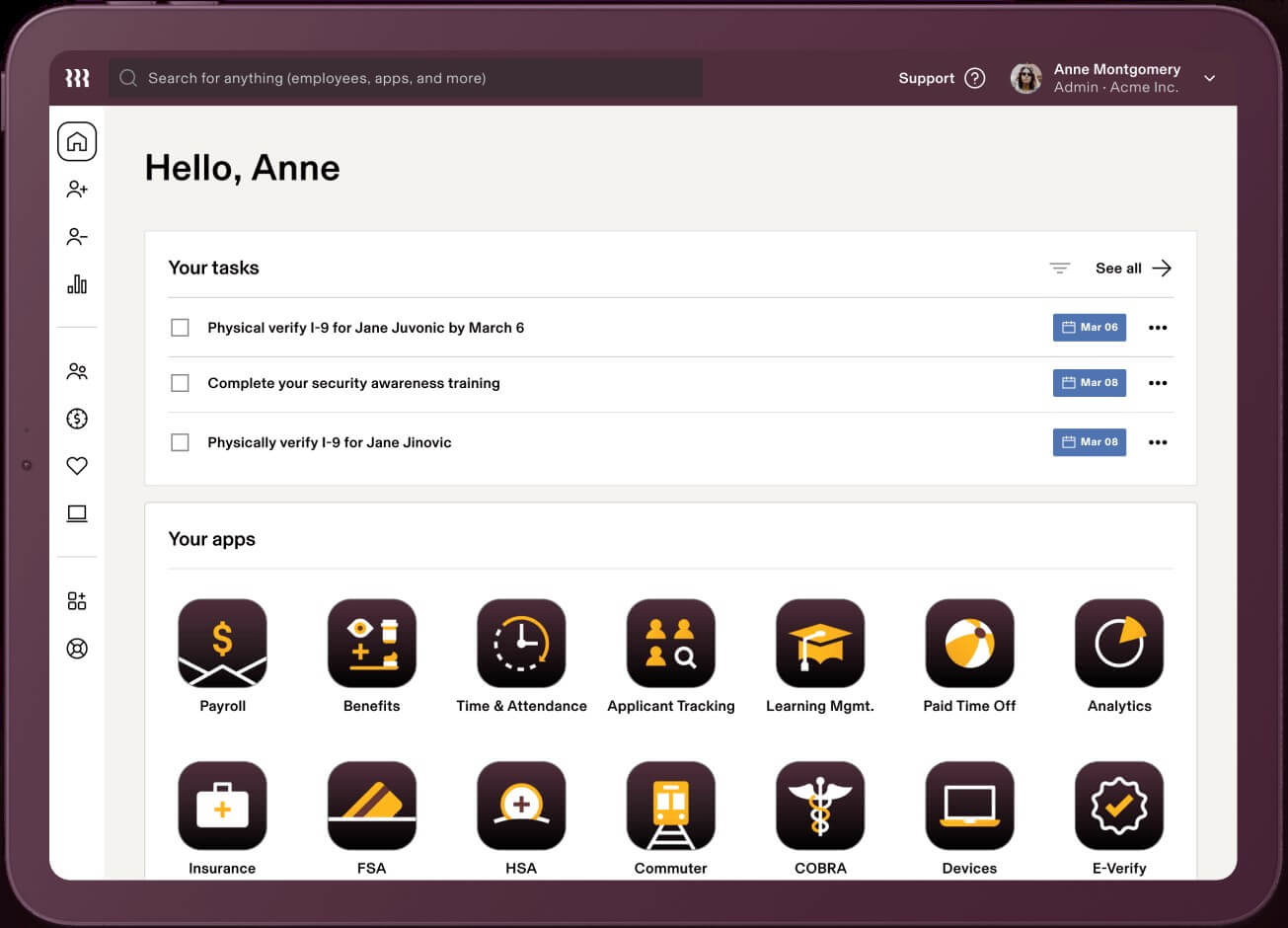
Rippling is a cloud-based HR management system that acts as a single source of truth for employee data with numerous automations to reduce manual work.
Why I picked Rippling: Its HR management software is available in three distinct bundles: Workforce Platform, HR Cloud, and IT Cloud. All three products operate seamlessly or can be purchased independently, depending on your business needs. Due to their sophisticated IT and global features, their software is well-suited to support distributed workforces.
Rippling Standout Features and Integrations:
Their Workforce Platform offers strong workflow automations and process improvement tools for workforce management, including tools for onboarding & offboarding and document approvals using e-signatures.
Their HR Cloud includes a suite of flexible modules for core HR tasks, including full-service payroll software with time-tracking and benefits administration data automatically synced to payroll to improve productivity and payroll accuracy. They even offer professional employer organization (PEO) services for organizations interested in hiring international talent, including international benefit plans, compliance tracking, and global payroll processing.
Still within their HR Cloud, their talent management and recruitment module features one-click job postings to multiple job boards, an applicant tracking system to organize candidates, and automatic interview scheduling through calendar integrations. To round that all out, their HR Cloud also includes a flexible learning management system (LMS) with 1,000+ pre-built courses and tools to build your own, plus automations to assign, remind and track course completion.
Last but not least, their IT Cloud offering really sets them apart from other traditional HRIS platforms. Within it, they offer advanced device & inventory management features to track, update, lock and wipe devices, manage security threats, and organize software (including purchasing apps and hardware) for new employees. In addition, they have app & identity management tools for password management, software lifecycle management, provisioning & de-provisioning of software licenses, multi-factor authentication, and single sign-on services too.
Integrations are available with 500+ third-party software systems through their App Shop. If needed, you can also set up custom integrations through their API too.
They do have two mobile apps as well: “Rippling - Time Clock” for clocking in/out, and “Rippling - Simplify HR & IT” for viewing pay stubs, managing time-off, accessing the employee directory, and managing passwords and apps.
New Product Updates from Rippling

Rippling AI Adds Plugins, Skills, and Automations
Rippling AI now supports plugins, skills, and automations so employees can connect approved third-party tools, package repeatable work into reusable AI instructions, and run recurring workflows under existing Rippling policies and permissions. For more information, visit Rippling's official site.

Best for benefits administration
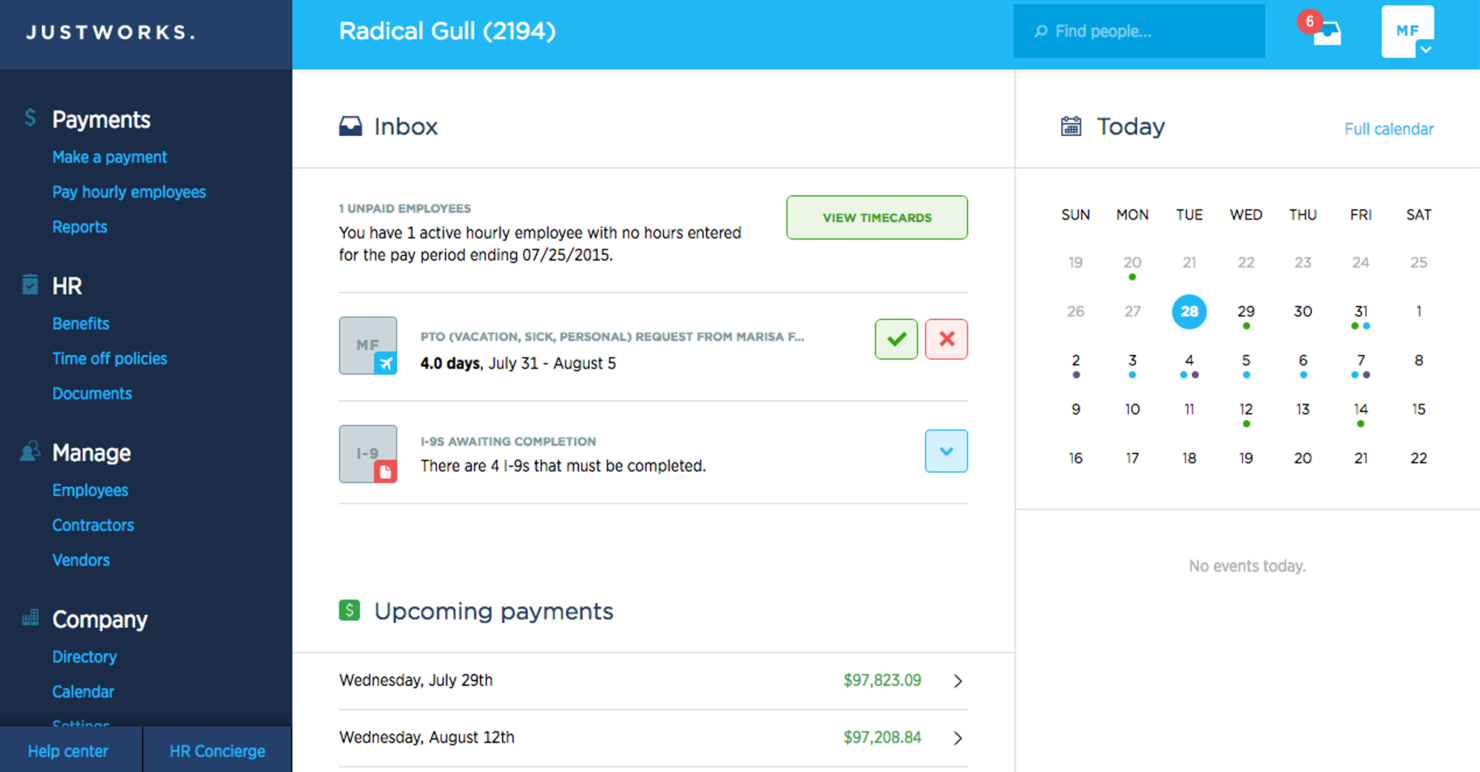
Justworks is an HR and payroll platform designed for small to medium-sized businesses, offering solutions for benefits administration, compliance, and payroll. It helps you manage employee benefits and ensure compliance with regulations.
Why I picked Justworks: Justworks excels in benefits administration, providing straightforward access to health insurance, 401(k) plans, and other benefits. You can manage compliance with ease, thanks to its built-in tools and resources.
The software handles payroll and tax filings, ensuring your finances are in order. It also offers support for employee onboarding, making it easier to integrate new hires into your team.
Standout features & integrations:
Features include automated payroll processing, compliance support, and employee self-service. These features allow your team to manage HR tasks efficiently. Justworks offers 24/7 support, ensuring that help is always available when you need it.
Integrations include QuickBooks, Xero, Slack, Expensify, TSheets, Google Workspace, Microsoft Teams, BambooHR, Gusto, and ADP.
Pros and Cons
Pros:
- Easy employee onboarding
- 24/7 customer support
- Strong benefits administration
Cons:
- Occasional software glitches
- Some features need improvement

Deel HR
Best for worldwide HR management
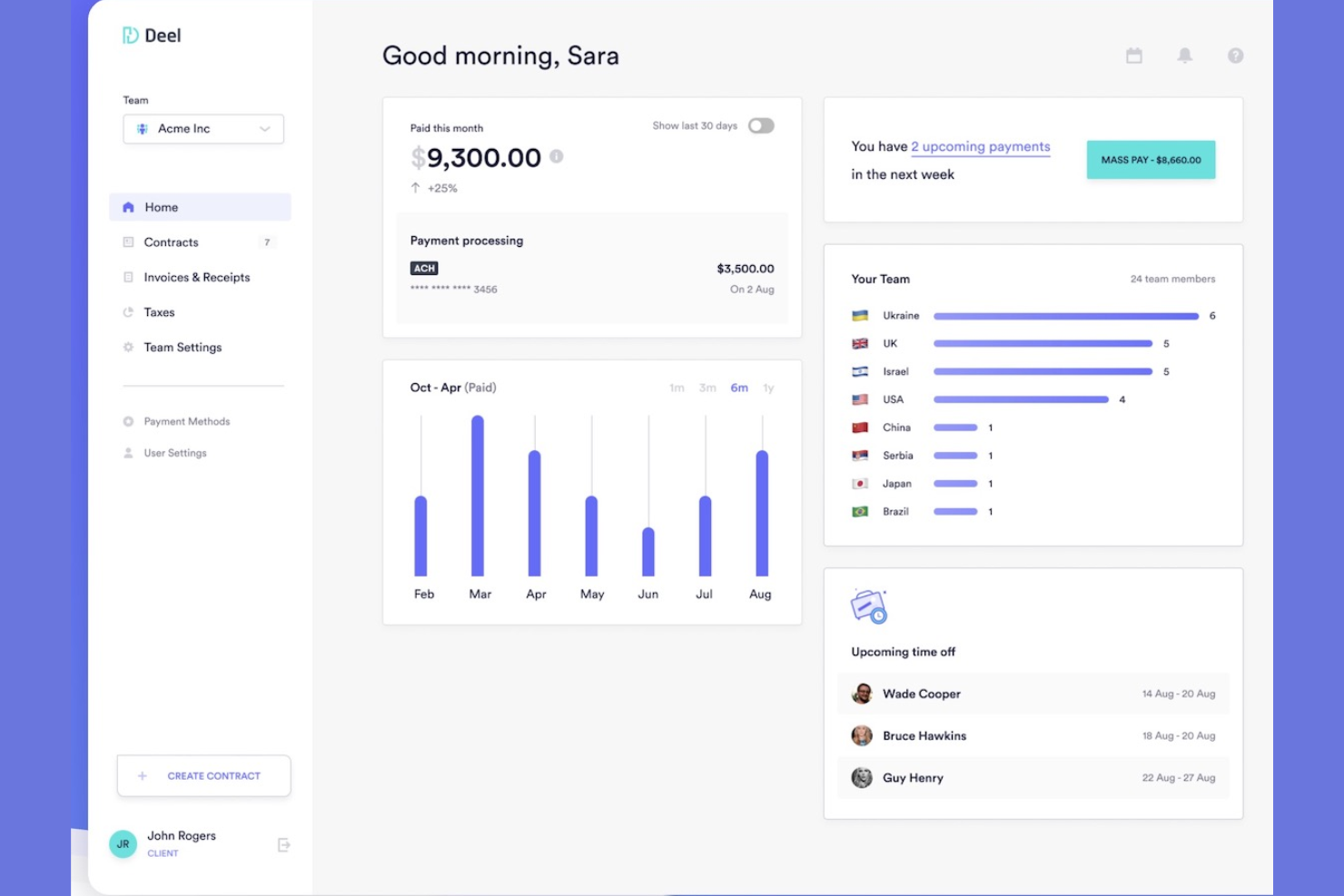
Deel is designed for companies hiring across multiple countries who need reliable global payroll, compliance, and HR administration in one platform. It’s especially useful for teams managing distributed employees or contractors and looking to centralize onboarding, payments, and documentation.
Why I Picked Deel
I picked Deel because it gives you a single system to run HR, payroll, and compliance across 150+ countries without juggling local vendors. You can manage time off, track performance documentation, and automate onboarding through structured workflows that ensure every hire meets local requirements.
I also like that you can offer localized benefits packages and manage global compensation policies directly in the platform. Deel’s compliant payroll engine handles taxes, payslips, and contractor payments automatically, reducing your admin workload.
Deel Key Features
Here are some key features worth highlighting:
- Invoice Generation: Create compliant contractor invoices and payouts from one dashboard.
- Tax and Compliance Management: Automatically applies country-specific tax rules and filing requirements.
- Payslip Management: Generates localized, legally compliant payslips for every hire.
- Accounting Integrations: Sync payroll and contractor payments directly into your finance systems.
Deel Integrations
Integrations include BambooHR, Ashby, Expensify, Greenhouse, Hibob, Netsuite, Okta, OneLogin, QuickBooks, Xero, Workday, and Workable.
Pros and Cons
Pros:
- Automated onboarding workflows with required documentation
- Localized benefits management for global teams
- Supports compliant HR and payroll in 150+ countries
Cons:
- Limited customization in certain regions
- Some HR tools (like performance) less advanced
New Product Updates from Deel HR

Deel Expands Stablecoin Wallet to 80+ Countries
Deel expands its Stablecoin Wallet to 80+ countries with dollar-backed balances and optional rewards. This gives eligible contractors more ways to hold and manage earnings inside Deel. For more information, visit Deel’s official site.
 .
.
Best for time-off management
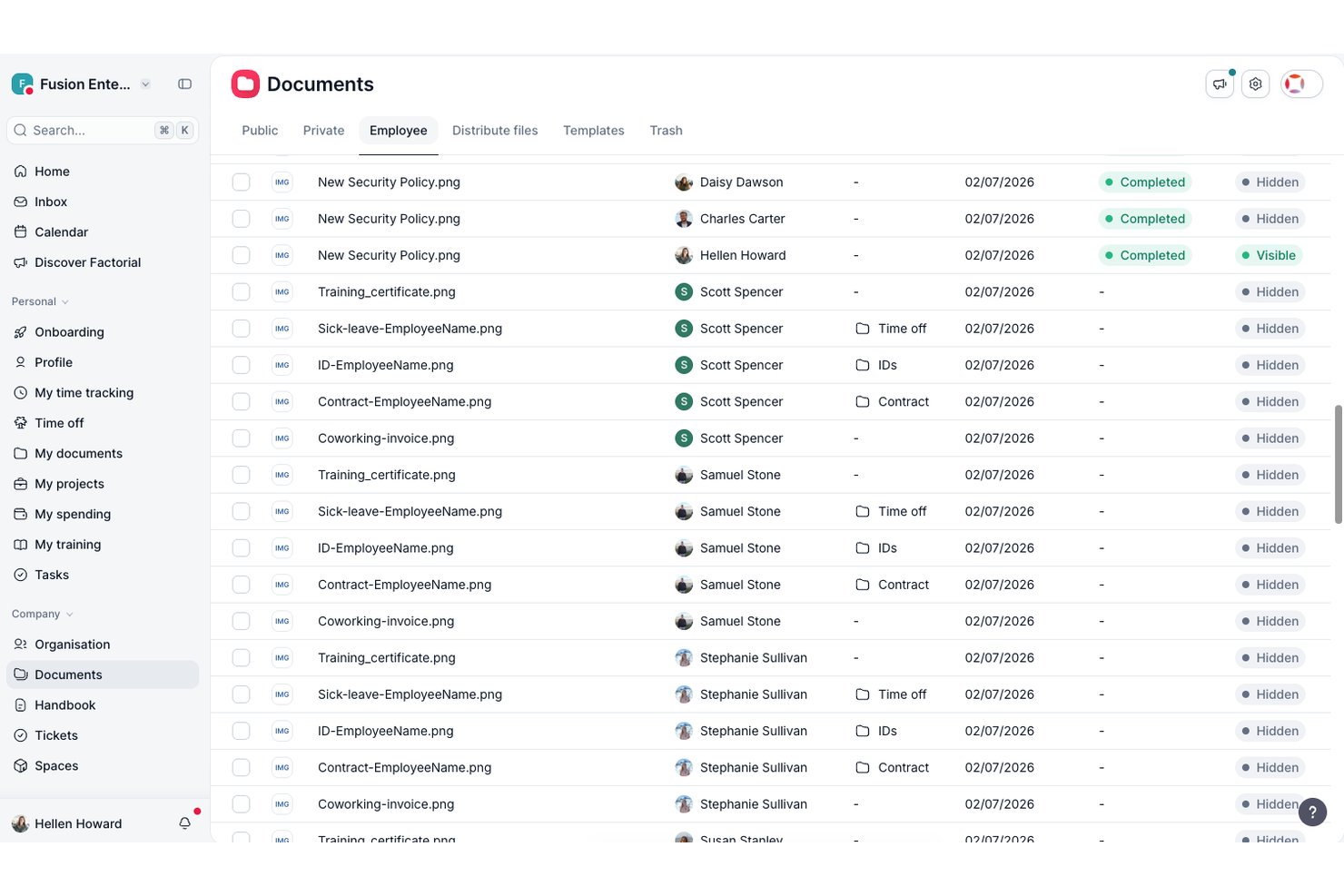
Factorial is an HR management software designed for small and medium-sized businesses. It focuses on simplifying HR tasks, including time-off management, employee data management, and payroll processing.
Why I picked Factorial: Factorial excels in time-off management, providing a straightforward way to handle employee leave requests. It offers features such as automated leave tracking and personalized time-off policies that cater to your team's specific needs.
You can easily approve or deny requests and keep track of all employee absences in one place. Factorial also provides insights into leave trends, helping you manage resources effectively.
Standout features & integrations:
Features include performance evaluations, document management, and customizable reports. These features enable you to evaluate employee performance and manage HR documents effectively. Factorial's reporting capabilities give you valuable insights into your HR processes.
Integrations include Slack, Google Calendar, Microsoft Outlook, BambooHR, Zapier, QuickBooks, Xero, Sage, LinkedIn, and Indeed.
Pros and Cons
Pros:
- Insightful leave analytics
- Customizable leave policies
- Effective time-off management
Cons:
- Some features need refinement
- Requires technical knowledge for customization

Best for payroll integration
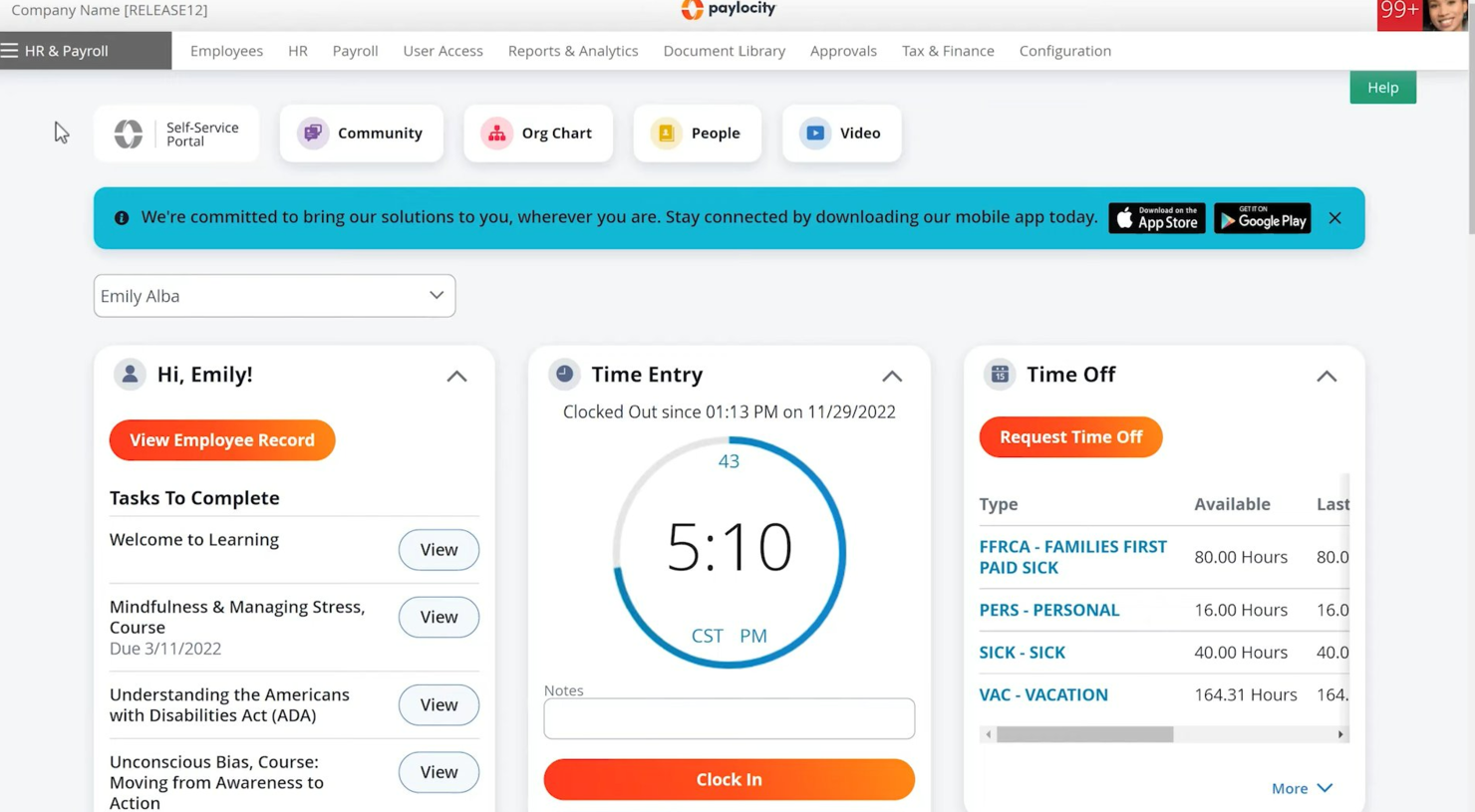
Paylocity is a human resources and payroll platform designed for businesses of all sizes. It offers payroll processing, benefits administration, and employee management solutions.
Why I picked Paylocity: Paylocity's strong payroll integration is a key feature, making it ideal if you need a reliable payroll solution. It provides automated payroll processing and tax filing, which simplifies financial management.
The software also offers employee self-service options, reducing the administrative burden on your HR team. You can manage benefits and track employee performance all in one place.
Standout features & integrations:
Features include a learning management system, survey tools, and performance reviews. These features help you develop and engage your workforce effectively. Paylocity’s survey tools allow you to gather valuable employee feedback.
Integrations include QuickBooks, ADP, Workday, Salesforce, Microsoft Dynamics, BambooHR, Xero, NetSuite, Oracle, and G Suite.
Pros and Cons
Pros:
- Learning management system
- Employee self-service options
- Automated tax filing
Cons:
- Limited offline access
- Occasional technical issues
New Product Updates from Paylocity

Paylocity Expands Expense and Purchase Request Tools
Paylocity adds connected personal cards, smarter expense categorization, and a streamlined purchase request experience. This reduces manual entry and helps finance teams manage expenses and approvals more efficiently. For more information, visit Paylocity’s official site.
 .
.
Best for small and medium businesses
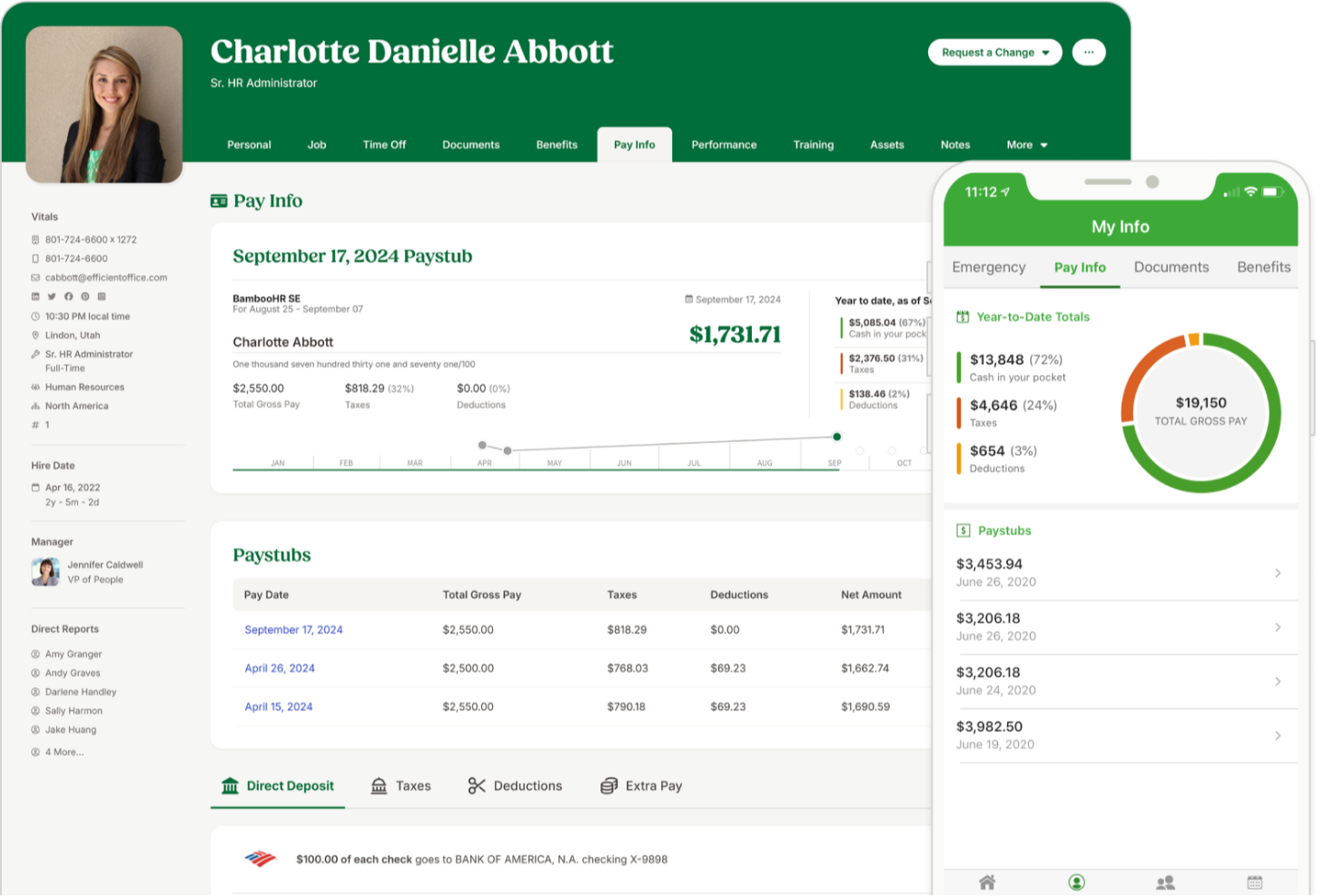
BambooHR is a good fit for small and mid-sized companies that want a single place to manage employee data, simplify everyday HR tasks, and give staff easy self-service access. It’s especially useful for teams that want clearer visibility into employee sentiment, stronger onboarding workflows, and mobile-friendly tools employees will actually use.
Why I Picked BambooHR
I picked BambooHR because it gives your team one centralized system for employee records, time-off management, hiring, and onboarding without adding extra admin work. Its self-service tools let employees request time off, update their own information, and access org charts or directories through the mobile app—reducing your team’s day-to-day workload.
I also like its built-in engagement tools, which combine eNPS surveys, well-being check-ins, and sentiment analysis so you can better understand how your workforce is doing. For hiring, its ATS auto-fills offer letter templates with candidate and job details and supports e-signatures to help you move faster. And because data syncs across the platform, you avoid duplicate entry and keep all employee information consistent.
BambooHR Key Features
Here are some key features worth highlighting:
- Employee Well-Being Surveys: Collect anonymous feedback using short recurring check-ins and open-text responses.
- Mobile App for Employees: Manage time off, view calendars, complete onboarding tasks, and sign documents from iOS or Android.
- Customizable Onboarding Templates: Build pre-boarding and onboarding task lists tailored to roles, departments, or locations.
- Time Tracking Add-On: Track hours, approve timesheets, and sync data directly into payroll when enabled.
BambooHR Integrations
Integrations include Slack, Microsoft Teams, Google Workspace, Indeed, Checkr, Greenhouse, Okta, OneLogin, NetSuite, and Trainual.
Pros and Cons
Pros:
- Employee mobile app supports time off, docs, and announcements
- Pre-boarding templates shorten new hire setup time
- Strong eNPS and sentiment tools improve engagement insights
Cons:
- Limited customization in certain HR workflows
- Payroll is an add-on
New Product Updates from BambooHR®

BambooHR Adds Enrollment Waivers and Plan Year Continuity
BambooHR adds automatic enrollment waivers and plan year continuity for Benefits Administration. These updates help admins handle missed deadlines and prepare benefit renewals with less manual work. For more information, visit BambooHR’s official site.
 .
.
HiBob
Best for onboarding new hires
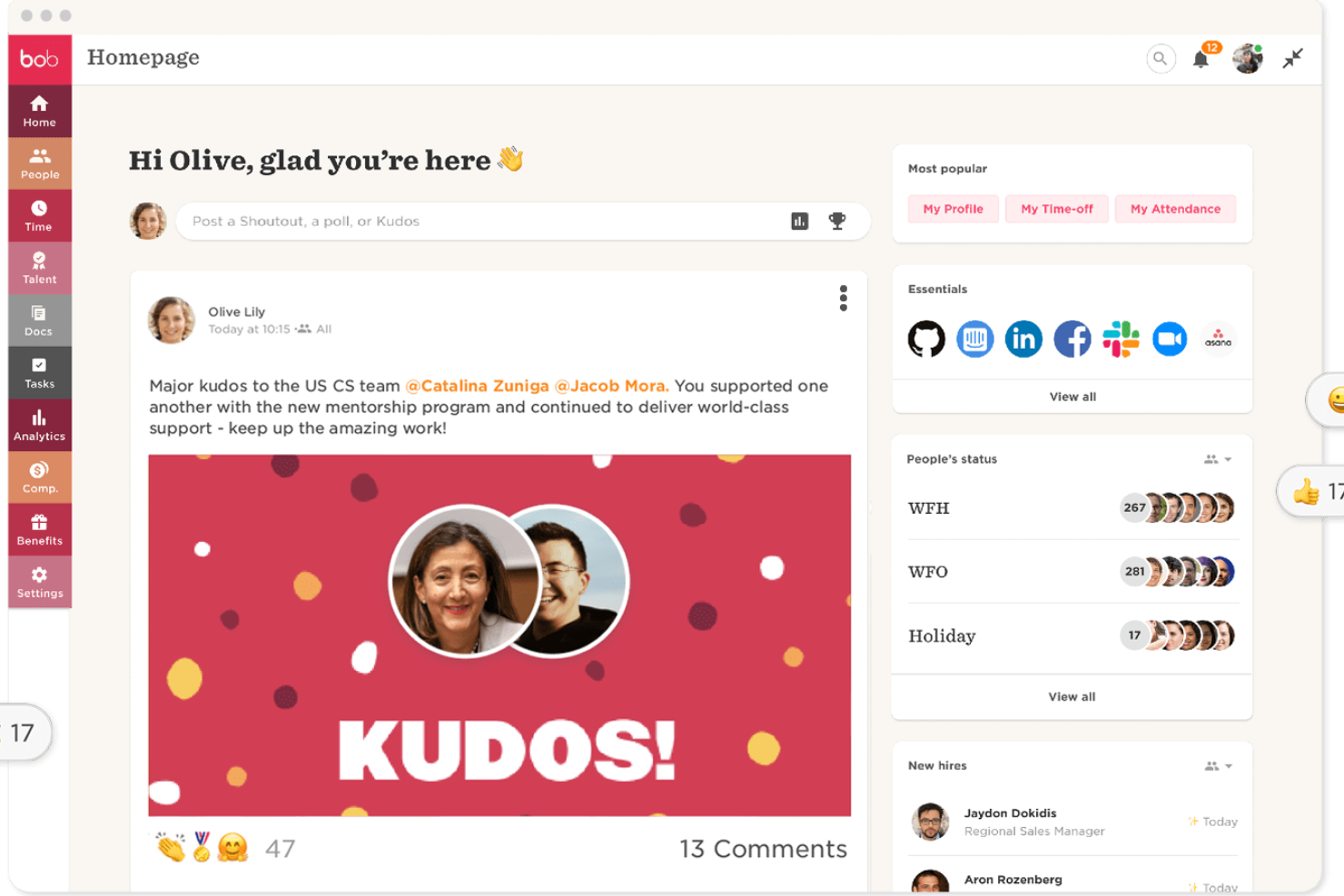
HiBob is designed for companies that want a modern, people-focused way to manage core HR tasks. It’s best suited for mid-sized and fast-growing teams that need clear onboarding workflows, reliable performance tools, and a single place to maintain employee data.
Why I Picked HiBob
I picked HiBob because it gives you practical tools to support the full employee lifecycle without adding administrative clutter. You can onboard new hires with guided steps that help your team set expectations, assign tasks, and track progress from day one.
Its goal-setting and review features help you tie individual performance to company objectives, giving managers a clear structure to work with, and I like that HiBob includes compensation planning tools, letting you compare salary data and manage increases in one place. Its built-in people analytics give you real workforce insights you can use to make informed HR decisions.
HiBob Key Features
Here are some key features worth highlighting:
- Payroll Hub: Centralizes payroll data and connects with leading payroll providers for consistent processing.
- Time & Attendance Tracking: Lets employees record hours and submit time-off requests, giving managers clear oversight.
- Customizable Workflows: Helps you automate recurring HR tasks such as approvals, reminders, and policy acknowledgments.
- Employee Engagement Tools: Supports recognition, updates, and surveys to help your team stay connected.
HiBob Integrations
Integrations include Slack, Microsoft Teams, Zoom, LinkedIn Learning, Deel, CloudPay, Culture Amp, Capdesk, ClickTime, and NetSuite.
Pros and Cons
Pros:
- Compensation modeling supports fair, consistent pay decisions
- Goal-setting tools help align teams with company objectives
- Guided onboarding workflows reduce admin work for managers
Cons:
- Reporting setup can take time for new admins
- Some features require add-ons depending on your plan

Paycor
Best for scaling HR needs

Paycor is designed for small and mid-sized businesses that need HR and payroll tools that can scale as they grow. It’s especially useful if your team wants a system that supports hiring, payroll, and compliance while letting you expand capabilities over time.
Why I Picked Paycor
I picked Paycor because it gives growing organizations the HR foundation they need without adding unnecessary complexity. You can run payroll confidently thanks to built-in tax calculations and automated filings, which help reduce manual errors.
Its hiring tools—such as applicant tracking and structured onboarding—make it easier to bring new employees onboard smoothly as your workforce expands. I also like that its workforce management tools, including scheduling and attendance tracking, give you visibility into staffing needs across different business sizes.
And because Paycor offers modular add-ons, you can extend functionality—like benefits, performance, or learning tools—whenever your team is ready.
Paycor Key Features
Here are some key features worth highlighting:
- Onboarding Checklists: Create consistent new-hire experiences with customizable, step-by-step tasks.
- Employee Self-Service: Let employees update personal details, view pay info, and manage time-off requests.
- Performance Management: Track goals and share feedback using built-in reviews and evaluation tools.
- Benefits Administration: Manage open enrollment, eligibility, and plan elections in one place.
Paycor Integrations
Integrations include QuickBooks, Xero, NetSuite, ADP, Salesforce, Indeed, Glassdoor, BambooHR, Microsoft Dynamics, and Workday.
Pros and Cons
Pros:
- Module add-ons let you expand HR capabilities as you grow
- User-friendly interface
- Effective compliance management
Cons:
- Limited customization for dashboards and reports
- Setup can take time for teams with complex payroll needs
Leapsome
Best for aligned HRIS-to-performance flow
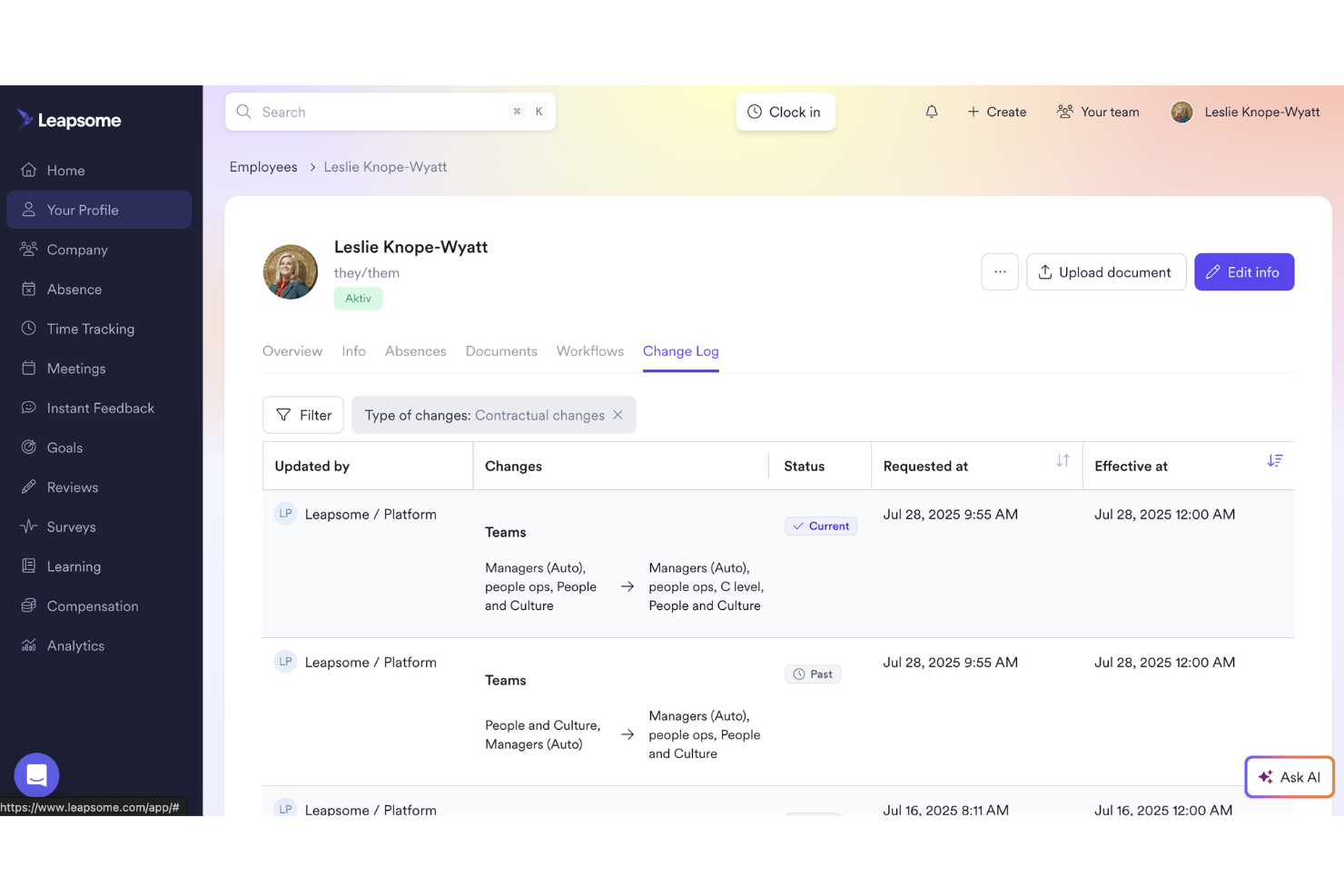
Leapsome is ideal for teams that want their HR data, performance processes, and development workflows connected in one place.
Why I Picked Leapsome
I picked Leapsome because it combines a modern HRIS with people-enablement tools in a way that keeps your operations compliant without sacrificing culture. You get a unified employee record system tied directly to goals, reviews, and development, meaning everything stays consistent and connected across the employee lifecycle.
I also appreciate its AI assistant, Leapy, which drafts policies, surfaces insights, and suggests next steps so you can cut down on manual work and focus on higher-value conversations.
Leapsome Key Features
Here are some key features work mentioning:
- Employee records & document management: Lets you store employee data, files, and signatures in one compliant, centralized location.
- Absence and time tracking: Gives your team clear visibility into time off, attendance, and scheduling without relying on spreadsheets.
- Onboarding & pre-boarding workflows: Provides guided workflows so new hires get consistent onboarding experiences with fewer manual tasks for HR.
- Payroll syncs & automated checks: Connects key employee data to payroll and runs automated validations to help reduce errors and administrative rework.
Leapsome Integrations
Integrations include Slack, Microsoft Teams, Google Workspace, Jira, BambooHR, Personio, Okta, OneLogin, Rippling, and Workday.
Pros and Cons
Pros:
- Engagement surveys include benchmarks and actionable recommended next steps
- Automates onboarding, time tracking, and payroll syncs to reduce manual tasks
- Connects HRIS data directly with goals, reviews, and development workflows
Cons:
- Limited customization for niche business requirements
- Mobile experience is less polished than the desktop environment

Best for detailed task management + automations
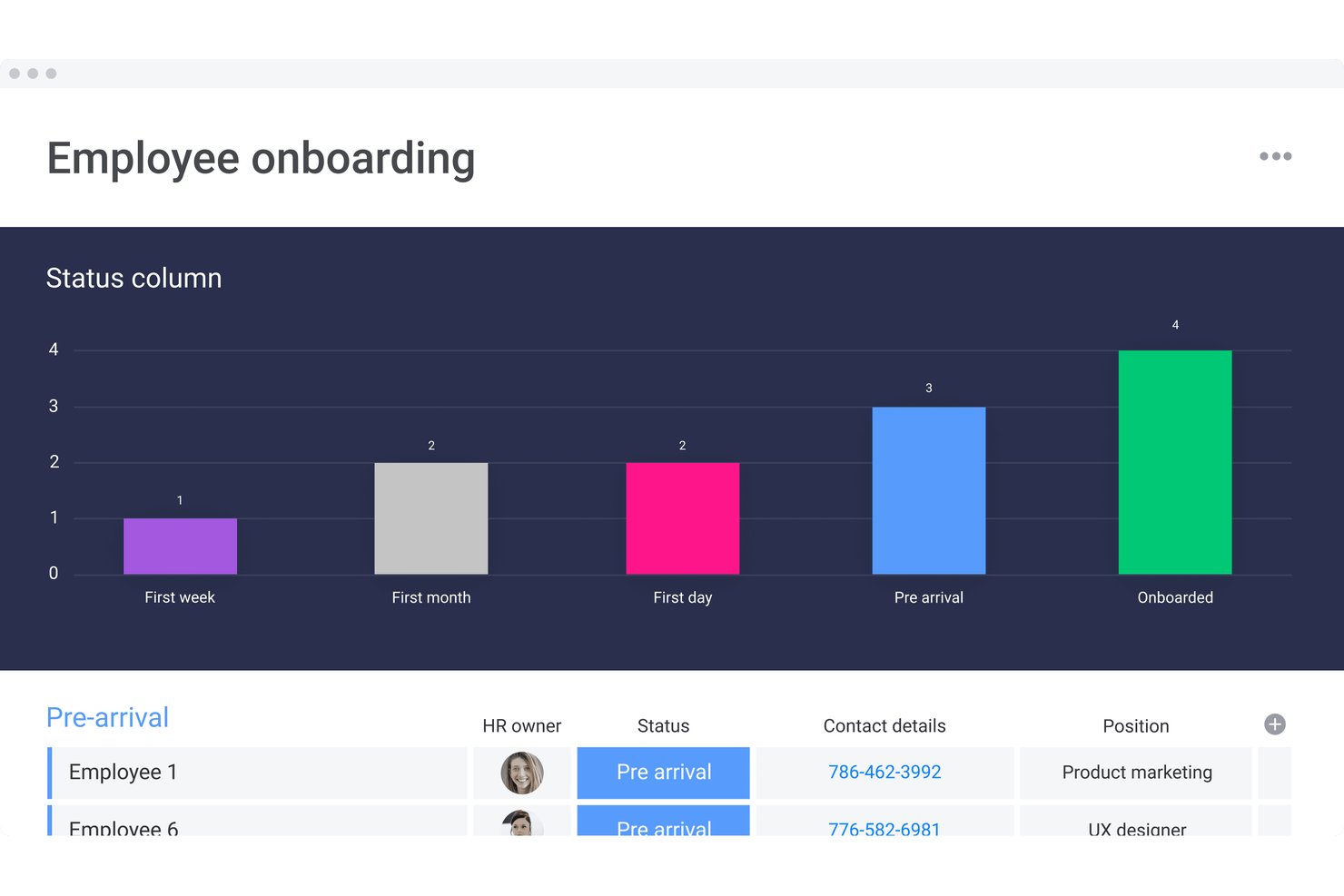
monday AI Workspace is a flexible work management platform that lets HR teams build custom workflows for onboarding, task tracking, employee requests, and process automation across the employee lifecycle.
Who Is monday AI Workspace Best For?
It's a strong fit for people ops and HR teams at small to mid-sized companies that need to manage HR workflows alongside cross-functional work in one shared platform.
Why I Picked monday AI Workspace
I picked monday AI Workspace because no other tool on this list gives me the same granularity of task management combined with no-code automation. My team uses automation recipes to assign onboarding tasks, send notifications, and update statuses in sequence, all triggered by a single status change on a board. On top of that, monday's AI agents can generate workflow status reports and flag overdue items without me checking manually.
monday AI Workspace Key Features
- Customizable employee databases: Build tailored boards to store employee profiles, documents, and status updates in one place.
- HR workflow templates: Access ready-to-use blueprints for onboarding, performance reviews, and time off requests.
- Automated compliance tracking: Set automated reminders for certifications, renewals, and documentation deadlines.
- Integration library: Connect with tools like DocuSign, Slack, and Google Drive for unified HR operations.
monday AI Workspace Integrations
monday AI Workspace offers hundreds of native integrations, including Slack, Google Workspace, Microsoft 365, DocuSign, Salesforce, Zoom, HubSpot, Dropbox, Zendesk, Trello, and Zapier. An API is also available for custom integrations.
Pros and Cons
Pros:
- Flexible boards adapt to any HR workflow
- No-code automations reduce manual HR admin
- Highly granular task and subtask management
Cons:
- Employee data fields lack HR-specific structure
- Not purpose-built for core HR functions
New Product Updates from monday AI Workspace
monday AI Workspace Adds Human Approval Routing
monday AI Workspace adds a human-in-the-loop approval block to AI Workflows, sending approval requests and routing workflow paths based on responses. For more information, visit monday AI Workspace's official site.
Other HR Management Software
Here are some additional HR management software options that didn’t make it onto my shortlist, but are still worth checking out:
- Breathe HR
For SMEs seeking HR solutions
- Workable HR
For customizable onboarding workflows
- Gusto
For payroll-HR integration
- Sloneek
For 360 degree feedback
- RemoFirst
HR management systems for global benefits management
- Lattice
For customizable performance reviews
- factoHR
For compliance management
- GoCo
For small and mid-sized businesses
- IntelliHR
For advanced analytics and time-saving compliance management features
- edays
For shared team calendars
- Oracle HCM Cloud
For managing the workforce lifecycle
- Workleap
For real-time feedback and analytics
- Workday
For managing human capital
- Personio
For people workflow tools for productivity
- Kallidus Sapling
HR software with an integrated learning management system
- UKG Pro
Advanced HCM software with talent management tools and AI-backed employee feedback sentiment analysis
- OrangeHRM
For open-source flexibility
- Odoo (HR module)
For modular scalability
- Dayforce
For data-driven HR decisions
- Namely
For mid-sized companies
- Sage HR
Adaptable HRMS software with unlimited applicant pipelines and an expense management app
- SAP SuccessFactors
Enterprise-level HR management software suite focused on human experience management.
- Cezanne HR
For European markets
- Vault ERP
Scalable HR management software with add-ons for budgeting, operations, asset management, client management, and more
- Zoho People
For multi-language support
- Freshteam
Human resource management software well-suited for small business - available as a 21-day free trial.
- PeopleFluent
For talent management in enterprises
- peopleHum
For AI-driven HR insights
- Connecteam
HR management software for deskless workers, including employee scheduling, time clocking in/out, task management, checklists and forms.
- Arcoro
Core HR management software well-suited for compliance and health & safety focused industries.


How I Evaluate HR Management Software
I split my evaluation into baseline criteria—like employee database depth and leave management—and differentiators that separate vendors for specific team sizes or compliance needs.
Core Functionality (Table Stakes For This List)
When I'm selecting tools for my list, I rank each one on a scale from 0 (does not offer the functionality) to 5 (excels in this area) for each core functionality listed below. Then, I calculate the tool's total score into a percentage. Each tool needs to achieve a minimum total score of 75% to be considered for inclusion.
- Employee Database & Records: I look for a centralized employee directory where HR teams can store and retrieve profiles, documents, and employment histories without toggling between spreadsheets or file systems.
- Onboarding & Offboarding Workflows: Each tool should support structured task sequences for new hires and departures, including offer letter collection, e-signatures, IT provisioning checklists, and exit interview scheduling.
- Time & Leave Management: I evaluate how the platform handles PTO requests, accrual policies, and approval routing—especially for organizations juggling multiple leave types like parental leave, sick time, and floating holidays.
- Performance Management Tools: Goal setting, review cycles, and feedback mechanisms matter here. I check whether the tool supports formats like 360 reviews, 1:1 tracking, or OKR alignment rather than just annual review forms.
- Compliance & Reporting: The platform should generate workforce reports and support regulatory requirements like EEO-1 filings or audit-ready data exports, not just basic headcount summaries.
- Payroll & Benefits Integration: I look at whether payroll and benefits administration are built in or connected through integrations with providers like ADP, Gusto, or Paychex—and how smoothly data flows between systems.
Once I have a list of tools that meet this criteria, I consider what sets each platform apart.
Differentiating Factors (What Sets Vendors Apart)
Here's how I compare and contrast different vendors:
Standout Features
Employee self-service portals are a big differentiator. When employees can update their own addresses, download tax documents, or submit PTO requests without emailing HR, it frees up hours every week. I also look at mobile app quality—especially for teams with deskless or field workers who need to clock in, check schedules, or view pay stubs from their phones. Pulse surveys and eNPS tools are worth evaluating too, since they give people ops teams real-time sentiment data instead of relying on annual engagement surveys.
Beyond Features
Integration ecosystem matters a lot here. I check whether a platform connects with your existing payroll provider, ATS, and tools like Slack or Microsoft 365—because disconnected systems create duplicate data entry. Compliance and data security are equally important; I look for SOC 2 certification, role-based access controls, and audit logs that hold up during internal or external reviews. Implementation support is another factor I weigh, since migrating employee records from a legacy HRIS can be complex, and a dedicated onboarding team makes a real difference.
How to Choose HR Management Software
It’s easy to get bogged down in long feature lists and complex pricing structures. To help you stay focused as you work through your unique software selection process, here’s a checklist of factors to keep in mind:
| Factor | What to Consider |
|---|---|
| Scalability | Will the software grow with your company? Consider if it can handle an increase in employees or additional HR functions as your business expands. |
| Integrations | Does it work with your existing tools? Check for compatibility with your current software stack to avoid disruptions in your workflows. |
| Customizability | Can you tailor the software to fit your needs? Look for options to adjust workflows, fields, and reports to match your HR processes. |
| Ease of use | Is it user-friendly for your team? Ensure the interface is intuitive and requires minimal training to reduce the learning curve for your staff. |
| Implementation and onboarding | How quickly can you get started? Evaluate the time and resources needed for deployment and initial training, and look for vendor support options. |
| Cost | Is it within your budget? Compare pricing plans and consider the total cost of ownership, including any hidden fees or charges for additional features. |
| Security safeguards | Are your data protected? Verify that the software complies with industry standards and offers encryption, access controls, and regular security updates. |
| Compliance requirements | Does it meet legal standards? Ensure the software adheres to local labor laws and regulations to avoid potential legal issues. |
What Is HR Management Software?
HR management software is a tool designed to help organizations manage their human resources functions efficiently. HR professionals, including managers and recruiters, typically use these tools to simplify tasks like payroll, benefits administration, and employee data management. Time tracking, performance evaluations, and compliance management features help with maintaining records and ensuring legal adherence. These tools ultimately save time and reduce errors, making HR processes more efficient.
Features
When selecting HR management software, keep an eye out for the following key features:
- Employee data management: Organizes and stores employee information, making it easy to access and update records.
- Payroll processing: Automates salary calculations and tax deductions, reducing errors and saving time.
- Time and attendance tracking: Monitors employee hours and attendance, ensuring accurate payroll and compliance.
- Benefits administration: Manages employee benefits, including health insurance and retirement plans, simplifying enrollment and tracking.
- Performance evaluations: Facilitates regular employee reviews, helping managers track progress and set goals.
- Compliance management: Ensures adherence to labor laws and regulations, reducing the risk of legal issues.
- Onboarding tools: Streamlines the hiring process, making it easier to integrate new employees into the company.
- Self-service portals: Allows employees to access and update their information, reducing the administrative burden on HR staff.
- Mobile app functionality: Provides access to HR tools on-the-go, increasing flexibility and convenience for users.
- Customizable workflows: Enables tailoring of processes and fields to fit the specific needs of an organization.
Benefits
Implementing HR management software provides several benefits for your team and your business. Here are a few you can look forward to:
- Efficiency improvements: Automates tasks like payroll and attendance tracking, saving time and reducing manual errors.
- Enhanced compliance: Ensures adherence to labor laws with compliance management features, minimizing legal risks.
- Better employee engagement: Offers self-service portals and mobile access, empowering employees to manage their own information.
- Streamlined onboarding: Simplifies the hiring process with onboarding tools, making it easier to integrate new hires.
- Informed decision-making: Provides insights through performance evaluations and reporting tools, helping managers make data-driven decisions.
- Cost savings: Reduces administrative overhead by automating and centralizing HR tasks, leading to potential cost reductions.
- Scalability: Adapts to growing business needs with customizable workflows and scalable options, ensuring long-term utility.
Costs & Pricing
Selecting HR management software requires an understanding of the various pricing models and plans available. Costs vary based on features, team size, add-ons, and more. The table below summarizes common plans, their average prices, and typical features included in HR management software solutions:
Plan Comparison Table for HR Management Software
| Plan Type | Average Price | Common Features |
|---|---|---|
| Free Plan | $0 | Basic employee data management, limited reporting, and simple time tracking. |
| Personal Plan | $5-$25/user/month | Employee data management, payroll processing, and basic compliance management. |
| Business Plan | $30-$60/user/month | Advanced reporting, performance evaluations, benefits administration, and mobile app access. |
| Enterprise Plan | $70-$100/user/month | Customizable workflows, dedicated support, advanced compliance features, and integration capabilities. |
HR Management Software FAQs
Here are some answers to common questions about HR management software:
Can HR management software integrate with payroll and benefits platforms?
Yes, most leading HR management software offers direct integration with popular payroll and benefits providers. This reduces manual data entry and helps avoid errors. Always verify if the software supports your current providers, or see if they offer easy data exports and API access for custom integrations.
How easy is it to migrate existing employee data into a new HR platform?
Most HR management software provides step-by-step import tools or guided onboarding to help migrate your current records. Some vendors offer dedicated migration support or data-mapping services, which can save you time and prevent errors. Schedule a test import before fully switching to ensure data transfers accurately.
How mobile-friendly are HR management systems?
Most HR management systems offer mobile apps that allow employees to access their information on the go. This feature is useful for remote work, enabling staff to manage tasks like leave requests and time tracking from their smartphones. Ensure the app is user-friendly and compatible with your devices.
How can HR management software improve employee engagement and retention?
HR management software provides tools for frequent feedback, recognition programs, and pulse surveys, making it easy to act on employee input. Automated workflows free up HR teams to focus on more meaningful interactions. By tracking engagement metrics and turnover risks, you can proactively address concerns and keep your best talent.
What’s Next:
If you're in the process of researching HR management software, connect with a SoftwareSelect advisor for free recommendations.
You fill out a form and have a quick chat where they get into the specifics of your needs. Then you'll get a shortlist of software to review. They'll even support you through the entire buying process, including price negotiations.