10 Best Cloud HR Software: Reviewed & Compared for 2026

10 Best Cloud HR Software Shortlist


The best cloud-based HR software helps you manage payroll, recruitment, performance, and compliance from anywhere—keeping your data secure, centralized, and always up to date.
When HR processes rely on spreadsheets or outdated on-premise systems, it slows teams down and makes collaboration difficult. Cloud HR platforms eliminate those barriers by automating workflows, improving accessibility, and ensuring your data is backed up and protected.
After testing dozens of HR tools firsthand, I’ve shortlisted the top cloud HR software that’s intuitive, scalable, and built to fit modern, flexible workplaces. In this guide, you’ll find solutions that streamline operations, save time, and make managing your people easier—wherever work happens.
Why Trust Our Software Recommendations
Our team has been testing and reviewing software since 2012. As HR experts ourselves, we know how difficult—and important—it is to choose the right software.
For this guide, we evaluated tools using hands-on testing and independent research, scoring tools using our selection criteria. We also draw on insights from industry thought leaders and practicing HR experts.
Our reviews reflect our human editorial judgment, not a sales pitch.
Expert reviewers:
Cloud HR Software Systems Comparison Table
This comparison table summarizes pricing details for my top cloud HR software systems selections:
| Tool | Best For | Trial Info | Price | ||
|---|---|---|---|---|---|
| 1 | Best for employee-driven payroll management | Not available | Pricing upon request | Website | |
| 2 | Best cloud HR platform with global payroll | Free demo available | From $5/user/month | Website | |
| 3 | Best with 24/7 HR and payroll customer support | Not available | From $599/employee/month | Website | |
| 4 | Best for AI-driven HR automation | Free demo available | Pricing upon request | Website | |
| 5 | Best for scaling multi-entity organizations | Free demo available | Pricing upon request | Website | |
| 6 | Best for payroll-HR integration | Free demo available | From $49/month + $6/month/user | Website | |
| 7 | Best for core HR features | Free trial available | From $10/employee/month | Website | |
| 8 | Best for employee self-service | Free demo available | Pricing upon request | Website | |
| 9 | Best as AI for business | Free demo available | From $8/user/month | Website | |
| 10 | Best for complex HR processes | Free demo available | Pricing upon request | Website |


Best Cloud HR Software Reviews
Here are my detailed summaries of the best cloud HR software that made it into my top 10 list, including notes on why I picked them. Each review offers a detailed look at the key features, integrations, and ideal use cases of each system to help you find the best tool for you.

Paycom
Best for employee-driven payroll management
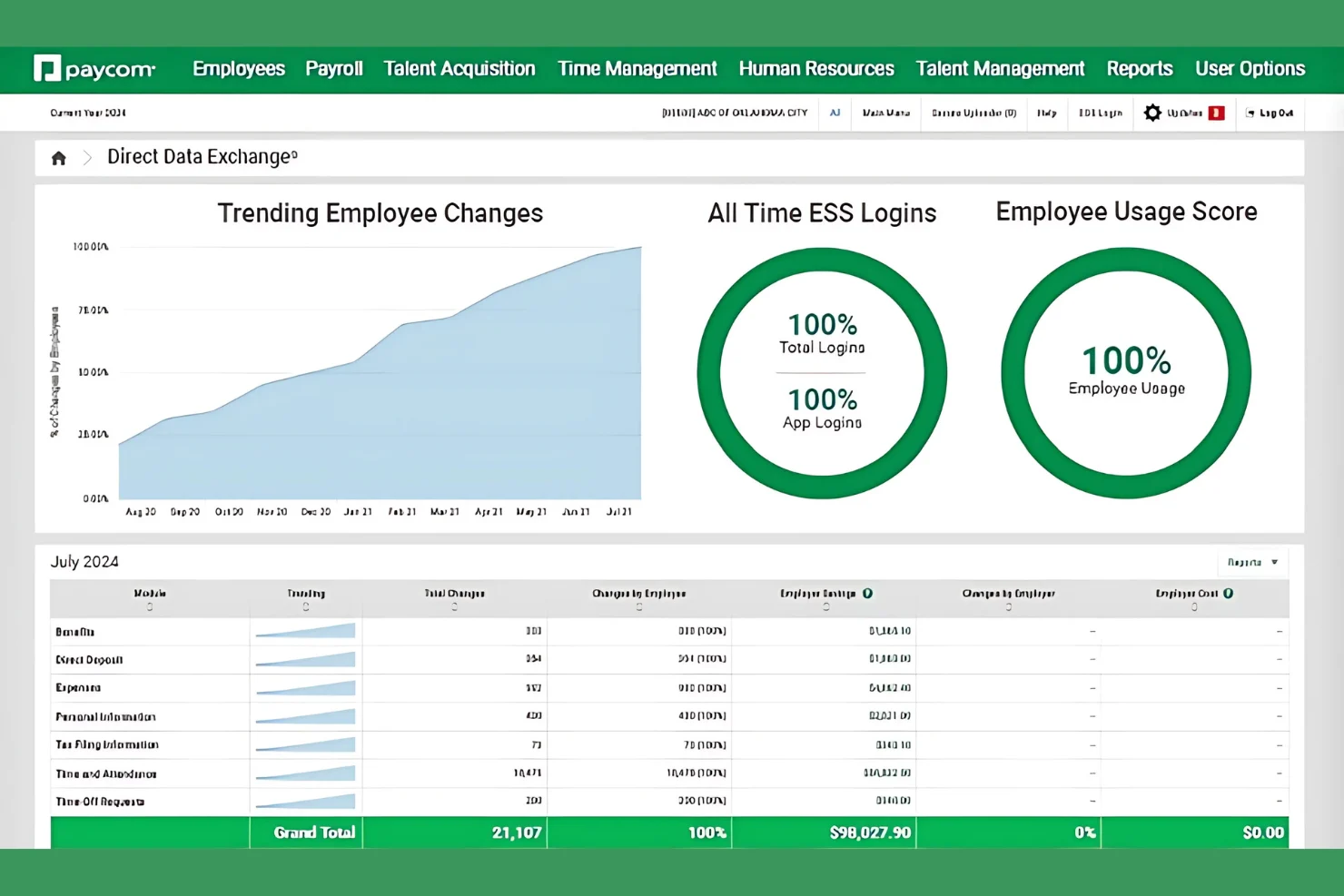
Paycom is a cloud-based HR and payroll platform built on a single database, covering payroll processing, time and attendance, benefits administration, talent management, and employee self-service across the full workforce life cycle.
Who Is Paycom Best For?
Paycom is a strong fit for mid-sized to large organizations that want a single platform to manage HR and payroll without juggling multiple disconnected systems.
Why I Picked Paycom
I've included Paycom in my top picks because of Beti, its employee-driven payroll tool that genuinely changes how payroll gets done. Instead of HR manually pulling together hours, expenses, and deductions, Beti self-starts each pay period by pulling that live data automatically. Employees then review, troubleshoot, and approve their own paychecks before payroll is ever submitted, which catches errors at the source rather than after the fact.
Paycom Key Features
- Benefits administration: Employees can enroll in, update, and manage their benefits directly within the platform during open enrollment or qualifying life events.
- Applicant tracking system: Post job openings, manage candidate pipelines, and move applicants through hiring stages from a single dashboard.
- GONE automated time-off decisions: Automatically approves or denies time-off requests based on rules your team sets, without manager intervention.
- Performance management: Create and assign performance reviews, track goal progress, and store completed appraisals in each employee's record.
Paycom Integrations
Paycom is built on a single-database architecture, so it intentionally limits third-party integrations in favor of keeping all HR and payroll data in one system.
Pros and Cons
Pros:
- Integrated microlearning modules
- Dedicated specialist replaces ticket-based support
- Single database eliminates duplicate data entry
Cons:
- Lacks third-party integrations
- Quote-based pricing structure

Deel HR
Best cloud HR platform with global payroll
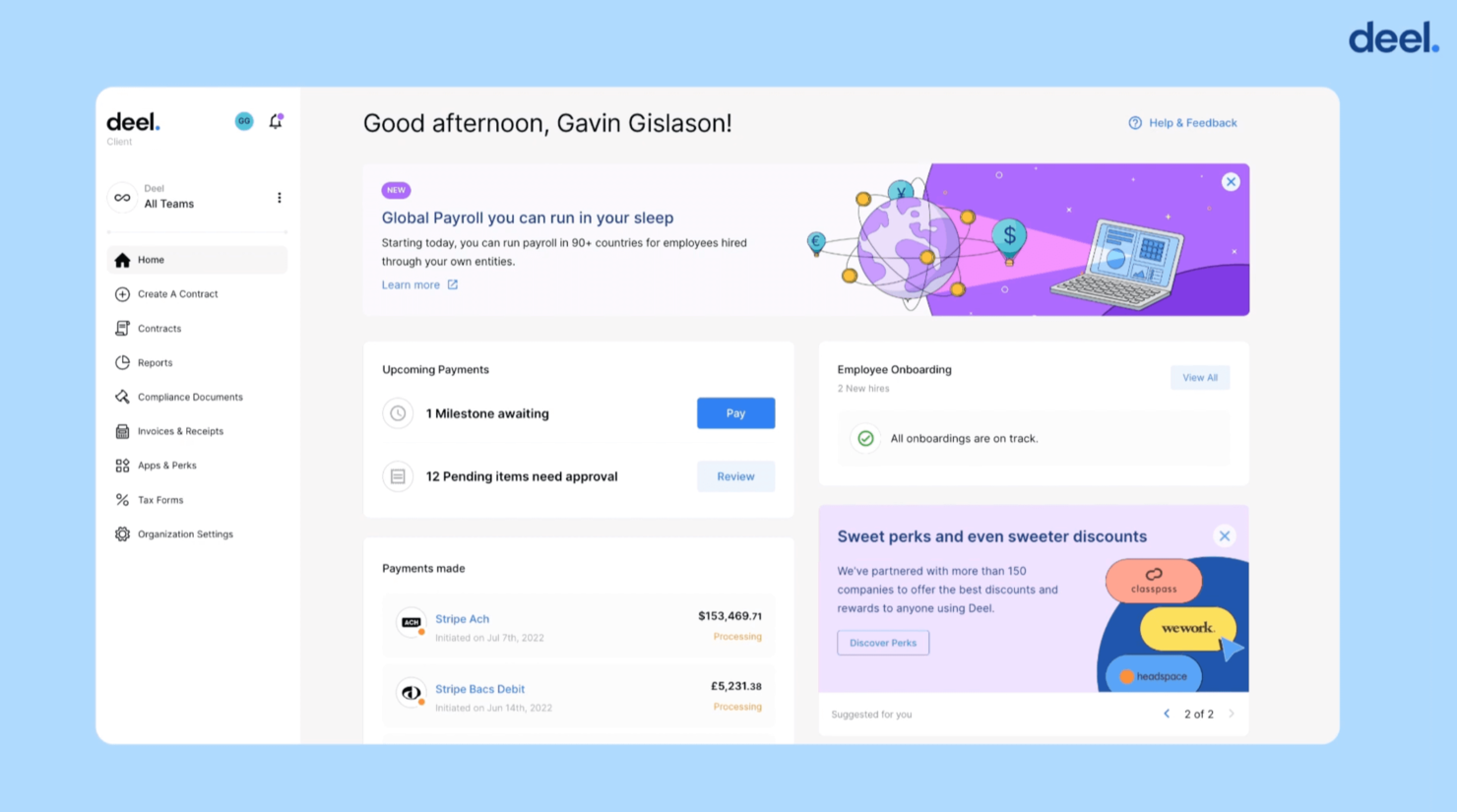
Deel is a strong fit for companies hiring across multiple countries that need accurate global payroll and compliant employee data management. It centralizes hiring, payments, and documentation for international teams so you don’t have to build local entities or manage country-specific payroll rules yourself.
Why I Picked Deel
I picked Deel because it lets you hire and pay employees or contractors in 150+ countries without dealing with local entity setup or payroll tax requirements.
You can onboard talent quickly through localized employment agreements and automated document collection tailored to each country. It’s also useful if your team needs to manage international perks, equipment, and equity from one dashboard.
I also like that employees can update their personal data, access payslips, and manage payments themselves, removing extra admin work from your HR team.
Deel Key Features
Here are some standout features worth highlighting:
- Localized Employment Contracts: Pre-vetted, country-specific templates that reflect local labor and tax laws.
- Global Payroll Engine: Runs compliant payroll for employees and contractors across multiple regions in one system.
- Equipment Tracking: Lets you assign, track, and retrieve company assets for remote and international workers.
- ID Verification (Veriff): Built-in identity checks to support secure onboarding and compliance needs.
Deel Integrations
Integrations include Ashby, BambooHR, Expensify, Greenhouse, Hibob, NetSuite, Okta, OneLogin, QuickBooks, Xero, Workday, and Workable.
Pros and Cons
Pros:
- Employee self-service tools limit HR involvement in routine tasks
- Supports international benefits and equity administration in-platform
- Localized contracts and workflows keep onboarding compliant
Cons:
- No built-in applicant tracking
- Some integrations require premium tiers to access
New Product Updates from Deel HR

Deel Expands Stablecoin Wallet to 80+ Countries
Deel expands its Stablecoin Wallet to 80+ countries with dollar-backed balances and optional rewards. This gives eligible contractors more ways to hold and manage earnings inside Deel. For more information, visit Deel’s official site.
 .
.
Best with 24/7 HR and payroll customer support
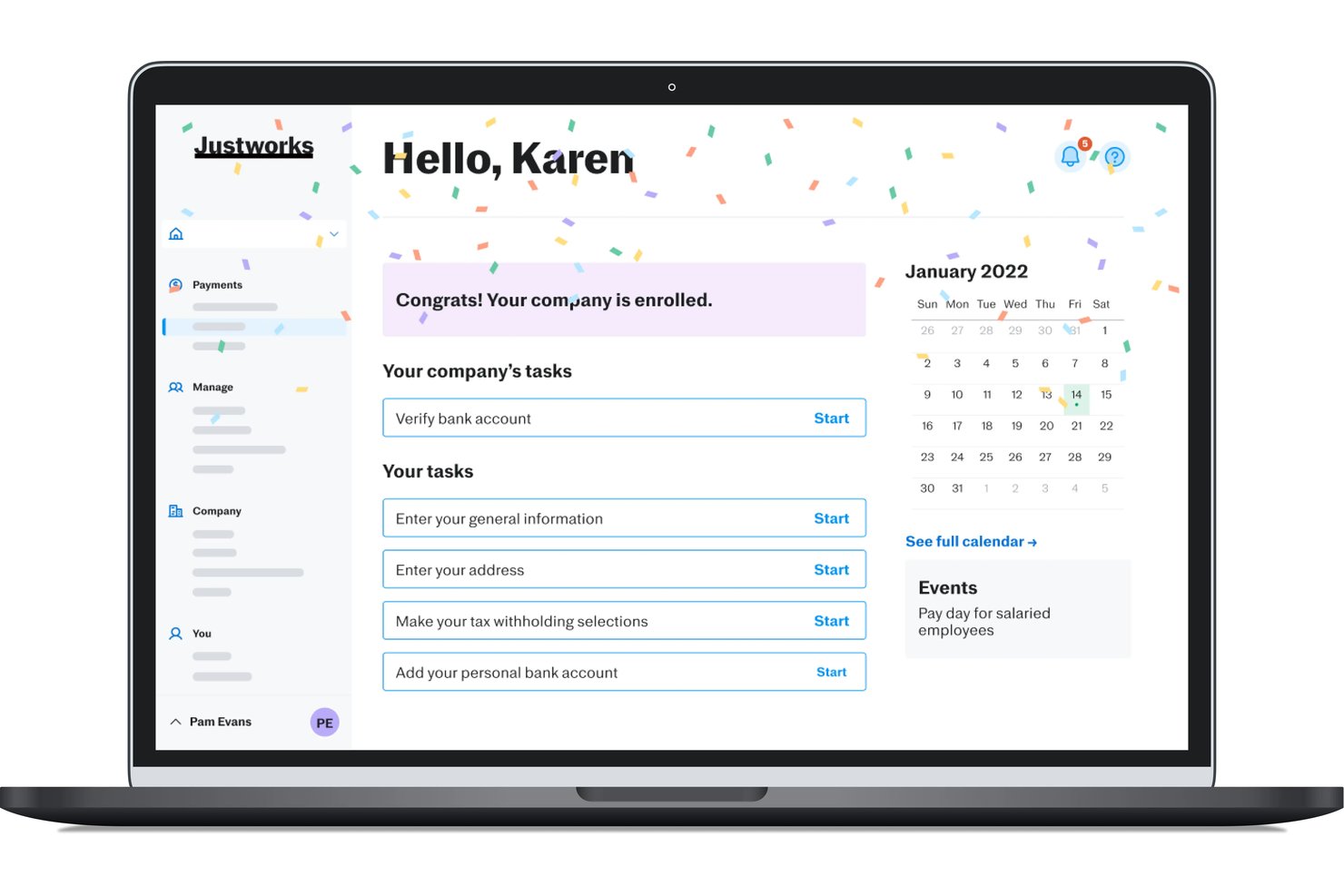
Justworks is a cloud-based HR software system for HR teams that brings together employee data, onboarding, payroll, benefits administration, and compliance management in a single platform.
Who Is Justworks Best For?
HR teams at small and midsize businesses in the US needing centralized payroll, benefits, and compliance in one platform.
Why I Picked Justworks
I picked Justworks as one of the best because I can always reach a real HR or payroll expert at any hour, which is crucial during off-cycle payroll runs or urgent compliance situations. I also value their seamless onboarding workflows and native benefits administration.
Justworks Key Features
- Employee self-service portal: Allows employees to access pay stubs, update personal info, and request time off from any device.
- Integrated PTO management: Tracks accruals, manages requests, and automates approval workflows within the platform.
- Document storage and e-signatures: Centralizes HR documents and captures signatures on key onboarding forms digitally.
- Automated compliance reporting: Generates standardized reports for ACA, EEO, and other HR compliance needs.
Justworks Integrations
Justworks offers native integrations with 15Five, Carta, Brex, Accurate, Expensify, QuickBooks, Xero, Greenhouse, and more. An API is available for custom integrations.
Pros and Cons
Pros:
- Strong multi-state payroll and compliance tools
- Automated onboarding and offboarding workflows
- 24/7 access to live HR and payroll support
Cons:
- Minimal customization for workflows and fields
- Limited reporting and analytics functionality

Best for AI-driven HR automation
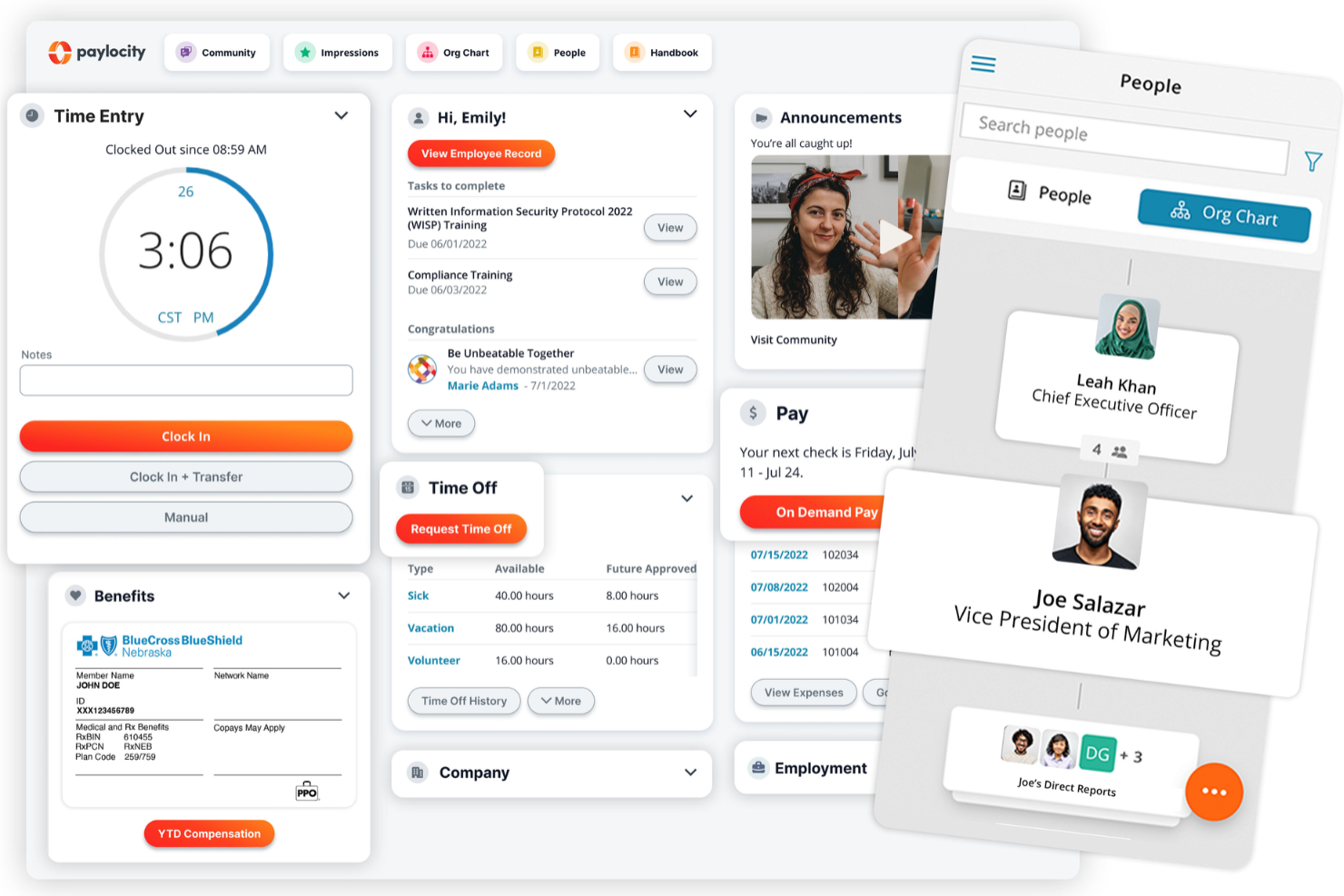
Paylocity is built for midsize and large organizations that want deeper automation across payroll and HR. Its AI-driven tools help your team predict staffing needs, improve compensation accuracy, and catch early signs of turnover risk while employees manage routine tasks through an easy self-service experience.
Why I Picked Paylocity
I picked Paylocity because it goes beyond basic HR automation and gives you decision-ready insights you can act on immediately. For example, its forecasting tools help you stay ahead of staffing gaps by analyzing historical trends and upcoming workloads.
Compensation recommendations draw from market data so you can create fair, competitive offers without juggling outside tools, and I also like that it identifies retention risks and provides suggestions your team can act on.
Combined with its self-service portal—which cuts down on daily HR requests—Paylocity is a strong fit for organizations that want automation and guidance in one platform.
Paylocity Key Features
Here are some standout features worth highlighting:
- Headcount Planning: Models future staffing scenarios with budget impact estimates.
- Automated Scheduling: Builds schedules based on labor rules, role needs, and availability.
- Personalized Benefits Guidance: Helps employees choose benefits based on their inputs.
- Built-In Analytics: Surfaces trends in labor costs, attendance, and compliance exposures.
Paylocity Integrations
Integrations include BambooHR, Greenhouse, NetSuite, ADP, Oracle HCM, Workday, Salesforce, Microsoft Teams, HubSpot, Zendesk, Slack, and Microsoft SharePoint.
Pros and Cons
Pros:
- Self-service tools reduce repetitive HR admin work
- Forecasting helps prepare for workload or headcount changes
- AI-driven insights support pay, staffing, and retention decisions
Cons:
- Mobile app missing certain admin configuration options
- Implementation can feel heavy for smaller teams
New Product Updates from Paylocity

Paylocity Expands Expense and Purchase Request Tools
Paylocity adds connected personal cards, smarter expense categorization, and a streamlined purchase request experience. This reduces manual entry and helps finance teams manage expenses and approvals more efficiently. For more information, visit Paylocity’s official site.
 .
.
HiBob
Best for scaling multi-entity organizations
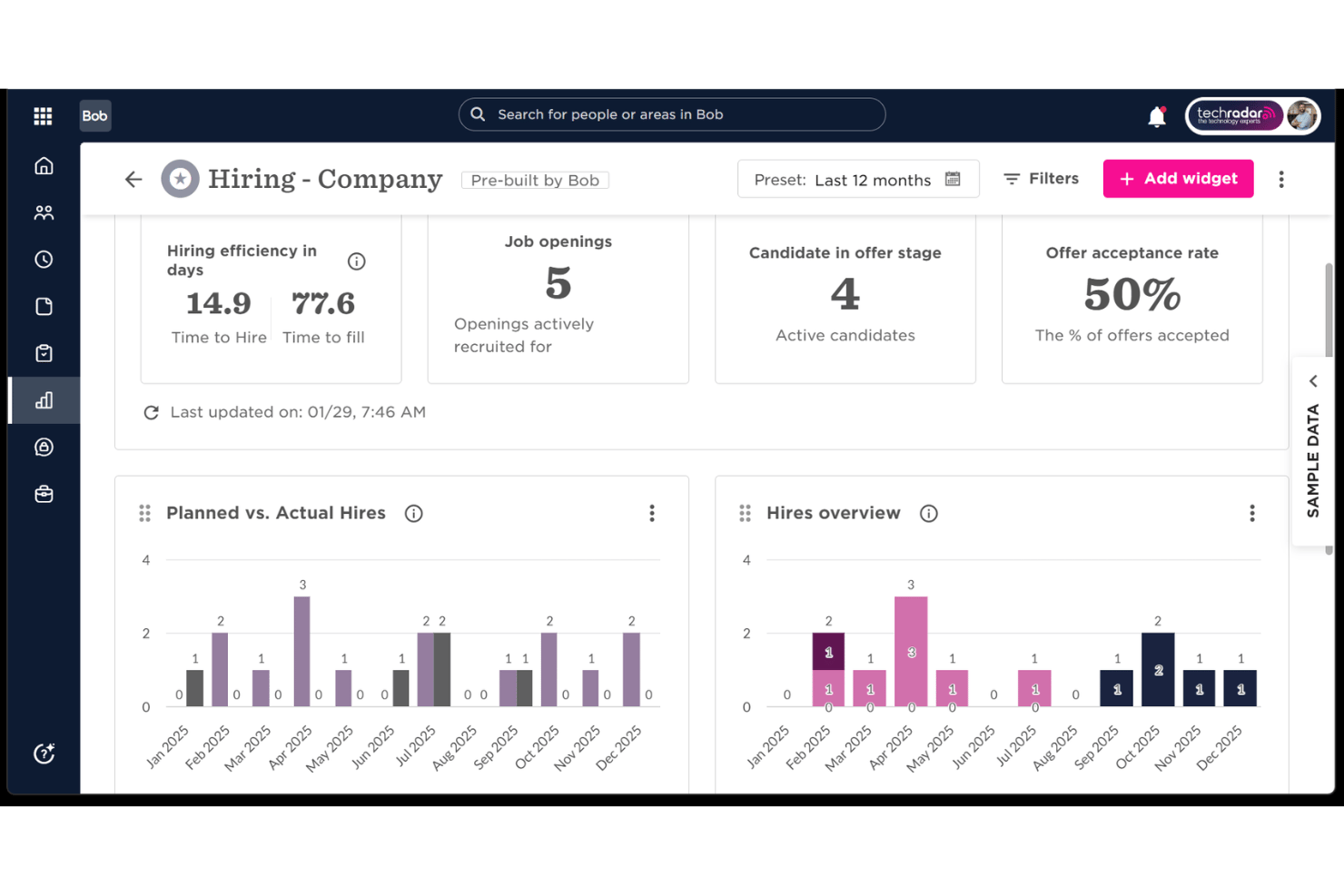
HiBob is a cloud-based HRIS platform that combines employee records, lifecycle automation, performance management, compensation, and workforce planning in a single system built for global, distributed teams.
Who Is HiBob Best For?
HiBob is a strong fit for People Operations teams at mid-market companies managing headcount across multiple countries or legal entities.
Why I Picked HiBob
HiBob earns its spot on my shortlist because of how cleanly it handles multi-entity org complexity at scale. I like that you can model separate legal entities, manage country-specific leave policies, and run payroll in local currencies, all from one platform. The built-in workforce scenario planning lets you stress-test headcount decisions across entities before acting, which is a capability I rarely see natively in an HRIS.
HiBob Key Features
- Self-service portal: Role-based employee and manager portals let users access profiles, submit requests, and approve workflows.
- Custom document management: Centralizes document storage, version history, and e-signatures for secure record-keeping.
- Integrated performance reviews: Built-in review cycles and feedback tools support ongoing employee development.
- Built-in survey tools: Pulse surveys and sentiment analysis track engagement and help teams act on employee feedback.
HiBob Integrations
HiBob offers native integrations with payroll and HR tools like Greenhouse, Workable, ADP, Google Workspace, Slack, Microsoft Teams, Jira, and Okta. An open API is available for custom integrations.
Pros and Cons
Pros:
- Highly configurable employee lifecycle workflows
- Built-in performance and engagement tools
- Strong multi-entity org structure management
Cons:
- Onboarding setup requires significant configuration time
- Reporting customization can feel limited

Gusto
Best for payroll-HR integration
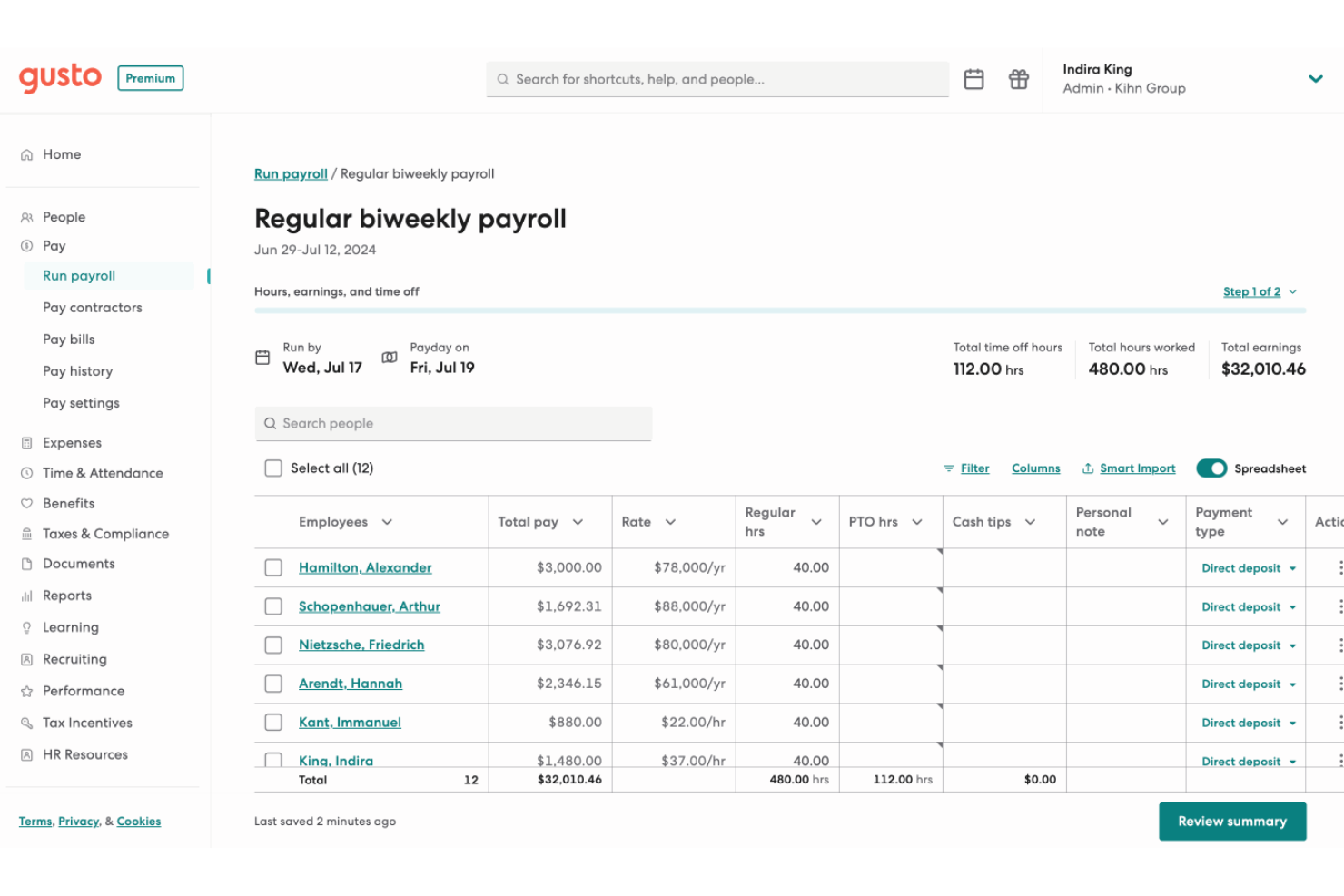
Gusto offers a versatile cloud platform that caters to the needs of small to medium-sized enterprises. With its comprehensive suite of HR tools, Gusto simplifies payroll, benefits administration, and compliance management, addressing the complexities of managing a growing team.
Why I Picked Gusto
I picked Gusto for its seamless integration of payroll and HR functionalities, which are vital for cloud-based HR solutions. The platform's ability to automate payroll calculations and tax filings ensures accuracy and saves time for your team.
Additionally, Gusto's benefits administration feature allows you to manage health insurance, 401(k) plans, and workers' compensation all in one place, providing comprehensive support for employee benefits management. These features make Gusto an attractive choice for businesses looking to streamline their HR operations.
Gusto Key Features
Here are some key features worth highlighting:
- Hiring and Onboarding Tools: These tools help you streamline the recruitment process and ensure new hires are integrated smoothly into your team.
- Time Tracking: This feature allows you to easily manage employee hours and ensure accurate payroll processing.
- Employee Self-Service: Employees can access their pay stubs, benefits, and personal information, reducing administrative burdens.
- Compliance Alerts: Gusto provides alerts for compliance deadlines to help you stay on top of legal requirements.
Gusto Integrations
Integrations include QuickBooks Online, Xero, FreshBooks, Expensify, TSheets, Deputy, Clover, Shopify, WooCommerce, and Slack.
Pros and Cons
Pros:
- Automatic tax filings and direct deposit simplify payroll compliance.
- Payroll, benefits, and HR in one unified platform.
- Employee self-service portal empowers staff to access pay and forms.
Cons:
- Great for simple pay and HR management but not customizable enough to handle large, complex orgs.
- SMBs that need advanced compliance or niche industry-specific HR modules may find Gusto limiting.
New Product Updates from Gusto
Gusto Adds Solo Advisory Tools and Mobile Money Features
Gusto adds Solo S-Corp Advisory Tools and Gusto Money on Mobile for tax guidance, invoicing, and bill payments. These updates help accountants advise solopreneurs and let users manage business finances from their phones. For more information, visit Gusto’s official site.

Best for core HR features
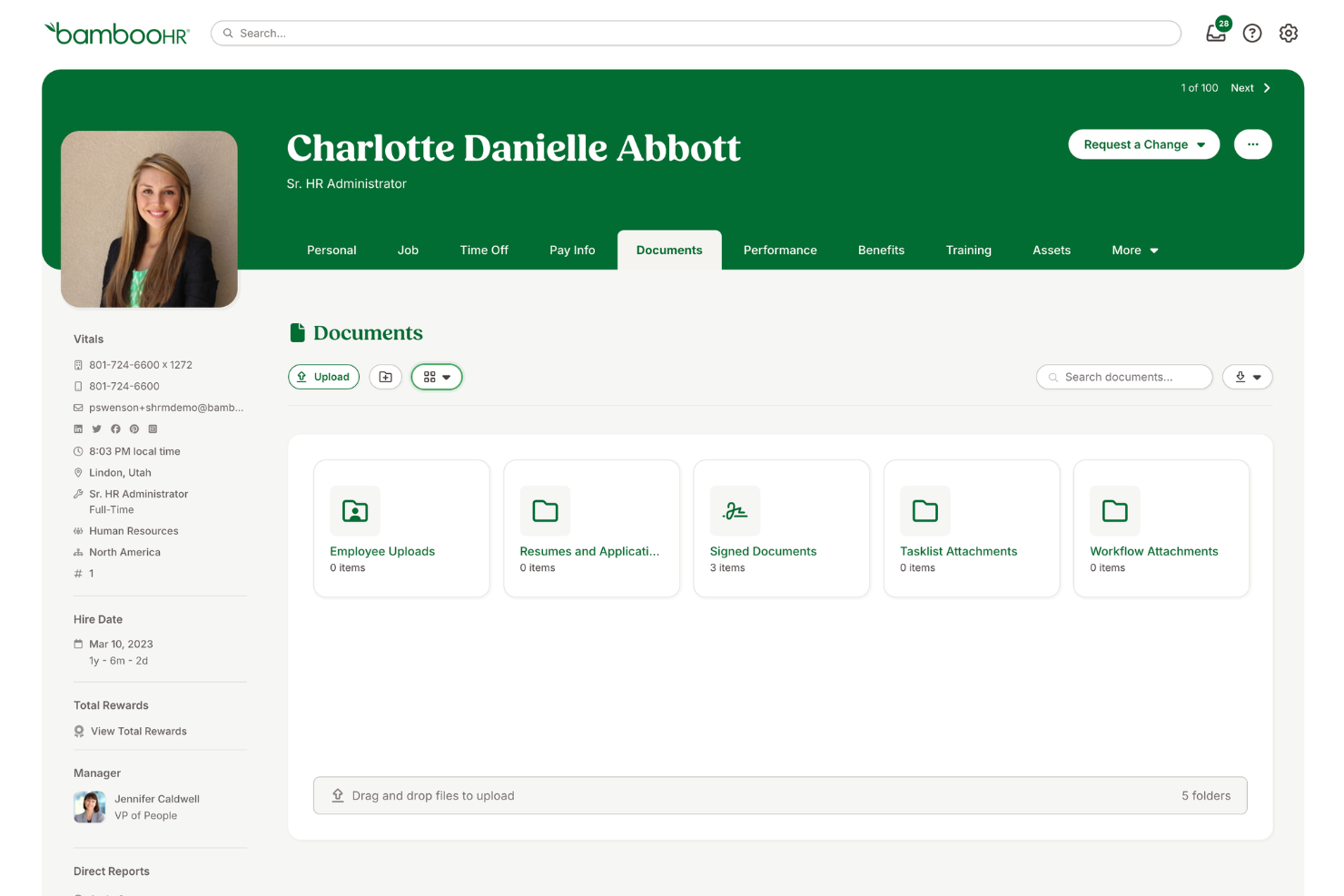
BambooHR is designed for small and mid-sized businesses that want a central hub for employee data and day-to-day HR tasks. It brings core HR, hiring, and people-management tools into one system so your team can stay organized and work more efficiently.
Why I Picked BambooHR
I picked BambooHR because it gives you a clear, centralized way to manage the entire employee lifecycle without adding extra complexity. You get tools like ATS workflows, guided onboarding, and built-in e-signatures that help your team handle routine tasks with fewer manual steps.
I also like its Time Tracking and PTO tools, which let employees submit requests and managers approve them in a few clicks, and in-built eNPS surveys give you straightforward insights into employee sentiment, backed by automated data collection. Plus, its add-on payroll service is built to stay compliant with U.S. federal and state requirements, which is helpful if your team wants everything in one place.
BambooHR Key Features
Here are some standout features worth highlighting:
- Employee Self-Service: Lets employees update personal info, upload documents, and access PTO balances on their own.
- Org Chart & Directory: Auto-updates as your team grows, giving everyone visibility into roles and reporting lines.
- Performance Management: Offers goal tracking and simple review cycles to keep employees aligned and on track.
- Company Calendar: Centralizes birthdays, anniversaries, and time off so teams always know who’s available.
BambooHR Integrations
Integrations include Slack, Greenhouse, HireRight, Indeed, Lattice, 15Five, PayScale, Pingboard, NetSuite, Spark Hire, and Zapier.
Pros and Cons
Pros:
- PTO and time tracking reduce manual admin work
- Simple onboarding flows with e-signatures and task assignments
- Clear employee profiles centralize essential HR data
Cons:
- Reporting customization can feel limited for advanced needs
- Payroll is U.S.-only
New Product Updates from BambooHR®

BambooHR Expands Compensation Benchmarking Data
BambooHR adds monthly-refreshed compensation benchmarks, additional data sources, and clearer job match indicators. This gives teams more context when comparing pay data and selecting relevant benchmarks. For more information, visit BambooHR’s official site.
 .
.
Paycor
Best for employee self-service
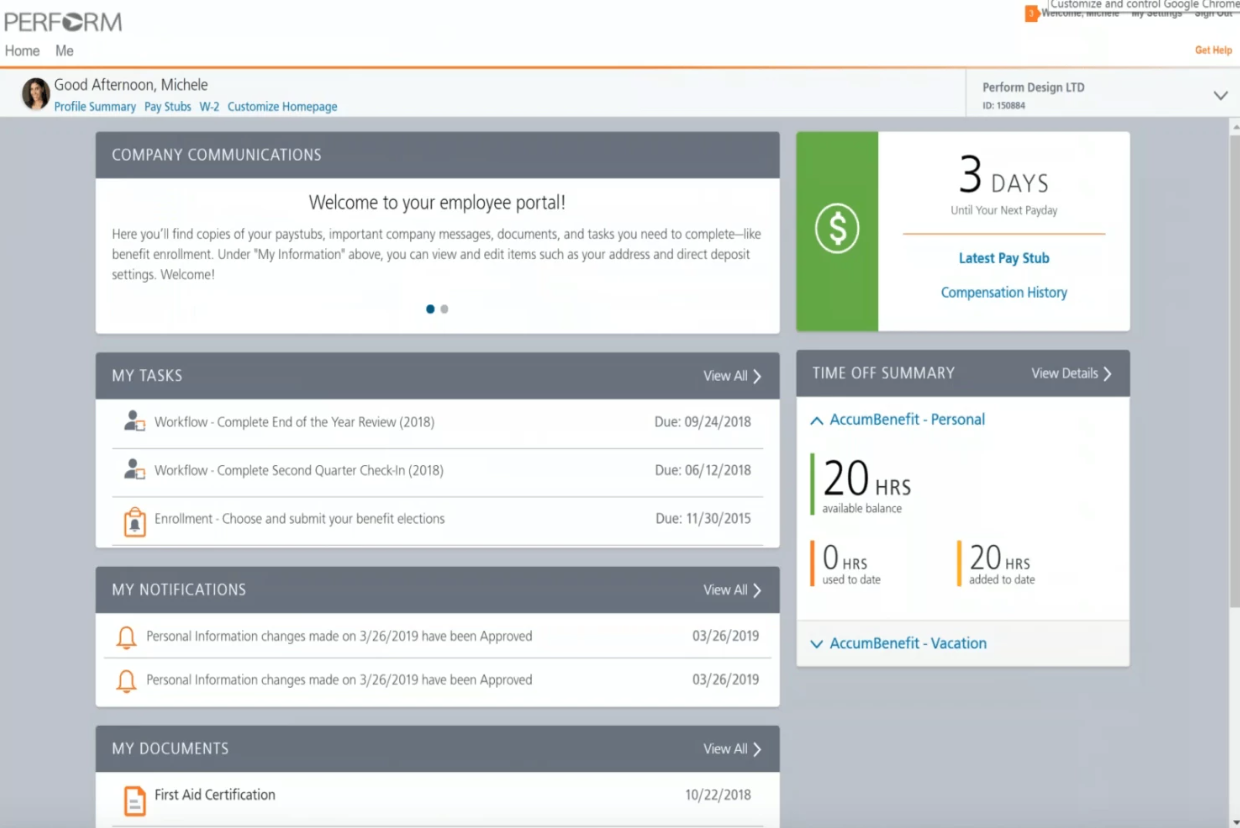
Paycor is built for HR teams that want to give employees more control over their own data while reducing admin work. It centralizes employee records, time-off management, and onboarding tasks in one place, making it a strong fit for mid-sized organizations that need reliable self-service tools.
Why I Picked Paycor
I picked Paycor because it gives your team an easy way to manage HR tasks while letting employees handle routine actions themselves. Its self-service portal lets staff update personal details, sign documents, and access payslips without relying on HR, which cuts down on repetitive requests.
You also get detailed audit trails that record every change to an employee profile, helping you maintain accuracy and compliance as your workforce grows. I like that the platform includes customizable permissions, so you can control who sees sensitive information, and it also offers access to HR resources and templates that help your team stay aligned with best practices.
Paycor Key Features
Here are some standout features worth highlighting:
- Performance Review Tools: Provides templates and rating systems to run consistent, documented evaluations.
- Payroll Process Automation: Automates payroll reports, reminders, and recurring tasks to reduce manual oversight.
- Shift & Task Automation: Helps you automate scheduling and repetitive administrative tasks to save time.
- Custom Reporting: Allows you to create tailored HR reports for visibility into workforce trends.
Paycor Integrations
Integrations include Broadcast Employee Communication Suite, Millie, OurPeople, Uncommon Giving, Spark Hire, Workvivo, ADP Workforce Now, Indeed, and Oracle Netsuite.
Pros and Cons
Pros:
- Custom permissions support secure access controls
- Detailed audit trails help maintain compliance accuracy
- Employee self-service reduces routine HR requests
Cons:
- Limited customization for onboarding workflows
- Some advanced analytics require higher-tier plans

Best as AI for business
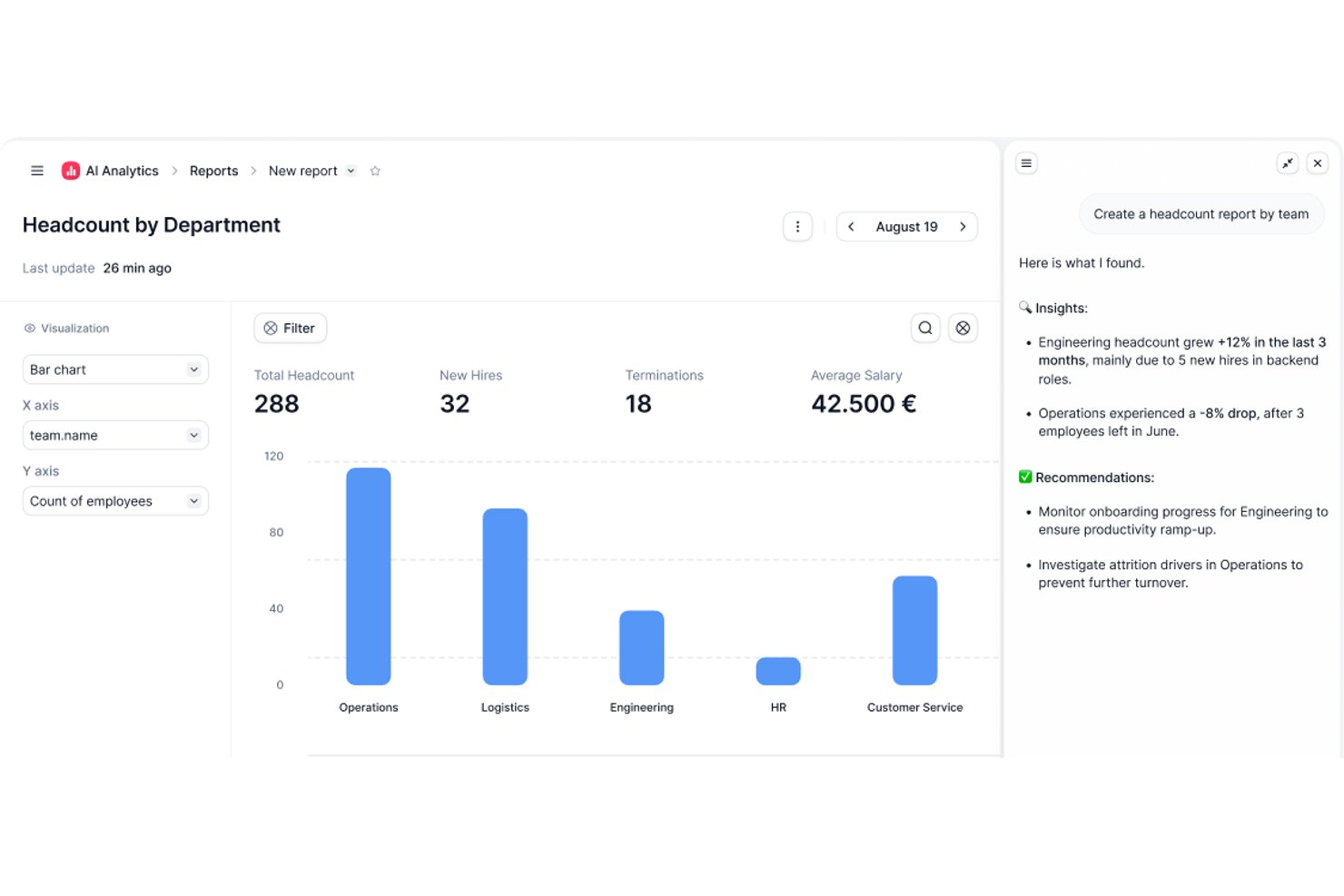
Factorial is a cloud HR platform that brings together time tracking, absence management, payroll preparation, recruitment, performance reviews, and employee records—with AI woven throughout to help you plan schedules, generate reports, and answer employee questions about company policies.
Who Is Factorial Best For?
Factorial suits growing small and mid-sized businesses that want a single platform to manage HR, time tracking, and day-to-day operations with AI built in.
Why I Picked Factorial
I picked Factorial as one of the best because its AI runs through the parts of HR that eat up the most time. Factorial's AI assistant, One, answers employee questions about policies directly so those questions don't land in your inbox, and it can plan timetables and generate reports without you pulling the data manually. The AI angle isn't cosmetic here—it's woven into the core workflows that HR teams actually use every day.
Factorial Key Features
- 360-degree performance reviews: Managers and peers can submit structured feedback on employees using configurable rating scales and competency tracking.
- Shift scheduling: Administrators can build and assign automated, bulk, and rotating shift schedules across teams.
- eNPS and climate surveys: HR teams can run employee net promoter score surveys, team pulse checks, and climate surveys to measure engagement.
- Digital e-signature: Users can send, sign, and track contracts and HR documents with legally compliant electronic signatures.
Factorial Integrations
Factorial offers marketplace integrations with Google Workspace, Slack, Microsoft Azure, Okta, Microsoft Power BI, LinkedIn, and payroll tools such as DATEV LODAS and Sage 200. It also supports a public API, webhooks, SDKs, and Zapier.
Pros and Cons
Pros:
- Onboarding workflows organize new-hire tasks
- Leave requests and balances stay visible
- AI answers policy questions and plans timetables
Cons:
- Complex workflows may require workarounds
- Custom reporting and analytics depth can be limited
Paychex Flex
Best for complex HR processes
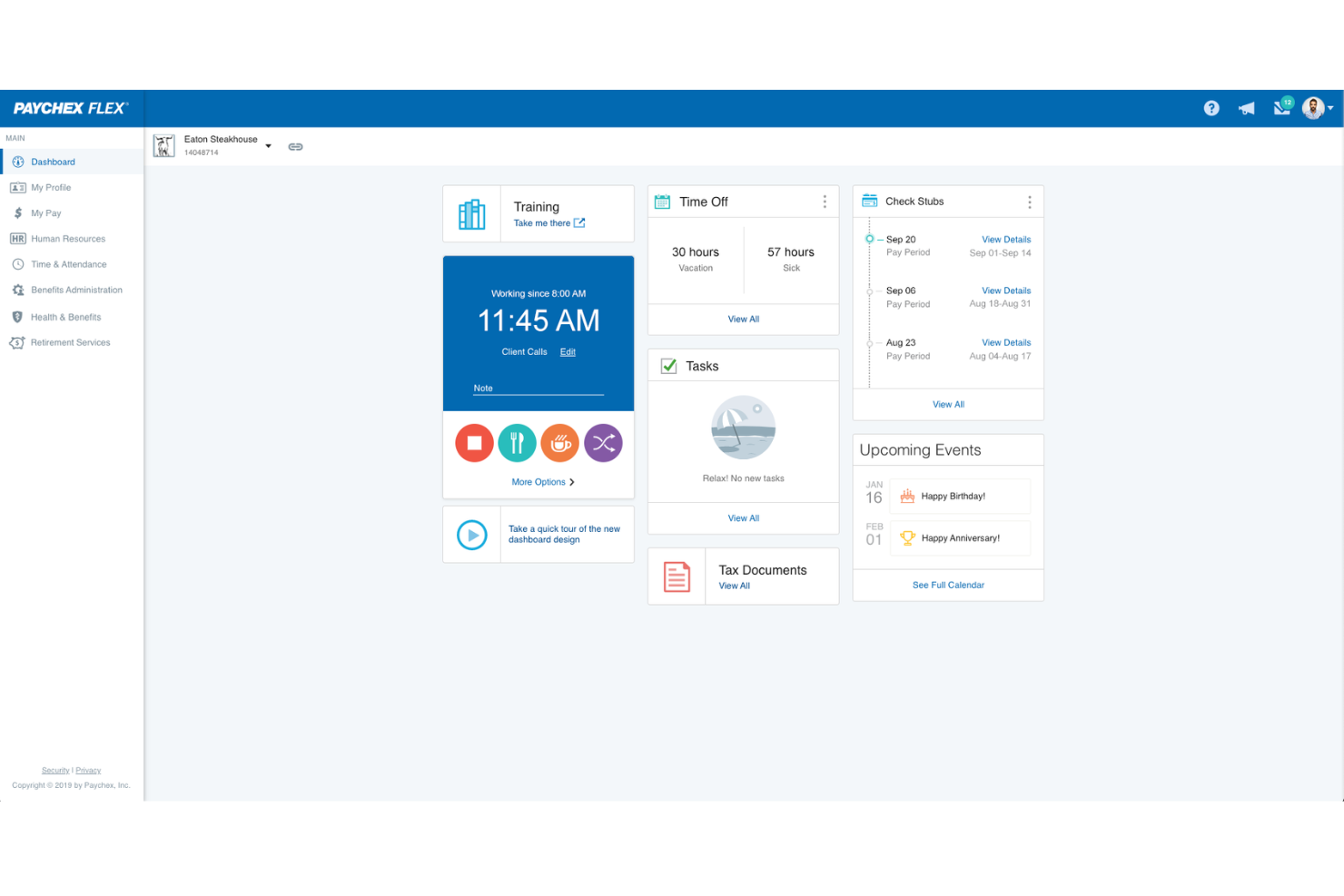
Paychex Flex is ideal for HR teams that need a single platform to manage payroll, benefits, and core HR tasks without juggling multiple systems. It’s a good fit for organizations that deal with complex payroll rules or multi-state teams and want built-in support for tax compliance and benefits administration.
Why I Picked Paychex Flex
I picked Paychex Flex because it gives your HR team tools that reduce manual work around payroll, time tracking, and benefits management. The platform calculates and files payroll taxes for you, which is especially helpful if you operate across multiple states.
I also like that new hires can complete onboarding tasks digitally through guided forms and required document uploads. For teams managing hourly workers, its time-entry options—like mobile punches and web-based timesheets—help you capture accurate hours without add-on tools.
Paychex Flex also supports businesses that need HR and benefits guidance through optional PEO services, giving growing teams more structure as they scale.
Paychex Flex Key Features
Here are some standout features worth highlighting:
- Custom Payroll Packages: Choose payroll service levels tailored to your team’s size and complexity.
- Mobile Time Tracking: Let employees clock in via mobile apps with GPS capture for shift accuracy.
- Digital Onboarding Tools: Provide new hires with a single hub for forms, policies, and training access.
- Benefits Administration: Manage healthcare, retirement plans, and open enrollment from one dashboard.
Paychex Flex Integrations
Integrations include QuickBooks, Xero, ClockShark, TSheets (QuickBooks Time), Aflac, UnitedHealthcare, Hubworks, Indeed, Jirav, Microsoft Azure AD, and Oracle.
Pros and Cons
Pros:
- Mobile time tracking improves accuracy for hourly teams
- Benefits administration connects directly to payroll data
- Handles multi-state payroll tax filing automatically
Cons:
- Some features require add-on services or higher tiers
- Limited reporting customization for advanced analytics
Other Cloud HR Software
Here are a few more options that didn’t make it into my top 10 list for the best cloud HR software, but are still worth checking out:
- HR Cloud
For digital onboarding and offboarding
- GoCo
With integrated benefits administration
- Kallidus Sapling
For customizing workflows
- Sage HR
For managing talent and succession planning
- Arcoro
For health and safety-focused industries
- Collage HR
For Canadian SMBs
- Cloud9HR
For organizational management
- Rippling
For automated onboarding
- TalentHR
For rich customization
- ClearCo
For the full employee lifecycle
- Folks HR
Cloud HRIS system for Canadian non-profit organizations
- Keka HR
For interconnected HR, payroll, and PSA
- Oyster HR
For international hiring
- Rise
For Canadian companies with lean HR teams
- TriNet HR Plus
Cloud HRIS system for benefits management and group insurance
- Zoho People
All-in-one cloud platform for managing variable workforces
- OrangeHRM
Free cloud-based HRMS software, available via open source
- BrightHR
Cloud HRIS for automations and document management
- Cezanne
HR software for global, multi-lingual organizations
- Connecteam
Cloud software for employee shift scheduling
- IntelliHR
Cloud HR software for performance management
- Employment Hero
Cloud based HR software for Canadian employee benefits administration
- Breathe HR
Cloud HR management software for leave management - available as a 14-day free trial


Related HR Software Reviews
If you still haven't found what you're looking for here, check out these other related tools that we've tested and evaluated:
- HR Software
- Payroll Software
- Recruiting Software
- Employer of Record Services
- Applicant Tracking Systems
- Workforce Management Software
How I Evaluate Cloud-Based HRIS
I evaluate cloud-based HRIS in two layers—core functionality any tool must have (think: employee records, self-service, and compliance reporting) and differentiators that set the right fit apart.
Core Functionality (Table Stakes For This List)
When I'm selecting tools for my list, I rank each one on a scale from 0 (does not offer the functionality) to 5 (excels in this area) for each core functionality listed below. Then, I calculate the tool's total score into a percentage. Each tool needs to achieve a minimum total score of 75% to be considered for inclusion.
- Employee Database Management: I look for a centralized system of record where HR teams can store job histories, compensation data, and org structures without toggling between spreadsheets.
- Self-Service Portals: Employees and managers should be able to update addresses, submit PTO requests, and approve workflows from both desktop and mobile browsers.
- Onboarding & Lifecycle Management: I evaluate whether a platform handles the full hire-to-exit journey, including offer letter e-signatures, task assignments, and IT provisioning triggers.
- Benefits & Time-Off Administration: This covers PTO accrual policies, leave request approvals, and benefits enrollment—I check whether the tool connects to carriers or requires manual entry.
- Compliance & Reporting: I look for custom report builders that let HR teams pull EEO, headcount, or turnover reports on demand rather than relying on IT or pre-built templates alone.
- Integrations & API Access: A cloud HRIS needs to fit into your existing stack, so I check for native connectors to major payroll and ATS platforms plus a documented API for custom builds.
Once I have a list of tools that meet this criteria, I consider what sets each platform apart.
Differentiating Factors (What Sets Vendors Apart)
Here's how I compare and contrast different vendors:
Standout Features
Global payroll support matters when your workforce spans multiple countries—I check whether a platform handles localized tax rules natively or through certified partners. Configurable workflows are another differentiator I evaluate closely, since no-code approval chains save HR teams real time during open enrollment or org restructures. I also look for built-in performance and engagement tools like review cycles and pulse surveys that tie directly to the employee record rather than requiring a separate platform.
Beyond Features
Scalability is a big factor—I check whether a platform fits your current headcount and can grow with you as you add entities or expand into new regions. Compliance and data security also carry real weight here, since your HRIS holds sensitive employee data. Certifications like SOC 2 Type II and role-based access controls help me gauge how seriously a vendor treats data protection. Total cost of ownership rounds out my evaluation, because implementation fees and add-on module pricing can shift the value equation quickly.
How to Choose Cloud HR Software
Cloud-based HR software can solve many different challenges and improve numerous workflows. To help you figure out the best HR software for your needs, you need to pinpoint your key users and document their specific challenges first.
As you work through your own unique HR software selection process, keep the following points in mind:
- What problem are you trying to solve - Start by identifying the challenges you're trying to overcome. This will help you clarify the features and functionality the cloud HR software needs to provide.
- Who will need to use it - To evaluate cost and requirements, consider who will use the software and how many licenses you'll need. Depending on the platform, you'll likely want employee-level access for your entire workforce, with special access for your HR administrators and managers. Once that's clear, it's also useful to rank the needs of your different users to identify your key priorities for your HR software power users, managers, and employees, to ensure they're all met.
- What other tools it needs to work with - Clarify what tools you're replacing, what tools are staying, and the tools you'll need to integrate with, such as accounting, time-tracking, or payroll software. You'll need to decide if the tools should integrate together, or alternatively, if you can replace multiple tools with an all-in-one cloud-based HR platform.
- What outcomes are important - Review the capabilities you want to gain or improve, and how you will measure success. For example, you may want to provide a more enriched employee experience through increased self-service abilities or improve employee engagement by increasing team recognition capabilities. You could compare HR software features until you’re blue in the face but if you aren’t thinking about the outcomes you want to achieve, you could waste a lot of valuable time.
- How it would work within your organization - Consider the software selection alongside your existing workflows and systems. Evaluate what's working well, and any problem areas that need to be addressed.
Remember every business is different — don’t assume that a cloud-based HR system will work for your organization just because it's popular.
Trends in Cloud HR Software
Understanding emerging trends in cloud HR software helps you better assess what to look for in a solution. I try to keep up with the shifting functionalities, features, and focuses of these products to ensure my lists are not just up-to-date, but forward-looking. Here are several trends taking shape now and into the future:
- AI-Driven Talent Acquisition: Artificial intelligence (AI) capabilities are enhancing hiring processes by improving how you can attract, discover, and recruit the right people for your open roles. They're becoming increasingly adept at understanding job requirements and candidate profiles, offering a more efficient and effective recruitment process. For example, AI-driven recruitment tools can analyze vast amounts of data to:
- Identify the most suitable candidates,
- Reduce time-to-hire, and
- Improve the recruitment and onboarding process.
- Employee Wellness and Mental Health Platforms: The rise of platforms focusing on employee wellness and mental health speaks to the increased importance of demonstrating care for your workforce. These cloud-based solutions offer resources like counseling services, wellness tracking, and stress management tools. By prioritizing employee well-being, companies can see a marked improvement in employee satisfaction, retention, and productivity. And this ultimately aligns with the objectives of HR leaders to build a supportive and enduring workplace culture.
- Advanced Performance Analytics: Employee performance and talent development are as important as ever—particularly with AI becoming increasingly present in many employees' day-to-day. Performance management tools provide actionable insights into employee productivity, engagement, and skill development. They help in identifying areas for improvement and training needs, ensuring that employees are performing to their best ability and are on a path of continuous growth.
- Hybrid Workforce Management Solutions: Cloud HR software is increasingly incorporating features for managing distributed teams, bridging the gap between remote and in-office work environments, and ensuring efficient operations irrespective of the physical location of employees. This includes tools for:
- Remote attendance tracking,
- Team collaboration, and
- Streamlined communication.
These trends are shaping the development of cloud HR software, making it more efficient and capable of meeting the complex needs of modern organizations.
If you’re interested in learning more about how AI is enhancing HR software systems, check out our articles explaining how AI will impact human resources.
What is Cloud HR Software?
Cloud HR software is an online platform that handles various human resource functions, providing remote access, data security, and efficient management of employee-related processes. Key features of cloud HR software include remote accessibility, employee data management, payroll processing, recruitment and onboarding tools, performance tracking, benefits administration, and real-time analytics and reporting.
Features of Cloud HR Software
When selecting cloud HR software, keep an eye out for the following key features:
- Employee self-service portal: Let employees manage their personal information, benefits, and time-off requests on their own—cutting down on HR’s day-to-day busywork while empowering the team.
- Automated payroll processing: Take the headache out of payday by automatically calculating salaries, deductions, and tax withholdings, ensuring everyone gets paid accurately and on time.
- Time and attendance tracking: Make clocking in and out a breeze. This feature records employee hours, monitors attendance trends, and helps you spot any patterns, like chronic lateness, before they become issues.
- Performance management tools: Track goals, gather feedback, and run performance reviews all in one place. These tools help create transparent growth paths and keep motivation high.
- Recruitment and onboarding workflows: Streamline hiring from job posting to welcoming a new joiner. Organize applications, schedule interviews, and automate onboarding paperwork so no one’s left sifting through email threads.
- Benefits administration: Easily manage health insurance, retirement plans, and other perks. Employees can review options and make selections without endless back-and-forth with HR.
- Compliance management: Keep your business on the right side of employment laws with built-in tools that track regulatory changes and update necessary documentation automatically.
- Reporting and analytics: Access dashboards and generate custom reports to uncover workforce trends, spot retention issues, or celebrate successes—all backed by real numbers.
Common Cloud HR Software AI Features
Beyond the standard cloud HR software features listed above, many of these solutions are incorporating AI with features like:
- AI-powered candidate screening: Automatically review resumes and shortlist qualified candidates, saving hours of manual sorting and helping you find the best match faster.
- Predictive employee turnover analysis: Use AI to analyze patterns and predict which employees might be at risk of leaving, giving you time to take action and boost retention.
- Smart chatbot assistance: Offer employees and candidates instant answers through AI chatbots that handle simple questions or guide them through HR processes 24/7.
- Automated compliance monitoring: AI scans changing regulations and adjusts company policies, flags risks, and helps you stay compliant without scouring every update yourself.
- Sentiment analysis: Tap into AI to analyze feedback from surveys and internal chat, giving you a real-time pulse on company morale and potential trouble spots.
- Personalized learning recommendations: Let AI suggest development courses and training paths tailored to each employee’s role and career stage, making professional growth feel custom-built.
Benefits of Cloud HR Software
Cloud-based HR software is designed to make your human resource functions more efficient and accessible from anywhere and any device. It can also help you reduce costs, enhance security, and ensure your software is always up-to-date with the latest features and improvements.
By selecting the best cloud HR software for your needs, you can expect to gain the following benefits:
- Improved Accessibility: Cloud HR software allows users to access information and perform tasks from any location with internet access. It also allows for remote and hybrid document management systems from anywhere.
- Improved Cost Efficiency: By reducing the need for in-house IT infrastructure and personnel, cloud HR software significantly lowers upfront and ongoing costs. Organizations can avoid large capital expenditures on hardware and enjoy a subscription-based model that scales with their needs.
- Enhanced Security: Providers of cloud-based HR software typically invest in robust security measures, including data encryption and secure data centers, which are often more extensive than what individual organizations can afford. This helps protect sensitive employee data against breaches.
- Continuous Updates and Improvements: Cloud software providers continuously update their products to include new features, improve user experience, and enhance performance. Users automatically receive these updates, ensuring they always have access to the latest tools and functionalities.
By adopting cloud HR systems, businesses can enjoy greater flexibility, reduced costs, improved security, and a host of other advantages that are crucial in today’s dynamic business environment.
Costs & Pricing for Cloud HR Software
Cloud HR software offers different plans and pricing options to support different business sizes and types, from startups to large enterprises. Each plan comes with its own set of features and pricing structure, designed to provide scalability and flexibility. Here’s a breakdown of common plan options to help you make an informed decision.
Plan Comparison Table for Cloud HR Software
| Plan Type | Average Price | Common Features |
|---|---|---|
| Free | $0 | Basic HR functions, limited users, and limited data storage |
| Basic | $10-20 per user/month | Core HR features, employee self-service portal, and cloud storage |
| Professional | $20-40 per user/month | Enhanced HR features, API access, and customization options |
| Enterprise | Custom Pricing | Advanced features, full customization, dedicated support, and analytics |
Choosing the right plan depends on the size of your organization, the complexity of your HR needs, and your budget. It’s important to consider not only the immediate capabilities of the software but also its potential to grow with your business. Keep these factors in mind as you compare different cloud HR software options to find the best fit for your needs.
Frequently Asked Questions
Here are some answers to commonly asked questions about cloud-based HR software and how it works:
Are there different types of cloud-based HR software?
There certainly are. For the purpose of keeping this list focused, I selected cloud-based HR systems that fall within the realm of HR management systems. Within the HR management software space, you’ll find the following sub-categories of software:
- HRIS = human resources information systems
- HRMS = human resource management systems
- HCM = human capital management [systems]
Beyond that, there other types of cloud-based software systems too. Popular types include online payroll software and cloud recruitment software among others.
How popular are cloud-based HR software systems?
According to Verified Market Research, 70% of the HR software market is comprised of cloud-based HR software. This includes HCM, HRMS, HRIS, and other types of talent and workforce management systems. Industry experts are projecting a compound annual growth rate of 11.12% between 2021 and 2028.
In a separate 2021 study by the Information Services Group that surveyed 260 companies, 46% of respondents confirmed they were currently subscribing to a SaaS platform, with 57% expecting to have subscribed by 2023.
What is the average implementation time for cloud HR software?
The average implementation time for cloud HR software can vary significantly depending on the complexity of the business’s requirements and the specific software chosen. Typically, small to medium-sized businesses can expect an implementation period ranging from a few weeks to a few months. Larger enterprises with more complex needs may require several months to fully integrate and train staff on the new system.
It’s crucial for companies to work closely with their software provider to establish a clear implementation plan, including milestones and training sessions to ensure a smooth transition. To gain a better sense of your own implementation needs, have a read through this article on software implementation and how to tell if you’re ready for new HR technology.
How do different cloud HR software handle data privacy?
Data privacy is a critical concern for cloud HR software, and reputable providers adhere to strict data protection regulations such as GDPR, HIPAA (in healthcare), or local data protection laws.
Most software platforms employ robust security measures including data encryption, regular security audits, and compliance checks. They often offer customizable privacy settings to allow businesses to control who has access to sensitive employee information.
Users should inquire about the specific security protocols each provider uses and ensure they align with the organization’s own data security standards. This article offers more details into data management best practices if you’re interested in learning more.
What are the contract terms like for cloud HR software?
Contract terms for cloud HR software vary by provider. Important elements to review include the length of the contract, cancellation policies, and any fees associated with early termination. Most providers offer a range of options from monthly subscriptions to annual contracts, giving businesses flexibility based on their budget and needs.
It’s important for potential buyers to thoroughly review the contract terms, understand the scope of the services provided, and clarify any points of confusion with the provider before signing. Questions about scalability, data ownership, and service level agreements (SLA) should also be addressed within the contract.
Other HR Software Reviews
Here are a few other cloud-based HR software lists that may also interest you:
- Best HRIS Systems for Small Businesses
- Best HRMS for Human Resource Management
- Best HRMS for Small Businesses
- Best HR Software List to Boost HR Functions
- Best Employee Management Systems
For a more holistic view of what the HR software landscape has to offer, don't miss our complete guide to HR software