

10 Best HR Software List in 2026

Best HR Software Lists Shortlist


An HR software list is a curated roundup of platforms that centralize everything from onboarding and payroll to performance tracking and people analytics for your HR team. If you’re weighing your options or upgrading from spreadsheets, the right choice sets your people strategy up for real results—and keeps your headcount data organized as you scale. In this list, you’ll find solutions that make workforce management practical for busy leaders, tailored insights for planning, and features that let your HR pros focus on people instead of paperwork.
Why Trust Our Software Recommendations
Our team has been testing and reviewing software since 2012. As HR experts ourselves, we know how difficult—and important—it is to choose the right software.
For this guide, we evaluated tools using hands-on testing and independent research, scoring tools using our selection criteria. We also draw on insights from industry thought leaders and practicing HR experts.
Our reviews reflect our human editorial judgment, not a sales pitch.
Expert reviewers:
Comparison Table: HR Software Lists
This comparison table summarizes pricing details for my best HR software list selections.
| Tool | Best For | Trial Info | Price | ||
|---|---|---|---|---|---|
| 1 | Best for employee-driven payroll accuracy | Free demo available | Pricing upon request | Website | |
| 2 | Best for global hiring, payroll, and compliance | Free demo available | From $5/user/month | Website | |
| 3 | Best for SMB employee experience and self-service | Free demo available | From $10/user/month | Website | |
| 4 | Best for all-in-one SMB HR and compliance | Free demo available | From $79/user/month | Website | |
| 5 | Best with customizable workflows for HR teams | Free demo available | Pricing upon request | Website | |
| 6 | Best for intuitive AI tools for HR tasks | Free plan + free demo available | From $2/user/month (billed annually) | Website | |
| 7 | Best for AI-driven performance and engagement | Free demo available | From $10/employee/month | Website | |
| 8 | Best for automated HCM and workforce management | Free demo available | Pricing upon request | Website | |
| 9 | Best for automated payroll and benefits | Free demo available | From $49/month | Website | |
| 10 | Best with end-to-end HCM and HR analytics | Free trial available | From $99/month | Website |


Best HR Software List Reviews
Below are my detailed summaries of the best HR software list that made it onto my shortlist. My reviews offer a detailed look at the features, best use cases, and integrations of each platform to help you find the best one for you.

Paycom
Best for employee-driven payroll accuracy
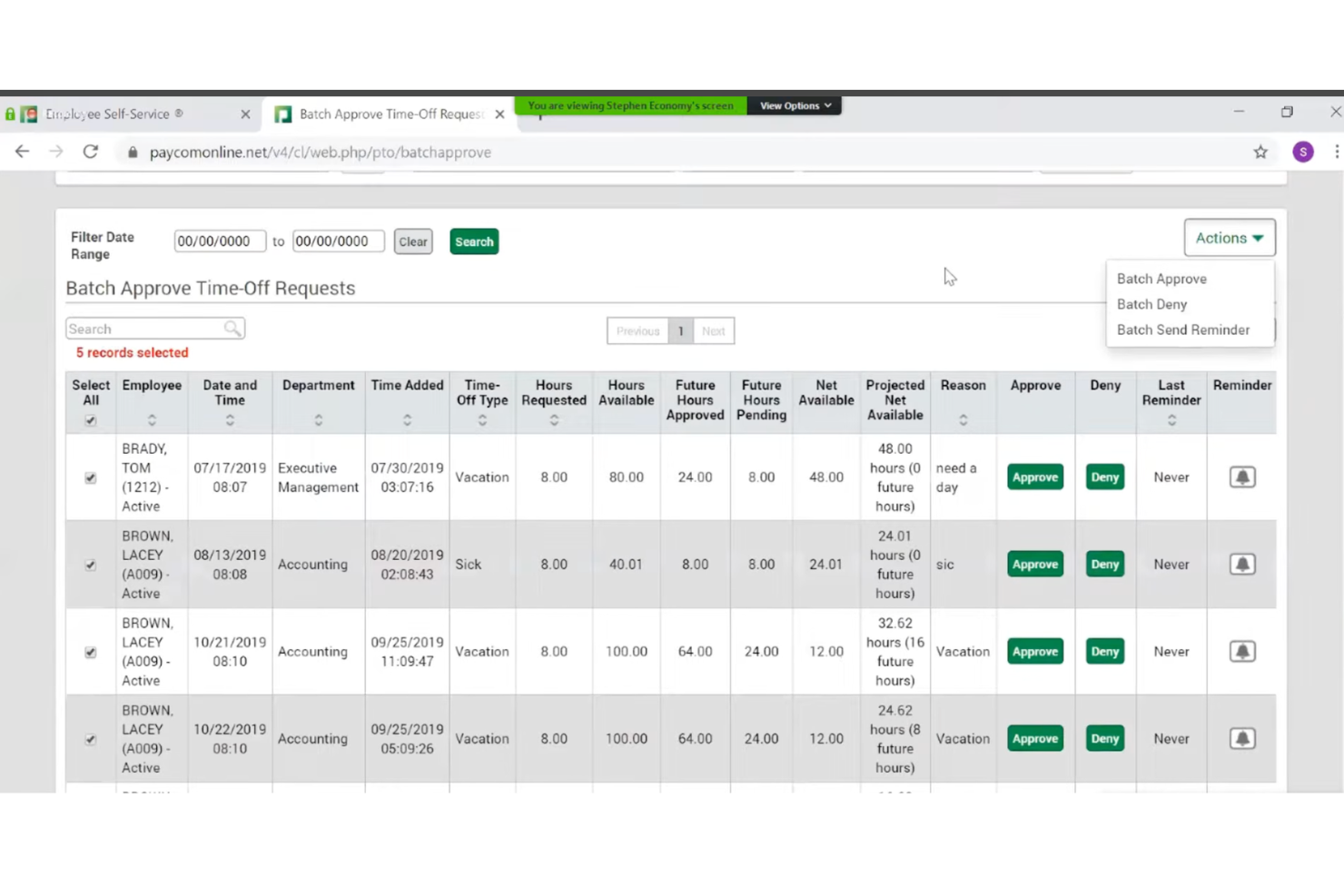
Paycom is a single-database HR and payroll platform that covers the full employee lifecycle—from hiring and onboarding to time tracking, benefits administration, and payroll processing.
Who Is Paycom Best For?
Paycom is a strong fit for mid-to-large U.S.-based organizations that want a single platform to manage HR, payroll, and workforce operations without juggling multiple systems.
Why I Picked Paycom
I picked Paycom as one of the best for employee-driven payroll accuracy because of Beti, its built-in payroll experience that genuinely changes how payroll gets done. Instead of HR catching errors after the fact, Beti automatically flags issues throughout the pay period and guides employees to fix them before payroll is ever submitted. In practice, that means your team isn't chasing down missed punches or reversing incorrect checks. The whole process self-starts each pay period, pulling live data from timecards, approved expenses, and PTO into payroll automatically.
Paycom Key Features
- Talent acquisition tools: Post jobs, manage applicants, and move candidates through a customizable hiring pipeline from within the same system used for onboarding and HR.
- Benefits administration: Employees enroll in and manage their benefits directly through the platform, with eligibility rules and carrier connections handled automatically.
- GONE automated time-off decisions: Paycom's GONE feature reviews and approves or denies time-off requests based on your preset rules, without manager intervention.
- Performance management: Set goals, run 360-degree reviews, and track employee development through structured review cycles built into the platform.
Paycom Integrations
Paycom doesn't provide public APIs for direct integration. Paycom is built on a single-database architecture, meaning most HR, payroll, and talent management functions live natively within the platform rather than relying on third-party connections. Its GL Concierge tool maps payroll data to your general ledger for export to accounting systems. For teams that need to connect Paycom to external tools, third-party middleware services like Finch and Merge offer unified API connections, but native integrations and Zapier support are not clearly documented.
Pros and Cons
Pros:
- Built-in EEO-1 and OSHA compliance reports
- Employees review and fix paycheck errors pre-payday
- Single database eliminates duplicate data entry
Cons:
- Implementation process can be time-consuming
- Custom reporting often requires extra Excel work

Deel HR
Best for global hiring, payroll, and compliance
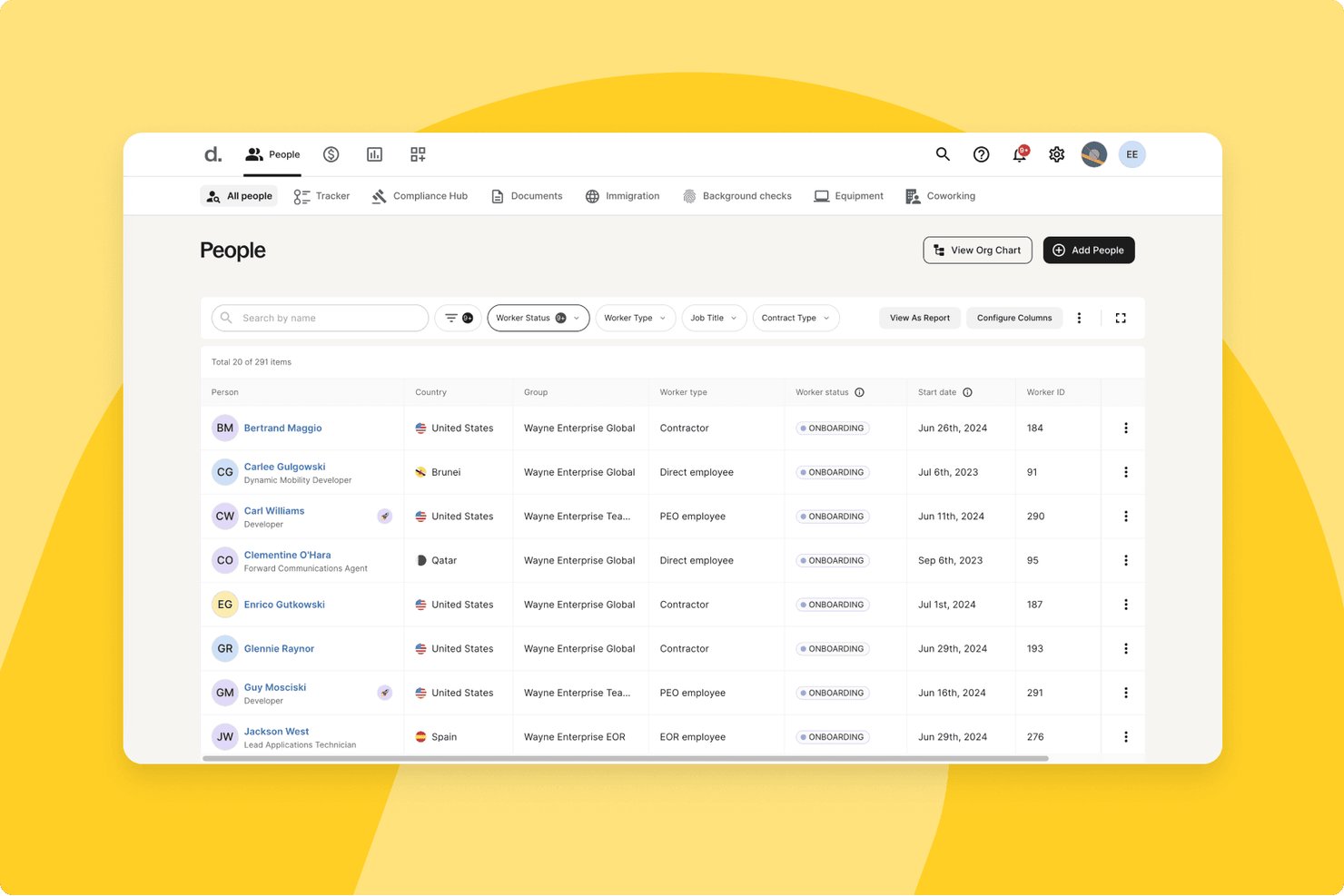
Deel HR is an HR platform built for global teams that combines employee records, onboarding workflows, time-off management, payroll, contractor management, and compliance tools across 150+ countries.
Who Is Deel HR Best For?
Deel HR is a strong fit for companies hiring across multiple countries who need payroll, compliance, and HR management in one place.
Why I Picked Deel HR
Deel HR earns its spot as one of the best on my shortlist because no other platform handles global hiring, payroll, and compliance with this level of native depth. I love that it covers 150+ countries with localized employment contracts, statutory leave calendars, and automatic alerts when local labor laws change, so your team isn't scrambling to catch up. Its AI-powered misclassification risk detection is especially useful when you're managing a mixed workforce of direct employees and contractors across multiple regions.
Deel HR Key Features
- Employee self-service portal: Employees can update personal details, access pay stubs, manage documents, and submit time-off requests without HR involvement.
- Custom workflow builder: Configure multi-step approval chains and automated onboarding or offboarding sequences by role and region, with no developer input needed.
- Centralized document storage: Store contracts, tax forms, HR policies, and payslips in one place with folder structures, role-based permissions, and e-signature support.
- Org chart and employee directory: An auto-generated, interactive org chart updates in real time as employee data changes and is accessible via Slack or the Deel platform.
Deel HR Integrations
Deel HR supports integrations with QuickBooks, Xero, NetSuite, BambooHR, HiBob, Greenhouse, Slack, Microsoft Teams, Google Workspace, and Rydoo. It also provides an open REST API and Zapier.
Pros and Cons
Pros:
- Org charts update automatically as teams change
- AI assistant flags contractor misclassification risk
- Built-in global compliance across 150+ countries
Cons:
- Analytics reliability issues reported by users
- Free HR module only with paid payroll
New Product Updates from Deel HR

Deel Expands Stablecoin Wallet to 80+ Countries
Deel expands its Stablecoin Wallet to 80+ countries with dollar-backed balances and optional rewards. This gives eligible contractors more ways to hold and manage earnings inside Deel. For more information, visit Deel’s official site.
 .
.
BambooHR
Best for SMB employee experience and self-service
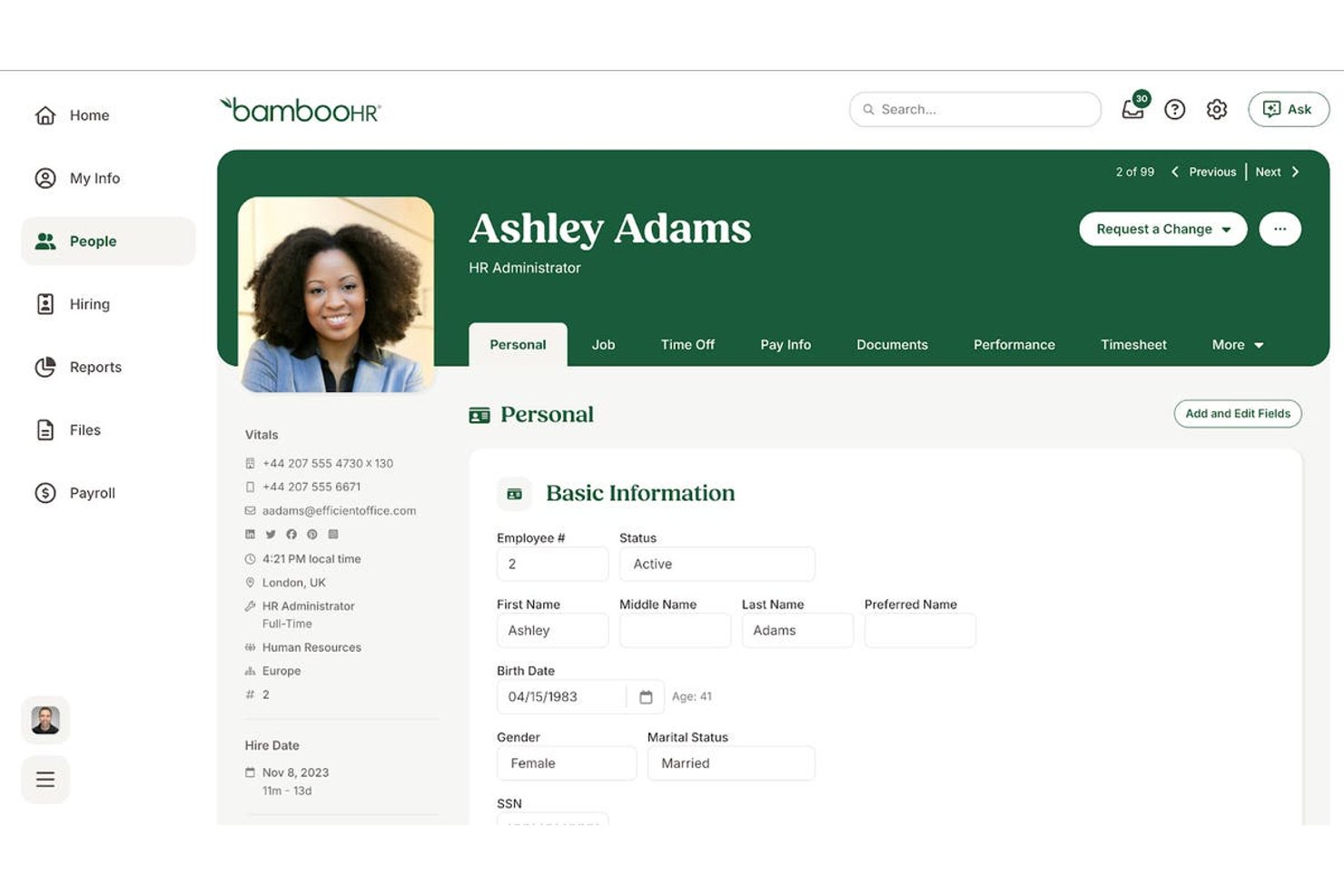
BambooHR is an HR platform built for small and mid-sized businesses that covers the full employee lifecycle—from hiring and onboarding to time-off tracking, performance management, and reporting—through a centralized employee database and self-service portal.
Who Is BambooHR Best For?
BambooHR is a strong fit for HR generalists and people ops managers at small to mid-sized companies who need a single platform to manage the full employee lifecycle without a large HR team behind them.
Why I Picked BambooHR
BambooHR earns its spot on my shortlist because the employee self-service portal genuinely reduces the back-and-forth that bogs down small HR teams. Employees can update their own records, submit PTO requests, and access documents without filing a ticket or sending an email. I also like the auto-generated org chart, which pulls directly from employee data and stays current as your team changes, giving everyone visibility into company structure without manual upkeep.
BambooHR Key Features
- Customizable onboarding checklists: Build task lists with due dates, assigned owners, and automated reminders so new hires complete required steps before day one.
- Bamboo AI assistant: Ask HR data questions in plain language and get instant answers, generated reports, or workforce insights without building a query manually.
- 360° performance review cycles: Run peer, manager, and self-assessments on configurable schedules, with goal tracking and 1:1 meeting notes in one place.
- HR benchmarking data: Compare your turnover, eNPS, and headcount trends against industry data powered by Mercer to inform people strategy decisions.
BambooHR Integrations
BambooHR offers 150+ marketplace integrations, including Greenhouse, Lever, Checkr, ADP, Slack, Microsoft Teams, Okta, and NetSuite. It also provides an open REST API on higher plan tiers and is available on Zapier.
Pros and Cons
Pros:
- Org chart auto-updates as team changes
- Automated onboarding checklists simplify new hire tasks
- Employees update records through self-service portal
Cons:
- Key features require higher-tier plans
- No ongoing free plan available
New Product Updates from BambooHR

BambooHR Improves Time Off Importer
BambooHR redesigns its Time Off Importer with automatic column mapping suggestions, full-file previews, and clearer import results. These updates help teams review bulk time off changes before import and resolve errors more easily. For more information, visit BambooHR’s official site.
 .
.
Best for all-in-one SMB HR and compliance
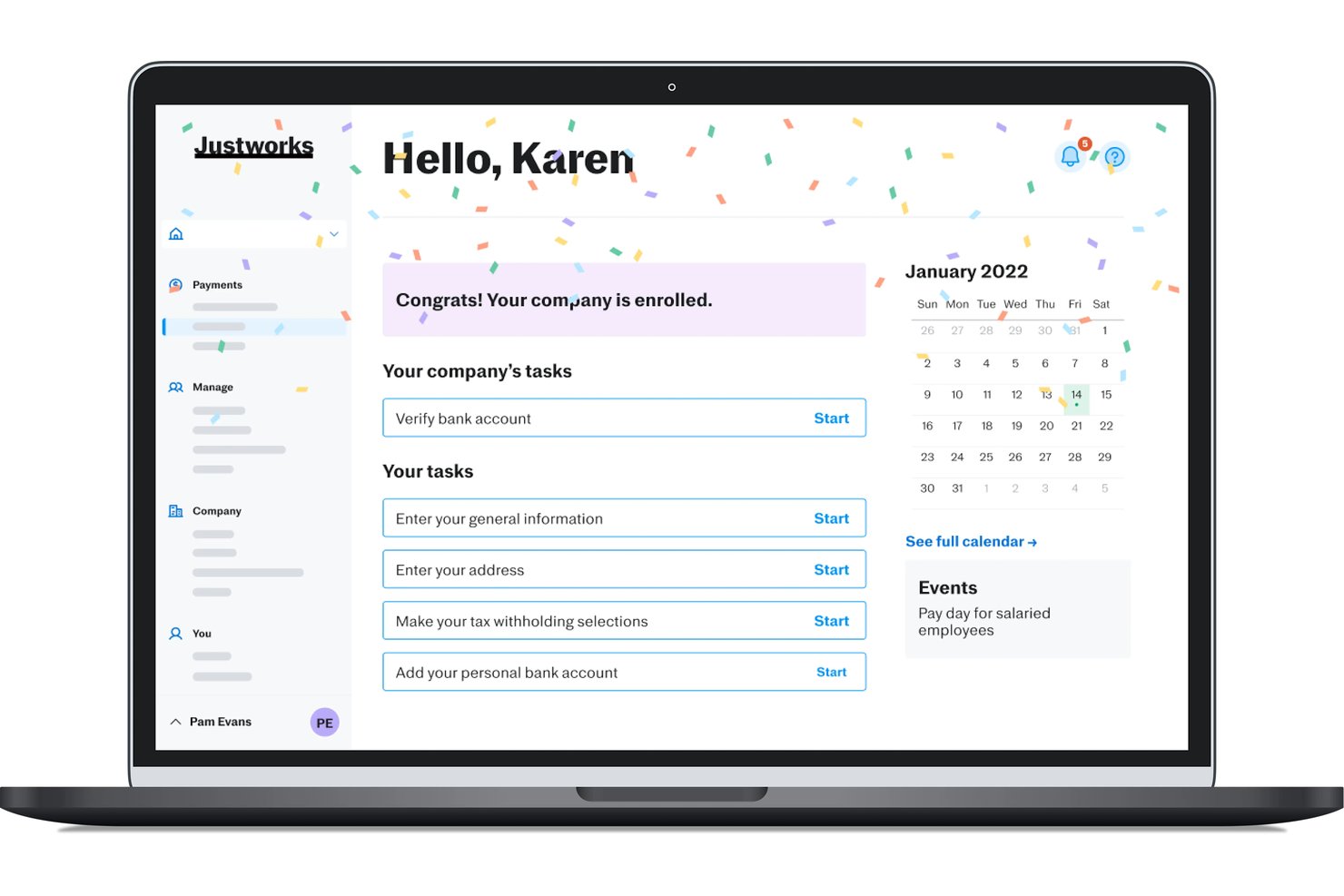
Justworks is an HR platform for small and midsize businesses that bundles payroll, benefits administration, compliance, onboarding, PTO management, and document handling into a single system.
Who Is Justworks Best For?
Justworks is a strong fit for small and midsize businesses that want payroll, benefits, compliance, and HR admin handled in one place—without needing a dedicated HR team to manage it all.
Why I Picked Justworks
Justworks earns its spot as one of the best on my shortlist because it genuinely consolidates what most small businesses need into a single platform, without requiring a dedicated HR team to run it. I'm particularly impressed by how the PEO model gives smaller companies access to large-group health insurance rates they simply couldn't negotiate independently. The built-in PTO management, digital onboarding with e-signatures, and compliance alerts all work together in one place, which matters when you're a small operation where one person is handling everything.
Justworks Key Features
- Employee self-service portal: Employees can update personal information, view pay stubs, and manage their own benefits elections directly from their dashboard.
- AI-powered report builder: Lets admins describe the report they need in plain language, then auto-generates it from payroll and workforce data.
- Company directory: A searchable, centralized directory available on all plans so employees and managers can find colleagues by department or role.
- International contractor payments: Supports payments to contractors in 60+ countries as an add-on, without needing a separate global payments platform.
Justworks Integrations
Justworks integrates with QuickBooks, NetSuite, Xero, Sage Intacct, Slack, allwhere, and Google Calendar. Justworks MCP connects HR data with Claude and ChatGPT for natural-language queries.
Pros and Cons
Pros:
- Offers 24/7 human support
- Includes e-signatures and onboarding checklists
- Access to group health benefits
Cons:
- Advanced reporting gated to higher tiers
- No free plan or trial available

HiBob
Best with customizable workflows for HR teams
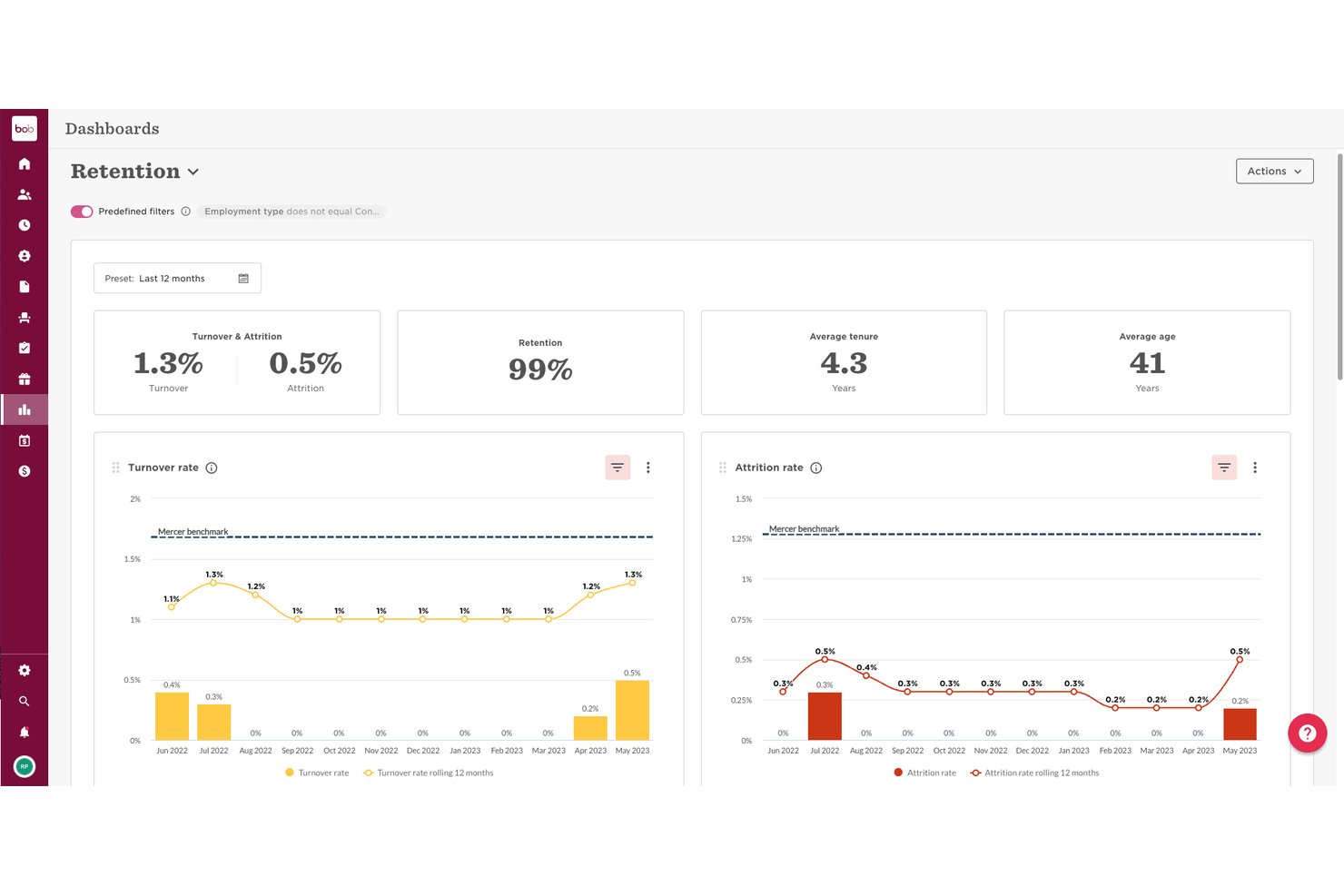
HiBob (Bob) is a people management platform that connects core HR, payroll, performance, and workforce planning in one modular system built for mid-sized and growing teams.
Who Is HiBob Best For?
HiBob is a strong fit for HR teams at mid-sized, fast-growing companies managing distributed or global workforces.
Why I Picked HiBob
HiBob earns its spot on my shortlist because its lifecycle workflow builder is genuinely flexible. I can configure multi-step onboarding journeys with task assignments, document collection, and automated reminders, all tailored by role, department, or location. The task stream feature means nothing slips through when a new hire starts or an employee transitions into a new position.
HiBob Key Features
- Employee self-service portal: Lets employees update personal details, request time off, and access documents without contacting HR.
- Org chart visualization: Auto-generates an interactive org chart from your employee data for easy org structure reference.
- Mobile app access: Offers iOS and Android apps so managers and employees can approve requests or check HR data on the go.
- Built-in reporting dashboards: Provides out-of-the-box reports for headcount, turnover, and time-off trends, viewable directly in the platform.
HiBob Integrations
HiBob offers native integrations with Slack, Microsoft Teams, Google Workspace, Okta, Adobe Acrobat Sign, DocuSign, Greenhouse, BambooHR, Jira, and Personio. An API is available for custom integrations.
Pros and Cons
Pros:
- Org chart updates automatically from employee data
- Strong performance and engagement tracking
- Highly configurable lifecycle workflow builder
Cons:
- Better suited for mid-size teams
- Reporting customization requires significant setup time
TalentHR
Best for intuitive AI tools for HR tasks
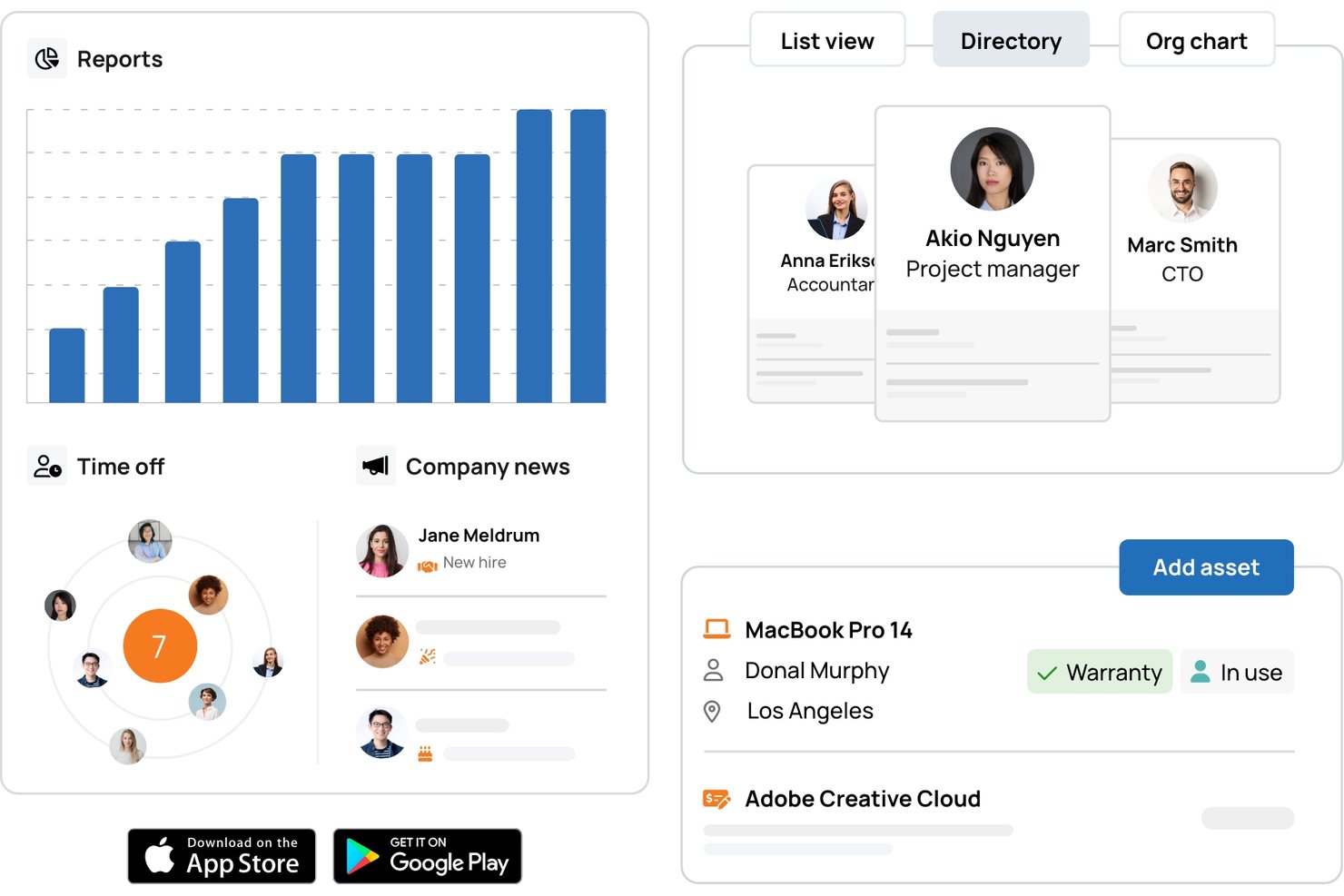
TalentHR is a modern HR management platform designed for teams that need easy-to-use tools for employee records, time off tracking, onboarding, and performance management in one dashboard.
Who Is TalentHR Best For?
HR teams at small to mid-sized companies who want a simple, centralized system to manage people operations.
Why I Picked TalentHR
I’ve included TalentHR in my top picks because its AI features automate time off approvals, candidate screening, and document management. I use its automated workflows to reduce repetitive admin, letting my team focus on higher-value HR work.
TalentHR Key Features
- Custom report builder: Create tailored HR reports with selectable metrics and filters.
- Whistleblowing tool: Provide employees with a secure channel for confidential concerns or reporting.
- Multi-language interface: Switch system language easily to support global or distributed teams.
- Asset management module: Track company equipment, assignments, and related documentation in one place.
TalentHR Integrations
TalentHR offers native integrations with Google Workspace, Microsoft 365, Slack, Greenhouse, and PayFit. It connects with Zapier and provides an API for custom integrations.
Pros and Cons
Pros:
- Custom reports builder for HR analytics
- Whistleblowing tool for confidential employee reporting
- AI auto-generates onboarding workflows and documentation
Cons:
- Few native third-party software integrations
- Lacks built-in payroll capabilities
Leapsome
Best for AI-driven performance and engagement
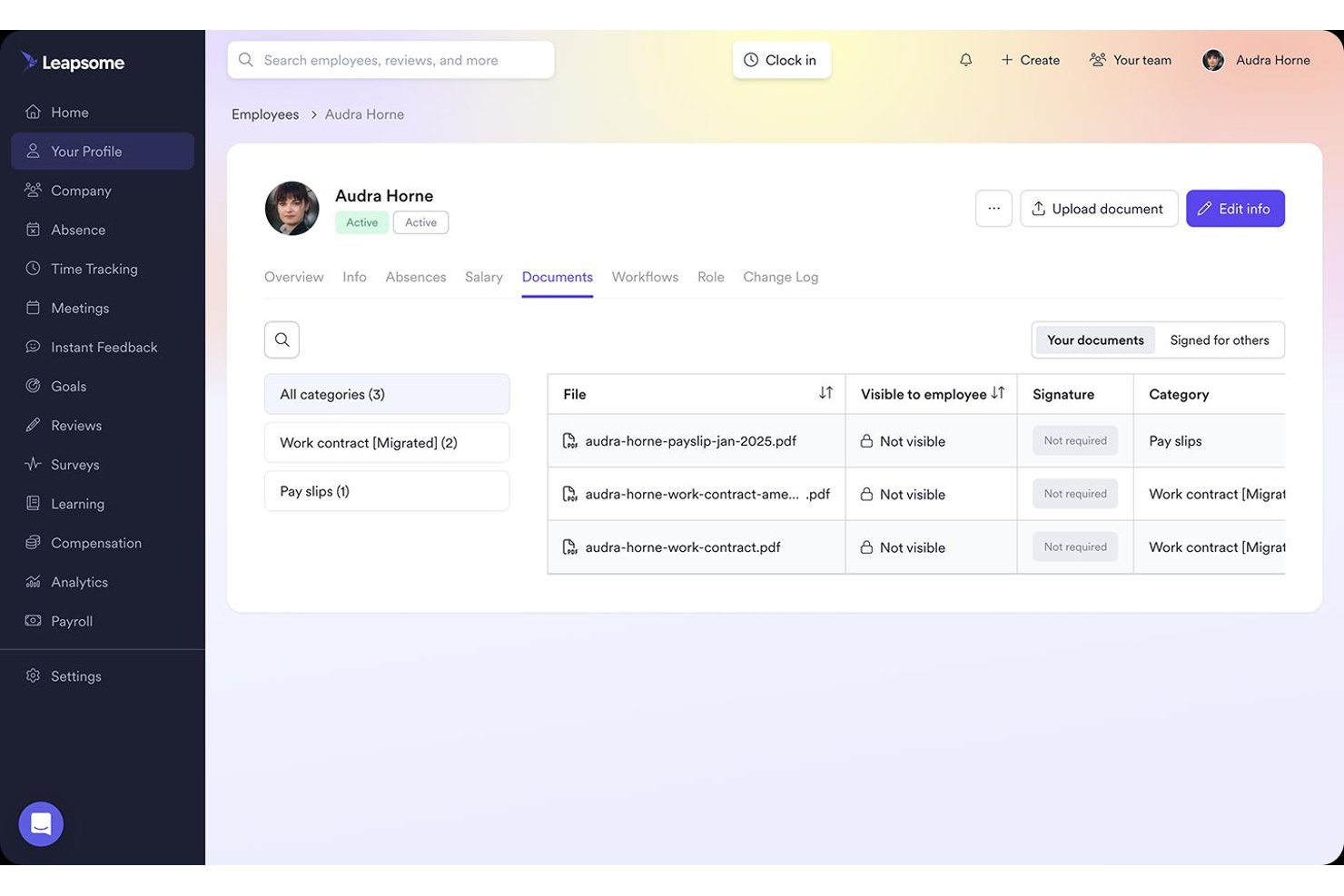
Leapsome is an AI-driven HR platform that combines HRIS, performance reviews, engagement surveys, goal tracking, learning, and compensation management into a single connected system.
Who Is Leapsome Best For?
Leapsome is a strong fit for people operations teams at mid-sized to large companies that want performance reviews, engagement, and core HR in one connected platform.
Why I Picked Leapsome
Leapsome earns its spot on my shortlist because its AI doesn't just assist—it acts, autonomously chasing document signatures, triggering onboarding tasks, and reconciling payroll changes within predefined limits. I'm particularly impressed by the AI-generated "Vibe Dashboards," which let you build custom analytics widgets using plain-language prompts, and the turnover prediction engine that flags flight risks before they become resignations. The Talent Suite and HRIS share one connected data record, so performance review outcomes feed directly into compensation reviews without any manual re-entry.
Leapsome Key Features
- Absence management: Employees submit time-off requests directly in the platform or via Slack, with configurable accrual rules, carryover limits, and multi-level approval workflows.
- Document templates and e-signatures: HR teams can generate documents from templates, collect e-signatures, and store signed files in a centralized repository with expiry tracking.
- Competency frameworks: Define and manage role-specific competency models that connect directly to performance reviews, career development, and compensation decisions.
- Cross-module analytics dashboards: Pre-built and custom reports cover headcount, retention, absence trends, pay gap data, and engagement benchmarks across all active modules.
Leapsome Integrations
Leapsome offers 100+ native integrations, including BambooHR, Workday, HiBob, Greenhouse, ADP Workforce Now, Slack, Microsoft Teams, Google Calendar, Jira, and Okta. An open API and SFTP support custom connections.
Pros and Cons
Pros:
- Turnover prediction highlights flight risks early
- Centralized employee records with audit trails
- AI automates onboarding and document workflows
Cons:
- No native mobile app for employees
- No permanent free plan available

Best for automated HCM and workforce management
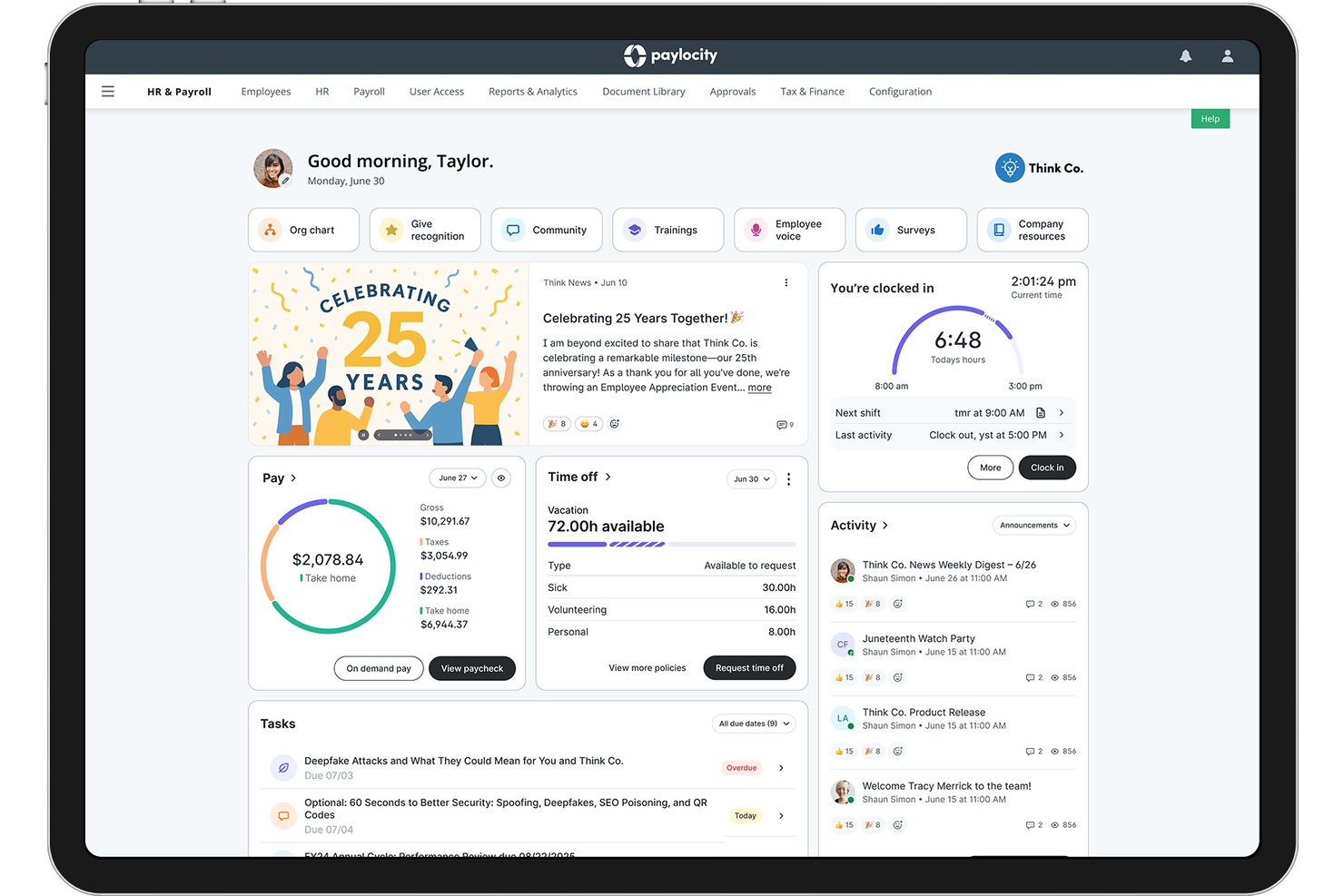
Paylocity is a cloud-based HCM platform that consolidates payroll, workforce management, talent acquisition, benefits administration, and employee engagement into a single system.
Who Is Paylocity Best For?
Paylocity is a strong fit for mid-market HR teams that need a single platform to manage payroll, workforce operations, and employee engagement at scale.
Why I Picked Paylocity
Paylocity earns its spot on my list because it handles automated HCM and workforce management at a level most platforms don't match. I'm particularly impressed by how its onboarding module auto-routes role-specific checklists, triggers 30-, 60-, and 90-day pulse surveys, and flows new hire data directly into payroll without manual re-entry. Its Workforce Analytics also surfaces at-risk employee signals using commute and compensation data, which is the kind of proactive insight that makes a real operational difference.
Paylocity Key Features
- AI Assistant: Query HR data and surface workforce insights using a built-in AI tool, without manually building reports.
- Benefits administration: Employees can enroll in benefits, view spending account balances, and submit claims directly through the self-service portal.
- Peer benchmarking: Compare your workforce data against similar-sized companies across Paylocity's 35,000+ client base.
- Custom approval workflows: Build multi-step approval chains for expenses, PTO, and document processes without developer involvement.
Paylocity Integrations
Paylocity offers hundreds of marketplace integrations, including Microsoft Entra, Google Workspace, Okta, Checkr, Ashby, Toast, Square, and ClockShark. Its REST API, WebLink API, EDI, and SFTP support custom integrations.
Pros and Cons
Pros:
- AI assistant surfaces actionable workforce insights
- Mobile app covers full HR functions
- Automated onboarding checklists with pulse surveys
Cons:
- Custom quotes required to access the platform
- No free plan or free trial
New Product Updates from Paylocity

Paylocity Adds Candidate Engagement and Talent Rediscovery Agents
Paylocity adds Candidate Engagement and Talent Rediscovery Agents to automate candidate outreach, scheduling, and re-engagement. This helps recruiting teams move candidates through hiring faster. For more information, visit Paylocity’s official site.
 .
.
Gusto
Best for automated payroll and benefits

For small to medium-sized businesses seeking a reliable HR software solution, Gusto offers an appealing option that addresses the multifaceted challenges of human resource management. Whether you're managing payroll, benefits, or onboarding, Gusto caters to a diverse range of industries and professionals who need a streamlined approach to HR tasks. By automating complexities such as compliance and employee benefits, Gusto helps you focus on what truly matters: supporting your team and growing your business.
Why I Picked Gusto
I picked Gusto for its comprehensive payroll management capabilities, which are crucial for any HR software list. Gusto's automated payroll processing, including tax filing and compliance reminders, ensures that your team gets paid accurately and on time, reducing administrative burdens. Additionally, its benefits administration feature allows you to offer health, dental, and retirement plans, providing your employees with the support they need without the hassle. These features make Gusto a valuable tool for businesses looking to simplify HR operations while maintaining high standards of employee care.
Gusto Key Features
In addition to its standout payroll and benefits features, Gusto offers a range of additional tools to enhance your HR management experience.
- Onboarding Tools: Streamline the new hire process with customizable onboarding checklists and digital document management.
- Time Tracking: Integrated time tracking helps you monitor employee hours and manage overtime effectively.
- Employee Self-Service: Empower your team with access to their own payroll and benefits information through a user-friendly portal.
- Compliance Alerts: Stay informed with automatic updates and alerts regarding changes in labor laws and tax regulations.
Gusto Integrations
Integrations include QuickBooks, Xero, FreshBooks, Clover, ZipRecruiter, BambooHR, TSheets, When I Work, Deputy, and JazzHR.
New Product Updates from Gusto
Gusto Adds Solo Advisory Tools and Mobile Money Features
Gusto adds Solo S-Corp Advisory Tools and Gusto Money on Mobile for tax guidance, invoicing, and bill payments. These updates help accountants advise solopreneurs and let users manage business finances from their phones. For more information, visit Gusto’s official site.
Paycor
Best with end-to-end HCM and HR analytics
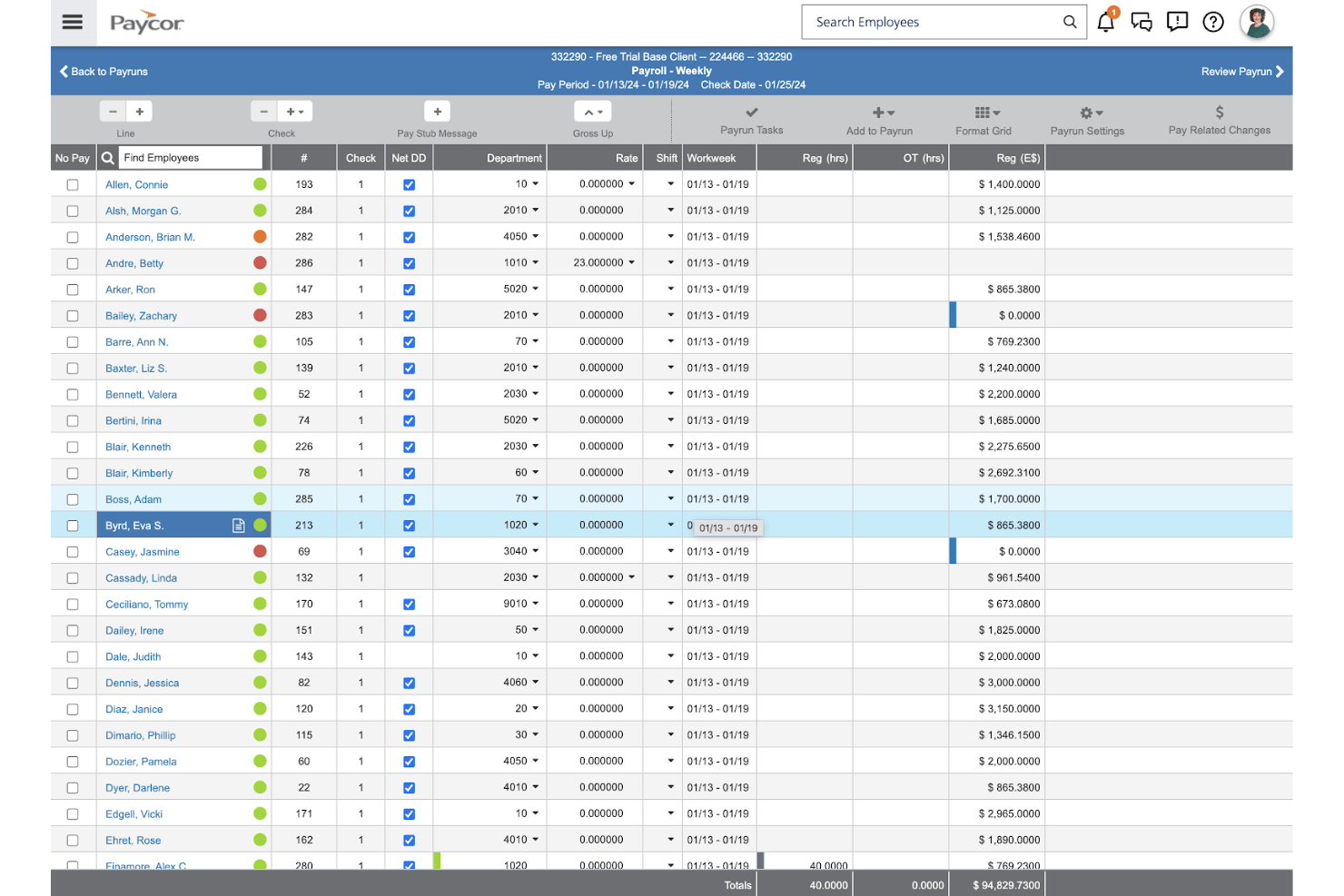
Paycor is an HCM platform that brings together payroll, HR recordkeeping, onboarding, time-off management, talent management, and workforce analytics in one system.
Who Is Paycor Best For?
Paycor is a strong fit for mid-market HR teams that need a unified HCM platform with deep workforce analytics built in.
Why I Picked Paycor
Paycor earns its spot on my shortlist because its workforce analytics go well beyond standard HR reporting. I'm particularly impressed by the AI-powered predictive resignation tool, which flags employees likely to leave within 12 months so you can act before it's too late. Pair that with pay equity tracking and EEOC benchmarking pulled from a 7-year historical dataset, and you get a genuinely complete picture of your workforce that most standalone HR tools can't match.
Paycor Key Features
- AI analytics assistant: Query your workforce data using plain-language questions and get instant dashboard results without any technical setup.
- Bulk onboarding automation: Send automated invites and assign onboarding task lists to large groups of new hires simultaneously.
- Configurable approval workflows: Set up multi-level time-off and HR process approvals tailored to your team structure and policy rules.
- Employee self-service portal: Employees can update personal details, view pay stubs, access documents, and request leave directly from the platform or mobile app.
Paycor Integrations
Paycor offers 320+ marketplace integrations, including OrgChart, Procore, JazzHR, Greenhouse, ZipRecruiter, and QuickBooks. It also provides 140+ open APIs for custom integrations, plus SSO support for Microsoft, Google, OneLogin, and Okta.
Pros and Cons
Pros:
- Bulk onboarding saves time for HR teams
- AI-powered dashboards offer instant HR insights
- Predictive resignation analytics highlight turnover risk
Cons:
- Advanced features often gated to higher tiers
- No free plan or free trial
Other HR Software Lists
Here are some additional HR software list options that didn’t make it onto my shortlist, but are still worth checking out:
- Oracle HCM Cloud
For full-lifecycle talent and payroll management
- Workday HCM
For enterprise-wide HR and workforce analytics
- HR Acuity
For compliant employee relations management
- TriNet
With full-service PEO and risk mitigation
- Workable HR
For AI recruitment and applicant tracking
- SixFifty
For automated employment law compliance
- iSpring LMS
For cloud training and pre-made courses
- factoHR
For hybrid workforces needing mobile HCM
- SAP SuccessFactors
For enterprise employee & talent management
- Insperity
Full-service HR outsourcing and technology combining payroll, compliance, benefits administration, and workforce analytics.


How I Evaluate HR Software Lists
I split my evaluation into what a tool must do to qualify and what sets it apart—covering everything from day-one onboarding to ongoing people analytics.
Core Functionality (Table Stakes For This List)
When I'm selecting tools for my list, I rank each one on a scale from 0 (does not offer the functionality) to 5 (excels in this area) for each core functionality listed below. I then calculate the tool's total score into a percentage, using 75% as a benchmark to help assess its overall fit for the list.
- Employee Database: I evaluate how each tool stores and organizes employee profiles, looking for custom fields, self-service updates, and bulk import options that keep records accurate as headcount grows.
- Time-Off Management: Leave workflows should include approval routing, balance tracking, and team visibility so managers can spot coverage gaps before approving requests.
- Onboarding Workflows: I check whether a platform offers structured task sequences with document collection, e-signatures, and automated reminders that guide new hires through their first days.
- Document Management: Secure, organized file storage matters. I look for role-based permissions and version history so teams can locate the right contract or policy without digging through email.
- Org Chart & Directory: A searchable directory paired with an auto-generated org chart helps employees understand reporting lines and find the right contact quickly across departments.
- Reporting & Analytics: I look for configurable reports on headcount, turnover, and time-off usage with export options, since canned reports alone rarely answer the questions HR leaders actually ask.
Once I have a list of tools that meet the criteria, I consider what sets each platform apart.
Differentiating Factors (What Sets Vendors Apart)
Here's how I compare and contrast different vendors:
Standout Features
I look for employee self-service portals that let people update their own info, request time off, and pull pay stubs without filing a ticket with HR. That alone cuts a surprising amount of back-and-forth. Custom workflow builders matter just as much—I check whether approval chains for PTO or expenses can mirror your actual org structure without needing a developer. Built-in reporting dashboards round things out; I want headcount, turnover, and diversity metrics I can slice without exporting to a spreadsheet.
Beyond Features
I check whether a platform offers native connectors to payroll providers, communication tools like Slack or Microsoft Teams, and calendars—plus an open API or Zapier support for filling gaps. Integration depth matters because a disconnected HR system creates duplicate data entry. I also evaluate data security posture, looking for SOC 2 Type II certification, role-based permissions, and audit logs that control access to sensitive employee records. Vendor stability rounds things out; I want confidence that my workforce data won't be stranded by a shutdown, so I look at data export options and product update frequency.
How to Choose an HR Software List
Finding the right HR software means asking: what data, workflow, and analytics needs can’t you compromise on—and which tradeoffs are you willing to make for your team’s style of working?
| If your priority is… | Look for… |
|---|---|
| Unified workforce visibility | Centralized employee database with real-time access |
| Data-driven planning | Built-in analytics dashboards and custom reporting |
| Efficient onboarding and workflows | Task-based onboarding sequences and automated alerts |
| Employee self-service | Portals for updating records and requesting time off |
| Data security and compliance | SOC 2 Type II certification and audit log features |
How to Vet Your Shortlist
- Test employee search and record updates: Search for five employee profiles and edit a job title to confirm database speed and data change history.
- Run a workflow trial: Set up and complete an onboarding workflow for a test user to check for missing automation or unclear steps.
- Request a security artifact: Ask the vendor for a SOC 2 Type II report or equivalent data security certification dated within the last 12 months.
- Check analytics customization: Build a headcount turnover report with department-level filtering and export the results to test flexibility.
- Big-platform breadth vs. workflow depth filter: Decide if you need broad all-in-one coverage or deep workflow customization, as few vendors allow both without major tradeoffs.
What Are HR Software Lists?
An HR software list is a curated collection of platforms that support HR teams with tasks like onboarding, employee record management, time-off tracking, and people analytics. These lists help you quickly compare features, evaluate options for your organization’s needs, and narrow down products that fit your requirements for workforce management as your business grows.
Features of HR Software Lists
When selecting HR software lists, keep an eye out for the following key features:
- Employee database: Centralizes employee records, making it easy to track personal information, job history, and custom fields as your organization grows.
- Time-off management: Automates leave requests, approvals, and balance tracking, helping teams manage vacation, sick days, and other absences without manual effort.
- Onboarding workflows: Provides step-by-step processes for new hires, with document collection, e-signatures, and task reminders to ensure no steps are missed.
- Document management: Offers secure storage for contracts, policies, and forms with role-based permissions and version control for easy access and compliance.
- Org chart and directory: Auto-generates a searchable structure of your organization, letting employees find colleagues and reporting lines quickly.
- Reporting and analytics: Supplies configurable dashboards for tracking headcount, turnover, and other metrics, with options to export or filter the data.
- Employee self-service portal: Allows staff to update personal details, request time off, and access pay slips without needing to go through HR for every task.
- Custom workflow builder: Lets you design approval processes and task sequences tailored to your organization, matching real-world structures and policies.
- Integration capabilities: Connects with payroll systems, communication tools, and calendars to reduce duplicate data entry and create a unified HR ecosystem.
- Security and compliance controls: Includes audit logs, data export options, and certification support (such as SOC 2 Type II) to help protect sensitive employee information and meet regulatory requirements.
Common HR Software List AI Features
Beyond the standard HR software list features listed above, many of these solutions are incorporating AI with features like:
- AI-driven candidate screening: Uses machine learning to analyze resumes and applications, automatically surfacing the most relevant candidates based on job requirements and historical hiring data. This helps recruiters focus on top matches and reduces manual review time.
- Predictive turnover analytics: Applies AI models to workforce data to identify employees at risk of leaving, factoring in engagement scores, tenure, and performance trends. HR teams can use these insights to intervene early and improve retention.
- Automated sentiment analysis: Monitors employee feedback from surveys, emails, and chat channels, using natural language processing to detect mood shifts and emerging concerns. This gives HR leaders a real-time pulse on morale and workplace culture.
- AI-powered scheduling assistants: Suggests optimal shift patterns, meeting times, or interview slots by analyzing availability, preferences, and workload data. This reduces scheduling conflicts and administrative back-and-forth.
- Personalized learning recommendations: Leverages AI to match employees with relevant training modules or career development resources based on their skills, goals, and performance gaps. This supports targeted upskilling and growth.
Benefits of HR Software Lists
Implementing HR software lists provides several benefits for your team and your business. Here are a few you can look forward to:
- Centralized employee records: Keep all employee data organized and easily accessible with features like bulk import, custom fields, and self-service profile updates.
- Automated time-off tracking: Eliminate manual leave management by using approval workflows, balance tracking, and team calendars to avoid scheduling conflicts.
- Structured onboarding processes: Guide new hires through step-by-step onboarding with automated workflows, document collection, and task reminders to ensure nothing falls through the cracks.
- Secure document management: Protect sensitive files and HR policies by storing them with role-based permissions and version history for reliable access and auditability.
- Configurable reporting and analytics: Generate detailed reports on headcount, turnover, or time-off with filters and export options that help tailor insights to your team's biggest questions.
- Employee self-service options: Empower employees to update their own information, request absences, or access pay slips without burdening the HR team.
- Integration with key systems: Connect with payroll, communication, and calendar tools—or use open API and Zapier support—to avoid duplicate data entry and keep HR workflows in sync.
Costs and Pricing of HR Software Lists
Selecting HR software lists requires an understanding of the various pricing models and plans available. Costs vary based on features, team size, add-ons, and more. The table below summarizes common plans, their average prices, and typical features included in HR software list solutions:
Plan Comparison Table for HR Software Lists
| Plan Type | Average Price | Common Features |
|---|---|---|
| Free Plan | $0 | Basic employee directory, limited self-service features, simple time-off tracking, and basic reporting. |
| Personal Plan | $5-$10/user/month | Core employee records, onboarding checklists, basic document storage, and basic analytics. |
| Business Plan | $10-$25/user/month | Full employee database, automated onboarding workflows, advanced document management, org chart, and reports. |
| Enterprise Plan | $25-$50/user/month | Custom workflow builders, API and integrations, deep analytics, enhanced security controls, and dedicated support. |
HR Software Lists FAQs
Here are some answers to common questions about HR software lists:
How do I know if an HR software list is up to date?
Look for the publish or “last updated” date on the page. If there isn’t one, check if the tools and screenshots reflect recent branding, features, or pricing. Lists that include recent compliance details, new integrations, or AI features are more likely to be current.
Do HR software lists include reviews or just features?
Most HR software lists include both a summary of each platform’s features and selections or highlights from user reviews. These reviews can help you spot potential pain points or unique strengths that aren’t obvious from the feature list alone.
What should I consider when shortlisting HR software vendors?
You’ll want to pilot the platform’s employee search, update user records, test onboarding workflows, and request up-to-date security certifications. This real-world testing helps you spot deal-breakers and ensure the product fits your HR team’s actual processes and compliance needs.
Can small businesses use the same HR software as large enterprises?
Yes, many HR software tools offer different tiers or pricing plans for companies of all sizes. Startups and small teams can usually start with a free or basic plan and scale up to business or enterprise features—like deeper analytics, integrations, or workflow builders—as headcount grows.
How important are integrations in choosing an HR software list?
Integrations should be a top priority if you use payroll, communication, or calendar tools outside your HR platform. Deep integrations help you avoid duplicate data entry, streamline approvals, and keep people records in sync across your systems. If in doubt, ask about API access or Zapier support.