

30 AI Recruiting Software for Sourcing in 2026

10 Best AI Recruiting Software Shortlist


Traditional recruiting processes can be time-consuming and inconsistent, with recruiters overwhelmed by manual resume reviews and repetitive tasks.
The best AI recruiting software helps you source, screen, and assess candidates more efficiently, and provides data-driven insights to improve decision-making.
Drawing on my experience as an HR specialist who has worked with dozens of recruiting platforms, I’ve curated a list of the top AI recruiting solutions on the market today.
In this guide, you’ll find tools that save time, increase hiring quality, and give your team a competitive edge in today’s fast-moving talent market.
What is AI Recruiting Software?
AI recruiting software uses artificial intelligence to streamline hiring by automating tasks like resume screening, candidate sourcing, and communication. It matches candidates to roles more effectively, analyzes hiring trends, and even predicts candidate fit.
The aim is to support recruitment teams and help create a faster, fairer, and more efficient hiring process that helps recruiters find the best talent with less effort.
Why Trust Our Software Reviews
We’ve been testing and reviewing HR software systems since 2019. As HR experts ourselves, we know how critical and difficult it is to make the right decision when selecting software.
We invest in deep research to help our audience make better software purchasing decisions. We’ve tested more than 2,000 tools for different HR management use cases and written over 1,000 comprehensive software reviews. Learn how we stay transparent & our software review methodology.
Best AI Recruiting Software: Pricing Comparison Chart
This comparison chart summarizes pricing details for my top AI recruiting software selections to help you find the best software for your budget and business needs.
| Tool | Best For | Trial Info | Price | ||
|---|---|---|---|---|---|
| 1 | Best for prioritizing most qualified candidates | 15-day free trial + free demo | From $299/month | Website | |
| 2 | Best AI skill assessments with video interviews | Free trial available | From $75/month | Website | |
| 3 | Best for automated candidate screening | Free demo available | Pricing upon request | Website | |
| 4 | Best for AI-powered background screening | Free demo available | From $29.99/report | Website | |
| 5 | Best for personalized AI interviews | No free trial available | Pricing upon request | Website | |
| 6 | Best for AI-driven talent acquisition | Free demo available | Pricing upon request | Website | |
| 7 | Best for customizable screening workflows | 7-day free trial + free demo available | From $99/month (billed annually) | Website | |
| 8 | Best for AI-powered content generation | Free demo available | Pricing upon request | Website | |
| 9 | Best for AI-powered email sequencing | Free trial + free demo available | From $85/user/month (billed annually) | Website | |
| 10 | Best for AI-powered candidate engagement | Free demo available | Pricing upon request | Website |


-

Native Teams
Visit WebsiteThis is an aggregated rating for this tool including ratings from Crozdesk users and ratings from other sites.4.6 -
Remote People
Visit WebsiteThis is an aggregated rating for this tool including ratings from Crozdesk users and ratings from other sites.5 -
Checkr
Visit WebsiteThis is an aggregated rating for this tool including ratings from Crozdesk users and ratings from other sites.4.5




Best AI Recruiting Software Reviews
Here’s a brief description of each AI recruiting software that showcases each vendor’s best use case, their noteworthy features, and some pros and cons. Keep reading to find additional bonus picks at the bottom of the list.


Workable is an AI-powered recruiting platform designed for HR teams and hiring managers who want to automate sourcing, screen candidates faster, and collaborate easily throughout the hiring process.
Who Is Workable Best For?
Workable is a good fit for growing mid-sized companies that need a structured, scalable hiring process with AI tools built in from the start.
Why I Picked Workable
I picked Workable as one of the best because of how well its AI screening assistant handles candidate prioritization. When my team is reviewing a high-volume pipeline, the AI generates match scores and requirement checklists for each candidate profile using semantic matching—so it catches qualified candidates even when their resume wording doesn't match the job description. I also like the AI-powered candidate recommendations, which pull from a database of 400 million profiles and learn from my team's decisions, refining suggestions based on who we advance or disqualify. The resume parser anonymizes identifying details before screening, keeping evaluations focused on qualifications rather than personal attributes.
Workable Key Features
- AI interview question generator: Generates role- and industry-specific interview question kits using just a job title and industry as inputs.
- One-way video interviews: Lets candidates record responses asynchronously, allowing your team to screen large volumes without scheduling live phone screens.
- Candidate self-scheduling: Candidates book their own interview slots directly, with automatic calendar syncing and time zone detection to reduce back-and-forth.
- Automated social media promotion: Identifies 1,000+ passive candidates and displays your job ad in their social media feeds with a single click.
Workable Integrations
Integrations include LinkedIn, Indeed, ADP Workforce Now, Xero, Slack, Google Calendar, Microsoft Outlook, Zoom, Docusign, and BambooHR.
Pros and Cons
Pros:
- Tracks candidates through the entire pipeline
- Customizable workflows and dashboards
- Enables the creation of SEO-optimized job descriptions
Cons:
- May be expensive for smaller businesses
- Search functionality could be improved
New Product Updates from Workable
Workable Syncs Past Work Schedules to Ergani
Workable introduces past work schedule synchronization with Ergani. This update automates data syncing using actual clock-in and clock-out records to improve compliance and accuracy. For more information, visit Workable’s official site.
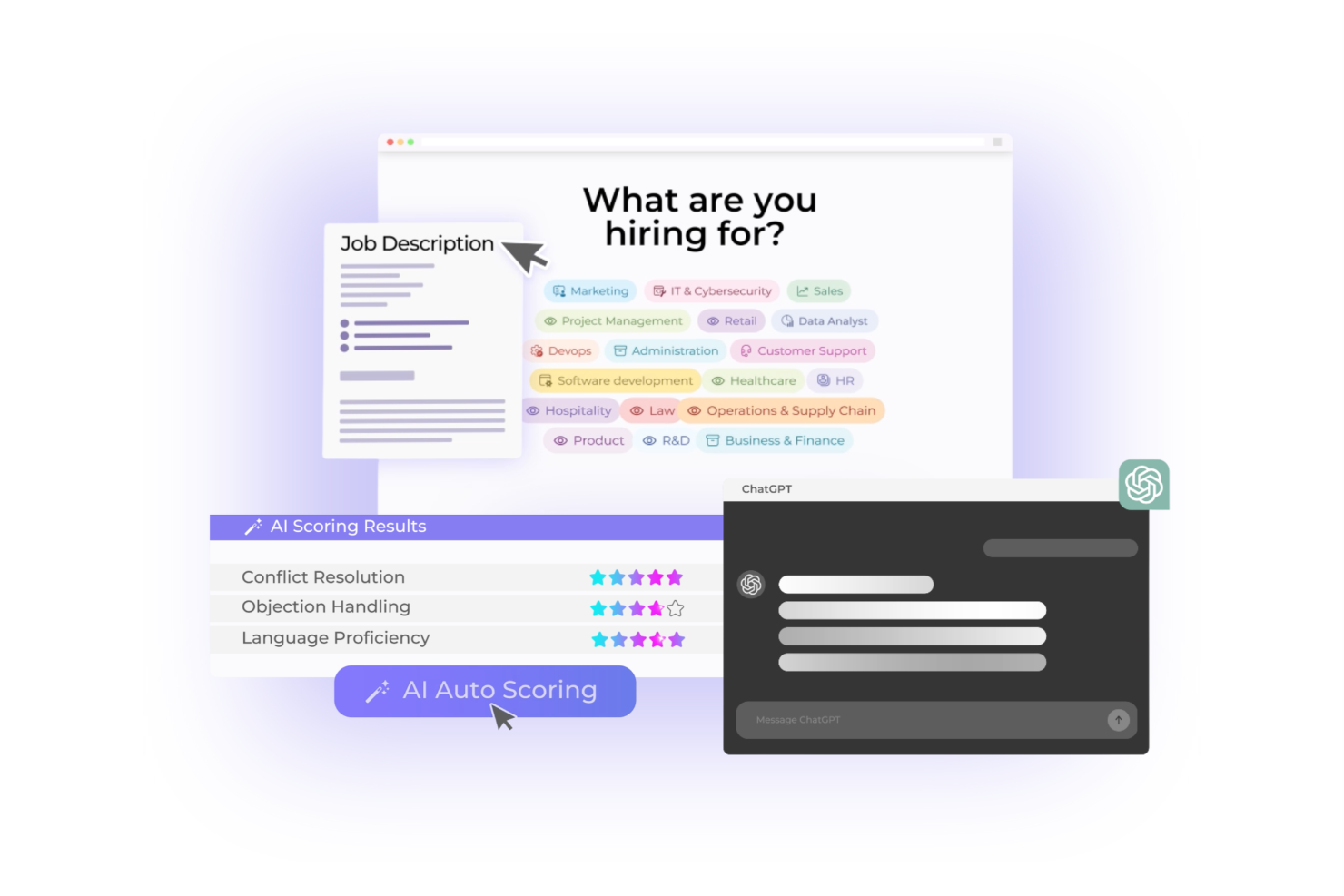
Canditech gives HR teams and recruiters a way to automate candidate screening with AI-driven skill assessments and video interviews, helping businesses in tech, finance, and customer service identify top talent sooner and reduce manual hiring tasks.
Who Is Canditech Best For?
Canditech is a strong fit for mid-sized to enterprise companies in tech, finance, and customer service that need to screen high volumes of candidates without sacrificing assessment quality.
Why I Picked Canditech
I've included Canditech in my top picks because I love how it combines AI-powered skill assessments with one-way video interviews in a single platform. A standout is the AI Assessment Builder—you upload a job description and it generates a role-specific, ready-to-use assessment in seconds. I also like the AI Auto-Scoring feature, where pre-trained AI agents check and score candidate answers automatically, so my team isn't manually reviewing every submission. Additionally, the video response question type lets candidates record answers directly inside the assessment, giving you a read on communication and soft skills without scheduling a separate interview round.
Canditech Key Features
- Anti-cheating detection tools: Monitor candidate behavior during assessments with tab switch tracking, copy-paste detection, webcam snapshots, and ChatGPT content detection.
- 500+ pre-built assessment library: Access ready-to-use tests built by industry experts across roles in engineering, finance, sales, customer support, and more.
- Candidate ranking and reporting: Automatically rank candidates by performance score and generate detailed reports to compare results across your applicant pool.
- Employer branding customization: Add your company logo, background image, color scheme, and a welcome video to assessments to reflect your brand to candidates.
Canditech Integrations
Integrations include Workday, SAP SuccessFactors, iCIMS, ADP Workforce Now, Oracle Recruiting Cloud, SmartRecruiters, Greenhouse, Lever, Bullhorn, and JazzHR.
Pros and Cons
Pros:
- Advanced AI auto-scored customizable assessments
- Comprehensive AI and technical library
- Expert support available
Cons:
- Only yearly pricing plans available
- ATS integrations excluded in the lowest pricing tier
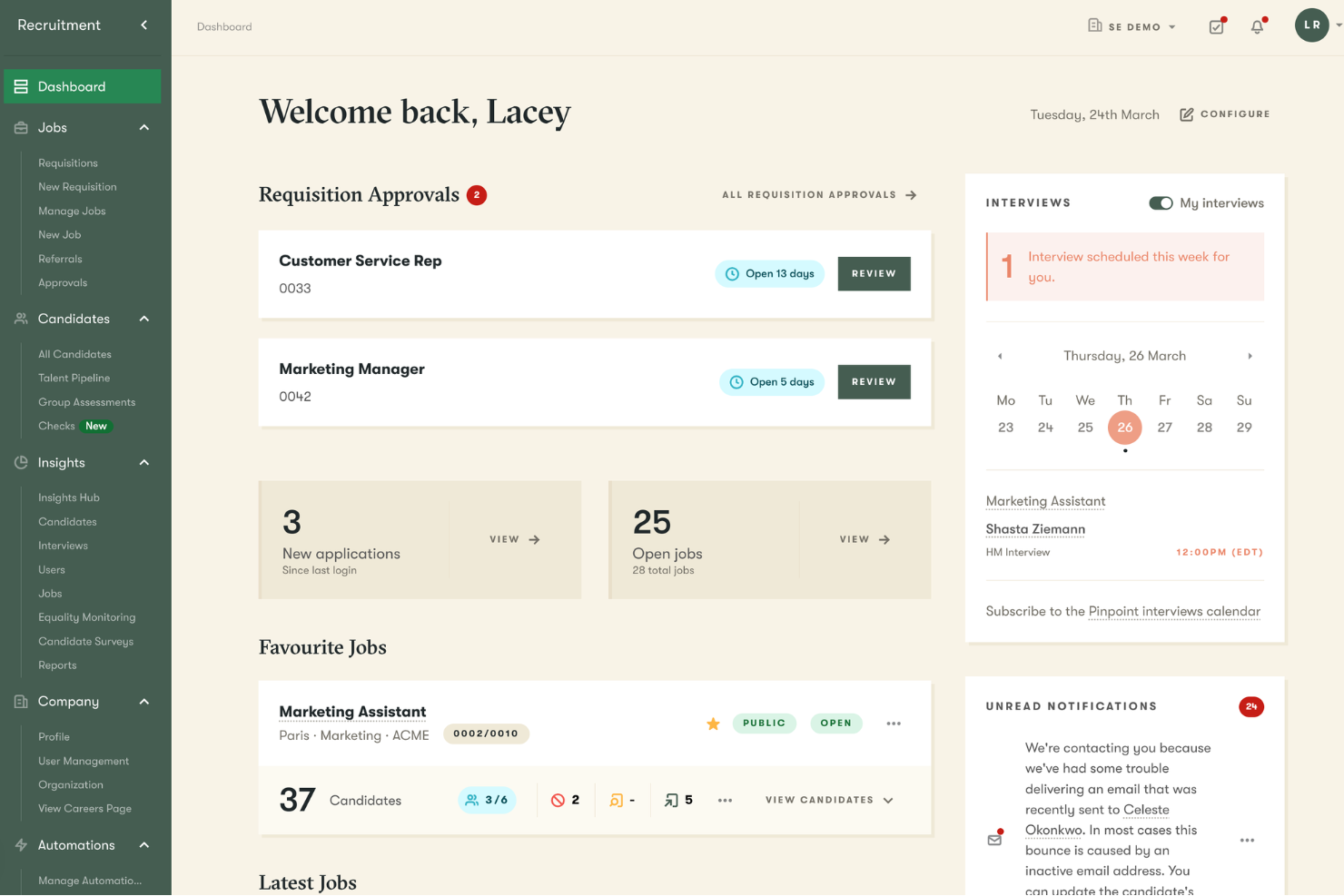
Pinpoint is an AI-powered recruiting platform built for in-house talent acquisition teams who want to automate repetitive hiring tasks, improve candidate quality, and deliver a branded experience throughout the recruitment process.
Who Is Pinpoint Best For?
Pinpoint is a strong fit for mid-sized companies with dedicated in-house recruiting teams looking to reduce manual screening work and hire more consistently at scale.
Why I Picked Pinpoint
Pinpoint earns its spot on my shortlist because its AI candidate screening tools work well. I particularly like the AI Candidate Filters feature, which lets you tell the AI exactly what to look for—specific skills, experience levels, or job description criteria—and it scores and flags candidates automatically. Paired with the AI Candidate Match Score, my team can consistently prioritize the strongest applicants without manually reviewing every application. That combination makes a real difference when you're managing high-volume roles across multiple departments at once.
Pinpoint Key Features
- Blind recruitment software: Automatically anonymize candidate applications so hiring teams evaluate applicants on skills and experience alone, reducing bias in the selection process.
- Interview scheduling software: Let candidates self-schedule interviews directly from your ATS, cutting out back-and-forth emails and reducing no-shows.
- Candidate scorecards: Score candidates against role-specific interview criteria so hiring teams can compare applicants side-by-side and make more objective decisions.
- Hiring workflow management: Configure custom recruitment workflows that automatically move candidates through stages and keep the right people updated without manual chasing.
Pinpoint Integrations
Integrations include BambooHR, ADP Workforce Now, UKG, BreatheHR, Oracle, Paycor, Sage People, LinkedIn, Microsoft Teams, and Slack.
Pros and Cons
Pros:
- Offers branded career sites
- Automation of various recruitment processes
- Ability to customize the platform
Cons:
- May not be suitable for large organizations with complex needs
- Initial setup can be time-consuming


Checkr is a background screening platform designed for HR teams and recruiters who need to vet candidates with speed and accuracy, helping businesses in regulated industries reduce hiring risk and speed up decision-making with automated, AI-driven workflows.
Who Is Checkr Best For?
Checkr is a strong fit for mid-size to enterprise companies in high-volume hiring industries like healthcare, logistics, and financial services that need fast, compliant background checks at scale.
Why I Picked Checkr
I picked Checkr as one of the best because of how deeply AI is woven into the actual screening process—not just bolted on as a feature. I like the charge classifier, which uses machine learning to normalize criminal charge language across jurisdictions, so my team isn't manually deciphering inconsistent court records from different counties. The name matcher is another feature I find genuinely useful: it identifies all name variants tied to a candidate and surfaces records across every alias, which catches records a manual review would miss. Additionally, the AI-powered report ETA reduces inbound candidate status questions, easing pressure on recruiting teams managing high-volume pipelines.
Checkr Key Features
- Continuous checks: Monitor candidates and employees on an ongoing basis for new criminal records after the initial background check is complete.
- Candidate portal: Give candidates a self-service portal to submit their information, track check status, and respond to any disputes.
- Adjudication tools: Apply customizable, rules-based criteria to automatically assess background check results against your company's hiring policies.
- Drug and health screening: Order and manage drug tests and occupational health screenings alongside criminal background checks in one place.
Checkr Integrations
Integrations include Gusto, iCIMS, Workday, Greenhouse, BambooHR, Rippling, and Planning Center.
Pros and Cons
Pros:
- Mobile-friendly candidate experience
- AI improves screening accuracy
- Fast background check turnaround
Cons:
- Limited phone-based support
- Occasional report delays
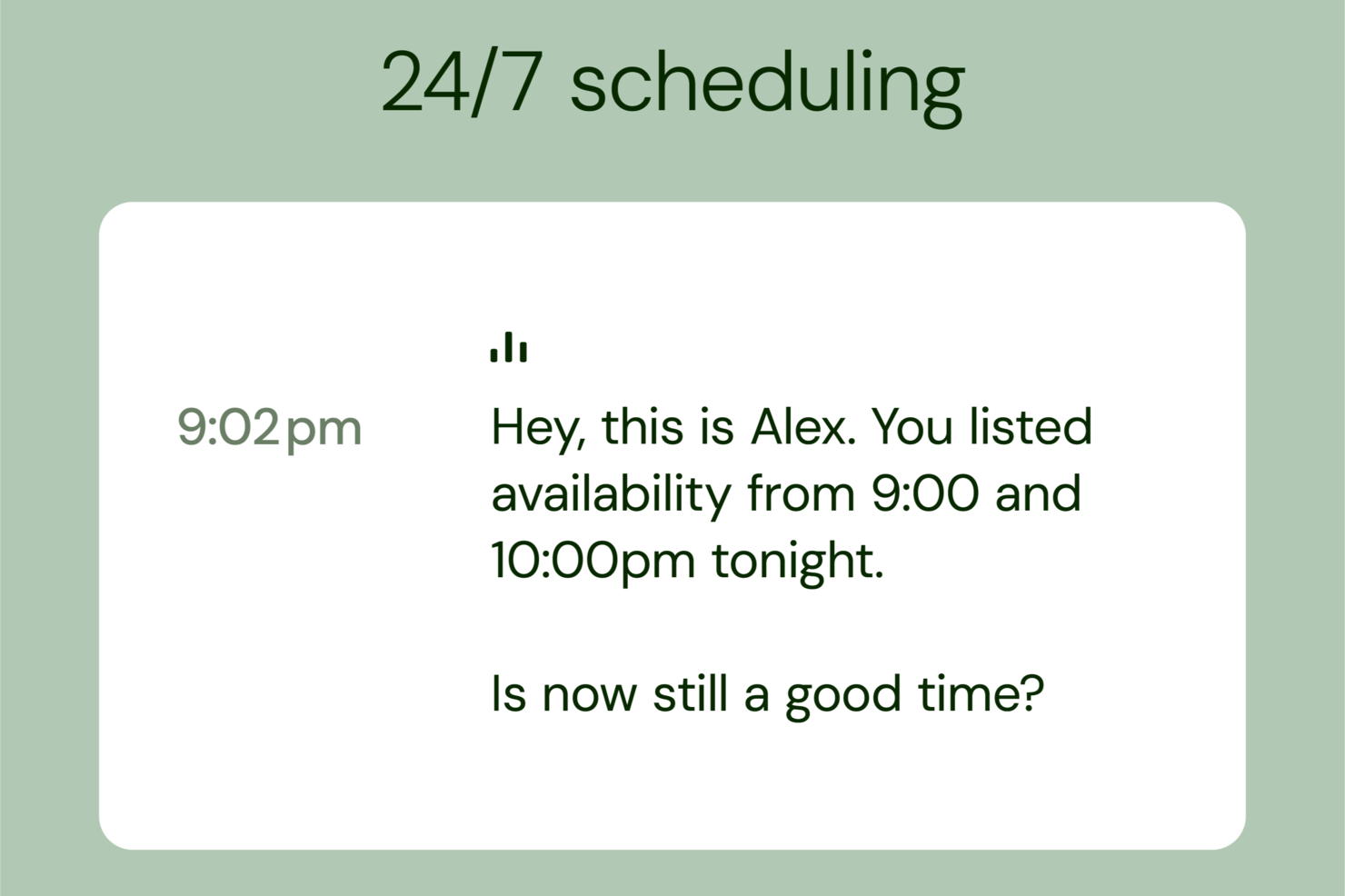
Alex uses AI to help recruiters and HR teams automate interviews, streamline candidate assessments, and improve hiring decisions with data-driven insights tailored for modern talent acquisition needs.
Who Is Alex Best For?
Alex is a good fit for talent acquisition teams and HR professionals who need to scale interview processes without sacrificing candidate experience.
Why I Picked Alex
Alex earns its spot on my shortlist because of how it handles personalized AI interviews at scale. I like that Alex tailors interview questions dynamically based on each candidate's background and role requirements, so no two interviews feel identical. My team is able to review AI-generated summaries and scoring after each session, which cuts down the time spent on manual note-taking and post-interview debriefs. That combination of personalization and automated evaluation is what makes Alex stand out in AI recruiting.
Alex Key Features
- Automated interview scheduling: Alex coordinates interview times with candidates automatically, removing back-and-forth email exchanges from the recruiter's workflow.
- Candidate ranking: Alex scores and ranks applicants based on interview responses, giving recruiters a structured way to compare candidates side by side.
- ATS integration: Alex connects with existing applicant tracking systems to sync candidate data and keep hiring pipelines up to date.
- Bias reduction tools: Alex applies consistent evaluation criteria across all interviews to support fair and objective candidate assessments.
Alex Integrations
Integrations include Greenhouse, Bullhorn, Workday, Google Workspace, and Zoho Calendar.
Pros and Cons
Pros:
- Supports multilingual candidate interviews
- Built in fraud detection tools
- Automates high volume interviews
Cons:
- Advanced features need configuration
- Pricing not publicly available

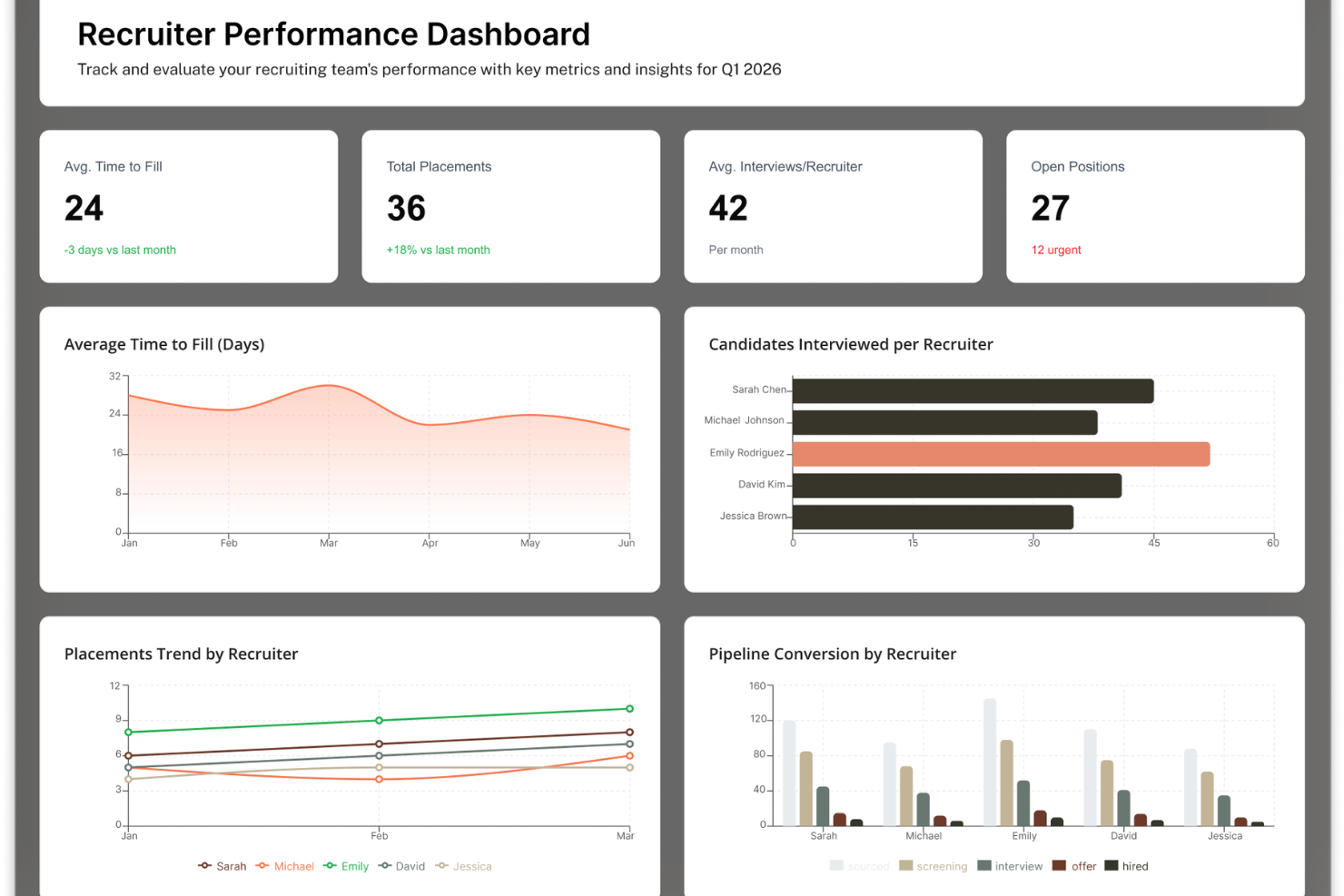
ClearCo gives HR teams and talent acquisition professionals a unified platform to automate recruiting workflows, screen candidates with AI, and make smarter hiring decisions across industries needing scalable, data-driven hiring solutions.
Who Is ClearCo Best For?
ClearCo is a strong fit for mid-size to enterprise HR teams that need a structured, AI-supported hiring process across multiple departments or locations.
Why I Picked ClearCo
ClearCo earns its spot as one of the best on my shortlist because of how deeply AI is woven into the actual hiring workflow, not bolted on as an afterthought. I particularly like Talent AI's candidate sourcing feature, which taps into 800 million global profiles and resurfaces past applicants matched to open roles—so my team isn't starting from scratch every time a requisition opens. The AI Notetaker is another feature I rely on heavily: it captures key moments from interviews automatically, pulling highlights and summaries so my team can stay present in conversations and compare candidates more consistently afterward. The Answer Builder also lets me ask natural-language questions about pipeline health and hiring performance and get instant, tailored reports without digging through dashboards.
ClearCo Key Features
- Talent AI sourcing: Enables candidate discovery across a large global profile database and resurfaces previously engaged applicants matched to open roles.
- AI Notetaker: Provides automated interview transcription with captured highlights and summaries for structured candidate evaluation.
- Answer Builder: Allows users to generate reports and insights on hiring pipeline performance using natural-language queries.
ClearCo Integrations
Integrations include ADP, UKG, Paylocity, Paychex, Ceridian, Indeed, LinkedIn, Glassdoor, Sterling, and SkillSurvey.
Pros and Cons
Pros:
- Highly customizable evaluations
- Helpful goal-tracking and alignment tools
- Real-time feedback
Cons:
- The interface looks somewhat dated
- No Boolean search

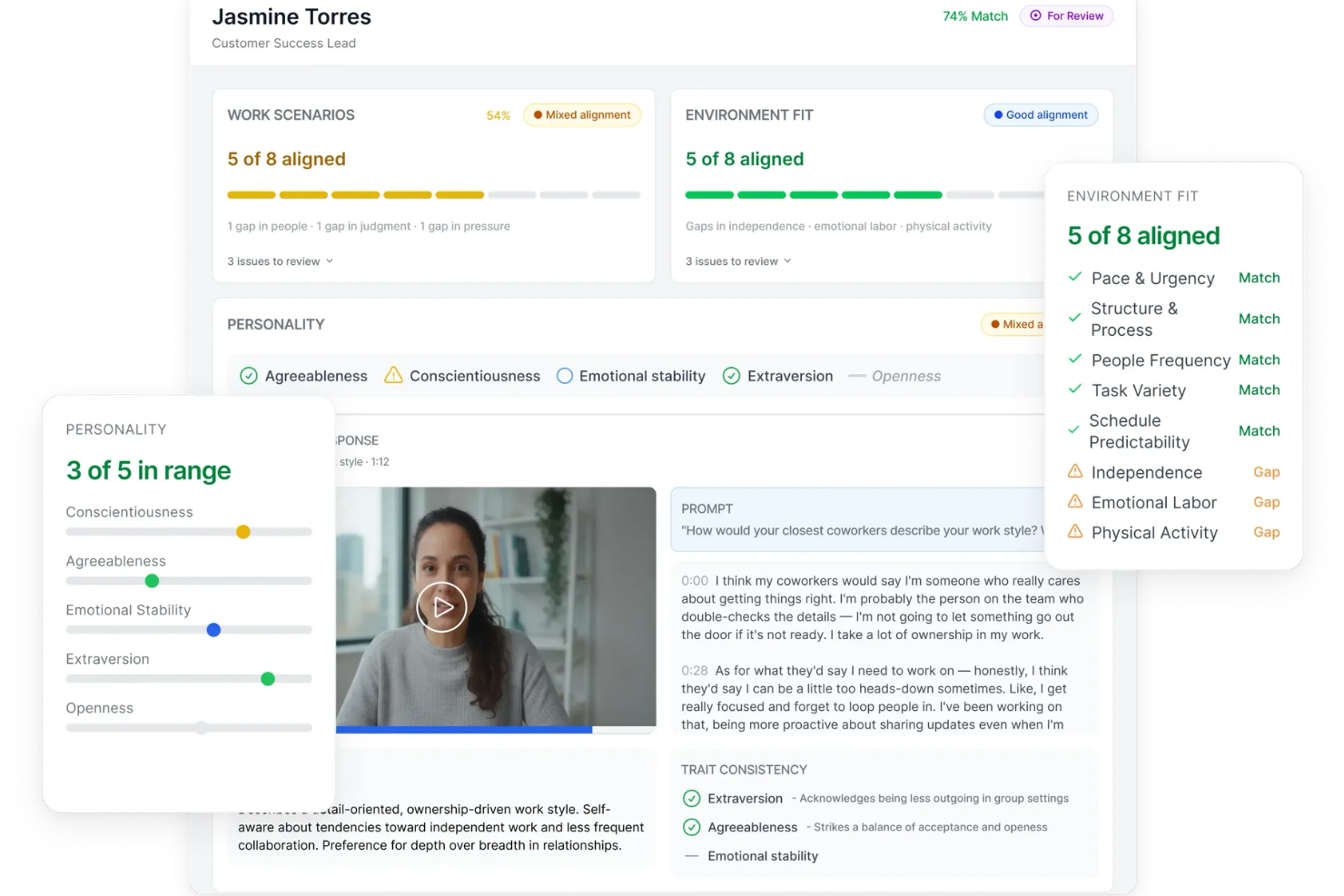
Truffle is an AI recruiting platform designed for in-house talent teams and agencies who want to automate sourcing, screening, and candidate engagement while keeping hiring workflows flexible and collaborative.
Who Is Truffle Best For?
Truffle is a strong fit for growing companies and recruiting teams that need to move fast without sacrificing structure in their hiring process.
Why I Picked Truffle
I picked Truffle as one of the best because of how much control it gives you over the screening process. You can mix and match one-way video interviews, structured talent assessments, and resume screening to match what each role actually needs. I like that the AI evaluates every candidate response against a rubric you define, then provides a clear explanation for each evaluation instead of only a score. So my team can review AI-flagged candidates with context rather than just a score.
Truffle Key Features
- Candidate Shorts: Truffle auto-generates a 30-second video recap of each candidate's interview so you can review responses without watching full recordings.
- AI Check: A built-in detection flag that highlights when a candidate's answers show patterns consistent with AI-generated responses.
- Team scorecards: Collect independent reviewer scores and see hiring consensus in one view, without waiting for a debrief meeting.
- Candidate branding customization: Customize interview landing pages, instructions, and confirmation emails with your logo, brand colors, and messaging.
Truffle Integrations
Integrations include Ashby, Breezy HR, and Indeed.
Pros and Cons
Pros:
- Flexible screening workflows by role
- Consolidated candidate view with AI summaries
- Built-in assessments reduce external tool reliance
Cons:
- Requires internet connectivity for video analysis
- Not a full applicant tracking system


Greenhouse is an AI-driven recruiting platform for talent acquisition teams and HR professionals, automating sourcing, screening, and candidate engagement across the hiring process.
Who Is Greenhouse Best For?
Greenhouse suits mid-size to enterprise companies with dedicated recruiting teams that need a structured, scalable hiring process.
Why I Picked Greenhouse
I picked Greenhouse as one of the best because I love how its AI content generation is woven directly into the hiring workflow rather than bolted on as a separate tool. When my team sets up a new role, Greenhouse generates structured job descriptions and scorecard attributes automatically—so we're not starting from scratch every time. I also like the AI-generated sourcing messages, which create personalized outreach for prospects without requiring recruiters to write each one manually. The automated hiring plans feature goes a step further, generating interview stages and questions tailored to each role so every interviewer knows exactly what to assess.
Greenhouse Key Features
- Talent Match: Uses AI to score and rank applicants against your job criteria, surfacing the strongest candidates to the top of your pipeline.
- Real Talent fraud detection: Combines spam filtering and CLEAR-powered identity verification to flag fake or misrepresented applicants before they reach your team.
- AI-driven interview scheduling: Automatically matches interviewers, checks calendar availability across time zones, and handles conflict resolution without manual coordination.
- Greenhouse Analytics: A self-serve reporting dashboard that lets recruiting teams query pipeline health, hiring performance, and sourcing data without relying on external BI tools.
Greenhouse Integrations
Integrations include Checkr, Criteria Corp, Findem, HireRight, BrightHire, Pave, Grayscale, AmazingHiring, Alva Labs, and AI Screened.
Pros and Cons
Pros:
- Robust analytics and reporting
- Bias mitigation tools
- Comprehensive applicant tracking system (ATS)
Cons:
- Can be complex to set up
- Could offer more customization options


Recruit CRM is an AI-driven recruiting platform designed for staffing agencies and recruitment teams who want to automate sourcing, candidate management, and communication throughout the hiring process.
Who Is Recruit CRM Best For?
Recruit CRM is a strong fit for independent staffing agencies and boutique recruitment firms that need a combined ATS and CRM in a single platform.
Why I Picked Recruit CRM
I picked Recruit CRM as one of the best because of how well its AI sequencing handles multi-channel outreach without requiring manual follow-up at every step. You can set up automated email, LinkedIn, and SMS sequences once, and the platform runs them on autopilot—sending personalized messages based on candidate actions, like applying to a role or going quiet after an initial touchpoint. I also like the GPT integration, which generates email templates and suggests improvements based on the intent behind a response, so sequences don't feel generic. Pair that with AI candidate sourcing that uses natural language prompts to surface LinkedIn profiles, and my team can move from finding a candidate to running a full outreach sequence without switching tools.
Recruit CRM Key Features
- Resume parser: Automatically extracts and organizes candidate data from uploaded resumes into structured profile fields.
- Kanban pipeline view: Lets you visualize and move candidates through custom recruitment stages on a drag-and-drop board.
- Job posting distribution: Publishes open roles to multiple job boards simultaneously from within the platform.
- Activity timeline: Logs all candidate interactions, notes, and status changes in a single chronological view per profile.
Recruit CRM Integrations
Native integrations are not currently listed.
Pros and Cons
Pros:
- Suitable for high-volume global hiring
- Easy-to-use
- Customer support is responsive to user feedback
Cons:
- Lack of native integrations
- No built-in spell check function within email campaigns
New Product Updates from Recruit CRM

Recruit CRM Adds AI Candidate Matching and Resume Parsing
Recruit CRM Recruit CRM introduces AI candidate matching and enhanced resume parsing. These updates help recruiters identify candidates faster and improve screening accuracy. For more information, visit Recruit CRM's official site.
 .
.

Humanly is an AI recruiting platform for HR teams and recruiters, automating candidate screening, engagement, and interview scheduling while reducing bias and improving the candidate experience.
Who Is Humanly Best For?
Humanly is a good fit for mid-sized to enterprise recruiting teams that handle high applicant volumes and need to automate early-stage candidate interactions without losing a personal touch.
Why I Picked Humanly
Humanly earns its spot on my shortlist because of how well its AI Recruiter handles candidate engagement at scale. I love that it reaches every applicant within seconds via SMS, chat, or email—24/7—using conversational AI that feels like a real two-way exchange rather than a form submission. In practice, that means my team isn't losing candidates to slow response times or application black holes. The customizable screening rules and knockout criteria also let us automatically surface qualified candidates and filter out mismatches before a recruiter ever gets involved.
Humanly Key Features
- AI Interviewer: Conducts structured, autonomous video or voice interviews with every candidate at scale, then ranks responses so recruiters can review results without sitting in on each session.
- AI Notetaker: Automatically captures notes and generates summaries during live interviews, so recruiters aren't manually transcribing conversations.
- Talent CRM: Manages candidate pipelines with multi-touch SMS and email outreach sequences, sentiment detection, and built-in referral tracking.
- Diversity tracking: Monitors progress toward diversity hiring goals at an aggregate level, with bias controls built into AI matching and sourcing.
Humanly Integrations
Native integrations are not currently listed.
Pros and Cons
Pros:
- Personalized outreach balances automation with a human touch
- Automated scheduling reduces time spent on coordination
- AI-powered video interviews improve candidate engagement
Cons:
- Some features may require onboarding to fully utilize
- Pricing not publicly listed
Other AI Recruiting Software
Here are a few more worthwhile options that didn’t make the best AI recruiting software list. I didn’t have room for a full review for each of these but they are still worthy of consideration:
- Boon
For AI-driven candidate referrals
- AvaHR
For smart job descriptions
- Manatal
For AI candidate sourcing and enrichment
- VidCruiter
For structured interview workflows
- Syndio
For AI-driven pay recommendations
- Rippling
For AI-powered candidate feedback
- Willo
For video screening
- Gem
For engaging candidates across platforms
- myInterview
For interviewing and assessing candidates
- Fetcher
For crafting automated outreach campaigns
- SeekOut
For sourcing hard-to-find talent
- HireVue
For conversational hiring
- iCIMS
For remote teams
- Mitratech TalentReef
For applicant tracking and management
- Jobvite
For optimized hiring strategies
- Transformify
ATS
- Unnanu Hire
For bias-free AI candidate scoring
- Skima.ai
For AI-driven candidate matching and parsing
- Eightfold.ai
For reducing time-to-hire
- Paradox
For text-based hiring workflows


Related HR Software Reviews
If you still haven't found what you're looking for here, check out these other related tools that we've tested and evaluated:
- HR Software
- Payroll Software
- Recruiting Software
- Employer of Record Services
- Applicant Tracking Systems
- Workforce Management Software
How I Selected the Best AI Recruiting Software
Selecting the right AI recruiting software requires a deep understanding of the recruitment lifecycle and how advanced automation can alleviate common pain points for hiring managers and recruiters.
Drawing on my recruitment experience, I developed a comprehensive approach to evaluating these tools.
That experience also made it easier to identify features that truly add value — and avoid the pitfalls of manual, time-consuming processes that slow down hiring.
Here’s a summary of the main features I evaluated to create this list:
Core Recruiting Functionalities (25% of total score)
To be considered, the solution needed to cover the essential aspects of recruitment:
- Applicant tracking system (ATS) capabilities: Managing candidate data and workflows, either as a standalone system or as a module within a broader HCM or HRIS.
- AI-powered candidate sourcing: Automated sourcing across job boards, social platforms, and internal databases to identify top talent faster.
- Candidate screening & ranking tools: Intelligent parsing, keyword matching, and scoring to ensure recruiters spend time with the most qualified candidates.
- Interview scheduling automation: Built-in calendar integrations to eliminate back-and-forth scheduling delays.
- Job posting distribution: Automated posting across multiple job boards and career sites.
- Recruiting analytics and reporting: Tools that eliminate manual data crunching and highlight pipeline bottlenecks, cost per hire, and time-to-fill.
Additional Standout Features (25% of total score)
I also looked for standout capabilities that go beyond the basics:
- AI-driven candidate matching that predicts best-fit candidates based on skills, experience, and cultural alignment.
- Chatbots and conversational AI to engage candidates 24/7, answer FAQs, and guide them through the application process.
- Diversity and bias reduction tools, including anonymized resume screening and fair evaluation algorithms.
- Video interview intelligence with AI-enabled note-taking, sentiment analysis, and skills recognition.
- Predictive hiring analytics for identifying potential turnover risks or forecasting candidate success.
- Customizable workflows to adapt to different roles, regions, or hiring volumes.
- Mobile recruiting capabilities, ensuring recruiters and candidates can interact on the go.
- Integration with background checks, assessments, and HR systems for seamless end-to-end hiring.
Usability (10% of total score)
I assessed how easy each platform is to use for recruiters, hiring managers, and candidates:
- Intuitive dashboards that display pipeline stages, hiring metrics, and candidate progress clearly.
- Drag-and-drop or no-code automation workflows that reduce repetitive tasks.
- Role-based permissions to ensure the right people have the right level of access.
- Integration with productivity tools like Slack, Teams, or email for smoother communication.
Customer Onboarding (10% of total score)
Adoption and setup are critical in recruiting software, so I considered:
- Step-by-step onboarding guides and training resources (videos, templates, product tours).
- Fast implementation timelines and pre-built integrations with job boards and HRIS systems.
- Support for importing historical candidate data from previous ATS or spreadsheets.
- Access to recruiter communities or best practice forums.
Customer Support (10% of total score
Because hiring is time-sensitive, strong support is essential:
- Multiple support channels, including live chat, email, and phone.
- Response times, especially during peak recruiting cycles.
- Access to a knowledge base and FAQs for self-service troubleshooting.
Value for Price (10% of total score)
Recruiting budgets vary, so I evaluated:
- Transparent pricing models, whether per seat, per job posting, or enterprise license.
- Flexible payment options to support both startups and larger enterprises.
- Free trials or demos for hands-on evaluation.
Customer Reviews (10% of total score)
Finally, I reviewed how the software performs for real users:
Consistent praise or criticism patterns in reviews that reveal true strengths and weaknesses.
Overall recruiter satisfaction scores and adoption rates.
Impact on hiring outcomes, such as reduced time-to-hire or improved candidate quality.
How to Choose an AI Recruiting Tool
AI recruiting software can help you streamline all aspects of your hiring process, including sourcing candidates, screening applications, scheduling interviews, and reviewing analytics.
To figure out which recruiting platform best fits your needs, use the following table as a guide:
| Decision Area | Questions to Ask | AI Recruiting Context |
|---|---|---|
| Recruitment Challenges | What hiring challenges are you trying to solve? | Time-consuming candidate sourcing, manual resume screening, lack of diversity in shortlists |
| Main Users | Who will use the tool, and how many licenses do you need? | Recruiters, hiring managers, interviewers |
| Budget | What is your budget, now and long-term? | Cost per user, projected hires over 5–10 years, SaaS savings from all-in-one tools |
| Desired Outcomes | What results are you aiming for, and how will you measure success? | Reduced time-to-hire, improved candidate quality, increased recruiter satisfaction |
| Integrations | Does it need to integrate with existing systems? | HRIS platforms, video interview tools, productivity apps like Slack or Gmail |
| Technical Requirements | Does the tool meet your security and workflow needs? | SSO and 2FA security, compatibility with Google Workspace, scalability for global teams |
AI Recruiting Software: Frequently Asked Questions
Interested to discover more about AI recruiting software? Here are some answers to common questions.
What recruitment tasks can AI assist with?
Specifically, AI can help with:
- Sourcing candidates from job boards, social platforms, and databases
-
Parsing and screening resumes automatically
-
Ranking and shortlisting candidates based on fit
-
Scheduling interviews with calendar integrations
-
Running chatbots for candidate Q&A and engagement
-
Sending automated updates and reminders to candidates
-
Analyzing recruiting metrics like time-to-hire and cost-per-hire
-
Predicting candidate success or turnover risk
-
Supporting diversity by anonymizing resumes and reducing bias.
Can AI recruiting tools reduce bias in hiring?
Yes, many tools anonymize resumes or use algorithms designed to reduce unconscious bias. However, it’s important to evaluate how transparent and fair the system’s AI models are.
What should I ask vendors before choosing a tool?
Key questions include:
- How does your AI model learn and update over time?
- Can we customize candidate scoring criteria?
- What level of transparency or explainability does the AI provide?
- How do you handle compliance with data privacy regulations (GDPR, EEOC, etc.)?
- Do you offer bias testing or auditing for the AI models?
- What is the average implementation time?
- Can recruiters override AI recommendations?
- Do you provide a sandbox or demo environment for testing?
- What onboarding and training resources are included?
- What support options are available (live chat, phone, dedicated account manager)?
- How do you ensure candidate experience isn’t negatively impacted by automation?
- What integrations are pre-built, and what requires API customization?
- How often is the platform updated or improved?
- Do you offer scalability for global recruiting (multi-language, multi-currency)?
- What reporting and analytics capabilities are included out-of-the-box?
Will AI recruiting software replace recruiters?
No. AI tools are designed to support recruiters by reducing manual, repetitive tasks and aiding in decision making. Recruiters are still responsible for relationship-building, interviewing, and final decision-making.
Improve your talent acquisition efforts with AI recruiting software
AI recruiting software can help your talent acquisition team find candidates that are not only technically skilled, but are also a great fit for your company culture. These solutions dramatically increase your chances of finding needles in haystacks, so they can be invaluable assets for your organization.
As Jack Kelly, CEO of WeCruitr, said: “Hiring managers want to hire the most appropriately skilled candidates as quickly as possible. However, one of the biggest complaints made by job seekers is that the hiring process takes too long. By leveraging AI to source the most suitable candidates more quickly, it will improve the process for all parties involved.”
What’s Next?
If you're in the process of researching AI performance management tools, connect with a SoftwareSelect advisor for free recommendations.
You fill out a form and have a quick chat where they get into the specifics of your needs. Then you'll get a shortlist of software to review. They'll even support you through the entire buying process, including price negotiations.