

10 Best Resume Screening Software For HR Teams in 2026

10 Best Resume Screening Software Shortlist


The best resume screening software helps you quickly identify top candidates, reduce manual review time, and keep your hiring process moving efficiently.
When you’re dealing with large volumes of applications, manual screening can slow everything down and increase the risk of missing qualified candidates. The right tool cuts through the noise by automatically ranking resumes, highlighting relevant skills, and surfacing the strongest matches for your roles.
Based on my experience as in an in-house recruiter and seasoned reviewer of HR software, I’ve curated the top resume screening solutions designed for speed, accuracy, and scalability.
What is Resume Screening Software?
Resume screening software is a tool recruiters use to scan, analyze, and filter job applications to identify the candidates with the most skill matches for each open position. You can use it to scan for specific keywords and skills, filter resumes for specific criteria, and rank candidates objectively against your job requirements. Many also use artificial intelligence (AI) technologies that analyze insights from past hiring processes to improve your recruitment workflows.
By automating the initial resume screening and filtering stage, resume screening software can save recruiters a ton of time. It can also improve your hiring outcomes by using AI to conduct skill matching for specific criteria, helping you find the best talent easily. Other benefits include the ability to detect inaccuracies in job profiles, eliminate hiring bias, promote diverse recruitment practices, and tools to build an efficient and productive workforce.
Why Trust Our Software Reviews
Our team has been testing and reviewing software since 2012. As HR experts ourselves, we know how difficult—and important—it is to choose the right software.
For this guide, we evaluated tools using hands-on testing and independent research, scoring tools using our selection criteria. We also draw on insights from industry thought leaders and practicing HR experts.
Our reviews reflect our human editorial judgment, not a sales pitch.
Expert reviewers:
Best Resume Screening Software: Pricing Comparison Chart
This comparison chart summarizes pricing details for my top resume screening software selections to help you find the best software for your budget and business needs.
| Tool | Best For | Trial Info | Price | ||
|---|---|---|---|---|---|
| 1 | Best for custom candidate pipelines | Free demo available | From $8/user/month | Website | |
| 2 | Best for cross-department recruitment workflows | Free plan available | From $9/user/month (billed annually) | Website | |
| 3 | Best for advanced resume filtering | 15-day free trial | From $299/month (billed annually) | Website | |
| 4 | Best for multilingual resume parsing | Free demo available | Pricing upon request | Website | |
| 5 | Best with AI-powered video interview analysis | 7-day free trial + free demo available | From $99/month (billed annually) | Website | |
| 6 | Best for real-time team collaboration in hiring | 7-day free trial + free demo available | From $99/month (billed annually) | Website | |
| 7 | Best for pre-screening tests and deep resume parsing capabilities | 21-day free trial | From $1.20/user/month + $71/month base fee | Website | |
| 8 | Best for shortlisting candidates with automated screening and video interviewing | Free demo available | Pricing upon request | Website | |
| 9 | Best for AI-powered background checks | Free demo available | From $29.99/report | Website | |
| 10 | Best for contextual candidate tracking and selection | 14-day free trial | From $69/month (billed annually) | Website |


Best Resume Screening Software Reviews
Here’s a comprehensive overview of the 10 best resume screening software with highlights featuring their standout attributes, pricing, and pros and cons.

Best for custom candidate pipelines
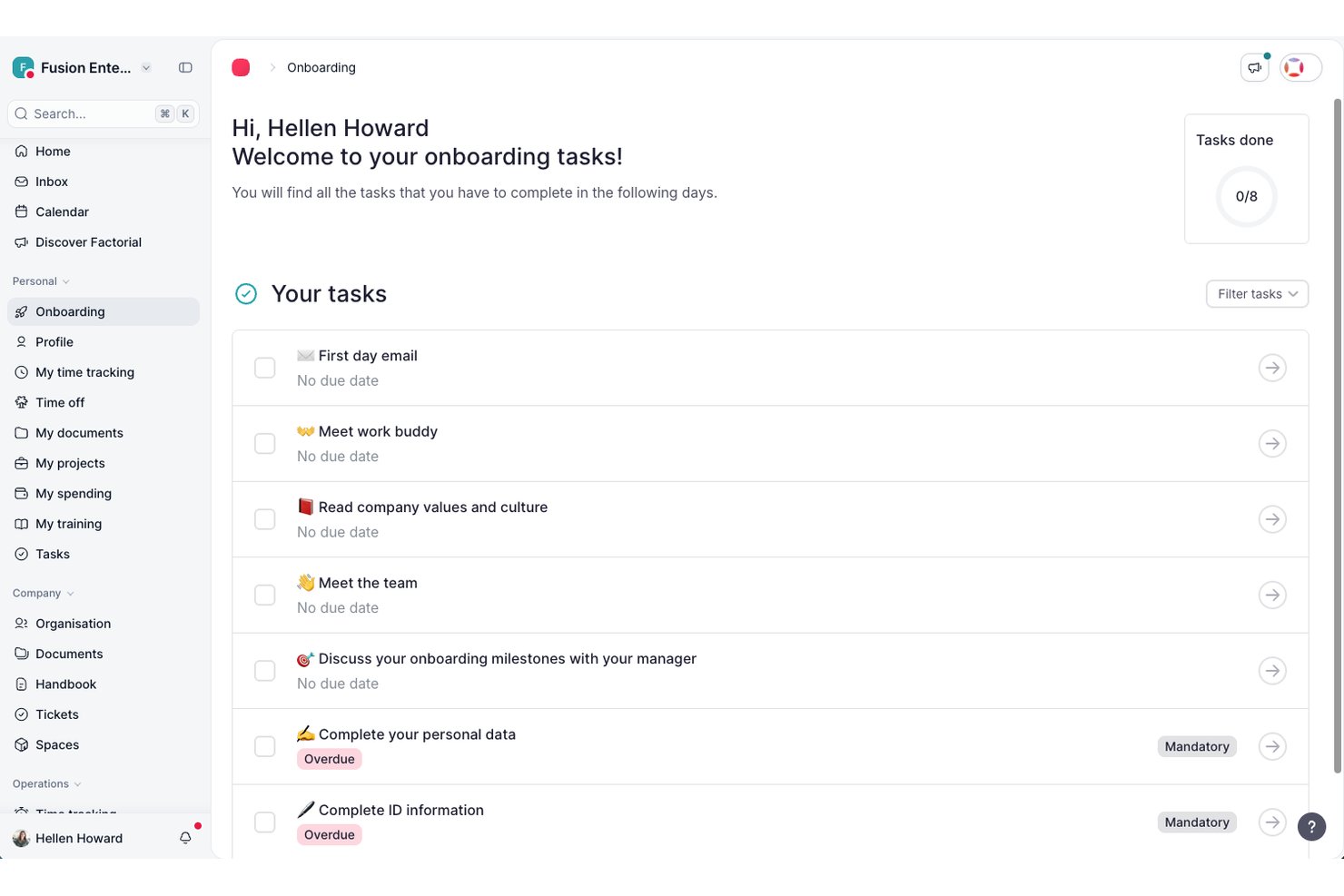
Factorial is an all-in-one HR platform with a built-in ATS that includes AI resume summarization, resume parsing, custom candidate pipelines, and interview scheduling tools as part of a broader people management suite.
Who Is Factorial Best For?
Factorial is a good fit for small to mid-sized businesses that want recruiting tools built into a broader HR platform rather than a standalone ATS.
Why I Picked Factorial
I picked Factorial as one of the best because of how much control it gives you over the shape of your hiring funnel. You can add custom stages directly to your pipeline and set up automatic messages that trigger when a candidate moves from one stage to the next, so nothing slips through without follow-up. I also like that you can attach evaluation form templates to specific stages, which means my team is able to collect structured feedback at each step rather than relying on scattered notes or email threads.
Factorial Key Features
- AI resume summarization: Factorial uses AI to generate a summary of each candidate's resume, giving you a quick read on qualifications without opening every file.
- Bulk resume upload: Upload multiple resumes at once and let Factorial automatically create candidate profiles from the parsed data.
- AI-generated screening questions: Generate role-specific screening questions with AI directly within the job posting setup.
- Collaborative candidate notes: Hiring team members can leave shared notes on candidate profiles, keeping feedback in one place throughout the review process.
Factorial Integrations
Factorial offers 90+ integrations through its marketplace, including Slack, Google Workspace, Okta, Microsoft Dynamics 365, Jira, monday.com, Suprema, and more. It also connects with Zapier and has a public API for custom integrations.
Pros and Cons
Pros:
- Color-coded pipeline visualizes candidate funnels
- Trigger-based emails auto-send at stage changes
- AI-assisted CV screening saves review time
Cons:
- Recruitment features require a paid add-on
- Report customization options are limited

Best for cross-department recruitment workflows
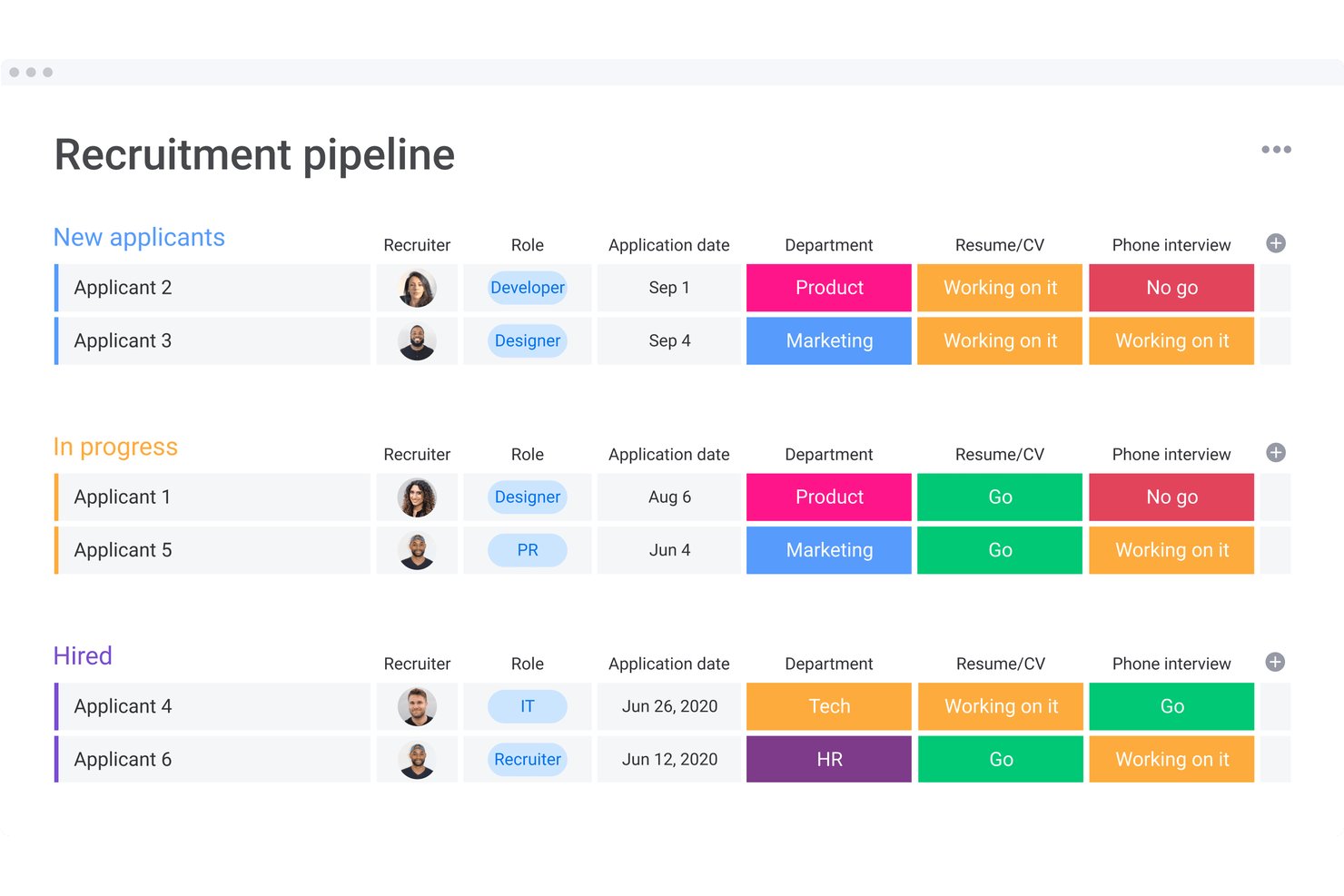
monday AI Workspace is a configurable work management platform that lets recruiting teams build AI-powered candidate screening pipelines with automated resume data extraction, status routing, and cross-department hiring workflows.
Who Is monday AI Workspace Best For?
It's a strong fit for mid-size to enterprise organizations where hiring spans multiple departments and recruiters need to coordinate with managers across teams.
Why I Picked monday AI Workspace
monday AI Workspace earns its spot on my shortlist because of how well it connects screening to collaboration across departments. When a new application lands, an AI agent can extract resume data, summarize the candidate, and notify a hiring manager in a completely separate team, all automatically. I also like that the AI Sidekick lets me share that candidate summary across stakeholders without anyone needing to open a separate tool.
monday AI Workspace Key Features
- AI-powered data extraction: Extracts structured candidate details from resume files into configurable board columns.
- Custom automation builder: Lets you create rules to route, tag, or update candidate records based on triggers you set.
- Document management: Stores resumes, interview notes, and offer letters directly within recruiting boards.
- Team permissions controls: Allows granular access settings for sensitive hiring data and recruiter collaboration.
monday AI Workspace Integrations
monday AI Workspace offers hundreds of built-in integrations, including Slack, Salesforce, HubSpot, Google Workspace, Microsoft 365, Outlook, Gmail, Zoom, GitHub, and connects with Zapier. An API is available for custom integrations.
Pros and Cons
Pros:
- Configurable candidate pipelines for multi-team hiring
- Automates candidate status and routing steps
- AI summary and extraction from resumes
Cons:
- No native bulk resume processing tool
- Lacks built-in bias mitigation features
New Product Updates from monday AI Workspace
monday AI Workspace Adds Human Approval Routing
monday AI Workspace adds a human-in-the-loop approval block to AI Workflows, sending approval requests and routing workflow paths based on responses. For more information, visit monday AI Workspace's official site.

Workable
Best for advanced resume filtering

Workable is an applicant tracking system designed for HR teams and recruiters who need to sort, filter, and evaluate large volumes of resumes to find qualified candidates faster.
Who Is Workable Best For?
Workable is a strong fit for growing mid-sized companies with high-volume hiring needs and dedicated recruiting teams managing multiple open roles at once.
Why I Picked Workable
Workable earns its spot on my shortlist because of how well its AI-assisted screening handles large applicant pools. I particularly like the semantic analysis matching, which maps candidate skills and experience against job requirements so I can see fit scores at a glance instead of reading every resume. The intelligent resume parsing automatically extracts and anonymizes key details, which speeds up initial review and supports fairer screening. The anonymized screening feature hides identifying information during the first pass, so my team evaluates qualifications rather than names or backgrounds.
Workable Key Features
- Customizable screening questions: Add role-specific questions to your application form to pre-qualify candidates before their resume reaches your desk.
- Candidate scorecards: Evaluate applicants against a shared set of criteria so every reviewer on your team is assessing candidates consistently.
- Talent pipeline management: Organize candidates across multiple stages and open roles in a single view to track where each applicant stands.
- Automated job posting: Publish open roles to 200+ job boards simultaneously directly from the Workable platform.
Workable Integrations
Integrations include LinkedIn, Indeed, ADP Workforce Now, Xero, Slack, Google Calendar, Microsoft Outlook, Zoom, DocuSign, and BambooHR.
Pros and Cons
Pros:
- Anonymized reviews support fairer candidate evaluation
- Configurable criteria let you tailor screening to each role
- AI scoring highlights best-fit resumes quickly
Cons:
- May be expensive for smaller businesses
- Can be difficult to migrate data from other platforms
New Product Updates from Workable
Workable Recruiting Enables Direct LinkedIn Job Promotion
Workable Recruiting lets teams purchase and manage paid LinkedIn job promotion directly in Workable. This gives recruiters more control over campaign spend and performance. For more information, visit Workable’s official site.

Best for multilingual resume parsing
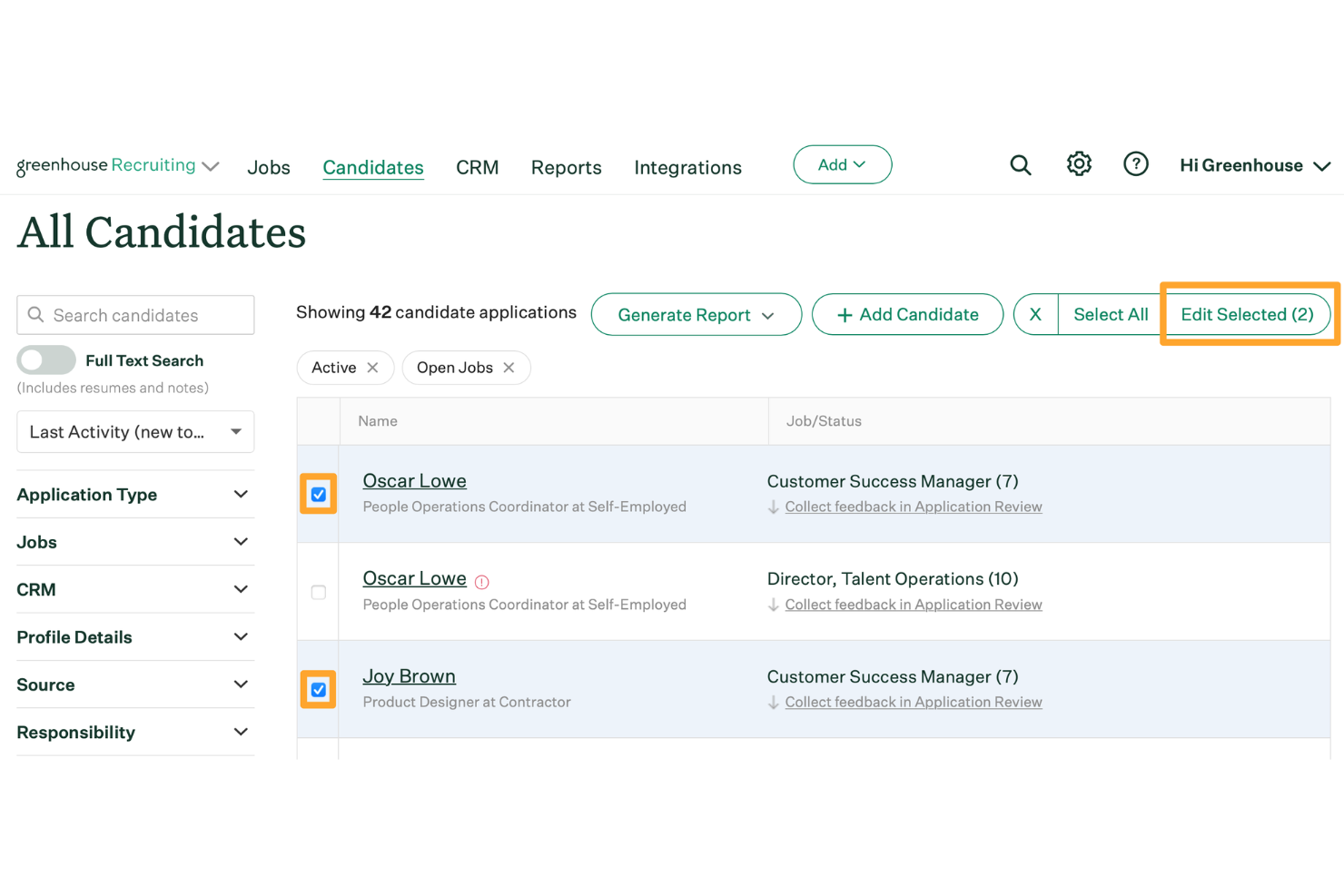
Greenhouse is an applicant tracking system designed for HR teams and recruiters to screen, organize, and advance candidates through every stage of the hiring process.
Who Is Greenhouse Best For?
Greenhouse is a strong fit for mid-size to enterprise companies with structured, high-volume hiring needs across multiple departments or locations.
Why I Picked Greenhouse
I picked Greenhouse as one of the best because of how well it handles multilingual resume parsing for teams hiring across borders. Greenhouse job boards support 19 languages, and the interview experience is available in six—meaning candidates can apply and move through the process in their native language, and the parsed data still flows into your pipeline. I also like the Greenhouse Real Talent™ feature, which filters out fraud and spam at the top of the funnel so my team isn't wasting time reviewing illegitimate applications. Additionally, AI-generated candidate summaries give recruiters a quick read on each applicant without digging through every resume manually.
Greenhouse Key Features
- Interview scorecard templates: Build role-specific scorecards that give every interviewer a consistent framework for evaluating candidates against defined criteria.
- Talent Match: Uses AI to surface the best-fit applicants to the top of your queue based on job criteria, so your team reviews the strongest candidates first.
- Custom report builder: Filter and build reports by candidates, sources, departments, jobs, offers, and more using boolean searches and multilayer filtering.
- Candidate self-scheduling: Let candidates book their own interview times on branded self-scheduling pages, with automatic conflict checks and calendar syncing.
Greenhouse Integrations
Integrations include Checkr, Criteria Corp, Findem, HireRight, BrightHire, Pave, Grayscale, AmazingHiring, Alva Labs, and Apideck.
Pros and Cons
Pros:
- Supports fair screening through resume anonymization
- Structured scorecards keep evaluations consistent
- Accurately parses resumes submitted in multiple languages
Cons:
- Limited resume keyword tuning compared to niche parsers
- Could offer more social media integrations
New Product Updates from Greenhouse

Greenhouse Opens Candidate Insights and Talent Matching Assistants to Beta
Greenhouse opens Candidate Insights and Talent Matching assistants to beta for candidate questions and natural-language search. This helps recruiters review candidates and build searches faster. For more information, visit Greenhouse’s official site.
 .
.
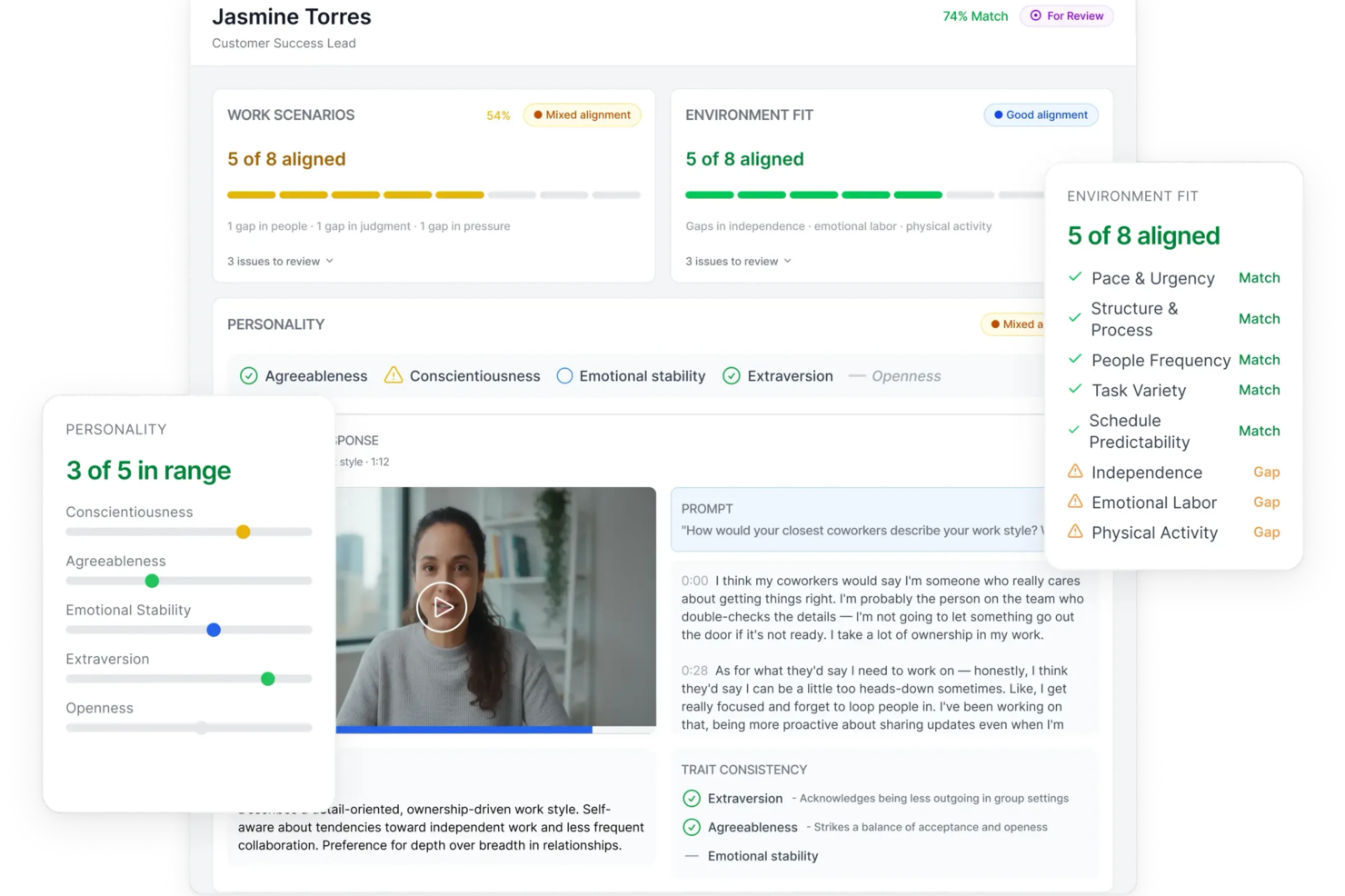
Truffle is an AI-driven resume screening platform designed for recruiters and HR teams who want to automate candidate evaluation and reduce manual screening time.
Who Is Truffle Best For?
Truffle is a strong fit for small to mid-sized businesses that need to screen high volumes of applicants without a large recruiting team.
Why I Picked Truffle
Truffle earns its spot on my shortlist because of how it handles AI-powered video interview analysis. I like that the AI doesn't just transcribe candidate responses—it evaluates each answer against a custom rubric and generates a match score with transparent reasoning, so I can see exactly why a candidate ranked where they did. The "Candidate Shorts" feature gives me a 30-second AI-generated recap of each interview, which means I can move through a large applicant pool without watching every full recording. I also find the AI Check flag genuinely useful—it surfaces patterns that suggest AI-assisted responses, so I can flag those candidates for a closer look before moving them forward.
Truffle Key Features
- Talent assessments: Three structured pre-employment assessments—Personality (Big Five), Situational Judgment, and Environment Fit—score candidates based on role alignment rather than rehearsed responses.
- Smart candidate ranking: Truffle ranks applicants against your defined requirements and generates a match percentage, so you can prioritize your shortlist without manually comparing profiles.
- Team reviews and scorecards: Hiring team members submit independent reviews, and Truffle surfaces consensus scores instantly using a three-option decision framework (Move Forward, Unsure, Pass).
- Candidate branding customization: Interview landing pages, instructions, and confirmation emails can carry your logo, brand colors, and custom messaging throughout the screening process.
Truffle Integrations
Integrations include Ashby, Breezy HR, and Indeed.
Pros and Cons
Pros:
- Customizable screening questions for tailored filtering
- Automated resume parsing organizes candidate data
- Plug-and-play setup takes under 15 minutes
Cons:
- Lacks advanced analytics or reporting dashboards
- No direct job board posting from the platform
AvaHR
Best for real-time team collaboration in hiring
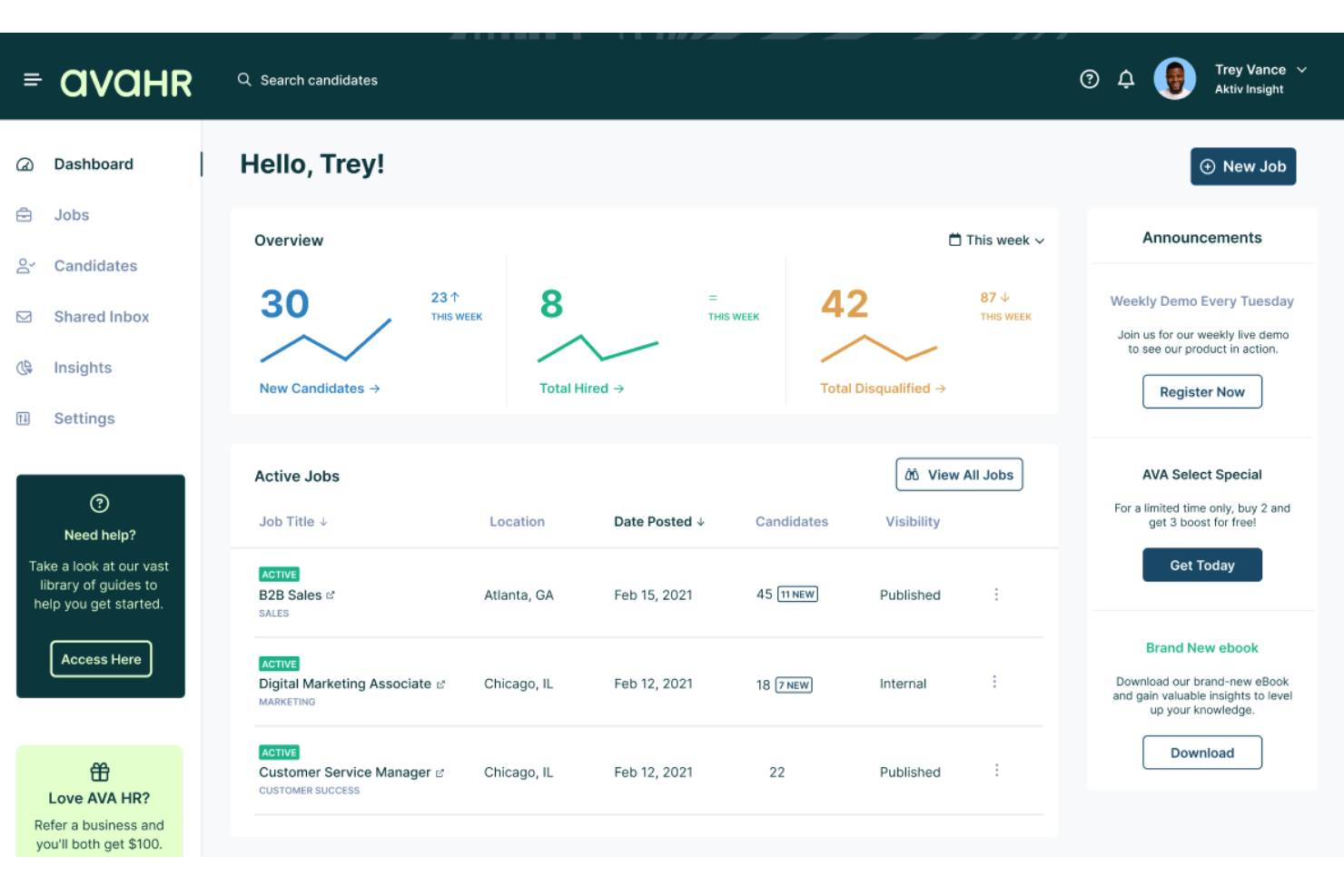
AvaHR is an applicant tracking system that combines AI-powered resume parsing, candidate scoring, and custom hiring pipelines with built-in team collaboration tools and one-click job distribution to 100+ job boards.
Who Is AvaHR Best For?
AvaHR is a strong fit for small businesses in industries like construction, healthcare, retail, and hospitality that need to fill roles quickly without a dedicated recruiting team.
Why I Picked AvaHR
AvaHR earns its spot on my shortlist because it treats resume screening as a team activity rather than a solo task. I love that hiring managers can leave shared notes, compare candidate scorecards, and move applicants through a custom pipeline all in real time. The AI Candidate Scoring layer adds real weight to that process, ranking applicants automatically before the team sits down to compare.
AvaHR Key Features
- AI job description generator: Automatically creates job descriptions to help kickstart postings.
- Knockout questions: Let you add pre-screen questions that filter out unqualified candidates early.
- Resume uploader and parser: Converts applicant resumes into structured digital profiles for faster sorting.
- Branded careers page: Allows you to build a customized job portal reflecting your company’s culture.
AvaHR Integrations
AvaHR offers over 70 native integrations, including BambooHR, Checkr, DocuSign, Google Calendar, Slack, Microsoft Teams, HubSpot, Salesforce, Gusto, and Calendly. An API is available for custom integrations.
Pros and Cons
Pros:
- Customizable knockout screening questions
- Real-time team collaboration features
- Fast AI resume parsing and scoring
Cons:
- Limited analytics and reporting tools
- Lacks bulk emailing to candidates
Best for pre-screening tests and deep resume parsing capabilities

Freshteam is an applicant tracking system designed for HR teams and recruiters who need to screen, parse, and manage large volumes of resumes to find the right candidates faster.
Who Is Freshteam Best For?
Freshteam is a strong fit for growing mid-sized companies that need a structured, scalable hiring process without a dedicated recruiting operations team.
Why I Picked Freshteam
I picked Freshteam as one of the best because I love how it handles both sides of early-stage screening: parsing resumes and testing candidates before they ever reach a recruiter's calendar. When a resume is uploaded, Freshteam automatically scans and parses it into a structured Candidate 360 profile, pulling out experience, skills, education, and previous employers. That means my team isn't manually entering data for every applicant. On top of that, Freshteam's Autopilot workflow builder lets you trigger pre-screening tests automatically when a candidate hits a specific hiring stage—so if someone applies for a technical role, an assessment goes out the moment they're moved to the online test stage, without anyone lifting a finger.
Freshteam Key Features
- Interview scorecards: Create structured evaluation forms for each job so hiring panel members can rate and compare candidates against consistent criteria.
- Talent pool management: Save promising candidates who weren't hired into a searchable pool, so you can revisit them for future openings without starting from scratch.
- Custom application forms: Build job-specific application forms with drag-and-drop fields to capture the exact information you need from applicants upfront.
- Candidate self-scheduling: Let candidates book their own interview slots based on interviewer availability, cutting back-and-forth scheduling emails.
Freshteam Integrations
Integrations include Microsoft Teams, Slack, Google Calendar, Outlook, LinkedIn, Zoom, HackerRank, DocuSign, and Google Meet.
Pros and Cons
Pros:
- Provides an birds-eye-view into applicants by screening stage
- Easy integration with other Freshworks apps
- Enables detailed daily, weekly, and monthly customized report creation
Cons:
- Mobile application could be improved
- Cannot generate custom salary breakups
Best for shortlisting candidates with automated screening and video interviewing

myInterview (now known as Radancy) gives recruiters and HR teams a way to automate resume screening and add video interviews to their hiring process, helping them identify top candidates earlier in the process and streamline early-stage selection.
Who Is myInterview Best For?
myInterview is a strong fit for talent acquisition teams and recruiters at small to mid-sized businesses that need to screen high volumes of applicants without adding headcount.
Why I Picked myInterview
myInterview earns its spot on my shortlist because of how it combines automated screening with one-way video in a single workflow. I like that the AI conducts and scores candidate interactions using transparent, data-driven evaluations, so my team isn't manually sifting through dozens of applications to find the strongest fits. The one-way video feature is particularly useful—candidates record answers on their own schedule, and the AI transcribes those responses and factors them directly into each candidate's screening score. That combination of automated scoring and video context gives my team a much clearer picture of a candidate than a resume alone ever could.
myInterview Key Features
- Customizable screening templates: Build role-specific screening workflows using AI-recommended qualifications and skills pulled directly from job descriptions.
- Candidate self-scheduling: Candidates receive personalized interview invitations and select their own time slots, syncing directly with recruiter and hiring manager calendars.
- Microsoft Teams integration: Schedule and manage interviews without leaving Teams, with real-time calendar syncing across Outlook, Google Calendar, and Teams.
- Personality insights: AI analyzes candidate responses to surface personality traits and culture fit signals beyond what a resume can show.
myInterview Integrations
Integrations include SAP SuccessFactors, Oracle, Workday, LinkedIn, Glassdoor, and LinkedIn.
Pros and Cons
Pros:
- Allows for more applicants to be screened
- Enhanced resume screening with AI technology
- Automates video interviews
Cons:
- No mobile application
- Limitations on group interviews

Checkr
Best for AI-powered background checks
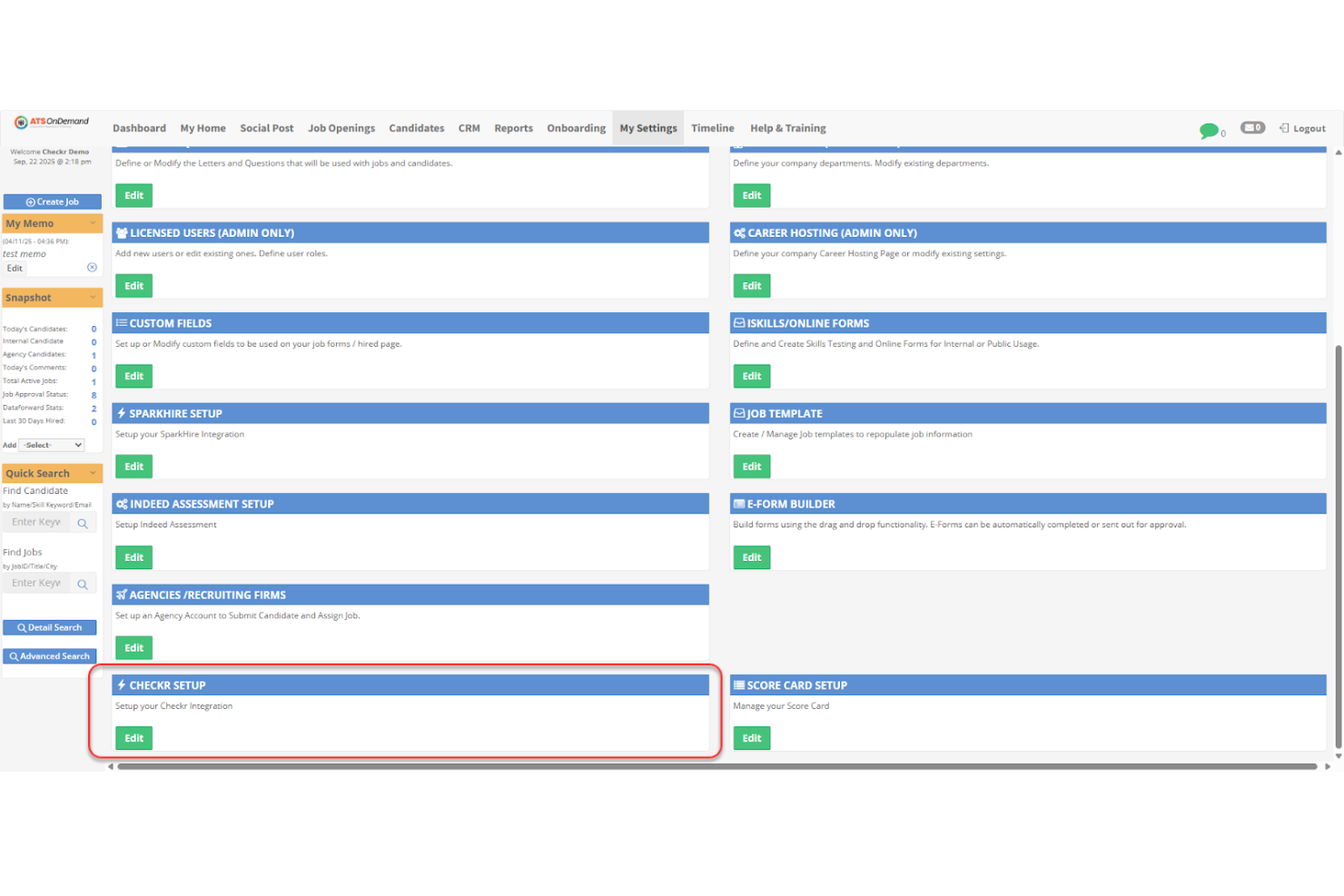
Checkr helps HR teams and recruiters in fast-paced industries verify candidate backgrounds and credentials, offering automated checks that support confident, compliant hiring decisions alongside your resume screening process.
Who Is Checkr Best For?
Checkr is a strong fit for high-volume hiring teams in industries like gig economy, healthcare, and retail that need fast, automated candidate verification at scale.
Why I Picked Checkr
Checkr earns its spot on my shortlist because its AI-powered background checks run faster than traditional manual processes, which matters when you're moving candidates through a hiring pipeline. I like that Checkr's continuous checks flag new criminal records or license changes on existing employees, not just new hires. The AI also reduces bias by standardizing how adjudication decisions are applied across candidates, which I find valuable for teams maintaining fair hiring practices at scale.
Checkr Key Features
- Candidate portal: Candidates submit their own information and consent directly through a self-service portal, reducing back-and-forth for your HR team.
- Drug screening: Order and manage drug tests alongside background checks from within the same platform.
- Compliance tools: Built-in federal, state, and local compliance guidance helps your team apply hiring rules correctly across different jurisdictions.
- Checkr Assess: Customizable adjudication rules let you automatically pre-adverse or clear candidates based on your own criteria.
Checkr Integrations
Integrations include Greenhouse, Lever, iCIMS, Workday, BambooHR, JazzHR, SmartRecruiters, Jobvite, SAP SuccessFactors, and Oracle Taleo.
Pros and Cons
Pros:
- Fast turnaround for background checks helping speed up hiring decisions
- User-friendly dashboard and candidate portal for easy background screening management
- Integrates with popular ATS tools, increasing workflow efficiency
Cons:
- May lack some resume screening software functionalities compared to dedicated tools
- Limited support for heavily regulated industries
New Product Updates from Checkr
Checkr Adds Post-Hire Drug & Alcohol Clearinghouse Screening
Checkr adds post-hire limited-query support to its Drug & Alcohol Clearinghouse screening, alongside existing pre-hire full queries. The update helps employers manage recurring FMCSA screening requirements for employed CDL drivers within the same platform. For more information, visit Checkr’s official site.
 .
.
CVViZ
Best for contextual candidate tracking and selection

CVViZ uses AI-driven resume screening to help recruiters and HR teams in fast-paced industries identify, rank, and shortlist top candidates based on contextual relevance and job fit.
Who Is CVViZ Best For?
CVViZ is a strong fit for in-house recruiting teams and growing businesses that need to screen high volumes of resumes without sacrificing candidate quality.
Why I Picked CVViZ
CVViZ earns its spot on my shortlist because of how it handles contextual resume screening—rather than flagging resumes based on keyword matches, its NLP and machine learning algorithm reads resumes the way a domain expert would. I like that it can tell the difference between a company secretary and a personal secretary, or an Oracle developer and a Java developer, which cuts down on the false positives that waste a recruiter's time. The relative ranking feature: CVViZ scores candidates against each other based on your organization's specific hiring history and the types of candidates you've previously engaged, not just a generic match score. I find the automated candidate tracking across pipeline stages useful—you can set triggers to move candidates, send notifications, and log stage changes without manual input.
CVViZ Key Features
- Candidate pre-screening questions: Set knockout or multiple-choice questions that candidates answer on application, then filter the applicant pool based on their responses.
- Resume database management: Upload resumes in bulk, parse them automatically, flag duplicates, tag candidates, and track the source of each application.
- Recruitment workflow automation: Define triggers to send emails or notifications automatically when a candidate moves stages, a new resume arrives, or a job is added.
- Recruitment analytics: Track sourcing performance, team activity, and time-to-fill metrics, with reports exportable in CSV, PDF, or JPG formats.
CVViZ Integrations
Native integrations are not currently listed.
Pros and Cons
Pros:
- Integrates with many job boards
- Intuitive and user-friendly UX
- Easy to integrate with any company website
Cons:
- Interview scheduling and talent scoring features can be improved
- Limited customizable email template options
Other Resume Screening Software
Here are a few more resume screener options that are worth considering:
- JazzHR
For customizable recruiting solutions
- eSkill
For evaluating industry-specific skills
- Boon
For community-powered AI referrals
- RecruiterCloud
For tailored screening with personalized outreach
- Unnanu Hire
For mitigating bias in candidate scoring
- Ideal
For eliminating hiring discrimination and promoting equality
- Daxtra Technologies
Resume screening software with semantic search technology for sourcing candidates across multiple databases
- HireBeat
For parsing resumes to create a 360-degree candidate profile
- Affinda
For job description parsing with recruitment AI capabilities
- Sovren
For AI search-and-match capabilities and data enrichment APIs
- Endorsed AI
Resume screening software for ranking candidates
- CiiVSOFT
For deep integrations with multiple HR and ATS systems
- CVJury
Free resume screening software with an AI-powered resume builder
- Recruit CRM
For AI-driven resume parsing
- Deel HR
For centralized global workforce management
- Manatal
For AI-driven recruitment automation
- Pinpoint
For hiring and onboarding talent
- Peoplebox.ai
For screening both resumes and ATS
- Canditech
For replacing resume screening with auto-scored skill assessments
- ClearCo
For AI-driven recruiting


How I Evaluate Resume Screening Software
I split my evaluation into two layers: baseline criteria every tool must meet—like accurate parsing and ATS integration—and differentiators that separate tools for high-volume hiring from lean recruiting teams.
Core Functionality (Table Stakes For This List)
When I'm selecting tools for my list, I rank each one on a scale from 0 (does not offer the functionality) to 5 (excels in this area) for each core functionality listed below. Then, I calculate the tool's total score as a percentage. Each tool needs to achieve a minimum total score of 65% to be considered for inclusion.
- Resume Parsing: I check whether the tool accurately extracts work history, skills, education, and contact details from PDFs, DOCX files, and other common formats without manual cleanup.
- Keyword & Skills Matching: Each tool should go beyond exact keyword hits—I look for synonym recognition and contextual matching that connects "project management" to "Scrum" or "Agile."
- Candidate Ranking & Scoring: I evaluate how the tool scores applicants against job criteria and whether recruiters can adjust weighting to prioritize certifications, years of experience, or specific skills.
- Bulk Resume Processing: High-volume teams need to ingest hundreds of resumes at once, so I look at batch upload limits and automated intake from job boards and email inboxes.
- AI/ML-Based Screening: I consider whether the AI layer adds genuine value beyond rules-based filters, such as learning from past hiring patterns or flagging transferable skills across industries.
- ATS Integration: The tool should sync candidate data with platforms like Greenhouse, Lever, or iCIMS so recruiters aren't copying records between systems manually.
Once I have a list of tools that meet the criteria, I consider what sets each platform apart.
Differentiating Factors (What Sets Vendors Apart)
Here's how I compare and contrast different vendors:
Standout Features
Bias mitigation tools matter a lot here—I look for features like automated name and demographic anonymization that let recruiters run blind screenings. Candidate rediscovery is another feature I value, especially for teams sitting on large talent databases. A tool that resurfaces past applicants who match a new req saves sourcing time and ad spend. I also evaluate whether platforms support custom scoring models that recruiters can train on their own historical hiring data to reflect role-specific priorities.
Beyond Features
Compliance is a big one—I check whether a vendor provides audit trails for AI-driven decisions and supports data privacy standards like GDPR and SOC 2. Hiring volume fit also matters. A staffing agency processing thousands of resumes weekly has very different scalability needs than a mid-size company hiring a few roles per quarter. I also look at implementation speed, specifically whether the platform offers pre-built skills libraries and templates so recruiting teams can start screening without weeks of configuration.
Features of Resume Screening Software
When it comes to resume screening software, the right features can make all the difference in helping you identify the best talent quickly. The following key features work together to eliminate tedious manual tasks and improve the accuracy and speed of resume evaluations.
- Automated keyword matching: The software scans resumes for keywords tied to the job description, helping you find candidates whose skills and experience align with your needs—no more endless manual sifting.
- Resume parsing: This feature pulls structured data like contact information, education, and job history from resumes, so you can review the essentials at a glance without flipping between documents.
- Bulk resume upload: You can upload hundreds (or thousands) of resumes at once, letting the software process large candidate pools faster than you ever could on your own.
- Customizable filters: Fine-tune the screening process by setting filters based on criteria such as years of experience, education level, certifications, or location. This helps you focus only on candidates who actually fit your requirements.
- Duplicate detection: The software automatically flags duplicate submissions, so your review isn’t bogged down by seeing the same candidate five times.
- Candidate ranking: Based on your chosen criteria, the software ranks candidates so you see the most promising people at the top of your list, saving time on initial reviews.
- Integration capabilities: Connect the resume screening tool with your existing applicant tracking system or HR software to streamline your workflow and avoid manual data transfers.
- Compliance checks: The software helps you stay out of hot water by highlighting compliance risks, such as missing consent for personal data processing or flagged work authorization issues.
- Collaboration tools: Share notes, ratings, and comments on candidates with your hiring team right inside the platform, making it easy for everyone to stay in sync.
Common Resume Screening Software AI Features
Beyond the standard resume screening software features listed above, many of these solutions are incorporating AI with features like:
- AI-powered matching: The AI analyzes not just keywords but context, work history, and skills to suggest candidates who may be a strong fit—even if their resumes aren’t a perfect keyword match.
- Automated bias reduction: AI algorithms identify and minimize unconscious biases by masking candidate data such as name, age, or gender during the screening process, helping to support fair hiring.
- Predictive candidate scoring: The software uses AI to predict which applicants are likely to succeed in the role based on data from past hires and current job requirements.
- Natural language processing (NLP): AI leverages NLP to interpret the meaning behind resume content, identifying relevant achievements and responsibilities even when phrased in unique ways.
- Automated shortlisting: The AI autonomously creates shortlists of top candidates based on your specific job criteria, so you can focus your attention where it matters most.
Frequently Asked Questions
Here are a few frequently asked questions and answers about resume screening software:
How does automated resume screening software work?
Automated resume screening software expedites the initial phase of recruitment: sourcing the ideal candidates for the job. These tools extract and match data from resumes against predefined keywords and other criteria.
The resumes are then assigned scores or rankings based on their alignment with your job requirements. The resumes that meet a minimum threshold (score) are forwarded for human review, while lower-scoring ones get rejected. Resume screening is a pivotal aspect of applicant tracking systems.
Aimed at improving accuracy and mitigating recruitment bias, advanced resume screening software systems leverage AI and machine learning algorithms that perform contextual analysis. Moreover, integrating these tools with your ATS can streamline the hiring workflow.
What are some techniques to speed up your recruitment process?
To speed up your recruitment process, you can begin by creating clear and precise job descriptions and using resume screening software to efficiently filter candidates and automate further recruitment processes.
Hiring managers today can use AI-driven software to source candidates from various job boards and even social media. Some software also helps with conducting pre-employment assessments or initial video interviews to evaluate candidate suitability.
Lastly, you should continuously review and refine your recruitment strategies to identify potential obstacles.
What are some tips for sourcing the best candidates?
Firstly, begin by clearly defining your job requirements.
Next, use resume screening software that offer job description parsing and multi-platform posting capabilities to post your jobs on LinkedIn and other industry-specific websites. You could also set up an internal referral campaign motivating existing employees to refer candidates, as this often helps increase the quality of hires.
Additionally, establishing a strong social media presence to engage with passive candidates and collaborating with reputable recruitment agencies to access their networks can also be very beneficial.
How can you screen candidates if you don’t have an HR department?
You need a streamlined approach to screen and hire candidates without the support of an HR department. You can engage third-party recruiters for this purpose or invest in automated resume screening and parsing software to make things easier for you.
Start by clearly defining your job requirements and establishing a structured application process. Once the applications pour in, automated resume screening tools can filter applications based on predetermined criteria efficiently.
Maintaining organized candidate records and thorough feedback documentation throughout the process is critical. While HR expertise is invaluable, small businesses can still effectively screen candidates using these steps.
Another approach involves engaging recruitment process outsourcing companies (RPOs) for your hiring needs. If you’re interested in that, here’s my list of the top 10 RPOs to point you in the right direction.
When selecting resume screening software, keep an eye out for the following key features:
- Automated keyword matching: The software scans resumes for keywords tied to the job description, helping you find candidates whose skills and experience align with your needs—no more endless manual sifting.
- Resume parsing: This feature pulls structured data like contact information, education, and job history from resumes, so you can review the essentials at a glance without flipping between documents.
- Bulk resume upload: You can upload hundreds (or thousands) of resumes at once, letting the software process large candidate pools faster than you ever could on your own.
- Customizable filters: Fine-tune the screening process by setting filters based on criteria such as years of experience, education level, certifications, or location. This helps you focus only on candidates who actually fit your requirements.
- Duplicate detection: The software automatically flags duplicate submissions, so your review isn’t bogged down by seeing the same candidate five times.
- Candidate ranking: Based on your chosen criteria, the software ranks candidates so you see the most promising people at the top of your list, saving time on initial reviews.
- Integration capabilities: Connect the resume screening tool with your existing applicant tracking system or HR software to streamline your workflow and avoid manual data transfers.
- Compliance checks: The software helps you stay out of hot water by highlighting compliance risks, such as missing consent for personal data processing or flagged work authorization issues.
- Collaboration tools: Share notes, ratings, and comments on candidates with your hiring team right inside the platform, making it easy for everyone to stay in sync.
Common Resume Screening Software AI Features
Beyond the standard resume screening software features listed above, many of these solutions are incorporating AI with features like:
- AI-powered matching: The AI analyzes not just keywords but context, work history, and skills to suggest candidates who may be a strong fit—even if their resumes aren’t a perfect keyword match.
- Automated bias reduction: AI algorithms identify and minimize unconscious biases by masking candidate data such as name, age, or gender during the screening process, helping to support fair hiring.
- Predictive candidate scoring: The software uses AI to predict which applicants are likely to succeed in the role based on data from past hires and current job requirements.
- Natural language processing (NLP): AI leverages NLP to interpret the meaning behind resume content, identifying relevant achievements and responsibilities even when phrased in unique ways.
- Automated shortlisting: The AI autonomously creates shortlists of top candidates based on your specific job criteria, so you can focus your attention where it matters most.
Other Software to Level Up Your Hiring Practices
Resume screening and parsing is only the tip of the iceberg. Hiring the right candidate for a job has many other aspects, and you have many different kinds of software available at your fingertips:
- Background Check Software
- Candidate Sourcing Software
- AI Recruiting Software
- Pre-Employment Testing Software
- Applicant Tracking Systems
- Recruiting Software
What's Next?
If you're in the process of researching resume screening software, connect with a SoftwareSelect advisor for free recommendations.
You fill out a form and have a quick chat where they get into the specifics of your needs. Then you'll get a shortlist of software to review. They'll even support you through the entire buying process, including price negotiations.