

10 Best AI HR Software of 2026

Best AI HR Software Shortlist


The best AI HR software helps you automate routine tasks, uncover workforce insights, and manage people operations more efficiently—so you can spend less time on admin and more time supporting your team.
From recruitment and engagement to compliance and performance management, HR teams are expected to do more with less. AI-powered platforms simplify these responsibilities by automating workflows, analyzing trends, and delivering real-time insights that support better decision-making.
Drawing on years of hands-on experience testing HR technology, I’ve curated a list of the top AI HR software solutions available today. In this guide, you’ll find unbiased reviews of tools designed for different team sizes and industries—helping you choose a platform that makes HR management smarter, faster, and more effective.
Why Trust Our Software Recommendations
Our team has been testing and reviewing software since 2012. As HR experts ourselves, we know how difficult—and important—it is to choose the right software.
For this guide, we evaluated tools using hands-on testing and independent research, scoring tools using our selection criteria. We also draw on insights from industry thought leaders and practicing HR experts.
Our reviews reflect our human editorial judgment, not a sales pitch.
Expert reviewers:
AI HR Software Comparison Table
This comparison table summarizes pricing details for my top AI HR software selections:
| Tool | Best For | Trial Info | Price | ||
|---|---|---|---|---|---|
| 1 | Best for AI-driven HR across multiple countries | Free demo available | From $5/employee/month | Website | |
| 2 | Best for built-in AI voice interview screening | Free demo available | Pricing upon request | Website | |
| 3 | Best for centralized document management | Free demo available | From $8/user/month | Website | |
| 4 | Best for data-driven workforce insights | Free demo available | Pricing upon request | Website | |
| 5 | Best for predictive HR analytics | Free demo available | Pricing upon request | Website | |
| 6 | Best for 360-degree feedback | Free demo available | Pricing upon request | Website | |
| 7 | Best for AI-powered people analytics | Free demo available | Pricing upon request | Website | |
| 8 | Best for AI-powered HR automation | Free demo available | Pricing upon request | Website | |
| 9 | Best for integrated time tracking | Not available | From $599/employee/month | Website | |
| 10 | Best for complex business compensation planning | Free demo available | Contact for pricing | Website |


Best AI HR Software Reviews
Below are my detailed summaries of the best AI HR software that made it onto my shortlist. My reviews offer a detailed look at the key features, pros & cons, integrations, and ideal use cases of each tool to help you find the best one for you.

Deel HR
Best for AI-driven HR across multiple countries

Deel HR is an AI-powered HR platform designed for global teams, offering automated onboarding, document management, compliance, and payroll features across multiple countries.
Who Is Deel HR Best For?
Deel HR is a strong fit for HR teams managing employees and contractors across multiple countries who need a single platform to handle compliance, payroll, and people operations.
Why I Picked Deel HR
Deel HR earns its spot on my shortlist because of how deeply AI is woven into the platform's global HR workflows. I particularly like Deel AI, which is trained by HR and compliance experts across 150+ countries and pulls directly from your people data to answer questions about local labor laws, payslips, and team insights in real time. My team can get country-specific compliance answers instantly, without opening a support ticket or waiting on a specialist. I also find the AI-powered ATS genuinely useful—it sources candidates automatically and moves them through interviews and offers into onboarding, all within the same system.
Deel HR Key Features
- Workforce planning: Forecast headcount, model scenarios, and track hiring costs using live workforce data instead of spreadsheets.
- Performance management: Run review cycles, set goals, and build learning and development paths within the same HR system.
- Anonymous reporting: Built-in whistleblowing tools let employees submit concerns securely, supporting compliant and transparent HR practices.
- Compensation management: Run compensation cycles and make pay decisions based on role, performance, and location data.
Deel HR Integrations
Deel HR offers native integrations with Workday, BambooHR, Greenhouse, HiBob, Lever, Okta, QuickBooks, Xero, NetSuite, Slack, and Google Workspace. An API is available for custom integrations.
Pros and Cons
Pros:
- Automated invoicing and payments
- Deel AI feature provides quick answers to users
- Simplifies international payroll and compliance
Cons:
- Mobile app doesn’t include the full admin feature set
- Limited customization options
New Product Updates from Deel HR

Deel Expands Stablecoin Wallet to 80+ Countries
Deel expands its Stablecoin Wallet to 80+ countries with dollar-backed balances and optional rewards. This gives eligible contractors more ways to hold and manage earnings inside Deel. For more information, visit Deel’s official site.
 .
.
Best for built-in AI voice interview screening
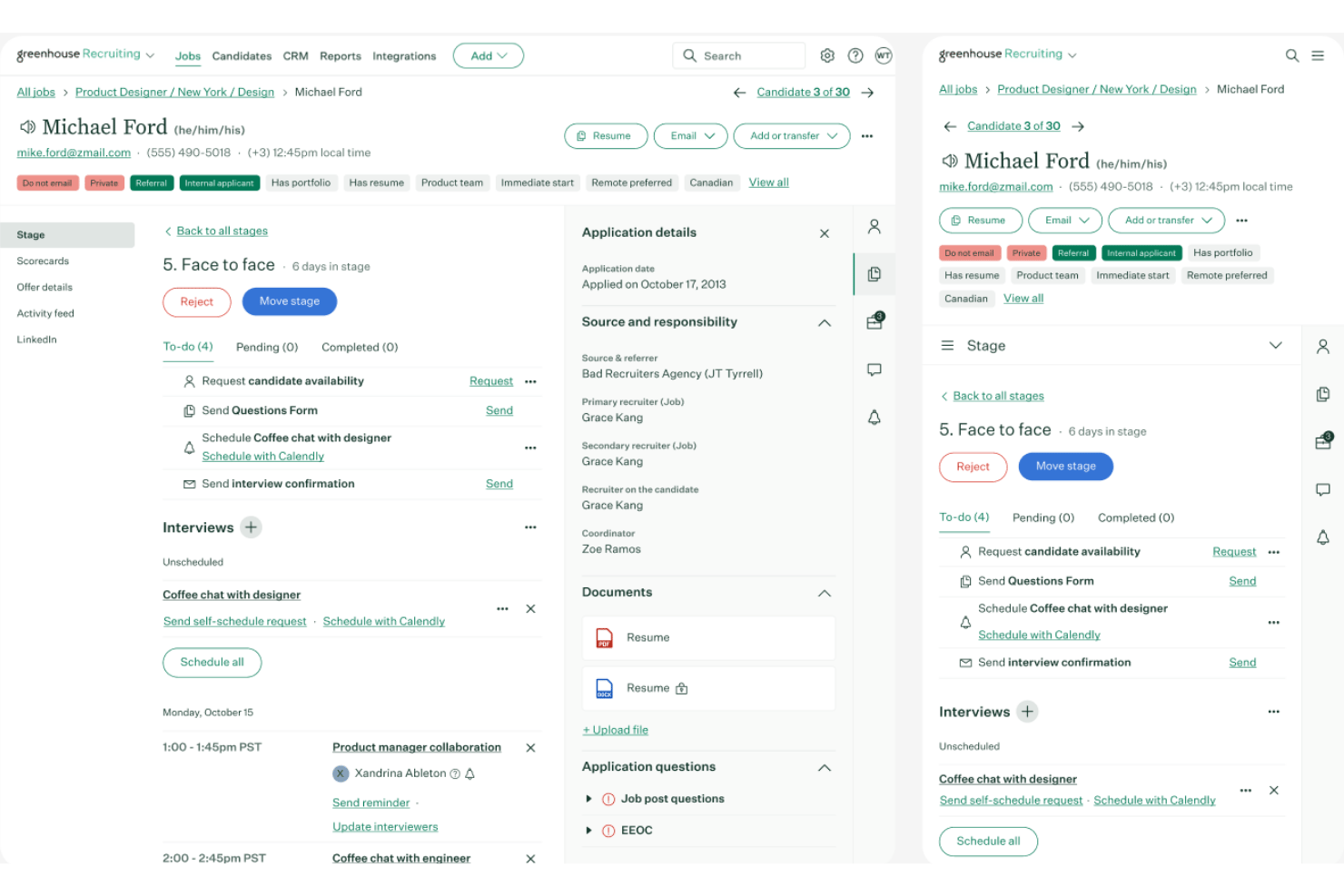
Greenhouse is an AI-powered recruiting platform that combines structured hiring workflows, candidate sourcing, AI interview screening, resume parsing, and talent rediscovery across the full recruiting lifecycle.
Who Is Greenhouse Best For?
Greenhouse is a strong fit for talent acquisition teams at mid-size to enterprise companies running high-volume, structured hiring across multiple roles or locations.
Why I Picked Greenhouse
I picked Greenhouse as one of the best because its Voice AI runs a genuine two-way conversation with candidates, not a one-way recording prompt. It asks dynamic follow-up questions in real time, with a 2-second response latency, which keeps candidates engaged and surfaces better signal than static screening forms. I also like that the AI Notetaker automatically maps transcriptions directly to scorecard questions, so interviewers walk into structured debriefs with usable data already organized.
Greenhouse Key Features
- Sourcing automation: AI tools help source and import candidates directly into job pipelines from external databases.
- Resume anonymization: Sensitive information like names and photos is automatically blurred for fair evaluation.
- Talent rediscovery: The system matches past candidates from your database to new job openings using AI.
- Business intelligence connector: Enables deep analytics and reporting by syncing recruiting data with external BI tools.
Greenhouse Integrations
Greenhouse offers native integrations with Workday, BambooHR, Paylocity, Docusign, Slack, LinkedIn, Zoom, Checkr, and provides an API for custom integrations.
Pros and Cons
Pros:
- Talent rediscovery resurfaces qualified past candidates
- Structured scorecards reduce bias in hiring decisions
- AI voice screening asks dynamic follow-up questions
Cons:
- Reporting customization requires technical configuration
- Limited HRIS functionality beyond recruiting workflows
New Product Updates from Greenhouse

Greenhouse Opens Candidate Insights and Talent Matching Assistants to Beta
Greenhouse opens Candidate Insights and Talent Matching assistants to beta for candidate questions and natural-language search. This helps recruiters review candidates and build searches faster. For more information, visit Greenhouse’s official site.
 .
.
Best for centralized document management
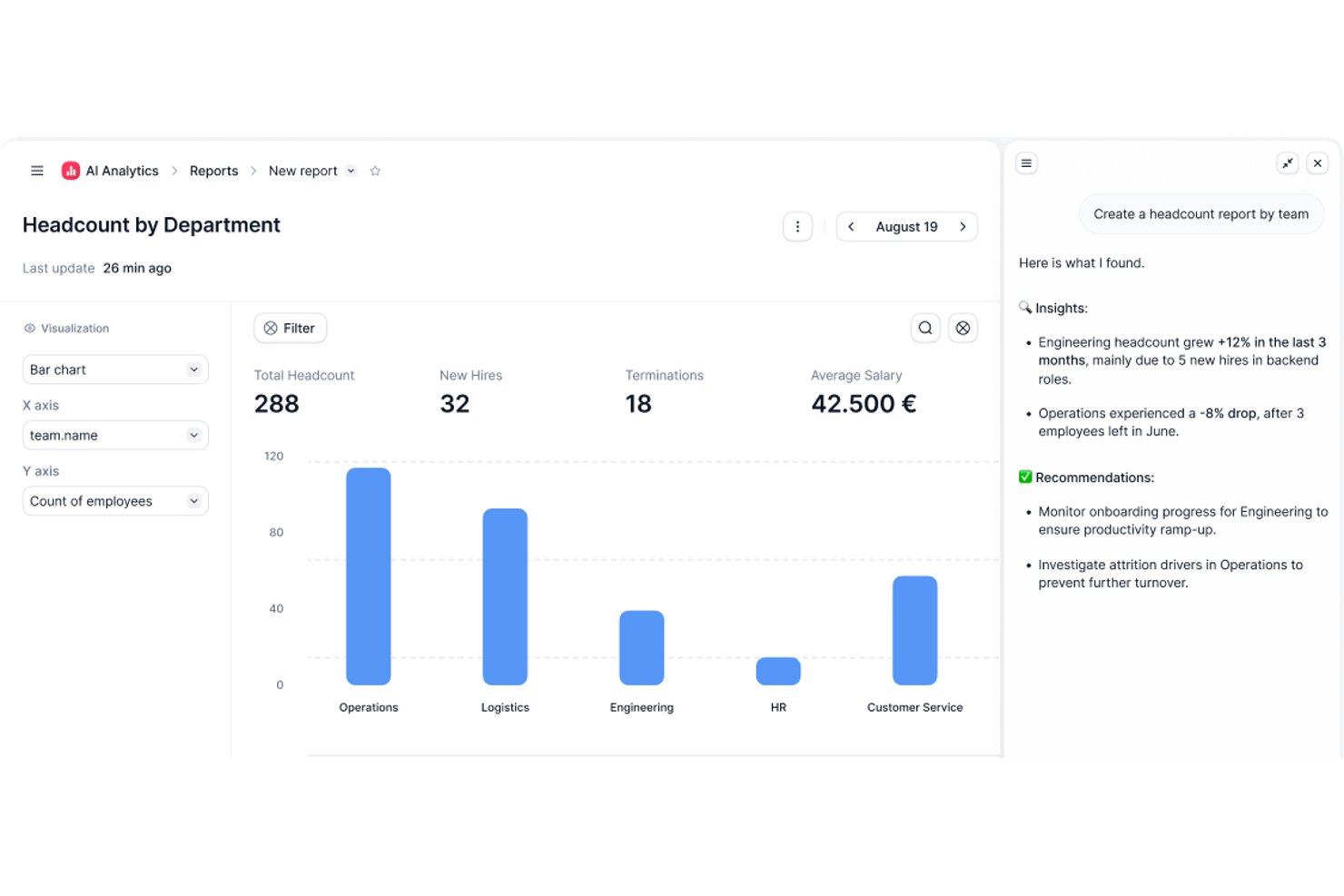
Factorial is an AI-driven HR and business management platform that brings together payroll, time tracking, document management, recruitment, and performance tools under one roof.
Who Is Factorial Best For?
Factorial is a strong fit for small to mid-sized businesses that need a single platform to manage HR, payroll, and people operations without a dedicated HR tech team.
Why I Picked Factorial
I've included Factorial in my top picks because its document management system goes beyond basic file storage. You can build custom approval workflows, assign specific reviewers, and track the status of any pending or unsigned document in real time. I also like that payslip distribution is automated: upload a batch of payslips and Factorial matches each one to the correct employee by name and ID. Add in eIDAS-compliant e-signatures for contracts and timesheets, and you've got a genuinely complete document hub baked into your HR platform.
Factorial Key Features
- Factorial One AI agent: Ask HR questions in plain language and get real-time answers pulled directly from your people data.
- AI-powered CV parsing: Upload candidate resumes and Factorial automatically extracts key details and ranks applicants against your job requirements.
- Onboarding workflow builder: Create task checklists, assign responsible parties, and set due dates for every step of the new hire process.
- 360-degree performance reviews: Configure multi-source feedback cycles with self-assessments, peer reviews, and manager evaluations in one place.
Factorial Integrations
Factorial offers 90+ integrations through its app marketplace, including Slack, Google Workspace, Microsoft Power BI, Microsoft Dynamics 365, Microsoft Azure, Okta, LinkedIn, Workable, Teamtailor, and DATEV LODAS. It also connects with Zapier and provides a public API for custom integrations.
Pros and Cons
Pros:
- AI-assisted candidate ranking in recruiting
- Automated leave balance and accrual tracking
- Built-in e-signatures for HR documents
Cons:
- Frequent app bugs disrupt daily workflows
- Reporting and analytics lack depth
UKG
Best for data-driven workforce insights
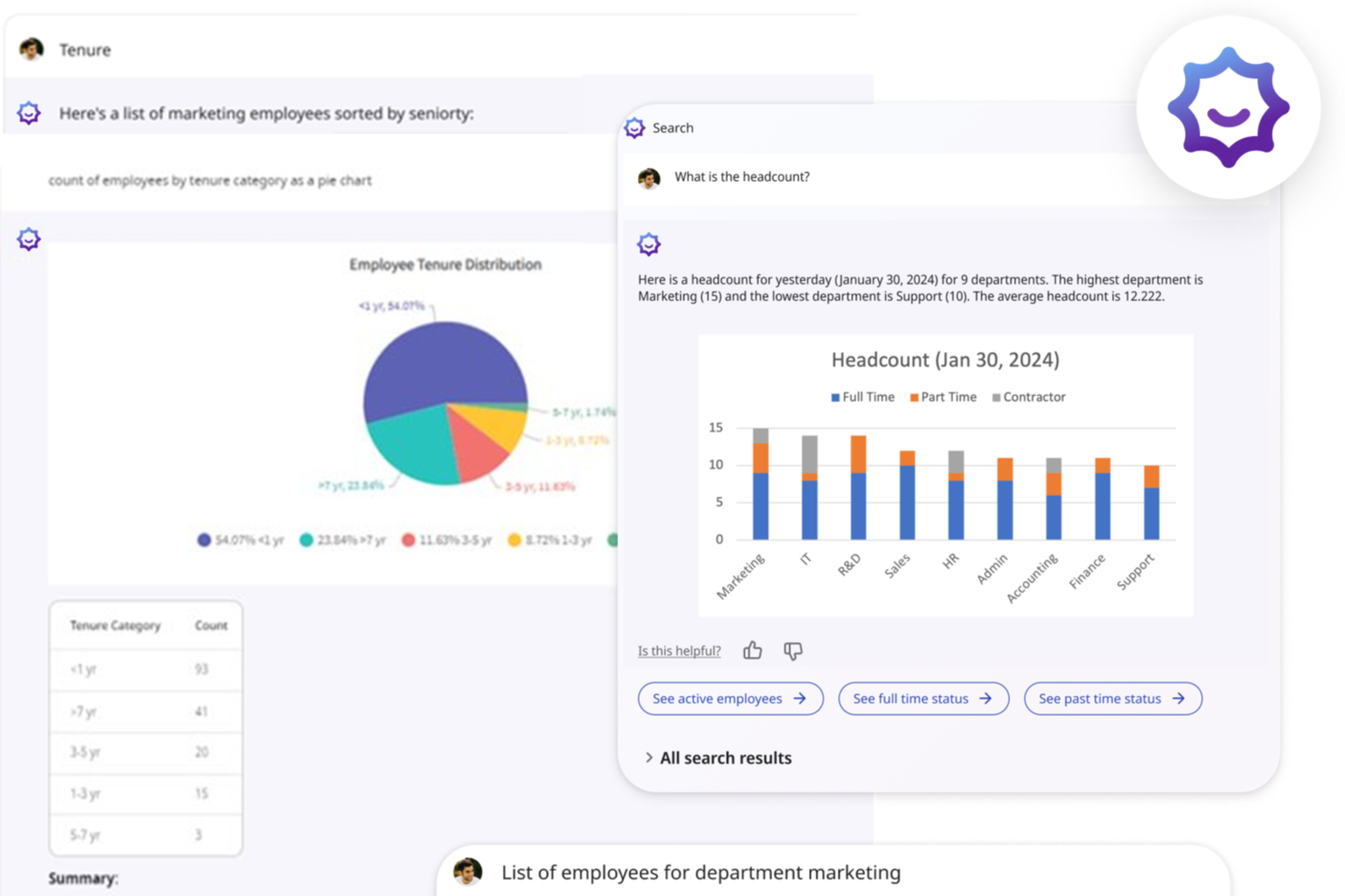
UKG is designed for teams that want to turn workforce data into clearer decisions using embedded AI. It’s a strong fit for mid-sized and large organizations that manage complex schedules, distributed teams, or multilocation operations and need HR, payroll, and labor insights in one place.
Why I Picked UKG
I picked UKG because its AI actively helps you spot issues—not just report on them. For example, UKG Bryte AI reviews pay, labor, and scheduling data to flag risks like rising overtime, potential compliance concerns, or engagement dips, giving your team clear next steps.
Its unified platform connects HR, payroll, timekeeping, and performance data, so those AI insights are always based on a full picture of your workforce. I also like that it includes industry-specific scheduling tools for frontline teams, helping you match staffing needs with demand. And with global payroll and compliance support built in, you can maintain accuracy and insight even as your organization expands.
UKG Key Features
Here are some standout features worth highlighting:
- AI-Driven Insights: Identifies labor risks, pay anomalies, and staffing issues and suggests actions.
- Predictive Scheduling Alerts: Uses historical patterns to recommend shift changes before shortages occur.
- Sentiment & Engagement Signals: Analyzes employee data to surface morale or burnout concerns early.
- Automated Compliance Monitoring: Flags potential breaks, pay rules, or scheduling violations in real time.
UKG Integrations
Integrations include Greenhouse, Lever, iCIMS, SmartRecruiters, Jobvite, Oracle Recruiting, Taleo, Active Directory, NetSuite, BCBS, and Delta Dental.
Pros and Cons
Pros:
- Real-time payroll sync improves accuracy and visibility
- Predictive insights help reduce overtime and staffing gaps
- AI flags labor, pay, and scheduling risks automatically
Cons:
- Payroll setup can be complex with multiple pay groups
- No live GPS clock-in tracking

Paycor
Best for predictive HR analytics
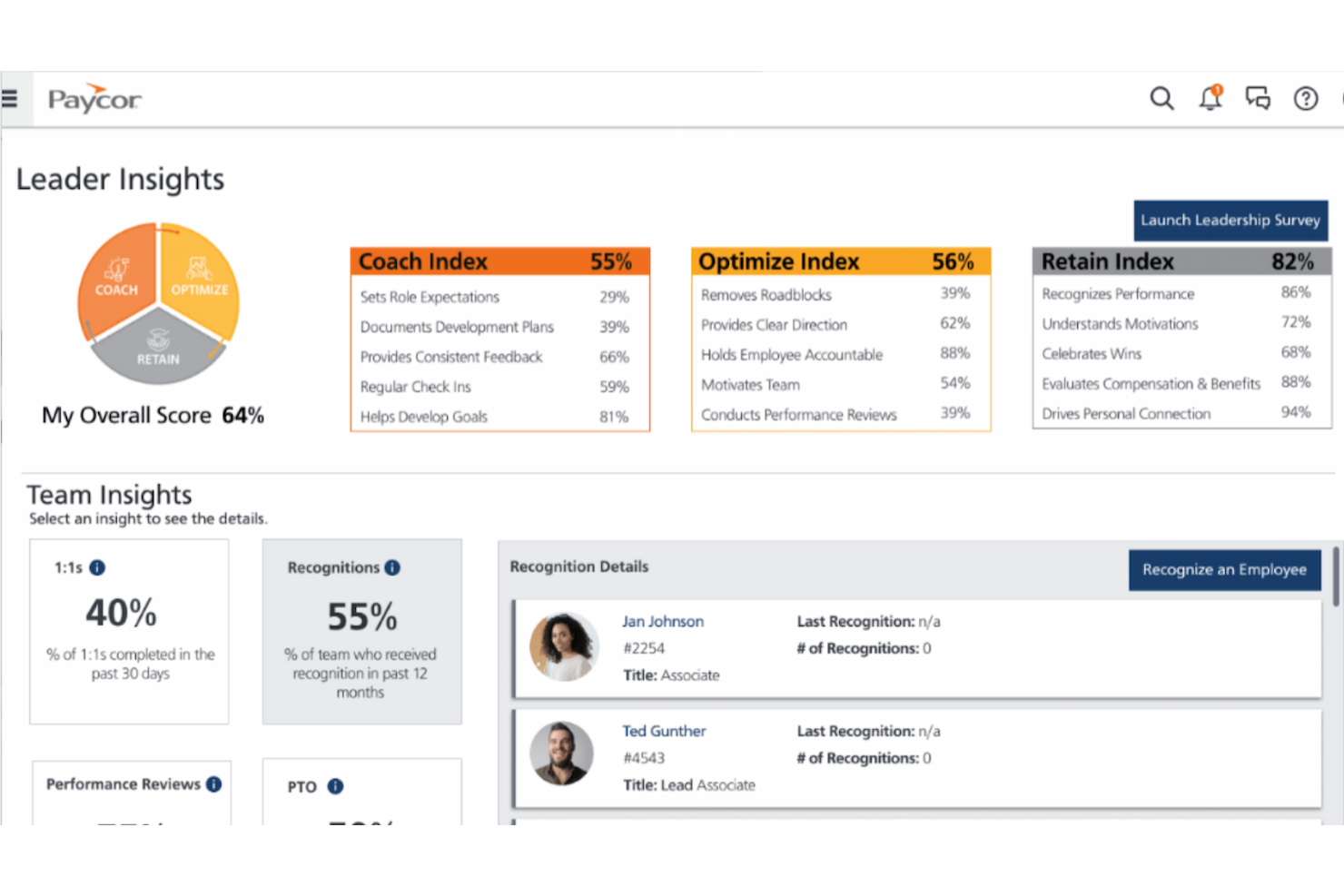
Paycor is an AI-powered HR software platform that combines predictive analytics, talent management, payroll automation, and employee engagement tools for HR teams seeking data-driven solutions.
Who Is Paycor Best For?
Paycor is a strong fit for mid-sized to large organizations with dedicated HR teams that need workforce analytics and data-driven tools to guide people strategy.
Why I Picked Paycor
Paycor earns its spot as one of the best on my shortlist because of how far its predictive analytics capabilities go beyond standard HR reporting. I particularly like the predictive resignation feature, which uses AI to identify at-risk employees, surface the factors driving their resignation risk, and forecast expected turnover across departments and locations over the next 12 months. That kind of forward-looking visibility is genuinely useful when you're trying to get ahead of attrition rather than react to it. I also use the AI Analytics Assistant regularly—you can ask workforce questions in plain language and get immediate answers without needing to build a report from scratch.
Paycor Key Features
- Automated talent sourcing: Paycor uses AI to source and screen candidates, surfacing qualified applicants without manual searching.
- Pulse surveys: Send short, configurable employee feedback surveys and view results as real-time insights in the analytics dashboard.
- Compensation management: Plan, model, and execute pay increases across departments with a detailed breakdown of total spend vs. budgeted amounts.
- Performance reviews with sentiment analysis: AI monitors the tone of written manager feedback during reviews, flagging positive, neutral, or negative sentiment.
Paycor Integrations
Paycor offers native integrations with ADP, QuickBooks, Indeed, ZipRecruiter, and Microsoft 365. An API is available for custom integrations.
Pros and Cons
Pros:
- Wide range of integrations with popular tools
- Advanced employee performance tracking
- Industry-specific HR and payroll solutions
Cons:
- May require additional support for full customization
- UX can feel a bit clunky at times
Leapsome
Best for 360-degree feedback

Leapsome is an AI-powered HR platform for managing performance reviews, 360-degree feedback, employee engagement surveys, goal tracking, and learning programs in one system.
Who Is Leapsome Best For?
Leapsome is a strong fit for mid-size to enterprise HR teams looking for a unified platform to manage performance, engagement, and employee development.
Why I Picked Leapsome
Leapsome earns its spot as one of the best on my shortlist because of how well its 360-degree review system handles the full feedback loop in one place. I like that you can run 360° reviews alongside self-assessments, peer reviews, and manager evaluations—all from the same configurable template builder, with granular anonymity settings you can toggle per cycle. The AI Review Assistant stands out: managers can speak or type directly to it, and it generates evidence-based draft feedback using past performance data, peer input, and goal progress. That means my team isn't starting from a blank page during review season. The calibration tools also help HR catch inconsistencies across reviewers before ratings are finalized, which is something I find genuinely useful when managing reviews at scale.
Leapsome Key Features
- Engagement survey templates: Run engagement, pulse, onboarding, and project surveys using expert-verified, research-backed templates with customizable anonymity settings.
- AI survey analysis: Automatically summarize survey responses, identify key themes, and analyze sentiment across your workforce data.
- Learning paths: Build and assign role-specific learning paths for onboarding, compliance, and leadership development, with automated enrollment triggers based on roles or start dates.
- People analytics dashboards: View performance trends, participation rates, and engagement data across cycles using heatmaps and live-updating dashboards.
Leapsome Integrations
Leapsome offers native integrations with Slack, Microsoft Teams, BambooHR, Personio, HiBob, Workday, Google Workspace, Okta, and Azure Active Directory. An API is available for custom integrations.
Pros and Cons
Pros:
- Goal tracking improves employee alignment
- Comprehensive performance review structure
- AI insights enhance HR decisions
Cons:
- Occasional integration setup challenges
- Limited customization for OKRs

HiBob
Best for AI-powered people analytics
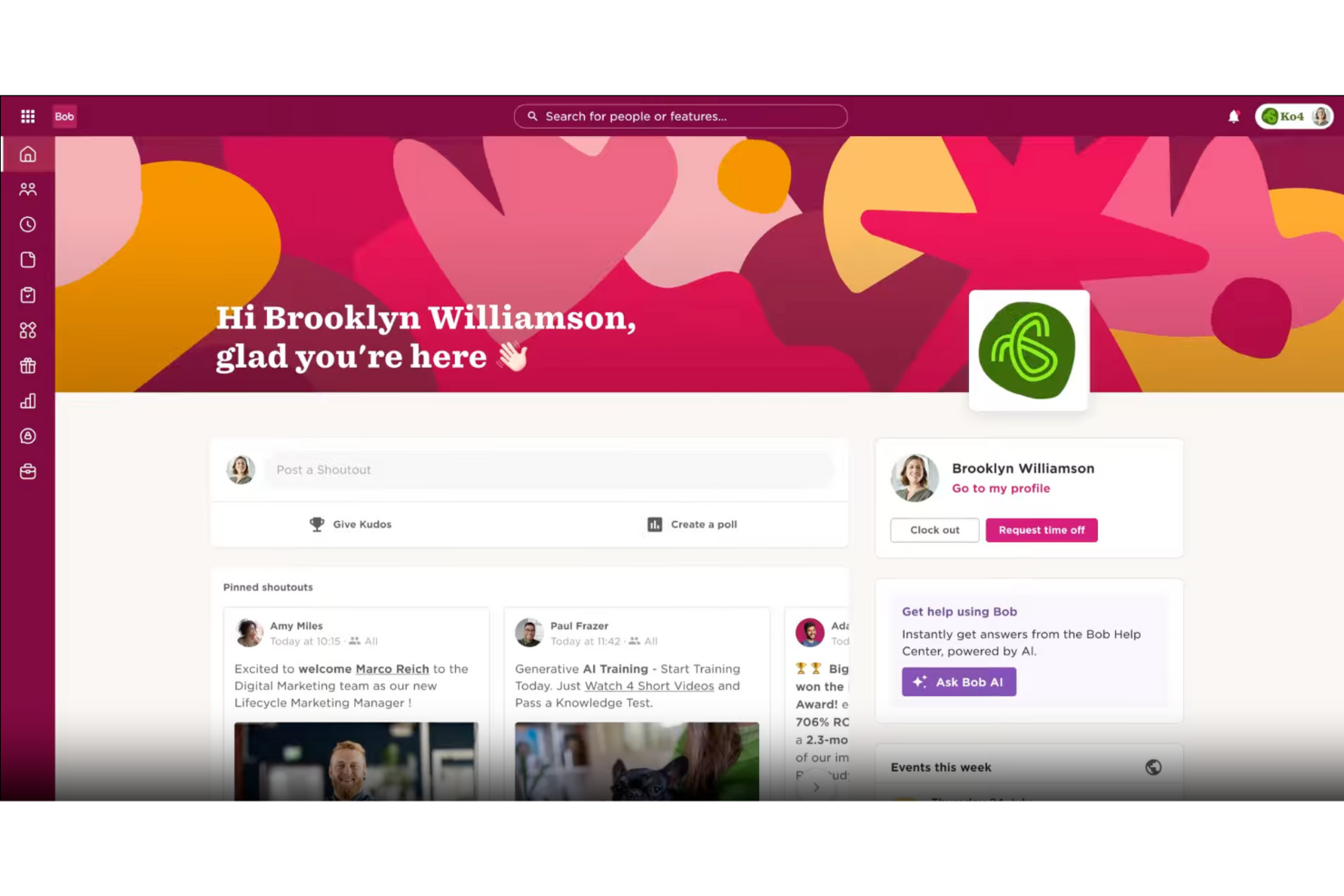
HiBob is an AI-powered HR platform that brings together people analytics, core HR management, performance tracking, and workflow automation for modern HR teams.
Who Is HiBob Best For?
HiBob is a strong fit for mid-sized and scaling companies that need a centralized HR platform with built-in people analytics and data-driven decision-making tools.
Why I Picked HiBob
HiBob earns a place on my shortlist because its AI-powered people analytics surface insights you'd otherwise miss. I particularly like the attrition risk indicators, which rate employees as "Low risk," "Some risk," or "At risk" based on factors like tenure, team size, and career development—so my team can act before someone hands in their notice. The Bob AI Companion also lets me query HR data conversationally instead of building manual reports. The proactive insights engine flags trends and patterns automatically, surfacing issues I wouldn't otherwise spot.
HiBob Key Features
- 360° performance reviews: Run structured review cycles that include self-reviews, peer reviews, manager reviews, and upward reviews in a single workflow.
- Compensation management: Manage salary reviews, bonuses, and equity allocation across global teams within a single compensation cycle.
- Automated onboarding flows: Build unlimited, role-specific onboarding workflows with tasks assigned to HR, IT, managers, and peers that trigger automatically for each new hire.
- AI-powered survey analysis: Run employee engagement and lifecycle surveys with built-in theme and sentiment analysis to surface patterns in feedback.
HiBob Integrations
HiBob offers native integrations with Slack, Microsoft Teams, Workday, Greenhouse, DocuSign, Okta, Google Workspace, Lever, and Zapier. An API is available for custom integrations.
Pros and Cons
Pros:
- Strong analytics provide useful insights into workforce data
- Clean design improves usability and employee self-service experience
- Comprehensive HR features support core employee management needs
Cons:
- Reporting and time-off configuration lack deeper customization options
- Some configurability issues limit flexibility

Best for AI-powered HR automation
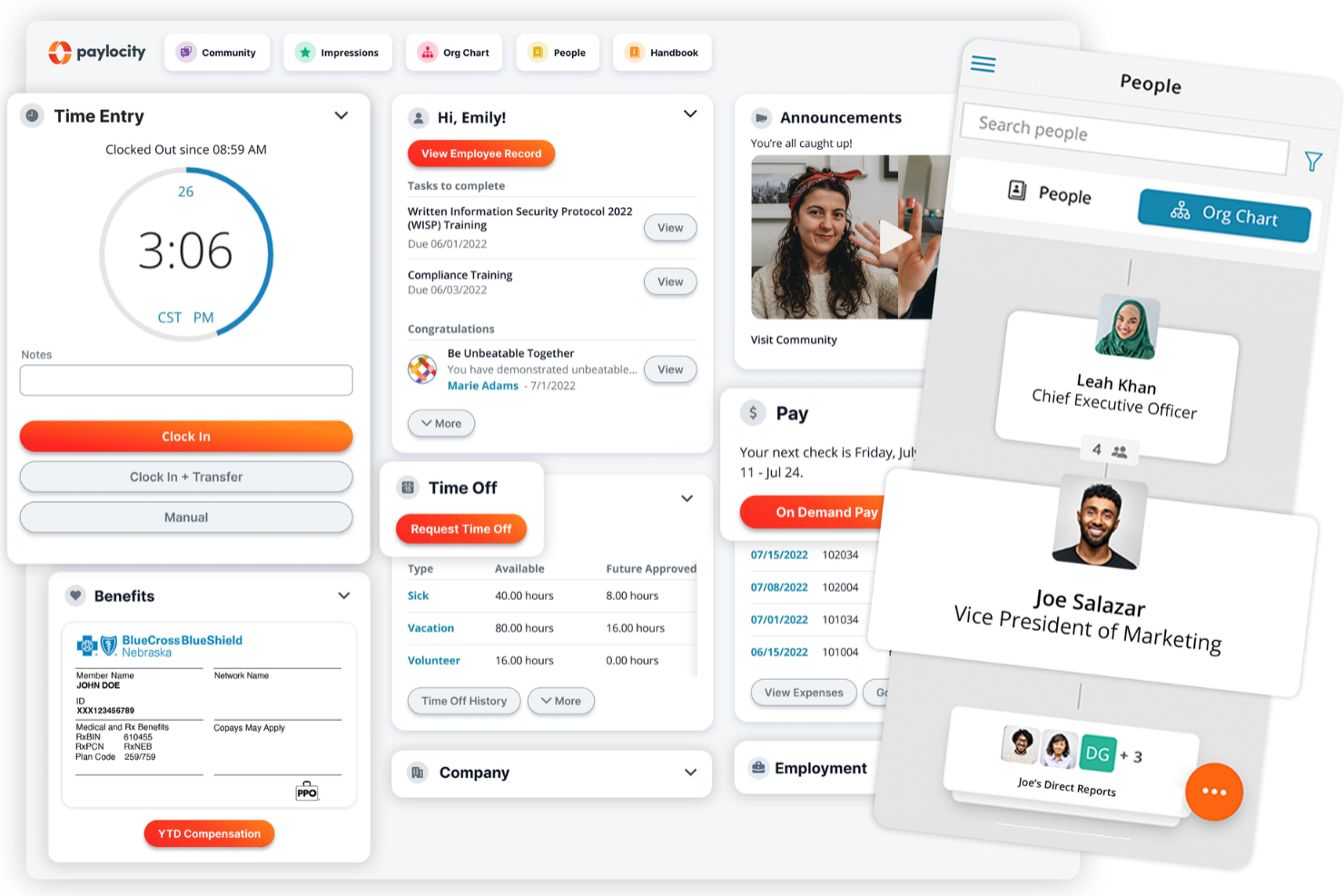
Paylocity is an AI-driven HR software platform that covers payroll, talent management, benefits administration, workforce analytics, and employee engagement tools in one system.
Who Is Paylocity Best For?
Paylocity is a strong fit for mid-sized to large organizations looking for a unified HR platform with AI-driven automation built across payroll, talent, and workforce management.
Why I Picked Paylocity
I've included Paylocity in my top picks because of how deeply AI is woven into the day-to-day HR workflow rather than bolted on as a separate module. What I find particularly compelling is the retention risk feature—it surfaces at-risk employees, flags the top contributing factors, and then generates research-backed action plans your team can act on. I also like the AI-powered scheduling, which uses historical data and sales goals to predict staffing needs and recommend schedules for manager review. The AI Assistant gives employees and managers context-aware, self-service support without HR having to field every question manually.
Paylocity Key Features
- Employee self-service portal: Employees get 24/7 access to paystubs, tax forms, time-off requests, and personal information updates via desktop or the Paylocity mobile app.
- Benefits decision support: Powered by Reclaim, this tool gives employees personalized plan recommendations based on their individual preferences and situations during open enrollment.
- Workforce analytics dashboard: Pull real-time, visualized reports and custom dashboards to monitor key HR metrics, identify workforce trends, and track headcount at the position and seat level.
- Workflow automation engine: Build automated routines for common tasks across the platform using templates for typical use cases like offboarding, or create custom workflows from scratch.
Paylocity Integrations
Paylocity offers native integrations with ADP, QuickBooks, NetSuite, SAP, Oracle, and the Microsoft ecosystem, including Microsoft 365 and Azure. An API is available for custom integrations.
Pros and Cons
Pros:
- Auto-generated job descriptions speed up recruiting
- AI assistant reduces routine HR inquiries
- Predictive analytics highlight turnover risks
Cons:
- Limited customization options in certain modules
- Setup can be time consuming
New Product Updates from Paylocity

Paylocity Expands Expense and Purchase Request Tools
Paylocity adds connected personal cards, smarter expense categorization, and a streamlined purchase request experience. This reduces manual entry and helps finance teams manage expenses and approvals more efficiently. For more information, visit Paylocity’s official site.
 .
.
Best for integrated time tracking
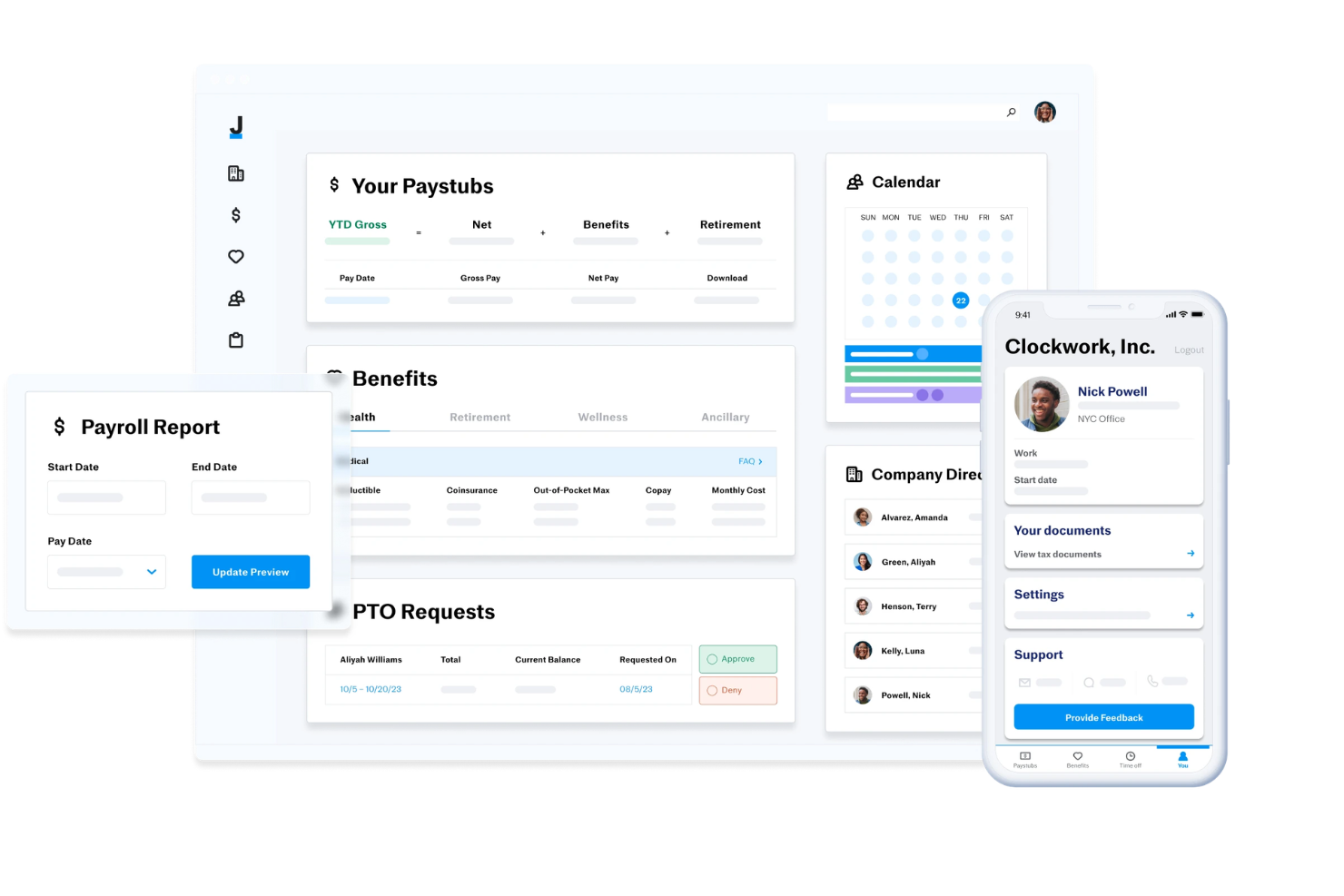
Justworks is an ai hr software platform that combines payroll, benefits administration, compliance management, time tracking, and HR tools in one system.
Who Is Justworks Best For?
Justworks is a good fit for small to midsize businesses that want a unified platform to manage HR, payroll, and compliance.
Why I Picked Justworks
I picked Justworks as one of the best because its integrated time tracking lets my team manage hours, attendance, and PTO directly within the HR platform. I like that I can review timesheets, approve requests, and sync data with payroll without switching tools. This setup helps me keep everything organized and accurate for both compliance and payroll processing.
Justworks Key Services
- Automated payroll processing: Run payroll for employees and contractors with automatic tax calculations and filings.
- Benefits administration: Manage health insurance, 401(k), and other employee benefits from a single dashboard.
- HR document storage: Store and organize HR documents, policies, and employee files securely online.
- Compliance support tools: Access built-in resources and alerts to help stay up to date with labor laws and regulations.
Justworks Integrations
Justworks offers native integrations with Greenhouse, Lever, JazzHR, QuickBooks, Xero, 15Five, Brex, Carta, Checkr, and Culture Amp.
Pros and Cons
Pros:
- Native integrations with top HR and finance tools
- Automated W-2 and 1099 tax filings
- Built-in time tracking and payroll sync
Cons:
- Lacks advanced AI-driven HR automation features
- No built-in performance management module

Aeqium
Best for complex business compensation planning
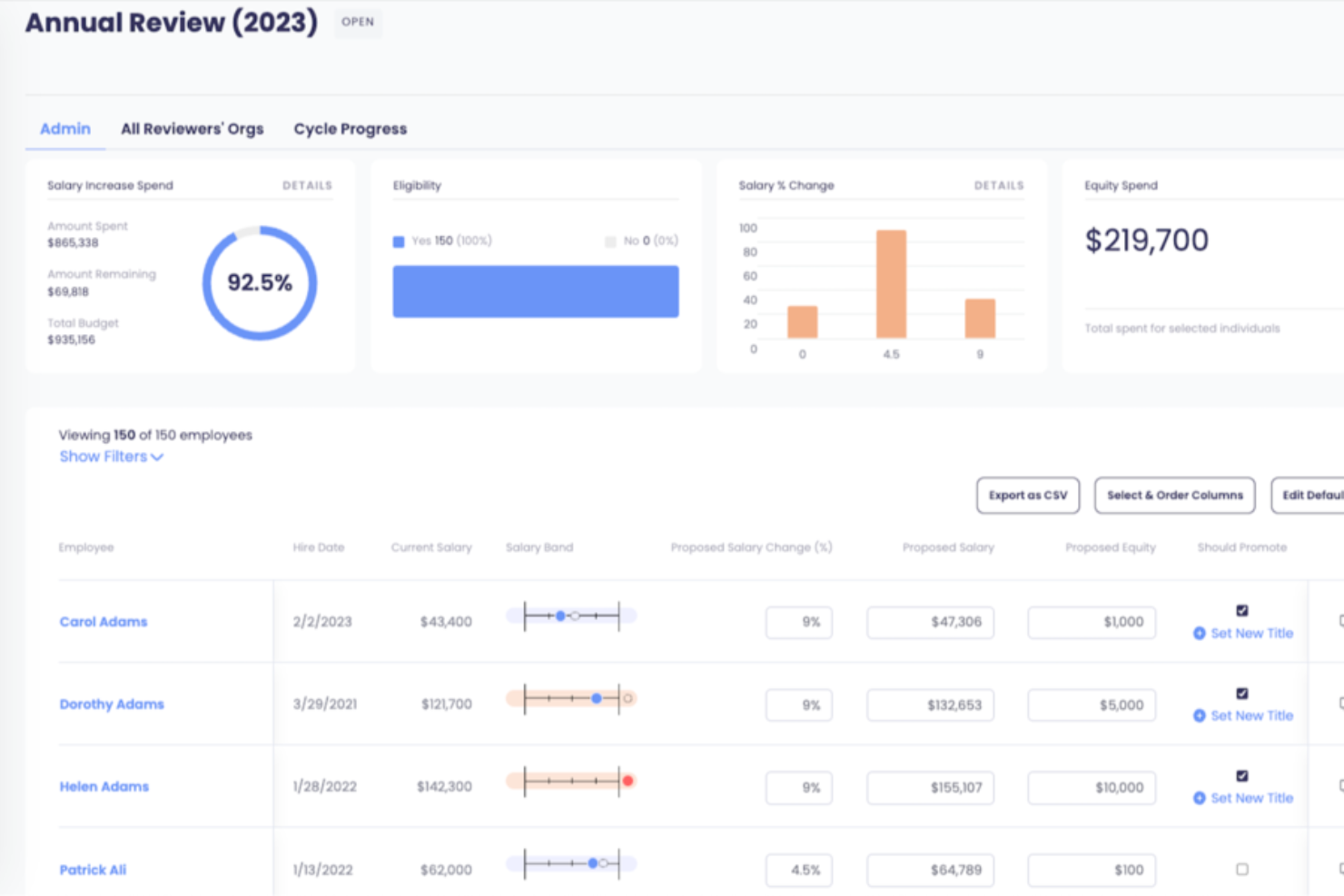
Aeqium is an AI-powered HR software platform designed for managing compensation planning, pay analytics, and workflow automation for HR teams handling complex pay structures.
Who Is Aeqium Best For?
Aeqium is a strong fit for mid-size to enterprise HR and compensation teams managing multi-layered pay structures, merit cycles, and equity programs across large employee populations.
Why I Picked Aeqium
Aeqium earns its spot on my shortlist because it's purpose-built for the kind of compensation complexity that breaks most tools. I like that its no-code logic lets my team configure custom eligibility rules, multi-level approval chains, and budget distribution methods without waiting on engineering or outside consultants. Aeqium Analyst is an AI agent that connects to live compensation data and generates narrative analysis reports rather than just charts. For example, I can ask "show me equity distribution by tenure across departments" and receive a written report with context and flagged outliers, ready to share with leadership.
Aeqium Key Features
- Compensation bands management: Create, customize, and audit salary ranges with role-based access controls, and share band data directly with employees through the employee portal.
- Pay band history tracking: Log and audit every change to compensation bands over time, giving your team a full record of how pay ranges have shifted alongside market conditions.
- Employee total rewards portal: Give employees 24/7 access to a personalized view of their salary, equity, bonus, and benefits, with configurable transparency settings you control.
- Interactive offer letters: Build dynamic, visual offer letters with a built-in equity simulator that lets candidates model the value of their equity under different scenarios.
Aeqium Integrations
Aeqium offers native integrations with most HRIS, ATS, and equity management systems, and also supports data uploads from custom sources via CSV. An API is available for custom integrations.
Pros and Cons
Pros:
- Flexibility in configuring pay bands
- Customizable templates for offer letters
- Pay equity modeling tools
Cons:
- Limited HR analytics beyond compensation
- No built-in ATS or recruiting tie-ins
Other AI HR Software
Below is a list of additional AI HR software that didn’t make it into my top 15 list, but are still worth checking out:
- WEX Benefits
For AI-driven benefits administration
- PerformYard
For AI-driven employee reviews
- Homebase
With AI-powered scheduling assistant
- HR Acuity
For employee relations management
- TriNet
For HR workflow guidance
- Sloneek
For automating HR tasks
- Mitratech Perform
For connecting hiring and performance
- Syndio
For real-time compensation insights
- Lattice
For employee performance and engagement AI
- Guidde
For AI-powered training videos
- Workleap
For AI-powered engagement insights
- ChartHop
For AI-powered insights & workflows
- Boon
For community-driven hiring
- Zimyo HRMS
For customizable HR workflows
- Eightfold
AI platform for managing talent diversity


Related HR Software Reviews
If you still haven't found what you're looking for here, check out these other related tools that we've tested and evaluated:
- HR Software
- Payroll Software
- Recruiting Software
- Employer of Record Services
- Applicant Tracking Systems
- Workforce Management Software
How I Evaluate AI HR Software
Every tool on this list needs to go beyond slapping an AI label on basic automation—I look for platforms where AI actually changes how teams hire, manage, and retain people. I split my evaluation into core functionality every tool must deliver to qualify and differentiating factors that separate good options from great ones.
Core Functionality (Table Stakes For This List)
When I'm selecting tools for my list, I rank each one on a scale from 0 (does not offer the functionality) to 5 (excels in this area) for each core functionality listed below. Then, I calculate the tool's total score into a percentage. Each tool needs to achieve a minimum total score of 75% to be considered for inclusion.
- AI-Powered Talent Acquisition: I evaluate how the platform handles sourcing, screening, and matching—like whether AI can rank applicants against role-specific criteria or surface passive candidates.
- Generative HR Assistant: The tool should offer a GenAI assistant that drafts real HR content, such as job descriptions, policy documents, or personalized employee responses.
- Predictive People Analytics: I look for models that go beyond dashboards to forecast outcomes like attrition risk or workforce planning gaps with actionable recommendations.
- Core HRIS Capabilities: Every tool needs solid employee record management, org structure mapping, and lifecycle tracking from hire through offboarding.
- HR Workflow Automation: I check whether onboarding sequences, approvals, and document routing use AI-driven triggers rather than relying on static rule-based templates.
- Compliance & Data Security: Certifications like SOC 2 and GDPR compliance matter, but I also evaluate AI-specific governance such as bias monitoring and decision audit trails.
Once I have a list of tools that meet the criteria, I consider what sets each platform apart.
Differentiating Factors (What Sets Vendors Apart)
Here's how I compare and contrast different vendors:
Standout Features
A skills intelligence engine adds real depth—I evaluate whether the platform can map employee competencies and recommend internal mobility paths or learning opportunities based on skill gaps. Bias detection is another differentiator, especially tools that flag biased language in job posts or surface demographic patterns in screening outcomes. Sentiment analysis through NLP also stands out when it can identify burnout risks or engagement dips from pulse surveys before they turn into retention problems.
Beyond Features
AI governance matters a lot in this space—I check whether vendors offer explainability for AI-driven decisions and human-in-the-loop controls for sensitive actions like screening or performance scoring. Integration depth is equally telling; a platform that connects natively with your ATS, payroll, and collaboration tools like Slack or Teams saves months of custom work. I also evaluate implementation speed, including whether pre-trained AI models reduce the data ramp-up that often delays time-to-value for HR teams.
How to Choose AI HR Software
Start by matching the software to the HR processes where AI can actually make a difference, whether that’s recruiting, employee support, workforce planning, performance management, analytics, or administrative tasks. From there, compare the HR software basics, including integrations, reporting, compliance, scalability, ease of use, and how well the AI features fit into your existing workflows.
Try our tool below to narrow your options based on your specific needs.
For a broader walkthrough of the fundamentals, see our guide on how to choose HR software.
Trends in AI HR Software
As everyone knows, the integration of AI-backed features into all types of software is continuing to evolve rapidly to match user needs and incorporate advances in AI technology itself. Here are several trends shaping the development of AI HR tools currently:
- Predictive Analytics in Talent Acquisition: AI-driven predictive analytics support talent acquisition teams by forecasting the success of candidates, and reducing hiring risks. This trend is pivotal for strategic workforce planning.
- Enhanced Employee Experience Platforms: Many platforms now use AI to improve the employee experience by anticipating employee needs and automating answers to routine inquiries. Collectively, these enhancements help boost employee satisfaction and retention.
- Bias Reduction in HR Processes: AI-powered applicant tracking tools help minimize bias in HR decisions by analyzing patterns and promoting diversity in recruitment, facilitating transparent, fair, and inclusive workplace cultures.
- AI-Powered Performance Management: Performance management is benefitting from AI in the context of real-time feedback and personalized development plans, helping to foster continuous growth and productivity.
- Advanced Natural Language Processing (NLP): NLP is improving HR communication interfaces. AI can now understand and respond to complex employee queries in a conversational style, which is key for efficient HR service delivery.
As you can see, these AI HR software trends are shaping a more data-driven, equitable, and responsive landscape across a wide range of human resources applications.
What Is AI HR Software?
AI HR software is a tool that automates and enhances various human resources tasks using artificial intelligence. HR professionals, recruiters, and managers generally use these tools to improve efficiency in recruitment, employee management, and data analysis. Features like automating recruitment processes, managing employee data, and tracking performance help with simplifying workflows and reducing manual tasks. Overall, these tools save time and improve decision-making in HR functions.
Key Features
When selecting AI HR software, keep an eye out for the following key features:
- Automated recruitment: AI-powered recruiting tools screen resumes, rank candidates, and shortlist top talent based on role requirements and historical hiring data. This significantly reduces manual screening time and speeds up the hiring process.
- Employee data management: AI HR software centralizes employee records into a single, intelligent system. Automated data validation helps keep information accurate, up to date, and easy to access across HR teams.
- Performance tracking: AI continuously monitors performance trends, goal progress, feedback, and productivity metrics. These insights support more informed appraisals, coaching conversations, and development planning.
- Integration capabilities: Seamless integrations with payroll, time tracking, accounting, communication, and learning platforms ensure data flows smoothly across systems and eliminate duplicate data entry.
- Customizable workflows: AI-driven workflow automation allows HR teams to tailor approvals, reports, onboarding steps, and notifications to fit organizational processes—improving efficiency and adaptability.
- Predictive analytics: AI analyzes workforce data to forecast trends such as turnover risk, hiring demand, skills gaps, and engagement levels—supporting proactive decision-making and workforce planning.
- Compliance management: AI helps monitor labor law changes, documentation requirements, and policy adherence. Automated alerts and checks reduce compliance risk and administrative overhead.
- Mobile accessibility: Mobile-friendly platforms allow employees and managers to access HR tools, approvals, and insights from anywhere—supporting remote, hybrid, and field-based teams.
- Security safeguards: AI HR software includes robust security features such as encryption, role-based access controls, audit logs, and compliance with data protection regulations to keep sensitive employee information safe.
Benefits
Implementing AI HR software provides several benefits for your team and your business. Here are a few you can look forward to:
- Time savings: Automating recruitment and data management reduces manual tasks, freeing up time for strategic initiatives.
- Improved decision-making: Predictive analytics offer insights into trends like turnover, helping you make informed HR decisions.
- Enhanced compliance: Automated compliance management ensures adherence to labor laws, reducing the risk of penalties.
- Increased accessibility: Mobile features allow access to HR functions from anywhere, keeping your team connected on the go.
- Better data security: Security safeguards protect sensitive information, ensuring your data remains confidential and compliant.
- Personalized HR processes: Customizable workflows let you tailor processes to fit your organization's unique needs, increasing efficiency.
- Boosted employee engagement: Performance tracking provides insights that help in recognizing and rewarding employee contributions, fostering a more engaged workforce.
Costs & Pricing
Selecting AI HR software requires an understanding of the various pricing models and plans available. Costs vary based on features, team size, add-ons, and more. The table below summarizes common plans, their average prices, and typical features included in AI HR software solutions:
Plan Comparison Table for AI HR Software
| Plan Type | Average Price | Common Features |
|---|---|---|
| Free Plan | $0 | Basic employee data management, limited recruitment tools, and basic reporting. |
| Personal Plan | $5-$25/user/month | Advanced data management, performance tracking, and mobile access. |
| Business Plan | $30-$60/user/month | Full recruitment automation, integration capabilities, and compliance tools. |
| Enterprise Plan | $70-$150/user/month | Customizable workflows, predictive analytics, and dedicated support. |
AI HR Software FAQs
Here are some answers to frequently asked questions you may have about AI HR software and how it works:
How does AI in HR software improve the recruitment process?
AI can significantly enhance the recruitment process by automating repetitive tasks such as resume screening and candidate sourcing. It can also use predictive analytics to identify the best candidates by matching their skills and experiences with job requirements. Furthermore, AI-driven chatbots can engage with candidates, schedule interviews, and provide timely updates, improving the candidate experience.
For HR software aimed at improving the recruitment process, I recommend reviewing my list of the best AI recruiting software next.
Can AI HR software help with employee retention?
Yes, AI HR software can help with employee retention by identifying patterns and predictors of employee turnover. It can analyze factors such as job satisfaction, engagement levels, and performance data to forecast potential retention issues. This allows HR teams to proactively address concerns and implement strategies to improve employee retention.
Is AI HR software capable of eliminating bias in hiring?
AI HR software can help reduce bias in hiring by using algorithms that focus on skills and qualifications rather than demographic information. However, it’s important to note that AI systems are only as unbiased as the data they are trained on. Regular audits and updates are necessary to ensure AI remains fair and objective.
How does AI enhance employee engagement and satisfaction?
AI can enhance employee engagement by offering personalized experiences and recommendations for career development. It can analyze employee interactions and feedback to identify engagement drivers and areas for improvement. AI-driven surveys and sentiment analysis tools can also provide insights into employee satisfaction, giving HR teams the insights they need to take targeted actions.
What are the security concerns with AI HR software?
Security concerns with AI HR software include the protection of sensitive employee data and ensuring compliance with data protection regulations. AI HR systems must have robust security measures in place, such as encryption, access controls, and regular security audits. Additionally, transparency in how AI algorithms process data is important to maintain trust and compliance.
How do I choose the best AI HR software for my organization?
Choosing the best AI HR software for your organization involves assessing your specific HR needs and challenges. Consider factors such as the size of your organization, the complexity of your HR processes, and the level of AI integration you require.
It’s also important to evaluate the software’s scalability, user-friendliness, customer support, and integration capabilities with your existing HR systems. Conducting a thorough comparison of features and seeking demos or trials can also help you make an informed decision.