

10 Best AI HRIS Reviewed in 2026

10 Best AI HRIS Shortlist


The best AI-powered HRIS platforms combine traditional HR management functions—like payroll, recruitment, and employee engagement—with intelligent automation and predictive analytics, helping you save time and make smarter decisions.
Manual processes and fragmented systems can slow down HR teams and create costly errors. An AI-driven HRIS streamlines these tasks by automating workflows, analyzing workforce trends, and even predicting future needs—so you can shift from reactive administration to proactive people strategy.
Drawing on years of testing and reviewing HR software, I’ve curated the top AI HRIS solutions that are intuitive, scalable, and built to boost both efficiency and employee experience.
In this guide, you’ll find platforms that reduce admin, enhance decision-making, and give you actionable insights into the health and performance of your workforce.
Why Trust Our Software Recommendations
Our team has been testing and reviewing software since 2012. As HR experts ourselves, we know how difficult—and important—it is to choose the right software.
For this guide, we evaluated tools using hands-on testing and independent research, scoring tools using our selection criteria. We also draw on insights from industry thought leaders and practicing HR experts.
Our reviews reflect our human editorial judgment, not a sales pitch.
Expert reviewers:
AI HRIS Comparison Table
This comparison table summarizes pricing details for my top AI HRIS selections:
| Tool | Best For | Trial Info | Price | ||
|---|---|---|---|---|---|
| 1 | Best for complex, multi-country scenarios | Free demo available | From $5/user/month | Website | |
| 2 | Best for integrated time tracking | Not available | From $599/employee/month | Website | |
| 3 | Best for customizable employee workflows | Free demo available | Pricing upon request | Website | |
| 4 | Best as AI for business | Free demo available | From $8/user/month | Website | |
| 5 | Best for performance reviews | Free demo available | Pricing upon request | Website | |
| 6 | Best for AI-powered HR automation | Free demo available | Pricing upon request | Website | |
| 7 | Best with AI-powered in-platform assistants | Free demo available | Pricing upon request | Website | |
| 8 | Best for AI-driven performance management | 14-day free trial | Pricing upon request | Website | |
| 9 | Best for AI-driven workforce planning | Free demo + free plan available | From $5/employee/month (billed annually) | Website | |
| 10 | Best for finance integration | Free demo available | Pricing upon request | Website |

Best AI HRIS Review
Below are my detailed summaries of the best AI HRIS that made it onto my shortlist. My reviews offer a detailed look at the key features, pros & cons, integrations, and ideal use cases of each tool to help you find the best one for you.

Deel HR
Best for complex, multi-country scenarios

Deel HR is an AI-powered HRIS platform designed for managing global teams, offering features like multi-country compliance, payroll, onboarding, and document management.
Who Is Deel HR Best For?
Deel HR is a strong fit for HR teams at mid-size to enterprise companies managing employees and contractors across multiple countries.
Why I Picked Deel HR
I've included Deel HR in my top picks because it's one of the few HRIS platforms genuinely built for global complexity from the ground up. Where most HRIS tools treat international compliance as an add-on, Deel HR bakes country-specific employment rules, localized contracts, and local law alerts directly into every workflow across 150+ countries. I particularly like Deel AI, which is trained by HR and compliance experts across those same 150+ countries and gives my team instant answers on local labor laws, payslips, and policy questions without filing a support ticket. The platform also handles multiple worker types—employees, contractors, and EOR workers—all within a single system, so when my team is managing headcount across six different countries with different employment structures, everything stays in one place.
Deel HR Key Features
- Workforce planning: Forecast roles, costs, and headcount growth using live workforce and hiring data instead of disconnected spreadsheets.
- Performance management: Run review cycles, set goals, and build learning and development paths for employees across your global team.
- Automated workflow builder: Create onboarding, offboarding, and compliance workflows without coding, including country-specific notifications for local policy changes.
- Anonymous reporting: Built-in whistleblowing tools let employees report concerns securely, supporting compliant and people-centered HR practices.
Deel HR Integrations
Integrations include Google Workspace, QuickBooks, NetSuite, FaceUp, Zoom, Assembly, and more.
Pros and Cons
Pros:
- Centralized data makes auditing simple
- Strong global compliance and labor law coverage
- Automates complex HR workflows efficiently
Cons:
- Limited customization for smaller teams
- Pricing can rise with added modules
New Product Updates from Deel HR

Deel Expands Stablecoin Wallet to 80+ Countries
Deel expands its Stablecoin Wallet to 80+ countries with dollar-backed balances and optional rewards. This gives eligible contractors more ways to hold and manage earnings inside Deel. For more information, visit Deel’s official site.
 .
.
Best for integrated time tracking
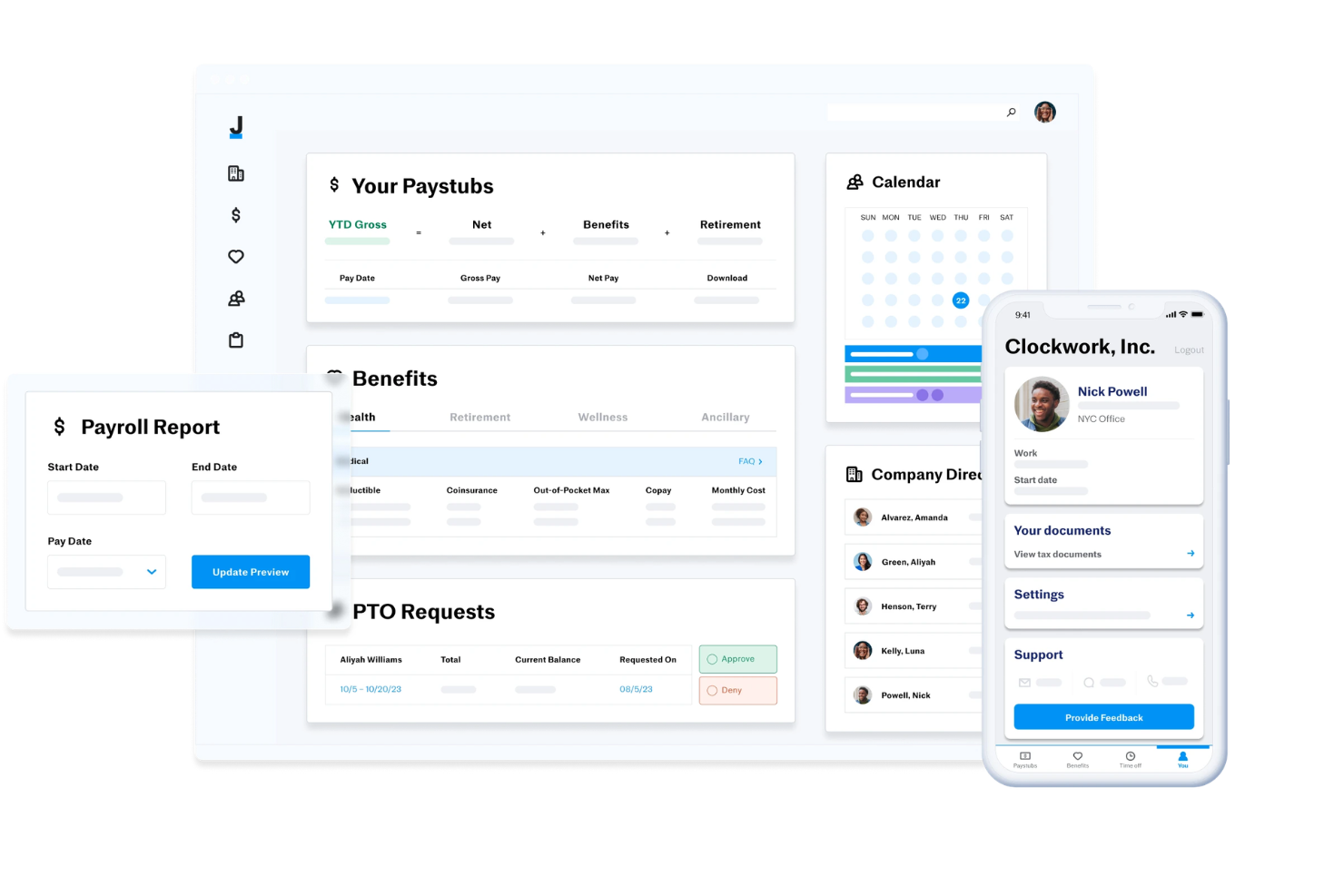
Justworks is an HRIS platform that combines payroll, benefits administration, compliance management, time tracking, and employee self-service tools for businesses managing HR processes in one system.
Who Is Justworks Best For?
Justworks is a good fit for small to midsize businesses that need a unified HRIS for payroll, benefits, and compliance across multiple states.
Why I Picked Justworks
I picked Justworks as one of the best because I can manage time tracking directly within the HRIS, which keeps payroll and attendance data in sync. My team uses the built-in time tracking to monitor hours, approve timesheets, and ensure accurate pay runs. I like that I don’t have to rely on third-party tools for tracking employee hours—everything is handled in one place.
Justworks Key Services
- Automated payroll processing: Run payroll for salaried and hourly employees with automated tax filings.
- Benefits administration: Manage health insurance, 401(k), and other employee benefits from one dashboard.
- Multi-state compliance tools: Access resources and support for handling HR compliance across different states.
- HR document management: Store, organize, and share HR documents securely within the platform.
Justworks Integrations
Native integrations are not clearly documented. Justworks offers an API for custom integrations.
Pros and Cons
Pros:
- Built-in HR document management and e-signatures
- Access to large-group health insurance plans
- Integrated time tracking for hourly employees
Cons:
- No built-in performance management features
- Benefits administration restricted to U.S. employees

Paycor
Best for customizable employee workflows
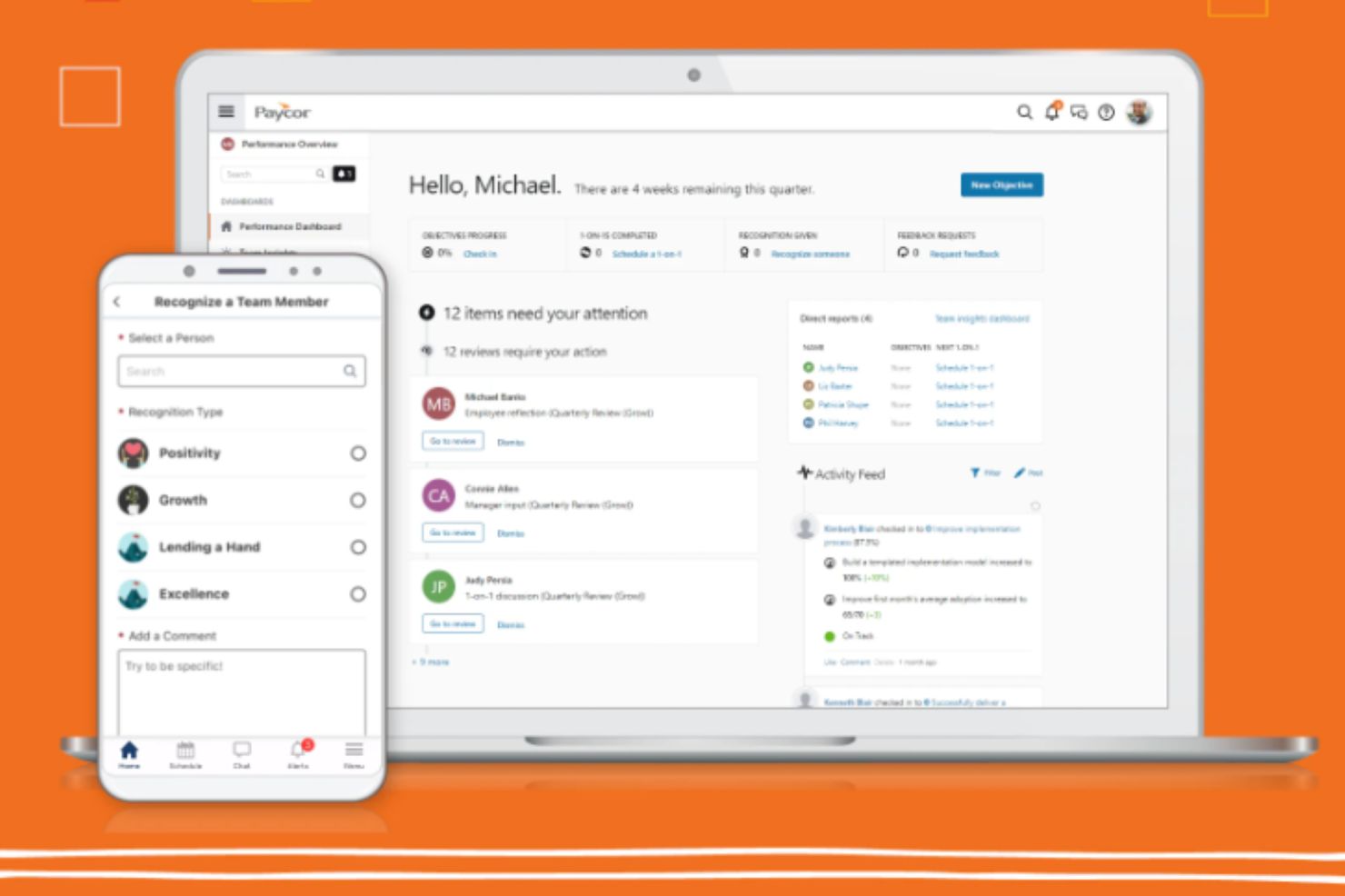
Paycor is an AI-driven HR and payroll platform that covers the full employee lifecycle, from recruiting and onboarding through performance management, scheduling, and people analytics.
Who Is Paycor Best For?
Paycor is a strong fit for midsize to enterprise HR teams that need a unified platform to manage payroll, compliance, and the full employee lifecycle without juggling multiple disconnected systems.
Why I Picked Paycor
I've included Paycor in my top picks because I love how far its configurable workflow tools go across the entire employee lifecycle. The system automation layer lets you set up automated workflows, reminders, and notifications for everyday HR tasks, so nothing falls through the cracks when a new hire joins or an employee changes roles. I also really like the Customer Sandbox, which lets you test workflow configurations and security setups without touching live data—that's a genuinely useful feature when you're rolling out process changes across a large team.
Paycor Key Features
- Paycor Assistant: An AI-powered tool that uses generative AI to summarize HR documents and surface admin insights directly within the platform.
- AI Smart Sourcing: Automatically identifies and surfaces active, passive, and diverse candidates using AI-driven candidate matching.
- Workforce analytics dashboards: Pre-built dashboards that track turnover, headcount, gender pay equity, and D&I metrics in real time.
- Performance review tools: Structured review cycles with AI-assisted sentiment analysis built into the feedback workflow.
Paycor Integrations
Paycor offers 320+ marketplace integrations through its Paycor Marketplace, including connectors to Microsoft Entra ID, Okta, Google Workspace, Greenhouse, iCIMS, Jira, ServiceNow, NetSuite, and Oracle. Zapier is not currently available as a native integration, but Paycor provides 140+ APIs through its Developer Tools for custom integrations.
Pros and Cons
Pros:
- Multi-state payroll tax auto-filing
- License and certification expiration tracking
- Recruiting through payroll in one platform
Cons:
- Modules feel disjointed across platform sections
- Reporting tools are limited and outdated

Best as AI for business
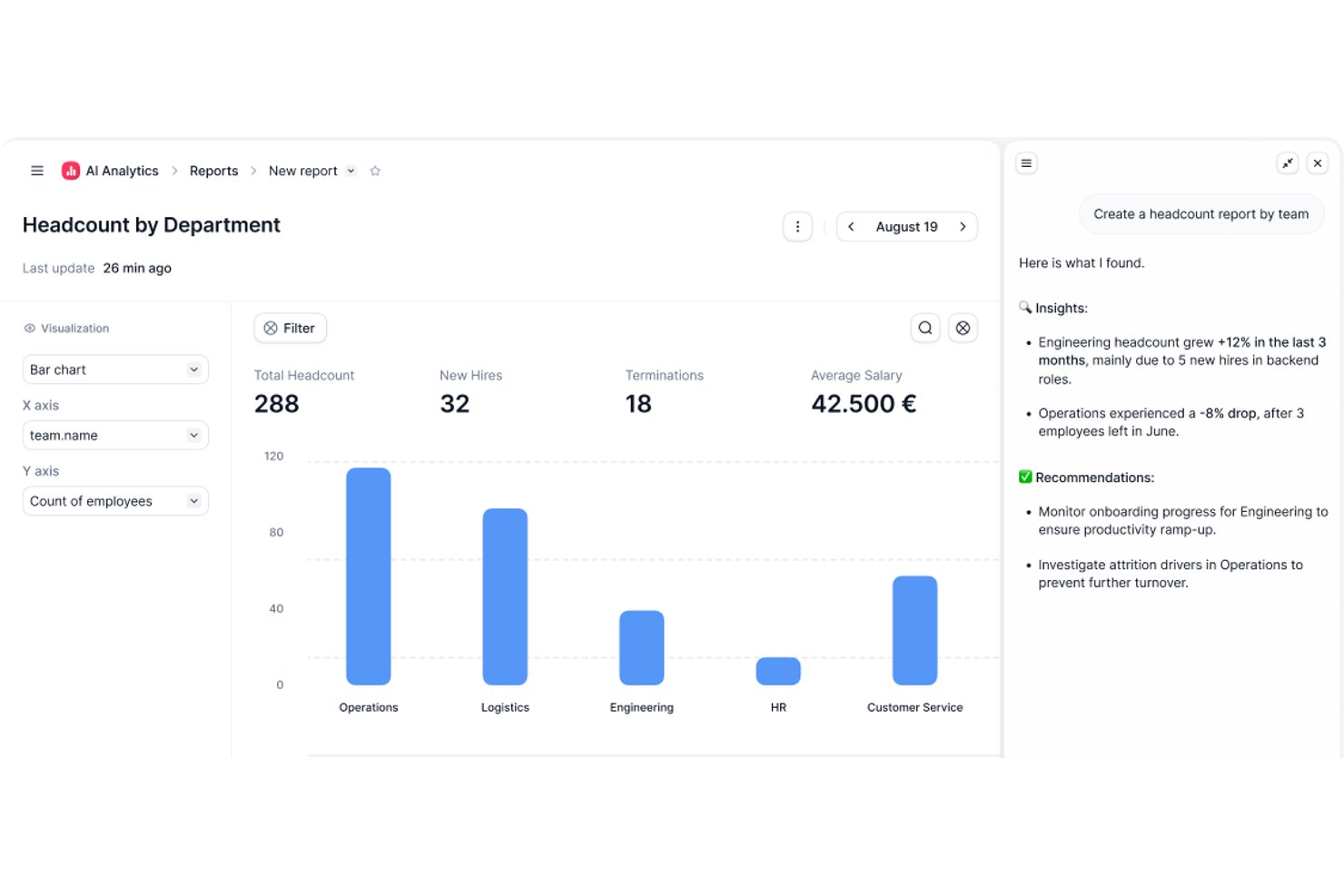
Factorial is an AI-powered HRIS that connects HR, finance, and IT operations, covering employee records, workflow automation, time tracking, recruitment, and performance management in one platform.
Who Is Factorial Best For?
Factorial suits growing SMBs and mid-market teams that want a single platform connecting HR, finance, and IT operations without managing multiple disconnected tools.
Why I Picked Factorial
I picked Factorial as one of the best because its AI for business positioning isn't just marketing language—One, its AI agent, actively works across HR, finance, and IT data to do things like answer employee questions about leave policies, flag payroll anomalies, and draft onboarding plans. I especially like that One respects each user's access permissions before responding or acting, so sensitive data stays appropriately gated. It's a genuinely cross-functional AI layer, not just a chatbot bolted onto an HR tool.
Factorial Key Features
- AI-assisted recruitment: Factorial uses AI to generate job descriptions, screen candidates, and summarize resumes within its built-in applicant tracking system.
- 360-degree performance reviews: The platform supports multi-rater feedback, review timelines, automatic participation reminders, and goal and competency tracking.
- Shift scheduling and time tracking: Factorial handles automated and rotating shift management alongside geolocation and QR-code-based time tracking.
- SaaS and IT inventory management: Factorial tracks your software licenses, flags unused ones, and manages device assignments and provisioning from a single dashboard.
Factorial Integrations
Factorial offers marketplace integrations with Microsoft Business Central, SAP Business One, Sage 100, Microsoft Power BI, Okta, Slack, LinkedIn, and Recruitee. It also supports an Open API and Zapier.
Pros and Cons
Pros:
- One answers policy questions with role-based access
- Automates leave, onboarding, and offboarding workflows
- Centralizes employee records and self-service documents
Cons:
- No documented predictive attrition-risk insights
- Workforce reporting offers limited customization
Leapsome
Best for performance reviews

Leapsome is a people enablement platform designed for organizations focused on enhancing employee performance and engagement. It delivers solutions for performance management, employee engagement, and learning, making it suitable for companies aiming to foster a culture of continuous improvement.
Why I picked Leapsome: Leapsome integrates AI across performance management, learning, and engagement to create a continuous cycle of improvement.
Its AI-powered feedback and review tools surface patterns in employee performance, helping leaders spot strengths and growth opportunities. With personalized learning paths and intelligent goal alignment, Leapsome ensures teams stay productive, engaged, and future-ready.
Standout features & integrations:
Features include AI-driven performance reviews with customizable cycles and 360-degree feedback, making evaluations more data-informed and fair. Its intelligent goal-setting and tracking tools align employee efforts with company objectives, while AI-powered engagement surveys reveal morale trends and recommend focus areas. The learning module uses AI to create personalized development plans, addressing skill gaps and fostering continuous growth.
Integrations include Slack, Microsoft Teams, Google Workspace, BambooHR, Personio, Okta, Workday, Greenhouse, LinkedIn, and Microsoft Outlook.
Pros and Cons
Pros:
- Flexible feedback options
- Effective goal tracking
- Customizable review cycles
Cons:
- Requires ongoing user training
- Initial setup complexity

Best for AI-powered HR automation

Paylocity is an AI-powered HRIS platform that brings together payroll, benefits administration, time tracking, talent management, and analytics in one system.
Who Is Paylocity Best For?
Paylocity is a strong fit for mid-sized to large organizations looking for a unified HR and payroll platform with built-in AI capabilities.
Why I Picked Paylocity
Paylocity earns its spot as one of the best on my shortlist because of how deeply AI is woven into the day-to-day HR workflow rather than bolted on as a separate module. I particularly like the AI-powered retention playbook, which surfaces at-risk employees, flags the top risk factors, and generates research-backed action plans—so my team isn't just looking at turnover data after the fact, we're acting on it proactively. I also find the AI Assistant genuinely useful: it handles context-aware, self-service queries from employees using company-specific data, which cuts down on the volume of repetitive HR tickets my team fields. The intelligent scheduling feature, which predicts staffing needs based on historical data and sales goals, is another area where Paylocity's AI does real work rather than just surfacing dashboards.
Paylocity Key Features
- Payroll readiness dashboard: Highlights critical tasks before processing and runs 40+ automated audits to flag potential errors like unexpected pay spikes before you submit payroll.
- Benefits decision support: Gives employees personalized plan recommendations based on their individual preferences and situation, reducing costly elections and open enrollment questions to HR.
- 360-degree performance reviews: Collects multi-source feedback from peers, managers, and direct reports, with built-in sentiment analysis and compensation benchmarks to support data-driven evaluations.
- Automated onboarding checklists: Assigns role-, team-, or location-specific onboarding tasks automatically, with real-time tracking and integrated data flow across recruiting, HR, and payroll.
Paylocity Integrations
Paylocity offers hundreds of native integrations, including Microsoft Entra, Google Workspace, Okta, Indeed, Checkr, Toast, Relias, Aeqium, Branch, Crunchtime, and Blissbook. An API is available for custom integrations.
Pros and Cons
Pros:
- Easy-to-use, mobile-friendly interface
- Delivers predictive analytics and insights
- Automates payroll and HR workflows
Cons:
- Pricing may stretch small budgets
- Advanced setup can take time
New Product Updates from Paylocity

Paylocity Expands Expense and Purchase Request Tools
Paylocity adds connected personal cards, smarter expense categorization, and a streamlined purchase request experience. This reduces manual entry and helps finance teams manage expenses and approvals more efficiently. For more information, visit Paylocity’s official site.
 .
.
HiBob
Best with AI-powered in-platform assistants
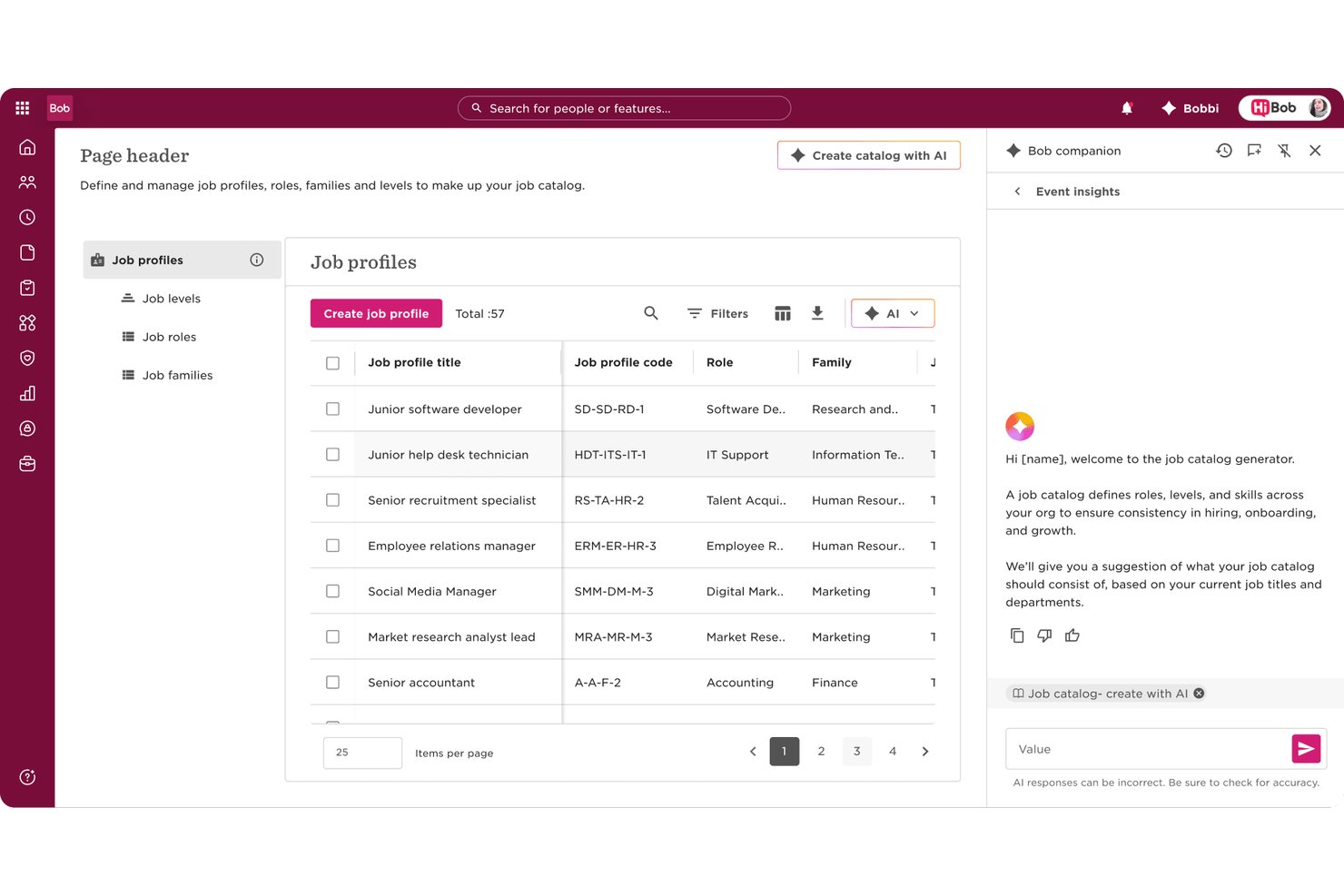
HiBob is an AI-native HRIS that brings together employee records, payroll, performance, compensation, and workforce planning in one platform, with embedded agentic AI and a conversational assistant built across every module.
Who Is HiBob Best For?
HiBob is a strong fit for mid-market companies scaling across multiple geographies who need a single people platform that connects HR, payroll, and workforce planning.
Why I Picked HiBob
HiBob earns its spot as one of the best on my shortlist because the AI isn't a single bolt-on feature. I love that Bob Companion runs as a central conversational interface across the entire platform, and behind it sits a network of 12 specialized agents. In practice, that means I can use the Compensation Agent to surface pay insights, the Performance Agent to draft review content, and the Payroll Agent to flag discrepancies, all without switching tools or screens.
HiBob Key Features
- Skills intelligence engine: AI auto-maps employee skills from resumes, projects, and reviews to support workforce planning.
- Sentiment and engagement analytics: Surveys and feedback are analyzed in real time to surface morale trends and turnover risk.
- Global compliance certifications: Holds ISO 27001, SOC 2, ISO 42001, and ensures GDPR/HIPAA alignment for secure, global HR data.
- Configurable sandbox environment: Lets admins test workflows, settings, and integrations before rolling changes out to employees.
HiBob Integrations
HiBob offers native integrations with Greenhouse, Okta, Slack, Microsoft 365, Google Workspace, BambooHR, ADP, and more. An API is available for custom integrations.
Pros and Cons
Pros:
- Sentiment AI surfaces flight risk in real time
- Skills intelligence auto-maps workforce capabilities from data
- Bob Companion spans every HR module natively
Cons:
- Payroll features vary significantly by region
- Reporting customization limited without admin configuration

Sloneek
Best for AI-driven performance management

Sloneek is an AI-powered HRIS platform that covers employee records, attendance tracking, document management, performance management, and workflow automation for HR teams looking for advanced digital tools.
Who Is Sloneek Best For?
Sloneek is a good fit for small to mid-sized companies that want a modern, AI-powered HRIS without the complexity of enterprise-grade systems.
Why I Picked Sloneek
I picked Sloneek as one of the best because I love how deeply AI is woven into its performance management tools. When a new role opens up, I can use the AI to generate skill sets, OKR sub-goals, and evaluation questionnaires for that position in seconds. The 360° feedback module also uses AI to generate questionnaires and automate evaluation recommendations, covering everything from soft skills to leadership across 90°, 180°, and full 360° configurations. I also rely on the competency evaluation dashboard to track how individual skill sets evolve over time, which makes development conversations much more grounded in actual data.
Sloneek Key Features
- People analytics dashboard: View pre-built charts covering headcount, turnover, absenteeism, and skills distribution across your organization.
- AI-powered ATS: Automatically import and parse CVs in bulk, rank candidates by fit, and generate job offers and interview questions using AI.
- Absence and attendance management: Configure working hours, absence types, approval workflows, and attendance terminals for each employee.
- Onboarding checklists: Build and assign customizable onboarding task lists to ensure every new hire completes the right steps in the right order.
Sloneek Integrations
Sloneek offers native integrations with Google Workspace, Microsoft 365, Slack, and Zapier. An API is available for custom integrations.
Pros and Cons
Pros:
- Strong employee engagement features
- AI-powered analytics and automation
- Comprehensive performance management tools
Cons:
- Limited public user review data
- Pricing available upon request
ChartHop
Best for AI-driven workforce planning
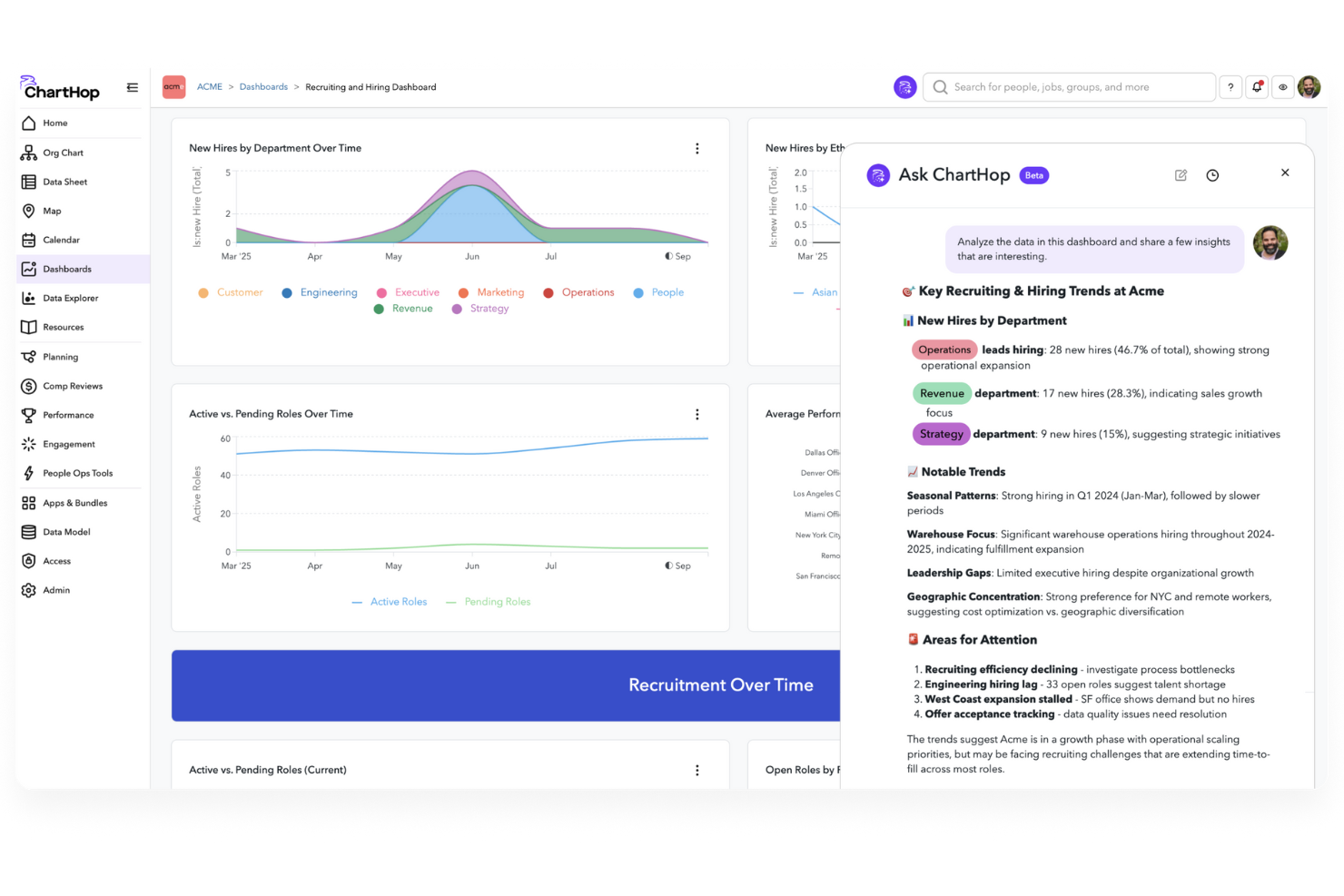
ChartHop is an AI-powered HRIS platform that brings together org charting, people analytics, workforce planning, and employee data management in one system.
Who Is ChartHop Best For?
ChartHop is a good fit for mid-size to enterprise HR teams that need a centralized platform for headcount planning, org design, and people analytics.
Why I Picked ChartHop
ChartHop earns its spot as one of the best on my shortlist because of how deeply AI is woven into its workforce planning workflows—not just as a reporting layer, but as an active part of how decisions get made. I particularly like the visual scenario modeling in the Headcount Planning module, where you can drag and drop roles on an org chart and get instant AI analysis of budget impact and team dynamics before a single hire is approved. The AI Pro module takes this further, letting my team describe a workforce action in plain language and have ChartHop execute it—building dashboards, sending notifications, or updating records—without any manual back-and-forth. What makes this genuinely useful is that the AI reasons across people data, compensation, performance, and even business data from tools like Salesforce, so headcount decisions aren't made in a vacuum.
ChartHop Key Features
- Time off management: Employees request time off directly in ChartHop, managers approve from ChartHop or Slack, and admins configure custom approval workflows for different policies.
- Onboarding and offboarding workflows: Build custom forms, tasks, emails, and automated survey triggers to manage the new hire and exit experience end-to-end.
- Compensation cycle configuration: Set up comp cycles with flexible budgets, compensation bands, approval workflows, and manager-facing dashboards that display real-time budget impact.
- 360-degree performance reviews: Configure review cycles with 15 question types, peer feedback, 1:1 notes, and goal tracking, with completion monitoring at the manager level.
ChartHop Integrations
ChartHop offers native integrations with ADP Workforce Now, BambooHR, Greenhouse, Gusto, Workday, SAP SuccessFactors, Paylocity, Lever, QuickBooks, and UKG. An API is available for custom integrations.
Pros and Cons
Pros:
- Strong integration capabilities with various HRIS systems.
- Advanced planning tools for headcount and restructuring flexibility.
- Dynamic org charting supports real-time structural visualization.
Cons:
- The breadth of configurable options can result in complexity and a steeper learning curve for admins.
- Lengthy implementation process requiring significant resources.
New Product Updates from ChartHop
ChartHop Adds Role and Filter Controls for Ask ChartHop
AI Pro customers can now set access controls for Ask ChartHop in AI settings, restricting who can use the assistant by role or filter criteria. For more information, visit ChartHop's official site.
 .
.
Workday
Best for finance integration

Workday is an AI-powered HRIS platform that brings together core HR, payroll, talent management, workforce analytics, and finance features in a single cloud-based system.
Who Is Workday Best For?
Workday is a strong fit for large enterprises that need HR and financial management running on a single, unified platform.
Why I Picked Workday
Workday earns its spot on my shortlist because it's one of the few HRIS platforms where HR and finance genuinely share the same data core—not just a connection between two separate systems. I like that workforce planning and financial planning run on the same unified platform, so when headcount changes, the financial impact updates in real time without any manual reconciliation. Workday's AI-powered anomaly detection in financial processes also means my team can catch discrepancies before they become audit issues.
Workday Key Features
- HiredScore AI for recruiting: AI-powered candidate screening and sourcing that surfaces relevant talent and pushes personalized internal mobility opportunities to existing employees.
- Workday Skills Cloud: An AI-driven skills intelligence foundation embedded across the HCM platform that maps workforce skills and identifies gaps across every stage of the talent lifecycle.
- AI-driven scheduling and demand forecasting: Automated workforce scheduling that matches employee preferences with business demand, including time tracking and absence management in a single hub.
- Workday Prism Analytics: A data hub that pulls in external transactional and high-volume data alongside HR data for self-service reporting, augmented analytics, and pay equity analysis.
Workday Integrations
Native integrations are not currently listed. The tool supports integrations via API for custom connections.
Pros and Cons
Pros:
- Industry-specific solutions
- Talent management capabilities
- Comprehensive workforce planning
Cons:
- Limited customization options
- Complex implementation process
Other AI HRIS
Here are some additional AI HRIS options that didn’t make it onto my shortlist, but are still worth checking out:
- Personio
For startups
- ADP
For payroll processing
- SAP SuccessFactors
For talent management
- UKG
For workforce management
- Oracle Cloud HCM
For global enterprises
- BambooHR
For user-friendly interface
- Gusto
For small businesses
- Lattice AI
For employee engagement
- Sense
For recruitment automation
- TalentHR
With custom people analytics dashboards
- Keka HR
For real-time AI-driven HR data sync
- Cezanne
For mid-sized businesses
- Humaans
For rapid HR setup


How I Evaluate AI HRIS Solutions
Every tool on this list needs to go beyond slapping an AI label on basic automation—I look for platforms where AI actually reduces admin load, surfaces actionable workforce insights, or handles employee queries without human intervention. I split my evaluation into core functionality every AI HRIS must cover and the differentiating factors that separate good options from great ones.
Core Functionality (Table Stakes For This List)
When I'm selecting tools for my list, I rank each one on a scale from 0 (does not offer the functionality) to 5 (excels in this area) for each core functionality listed below. Then, I calculate the tool's total score into a percentage. Each tool needs to achieve a minimum total score of 65% to be considered for inclusion.
- Centralized Employee Database: I check whether the platform serves as a true single source of truth—storing profiles, org charts, employment history, and documents with a full audit trail.
- AI-Powered Workflow Automation: The AI should handle tasks like auto-routing approval chains, generating onboarding checklists, or pre-filling forms—not just basic if/then triggers.
- Conversational AI Assistant: I evaluate whether employees can ask questions about PTO balances or benefits eligibility through a chatbot and get accurate, policy-grounded answers.
- Predictive People Analytics: Dashboards with AI-generated attrition forecasts or engagement trend alerts matter here, not just static headcount reports that any legacy HRIS offers.
- Core HR Module Coverage: A platform should cover onboarding, time-off, benefits, and payroll—whether natively or through tight integrations, like Rippling's unified approach or BambooHR's partner ecosystem.
- Compliance & Document Intelligence: I look for AI that can parse uploaded tax forms or contracts, flag missing fields, and alert admins to regulatory deadlines across different jurisdictions.
Once I have a list of tools that meet the criteria, I consider what sets each platform apart.
Differentiating Factors (What Sets Vendors Apart)
Here's how I compare and contrast different vendors:
Standout Features
A skills intelligence engine is a major differentiator—platforms that auto-tag and map employee competencies from performance data and project history make internal mobility and succession planning far easier to manage. I also evaluate anomaly and bias detection, where AI flags pay equity gaps or hiring pattern imbalances before they become real compliance risks. Generative HR content stands out too, especially when HR teams can draft role-specific job descriptions or personalized offer letters in seconds instead of hours.
Beyond Features
AI governance matters a lot in this space—I check whether vendors offer clear model explainability, human-in-the-loop controls, and data residency options, since HR data is some of the most sensitive in any organization. Integration depth is another big factor. A platform that connects natively with your ATS, payroll provider, and collaboration tools like Slack or Teams reduces manual data transfers that create errors. I also evaluate implementation timelines and whether vendors provide guided migration tooling, because a slow rollout can stall AI adoption across your HR team.
How to Choose AI HRIS
It’s easy to get bogged down in long feature lists and complex pricing structures. To help you stay focused as you work through your unique software selection process, here’s a checklist of factors to keep in mind:
| Factor | What to Consider |
|---|---|
| Scalability | Can the software grow with your company? Consider whether it can handle more employees as your team expands. Look for options that support different company sizes. |
| Integrations | Does it work well with your existing tools? Check for compatibility with key software like payroll, accounting, and communication platforms. |
| Customizability | Can you tailor it to fit your processes? Evaluate if you can adjust workflows and reports to match your HR needs without excessive complexity. |
| Ease of use | Is it user-friendly for your team? Ensure the interface is intuitive and requires minimal training to get started. |
| Implementation and onboarding | How quickly can you get up and running? Consider the setup time, available resources for training, and any support during the transition. |
| Cost | Does the pricing align with your budget? Compare the cost against the features offered and check for hidden fees or long-term contracts. |
| Security safeguards | Does it protect employee data? Ensure it has encryption, access controls, and complies with data protection regulations. |
| Support availability | Is help readily available when needed? Look for 24/7 support options and assess the quality of customer service provided. |
What Is AI HRIS?
AI HRIS is a digital tool that uses artificial intelligence to manage human resources information systems. HR professionals, managers, and recruiters generally use these tools to improve efficiency and decision-making.
Time tracking, payroll processing, and employee engagement features help with managing workforce data and supporting HR tasks. Overall, these tools simplify HR processes and enhance productivity.
Features of AI HRIS
When selecting AI HRIS, keep an eye out for the following key features:
- Time tracking: Automates the recording of employee hours, making payroll processing more accurate and efficient.
- Payroll processing: Simplifies salary calculations and tax filings, ensuring timely and accurate payments.
- Employee engagement: Provides tools for feedback and communication to enhance morale and productivity.
- Recruitment management: Streamlines hiring processes with candidate tracking and automated communication.
- Performance management: Tracks and evaluates employee performance to support development and goal-setting.
- Customizable workflows: Allow tailoring of HR processes to fit specific business needs and preferences.
- Advanced analytics: Offers insights into workforce data to inform strategic HR decisions.
- Compliance management: Ensures adherence to legal requirements with built-in regulatory tools.
- Benefits administration: Manages employee benefits, making enrollment and tracking straightforward.
- Employee self-service: Empowers employees to manage their own information and tasks, reducing HR workload.
Benefits of AI HRIS
Implementing AI HRIS provides several benefits for your team and your business. Here are a few you can look forward to:
- Improved efficiency: Automates repetitive tasks like payroll and time tracking, freeing up your team for more strategic activities.
- Enhanced decision-making: Advanced analytics offer insights into workforce trends, helping you make informed HR decisions.
- Better compliance: Built-in compliance tools ensure your company meets legal requirements, reducing the risk of penalties.
- Increased employee engagement: Feedback and communication features boost morale and productivity within your team.
- Streamlined recruitment: Recruitment management tools simplify hiring processes, making it easier to attract and retain talent.
- Cost savings: Reduces the need for manual processes, saving time and resources in HR operations.
- Flexibility and scalability: Customizable workflows adapt to your business needs, supporting growth and change.
Costs and Pricing
Selecting AI HRIS requires an understanding of the various pricing models and plans available. Costs vary based on features, team size, add-ons, and more. The table below summarizes common plans, their average prices, and typical features included in AI HRIS solutions:
Plan Comparison Table
| Plan Type | Average Price | Common Features |
|---|---|---|
| Free Plan | $0 | Basic time tracking, basic reporting, and limited user support. |
| Personal Plan | $5-$25/user/month | Advanced time tracking, payroll processing, and employee self-service. |
| Business Plan | $30-$50/user/month | Recruitment management, performance management, and benefits administration. |
| Enterprise Plan | $55-$100/user/month | Customizable workflows, advanced analytics, and compliance management tools. |
AI HRIS FAQs
Here are some answers to common questions about AI HRIS:
What is the role of AI in HRIS?
AI in HRIS helps analyze large volumes of data quickly and accurately. It gives HR professionals insights from employee records, performance metrics, and feedback surveys. This capability supports informed decision-making and strategic planning, making HR processes more efficient.
What are the limitations of AI in HR?
AI in HR can face issues like bias in algorithms, as AI tools learn from historical data that may contain human biases. This can lead to biased outcomes, affecting hiring and evaluations. It’s crucial to monitor and adjust AI systems to minimize these risks and ensure fairness.
How can AI HRIS improve recruitment processes?
AI HRIS can automate repetitive tasks in recruitment, such as screening resumes and scheduling interviews. It can also provide predictive analytics to identify the best candidates based on past hiring data. This speeds up the recruitment process and improves the quality of hires.
How does AI HRIS enhance employee engagement?
AI HRIS uses data-driven insights to personalize employee experiences, offering targeted development opportunities and feedback. It can also automate routine tasks, freeing up time for HR to focus on engagement initiatives. This leads to a more motivated and satisfied workforce.
Can AI HRIS help with compliance management?
Yes, AI HRIS can help with compliance by automating monitoring and reporting tasks. It tracks changes in regulations and ensures your company adheres to legal requirements. This reduces the risk of non-compliance penalties and keeps your HR practices up to date.
What should I consider when implementing AI HRIS?
When implementing AI HRIS, evaluate your current HR processes and identify areas for improvement. Consider the scalability of the solution, its integration capabilities with existing systems, and the level of support provided. Also, assess the training required to ensure a smooth transition.