

I 10 migliori software per la gestione dei visitatori del 2026: recensioni

10 Migliori Software di Gestione Visitatori: Shortlist


Gestire i visitatori può essere una sfida per le aziende, che devono trovare un equilibrio tra sicurezza e conformità, offrendo al contempo una prima impressione positiva. Il software di gestione dei visitatori (VMS) semplifica questo processo, garantendo operazioni fluide e migliorando sicurezza ed efficienza.
Dopo un'analisi approfondita di vari strumenti, ho identificato le migliori soluzioni di gestione degli accessi disponibili. In questo articolo ti fornirò opinioni oneste e imparziali sui loro punti di forza e di debolezza, aiutandoti a scegliere quella più adatta al tuo team. Scopriamo insieme le opzioni migliori per semplificare al massimo la gestione dei visitatori.
Perché fidarsi delle nostre recensioni sui software
Il nostro team testa e recensisce software dal 2012. In quanto esperti HR noi stessi, sappiamo quanto sia difficile — e importante — scegliere il software giusto.
Per questa guida, abbiamo valutato gli strumenti attraverso test pratici e ricerche indipendenti, assegnando un punteggio agli strumenti in base ai nostri criteri di selezione. Ci basiamo inoltre sulle competenze di leader di pensiero del settore e di professionisti HR attivi.
Le nostre recensioni riflettono il nostro giudizio editoriale umano, non un discorso di vendita.
Revisori esperti:
Migliori Software di Gestione Visitatori: Tabella Comparativa
Questa tabella comparativa riassume prezzi, dettagli sulle prove gratuite e sulle demo delle mie principali selezioni di software per la gestione dei visitatori, aiutandoti a trovare la soluzione migliore per il tuo budget ed esigenze aziendali.
| Tool | Best For | Trial Info | Price | ||
|---|---|---|---|---|---|
| 1 | Ideale per automatizzare la registrazione dei visitatori | Prova gratuita di 14 giorni + demo gratuita disponibile | A partire da $159/mese | Website | |
| 2 | Ideale per il coordinamento proattivo dei visitatori | Nessuna prova gratuita disponibile | A partire da $3/scrivania/mese | Website | |
| 3 | Ideale per inviti ai visitatori gestiti dall’IA | Demo gratuita disponibile | Prezzi su richiesta | Website | |
| 4 | Ideale per la verifica sicura dei visitatori | Demo gratuita disponibile | Da $99/utente/mese (fatturazione annuale) | Website | |
| 5 | Ideale per i diritti di accesso automatizzati | Piano gratuito + prova gratuita + demo gratuita disponibili | A partire da $4/risorsa/mese (con fatturazione annuale) | Website | |
| 6 | Ideale per stampa di badge visitatore | Piano gratuito + demo gratuita disponibile | Da $500/mese | Website | |
| 7 | Ideale per la gestione di visitatori e appaltatori in ambito enterprise | Demo gratuita disponibile | Prezzo su richiesta | Website | |
| 8 | Ideale per la prenotazione flessibile degli spazi di lavoro | Versione gratuita disponibile | Da $32.47/utente/mese (fatturato annualmente) | Website | |
| 9 | Ideale per soluzioni aziendali | Demo gratuita disponibile | Prezzo su richiesta | Website | |
| 10 | Ideale per ambienti di lavoro flessibili | Prova gratuita di 7 giorni + demo gratuita disponibile | Da $1,79/utente/mese (fatturazione annuale) | Website |

Recensioni sui Migliori Software di Gestione Visitatori
Di seguito trovi le mie sintesi dettagliate dei migliori software per la gestione dei visitatori che ho selezionato nella mia shortlist. Le recensioni offrono una panoramica completa delle funzionalità principali, vantaggi e svantaggi, integrazioni e scenari d’uso ideali di ciascuno strumento, per aiutarti a individuare la soluzione più adatta alle tue esigenze.

Archie
Ideale per automatizzare la registrazione dei visitatori

Archie è una piattaforma per la gestione dei visitatori progettata per uffici, spazi di coworking e luoghi di lavoro flessibili che desiderano semplificare il check-in degli ospiti, migliorare la sicurezza e creare un'esperienza fluida sia per i visitatori che per il personale.
Per chi è più adatto Archie?
Archie è una soluzione ideale per i responsabili degli uffici e i team che si occupano degli ambienti di lavoro presso piccole e medie imprese e che hanno bisogno di un modo strutturato e professionale per gestire il check-in dei visitatori.
Perché ho scelto Archie
Archie si è guadagnato un posto tra le migliori soluzioni della mia lista perché automatizza in modo estremamente completo la registrazione dei visitatori. Mi piace il fatto che sia possibile creare flussi di check-in separati per diversi tipi di visita: un colloquio di lavoro attiva un modulo per le risorse umane e l'acquisizione di una foto, mentre una visita di manutenzione segue un insieme di passaggi completamente diverso, il tutto senza alcun intervento da parte della reception. Trovo davvero utile anche la preregistrazione: i responsabili possono programmare le visite in anticipo e gli ospiti ricevono un'e-mail con le indicazioni e gli eventuali documenti necessari da firmare prima ancora di arrivare, così il check-in consiste semplicemente nella scansione di un codice QR. Le automazioni aggiunte a questo sistema consentono di definire le procedure di check-out, impostare restrizioni di accesso basate sull'orario e attivare notifiche per i responsabili in Slack o Microsoft Teams nel momento stesso in cui un ospite entra.
Funzionalità principali di Archie
- Stampa dei badge dei visitatori: Genera e stampa automaticamente badge personalizzati per i visitatori al momento del check-in, includendo il nome e la foto dell'ospite, il responsabile e l'orario della visita.
- Controllo delle liste di osservazione: Contrassegna i visitatori che corrispondono a una lista di osservazione personalizzata durante il check-in e attiva un avviso per il personale della sicurezza o della reception prima di concedere l'accesso.
- Registro e report dei visitatori: Accedi a un registro in tempo reale di tutti i visitatori presenti e passati, con dati esportabili per finalità di conformità e controllo.
- Prenotazione di postazioni e sale: Consenti ai visitatori o ai dipendenti di prenotare postazioni e sale riunioni direttamente tramite la piattaforma, insieme alla registrazione della visita.
Integrazioni di Archie
Le integrazioni includono Microsoft Teams, Slack, Google Calendar, Microsoft Outlook, Zoom, Kisi, Stripe, GoCardless, QuickBooks e Xero.
Pros and Cons
Pros:
- Offre potenti funzionalità di automazione
- Interfaccia moderna con branding personalizzato
- Facile da configurare e gestire
Cons:
- Alcune funzionalità di reportistica potrebbero essere migliorate
- Interfaccia disponibile in sole 6 lingue

Tactic
Ideale per il coordinamento proattivo dei visitatori
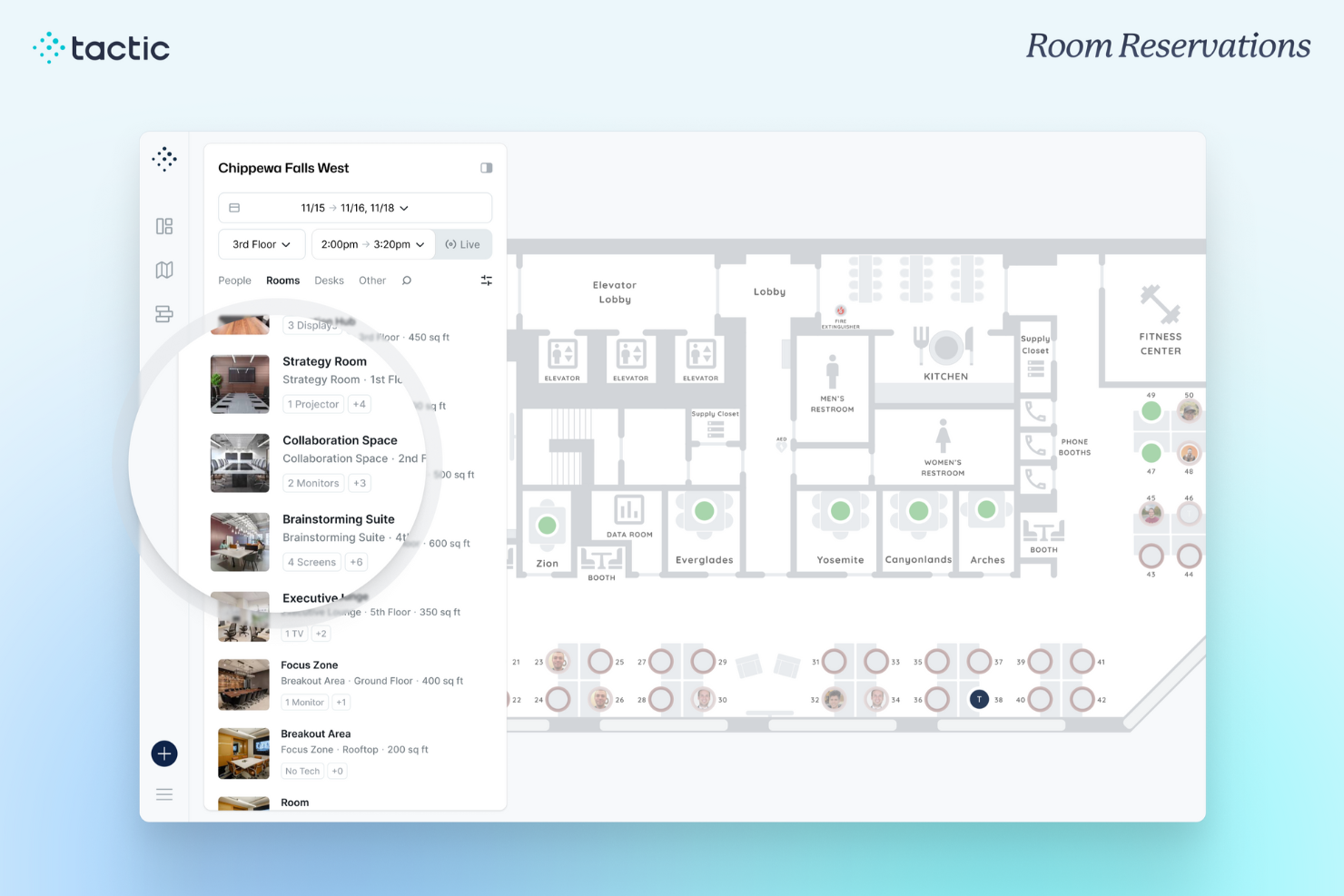
Tactic aiuta i luoghi di lavoro a gestire il flusso dei visitatori e le prenotazioni delle scrivanie, offrendo a responsabili d'ufficio e team HR strumenti per coordinare gli arrivi, monitorare l'occupazione e creare un'esperienza fluida per ospiti e dipendenti.
Per chi è ideale Tactic?
Tactic è adatto ad aziende di medie dimensioni che gestiscono ambienti di lavoro ibridi e hanno bisogno di coordinare gli arrivi dei visitatori insieme alle prenotazioni di scrivanie e spazi per i dipendenti.
Perché ho scelto Tactic
Tactic merita un posto nella mia rosa di candidati perché apprezzo come colleghi direttamente il check-in dei visitatori alle prenotazioni di scrivanie e spazi, tutto in un'unica piattaforma. Quando un host invia un invito per la pre-registrazione, include dettagli sull'arrivo e informazioni sul parcheggio, così gli ospiti non si trovano impreparati al loro arrivo. Mi piace anche che le notifiche agli host vengano inviate istantaneamente tramite Slack o Microsoft Teams non appena un visitatore effettua il check-in, così nessuno resta ad aspettare nella hall. La possibilità di raccogliere firme per NDA e moduli personalizzati direttamente al check-in è un dettaglio che trovo realmente utile per i team attenti alla conformità.
Caratteristiche principali di Tactic
- Pre-registrazione visitatori e inviti: Gli host inviano agli ospiti un invito pre-arrivo che include indicazioni per il check-in, informazioni sul parcheggio e istruzioni per l'arrivo prima del loro ingresso in ufficio.
- Generazione badge digitale: Tactic stampa o visualizza automaticamente i badge dei visitatori con nome, host e dettagli di accesso al momento del check-in.
- Storico delle visite e registro audit: Tutti i dati dei visitatori sono archiviati in modo sicuro e consultabili, offrendo ai team di conformità un record affidabile per gli audit di sicurezza.
- Integrazione con sistemi di accesso fisico: Tactic collega i dati di check-in dei visitatori ai sistemi di controllo accessi, così i permessi degli ospiti possono essere gestiti insieme al registro delle visite.
Integrazioni di Tactic
Le integrazioni includono Microsoft Teams, Slack, Google Calendar, Outlook, Zoom, Microsoft Entra ID e Avigilon.
Pros and Cons
Pros:
- Notifiche in tempo reale offerte
- Pre-registrazione dei visitatori efficiente
- Registro centralizzato dei visitatori
Cons:
- Potrebbe essere troppo complesso per le piccole imprese
- Alcune funzionalità richiedono configurazione aggiuntiva
Kadence
Ideale per inviti ai visitatori gestiti dall’IA
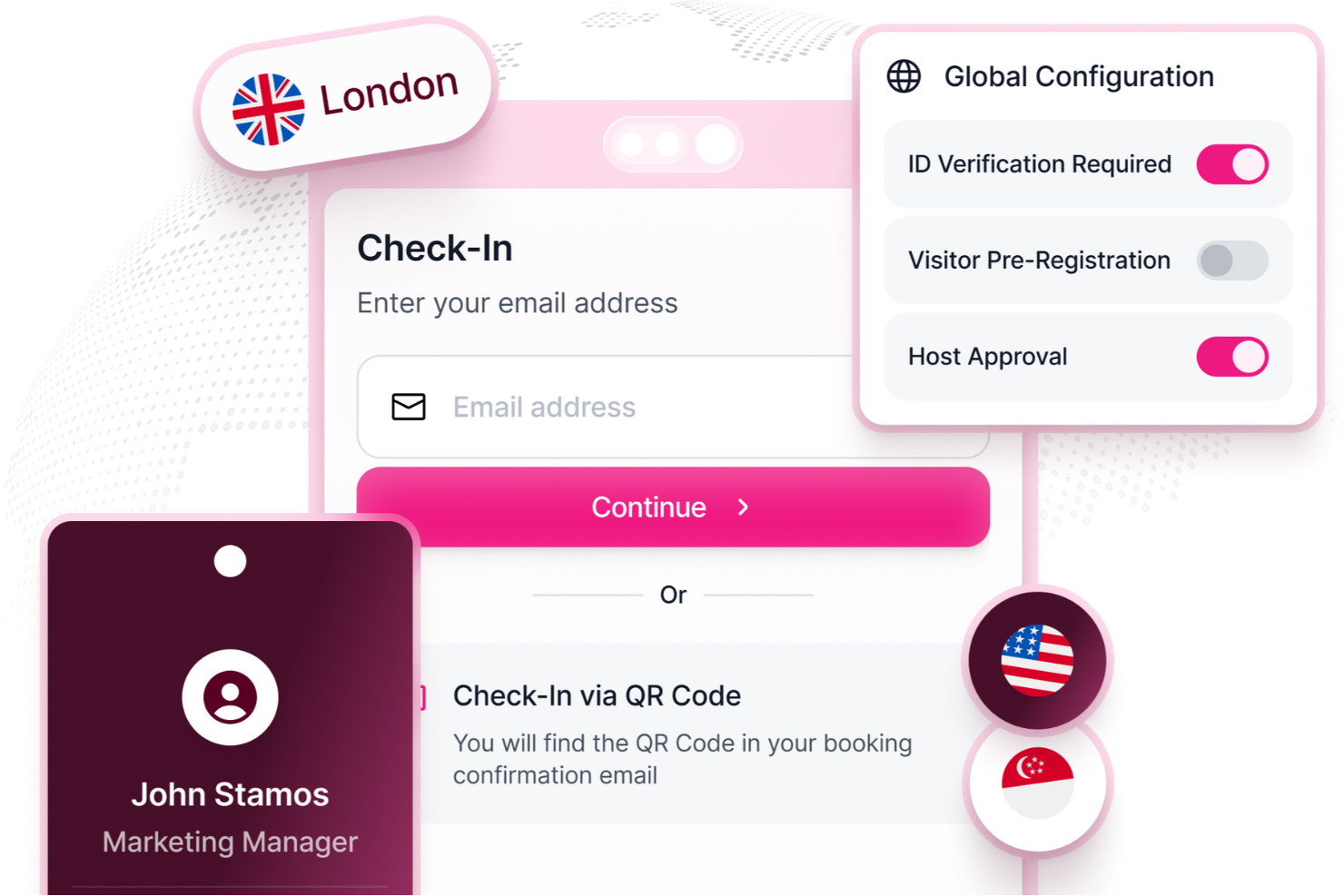
Kadence è una piattaforma di gestione dello spazio di lavoro progettata per le organizzazioni che desiderano semplificare la pianificazione delle visite, automatizzare il check-in e aumentare la sicurezza per ospiti e dipendenti.
Per chi è Kadence?
Kadence è ideale per organizzazioni orientate al lavoro ibrido che necessitano di un sistema centralizzato per gestire la presenza in ufficio, la prenotazione delle scrivanie e l'accesso ai visitatori su più sedi.
Perché ho scelto Kadence
Ho scelto Kadence tra i migliori per il suo assistente AI, che gestisce l'invito ai visitatori in modo completo. Invece di coordinare le visite manualmente, posso attivare l’intero flusso—invito, firma dell'NDA e notifica dell’host—con un solo comando su Slack o Microsoft Teams. Apprezzo anche che la gestione dei documenti pre-arrivo sia integrata nello stesso flusso, così gli ospiti arrivano già conformi. Il coordinamento automatizzato e guidato dall'intelligenza artificiale, dall'invito all'arrivo, dà a Kadence un vantaggio nella gestione dei visitatori.
Caratteristiche principali di Kadence
- Planimetrie interattive: Visualizza una mappa dal vivo, codificata a colori, del tuo ufficio per vedere la disponibilità delle scrivanie, le posizioni dei team e la popolarità degli spazi in tempo reale.
- Monitoraggio delle presenze: Tieni traccia della presenza in ufficio per team, reparto o sede e confronta le presenze effettive con le aspettative della policy ibrida.
- Suggerimenti intelligenti per la prenotazione: Ricevi raccomandazioni AI per le scrivanie in base a quando i tuoi colleghi sono programmati in sede.
- Dashboard analytics per lo spazio di lavoro: Accedi a trend di occupazione, giornate di punta in ufficio e dati sull’utilizzo degli spazi per supportare decisioni immobiliari e di policy.
Integrazioni di Kadence
Le integrazioni includono Microsoft Teams, Slack, Google Workspace, BambooHR, Gusto, Okta, Workday, Zendesk, Jira e ServiceNow.
Pros and Cons
Pros:
- Funzionalità avanzate per la gestione del lavoro ibrido
- Tracciamento in tempo reale di occupazione e sicurezza
- Ampie integrazioni con strumenti per il luogo di lavoro
Cons:
- Supporto limitato per il check-in visitatori offline
- La configurazione può essere lunga
New Product Updates from Kadence
Kadence MCP Comes to Popular AI Assistants
Kadence launches MCP support for Claude, ChatGPT, and Microsoft Copilot to manage workplace tasks and access space insights. This brings booking, scheduling, and reporting into the AI assistants teams already use. For more information, visit Kadence’s official site.
 .
.
Ideale per la verifica sicura dei visitatori
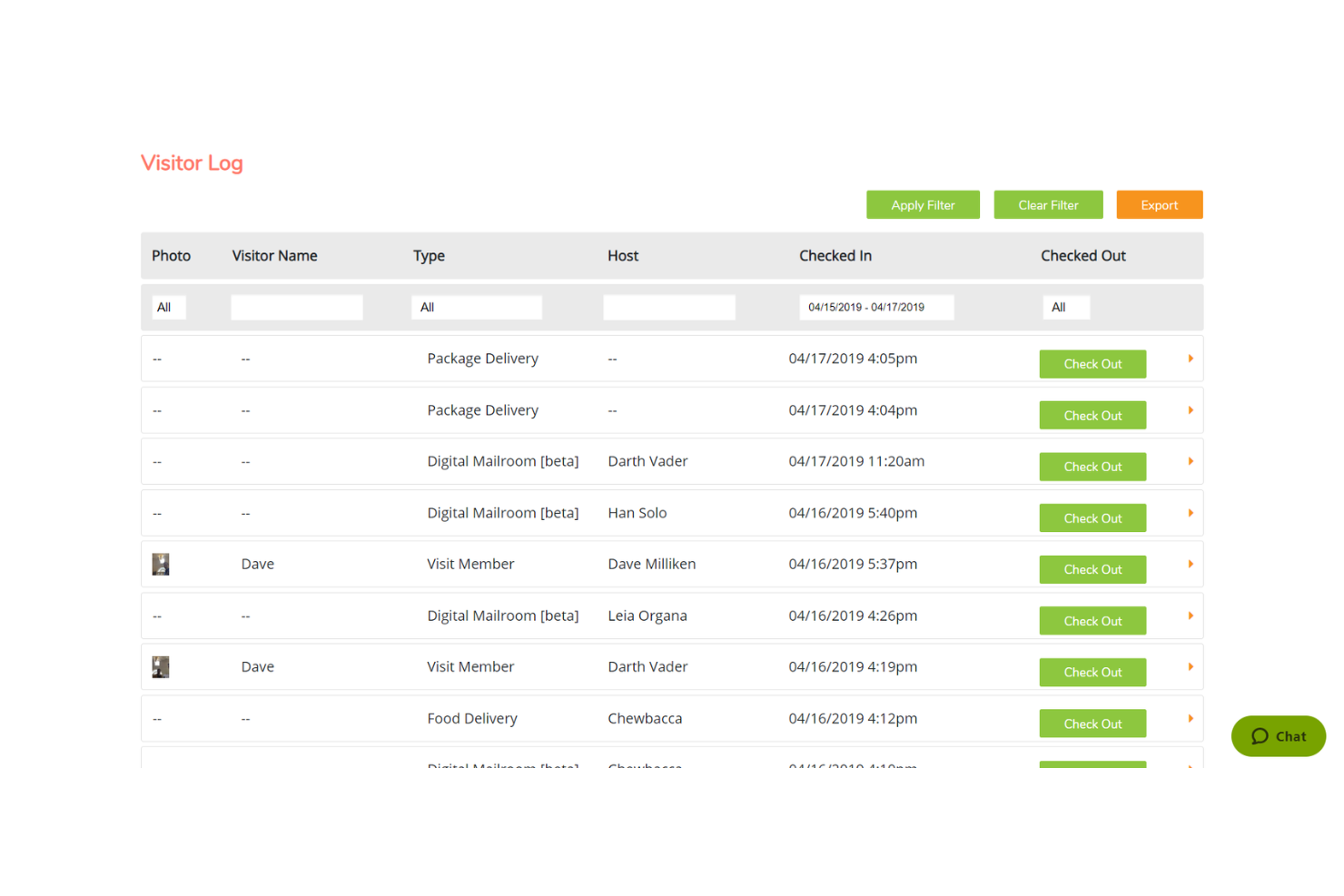
Greetly by OfficeSpace è un sistema di gestione dei visitatori progettato per semplificare le esperienze degli ospiti, migliorare la sicurezza sul posto di lavoro e supportare registrazioni personalizzabili e senza contatto. Aiuta le organizzazioni ad automatizzare la registrazione degli ospiti, mantenere la conformità e creare un'esperienza per i visitatori completamente personalizzata con il brand aziendale.
Perché ho scelto Greetly by OfficeSpace: Ho scelto Greetly by OfficeSpace per la sua forte attenzione alla sicurezza e alla praticità. La funzione di verifica dei visitatori garantisce che ogni ospite sia adeguatamente identificato prima di entrare, aumentando la sicurezza della sede. Il sistema di registrazione senza contatto tramite smartphone supporta gli standard igienici moderni e velocizza la procedura di check-in. Inoltre, la personalizzazione del branding di Greetly consente alle aziende di creare una prima impressione curata e in linea con la propria identità per i visitatori.
Funzionalità e integrazioni principali
Le funzionalità includono notifiche istantanee ai dipendenti su più canali, stampa dei badge per i visitatori per una chiara identificazione, registro digitale degli accessi in cloud, acquisizione di firme elettroniche e di NDA, acquisizione di foto dei visitatori e misurazione termica della temperatura. Greetly supporta anche workflow flessibili e mantiene una forte conformità in materia di sicurezza, aiutando le aziende a gestire i visitatori in modo efficiente e professionale.
Le integrazioni includono Active Directory, Azure AD, Google Workspace, Google Chat, Microsoft Teams, Slack, Zapier, Satellite Deskworks, Rippling ed essensys Operate.
Pros and Cons
Pros:
- Check-in senza contatto via smartphone
- Opzione per lo screening termico della temperatura
- Supporta la firma di NDA e l'acquisizione di firme elettroniche
Cons:
- La configurazione iniziale può essere complessa
- Nessuna mappa termica di occupazione integrata

anny
Ideale per i diritti di accesso automatizzati

anny è una soluzione per la gestione dei visitatori integrata in una piattaforma più ampia per la prenotazione delle risorse, progettata per le organizzazioni che desiderano gestire in un unico luogo il check-in degli ospiti, il controllo degli accessi e la prenotazione degli spazi di lavoro. Automatizza la registrazione dei visitatori, acquisisce firme digitali, stampa badge all'arrivo e mantiene un registro aggiornato delle persone presenti nell'edificio, dal check-in al check-out.
Perché ho scelto anny
anny si è guadagnata un posto nella mia selezione perché collega il check-in dei visitatori al controllo degli accessi, non soltanto alla reception. Apprezzo il fatto che i diritti di accesso degli ospiti vengano assegnati e revocati automaticamente in relazione alla loro visita, così i team addetti alla sicurezza non devono gestire manualmente le credenziali. Anche il flusso di arrivo è ben progettato: gli ospiti effettuano il check-in autonomamente tramite codice QR o presso un terminale personalizzato, i responsabili ricevono un SMS istantaneo o una chiamata dell'IA e gli accordi di riservatezza possono essere firmati sul posto. Per i team che utilizzano Microsoft 365, i visitatori possono persino essere registrati direttamente da un invito a una riunione di Outlook.
Funzionalità principali di anny
- Check-in flessibile dei visitatori: gli ospiti effettuano il check-in tramite codice QR, e-mail o presso un terminale self-service personalizzato, così gli arrivi procedono rapidamente senza impegnare la reception.
- Stampa dei badge all'arrivo: stampa automaticamente badge con il nome dell'ospite, l'azienda, il responsabile e un codice QR per il check-out, utilizzando un design del badge personalizzabile.
- Diritti di accesso automatizzati: sincronizza il check-in con il sistema di controllo degli accessi e le serrature intelligenti (come Salto, Nuki o dormakaba), in modo che le credenziali dei visitatori si attivino all'arrivo e scadano al check-out.
- Acquisizione dei documenti durante il check-in: consente ai visitatori di firmare sul posto accordi di riservatezza, condizioni o informative sulla sicurezza durante il check-in, con una copia inviata automaticamente tramite e-mail e archiviata per gli audit.
Integrazioni di anny
Le integrazioni includono Microsoft 365, Outlook, Google Workspace, Microsoft Teams, Zoom, Personio, SAML/SSO e un'ampia gamma di sistemi di controllo degli accessi e serrature intelligenti, tra cui Salto, Nuki, dormakaba, Tapkey, iLOQ, KleverKey, Comydo, UniFi, Glutz e altri.
Pros and Cons
Pros:
- Le credenziali dei visitatori si attivano e scadono automaticamente
- Copre l'intero flusso dal check-in al check-out
- Solida conformità a ISO 27001 e GDPR, con hosting nell'UE
Cons:
- Nessuna lista di controllo o scansione integrata dei documenti d'identità
- L'interfaccia di amministrazione può risultare complessa
elia
Ideale per stampa di badge visitatore
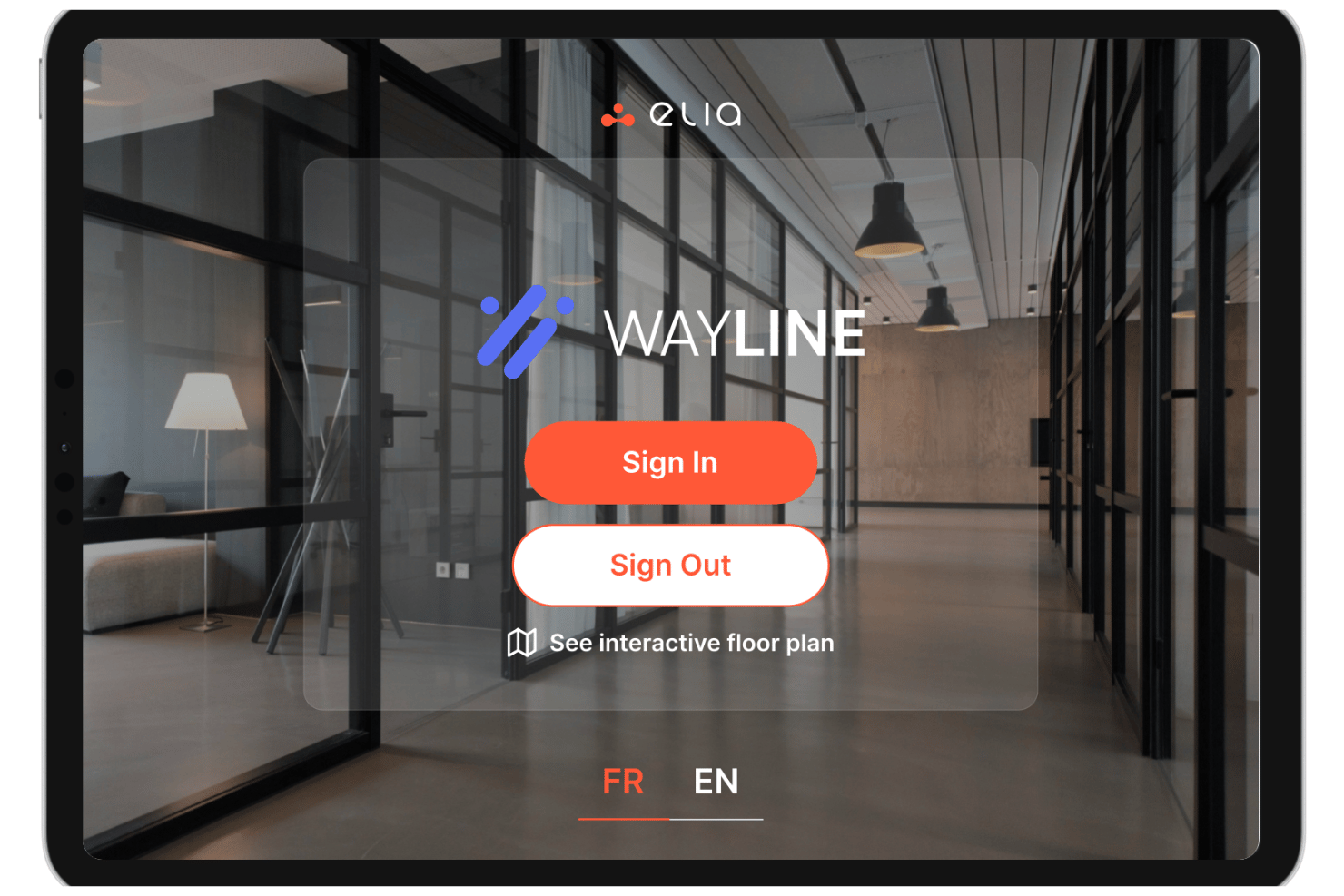
elia è una piattaforma di gestione dei visitatori con un sistema di check-in tramite chiosco, stampa di badge, notifiche agli host, firma di documenti e monitoraggio delle evacuazioni di emergenza progettata per ambienti di lavoro multi-sito.
Per chi è più adatta elia?
elia è particolarmente indicata per i team delle strutture e del workplace che gestiscono il flusso dei visitatori in più sedi o campus aziendali.
Perché ho scelto elia
Ho scelto elia tra le migliori perché offre moltissimo controllo sulla categorizzazione dei visitatori e sui flussi di check-in. Puoi creare categorie distinte di visitatori (ad esempio: appaltatori, ospiti, candidati, VIP) e personalizzare i campi di raccolta dati per ciascuna. Significa che il badge di un appaltatore verrà stampato con dettagli specifici—come informazioni sull'host o dettagli dinamici di accesso—mentre il badge di un ospite rimane semplice. Insieme alla cattura della foto del visitatore, la stampa del badge diventa uno strumento potente di identificazione, e non solo un'etichetta basilare.
Funzionalità chiave di elia
- Pre-registrazione: Invia ai visitatori un link di registrazione prima dell'arrivo, così i loro dati vengono acquisiti in anticipo e il check-in il giorno stesso è più rapido.
- Notifiche agli host: Avvisa l'impiegato ospitante via email, Slack o Microsoft Teams non appena il suo ospite si registra al chiosco.
- Firma documenti al check-in: Raccogli le firme dei visitatori su NDA, liberatorie di sicurezza o documenti personalizzati direttamente durante la procedura di accesso.
- Esportazione registro visitatori: Accedi a un registro completo e con data/ora di tutte le visite sul sito ed esportalo in formato CSV per audit o controlli di sicurezza.
Integrazioni di elia
elia offre integrazioni native con Microsoft 365, Google Workspace, Slack e strumenti specifici all'interno di questi ecosistemi, tra cui Google Calendar, Microsoft Teams e Microsoft Outlook.
Pros and Cons
Pros:
- Include elenchi di evacuazione nei piani standard
- Supporta chioschi iPad
- Planimetria integrata per il contesto degli spazi
Cons:
- Integrazioni di controllo accessi limitate
- Nessuna scansione di documenti d'identità o controllo su liste di sorveglianza
Ideale per la gestione di visitatori e appaltatori in ambito enterprise
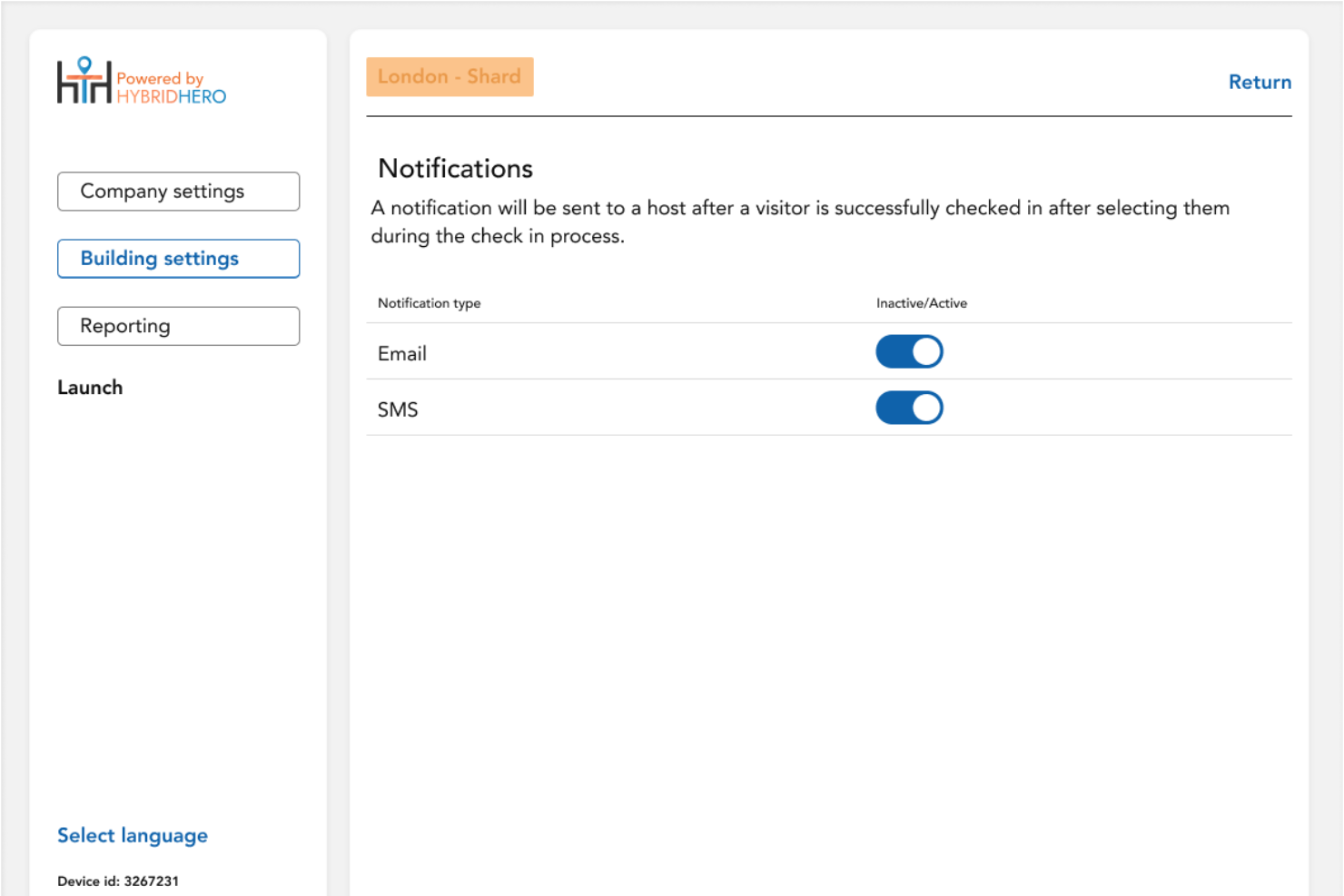
Hybrid Hero è una piattaforma di gestione del luogo di lavoro per organizzazioni che gestiscono l’accesso dei visitatori, monitorano l’occupazione e ottimizzano l’utilizzo degli spazi tra uffici, spazi di coworking e ambienti di lavoro ibridi.
Per chi è ideale Hybrid Hero?
Hybrid Hero è particolarmente adatto a organizzazioni di medie e grandi dimensioni che gestiscono l’accesso di visitatori e appaltatori in più sedi.
Perché ho scelto Hybrid Hero
Hybrid Hero si distingue per la capacità di abbinare la gestione di visitatori e appaltatori con strumenti operativi per il luogo di lavoro come prenotazione delle scrivanie, gestione dei parcheggi e monitoraggio dell’occupazione, tutto in un’unica piattaforma. Il sistema offre una visibilità centralizzata tra le diverse sedi, inclusi dati sulle attività dei visitatori e sulla presenza onsite, utili per il coordinamento del luogo di lavoro e processi di conformità nelle organizzazioni di grandi dimensioni.
Caratteristiche principali di Hybrid Hero
- Gestione di visitatori e appaltatori: Gestione degli accessi di visitatori e appaltatori con pre-registrazione, notifiche agli ospitanti e tracciamento centralizzato degli accessi nelle varie sedi.
- Registro digitale dei visitatori: Conservazione di registri consultabili e contrassegnati temporalmente delle attività di visitatori e appaltatori per audit e una migliore visibilità operativa.
- Visibilità dell’occupazione in emergenza: Monitoraggio in tempo reale del numero di persone presenti onsite nelle diverse sedi per la sicurezza e il coordinamento in caso di evacuazione.
- Amministrazione multi-sito: Supervisione delle attività dei visitatori, reportistica e operazioni del luogo di lavoro in più sedi attraverso un’unica dashboard centralizzata.
Integrazioni di Hybrid Hero
Le integrazioni includono Microsoft 365, Outlook, Teams, Azure AD, Google Workspace ed automazioni personalizzate tramite API.
Pros and Cons
Pros:
- Combina gestione di visitatori, appaltatori e spazi di lavoro in un’unica piattaforma
- Offre visibilità centralizzata su più sedi aziendali
- Include monitoraggio in tempo reale del numero di persone per coordinamento e sicurezza del luogo di lavoro
Cons:
- L’esperienza mobile è meno completa rispetto alla piattaforma desktop
- È maggiormente pensato per organizzazioni di media e grande dimensione, meno per piccoli team
Ideale per la prenotazione flessibile degli spazi di lavoro

Othership è una piattaforma di gestione degli spazi di lavoro progettata per aziende e team che devono coordinare il lavoro ibrido, gestire l'accesso degli ospiti e ottimizzare lo spazio ufficio sia per i dipendenti che per i visitatori.
Per chi è ideale Othership?
Othership è particolarmente adatto per aziende incentrate sul modello ibrido che necessitano di gestire la prenotazione flessibile di scrivanie, sale riunioni e accesso dei visitatori in ambienti di lavoro condivisi.
Perché ho scelto Othership
Ho incluso Othership tra le mie scelte migliori perché è uno dei pochi strumenti di gestione dei visitatori che integra l’accesso degli ospiti direttamente in un sistema di prenotazione flessibile degli spazi. Mentre la maggior parte dei software di gestione degli ospiti tratta i visitatori come un flusso di lavoro separato, Othership collega la pianificazione delle visite alla prenotazione di scrivanie e sale riunioni in un solo posto. Quando un ospite è invitato in ufficio, l’organizzatore può contemporaneamente prenotare una sala riunioni o una scrivania senza dover passare da uno strumento all’altro. Apprezzo anche il fatto che le planimetrie interattive di Othership permettano agli amministratori di coordinare dove si siedono dipendenti e visitatori ogni giorno, il che è davvero utile quando il numero di persone in ufficio varia settimanalmente.
Funzionalità principali di Othership
- Inviti ai visitatori su più canali: Invita e gestisci gli ospiti dal tuo telefono, calendario, app o tablet d’ingresso senza la necessità di una postazione reception dedicata.
- Esportazione dati di conformità: Esporta registri delle visite e dati di audit su richiesta per soddisfare i requisiti normativi senza dover tenere registri manuali.
- Raccolta feedback dei dipendenti: Invita i dipendenti a fornire feedback, segnalare dotazioni non funzionanti e rilevare problemi direttamente dalla piattaforma.
- Analisi dell’utilizzo degli spazi: Consulta dati in tempo reale sull’utilizzo degli uffici, tendenze di prenotazione e preferenze di utilizzo degli spazi per facilitare le decisioni di pianificazione.
Integrazioni Othership
Le integrazioni includono Microsoft 365, Google Workspace, MS Teams, Slack, Zoom ed è disponibile un’API per integrazioni personalizzate.
Pros and Cons
Pros:
- Fornisce registri dettagliati delle visite e analisi
- Self check-in con aggiornamenti in tempo reale
- Videoconferenza e gestione documenti
Cons:
- Opzioni di personalizzazione limitate
- Possibili sfide di integrazione

Ideale per soluzioni aziendali
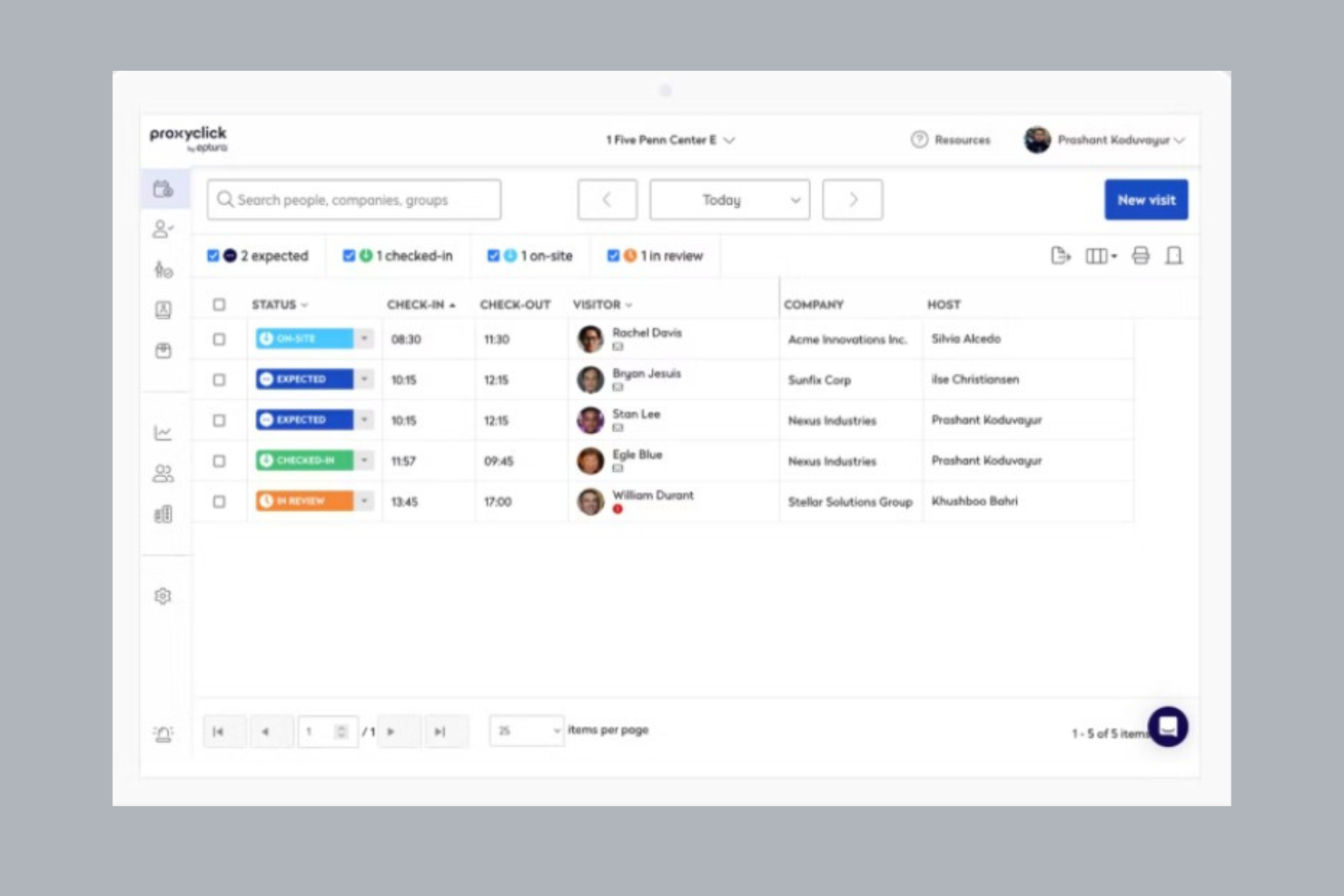
Proxyclick è una piattaforma di gestione visitatori progettata per organizzazioni che necessitano di esperienze di check-in sicure e personalizzabili, oltre a controlli di conformità, aiutando i team delle strutture e i professionisti della sicurezza a gestire visitatori, appaltatori e consegne in più sedi.
Per Chi è Ideale Proxyclick?
Proxyclick è particolarmente indicato per grandi aziende e organizzazioni multisede che necessitano di una gestione centralizzata dei visitatori con avanzati controlli di sicurezza e conformità.
Perché Ho Scelto Proxyclick
Proxyclick si guadagna un posto tra i migliori nella mia shortlist grazie all’efficacia con cui gestisce la complessità legata alla gestione dei visitatori su scala aziendale. Trovo particolarmente utile la funzionalità di watchlist: è possibile creare una lista di controllo interna e collegarla a sistemi di screening di terze parti, così i team di sicurezza possono segnalare o bloccare specifici visitatori prima ancora che arrivino alla reception. Anche l’integrazione con il controllo accessi è un punto di forza per le grandi sedi: Proxyclick sincronizza direttamente i dati dei visitatori con il tuo sistema di controllo accessi esistente e può emettere codici QR o badge RFID all’istante, permettendo ai visitatori di spostarsi nell’edificio senza creare colli di bottiglia all’ingresso. Per le organizzazioni che gestiscono più sedi, la possibilità di configurare flussi di visitatori, punti di accesso e design dei badge per ciascun sito da un pannello di amministrazione centrale lo rende veramente pratico su larga scala.
Caratteristiche Principali di Proxyclick
- Notifiche agli ospitanti: Invia automaticamente avvisi SMS o email agli host non appena il loro visitatore effettua il check-in.
- Pre-registrazione: Aggiungi visitatori in anticipo e condividi mappe, requisiti di accesso e contatti prima del loro arrivo.
- Badge ospiti e credenziali Wi-Fi: Emissione di badge stampati personalizzati e credenziali Wi-Fi dedicate a ciascun visitatore al momento del check-in.
- Integrazione con ascensori destination dispatch: Indirizza automaticamente i visitatori ai piani designati collegandosi ai sistemi di ascensori destination dispatch.
Integrazioni di Proxyclick
Le integrazioni includono Microsoft Teams, Slack, Cisco Webex, Honeywell, LenelS2, Genetec, Avigilon, Okta, Azure Active Directory e Google Workspace.
Pros and Cons
Pros:
- Supporta più sedi
- Opzioni avanzate di sicurezza
- Offre analisi dettagliate sui visitatori
Cons:
- Processo di configurazione complesso
- Problemi di sincronizzazione occasionali

WorkInSync
Ideale per ambienti di lavoro flessibili
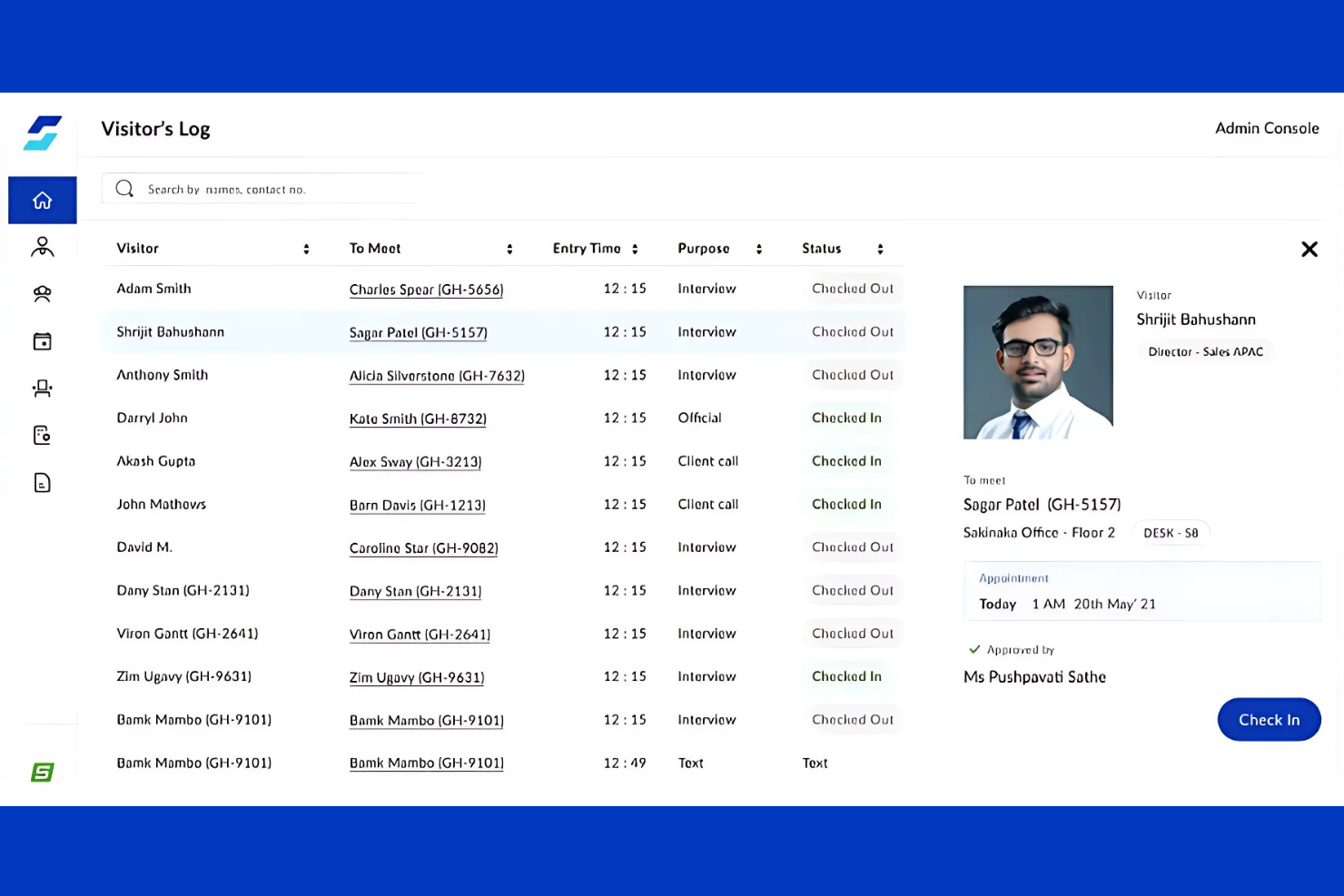
WorkInSync è una piattaforma di gestione degli ambienti di lavoro progettata per le organizzazioni che desiderano semplificare i check-in dei visitatori, gestire spazi di lavoro ibridi e migliorare la sicurezza in loco per dipendenti e ospiti.
Per chi è più indicato WorkInSync?
WorkInSync è particolarmente adatto a organizzazioni di medie e grandi dimensioni che gestiscono ambienti di lavoro ibridi o flessibili, dove la coordinazione degli accessi dei visitatori insieme alla prenotazione di scrivanie e sale è una necessità operativa quotidiana.
Perché ho scelto WorkInSync
WorkInSync si è guadagnato un posto nella mia shortlist perché è uno dei pochi strumenti di gestione visitatori realmente pensato per spazi di lavoro flessibili e non semplicemente integrato in un secondo momento. Apprezzo il fatto che i check-in dei visitatori siano direttamente collegati alla prenotazione delle scrivanie e delle sale riunioni, quindi quando un ospite arriva, lo spazio del referente è già prenotato. In pratica, il mio team può pre-registrare i visitatori, assegnare l’ingresso tramite QR code e coordinare la prenotazione della scrivania o della sala dell’host tutto dalla stessa piattaforma. La funzione di flusso di lavoro personalizzato permette inoltre di adattare i messaggi di notifica e i passaggi di approvazione per ogni tipo di visita, utile quando diversi team hanno requisiti di accesso diversi a seconda del giorno.
Caratteristiche principali di WorkInSync
- Schermate di check-in personalizzate: Personalizza i chioschi di check-in con il logo, i colori e i messaggi della tua azienda per creare un’esperienza coerente per ogni visitatore.
- Registro visitatori e reportistica: Tieni traccia della cronologia dei visitatori, dei dettagli degli host e dei modelli di accesso in un registro centralizzato esportabile per audit o revisioni di conformità.
- Notifiche host via Microsoft Teams o email: Avvisa automaticamente il referente non appena il suo ospite arriva, eliminando la necessità di monitorare manualmente la reception.
- Gestione emergenze ed evacuazioni: Accedi all’elenco in tempo reale di tutti i visitatori presenti in caso di emergenza per tenerne rapidamente conto e favorire evacuazioni sicure.
Integrazioni di WorkInSync
Le integrazioni includono Microsoft Teams, Google Workspace, Outlook, OneLogin, Okta, Active Directory, Slack, Zoom, Cisco Webex e ServiceNow.
Pros and Cons
Pros:
- Pre-registrazione visitatori efficiente
- Analisi dettagliata degli spazi di lavoro
- Aumenta la sicurezza con check-in contactless
Cons:
- Alcune funzionalità avanzate richiedono un costo extra
- Problemi di sincronizzazione occasionali
Altri Software di Gestione Visitatori
Ecco alcune altre soluzioni di software per la gestione dei visitatori che non sono entrate nella mia shortlist, ma che meritano comunque attenzione:
- Robin
Ideale per uffici ibridi
- YAROOMS
Ideale per la prenotazione di sale riunioni
- Envoy Visitor
Ideale per il monitoraggio dei visitatori in ufficio
- The Receptionist
Ideale per una configurazione semplice
- DeskFlex
Ideale per il monitoraggio degli accessi dei visitatori
- Skedda
Ideale per la prenotazione di spazi
- OfficeSpace
Ideale per check-in senza contatto
- Whatspot
Ideale per prenotazioni visitatori basate su approvazione


Come Valuto il Software di Gestione dei Visitatori
Valuto ogni strumento in base ai requisiti di base—come flussi di check-in digitali e avvisi automatici agli host—per poi considerare fattori differenzianti come il supporto multi-sede e le integrazioni con HRIS.
Funzionalità Principali (Requisiti Minimi per Questa Lista)
Quando seleziono gli strumenti per la mia lista, valuto ognuno su una scala da 0 (non offre la funzionalità) a 5 (eccelle in quest'area) per ciascuna funzione principale elencata di seguito. Quindi, calcolo il punteggio totale dello strumento in percentuale. Ogni strumento deve raggiungere un punteggio totale minimo del 65% per essere preso in considerazione.
- Esperienza di Check-In per i Visitatori: Verifico se candidati e fornitori possono effettuare il check-in tramite tablet, chiosco o dispositivo mobile—e se la pre-registrazione riduce i tempi di attesa nella hall.
- Notifiche Automatiche all'Host: Ogni strumento dovrebbe avvisare tempestivamente gli host tramite email, SMS o app di lavoro come Slack o Teams nel momento in cui il visitatore effettua il check-in.
- Registro Digitale dei Visitatori: Cerco registri ricercabili ed esportabili con marcature temporali e dettagli delle visite che i team HR e sicurezza possono recuperare rapidamente durante gli audit.
- Stampa Badge all'Arrivo: I badge stampati con foto, nome dell'host e dati di scadenza aiutano il personale della reception e la sicurezza a identificare rapidamente i visitatori autorizzati.
- Acquisizione di Documentazione Legale: Controllo se è possibile firmare digitalmente NDA, dichiarazioni di salute o liberatorie del sito durante il check-in, con una traccia di verifica archiviata.
- Screening per Liste di Sorveglianza e Conformità: Gli strumenti devono controllare i visitatori in arrivo rispetto a liste interne o regolamentari e segnalare eventuali corrispondenze prima di autorizzare l'ingresso.
Una volta che ho un elenco di strumenti che soddisfano i criteri, considero cosa distingue ciascuna piattaforma.
Fattori Differenzianti (Cosa Distingue i Fornitori)
Ecco come confronto i diversi fornitori:
Funzionalità Distintive
La gestione multi-sede è importante quando la tua organizzazione gestisce più uffici. Cerco un'unica dashboard in cui gli amministratori possano configurare i flussi di check-in e generare report dei visitatori per ogni sede. Anche gli strumenti per l'evacuazione d'emergenza sono un fattore determinante; la presenza in tempo reale dei presenti sul posto durante un'esercitazione antincendio o un'emergenza supporta direttamente la responsabilità di tutela. Valuto inoltre le integrazioni al controllo accessi: collegare il check-in dei visitatori a tornelli o serrature intelligenti consente che le credenziali temporanee scadano automaticamente al termine della visita.
Oltre le Funzionalità
Conformità e privacy dei dati sono molto rilevanti qui. Verifico se le piattaforme offrono politiche configurabili di conservazione dei dati e dispongono di certificazioni come SOC 2 Type II, soprattutto quando i dati personali dei visitatori attraversano diverse giurisdizioni. Anche la compatibilità delle integrazioni è fondamentale; uno strumento che sincronizza le directory degli host dal tuo HRIS e crea visite dagli inviti in calendario fa risparmiare ore di coordinamento manuale ai team HR. Valuto inoltre la trasparenza dei prezzi, poiché costi nascosti per hardware o tariffe a ingresso possono gonfiare silenziosamente i budget man mano che crescono i volumi di visitatori.
Come Scegliere un Software di Gestione Visitatori
È facile perdersi tra lunghe liste di funzionalità e strutture di prezzo complesse. Per aiutarti a restare concentrato durante il processo di selezione, ti propongo alcuni fattori chiave da tenere a mente:
| Fattore | Cosa Considerare |
| Scalabilità | Verifica che il software possa crescere insieme alla tua azienda. Considera se è in grado di gestire un numero crescente di visitatori e sedi senza perdere in prestazioni. |
| Integrazioni | Controlla se il software si integra con strumenti esistenti come il calendario, i sistemi di controllo accessi e le piattaforme di comunicazione per ottimizzare le operazioni. |
| Personalizzazione | Cerca opzioni per adattare i flussi di lavoro, la brand identity e l’esperienza dei visitatori in base alle esigenze specifiche della tua azienda e per migliorare la soddisfazione dei visitatori. |
| Facilità d'Uso | Valuta la facilità d’uso dell’interfaccia. Il tuo team dovrebbe poter utilizzare il sistema in modo intuitivo senza formarsi a lungo o avere competenze tecniche avanzate. |
| Budget | Tieni conto delle limitazioni di budget. Confronta i modelli di prezzo e assicurati di ottenere il massimo valore dalle funzionalità offerte, evitando spese superflue. |
| Tutele di Sicurezza | Verifica che il software disponga di robuste misure di sicurezza. Cerca funzioni quali screening dei visitatori, crittografia dei dati e conformità alle normative di settore. |
| Supporto | Valuta la disponibilità e la qualità dell’assistenza clienti. Un supporto affidabile aiuta il tuo team a risolvere rapidamente eventuali problemi e a mantenere operazioni efficienti. |
| Feedback degli Utenti | Leggi le recensioni degli utenti per conoscere le esperienze reali. Fai attenzione a riscontri su affidabilità, efficienza delle funzionalità e soddisfazione generale per orientare la tua scelta. |
Tendenze nel Software di Gestione Visitatori
Nelle mie ricerche, ho consultato numerosi aggiornamenti di prodotto, comunicati stampa e note di rilascio di diversi fornitori di software per la gestione dei visitatori. Ecco alcune tendenze emergenti a cui presto particolare attenzione:
- Check-in senza contatto: Molti fornitori stanno aggiungendo opzioni touchless per aumentare la sicurezza e la comodità. Questa funzione permette ai visitatori di effettuare il check-in tramite i loro smartphone, riducendo i contatti fisici. È particolarmente rilevante nell’attuale clima attento alla salute.
- Approfondimenti basati sull’IA: L’intelligenza artificiale viene utilizzata per analizzare i dati dei visitatori e fornire informazioni utili. Questo aiuta le aziende a ottimizzare il flusso dei visitatori e a migliorare la sicurezza generale. Alcuni fornitori utilizzano l’IA per prevedere i periodi di maggior affluenza e consigliare regolazioni del personale.
- Riconoscimento facciale: Questa tecnologia è stata integrata per check-in più rapidi e sicuri. Permette l’identificazione veloce senza badge o inserimenti manuali. I fornitori che adottano questa tendenza migliorano sicurezza ed efficienza.
- Personalizzazione e branding: Sempre più software permettono alle aziende di personalizzare le interfacce per i visitatori con loghi e flussi di lavoro su misura. Questa tendenza aiuta le aziende a presentare un’immagine professionale e a offrire un’esperienza di brand coerente ai visitatori.
- Funzionalità di sostenibilità: I fornitori stanno integrando opzioni ecosostenibili, come badge digitali e check-in senza carta. Questa tendenza aiuta le aziende a ridurre l’impatto ambientale mantenendo operazioni efficienti.
Cos’è un software di gestione dei visitatori?
Un software di gestione dei visitatori è un sistema che aiuta le organizzazioni a gestire e tracciare i visitatori che entrano nei loro locali. Questi strumenti sono tipicamente utilizzati da office manager, receptionist e personale di sicurezza per aumentare la sicurezza e migliorare l’esperienza dei visitatori. Funzioni come il check-in senza contatto, approfondimenti basati sull’IA e riconoscimento facciale favoriscono un’elaborazione efficiente dei visitatori e una maggiore sicurezza.
In generale, questi strumenti forniscono valore assicurando un’esperienza dei visitatori sicura e organizzata per le aziende.
Caratteristiche del software di gestione dei visitatori
Quando selezioni il miglior sistema di gestione dei visitatori per te, fai attenzione alle seguenti caratteristiche chiave:
- Check-in senza contatto: Permette ai visitatori di registrarsi tramite smartphone, riducendo il contatto fisico e aumentando la sicurezza.
- Pre-registrazione dei visitatori: Permette agli ospiti di registrarsi prima dell’arrivo, velocizzando il check-in e riducendo i tempi di attesa.
- Riconoscimento facciale: Fornisce un’identificazione rapida e sicura senza badge o inserimento manuale.
- Notifiche istantanee: Avvisa gli host all’arrivo dei visitatori, migliorando comunicazione e coordinamento.
- Flussi di lavoro personalizzabili: Permette alle aziende di adattare il processo di check-in alle proprie esigenze, migliorando l’esperienza dei visitatori.
- Analisi in tempo reale: Offre approfondimenti sulle abitudini e tendenze dei visitatori, aiutando le aziende a ottimizzare le operazioni.
- Stampa badge: Genera badge visitatore per una facile identificazione e maggiore sicurezza.
- Gestione delle evacuazioni: Garantisce la sicurezza tracciando i visitatori durante le emergenze e fornendo istruzioni di evacuazione.
- Prenotazione di scrivanie o sale: Molti VMS offrono funzionalità aggiuntive per gli ambienti di lavoro ibridi, come sistemi di prenotazione delle postazioni o strumenti per prenotare le sale riunioni interni.
- Capacità di integrazione: Si collega a strumenti già in uso come calendari e sistemi di controllo accessi per semplificare le operazioni.
- Salvaguardie di sicurezza: Applica misure come la crittografia dei dati e la gestione della conformità per proteggere le informazioni sensibili.
Vantaggi del software di gestione dei visitatori
L’implementazione di software di gestione dei visitatori offre numerosi vantaggi per il tuo team e la tua azienda. Eccone alcuni a cui puoi puntare:
- Sicurezza migliorata: Funzioni come riconoscimento facciale e stampa badge aiutano ad assicurare che solo persone autorizzate entrino nei locali.
- Efficienza aumentata: Il check-in senza contatto e la pre-registrazione rendono più fluido il processo per i visitatori, riducendo tempi di attesa e compiti amministrativi.
- Comunicazione migliorata: Le notifiche istantanee tengono il team aggiornato sugli arrivi dei visitatori, migliorando coordinamento e reattività.
- Approfondimenti dai dati: Le analisi in tempo reale forniscono informazioni utili sulle tendenze dei visitatori, aiutandoti a prendere decisioni informate.
- Esperienza personalizzabile: Flussi di lavoro su misura e opzioni di branding permettono di creare un’esperienza per i visitatori che rispecchia le esigenze aziendali.
- Supporto alla conformità: Le salvaguardie di sicurezza e funzionalità di gestione dati aiutano a rispettare le normative di settore e a proteggere le informazioni sensibili.
Costi e prezzi per il software di gestione dei visitatori
La selezione di un software di gestione dei visitatori richiede la comprensione dei vari modelli e piani di prezzo disponibili. I costi variano in base alle funzionalità, alla dimensione del team, agli add-on e altro ancora.
La tabella sottostante riassume i piani comuni, i loro prezzi medi e le tipiche funzionalità incluse nelle soluzioni di software per la gestione dei visitatori:
Tabella di confronto dei piani per il software di gestione dei visitatori
| Tipo di piano | Prezzo medio | Funzionalità comuni |
| Piano gratuito | $0 | Include check-in di base, registri dei visitatori e notifiche limitate. |
| Piano personale | $5-$25 per utente/mese | Include check-in personalizzabile, stampa dei badge e analisi di base. |
| Piano business | $25-$50 per utente/mese | Include check-in contactless, capacità di integrazione e analisi avanzate. |
| Piano enterprise | $50+ per utente/mese | Include funzionalità di sicurezza complete, gestione multi-sede e supporto dedicato. |
Domande frequenti sul software di gestione dei visitatori
Ecco alcune risposte alle domande più comuni sul software di gestione dei visitatori:
Quanto è sicuro il software di gestione dei visitatori?
Il software di gestione dei visitatori è progettato tenendo conto della sicurezza. Include spesso funzionalità come lo screening dei visitatori, la verifica dell’identità e la crittografia dei dati per proteggere i tuoi locali e le informazioni sensibili. Questi strumenti aiutano a garantire l’accesso solo a persone autorizzate, aumentando la sicurezza complessiva.
I sistemi di gestione dei visitatori possono integrarsi con strumenti esistenti?
Sì, la maggior parte dei sistemi di gestione dei visitatori offre capacità di integrazione. Possono collegarsi a strumenti come sistemi di calendario, controllo accessi e piattaforme di comunicazione. Questa integrazione aiuta a semplificare le operazioni e garantisce comunicazioni fluide tra le diverse piattaforme della tua organizzazione.
Quali hardware sono necessari per il software di gestione dei visitatori?
I requisiti hardware possono variare in base alle capacità del sistema. Alcuni sistemi possono necessitare solo di un tablet o di un computer per il check-in, mentre altri potrebbero richiedere stampanti per la stampa dei badge o lettori di codici QR per l’ingresso contactless. È essenziale scegliere l’hardware che meglio si adatta alle esigenze della tua organizzazione.
Come gestiscono i sistemi di gestione dei visitatori la privacy dei dati?
Questi sistemi includono tipicamente funzionalità di protezione dei dati per rispettare le normative sulla privacy. Offrono crittografia, archiviazione sicura e opzioni per controllare l’accesso ai dati. È possibile gestire come vengono raccolti, archiviati e utilizzati i dati dei visitatori, garantendo la conformità alle leggi vigenti.
È disponibile formazione per i nuovi utenti?
Molti fornitori offrono risorse formative per aiutare i nuovi utenti a iniziare. Questo può includere video di formazione, tour del prodotto, webinar e manuali utente. L’accesso a queste risorse garantisce che il tuo team possa utilizzare efficacemente il software e massimizzarne i benefici.
I sistemi di gestione dei visitatori possono essere personalizzati?
Sì, la personalizzazione è spesso una caratteristica chiave. Spesso è possibile adattare il processo di check-in, la brandizzazione e i flussi di lavoro alle proprie esigenze aziendali specifiche. Questa flessibilità aiuta a creare un’esperienza visitatore personalizzata e assicura che il sistema sia in linea con i requisiti operativi.
Cosa succede adesso:
Se sei nella fase di ricerca del software di gestione dei visitatori, collegati con un consulente SoftwareSelect per raccomandazioni gratuite.
Compili un modulo e fai una breve chiacchierata in cui entrano nello specifico delle tue esigenze. Poi riceverai una lista di software da valutare. Ti supporteranno anche per tutto il processo di acquisto, incluse le trattative sul prezzo.