

I 10 migliori software per il processo decisionale basato sull’IA recensiti nel 2026

10 Elenco dei migliori software di supporto decisionale basati sull'IA


I professionisti delle risorse umane affrontano costantemente difficoltà nel prendere decisioni informate. Sono necessari strumenti per analizzare i dati, prevedere i risultati e prendere decisioni vantaggiose per il team e l'organizzazione. I software di supporto decisionale basati sull'IA possono offrire queste funzionalità, aiutando a elaborare i dati in modo efficiente e a prendere decisioni migliori.
Questi strumenti sono indispensabili per chi desidera migliorare l'accuratezza delle decisioni e l'efficienza operativa. In questo articolo condividerò le mie migliori scelte tra i software di supporto decisionale basati sull'IA, concentrandomi sulle loro caratteristiche e funzionalità distintive, per aiutarti a scegliere lo strumento più adatto alle tue esigenze.
Perché fidarsi delle nostre recensioni sui software
Il nostro team testa e recensisce software dal 2012. In quanto esperti HR noi stessi, sappiamo quanto sia difficile — e importante — scegliere il software giusto.
Per questa guida, abbiamo valutato gli strumenti attraverso test pratici e ricerche indipendenti, assegnando un punteggio agli strumenti in base ai nostri criteri di selezione. Ci basiamo inoltre sulle competenze di leader di pensiero del settore e di professionisti HR attivi.
Le nostre recensioni riflettono il nostro giudizio editoriale umano, non un discorso di vendita.
Revisori esperti:
Tabella comparativa dei software di supporto decisionale basati sull'IA
Questa tabella comparativa riassume i dettagli sui prezzi dei migliori software di supporto decisionale basati sull’IA che ho selezionato:
| Tool | Best For | Trial Info | Price | ||
|---|---|---|---|---|---|
| 1 | Ideale per decisioni sulla forza lavoro globale basate su AI | Demo gratuita disponibile | A partire da $5/dipendente/mese | Website | |
| 2 | Ideale per l'identificazione precoce dei talenti esecutivi | Demo gratuita disponibile | Prezzo su richiesta | Website | |
| 3 | Ideale per la visualizzazione dei dati | Piano gratuito disponibile | Da $15/utente/mese (fatturato annualmente) | Website | |
| 4 | Ideale per la pianificazione aziendale | Demo gratuita disponibile | Prezzo su richiesta | Website | |
| 5 | Ideale per il coinvolgimento dei clienti | Tour autonomo disponibile | Prezzi su richiesta | Website | |
| 6 | Ideale per la distribuzione di modelli di intelligenza artificiale | Piano gratuito disponibile | Prezzo su richiesta | Website | |
| 7 | Ideale per la ricerca sull'IA | Demo gratuita disponibile | Incluso negli abbonamenti e strumenti per sviluppatori esistenti di Google | Website | |
| 8 | Ideale per approfondimenti in tempo reale | Demo gratuita disponibile su richiesta | Prezzi su richiesta | Website | |
| 9 | Ideale per utenti non tecnici | Prova gratuita disponibile | Da $20/utente/mese per un minimo di 10 utenti | Website | |
| 10 | Ideale per la gestione delle decisioni | Prova gratuita di 14 giorni | Prezzo su richiesta | Website |
Recensione dei migliori software di supporto decisionale basati sull'IA
Di seguito trovi i miei riepiloghi dettagliati dei migliori software di supporto decisionale basati sull’IA inclusi nella mia selezione. Le mie recensioni analizzano le principali funzionalità di ogni strumento, i pro e i contro, le integrazioni e i casi d’uso ideali.

Deel HR
Ideale per decisioni sulla forza lavoro globale basate su AI
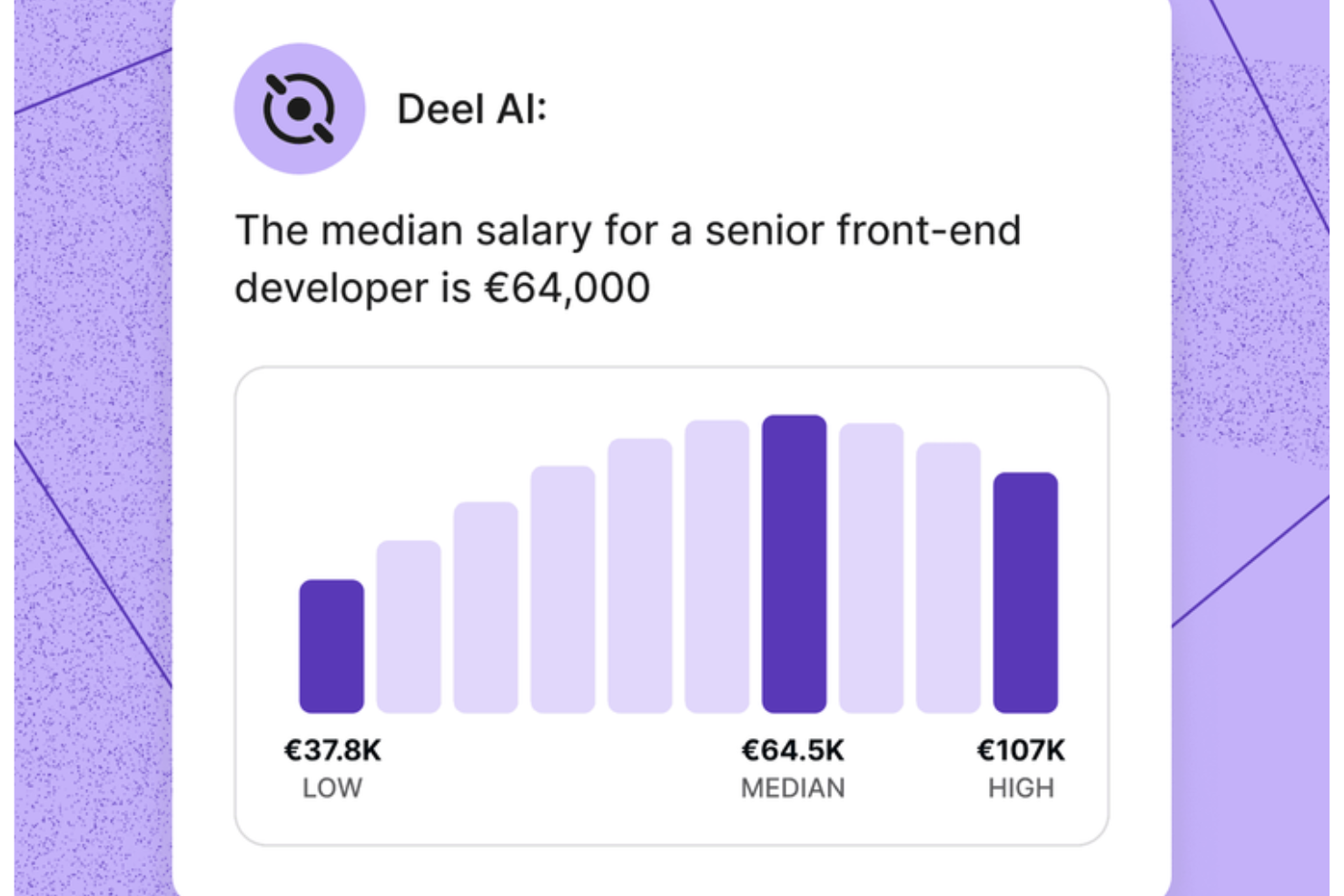
Deel AI ti offre un modo per gestire domande su HR e questioni legali con sicurezza, combinando i dati del tuo team con approfondimenti supportati da esperti di oltre 150 paesi. Se gestisci una forza lavoro distribuita o supporti team in diverse regioni, hai a disposizione un assistente sempre disponibile che ti aiuta a comprendere i requisiti di conformità, i dettagli della forza lavoro e le attività HR quotidiane senza dover cercare tra i documenti o attendere l'assistenza.
Perché ho scelto Deel
Ho scelto Deel perché il suo assistente AI agisce come un esperto integrato di conformità e HR che interpreta continuamente i tuoi dati e le normative sull'occupazione a livello globale. Hai a disposizione funzionalità come approfondimenti contestuali, consapevoli della pagina, che presentano riepiloghi, dettagli chiave e considerazioni sulla conformità direttamente dove stai lavorando. Mi piace anche che Deel AI risponda a domande HR complesse — da buste paga a regolamenti locali — attingendo da un Knowledge Hub creato da esperti legali e HR in più di 150 paesi. Questo lo rende particolarmente adatto a chi ha bisogno di supporto decisionale AI fondato su dati reali della forza lavoro e di conformità.
Funzionalità principali di Deel
Oltre alle funzionalità di conformità e approfondimento basate su AI che ho menzionato sopra, troverai utili queste caratteristiche se stai scegliendo un software di supporto decisionale AI:
- Domande e risposte istantanee per i dipendenti: I lavoratori possono chiedere a Deel AI informazioni su buste paga, ferie e politiche interne, così il tuo team dedica meno tempo a gestire domande ripetitive.
- Approfondimenti HR dai dati delle tue persone: Il sistema combina i tuoi dati esistenti con il Knowledge Hub di Deel per fornire approfondimenti personalizzati sulla tua forza lavoro.
- Report e analisi organizzative generati dall'AI: Ti permette di creare riepiloghi organizzativi, visualizzare dati chiave e ricevere suggerimenti di conformità usando il contesto interno.
- Supporto AI 24/7: Fornisce assistenza sempre disponibile su attività HR e domande sul prodotto, aiutandoti a mantenere il lavoro in movimento in qualsiasi fuso orario.
Integrazioni Deel
Le integrazioni includono BambooHR, Workday, Xero, QuickBooks, Expensify, Netsuite, Greenhouse, Okta, Slack e Microsoft 365. È disponibile un'API per integrazioni personalizzate.
Pros and Cons
Pros:
- L'AI offre risposte istantanee sulle normative sul lavoro locale in oltre 150 paesi
- Approfondimenti contestuali riassumono le pagine HR durante la visualizzazione
- I dipendenti possono ricevere risposte alle domande HR senza coinvolgimento dei manager
Cons:
- Le indicazioni dell'AI possono richiedere revisione umana per scenari legali complessi
- Forte dipendenza dal Knowledge Hub proprietario per l'accuratezza
New Product Updates from Deel HR

Deel Expands Stablecoin Wallet to 80+ Countries
Deel expands its Stablecoin Wallet to 80+ countries with dollar-backed balances and optional rewards. This gives eligible contractors more ways to hold and manage earnings inside Deel. For more information, visit Deel’s official site.
 .
.
Ideale per l'identificazione precoce dei talenti esecutivi
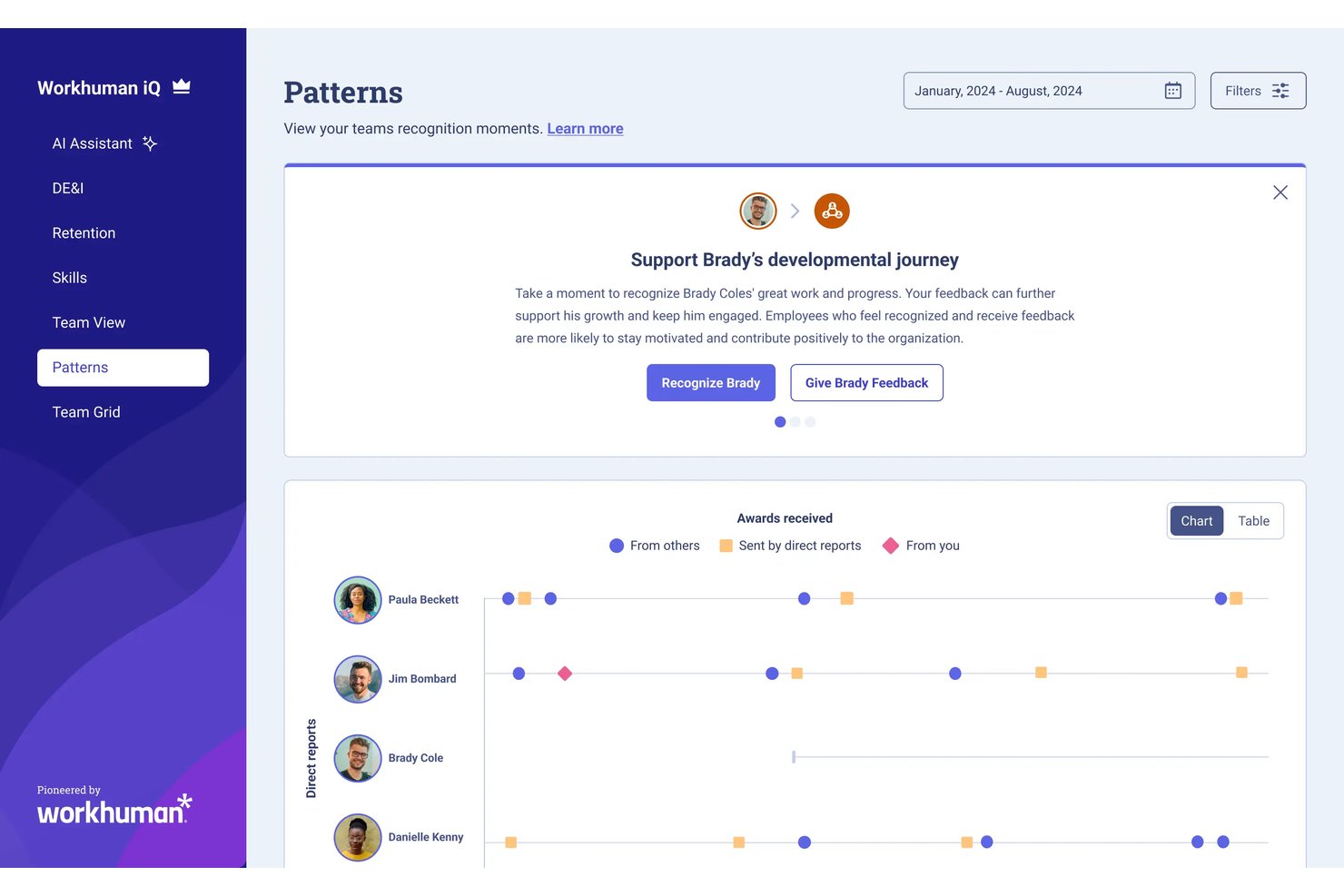
Workhuman Future Leaders è uno strumento di pianificazione della successione basato sull'intelligenza artificiale che utilizza dati di riconoscimento e comportamentali per identificare i dipendenti ad alto potenziale che si troveranno in un percorso verso ruoli di alto livello dirigenziale.
Per chi è meglio Workhuman Future Leaders?
È particolarmente adatto a grandi aziende con programmi di riconoscimento già consolidati che necessitano di un approccio basato sui dati per la pianificazione della successione e lo sviluppo della pipeline di leadership.
Perché ho scelto Workhuman Future Leaders
Workhuman Future Leaders si guadagna un posto nella mia shortlist perché il motore Ascend AI identifica i dipendenti ad alto potenziale da tre a cinque anni prima che siano pronti per ruoli dirigenziali. Mi piace che impari i segnali di leadership unici di ogni organizzazione dai dati reali di riconoscimento e comportamento, non da nomine dei manager o da sensazioni. I suoi modelli autoapprendenti si ricalibrano in tempo reale con l'avanzamento dei leader e il cambiamento dei ruoli, così i segnali di talento restano sempre aggiornati.
Caratteristiche principali di Workhuman Future Leaders
- Analisi dei modelli comportamentali: Individua i dipendenti il cui comportamento riflette le qualità della leadership utilizzando i dati di riconoscimento e delle risorse umane.
- Integrazione con Workday HCM: Sincronizza le attività di riconoscimento e premiazione degli utenti con i registri HR principali per un flusso dati senza interruzioni.
- App per Microsoft Teams e Slack: Permette agli utenti di dare e ricevere riconoscimenti direttamente all'interno dei popolari strumenti di collaborazione.
- Feed Culture Hub: Centralizza riconoscimenti, celebrazioni e coinvolgimento interattivo in uno spazio di lavoro digitale unificato.
Integrazioni di Workhuman Future Leaders
Pros and Cons
Pros:
- Riconosce i segnali di leadership dal comportamento reale
- Scopre talenti ad alto potenziale prima dei cicli di promozione
- Fornisce heatmap della cultura organizzativa per la successione
Cons:
- La configurazione richiede dati di un programma di riconoscimento già esistente
- Visibilità limitata sulla logica decisionale del modello
Tableau
Ideale per la visualizzazione dei dati
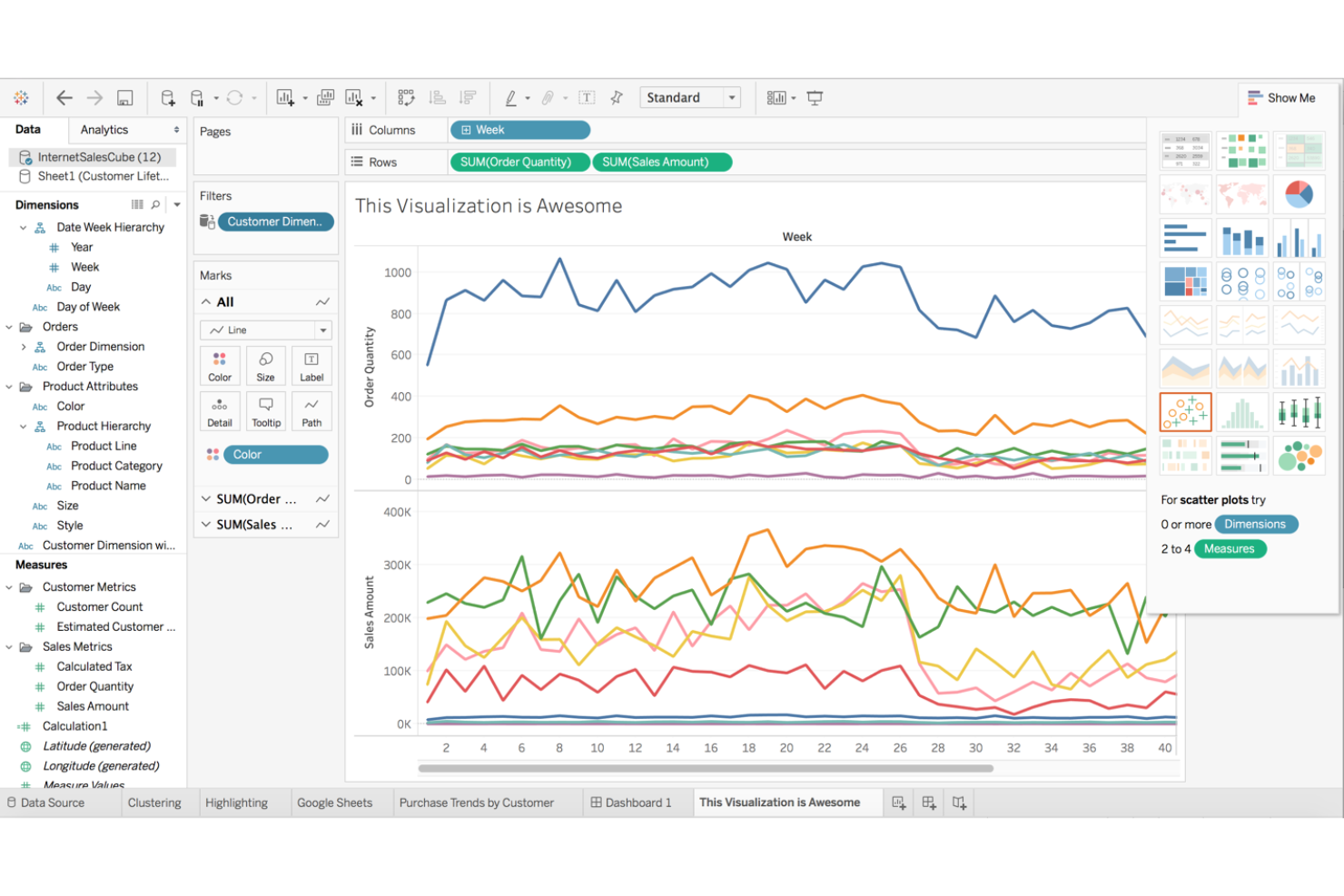
Tableau è uno strumento di visualizzazione dei dati rivolto ad analisti, professionisti di business intelligence e decisori aziendali. Trasforma i dati grezzi in metriche interattive e condivisibili, offrendo insight attraverso l'analisi visiva per sostenere decisioni informate.
Perché ho scelto Tableau: È rinomato per la visualizzazione dei dati, offrendo analisi guidate dall’intelligenza artificiale e processi di linguaggio naturale. Queste funzionalità consentono di esplorare i dati tramite formati visivi intuitivi. L’interfaccia drag-and-drop di Tableau semplifica l’analisi dei dati complessi, rendendola accessibile per tutto il tuo team. Pur non essendo una piattaforma di decision-making basata esclusivamente sull’IA, le sue analisi assistite dall’IA e le capacità di visualizzazione all’avanguardia lo rendono uno strumento eccellente per individuare insight in grado di guidare decisioni aziendali più intelligenti.
Funzionalità principali e integrazioni:
Funzionalità incluse dashboard interattive che permettono un'esplorazione approfondita dei dati. La piattaforma supporta anche aggiornamenti dati in tempo reale, assicurando che le analisi siano sempre aggiornate. La funzione di storytelling aiuta a presentare gli insight ai portatori di interesse.
Integrazioni includono Salesforce, AWS, Google Cloud, Microsoft Excel, SAP, Oracle, IBM, Alteryx, Snowflake e Dropbox.
Pros and Cons
Pros:
- Dashboard dati interattive
- Supporta aggiornamenti dati in tempo reale
- Funzione di storytelling per presentazioni
Cons:
- Può essere impegnativo per le risorse
- Richiede formazione per le funzionalità avanzate

Anaplan
Ideale per la pianificazione aziendale
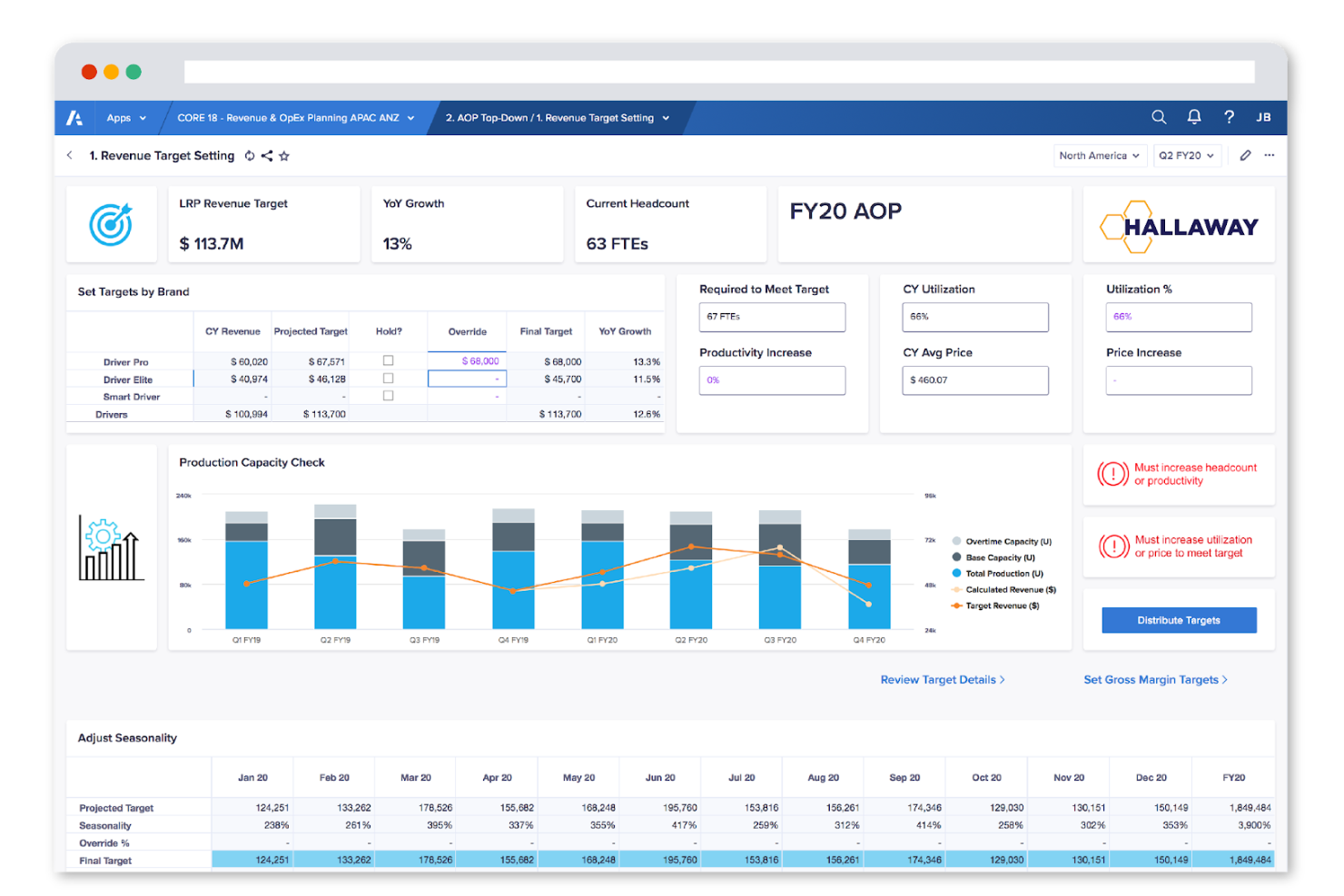
Anaplan è una piattaforma cloud per la pianificazione aziendale e la gestione delle prestazioni. È utilizzata da team di finanza, vendite e operazioni e offre funzionalità di modellazione e previsione basate sull'IA per migliorare la pianificazione strategica e il processo decisionale.
Perché ho scelto Anaplan: È ideale per la pianificazione aziendale grazie ai suoi strumenti avanzati di modellazione e previsione. Con le capacità di IA di Anaplan, puoi simulare diversi scenari di business e ottimizzare le risorse. Le sue funzionalità collaborative consentono al tuo team di allinearsi sugli obiettivi strategici e monitorare le prestazioni in tempo reale. La flessibilità nella personalizzazione dei modelli garantisce che i processi di pianificazione siano adattati alle esigenze specifiche della tua attività.
Funzionalità e integrazioni principali:
Funzionalità includono il suo motore in-memory Hyperblock, che ricalcola all'istante modelli complessi tra i vari dipartimenti. Connected Planning collega i modelli di finanza, vendite, supply chain e forza lavoro, mantenendo i team allineati su ipotesi condivise. Infine, la modellazione multidimensionale consente di costruire scenari dettagliati tra prodotti, regioni, clienti o periodi temporali, offrendo approfondimenti sui fattori che influenzano le prestazioni aziendali.
Integrazioni includono Salesforce, Microsoft Excel, Workday, Tableau, SAP, Oracle, Google Cloud, AWS e Microsoft Azure.
Pros and Cons
Pros:
- Modellazione personalizzabile per esigenze specifiche
- Aggiornamenti dati in tempo reale
- Strumenti collaborativi per l'allineamento del team
Cons:
- Configurazione iniziale del modello lenta
- Struttura rigida per utilizzo ad hoc

Ideale per il coinvolgimento dei clienti
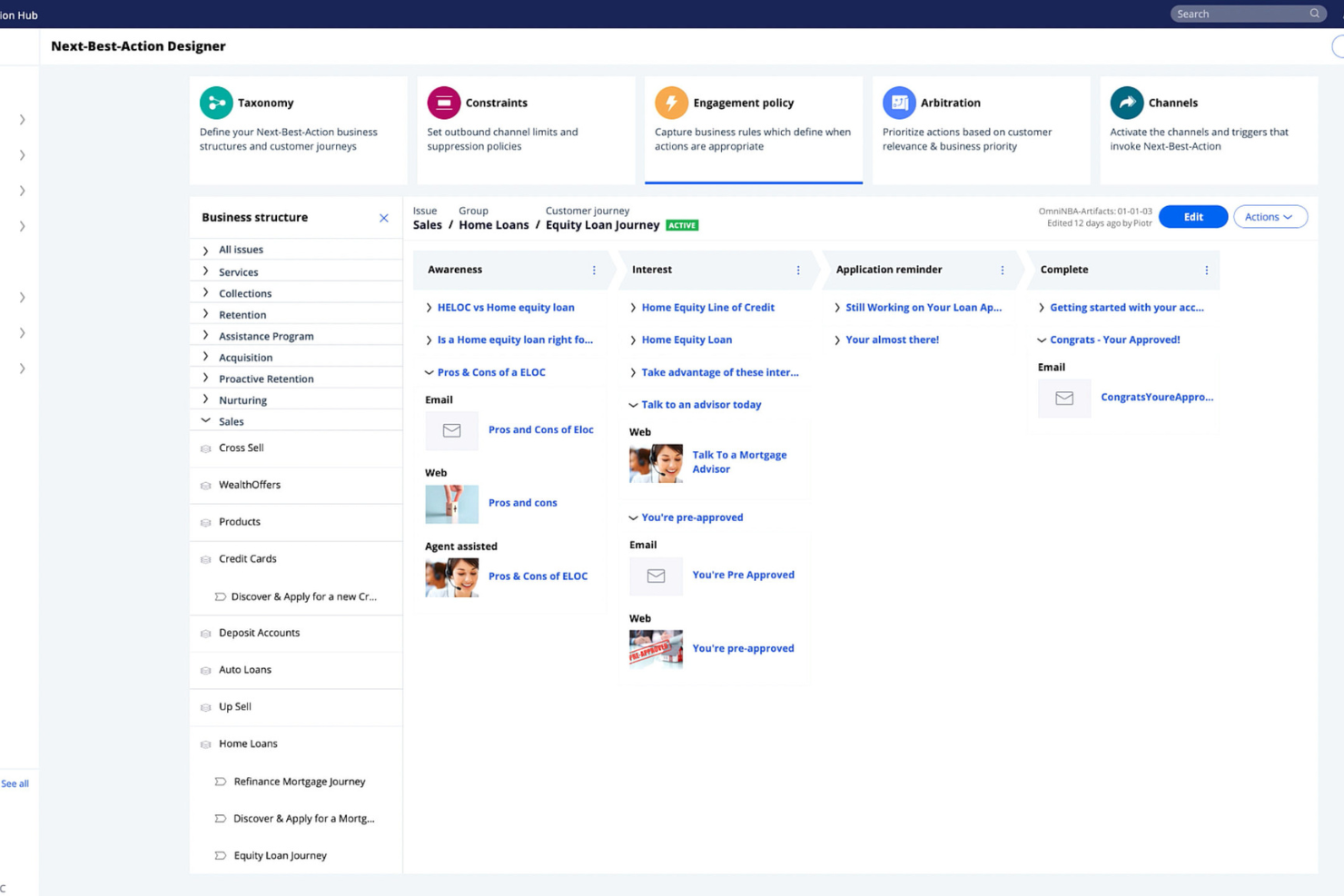
Pega Decision Hub è una piattaforma guidata dall’IA per marketer e team di customer experience che supporta il coinvolgimento dei clienti attraverso decisioni in tempo reale e analisi predittiva. Offre funzionalità per personalizzare le interazioni con i clienti e ottimizzare le strategie di marketing.
Perché ho scelto Pega Decision Hub: Si distingue per il coinvolgimento dei clienti grazie all’uso dell’IA per analizzare i dati dei clienti in tempo reale. Questo permette al tuo team di personalizzare le interazioni in base al comportamento attuale del cliente. Le analisi predittive di Pega aiutano ad anticipare le esigenze dei clienti e a guidare le decisioni. La sua capacità di integrarsi con i sistemi di marketing esistenti assicura una transizione agevole e massimizza l’efficienza del team.
Funzionalità e integrazioni principali:
Funzionalità includono apprendimento adattivo che affina i processi decisionali nel tempo. La piattaforma offre una dashboard centralizzata per monitorare le interazioni dei clienti. Inoltre, supporta il coinvolgimento omnicanale, garantendo comunicazioni coerenti su vari canali.
Integrazioni includono Salesforce, Adobe, Microsoft Dynamics, AWS, Google Cloud e Twilio.
Pros and Cons
Pros:
- Elaborazione dati in tempo reale
- Supporta il coinvolgimento omnicanale
- Apprendimento adattivo per decisioni migliorate
Cons:
- Richiede competenze tecniche per l’implementazione
- La complessità può essere eccessiva per piccoli team

Ideale per la distribuzione di modelli di intelligenza artificiale

IBM Watson Studio è una piattaforma di data science e intelligenza artificiale per data scientist, sviluppatori e analisti. Facilita la creazione, l'addestramento e la distribuzione di modelli di intelligenza artificiale, consentendo agli utenti di ottenere insight e prendere decisioni basate sui dati.
Perché ho scelto IBM Watson Studio: È pensata per la distribuzione di modelli di intelligenza artificiale, con funzionalità come la creazione automatizzata dei modelli e pipeline di distribuzione. Questi strumenti aiutano il tuo team a creare e distribuire soluzioni di intelligenza artificiale rapidamente, anche senza competenze tecniche approfondite. Le funzionalità di collaborazione di Watson Studio permettono a più utenti di lavorare contemporaneamente agli stessi progetti. Il supporto per framework open-source garantisce flessibilità e adattabilità per diversi progetti di intelligenza artificiale.
Funzionalità e integrazioni principali:
Funzionalità includono un'interfaccia facile da usare che semplifica la preparazione dei dati e l'addestramento dei modelli. La piattaforma supporta l'apprendimento automatico automatizzato, permettendo di costruire modelli con un intervento manuale minimo. Watson Studio offre anche strumenti per la visualizzazione e l'analisi dei dati.
Integrazioni (framework) includono piattaforme popolari come IBM Cloud, Apache Spark, Hadoop, Python, R, TensorFlow e Keras.
Pros and Cons
Pros:
- Supporta framework open-source
- Facilita la collaborazione tra utenti
- Offre apprendimento automatico automatizzato
Cons:
- Richiede competenze tecniche
- Configurazione iniziale complessa


Google DeepMind è un laboratorio di ricerca sull'IA focalizzato sull'avanzamento dell'intelligenza artificiale attraverso la ricerca e le applicazioni. Si rivolge a ricercatori, sviluppatori di IA e organizzazioni che desiderano superare i confini della tecnologia e delle applicazioni IA.
Perché ho scelto Google DeepMind: È un leader nella ricerca sull'IA, offrendo capacità come l'apprendimento per rinforzo e lo sviluppo di reti neurali. Queste funzionalità aiutano a comprendere e sviluppare soluzioni IA all'avanguardia. L'attenzione di DeepMind verso un'IA etica garantisce che i tuoi progetti siano in linea con le migliori pratiche sulla sicurezza e la responsabilità nell'IA. I suoi risultati scientifici fanno progredire settori come l’assistenza sanitaria e l’efficienza energetica, dimostrando impatto e innovazione.
Caratteristiche e integrazioni principali:
Caratteristiche comprendono scoperte nella ricerca sull'apprendimento per rinforzo, modelli generativi e architetture di reti neurali. Il lavoro di DeepMind su sistemi come AlphaFold, AlphaZero e agenti di pianificazione avanzati dimostra fin dove l'IA di ultima generazione può arrivare in contesti decisionali complessi.
Integrazioni comprendono framework utilizzati da DeepMind nella ricerca, come l’ecosistema Google, TensorFlow, PyTorch, JAX, Scikit-learn, NumPy, OpenAI Gym, Pandas e Matplotlib.
Pros and Cons
Pros:
- Ricerca e sviluppo IA all'avanguardia
- Focus sulle pratiche etiche dell'IA
- Contributi a diversi settori
Cons:
- Principalmente focalizzato sulla ricerca, non per uso commerciale
- Richiede competenze tecniche avanzate

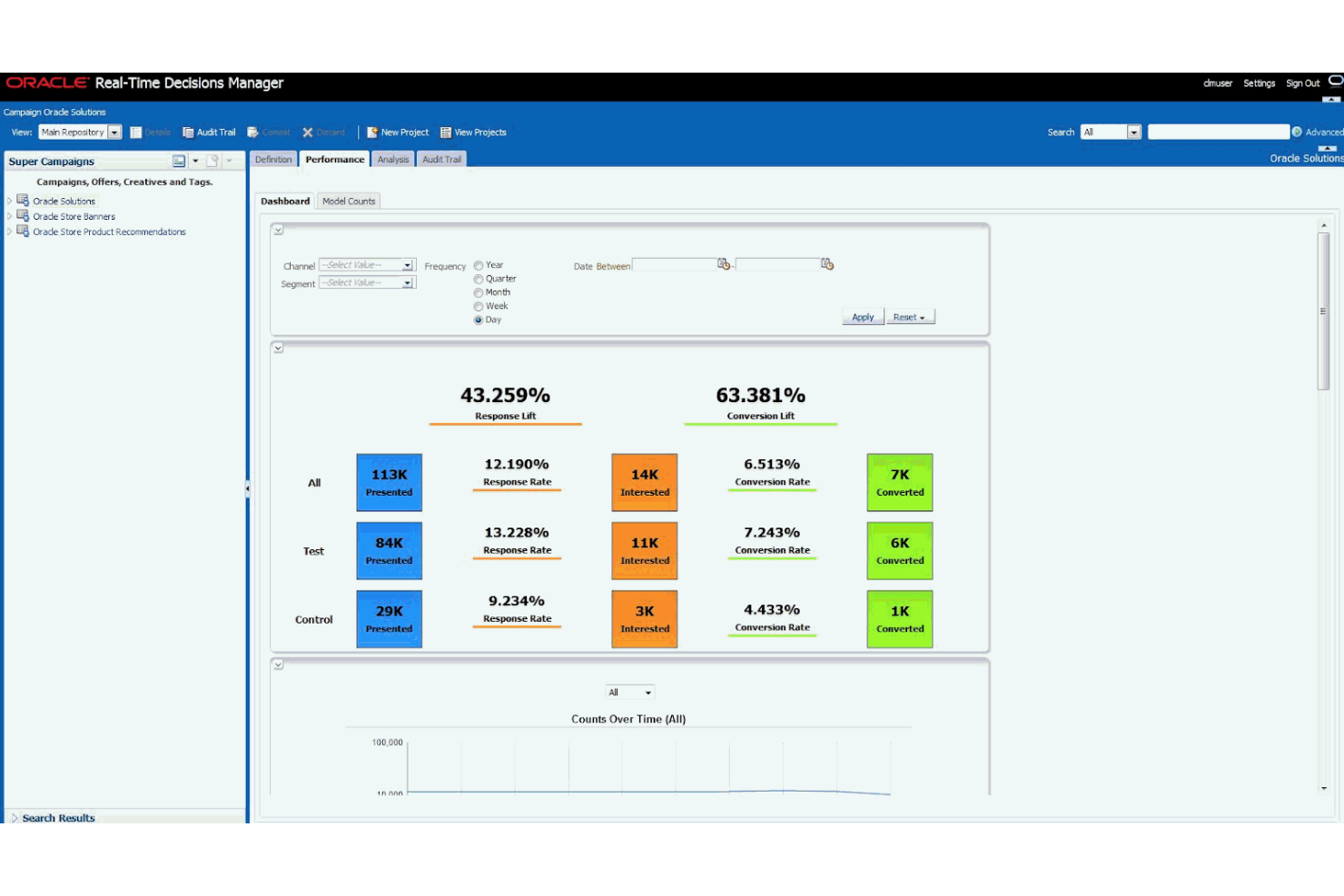
Oracle RTD è uno strumento di gestione delle decisioni basato su intelligenza artificiale progettato per le aziende che necessitano di analisi dei dati e presa di decisioni in tempo reale. Permette alle imprese di prendere decisioni immediate e guidate dai dati, analizzando le interazioni con i clienti e altri punti dati in tempo reale.
Perché ho scelto Oracle RTD: Si concentra su approfondimenti in tempo reale, con funzionalità come l'elaborazione dei dati in tempo reale e l'analisi predittiva. Queste capacità consentono al tuo team di rispondere ai cambiamenti del mercato e ai comportamenti dei clienti. Gli algoritmi di apprendimento automatico di Oracle RTD prevedono gli esiti e ottimizzano le decisioni. Infine, la sua capacità di elaborare dati in tempo reale lo distingue per le aziende che devono agire rapidamente.
Funzionalità principali e integrazioni:
Funzionalità includono l'apprendimento adattivo, che migliora la precisione delle decisioni nel tempo, e un'interfaccia intuitiva che semplifica l'analisi di dati complessi. Inoltre, la modellazione basata su scenari ti prepara a una varietà di situazioni aziendali.
Integrazioni includono API e servizi web che consentono a Oracle RTD di collegarsi con applicazioni rivolte ai clienti, sistemi CRM, siti web e fonti di dati di back office.
Pros and Cons
Pros:
- Supporta l'analisi dei dati in tempo reale
- L'apprendimento adattivo migliora nel tempo
- Modellazione basata su scenari per la pianificazione
Cons:
- Elevati requisiti di integrazione
- Configurazione complessa del modello di regole

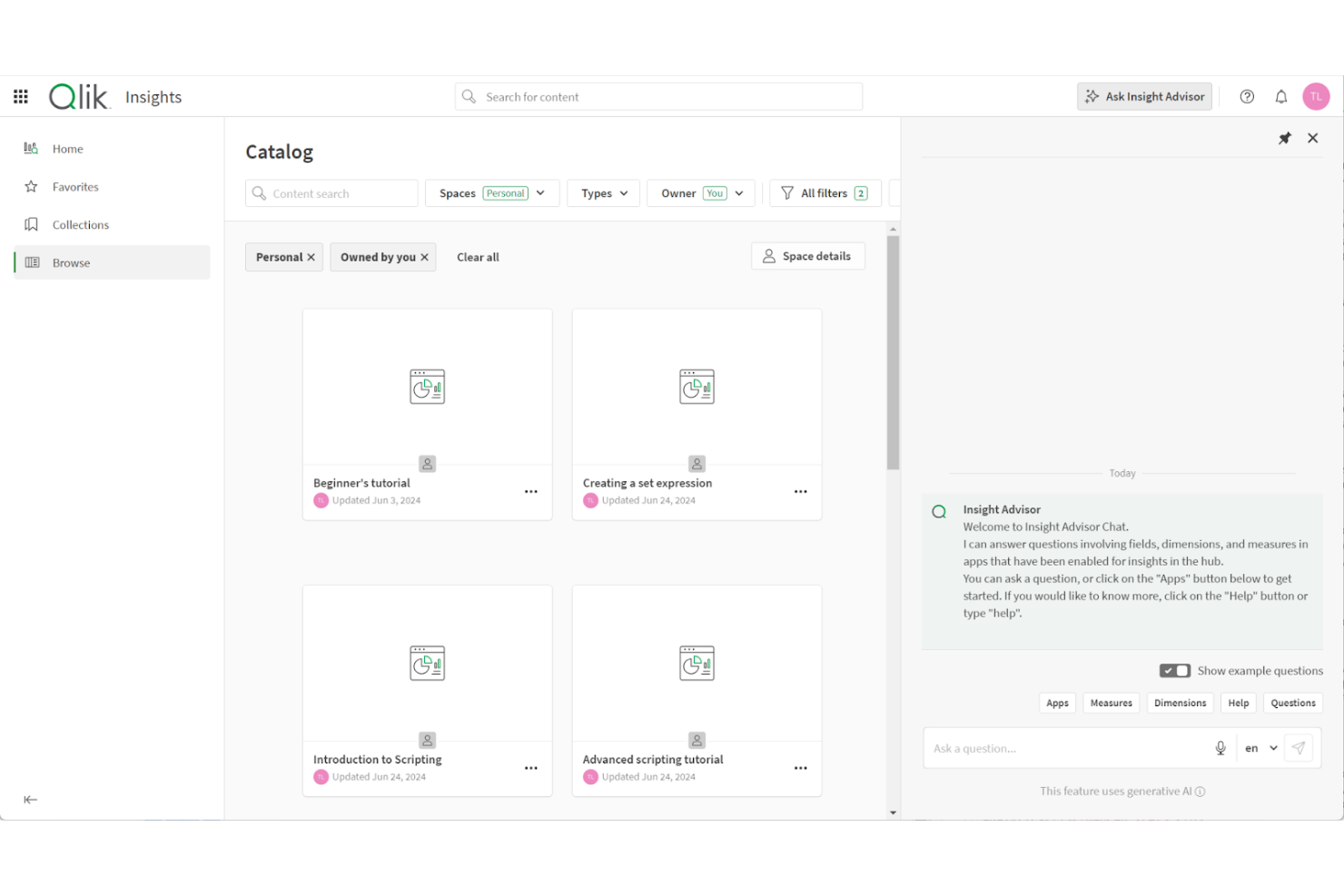
Qlik Analytics è una piattaforma di analisi dei dati basata su cloud per esplorare e comprendere dati provenienti da più fonti. È pensata per aziende che desiderano trasformare dati grezzi in intuizioni senza richiedere competenze tecniche avanzate.
Perché ho scelto Qlik Analytics: consente al tuo team di porre domande in linguaggio naturale e ricevere subito intuizioni guidate dall’IA. Il suo motore di analisi associativa permette di esplorare le relazioni tra i dati senza scrivere query o codici, aiutando a scoprire schemi che gli strumenti tradizionali non rilevano. Insight Advisor genera dashboard, fogli di calcolo, visualizzazioni e previsioni, rendendo l’analisi avanzata accessibile anche a chi non ha competenze tecniche.
Funzionalità principali & integrazioni:
Funzionalità includono l’analisi conversazionale per interrogazioni in linguaggio naturale, visualizzazioni adattive che portano alla luce relazioni nascoste tra i dati e strumenti di narrazione integrati che trasformano le informazioni in presentazioni condivisibili.
Integrazioni includono Microsoft Excel, Google Sheets, Snowflake, Amazon Redshift, Databricks, Salesforce, Google BigQuery, Oracle, SAP e Microsoft Power BI.
Pros and Cons
Pros:
- Permette di esplorare i dati senza programmare
- Funziona bene per la collaborazione tra reparti
- Offre intuizioni guidate supportate dall’IA
Cons:
- Può risultare limitante per gli ingegneri dei dati
- Richiede configurazione per dati complessi

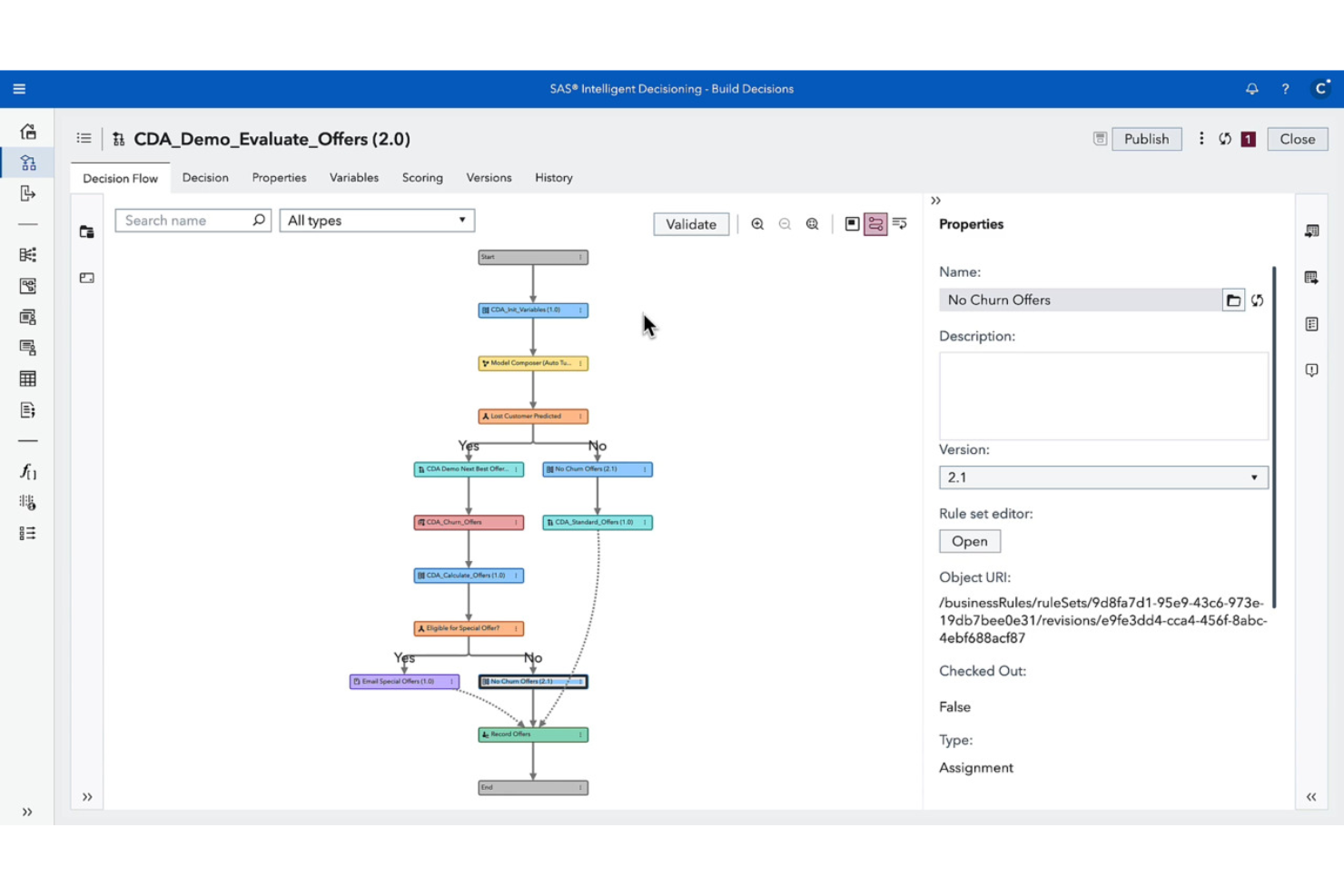
SAS Intelligent Decisioning è una piattaforma di gestione delle decisioni rivolta ad analisti aziendali e decisori, che offre strumenti per automatizzare e ottimizzare i processi decisionali. Fornisce funzionalità basate sull'IA per l'analisi dei dati e la gestione delle decisioni a supporto delle operazioni aziendali.
Perché ho scelto SAS Intelligent Decisioning: Si distingue nella gestione delle decisioni, grazie a funzionalità come la gestione dei modelli e l'automazione delle regole aziendali. Queste consentono di implementare e gestire la logica decisionale in tutta l'organizzazione. La piattaforma supporta processi decisionali in tempo reale, essenziali per contesti aziendali dinamici. Per esempio, mercati in rapido movimento o operazioni di assistenza clienti ad alto volume. Inoltre, la capacità di integrare modelli di apprendimento automatico assicura l'utilizzo di analisi avanzate per decisioni informate.
Caratteristiche principali & integrazioni:
Caratteristiche includono dashboard intuitive, regole aziendali automatizzate e analisi di scenario. Queste funzionalità aiutano il tuo team a visualizzare gli insight e prendere decisioni consapevoli.
Integrazioni con l'ecosistema SAS Viya e con le principali piattaforme aziendali, inclusi servizi cloud e sistemi CRM/ERP.
Pros and Cons
Pros:
- Supporta le decisioni in tempo reale
- Logica decisionale personalizzabile
- Fornisce analisi avanzate
Cons:
- Flessibilità limitata sui tipi di dati
- Richiede formazione per l'utilizzo completo
Altri software di supporto decisionale basati sull'IA
Ecco alcune opzioni aggiuntive di software di supporto decisionale basati sull’IA che non sono entrate nella mia selezione, ma che vale comunque la pena valutare:
- GiniMachine
Ideale per la valutazione del merito creditizio
- DataRobot
Ideale per l'apprendimento automatico automatizzato
- Movable Ink
Ideale per il marketing personalizzato
- Aera Technology
Ideale per l'analisi aziendale


Come Valuto il Software di Decisione AI
Dai responsabili della supply chain che devono automatizzare il rifornimento giornaliero su larga scala ai team di gestione del rischio creditizio che desiderano logiche coerenti per l'approvazione dei prestiti, il software di decisione AI è lo strato che trasforma i dati grezzi in un'azione raccomandata o automatizzata. Quando valuto gli strumenti in questo ambito, parto da una base che ogni piattaforma deve soddisfare, poi considero ciò che realmente differenzia una scelta dall'altra a seconda dei casi d'uso specifici, tipi di team e volumi di decisioni.
Funzionalità di Base (Requisiti Minimi per Questa Lista)
Per il software di decisione AI, le funzionalità di base che testo e valuto sono:
- Integrazione dei dati: Verifico se la piattaforma è in grado di prelevare dati da sistemi ERP, CRM e magazzini in tempo reale, non solo da file CSV importati in batch.
- Analisi predittiva: I modelli di machine learning dovrebbero prevedere risultati come cambi di domanda, rischio di abbandono o inadempienza creditizia con un'accuratezza sufficiente per poter agire.
- Raccomandazioni prescrittive: Oltre a prevedere cosa potrebbe accadere, valuto se lo strumento suggerisce azioni specifiche da intraprendere, come quantità di riordino o adeguamenti di prezzo.
- Modellazione di scenari: I decisori devono poter testare percorsi "what if", come simulare l'impatto della rottura di un fornitore prima di adottare un piano di contingenza.
- Automazione delle decisioni: Cerco regole configurabili che permettano ai team di automatizzare scelte di routine, come segnalazioni di frode o riassortimento delle scorte, mantenendo il controllo umano laddove necessario.
- Spiegabilità e tracciabilità delle decisioni: Ogni raccomandazione deve poter essere ricondotta ai dati e alla logica da cui deriva, fondamentale in settori regolamentati come il credito o la sanità.
- Visualizzazione e reportistica: I cruscotti devono essere orientati alla decisione, mettendo in evidenza le azioni suggerite e le probabilità degli esiti, non solo semplici grafici grezzi.
Uno strumento deve offrire la maggior parte di queste capacità per essere incluso nella lista. Su questa base, considero cosa distingue ogni soluzione.
Funzionalità Distintive (Cosa Distingue le Scelte)
Alcune piattaforme offrono apprendimento adattivo, in cui i modelli si auto-regolano in base ai risultati monitorati nel tempo, rendendo ogni ciclo decisionale più intelligente. In ambienti altamente regolamentati o complessi, considero controlli di governance avanzati come workflow di approvazione e permessi granulari per proteggere la logica decisionale. È anche molto utile quando gli strumenti includono template preconfigurati specifici per settore o acceleratori decisionali, consentendo l'applicazione immediata di logiche già collaudate per risolvere casi comuni senza dover partire da zero.
Cosa Valuto Oltre Alle Funzionalità
La profondità dell'integrazione qui conta molto, perché questi strumenti sono utili solo quanto i dati che possono gestire. Valuto quanto bene ogni piattaforma si collega a sistemi ERP, CRM e magazzini dati di cui il vostro team si serve già. Anche la complessità dell'implementazione è un fattore rilevante. Alcune piattaforme richiedono mesi di consulenza e lavoro di data engineering, mentre altre si possono mettere in funzione nel giro di poche settimane. Considero inoltre se il modello di pricing del fornitore—che sia per utente, a consumo o tramite contratto aziendale—sia allineato a budget realistici in funzione della dimensione del team e del volume di decisioni gestite.
Come scegliere un software di supporto decisionale basato sull'IA
È facile perdersi in lunghi elenchi di funzionalità e strutture tariffarie complesse. Per aiutarti a rimanere concentrato mentre affronti il tuo processo di selezione software specifico, ecco un elenco di fattori da tenere a mente:
| Fattore | Cosa considerare |
|---|---|
| Scalabilità | Il software può crescere insieme alla tua azienda? Verifica se è in grado di gestire un aumento del volume di dati o del numero di utenti senza problemi di prestazioni. |
| Integrazioni | Si collega agli strumenti che già utilizzi? Verifica se supporta integrazioni come piattaforme CRM, ERP o di analisi dei dati. |
| Personalizzazione | Puoi adattarlo ai tuoi flussi di lavoro? Cerca opzioni per modificare impostazioni e funzionalità in modo che corrispondano ai processi del tuo team. |
| Facilità d'uso | È facile da usare per il tuo team? Valuta l'interfaccia e la formazione necessaria per garantire un'adozione agevole da parte degli utenti non tecnici. |
| Implementazione e inserimento | Con quale rapidità puoi iniziare? Considera il tempo e le risorse necessari per la configurazione e verifica la disponibilità di formazione o assistenza durante la transizione. |
| Costo | Rientra nel tuo budget? Confronta il prezzo del software con le sue funzionalità e i suoi vantaggi, considerando anche eventuali costi nascosti. |
| Misure di sicurezza | Protegge i tuoi dati? Assicurati che disponga di misure di sicurezza avanzate, come la crittografia e i controlli di accesso, per proteggere le tue informazioni. |
| Disponibilità dell'assistenza | Puoi ricevere aiuto quando ne hai bisogno? Verifica la disponibilità di opzioni di assistenza 24 ore su 24, 7 giorni su 7, e la reattività del servizio clienti del fornitore. |
Che cos'è un software di supporto decisionale basato sull'IA?
Il software di supporto decisionale basato sull'IA è uno strumento che utilizza l'intelligenza artificiale per analizzare i dati, prevedere i risultati e supportare i processi decisionali. Questi strumenti sono comunemente utilizzati da analisti aziendali, scienziati dei dati e manager che devono prendere decisioni basate sui dati in modo rapido e accurato.
Le sue funzionalità includono l'analisi predittiva, l'elaborazione dei dati in tempo reale e la generazione automatica di rapporti, che aiutano a identificare le tendenze, ottimizzare le strategie e migliorare l'efficienza. Nel complesso, questi strumenti forniscono informazioni preziose che migliorano il processo decisionale e favoriscono risultati aziendali migliori.
Funzionalità
Quando selezioni un software decisionale basato sull'AI, presta attenzione alle seguenti funzionalità chiave:
- Analisi predittiva: utilizza l'AI per prevedere tendenze e risultati futuri, aiutandoti a prendere decisioni informate.
- Elaborazione dei dati in tempo reale: analizza immediatamente i dati, consentendo di prendere decisioni tempestive e pertinenti.
- Generazione automatica di report: crea report automaticamente, facendo risparmiare tempo e garantendo l'accuratezza nella presentazione dei dati.
- Integrazione dell'apprendimento automatico: incorpora modelli di apprendimento automatico per supportare l'analisi dei dati e le previsioni.
- Visualizzazione dei dati: presenta i dati in formati visivi di facile comprensione, consentendo di ottenere rapidamente informazioni utili.
- Pianificazione degli scenari: simula diversi scenari per valutare potenziali strategie e risultati.
- Apprendimento adattivo: i processi decisionali basati sui dati migliorano costantemente il sistema complessivo.
- Dashboard personalizzabili: consentono di adattare l'interfaccia alle proprie esigenze e ai propri flussi di lavoro specifici.
- Interazione omnicanale: garantisce una comunicazione coerente su più piattaforme.
- Misure di sicurezza: proteggono i dati sensibili tramite crittografia e controlli degli accessi, garantendo l'integrità dei dati.
Vantaggi
L'implementazione di un software decisionale basato sull'AI offre diversi vantaggi al tuo team e alla tua azienda. Ecco alcuni dei benefici che puoi aspettarti:
- Decisioni più coerenti: gli algoritmi di AI applicano ogni volta la stessa logica, riducendo le supposizioni e garantendo che le decisioni rimangano allineate tra i team.
- Migliore allineamento tra i team: i dati condivisi e i modelli decisionali centralizzati consentono ai reparti di lavorare sulla base delle stesse ipotesi e priorità.
- Maggiore ROI sui dati: l'AI trasforma i dati grezzi, storici e in tempo reale in raccomandazioni operative che producono risultati aziendali misurabili.
- Meno colli di bottiglia operativi: le fasi decisionali automatizzate semplificano i flussi di lavoro ed eliminano i ritardi causati da approvazioni o revisioni manuali.
- Risposta più rapida ai cambiamenti del mercato: i modelli di AI adattivi si aggiornano rapidamente, aiutando il team a reagire ai cambiamenti nel comportamento dei clienti o nelle condizioni aziendali.
- Migliore esperienza dei clienti: raccomandazioni personalizzate e cicli decisionali più rapidi portano a interazioni più pertinenti e soddisfacenti.
- Governance e conformità più solide: le piattaforme di AI registrano i percorsi decisionali e garantiscono trasparenza, semplificando gli audit e la reportistica normativa.
- Riduzione del rischio aziendale: il rilevamento precoce di anomalie, problemi di conformità o cali delle prestazioni aiuta a prevenire problemi costosi prima che si aggravino.
Costi e prezzi
La selezione di un software decisionale basato sull'AI richiede la comprensione dei modelli e dei piani tariffari disponibili. I costi variano in base alle funzionalità, alle dimensioni del team, ai componenti aggiuntivi e ad altri fattori. La tabella seguente riassume i piani standard, i relativi prezzi medi e le funzionalità tipicamente incluse negli strumenti di AI:
Tabella comparativa dei piani per software decisionali basati sull'AI
| Tipo di piano | Prezzo medio | Funzionalità comuni |
|---|---|---|
| Piano gratuito | $0 | Analisi di base, elaborazione limitata dei dati e assistenza della comunità. |
| Piano personale | $10-$30/utente/mese | Visualizzazione dei dati, analisi predittiva e assistenza via e-mail. |
| Piano aziendale | $50-$100/utente/ mese | Elaborazione dei dati in tempo reale, dashboard personalizzabili e assistenza prioritaria. |
| Piano aziendale | $150-$300/utente/ mese | Apprendimento automatico avanzato, funzionalità complete di integrazione e assistenza dedicata. |
Domande frequenti sul software per il processo decisionale basato sull'IA
Ecco alcune risposte alle domande comuni sul software per il processo decisionale basato sull’IA:
Il software per il processo decisionale basato sull'IA può integrarsi con i sistemi esistenti?
Sì, la maggior parte degli strumenti per il processo decisionale basato sull’IA può integrarsi con i sistemi esistenti. Cerca strumenti che offrano accesso API e supportino piattaforme diffuse come CRM, ERP e strumenti di analisi dei dati. In questo modo puoi mantenere i flussi di lavoro attuali sfruttando al contempo le funzionalità dell’IA. Verifica le opzioni di integrazione prima dell’acquisto per evitare problemi di compatibilità.
Come posso valutare la scalabilità del software per il processo decisionale basato sull'IA?
Per valutare la scalabilità, verifica se il software è in grado di gestire un aumento del volume di dati e del numero di utenti senza problemi di prestazioni. Cerca funzionalità come un’infrastruttura basata sul cloud e piani tariffari flessibili che si adattino alla crescita. Se la tua azienda prevede di espandersi, assicurati che il software possa crescere insieme a te.
Quali risorse formative sono disponibili per il software per il processo decisionale basato sull'IA?
La maggior parte delle piattaforme offre diverse risorse formative, tra cui video tutorial, webinar e documentazione. Alcune possono fornire tour interattivi del prodotto o una base di conoscenza per l’apprendimento autonomo. Prima di scegliere il software, esamina i materiali formativi per assicurarti che il tuo team possa acquisire rapidamente le competenze necessarie e sfruttare al massimo le funzionalità utilizzando l’IA.
Quanto è importante l'assistenza clienti nella scelta del software per il processo decisionale basato sull'IA?
Un buon servizio di assistenza aiuta a risolvere rapidamente i problemi, riducendo al minimo i tempi di inattività nella scelta del software per il processo decisionale basato sull’IA. Cerca fornitori che offrano assistenza 24 ore su 24, 7 giorni su 7, chat dal vivo e responsabili di account dedicati. Valuta la reattività e la competenza del team di assistenza leggendo le recensioni dei clienti o contattandolo per richieste precedenti all’acquisto.
Ci sono problemi di sicurezza con il software per il processo decisionale basato sull'IA?
Sì, la sicurezza è un aspetto fondamentale. Assicurati che il software includa una crittografia efficace, controlli degli accessi e conformità alle normative sulla protezione dei dati, come il GDPR. Verifica le certificazioni di sicurezza del fornitore e informati sulle sue pratiche storiche di raccolta dei dati. Proteggere le informazioni sensibili è essenziale per mantenere la fiducia e la conformità.