

10 migliori software per la programmazione della formazione per il 2026

Elenco dei migliori software per la programmazione della formazione


Il software per la programmazione della formazione aiuta il tuo team a organizzare, assegnare e monitorare sessioni formative, risorse e partecipanti in un unico posto. Se stai cercando modi per ridurre la programmazione manuale, evitare doppie prenotazioni e mantenere i programmi di formazione in piena efficienza, lo strumento giusto può fare davvero la differenza.
Questo elenco ti aiuterà a confrontare le principali opzioni di software per le prenotazioni, così potrai trovare il software più adatto alle esigenze della tua organizzazione, sia che tu gestisca sessioni in presenza, corsi virtuali o formazione blended.
Perché fidarsi delle nostre recensioni sui software
Il nostro team testa e recensisce software dal 2012. In quanto esperti HR noi stessi, sappiamo quanto sia difficile — e importante — scegliere il software giusto.
Per questa guida, abbiamo valutato gli strumenti attraverso test pratici e ricerche indipendenti, assegnando un punteggio agli strumenti in base ai nostri criteri di selezione. Ci basiamo inoltre sulle competenze di leader di pensiero del settore e di professionisti HR attivi.
Le nostre recensioni riflettono il nostro giudizio editoriale umano, non un discorso di vendita.
Revisori esperti:
Tabella comparativa dei software per la programmazione della formazione
Questa tabella comparativa riassume i dettagli sui prezzi delle mie migliori selezioni di software per la programmazione della formazione.
| Tool | Best For | Trial Info | Price | ||
|---|---|---|---|---|---|
| 1 | Ideale per automatizzare sessioni ricorrenti | Piano gratuito + demo gratuita disponibile | Da $119/mese (fatturazione annuale) | Website | |
| 2 | Migliore per flussi di lavoro automatici di iscrizione alla formazione | Prova gratuita di 30 giorni + demo gratuita disponibile | Da $3,97/utente/mese | Website | |
| 3 | Ideale per il coordinamento di sessioni di apprendimento misto | Demo gratuita disponibile | Prezzo su richiesta | Website | |
| 4 | Ideale per la sincronizzazione in tempo reale dei calendari | Piano gratuito disponibile | Da €25.00/mese/sede | Website | |
| 5 | Ideale per gestire prenotazioni complesse con più risorse | Prova gratuita disponibile | Da $16/utente/mese (minimo 3 utenti) | Website | |
| 6 | Ideale per l'iscrizione autonoma dei partecipanti | Prova gratuita di 30 giorni disponibile | A partire da $14.95/mese | Website | |
| 7 | Ideale per modelli di pianificazione personalizzabili | Prova gratuita di 30 giorni disponibile | Da $5.38/risorsa/mese (fatturazione annuale) | Website | |
| 8 | Ideale per automatizzare la logistica delle sessioni formative con istruttore | Prova gratuita disponibile | A partire da $121/mese (fatturazione annuale) | Website | |
| 9 | Ideale per l'integrazione con sistemi HR esistenti | Demo gratuita disponibile | Prezzo su richiesta | Website | |
| 10 | Ideale per operazioni formative su larga scala in azienda | Demo gratuita disponibile | Prezzo su richiesta | Website |


Recensioni dei migliori software per la programmazione della formazione
Di seguito trovi i miei riepiloghi dettagliati dei software per la programmazione della formazione inclusi nel mio elenco. Le mie recensioni offrono una panoramica dettagliata delle funzionalità, dei casi d’uso più indicati e delle integrazioni di ciascuna piattaforma, per aiutarti a trovare quella più adatta a te.

Ideale per automatizzare sessioni ricorrenti
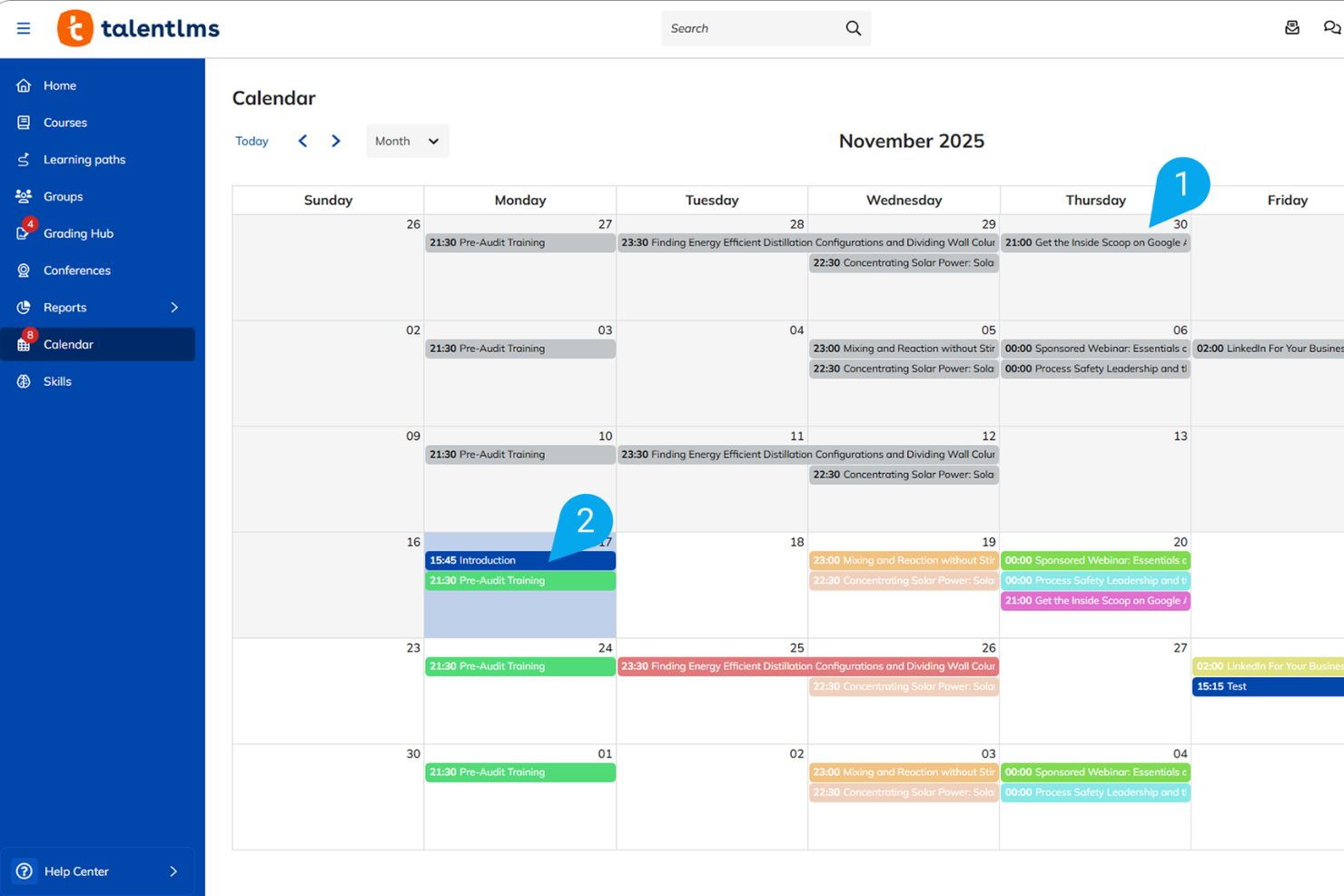
TalentLMS è una piattaforma LMS basata su cloud progettata per programmare ed erogare corsi guidati da istruttore, corsi blended e corsi in autoapprendimento, con strumenti per la creazione dei corsi, la gestione degli studenti, la pianificazione automatica delle sessioni ILT ricorrenti e la traduzione dei corsi alimentata dall'intelligenza artificiale.
Per chi è consigliato TalentLMS?
TalentLMS è particolarmente adatto per i team HR e L&D di organizzazioni di medie dimensioni che hanno bisogno di automatizzare, gestire e monitorare programmi di formazione ripetitivi e complessi corsi guidati da istruttore (ILT).
Perché ho scelto TalentLMS
Ho scelto TalentLMS tra i miei preferiti perché mi piace come gestisce su larga scala le sessioni ILT ricorrenti. Mi permette di programmare automaticamente più date di sessione all’interno di una singola unità del corso, cosicché il mio team non debba creare manualmente nuovi eventi ogni settimana. Mi affido anche alla funzione di notifiche automatiche per tenere informati gli studenti sulle prossime sessioni live, che si sincronizzano perfettamente con i loro calendari personali. Insieme, queste due funzionalità rendono molto meno gravoso coordinare programmi blended di formazione su team globali rispetto a gestire voci separate.
Caratteristiche principali di TalentLMS
- Pianificazione delle sessioni ILT: Pianifica sessioni di formazione guidate da istruttore impostando data, ora e luogo, e consenti agli studenti di iscriversi in autonomia direttamente dalla piattaforma.
- Formazione blended: Combina corsi online in autoapprendimento con sessioni guidate da istruttore dal vivo e programmate, all’interno di un unico programma di formazione.
- Notifiche automatiche: Invia promemoria e avvisi via email in base a eventi chiave come sessioni in arrivo, completamento dei corsi o inattività.
- Percorsi formativi: Organizza i corsi in percorsi strutturati che si sbloccano in un determinato ordine, guidando gli studenti attraverso programmi di formazione multi-step.
Integrazioni di TalentLMS
Le integrazioni includono BambooHR, Salesforce, Zoom, Microsoft Teams, Okta, Google Calendar, PayPal, Shopify e Slack.
Pros and Cons
Pros:
- Automatizza le attività ricorrenti di certificazione compliance
- Accedi a corsi pronti sulle soft skills
- Crea portali di formazione isolati e con branding personalizzato
Cons:
- Il builder nativo dei corsi manca di interattività
- I report di base non offrono analisi predittive
New Product Updates from TalentLMS
TalentLMS Adds Learning Paths, AI Video, and Learner Experience Updates
TalentLMS introduced updates across learning management, content creation, and learner experience, including Learning Paths for Groups, AI video generation in TalentCraft, video bookmarking, and expanded administration tools. For more information, visit TalentLMS’s official site.

Migliore per flussi di lavoro automatici di iscrizione alla formazione
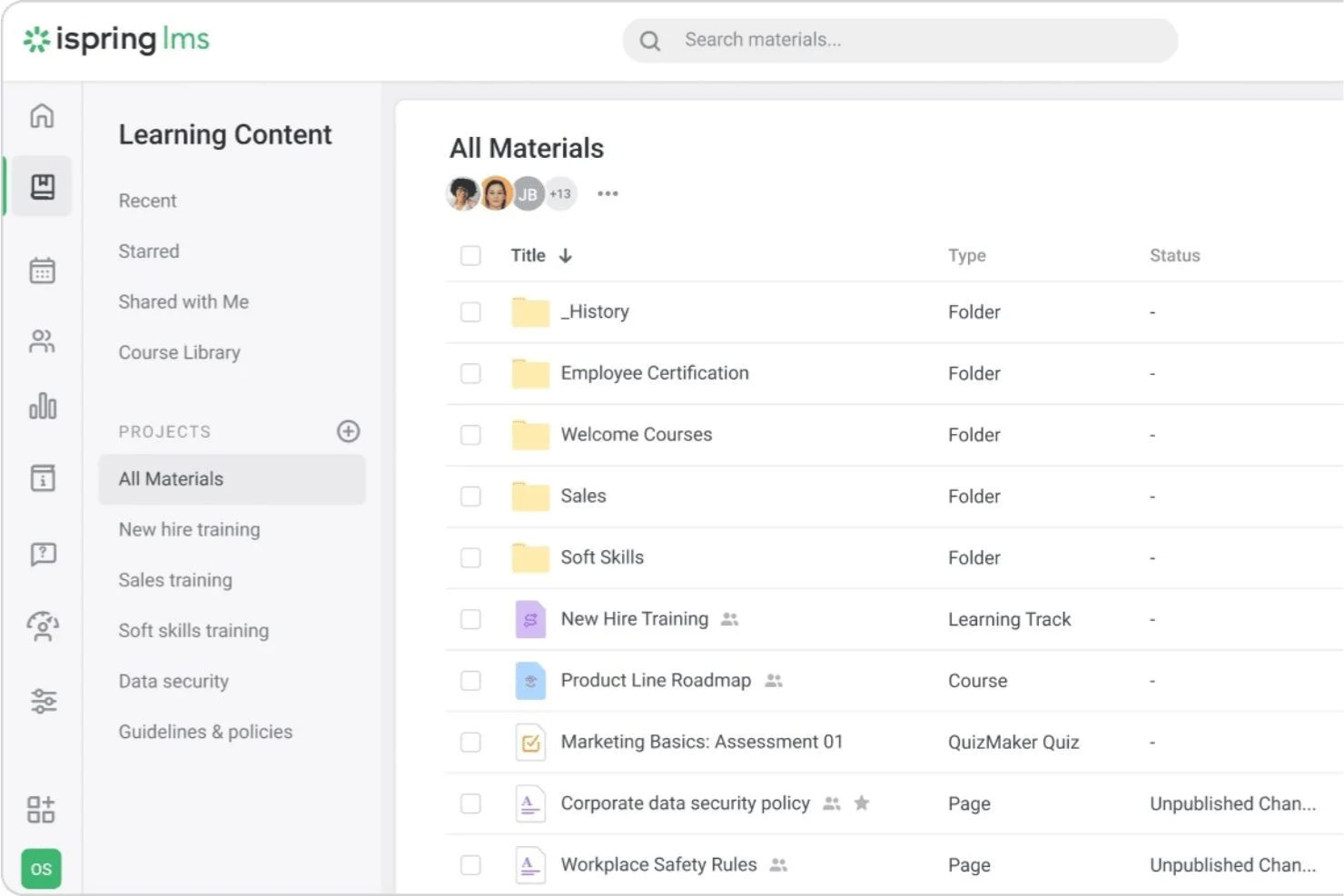
Se hai bisogno di assegnare e monitorare rapidamente i moduli di formazione, iSpring LMS è progettato per le organizzazioni che richiedono una consegna della formazione strutturata e una pianificazione precisa. Supporta l'iscrizione automatica ai corsi e consente ai team di monitorare i progressi degli studenti tramite strumenti di reportistica centralizzati. La piattaforma include anche funzionalità di notifica e promemoria per aiutare a gestire le scadenze e il completamento delle attività.
Perché ho scelto iSpring LMS
Questa piattaforma supporta l'assegnazione e il monitoraggio dei corsi attraverso regole di iscrizione automatica e percorsi di apprendimento strutturati. Gli amministratori possono iscrivere automaticamente gli utenti in base ai ruoli, ai gruppi o alle esigenze di onboarding e monitorare il completamento tramite strumenti di reportistica in tempo reale. Le funzionalità di notifica aiutano a mantenere gli utenti informati sui corsi assegnati e sulle scadenze. La piattaforma include anche la funzione Newsfeed per gli annunci di formazione e gli aggiornamenti aziendali, oltre ai Piani di Sviluppo per programmi di apprendimento basati sui ruoli.
Caratteristiche chiave di iSpring LMS
Altre funzionalità che rendono iSpring utile per la pianificazione della formazione includono:
- Strumento integrato di authoring: Crea corsi interattivi, quiz e valutazioni direttamente all'interno della piattaforma.
- Percorsi di apprendimento: Organizza più corsi in percorsi di apprendimento strutturati per diversi ruoli o reparti.
- Accesso tramite app mobile: Permette agli utenti di completare la formazione e ricevere notifiche su dispositivi iOS e Android.
- Notifiche automatizzate: Invia promemoria e avvisi per assegnazioni dei corsi e scadenze.
Integrazioni iSpring LMS
Le integrazioni includono Zoom, Microsoft Teams, Salesforce, LinkedIn Learning e altre piattaforme di terze parti. Il sistema supporta anche l'accesso tramite API e integrazione tramite connettori come Zapier.
Pros and Cons
Pros:
- Assegnazione automatica dei corsi per gruppo o ruolo
- Monitoraggio in tempo reale delle scadenze di formazione in ritardo
- Importazione in blocco per pianificare grandi gruppi di utenti
Cons:
- Nessuna vista calendario integrata per le sessioni
- Non è possibile pianificare sessioni con istruttore in modo nativo
New Product Updates from iSpring LMS

iSpring LMS Adds Multiple Observations to OJT Sessions
iSpring LMS now lets managers log multiple observations within one OJT session, grouping visits and auto-generating summary stats like averages, criterion results, and comparisons. For more information, visit iSpring LMS's official site.

Ideale per il coordinamento di sessioni di apprendimento misto

Se desideri coordinare sessioni di formazione sia in presenza che online, LearnUpon è stato creato per ambienti di apprendimento misto. È particolarmente adatto per i team HR e per i professionisti L&D che devono gestire sessioni guidate da istruttori, corsi a ritmo autonomo e classi virtuali in un'unica piattaforma. LearnUpon ti aiuta a centralizzare la pianificazione, monitorare le presenze e automatizzare i promemoria per ogni tipo di formazione.
Perché ho scelto LearnUpon
Coordinare sessioni di apprendimento misto può essere complesso, e LearnUpon è progettato per semplificare questo processo per i team HR e L&D. La piattaforma permette di programmare, gestire e monitorare sia la formazione guidata da istruttori che quella a ritmo autonomo da un'unica dashboard. Apprezzo il fatto che sia possibile automatizzare inviti e promemoria per le sessioni live, oltre a tenere traccia delle presenze e dei completamenti per ogni tipo di formazione. Questo rende LearnUpon una scelta solida se hai bisogno di unire apprendimento virtuale, in presenza e on demand in un unico luogo.
Funzionalità chiave di LearnUpon
Altre funzionalità che rendono LearnUpon utile per la pianificazione della formazione includono:
- Gestione del catalogo dei corsi: Organizza e pubblica una libreria di corsi di formazione ricercabile per i partecipanti.
- Percorsi di apprendimento personalizzati: Crea sequenze strutturate di corsi per guidare i partecipanti attraverso la formazione richiesta.
- Costruttore di test e quiz: Crea quiz e valutazioni per misurare la conservazione delle conoscenze dopo le sessioni.
- Supporto a SCORM e xAPI: Carica e distribuisci contenuti e-learning interattivi utilizzando formati standard del settore.
Integrazioni LearnUpon
Le integrazioni includono HubSpot, BambooHR, Salesforce, Zoom, Microsoft Teams, LinkedIn Learning, Go1, Okta, Slack e PayPal.
Pros and Cons
Pros:
- Supporta la pianificazione di sessioni sia virtuali che in presenza
- Monitora la presenza agli eventi di formazione con istruttore
- Si integra con Zoom per la formazione live
Cons:
- Nessuna sincronizzazione integrata del calendario con Outlook
- Non è possibile assegnare più formatori a una singola sessione

TIMIFY
Ideale per la sincronizzazione in tempo reale dei calendari
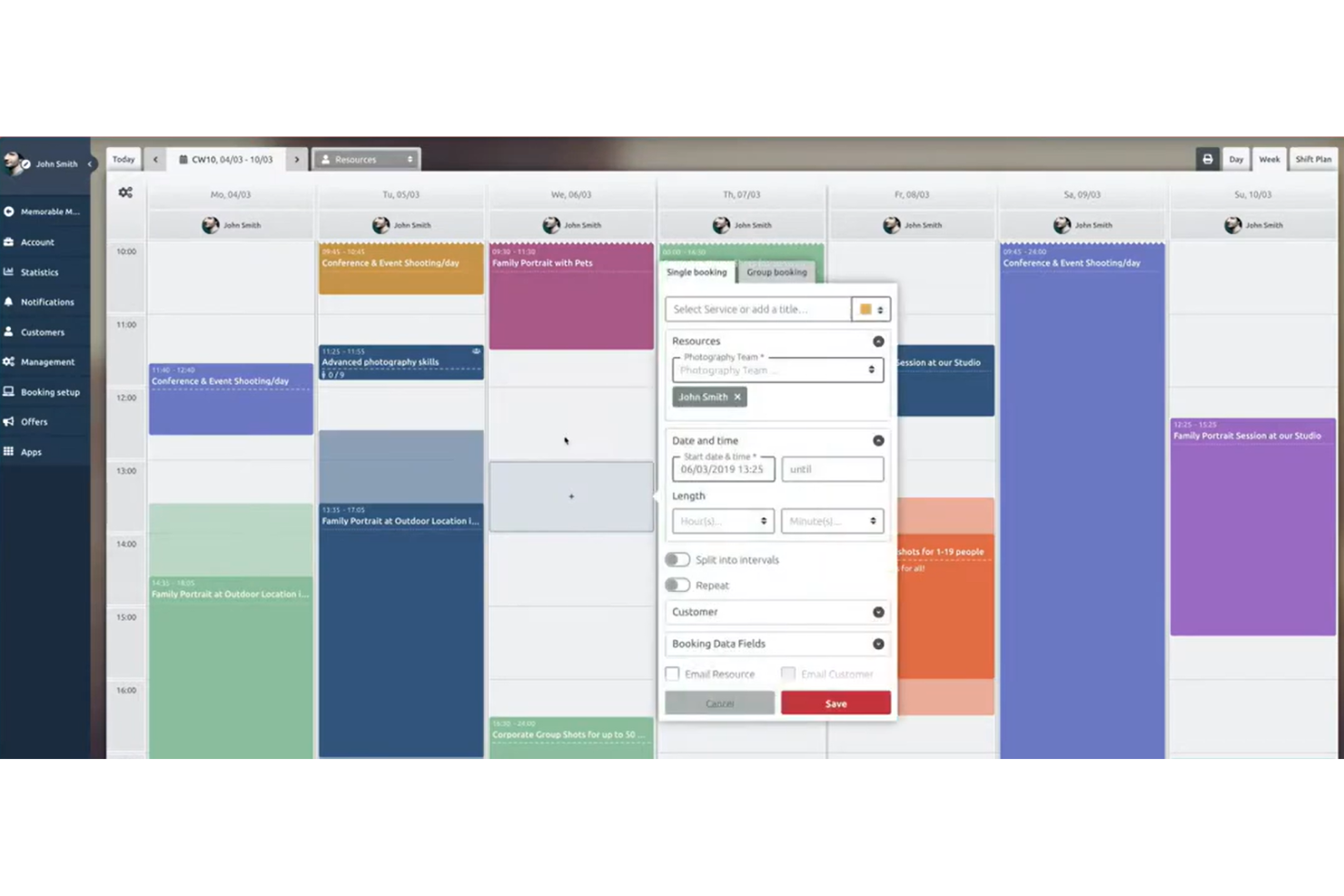
Se hai bisogno di un software di programmazione dei corsi che mantenga i calendari perfettamente sincronizzati, TIMIFY merita sicuramente attenzione. È progettato per team e organizzazioni che dipendono da aggiornamenti in tempo reale su più calendari, risultando particolarmente adatto a dipartimenti HR, coordinatori della formazione e team dislocati. TIMIFY ti aiuta a evitare doppie prenotazioni e sessioni perse collegandosi direttamente alle principali piattaforme di calendario e aggiornando gli orari istantaneamente.
Perché ho scelto TIMIFY
Per le organizzazioni in cui la sincronizzazione in tempo reale del calendario è essenziale, TIMIFY si distingue come una scelta pratica per la pianificazione della formazione. La sincronizzazione bidirezionale della piattaforma con Google Calendar, Microsoft Outlook e altri principali strumenti di calendario assicura che ogni modifica alle sessioni di formazione sia istantaneamente riflessa su tutti i calendari collegati. Apprezzo come gli aggiornamenti live di TIMIFY aiutino a prevenire doppie prenotazioni e conflitti di programmazione, particolarmente importanti per i team che gestiscono più formatori o sedi. Questa attenzione all’accuratezza in tempo reale la rende ideale per reparti HR e coordinatori della formazione che devono mantenere tutti aggiornati.
Funzionalità principali di TIMIFY
Altre funzionalità che rendono TIMIFY utile per la pianificazione della formazione includono:
- Widget di prenotazione: Aggiungi un widget di prenotazione personalizzabile al tuo sito web per l’iscrizione diretta alle sessioni.
- Gestione delle risorse: Assegna a ogni evento formativo sale, formatori e attrezzature.
- Promemoria automatici: Invia promemoria via email e SMS ai partecipanti prima delle sessioni.
- Supporto per prenotazioni di gruppo: Pianifica e gestisci sessioni formative di gruppo con più partecipanti.
Integrazioni di TIMIFY
Le integrazioni includono Google Calendar, Microsoft Office 365, Microsoft Exchange, Zoom, HubSpot, Intercom e Meta.
Pros and Cons
Pros:
- Sincronizzazione in tempo reale con Google e Outlook
- Promemoria automatici via SMS ed email per le sessioni
- Widget di prenotazione personalizzabile per i siti web
Cons:
- Nessuna funzione integrata di tracciamento delle presenze
- Manca la gestione nativa dei certificati

Ideale per gestire prenotazioni complesse con più risorse

Schedule it è pensato per organizzazioni che devono coordinare più formatori, aule e risorse in calendari formativi complessi. Questo strumento è adatto ai responsabili della formazione di grandi aziende o istituzioni educative che gestiscono sessioni sovrapposte e asset condivisi. Il suo approccio incentrato sulle risorse aiuta a prevenire doppie prenotazioni e a mantenere ogni dettaglio organizzato.
Perché ho scelto Schedule it
Ho scelto Schedule it perché consente di gestire la sfida di organizzare più formatori, sale e attrezzature in un'unica visualizzazione unificata. Il suo calendario a trascinamento permette di assegnare risorse alle sessioni senza sovrapposizioni, essenziale per le organizzazioni con logistica formativa complessa. Apprezzo anche la possibilità di impostare regole per la disponibilità delle risorse, in modo da evitare doppie prenotazioni di formatori o spazi. Il calendario visivo e gli avvisi di conflitto rendono più semplice monitorare ogni sessione formativa.
Funzionalità principali di Schedule it
Altre funzionalità che rendono Schedule it utile per la pianificazione della formazione includono:
- Promemoria automatici: Invia promemoria automatici via email o SMS a formatori e partecipanti per ridurre le assenze prima di ogni sessione.
- Report sull'utilizzo delle risorse: Genera report che mostrano con quale frequenza ciascun formatore, aula o asset viene prenotato.
- Moduli di prenotazione personalizzabili: Crea moduli di prenotazione su misura per raccogliere informazioni specifiche su ogni sessione formativa.
- Permessi di accesso: Imposta diversi livelli di accesso per i membri del team, così solo gli utenti autorizzati possono modificare o visualizzare determinati calendari.
Integrazioni di Schedule it
Le integrazioni comprendono Outlook, Office 365, Google Calendar, Salesforce, Slack, Gmail, MailChimp, Trello, Asana e Google Sheets.
Pros and Cons
Pros:
- Gestisce prenotazioni multi-risorsa e multi-location
- Fornisce report dettagliati sull'utilizzo delle risorse
- Supporta moduli di prenotazione personalizzabili
Cons:
- L'esperienza mobile è limitata
- Non include integrazione per videoconferenze

Bookeo
Ideale per l'iscrizione autonoma dei partecipanti

Bookeo offre ai fornitori di formazione e alle organizzazioni un modo per consentire ai partecipanti di gestire autonomamente le proprie iscrizioni tramite una pagina di prenotazione dedicata. È una soluzione ideale per i team che desiderano ridurre le attività amministrative manuali e offrire una programmazione flessibile e autonoma per lezioni, workshop o corsi. Grazie alle conferme automatiche e alla disponibilità in tempo reale, Bookeo aiuta a mantenere la gestione dei partecipanti semplice ed efficiente.
Perché ho scelto Bookeo
Bookeo si distingue per la sua attenzione nel consentire ai partecipanti di iscriversi autonomamente alle sessioni di formazione, un'esigenza fondamentale per molti team di formazione. La piattaforma consente di pubblicare la disponibilità delle lezioni in tempo reale e di automatizzare le conferme, così i partecipanti possono prenotare e gestire autonomamente i propri posti senza scambi continui di e-mail. Apprezzo anche il supporto di Bookeo per le liste d'attesa e le prenotazioni di gruppo, che aiuta a gestire la domanda variabile e i gruppi più numerosi. Queste funzionalità lo rendono una scelta pratica se desideri ridurre al minimo la programmazione manuale e offrire ai partecipanti un maggiore controllo sulla loro esperienza di iscrizione.
Funzionalità principali di Bookeo
Alcune altre funzionalità che rendono Bookeo utile per la programmazione della formazione includono:
- Widget di prenotazione personalizzabili: Aggiungi moduli di prenotazione personalizzati con il tuo marchio direttamente al tuo sito web.
- Promemoria automatici: Invia promemoria programmati via e-mail o SMS ai partecipanti.
- Elaborazione dei pagamenti online: Accetta pagamenti online con carta di credito tramite gateway integrati come Stripe e PayPal.
- Assegnazione delle risorse: Assegna automaticamente istruttori, aule o attrezzature a ogni sessione.
Integrazioni di Bookeo
Le integrazioni includono PayPal, Square, Stripe, Xero, WordPress, Wix, Shopify, Google Calendar, Zoom e Mailchimp. Bookeo offre anche un'API per integrazioni personalizzate.
Pros and Cons
Pros:
- Consente di aggiungere moduli di prenotazione personalizzati con il tuo marchio al tuo sito web
- Offre la gestione delle liste d'attesa per le sessioni
- Consente prenotazioni di gruppo e individuali per i partecipanti
Cons:
- Non offre il monitoraggio integrato di certificati o qualifiche
- Non consente di importare in blocco gli elenchi dei partecipanti per le sessioni

Ideale per modelli di pianificazione personalizzabili
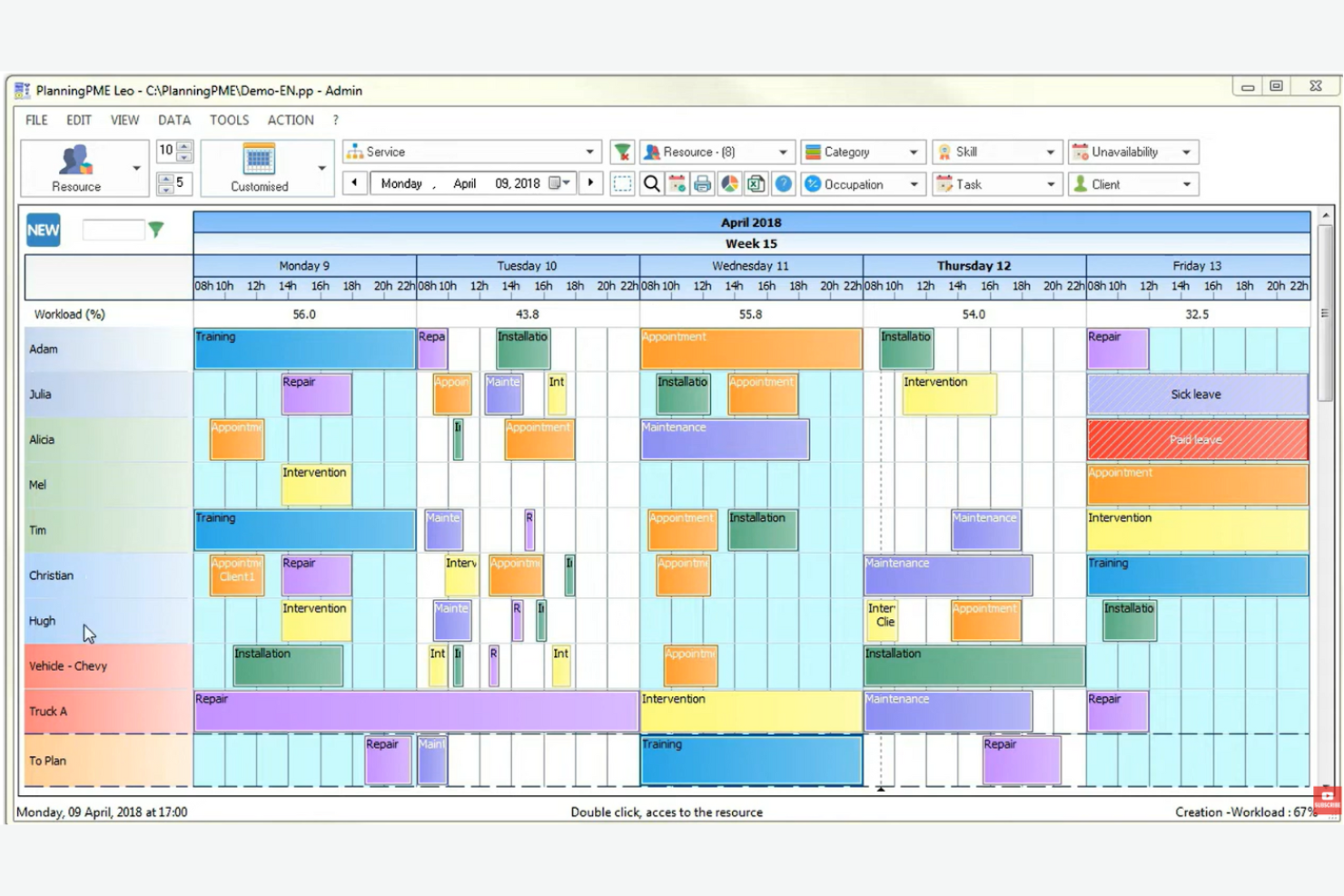
PlanningPME è progettato per le organizzazioni che necessitano di modelli di pianificazione flessibili e personalizzabili per la gestione delle sessioni di formazione. È particolarmente utile per i team HR, i responsabili della formazione e i coordinatori che desiderano adattare i calendari per soddisfare flussi di lavoro unici o esigenze complesse di risorse. Con PlanningPME, puoi adattare i modelli ai tuoi formati di formazione, facilitando l'organizzazione di sessioni, formatori e risorse in un unico posto.
Perché ho scelto PlanningPME
Ciò che distingue PlanningPME è il suo focus su modelli di pianificazione personalizzabili, particolarmente preziosi per i team di formazione con requisiti unici o in evoluzione. Puoi creare e modificare i modelli per adattarli a diversi formati di formazione, tipi di sessione o allocazioni di risorse, rendendo semplice l'adattamento al cambiare dei programmi. Mi piace il fatto che sia possibile impostare sessioni ricorrenti, assegnare formatori e gestire la prenotazione delle aule direttamente tramite questi modelli. Questa flessibilità aiuta i professionisti HR e i coordinatori di formazione a mantenere il processo di pianificazione organizzato e cucito sulle loro esigenze specifiche.
Funzionalità principali di PlanningPME
Altre funzionalità che rendono PlanningPME utile per la pianificazione delle formazioni includono:
- Accesso multiutente: più membri del team possono visualizzare e aggiornare i calendari contemporaneamente.
- Gestione assenze e permessi: traccia direttamente sulla piattaforma le assenze di formatori e partecipanti.
- Vista calendario a colori: utilizza la codifica a colori per distinguere rapidamente tra diversi tipi di formazione o risorse.
- Notifiche email: invia automaticamente aggiornamenti e promemoria di calendario a formatori e partecipanti.
Integrazioni di PlanningPME
Le integrazioni includono Outlook Exchange, Power BI, Microsoft Excel, Google Calendar, PlanningConnect, Lucca, Microsoft Dynamics NAV, Sage e Arxivar.
Pros and Cons
Pros:
- Modelli personalizzati per diversi formati di formazione
- Calendario a colori per un rapido riferimento visivo
- Integrazione nativa con Power BI per la creazione di report
Cons:
- Nessuna funzione di pagamento online integrata
- Interfaccia che può sembrare datata

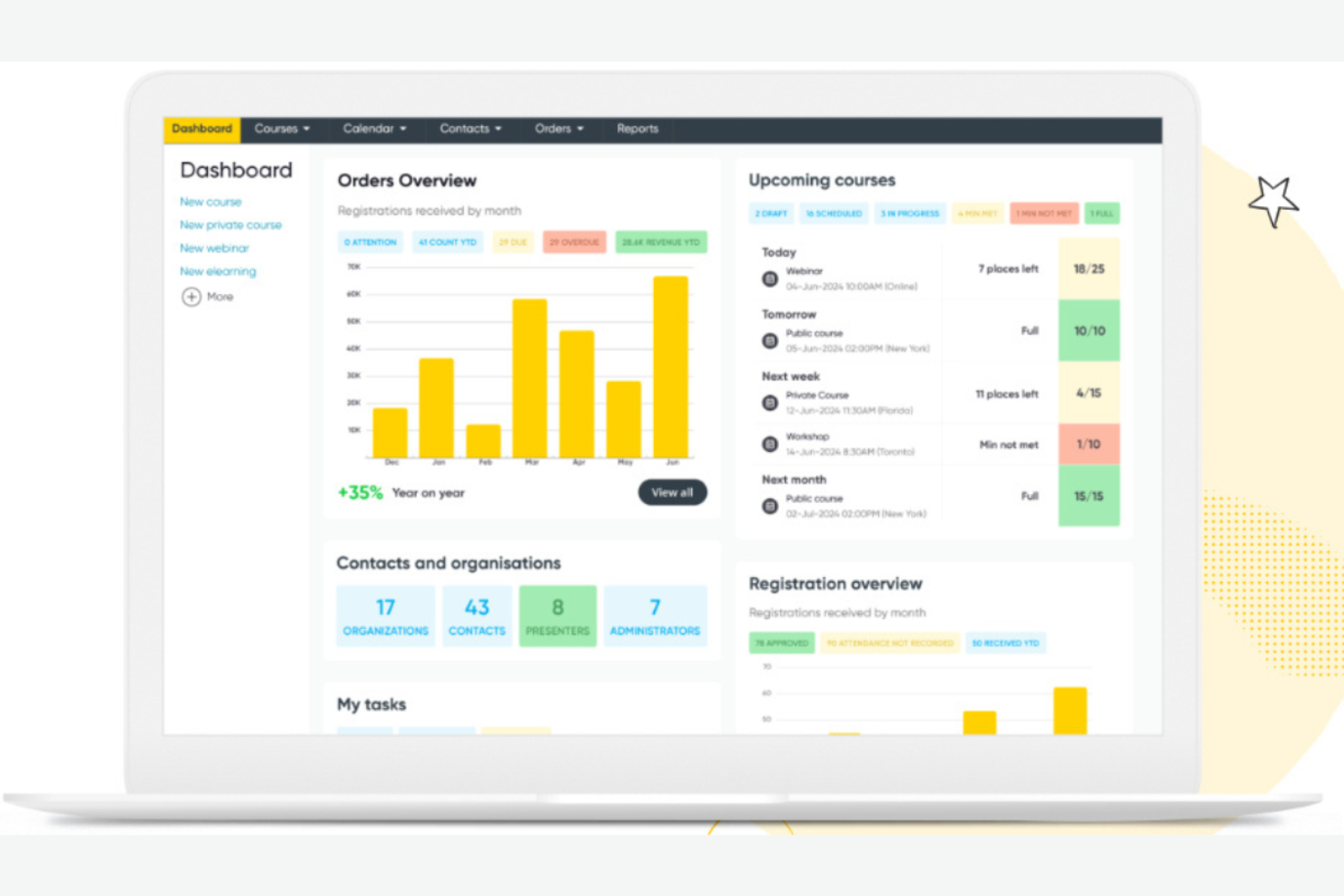
Arlo è pensato per fornitori di formazione e organizzazioni che hanno bisogno di automatizzare la logistica delle sessioni guidate da istruttori, sia in presenza sia online. È particolarmente utile per i team che gestiscono corsi ricorrenti, orari complessi e un alto volume di iscrizioni. Grazie a funzionalità per la comunicazione automatizzata, l’allocazione delle risorse e la gestione dei partecipanti, Arlo aiuta a ridurre le attività amministrative manuali e mantiene l’organizzazione delle operazioni formative.
Perché ho scelto Arlo
Ciò che rende Arlo una scelta valida è la sua attenzione all’automazione della logistica delle sessioni formative guidate da istruttore. La piattaforma gestisce pianificazione, gestione delle sedi e comunicazioni automatizzate, contribuendo a ridurre la necessità di coordinamento manuale per i team di formazione. Mi piace che Arlo supporti anche corsi ricorrenti e strutture di sessioni complesse, facilitando la gestione di programmi con più sessioni. Queste funzionalità sono particolarmente preziose per le organizzazioni che svolgono formazione in aula frequente o su larga scala e vogliono minimizzare il carico amministrativo.
Funzionalità principali di Arlo
Oltre all’automazione della logistica delle sessioni, Arlo offre altre funzionalità degne di nota:
- Moduli di registrazione personalizzabili: Raccogli informazioni specifiche sui partecipanti con campi di registrazione su misura.
- Gestione dei pagamenti: Accetta pagamenti online per i corsi direttamente attraverso la piattaforma.
- Strumenti di marketing: Promuovi i corsi con campagne email e social media integrate.
- Dashboard di reportistica: Accedi a dati in tempo reale su iscrizioni, partecipazione e ricavi.
Integrazioni di Arlo
Le integrazioni includono Zoom, WordPress, Salesforce, Xero, PayPal, Stripe, GoToWebinar, Moodle e CourseCheck.
Pros and Cons
Pros:
- Automatizza la pianificazione di corsi e sessioni ricorrenti
- Supporta pagine di registrazione ed eventi con marchio personalizzato
- Fornisce reportistica in tempo reale sulle prestazioni dei corsi
Cons:
- Nessuna funzione LMS o di creazione contenuti integrata
- Opzioni limitate per le email automatiche

Ideale per l'integrazione con sistemi HR esistenti
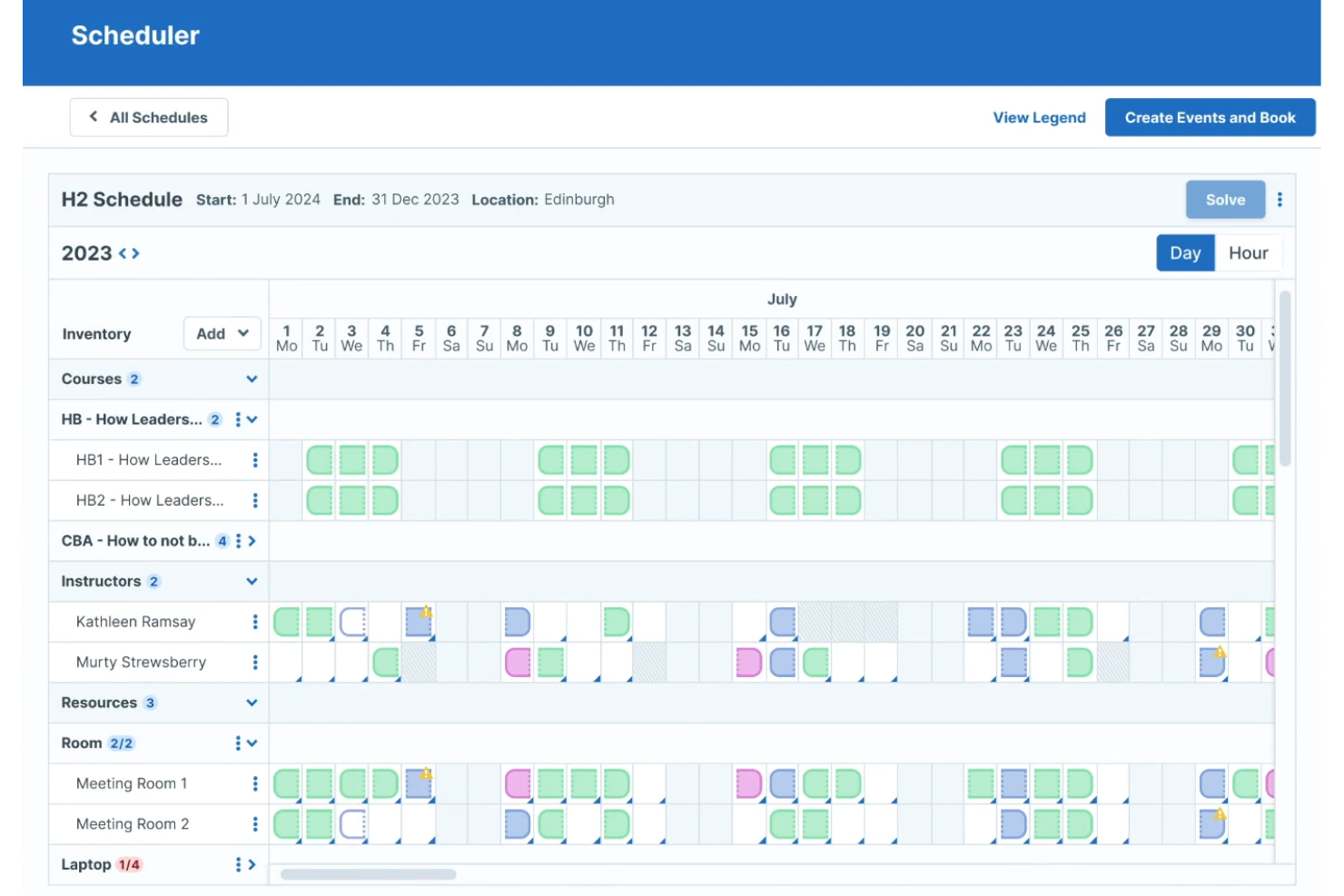
Administrate è progettato per le organizzazioni che hanno bisogno che le proprie operazioni di formazione siano integrate con i sistemi HR esistenti e gli strumenti aziendali. È particolarmente utile per i team HR e i dipartimenti di formazione che gestiscono programmi complessi in più sedi. Con un focus sull'integrazione e il flusso di dati, Administrate ti aiuta a centralizzare la pianificazione, automatizzare i report e mantenere la formazione allineata ai più ampi processi HR.
Perché ho scelto Administrate
Ciò che distingue Administrate è la sua capacità di collegare direttamente la pianificazione della formazione con i sistemi HR e le piattaforme aziendali già in uso. La piattaforma offre un'API flessibile e connettori predefiniti, consentendo di sincronizzare i dati della formazione con HRIS, sistemi di payroll o strumenti di gestione delle performance. Apprezzo anche il fatto che Administrate supporti flussi automatici di dati, il che aiuta a ridurre l'inserimento manuale e mantiene omogenei i dati tra i vari sistemi. Questo lo rende una soluzione solida se desideri che le attività di formazione si integrino perfettamente nei processi HR e aziendali più ampi.
Funzionalità principali di Administrate
Altre funzionalità che rendono Administrate prezioso per la pianificazione delle formazioni includono:
- Libreria di modelli di corsi: Crea e riutilizza modelli per sessioni di formazione ricorrenti.
- Gestione delle risorse: Assegna istruttori, sale e attrezzature a ciascun evento.
- Strumenti di comunicazione automatizzati: Invia email e notifiche pianificate a partecipanti e formatori.
- Dashboard di report personalizzabili: Crea e condividi report in tempo reale su presenze, completamenti e pianificazioni.
Integrazioni di Administrate
Le integrazioni includono Docebo, Salesforce, SAP SuccessFactors, Cornerstone, Workday, Google Suite e Microsoft Office.
Pros and Cons
Pros:
- Supporta la pianificazione in più sedi e valute
- Offre controlli delle autorizzazioni dettagliati per i ruoli utente
- Include l'assegnazione delle risorse per formatori e sale
Cons:
- Nessuna app mobile integrata per la pianificazione
- Opzioni self-service limitate per i partecipanti

Training Orchestra è pensato per le organizzazioni che devono coordinare la formazione in presenza su larga scala attraverso più sedi e unità aziendali. Questa piattaforma è particolarmente indicata per i team L&D aziendali e i dipartimenti di formazione che gestiscono un alto numero di sessioni in aula, risorse e requisiti di conformità. La pianificazione centralizzata e la gestione delle risorse aiutano a ridurre il carico amministrativo e a mantenere fluide le operazioni formative complesse.
Perché ho scelto Training Orchestra
Ciò che distingue Training Orchestra è la capacità di gestire la scala e la complessità delle attività formative in azienda. La piattaforma permette la pianificazione centralizzata di migliaia di sessioni, formatori e sedi, un elemento essenziale per le grandi organizzazioni con team distribuiti. Apprezzo il modo in cui automatizza l’allocazione delle risorse e il monitoraggio della conformità, aiutando i team L&D a evitare conflitti di pianificazione e lacune normative. Il focus sull’ottimizzazione della logistica della formazione in presenza lo rende una scelta solida per le aziende che gestiscono elevati volumi di training.
Funzionalità principali di Training Orchestra
Altre funzionalità che rendono Training Orchestra prezioso per la pianificazione della formazione comprendono:
- Monitoraggio di budget e costi: Monitora i budget della formazione e tiene traccia dei costi per ogni sessione o programma.
- Gestione delle liste d’attesa: Gestisce automaticamente le cancellazioni e avvisa i partecipanti quando si liberano dei posti.
- Portale formatori: Consente ai formatori di accedere a calendari, materiali e dettagli delle sessioni tramite un portale dedicato.
- Supporto multilingua: Permette pianificazione e comunicazioni in più lingue per team globali.
Integrazioni di Training Orchestra
Le integrazioni includono Docebo, Rise Up, Workday e Brightspace. È disponibile un’API per integrazioni personalizzate.
Pros and Cons
Pros:
- Centralizza la pianificazione per team formativi globali
- Tiene traccia dei budget formativi e dei costi delle sessioni
- Include un portale dedicato per i formatori
Cons:
- Le opzioni di personalizzazione dei report sono limitate
- Non dispone di una classe virtuale integrata
Altri software per la programmazione della formazione
Ecco alcune ulteriori opzioni di software per la programmazione della formazione che non sono state incluse nel mio elenco, ma che vale comunque la pena valutare:
- Connecteam
Ideale per la pianificazione dei turni mobile-first
- Saviom
Ideale per l'ottimizzazione delle risorse nell'erogazione della formazione
- Employee Training Manager
Ideale per gestire i rinnovi delle certificazioni dei dipendenti


Come Valuto i Software per la Pianificazione della Formazione
Suddivido la mia valutazione in criteri di base—come la ricorrenza delle sessioni, i flussi di iscrizione e le notifiche automatiche—e fattori differenzianti che distinguono gli strumenti raccomandabili dagli altri.
Funzionalità Principali (Requisiti Fondamentali per Questa Lista)
Quando seleziono gli strumenti per la mia lista, valuto ciascuno su una scala da 0 (non offre la funzionalità) a 5 (eccelle in quest’area) per ogni funzionalità di base elencata sotto. Poi calcolo il punteggio totale dello strumento in percentuale. Ogni strumento deve raggiungere un punteggio minimo totale del 65% per essere considerato per l’inclusione.
- Pianificazione delle Sessioni Formative: Verifico se uno strumento gestisce sessioni ricorrenti, programmi su più giorni e formati virtuali o in presenza senza dover ricorrere a soluzioni alternative per ognuno.
- Assegnazione di Istruttori & Risorse: Ogni strumento dovrebbe consentire di assegnare formatori, sale e attrezzature alle sessioni, segnalando conflitti come facilitatori prenotati due volte.
- Gestione Iscrizioni & Registrazioni: Cerco auto-iscrizione, limiti di capienza, liste d’attesa e flussi di approvazione così che gli amministratori non debbano costruire manualmente gli elenchi su fogli di calcolo.
- Notifiche & Promemoria Automatici: Lo strumento dovrebbe inviare email di conferma, inviti a calendario e sequenze di promemoria a studenti e istruttori quando le sessioni vengono create o modificate.
- Tracciamento Presenze & Completamento: Valuto come ogni piattaforma registra la presenza, segna i completamenti e collega i dati ai requisiti di conformità come certificazioni sulla sicurezza o aggiornamenti annuali.
- Integrazione con Calendari & Sistemi: Sincronizzazione nativa con strumenti come Outlook, Google Calendar e il proprio HRIS o LMS è importante—le importazioni manuali tramite CSV non sono sufficienti qui.
Una volta che ho una lista di strumenti che soddisfano i criteri, considero cosa distingue ciascuna piattaforma.
Fattori Differenzianti (Cosa Distingue i Fornitori)
Ecco come confronto i vari fornitori:
Funzionalità Distintive
La pianificazione tramite intelligenza artificiale è un fattore che fa davvero la differenza. Gli strumenti che suggeriscono automaticamente gli orari delle sessioni in base alla disponibilità di studenti e istruttori fanno risparmiare ore di coordinamento ai team di formazione. Per le organizzazioni con uffici o squadre sul campo in varie regioni, valuto anche il supporto multi-sede e multi-fuso orario, perché pianificare una formazione sulla sicurezza attraverso tre continenti non dovrebbe richiedere configurazioni manuali separate. Dashboard di reportistica personalizzata completano il quadro permettendo agli amministratori di monitorare andamento completamenti, utilizzo della capienza e spesa di budget senza dover esportare i dati su un foglio di calcolo.
Oltre le Funzionalità
Pongo molta attenzione all’ecosistema di integrazioni di ciascuno strumento—specificatamente se si collega nativamente con piattaforme HRIS come Workday o BambooHR e strumenti di videoconferenza come Zoom o Teams. Anche l’idoneità per settore e conformità è importante. Una piattaforma sviluppata per una startup tech appare molto diversa da una pensata per squadre sanitarie che gestiscono certificazioni cliniche obbligatorie. Infine, valuto la trasparenza dei prezzi, perché costi nascosti per moduli aggiuntivi o integrazioni premium possono rapidamente gonfiare quella che sembrava un’offerta ragionevole.
Come scegliere il software per la programmazione della formazione
È facile perdersi in lunghi elenchi di funzionalità e strutture di prezzo complesse. Per aiutarti a rimanere concentrato mentre segui il tuo esclusivo processo di selezione del software, ecco una lista di fattori da tenere a mente:
| Fattore | Cosa considerare |
| Scalabilità | Il software sarà in grado di gestire il numero attuale e futuro di dipendenti, sedi e attività formative? Verifica i limiti relativi agli utenti o ai corsi. |
| Integrazioni | Si connette nativamente al tuo sistema informativo per le risorse umane, al software paghe o ai fornitori di contenuti formativi? Conferma la compatibilità con la tua infrastruttura tecnologica esistente. |
| Personalizzazione | Puoi adattare flussi di lavoro, notifiche e report per rispecchiare i processi e l'identità visiva della tua organizzazione? |
| Facilità d'uso | Gli amministratori e i partecipanti troveranno l'interfaccia intuitiva? Esegui un test con un piccolo gruppo per individuare eventuali difficoltà prima del lancio. |
| Implementazione e onboarding | Quanto tempo richiederà la configurazione e quali risorse saranno necessarie? Informati sul supporto alla migrazione, sulla formazione e sulle tempistiche solitamente necessarie per l'avvio. |
| Costo | I piani tariffari sono chiari e prevedibili durante la crescita? Fai attenzione ai costi aggiuntivi per utenti, integrazioni o assistenza. |
| Misure di sicurezza | Il fornitore soddisfa le tue esigenze in materia di privacy dei dati, controllo degli accessi e conformità? Richiedi la documentazione relativa alle certificazioni e ai registri di audit. |
| Disponibilità dell'assistenza | Quali canali di assistenza e tempi di risposta vengono offerti? Valuta se hai bisogno di supporto 24 ore su 24, 7 giorni su 7, o di un responsabile dedicato. |
Che cos'è il software per la programmazione della formazione?
Il software per la programmazione della formazione è uno strumento digitale che aiuta le organizzazioni a pianificare, assegnare e monitorare sessioni e corsi di formazione per i dipendenti. Centralizza la programmazione, automatizza i promemoria e monitora lo stato di completamento sia per la formazione in presenza sia per quella online. I team delle risorse umane e i responsabili lo utilizzano per garantire il rispetto dei requisiti formativi, monitorare le scadenze e mantenere la conformità in tutta la forza lavoro.
Caratteristiche del software per la pianificazione della formazione
Quando selezioni un software per la pianificazione della formazione, presta attenzione alle seguenti caratteristiche fondamentali:
- Assegnazione dei corsi: assegna sessioni di formazione o corsi specifici a singoli individui, team o reparti in base ai ruoli o ai requisiti.
- Promemoria automatici: invia notifiche programmate a partecipanti e manager riguardo alle sessioni imminenti, alle scadenze o alla formazione in ritardo.
- Monitoraggio delle presenze: registra e monitora la partecipazione alle sessioni di formazione in presenza e virtuali ai fini della conformità e della reportistica.
- Integrazione con il calendario: sincronizza i programmi della formazione con i calendari esterni per aiutare partecipanti e manager a evitare conflitti e a mantenersi organizzati.
- Percorsi di apprendimento: struttura più corsi in percorsi di apprendimento sequenziali, personalizzati per diversi ruoli lavorativi o obiettivi di sviluppo.
- Reportistica e analisi: genera report dettagliati sul completamento della formazione, sulle presenze e sui progressi per supportare audit e processi decisionali.
- Gestione dei certificati: rilascia, monitora e gestisci certificati digitali per i corsi completati o per i requisiti di conformità.
- Pianificazione in blocco: pianifica sessioni o assegna corsi a gruppi numerosi contemporaneamente per far risparmiare tempo ai coordinatori delle risorse umane e della formazione.
- Accesso da dispositivi mobili: consenti a partecipanti e manager di visualizzare i programmi, completare la formazione e ricevere notifiche da qualsiasi dispositivo.
- Autorizzazioni degli utenti: controlla l'accesso alle funzioni di pianificazione, reportistica e amministrazione in base ai ruoli degli utenti all'interno dell'organizzazione.
Vantaggi del software per la pianificazione della formazione
L'implementazione di un software per la pianificazione della formazione offre diversi vantaggi al tuo team e alla tua azienda. Eccone alcuni:
- Gestione centralizzata della formazione: gestisci tutte le sessioni di formazione, le assegnazioni e i registri da un'unica piattaforma, riducendo il monitoraggio manuale e il carico amministrativo.
- Maggiore conformità: monitora il completamento e la partecipazione alla formazione obbligatoria, rendendo più semplice rispettare gli standard normativi e interni di conformità.
- Notifiche automatiche: riduci le sessioni perse e la formazione in ritardo inviando promemoria e avvisi tempestivi a partecipanti e manager.
- Approfondimenti basati sui dati: utilizza la reportistica e le analisi integrate per identificare le lacune formative, monitorare i progressi e supportare la pianificazione strategica della forza lavoro.
- Pianificazione flessibile: assegna corsi e sessioni a singoli individui o gruppi e adatta i programmi quando cambiano le esigenze aziendali o la struttura dei team.
- Esperienza dei partecipanti migliorata: offri ai dipendenti percorsi di apprendimento chiari, accesso da dispositivi mobili e certificati digitali, rendendo la formazione più accessibile e coinvolgente.
- Processi scalabili: gestisci facilmente la crescita pianificando e monitorando la formazione per nuovi dipendenti, team da remoto o più sedi senza ulteriore lavoro manuale.
Costi e prezzi del software per la pianificazione della formazione
La scelta di un software per la pianificazione della formazione richiede la comprensione dei vari modelli e piani tariffari disponibili. I costi variano in base alle funzionalità, alle dimensioni del team, ai componenti aggiuntivi e ad altri fattori. La tabella seguente riassume i piani più comuni, i relativi prezzi medi e le funzionalità tipicamente incluse nelle soluzioni software per la pianificazione della formazione:
Tabella comparativa dei piani per il software di pianificazione della formazione
| Tipo di piano | Prezzo medio | Funzionalità comuni |
| Piano gratuito | $0 | Assegnazione di base dei corsi, numero limitato di utenti, reportistica semplice e notifiche via email. |
| Piano personale | $5-$15/utente/mese | Pianificazione individuale, monitoraggio delle presenze, integrazione con il calendario e analisi di base. |
| Piano aziendale | $20-$40/utente/mese | Pianificazione di gruppo, promemoria automatici, reportistica avanzata, gestione dei certificati e integrazioni. |
| Piano per grandi aziende | $40-$80/utente/mese | Flussi di lavoro personalizzati, pianificazione in blocco, accesso API, supporto dedicato e controlli di sicurezza avanzati. |
Domande frequenti sul software di pianificazione della formazione
Ecco alcune risposte alle domande comuni sul software di pianificazione della formazione:
Il software di pianificazione della formazione può gestire sia le sessioni in presenza sia quelle online?
Sì, la maggior parte dei software di pianificazione della formazione supporta sia le sessioni in presenza sia quelle online. È possibile assegnare le sedi, aggiungere i link alle riunioni virtuali e monitorare la partecipazione per ogni tipologia, semplificando la gestione dei programmi di apprendimento misto.
In che modo il software di pianificazione della formazione aiuta a monitorare la conformità?
Il software di pianificazione della formazione tiene traccia del completamento dei corsi, della partecipazione e dello stato delle certificazioni. Questo aiuta i team delle risorse umane a monitorare la conformità ai requisiti formativi normativi o interni e a generare report per audit o ispezioni.
Quali integrazioni dovrei cercare in un software di pianificazione della formazione?
Cerca integrazioni con il tuo HRIS, il sistema paghe, il sistema di gestione dell’apprendimento e gli strumenti di calendario. Queste connessioni aiutano ad automatizzare la gestione degli utenti, sincronizzare i dati della formazione e mantenere allineati i calendari tra le piattaforme.
È possibile automatizzare promemoria e notifiche per le sessioni di formazione?
Sì, la maggior parte delle soluzioni consente di configurare promemoria e notifiche automatici per le sessioni imminenti, la formazione in ritardo o le certificazioni in scadenza. Questo riduce i solleciti manuali e aiuta i partecipanti a rispettare il programma.
Come valuto la facilità d'uso di uno strumento di pianificazione della formazione?
Prova il software con un piccolo gruppo di amministratori e partecipanti. Cerca una navigazione intuitiva, flussi di lavoro chiari per la pianificazione e risorse di assistenza facilmente accessibili. Il feedback degli utenti durante una prova può rivelare potenziali difficoltà prima dell’implementazione completa.