

I 10 migliori software per la formazione dei dipendenti del 2026

10 Elenco dei migliori software per la formazione dei dipendenti


Il miglior software per la formazione dei dipendenti aiuta i professionisti delle risorse umane a semplificare i flussi di apprendimento, aumentare il coinvolgimento e misurare l’efficacia della formazione, il tutto senza perdersi tra fogli di calcolo o strumenti obsoleti e macchinosi.
Se hai difficoltà a organizzare i programmi di formazione, monitorare i progressi dei dipendenti o dimostrare il ROI alla dirigenza, non sei il solo. L’enorme numero di soluzioni disponibili sul mercato può rendere difficile capire quale sia davvero adatta alle esigenze del tuo team.
Questo elenco include piattaforme LMS, strumenti per il supporto alle vendite, sistemi per la conformità e piattaforme per l’esperienza di apprendimento, perché oggi il “software per la formazione dei dipendenti” comprende molto più della semplice erogazione tradizionale dei corsi. Team diversi hanno bisogno di funzionalità diverse, che si tratti di monitorare certificazioni strutturate, seguire i rappresentanti, gestire i requisiti normativi o creare percorsi di apprendimento interattivi.
Di seguito troverai i migliori software per la formazione dei dipendenti in queste categorie, con spiegazioni chiare su chi può trarre il massimo vantaggio da ogni strumento e sull’ambito in cui si inserisce, così potrai scegliere la soluzione giusta in base alle priorità e al budget del tuo team.
Perché fidarsi delle nostre recensioni sui software
Il nostro team testa e recensisce software dal 2012. In quanto esperti HR noi stessi, sappiamo quanto sia difficile — e importante — scegliere il software giusto.
Per questa guida, abbiamo valutato gli strumenti attraverso test pratici e ricerche indipendenti, assegnando un punteggio agli strumenti in base ai nostri criteri di selezione. Ci basiamo inoltre sulle competenze di leader di pensiero del settore e di professionisti HR attivi.
Le nostre recensioni riflettono il nostro giudizio editoriale umano, non un discorso di vendita.
Revisori esperti:
Tabella comparativa dei software per la formazione dei dipendenti
Questa tabella comparativa riassume i dettagli sui prezzi delle mie migliori selezioni di software per la formazione dei dipendenti:
| Tool | Best For | Trial Info | Price | ||
|---|---|---|---|---|---|
| 1 | Ideale per l'uso da mobile e la formazione di dipendenti senza postazione fissa | Prova gratuita di 14 giorni + demo gratuita disponibile | A partire da $29/mese (fatturazione annuale) | Website | |
| 2 | Ideale per lo sviluppo di obiettivi e percorso di carriera | Demo gratuita disponibile | Da $5/dipendente/mese | Website | |
| 3 | Ideale per capacità formative guidate dall'IA | Prova gratuita disponibile | Prezzo su richiesta | Website | |
| 4 | Ideale per gestire l’intero ciclo di formazione | Prova gratuita di 30 giorni | Utenti illimitati su qualsiasi piano. Si paga solo per gli utenti attivi. | Website | |
| 5 | Ideale per formazione e inserimento nativi nella piattaforma per le risorse umane | Demo gratuita disponibile | A partire da $8/utente/mese | Website | |
| 6 | Ideale per la formazione dei dipendenti basata sui ruoli | Piano gratuito + demo gratuita disponibile | Da $119/mese (fatturazione annuale) | Website | |
| 7 | Ideale per un supporto clienti di qualità | 14 giorni di prova gratuita | Prezzo su richiesta. | Website | |
| 8 | Ideale per l'upskilling e reskilling dei dipendenti | Demo gratuita + prova gratuita disponibile | Da $10.000 all'anno | Website | |
| 9 | Ideale per scenari di pratica guidati dall'IA | Prova gratuita disponibile | A partire da $239/mese (80 utenti) | Website | |
| 10 | Ideale per le simulazioni vocali basate sull'IA nella formazione sanitaria | Prova gratuita di 14 giorni | A partire da $50/postazione/mese | Website |


Recensioni dei migliori software per la formazione dei dipendenti
Ecco una breve descrizione dei migliori software per gestire e monitorare la formazione dei dipendenti. Per aiutarti nel processo di selezione, ho spiegato il caso d’uso migliore e le funzionalità più interessanti di ciascun sistema. Ho incluso anche uno screenshot per ogni soluzione, così potrai visualizzarne l’interfaccia utente.

Ideale per l'uso da mobile e la formazione di dipendenti senza postazione fissa

Connecteam è una piattaforma di formazione per dipendenti pensata per aziende con team operativi, sul campo o senza una postazione fissa, che hanno bisogno di erogare formazione, monitorare i progressi e comunicare—tutto tramite un'app mobile.
Per chi è ideale Connecteam?
Connecteam è perfetto per piccole e medie imprese nei settori come vendita al dettaglio, ospitalità, edilizia e sanità che si affidano a lavoratori a turni o a ore.
Perché ho scelto Connecteam
Connecteam si merita il suo posto nella mia shortlist perché è stato progettato appositamente per formare team che non lavorano in ufficio. L'ho scelto per il suo corso builder mobile-first, che consente di creare moduli formativi con video, PDF e quiz che i dipendenti seguono direttamente dal telefono—senza bisogno di un computer portatile. I responsabili hanno visibilità in tempo reale su chi ha completato la formazione e chi no, aspetto molto utile per coordinare squadre sparse tra diversi cantieri o punti vendita.
Caratteristiche principali di Connecteam
- Base di conoscenza: Conserva e organizza documenti aziendali, procedure operative standard e materiali di riferimento che i dipendenti possono consultare in qualsiasi momento dai loro dispositivi mobili.
- Chat in-app: Invia messaggi diretti o di gruppo ai dipendenti sul campo senza bisogno di numeri di telefono personali o di app di messaggistica di terze parti.
- Sondaggi e questionari: Raccogli feedback dai dipendenti o esegui verifiche delle conoscenze utilizzando strumenti di sondaggio integrati collegati direttamente alla tua forza lavoro.
- Flussi di onboarding automatizzati: Assegna automaticamente incarichi di onboarding, corsi di formazione e moduli ai nuovi assunti in base al loro ruolo o alla loro sede.
Integrazioni di Connecteam
Le integrazioni includono QuickBooks, Gusto, Xero, ADP, Zapier, Wix, Lightspeed, PrismHR, Square e BambooHR.
Pros and Cons
Pros:
- Il design mobile-first si adatta alle esigenze formative di team operativi e a turni
- Smart Groups automatizzano l'iscrizione in base a ruoli o sedi
- L'apprendimento offline funziona bene per i cantieri con connettività scarsa
Cons:
- La profondità della formazione (es. simulazioni, scenari ramificati) non è ricca come negli strumenti eLearning specializzati
- Le funzionalità avanzate di reportistica/analisi personalizzate per la formazione possono essere limitate
New Product Updates from Connecteam

Connecteam Expands Break and Timesheet Controls
Connecteam adds flexible break thresholds, personalized policies, auto-end options, a centralized exceptions report, and improved timesheet issue visibility to help teams manage breaks and timesheets more effectively. For more information, visit Connecteam’s official site.
 .
.
Deel HR
Ideale per lo sviluppo di obiettivi e percorso di carriera
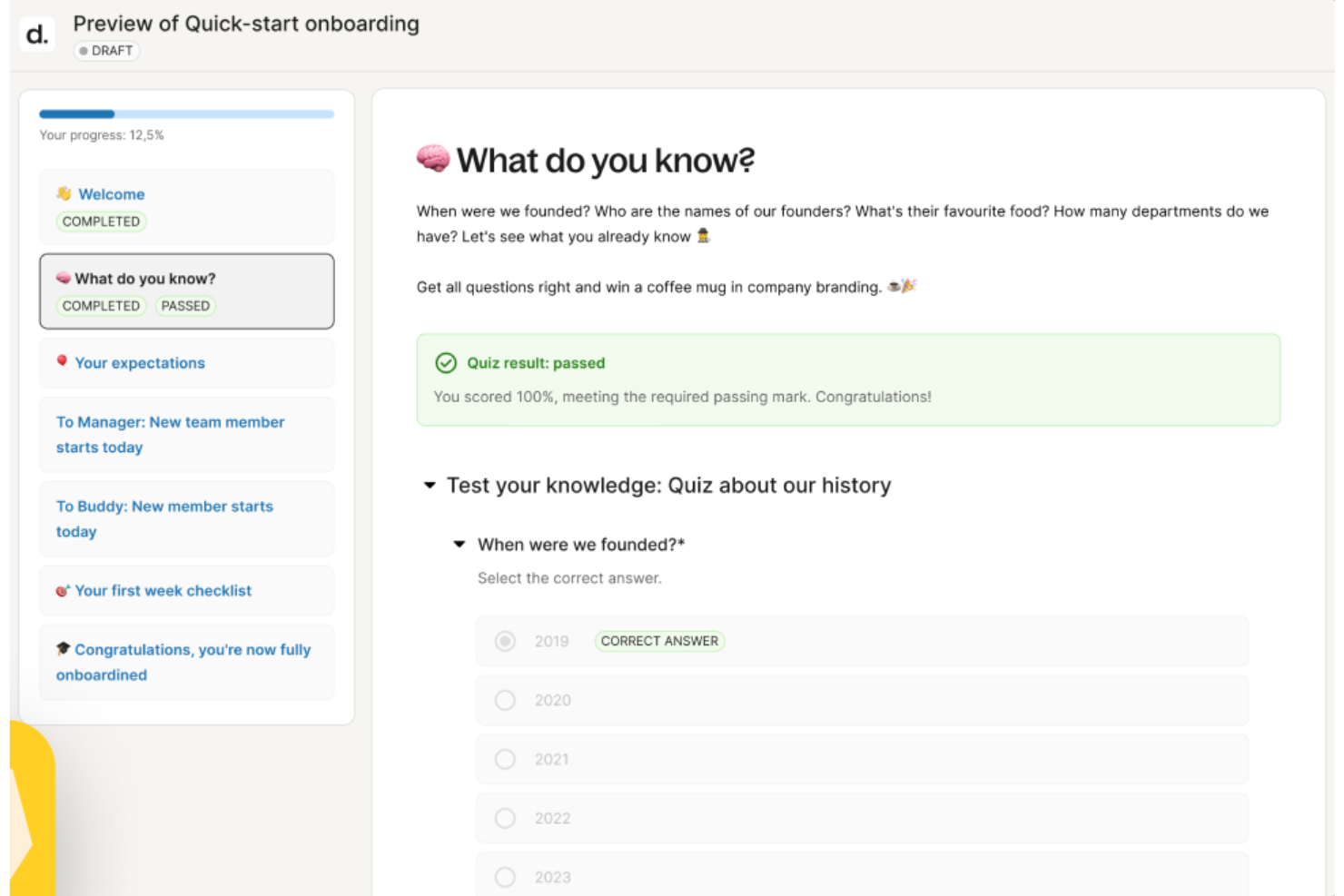
Deel HR offre ai team delle risorse umane e ai leader aziendali una piattaforma per gestire la formazione dei dipendenti, monitorare i progressi nello sviluppo e supportare la crescita di team distribuiti e globali.
Per chi è ideale Deel HR?
Deel HR è particolarmente adatto ai team HR che gestiscono una forza lavoro globale o remota e che necessitano di collegare la formazione dei dipendenti con una crescita professionale strutturata.
Perché ho scelto Deel HR
Deel HR collega la definizione degli obiettivi direttamente allo sviluppo della carriera in un unico sistema integrato. Attraverso Deel Engage, puoi definire gli OKR aziendali, di team e individuali e monitorare i progressi in tempo reale all'interno di cicli di revisione personalizzabili. Il framework di avanzamento di carriera consente di mappare aspettative di ruolo e percorsi di crescita in modo che i dipendenti sappiano cosa è richiesto per avanzare. La redazione assistita da IA permette ai team di costruire librerie di competenze e contenuti formativi senza dover partire da zero.
Caratteristiche principali di Deel HR
- Feedback a 360 gradi: Raccogli feedback strutturati da colleghi, manager e riporti diretti nell'ambito dei cicli di sviluppo dei dipendenti.
- Sondaggi ai dipendenti: Esegui sondaggi di coinvolgimento e pulse per rilevare il sentiment del team e individuare aree su cui focalizzare lo sviluppo.
- Gestione dell'apprendimento: Assegna e monitora corsi di formazione e materiali di apprendimento direttamente nei profili dei dipendenti.
- Workflow di onboarding: Crea sequenze di task strutturate per guidare i nuovi assunti attraverso i passaggi formativi specifici per il ruolo.
Integrazioni Deel HR
Le integrazioni includono BambooHR, Workday, Personio, HiBob, Greenhouse, Lever, Slack, Microsoft Teams e Okta.
Pros and Cons
Pros:
- La creazione di corsi supportata dall’IA riduce drasticamente il tempo necessario per sviluppare contenuti formativi
- Collega la formazione alle valutazioni delle performance e alla crescita professionale a lungo termine
- Assegnazione automatica dei corsi in base al ruolo, regione o data di inizio del dipendente
Cons:
- La personalizzazione dei report può richiedere supporto aggiuntivo o l'uso delle API
- Manca di funzionalità integrate per social learning o collaborazione tra pari
New Product Updates from Deel HR

Deel Expands Stablecoin Wallet to 80+ Countries
Deel expands its Stablecoin Wallet to 80+ countries with dollar-backed balances and optional rewards. This gives eligible contractors more ways to hold and manage earnings inside Deel. For more information, visit Deel’s official site.
 .
.
Exec
Ideale per capacità formative guidate dall'IA
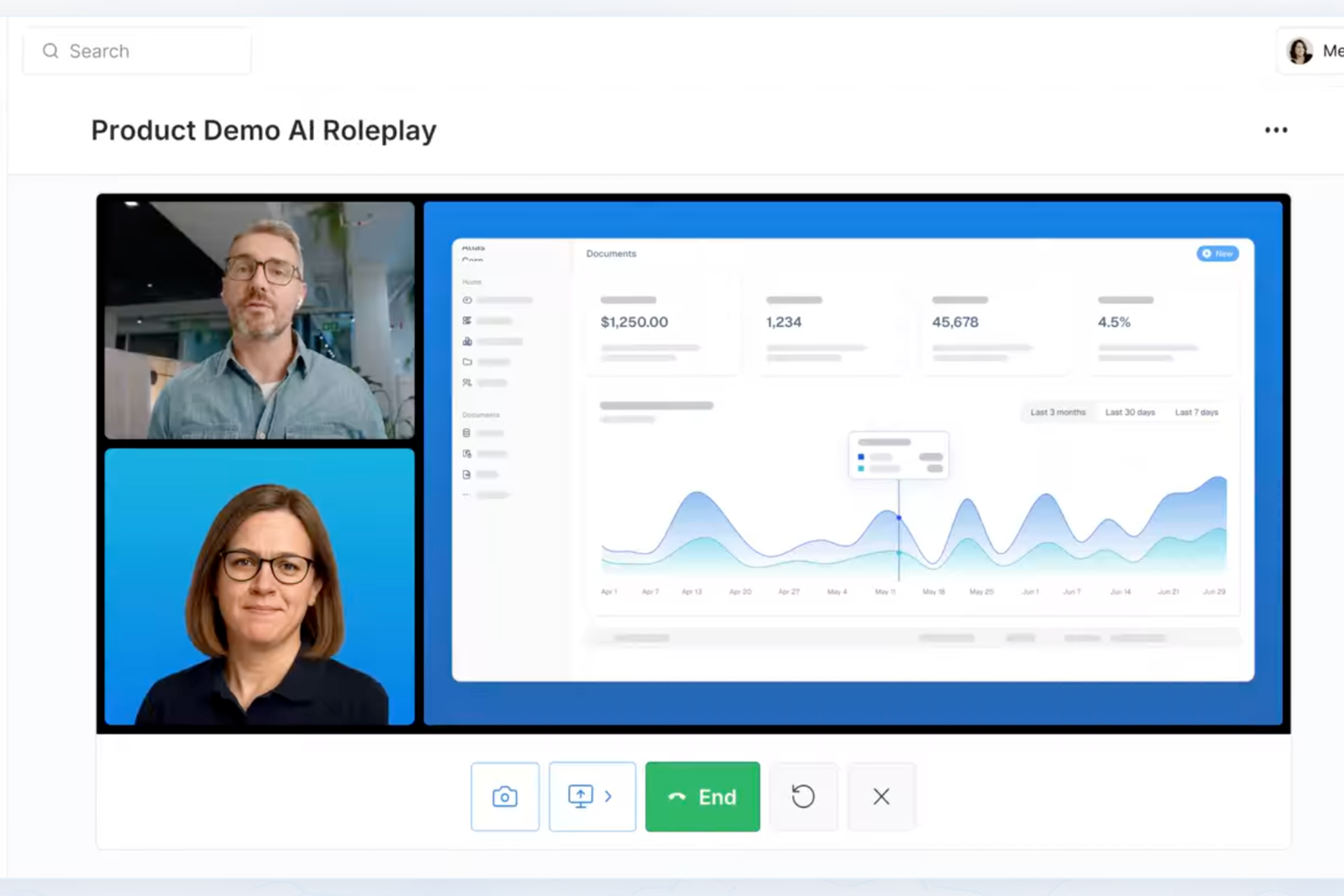
Exec è pensato per i team HR e i leader aziendali che desiderano offrire una formazione personalizzata e guidata dai dati, adattabile alle esigenze di apprendimento individuali e in grado di supportare lo sviluppo continuo delle competenze.
Per chi è Exec?
Exec si adatta a organizzazioni di medie e grandi dimensioni con team L&D che vogliono andare oltre le librerie di corsi statiche e offrire formazione adattiva e guidata dall'IA su larga scala.
Perché ho scelto Exec
Ho scelto Exec perché il suo approccio guidato dall'intelligenza artificiale va oltre le semplici raccomandazioni di corsi. Usa l'IA per costruire percorsi di apprendimento personalizzati in base al ruolo, alle lacune di competenze e al progresso di ciascun dipendente—così la formazione risulta pertinente e non generica. Il mio team monitora lo sviluppo individuale in tempo reale, rendendo semplice identificare chi ha bisogno di supporto e dove. Le funzionalità di coaching tramite IA rappresentano un vero punto di forza, offrendo guida on-demand che si adatta con la crescita dell'impiegato.
Funzionalità principali di Exec
- Valutazione delle chiamate: Analizza automaticamente le chiamate registrate secondo rubriche personalizzate per evidenziare le lacune di competenze e le opportunità di coaching all'interno del team.
- Certificazione a tappe: Rilascia certificazioni quando i dipendenti superano valutazioni di roleplay con IA basate su criteri personalizzati, assicurando la preparazione prima di assumere nuove responsabilità.
- Condivisione dello schermo per esercitazioni pratiche: Permette ai dipendenti di presentare slide o fare demo prodotto a un'audience IA interattiva che risponde come veri stakeholder.
- Resoconti settimanali sui progressi: Invia riepiloghi automatici settimanali sui progressi e i risultati dei membri del team per tenere informati i responsabili.
Integrazioni di Exec
Le integrazioni native non sono elencate.
Pros and Cons
Pros:
- Simulazioni di vendita realistiche con IA
- Percorsi di onboarding personalizzabili
- Analisi delle chiamate integrata
Cons:
- La configurazione potrebbe richiedere intervento amministrativo
- Nessuna integrazione nativa pubblicamente elencata

Ideale per gestire l’intero ciclo di formazione
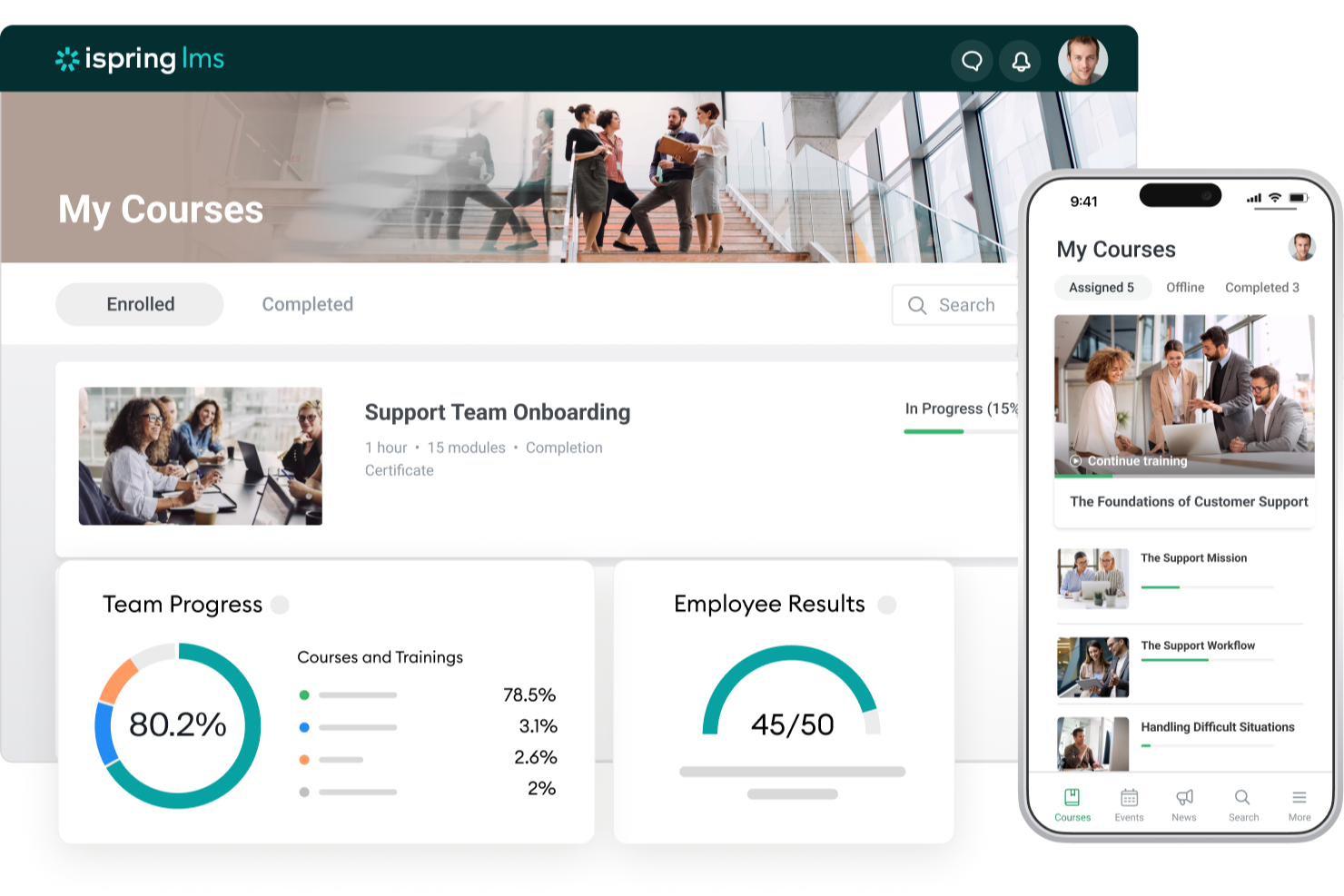
iSpring LMS offre ai team HR e ai professionisti della formazione una piattaforma per creare, erogare e monitorare programmi di formazione dei dipendenti, facilitando la gestione dell’onboarding, della conformità e dello sviluppo continuo in un unico luogo.
Per Chi è iSpring LMS?
iSpring LMS è adatto per aziende di medie e grandi dimensioni che necessitano di un approccio strutturato e scalabile alla formazione dei dipendenti tra diversi reparti.
Perché Ho Scelto iSpring LMS
iSpring LMS si guadagna un posto nella mia shortlist perché copre ogni fase del ciclo di formazione senza dover integrare strumenti separati. Mi piace il fatto che sia possibile creare corsi direttamente in iSpring Suite, assegnarli tramite percorsi di apprendimento automatizzati e quindi monitorare il completamento e i punteggi dei quiz sulla stessa piattaforma. Il cruscotto dei report dettagliati consente al mio team di monitorare il progresso individuale, individuare le lacune conoscitive e generare report di conformità senza dover esportare i dati altrove. Questa visibilità end-to-end—dalla creazione dei contenuti al monitoraggio delle prestazioni—lo distingue dagli altri.
Funzionalità Chiave di iSpring LMS
- Gamification: I dipendenti guadagnano punti e badge e monitorano i loro progressi nelle classifiche per restare motivati durante la formazione.
- Revisione a 360 gradi: Raccoglie feedback strutturati da colleghi, manager e collaboratori diretti per valutare le competenze e l’idoneità al ruolo dei dipendenti.
- Base di conoscenza: Archivia risorse aziendali, guide e FAQ in un hub cloud controllato per ruolo, accessibile dai dipendenti in qualsiasi momento.
- App mobile: Un’app nativa per iOS e Android permette agli utenti di completare la formazione offline, sincronizzando automaticamente i progressi al successivo collegamento.
Integrazioni di iSpring LMS
Le integrazioni includono Salesforce, MS Azure, MS Exchange, BambooHR, Udemy, Go1, LinkedIn Learning e altre librerie di corsi popolari.
Pros and Cons
Pros:
- Configurazione estremamente rapida
- La funzione white-label permette una completa personalizzazione del brand
- Iscrizione automatica e promemoria fanno risparmiare molto tempo amministrativo
Cons:
- Funzionalità di gamification o di social learning limitate rispetto alle piattaforme più recenti
- La configurazione delle integrazioni può essere troppo tecnica per chi non è sviluppatore
New Product Updates from iSpring LMS

iSpring LMS Adds Multiple Observations to OJT Sessions
iSpring LMS now lets managers log multiple observations within one OJT session, grouping visits and auto-generating summary stats like averages, criterion results, and comparisons. For more information, visit iSpring LMS's official site.

Ideale per formazione e inserimento nativi nella piattaforma per le risorse umane
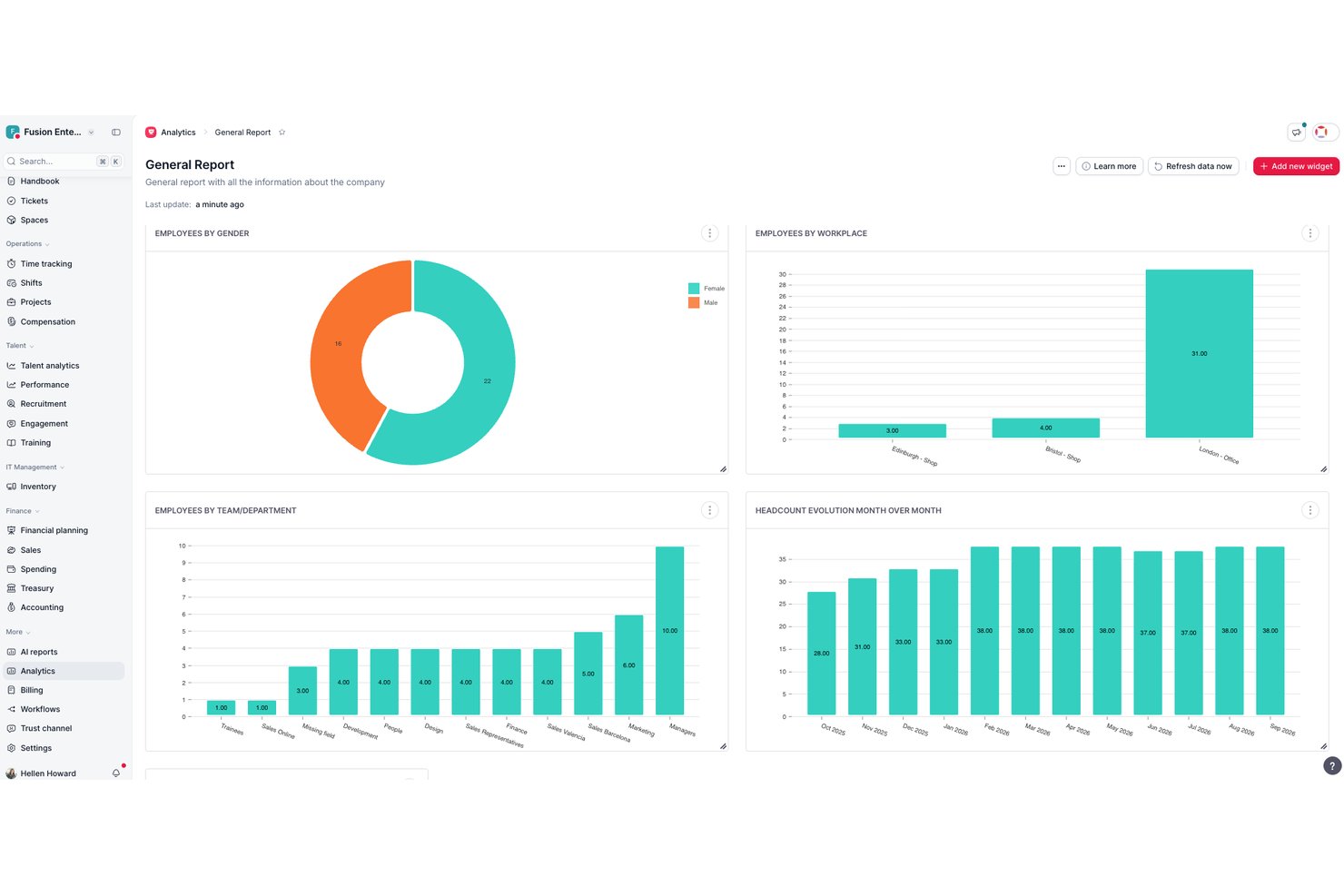
Factorial è una piattaforma completa per le risorse umane con un sistema integrato di gestione dell'apprendimento che comprende la creazione di corsi, la generazione di contenuti tramite IA, l'importazione di contenuti SCORM, i percorsi di apprendimento e il monitoraggio della formazione, oltre a funzioni più ampie per le risorse umane come l'inserimento dei dipendenti e la gestione delle prestazioni.
Per chi è più adatto Factorial?
Factorial è una soluzione ideale per i team delle risorse umane di piccole e medie imprese che desiderano integrare formazione e inserimento dei dipendenti nella stessa piattaforma utilizzata per buste paga, prestazioni e gestione del personale.
Perché ho scelto Factorial
Ho incluso Factorial tra le mie scelte migliori perché è uno dei pochi strumenti di formazione che risiede interamente nella piattaforma per le risorse umane, risultando quindi particolarmente adatto ai team che gestiscono numerosi inserimenti. Quando entra in azienda una nuova persona, il suo piano formativo può essere creato direttamente nello stesso sistema che gestisce contratto, buste paga e valutazioni delle prestazioni. Mi piace anche il fatto che Factorial possa generare automaticamente corsi strutturati a partire da PDF esistenti, riducendo notevolmente il tempo necessario per creare contenuti quando si lavora con documenti sulle politiche aziendali o guide ai processi.
Funzionalità principali di Factorial
- Importazione di corsi SCORM: Carica e gestisci pacchetti di e-learning basati su SCORM direttamente nel modulo Formazione.
- Struttura di competenze e capacità: Mappa le competenze dei dipendenti per individuare le lacune nello sviluppo e collega le attività formative a competenze specifiche.
- Test di verifica delle conoscenze: Crea quiz all'interno dei corsi per valutare se i dipendenti hanno assimilato i contenuti del corso.
- Applicazione mobile: Accedi ai corsi assegnati e completali, inclusi i contenuti SCORM, da un'app nativa per iOS e Android con una valutazione di 4,7 stelle.
Integrazioni di Factorial
Factorial offre un catalogo di integrazioni, tra cui Slack, Google Workspace, Microsoft Outlook, Microsoft Power BI e altre ancora. Supporta inoltre un'API aperta per integrazioni personalizzate e Zapier.
Pros and Cons
Pros:
- Formazione integrata con i flussi di lavoro per l'inserimento e la gestione delle risorse umane
- L'IA crea corsi completi a partire da PDF esistenti
- Struttura integrata di competenze e capacità
Cons:
- Nessuna raccolta predefinita di corsi sulla conformità
- Funzionalità avanzate limitate per report e analisi

Ideale per la formazione dei dipendenti basata sui ruoli
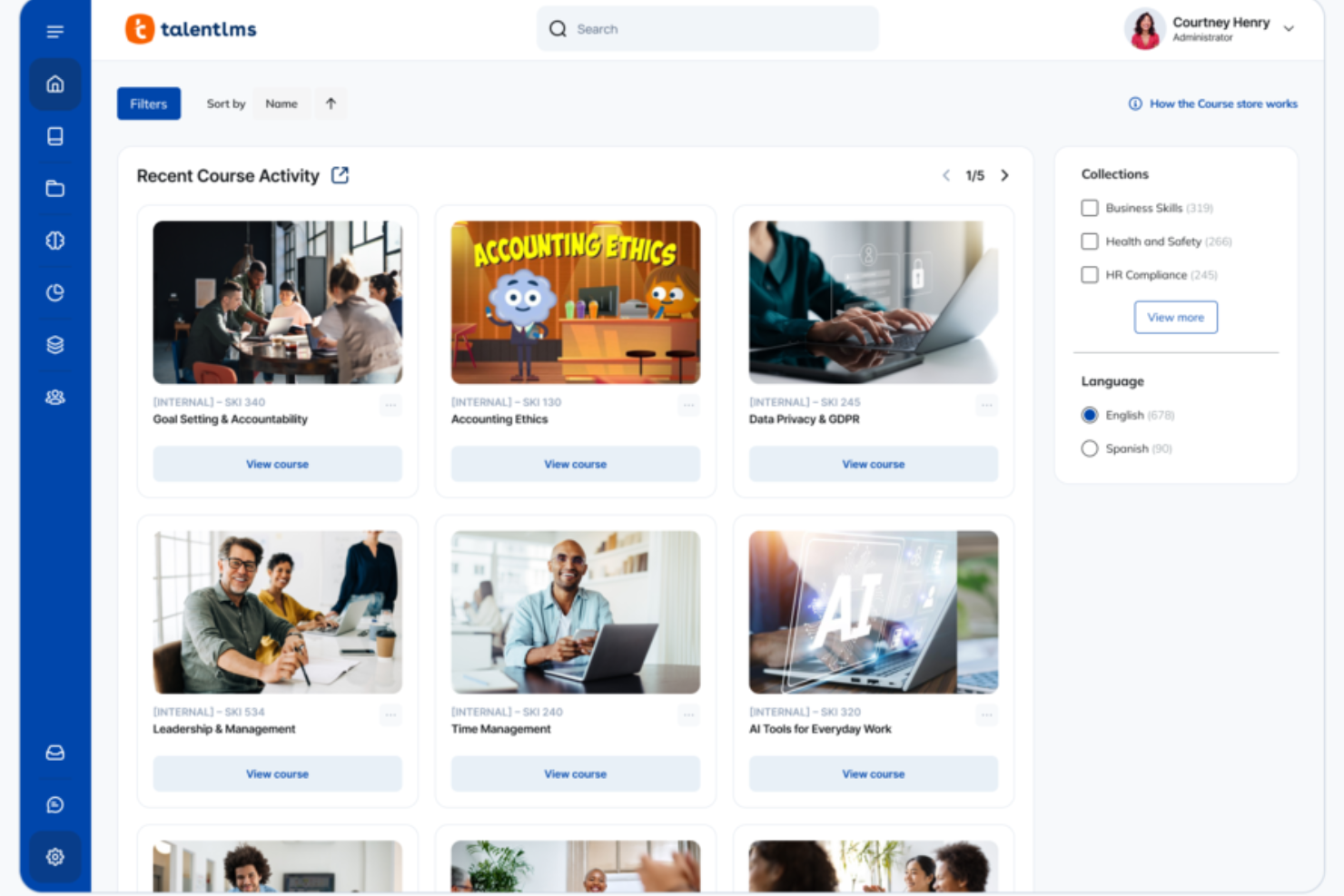
TalentLMS è un sistema di gestione dell'apprendimento basato su cloud pensato per le aziende che desiderano erogare, monitorare e gestire la formazione dei dipendenti, offrendo strumenti flessibili per la creazione e l'assegnazione dei corsi.
Per chi è ideale TalentLMS?
TalentLMS è adatto a piccole e medie imprese che necessitano di una piattaforma semplice per formare dipendenti, partner o clienti su più team o reparti.
Perché ho scelto TalentLMS
Ho scelto TalentLMS tra i migliori per la sua efficacia nella gestione della formazione basata sui ruoli su larga scala. La funzionalità Branches consente di creare ambienti di formazione separati per diversi reparti o team, ognuno con i propri contenuti, utenti e branding—tutto gestito da una singola vista amministratore. Apprezzo anche la funzione Ruoli e Permessi Personalizzati, che permette di definire esattamente cosa possono accedere amministratori, istruttori e discenti, mantenendo la formazione pertinente e impedendo la sovrapposizione dei contenuti tra i gruppi. Unita ai Gruppi, che consente di assegnare in un clic interi set di corsi a un team, la formazione specifica per ruolo diventa facilmente gestibile.
Caratteristiche principali di TalentLMS
- Authoring dei corsi: Crea corsi direttamente sulla piattaforma utilizzando testo, video, presentazioni e quiz senza la necessità di uno strumento di authoring separato.
- Gamification: Aggiungi punti, badge e classifiche ai corsi per aumentare il coinvolgimento degli utenti e i tassi di completamento.
- Gestione delle certificazioni: Crea e rilascia automaticamente certificati quando gli utenti completano un corso o superano una valutazione.
- Reportistica e analisi: Monitora i progressi degli utenti, il completamento dei corsi e i punteggi delle valutazioni attraverso dashboard di reportistica integrate.
Integrazioni di TalentLMS
Le integrazioni includono BambooHR, Salesforce, TalentHR, Sage People, Intercom, ADP Workforce Now, Zendesk Chat, Zoom, Microsoft Teams e GoTo.
Pros and Cons
Pros:
- Funzionalità chiare di raggruppamento utenti supportano strutture formative complesse.
- Strumenti di IA velocizzano la creazione dei corsi per esigenze formative che cambiano rapidamente.
- Valutazioni integrate supportano la misurazione delle competenze e il rilascio delle certificazioni.
Cons:
- Gli strumenti di collaborazione integrati sono basilari rispetto alle community di apprendimento dedicate.
- File multimediali di grandi dimensioni potrebbero richiedere soluzioni di hosting esterno.
New Product Updates from TalentLMS
TalentLMS Adds Learning Paths, AI Video, and Learner Experience Updates
TalentLMS introduced updates across learning management, content creation, and learner experience, including Learning Paths for Groups, AI video generation in TalentCraft, video bookmarking, and expanded administration tools. For more information, visit TalentLMS’s official site.

SkyPrep
Ideale per un supporto clienti di qualità

SkyPrep è una piattaforma di formazione dei dipendenti basata su cloud per team HR e leader aziendali che desiderano offrire, monitorare e gestire l’apprendimento sul posto di lavoro tramite corsi personalizzabili, flussi di lavoro automatizzati e report dettagliati.
Per Chi è Ideale SkyPrep?
SkyPrep è adatto a piccole e medie imprese che necessitano di un LMS semplice, senza una curva di apprendimento ripida o un pesante coinvolgimento IT.
Perché Ho Scelto SkyPrep
SkyPrep si è guadagnato un posto nella mia shortlist per il modo in cui prende sul serio il supporto clienti — una cosa piuttosto rara nel settore LMS. Quando il mio team incontra un problema di configurazione o ha bisogno di aiuto nell’impostare un nuovo percorso di formazione, il team di supporto di SkyPrep risponde e risolve il problema. Mi piace anche che ogni piano includa un manager dedicato al successo del cliente, così non sei lasciato a navigare da solo nel centro assistenza. Questo tipo di supporto pratico fa davvero la differenza quando stai inserendo nuovi dipendenti o lanciando un corso di conformità con scadenze strette.
Funzionalità Principali di SkyPrep
- Iscrizione automatica ai corsi: Assegna automaticamente i corsi agli utenti in base a regole predefinite, eliminando la necessità di iscrizione manuale.
- Gamification: Aggiungi punti, badge e classifiche ai corsi di formazione per aumentare il coinvolgimento degli utenti.
- LMS multi-tenant: Crea portali di formazione separati e personalizzati per diversi clienti, reparti o filiali da un unico account.
- Reportistica e analisi: Accedi a report pronti all’uso per monitorare i progressi degli utenti, i tassi di completamento dei corsi e l’impatto della formazione.
Integrazioni SkyPrep
Le integrazioni includono ADP, Workday, BambooHR, Salesforce, HubSpot, Zoom, Microsoft Teams, Paylocity, Stripe e GoToMeeting.
Pros and Cons
Pros:
- Navigazione molto semplice che riduce la confusione degli utenti e il carico sul supporto
- Tempi di risposta rapidi e assistenza pratica nella risoluzione dei problemi
- Manager dedicato al successo del cliente per configurazione e supporto continuo
Cons:
- Libreria di contenuti integrata limitata rispetto ad alcuni concorrenti
- L’esperienza mobile potrebbe essere migliorata per corsi multimediali di grandi dimensioni

Absorb
Ideale per l'upskilling e reskilling dei dipendenti
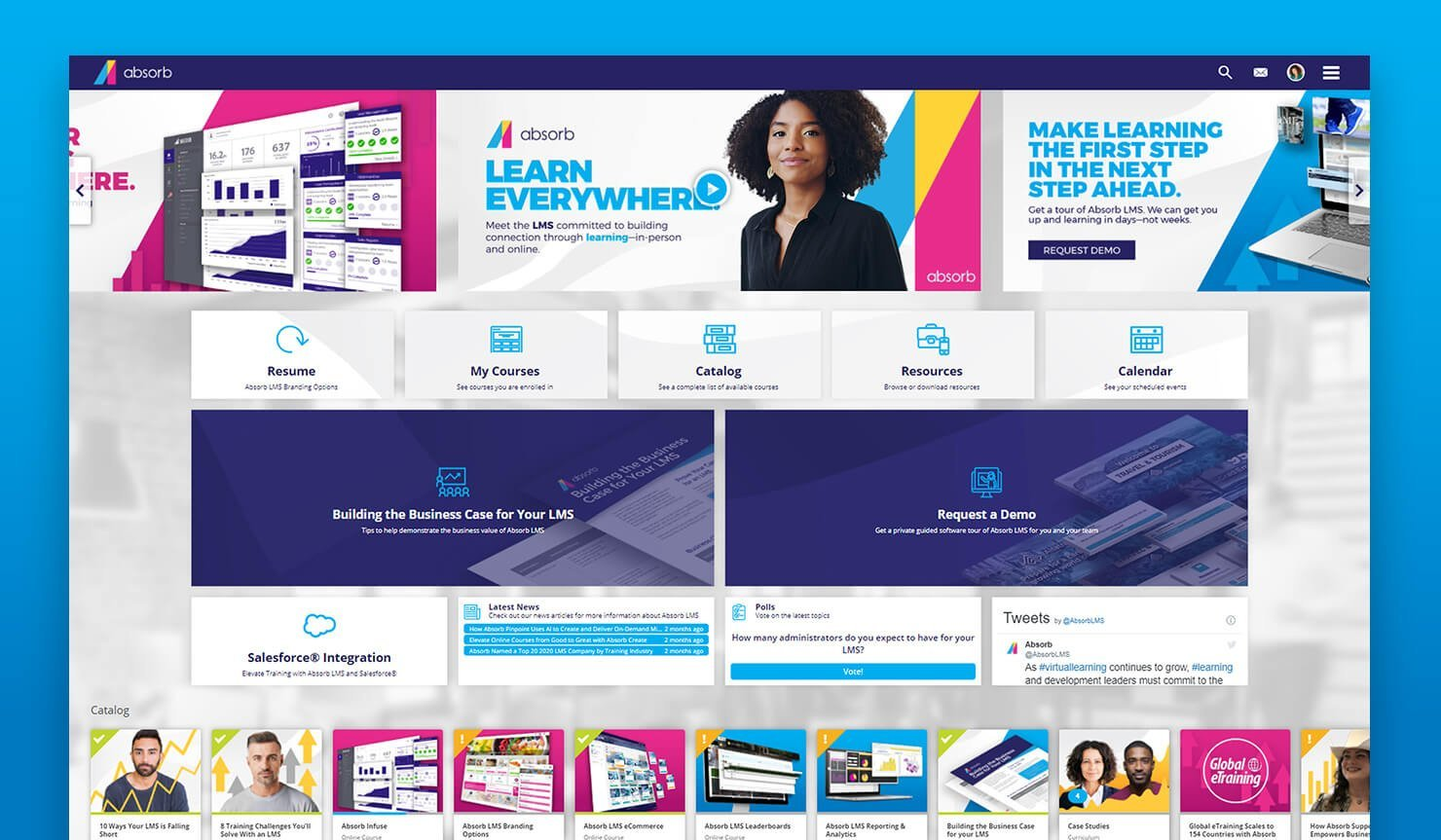
Absorb offre ai team HR e ai responsabili della formazione una piattaforma flessibile per erogare, monitorare e gestire programmi di formazione dei dipendenti, facilitando alle organizzazioni lo sviluppo delle competenze, la conformità e la crescita continua su larga scala.
Per chi è ideale Absorb?
Absorb è particolarmente adatto a organizzazioni di medie e grandi dimensioni che necessitano di una piattaforma scalabile per gestire programmi formativi strutturati su grandi team o su una forza lavoro distribuita.
Perché ho scelto Absorb
Ho incluso Absorb tra le mie migliori scelte perché è stato sviluppato specificamente per affrontare la sfida dell'aggiornamento e riqualificazione delle competenze su vasta scala. Ciò che mi piace di più è Absorb Skills, che utilizza l'intelligenza artificiale per generare percorsi di apprendimento personalizzati in base all'autovalutazione di ogni dipendente rapportata a quasi 200 competenze e 10.000 abilità. In pratica, ciò significa che il mio team può identificare esattamente dove un ingegnere software o un responsabile operativo ha delle carenze su una determinata competenza e assegnare automaticamente corsi per colmare tali lacune, senza dover selezionare manualmente i contenuti per ogni singolo individuo. Le oltre 20.000 lezioni già etichettate nella libreria Amplify Max rendono semplice coprire argomenti che vanno dall'alfabetizzazione digitale allo sviluppo della leadership senza dover creare contenuti da zero.
Funzionalità principali di Absorb
- Gestione della formazione obbligatoria: Assegna, monitora e rinnova automaticamente i corsi obbligatori di conformità tramite promemoria automatici e registri delle completazioni.
- Dashboard di reportistica e analisi: Monitora i progressi degli utenti, i tassi di completamento dei corsi e il ROI della formazione tra team e dipartimenti.
- App mobile per l'apprendimento: I dipendenti possono accedere e completare corsi su dispositivi iOS e Android, compresa la possibilità di visualizzare i corsi offline.
- Gestione della formazione guidata da istruttore (ILT): Pianifica, gestisci e traccia sessioni in presenza o virtuali guidate da istruttori, affiancandole a corsi online in autoapprendimento.
Integrazioni di Absorb
Le integrazioni includono ADP, BambooHR, Salesforce, Zoom, Microsoft Teams, Okta, Workday, LinkedIn Learning, SAP SuccessFactors e Google Workspace.
Pros and Cons
Pros:
- Supporta contenuti SCORM/xAPI per moduli specializzati di sviluppo di competenze
- Le regole di certificazione semplificano il reskilling continuo nei settori regolamentati
- Il mapping delle competenze aiuta a identificare e colmare i gap di skill
Cons:
- La personalizzazione dell'interfaccia è piuttosto limitata
- Le funzionalità di apprendimento sociale e collaborazione sono meno evolute rispetto ad alcuni concorrenti
New Product Updates from Absorb
Absorb Aura Adds Claude and ChatGPT Connections
Absorb Aura now connects to Claude or ChatGPT via MCP, enabling users to ask questions about their learning and the LMS directly inside the AI tool after a simple setup. For more information, visit Absorb's official site.
 .
.
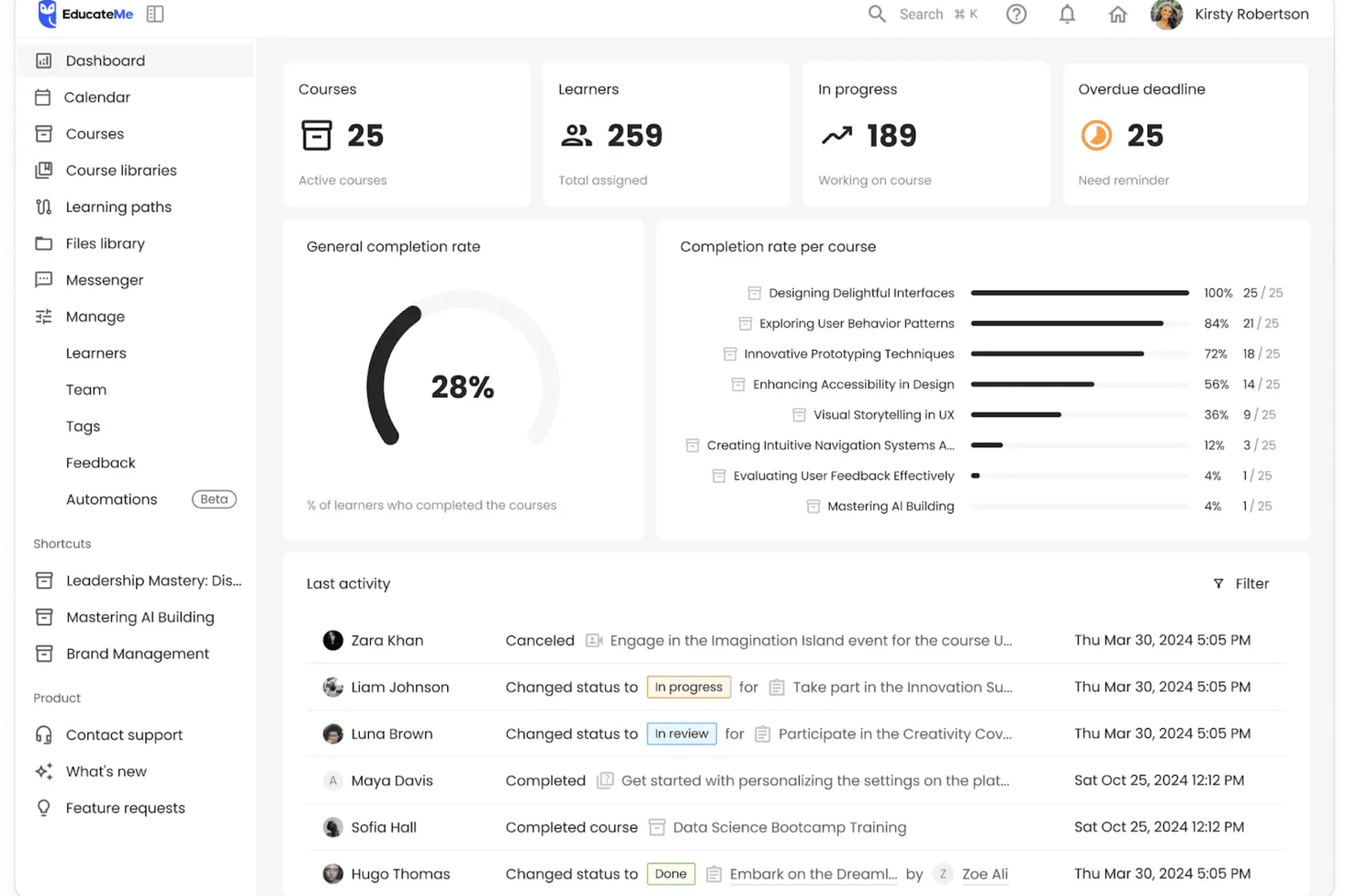
EducateMe LMS è una piattaforma di gestione dell'apprendimento progettata per i team HR e i responsabili aziendali che desiderano offrire una formazione ai dipendenti coinvolgente e interattiva, adattandosi alle esigenze dei luoghi di lavoro moderni.
Per chi è ideale EducateMe LMS?
EducateMe LMS è particolarmente adatto per aziende di medie dimensioni e team in crescita che necessitano di un metodo strutturato e scalabile per sviluppare e erogare programmi di formazione ai dipendenti.
Perché ho scelto EducateMe LMS
Ho scelto EducateMe LMS tra i migliori per il modo in cui gestisce scenari di pratica guidati dall'IA per la formazione dei dipendenti. Mi piace che gli utenti possano cimentarsi in simulazioni realistiche e specifiche per il ruolo che rispecchiano reali situazioni lavorative—come gestire una conversazione difficile con un cliente o affrontare una decisione di conformità. L'IA genera risposte dinamiche in base all'input dell'utente, quindi ogni esercitazione risulta unica. Utilizzo anche il costruttore di scenari ramificati per progettare esercizi a percorsi multipli che mettono alla prova il processo decisionale, senza la necessità di uno sviluppatore per la configurazione.
Caratteristiche principali di EducateMe LMS
- Costruttore di corsi: Crea corsi di formazione strutturati usando un editor drag-and-drop che supporta video, quiz e contenuti testuali.
- Dashboard di monitoraggio progressi: Monitora avanzamento, tassi di completamento e risultati delle valutazioni di singoli o gruppi in un'unica vista.
- Apprendimento per coorti: Organizza i partecipanti in gruppi e fornisci la formazione su un calendario condiviso con compiti collaborativi.
- Notifiche automatiche: Invia promemoria e avvisi di scadenza a utenti e manager basati sulle attività e sullo stato di completamento dei corsi.
Integrazioni EducateMe LMS
Le integrazioni includono Zoom, Slack, Google Calendar, Outlook Calendar, Stripe, BambooHR, Workday, HiBob, ADP Workforce Now e Okta.
Pros and Cons
Pros:
- Simulazioni di coaching con IA per roleplay
- Supporta contenuti di corsi conformi a SCORM
- Accesso API e single sign-on
Cons:
- Numero minimo di utenti richiesto per il prezzo
- Configurazione avanzata può richiedere supporto
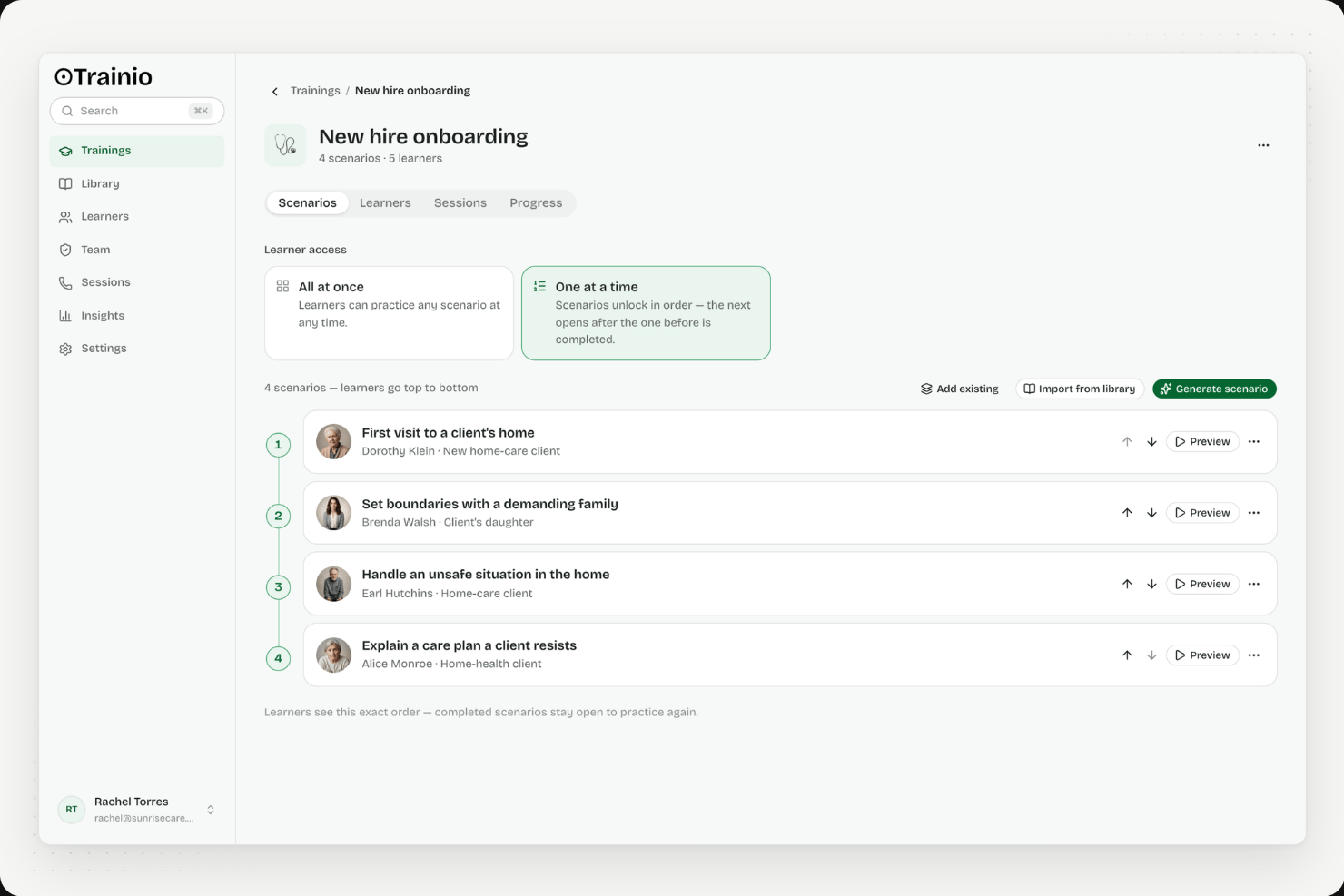
Trainio è una piattaforma di formazione con simulazioni vocali basate sull'IA, progettata appositamente per i team sanitari, che offre esercitazioni basate su scenari, un hub della conoscenza, valutazioni con punteggio basate su rubriche e gestione dei percorsi di apprendimento.
Per chi è più adatto Trainio?
Trainio è particolarmente adatto alle organizzazioni sanitarie che devono formare il personale a contatto con i pazienti sulle competenze conversazionali ad alta criticità, come la de-escalation, l'accettazione dei pazienti e la comunicazione nelle situazioni di crisi.
Perché ho scelto Trainio
Ho scelto Trainio come una delle soluzioni migliori perché è l'unica piattaforma di formazione che ho visto progettata appositamente per le situazioni conversazionali ad alta criticità che il personale sanitario affronta ogni giorno. Il motore di simulazione vocale basato sull'IA include scenari come la de-escalation, l'accettazione dei pazienti e la comunicazione nelle situazioni di crisi, con personaggi IA che modificano umore e comportamento in base al modo in cui risponde il partecipante. Il punteggio basato su rubriche fornisce un feedback immediato e obiettivo dopo ogni sessione, mentre le trascrizioni fungono anche da prove pronte per gli audit nelle verifiche CARF e della Joint Commission.
Funzionalità principali di Trainio
- Hub della conoscenza: Un archivio centrale di documenti in cui il personale può caricare e cercare procedure operative standard, copioni per le chiamate, protocolli, video e PDF, con un chatbot IA che risponde alle domande utilizzando esclusivamente i contenuti caricati dalla propria organizzazione.
- Iscrizione in base a ruolo, team e sede: Assegna automaticamente i percorsi di apprendimento al personale in base al ruolo, al team o alla sede assistenziale, così che i nuovi assunti ricevano gli scenari corretti fin dal primo giorno senza configurazione manuale.
- Importazione SCORM: Trasferisce i contenuti formativi esistenti nella piattaforma insieme agli scenari nativi di simulazione di ruolo di Trainio, mantenendo tutta la formazione in un unico luogo.
- Certificati dei percorsi di apprendimento: Rilascia certificati di completamento quando il personale termina un percorso di apprendimento strutturato, fornendo ai responsabili una registrazione tracciabile del livello di preparazione.
Integrazioni di Trainio
Trainio offre integrazioni documentate con Slack, Zoom e Google Calendar, oltre all'importazione SCORM. I piani Enterprise aggiungono l'integrazione HRIS, SSO, l'accesso API e un server MCP; è inoltre supportato Zapier.
Pros and Cons
Pros:
- Trascrizioni pronte per gli audit nell'ambito dell'accreditamento sanitario
- Scenari illimitati di simulazione vocale basata sull'IA inclusi
- Il feedback basato su rubriche elimina la soggettività dei formatori
Cons:
- Nessuno strumento tradizionale per la creazione di corsi o quiz
- Non adatto alle esigenze formative al di fuori del settore sanitario
Altri software per la formazione dei dipendenti
Ecco alcuni altri programmi per la formazione dei dipendenti che vale la pena valutare se hai bisogno di qualche altra opzione:
- Mitratech
Ideale per la formazione focalizzata sulla conformità
- Groundwork1
Ideale per la formazione via email
- Continu
Ideale per il supporto multilingue della piattaforma
- LearnWorlds
Ideale per il white-labeling dei materiali formativi
- Seismic Learning
Ideale per formazione e coaching specifici per le vendite
- LearnUpon
Ideale per formare sia il personale interno sia il pubblico esterno
- Guidde
Miglior creatore di video formativi con AI
- Thinkific
Ideale per reportistica su progressi e coinvolgimento
- Skilljar
Ideale per favorire l'adozione del prodotto attraverso la formazione
- Kallidus Learn
Migliore per la gamification della formazione dei dipendenti e il monitoraggio del coinvolgimento
- Docebo
Ideale per offrire apprendimento con intelligenza artificiale a qualsiasi pubblico
- eloomi
Ideale con funzionalità alimentate dall’IA
- Bridge
Ideale per la creazione avanzata di corsi
- Constructor Tech
Migliore LMS per il suo approccio di apprendimento interattivo
- GO1
Ideale per accedere a un'ampia libreria di corsi eLearning
- Biz Library
Ideale per una vasta collezione di materiali formativi aziendali
- Eduflow
Ideale per la formazione aziendale
- Compass
Ideale per guide di formazione interattive
- PitchMonster
Ideale per esercitarsi nelle competenze di gestione delle obiezioni
- Leapsome
Ideale per chiudere il cerchio tra apprendimento, coinvolgimento e performance
- Qooper
Ideale per offrire formazione, upskilling, reskilling e mentoring tutti in un'unica piattaforma
- eduMe
Ideale per la creazione di contenuti tramite IA
- Mitratech Perform
Ideale per la creazione di corsi multimediali e formazione
- SAI360
Ideale per la formazione focalizzata sulla conformità
- Synergy Learning
Ideale per soluzioni formative personalizzate


Recensioni correlate sui software per le risorse umane
Se non hai ancora trovato ciò che cerchi, dai un’occhiata a questi altri strumenti correlati che abbiamo testato e valutato:
- Software per le risorse umane
- Software per la gestione delle paghe
- Software per la selezione del personale
- Servizi di datore di lavoro ufficiale
- Sistemi di gestione dei candidati
- Software per la gestione della forza lavoro
Come Valuto i Software di Formazione per Dipendenti
Valuto ogni piattaforma su due livelli: i requisiti di base che deve soddisfare—creazione di corsi, tracciamento della conformità, reportistica per gli utenti—e i fattori differenzianti che rendono un tool più adatto di un altro.
Funzionalità di Base (Requisiti Indispensabili per Questa Lista)
Quando seleziono gli strumenti per la mia lista, valuto ciascuno su una scala da 0 (non offre la funzionalità) a 5 (eccelle in questo ambito) per ogni funzionalità di base elencata di seguito. Poi, calcolo il punteggio totale dello strumento come percentuale. Ogni tool deve raggiungere un punteggio minimo totale del 75% per essere preso in considerazione per l'inclusione.
- Creazione di Corsi & Gestione dei Contenuti: Cerco strumenti di creazione integrati che supportino più formati—SCORM, video, quiz, documenti—così il tuo team può sviluppare moduli di onboarding o formazione su prodotti senza bisogno di strumenti separati.
- Assegnazione dei Corsi & Percorsi di Apprendimento: Ogni piattaforma dovrebbe permetterti di assegnare corsi per ruolo, team o dipartimento e organizzarli in percorsi strutturati, come un curriculum per nuovi manager che parte dai fondamenti fino agli argomenti avanzati.
- Tracciamento dei Progressi & Reportistica: Verifico se responsabili e amministratori possono estrarre tassi di completamento, risultati dei quiz e attività degli utenti in dashboard o report esportabili utili per le revisioni trimestrali aziendali.
- Valutazioni & Certificazioni: La piattaforma deve supportare quiz con logica di superamento/fallimento e generare attestati al completamento—particolarmente importante quando è necessario documentare la verifica delle competenze per promozioni interne o audit.
- Gestione della Conformità & delle Ricertificazioni: Valuto come ogni strumento gestisce le scadenze ricorrenti della formazione, i promemoria automatici e la tenuta dei registri pronti per gli audit, come per la formazione annuale sulla sicurezza che richiede una prova di completamento e monitoraggio dei rinnovi.
- Portale di Apprendimento per i Dipendenti: I tuoi utenti hanno bisogno di uno spazio dedicato in cui visualizzare i corsi assegnati, controllare i propri progressi e consultare la formazione disponibile—piattaforme come Docebo e TalentLMS affrontano questo aspetto in modo diverso, ma l'aspettativa minima è un'esperienza chiara e accessibile per l'utente.
Una volta che ho una lista di strumenti che soddisfano i criteri, considero ciò che distingue ciascuna piattaforma.
Fattori Differenzianti (Cosa Distingue i Fornitori)
Ecco come confronto e metto a confronto i diversi fornitori:
Funzionalità Distintive
La personalizzazione guidata dall'AI è importante quando si gestisce la formazione su centinaia di ruoli—cerco piattaforme che adattino i percorsi formativi in base alle lacune di competenze invece che solo tramite assegnazioni manuali. L'accesso da mobile e offline è un grande fattore distintivo per le organizzazioni con lavoratori senza scrivania o sul campo che non possono seguire corsi da un desktop. Valuto anche se una piattaforma collega la formazione a un framework di competenze, il che aiuta i team di formazione e sviluppo a collegare la conclusione dei corsi a obiettivi reali di crescita professionale.
Oltre le Funzionalità
L'integrazione con l'ecosistema HR è una priorità—verifico se la piattaforma si connette nativamente con il tuo HRIS in modo che i dati dei dipendenti si sincronizzino automaticamente e le iscrizioni avvengano senza lavoro manuale. L'accesso alla libreria di contenuti è un altro fattore chiave, poiché le piattaforme che includono o si integrano con fornitori come Go1 o OpenSesame ti evitano di dover creare ogni corso da zero. Valuto anche la struttura dei prezzi, in particolare se si adatta agli utenti attivi o al totale del personale, cosa che fa davvero la differenza con la crescita della tua organizzazione.
La formazione non riguarda solo la conformità. Inizia comprendendo gli obiettivi dell’azienda, che si tratti di assumere una o due persone o di espandersi a livello globale, e adatta la formazione a tali obiettivi.
Come scegliere il software per la formazione dei dipendenti
Per individuare il software per la formazione dei dipendenti più adatto alle tue esigenze, devi identificare gli utenti principali e documentare le loro difficoltà specifiche.
Mentre affronti il tuo processo personalizzato di selezione del software per la formazione dei dipendenti, tieni presenti i seguenti aspetti:
| Considerazione principale | Descrizione / Cosa fare |
|---|---|
| Problema da risolvere | Identifica le difficoltà principali che stai cercando di affrontare per chiarire le caratteristiche e le funzionalità necessarie. |
| Utenti e accesso | Determina chi utilizzerà il software (ad es. amministratori HR, responsabili, dipendenti), quante licenze sono necessarie e assegna la priorità ai requisiti di ciascun gruppo. |
| Compatibilità con gli strumenti | Elenca gli strumenti da sostituire, mantenere o integrare (ad es. HRIS, LMS). Decidi se siano più appropriate le integrazioni o una piattaforma tutto-in-uno. |
| Risultati desiderati | Definisci gli obiettivi e le metriche di successo, ad esempio la digitalizzazione della formazione, il miglioramento dell'accesso da dispositivi mobili o del coinvolgimento, così da poter valutare gli strumenti in base ai risultati e non solo alle funzionalità. |
| Idoneità organizzativa | Valuta come il software si adatta ai flussi di lavoro e ai sistemi esistenti, osservando cosa funziona bene e cosa deve essere migliorato. |
| Ultimo consiglio | Ogni azienda è diversa: non dare per scontato che una soluzione valida per tutti sia adatta a chiunque; adatta la scelta alle tue esigenze specifiche. |
Ricorda che ogni azienda è diversa: non dare per scontato che un sistema per la formazione dei dipendenti sia adatto alla tua organizzazione solo perché è popolare.
Tendenze nel software per la formazione dei dipendenti
Il software per la formazione dei dipendenti ha continuato a evolversi per adattarsi alle esigenze in cambiamento delle aziende e integrare i progressi nelle nuove tecnologie, come l'intelligenza artificiale (AI), la realtà virtuale (VR) e la realtà aumentata (AR). Ecco una rapida panoramica delle tendenze che stanno attualmente influenzando lo sviluppo del software per la formazione:
I dipendenti devono comprendere in che modo la formazione li avvantaggia. Se non ne vedono il valore per la propria carriera, non parteciperanno. Allinea la formazione ai loro obiettivi personali e collegala alla strategia più ampia dell’azienda.
- Maggiore attenzione ai percorsi di apprendimento personalizzati: si osserva una chiara tendenza a offrire esperienze di apprendimento più personalizzate e adattive. Gli strumenti sfruttano sempre più l'AI per analizzare le prestazioni e gli stili di apprendimento dei dipendenti, adattando i contenuti alle esigenze individuali. Questa personalizzazione garantisce che la formazione sia più pertinente e coinvolgente, affrontando direttamente le lacune e i punti di forza di chi apprende.
- Integrazione di AR e VR per un apprendimento immersivo: la Realtà Aumentata (AR) e la Realtà Virtuale (VR) stanno diventando sempre più diffuse, offrendo esperienze di apprendimento immersive che un tempo erano una novità, ma che oggi sono sempre più richieste. Queste tecnologie offrono simulazioni di formazione pratica particolarmente utili per lo sviluppo di competenze tecniche, la formazione sulla sicurezza e il potenziamento delle competenze trasversali.
- Elementi di ludicizzazione per aumentare il coinvolgimento: la ludicizzazione rimane una funzionalità fondamentale, con strumenti che incorporano elementi di gioco sempre più sofisticati per aumentare il coinvolgimento e la motivazione dei partecipanti. Distintivi, classifiche e ricompense si stanno integrando maggiormente con i contenuti formativi, diventando una parte essenziale dell'esperienza di apprendimento anziché un'aggiunta secondaria.
- Funzionalità di apprendimento mobile: con il lavoro da remoto ancora molto diffuso, l'accessibilità da dispositivi mobili è diventata una necessità anziché un lusso. I software per la formazione sono sempre più progettati con un approccio prioritariamente mobile, per garantire che i partecipanti possano accedere ai materiali formativi in qualsiasi momento, ovunque si trovino e da qualunque dispositivo.
- Monitoraggio della conformità e delle certificazioni: con la continua evoluzione dei requisiti normativi, è aumentata la domanda di funzionalità per monitorare e gestire la formazione sulla conformità e le certificazioni. Questo garantisce che le organizzazioni rimangano conformi agli standard e alle normative di settore.
Queste tendenze riflettono un cambiamento più ampio nel mercato dei software per la formazione dei dipendenti verso la creazione di esperienze di apprendimento più coinvolgenti, personalizzate ed efficaci.
Per assicurarti che la tua strategia di apprendimento sfrutti queste tendenze in crescita, potresti anche aggiornarti sulle più recenti tendenze dell'apprendimento dei dipendenti.
Che cos'è il software per la formazione dei dipendenti?
Il software per la formazione dei dipendenti è una piattaforma digitale che aiuta i team delle risorse umane e i manager a creare, erogare e monitorare i programmi di apprendimento dei dipendenti.
Viene utilizzato per semplificare la formazione, migliorare lo sviluppo delle competenze e garantire la conformità, soprattutto per i team sopraffatti dal monitoraggio manuale, da esperienze di apprendimento incoerenti o da risorse frammentate.
Funzionalità principali del software per la formazione dei dipendenti
Quando scegli un software per la formazione dei dipendenti, presta attenzione alle seguenti funzionalità principali:
- Gestione dei corsi: organizza, programma e aggiorna i materiali formativi senza difficoltà, così puoi mantenere i contenuti aggiornati e il tuo team coinvolto. Questo ti aiuta a offrire un'esperienza di apprendimento strutturata e a introdurre rapidamente nuovi argomenti o requisiti di conformità.
- Monitoraggio dei progressi degli utenti: monitora i progressi di ogni dipendente nei corsi, ottenendo informazioni su chi sta ottenendo buoni risultati e chi potrebbe aver bisogno di un incoraggiamento. In questo modo puoi personalizzare il supporto e celebrare i traguardi raggiunti in ogni fase.
- Strumenti di valutazione: crea quiz, test e attività interattive per valutare l'apprendimento e la memorizzazione. Questi strumenti rendono più semplice individuare le lacune nelle conoscenze e misurare l'efficacia della formazione, senza trasformare il feedback in un gioco di supposizioni.
- Percorsi di apprendimento personalizzabili: adatta i percorsi formativi a ruoli, dipartimenti o obiettivi di carriera individuali diversi. Potendo modificare i contenuti, i dipendenti ricevono un'esperienza di apprendimento che si adatta davvero a ciò che fanno e a ciò che sperano di fare in futuro.
- Report e analisi: genera report sulla partecipazione, sui tassi di completamento e sui punteggi dei test con pochi clic. Analisi chiare ti consentono di individuare tendenze, identificare opportunità di miglioramento e dimostrare l'impatto concreto del tuo investimento nella formazione.
- Libreria di contenuti: accedi a un archivio integrato di materiali formativi, modelli o persino moduli specifici per il settore. Una libreria ricca significa che non devi sempre reinventare la ruota, ma puoi adattare contenuti di alta qualità alle tue esigenze.
- Accessibilità da dispositivi mobili: consenti ai dipendenti di imparare ovunque si trovino, sul campo o a casa. La formazione ottimizzata per i dispositivi mobili elimina gli ostacoli e rispetta la vita dinamica e flessibile che il tuo team conduce già.
- Funzionalità di integrazione: collega il software ai tuoi sistemi HR, ai CRM o ad altri strumenti di lavoro. Le integrazioni aiutano a mantenere sincronizzati i dati e ad automatizzare alcune fasi del ciclo di vita della formazione, facendoti risparmiare tempo e riducendo il lavoro manuale.
- Programmi di certificazione: assegna certificati e distintivi al completamento dei corsi. Queste credenziali motivano i dipendenti, riconoscono i risultati raggiunti e possono persino contribuire a soddisfare le esigenze di conformità.
Funzionalità comuni dell'intelligenza artificiale nei software per la formazione dei dipendenti
Oltre alle funzionalità standard dei software per la formazione dei dipendenti elencate sopra, molte di queste soluzioni stanno integrando l'intelligenza artificiale con funzionalità come:
Chatbot in linguaggio naturale: rispondono alle domande dei dipendenti e aiutano a risolvere i problemi 24 ore su 24, 7 giorni su 7, fornendo supporto e indicazioni immediati durante tutto il processo di apprendimento.
Raccomandazioni di apprendimento personalizzate: suggeriscono corsi e risorse personalizzati in base alla cronologia di apprendimento, agli obiettivi e alle prestazioni di ciascun dipendente, così nessuno rimane bloccato in una formazione uguale per tutti.
Generazione automatizzata dei contenuti: crea quiz, moduli formativi o materiali didattici in pochi istanti con strumenti per la creazione di contenuti basati sull'intelligenza artificiale, riducendo i tempi di sviluppo e mantenendo i contenuti aggiornati e pertinenti.
Analisi intelligente delle lacune nelle competenze: analizza istantaneamente i dati della forza lavoro per individuare dove i dipendenti necessitano di maggiore supporto o di nuove competenze, aiutandoti a creare piani di formazione più intelligenti e mirati.
Valutazioni adattive: adatta in tempo reale la difficoltà e i contenuti dei quiz in base alle prestazioni del discente, garantendo che ogni valutazione sia coinvolgente e adeguatamente stimolante.
Vantaggi del software per la formazione dei dipendenti
Investire nella tecnologia per migliorare il tuo programma di formazione dei dipendenti è una scelta strategica che può generare vantaggi significativi sia per gli utenti sia per le organizzazioni. Ecco alcuni dei vantaggi che puoi ottenere investendo nel miglior software per la formazione dei dipendenti, in base alle tue esigenze specifiche:
- Risorse di apprendimento centralizzate: offrendo un unico archivio per tutti i materiali formativi, il software per la formazione dei dipendenti semplifica l'accesso e l'organizzazione. Questa centralizzazione garantisce che i dipendenti possano trovare e utilizzare facilmente le risorse, risparmiando tempo e riducendo la frustrazione.
- Percorsi di apprendimento personalizzati: il software di formazione avanzato consente di creare programmi formativi personalizzati che corrispondono alle esigenze e ai livelli di competenza dei singoli dipendenti. Questo livello di personalizzazione migliora l'esperienza di apprendimento, rendendola più pertinente ed efficace per ogni utente.
- Maggiore coinvolgimento attraverso la ludicizzazione: molte piattaforme integrano elementi di ludicizzazione, come punti, distintivi e classifiche. La ludicizzazione aumenta il coinvolgimento e la motivazione, rendendo il processo di apprendimento più piacevole e stimolante.
- Apprendimento flessibile e accessibile: il software per la formazione dei dipendenti supporta spesso l'apprendimento da dispositivi mobili, consentendo agli utenti di accedere ai materiali formativi in qualsiasi momento e luogo. Questa flessibilità tiene conto dei diversi orari e delle preferenze di apprendimento, facilitando l'apprendimento continuo al di fuori del tradizionale contesto d'aula.
- Soluzioni di formazione convenienti: riducendo la necessità di sessioni di formazione in presenza, trasferte e materiali stampati, il software per la formazione dei dipendenti può ridurre significativamente i costi della formazione. L'efficienza e l'efficacia della formazione digitale contribuiscono inoltre a un migliore ritorno sull'investimento.
Come puoi vedere, investire in una piattaforma di formazione può semplificare gli aspetti amministrativi della gestione della formazione e migliorare l'esperienza di apprendimento dei dipendenti, portando a prestazioni migliori e a una maggiore soddisfazione lavorativa.
Costi e prezzi del software per la formazione dei dipendenti
Siamo onesti. Spesso tutto si riduce al prezzo. Poiché il software per la formazione dei dipendenti è progettato in modo modulare, la maggior parte dei fornitori di software presenti in questo elenco fornisce i dettagli sui prezzi solo su richiesta, poiché personalizzerà il software in base alle tue esigenze. Per ottenere maggiori dettagli sui loro piani tariffari, ti consiglio di visitare il loro sito web e richiedere un preventivo personalizzato.
Tuttavia, per aiutarti a farti un'idea più realistica del costo del software per la formazione dei dipendenti, ho preparato una tabella riepilogativa che illustra i diversi piani e le strutture tariffarie per esigenze organizzative, dimensioni e budget differenti.
Tabella comparativa dei piani per il software di formazione dei dipendenti
| Tipo di piano | Prezzo medio | Prezzo medio per utente | Funzionalità comuni |
|---|---|---|---|
| Gratuito | $0 | Accesso ai moduli formativi di base, capacità limitata di utenti e monitoraggio di base dei progressi | |
| Base | $100 - $500 al mese | $2-$10 per utente/mese | Programmi formativi personalizzabili, analisi e reportistica, supporto via e-mail e fino a 50 utenti |
| Standard | $500 - $1,500 al mese | $2-$20 per utente/mese | Reportistica avanzata, funzionalità di integrazione, supporto telefonico e via chat e fino a 250 utenti |
| Premium | $1,500 - $5,000 al mese | $2-$20 per utente/mese | Personalizzazione del marchio, integrazione avanzata, responsabile dedicato della gestione degli account, fino a 500 utenti e opzioni di sviluppo personalizzato |
| Aziendale | Prezzo personalizzato | Prezzo personalizzato | Funzionalità e integrazioni personalizzabili, responsabile personale del successo del cliente, utenti illimitati, formazione in sede e supporto prioritario |
Quando valuti queste opzioni, considera sia il costo per utente sia il valore complessivo offerto da ciascun piano in termini di funzionalità e supporto. Questa doppia prospettiva garantisce che tu non scelga solo una soluzione conveniente, ma anche una che soddisfi in modo completo le esigenze formative della tua organizzazione.
Consiglio inoltre di richiedere una prova gratuita o una dimostrazione di ogni software. In questo modo, puoi farti un'idea concreta del loro software prima di investirci troppo tempo.
Domande frequenti
Ti stai ancora chiedendo come funziona il software per la formazione dei dipendenti e cosa offre? Queste risposte alle domande frequenti sono un buon punto di partenza:
Quali integrazioni dovrei cercare quando scelgo un software per la formazione dei dipendenti?
Quando valuti le piattaforme per la formazione, cerca integrazioni con il tuo HRIS, gli strumenti di gestione delle prestazioni e quelli di comunicazione come Slack o Microsoft Teams. Queste integrazioni consentono di sincronizzare i dati dei dipendenti, automatizzare la creazione degli utenti, monitorare l’impatto dell’apprendimento e semplificare la reportistica. L’integrazione con librerie di contenuti o con l’accesso singolo può inoltre far risparmiare tempo al tuo team e favorire l’adozione.
Quanto sono sicuri i dati sulla formazione dei dipendenti nella maggior parte delle piattaforme?
Le piattaforme per la formazione dei dipendenti offrono generalmente solide funzionalità di sicurezza, come la crittografia dei dati, l’hosting cloud sicuro e l’accesso basato sui ruoli. Cerca piattaforme con certificazioni di conformità come SOC 2, ISO 27001 o il supporto al GDPR se operi in regioni regolamentate.
Chiedi ai fornitori informazioni sulle loro politiche di privacy dei dati e su come proteggono le informazioni sensibili dei dipendenti.
In che modo le piattaforme per la formazione dei dipendenti supportano il monitoraggio continuo della conformità?
La maggior parte delle soluzioni leader monitora in tempo reale il completamento dei corsi, i rinnovi delle certificazioni e la presa visione delle politiche. Puoi configurare promemoria automatici e generare report sulla conformità per gli audit.
Per i settori soggetti a normative rigorose, cerca pannelli di controllo della conformità personalizzabili e la possibilità di allegare prove o certificati.
Il software per la formazione dei dipendenti può automatizzare i promemoria e il monitoraggio dei progressi?
Sì, molte piattaforme automatizzano i promemoria per i corsi incompleti e notificano ai dipendenti le scadenze imminenti o le certificazioni in scadenza. I pannelli di controllo per il monitoraggio dei progressi aiutano sia i partecipanti sia i responsabili a controllare lo stato e i tassi di completamento e a individuare le lacune. Le funzionalità di automazione liberano i team HR e L&D dal monitoraggio manuale.
Quali tipi di formati dei contenuti supportano generalmente gli strumenti per la formazione dei dipendenti?
I moderni software per la formazione supportano video, audio, corsi SCORM e xAPI, PDF, quiz, webinar e moduli interattivi. Alcuni strumenti consentono anche il microapprendimento, la ludicizzazione e la creazione di contenuti ottimizzati per i dispositivi mobili. Assicurati che la piattaforma scelta sia in linea con i materiali già in uso dalla tua squadra e con le esigenze future.
Questi sistemi possono gestire lingue diverse per le squadre globali?
Sì, la maggior parte delle piattaforme per la formazione dei dipendenti supporta più lingue e impostazioni di localizzazione. Questa funzionalità è fondamentale per le multinazionali che desiderano fornire una formazione coerente in diverse aree geografiche.
Quando acquisti una soluzione per le squadre globali, verifica se il software è in grado di tradurre sia l’interfaccia sia i contenuti, gestire la conformità a livello regionale e consentire valutazioni in più lingue. Testa l’usabilità con contenuti di esempio per garantire l’accessibilità a tutti gli utenti.
Queste piattaforme possono essere personalizzate per settori specifici?
Molte piattaforme offrono modelli, moduli sulla conformità e librerie di contenuti pensati per settori specifici come sanità, finanza, produzione o vendita al dettaglio. Oltre a questo, la maggior parte dei sistemi offre ulteriori opzioni di personalizzazione, consentendo di adattare corsi, simulazioni e valutazioni per riflettere standard, normative e pratiche specifici del settore.
Chiedi ai fornitori se possono adattare le funzionalità e i materiali dei corsi per riflettere le normative, la terminologia e i flussi di lavoro del tuo settore. Questo livello di personalizzazione può migliorare il coinvolgimento e l’efficacia dell’apprendimento, garantendo che i dipendenti ricevano la formazione più pertinente e incisiva possibile. Può inoltre accelerare l’inserimento e la conformità della tua forza lavoro.
Qual è la differenza tra un sistema per la formazione dei dipendenti e un sistema di gestione dell'apprendimento?
Sebbene i termini siano spesso usati in modo intercambiabile, il software per la formazione dei dipendenti e i sistemi di gestione dell’apprendimento (LMS) hanno finalità leggermente diverse.
I sistemi per la formazione dei dipendenti (talvolta chiamati sistemi di gestione della formazione) sono progettati per le squadre interne, affinché possano organizzare, erogare e monitorare la formazione obbligatoria. Questi strumenti si concentrano sulla conformità, sull’amministrazione della formazione e sulla pianificazione, soprattutto per i corsi su salute e sicurezza o per i programmi di inserimento che devono rispettare le normative del settore.
D’altra parte, i sistemi di gestione dell’apprendimento sono più incentrati sul partecipante. Sono progettati per supportare lo sviluppo continuo e aumentare il coinvolgimento, offrendo ai dipendenti l’accesso a contenuti facoltativi per lo sviluppo delle competenze. Le piattaforme LMS includono spesso funzionalità interattive come strumenti di apprendimento sociale, forum di discussione e percorsi di apprendimento autoguidati, per creare un’esperienza di apprendimento più completa.