

I 10 migliori sistemi HRMS per piccole imprese per gestire la crescita nel 2026

10 I migliori HRMS per le piccole imprese


Gestire le risorse umane in una piccola impresa non è affatto semplice, soprattutto quando devi ricoprire più ruoli e gestire numerose responsabilità. Potresti trovarti alle prese con fogli di calcolo infiniti, trascorrere ore nell’elaborazione delle buste paga o gestire errori nei dati dei dipendenti che potrebbero comportare rischi di non conformità. Inoltre, scegliere il software HRMS giusto può sembrare complicato, con così tanti strumenti che promettono di risolvere i tuoi problemi: ma quale lo farà davvero?
Gli strumenti HRMS sono progettati per semplificare funzioni chiave delle risorse umane come la gestione dei dati dei dipendenti, l’automazione delle buste paga, il reclutamento e la gestione dei benefit. Ti aiutano a risparmiare tempo, ridurre al minimo gli errori e creare un’esperienza HR più efficiente per te e il tuo team.
Basandomi sulla mia esperienza come specialista HR in un piccolo team, ho creato questo elenco dei migliori HRMS per le piccole imprese. Il mio obiettivo è aiutarti a trovare più facilmente una soluzione adatta alle tue esigenze specifiche, così potrai dedicare meno tempo ai problemi legati alle risorse umane e più tempo alla gestione della tua attività.
Perché Fidarti delle Nostre Recensioni Software
Testiamo e recensiamo sistemi software HR dal 2019. In quanto esperti HR, sappiamo quanto sia fondamentale e allo stesso tempo difficile prendere la decisione giusta nella scelta di un software. Investiamo molto nella ricerca approfondita per aiutare il nostro pubblico a prendere decisioni d’acquisto migliori. Abbiamo testato più di 2.000 strumenti per diversi casi d’uso nell’ambito HR e scritto oltre 1.000 recensioni approfondite. Scopri come rimaniamo trasparenti & la nostra metodologia di valutazione software.
I migliori HRMS per le piccole imprese: tabella comparativa dei prezzi
\u003cspan style=\u0022font-weight: 400\u0022\u003eQuesta tabella comparativa riassume i dettagli dei prezzi delle mie migliori selezioni di HRMS per le piccole imprese, per aiutarti a trovare il software più adatto al tuo budget e alle esigenze della tua attività.\u003c/span\u003e
| Tool | Best For | Trial Info | Price | ||
|---|---|---|---|---|---|
| 1 | Il miglior HRMS tutto-in-uno gratuito per piccole imprese | Demo gratuita disponibile | A partire da $5/dipendente/mese | Website | |
| 2 | Il migliore per supporto HR e paghe con esperti attivo 24/7 | Demo gratuita disponibile | Da $8/utente/mese + quota base di $50/mese | Website | |
| 3 | Ideale per processi HR flessibili | Demo gratuita disponibile | Prezzo su richiesta | Website | |
| 4 | Miglior modulo per il benessere e il feedback dei dipendenti | Demo gratuita disponibile | Da $8/utente/mese | Website | |
| 5 | Ideale per funzionalità paghe specifiche per settore | Demo gratuita disponibile | Prezzo su richiesta | Website | |
| 6 | Ideale per outsourcing HR e conformità normativa | Demo gratuita disponibile | Prezzi su richiesta | Website | |
| 7 | Ideale per l'automazione delle paghe e le integrazioni | Demo gratuita disponibile | Prezzo su richiesta | Website | |
| 8 | Ideale per la documentazione HR centralizzata | Prova gratuita di 14 giorni | Da $22/utente/mese | Website | |
| 9 | Ideale per la coordinazione tra paghe e benefit | Demo gratuita disponibile | Da $49/mese + $6/mese per persona | Website | |
| 10 | Ideale per l'automazione e i flussi di lavoro semplificati | 7 giorni di prova gratuita | Da $4,95/utente/mese | Website |


Recensioni dei migliori HRMS per le piccole imprese
Ecco una breve descrizione di ciascun HRMS per le piccole imprese, con il relativo caso d’uso migliore, alcune funzionalità degne di nota e schermate che mostrano una panoramica dell’interfaccia utente. Continua a leggere per scoprire altre soluzioni bonus in fondo all’elenco.

Deel HR
Il miglior HRMS tutto-in-uno gratuito per piccole imprese
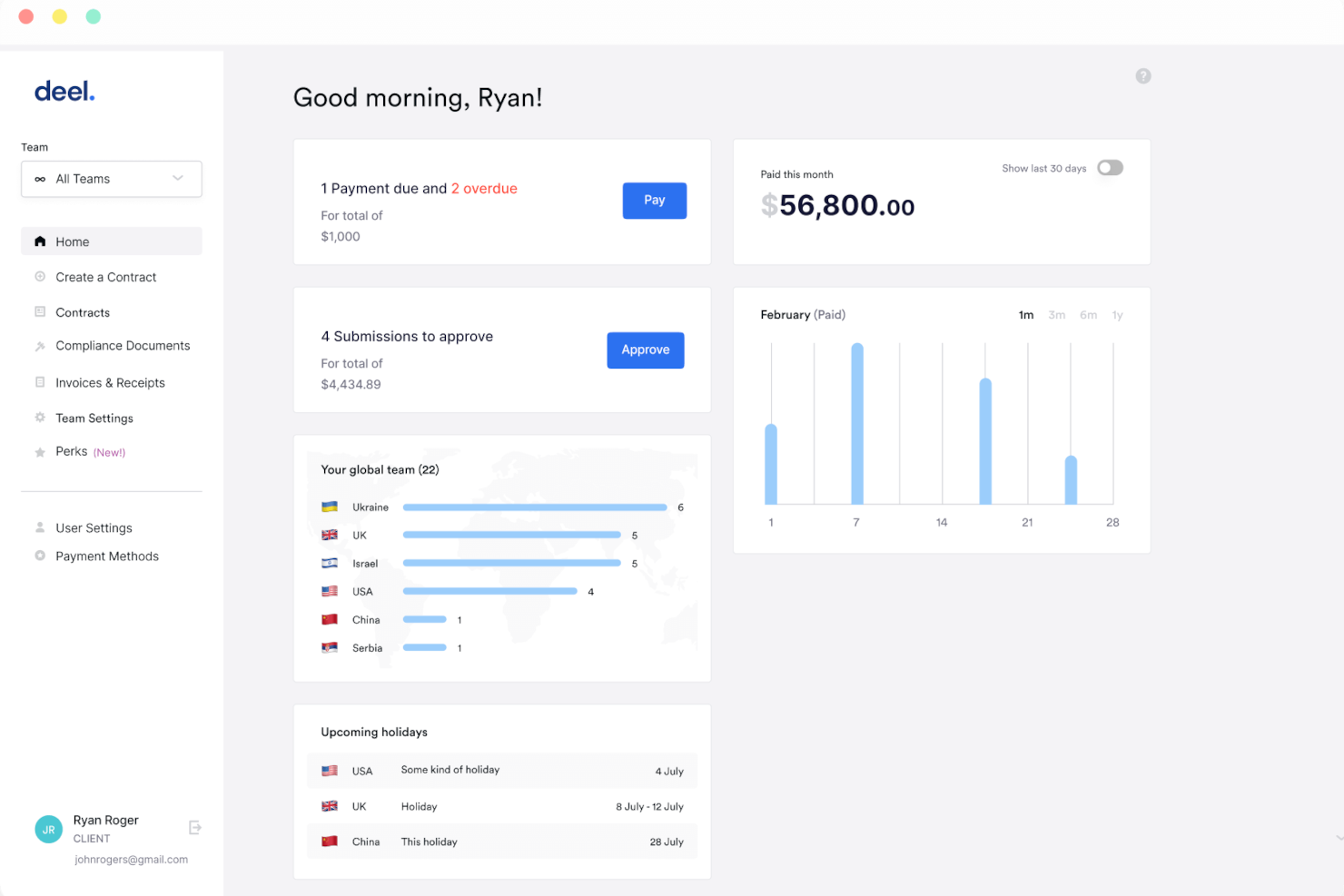
Deel HR è un sistema di gestione delle risorse umane per piccole imprese che include onboarding dei dipendenti, gestione dei documenti, monitoraggio delle assenze e gestione dell'organigramma in un'unica piattaforma.
Per chi è ideale Deel HR?
Deel HR è particolarmente adatto per piccole imprese e startup che necessitano di un sistema HR gratuito e centralizzato per gestire una forza lavoro in crescita senza dover investire in software a pagamento.
Perché ho scelto Deel HR
Deel HR merita un posto nella mia lista perché è una delle poche piattaforme HRMS che offre un livello core HR veramente gratuito per le piccole aziende. Il piano gratuito non è una versione limitata di prova: include profili dei lavoratori, monitoraggio delle assenze, gestione dei documenti e un organigramma, coprendo le esigenze quotidiane di un piccolo team senza richiedere l’upgrade a pagamento. Quando sei pronto per crescere, puoi aggiungere moduli come recruiting o gestione delle performance come componenti aggiuntivi a pagamento senza dover ricostruire nulla. Il suo design modulare permette al mio team di iniziare con le funzioni di cui abbiamo bisogno ora e integrare successivamente cicli di retribuzione o pianificazione degli organici, il tutto sulla stessa base dati.
Funzionalità chiave di Deel HR
- Pianificazione della forza lavoro: Prevedi l'organico, modella scenari e monitora i costi di assunzione utilizzando dati live della forza lavoro invece che fogli di calcolo.
- Selezione automatica dei candidati con IA: Sorgente dei candidati automatica, gestione dei colloqui e onboarding diretto dei nuovi assunti, tutto da un’unica pipeline.
- Valutazioni delle performance a 360°: Cicli di valutazione configurabili con feedback quantitativo e qualitativo, OKR e calibrazione delle valutazioni in tutto il team.
- Segnalazione anonima: Strumenti integrati per whistleblowing permettono ai dipendenti di segnalare problemi in modo sicuro, supportando la compliance e una cultura del parlare apertamente.
Integrazioni di Deel HR
Deel HR offre integrazioni native con Greenhouse, BambooHR, HiBob, Workday, Lever, Ashby e Personio. È disponibile un’API per integrazioni personalizzate.
New Product Updates from Deel HR

Deel Expands Stablecoin Wallet to 80+ Countries
Deel expands its Stablecoin Wallet to 80+ countries with dollar-backed balances and optional rewards. This gives eligible contractors more ways to hold and manage earnings inside Deel. For more information, visit Deel’s official site.
 .
.
Il migliore per supporto HR e paghe con esperti attivo 24/7
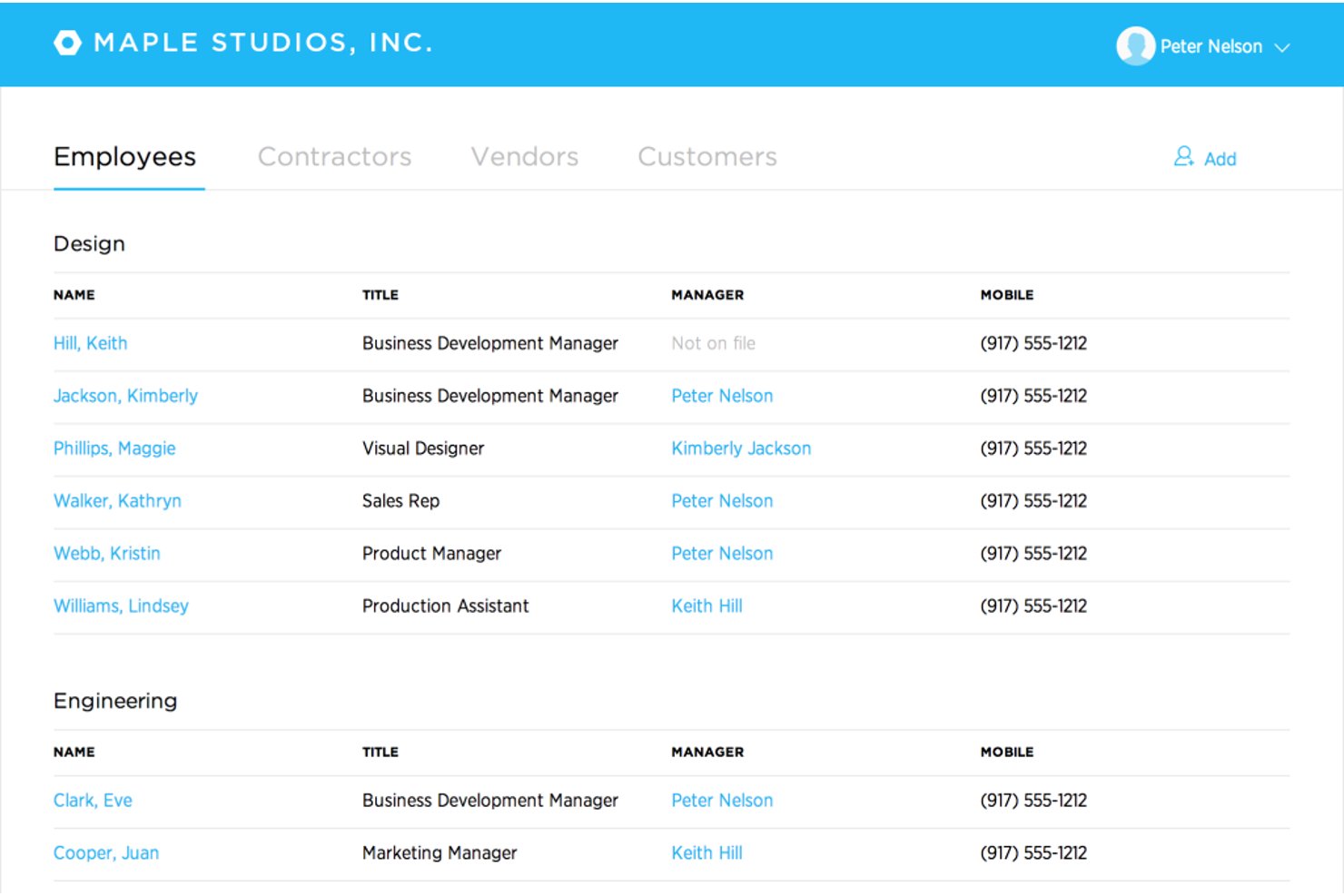
Justworks è un software HRMS basato su cloud pensato per le piccole imprese, che unisce elaborazione paghe, amministrazione dei benefit, gestione delle risorse umane, supporto per la conformità normativa e dichiarazioni fiscali automatizzate su un'unica piattaforma.
Per chi è migliore Justworks?
Piccole imprese e startup che necessitano di una gestione paghe e risorse umane semplice e conforme, anche su più stati o sedi.
Perché ho scelto Justworks
Ho scelto Justworks tra i migliori perché posso contare sulla loro assistenza HR e paghe di esperti attiva 24/7 per domande urgenti sulla conformità e per risolvere rapidamente i problemi. Apprezzo anche l'elaborazione paghe automatizzata e la gestione fiscale per team distribuiti in più stati.
Funzionalità principali di Justworks
- Modulo aggiuntivo per tracciamento ore: Il tracciamento ore integrato si collega direttamente alle paghe per i team pagati a ore.
- Portale self-service per dipendenti: I membri del team possono gestire online i propri documenti, benefit e cedolini.
- Gestione dei benefit: Sistema centralizzato per iscrivere, aggiornare e monitorare i benefit di tutti i dipendenti.
- Archiviazione documenti: Archivio sicuro e cloud per le policy aziendali e i documenti HR obbligatori.
Integrazioni di Justworks
Le integrazioni native non sono chiaramente documentate. È disponibile una API per integrazioni personalizzate.
Pros and Cons
Pros:
- Assistenza HR e paghe live 24/7
- La conformità paghe multi-stato è automatizzata
- Offre accesso a benefit aziendali da grandi gruppi
Cons:
- Strumenti di gestione delle performance integrati limitati
- Poche opzioni per workflow personalizzati

HiBob
Ideale per processi HR flessibili
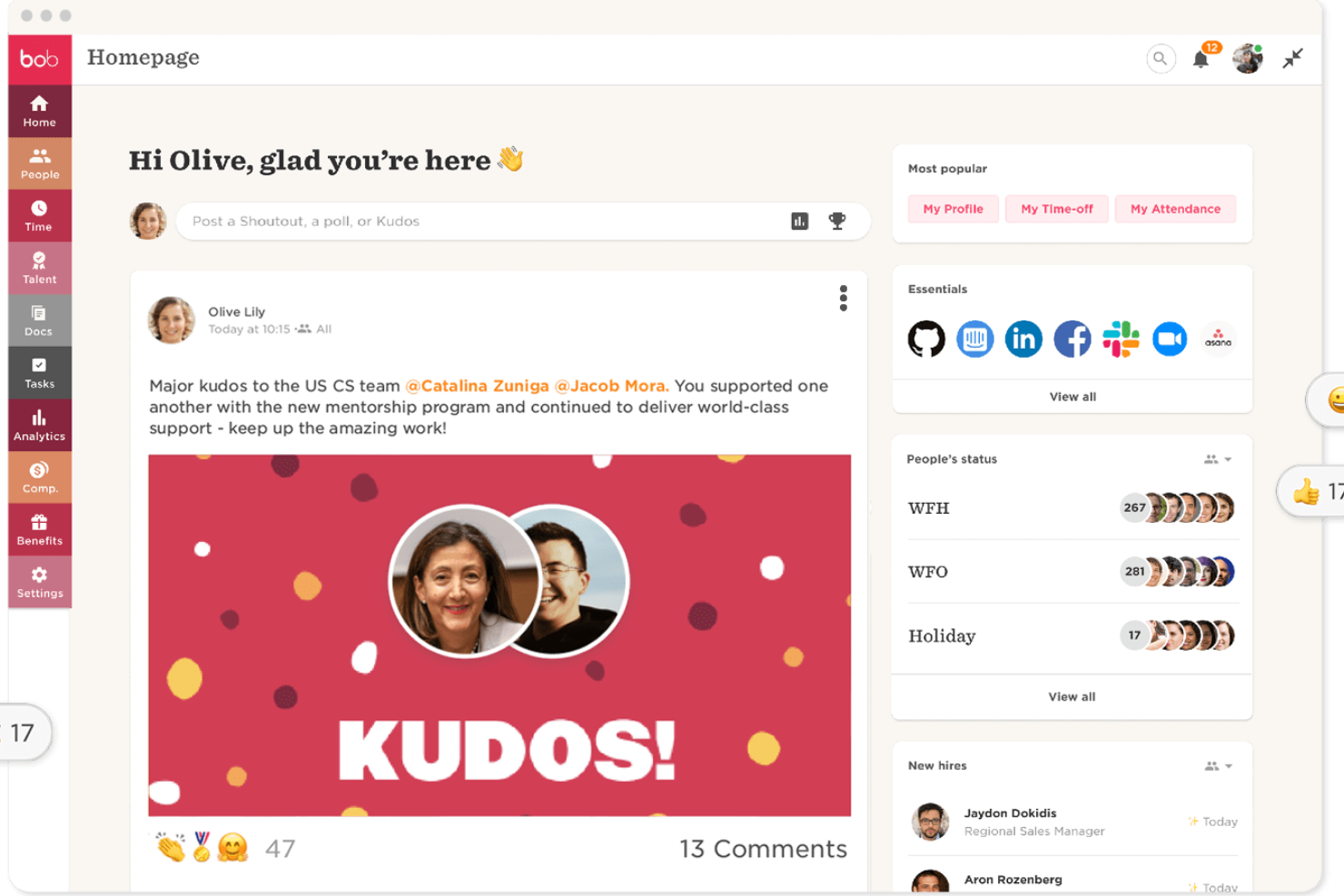
HiBob è una piattaforma di gestione delle risorse umane progettata per le piccole imprese, che offre funzioni di HR di base, onboarding, monitoraggio delle assenze, gestione delle performance e flussi di lavoro personalizzabili.
Per chi è ideale HiBob?
HiBob è particolarmente adatto per piccole e medie imprese che necessitano di processi HR adattabili per supportare strutture di team in rapida evoluzione e attività di gestione del personale dinamiche.
Perché ho scelto HiBob
HiBob si guadagna un posto nella mia selezione per la flessibilità dei suoi processi HR. Mi piace il fatto che si possano creare flussi di lavoro e catene di approvazione personalizzate che rispecchiano effettivamente il funzionamento della propria squadra, invece di costringere i processi in una struttura rigida. L'ambiente sandbox è particolarmente utile: consente di testare modifiche ai cicli retributivi, alle regole di automazione o alle valutazioni delle performance prima che entrino in vigore, riducendo così il rischio legato all'adattamento dei processi HR in tempo reale. La configurazione modulare permette di iniziare con le funzionalità Core HR e aggiungere moduli di talent management, gestione paghe o pianificazione del personale mano a mano che crescono le esigenze.
Caratteristiche principali di HiBob
- People analytics: Monitora organico, retention, assenteismo e crescita con report in tempo reale pianificabili e condivisibili direttamente con la direzione.
- Flussi di onboarding: Automatizza compiti e sequenze di onboarding per offrire ai nuovi assunti un'esperienza coerente e strutturata fin dal primo giorno.
- Gestione delle assenze: I dipendenti possono richiedere e i manager approvare le assenze direttamente dalla piattaforma, con visibilità immediata su chi è presente o assente.
- Sondaggi ai dipendenti: Conduci sondaggi durante il ciclo di vita lavorativo o sull'engagement per raccogliere feedback nei momenti chiave e visualizza i risultati su una dashboard integrata.
Integrazioni di HiBob
HiBob offre integrazioni native con Slack, Microsoft Teams, Google Workspace, DocuSign, Greenhouse, Okta e Workable. È disponibile una API per integrazioni personalizzate.

Miglior modulo per il benessere e il feedback dei dipendenti
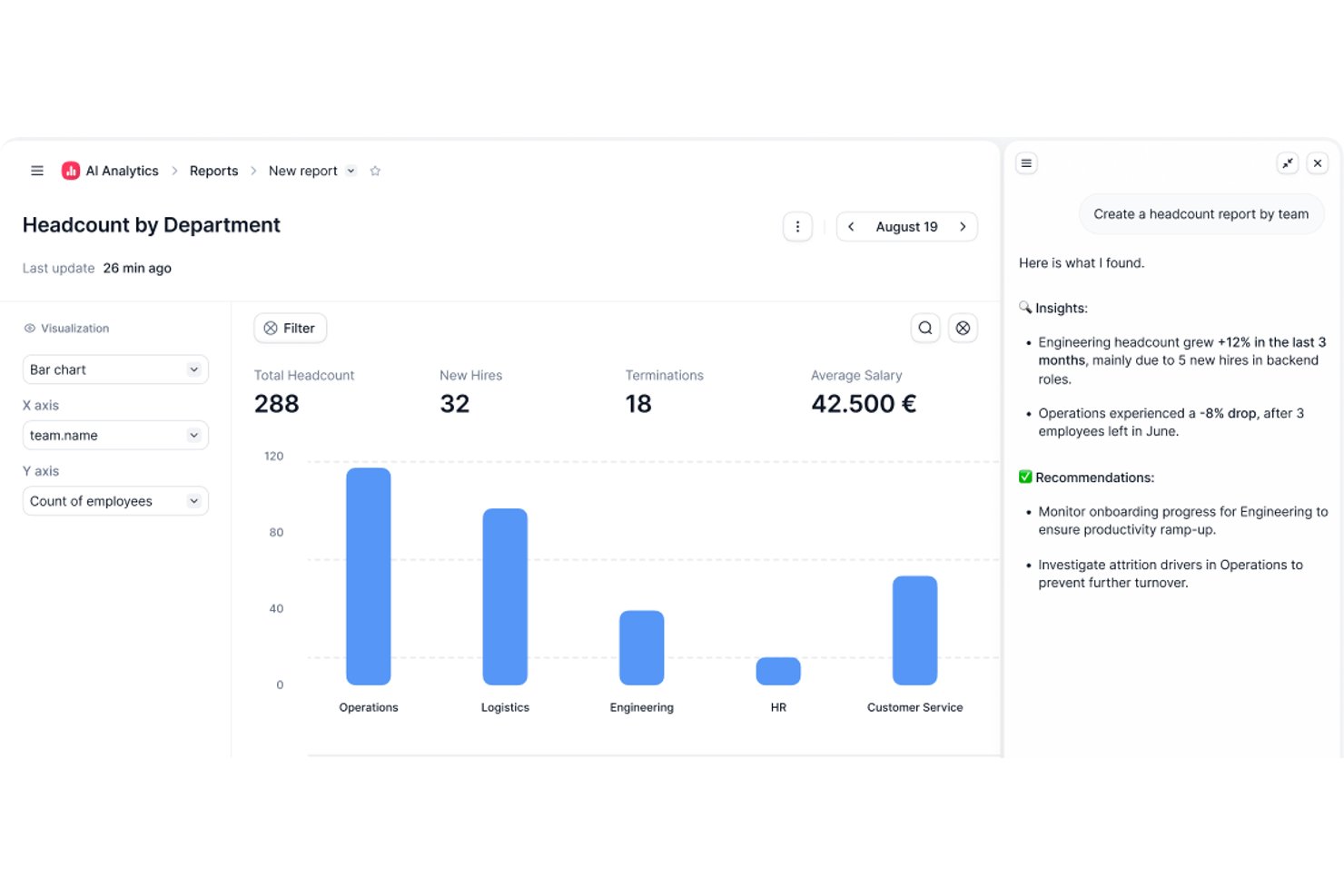
Factorial è un sistema di gestione delle risorse umane per le piccole imprese che riunisce in un'unica piattaforma i dati dei dipendenti, il monitoraggio delle ferie, le buste paga, l'inserimento e la gestione delle prestazioni.
A chi è più adatto Factorial?
Factorial è una soluzione adatta alle piccole e medie imprese che cercano una piattaforma HR completa per gestire le proprie attività relative al personale senza un team HR dedicato.
Perché ho scelto Factorial
Factorial si è guadagnato un posto nella mia lista ristretta grazie al modo in cui gestisce il benessere e il feedback dei dipendenti per i piccoli team. Mi piace in particolare la funzione Pulse dei dipendenti, che consente di inviare verifiche giornaliere o programmate su misura, durante le quali i dipendenti condividono anonimamente il proprio stato d'animo. Questo tipo di segnale regolare e senza ostacoli è davvero utile quando non si dispone di un team dedicato al coinvolgimento che tenga sotto controllo il burnout o il disimpegno. Inoltre, il pannello di controllo delle informazioni sul coinvolgimento riunisce i punteggi eNPS e i risultati dei sondaggi sul clima in un'unica vista, così posso vedere i tassi di partecipazione, la suddivisione tra promotori e detrattori e le tendenze della percezione senza dover consultare report separati. Le valutazioni delle prestazioni a 360° completano bene l'offerta, consentendo a colleghi, manager e collaboratori diretti di esprimersi tutti sullo stesso dipendente.
Funzionalità principali di Factorial
- Flussi di lavoro per l'inserimento e l'uscita: Configura checklist di attività, assegna le attrezzature e invia i documenti per la firma nell'ambito di un processo strutturato di inserimento o uscita.
- Gestione dei turni: Crea e pubblica i turni dei dipendenti, imposta i modelli di turno e consenti ai dipendenti di visualizzare i turni imminenti dall'app mobile.
- Monitoraggio di obiettivi e OKR: Crea obiettivi individuali o a livello di team, collegali agli obiettivi aziendali e monitora i progressi direttamente all'interno della piattaforma.
- Gestione dei documenti: Archivia, organizza e condividi i documenti dei dipendenti, come contratti e buste paga, con controlli degli accessi basati sui ruoli per gestire chi può visualizzare o modificare ogni file.
Integrazioni di Factorial
Factorial offre integrazioni native con Slack, Google Calendar, Microsoft Outlook e Zapier, oltre a fornire un'API per integrazioni personalizzate.

Paycor
Ideale per funzionalità paghe specifiche per settore

Paycor è una piattaforma HRMS per piccole imprese che riunisce in un unico sistema gestione delle paghe, gestione delle risorse umane, rilevazione delle presenze, amministrazione dei benefit e gestione dei talenti.
Per chi è più indicato Paycor?
Paycor è particolarmente adatto alle piccole imprese di settori come sanità, manifatturiero e retail che necessitano di strumenti di gestione paghe e HR costruiti sulle esigenze specifiche della propria forza lavoro.
Perché Paycor è una delle migliori scelte
Paycor è una delle migliori scelte perché integra logiche di gestione delle paghe specifiche per settore direttamente nel prodotto, invece di trattare tutte le aziende allo stesso modo. Per i team del settore manifatturiero, questo significa che straordinari combinati e calcoli a cottimo vengono gestiti nativamente, senza necessità di soluzioni manuali. Per il settore sanitario, Paycor supporta la rendicontazione PBJ (Payroll-Based Journal) e consente di copiare e incollare i turni tra diversi giorni filtrando per certificazioni degli infermieri. Apprezzo anche il fatto che ogni settore abbia un proprio piano di implementazione, così il processo di setup è guidato da consulenti che conoscono già la struttura paghe prima ancora di iniziare la collaborazione.
Funzionalità principali di Paycor
- Benefits Advisor: Uno strumento per l’iscrizione ai benefit che permette ai dipendenti di scegliere autonomamente tra i benefici disponibili con un supporto decisionale integrato, offrendo al team HR capacità di benchmarking e reportistica.
- Sondaggi Pulse: Uno strumento integrato di feedback dei dipendenti che raccoglie le risposte e fornisce insight direttamente nella piattaforma.
- Software per la selezione del personale: Uno strumento di tracciamento dei candidati e comunicazione che consente di pubblicare annunci di lavoro, inviare sms ai candidati e seguire i candidati attraverso ogni fase del processo di assunzione.
- Reportistica e analisi: Report preimpostati e configurabili su turnover, organico e parità salariale di genere, che attingono tutti da un'unica fonte dati.
Integrazioni di Paycor
Paycor offre integrazioni native con QuickBooks, JazzHR, 15Five, DailyPay, OrgChart, Timeero, Spark Hire, Mitratech AssureHire, Tilt e Procurify. È disponibile un'API per integrazioni personalizzate.
TriNet
Ideale per outsourcing HR e conformità normativa
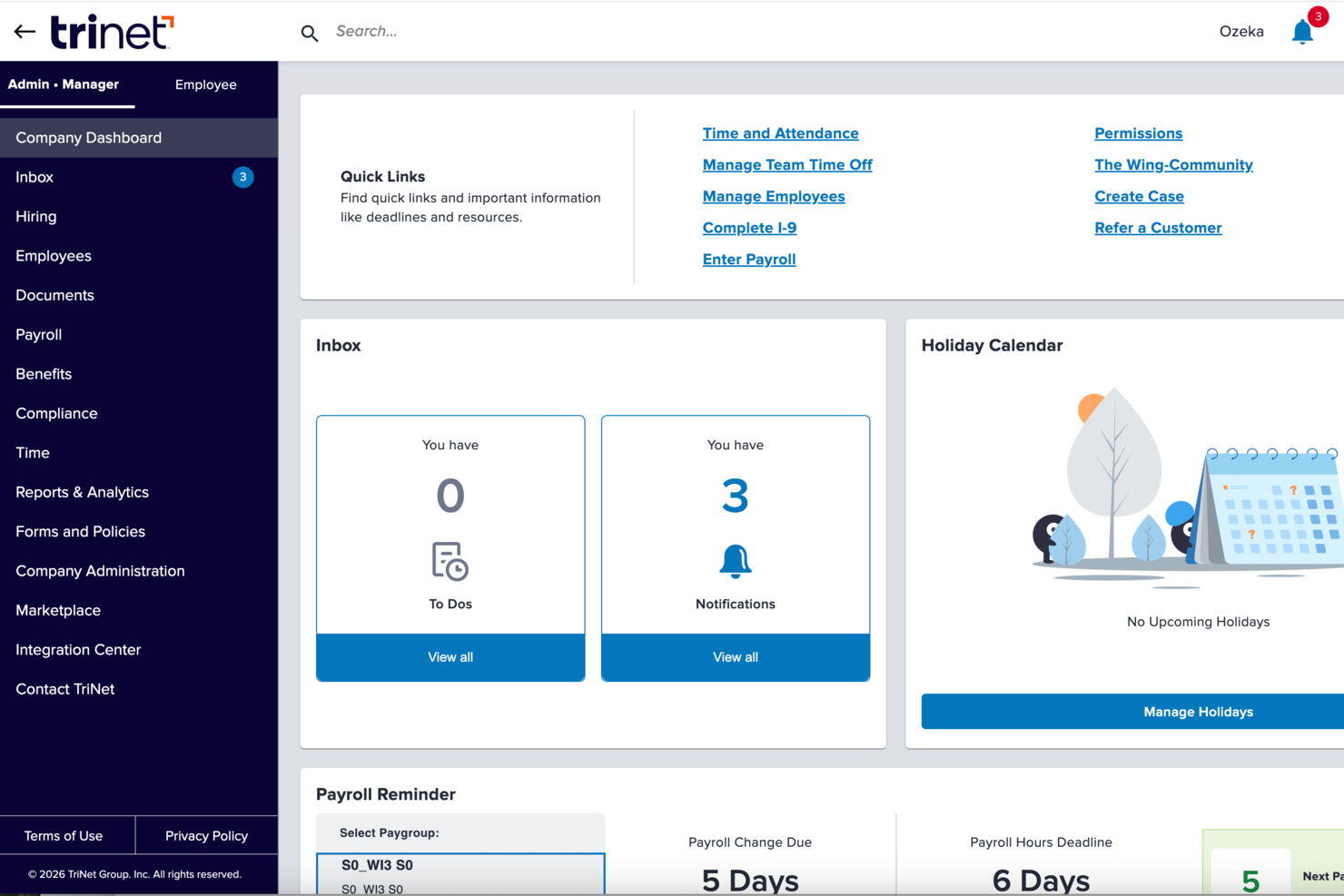
TriNet è una piattaforma di gestione delle risorse umane per piccole imprese che combina gestione paghe, amministrazione dei benefit, outsourcing HR, supporto per la conformità e strumenti di self-service per i dipendenti.
Per chi è più indicato TriNet?
TriNet è particolarmente adatto a piccole imprese che non dispongono di un team HR dedicato e necessitano di supporto esterno per la gestione di paghe, benefit e adempimenti normativi.
Perché ho scelto TriNet
TriNet si guadagna un posto nella mia selezione grazie al modo in cui gestisce l’outsourcing HR attraverso il suo modello PEO—che lo distingue dalle piattaforme HRMS tradizionali. Invece di fornire solo software per gestire autonomamente le risorse umane, TriNet opera come co-datore di lavoro, il che significa che il suo team si occupa insieme a te di gestione paghe, amministrazione dei benefit e conformità normativa. Apprezzo in particolare il monitoraggio della conformità multi-stato, che tiene traccia dei cambiamenti normativi in tutti e 50 gli stati e segnala quali sono rilevanti per le tue sedi. Per le piccole imprese che assumono in più stati, questo offre un livello di tutela aggiuntivo. La copertura EPLI e l’accesso a una linea diretta legale attraverso il piano PEO sono caratteristiche che non trovi nella maggior parte degli strumenti HRMS.
Caratteristiche principali di TriNet
- Onboarding digitale e firme elettroniche: Configura nuovi assunti con flussi di lavoro di onboarding automatizzati e firma digitale dei documenti, riducendo la burocrazia e l'inserimento manuale dei dati.
- Monitoraggio ore e ferie: Tieni traccia in tempo reale di ore lavorate, pause e richieste di permessi tramite la piattaforma o l'app mobile.
- Strumenti per l’iscrizione ai benefit: I dipendenti possono confrontare i piani fianco a fianco e iscriversi tramite un portale self-service, con supporto per la gestione ACA e COBRA incluso.
- Report paga su richiesta: Genera report paghe dettagliati e visualizzazioni dati su richiesta, con integrazione diretta negli strumenti contabili come QuickBooks Online.
Integrazioni TriNet
TriNet offre integrazioni native con Oracle Netsuite, Sage Intacct, Greenhouse, Lever, BambooHR, Lattice e altri. TriNet fornisce anche un'API per integrazioni personalizzate.
Pros and Cons
Pros:
- L'app mobile offre accesso in tempo reale ai dati HR
- Favorisce la conformità alle normative HR in evoluzione
- Semplifica assunzione e trattenimento del personale con risorse esperte
Cons:
- Segnalate alcune difficoltà nell'elaborazione delle paghe
- Spesso necessarie richieste di supporto per attività di base

Ideale per l'automazione delle paghe e le integrazioni

Paylocity è una piattaforma HRMS per piccole aziende che unisce elaborazione delle paghe, gestione delle risorse umane, rilevazione delle presenze, amministrazione dei benefit e strumenti per la conformità in un unico sistema.
Per Chi È Ideale Paylocity?
Paylocity è adatto a piccole e medie imprese che necessitano di una piattaforma unificata per la gestione di HR e paghe con possibilità di crescita.
Perché Ho Scelto Paylocity
Paylocity si guadagna un posto nella mia shortlist per la qualità con cui l'automazione delle paghe gestisce i dettagli che possono creare problemi a piccoli team HR. Apprezzo particolarmente il Payroll Readiness Dashboard, che mette in evidenza le attività critiche prima della giornata di elaborazione ed esegue oltre 40 controlli per segnalare problematiche come picchi di paga inattesi prima dell'invio. Le ore lavorate e le allocazioni del lavoro fluiscono direttamente dal modulo Time & Labor alle paghe, quindi non è necessario reinserirle manualmente tra sistemi diversi. Dal lato integrazioni, Paylocity si collega a piattaforme ATS, provider di benefit e 401(k), sistemi ERP e strumenti di identità come Okta e Microsoft Entra—oltre ad API aperte per connessioni personalizzate.
Caratteristiche Principali di Paylocity
- Supporto alle decisioni sui benefit: Lo strumento di Supporto alle Decisioni sui Benefit di Paylocity offre raccomandazioni personalizzate sui piani ai dipendenti in base alle loro preferenze e situazioni individuali durante l'iscrizione aperta.
- Geolocalizzazione fiscale: Paylocity verifica la posizione di ciascun dipendente per assicurarsi che paghino le tasse corrette, con il supporto di un team registrato IRS Reporting Agent in tutti i 50 stati.
- Pagamento su richiesta: I dipendenti possono accedere ai salari maturati prima del giorno di paga, fornendo così alle piccole aziende uno strumento di recruiting e retention senza impatti sul flusso di cassa delle paghe.
- Mappatura generale della contabilità: Configura le impostazioni del piano dei conti, crea registrazioni contabili e genera report personalizzati direttamente dalla piattaforma senza dover contattare il supporto Paylocity.
Integrazioni di Paylocity
Paylocity offre integrazioni native con ADP, QuickBooks, NetSuite, Okta, Microsoft Entra e diversi provider di benefit e 401(k). Un'API è disponibile per integrazioni personalizzate.
New Product Updates from Paylocity

Paylocity Expands Expense and Purchase Request Tools
Paylocity adds connected personal cards, smarter expense categorization, and a streamlined purchase request experience. This reduces manual entry and helps finance teams manage expenses and approvals more efficiently. For more information, visit Paylocity’s official site.
 .
.
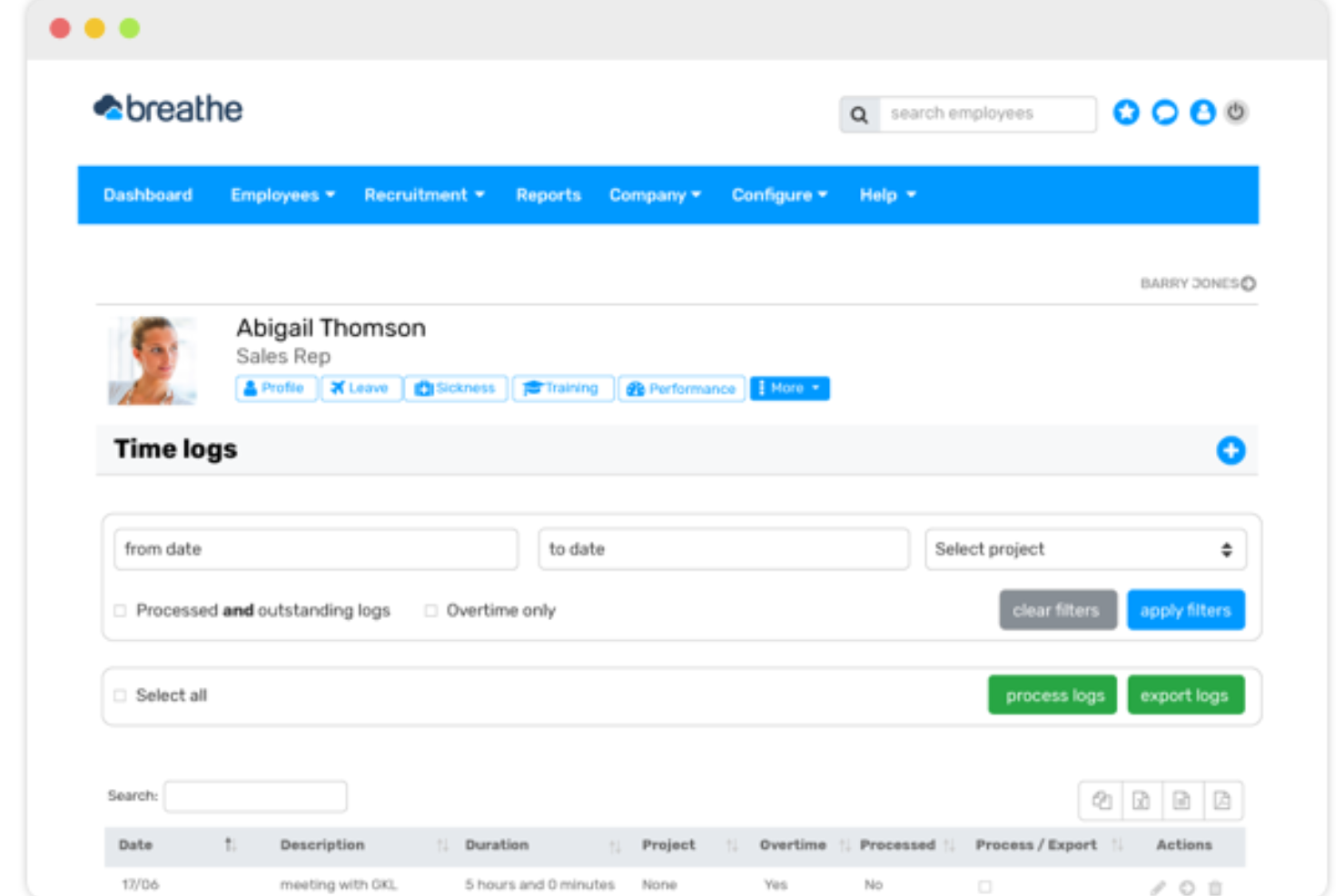
Breathe HR è un sistema di gestione delle risorse umane per piccole imprese che riunisce registri dei dipendenti, gestione dei documenti, monitoraggio delle assenze e gestione delle prestazioni in un'unica piattaforma.
Per Chi è Breathe HR?
Breathe HR è ideale per le piccole aziende con sede nel Regno Unito che hanno bisogno di una soluzione semplice per gestire le attività di amministrazione HR senza un team HR dedicato.
Perché Ho Scelto Breathe HR
Breathe HR si guadagna il suo posto tra i migliori della mia selezione per la gestione centralizzata della documentazione HR nelle piccole aziende. Mi piace che si possano archiviare documenti illimitati—contratti, politiche di conformità, valutazioni delle prestazioni—tutto in un'unica posizione conforme al GDPR, senza preoccuparsi di raggiungere un limite di spazio. Trovo particolarmente utile la funzione di firma elettronica: puoi inviare un contratto direttamente tramite Breathe, aggiungere più firmatari e ottenere una traccia di audit automatica con data, ora e indirizzi IP memorizzati per ogni firma. C'è anche una funzione di tracciamento delle letture che mostra esattamente chi ha aperto e chi non ha aperto un documento aziendale condiviso, così puoi inviare promemoria mirati senza alcun inseguimento manuale.
Caratteristiche Principali di Breathe HR
- Monitoraggio ferie e assenze: Gestisci richieste di ferie, registri di malattia e saldi di permessi con una vista calendario condivisa e flussi di approvazione istantanea.
- Avvisi di soglia per malattie: Imposta soglie personalizzate per il punteggio Bradford Factor o limiti sul numero di episodi di malattia, e Breathe ti notifica automaticamente al raggiungimento dei limiti da parte di un dipendente.
- Gestione delle prestazioni: Pianifica incontri individuali, organizza colloqui di valutazione e assegna obiettivi e compiti ai dipendenti direttamente dalla piattaforma.
- Esportazione dati pronto per il libro paga: Esporta i dati HR in un formato pronto per il libro paga, riducendo l'inserimento manuale dei dati durante l'elaborazione delle retribuzioni.
Integrazioni di Breathe HR
Breathe HR offre integrazioni native con Xero e Google Workspace. È disponibile una API per integrazioni personalizzate.

Gusto
Ideale per la coordinazione tra paghe e benefit

Gusto è una piattaforma HRMS per piccole imprese che riunisce in un unico sistema gestione delle paghe, amministrazione dei benefit, onboarding, strumenti di conformità e gestione dei dipendenti.
Per chi è Gusto?
Gusto è ideale per i titolari di piccole imprese e generalisti delle risorse umane che necessitano di gestire insieme paghe e benefit senza un team HR dedicato.
Perché ho scelto Gusto
Gusto merita un posto nella mia shortlist perché paghe e benefit sono integrati in un unico flusso di lavoro. Quando aggiungi una nuova assunzione, l'iscrizione ai benefit inizia direttamente nel processo di onboarding—le detrazioni per assicurazione sanitaria, dentistica, oculistica e 401(k) vengono calcolate e sincronizzate con le buste paga. Gusto gestisce anche i rinnovi dell'iscrizione direttamente sulla piattaforma, inviando la documentazione ai fornitori così che il mio team non debba inseguire firme o monitorare scadenze. Le funzionalità paycheck splitter e Gusto Wallet aggiungono flessibilità, permettendo ai dipendenti di destinare una parte di ciascun stipendio su conti di risparmio senza lavoro amministrativo aggiuntivo.
Caratteristiche principali di Gusto
- Sistema di tracciamento delle candidature: Pubblica offerte di lavoro e traccia i candidati nel flusso di assunzione direttamente in Gusto, senza bisogno di uno strumento di recruiting separato.
- Rilevamento presenze mobile con geolocalizzazione: I dipendenti possono timbrare entrata e uscita dal proprio smartphone, con dati di posizione raccolti per verificare la presenza sul posto.
- Template per recensioni delle prestazioni: Gestisci valutazioni strutturate dei dipendenti utilizzando i modelli integrati, con richieste di feedback inviate ai revisori appropriati secondo programma.
- Sondaggi anonimi di feedback: Raccogli opinioni dei dipendenti tramite sondaggi integrati che mantengono anonime le risposte per incoraggiare feedback sinceri.
Integrazioni Gusto
Gusto offre oltre 140 integrazioni native, tra cui QuickBooks, Xero, 15Five, 7Shifts, Asana, Bench, Betterment at Work, Box, ApplicantPro e Checkr. È disponibile un'API per integrazioni personalizzate.
Pros and Cons
Pros:
- Esecuzione illimitata delle paghe ogni mese senza costi aggiuntivi.
- Paghe, benefit e risorse umane in un'unica piattaforma integrata.
- Offre onboarding self-service e archiviazione online di documenti fiscali e buste paga per collaboratori e dipendenti.
Cons:
- Le PMI che necessitano di moduli di conformità avanzata o soluzioni specifiche per settori di nicchia possono trovare Gusto limitante.
- Flessibilità limitata nella personalizzazione delle ritenute fiscali o configurazioni paghe non standard.
New Product Updates from Gusto
Gusto Adds Solo Advisory Tools and Mobile Money Features
Gusto adds Solo S-Corp Advisory Tools and Gusto Money on Mobile for tax guidance, invoicing, and bill payments. These updates help accountants advise solopreneurs and let users manage business finances from their phones. For more information, visit Gusto’s official site.

BambooHR®
Ideale per l'automazione e i flussi di lavoro semplificati

BambooHR è un sistema di gestione delle risorse umane per piccole imprese che integra archiviazione dei dati dei dipendenti, onboarding, monitoraggio delle assenze, automazione dei flussi di lavoro e reportistica in un'unica piattaforma.
Per chi è consigliato BambooHR?
BambooHR è adatto a piccole e medie imprese che necessitano di un sistema HR dedicato senza la complessità di un software a livello aziendale.
Perché ho scelto BambooHR
Ho scelto BambooHR tra i migliori grazie all'efficacia dei suoi flussi di lavoro automatizzati, che eliminano i colli di bottiglia delle approvazioni che rallentano i piccoli team HR. Quando arriva una richiesta di assenza o una promozione, BambooHR la inoltra automaticamente alla persona giusta per l'approvazione—senza catene di email né necessità di solleciti manuali. Apprezzo anche le checklist di onboarding automatiche, che assegnano i compiti ai membri del team interno appropriati non appena viene inserito un nuovo assunto, così nulla viene trascurato prima del primo giorno. In una piccola azienda dove spesso una sola persona gestisce tutte le risorse umane, una struttura così integrata fa davvero la differenza operativa.
Caratteristiche principali di BambooHR
- Sistema di tracciamento dei candidati: Gestisci annunci di lavoro, valuta i candidati e guidali attraverso il processo di selezione direttamente in BambooHR.
- Portale self-service per i dipendenti: I dipendenti possono aggiornare autonomamente le proprie informazioni personali, visualizzare i cedolini e richiedere ferie senza passare dalle risorse umane.
- Gestione delle prestazioni: Svolgi cicli di valutazione delle performance, imposta obiettivi e raccogli feedback dai colleghi all'interno della piattaforma.
- Report e dashboard personalizzati: Crea report in tempo reale sui dati della forza lavoro e visualizza le tendenze tramite dashboard configurabili.
Integrazioni BambooHR
BambooHR offre integrazioni native con ADP, Paylocity, QuickBooks, Slack, Greenhouse, Checkr e Indeed. Fornisce inoltre un'API per integrazioni personalizzate.
New Product Updates from BambooHR®

BambooHR Adds Manager Team View for Time & Attendance
BambooHR adds Manager Team View with live attendance statuses, insights, and workday details for hourly employees. This helps managers monitor teams and spot issues faster. For more information, visit BambooHR’s official site.
 .
.Altri HRMS per le PMI
Di seguito trovi un elenco di altri HRMS per le piccole imprese che non sono rientrati nella mia prime 10, ma che vale comunque la pena prendere in considerazione:
- Agendrix
Migliore HRMS per il monitoraggio delle ore di lavoro
- RemoFirst
Migliore HRMS per supportare team internazionali in crescita in oltre 170 paesi
- Sloneek
Ideale per centralizzare la gestione dei dipendenti
- Lattice
Ideale per feedback in tempo reale e gestione delle prestazioni
- HR Cloud
Ideale per un onboarding dei dipendenti automatizzato ma coinvolgente
- Eddy
Ideale per un elenco dettagliato dei dipendenti
- Sage HR
Ideale per la gestione della programmazione dei turni dei dipendenti
- Trinet
Ideale per la sua robusta app mobile
- Insperity
Il miglior software HRMS per piccole imprese negli Stati Uniti
- Qandle
Crea politiche aziendali con un software HR flessibile


Recensioni correlate di software HR
Se non hai ancora trovato ciò che cerchi, dai un’occhiata a questi altri strumenti correlati che abbiamo testato e valutato:
- Software HR
- Software per le buste paga
- Software per il reclutamento
- Servizi di datore di lavoro ufficiale
- Sistemi di gestione dei candidati
- Software per la gestione della forza lavoro
Come Valuto gli HRMS per le Piccole Imprese
Divido la mia valutazione tra requisiti di base che ogni HRMS per piccole imprese deve soddisfare—come gestione dei dati dei dipendenti, tracciamento delle ferie, e sincronizzazione con il payroll—e elementi differenzianti che distinguono i migliori strumenti dagli altri.
Funzionalità di Base (Requisiti Fondamentali per questa Lista)
Quando seleziono gli strumenti per la mia lista, valuto ciascuno su una scala da 0 (non offre la funzionalità) a 5 (eccelle in quest'area) per ogni funzionalità di base elencata sotto. Poi, calcolo il punteggio totale dello strumento in percentuale. Ogni strumento deve raggiungere un punteggio totale minimo del 65% per essere preso in considerazione.
- Database Dipendenti: Verifico se il sistema archivia la storia lavorativa, i contatti di emergenza, i documenti e i campi personalizzati in un unico hub ricercabile invece che in fogli di calcolo sparsi.
- Onboarding & Offboarding: Ogni strumento dovrebbe permetterti di costruire flussi di lavoro automatizzati—come invio di lettere d’offerta, raccolta di firme elettroniche e assegnazione di compiti per il primo giorno—senza dover inviare email manuali di follow-up.
- Ferie & Presenze: Valuto come funzionano le richieste di ferie, le politiche di maturazione e le catene di approvazione, in particolare per team che gestiscono diversi tipi di permessi su più sedi.
- Integrazione o Gestione Paghe: Che lo strumento gestisca le paghe internamente o si sincronizzi con provider come Gusto o QuickBooks, verifico la fluidità con cui ore, detrazioni e dati fiscali passano tra i sistemi.
- Gestione dei Benefit: Anche i piccoli team devono gestire piani sanitari e previdenza, quindi cerco flussi di iscrizione, integrazione con i fornitori e informazioni chiare e trasparenti sui piani, rivolte ai dipendenti.
- Conformità & Reportistica: Valuto la presenza di moduli di conformità integrati, tracce di audit e funzionalità di reportistica—come la generazione di report sulla forza lavoro o il monitoraggio dei tassi di completamento dei documenti.
Una volta ottenuta una lista di strumenti che soddisfano i criteri, considero cosa distingue ciascuna piattaforma.
Fattori Differenzianti (Cosa Distingue i Fornitori)
Ecco come confronto e metto in contrasto i diversi fornitori:
Funzionalità Speciali
Un portale self-service per i dipendenti fa davvero la differenza per i piccoli team: quando il personale può aggiornare il proprio indirizzo, scaricare le buste paga e inviare richieste di ferie dal proprio telefono, si riducono le domande di routine. Guardo anche se uno strumento include valutazioni delle prestazioni integrate e tracciamento degli obiettivi, poiché la maggior parte delle piccole imprese supera rapidamente i feedback informali. Il recruiting è un altro elemento che valuto; strumenti che permettono di pubblicare offerte di lavoro, valutare candidati e convertirli in schede dipendenti nello stesso sistema fanno risparmiare parecchio lavoro doppio di inserimento dati.
Oltre le Funzionalità
La trasparenza dei prezzi è molto importante per le piccole imprese, quindi verifico se i fornitori offrono tariffe chiare per dipendente al mese e punti di ingresso a basso impegno che si adattano man mano che assumi. Anche il supporto per le integrazioni è essenziale—il tuo HRMS deve connettersi a strumenti come QuickBooks, Xero, Slack o Google Workspace senza bisogno di sviluppi personalizzati. Valuto inoltre il supporto all’onboarding, in particolare se il fornitore propone wizard guidati o template per la migrazione dei dati, dato che la maggior parte dei piccoli team abbandona i fogli di calcolo e non può permettersi implementazioni lunghe mesi.
Come scegliere un HRMS per una PMI
Un HRMS può aiutarti a riunire tutte le funzioni fondamentali delle risorse umane in un unico sistema, per ottenere la massima efficienza. Per capire quale HRMS sia più adatto alle esigenze della tua piccola impresa, devi innanzitutto individuare gli utenti principali e documentare le loro difficoltà specifiche.
Mentre affronti il tuo processo di selezione del software, unico per la tua realtà, tieni presenti i seguenti aspetti:
- Quale problema stai cercando di risolvere - Inizia identificando le sfide che stai cercando di superare. Questo ti aiuterà a chiarire le caratteristiche e le funzionalità che l'HRMS deve offrire.
- Chi dovrà utilizzarlo - Per valutare costi e requisiti, considera chi utilizzerà il software e di quante licenze avrai bisogno. Per un HRMS, probabilmente vorrai fornire l'accesso a livello di dipendente a tutta la tua forza lavoro, con accessi speciali per gli amministratori delle risorse umane e i responsabili. Una volta chiarito questo aspetto, è inoltre utile classificare le esigenze dei diversi utenti per identificare le priorità principali per gli utenti avanzati, i responsabili e i dipendenti, assicurandoti che siano tutte soddisfatte.
- Con quali altri strumenti deve funzionare - Chiarisci quali strumenti stai sostituendo, quali rimarranno e con quali strumenti dovrai effettuare l'integrazione, come software per la gestione della formazione, applicazioni per l'accesso singolo o sistemi operativi di lavoro come Microsoft 365 o Google Workspace. Dovrai decidere se gli strumenti dovranno integrarsi tra loro o, in alternativa, se puoi sostituire più strumenti con un'unica piattaforma HR completa.
- Quali risultati sono importanti - Esamina le funzionalità che vuoi ottenere o migliorare e come misurerai il successo. Ad esempio, potresti voler introdurre funzionalità self-service per i dipendenti per ridurre le richieste amministrative o digitalizzare diversi processi di monitoraggio basati su documenti cartacei o Excel. Potresti confrontare le funzionalità dei software fino allo sfinimento, ma se non stai pensando ai risultati che vuoi raggiungere, potresti sprecare molto tempo prezioso.
- Come si integrerebbe nella tua organizzazione - Considera la scelta del software insieme ai flussi di lavoro e ai sistemi esistenti. Valuta cosa funziona bene e quali sono gli aspetti che stanno causando problemi e devono essere affrontati.
Ricorda che ogni azienda è diversa: non dare per scontato che un HRMS funzionerà per la tua organizzazione solo perché è popolare.
Che cos'è un HRMS?
I sistemi di gestione delle risorse umane (HRMS) sono strumenti software progettati per semplificare e automatizzare diverse funzioni delle risorse umane, come la gestione dei dati dei dipendenti, l'elaborazione delle buste paga, la gestione dei benefit e i processi di selezione. Forniscono una piattaforma centralizzata per archiviare e accedere alle informazioni sui dipendenti, semplificando le attività delle risorse umane e migliorando il processo decisionale.
Questo software aiuta le piccole aziende a gestire in modo efficiente una forza lavoro ridotta, garantendo la conformità alle leggi sul lavoro e riducendo il carico di lavoro manuale senza costare una fortuna. Utilizzando un HRMS, le piccole aziende possono concentrarsi maggiormente sulla crescita strategica e meno sugli oneri amministrativi.
Funzionalità di un HRMS
Scegliere il giusto sistema di gestione delle risorse umane (HRMS) è fondamentale per le piccole aziende che mirano a mantenere la conformità, migliorare la gestione dei dipendenti e concentrarsi sulla crescita. Il ruolo delle risorse umane nelle piccole aziende e nelle grandi imprese dipende fortemente dall'efficienza dei sistemi HRIS, che garantiscono operazioni e gestione dei dati semplificate.
Un HRMS efficace può semplificare diverse attività delle risorse umane, garantendo che le aziende operino in modo fluido ed efficiente. Ecco dieci funzionalità essenziali da considerare:
- Gestione del database dei dipendenti: il tuo HRMS funzionerà come un database centralizzato per archiviare tutte le informazioni sui dipendenti. Ciò garantisce che tutti i dati dei dipendenti siano organizzati e facilmente accessibili, facilitando la conformità alle normative sulla conservazione dei registri.
- Gestione delle buste paga: l'automazione delle buste paga riduce gli errori e la necessità di inserire manualmente i dati, rendendo il processo di elaborazione delle buste paga molto meno dispendioso in termini di tempo.
- Monitoraggio delle ore e delle presenze: questa funzionalità aiuta le organizzazioni a monitorare le ore dei dipendenti, gestire i costi del lavoro e rispettare le leggi sul lavoro relative agli straordinari e al numero di giorni consecutivi lavorati.
- Amministrazione dei benefit: un'amministrazione efficiente dei benefit aiuta ad attrarre e trattenere i talenti, contribuendo alla crescita complessiva dell'azienda. Inoltre, collegando direttamente i costi mensili dei benefit al modulo paghe, ridurrai l'inserimento manuale dei dati.
- Gestione delle prestazioni: questa funzionalità si riferisce agli strumenti per definire gli obiettivi e valutare le prestazioni dei dipendenti. Le valutazioni periodiche delle prestazioni contribuiscono a migliorare la produttività e a identificare le aree di sviluppo, favorendo il successo aziendale.
- Selezione e monitoraggio dei candidati: una selezione e un monitoraggio dei candidati efficienti garantiscono che l'azienda attragga rapidamente i talenti migliori. Molti sistemi sfruttano oggi funzionalità basate sull'IA che rendono il confronto delle competenze dei candidati con le descrizioni delle posizioni molto più efficiente ed equo.
- Gestione della conformità: i sistemi HRMS includono strumenti per monitorare e garantire la conformità legale. Questa funzionalità aiuta a evitare sanzioni e problemi legali, mantenendo l'azienda operativa senza intoppi.
- Portale self-service per i dipendenti: questa importante funzionalità consente ai dipendenti di accedere e gestire autonomamente le proprie informazioni HR, come i dati di contatto, le coordinate bancarie e le informazioni sui benefit. Dare ai dipendenti la possibilità di gestire i propri dati aumenta il coinvolgimento e riduce gli oneri amministrativi.
- Reportistica e analisi: i sistemi HRMS offrono modelli integrati di report e analisi per aiutare i team a prendere decisioni informate, ottimizzare le strategie HR e sostenere la crescita aziendale.
- Formazione e sviluppo: si tratta di strumenti per ospitare e monitorare i programmi di formazione interni dei dipendenti, che spesso includono un sistema interno di gestione dell'apprendimento (LMS). Per una piccola azienda, investire nello sviluppo dei dipendenti favorisce la creazione di una forza lavoro competente, ponendo le basi per l'espansione aziendale nel tempo.
Per le aziende che cercano maggiori opzioni di personalizzazione, esplorare software HR avanzati può offrire una gamma più ampia di funzionalità da adattare alle proprie esigenze.
Fai crescere la tua piccola azienda con le soluzioni HRMS
Far crescere una piccola azienda è complicato perché ci sono molti aspetti a cui i titolari devono prestare attenzione. Tuttavia, le soluzioni HRMS e gli altri software HR progettati per le piccole aziende rendono il processo più semplice. Molti di questi strumenti aiutano ad automatizzare le attività HR ripetitive, così puoi concentrarti su altri aspetti della tua azienda. Inoltre, aiutano a risparmiare tempo nelle attività di selezione, gestione dei talenti, inserimento e gestione della forza lavoro.
Ma soprattutto, il software HRMS può aiutare te e il tuo team a capire come crescere. Mary Karamanos, Vicepresidente senior delle Risorse umane presso BDC, ha dichiarato “Un errore comune commesso dalle aziende in crescita è non dedicare abbastanza tempo alla pianificazione delle proprie esigenze HR. […] La buona notizia è che le piccole aziende spesso attraggono dipendenti di talento perché possono offrire responsabilità stimolanti, buone opportunità di apprendimento e crescita personale.”
Cosa succede ora?
Se stai cercando un HRMS per piccole aziende, contatta gratuitamente un consulente SoftwareSelect per ricevere consigli.
Compili un modulo e fai una breve conversazione durante la quale il consulente approfondirà le tue esigenze specifiche. In seguito riceverai una selezione di software da valutare. Ti assisterà persino durante l'intero processo di acquisto, comprese le negoziazioni sul prezzo.