

I 10 migliori software per la gestione della formazione del 2026

10 Elenco dei migliori software per la gestione della formazione


Gestire la formazione dei dipendenti può essere un vero grattacapo. Devi coordinare i programmi, monitorare i progressi e cercare di dimostrare il ritorno sull’investimento. Non c’è da stupirsi che tu stia cercando un software che ti aiuti.
Secondo la mia esperienza, il software giusto per la gestione della formazione può fare una grande differenza. Mantiene il tuo team organizzato e garantisce che tutti siano sulla stessa lunghezza d’onda. Risparmierai tempo e ridurrai lo stress.
Ho esaminato e testato innumerevoli opzioni per offrirti le migliori. Questo articolo ti guiderà attraverso le scelte migliori, illustrando caratteristiche e vantaggi principali. Troverai una soluzione adatta alle esigenze del tuo team.
Perché fidarsi delle nostre recensioni sui software
Il nostro team testa e recensisce software dal 2012. In quanto esperti HR noi stessi, sappiamo quanto sia difficile — e importante — scegliere il software giusto.
Per questa guida, abbiamo valutato gli strumenti attraverso test pratici e ricerche indipendenti, assegnando un punteggio agli strumenti in base ai nostri criteri di selezione. Ci basiamo inoltre sulle competenze di leader di pensiero del settore e di professionisti HR attivi.
Le nostre recensioni riflettono il nostro giudizio editoriale umano, non un discorso di vendita.
Revisori esperti:
Riepilogo dei migliori software per la gestione della formazione
Questa tabella comparativa riassume i dettagli dei prezzi delle mie migliori selezioni di software per la gestione della formazione, per aiutarti a trovare quello più adatto al tuo budget e alle esigenze della tua azienda.
| Tool | Best For | Trial Info | Price | ||
|---|---|---|---|---|---|
| 1 | Il miglior software di gestione della formazione con funzionalità potenziate dall'IA | Demo gratuita disponibile | A partire da $5/dipendente/mese | Website | |
| 2 | Ideale per l’esperienza di utenti e amministratori | Prova gratuita di 30 giorni + demo gratuita disponibile | Da $3,97/utente/mese | Website | |
| 3 | Miglior software di gestione della formazione per la formazione interna | Demo gratuita + prova gratuita disponibile | Prezzo su richiesta | Website | |
| 4 | Ideale per assegnazioni formative basate sui ruoli | Piano gratuito + demo gratuita disponibile | Da $119/mese (fatturazione annuale) | Website | |
| 5 | Ideale per lo sviluppo delle competenze all'interno di un LMS nativo per HR | Demo gratuita disponibile | A partire da $8/utente/mese | Website | |
| 6 | Ideale per la formazione su nuovi processi/nuovi sistemi | Demo gratuita disponibile | Prezzo su richiesta | Website | |
| 7 | Ideale per il roleplay con coaching AI | Prova gratuita disponibile | Da $239/mese (80 utenti) | Website | |
| 8 | Ideale per la pianificazione automatizzata dei corsi | Prova gratuita disponibile | Da $105/mese (fatturazione annuale) | Website | |
| 9 | Ideale per la creazione di programmi di onboarding e percorsi di apprendimento | Demo gratuita disponibile | Prezzi su richiesta | Website | |
| 10 | Ideale per la distribuzione multilingue dei corsi | Demo gratuita disponibile | Prezzo su richiesta | Website |


Recensioni dei migliori software per la gestione della formazione
Di seguito trovi i miei riepiloghi dettagliati dei migliori software per la gestione della formazione inclusi nel mio elenco. Le mie recensioni offrono uno sguardo approfondito alle caratteristiche principali, ai pro e contro, alle integrazioni e ai casi d’uso ideali di ogni strumento, per aiutarti a trovare quello più adatto a te.

Deel HR
Il miglior software di gestione della formazione con funzionalità potenziate dall'IA

Deel HR aiuta i team HR globali e i responsabili delle risorse umane a gestire formazione dei dipendenti, conformità e sviluppo delle competenze in un'unica piattaforma, rendendo più semplice migliorare le competenze di una forza lavoro distribuita e monitorare i progressi in più sedi.
Per chi è ideale Deel HR?
Deel HR è particolarmente indicato per i team HR di aziende di medie e grandi dimensioni che gestiscono formazione e sviluppo su forza lavoro internazionale o remota.
Perché ho scelto Deel HR
Ho incluso Deel HR tra le mie scelte migliori perché le sue capacità di intelligenza artificiale vanno ben oltre la semplice automazione: sono integrate direttamente nel flusso di lavoro di formazione e gestione dei talenti. Mi piace soprattutto come Deel AI possa creare librerie di competenze, contenuti di formazione e feedback in pochi minuti, attingendo da una base di conoscenza creata da esperti HR e di compliance in oltre 150 paesi. È un vero vantaggio quando si devono costruire programmi di apprendimento per team distribuiti e non si vuole partire da zero ogni volta. Il modulo Engage collega inoltre l'apprendimento direttamente a valutazioni delle performance, piani di sviluppo carriera e OKR, così la formazione non rimane isolata dal resto della strategia sulle persone.
Caratteristiche principali di Deel HR
- Assegnazione dei percorsi di apprendimento: Assegna ai dipendenti percorsi di formazione strutturati in base a ruolo, sede o reparto.
- Monitoraggio della formazione obbligatoria: Segui il completamento dei corsi di conformità e delle certificazioni obbligatorie in tutta la forza lavoro.
- Portale self-service per i dipendenti: Permetti ai dipendenti di accedere ai materiali formativi, monitorare autonomamente i propri progressi e aggiornare il profilo.
- Dashboard dell'analisi del personale: Visualizza i dati sulla formazione, le carenze di competenze e le tendenze di sviluppo della forza lavoro da un'unica vista reportistica centralizzata.
Integrazioni di Deel HR
Le integrazioni includono FaceUp, Snowflake, DefensX, Microsoft Finance, Kintsugi, ReFresh OS, Revo.ai, Keeper, Human Interest ed Everyminute.
Pros and Cons
Pros:
- Integrazione senza interruzioni con Deel HR
- Automatizza i flussi di lavoro della formazione
- Interfaccia intuitiva drag-and-drop
Cons:
- Curva di apprendimento per i nuovi utenti
- Potrebbe offrire più opzioni di personalizzazione
New Product Updates from Deel HR

Deel Expands Stablecoin Wallet to 80+ Countries
Deel expands its Stablecoin Wallet to 80+ countries with dollar-backed balances and optional rewards. This gives eligible contractors more ways to hold and manage earnings inside Deel. For more information, visit Deel’s official site.
 .
.
Ideale per l’esperienza di utenti e amministratori

iSpring LMS è una piattaforma di gestione della formazione basata su cloud per le organizzazioni che desiderano sviluppare le competenze dei dipendenti con corsi interattivi, percorsi di apprendimento automatizzati e monitoraggio dei progressi in tempo reale.
Per chi è pensato iSpring LMS?
iSpring LMS è particolarmente adatto per aziende di medie e grandi dimensioni che necessitano di una piattaforma semplice per offrire e gestire programmi di sviluppo delle competenze dei dipendenti su larga scala.
Perché ho scelto iSpring LMS
iSpring LMS si è guadagnato il suo posto nella mia shortlist per l’equilibrio con cui gestisce l’esperienza sia dell’utente che dell’amministratore, senza compromettere la profondità delle funzioni. Mi piace molto il pannello di amministrazione: offre una panoramica chiara dei tassi di completamento dei corsi, dei progressi individuali e delle performance a livello di reparto, tutto in un unico posto. Dal lato utente, l’app mobile consente ai membri del team di riprendere la formazione a metà corso su qualsiasi dispositivo, mantenendo attivo il percorso di apprendimento anche fuori dall’ufficio. Un’altra funzione su cui faccio affidamento sono le regole di iscrizione automatica, che permettono di assegnare percorsi di apprendimento specifici in base al ruolo o al reparto, senza dover configurare tutto manualmente ogni volta.
Funzionalità principali di iSpring LMS
- Piani di sviluppo individuali: Crea piani di crescita personalizzati e specifici per ruolo, assegnando a ciascun dipendente compiti e traguardi mirati.
- Feedback a 360 gradi: Raccogli valutazioni strutturate da colleghi, manager e diretti riporti per analizzare le competenze e individuare gap di formazione.
- Gamification: Assegna punti e badge, mostra i progressi degli utenti nelle classifiche per incentivare il completamento dei corsi e l’impegno nella formazione.
- Creazione corsi con intelligenza artificiale: Genera testi per i corsi, domande per i quiz e immagini grazie a un assistente AI integrato direttamente nell’LMS.
Integrazioni di iSpring LMS
Le integrazioni includono Salesforce, MS Azure, MS Exchange, BambooHR, Udemy, Go1, LinkedIn Learning e altre librerie di corsi popolari.
Pros and Cons
Pros:
- Funziona su dispositivi mobili sia online che offline
- Facile creazione di workflow per l’onboarding
- Include una knowledge base
Cons:
- Sarebbero utili più integrazioni software
- Listino prezzi complesso (molte opzioni aggiuntive)
New Product Updates from iSpring LMS

iSpring LMS Adds Multiple Observations to OJT Sessions
iSpring LMS now lets managers log multiple observations within one OJT session, grouping visits and auto-generating summary stats like averages, criterion results, and comparisons. For more information, visit iSpring LMS's official site.

Absorb
Miglior software di gestione della formazione per la formazione interna
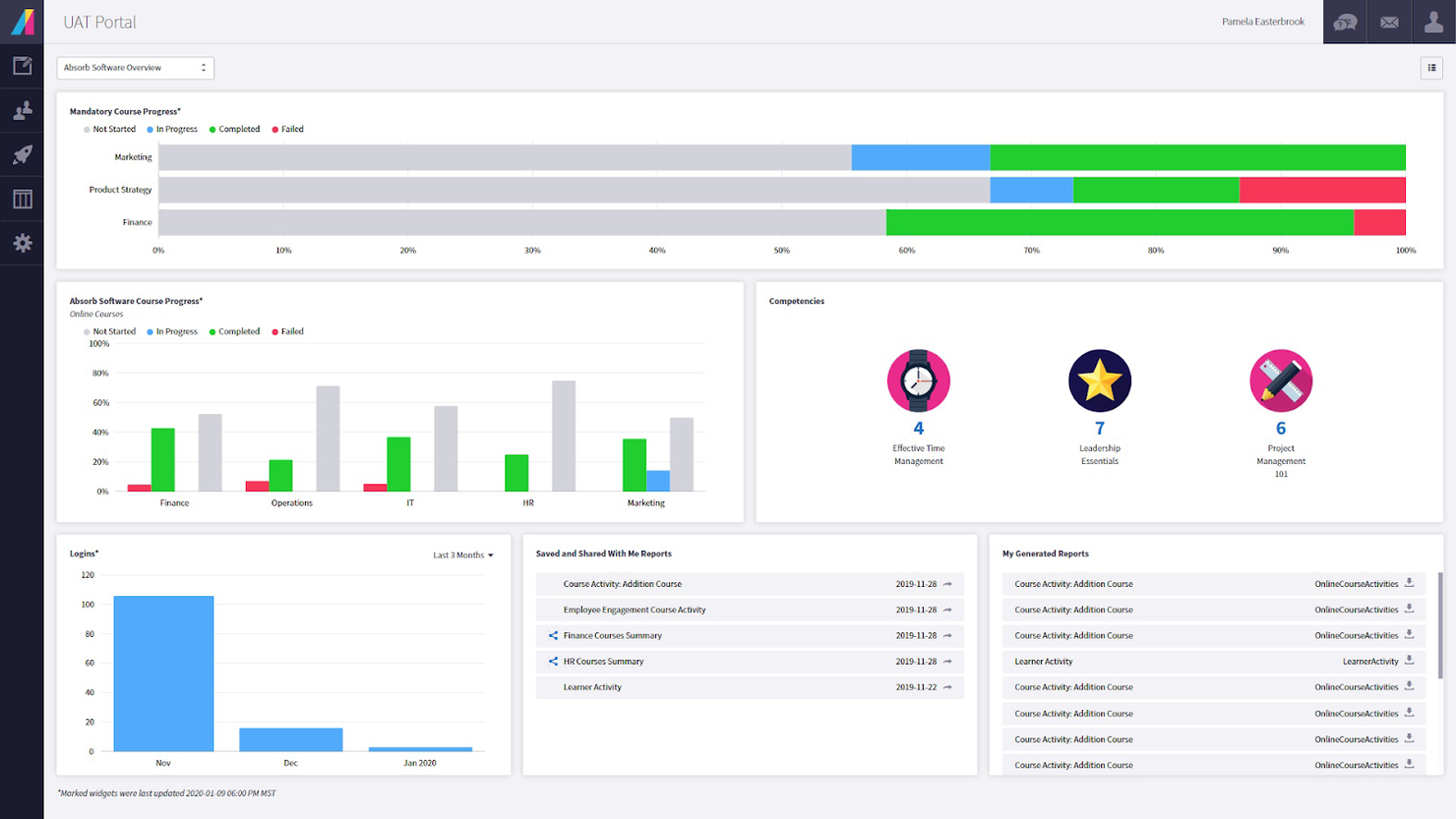
Absorb è una piattaforma di gestione dell'apprendimento progettata per le organizzazioni che desiderano offrire, monitorare e gestire programmi di sviluppo delle competenze per dipendenti, partner o clienti in diversi settori.
Per chi è ideale Absorb?
Absorb è particolarmente adatto per organizzazioni di medie e grandi dimensioni con team dedicati L&D che gestiscono programmi strutturati di formazione interna su larga scala.
Perché ho scelto Absorb
Absorb è una delle piattaforme più complete che abbia mai visto per la gestione della formazione interna su larga scala. Ciò che mi piace particolarmente è Absorb Skills, che consente ai dipendenti di autovalutarsi su 200 competenze e migliaia di abilità, assegnando automaticamente corsi per colmare le lacune. Questo tipo di percorso formativo, basato sul ruolo e sugli obiettivi, è esattamente ciò di cui i team L&D interni hanno bisogno quando cercano di potenziare realmente le capacità della forza lavoro. Apprezzo anche la funzione Intelligent Assist, che permette agli amministratori di generare report utilizzando comandi in linguaggio naturale: invece di cercare nei dashboard, si può digitare 'mostrami tutti gli utenti che non hanno completato la formazione sulla leadership' e ricevere un report già compilato.
Funzionalità principali di Absorb
- Strumenti per la creazione di corsi: Crea e pubblica contenuti formativi direttamente sulla piattaforma utilizzando una suite integrata di creazione corsi.
- Iscrizione automatica: Assegna corsi ai partecipanti in modo automatico in base al ruolo, dipartimento, o regole personalizzate.
- Gestione certificazioni: Emissione, monitoraggio e rinnovo delle certificazioni con promemoria automatici di scadenza.
- Apprendimento mobile: Gli utenti possono accedere ai contenuti formativi da qualsiasi dispositivo, incluso l'accesso offline tramite l'app mobile.
Integrazioni di Absorb
Le integrazioni includono ADP, BambooHR, Namely, Workday, SAP SuccessFactors, UKG Pro, Dayforce, Salesforce, HubSpot e Zoom.
Pros and Cons
Pros:
- Apprendimento online e offline
- Ottime opzioni di personalizzazione e localizzazione
- Assistenza clienti reattiva
Cons:
- I filtri di ricerca non sono molto specifici
- Il sistema ha una curva di apprendimento
New Product Updates from Absorb
Absorb Aura Adds Claude and ChatGPT Connections
Absorb Aura now connects to Claude or ChatGPT via MCP, enabling users to ask questions about their learning and the LMS directly inside the AI tool after a simple setup. For more information, visit Absorb's official site.
 .
.
Ideale per assegnazioni formative basate sui ruoli
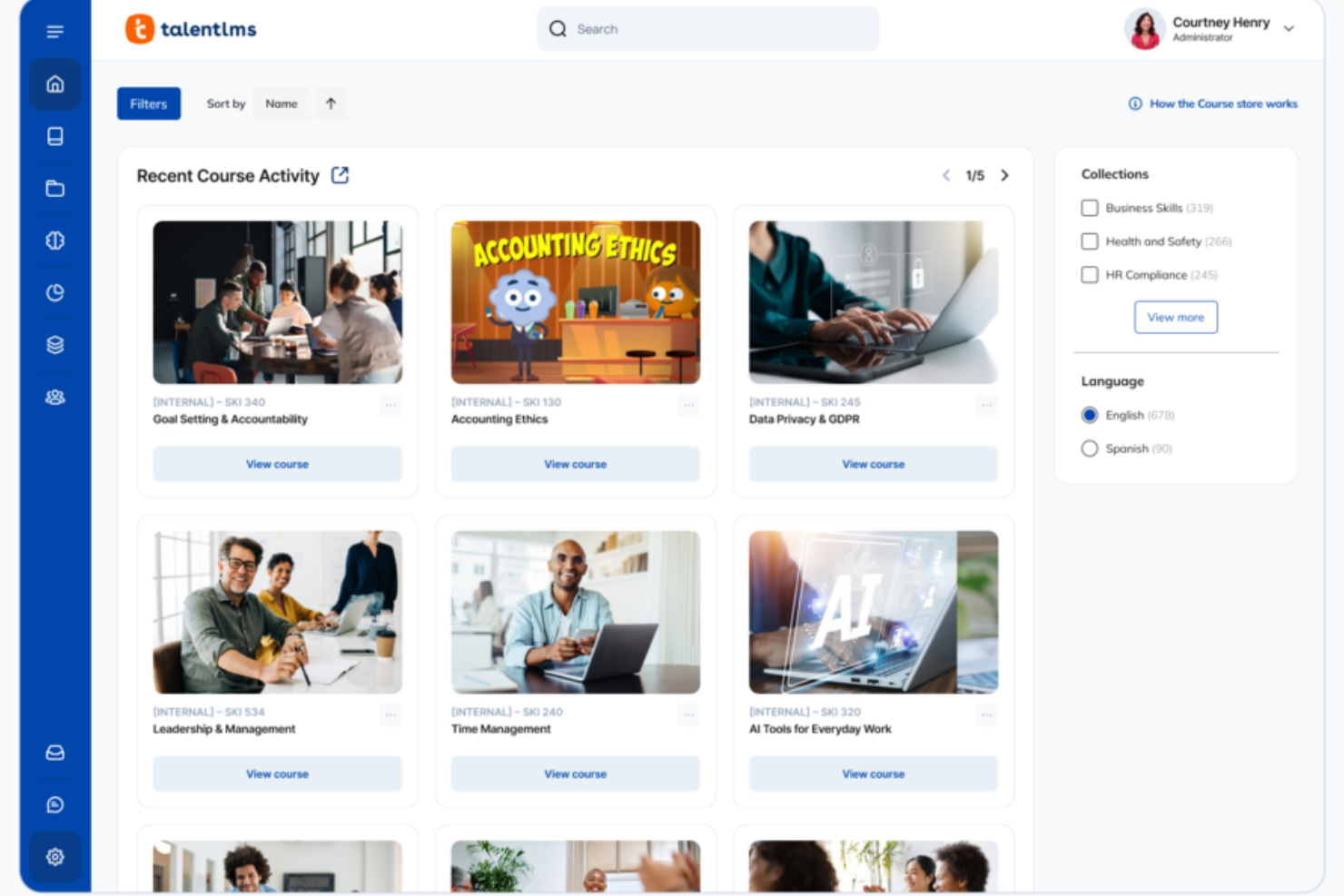
TalentLMS offre ai team HR e ai responsabili della formazione una piattaforma flessibile per creare, erogare e monitorare programmi di sviluppo delle competenze per dipendenti, partner o clienti, consentendo alle risorse umane di gestire la formazione su larga scala tra ruoli e reparti.
Per chi è ideale TalentLMS?
TalentLMS è particolarmente adatto alle aziende di medie dimensioni che devono formare diversi gruppi di dipendenti, come team di vendita, personale di assistenza clienti o nuovi assunti, all'interno di un unico sistema.
Perché ho scelto TalentLMS
TalentLMS si guadagna il suo posto nella mia lista grazie all'efficacia nella gestione delle assegnazioni di formazione basate sui ruoli su larga scala. Apprezzo in particolare la funzione Branches, che consente di creare portali di formazione separati per diversi team o reparti—così i team di vendita e di assistenza clienti possono avere ciascuno un ambiente di apprendimento costruito sulle proprie esigenze specifiche di competenze, tutto gestito da una vista amministrativa centrale. Il sistema di ruoli e permessi personalizzati permette di controllare esattamente cosa ogni tipo di utente può vedere e fare, mantenendo la formazione mirata e pertinente. La mappatura delle competenze potenziata dall’IA completa il quadro, abbinando automaticamente i corsi ai gap di competenze, eliminando la necessità di stabilire manualmente i bisogni formativi.
Caratteristiche chiave di TalentLMS
- Gamification: Aggiungi punti, badge, livelli e classifiche ai corsi per aumentare la motivazione e il coinvolgimento degli utenti durante i programmi di formazione.
- Valutazioni e certificazioni: Crea quiz, sondaggi e compiti per misurare i progressi delle competenze e rilascia certificati personalizzati che possono essere impostati per scadere e rinnovarsi.
- Automazioni: Attiva automaticamente azioni formative in base al comportamento degli utenti, come il completamento dei corsi, l’inattività o la scadenza di un certificato.
- TalentLibrary: Accedi a una libreria integrata con oltre 1.000 corsi realizzati da esperti che i discenti possono seguire subito per costruire competenze rilevanti per il lavoro.
Integrazioni di TalentLMS
Le integrazioni includono BambooHR, Salesforce, TalentHR, Sage People, Intercom, ADP Workforce Now, Zendesk Chat, Zoom, Microsoft Teams e GoTo.
Pros and Cons
Pros:
- Valutazioni integrate supportano la misurazione delle competenze e la certificazione.
- Gli strumenti AI accelerano la creazione dei corsi per esigenze formative in rapido cambiamento.
- Le chiare funzionalità di raggruppamento degli utenti supportano strutture di formazione complesse.
Cons:
- I file multimediali di grandi dimensioni possono richiedere soluzioni di hosting esterne.
- Gli strumenti collaborativi integrati sono basilari rispetto alle community di apprendimento dedicate.
New Product Updates from TalentLMS
TalentLMS Adds Learning Paths, AI Video, and Learner Experience Updates
TalentLMS introduced updates across learning management, content creation, and learner experience, including Learning Paths for Groups, AI video generation in TalentCraft, video bookmarking, and expanded administration tools. For more information, visit TalentLMS’s official site.

Ideale per lo sviluppo delle competenze all'interno di un LMS nativo per HR
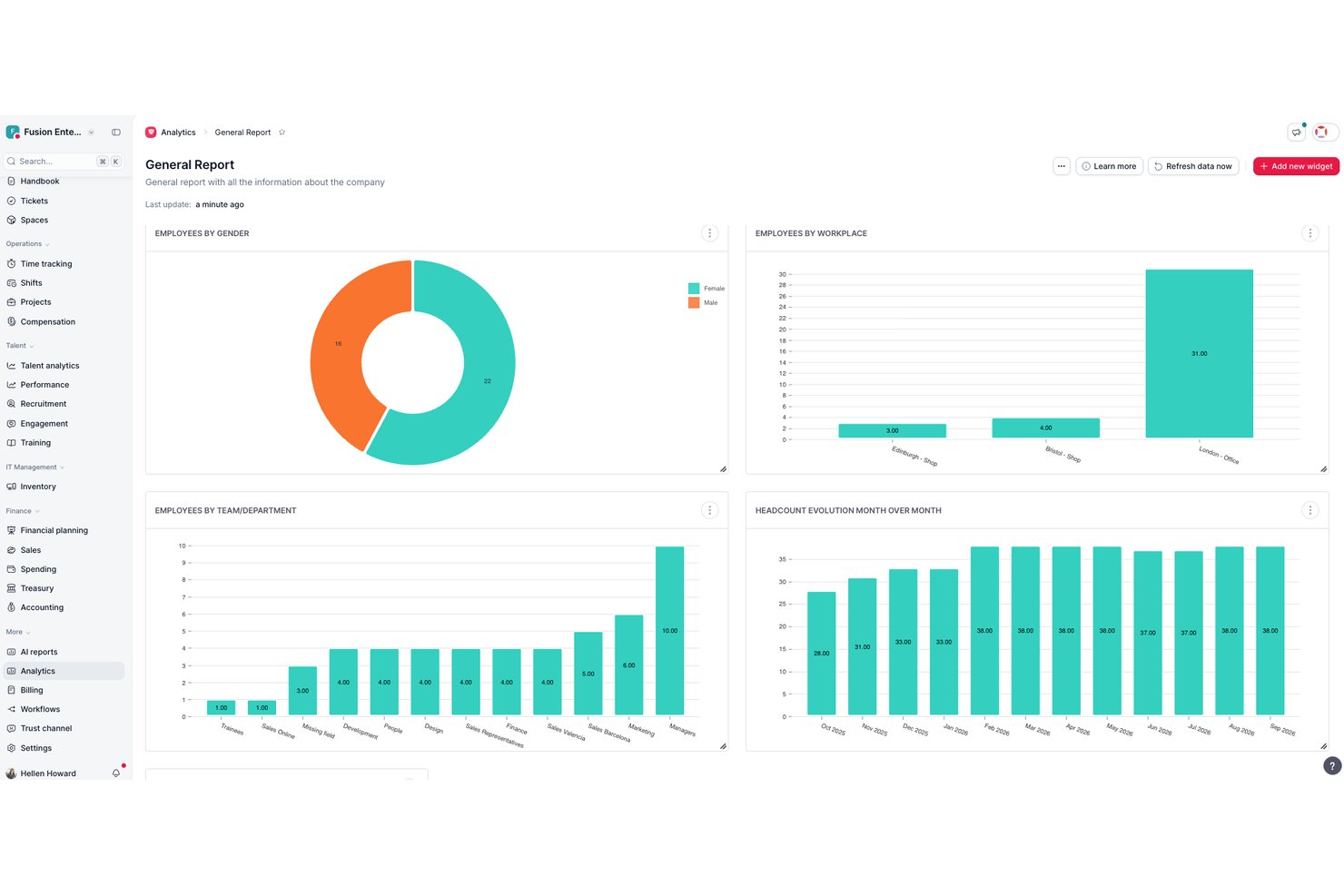
Factorial è una piattaforma HR con un modulo integrato di gestione della formazione che include la pianificazione dei corsi, l'automazione delle iscrizioni, il supporto ai contenuti SCORM, la creazione di corsi basata sull'IA, il monitoraggio delle competenze e i sondaggi sull'efficacia post-formazione.
Per chi è più adatto Factorial?
Factorial è adatto ai team guidati dalle risorse umane di aziende piccole e medie che desiderano integrare la formazione e lo sviluppo delle competenze direttamente nei principali flussi di lavoro HR.
Perché ho scelto Factorial
Ho scelto Factorial come una delle migliori soluzioni perché il suo modulo di formazione è integrato nativamente nello stesso sistema HR che gestisce i dati dei dipendenti, i profili delle competenze e le valutazioni delle prestazioni. Apprezzo in particolare il modo in cui l'iscrizione automatica basata su regole mantiene aggiornati gli elenchi degli iscritti ai corsi senza interventi manuali e in cui la creazione di corsi basata sull'IA trasforma i PDF esistenti in moduli didattici strutturati con valutazioni. Il monitoraggio delle competenze è direttamente collegato alla pianificazione della formazione, così le lacune nelle competenze individuate durante un ciclo di valutazione possono essere colmate immediatamente con corsi mirati.
Funzionalità principali di Factorial
- Importazione di contenuti SCORM: gli amministratori possono caricare corsi basati su SCORM direttamente nel modulo di formazione di Factorial per utilizzarli su dispositivi desktop e mobili.
- Libreria dei corsi Factorial Campus: una raccolta integrata di corsi preconfezionati e pronti per l'attivazione riduce il carico di creazione dei contenuti per i team più piccoli di formazione e sviluppo.
- Monitoraggio dei costi della formazione: gli amministratori possono monitorare le spese e i budget della formazione per entità giuridica, con criteri di approvazione delle spese integrati nella piattaforma.
- Integrazione con Microsoft Power BI: collega i dati sul completamento e sull'efficacia della formazione a Power BI per creare dashboard di reportistica avanzata e personalizzabile.
Integrazioni di Factorial
Factorial offre integrazioni native con QuickBooks e Monday.com, oltre a Sage, DATEV, Microsoft Business Central e Microsoft Power BI. Fornisce inoltre un'API REST pubblica, webhook e connettività con Zapier per integrazioni personalizzate.
Pros and Cons
Pros:
- I dati della formazione e delle risorse umane sono completamente unificati
- Gli elenchi degli iscritti ai corsi si aggiornano automaticamente in base agli attributi dei dipendenti
- Supporta la creazione di corsi SCORM e basati sull'IA
Cons:
- Non consente di monitorare la scadenza o il rinnovo delle certificazioni
- Non dispone di integrazioni native con strumenti per riunioni video

SkyPrep
Ideale per la formazione su nuovi processi/nuovi sistemi

SkyPrep è una piattaforma di gestione della formazione basata su cloud, pensata per i team HR e i responsabili aziendali che devono offrire, monitorare e gestire programmi di sviluppo delle competenze per dipendenti che si adattano a nuovi ruoli, strumenti o processi.
Per chi è ideale SkyPrep?
SkyPrep è particolarmente adatto alle organizzazioni di medie dimensioni che necessitano di un modo semplice per formare i dipendenti tra diversi reparti senza dover fare affidamento su un team L&D dedicato.
Perché ho scelto SkyPrep
Ho scelto SkyPrep come uno dei migliori perché gestisce la formazione su nuovi processi e sistemi in modo mirato per i cambiamenti operativi. Mi piace come si possano creare percorsi di apprendimento strutturati che guidano i dipendenti attraverso un nuovo strumento o un nuovo flusso di lavoro passo dopo passo, con quiz e valutazioni integrati per verificare la comprensione prima di procedere. Il mio team utilizza anche la funzione di assegnazione automatica della formazione, che avvia il corso giusto per il dipendente giusto non appena viene registrato un cambiamento di ruolo o di processo—senza necessità di follow-up manuale.
Caratteristiche principali di SkyPrep
- Gamification: Aggiungi punti, badge e classifiche ai corsi per mantenere alto il coinvolgimento dei partecipanti durante i programmi di formazione.
- Report e analisi: Accedi a dashboard preimpostate che monitorano i progressi dei partecipanti, i tassi di completamento dei corsi e i punteggi delle valutazioni.
- Creazione di contenuti con intelligenza artificiale: Utilizza gli strumenti AI di SkyPrep per generare e ottimizzare contenuti dei corsi direttamente all'interno della piattaforma.
- LMS multi-tenant: Gestisci portali di formazione separati per diversi reparti, marchi o gruppi di clienti da un unico account.
Integrazioni di SkyPrep
Le integrazioni includono ADP, Workday, BambooHR, Salesforce, HubSpot, Zoom, Microsoft Teams, Stripe, PayPal e GoToMeeting.
Pros and Cons
Pros:
- Ottimi strumenti per la creazione dei corsi
- Assistenza clienti reattiva
- Facile da configurare e apprendere
Cons:
- Sottotitoli automatici dei video disponibili solo nel piano più costoso
- Piani tariffari non pubblicati pubblicamente

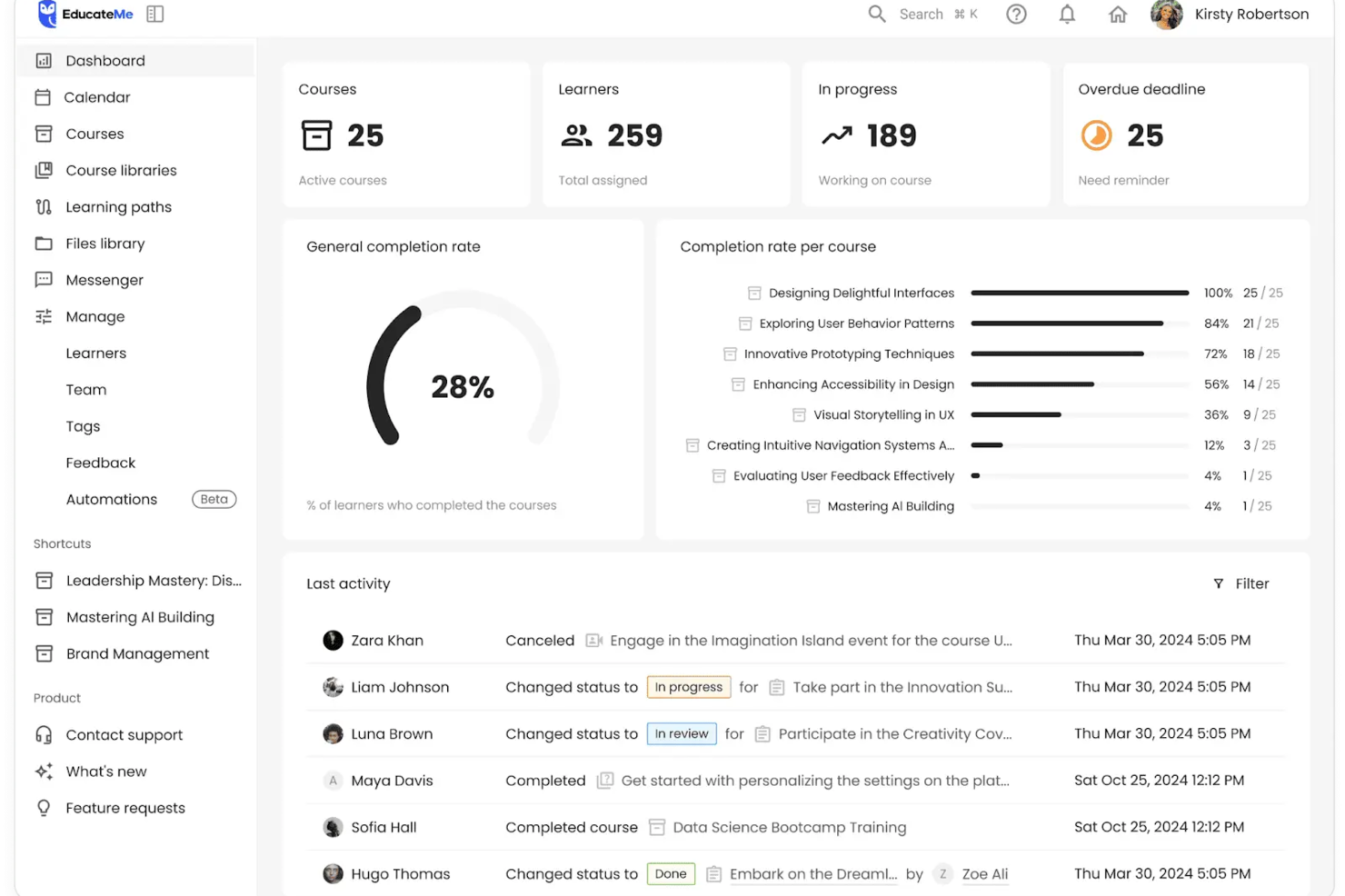
EducateMe LMS è una piattaforma di gestione della formazione per organizzazioni ed educatori che offre esperienze di apprendimento interattive, incentrate sulle competenze, e consente di monitorare in tempo reale i progressi di dipendenti o studenti.
Per chi è più indicato EducateMe LMS?
EducateMe LMS è adatto a team L&D e responsabili della formazione di aziende di medie dimensioni che necessitano di un modo strutturato e scalabile per creare ed erogare programmi di apprendimento basati sulle competenze.
Perché ho scelto EducateMe LMS
EducateMe LMS si guadagna un posto nella mia lista di preferiti grazie alla qualità con cui il coach AI per le simulazioni di roleplay gestisce situazioni di esercitazione impossibili da replicare nei tradizionali LMS. Apprezzo la possibilità di generare un intero scenario di roleplay partendo da un solo prompt—che si tratti di una conversazione su un'obiezione di vendita, di una discussione complessa tra manager e dipendente o di una simulazione di colloquio. Il coach AI rimane in tema grazie a regole configurabili e logiche ramificate, così gli utenti non si limitano a 'recitare una parte'. Il sistema di feedback basato su rubriche dà agli studenti riscontri precisi e coerenti sulle loro prestazioni, invece del feedback casuale o discontinuo dei revisori umani.
Caratteristiche principali di EducateMe LMS
- Percorsi di apprendimento: Costruisci sequenze di corsi strutturate, passo dopo passo, che guidano gli studenti nello sviluppo di competenze in un ordine prestabilito.
- Program builder: Combina quiz, flashcard e compiti in un unico programma di apprendimento interattivo tramite un editor a blocchi.
- Automazione: Imposta promemoria automatici, iscrizioni e assegnazioni di corsi per ridurre il lavoro amministrativo manuale.
- Monitoraggio dei progressi e analisi: Visualizza report dettagliati e pagelle su attività, completamento corsi e rendimento degli utenti nei vari programmi di formazione.
Integrazioni EducateMe LMS
Le integrazioni comprendono Notion, Loom e Zoom, oltre a una API potente per soluzioni personalizzate.
Pros and Cons
Pros:
- Simulazioni di roleplay con coaching AI
- Supporta contenuti di corsi conformi a SCORM
- Accesso API e single sign-on
Cons:
- Prezzi riservati a un numero minimo di utenti
- Le impostazioni avanzate possono richiedere assistenza
Ideale per la pianificazione automatizzata dei corsi

Il software di gestione della formazione Arlo aiuta fornitori di formazione, team aziendali di L&D e formatori professionisti a gestire, erogare e monitorare corsi tenuti da istruttori, organizzando programmi di sviluppo delle competenze e ottimizzando il processo di formazione.
Per chi è indicato il software di gestione della formazione Arlo?
Arlo è particolarmente adatto a fornitori di formazione e team aziendali di L&D che organizzano un alto volume di corsi con istruttore e necessitano di una piattaforma dedicata per gestire la pianificazione, le iscrizioni e le comunicazioni con i partecipanti.
Perché ho scelto il software di gestione della formazione Arlo
Arlo conquista un posto nella mia selezione grazie all'efficacia con cui gestisce la programmazione automatizzata dei corsi per team che gestiscono più programmi contemporaneamente. Apprezzo la possibilità di impostare corsi ricorrenti tramite modelli predefiniti, così pianificare una nuova edizione non significa ricostruire tutto da zero. Arlo automatizza anche la gestione delle liste d'attesa e delle comunicazioni ai partecipanti, inviando conferme di iscrizione e promemoria senza necessità di follow-up manuale. Questa automazione nella pianificazione è molto utile quando si coordinano programmi di sviluppo delle competenze in diverse sedi, con più istruttori e fusi orari.
Funzionalità chiave del software di gestione della formazione Arlo
- Erogazione blended learning: Raggruppa lezioni in aula, webinar dal vivo e moduli di e-learning in un unico corso multi-sessione con pianificazione e iscrizione unificate.
- Gestione di certificazioni e licenze: Approva e rinnova certificazioni e licenze in tutti i formati formativi, con promemoria automatici prima della scadenza.
- Tracciamento presenze su mobile: Gli istruttori possono registrare presenze, assegnare voti e visualizzare i dettagli dei partecipanti in tempo reale tramite l'app mobile di Arlo.
- Creazione di e-learning con intelligenza artificiale: Costruisci corsi interattivi da prompt o documenti esistenti utilizzando flussi di lavoro AI, con quiz drag-and-drop e contenuti multimediali.
Integrazioni del software di gestione della formazione Arlo
Le integrazioni includono Moodle, Wordpress, Xero, AccountsIQ, Authorize.Net, Campaign Monitor, CourseCheck, GoToWebinar, Salesforce e Zoom.
Pros and Cons
Pros:
- Flussi di lavoro automatizzati per prenotazioni, promemoria e attestati
- Reportistica in tempo reale e CRM per monitorare le performance
- Pianificazione centralizzata di corsi ed eventi con modelli
Cons:
- Configurazione iniziale e setup possono risultare complessi
- Nessun supporto nativo per interfacce multilingua

Ideale per la creazione di programmi di onboarding e percorsi di apprendimento

Mitratech Perform è una piattaforma online che consente ai manager di monitorare e tenere traccia delle prestazioni dei dipendenti durante tutto il loro percorso professionale. Aiuta le organizzazioni a stabilire obiettivi, fornire feedback sulle prestazioni e sviluppare le competenze dei dipendenti.
Perché ho scelto Mitratech Perform: Mitratech Perform offre una suite completa di funzionalità per supportare lo sviluppo e la fidelizzazione dei dipendenti in qualsiasi organizzazione, indipendentemente dalla dimensione. La sua piattaforma consente agli utenti di sviluppare piani di apprendimento personalizzati in base alle singole esigenze, misurare i progressi e assegnare compiti in modo rapido e semplice. Creando piani di apprendimento personalizzati per ogni dipendente, puoi assicurarti che i tuoi collaboratori traggano il massimo dalla loro esperienza formativa mentre lavorano per raggiungere gli obiettivi aziendali.
Mitratech Perform: caratteristiche e integrazioni di rilievo
La funzione di creazione corsi multimediali è uno strumento altamente efficace che permette di realizzare e personalizzare facilmente i curricula. Grazie alla sua piattaforma intuitiva, Mitratech Perform semplifica il processo di creazione dei corsi offrendo modelli, funzionalità drag-and-drop e slide interattive. Chi crea il corso può personalizzare l’aspetto delle lezioni e inserire punti didattici importanti, mantenendo così un maggiore controllo sulla qualità dell’apprendimento dei corsi.
La funzione di conformità SCORM di Mitratech Perform offre un metodo efficiente ed efficace per integrare corsi di formazione provenienti da fonti esterne nel proprio software di gestione della formazione online. SCORM è uno standard per impacchettare, avviare, tracciare e rendicontare i contenuti utilizzati all’interno del software. Consente agli utenti di integrare contenuti e-learning di terze parti nella propria piattaforma ed essere certi che i dati sul progresso e i punteggi dei corsi siano sincronizzati tra diversi fornitori.
Integrazioni disponibili con sistemi HR e software CRM, e con strumenti di creazione contenuti come Canva, Vimeo e HTML, consentendo ai progettisti didattici di creare esperienze di apprendimento ricche e coinvolgenti che rispondono alle esigenze di studenti di ogni livello.
Pros and Cons
Pros:
- I progressi formativi possono essere collegati a specifici obiettivi di performance dei dipendenti
- Facile integrazione di contenuti SCORM da fornitori terzi
- Si integra con altri moduli di Mitratech Perform per flussi di lavoro di onboarding semplificati
Cons:
- Elenco limitato di integrazioni predefinite
- Dettagli sui prezzi e le funzionalità dei piani non sono trasparenti

Continu
Ideale per la distribuzione multilingue dei corsi

Continu è una piattaforma software di gestione della formazione per aziende che riunisce autore di corsi, compatibilità SCORM, strumenti di reportistica e gestione delle risorse in un unico sistema.
Per chi è più adatto Continu?
Continu è ideale per organizzazioni di medie e grandi dimensioni con team L&D dedicati che necessitano di una piattaforma scalabile per gestire la formazione di dipendenti, partner e clienti.
Perché ho scelto Continu
Ho incluso Continu tra le mie scelte migliori perché gestisce la distribuzione di corsi multilingue in modo nativo tramite la funzione Extend. Ogni portale con marchio personalizzato può offrire contenuti in più lingue, tradotti automaticamente o manualmente, il che significa che un team globale che gestisce la formazione dei partner in oltre 20 paesi non deve duplicare portali o creare soluzioni alternative. Mi piace anche come Smart Segmentation™ si integri a questo, permettendo di indirizzare i discenti per regione affinché i contenuti nella lingua corretta raggiungano automaticamente il giusto pubblico.
Caratteristiche principali di Continu
- Continu Insights: Una dashboard di analisi in cui puoi porre domande in linguaggio naturale sui tuoi dati di apprendimento e ottenere risposte immediate senza SQL o report manuali.
- Percorsi di apprendimento: Costruisci percorsi strutturati di corsi multi-contenuto che combinano video, articoli, file SCORM e valutazioni in una sequenza definita.
- Badge e certificazioni: Premia i discenti con badge digitali o certificati al completamento dei corsi o al raggiungimento di specifiche competenze.
- Verifica di conformità: Visualizza report in tempo reale che mostrano quali discenti non hanno completato la formazione obbligatoria, con promemoria automatici tramite Slack, MS Teams o email.
Integrazioni di Continu
Continu offre integrazioni native con Salesforce, Slack, Microsoft Teams, Zoom e Google Workspace. Dispone inoltre di un'API per integrazioni personalizzate.
Pros and Cons
Pros:
- Integrazioni native con Salesforce, Slack, Teams
- Smart Segmentation per assegnare i percorsi formativi
- Portali esterni personalizzati per la formazione dei partner
Cons:
- Poche opzioni di contenuti preconfezionati in libreria
- Nessuna app mobile per la formazione in mobilità
New Product Updates from Continu
Continu Adds Smarter Content Management
Continu adds Intelligent Tagging and Descriptions and richer content details to improve how learning content is organized and maintained. These updates reduce manual work and give teams more consistent, detailed content records. For more information, visit Continu’s official site.
 .
.Altri software per la gestione della formazione
Ecco alcune ulteriori opzioni di software per la gestione della formazione che non sono entrate nel mio elenco, ma che vale comunque la pena considerare:
- Looop
La migliore gestione della formazione per percorsi di apprendimento automatizzati
- LearnUpon
Il miglior software di gestione della formazione per l'e-commerce
- Guidde
Ideale per tutorial video basati sull'intelligenza artificiale
- WeSchool
La soluzione migliore per semplificare la formazione aziendale
- Docebo
Il miglior software per la gestione della formazione aziendale
- eloomi
Il miglior software per la gestione della formazione per l'apprendimento e lo sviluppo personalizzati
- Bridge
Ideale per la creazione avanzata di corsi
- Litmos LMS
Il miglior software di gestione della formazione per la formazione aziendale
- Constructor Tech
Il miglior software di gestione della formazione che promuove l'apprendimento attivo
- Seismic’s Lessonly
Il miglior software di gestione della formazione per team di vendita


Come Valuto i Software di Gestione della Formazione
Divido la mia valutazione su due livelli: i requisiti di base indispensabili—come la programmazione delle sessioni e il monitoraggio della conformità—e i fattori differenzianti che separano gli strumenti buoni da quelli eccellenti.
Funzionalità di Base (Requisiti Fondamentali Per Questa Lista)
Quando seleziono gli strumenti per la mia lista, valuto ognuno su una scala da 0 (non offre la funzionalità) a 5 (eccelle in quest'area) per ciascuna delle funzionalità principali elencate di seguito. Poi, calcolo il punteggio totale dello strumento come percentuale. Ogni strumento deve raggiungere un punteggio totale minimo del 65% per poter essere preso in considerazione.
- Programmazione di Corsi & Sessioni: Controllo se è possibile creare un catalogo dei corsi, assegnare istruttori e programmare sessioni ricorrenti in formati presenziali, virtuali e misti.
- Gestione Iscrizioni & Registrazioni: L'auto-iscrizione, le approvazioni da parte dei responsabili, le liste d'attesa e le registrazioni di gruppo sono tutte caratteristiche che cerco quando valuto come uno strumento gestisce l'accoglienza dei partecipanti.
- Registri di Formazione & Trascrizioni: Ogni strumento dovrebbe mantenere una cronologia centralizzata dell'utente, perciò valuto come registra completamenti, presenze e punteggi in trascrizioni auditabili.
- Monitoraggio Certificazioni & Conformità: Cerco avvisi automatici di scadenza e flussi di lavoro per la ricertificazione, soprattutto per team che gestiscono certificazioni di sicurezza o formazione obbligatoria normativa.
- Reportistica & Analisi: Che si tratti di estrarre i tassi di completamento per dipartimento o monitorare la formazione normativa in ritardo, valuto la profondità e la flessibilità delle funzionalità di reportistica di ogni strumento.
- Comunicazione & Notifiche: Conferme automatiche di iscrizione, promemoria delle sessioni e avvisi di scadenza sono tutti aspetti importanti, quindi controllo quanto sono configurabili i flussi di notifica di ciascun software.
Una volta che ho una lista di strumenti che soddisfano i requisiti, considero cosa distingue realmente ogni piattaforma.
Fattori Differenzianti (Cosa Distingue i Fornitori)
Ecco come confronto e metto a confronto i diversi fornitori:
Funzionalità Distintive
La mappatura delle competenze e delle abilità è un grande fattore differenziante che cerco, perché permette ai responsabili della formazione di collegare i corsi a ruoli lavorativi specifici e individuare carenze nelle squadre. La creazione nativa di contenuti è un altro fattore da valutare, soprattutto per i team che devono costruire corsi personalizzati con quiz e pacchetti SCORM senza dipendere da strumenti separati. Prendo anche in considerazione se una piattaforma supporta la vendita di corsi all'esterno grazie a funzioni di e-commerce integrate, elemento importante per le organizzazioni che monetizzano i loro programmi formativi.
Oltre le Funzionalità
L'integrazione con sistemi HRIS è una delle prime cose che controllo perché la sincronizzazione dei dati dei dipendenti da piattaforme come Workday o BambooHR elimina la gestione manuale degli elenchi. L'idoneità alla conformità specifica del settore conta molto, soprattutto per i team dei settori sanitario o manifatturiero che necessitano di framework preimpostati per la formazione OSHA o HIPAA. Valuto anche la scalabilità, esaminando se una piattaforma supporta l'erogazione multilingue e modelli di licenza flessibili che non penalizzano la crescita del personale nelle diverse regioni.
Come scegliere un software per la gestione della formazione
È facile perdersi in lunghi elenchi di funzionalità e strutture tariffarie complesse. Per aiutarti a rimanere concentrato mentre affronti il tuo processo di selezione del software, unico per le tue esigenze, ecco una checklist dei fattori da tenere a mente:
| Fattore | Cosa considerare |
|---|---|
| Scalabilità | Il software può crescere insieme al tuo team? Considera le esigenze future e valuta se lo strumento può gestire un numero crescente di utenti e dati senza costi aggiuntivi o problemi di prestazioni. |
| Integrazioni | Funziona con i sistemi che utilizzi attualmente? Verifica la compatibilità con gli strumenti per le risorse umane, le buste paga e altri strumenti, per evitare silos di dati e semplificare i flussi di lavoro. |
| Personalizzazione | Puoi adattarlo ai tuoi processi? Cerca opzioni per personalizzare dashboard, report e ruoli utente in base alle esigenze del tuo team. |
| Facilità d’uso | Il tuo team lo utilizzerà con sicurezza? Valuta l’interfaccia e la navigazione. Un design semplice e intuitivo riduce i tempi di formazione e favorisce l’adozione. |
| Implementazione e avviamento | Quanto velocemente puoi iniziare? Valuta il supporto per la configurazione, le risorse formative e il tempo o l’impegno necessari al tuo team per rendere operativo il software. |
| Costo | Qual è il costo totale di proprietà? Non considerare solo il prezzo. Tieni conto dei costi di abbonamento, delle spese di configurazione e di eventuali costi nascosti, per avere un quadro finanziario chiaro. |
| Misure di sicurezza | Quanto sono al sicuro i tuoi dati? Assicurati che il software sia conforme agli standard di protezione dei dati e offra crittografia, controlli degli accessi e aggiornamenti di sicurezza regolari. |
Che cos’è un software per la gestione della formazione?
Il software per la gestione della formazione è uno strumento che aiuta a organizzare, erogare e monitorare i programmi di formazione dei dipendenti. I professionisti delle risorse umane, i coordinatori della formazione e i manager utilizzano generalmente questi strumenti per migliorare l'apprendimento e lo sviluppo. La pianificazione, il monitoraggio dei progressi e la generazione di report aiutano a gestire la formazione in modo efficiente e a raggiungere gli obiettivi organizzativi. Nel complesso, questi strumenti semplificano i processi formativi e migliorano lo sviluppo della forza lavoro.
Funzionalità
Quando selezioni un software per la gestione della formazione, presta attenzione alle seguenti funzionalità chiave:
- Pianificazione: consente di pianificare e organizzare le sessioni di formazione in modo efficiente, evitando sovrapposizioni o conflitti.
- Monitoraggio dei progressi: monitora i progressi e le prestazioni dei partecipanti, fornendo informazioni sull'efficacia della formazione e sulle aree che necessitano di miglioramento.
- Report e analisi: genera report dettagliati che aiutano a valutare l'impatto della formazione e a prendere decisioni informate.
- Erogazione dei contenuti: supporta diversi formati per la distribuzione dei materiali formativi, adattandosi ai diversi stili di apprendimento.
- Integrazioni: si collega ai sistemi HR e paghe esistenti per ottimizzare il flusso dei dati e migliorare le funzionalità.
- Personalizzazione: offre opzioni per adattare dashboard, report e ruoli degli utenti alle esigenze organizzative specifiche.
- Accesso da dispositivi mobili: consente ai partecipanti di accedere ai materiali formativi ovunque si trovino, aumentando flessibilità e coinvolgimento.
- Misure di sicurezza: protegge i dati sensibili mediante crittografia e controlli degli accessi, garantendo la conformità agli standard di protezione dei dati.
- Interfaccia intuitiva: offre un design intuitivo che semplifica la navigazione e riduce la curva di apprendimento per gli utenti.
- Supporto per l'onboarding: include risorse come video formativi e tour interattivi per facilitare un'implementazione e un'adozione senza intoppi.
Vantaggi
L'implementazione di un software per la gestione della formazione offre numerosi vantaggi al tuo team e alla tua azienda. Ecco alcuni dei benefici che puoi aspettarti:
- Organizzazione migliorata: le funzionalità di pianificazione e distribuzione dei contenuti mantengono i programmi formativi ben organizzati e facili da gestire.
- Monitoraggio potenziato: il monitoraggio dei progressi e i report forniscono informazioni sulle prestazioni dei partecipanti, aiutando a individuare le aree di miglioramento.
- Risparmio di tempo: l'automazione di attività amministrative come la pianificazione e la creazione di report libera tempo per attività più strategiche.
- Maggiore accessibilità: l'accesso da dispositivi mobili consente ai partecipanti di utilizzare i materiali formativi ovunque, aumentando flessibilità e partecipazione.
- Migliore integrazione dei dati: le integrazioni con i sistemi esistenti garantiscono un flusso regolare di informazioni tra le piattaforme, riducendo i silos di dati.
- Sicurezza rafforzata: le misure di sicurezza proteggono le informazioni sensibili, garantendo la conformità alle normative sulla protezione dei dati.
- Esperienza personalizzabile: la personalizzazione consente di adattare il software ai tuoi processi specifici, migliorando la soddisfazione degli utenti.
Costi e prezzi
La scelta di un software per la gestione della formazione richiede la comprensione dei diversi modelli e piani tariffari disponibili. I costi variano in base alle funzionalità, alle dimensioni del team, agli extra e ad altri fattori. La tabella seguente riassume i piani più comuni, i relativi prezzi medi e le funzionalità tipicamente incluse nelle soluzioni software per la gestione della formazione:
Tabella comparativa dei piani per il software di gestione della formazione
| Tipo di piano | Prezzo medio | Funzionalità comuni |
|---|---|---|
| Piano gratuito | $0 | Pianificazione di base, reportistica limitata e supporto della comunità. |
| Piano personale | $5-$25/user/month | Monitoraggio avanzato, accesso da dispositivi mobili e supporto via e-mail. |
| Piano aziendale | $30-$75/user/month | Analisi avanzate, integrazioni e personalizzazione. |
| Piano per grandi aziende | $100+/user/month | Sicurezza completa, personalizzazione totale e gestione dedicata dell'account. |
FAQ sul software di gestione della formazione
Ecco alcune risposte alle domande più comuni sul software di gestione della formazione:
Il software di gestione della formazione può gestire utenti esterni o non dipendenti (ad esempio, collaboratori o partner)?
Sì, molti sistemi consentono di assegnare attività formative a utenti esterni creando account ospite o utilizzando portali separati. È possibile controllare i livelli di accesso, monitorare i loro progressi separatamente rispetto al personale interno e fornire certificati al completamento. Questo semplifica l’inclusione di collaboratori, fornitori o partner nel flusso formativo senza inserirli nei registri dei dipendenti.
Quali tipi di report e analisi può fornire il software di gestione della formazione per il mio team?
Il software di gestione della formazione offre spesso dashboard e report sui completamenti degli utenti, sui corsi in scadenza e sulle prestazioni dei corsi. Può aiutare a identificare gli utenti che non hanno completato le sessioni obbligatorie e a evidenziare i corsi che potrebbero dover essere aggiornati. È possibile utilizzare questi dati per pianificare la formazione e monitorare i progressi relativi alla conformità o allo sviluppo.
Quanto tempo richiede l'implementazione del software di gestione della formazione?
I tempi di implementazione variano in base alla complessità del software e al livello di preparazione del team. I sistemi semplici potrebbero richiedere alcuni giorni, mentre le configurazioni più complesse potrebbero richiedere settimane. È opportuno prevedere sessioni di formazione e destinare risorse adeguate per garantire una transizione fluida. Si può valutare di iniziare con un gruppo pilota per risolvere eventuali problemi.
È necessaria una competenza tecnica per utilizzare il software di gestione della formazione?
No, la maggior parte dei software di gestione della formazione è progettata per utenti non tecnici. In genere offre interfacce intuitive e risorse di supporto come tutorial e assistenza clienti. Tuttavia, avere a disposizione una persona con competenze tecniche può essere utile durante la configurazione iniziale o se si prevede di integrare il software con altri sistemi.
Qual è il prossimo passo:
Se stai cercando un software di gestione della formazione, contatta gratuitamente un consulente SoftwareSelect per ricevere consigli personalizzati.
Compili un modulo e partecipi a una breve conversazione in cui il consulente approfondirà le tue esigenze specifiche. In seguito riceverai una selezione ristretta di software da valutare. Ti supporterà inoltre durante l'intero processo di acquisto, comprese le trattative sul prezzo.