

I 10 migliori software di formazione online del 2026

10 Selezione dei migliori software per la formazione online


Orientarsi nel mondo delle risorse umane può essere difficile, soprattutto quando ti viene affidato il compito di formare il tuo gruppo in modo efficiente. Potresti ritrovarti a gestire diverse responsabilità contemporaneamente, dall'inserimento dei nuovi dipendenti alla garanzia della conformità agli standard del settore. È qui che il software per la formazione online si rivela utile.
Nella mia esperienza, questi strumenti possono alleggerire il tuo carico di lavoro offrendo una piattaforma centralizzata per tutte le tue esigenze formative. Contribuiscono a migliorare l'efficienza e il coinvolgimento nell'apprendimento, semplificando il tuo lavoro e rendendo il tuo gruppo più competente.
In questo articolo condividerò le mie migliori scelte di software per la formazione online. Ho testato e recensito questi strumenti in modo indipendente, concentrandomi su ciò che conta davvero per i professionisti delle risorse umane come te. Scopriamo insieme le opzioni che possono supportare al meglio i tuoi obiettivi formativi.
Perché fidarsi delle nostre recensioni sui software
Il nostro team testa e recensisce software dal 2012. In quanto esperti HR noi stessi, sappiamo quanto sia difficile — e importante — scegliere il software giusto.
Per questa guida, abbiamo valutato gli strumenti attraverso test pratici e ricerche indipendenti, assegnando un punteggio agli strumenti in base ai nostri criteri di selezione. Ci basiamo inoltre sulle competenze di leader di pensiero del settore e di professionisti HR attivi.
Le nostre recensioni riflettono il nostro giudizio editoriale umano, non un discorso di vendita.
Revisori esperti:
Tabella comparativa dei software per la formazione online
Questa tabella comparativa riassume i dettagli dei prezzi delle mie migliori selezioni di software per la formazione online:
| Tool | Best For | Trial Info | Price | ||
|---|---|---|---|---|---|
| 1 | Ideale per la formazione di team distribuiti a livello globale | Demo gratuita disponibile | Da $5/dipendente/mese | Website | |
| 2 | Ideale per una formazione completa su etica e conformità | Demo gratuita disponibile | Prezzi su richiesta | Website | |
| 3 | Ideale per la formazione sulla conformità aziendale | Demo gratuita + prova gratuita disponibili | Prezzi su richiesta | Website | |
| 4 | Ideale per una configurazione rapida della formazione online | Piano gratuito + demo gratuita disponibile | Da $119/mese (fatturazione annuale) | Website | |
| 5 | Ideale per programmi personalizzati di sviluppo delle competenze | Prova gratuita di 30 giorni + demo gratuita disponibile | Da $3,97/utente/mese | Website | |
| 6 | Il miglior software di formazione online con un plugin per PowerPoint | Prova gratuita di 14 giorni disponibile | Da $970/autore (fatturazione annuale) | Website | |
| 7 | Ideale per un'esperienza utente intuitiva e un supporto clienti di qualità | Demo gratuita disponibile | Prezzi su richiesta | Website | |
| 8 | Ideale per creare corsi di formazione mobile | Prova gratuita di 14 giorni + demo gratuita disponibile | Da 29$/mese (fatturato annualmente) | Website | |
| 9 | Ideale per percorsi di apprendimento automatizzati | Prova gratuita disponibile | Da $239/mese (80 utenti) | Website | |
| 10 | Ideale per la sicurezza dei dati a livello enterprise | Demo gratuita disponibile | Prezzo su richiesta | Website |


Recensione dei migliori software per la formazione online
Potresti sentirti sopraffatto da tutte le diverse opzioni disponibili. Non preoccuparti: ecco una valutazione dei migliori software per la formazione online, con un riepilogo delle loro funzionalità principali, schermate e informazioni su prove gratuite e prezzi.

Deel HR
Ideale per la formazione di team distribuiti a livello globale

Deel Engage è una piattaforma completa per lo sviluppo dei talenti che integra in modo unico la formazione online con valutazioni delle prestazioni e framework di avanzamento di carriera.
Perché ho scelto Deel: Innanzitutto, apprezzo che Deel porti la formazione online oltre quanto offerto dalle piattaforme tradizionali. La suite Engage permette ai manager di valutare le prestazioni dei dipendenti tramite analisi approfondite e feedback a 360 gradi, informazioni che possono poi essere utilizzate per creare piani di carriera e fornire le risorse formative necessarie a supportare la crescita dei dipendenti.
Per quanto riguarda il software di formazione online vero e proprio, il sistema di gestione dell’apprendimento offre un’interfaccia intuitiva drag-and-drop per lo sviluppo rapido dei corsi, con possibilità di integrare quiz interattivi e altri elementi multimediali.
Funzionalità principali e integrazioni di Deel:
Funzionalità principali includono la creazione di corsi tramite intelligenza artificiale, assegnazione automatizzata dei corsi in base a criteri specifici e una vasta libreria di risorse interne ed esterne per ridurre lo sforzo manuale nella gestione e distribuzione dei materiali formativi.
Le integrazioni includono Workday, BambooHR, Slack e Personio. Sono disponibili anche integrazioni personalizzate tramite la Open API.
Pros and Cons
Pros:
- Interfaccia LMS drag-and-drop
- Monitoraggio del progresso in tempo reale
- Flussi di lavoro di formazione automatizzati
Cons:
- Possibile curva di apprendimento per i nuovi utenti
- Potrebbe offrire più opzioni di personalizzazione
New Product Updates from Deel HR

Deel Expands Stablecoin Wallet to 80+ Countries
Deel expands its Stablecoin Wallet to 80+ countries with dollar-backed balances and optional rewards. This gives eligible contractors more ways to hold and manage earnings inside Deel. For more information, visit Deel’s official site.
 .
.
Ideale per una formazione completa su etica e conformità

Mitratech è specializzata nella fornitura di soluzioni complete per la formazione sulla conformità e la segnalazione etica. Per quanto riguarda la formazione dei dipendenti, offre una varietà di corsi eLearning su argomenti come diversità & inclusione, diritto del lavoro, etica & conformità e competenze aziendali.
Perché ho scelto Mitratech: Apprezzo il fatto che il sistema di gestione dell'apprendimento di Mitratech supporti una vasta gamma di stili di apprendimento integrando diversi formati, come audio, documenti digitali e lezioni guidate da istruttore, così che i dipendenti possano apprendere in modo efficace. Poiché Mitratech dispone già di numerosi corsi incentrati su conformità ed etica, questi possono essere caricati senza problemi sulla piattaforma.
In alternativa, la piattaforma supporta anche corsi acquistati da altri fornitori, offrendo ai datori di lavoro la flessibilità di personalizzare i materiali di formazione. Le opzioni di percorso di apprendimento sono inoltre accessibili, soddisfacendo sia gli standard 508 sia WCAG.
Funzionalità distintive e integrazioni di Mitratech:
Funzionalità distintive includono un'interfaccia utente flessibile, materiale di riferimento, monitoraggio dei progressi formativi e opzioni di comunicazione. I moduli di formazione online comprendono corsi di base, microlearning e snapshot etici.
Integrazioni includono corsi acquistati da altri fornitori. È anche possibile integrare i corsi di Mitratech con il LMS già in uso.
Pros and Cons
Pros:
- Personalizzabile secondo gli stili di apprendimento
- Gestione dati robusta
- Corsi di formazione approfonditi
Cons:
- Concentrato principalmente sulla formazione in materia di conformità
- La flessibilità dell'interfaccia LMS può presentare una curva di apprendimento

Absorb
Ideale per la formazione sulla conformità aziendale
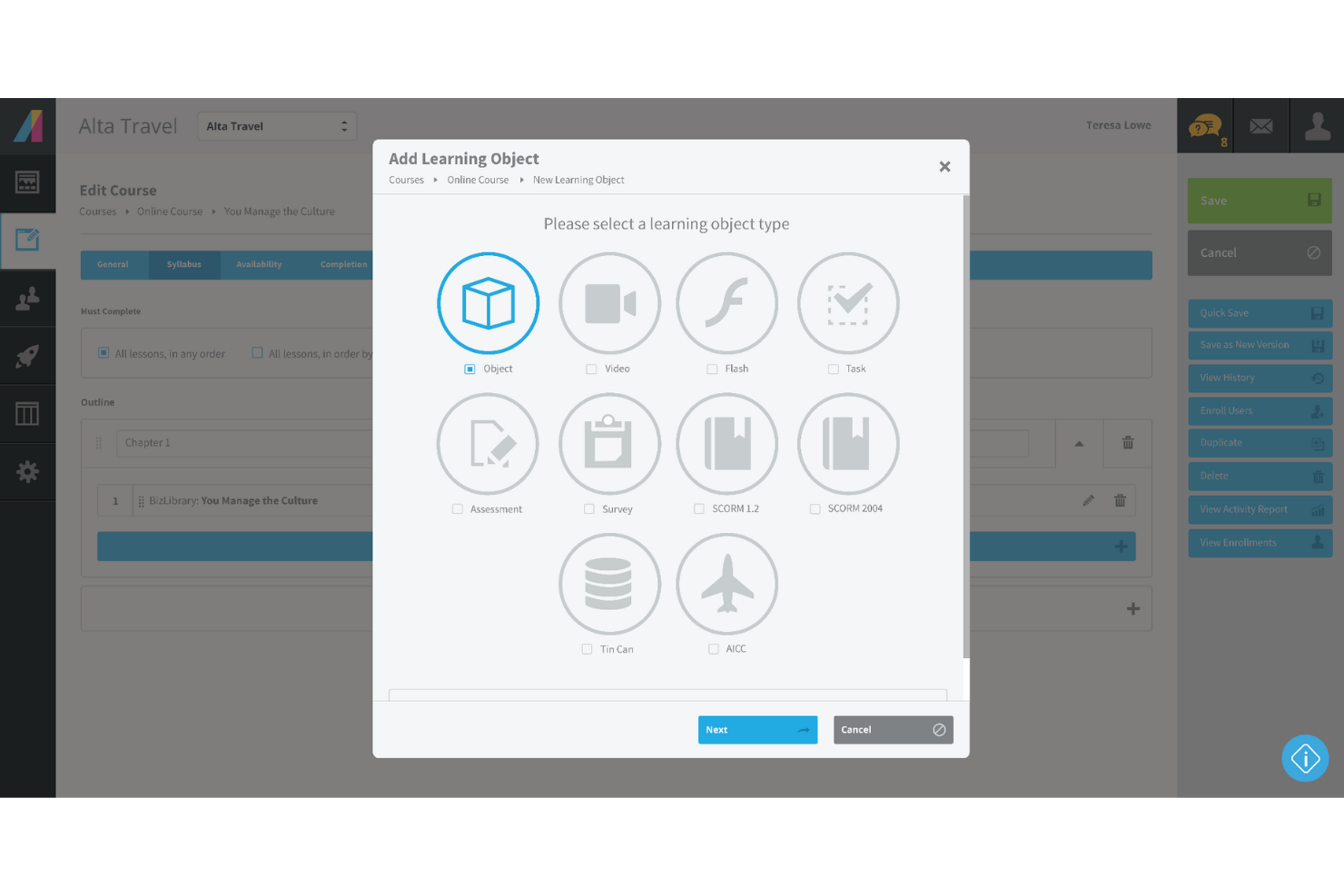
Absorb è una soluzione di formazione online basata su cloud pensata per offrire una formazione aziendale efficace. Il software è specializzato nella formazione sulla conformità aziendale, per aiutare i dipendenti a comprendere le normative, l'etica e altre criticità legate alla conformità.
Perché ho scelto Absorb: Ho sempre segretamente detestato la formazione sulla conformità aziendale. Mi limitavo a spuntare caselle a caso e a scorrere interminabili blocchi di testo. Absorb aggiunge un tocco unico alla formazione sulla conformità aziendale con la pianificazione e l'iscrizione automatica. Inoltre, Absorb permette di creare liste di cose da fare personalizzate per i discenti, migliorando così il coinvolgimento.
Se sei un responsabile HR di Formazione e Sviluppo (L&D), probabilmente sarai d'accordo sul fatto che gestire le certificazioni in scadenza sia un vero incubo. Absorb aiuta ad automatizzare tutto il processo di riqualificazione e rinnovo, migliorando la produttività.
Caratteristiche e integrazioni principali di Absorb:
Le funzionalità che distinguono Absorb comprendono l'apprendimento sociale, che consente ai dipendenti più esperti di fare da mentori ai nuovi assunti. Una funzionalità multilingue e percorsi di apprendimento personalizzati aiutano i responsabili HR a formare i dipendenti in diverse aree geografiche.
Le integrazioni comprendono oltre 15 strumenti come BambooHR, Degreed, Google Suite, Microsoft Azure, Namely, Okta, Salesforce, WebEx, Workday, Zoom e altri.
Pros and Cons
Pros:
- Ottimo servizio clienti
- Solidi modelli predefiniti
- Ampie opzioni di personalizzazione
Cons:
- Le risorse non dispongono di una funzione miniatura
- Funzionalità di valutazione limitate
New Product Updates from Absorb
Absorb Aura Adds Claude and ChatGPT Connections
Absorb Aura now connects to Claude or ChatGPT via MCP, enabling users to ask questions about their learning and the LMS directly inside the AI tool after a simple setup. For more information, visit Absorb's official site.
 .
.
Ideale per una configurazione rapida della formazione online
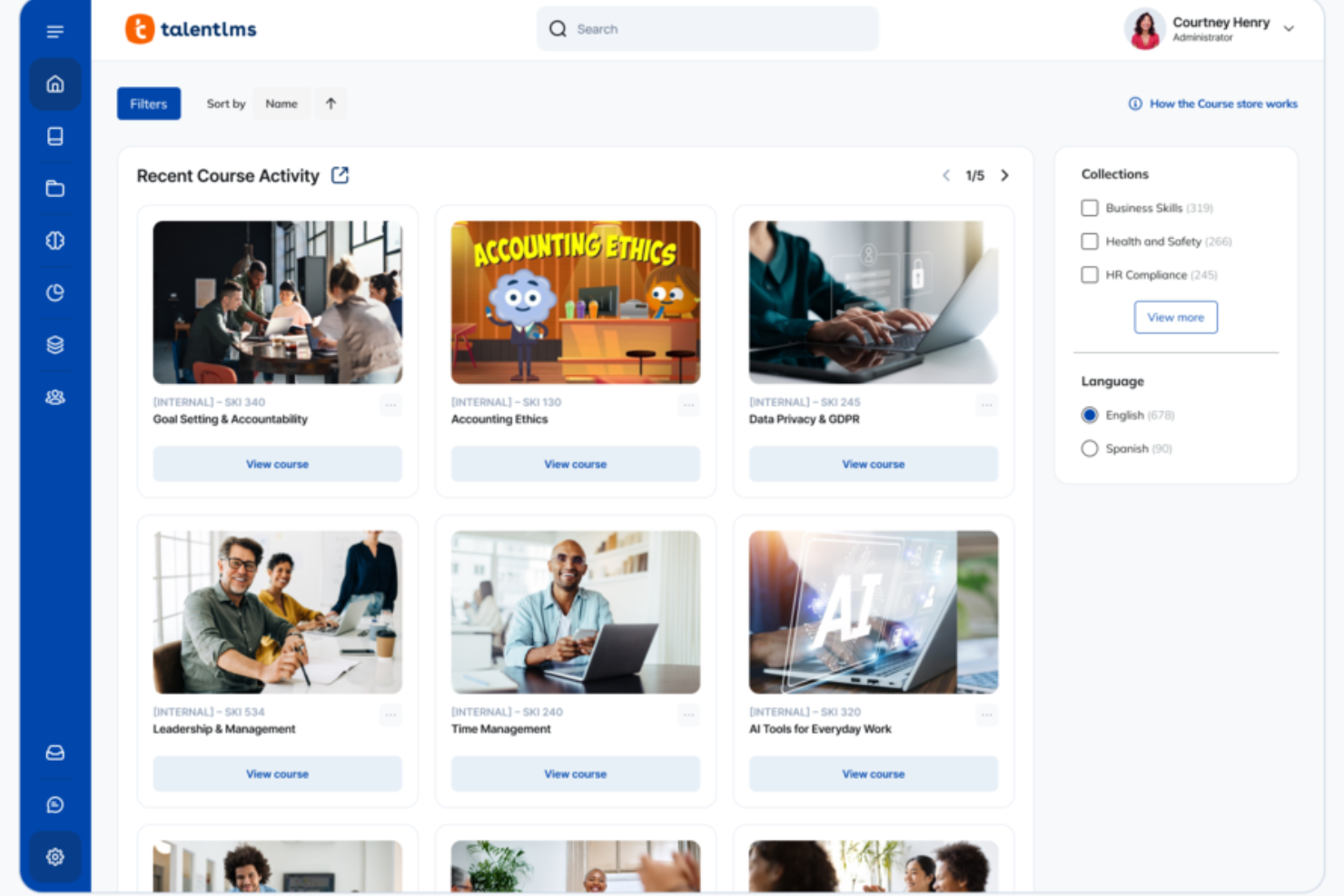
Se cerchi un software di formazione online che aiuti il tuo team a imparare senza rallentarti, TalentLMS si adatta alle tue esigenze—sia che tu stia creando corsi da zero o distribuendo la formazione su più gruppi. Ottieni una piattaforma che mantiene la configurazione semplice, ti dà il controllo sui contenuti e si adatta a diversi stili di apprendimento, dai moduli autonomi alle sessioni miste. È progettato per alleggerirti il carico gestionale, così che il tuo personale possa crescere senza generare ulteriori freni operativi.
Perché ho scelto TalentLMS
Ho scelto TalentLMS perché ti consente di lanciare programmi di formazione online rapidamente, supportando comunque la complessità che affrontano i team in crescita. Puoi caricare i tuoi materiali, creare nuovi contenuti con l’IA oppure attingere da un’ampia libreria di corsi già pronti, rendendo facile coprire esigenze formative in evoluzione senza interruzioni. Le sue automazioni—come iscrizioni, promemoria e riassegnazioni—eliminano molta amministrazione ripetitiva, così puoi mantenere la formazione costante nel tempo. E funzionalità come mappatura delle competenze e report dettagliati ti aiutano a capire cosa sa la tua forza lavoro, dove ci sono lacune e come la formazione contribuisce allo sviluppo reale.
Caratteristiche principali di TalentLMS
Oltre ai suoi strumenti flessibili per la creazione di contenuti e automazione, TalentLMS include diverse funzioni che supportano un’esperienza completa di formazione online:
- Gamification: Aggiunge punti, badge e classifiche per mantenere alta la motivazione e il coinvolgimento dei partecipanti.
- Percorsi di apprendimento: Ti permette di guidare i partecipanti passo dopo passo attraverso sequenze strutturate di sviluppo delle competenze.
- Filiali: Crea portali separati per diversi team o regioni, gestendo comunque tutto da un'unica piattaforma.
- Apprendimento misto: Combina formazione autonoma e sessioni guidate da istruttore.
Integrazioni di TalentLMS
Le integrazioni includono Salesforce, Shopify, WordPress, BambooHR, ADP Workforce Now, Zoom, Microsoft Teams, GoTo, BigBlueButton e Stripe.
Pros and Cons
Pros:
- Le funzionalità di raggruppamento degli utenti facilitano la gestione di strutture formative complesse.
- Gli strumenti IA accelerano la creazione dei corsi per rispondere rapidamente alle nuove esigenze formative.
- Le valutazioni integrate supportano la misurazione delle competenze e la certificazione.
Cons:
- Gli strumenti di collaborazione integrati sono basilari rispetto alle community di apprendimento dedicate.
- Per file multimediali di grandi dimensioni potrebbe essere necessario un hosting esterno.
New Product Updates from TalentLMS
TalentLMS Adds Learning Paths, AI Video, and Learner Experience Updates
TalentLMS introduced updates across learning management, content creation, and learner experience, including Learning Paths for Groups, AI video generation in TalentCraft, video bookmarking, and expanded administration tools. For more information, visit TalentLMS’s official site.

Ideale per programmi personalizzati di sviluppo delle competenze
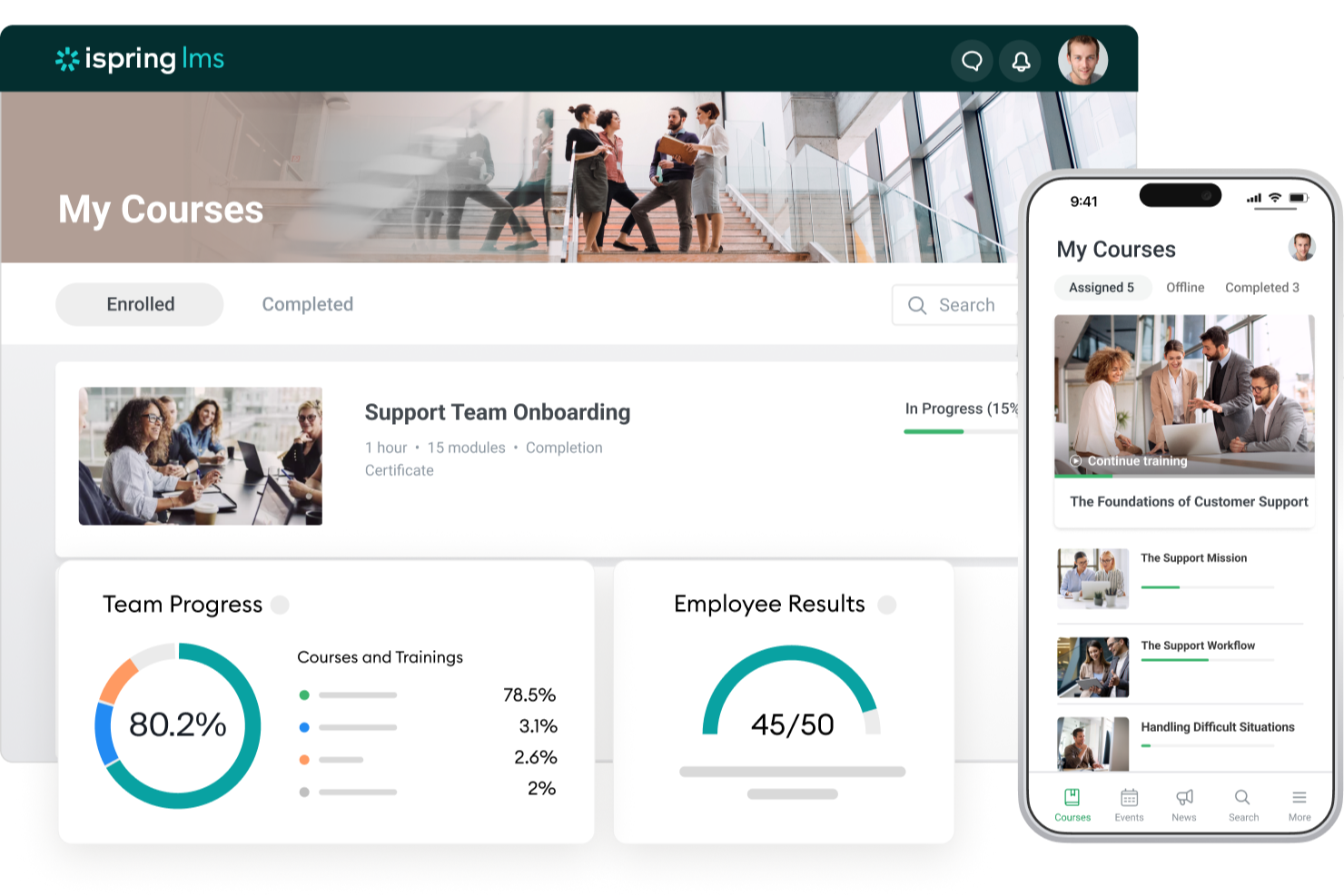
iSpring LMS è una soluzione di gestione della formazione basata sul web che aiuta le organizzazioni a gestire in modo efficiente l'intero ciclo di sviluppo dei dipendenti, dall'onboarding alla crescita continua delle competenze.
Perché ho scelto iSpring LMS: Ho deciso di includere questo software nella mia lista per la sua flessibilità e il potenziale di personalizzazione della formazione. Le funzionalità di creazione dei contenuti sono particolarmente avanzate. Ad esempio, lo strumento integrato di creazione corsi assistito dall'IA consente di realizzare corsi interattivi con quiz, video, audio e altri elementi coinvolgenti. È anche possibile caricare contenuti esistenti, come presentazioni PowerPoint, e convertirli in corsi online.
La piattaforma offre anche piani di sviluppo, una funzionalità che permette di delineare percorsi di crescita delle competenze personalizzati per ciascun dipendente. Si possono combinare corsi, attività pratiche, valutazioni e scadenze in un percorso chiaro e strutturato, che si adatta a ruoli ed esperienze diversi, rendendo la formazione mirata piuttosto che generica.
Grazie alla sua personalizzabilità, il software può essere utilizzato per l'onboarding dei dipendenti, la formazione su prodotti e vendite, la formazione sulla conformità e le valutazioni delle performance. Inoltre, è possibile aumentare il coinvolgimento grazie alla gamification integrata: punti, classifiche e badge motivano i partecipanti a completare la formazione e a rimanere attivi nel tempo.
Funzionalità e integrazioni principali di iSpring LMS:
Le funzionalità principali includono la possibilità di creare percorsi di apprendimento individualizzati per ogni dipendente. Ho trovato questo strumento davvero utile per incentivare lo sviluppo professionale e allineare gli obiettivi di crescita al percorso di carriera unico di ciascun dipendente. Il software è anche compatibile con dispositivi mobili, quindi puoi accedere ai dati dei dipendenti, monitorare le performance e generare report ovunque ti trovi, anche in assenza di una sede centrale.
Le integrazioni includono ADP, BambooHR, Salesforce, Workday e Zoom. Ulteriori integrazioni possono essere configurate tramite le API REST/SOAP.
Pros and Cons
Pros:
- Feedback a 360 gradi
- Piani di sviluppo personalizzati
- Ideale per processi che richiedono una formazione approfondita
Cons:
- Limitate integrazioni software native
- Struttura di prezzo complicata (molti moduli e opzioni aggiuntive)
New Product Updates from iSpring LMS

iSpring LMS Adds Multiple Observations to OJT Sessions
iSpring LMS now lets managers log multiple observations within one OJT session, grouping visits and auto-generating summary stats like averages, criterion results, and comparisons. For more information, visit iSpring LMS's official site.

Il miglior software di formazione online con un plugin per PowerPoint

iSpring si è specializzata nella creazione di software per l’eLearning da oltre vent’anni. La iSpring Suite offre un fantastico plugin per PowerPoint che ti consente di creare corsi dalle presentazioni PPT.
Perché ho scelto iSpring Suite: Trovo entusiasmante l’idea di creare corsi di formazione per i dipendenti direttamente da Microsoft PowerPoint. iSpring Suite dispone di un ampio kit di strumenti per l’autore di eLearning, con funzioni come corsi a slide, quiz intelligenti e pagine interattive.
Inoltre, iSpring Suite ti permette di realizzare valutazioni interattive con attività trascina e rilascia, punteggi flessibili e altre logiche di testing personalizzabili.
Funzionalità e integrazioni principali di iSpring Suite:
Funzionalità principali includono una pratica funzione di conversione da PPT a SCORM che consente di esportare le presentazioni PowerPoint in corsi online. Inoltre, le interazioni eLearning aiutano ad aumentare il coinvolgimento grazie a modelli altamente interattivi.
Dettagli sull’integrazione attualmente non disponibili.
Pros and Cons
Pros:
- Ottimo servizio clienti
- Simulazioni di role-play
- Pubblicazione HTML5 versatile
Cons:
- Curva di apprendimento leggermente ripida
- Funzionalità di collaborazione limitate

SkyPrep
Ideale per un'esperienza utente intuitiva e un supporto clienti di qualità
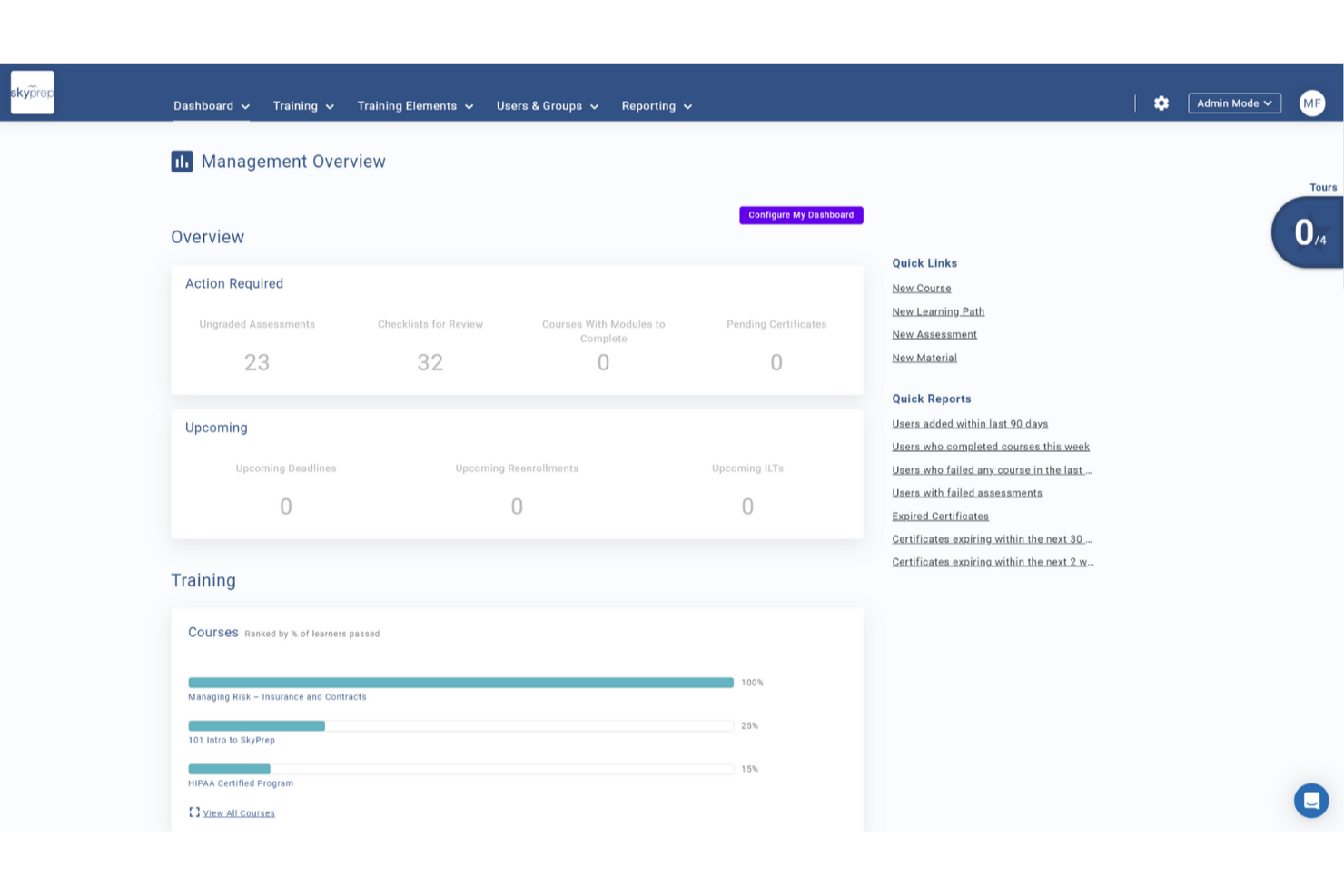
SkyPrep è una piattaforma di formazione online intuitiva e facile da usare che semplifica il processo di creazione, gestione ed erogazione dei programmi di formazione. Grazie alla sua interfaccia intuitiva e alle funzionalità avanzate, SkyPrep consente alle organizzazioni di formare efficacemente i propri dipendenti e monitorarne i progressi.
Perché ho scelto SkyPrep: la piattaforma si distingue come strumento di formazione online per la sua eccezionale capacità di automatizzare numerosi processi di formazione online. Snellendo le attività amministrative come la creazione dei corsi, la gestione delle iscrizioni e il monitoraggio dei progressi, gli utenti possono risparmiare tempo prezioso e risorse per la propria organizzazione. Le sue funzionalità di automazione, tra cui opzioni di auto-iscrizione, notifiche automatiche e workflow personalizzabili, garantiscono un'esperienza di formazione fluida. I report e le analisi automatizzate forniscono dati approfonditi sulle performance degli studenti, permettendo alle organizzazioni di prendere decisioni informate e migliorare continuamente i programmi formativi.
Caratteristiche e integrazioni principali di SkyPrep
Le caratteristiche includono un costruttore di corsi intuitivo che consente agli utenti di creare contenuti formativi coinvolgenti senza la necessità di competenze tecniche. L’interfaccia drag-and-drop, il supporto multimediale e le valutazioni personalizzabili permettono alle organizzazioni di progettare corsi interattivi su misura per le proprie esigenze specifiche.
Gli utenti possono inoltre beneficiare della partnership di SkyPrep con OpenSesame per accedere a migliaia di corsi preconfezionati su vari settori e argomenti.
Le integrazioni includono Okta, SAML, onelogin, Stripe, PayPal, Shopify, ADP, Workday, Salesforce, HubSpot, Zoom, GoTo, Webex, G Suite, Office 365, Twilio, iorad, UKG e molte altre.
Pros and Cons
Pros:
- Interfaccia facile da usare
- Automazioni del workflow personalizzabili
- Personalizzazione del branding
Cons:
- Funzionalità di reporting avanzato minime
- La struttura dei prezzi potrebbe non essere adatta a tutte le dimensioni aziendali

Ideale per creare corsi di formazione mobile
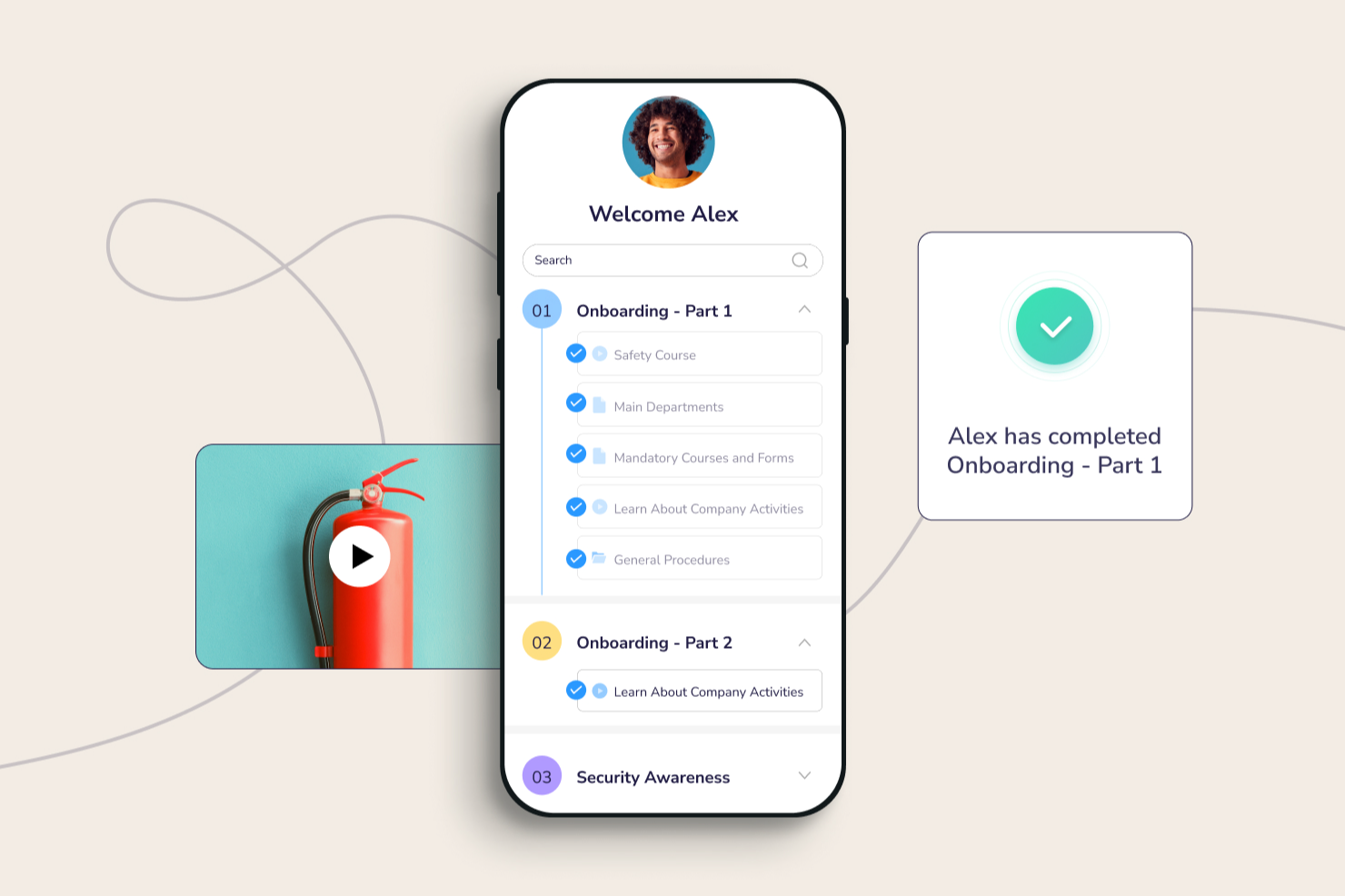
Connecteam si rivolge alle aziende con team senza postazione fissa. Conta oltre 500.000 utenti attivi quotidianamente distribuiti in più di 79 paesi in tutto il mondo. Inoltre, Connecteam dispone di un'ottima app mobile che aiuta i dipendenti ad acquisire nuove competenze ovunque si trovino.
Perché ho scelto Connecteam: Adoro seguire corsi dal mio smartphone, sia in tram che durante una corsa. L'applicazione mobile di Connecteam consente efficacemente ai dipendenti di acquisire competenze essenziali anche lontano dalle loro postazioni. L'app funge anche da archivio della conoscenza, permettendo ai dipendenti di accedere ai documenti aziendali.
Puoi creare rapidamente diversi corsi e progettare percorsi formativi personalizzati. Inoltre, Connecteam ti permette di monitorare il progresso di ciascun dipendente nell'apprendimento e di contattarli proattivamente se incontrano difficoltà.
Funzionalità e integrazioni di spicco di Connecteam:
Funzionalità di spicco comprendono unità di microformazione che suddividono i moduli di formazione più ampi in parti più piccole per migliorare l'efficienza dell'apprendimento online. Il modulo di conformità è completo e consente revisioni rapide dei contenuti e tiene traccia delle formazioni obbligatorie.
Integrazioni includono Paychex, Xero, Gusto, QuickBooks Payroll (online + desktop), Zapier, Google Calendar, accesso API e altri.
Pros and Cons
Pros:
- Funzioni avanzate di rilevazione presenze
- Gestione dei dipendenti all-in-one
- Tracciamento delle certificazioni
Cons:
- Ritardi occasionali nell'applicazione
- Personalizzazione limitata per l'amministratore
New Product Updates from Connecteam

Connecteam Expands Break and Timesheet Controls
Connecteam adds flexible break thresholds, personalized policies, auto-end options, a centralized exceptions report, and improved timesheet issue visibility to help teams manage breaks and timesheets more effectively. For more information, visit Connecteam’s official site.
 .
.
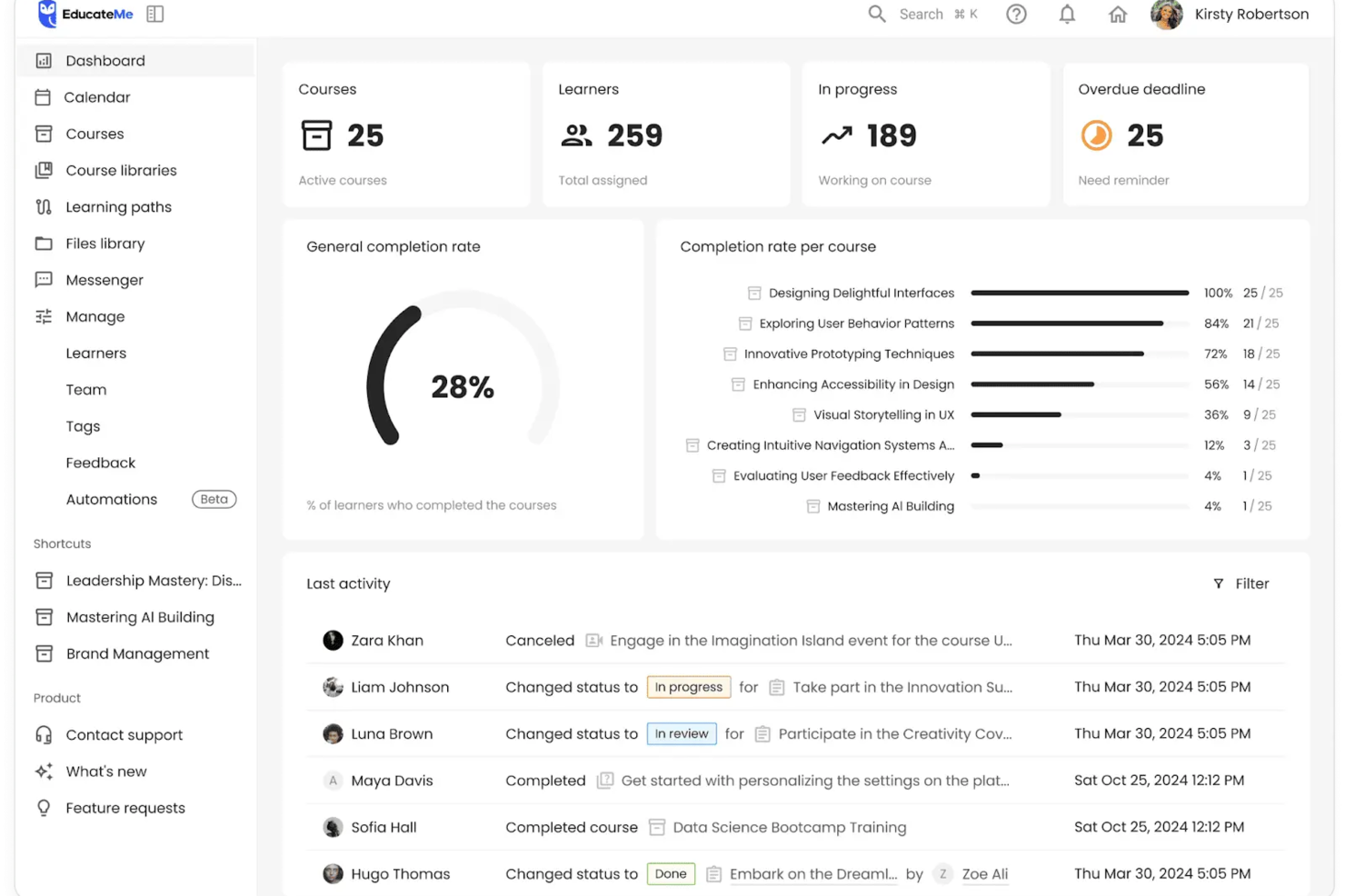
EducateMe LMS è una piattaforma innovativa di formazione online che si rivolge alle organizzazioni desiderose di ampliare la condivisione interna delle conoscenze. Questa soluzione basata sull’IA si rivolge a aziende, accademie e agenzie di formazione offrendo strumenti per una creazione e gestione dei contenuti efficiente. Affronta le sfide della formazione fornendo soluzioni scalabili per l’onboarding dei dipendenti, la formazione sulla conformità e molto altro.
Perché ho scelto EducateMe LMS
Ho scelto EducateMe LMS per il suo approccio unico e guidato dall’intelligenza artificiale alla formazione online. Ti consente di inserire logiche automatizzate nei percorsi formativi, garantendo che la qualità dell’istruzione si mantenga costante mentre il team cresce, senza bisogno di intervento manuale. È particolarmente efficace per team tecnici che devono rimanere aggiornati su funzionalità di prodotto in rapida evoluzione o procedure operative interne. Inoltre, la funzione di analisi fornisce informazioni in tempo reale sul coinvolgimento degli utenti, permettendoti di migliorare continuamente i tuoi programmi di formazione.
Funzionalità principali di EducateMe LMS
Oltre alle sue capacità di IA, EducateMe LMS offre una serie di funzionalità che ne potenziano l’efficacia come software di formazione online.
- Strumenti per la creazione di contenuti: Questi strumenti permettono al tuo team di progettare materiali di apprendimento interattivi e coinvolgenti su misura per le esigenze della tua organizzazione.
- Opzioni white-label: Puoi personalizzare la piattaforma per allinearla all’identità del tuo brand, offrendo un’esperienza fluida ai tuoi utenti.
- Reportistica in tempo reale: Questa funzione fornisce dati sul coinvolgimento degli utenti e sull’efficacia dei corsi, aiutandoti a prendere decisioni basate sui dati.
- Integrazioni CRM: Queste integrazioni semplificano le attività amministrative, consentendoti di gestire i tuoi programmi formativi in modo più efficiente.
Integrazioni EducateMe LMS
Le integrazioni includono Google Workspace, Slack, Zoom, Salesforce, Figma, Calendly e altro ancora. È disponibile un’API per integrazioni personalizzate.
Pros and Cons
Pros:
- Supporta formati di apprendimento diversificati
- Si integra facilmente con i principali strumenti CRM
- Funzionalità di automazione altamente scalabili
Cons:
- Nessuno strumento di registrazione video integrato
- Funzionalità offline limitate

Continu
Ideale per la sicurezza dei dati a livello enterprise

Continu è una piattaforma di formazione online che ti permette di creare, distribuire e monitorare programmi di apprendimento personalizzati con strumenti per contenuti interattivi, compatibilità SCORM, sicurezza dei dati e integrazioni native.
Per chi è Continu?
Continu è ideale per aziende di medie e grandi dimensioni che necessitano di una piattaforma centralizzata per gestire la formazione dei dipendenti, l'onboarding e l'apprendimento continuo su larga scala.
Perché ho scelto Continu
Ho inserito Continu tra le mie migliori scelte perché la sua infrastruttura di sicurezza è davvero pensata per l'uso aziendale, non aggiunta successivamente. Tutti i dati a riposo sono crittografati con AES-256 e tutto il traffico in transito passa tramite TLS 1.2 o 1.3—gli stessi standard utilizzati in ambito bancario e governativo. Continu è inoltre certificato SOC 2 Tipo II e allineato con ISO 27001, elementi molto importanti quando si gestiscono dati formativi in grandi aziende distribuite. Apprezzo anche il provisioning SCIM automatico, che sincronizza l'accesso degli utenti direttamente dal provider di identità, consentendo ai nuovi assunti di accedere dal primo giorno e revocando automaticamente l'accesso a chi lascia l'azienda.
Caratteristiche principali di Continu
- Percorsi di apprendimento: Crea programmi di formazione strutturati e sequenziali che guidano i partecipanti attraverso i contenuti in un ordine definito.
- Strumenti di creazione dei contenuti: Realizza corsi interattivi, quiz e valutazioni direttamente sulla piattaforma senza software di terze parti.
- Report e analisi: Monitora i progressi dei partecipanti, i tassi di completamento dei corsi e i dati di coinvolgimento di tutta la forza lavoro.
- Supporto per l'apprendimento misto: Combina moduli online autogestiti con sessioni di formazione dal vivo in un unico programma formativo.
Integrazioni di Continu
Continu offre integrazioni native con Workday, BambooHR, Namely, Rippling, Okta, Slack, Microsoft Teams, Google Workspace, Zoom e Salesforce, e fornisce un'API per integrazioni personalizzate.
Pros and Cons
Pros:
- Notifiche native su Slack e Teams
- Solidi controlli di conformità e accesso
- Branding personalizzabile per i portali dei partecipanti
Cons:
- La creazione dei corsi non supporta scenari ramificati
- Nessun marketplace integrato per corsi preconfezionati
New Product Updates from Continu
Continu Adds Smarter Content Management
Continu adds Intelligent Tagging and Descriptions and richer content details to improve how learning content is organized and maintained. These updates reduce manual work and give teams more consistent, detailed content records. For more information, visit Continu’s official site.
 .
.Altri software per la formazione online
Ecco alcuni altri strumenti per la formazione online che non sono entrati nella mia lista, ma che vale sicuramente la pena valutare:
- TeachFloor
Ideale per la formazione basata su gruppi e l'apprendimento tra pari
- LearnUpon
Ideale per creare portali di apprendimento personalizzati
- Guidde
Ideale per la formazione video potenziata dall'IA
- Coassemble
Ideale per creare campagne di formazione d'impatto
- WeSchool
Ideale per semplificare la formazione aziendale
- eloomi
Il miglior software di formazione online con un costruttore di corsi intuitivo
- MedTrainer
Ideale per la formazione alla conformità sanitaria
- Bridge
Ideale per l'analisi incorporata della formazione
- Guru
Ideale per la gestione della conoscenza aziendale tramite intelligenza artificiale
- Whale
Ideale per la formazione sull'onboarding dei dipendenti
- Compass
Ideale per walkthrough interattivi di formazione
- PitchMonster
Ideale per accelerare l’onboarding di nuovi rappresentanti di vendita
- Traineaze
Ideale per motivare i dipendenti tramite aggiornamenti delle competenze
- SafetyAmp
Ideale per l’erogazione di corsi sulla sicurezza
- Exec
Ideale per roleplay conversazionali alimentati dall'IA
- Synergy Learning
Ideale per lo sviluppo di LMS personalizzati


Come Valuto i Software di Formazione Online
Valuto i software di formazione online su due livelli: la base — elementi come la distribuzione SCORM, la gestione delle iscrizioni e il monitoraggio dei completamenti — e i fattori differenzianti come la creazione automatica tramite IA o le integrazioni HRIS.
Funzionalità Principali (Requisiti Fondamentali per Questa Lista)
Quando seleziono gli strumenti per la mia lista, valuto ciascuno su una scala da 0 (non offre la funzionalità) a 5 (eccelle in quest’area) per ogni funzionalità principale elencata qui sotto. Calcolo poi il punteggio totale dello strumento come percentuale. Ogni strumento deve raggiungere un punteggio minimo totale del 65% per essere considerato per l’inclusione.
- Strumenti di Creazione Corsi: Cerco creazione di contenuti integrata che supporti più formati, inclusi video, pacchetti SCORM e quiz interattivi, così il tuo team può costruire corsi senza strumenti di terze parti.
- Distribuzione dei Contenuti & Portale LMS: Ogni strumento dovrebbe offrire un portale di apprendimento centralizzato e organizzato dove i dipendenti possono sfogliare, iscriversi e completare corsi da qualsiasi dispositivo.
- Gestione dei Discenti & Iscrizione: Valuto come la piattaforma gestisce la creazione di gruppi di utenti, l’assegnazione di ruoli e i percorsi di apprendimento — ad esempio, l’iscrizione automatica dei nuovi assunti a un percorso di onboarding per reparto.
- Valutazioni & Rilascio Certificazioni: Le piattaforme solide permettono di creare verifiche delle conoscenze con diversi tipi di domande e di rilasciare automaticamente certificati, particolarmente utile per la formazione ricorrente sulla conformità.
- Monitoraggio dei Progressi & Reportistica: Controllo se le dashboard mostrano chiaramente tassi di completamento, punteggi e compiti in ritardo, così che un responsabile L&D possa individuare le lacune a colpo d’occhio.
- Integrazioni con Sistemi HR: La piattaforma dovrebbe collegarsi con il tuo HRIS o HCM esistente, in modo che i dati dei dipendenti si sincronizzino automaticamente, eliminando la doppia registrazione quando qualcuno entra, cambia team o lascia l’azienda.
Una volta ottenuta una lista di strumenti che soddisfano i criteri, considero cosa rende unica ciascuna piattaforma.
Fattori Differenzianti (Cosa Distingue i Fornitori)
Ecco come confronto e metto a confronto i vari fornitori:
Funzionalità Distintive
La creazione di corsi tramite IA è una differenza importante. Le piattaforme che generano lezioni di bozza da documenti caricati fanno risparmiare ore di lavoro manuale ai team L&D. Anche le librerie di contenuti predefiniti hanno importanza: corsi già pronti su conformità o soft skills ti permettono di avviare la formazione fin dal primo giorno invece di partire da zero. Valuto anche la mappatura di competenze e capacità, che collega i completamenti dei corsi ai percorsi di carriera e dà ai responsabili della gestione talenti chiara visibilità sulle carenze di sviluppo nel personale.
Oltre le Funzionalità
La struttura dei prezzi ha qui molta importanza. La tariffazione per utente può diventare onerosa per organizzazioni con lavoratori stagionali o in prima linea, quindi verifico se le piattaforme offrono fatturazione per utenti attivi o tariffe flat. L’accessibilità per l’utente è un’altra priorità: cerco il supporto multilingue e la conformità WCAG, soprattutto per i team globali in onboarding tra regioni diverse. Valuto anche la prontezza alla conformità, inclusa la certificazione SOC 2 e le funzionalità di tracciabilità degli audit, poiché molti team HR devono dimostrare l’avvenuto completamento della formazione durante le revisioni normative.
Come scegliere un software per la formazione online
È facile perdersi in lunghi elenchi di funzionalità e strutture tariffarie complesse. Per aiutarti a rimanere concentrato mentre affronti il tuo processo di selezione del software, unico per le tue esigenze, ecco una lista di fattori da tenere a mente:
| Fattore | Cosa considerare |
|---|---|
| Scalabilità | Il software può crescere insieme al tuo gruppo? Verifica che supporti utenti, corsi e contenuti aggiuntivi senza costi o complessità extra. |
| Integrazioni | Si collega agli strumenti che già utilizzi? Assicurati che si integri senza problemi con i sistemi HR, gli strumenti di comunicazione e le altre piattaforme utilizzate dal tuo gruppo. |
| Personalizzazione | Puoi adattarlo alle tue esigenze? Cerca opzioni per personalizzare il marchio, i percorsi di apprendimento e i ruoli degli utenti in base alla struttura della tua organizzazione. |
| Facilità d'uso | È intuitivo per il tuo gruppo? Testa l'interfaccia per assicurarti che sia semplice da utilizzare e riduca la necessità di una formazione approfondita. |
| Implementazione e inserimento | Quanto tempo occorre per iniziare? Valuta il processo di configurazione, inclusa qualsiasi formazione necessaria o migrazione dei dati, per evitare lunghi ritardi. |
| Costo | Rientra nel tuo budget? Confronta i piani tariffari, i costi nascosti e il valore offerto. Cerca prove gratuite per testarlo prima di impegnarti. |
| Misure di sicurezza | I tuoi dati sono protetti? Verifica la crittografia dei dati, la conformità alle normative e i controlli degli accessi per proteggere le informazioni sensibili. |
| Disponibilità dell'assistenza | Riceverai aiuto quando ne avrai bisogno? Verifica la disponibilità di assistenza 24 ore su 24, 7 giorni su 7, i tempi di risposta e le risorse disponibili, come basi di conoscenza e forum della comunità. |
Che cos'è il software per la formazione online?
Il software per la formazione online è una piattaforma digitale utilizzata per offrire contenuti didattici e programmi di formazione tramite Internet. Professionisti come responsabili delle risorse umane, formatori aziendali ed educatori utilizzano questi strumenti per migliorare l'efficienza e il coinvolgimento nell'apprendimento. Funzionalità come l'erogazione dei corsi, il monitoraggio dei progressi e il supporto multimediale contribuiscono a fornire esperienze di apprendimento strutturate e interattive. Nel complesso, questi strumenti rendono la formazione più accessibile e flessibile sia per le organizzazioni sia per gli studenti.
Funzionalità
Quando selezioni un software per la formazione online, presta attenzione alle seguenti funzionalità principali:
- Erogazione dei corsi: Fornisce una piattaforma per distribuire contenuti didattici agli studenti, rendendo la formazione accessibile ovunque.
- Monitoraggio dei progressi: Monitora l'avanzamento degli studenti nei corsi, aiutando i formatori a individuare chi necessita di ulteriore supporto.
- Supporto multimediale: Consente l'integrazione di video, audio ed elementi interattivi per migliorare l'esperienza di apprendimento.
- Percorsi di apprendimento personalizzabili: Permette agli utenti di adattare i programmi di formazione alle esigenze individuali o organizzative, garantendo contenuti pertinenti.
- Funzionalità di integrazione: Si collega agli strumenti esistenti per le risorse umane e la comunicazione, semplificando i flussi di lavoro e la condivisione dei dati.
- Certificazione e conformità: Offre strumenti per rilasciare certificati e monitorare la conformità agli standard del settore.
- Accessibilità da dispositivi mobili: Garantisce agli studenti l'accesso ai materiali di formazione da diversi dispositivi, offrendo flessibilità nell'apprendimento.
- Analisi e report: Fornisce informazioni sulle prestazioni degli studenti e sull'efficacia dei corsi, supportando il processo decisionale.
- Interfaccia intuitiva: Garantisce una navigazione semplice sia per gli amministratori sia per gli studenti, riducendo la necessità di una formazione approfondita.
- Misure di sicurezza: Protegge i dati sensibili mediante crittografia e controlli degli accessi, garantendo la conformità alle normative.
Vantaggi
L'implementazione di un software per la formazione online offre diversi vantaggi al tuo team e alla tua azienda. Ecco alcuni dei benefici che puoi aspettarti:
- Maggiore accessibilità: Consente agli studenti di accedere ai materiali di formazione ovunque, rendendo più semplice inserire l'apprendimento in programmi già impegnativi.
- Maggiore coinvolgimento: I contenuti multimediali interattivi mantengono gli studenti interessati e motivati durante tutto il processo di formazione.
- Risparmio sui costi: Riduce la necessità di spazi e materiali per la formazione in presenza, diminuendo i costi generali.
- Scalabilità: Supporta i team in crescita consentendo di gestire più utenti e contenuti senza costi aggiuntivi significativi.
- Apprendimento personalizzato: I percorsi di apprendimento personalizzabili garantiscono che la formazione sia pertinente al ruolo e alle esigenze di ogni studente.
- Monitoraggio efficiente: Il monitoraggio dei progressi e le analisi forniscono informazioni sulle prestazioni degli studenti, aiutando a individuare le aree di miglioramento.
- Conformità migliorata: Le funzionalità di certificazione e conformità garantiscono che il tuo team soddisfi gli standard e le normative del settore.
Costi e prezzi
La scelta di un software per la formazione online richiede la conoscenza dei diversi modelli e piani tariffari disponibili. I costi variano in base alle funzionalità, alle dimensioni del team, ai componenti aggiuntivi e ad altri fattori. La tabella seguente riassume i piani più comuni, i relativi prezzi medi e le funzionalità generalmente incluse nelle soluzioni software per la formazione online:
Tabella comparativa dei piani per il software di formazione online
| Tipo di piano | Prezzo medio | Funzionalità comuni |
|---|---|---|
| Piano gratuito | $0 | Erogazione di corsi di base, accesso limitato per gli utenti e analisi essenziali. |
| Piano personale | $5-$25/utente/mese | Erogazione dei corsi, supporto multimediale e monitoraggio dei progressi. |
| Piano aziendale | $25-$50/utente/mese | Percorsi di apprendimento personalizzabili, integrazioni e accessibilità da dispositivi mobili. |
| Piano aziendale avanzato | $50-$100+/utente/mese | Analisi avanzate, assistenza dedicata e strumenti completi per la conformità. |
Domande frequenti sul software per la formazione online
Hai domande sul software per la formazione online? Consulta queste FAQ per saperne di più:
Qual è la differenza tra il software per la formazione e un sistema di gestione dell'apprendimento?
Il software per la formazione si concentra sull’erogazione di programmi formativi specifici, principalmente sulla creazione, sull’erogazione e sul monitoraggio dei contenuti.
Un LMS (sistema di gestione dell’apprendimento) è una piattaforma completa che consente di gestire, iscrivere, sottoporre a test e valutare i dipendenti. Un’interessante analogia per un LMS è quella di un vivace terminal aeroportuale, mentre il software per la formazione online è un vettore aereo.
Posso personalizzare i corsi nel software per la formazione online?
Sì, la maggior parte dei software per la formazione online consente di personalizzare i corsi in base alle proprie esigenze. Spesso è possibile modificare i percorsi di apprendimento, aggiungere elementi multimediali e personalizzare l’interfaccia con i colori e i loghi della propria organizzazione. Questa flessibilità consente di creare un’esperienza di apprendimento che rispecchi il proprio team e soddisfi gli obiettivi formativi specifici.
Il software per la formazione online è sicuro?
Sì, i fornitori affidabili di software per la formazione online adottano misure di sicurezza per proteggere i dati. Cerca funzionalità come la crittografia dei dati, i controlli di accesso e la conformità alle normative di settore. Verifica sempre i protocolli di sicurezza del fornitore e valuta la possibilità di richiedere una dimostrazione delle sue funzionalità di sicurezza, per assicurarti che le tue informazioni rimangano al sicuro.
Sono necessarie competenze tecniche per utilizzare il software per la formazione online?
No, non servono competenze tecniche avanzate per utilizzare la maggior parte dei software per la formazione online. Queste piattaforme sono progettate per essere facili da usare, con interfacce intuitive e una navigazione semplice. Tuttavia, possedere competenze informatiche di base ti aiuterà a iniziare più rapidamente. Molti fornitori offrono tutorial e assistenza per aiutarti a configurare e gestire i corsi in modo efficace.