

I 10 migliori strumenti di IA per la gestione dell’uscita dei dipendenti recensiti nel 2026

Selezione dei migliori strumenti di AI per l'uscita dei dipendenti


Perché fidarsi delle nostre recensioni sui software
Il nostro team testa e recensisce software dal 2012. In quanto esperti HR noi stessi, sappiamo quanto sia difficile — e importante — scegliere il software giusto.
Per questa guida, abbiamo valutato gli strumenti attraverso test pratici e ricerche indipendenti, assegnando un punteggio agli strumenti in base ai nostri criteri di selezione. Ci basiamo inoltre sulle competenze di leader di pensiero del settore e di professionisti HR attivi.
Le nostre recensioni riflettono il nostro giudizio editoriale umano, non un discorso di vendita.
Revisori esperti:
Anche quando vengono gestite con attenzione, le uscite dei dipendenti possono mettere in luce punti deboli nella coerenza, nella comunicazione e nella documentazione. È un processo in cui un singolo dettaglio trascurato può avere ripercussioni sui team, sui sistemi e persino sulla cultura aziendale.
È qui che gli strumenti di AI per l'uscita dei dipendenti possono fare una differenza significativa. Queste soluzioni eliminano dal tuo carico attività manuali e soggette a errori, come l'automazione delle liste di controllo, la revoca degli accessi, la garanzia della conformità e persino l'individuazione di potenziali rischi. Portano struttura, rapidità e coerenza in un processo spesso stressante, consentendo ai team HR di concentrarsi sull'aspetto umano della transizione: dignità, trasparenza e supporto.
In questo articolo condividerò le mie migliori scelte tra gli strumenti di AI per l'uscita dei dipendenti, oltre a un'analisi imparziale delle loro funzionalità, dei loro utilizzi e del modo in cui possono aiutare il tuo team a semplificare il processo proteggendo al contempo sia le persone sia l'azienda. Scopriamo come la tecnologia può trasformare uno dei momenti più difficili per le risorse umane in un'esperienza più fluida sia per i dipendenti in uscita sia per la dirigenza.
Tabella comparativa degli strumenti di AI per l'uscita dei dipendenti
Questa tabella comparativa riassume i dettagli sui prezzi degli strumenti di AI per l’uscita dei dipendenti che ho selezionato:
| Tool | Best For | Trial Info | Price | ||
|---|---|---|---|---|---|
| 1 | Ideale per offboarding globale conforme | Demo gratuita disponibile | Da $5/dipendente/mese | Website | |
| 2 | Ideale per modelli di offboarding personalizzabili | Demo gratuita disponibile | Prezzo su richiesta | Website | |
| 3 | Ideale per capacità di integrazione avanzate | Demo gratuita disponibile | Prezzo su richiesta | Website | |
| 4 | Ideale per la protezione dei dati | Prova gratuita di 21 giorni + demo gratuita disponibile | Prezzo su richiesta | Website | |
| 5 | Ideale per la gestione SaaS | Demo gratuita disponibile | Prezzo su richiesta | Website | |
| 6 | Ideale per le richieste automatizzate dei dipendenti | Demo gratuita disponibile | Prezzi su richiesta | Website | |
| 7 | Ideale per l'automazione della sicurezza | Demo gratuita disponibile | Prezzo su richiesta | Website | |
| 8 | Ideale per la visibilità delle applicazioni | Prova gratuita di 7 giorni disponibile | Prezzo su richiesta | Website | |
| 9 | Ideale per la gestione centralizzata delle app | Prova gratuita di 15 giorni + demo gratuita | Da $2.500/mese | Website | |
| 10 | Ideale per team di piccole e medie dimensioni | Prova gratuita + demo disponibile | Da $90/utente/anno | Website |
Recensioni dei migliori strumenti di AI per l'uscita dei dipendenti
Di seguito trovi le mie sintesi dettagliate dei migliori strumenti di AI per l’uscita dei dipendenti inclusi nella mia selezione. Le mie recensioni offrono uno sguardo approfondito sulle funzionalità principali, sui pro & contro, sulle integrazioni e sui casi d’uso ideali di ciascuno strumento, per aiutarti a creare un’esperienza fluida di uscita dei dipendenti.

Deel HR
Ideale per offboarding globale conforme
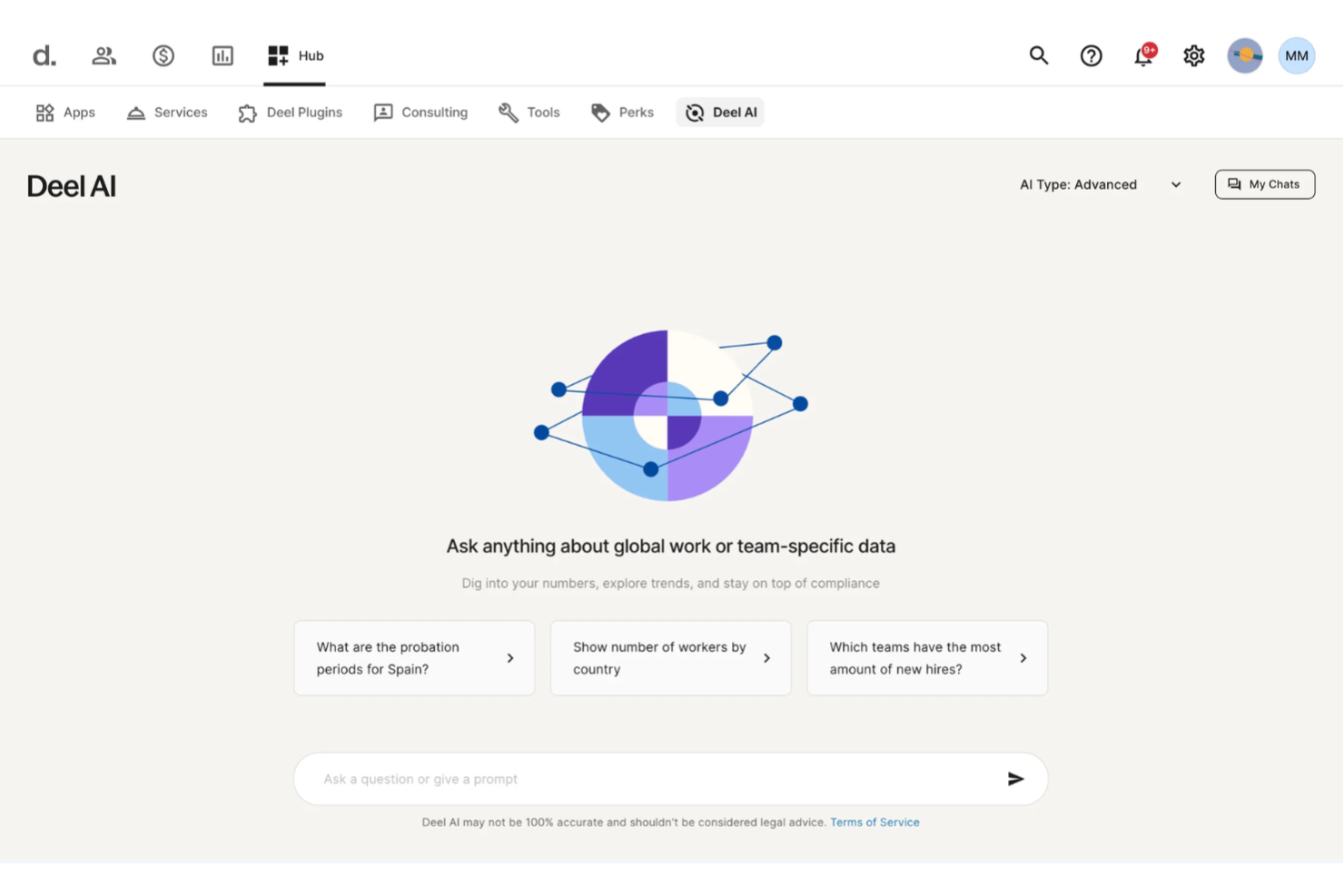
Quando è il momento di offboardare un membro del tuo team, desideri chiarezza, non documenti sparsi, incertezze legali o ritardi. Deel AI ti offre un assistente sempre disponibile che comprende i dati della tua forza lavoro, le leggi locali sul lavoro e i flussi di lavoro HR, così puoi gestire con sicurezza decisioni delicate di offboarding.
Perché ho scelto Deel
Ho scelto Deel perché la sua intelligenza artificiale fornisce indicazioni contestuali durante i momenti critici delle risorse umane, incluso l’offboarding, dove le sfumature normative sono fondamentali. Ottieni intelligenza integrata per la conformità, formata da esperti di oltre 150 paesi, così il sistema può segnalare considerazioni legali locali, obblighi contrattuali e approfondimenti sulle policy mentre lavori. Apprezzo anche che Deel AI interpreti il contesto della pagina—come i profili dei dipendenti o le visualizzazioni dei salari—e riassuma i dati chiave necessari prima di prendere decisioni di offboarding. Questo lo rende una soluzione ideale se desideri uno strumento AI che riduca l’incertezza e velocizzi il processo di offboarding senza dover dipendere esclusivamente da ricerche manuali.
Caratteristiche principali di Deel
Oltre al supporto decisionale basato sulla conformità, Deel offre altre funzionalità degne di nota:
- Disattivazione automatica degli account: Garantisce che l’accesso dei dipendenti uscenti ai sistemi aziendali venga revocato tempestivamente, riducendo i rischi per la sicurezza.
- Recupero globale dei dispositivi: Facilita il ritiro dei dispositivi aziendali assegnati ai dipendenti remoti, assicurando che gli asset vengano restituiti in modo efficiente.
- Reportistica di conformità: Fornisce report dettagliati per garantire l’adesione alle normative locali, riducendo al minimo i rischi legali.
- Gestione globale delle buste paga: Automatizza le attività legate alle buste paga in più paesi, garantendo la conformità alle normative locali.
Integrazioni di Deel
Le integrazioni includono Slack, QuickBooks, Xero, BambooHR, Greenhouse, Lever, Rippling, Personio, Gusto e Workday.
Pros and Cons
Pros:
- L’AI risponde a domande su talenti e forza lavoro utilizzando dati raccolti da esperti
- Fornisce approfondimenti e riepiloghi dell'organizzazione direttamente dai dati del team
- Fornisce indicazioni in oltre 150 contesti occupazionali nazionali
Cons:
- Forte dipendenza dal Knowledge Hub proprietario per l’accuratezza
- Le indicazioni dell’AI possono richiedere una revisione umana per scenari legali complessi
New Product Updates from Deel HR

Deel Expands Stablecoin Wallet to 80+ Countries
Deel expands its Stablecoin Wallet to 80+ countries with dollar-backed balances and optional rewards. This gives eligible contractors more ways to hold and manage earnings inside Deel. For more information, visit Deel’s official site.
 .
.
HR Cloud
Ideale per modelli di offboarding personalizzabili
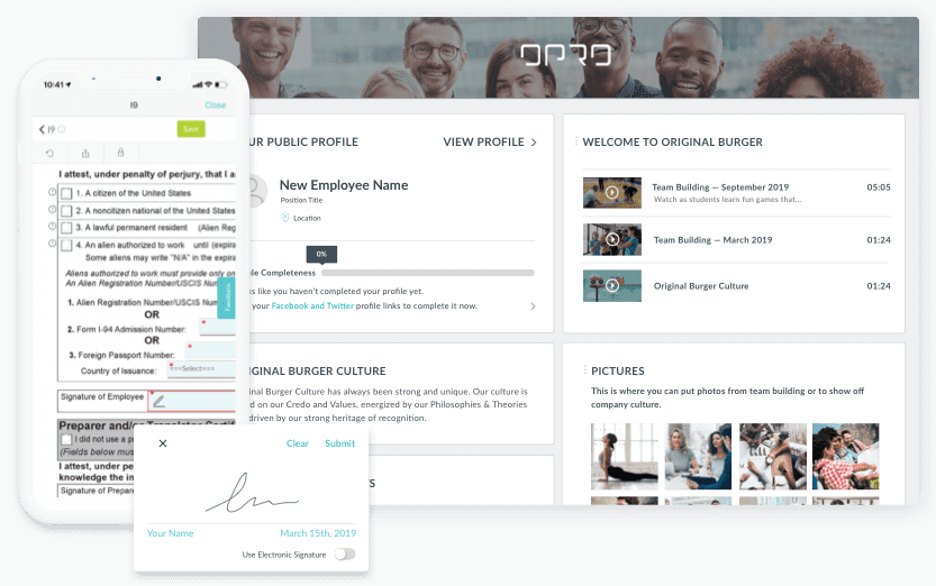
HR Cloud è una soluzione software HR basata sull'IA, progettata per migliorare la gestione delle risorse umane e il coinvolgimento dei dipendenti. Si rivolge a settori come sanità, tecnologia e retail, offrendo funzionalità come onboarding automatizzato, gestione delle assenze e valutazioni delle prestazioni. Le capacità di intelligenza artificiale includono analisi preziose, aiutando il tuo team a prendere decisioni informate.
Perché ho scelto HR Cloud: I modelli di offboarding personalizzabili distinguono HR Cloud, permettendoti di adattare il processo di uscita alle esigenze della tua organizzazione. Le analisi basate su IA aiutano a prevedere potenziali criticità nell’offboarding e offrono soluzioni. La piattaforma automatizza le attività di routine, consentendo al tuo team di concentrarsi sullo sviluppo dei talenti. Le opzioni di integrazione di HR Cloud assicurano che si adatti all’ecosistema HR esistente.
Caratteristiche principali & integrazioni:
Funzionalità includono segnaletica digitale per le comunicazioni, gestione automatizzata della conformità e flussi di lavoro personalizzabili per differenti attività HR. Queste funzioni permettono al tuo team di gestire i processi HR in modo efficiente e di mantenere facilmente la conformità.
Integrazioni includono oltre 35 soluzioni software come ADP, Glassdoor, Greenhouse, Indeed, JazzHR, Lever, Microsoft Office 365, SAP SuccessFactors, Slack, Staffbase, Twilio, QuickBooks, Yammer, Zapier, ZipRecruiter e altri.
Pros and Cons
Pros:
- Modelli di onboarding e offboarding personalizzabili
- Analisi basate su IA per il supporto alle decisioni
- Integrazione senza soluzione di continuità con strumenti popolari
Cons:
- Opzioni di personalizzazione avanzata limitate
- Alcune funzionalità possono richiedere tempo per l’apprendimento

Workato
Ideale per capacità di integrazione avanzate

Workato è una piattaforma di automazione aziendale che unifica app, dati e flussi di lavoro tra i sistemi aziendali. Consente ai team IT e HR di automatizzare complessi processi di offboarding, dalla revoca degli accessi all’aggiornamento delle buste paga, utilizzando integrazioni intuitive e senza codice. I suoi strumenti di progettazione assistiti dall’IA rendono semplice costruire automazioni dinamiche che garantiscono che ogni fase dell’offboarding sia gestita in modo coerente e sicuro.
Perché ho scelto Workato: Le capacità di integrazione di Workato offrono una libreria estesa di connettori, inclusi strumenti finanziari e per le buste paga, che facilitano l’automazione dei flussi di lavoro di offboarding per il tuo team. Le sue funzionalità guidate dall’intelligenza artificiale aiutano a creare automazioni intelligenti, riducendo la necessità di interventi manuali. I suggerimenti automatizzati semplificano la creazione dei flussi, e la logica condizionale garantisce che le attività sensibili (come la disattivazione dei dispositivi o il trasferimento dei dati) avvengano nell’ordine corretto. La piattaforma di Workato si adatta man mano che il tuo stack tecnologico evolve, diventando uno strumento utile per settori dinamici.
Funzionalità e integrazioni principali:
Funzionalità includono un’interfaccia intuitiva che semplifica la creazione dei flussi, una libreria di connettori preconfigurati che velocizzano l’integrazione, un generatore di flussi assistito dall’IA, flussi di lavoro integrati per HR, IT e finanza, e automazioni potenziate dall’IA che riducono le attività manuali.
Integrazioni includono Salesforce, Slack, QuickBooks, Google Workspace, Microsoft 365, Jira, Zendesk, NetSuite, HubSpot e ServiceNow.
Pros and Cons
Pros:
- Ampie opzioni di integrazione con strumenti popolari
- Automazione cross-dipartimentale
- I suggerimenti dell’IA semplificano la configurazione e riducono l’errore umano
Cons:
- Può richiedere competenze tecniche per la configurazione
- L’IA è di supporto, non autonoma


BetterCloud è una piattaforma di gestione e sicurezza SaaS che eccelle nell'automazione del processo di offboarding. Il suo builder di workflow senza codice permette ai team IT di revocare in modo sicuro l'accesso degli utenti, rimuovere permessi e recuperare dati su tutte le applicazioni SaaS collegate — senza intervento manuale. Progettato per ambienti aziendali di grande scala, supervisiona il deprovisioning riducendo i rischi e garantendo la conformità.
Perché ho scelto BetterCloud: BetterCloud si distingue per la capacità di rendere l’offboarding sicuro, coerente e veloce. Grazie a workflow automatizzati attivati da eventi HR o di identità, l’IT può revocare accessi degli utenti, rimuovere in massa i permessi sui file e registrare ogni azione ai fini di audit. Il risultato è una rimozione più rapida di accessi e permessi, una riduzione del rischio interno e una visibilità completa su modifiche di accesso e dati durante il processo di offboarding.
Funzionalità e integrazioni principali:
Funzionalità includono workflow di rimozione accessi automatizzati con logica condizionale e pianificazione, revoca in massa di accessi e file, avvisi in tempo reale per potenziali minacce alla sicurezza e analytics dettagliati che offrono insight su utilizzo e sicurezza delle piattaforme SaaS.
Integrazioni includono Google Workspace, Microsoft 365, Slack, Salesforce, Box, Dropbox, Zendesk, Okta, Zoom e Jira.
Pros and Cons
Pros:
- Gestione granulare di accessi e condivisione
- Automatizza i compiti di sicurezza e conformità
- Riduce l’esposizione dei dati ed errori umani
Cons:
- Più adatto a organizzazioni di medie e grandi dimensioni
- Le funzionalità IA sono più basate su regole che predittive


Zluri è una piattaforma di gestione SaaS progettata per i team IT, finanziari e di approvvigionamento nelle grandi organizzazioni. I suoi insight basati sull’intelligenza artificiale aiutano a gestire le licenze software, ottimizzare l’utilizzo e controllare i costi. Pur non essendo progettato specificamente per l’onboarding e l’offboarding dei dipendenti, i flussi di lavoro automatizzati di Zluri possono essere adattati per gestire la deprovisioning, assicurando che le licenze vengano recuperate e che la conformità sia mantenuta.
Perché ho scelto Zluri: Zluri si distingue per le sue analisi guidate dall’IA e per l’automazione. Centralizza la visibilità sull’uso delle soluzioni SaaS in tutta l’azienda e utilizza il machine learning per identificare applicazioni poco usate, abbonamenti ridondanti e opportunità di consolidamento dei fornitori. L’automazione dei processi può supportare l’offboarding revocando accessi e riallocando licenze, ma il suo vero punto di forza risiede nell’ottimizzazione continua delle soluzioni SaaS e nell’intelligenza sulla spesa.
Caratteristiche e integrazioni distintive:
Caratteristiche comprendono flussi di lavoro automatizzati che migliorano l’efficienza, monitoraggio in tempo reale che fornisce dati di utilizzo aggiornati e strumenti di ottimizzazione delle licenze che identificano opportunità di risparmio sui costi.
Integrazioni includono Okta, Microsoft 365, Slack, Google Workspace, Salesforce, Zoom, ServiceNow, Jira, Dropbox e Asana.
Pros and Cons
Pros:
- Riduce lo spreco di licenze
- Si integra con i principali sistemi HR e IT
- Automatizza i processi di offboarding
Cons:
- L’IA è principalmente analitica, non profondamente autonoma
- Il caso d’uso offboarding è secondario, non centrale


Leena AI è una soluzione HR basata sull'intelligenza artificiale progettata per gestire e automatizzare il processo di offboarding dei dipendenti. Offre un'esperienza di uscita intuitiva e coerente gestendo i flussi di lavoro di uscita, raccogliendo feedback, revocando l'accesso dei dipendenti a login e laptop e garantendo la conformità, il tutto tramite un'automazione intelligente. La piattaforma si integra con i sistemi HR esistenti per gestire ogni fase in modo efficiente e trasparente.
Perché ho scelto Leena AI: Questo strumento si distingue per la capacità di semplificare e personalizzare il processo di offboarding dei dipendenti su larga scala. I flussi di lavoro guidati dall'IA aiutano i team HR ad automatizzare le checklist di uscita, attivare il recupero degli asset e raccogliere i colloqui di uscita senza necessità di follow-up manuali. Leena AI utilizza anche analisi predittive per individuare potenziali rischi di retention ed evidenziare tendenze dai feedback di uscita, aiutando le organizzazioni ad apprendere dall'esperienza di uscita, migliorare l'esperienza dei dipendenti e ridurre l'abbandono del personale in futuro. L'integrazione fluida con i sistemi HRIS e IT esistenti garantisce un processo di offboarding conforme, sicuro per i dati ed efficiente.
Caratteristiche principali & integrazioni:
Caratteristiche includono moduli di formazione personalizzati che si adattano alle esigenze del team, capacità di risposta rapida per gestire le richieste in modo tempestivo e analisi predittiva per prevedere tendenze e necessità di assunzione.
Integrazioni comprendono Workday, SAP SuccessFactors, ADP, Microsoft Teams, Slack, Oracle, Zoho CRM, ServiceNow, Zendesk e Salesforce.
Pros and Cons
Pros:
- Automatizza le risposte alle domande frequenti di HR
- Riduce notevolmente il carico amministrativo
- L'IA segue regole, politiche e permessi
Cons:
- La configurazione iniziale può richiedere l'intervento dell'IT
- Può richiedere personalizzazione per settori specifici


Swimlane è una piattaforma SOAR (orchestrazione, automazione e risposta della sicurezza) creata per i team di operazioni di sicurezza e IT. Utilizza l'intelligenza artificiale per automatizzare i flussi di lavoro, rilevare minacce e gestire processi come la disattivazione dei dipendenti con maggiore controllo e coerenza. Agendo come un sistema sicuro di registrazione, Swimlane aiuta le organizzazioni a proteggere i punti di accesso, mantenere la conformità e garantire che nessun account o permesso sfugga durante le transizioni.
Perché ho scelto Swimlane: Si distingue per l'automazione sicura, soprattutto quando l'offboarding e il controllo degli accessi sono critici. Le funzionalità di automazione e AI di Swimlane aiutano il tuo team a disabilitare i dipendenti in modo sicuro revocando istantaneamente le credenziali, disabilitando gli account e documentando ogni azione. Ciò riduce gli errori umani, accelera i tempi di risposta e rafforza la postura di sicurezza. I flussi di lavoro intelligenti della piattaforma supportano inoltre il miglioramento continuo apprendendo dagli incidenti passati e dai dati di offboarding.
Funzionalità e integrazioni principali:
Funzionalità comprendono playbook automatizzati per l'offboarding sicuro dei dipendenti, analisi guidate dall'AI che rilevano e rispondono alle minacce in tempo reale e dashboard centralizzate per una visibilità completa sugli accessi utenti e le operazioni di sicurezza. Swimlane si integra con i principali provider di identità, sistemi di ticketing e strumenti di sicurezza per garantire che ogni fase del processo di offboarding sia completamente automatizzata e verificabile.
Integrazioni includono un marketplace modulare a stack completo di integrazioni e componenti di automazione, permettendo la connessione a strumenti come CrowdStrike Falcon, Microsoft Teams, Google Workspace, Atlassian Jira, Okta e ServiceNow.
Pros and Cons
Pros:
- Automatizza le operazioni di sicurezza
- Riduce i tempi di risposta agli incidenti
- Dashboard personalizzabili per approfondimenti
Cons:
- Può richiedere competenze tecniche
- La configurazione iniziale può essere complessa


Lumos è una piattaforma di visibilità delle applicazioni e gestione degli accessi progettata per i team IT e di sicurezza. Pur non essendo uno strumento dedicato all’offboarding, offre automazione e governance degli accessi potenziata dall’IA. Lumos centralizza la visibilità attraverso provider di identità, SaaS, cloud e sistemi on-premise, consentendo ai team di gestire il provisioning e i workflow di offboarding sicuri mantenendo conformità e controllo.
Perché ho scelto Lumos: Lumos eccelle nell’unificare la gestione degli accessi con un controllo intelligente. Il suo motore IA, Albus, consiglia policy di RBAC e ABAC contestuali per applicare il giusto livello di accesso e revocarlo tempestivamente durante l’offboarding. La sincronizzazione HRIS in tempo reale garantisce che i cambiamenti di stato dei dipendenti attivino aggiornamenti nei sistemi collegati, eliminando l’onere manuale per i team IT. Unita alle capacità di rilevamento anomalie e reporting di Lumos, queste funzionalità consentono un offboarding più rapido e sicuro con monitoraggio continuo dell’utilizzo delle app e delle autorizzazioni.
Caratteristiche principali & integrazioni:
Le funzionalità includono avvisi in tempo reale che rilevano e segnalano attività di accesso insolite, deprovisioning automatico attivato da aggiornamenti HRIS e raccomandazioni di policy guidate da Albus per garantire la rimozione sicura degli accessi. Dashboard personalizzabili e report dettagliati offrono visibilità sull’uso delle applicazioni e sulla conformità dell’offboarding nell’intero ecosistema SaaS.
Integrazioni includono Slack, Microsoft 365, Google Workspace, Salesforce, Zoom, Asana, Dropbox, Zendesk, Okta e ServiceNow.
Pros and Cons
Pros:
- Visibilità centralizzata tra SaaS e livelli di identità
- Le policy di accesso consigliate dall’IA migliorano la postura di sicurezza
- La sincronizzazione HRIS in tempo reale riduce l’intervento manuale dell’IT
Cons:
- Il focus principale è più sulla governance dell’identità che sull’offboarding
- L’IA fornisce indicazioni ma non un’applicazione autonoma


CloudEagle è una piattaforma di gestione SaaS che aiuta le organizzazioni a ottimizzare l'utilizzo e la spesa per il software. Serve principalmente aziende di medie e grandi dimensioni, offrendo insight guidati dall'IA per migliorare il processo decisionale e semplificare la gestione dei software.
Perché ho scelto CloudEagle: Questo strumento è ideale per i team che desiderano centralizzare la visibilità delle app e automatizzare la gestione del ciclo di vita. Grazie alle sue integrazioni con sistemi HR e di identità, CloudEagle supporta il deprovisioning senza intervento manuale, revocando automaticamente gli accessi, recuperando licenze inutilizzate e garantendo la conformità quando i dipendenti lasciano l'azienda. Le sue capacità di IA evidenziano abbonamenti ridondanti e prevedono esigenze future di software, migliorando sia la sicurezza sia l'efficienza.
Funzionalità e integrazioni principali:
Le funzionalità includono il provisioning e deprovisioning automatizzati degli utenti, report dettagliati sull'utilizzo per una maggiore visibilità, strumenti per ottimizzare le licenze e ridurre gli sprechi e analisi predittive per la pianificazione dei budget software.
Le integrazioni comprendono Okta, Microsoft 365, Google Workspace, Slack, Salesforce, Zoom, ServiceNow, Asana e Jira.
Pros and Cons
Pros:
- Offboarding completamente automatico
- Riassegna istantaneamente le licenze software
- Dashboard centralizzata che riduce il lavoro manuale dell'IT
Cons:
- Si concentra sull'accesso alle app e non sull'offboarding completo delle risorse umane
- I team più piccoli potrebbero trovarlo troppo tecnico

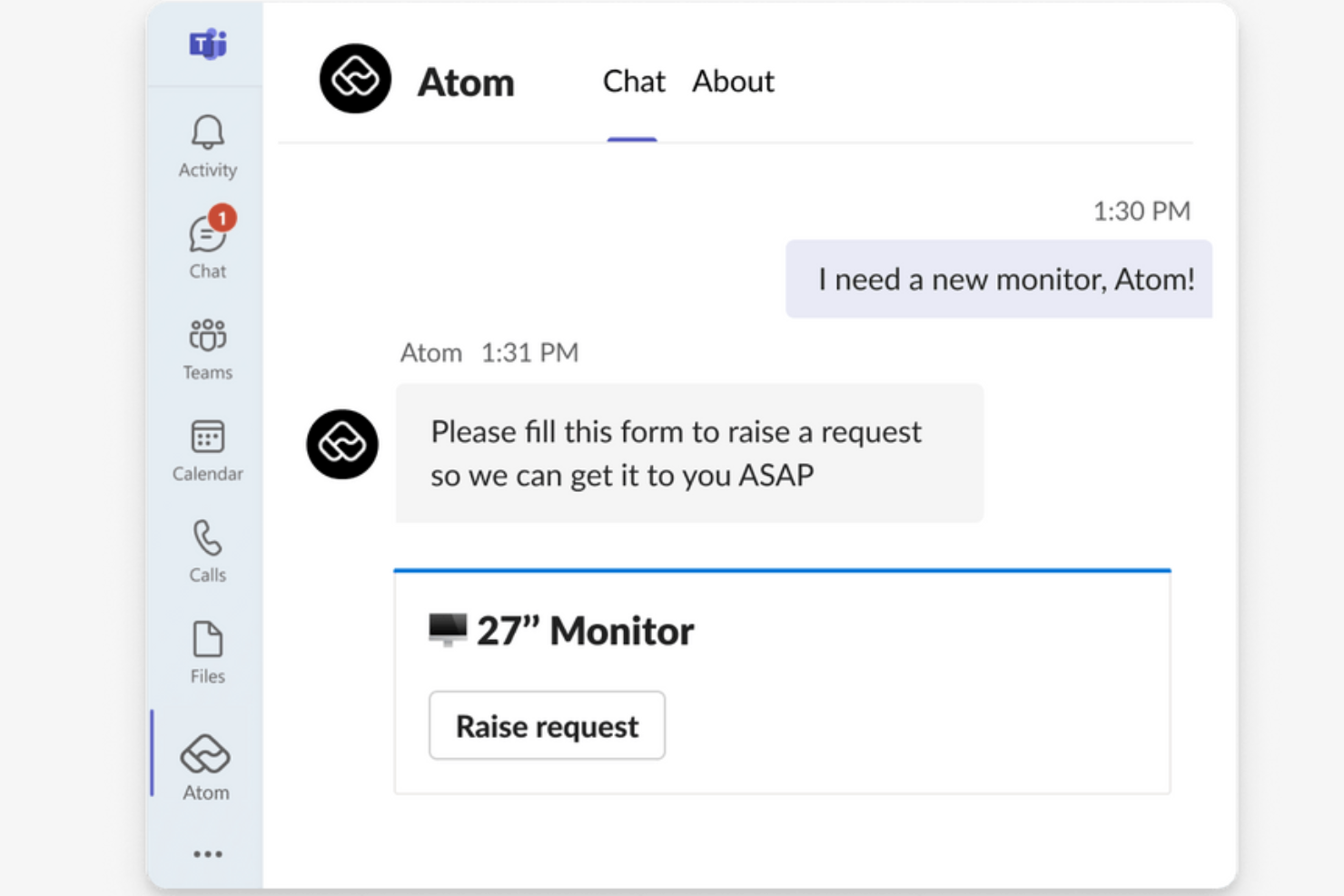
Atomicwork è un software di gestione dei servizi e offboarding alimentato dall'IA che aiuta le organizzazioni ad automatizzare e mettere in sicurezza ogni fase del processo di uscita dei dipendenti. Gestisce attività di offboarding come la revoca degli accessi ai sistemi, il recupero dei beni aziendali e la gestione della documentazione finale.
Perché ho scelto Atomicwork: Atomicwork si distingue per la sua capacità di unificare e automatizzare i flussi di lavoro di offboarding tra più team. L'approccio AI-first garantisce che ogni fase, dall'attivazione delle richieste di uscita al monitoraggio del completamento delle attività, venga gestita in modo coerente senza supervisione manuale.
Caratteristiche principali & integrazioni:
Le funzionalità includono gli strumenti di gestione della conoscenza e automazione dei flussi di lavoro della piattaforma, che aiutano a garantire la conformità, ridurre gli errori umani e minimizzare il tempo speso per attività ripetitive. Offre inoltre la de-provisioning degli accessi ai sistemi e dei beni, un builder di workflow drag-and-drop/low-code e l'assegnazione automatica delle attività di offboarding ai team pertinenti.
Le integrazioni includono Microsoft Teams, Slack, Okta, Microsoft 365 e Lansweeper.
Pros and Cons
Pros:
- Scalabile per team di piccole e medie dimensioni
- Flussi di lavoro unificati
- Supporta il self-service dei dipendenti
Cons:
- La configurazione iniziale potrebbe essere complessa
- Potrebbe non scalare bene per organizzazioni di grandi dimensioni
Altri strumenti di AI per l'uscita dei dipendenti
Ecco alcune opzioni aggiuntive di strumenti di AI per l’uscita dei dipendenti che non sono entrate nella mia selezione, ma che vale comunque la pena considerare:


Come valuto gli strumenti AI per l'offboarding
Cerco soluzioni in cui l'AI faccia davvero la differenza rispetto alla semplice automazione nominale — dovrebbe effettivamente ridurre il carico manuale nella revoca degli accessi, nell'estrazione di insight sulle uscite e nel garantire la conformità delle cessazioni. Suddivido la mia valutazione in funzionalità di base che ogni strumento deve possedere e fattori differenzianti che separano le buone opzioni da quelle eccellenti.
Funzionalità di base (requisiti minimi per questa lista)
Quando seleziono gli strumenti da inserire nell'elenco, valuto ciascuno su una scala da 0 (non offre la funzionalità) a 5 (eccelle in questo ambito) per ogni funzionalità fondamentale di seguito elencata. Quindi calcolo il punteggio totale dello strumento trasformandolo in percentuale. Ogni soluzione deve raggiungere un punteggio totale minimo del 55% per essere considerata per l'inclusione.
- Workflow di offboarding automatizzati: Verifico se la soluzione utilizza l'AI per attivare e instradare le attività tra HR, IT e manager anziché fare affidamento su checklist statiche.
- Analisi AI dei colloqui di uscita: Ogni strumento deve andare oltre la semplice raccolta di sondaggi — cerco estrazione di temi tramite NLP e valutazione del sentiment sui dati di uscita.
- Revoca di accessi e asset: Qui conta l'integrazione con provider di identità come Okta o Azure AD, insieme alla revoca automatica delle licenze sulle app SaaS.
- Insight predittivi sull'attrito: Valuto se la piattaforma applica il machine learning ai pattern di offboarding per evidenziare cause di turnover e segnali di rischio fuga.
- Automazione compliance e documentazione: Lo strumento dovrebbe generare e distribuire automaticamente documenti idonei per area geografica, come NDA e avvisi sui benefit, con tracciabilità degli audit.
- Integrazione HRIS e trasferimento conoscenze: La sincronizzazione bidirezionale con piattaforme come Workday o BambooHR è il requisito base; cerco inoltre la cattura assistita da AI di conoscenze dal personale in uscita.
Dopo aver identificato gli strumenti che soddisfano questi criteri, considero cosa distingue ogni piattaforma dalle altre.
Fattori differenzianti (cosa distingue i fornitori)
Ecco come confronto e metto a confronto i diversi vendor:
Funzionalità distintive
La cattura generativa della conoscenza è un grande elemento distintivo — cerco soluzioni che sintetizzino automaticamente i documenti e le comunicazioni dei progetti di un dipendente in uscita in brevi riassunti realmente utilizzabili da chi subentra. Anche gli alert di retention guidati dal sentiment spiccano, specialmente quando l'AI segnala rischi di fuga all'interno dei team prima che le dimissioni arrivino sulla scrivania. Valuto anche le funzionalità di engagement per ex dipendenti e boomerang: le soluzioni che trasferiscono chi lascia in una rete di talenti con scoring di riassunzione offrono valore costante per il recruiting.
Oltre le funzionalità
La trasparenza dell'AI è molto importante in questo ambito. Verifico che i punteggi di attrito e le analisi di sentiment siano accompagnati da spiegazioni chiare — i team HR devono poter confidare e giustificare le raccomandazioni ricevute, soprattutto durante fasi delicate come ristrutturazioni o tagli. Un altro elemento chiave che considero è la profondità di integrazione: uno strumento di offboarding che non si collega al proprio IdP, HRIS e stack SaaS richiederebbe più operatività manuale di quella che elimina. Valuto infine la prontezza globale, verificando se la piattaforma gestisce normative multinazionali e documentazione multilingua per team distribuiti.
Come scegliere gli strumenti di AI per l'uscita dei dipendenti
È facile perdersi in lunghi elenchi di funzionalità e strutture tariffarie complesse. Per aiutarti a rimanere concentrato mentre affronti il tuo processo di selezione del software, ecco una lista di controllo dei fattori da tenere a mente:
| Fattore | Cosa considerare |
|---|---|
| Scalabilità | Lo strumento può crescere insieme al tuo team? Considera le esigenze future e se lo strumento supporta team di diverse dimensioni senza perdere efficienza. |
| Integrazioni | Si connette al software che già utilizzi? Assicurati che supporti le integrazioni principali per evitare l'inserimento manuale dei dati e mantenere la coerenza del flusso di lavoro. |
| Personalizzazione | Puoi adattare lo strumento ai tuoi processi? Cerca flessibilità nei flussi di lavoro e nelle impostazioni, in modo che corrispondano alle esigenze specifiche della tua azienda. |
| Facilità d'uso | Lo strumento è intuitivo? Un'interfaccia facile da usare riduce i tempi di formazione e aiuta i dipendenti ad adattarsi rapidamente. |
| Implementazione e onboarding | Quanto tempo richiede la configurazione? Valuta le risorse necessarie per una transizione senza problemi e se il fornitore offre assistenza durante l'onboarding. |
| Costo | Il prezzo rientra nel tuo budget? Confronta il costo con le funzionalità offerte e presta attenzione ai costi nascosti o ai limiti dei diversi piani. |
| Misure di sicurezza | In che modo lo strumento protegge i dati? Cerca funzionalità di crittografia, controlli degli accessi e conformità alle normative sulla protezione dei dati per garantire la sicurezza delle informazioni sensibili. |
| Requisiti di conformità | Soddisfa gli standard del settore? Verifica la capacità dello strumento di rispettare le normative pertinenti e i requisiti legali specifici del tuo settore. |
Cosa sono gli strumenti di AI per la gestione dell'uscita dei dipendenti?
Gli strumenti di AI per la gestione dell'uscita dei dipendenti sono soluzioni software progettate per automatizzare e migliorare il processo di uscita dei dipendenti utilizzando l'intelligenza artificiale. I professionisti delle risorse umane e i team IT utilizzano generalmente questi strumenti per garantire transizioni senza problemi, mantenere la conformità e proteggere i dati aziendali durante l'uscita dei dipendenti. I flussi di lavoro automatizzati, la sicurezza dei dati e la gestione della conformità aiutano a ridurre le attività manuali, proteggere le informazioni sensibili e rispettare i requisiti legali. Nel complesso, questi strumenti offrono efficienza e tranquillità durante il processo di uscita dei dipendenti.
Funzionalità
Quando selezioni strumenti di AI per la gestione dell'uscita dei dipendenti, presta attenzione alle seguenti funzionalità principali:
- Flussi di lavoro automatizzati: Semplificano il processo di uscita dei dipendenti automatizzando le attività ripetitive, risparmiando tempo e riducendo gli errori.
- Sicurezza dei dati: Protegge le informazioni sensibili con la crittografia e i controlli degli accessi durante il processo di uscita dei dipendenti.
- Gestione della conformità: Garantisce il rispetto delle normative legali e delle politiche aziendali, riducendo il rischio di non conformità.
- Avvisi in tempo reale: Invia notifiche relative a potenziali rischi per la sicurezza o anomalie durante l'uscita dei dipendenti, consentendo di intervenire immediatamente.
- Supporto per le integrazioni: Si connette ai sistemi HR e IT esistenti per mantenere la coerenza del flusso di lavoro.
- Analisi basate sull'AI: Analizza i dati relativi all'uscita dei dipendenti per identificare tendenze e migliorare i processi futuri.
- Modelli personalizzabili: Adatta i processi di uscita dei dipendenti alle esigenze e ai requisiti specifici della tua organizzazione.
- Analisi del sentiment: Valuta il sentiment dei dipendenti durante i colloqui di uscita per ottenere feedback e informazioni utili.
- Revoca delle licenze: Revoca automaticamente l'accesso ai sistemi e al software aziendali per proteggere i dati dell'azienda.
- Analisi predittiva: Prevede i potenziali problemi nel processo di uscita dei dipendenti per affrontarli in modo proattivo.
Vantaggi
L'implementazione di strumenti di AI per la gestione dell'uscita dei dipendenti offre diversi vantaggi al tuo team e alla tua azienda. Ecco alcuni dei vantaggi che puoi aspettarti:
- Risparmio di tempo: I flussi di lavoro automatizzati riducono la necessità di attività manuali, liberando tempo prezioso per il tuo team.
- Maggiore conformità: La gestione della conformità garantisce che tutti i processi di uscita dei dipendenti rispettino gli standard legali e aziendali.
- Maggiore sicurezza dei dati: Funzionalità come la crittografia dei dati e i controlli degli accessi proteggono le informazioni sensibili durante l'uscita dei dipendenti.
- Migliore processo decisionale: Le analisi basate sull'AI e l'analisi predittiva forniscono dati utili per perfezionare e migliorare i processi di uscita dei dipendenti.
- Efficienza dei costi: Identificare e revocare le licenze inutilizzate aiuta a ridurre i costi e a ottimizzare l'allocazione delle risorse.
- Maggiore precisione: L'automazione riduce la possibilità di errore umano, garantendo procedure di uscita dei dipendenti coerenti e accurate.
- Feedback prezioso: L'analisi del sentiment durante i colloqui di uscita offre informazioni sulle esperienze dei dipendenti, contribuendo ai miglioramenti futuri.
Costi & prezzi
La scelta di strumenti di AI per la gestione dell'uscita dei dipendenti richiede una comprensione dei vari modelli e piani tariffari disponibili. I costi variano in base alle funzionalità, alle dimensioni del team, agli elementi aggiuntivi e ad altri fattori. La tabella seguente riassume i piani più comuni, i relativi prezzi medi e le funzionalità tipicamente incluse nelle soluzioni di strumenti di AI per la gestione dell'uscita dei dipendenti:
Tabella comparativa dei piani per gli strumenti di uscita dei dipendenti basati sull'IA
| Tipo di piano | Prezzo medio | Funzionalità comuni |
|---|---|---|
| Piano gratuito | $0 | Automazione di base, analisi limitate e assistenza via e-mail. |
| Piano personale | $5-$25/utente/mese | Flussi di lavoro avanzati, sicurezza dei dati e integrazioni di base. |
| Piano aziendale | $15-45/utente/mese | Analisi avanzate, gestione della conformità e modelli personalizzati. |
| Piano per grandi aziende | $50+/utente/mese | Supporto completo alle integrazioni, analisi predittive e assistenza clienti dedicata. |
Domande frequenti sugli strumenti di uscita dei dipendenti basati sull'IA
Ecco alcune risposte alle domande comuni sugli strumenti di uscita dei dipendenti basati sull’IA:
In che modo gli strumenti di uscita dei dipendenti basati sull'IA contribuiscono a ridurre i rischi durante l'uscita dei dipendenti?
Gli strumenti di uscita dei dipendenti basati sull’IA contribuiscono a ridurre i rischi automatizzando la revoca degli accessi, monitorando i trasferimenti di dati e garantendo che tutte le attività di uscita vengano completate nei tempi previsti. Ciò riduce la probabilità di fughe di dati, violazioni della conformità e passaggi mancanti che potrebbero esporre la tua organizzazione. L’utilizzo di questi strumenti documenta inoltre ogni azione del processo di uscita, consentendoti di verificare facilmente i processi quando necessario.
Quali passaggi posso adottare per garantire una transizione fluida con un processo di uscita dei dipendenti basato sull'IA?
Innanzitutto, mappa i tuoi flussi di lavoro di uscita e individua le attività ripetitive o sensibili. Successivamente, configura le integrazioni dello strumento di IA con i sistemi HR e IT. Assicurati che le attività principali, come Inizia mappando il tuo flusso di lavoro di uscita — individua ogni passaggio in cui accessi, dati o risorse cambiano di mano. Piattaforme come BetterCloud e Zluri funzionano al meglio quando hai definito chiaramente gli eventi di attivazione, ad esempio un aggiornamento nell’HRIS o una data di uscita nel tuo fornitore di identità.
Quindi, crea flussi di lavoro automatizzati per gestire le attività ripetitive e sensibili — disabilitare gli account, riassegnare la titolarità, raccogliere i dispositivi e revocare le autorizzazioni sui file — utilizzando strumenti come Workato per i passaggi di consegne tra reparti, ad esempio dall’IT alla Finanza.
Infine, forma i responsabili ed esegui verifiche periodiche. Esamina i registri e i report generati dall’IA per individuare passaggi mancanti, lacune di sicurezza o accessi ridondanti. Una revisione continua mantiene il processo di uscita sicuro, conforme e adattabile all’evoluzione dei tuoi sistemi.
Come posso misurare il ROI di uno strumento di uscita dei dipendenti basato sull'IA?
Inizia definendo un valore di riferimento per l’impegno manuale attuale — il tempo impiegato per revocare gli accessi, raccogliere le apparecchiature, trasferire i dati e gestire le licenze. Dopo aver implementato lo strumento, monitora l’efficienza dell’automazione: misura le ore risparmiate per ogni processo di uscita, la percentuale di flussi di lavoro completamente automatizzati e la riduzione dei ticket IT manuali.
Monitora le metriche di sicurezza e conformità, come la riduzione dei deprovisioning ritardati, il minor rischio di account orfani e una migliore preparazione agli audit.
Valuta l’ottimizzazione dei costi attraverso il recupero delle licenze e la riduzione dell’IT ombra, raccogliendo al contempo il livello di soddisfazione e fiducia nel processo da parte delle parti interessate IT e HR. Nel tempo, dovresti osservare riduzioni misurabili dei costi, cicli di uscita più rapidi e punteggi di conformità più elevati; un chiaro indicatore del fatto che il tuo sistema basato sull’IA sta generando un ritorno positivo.
Con quale frequenza devo aggiornare i miei flussi di lavoro di uscita dei dipendenti basati sull'IA?
Esamina e aggiorna i tuoi flussi di lavoro di uscita dei dipendenti basati sull’IA almeno una volta all’anno o ogni volta che si verificano importanti cambiamenti organizzativi o di sistema. Se cambiano il tuo HRIS, il fornitore di identità o le integrazioni SaaS, aggiorna immediatamente i passaggi del flusso di lavoro corrispondente per prevenire errori o lacune di sicurezza. Gli aggiornamenti regolari garantiscono che le regole di automazione, gli eventi di attivazione degli accessi e le catene di approvazione rimangano accurati con l’evoluzione degli strumenti, dei ruoli o degli standard di conformità.