

I 10 migliori strumenti di IA per i riepiloghi delle riunioni nel 2026

Elenco dei migliori strumenti di IA per i riepiloghi delle riunioni


Uno strumento di IA per i riepiloghi delle riunioni utilizza l’intelligenza artificiale per acquisire, trascrivere e organizzare automaticamente i punti chiave delle riunioni. Se stai cercando modi per ridurre la presa manuale degli appunti, assicurarti che nulla venga tralasciato e mantenere il tuo team allineato, questi strumenti possono aiutarti a trasformare il modo in cui documenti le riunioni e dai seguito alle attività successive.
In questo elenco troverai le migliori opzioni di IA per i riepiloghi delle riunioni per il 2026, ciascuna selezionata per le funzionalità che affrontano le difficoltà concrete che i professionisti delle risorse umane e i team aziendali devono affrontare ogni giorno. Usa questa guida per confrontare le soluzioni e trovare quella più adatta al tuo flusso di lavoro.
Perché fidarsi delle nostre recensioni sui software
Il nostro team testa e recensisce software dal 2012. In quanto esperti HR noi stessi, sappiamo quanto sia difficile — e importante — scegliere il software giusto.
Per questa guida, abbiamo valutato gli strumenti attraverso test pratici e ricerche indipendenti, assegnando un punteggio agli strumenti in base ai nostri criteri di selezione. Ci basiamo inoltre sulle competenze di leader di pensiero del settore e di professionisti HR attivi.
Le nostre recensioni riflettono il nostro giudizio editoriale umano, non un discorso di vendita.
Revisori esperti:
Riepilogo dei migliori strumenti di IA per i riepiloghi delle riunioni
Questa tabella comparativa riassume i dettagli dei prezzi delle mie migliori selezioni di strumenti di IA per i riepiloghi delle riunioni, per aiutarti a trovare quello più adatto al tuo budget e alle esigenze della tua azienda.
| Tool | Best For | Trial Info | Price | ||
|---|---|---|---|---|---|
| 1 | Ideale con supporto integrato per le riunioni Zoom | Piano gratuito + demo gratuita disponibile | Da $14.16/mese (fatturazione annuale) | Website | |
| 2 | Ideale per catturare i momenti salienti su Google Meet | Piano gratuito disponibile | Da $8/utente/mese (fatturato annualmente) | Website | |
| 3 | Ideale per la trascrizione dal vivo con etichette dei partecipanti | Piano gratuito disponibile | Da $8,33/utente/mese (fatturazione annuale) | Website | |
| 4 | Ideale per la cattura di note audio prive di rumore | Piano gratuito + prova disponibile | Da $8/utente/mese (fatturato annualmente) | Website | |
| 5 | Ideale per esportare note in più formati | Piano gratuito disponibile | Da $8.17/mese (fatturazione annuale) | Website | |
| 6 | Ideale per l'estrazione automatizzata delle azioni da intraprendere | Piano gratuito disponibile | Da $15/mese (fatturato annualmente) | Website | |
| 7 | Ideale per il supporto ai riassunti multilingue | Piano gratuito + demo gratuita disponibile | A partire da €39/utente/mese (fatturato annualmente) | Website | |
| 8 | Ideale per suggerimenti di follow-up alimentati dall’AI | Piano gratuito disponibile | A partire da $9/mese (fatturazione annuale) | Website | |
| 9 | Ideale per la privacy dei dati dell'IA e la conformità alla norma ISO 27001 | Demo gratuita disponibile | Prezzi su richiesta | Website | |
| 10 | Ideale per riepiloghi istantanei dopo le chiamate | Versione di prova gratuita disponibile | Prezzo su richiesta | Website |
Recensioni dei migliori strumenti di IA per i riepiloghi delle riunioni
Di seguito sono riportati i miei riepiloghi dettagliati degli strumenti di IA per i riepiloghi delle riunioni inclusi nel mio elenco. Le mie recensioni offrono una panoramica dettagliata delle funzionalità, delle integrazioni e dei casi d’uso migliori di ogni strumento, per aiutarti a trovare quello più adatto a te.

Zoom
Ideale con supporto integrato per le riunioni Zoom

Se il tuo team si affida già a Zoom per le riunioni, la funzione di presa appunti con intelligenza artificiale di Zoom porta i riassunti delle riunioni direttamente nel tuo flusso di lavoro. Questa funzione è pensata per le organizzazioni che desiderano riassunti automatici, attività e spunti senza lasciare l'ambiente Zoom. È particolarmente utile per HR, project manager e leader aziendali che necessitano di riepiloghi istantanei e contestuali delle riunioni proprio dove avvengono le conversazioni.
Perché ho scelto Zoom
Poiché il sistema di presa appunti con IA di Zoom è integrato direttamente nella piattaforma Zoom, rappresenta una soluzione naturale per i team che già utilizzano Zoom per i propri incontri. Ho scelto questo strumento per la sua capacità di generare in tempo reale riepiloghi e attività senza la necessità di configurazioni aggiuntive o di dover passare da un'app all'altra. La funzione di IA può catturare automaticamente i punti salienti e le decisioni man mano che si svolge la riunione, rendendo semplice mantenere tutti allineati. Questo approccio integrato permette di ottenere spunti e riepiloghi delle riunioni direttamente dove avvengono le conversazioni, un valore aggiunto soprattutto per i team HR e i leader aziendali più impegnati.
Caratteristiche principali di Zoom
Altre funzionalità che rendono Zoom utile per i riassunti delle riunioni con IA includono:
- Suddivisione automatica in capitoli intelligenti: Lo strumento divide le registrazioni delle riunioni in sezioni etichettate per una navigazione rapida.
- Trascrizione in tempo reale durante la riunione: Gli utenti possono visualizzare didascalie e trascrizioni in tempo reale mentre sono in chiamata.
- Trascrizioni ricercabili dopo la riunione: Tutte le trascrizioni delle riunioni vengono archiviate e rimangono ricercabili all'interno della piattaforma Zoom.
- Risposte IA nella chat: L'AI Companion può generare risposte suggerite nelle conversazioni di Zoom Team Chat.
Integrazioni di Zoom
Le integrazioni includono Google Drive, Microsoft 365, Figma, Confluence, Notion, Coda, Microsoft Teams, Slack, Calendly e Salesforce.
Pros and Cons
Pros:
- Le attività vengono generate e evidenziate automaticamente
- I capitoli intelligenti organizzano le registrazioni per la revisione
- Le trascrizioni sono ricercabili all’interno della piattaforma Zoom
Cons:
- I riassunti sono disponibili solo per le riunioni Zoom
- A volte ci sono errori di trascrizione con gli accenti

Tactiq
Ideale per catturare i momenti salienti su Google Meet
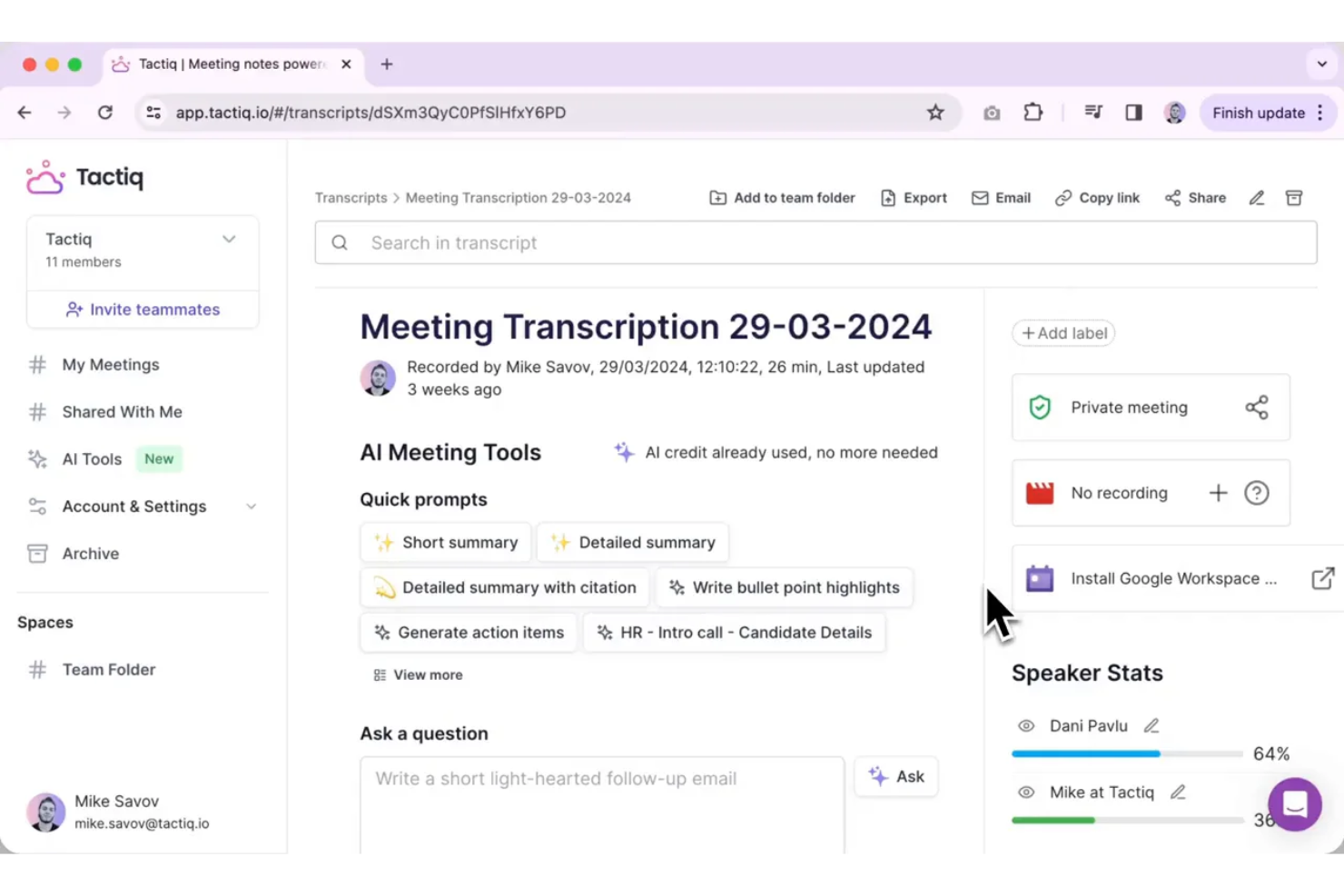
Tactiq è pensato per team e professionisti che utilizzano Google Meet e desiderano catturare i momenti chiave durante le chiamate dal vivo. Permette di evidenziare in tempo reale i punti salienti della discussione, facilitando così la creazione di riassunti delle riunioni tramite IA. Questo strumento è particolarmente utile per HR, project manager ed educatori che hanno bisogno di consultare o condividere rapidamente i punti principali degli incontri senza dover esaminare le trascrizioni complete.
Perché ho scelto Tactiq
Ciò che distingue Tactiq è la sua attenzione alla cattura dei momenti salienti direttamente in Google Meet, ideale per i team che impiegano Google Workspace come principale piattaforma di collaborazione. Ho scelto Tactiq perché consente agli utenti di contrassegnare i momenti importanti durante le riunioni dal vivo, permettendo di generare rapidamente riassunti focalizzati su ciò che conta davvero. Lo strumento trascrive automaticamente le conversazioni e consente di aggiungere evidenziazioni e commenti in tempo reale. Questo approccio aiuta HR, responsabili di progetto ed educatori a risparmiare tempo individuando i punti chiave senza dover rivedere tutte le trascrizioni.
Funzionalità principali di Tactiq
Oltre all’evidenziazione in tempo reale, Tactiq offre anche altre funzionalità utili per rispondere alle esigenze di riassunto delle riunioni tramite IA:
- Trascrizione automatica delle riunioni: Tactiq genera trascrizioni in tempo reale per le sessioni di Google Meet.
- Identificazione degli oratori: Lo strumento contrassegna ogni riga della trascrizione con il nome dell’oratore.
- Esportazione su Google Docs e Notion: Gli utenti possono inviare direttamente i riassunti e le trascrizioni delle riunioni su queste piattaforme.
- Riassunti delle riunioni generati dall’IA: Tactiq utilizza l’intelligenza artificiale per creare riassunti concisi partendo dalla trascrizione completa.
Integrazioni di Tactiq
Le integrazioni includono Google Meet, Zoom, Microsoft Teams, Slack, Notion, Linear e HubSpot.
Pros and Cons
Pros:
- Le evidenziazioni possono essere aggiunte durante le riunioni dal vivo
- Esporta i riassunti direttamente su Google Docs
- Etichette dei relatori incluse in tutte le trascrizioni
Cons:
- A volte i momenti salienti vengono persi nelle riunioni affollate
- Opzioni di modifica limitate per i riassunti generati

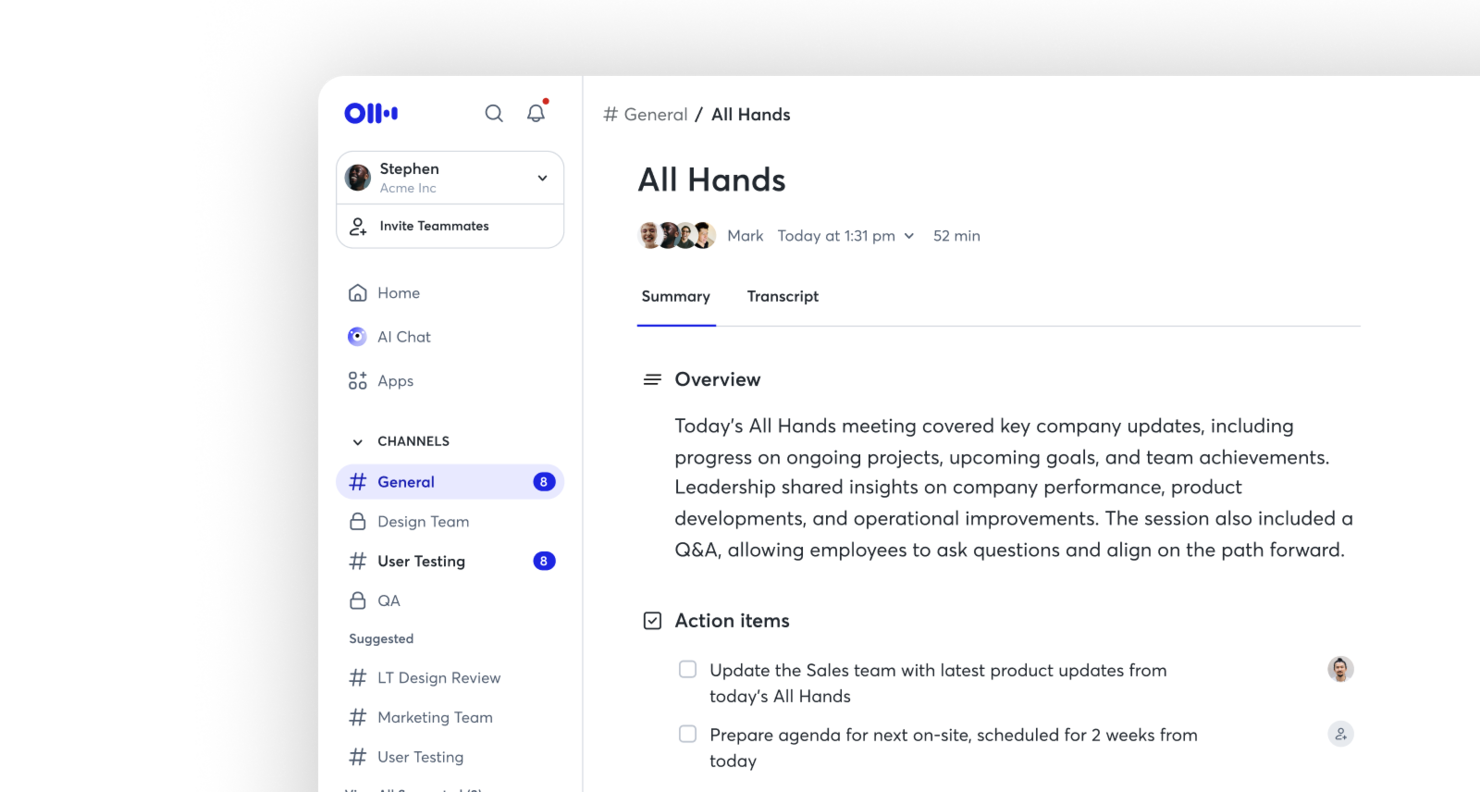
Otter è un'intelligenza artificiale per il riassunto delle riunioni, pensata per i team che necessitano di trascrizioni in tempo reale con chiare etichette dei partecipanti. È particolarmente utile per i professionisti che desiderano catturare le conversazioni in tempo reale e identificare rapidamente chi ha detto cosa. Se vuoi migliorare la documentazione e la responsabilità delle riunioni, l'identificazione dei relatori e le trascrizioni ricercabili di Otter.ai possono aiutarti.
Perché ho scelto Otter
Per i team che hanno bisogno di registri delle riunioni accurati e in tempo reale, Otter si distingue per la trascrizione live con etichette dei partecipanti. Ho scelto questo strumento perché distingue e tagga automaticamente ogni relatore, facilitando il follow-up delle conversazioni e l'attribuzione dei commenti. La trascrizione dal vivo permette di catturare le discussioni mentre avvengono, senza attendere l'elaborazione post-riunione. Questa combinazione risulta particolarmente preziosa per i team che necessitano di registrazioni chiare e operative di chi ha detto cosa durante le riunioni.
Funzionalità principali di Otter
Oltre alla trascrizione live e all'etichettatura dei partecipanti, ho trovato utili anche queste funzionalità per l'AI di riassunto delle riunioni:
- Generazione automatica di riassunti: Otter.ai crea riassunti concisi delle riunioni, evidenziando i punti chiave e le decisioni.
- Archivio trascrizioni ricercabile: Conserva e ricerca le trascrizioni delle riunioni passate per trovare velocemente argomenti o dichiarazioni specifiche.
- Note condivise in tempo reale: Collabora sulle note delle riunioni in tempo reale con gli altri partecipanti.
- Integrazione con il calendario: Collega Otter.ai ai calendari Google o Microsoft per partecipare automaticamente e registrare le riunioni programmate.
Integrazioni di Otter
Le integrazioni includono Zoom, Google Meet, Microsoft Teams, Slack, Salesforce, HubSpot, Asana, Jira, Notion e Dropbox.
Pros and Cons
Pros:
- Le etichette dei partecipanti identificano accuratamente chi partecipa
- Aggiornamenti della trascrizione live in tempo reale
- Trascrizioni ricercabili per un rapido riferimento
Cons:
- Errori di trascrizione occasionali con gli accenti
- Opzioni di formattazione limitate per le note esportate

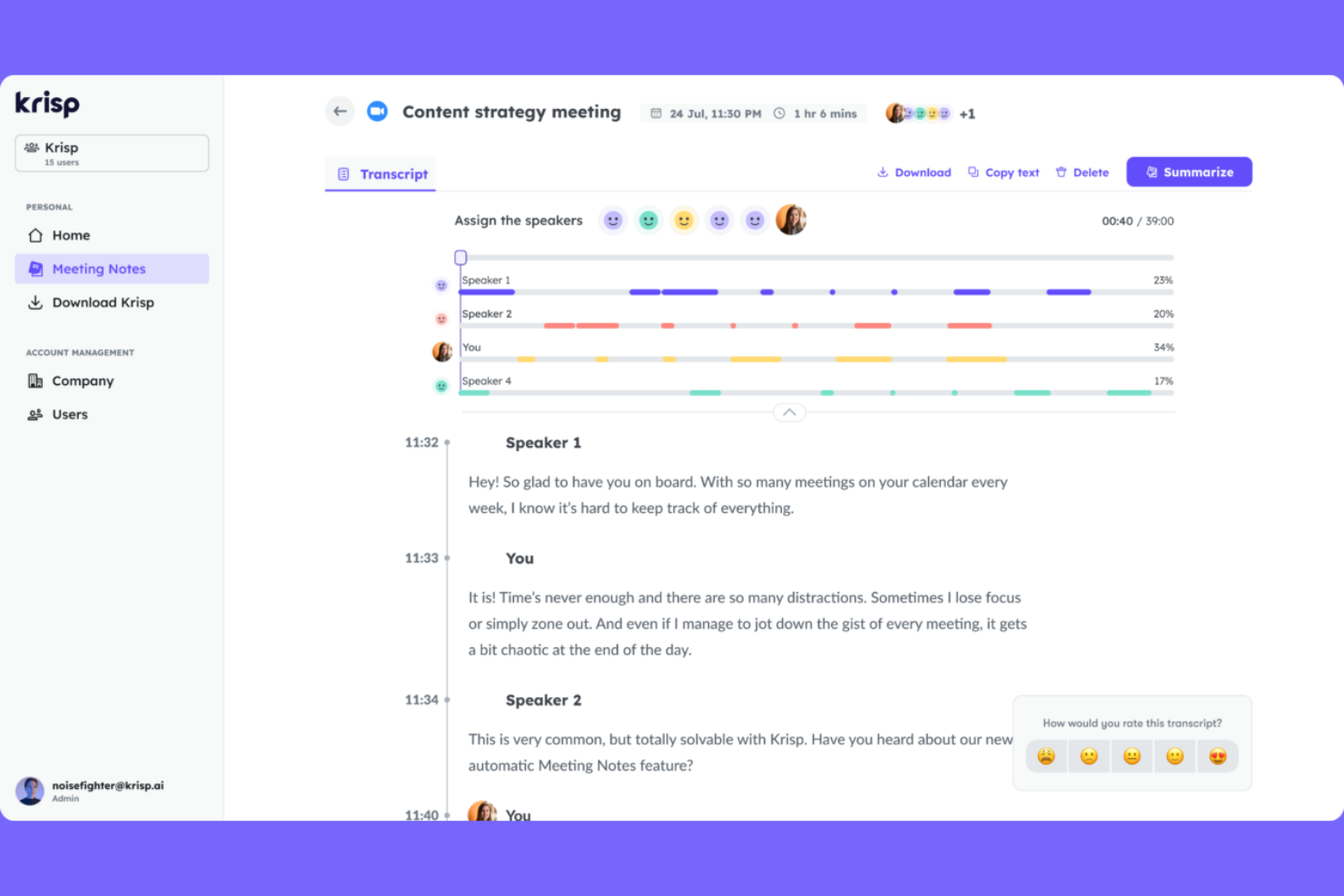
Per i team che hanno difficoltà con il rumore di fondo durante le riunioni virtuali, Krisp offre una cancellazione del rumore alimentata da intelligenza artificiale e la cattura automatica di note audio. È particolarmente utile per i professionisti che lavorano da remoto, i recruiter e i team HR che necessitano di registrazioni chiare e prive di distrazioni per riassunti di riunione accurati. Krisp assicura che le tue note di riunione riflettano ciò che è realmente stato detto, non ciò che è andato perso nel rumore.
Perché ho scelto Krisp
Quando si devono prendere note di una riunione, la qualità audio può determinare l’utilità dei tuoi riassunti. Ho scelto Krisp perché la sua cancellazione del rumore basata su intelligenza artificiale elimina in tempo reale i suoni di sottofondo, per ottenere un audio pulito e chiaro in ogni riunione. Lo strumento offre anche l’isolamento vocale, che aiuta a catturare solo la voce dell’oratore, riducendo la confusione nelle trascrizioni e nei riassunti. Per chiunque necessiti di un’IA per riassunti di riunione affidabile, l’attenzione di Krisp all’audio privo di rumori offre una solida base per prendere appunti accurati.
Funzionalità principali di Krisp
Altre caratteristiche che rendono Krisp utile per l’IA per riassunti di riunione includono:
- Assistente IA per le riunioni: Genera automaticamente note e riassunti delle riunioni dalle tue chiamate.
- Trascrizione delle chiamate: Fornisce la trascrizione in tempo reale delle riunioni sulle piattaforme supportate.
- Dashboard di analisi delle riunioni: Offre informazioni su tempo di parola, partecipazione e coinvolgimento nelle riunioni.
- Compatibilità multipiattaforma: Funziona con Zoom, Microsoft Teams, Google Meet e altri principali strumenti di videoconferenza.
Integrazioni di Krisp
Le integrazioni includono Zoom, Google Meet, Microsoft Teams, Slack, HubSpot, Salesforce, Google Calendar, Webex, Outlook e Discord.
Pros and Cons
Pros:
- Rimuove i rumori di fondo dalle registrazioni
- Tiene traccia del tempo di parola e della partecipazione alle riunioni
- Supporta più piattaforme di videoconferenza
Cons:
- La precisione della trascrizione cala con accenti molto forti
- Per le funzionalità complete è necessario installare l’app desktop
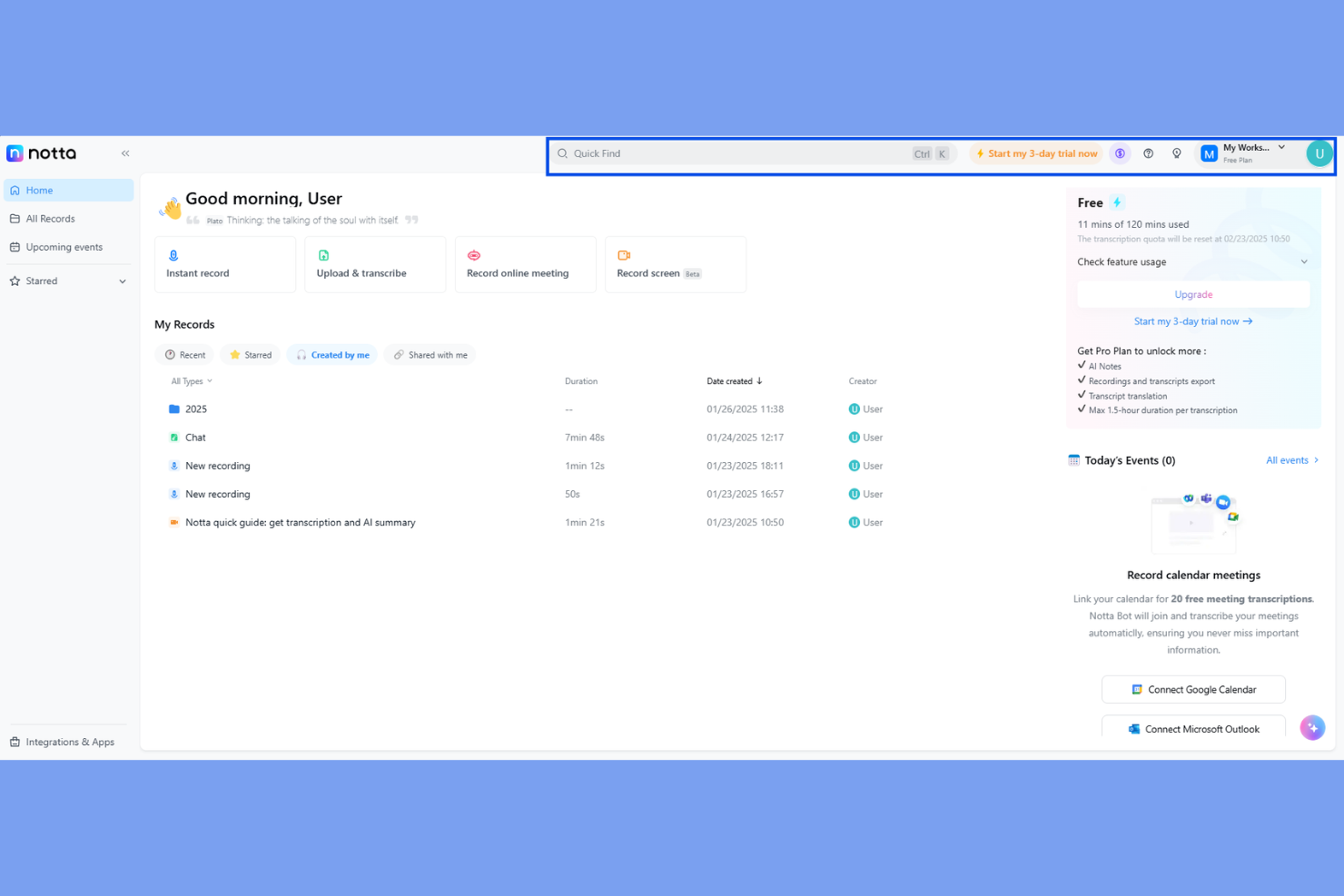
Notta è un'intelligenza artificiale per il riepilogo delle riunioni pensata per team e professionisti che necessitano di opzioni flessibili per la condivisione e l'archiviazione delle note delle riunioni. Se lavori spesso con clienti, team interfunzionali o partner esterni, Notta rende semplice esportare trascrizioni e riepiloghi in un'ampia gamma di formati. Questo ti aiuta a mantenere tutti allineati, indipendentemente dagli strumenti o dai flussi di lavoro utilizzati dai tuoi collaboratori.
Perché ho scelto Notta
Ciò che distingue Notta rispetto ad altre IA per il riepilogo delle riunioni è la sua capacità di esportare note e trascrizioni in diversi formati, particolarmente utile per i team che devono condividere informazioni su piattaforme differenti. Ho scelto Notta perché ti permette di scaricare i riepiloghi delle riunioni come PDF, TXT, DOCX, SRT e persino tramite link condivisibili, facilitandone l'inserimento in qualsiasi flusso di lavoro. Questa flessibilità è preziosa per professionisti HR, consulenti e project manager che spesso devono distribuire gli esiti delle riunioni a diversi interlocutori. Se cerchi uno strumento che si adatti alle tue esigenze di documentazione e condivisione, le opzioni di esportazione di Notta rappresentano una scelta valida.
Funzionalità principali di Notta
Oltre alle sue opzioni flessibili di esportazione, Notta offre altre funzionalità utili per soddisfare le esigenze di sintesi delle riunioni:
- Trascrizione in tempo reale: converte le parole pronunciate in testo durante la riunione.
- Identificazione degli oratori: indica chi sta parlando durante conversazioni con più partecipanti.
- Importazione di audio e video: consente di caricare registrazioni per la trascrizione e il riepilogo.
- App mobile: permette di registrare e accedere alle note delle riunioni ovunque ti trovi.
Integrazioni di Notta
Le integrazioni includono Zoom, Google Meet, Microsoft Teams, Slack, Notion, Google Docs, Salesforce, HubSpot, ClickUp e Dropbox.
Pros and Cons
Pros:
- Trascrive file audio e video caricati
- L'app mobile supporta la registrazione in movimento
- Le etichette degli oratori aiutano a chiarire le trascrizioni delle riunioni
Cons:
- Nessuna pianificazione riunioni tramite calendario integrata
- Nessuna opzione di trascrizione umana dal vivo disponibile

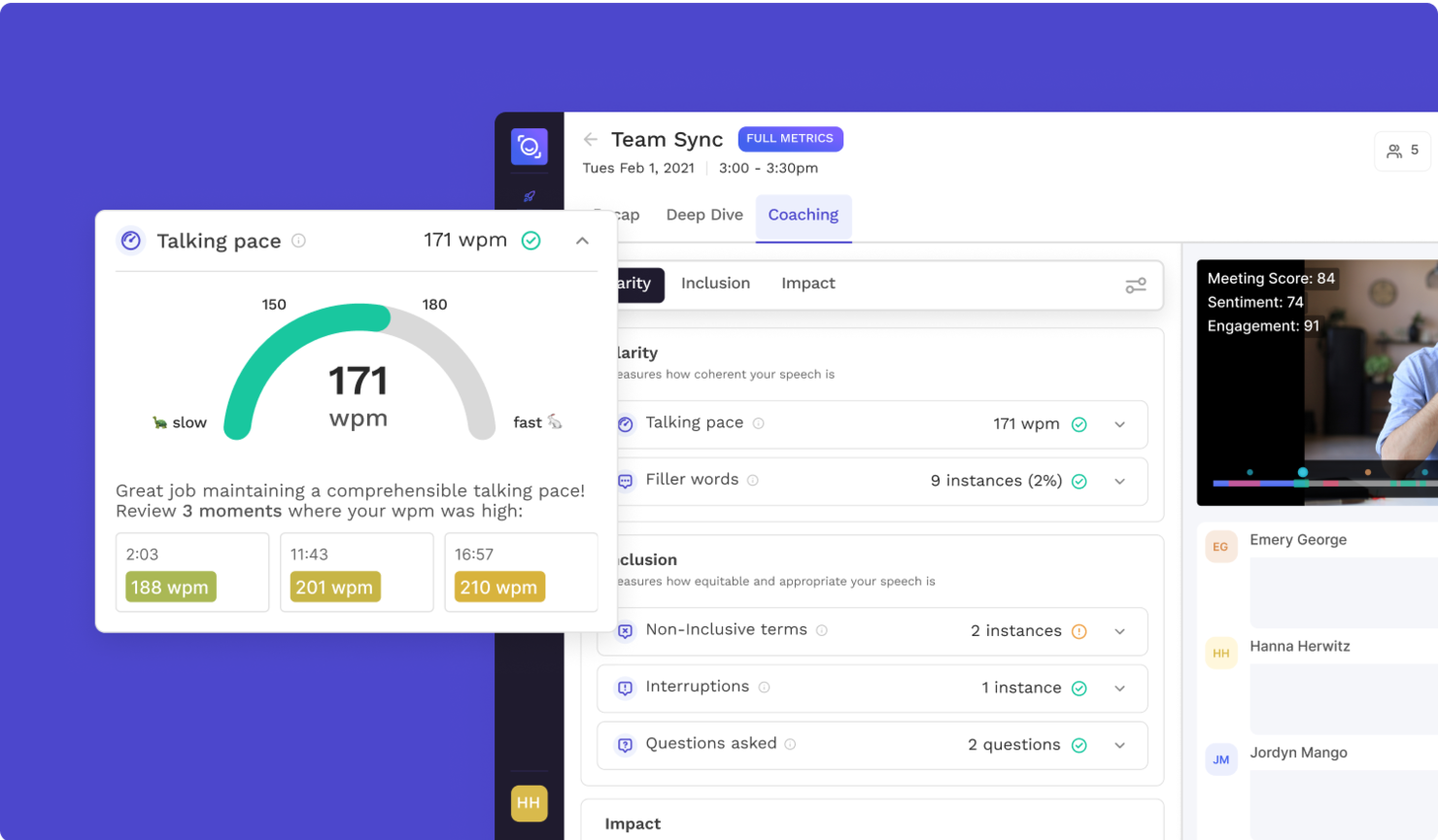
Se hai bisogno di un'AI per il riassunto delle riunioni che identifichi e estragga automaticamente le azioni da intraprendere, Read AI merita attenzione. Questo strumento è pensato per team e professionisti che desiderano raccogliere i prossimi passi senza dover consultare lunghe trascrizioni. Il suo focus su risultati concreti ti aiuta a rendere le riunioni produttive e i follow-up chiari.
Perché ho scelto Read AI
Ciò che distingue Read AI come AI per il riassunto delle riunioni è la sua attenzione all'estrazione automatica delle azioni da intraprendere. Ho scelto questo strumento perché identifica e mette in evidenza i prossimi passi direttamente dalle conversazioni dei meeting, così non devi cercarli nelle trascrizioni. La piattaforma utilizza l'AI per taggare e organizzare le azioni assegnabili, facilitando la distribuzione dei compiti e il monitoraggio dei follow-up. Questo approccio mirato aiuta il team a restare responsabile e garantisce che le attività importanti non vengano dimenticate dopo una riunione.
Funzionalità principali di Read AI
Altre funzionalità di Read AI che spiccano per chi usa AI per riassunti delle riunioni includono:
- Trascrizione in tempo reale: Cattura il contenuto parlato mentre accade, facilitando la revisione o il riferimento immediato alle discussioni dopo i meeting.
- Dashboard di analisi delle riunioni: Accedi a sintesi visive e metriche di coinvolgimento per comprendere la partecipazione e l'efficacia delle riunioni.
- Template personalizzabili per i riassunti: Scegli o crea modelli di riassunto che si adattano al flusso di lavoro e alle esigenze di documentazione del tuo team.
- Supporto multipiattaforma: Utilizza Read AI con i principali strumenti di videoconferenza come Zoom, Microsoft Teams e Google Meet.
Integrazioni di Read AI
Le integrazioni includono Zoom, Google Meet, Microsoft Teams, Slack, HubSpot, Salesforce, Atlassian, Notion, Asana e Gmail.
Pros and Cons
Pros:
- Estrazione accurata delle azioni da intraprendere nelle riunioni
- Trascrizione in tempo reale su più piattaforme
- Supporto multilingue per oltre 20 lingue
Cons:
- Segnalate occasionali preoccupazioni per la privacy
- Profondità analitica limitata durante le riunioni live


Se hai bisogno di riassunti delle riunioni in più lingue, Jamie è progettato per supportare team globali e ambienti di lavoro multilingue. Trascrive e riassume automaticamente le riunioni in oltre 15 lingue, rendendolo ideale per risorse umane internazionali, project manager e consulenti. Jamie ti aiuta a superare le barriere linguistiche e a mantenere tutti allineati, indipendentemente da dove si trovi il tuo team.
Perché ho scelto Jamie
Jamie si distingue per la sua capacità di generare riassunti delle riunioni in più lingue, fondamentale per i team che lavorano oltre confine. Ho scelto Jamie perché supporta più di 15 lingue, consentendo agli utenti di ricevere trascrizioni e riassunti accurati indipendentemente dalla lingua parlata durante la riunione. Lo strumento rileva anche automaticamente la lingua parlata, quindi non è necessario impostare preferenze prima di ogni chiamata. Questo rende Jamie una scelta valida per professionisti HR, consulenti e team globali che hanno bisogno di mantenere tutti sulla stessa linea, indipendentemente da dove si trovino.
Caratteristiche principali di Jamie
Altre funzionalità che rendono Jamie utile per il riassunto delle riunioni tramite IA includono:
- Estrazione automatica delle attività: Jamie individua e elenca i punti d’azione emersi dalle conversazioni della riunione.
- Modelli personalizzati per i riassunti: Gli utenti possono scegliere o progettare modelli per formattare i riassunti delle riunioni.
- Integrazione diretta con il calendario: Lo strumento si collega al tuo calendario per partecipare automaticamente e registrare le riunioni programmate.
- Gestione dati conforme al GDPR: Jamie elabora e archivia i dati delle riunioni nel rispetto dei requisiti del GDPR.
Integrazioni di Jamie
Le integrazioni includono Notion, Google Docs, OneNote e HubSpot.
Pros and Cons
Pros:
- Riassume in oltre 15 lingue
- Rileva automaticamente la lingua parlata nelle riunioni
- Offre trattamento dati conforme al GDPR
Cons:
- Accuratezza dell’estrazione delle attività talvolta imprecisa
- Nessuna app mobile per accesso in mobilità


Se stai cercando un’AI per il riassunto delle riunioni che vada oltre la semplice presa di appunti, NoteGPT si distingue grazie ai suoi suggerimenti di follow-up alimentati dall’intelligenza artificiale. Questo strumento è ideale per team di vendita, project manager e professionisti delle risorse umane che desiderano trasformare gli spunti emersi dalle riunioni in azioni concrete. NoteGPT ti aiuta a catturare i punti chiave e raccomanda automaticamente le azioni successive, così nulla di importante sfugge.
Perché ho scelto NoteGPT
A differenza di molti strumenti per il riassunto delle riunioni che si limitano a trascrivere e sintetizzare, NoteGPT analizza attivamente le conversazioni per suggerire azioni di follow-up pertinenti. Ho scelto NoteGPT perché la sua AI non si limita a registrare quanto è stato detto, ma ti aiuta a decidere cosa fare dopo. Lo strumento evidenzia i punti d’azione e genera automaticamente suggerimenti di follow-up basati sul contenuto della riunione, il che è particolarmente utile per i team che devono portare avanti i progetti. Per chi desidera qualcosa di più di una semplice registrazione delle riunioni, l’enfasi di NoteGPT sugli spunti azionabili lo rende unico.
Caratteristiche principali di NoteGPT
Altre funzionalità che rendono NoteGPT utile come AI per il riassunto delle riunioni includono:
- Trascrizione multilingue: Supporta le trascrizioni in diverse lingue principali per i team internazionali.
- Identificazione dei relatori: Distingue tra i diversi partecipanti alle riunioni nelle registrazioni.
- Funzione di ricerca delle riunioni: Consente di cercare tra note e trascrizioni di riunioni passate.
- Estensione Chrome: Cattura e riassume le riunioni direttamente dal tuo browser.
Integrazioni NoteGPT
Le integrazioni non sono elencate pubblicamente.
Pros and Cons
Pros:
- L’AI suggerisce azioni di follow-up dopo le riunioni
- L’estensione Chrome cattura le riunioni dal browser
- La funzione di ricerca trova dettagli nelle riunioni passate
Cons:
- Nessuna integrazione diretta con Zoom o Teams
- Il piano gratuito limita la durata delle riunioni e i caricamenti

Ideale per la privacy dei dati dell'IA e la conformità alla norma ISO 27001
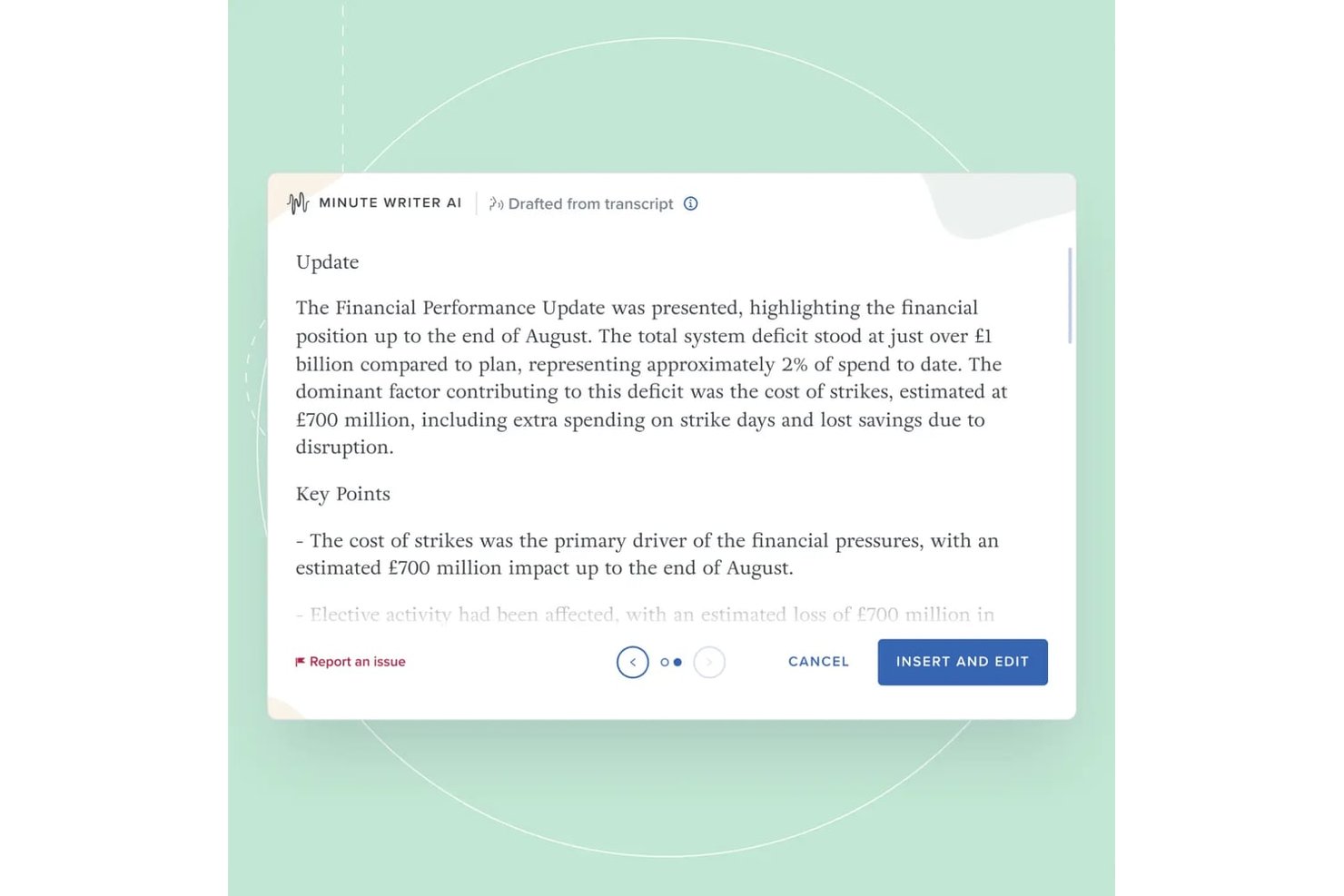
Board Intelligence è una piattaforma per la gestione dei consigli di amministrazione con strumenti di IA appositamente progettati per redigere verbali delle riunioni, riassumere i documenti del consiglio e scrivere documenti per il consiglio all'interno di un flusso di lavoro di governance sicuro.
Per chi è più adatto Board Intelligence?
Segretari aziendali e team di governance presso grandi imprese trarranno il massimo vantaggio dai flussi di lavoro specifici per il consiglio relativi a riunioni e verbali offerti da Board Intelligence.
Perché ho scelto Board Intelligence
Board Intelligence si è guadagnata un posto nella mia rosa di candidati perché la sua IA elabora l'audio e le trascrizioni delle riunioni del consiglio esclusivamente in una memoria temporanea, senza conservare alcun dato una volta terminata la sessione. Apprezzo particolarmente il fatto che ciò sia supportato dalla certificazione ISO 27001, non soltanto da una dichiarazione di policy. La sua IA Minute Writer mette inoltre in pausa la registrazione su richiesta, così le discussioni sensibili rimangono completamente escluse dalla trascrizione.
Funzionalità principali di Board Intelligence
- Strumento per la creazione dell'ordine del giorno: Consente di creare e gestire modelli strutturati di ordine del giorno personalizzati per ogni riunione.
- IQ Insights basato sull'IA: Evidenzia i punti decisionali e i rischi analizzando i contenuti dei documenti del consiglio e riassumendo gli aspetti più importanti.
- Componente aggiuntivo Report Writer: Consente agli utenti di redigere report pronti per il consiglio direttamente in Microsoft Word.
- Monitoraggio delle azioni: Aiuta i team a registrare, assegnare e monitorare le azioni concordate durante le riunioni.
Integrazioni di Board Intelligence
Board Intelligence offre integrazioni native con Microsoft 365 e Microsoft Word, supporta le integrazioni con i calendari per la pianificazione delle riunioni e accetta trascrizioni delle riunioni provenienti da strumenti di trascrizione di terze parti.
Pros and Cons
Pros:
- Verbali generati dall'IA senza conservazione dei dati
- Conformità alla norma ISO 27001 per una sicurezza rigorosa
- Mettere in pausa la raccolta tramite IA per gli argomenti sensibili
Cons:
- Nessuna API per integrazioni personalizzate
- Limitato a un flusso di lavoro basato su Microsoft

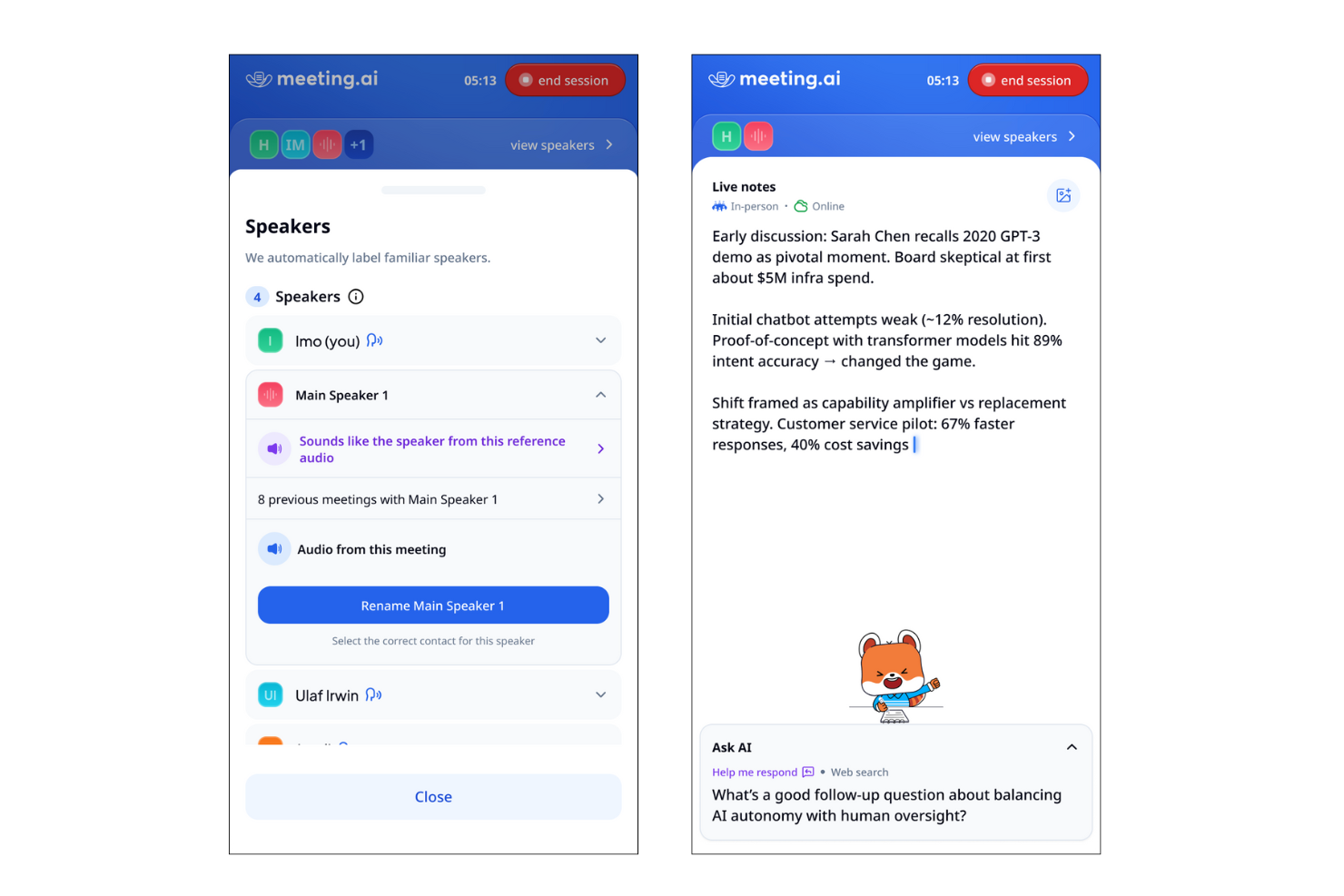
Meeting.ai è pensato per team e professionisti che hanno bisogno di riepiloghi istantanei e concreti subito dopo le chiamate. È particolarmente adatto a contesti dinamici in cui un rapido follow-up e una documentazione chiara sono fondamentali. Se desideri catturare gli esiti delle riunioni senza ritardi, la rapidità di consegna dei riepiloghi di Meeting.ai lo distingue dagli altri strumenti di sintesi delle riunioni basati su IA.
Perché ho scelto Meeting.ai
Ciò che mi ha attirato verso Meeting.ai è l'attenzione alla consegna immediata dei riepiloghi, subito dopo la fine delle chiamate. Per chiunque debba rivedere velocemente gli esiti o condividere le attività da svolgere, la rapidità di generazione dei riepiloghi di questo strumento è un grande vantaggio. Meeting.ai elabora automaticamente le registrazioni delle chiamate e produce riepiloghi concisi e strutturati in pochi minuti. Apprezzo come questo approccio aiuti i team a rimanere allineati e ad agire senza dover attendere appunti manuali o resoconti tardivi.
Caratteristiche principali di Meeting.ai
Altre funzionalità che rendono Meeting.ai utile per la sintesi delle riunioni con IA includono:
- Estrazione automatica delle attività: Lo strumento individua e elenca i compiti discussi durante le riunioni.
- Identificazione dei partecipanti: Meeting.ai associa le affermazioni ai relativi oratori per maggiore chiarezza.
- Archivio delle riunioni ricercabile: Gli utenti possono cercare riepiloghi e trascrizioni di riunioni passate usando parole chiave.
- Template di riepilogo personalizzabili: I team possono adattare formato e struttura dei riepiloghi alle proprie esigenze di lavoro.
Integrazioni di Meeting.ai
Le integrazioni includono Zoom, Google Meet, Microsoft Teams e Google Drive.
Pros and Cons
Pros:
- I riepiloghi vengono consegnati in pochi minuti
- Le attività vengono evidenziate automaticamente nei riepiloghi
- Identificazione degli oratori inclusa nelle trascrizioni
Cons:
- Integrazioni limitate con strumenti di project management
- Contesto a volte mancante in alcune parti del riepilogo
Altri strumenti di IA per i riepiloghi delle riunioni
Ecco alcune opzioni aggiuntive di strumenti di IA per i riepiloghi delle riunioni che non sono state incluse nel mio elenco, ma che vale comunque la pena valutare:


Come valuto l’Intelligenza Artificiale per i riepiloghi delle riunioni
Divido la mia valutazione in due livelli: le funzionalità di base che uno strumento deve avere — come trascrizione e riepiloghi generati dall’IA — e i fattori differenzianti come la sincronizzazione con l’ATS e la privacy dei dati, che sono importanti per i team HR.
Funzionalità principali (requisiti minimi per questa lista)
Quando seleziono gli strumenti per la mia lista, valuto ciascuno su una scala da 0 (non offre la funzionalità) a 5 (eccelle in quest’area) per ogni funzionalità principale elencata di seguito. Calcolo poi il punteggio totale dello strumento come percentuale. Ogni strumento deve raggiungere un punteggio minimo totale del 65% per essere preso in considerazione.
- Trascrizione automatica delle riunioni: Valuto la precisione della trascrizione tra più interlocutori e accenti, e anche se lo strumento riesce a identificare correttamente chi ha detto cosa durante i panel o le sessioni di calibrazione dei gruppi.
- Riepiloghi generati dall’IA: Ogni strumento dovrebbe produrre riepiloghi strutturati e leggibili che catturino decisioni e temi chiave, invece di condensare semplicemente il verbale in paragrafi più brevi.
- Estrazione dei compiti da svolgere: Verifico se lo strumento è in grado di individuare automaticamente follow-up con responsabili assegnati e scadenze, come segnalare l’impegno del responsabile delle assunzioni a inviare un feedback sulla scorecard entro venerdì.
- Integrazioni con le videoconferenze: Sono rilevanti connessioni native con Zoom, Microsoft Teams e Google Meet, oltre all’accesso automatico dagli eventi del calendario così che i recruiter non debbano avviare manualmente le registrazioni tra una riunione e l’altra.
- Archivio ricercabile delle riunioni: Cerco la possibilità di effettuare ricerche tra le riunioni passate per parola chiave, speaker o argomento, particolarmente utile quando i team HR devono recuperare un post-colloquio o una discussione di policy a distanza di mesi.
- Controlli di condivisione & collaborazione: Le impostazioni dei permessi dovrebbero permettere di condividere i riepiloghi dei colloqui con la commissione di selezione limitando però l’accesso alle conversazioni sensibili di relazioni con i dipendenti dallo stesso account.
Una volta che ho una lista di strumenti che soddisfano i criteri, considero cosa distingue ciascuna piattaforma.
Fattori differenzianti (cosa distingue i fornitori)
Ecco come confronto e metto a confronto i vari fornitori:
Funzionalità distintive
Cerco strumenti che sincronizzino direttamente i riepiloghi e le scorecard negli ATS o nelle piattaforme HRIS, così i recruiter non devono copiare e incollare note tra i sistemi dopo ogni fase di selezione. Anche il rilevamento di bias e di conformità è un fattore che valuto: alcuni strumenti possono evidenziare in tempo reale domande potenzialmente non conformi durante i colloqui. L’analisi del sentiment aggiunge inoltre profondità, aiutando gli specialisti ER a cogliere cambiamenti di tono in conversazioni delicate con i dipendenti, oltre ciò che un semplice riepilogo scritto può mostrare.
Oltre le funzionalità
Le conversazioni HR spesso riguardano dati personali sensibili, quindi valuto l’approccio di ciascun fornitore alla gestione del consenso, alle politiche di conservazione dei dati e agli standard di crittografia. Anche la scalabilità è fondamentale: i team di selezione che gestiscono decine di colloqui a settimana hanno bisogno di uno strumento capace di gestire incontri in parallelo senza perdita nella qualità delle trascrizioni. Considero anche il supporto all’onboarding, poiché introdurre uno strumento di registrazione tra responsabili delle assunzioni e intervistatori di diversi dipartimenti richiede risorse chiare per la formazione e una guida sul change management.
Come scegliere il software di IA per i riepiloghi delle riunioni
È facile perdersi in lunghi elenchi di funzionalità e strutture tariffarie complesse. Per aiutarti a rimanere concentrato mentre affronti il tuo specifico processo di selezione del software, ecco una lista di controllo dei fattori da tenere a mente:
| Fattore | Cosa considerare |
|---|---|
| Scalabilità | Lo strumento sarà in grado di gestire il volume delle tue riunioni man mano che il tuo team o la tua organizzazione cresce? Verifica i limiti degli utenti, i limiti di archiviazione e i prezzi per i team più numerosi. |
| Integrazioni | Lo strumento si collega nativamente al tuo calendario, alle piattaforme di videoconferenza o di collaborazione? Le integrazioni mancanti possono creare lavoro manuale. |
| Personalizzazione | Puoi adattare riepiloghi, modelli o flussi di lavoro agli standard di documentazione o alle esigenze di conformità della tua organizzazione? |
| Facilità d’uso | L’interfaccia è intuitiva per tutti gli utenti, compresi quelli meno esperti di tecnologia? Considera la rapidità con cui i membri del team possono adottare lo strumento. |
| Implementazione e configurazione iniziale | Quanto tempo servirà per iniziare a utilizzarlo? Cerca risorse chiare per la configurazione iniziale, supporto alla migrazione e interruzioni minime dei flussi di lavoro esistenti. |
| Costo | I piani tariffari sono trasparenti e prevedibili? Fai attenzione ai costi nascosti, agli addebiti per utente o ai componenti aggiuntivi obbligatori che potrebbero incidere sul tuo budget. |
| Misure di sicurezza | Lo strumento offre elaborazione sul dispositivo, crittografia o rigide politiche di gestione dei dati? Valuta come protegge i contenuti sensibili delle riunioni. |
| Requisiti di conformità | Lo strumento supporta gli standard di conformità del tuo settore, come il GDPR o l’HIPAA? Verifica le certificazioni e i registri di controllo se gestisci dati soggetti a normative. |
Che cos’è una piattaforma di IA per i riepiloghi delle riunioni?
La piattaforma di IA per il riepilogo delle riunioni è un software che registra, trascrive e riassume automaticamente i punti chiave delle riunioni utilizzando l'intelligenza artificiale. Questi strumenti acquisiscono i contenuti pronunciati, identificano gli interlocutori e generano riepiloghi scritti concisi per una facile consultazione e documentazione. Lo strumento di IA per il riepilogo delle riunioni aiuta i team a risparmiare tempo, migliorare la precisione e mantenere registri coerenti delle discussioni senza prendere appunti manualmente.
Funzionalità dello strumento di IA per il riepilogo delle riunioni
Quando scegli uno strumento di IA per il riepilogo delle riunioni, presta attenzione alle seguenti funzionalità chiave:
- Registrazione automatizzata: acquisisce l'audio delle riunioni senza intervento manuale, assicurando che tutte le discussioni siano documentate dall'inizio alla fine.
- Trascrizione: converte le parole pronunciate in testo scritto, facilitando la consultazione, la ricerca e il riferimento ai contenuti delle riunioni.
- Identificazione degli interlocutori: assegna etichette e distingue tra i diversi interlocutori, aiutando a chiarire chi ha detto cosa durante la riunione.
- Indicazione dei timestamp: contrassegna punti specifici della trascrizione con codici temporali, consentendo agli utenti di passare rapidamente ai momenti importanti.
- Opzioni di esportazione: consente agli utenti di scaricare trascrizioni e riepiloghi in vari formati, come PDF, DOCX o TXT, per condividerli o archiviarli.
- Funzionalità di ricerca: permette agli utenti di trovare argomenti specifici, decisioni o attività da svolgere all'interno delle trascrizioni o dei riepiloghi.
- Modelli personalizzabili: offre formati preimpostati o regolabili per i riepiloghi delle riunioni, in linea con gli standard o le preferenze dell'organizzazione.
- Controlli degli accessi: consente agli amministratori di impostare le autorizzazioni per stabilire chi può visualizzare, modificare o condividere la documentazione delle riunioni.
- Supporto multilingue: offre funzionalità di trascrizione e riepilogo in più lingue per rispondere alle esigenze di team diversificati.
- Integrazione con l'archiviazione cloud: si connette alle piattaforme cloud per archiviare e organizzare in modo sicuro i file delle riunioni e accedervi da qualsiasi luogo.
Funzionalità comuni dell'IA per il riepilogo delle riunioni
Oltre alle funzionalità standard dell'IA per il riepilogo delle riunioni elencate sopra, molte di queste soluzioni stanno integrando l'IA con funzionalità come:
- Estrazione automatizzata delle attività: utilizza l'IA per identificare ed elencare le attività successive o le decisioni emerse dalle conversazioni della riunione, aiutando i team a monitorare le responsabilità senza una revisione manuale.
- Riepilogo basato sul contesto: applica l'IA per generare riepiloghi concisi e pertinenti che catturano i punti e i risultati principali, adattandosi al contesto e agli argomenti specifici della riunione.
- Analisi del sentiment: analizza il tono e l'umore delle discussioni utilizzando l'IA, fornendo informazioni sulle dinamiche del team o su potenziali problematiche sollevate durante le riunioni.
- Rilevamento degli argomenti: sfrutta l'IA per categorizzare e contrassegnare automaticamente le sezioni della riunione in base all'argomento, facilitando l'organizzazione e il recupero delle informazioni in un secondo momento.
- Elementi salienti intelligenti: utilizza l'IA per segnalare i momenti chiave, come annunci o decisioni importanti, così gli utenti possono esaminare rapidamente le parti più rilevanti di una riunione.
Vantaggi dello strumento di IA per il riepilogo delle riunioni
L'implementazione di uno strumento di IA per il riepilogo delle riunioni offre numerosi vantaggi al team e all'azienda. Eccone alcuni:
- Documentazione accurata: la registrazione e la trascrizione automatizzate assicurano che ogni discussione venga acquisita senza perdere dettagli o fare affidamento sulla memoria.
- Risparmio di tempo: il riepilogo basato sull'IA e l'estrazione delle attività riducono la necessità di prendere appunti manualmente e di svolgere attività di follow-up dopo la riunione.
- Maggiore responsabilità: l'identificazione degli interlocutori e il monitoraggio delle attività rendono chiaro chi è responsabile di ciascuna attività o decisione.
- Maggiore privacy: l'elaborazione sul dispositivo e i controlli degli accessi aiutano a proteggere i contenuti sensibili delle riunioni e a limitare l'esposizione dei dati.
- Registri coerenti: i modelli personalizzabili e le opzioni di esportazione standardizzano la documentazione delle riunioni tra team e progetti.
- Migliore accessibilità: il supporto multilingue e le trascrizioni ricercabili rendono i contenuti delle riunioni disponibili a team diversificati e distribuiti.
- Informazioni utili: funzionalità di IA come l'analisi del sentiment e il rilevamento degli argomenti offrono una comprensione più approfondita delle dinamiche del team e dei risultati delle riunioni.
Costi e prezzi degli strumenti di IA per il riepilogo delle riunioni
La scelta degli strumenti di IA per il riepilogo delle riunioni richiede la comprensione dei vari modelli e piani tariffari disponibili. I costi variano in base alle funzionalità, alle dimensioni del team, ai componenti aggiuntivi e ad altri fattori. La tabella seguente riassume i piani più comuni, i relativi prezzi medi e le funzionalità tipicamente incluse nelle soluzioni di IA per il riepilogo delle riunioni:
Tabella di confronto dei piani per gli strumenti di IA per i riepiloghi delle riunioni
| Tipo di piano | Prezzo medio | Funzionalità comuni |
|---|---|---|
| Piano gratuito | $0 | Registrazione di base, minuti di trascrizione limitati, riepiloghi semplici e opzioni di esportazione di base. |
| Piano personale | $5-$15/utente/mese | Registrazioni illimitate, trascrizioni ricercabili, identificazione degli interlocutori e integrazioni di base. |
| Piano aziendale | $15-$30/utente/mese | Gestione del team, formati di esportazione avanzati, modelli personalizzabili, strumenti di collaborazione e assistenza prioritaria. |
| Piano per grandi aziende | $30-$60/utente/mese | Sicurezza avanzata, funzionalità di conformità, inserimento dedicato, analisi avanzate e integrazioni personalizzate. |
Domande frequenti sugli strumenti di IA per i riepiloghi delle riunioni
Ecco alcune risposte alle domande comuni sugli strumenti di IA per i riepiloghi delle riunioni:
Uno strumento di IA per i riepiloghi delle riunioni può gestire più lingue?
Sì, molte soluzioni ora possono trascrivere riunioni in oltre 100 lingue e con diversi accenti. Questo è particolarmente utile per i team internazionali che utilizzano piattaforme come Microsoft Teams per le riunioni, in cui il software può fornire traduzioni in tempo reale e riepiloghi basati sull’IA nella lingua preferita dal partecipante. Verifica sempre la disponibilità di funzionalità specifiche per le lingue prima di scegliere una soluzione, poiché alcuni strumenti offrono persino la traduzione dal vivo per un podcast o un video registrato.
Quanto è sicuro uno strumento di IA per i riepiloghi delle riunioni durante le riunioni riservate?
La maggior parte delle soluzioni professionali di IA per le riunioni offre una sicurezza di livello aziendale, tra cui la certificazione SOC 2 Type II, la crittografia e i controlli degli accessi. Per le riunioni in presenza altamente riservate, alcuni strumenti offrono l’elaborazione sul dispositivo per garantire che i dati non lascino mai il tuo dispositivo. La verifica di queste politiche di gestione dei dati garantisce che gli elementi chiave e i verbali sensibili delle riunioni rimangano protetti in conformità con gli standard di conformità della tua organizzazione.
Devo installare software speciale per utilizzare uno strumento di IA per i riepiloghi delle riunioni?
No, molti strumenti di IA per i riepiloghi delle riunioni sono basati sul cloud e funzionano direttamente nel browser oppure si integrano con le piattaforme di videoconferenza. Tuttavia, alcuni fornitori offrono applicazioni desktop che consentono di acquisire l’audio senza che un “bot” partecipi alla chiamata, una modalità comune per trascrivere le riunioni. Queste applicazioni possono anche sincronizzare direttamente i risultati con il tuo CRM, garantendo che le note sui clienti vengano aggiornate automaticamente senza inserimenti manuali.
Uno strumento di IA per i riepiloghi delle riunioni può identificare ed etichettare interlocutori diversi?
Sì, l’identificazione degli interlocutori (o diarizzazione) è una funzionalità standard. Il motore di trascrizione basato sull’IA distingue i partecipanti analizzando i loro schemi vocali ed etichetta i rispettivi interventi nella trascrizione finale. Questo rende facile effettuare ricerche per partecipante e visualizzare il momento preciso in cui è stata presa una decisione, garantendo la responsabilità all’interno del team.
Cosa succede se una riunione ha una qualità audio scadente?
Una qualità audio scadente può influire sulla precisione della trascrizione. Alcuni strumenti di IA per i riepiloghi delle riunioni utilizzano l’IA per filtrare i rumori di fondo e rendere più chiaro il parlato, ma per ottenere risultati ottimali è consigliabile utilizzare un buon microfono e un ambiente tranquillo.