

10 migliori strumenti per il lavoro da remoto per team distribuiti nel 2026

10 Elenco dei migliori software per il lavoro da remoto


Gestire il lavoro da remoto può essere difficile per professionisti delle risorse umane come te. Bilanciare la produttività del team con una comunicazione efficace non è semplice. I software per il lavoro da remoto possono contribuire a colmare queste lacune, offrendo strumenti per mantenere il team connesso e concentrato sugli obiettivi.
In base alla mia esperienza, scegliere il software giusto può fare una grande differenza nella gestione dei team da remoto. Ho svolto il lavoro più impegnativo, testando e valutando diverse opzioni per trovare le migliori.
In questo articolo troverai una panoramica imparziale dei principali strumenti per il lavoro da remoto. Condividerò funzionalità, vantaggi e svantaggi per aiutarti a prendere una decisione informata per il tuo team. Esploriamo insieme il mondo delle soluzioni per il lavoro da remoto.
Perché fidarsi delle nostre recensioni sui software
Il nostro team testa e recensisce software dal 2012. In quanto esperti HR noi stessi, sappiamo quanto sia difficile — e importante — scegliere il software giusto.
Per questa guida, abbiamo valutato gli strumenti attraverso test pratici e ricerche indipendenti, assegnando un punteggio agli strumenti in base ai nostri criteri di selezione. Ci basiamo inoltre sulle competenze di leader di pensiero del settore e di professionisti HR attivi.
Le nostre recensioni riflettono il nostro giudizio editoriale umano, non un discorso di vendita.
Revisori esperti:
Riepilogo dei migliori software per il lavoro da remoto
Questa tabella comparativa riassume i dettagli dei prezzi delle mie migliori selezioni di software per il lavoro da remoto, per aiutarti a trovare quello più adatto al tuo budget e alle esigenze della tua azienda.
| Tool | Best For | Trial Info | Price | ||
|---|---|---|---|---|---|
| 1 | Ideale per la gestione di team distribuiti a livello globale | Demo gratuita disponibile | Da $5/dipendente/mese | Website | |
| 2 | Il miglior software per il lavoro da remoto per coinvolgere i team | Demo gratuita disponibile | Da $3/utente/mese | Website | |
| 3 | Il miglior software per il lavoro da remoto per la collaborazione visiva | Piano gratuito disponibile | Da $8/membro/mese (fatturato annualmente) | Website | |
| 4 | Ideale per la visibilità organizzativa e la creazione di connessioni | Prova gratuita disponibile | Da $1.50/utente/mese | Website | |
| 5 | Ideale per il tracciamento automatico della produttività | Prova gratuita di 14 giorni + demo gratuita disponibile | Da $6,42/utente/mese (fatturazione annuale) | Website | |
| 6 | Ideale per l'accesso remoto da qualsiasi dispositivo | Prova gratuita di 7 giorni | A partire da $44.00/computer /mese | Website | |
| 7 | Il miglior software per il lavoro da remoto per la gestione dei progetti | Piano gratuito + demo gratuita disponibile | Da $7/utente/mese (fatturato annualmente) | Website | |
| 8 | Miglior software per il lavoro da remoto per la registrazione di video | Demo gratuita disponibile | $18/mese | Website | |
| 9 | Ideale per promuovere la felicità dei dipendenti | Versione gratuita disponibile | Da $32.47/utente/mese (fatturato annualmente) | Website | |
| 10 | Il miglior software per il lavoro da remoto per la collaborazione all'interno dell'ecosistema Microsoft | Piano gratuito disponibile | A partire da $4/utente/mese (fatturazione annuale) | Website |


I migliori software per il lavoro da remoto
Ecco una breve descrizione di ciascun sistema software per il lavoro da remoto, con il relativo caso d’uso migliore, le funzionalità più interessanti, i vantaggi e gli svantaggi. Ho incluso anche delle schermate per offrirti un’istantanea della loro interfaccia utente.

Deel HR
Ideale per la gestione di team distribuiti a livello globale
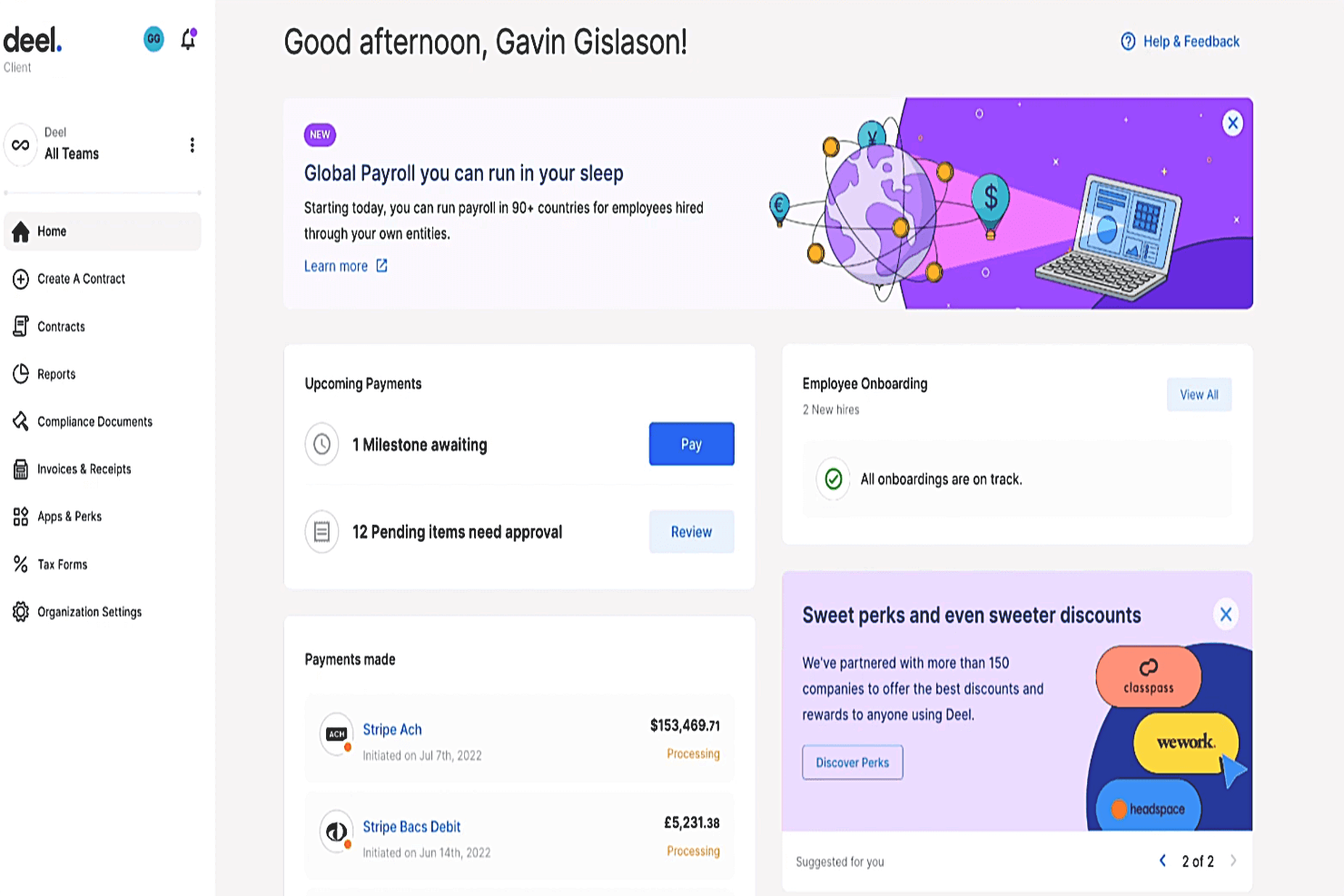
Deel è una soluzione software per il lavoro da remoto che aiuta le organizzazioni a gestire e pagare team distribuiti. Utilizzando la loro piattaforma HR globale all-in-one puoi assumere dipendenti e collaboratori da remoto in qualsiasi parte del mondo e Deel gestirà per te le tue obbligazioni fiscali e di conformità internazionale.
La loro piattaforma copre sia le funzioni HR che quelle di gestione paghe e include strumenti aggiuntivi come la funzione '1 on 1' che integra Deel con Slack per consentire una comunicazione e coordinazione di squadra semplice. Questa funzione fa parte del piano Deel Engage, che si concentra strategicamente sul supporto più efficace dei team remoti. Altre funzionalità all'interno di questo modulo includono sondaggi di coinvolgimento dei dipendenti, strumenti per la gestione delle ferie retribuite e automazione delle attività HR comuni.
Deel Engage aiuta anche i team distribuiti a coordinare riunioni tra diversi fusi orari, e a condividere facilmente punti chiave e ordini del giorno in anticipo per ogni riunione di squadra. Integrando '1 on 1' con Deel Engage, la loro piattaforma globale diventa ancora più un essenziale hub digitale di supporto per organizzazioni realmente remote.
Caratteristiche e Integrazioni principali di Deel
Funzionalità includono strumenti di assunzione internazionale, flussi di lavoro di onboarding & offboarding, funzionalità di gestione paghe globali, valute e metodi di pagamento multipli, strumenti di comunicazione da remoto, gestione di tasse e conformità, benefit internazionali, strumenti per la collaborazione nelle riunioni e avanzata protezione della proprietà intellettuale.
Le integrazioni sono disponibili con Ashby, BambooHR, Expensify, Greenhouse, Hibob, Netsuite, Okta, OneLogin, Quickbooks, Slack, Xero, Workday e Workable. Inoltre, dispongono di una Open API che supporta l'integrazione aggiuntiva con soluzioni software personalizzate.
Pros and Cons
Pros:
- Offre anche servizi aggiuntivi di employer of record (EOR)
- Semplifica la gestione paghe globale in oltre 150 valute
- Funzione utile di coordinamento delle riunioni tra fusi orari
Cons:
- Nessuna versione di prova gratuita disponibile
- Nessuna app mobile disponibile
New Product Updates from Deel HR

Deel Expands Stablecoin Wallet to 80+ Countries
Deel expands its Stablecoin Wallet to 80+ countries with dollar-backed balances and optional rewards. This gives eligible contractors more ways to hold and manage earnings inside Deel. For more information, visit Deel’s official site.
 .
.
Nectar
Il miglior software per il lavoro da remoto per coinvolgere i team
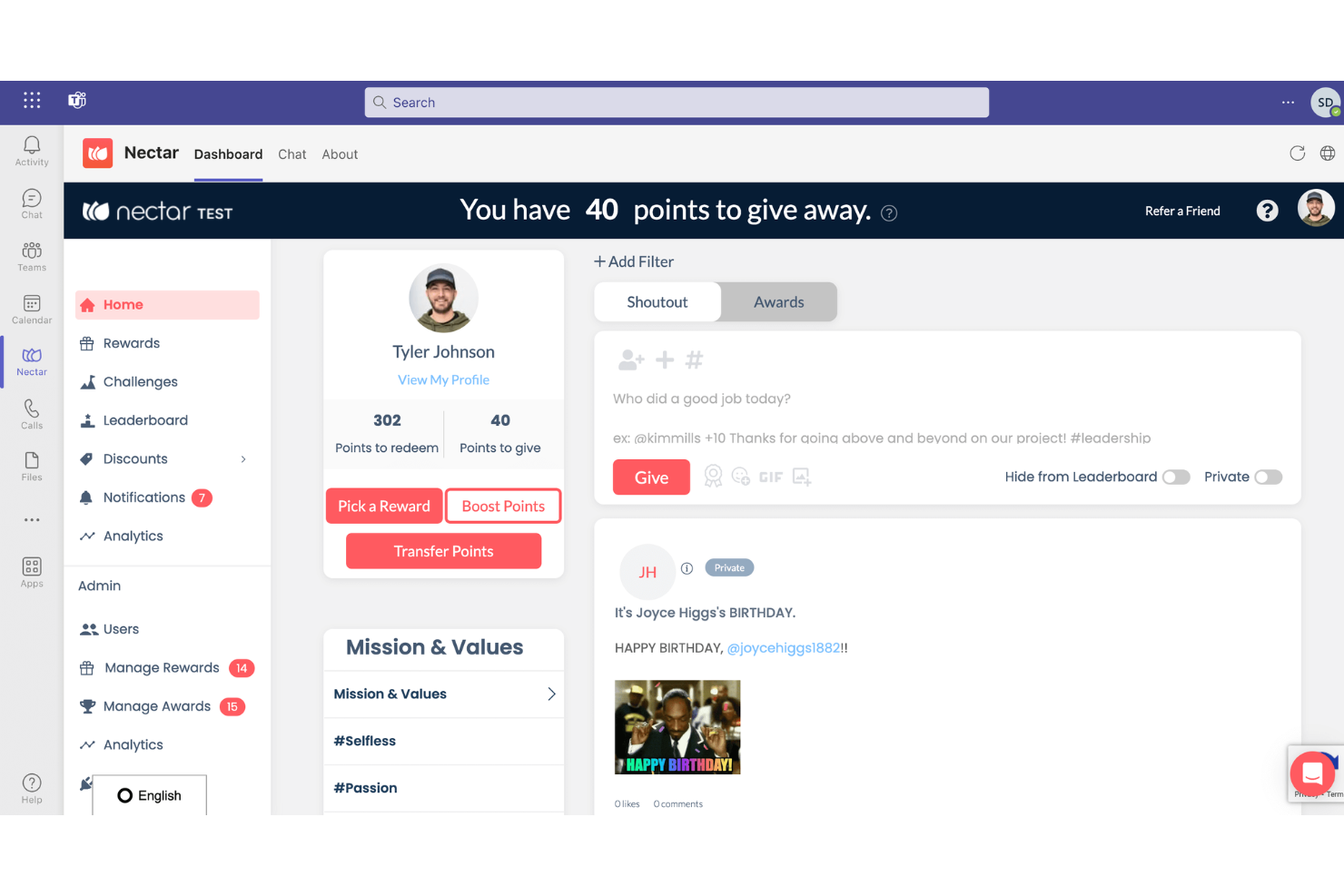
Nectar è una piattaforma di riconoscimento dei dipendenti che si concentra sul miglioramento dell'esperienza lavorativa comprendendo le interazioni degli utenti e aumentando il coinvolgimento. Si integra con vari software HRIS, SSO e di collaborazione per offrire una soluzione completa al riconoscimento e alla fidelizzazione dei dipendenti.
Perché ho scelto Nectar: Nectar si distingue come un eccellente software per il lavoro da remoto grazie alla sua suite completa di funzionalità progettate per migliorare il coinvolgimento dei dipendenti, il riconoscimento e la cultura aziendale complessiva. Uno dei punti di forza di Nectar è il suo potente sistema di riconoscimento, che permette sia ai manager sia ai collaboratori di inviare lodi significative per celebrare i successi.
Inoltre, la piattaforma consente la creazione di sfide personalizzate, come attività di benessere e sondaggi di feedback, utili per coinvolgere i dipendenti in diverse iniziative aziendali. La possibilità di inviare riconoscimenti direttamente da Slack o Microsoft Teams ne aumenta ulteriormente l'usabilità, rendendo semplice la partecipazione al processo di riconoscimento senza dover cambiare piattaforma.
Caratteristiche e integrazioni distintive di Nectar
Funzionalità includono lodi, notifiche per anniversari e compleanni, interfaccia drag-and-drop per progettare comunicazioni come newsletter e annunci, e cinque opzioni di premi per i dipendenti.
Integrazioni con Slack, Microsoft Teams, BambooHR, ADP, Namely, Paylocity, Zenefits, Workday, Rippling, Gusto, Netsuite, G Suite, Okta, OneLogin e Azure AD.
Pros and Cons
Pros:
- Ampia scelta di premi
- Analisi e report approfonditi
- Consente alle aziende di creare le proprie sfide
Cons:
- I premi possono essere costosi e gli utenti devono accumulare punti
- Potrebbe non essere la soluzione migliore per la scalabilità
New Product Updates from Nectar

Nectar Enhances Clara AI With Live Platform Data
Nectar introduces live platform data access and expanded knowledge coverage for Clara AI. The updates improve response accuracy and speed while enabling Clara AI to answer questions across more recognition and rewards features. For more information, visit Nectar's official site.
 .
.
Miro
Il miglior software per il lavoro da remoto per la collaborazione visiva

Miro è uno strumento di collaborazione visiva per piccole e medie imprese. Il software offre una lavagna digitale che può essere utilizzata per ricerche, brainstorming, sviluppo di customer journey, definizione di user story map, wireframing e altre attività collaborative.
I membri del team remoto possono collaborare facilmente utilizzando le lavagne di Miro. Possono disegnare con uno stilo, scrivere su post-it digitali o inserire file nella conversazione. Il toolkit della lavagna consente agli utenti di annotare idee, creare mockup e schemi e lasciare feedback sui contributi degli altri membri del team. È possibile creare lavagne utilizzando modelli preimpostati, convertirle in presentazioni o salvarle in formato PDF.
Miro include una libreria integrata di icone, wireframe e altri contenuti. Gli utenti possono anche caricare file, immagini e documenti dal proprio computer o da Google Drive. Il software offre funzionalità avanzate di sicurezza e gestione, inclusi accesso sicuro e disconnessione automatica.
Funzionalità e integrazioni principali di Miro
Funzionalità includono condivisione dello schermo, video incorporati, un'ampia libreria di contenuti, modelli predefiniti, framework e widget.
Integrazioni includono Airtable, Asana, Atlassian, Box, Figma, Jira, Microsoft 365, Notion, Slack e Zoom.
Pros and Cons
Pros:
- Modelli flessibili
- Ampia gamma di funzionalità
- Lavagne condivise per il team
Cons:
- Richiede tempo per imparare
- All'inizio può risultare opprimente
New Product Updates from Miro
Miro Adds Japan Data Residency for Enterprise Customers
Miro has introduced Japan data residency for enterprise customers, offering in-region storage for production data, backups, and metadata, plus in-region compute infrastructure. For more information, visit Miro's official site.
Sift
Ideale per la visibilità organizzativa e la creazione di connessioni
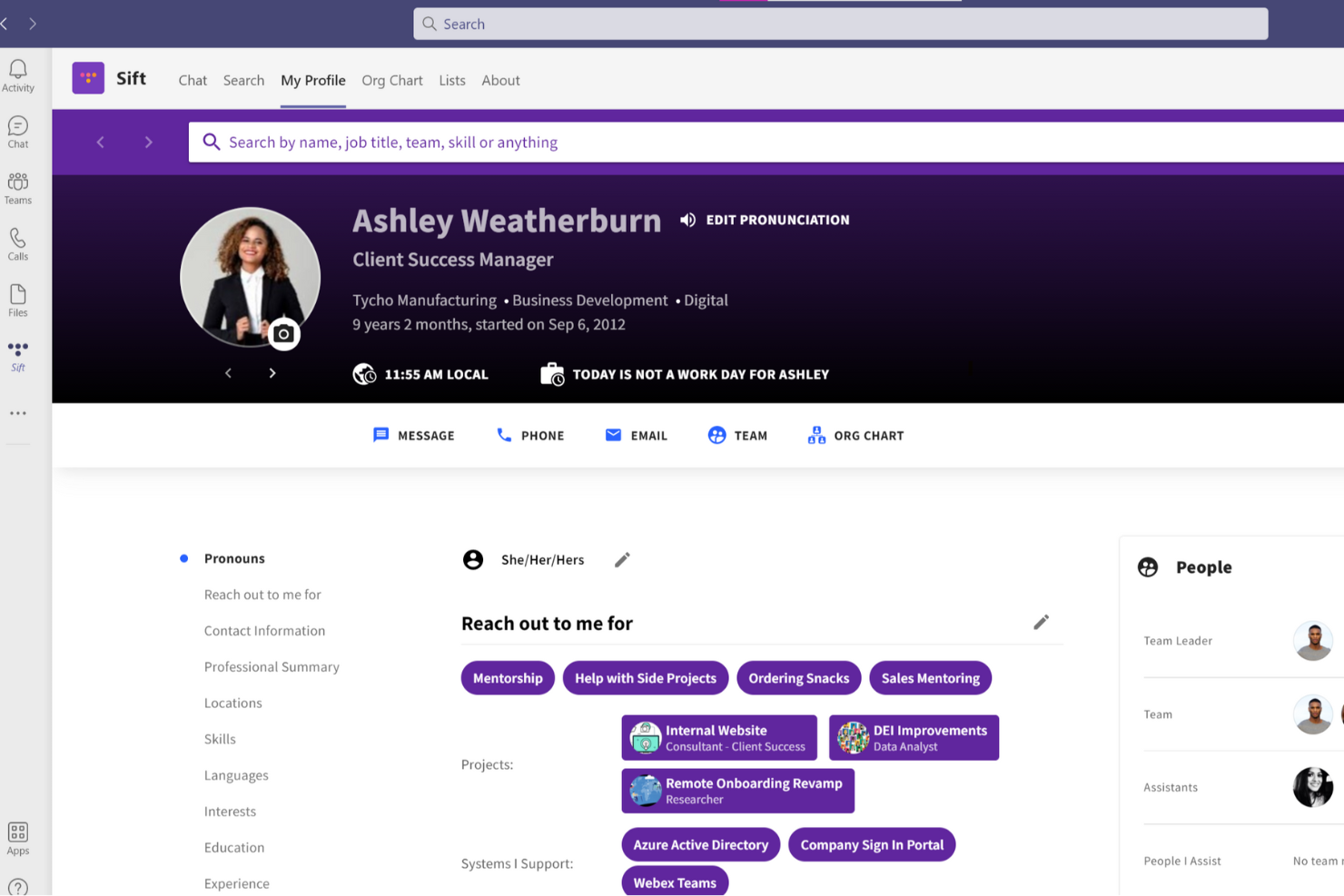
Sift è un motore di ricerca per persone che include profili dei dipendenti e un organigramma dinamico che aiuta i dipendenti remoti a conoscere i loro colleghi e a familiarizzare con le connessioni interne all’azienda.
Perché ho scelto Sift: Questo software offre un database utile per il personale remoto per scoprire chi sono i colleghi, capire a chi rivolgersi per determinate esigenze e, in generale, conoscere meglio gli altri membri del team remoto. Gli utenti possono condividere informazioni come competenze ed esperienze, interessi, foto, recapiti e altro.
Le avanzate funzionalità di organigramma del software permettono agli utenti di visualizzare e navigare l’intera forza lavoro in un ambiente digitale. Il personale può essere raggruppato per dipartimenti e team e puoi facilmente tenere traccia di chi è chi man mano che la tua azienda cresce.
Caratteristiche e integrazioni distintive di Sift
Le caratteristiche includono profili dei dipendenti personalizzabili, visualizzazioni dinamiche dell'organigramma, ricerca nella directory, filtri personalizzati, dashboard di analisi e app sia mobili che desktop.
Le integrazioni sono disponibili con vari sistemi HR e IT, come Microsoft Teams, UKG Pro, Azure AD, Google Workspace, OKTA e altri.
Pros and Cons
Pros:
- Interfaccia intuitiva e funzionalità personalizzabili
- Valutazione del rischio completa e intelligence sul rischio in tempo reale
- Offre trasparenza sul suo modello di intelligenza
Cons:
- Connessioni API e integrazioni limitate
- Capacità di automazione limitate

DeskTime
Ideale per il tracciamento automatico della produttività
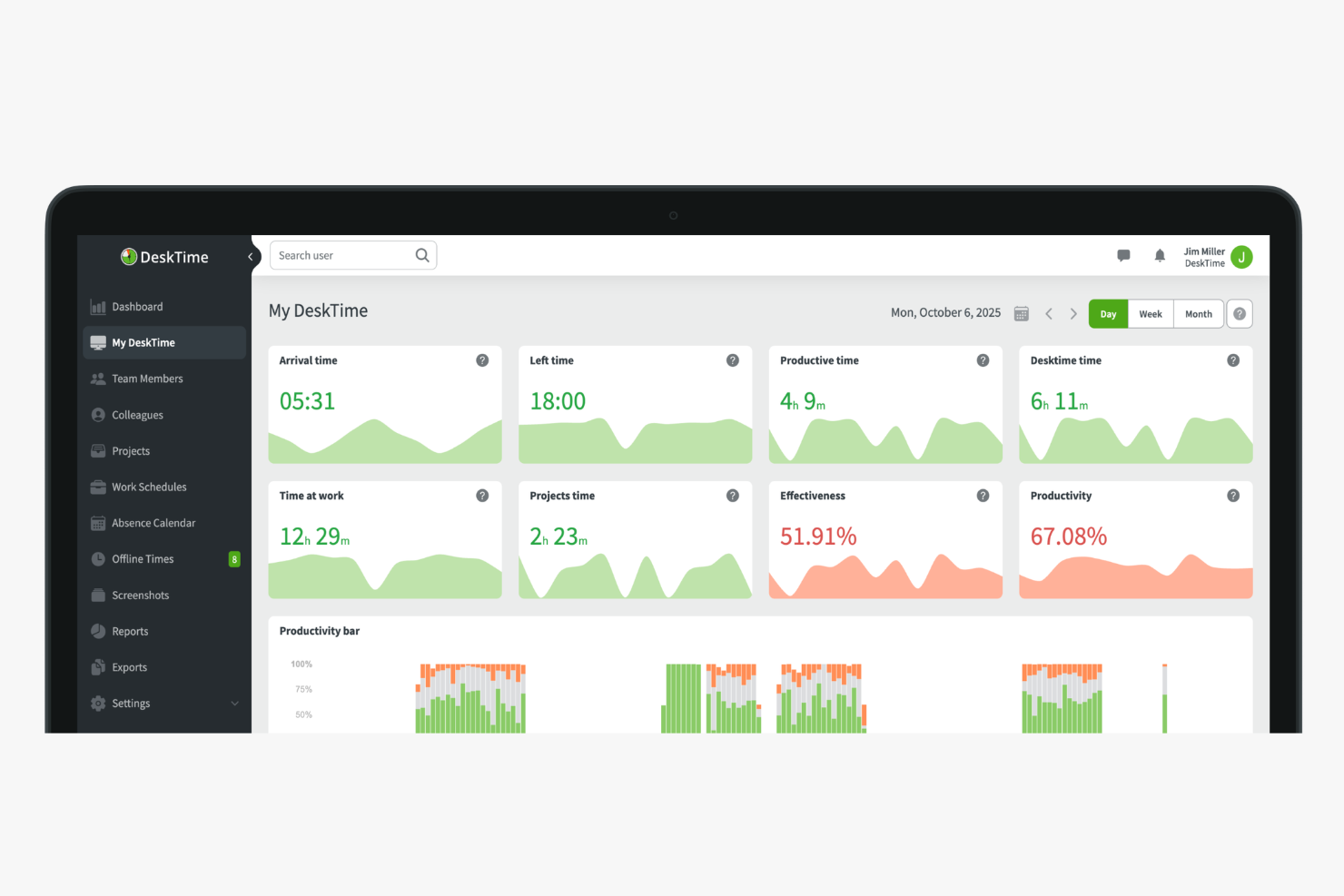
DeskTime è una piattaforma di monitoraggio della produttività e tracciamento automatico del tempo che rileva l'utilizzo di app, URL e documenti in background, offrendo ai manager una visibilità in tempo reale su come lavorano i team remoti, ibridi e in sede.
Per chi è DeskTime?
DeskTime è particolarmente indicato per manager e responsabili di team di piccole e medie imprese che necessitano di avere visibilità su come i team distribuiti o remoti impiegano le ore di lavoro.
Perché ho scelto DeskTime
Ho scelto DeskTime tra le mie migliori opzioni perché apprezzo molto il fatto che il tracciamento automatico inizi non appena si accende il computer, senza necessità di input manuali. Rileva in background ogni app, URL e titolo di documento, calcolando la percentuale di produttività in tempo reale per ciascun membro del team. Trovo particolarmente utile il fatto che sia possibile impostare categorie di produttività personalizzate per ogni team: ad esempio, i social media sono considerati produttivi per il marketing, ma improduttivi per tutti gli altri. Questo livello di granularità lo rende davvero efficace nella gestione di team remoti con ruoli differenti.
Funzionalità principali di DeskTime
- Screenshots: Cattura automaticamente screenshot opzionali e programmati degli schermi dei dipendenti, così i manager possono verificare l'attività da remoto senza diventare invadenti.
- Monitoraggio del tempo sui progetti: Permette ai membri del team di inserire direttamente il tempo su progetti e attività specifici, fornendo ai manager una panoramica su dove vengono impiegate le ore fatturabili.
- Rilevamento inattività: Traccia i periodi di inattività e li segnala separatamente, così i dati sulle performance dei team remoti rimangono accurati.
- Resoconti giornalieri con IA: Genera una panoramica automatica di fine giornata sull'attività lavorativa di ciascun dipendente, le app utilizzate e il tempo dedicato a ogni progetto.
Integrazioni DeskTime
Le integrazioni includono Google Calendar, Outlook Calendar, Trello, Gitlab, Asana, Jira e Zapier.
Pros and Cons
Pros:
- Rileva automaticamente l'utilizzo di app e URL
- I dipendenti possono mettere in pausa il tracciamento per privacy
- Calendario assenze e permessi integrato
Cons:
- Il monitoraggio mobile non include dati dettagliati sulle attività
- Nessun monitoraggio dello schermo in tempo reale
GoToMyPC
Ideale per l'accesso remoto da qualsiasi dispositivo
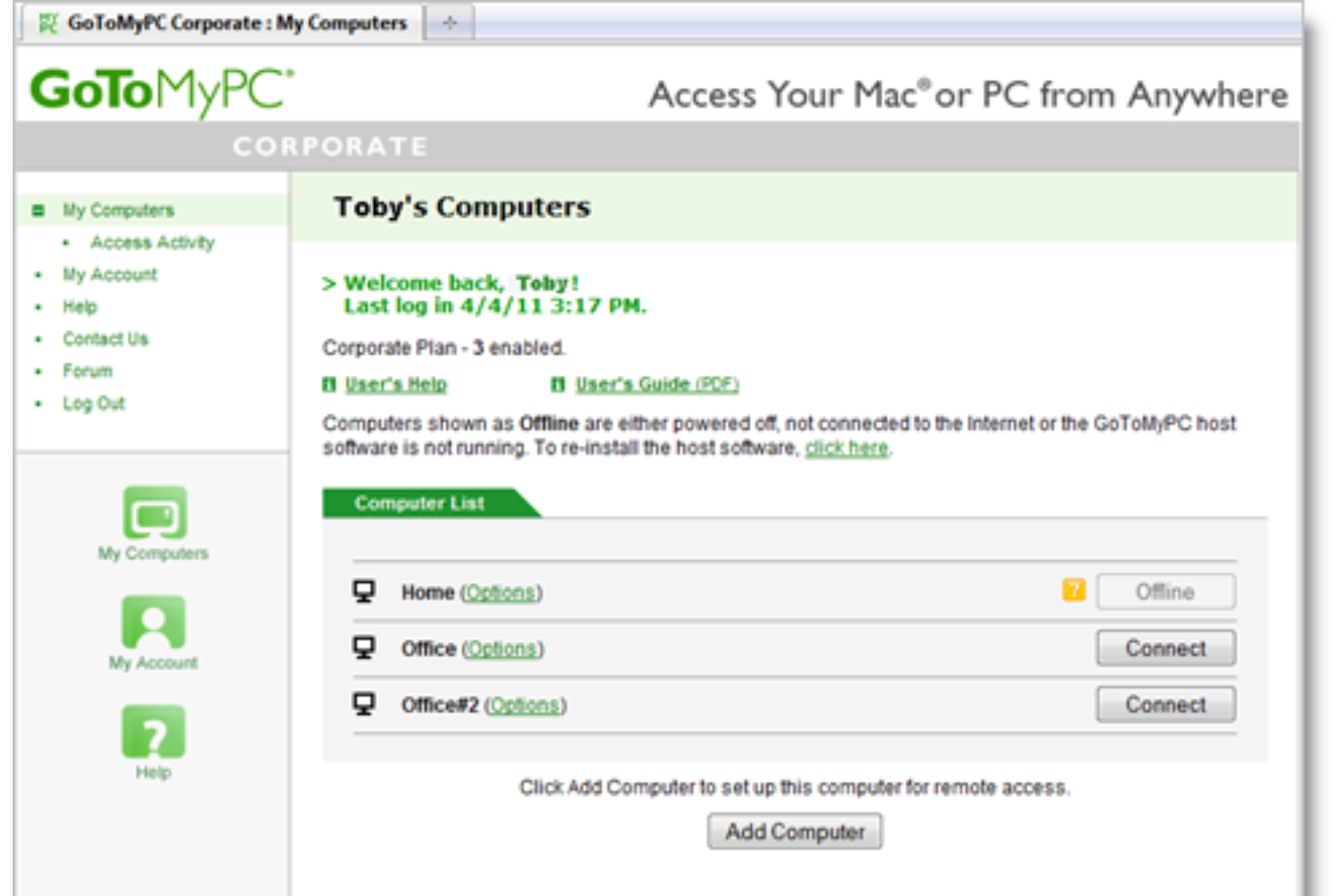
GoToMyPC è un software di desktop remoto che ti permette di accedere al tuo computer da qualsiasi dispositivo connesso a Internet. Che tu sia a casa, in ufficio o in viaggio, ti consente di lavorare su file, applicazioni e rete come se fossi fisicamente davanti alla tua scrivania.
Perché ho scelto GoToMyPC: Una funzionalità che rende GoToMyPC ideale per il lavoro da remoto è la possibilità di stampare a distanza. Questo ti permette di stampare documenti dal tuo computer remoto su una stampante locale, eliminando la necessità di trasferire manualmente i file. Per i professionisti che hanno bisogno di copie cartacee dei documenti mentre lavorano a distanza, questa funzione offre un notevole vantaggio.
Un altro aspetto prezioso è il supporto multi-monitor. Se il tuo computer principale utilizza più monitor, GoToMyPC ti consente di visualizzare e interagire con tutti loro da remoto. Ciò è particolarmente utile per gli utenti che si affidano a ampi spazi di lavoro digitali per gestire compiti complessi o monitorare più applicazioni contemporaneamente.
Funzionalità e integrazioni distintive di GoToMyPC
Funzionalità includono trasferimento file, accesso da dispositivi mobili, connessioni sicure, funzionalità copia e incolla, creazione di collegamenti desktop, report di utilizzo, accesso remoto, audio remoto, invito ospite e monitoraggio attivo della connettività.
Integrazioni includono RADIUS.
Pros and Cons
Pros:
- Accesso remoto affidabile da qualsiasi luogo
- Supporto efficace per monitor multipli
- Connessioni sicure con crittografia avanzata
Cons:
- Nessun supporto per Linux
- Mancano funzionalità di collaborazione remota

ClickUp
Il miglior software per il lavoro da remoto per la gestione dei progetti
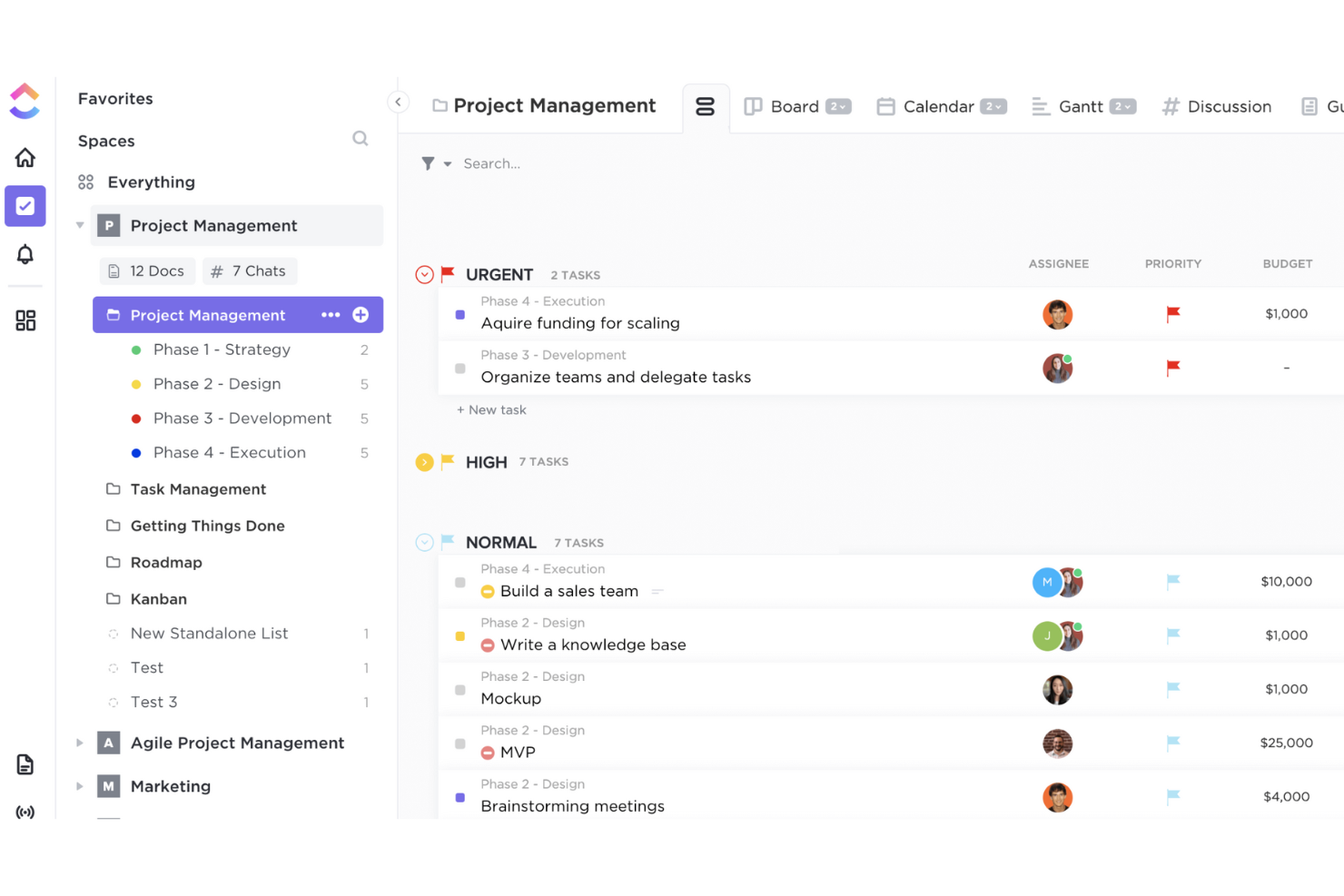
ClickUp è uno strumento online di collaborazione e gestione dei progetti adatto ad aziende di qualsiasi dimensione e settore.
Puoi assegnare commenti e task a membri specifici del team o a gruppi di persone. Puoi anche contrassegnare commenti e task come risolti o in corso, oppure creare stati personalizzati. Tutti i progetti possono essere visualizzati tramite una dashboard agile o organizzati per assegnatario. Il flusso attività in tempo reale mostra i task man mano che vengono creati e completati.
Puoi inoltre configurare le notifiche affinché vengano inviate solo per elementi specifici. La funzione di menzione avvisa gli utenti quando un collega li cita in una discussione, e i commenti possono essere modificati dopo la pubblicazione.
Funzionalità e integrazioni principali di ClickUp
Funzionalità includono attività personalizzabili, checklist, strumenti di comunicazione, liste di cose da fare, videochat, opzioni per la collaborazione, assegnazione delle attività, fatturazione, avvisi di stato e una barra degli strumenti per le attività.
Integrazioni includono Dropbox, Everhour, Figma, GitHub, HubSpot, Loom, Slack, Toggl, Vimeo e YouTube.
Pros and Cons
Pros:
- Aggiornato regolarmente
- Tantissimi video tutorial
- Potenti capacità di gestione dei progetti
Cons:
- Richiede inserimento manuale dei dati
- Può risultare complesso
New Product Updates from ClickUp
ClickUp Adds Meetings Hub, Super Agent Templates, and ZoomInfo Integration
ClickUp adds a searchable Meetings Hub, new ways to clone and template Super Agents, and a ZoomInfo integration through the App Center. These updates improve meeting retrieval, agent reuse, and access to sales intelligence. For more information, visit ClickUp’s official site.
Loom
Miglior software per il lavoro da remoto per la registrazione di video
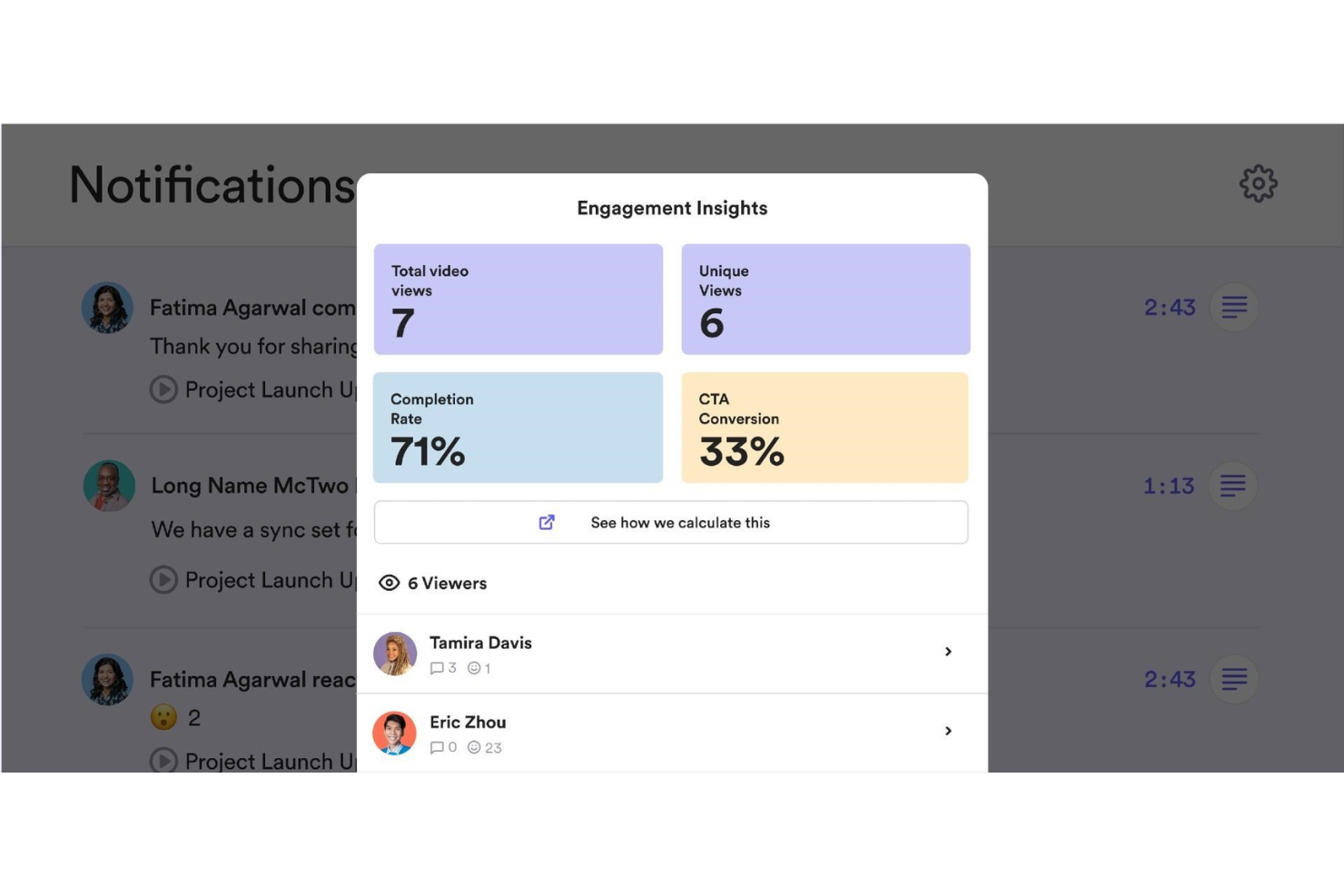
Loom è una delle soluzioni più popolari per la registrazione di video e la condivisione dello schermo, che permette ai team di comunicare senza dover perdere ore in riunioni poco produttive.
I membri dei team da remoto possono registrare lo schermo o una specifica applicazione, oltre alla registrazione dal vivo per qualsiasi sessione video. Loom genera un URL personalizzato per ogni sessione video, che può essere condiviso con altri utenti.
Gli strumenti di editing di Loom rendono facile modificare, tagliare e aggiungere CTA e miniature personalizzate. I proprietari dei video possono utilizzare i controlli di accesso per impostare filtri di privacy nei video, limitando la visibilità agli utenti che non dispongono di una password o del link URL. Loom è disponibile anche per dispositivi mobili Apple tramite un'app per iOS.
Funzionalità e integrazioni distintive di Loom
Le funzionalità includono registrazione rapida, condivisione dello schermo, condivisione di link, editing video, reazioni con emoji e commenti, controlli d'accesso e reportistica avanzata.
Integrazioni includono Dropbox, GitHub, Gmail, InVision, Jira, Notion, Salesforce, Slack, Zendesk e Zoom.
Pros and Cons
Pros:
- Editor video integrato
- Ottime funzioni di condivisione
- Creazione video rapida e semplice
Cons:
- I video sono pubblici per impostazione predefinita
- Nessuna opzione per cambiare le impostazioni predefinite
Ideale per promuovere la felicità dei dipendenti

Othership è una piattaforma versatile progettata per migliorare le esperienze di lavoro ibrido e remoto, offrendo l'accesso a diversi spazi di lavoro e software collaborativi. Fornisce soluzioni come spazi di lavoro su richiesta, prenotazione di scrivanie e gestione delle sale riunioni, soddisfacendo le esigenze sia dei singoli che delle aziende.
Perché ho scelto Othership: Il suo pianificatore di spazi di lavoro basato su cloud permette agli utenti di prenotare una varietà di ambienti, che preferiscano caffetterie, spazi di coworking o uffici privati. Questa flessibilità garantisce che i lavoratori da remoto possano trovare l'ambiente più adatto alle loro necessità. Inoltre, il software include la gestione di scrivanie e sale riunioni, migliorando il processo di prenotazione degli spazi e riducendo il carico amministrativo sui dipendenti, consentendo loro di concentrarsi maggiormente sulle attività principali.
Un altro vantaggio significativo di Othership è il suo sistema di gestione dei visitatori, che migliora la sicurezza e traccia l'attività negli spazi di lavoro. Questa funzione è particolarmente utile per le aziende che hanno un numero variabile di lavoratori remoti e visitatori negli uffici. Inoltre, la piattaforma supporta collaborazione, connessione e benessere generale tra colleghi, offrendo strumenti per trovare e connettersi con i colleghi, impostare notifiche personalizzate e analizzare i modelli di utilizzo.
Caratteristiche e integrazioni distintive di Othership
Caratteristiche includono regole di prenotazione personalizzabili, promemoria e notifiche automatiche, analisi dettagliate e report, accesso mobile intuitivo, supporto per sedi multiple, integrazione con sistemi di controllo accessi, esperienze di prenotazione personalizzate e gestione efficiente delle risorse.
Integrazioni comprendono le principali applicazioni per ufficio e risorse umane, software di pianificazione e videoconferenza come Microsoft Office, Outlook, Teams, Entra, Gmail, Google Calendar, Slack, Zoom e Bamboo.
Pros and Cons
Pros:
- Possibilità di prenotare stanze da diversi dispositivi
- Analisi sulle prenotazioni di sale riunioni e scrivanie
- Gestisci una politica ibrida con dati sia dall'ufficio che da remoto
Cons:
- Disponibilità limitata per lingue aggiuntive
- Potrebbe esserci disponibilità limitata di spazi coworking in alcune regioni
Il miglior software per il lavoro da remoto per la collaborazione all'interno dell'ecosistema Microsoft

Microsoft Teams è una popolare soluzione di messaggistica di gruppo basata su cloud che aiuta i team a collaborare su documenti e progetti. Le sue funzionalità principali includono messaggistica, conferenze e condivisione di file.
Perfetto per le organizzazioni che già utilizzano la tecnologia Microsoft, questo software aiuta gli utenti a archiviare file online, gestire documenti, creare gruppi e ricevere notifiche. Può essere personalizzato per ogni team e gli utenti possono comunicare tramite messaggistica istantanea, chiamate, riunioni online e web conference.
Lo strumento di comunicazione e collaborazione può essere utilizzato per lavorare su file all'interno delle app di Microsoft 365 come Word, PowerPoint, Excel e SharePoint.
Questa app consente ai lavoratori locali e remoti di collaborare sui contenuti in tempo reale e quasi reale su diversi dispositivi, tra cui laptop e dispositivi mobili. Agisce come il fulcro della collaborazione di team per gli utenti di Microsoft Office 365.
Funzionalità e integrazioni distintive di Microsoft Teams
Funzionalità includono messaggistica, conferenze, condivisione di file, riunioni virtuali, un'interfaccia aperta di elaborazione delle applicazioni, assistenti bot, ricerca di conversazioni, ricerca di contatti e autenticazione a più fattori.
Integrazioni includono ADP, Asana, BambooHR, Delve, GitHub, Microsoft Office, Planner, Power BI, Trello e Zendesk.
Pros and Cons
Pros:
- Implementazione semplice
- Alto livello di sicurezza
- Architettura del prodotto flessibile
Cons:
- Flessibilità limitata
- Strutture di file confuse
Altri software per il lavoro da remoto
Ecco alcune altre opzioni interessanti che non sono state incluse nell’elenco dei migliori software per il lavoro da remoto:
- Tettra
Il miglior software per il lavoro da remoto per creare una base di conoscenza
- Omnipresent
Ideale per l'onboarding globale
- Compass
Ideale per walkthrough da remoto
- Agile HRO
Ideale per la gestione di team globali
- Insightful
Ideale per garantire visibilità sui team distribuiti
- Cooleaf (ITA Group)
Il miglior software per il lavoro da remoto con strumenti di messaggistica avanzati
- Bonusly
Il miglior software per il lavoro da remoto per il riconoscimento e i premi ai dipendenti
- Slack
Il miglior software per il lavoro da remoto e la collaborazione tra più team
- monday AI Workspace
Il miglior software per il lavoro da remoto per collaborazione e produttività su larga scala
- Connecteam
Ideale per gestire facilmente dipendenti in prima linea e operazioni quotidiane


Come valuto i software per il lavoro da remoto
Valuto i software per il lavoro da remoto su due livelli: le funzionalità di base che uno strumento deve avere — come comunicazione asincrona, monitoraggio del tempo e onboarding virtuale — e i fattori differenzianti che separano il buono dall’eccellente.
Funzionalità di base (Requisiti minimi per questa lista)
Quando seleziono gli strumenti per la mia lista, valuto ciascuno su una scala da 0 (non offre la funzionalità) a 5 (eccelle in quest’area) per ogni funzionalità chiave elencata di seguito. Poi, calcolo il punteggio totale dello strumento in percentuale. Ogni strumento deve raggiungere un punteggio minimo totale del 75% per essere considerato per l’inclusione.
- Strumenti di comunicazione per il team: Cerco chat integrate, videoconferenze e messaggistica organizzata per canali che permettano ai team distribuiti di fare standup, brevi sincronizzazioni e aggiornamenti asincroni senza dover passare da un’app all’altra.
- Collaborazione in tempo reale: Che si tratti di co-modificare un documento di policy o gestire attività su una bacheca condivisa, valuto quanto bene la piattaforma mantenga i colleghi remoti a lavorare insieme in un unico luogo.
- Funzionalità per il coinvolgimento dei dipendenti: Sondaggi istantanei, riconoscimenti tra pari e spazi sociali virtuali sono tutti aspetti che considero. Verifico se lo strumento offre ai team HR un modo per misurare il morale tra le varie sedi.
- Monitoraggio di orari e presenze: Analizzo come la piattaforma gestisce le timbrature, la visibilità dei fusi orari e la programmazione dei turni per team distribuiti in diverse regioni e con differenti orari di lavoro.
- Workflow di onboarding virtuale: Iniziare un nuovo ruolo da remoto può essere isolante. Valuto se lo strumento supporta fasi di onboarding strutturate come la firma digitale dei documenti, moduli di formazione e sequenze di benvenuto.
- Controlli di accesso e sicurezza: Permessi basati sui ruoli, SSO e MFA sono le caratteristiche che verifico in questa sezione, soprattutto per team in cui i dipendenti accedono a dati HR sensibili da dispositivi personali e reti domestiche.
Una volta che ho una lista di strumenti che soddisfano questi criteri, considero cosa distingue ciascuna piattaforma.
Fattori distintivi (Cosa distingue i fornitori)
Ecco come confronto e metto a confronto i diversi fornitori:
Funzionalità che si distinguono
Gli ambienti di lavoro virtuali rappresentano un grande elemento di differenziazione. Le piattaforme che simulano una disposizione dell’ufficio con stanze accessibili al bisogno restituiscono ai team remoti l’interazione spontanea che spesso agli HR risulta difficile ricreare. Cerco anche insight sulla produttività guidati dall’intelligenza artificiale che segnalano squilibri di carico di lavoro o lacune nella collaborazione prima che diventino problemi di retention. Strumenti per il benessere e la prevenzione del burnout completano il quadro. Funzionalità come il blocco dei periodi di concentrazione e i check-in sul benessere mentale aiutano i team HR a supportare proattivamente il personale distribuito anziché reagire solo quando il coinvolgimento è già calato.
Oltre le funzionalità
L’ecosistema di integrazioni qui conta molto. Verifico se una piattaforma si collega nativamente a strumenti HRIS, sistemi payroll e suite di collaborazione come Slack o Microsoft 365 in modo che i team HR non debbano sincronizzare manualmente i dati dei dipendenti tra i sistemi. Sicurezza e conformità sono altrettanto importanti quando il personale accede a dati sensibili da reti domestiche. Cerco certificazioni SOC 2 e GDPR, oltre a opzioni per la residenza dei dati. Anche il supporto alla forza lavoro globale ha il suo peso: la programmazione consapevole dei fusi orari e calendari con festività locali fanno davvero la differenza per team internazionalmente distribuiti.
Come scegliere il software per il lavoro da remoto
È facile perdersi in lunghi elenchi di funzionalità e strutture tariffarie complesse. Per aiutarti a rimanere concentrato mentre affronti il tuo specifico processo di selezione del software, ecco una lista di fattori da tenere a mente:
| Fattore | Cosa considerare |
|---|---|
| Scalabilità | Il software può crescere insieme al tuo team? Considera l’espansione futura e se lo strumento è in grado di gestire un numero maggiore di utenti o dati senza problemi di prestazioni. |
| Integrazioni | Si collega agli strumenti che utilizzi attualmente? Assicurati che supporti le integrazioni con le piattaforme che già usi, per garantire un flusso di lavoro fluido. |
| Personalizzazione | Puoi adattarlo alle tue esigenze? Cerca strumenti che consentano di personalizzare disposizioni, pannelli di controllo e flussi di lavoro in base ai processi del tuo team. |
| Semplicità d’uso | È facile da usare? Scegli un software intuitivo e facile da adottare per il tuo team, senza bisogno di una formazione approfondita. |
| Implementazione e inserimento | Quanto velocemente puoi iniziare? Valuta i tempi di configurazione e le risorse necessarie per integrare efficacemente il tuo team. |
| Costo | Rientra nel tuo budget? Confronta i piani tariffari e verifica la presenza di costi nascosti. Considera il valore che ottieni rispetto al prezzo. |
| Misure di sicurezza | I tuoi dati sono al sicuro? Assicurati che il software disponga di solide misure di protezione dei dati, come la crittografia e aggiornamenti di sicurezza regolari. |
| Disponibilità dell’assistenza | Potrai ricevere aiuto quando ne avrai bisogno? Verifica gli orari e i canali di assistenza del fornitore per assicurarti che siano in linea con le tue esigenze. |
Che cos'è il software per il lavoro da remoto?
Il software per il lavoro da remoto è un insieme di strumenti digitali che consentono ai team di collaborare e comunicare efficacemente da sedi diverse. Questi strumenti sono generalmente utilizzati da professionisti come project manager, responsabili di team e dipendenti da remoto per facilitare il lavoro al di fuori di un ambiente d'ufficio tradizionale. Il software per il lavoro da remoto può includere strumenti per le videoconferenze, piattaforme per la condivisione di file, app per la gestione delle attività e software wiki per la condivisione delle conoscenze.
Nel complesso, questi strumenti facilitano il lavoro efficiente dei team e consentono di mantenere il flusso di lavoro, indipendentemente dalla loro ubicazione.
Funzionalità
Quando scegli un software per il lavoro da remoto, presta attenzione alle seguenti funzionalità chiave:
- Videoconferenze: facilitano la comunicazione faccia a faccia, aiutando i team a connettersi e collaborare in tempo reale.
- Condivisione di file: consente agli utenti di condividere e accedere facilmente ai documenti, assicurando che tutti dispongano delle informazioni necessarie.
- Gestione delle attività: aiuta a organizzare e assegnare le attività, mantenendo i membri del team concentrati e facendo avanzare i progetti.
- Funzionalità di integrazione: si collega agli altri strumenti utilizzati dal team, creando un flusso di lavoro fluido tra le piattaforme.
- Pannelli di controllo personalizzabili: consentono agli utenti di adattare il proprio spazio di lavoro alle esigenze e preferenze specifiche.
- Misure di sicurezza: proteggono i dati sensibili mediante la crittografia e aggiornamenti regolari, garantendo privacy e conformità.
- Interfaccia intuitiva: facilita la navigazione e l'utilizzo del software da parte dei membri del team senza una formazione approfondita.
- Scalabilità: supporta la crescita consentendo di gestire un numero maggiore di utenti e volumi di dati più elevati man mano che il team si espande.
- Tour interattivi del prodotto: guidano i nuovi utenti nell'utilizzo del software, migliorando l'inserimento e i tassi di adozione.
- Assistenza clienti 24/7: fornisce supporto ogni volta che è necessario, assicurando una rapida risoluzione dei problemi.
Vantaggi
L'implementazione di un software per il lavoro da remoto offre numerosi vantaggi al team e all'azienda. Ecco alcuni dei benefici che puoi aspettarti:
- Comunicazione migliorata: gli strumenti per videoconferenze e chat mantengono il team connesso, riducendo i malintesi e migliorando la collaborazione.
- Maggiore produttività: le funzionalità di gestione delle attività aiutano a monitorare i progressi e le scadenze, assicurando che i progetti rispettino i tempi previsti.
- Maggiore flessibilità: gli strumenti per il lavoro da remoto consentono al team di lavorare da qualsiasi luogo, adattandosi a diversi stili e luoghi di lavoro.
- Risparmio sui costi: consentendo il lavoro da remoto, puoi ridurre i costi generali associati al mantenimento di uno spazio fisico per uffici.
- Maggiore sicurezza dei dati: le misure di sicurezza proteggono le informazioni sensibili, garantendo maggiore tranquillità in merito alla privacy dei dati.
- Flussi di lavoro ottimizzati: le funzionalità di integrazione assicurano transizioni fluide tra strumenti diversi, migliorando l'efficienza complessiva.
- Scalabilità: con la crescita dell'azienda, un software scalabile consente di aggiungere più utenti e gestire carichi di lavoro maggiori senza interruzioni.
Costi e prezzi
La scelta di un software per il lavoro da remoto richiede la comprensione dei diversi modelli e piani tariffari disponibili. I costi variano in base alle funzionalità, alle dimensioni del team, agli elementi aggiuntivi e ad altri fattori. La tabella seguente riepiloga i piani comuni, i relativi prezzi medi e le funzionalità tipicamente incluse nelle soluzioni software per il lavoro da remoto:
Tabella comparativa dei piani per il software per il lavoro da remoto
| Tipo di piano | Prezzo medio | Funzionalità comuni |
|---|---|---|
| Piano gratuito | $0/user/month | Strumenti di comunicazione di base, spazio di archiviazione limitato e funzionalità di sicurezza essenziali. |
| Piano personale | $5-$15/user/month | Strumenti di collaborazione avanzati, spazio di archiviazione moderato e assistenza prioritaria. |
| Piano aziendale | $20-$40/user/month | Gestione avanzata delle attività, integrazioni con altre app e misure di sicurezza rafforzate. |
| Piano aziendale | $50+/user/month | Funzionalità personalizzabili, integrazioni estese, assistenza dedicata per l'account e analisi complete. |
Software per il lavoro da remoto: domande frequenti
Ecco alcune delle domande che mi vengono poste più spesso riguardo all'utilizzo degli strumenti per il lavoro da remoto.
Esistono diversi tipi di software per il lavoro da remoto?
Sono disponibili diversi tipi di software per il lavoro da remoto, che coprono funzioni come videoconferenze, gestione dei progetti, condivisione di file e collaborazione. È inoltre possibile trovare strumenti per aiutare a monitorare il tempo, comunicare e inviare messaggi.
Come posso capire quale software per il lavoro da remoto è adatto alla mia azienda?
Per determinare quale software per il lavoro da remoto sia adatto alla tua azienda, considera le esigenze e i requisiti del tuo team, oltre al tuo budget. Inizia identificando le attività e i processi specifici che devi supportare, quindi cerca un software che offra le funzionalità necessarie per supportarli.
Come posso fare in modo che il mio team adotti un nuovo software per il lavoro da remoto?
Per incoraggiarne l'adozione, coinvolgi il tuo team nel processo decisionale e fornisci una formazione adeguata. Inizia spiegando i vantaggi e come il software contribuirà a migliorare il loro flusso di lavoro. Offri sessioni di formazione, tutorial e risorse per aiutarli a familiarizzare rapidamente con lo strumento. Incoraggia i feedback e affronta tempestivamente eventuali dubbi. Metti in evidenza i risultati rapidi o i miglioramenti della produttività per motivare a continuare a utilizzarlo. Confrontati regolarmente con il tuo team per assicurarti che si senta a proprio agio e utilizzi lo strumento in modo efficace.
Cosa succede ora:
Se stai cercando un software per il lavoro da remoto, contatta gratuitamente un consulente SoftwareSelect per ricevere consigli personalizzati.
Compili un modulo e partecipi a una breve conversazione durante la quale verranno analizzate nel dettaglio le tue esigenze. In seguito riceverai una selezione di software da valutare. Ti supporteranno anche durante l'intero processo di acquisto, comprese le negoziazioni sui prezzi.