

10 Migliori Software e App di Comunicazione del 2026

10 Elenco dei migliori software per le comunicazioni


Con così tanti software per le comunicazioni diversi disponibili, capire quale sia quello giusto per la propria azienda è difficile. Sai di volere uno strumento che colmi il divario tra i team e renda più semplice la comunicazione di gruppo, ma devi capire quale strumento sia il migliore. In questo articolo ti aiuterò a scegliere più facilmente condividendo le mie opinioni sui migliori software e app per le comunicazioni, utili per inviare messaggi, condividere file e svolgere riunioni virtuali con colleghi da remoto ovunque ti trovi.
Perché fidarsi delle nostre recensioni sui software
Il nostro team testa e recensisce software dal 2012. In quanto esperti HR noi stessi, sappiamo quanto sia difficile — e importante — scegliere il software giusto.
Per questa guida, abbiamo valutato gli strumenti attraverso test pratici e ricerche indipendenti, assegnando un punteggio agli strumenti in base ai nostri criteri di selezione. Ci basiamo inoltre sulle competenze di leader di pensiero del settore e di professionisti HR attivi.
Le nostre recensioni riflettono il nostro giudizio editoriale umano, non un discorso di vendita.
Revisori esperti:
Tabella comparativa dei migliori software per le comunicazioni
Questa tabella comparativa riassume i dettagli di base di ciascuna delle mie migliori selezioni di software per le comunicazioni. Puoi visualizzare fianco a fianco i dettagli sui prezzi e la disponibilità di prove gratuite o demo, così da trovare il software migliore per il tuo budget e le esigenze della tua azienda.
| Tool | Best For | Trial Info | Price | ||
|---|---|---|---|---|---|
| 1 | Ideale per supervisionare operazioni sul campo | Prova gratuita di 14 giorni + demo gratuita disponibile | A partire da $29/mese (fatturato annualmente) | Website | |
| 2 | Ideale per le comunicazioni interne incentrate sul riconoscimento | Demo gratuita disponibile | Prezzi su richiesta | Website | |
| 3 | Ideale per collegare team in crescita e PMI | Demo gratuita disponibile | Prezzo su richiesta | Website | |
| 4 | Il miglior software per la comunicazione tramite videoconferenza | Piano gratuito disponibile | A partire da $14.16/utente/mese (fatturato annualmente) | Website | |
| 5 | Ideale per favorire il coinvolgimento dei dipendenti | Demo gratuita disponibile | Prezzo su richiesta | Website | |
| 6 | Ideale per la messaggistica istantanea | Prova gratuita di 30 giorni + demo gratuita disponibile | Da $2.50/utente/mese | Website | |
| 7 | Il miglior software di comunicazione d'emergenza | Demo gratuita disponibile | Prezzo su richiesta | Website | |
| 8 | Ideale per valutare il sentiment dei dipendenti | Demo gratuita disponibile | Prezzi su richiesta | Website | |
| 9 | Ideale per comunicare con i clienti | Prova gratuita di 30 giorni + piano gratuito disponibile | Da $4.50/utente/mese (fatturazione annuale) | Website | |
| 10 | Miglior sistema di comunicazione telefonica virtuale | Prova gratuita disponibile | Prezzo su richiesta | Website |
Panoramica dei 10 migliori software per le comunicazioni
In questa sezione fornirò una panoramica dettagliata delle 10 migliori soluzioni software per le comunicazioni. Metterò in evidenza le loro caratteristiche e i vantaggi principali e spiegherò come possono migliorare la comunicazione interna e il coinvolgimento dei dipendenti.

Ideale per supervisionare operazioni sul campo
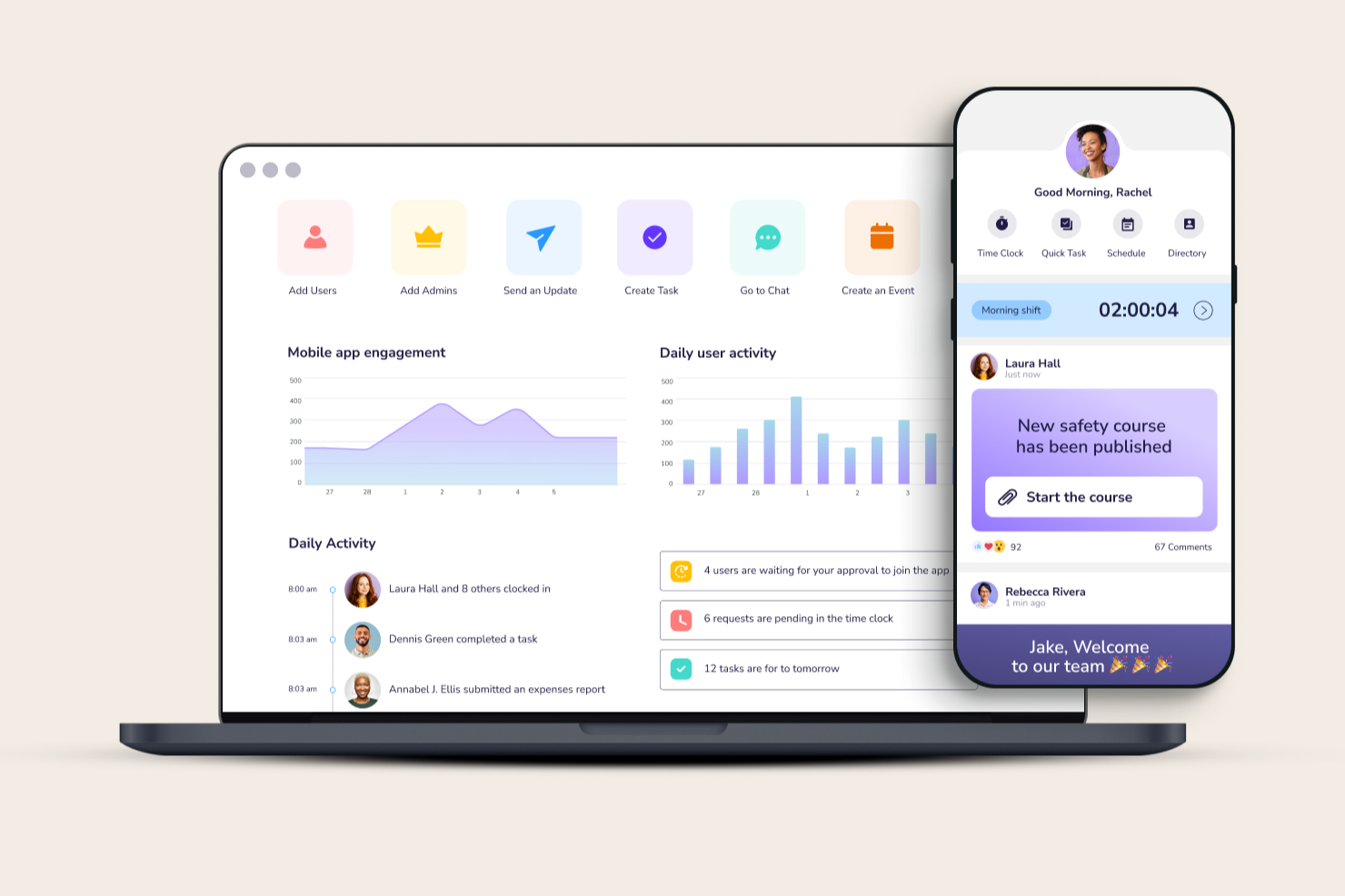
Connecteam è un'applicazione di gestione del personale tutto-in-uno progettata per semplificare le operazioni, migliorare la comunicazione e rispondere alle esigenze HR per aziende orientate al mobile. Include un feed di notizie aziendali personalizzato, messaggistica istantanea sicura, sondaggi per i dipendenti e una base di conoscenze rivolta ai dipendenti.
Perché ho scelto Connecteam: Ho selezionato Connecteam per le sue funzionalità complete che facilitano il controllo in tempo reale delle operazioni, una caratteristica che lo distingue dagli altri strumenti sul mercato. Connecteam offre una combinazione unica di strumenti per la comunicazione, le operazioni e la formazione, tutto in un’unica piattaforma, caratteristica non comune in altri software.
Oltre a comunicare direttamente con i tuoi dipendenti o team, puoi anche utilizzare Connecteam per il monitoraggio delle presenze, la gestione dei turni e il controllo dei compiti, rendendolo una soluzione ideale per le aziende che cercano un maggiore controllo sulle operazioni mobili o sul campo.
Funzionalità e integrazioni principali di Connecteam
Le funzionalità di spicco di Connecteam includono gli strumenti di comunicazione e di gestione delle attività. I responsabili possono comunicare direttamente con i dipendenti tramite la messaggistica istantanea sicura, quindi assegnare loro compiti di follow-up direttamente all’interno dell’app, includendo ulteriori commenti e allegati. I dipendenti possono segnarli come completati durante il lavoro, fornendo ai responsabili aggiornamenti in tempo reale sul progresso delle attività.
Altre funzionalità utili includono un canale di comunicazione dedicato ai dipendenti con aggiornamenti mirati, funzionalità per il coinvolgimento del team, una cassetta digitale dei suggerimenti per raccogliere feedback dai dipendenti, una directory aziendale ricercabile e un organigramma.
Le integrazioni includono Paychex, Xero, Gusto, QuickBooks Payroll (online + desktop), Google Calendar e altri.
Pros and Cons
Pros:
- Interfaccia intuitiva e facile da usare
- Tutte le funzioni sono accessibili da mobile
- Le funzionalità di gestione delle attività aiutano a migliorare produttività e responsabilità
Cons:
- Funzionalità offline limitate
- Progettato prevalentemente per dispositivi mobili, il che può rappresentare un limite per chi preferisce soluzioni desktop
New Product Updates from Connecteam

Connecteam Expands Break and Timesheet Controls
Connecteam adds flexible break thresholds, personalized policies, auto-end options, a centralized exceptions report, and improved timesheet issue visibility to help teams manage breaks and timesheets more effectively. For more information, visit Connecteam’s official site.
 .
.
Nectar
Ideale per le comunicazioni interne incentrate sul riconoscimento
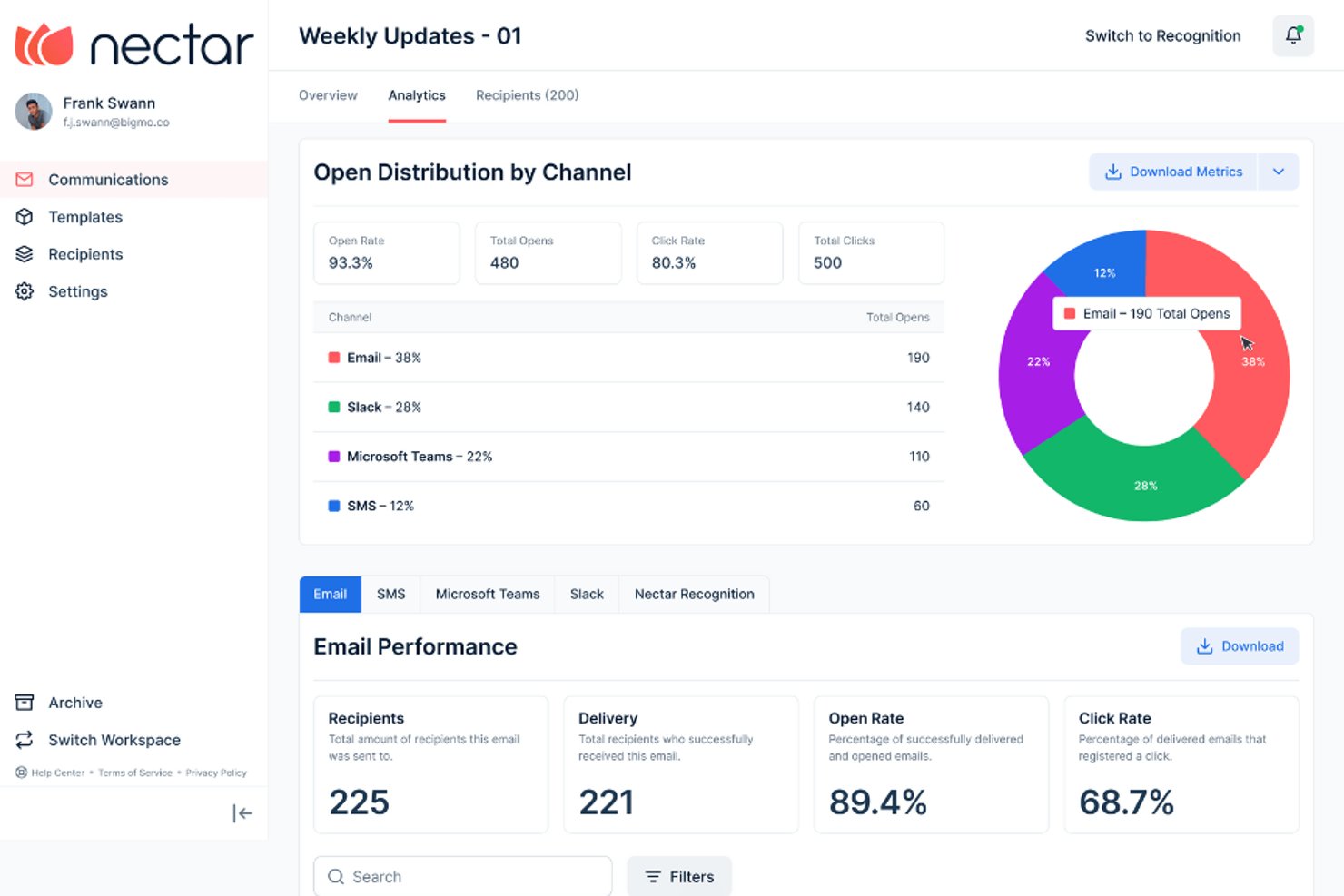
Nectar è una piattaforma per le comunicazioni interne che combina messaggistica multicanale, riconoscimento dei dipendenti, sondaggi e analisi del coinvolgimento in un unico spazio di lavoro.
Per chi è più adatto Nectar?
Nectar è adatto ai responsabili dell'esperienza dei dipendenti e ai team di comunicazione interna che desiderano gestire il riconoscimento e la messaggistica aziendale su un'unica piattaforma.
Perché ho scelto Nectar
Ho scelto Nectar come una delle soluzioni migliori perché il riconoscimento e le comunicazioni interne risiedono sulla stessa piattaforma, il che significa che un elogio da parte di un responsabile e un annuncio aziendale condividono lo stesso profilo del dipendente. Mi piace il fatto che Comunicazioni consenta di inviare messaggi tramite e-mail, SMS, WhatsApp, Slack e Teams da un unico flusso di lavoro, con un passaggio automatico dagli SMS a WhatsApp per i lavoratori internazionali. Nectar Signals assegna quindi un punteggio allo stato del coinvolgimento di ciascun team sulla base delle attività di messaggistica e riconoscimento, così puoi vedere dove la comunicazione sta effettivamente arrivando.
Funzionalità principali di Nectar
- Elenchi dinamici dei destinatari: gli elenchi sincronizzati con l'HRIS si aggiornano automaticamente quando i dipendenti entrano, cambiano ruolo o lasciano l'azienda, così i tuoi segmenti rimangono accurati senza manutenzione manuale.
- Creazione di segnaletica digitale: un editor con funzione di trascinamento consente di creare diapositive in formato 16:9, raggrupparle in raccolte basate sulla posizione e visualizzarle sui lettori di segnaletica esistenti senza costi aggiuntivi.
- Automazione dei flussi: sequenze di messaggi predefinite con ritardi e diramazioni vengono attivate da eventi dell'HRIS, date di assunzione o strumenti di terze parti come HubSpot, Salesforce e Zapier.
- Chat anonima SafeTalk: un canale di messaggistica bidirezionale riservato consente alle risorse umane di ricontattare privatamente i partecipanti ai sondaggi senza rivelarne l'identità.
Integrazioni di Nectar
Nectar offre integrazioni con ADP, BambooHR, Workday, UKG, Slack, Microsoft Teams, HubSpot, Salesforce, Google Sheets e Zapier. Supporta inoltre connessioni SFTP, Merge e Open API per i dati dell'HRIS e le integrazioni personalizzate.
Pros and Cons
Pros:
- Raggiunge i lavoratori senza postazione fissa oltre l'e-mail
- Segmenta automaticamente i dipendenti con aggiornamento automatico
- Combina gli annunci con gli approfondimenti sul riconoscimento
Cons:
- Le risposte agli annunci non supportano discussioni organizzate in conversazioni
- Le analisi rimangono superficiali per le aziende
New Product Updates from Nectar

Nectar Enhances Clara AI With Live Platform Data
Nectar introduces live platform data access and expanded knowledge coverage for Clara AI. The updates improve response accuracy and speed while enabling Clara AI to answer questions across more recognition and rewards features. For more information, visit Nectar's official site.
 .
.
Hub
Ideale per collegare team in crescita e PMI

Hub è un software avanzato di comunicazione per dipendenti progettato per team in crescita e PMI, pensato per migliorare la connettività, la comunicazione interna e il coinvolgimento dei dipendenti.
Perché ho scelto Hub: Hub supporta la comunicazione bidirezionale e la collaborazione attraverso feedback e forum di gruppo. Puoi indirizzare le comunicazioni a diversi destinatari grazie a tag intelligenti ed email personalizzate. Apprezzo anche il fatto che includa strumenti per la comunicazione e l'analisi del benessere dei dipendenti tramite moduli, sondaggi e questionari. Inoltre, Hub facilita la condivisione di risorse e la collaborazione tra più sedi in uno spazio di lavoro sicuro e include funzionalità come like, commenti e report sull'utilizzo.
Hub è completamente ottimizzato per dispositivi mobili, consentendo l'accesso da remoto a tutte le funzionalità, e include aggiornamenti continui basati sui feedback dei clienti per garantire che rimanga una soluzione all'avanguardia per la comunicazione interna aziendale.
Un altro aspetto che mi colpisce è il fatto che Hub promuove la sostenibilità e pianterà 50 alberi per ogni nuovo HUB venduto, con un focus su progetti di riforestazione comunitari a sostegno delle comunità colpite dai cambiamenti climatici. Offrono inoltre sconti per PMI e non profit e non applicano costi di installazione, rendendolo una buona soluzione per aziende di piccole e medie dimensioni.
Funzionalità e integrazioni principali di Hub
Funzionalità principali includono accesso a tutte le aree senza costi nascosti o componenti aggiuntivi, aggiornamenti gratuiti che garantiscono agli utenti la versione più recente, e un’interfaccia user-friendly progettata per semplicità e facilità di navigazione.
Hub può essere configurato rapidamente, spesso entro 48 ore, offrendo un'esperienza intranet completamente brandizzata.
Integrazioni includono Single Sign-On, account email e calendario Gmail e Microsoft Outlook, Google Drive, Microsoft OneDrive, SharePoint, feed di terze parti e widget HTML, e il software di email marketing Enabler.
Pros and Cons
Pros:
- Suite di comunicazione completa
- Micro-applicazioni personalizzabili
- Analisi AI avanzate
Cons:
- Leggera curva di apprendimento
- Potrebbe non essere conveniente per le piccole imprese

Zoom
Il miglior software per la comunicazione tramite videoconferenza
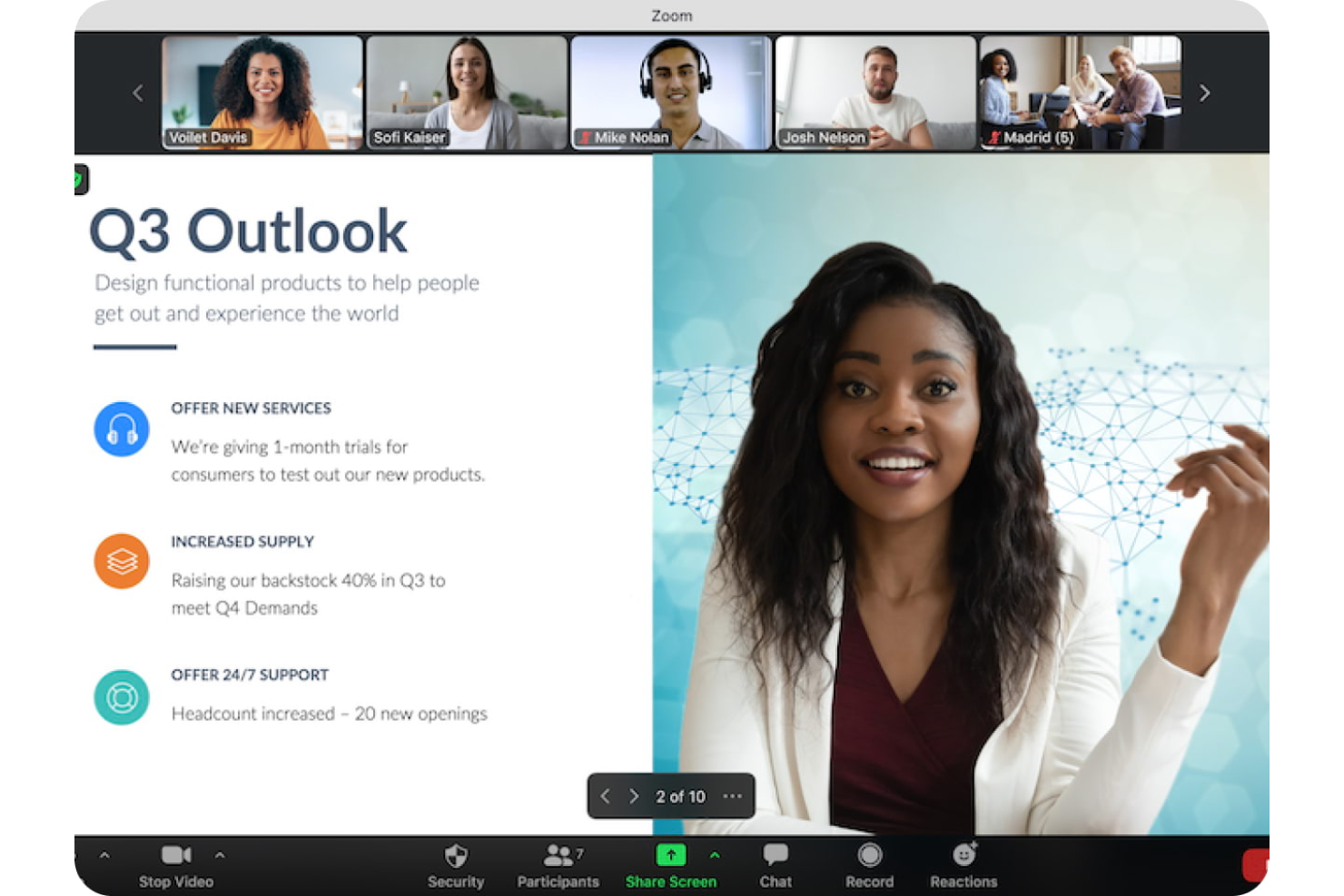
Zoom è una piattaforma di videoconferenza per riunioni online, webinar e chat dal vivo tramite la loro app desktop o mobile.
Perché ho scelto Zoom: Ho scelto Zoom per le funzionalità che mi aiutano durante una riunione. Lo sfondo virtuale, che mi permette di inserire un'immagine o un video dietro di me, aiuta a mantenere nascosta la mia posizione reale pur apparendo professionale. Un'altra funzione interessante di Zoom è la possibilità di avere sottotitoli tradotti, rendendo facile la comunicazione tra dipendenti che parlano lingue diverse senza bisogno di un interprete o servizi di traduzione.
Caratteristiche distintive e integrazioni di Zoom:
Zoom si distingue per la qualità elevata di video e audio, assicurando una comunicazione chiara in ogni interazione. Gli utenti possono interagire di più con funzioni come la condivisione dello schermo e le reazioni di alzata di mano. Le breakout rooms facilitano discussioni mirate in piccoli gruppi, mentre il sistema di sondaggi e domande/risposte aumenta il coinvolgimento dei partecipanti. Inoltre, le sue capacità telefoniche, complete di segreteria telefonica, inoltro di chiamata e registrazione, lo rendono uno strumento di comunicazione completo.
Le integrazioni includono Salesforce, HubSpot, Slack, Microsoft Teams, Google Drive, Dropbox Box, Trello, Asana e Fireflies.ai.
Pros and Cons
Pros:
- Video di alta qualità
- Interfaccia facile da usare
- Ampia gamma di integrazioni
Cons:
- Il tempo delle riunioni è limitato nella versione gratuita
- La qualità delle chiamate è a volte bassa

Workvivo
Ideale per favorire il coinvolgimento dei dipendenti
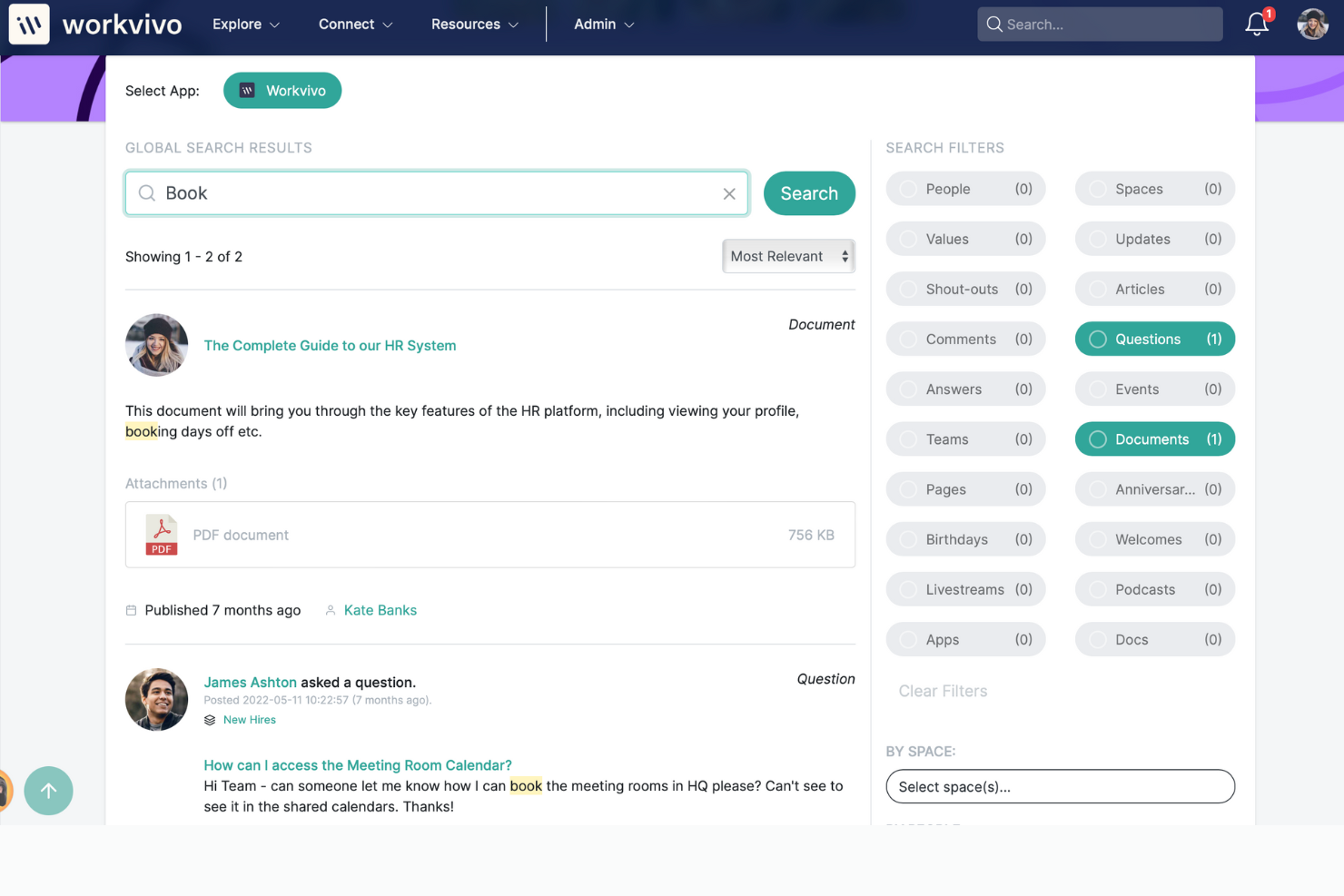
Workvivo è una piattaforma per l’esperienza dei dipendenti che combina funzionalità di comunicazione e strumenti di coinvolgimento del personale in uno stile simile a un social intranet. La piattaforma offre funzionalità che supportano la condivisione delle informazioni, la collaborazione e il riconoscimento per dare voce a ogni dipendente.
Perché ho scelto Workvivo: Ho incluso Workvivo perché mette in risalto la comunicazione e il coinvolgimento dei dipendenti grazie alle sue capacità di social intranet. Quello che distingue Workvivo, secondo me, è la possibilità di raccogliere e monitorare informazioni sull’andamento dell’ambiente di lavoro tramite dashboard, oltre alla sua versatilità nell’unire e coinvolgere dipendenti in diversi settori. La piattaforma sostiene il coinvolgimento del personale grazie a un approccio completo alla comunicazione, al rafforzamento della cultura aziendale e al supporto per il lavoro da remoto, elementi essenziali per favorire una forza lavoro connessa e coinvolta.
Funzionalità e integrazioni distintive di Workvivo:
Alcune delle funzionalità principali di Workvivo includono gruppi di comunità per la collaborazione e la condivisione delle conoscenze, un’intranet sociale per centralizzare i messaggi, un portale documenti e canali di comunicazione inclusivi per le interazioni tra leadership e membri del team.
Inoltre, la piattaforma offre approfondimenti sul luogo di lavoro tramite analisi e garantisce sicurezza dei dati e delle comunicazioni, consentendo agli utenti di personalizzare la propria esperienza attraverso la gestione delle preferenze e dei consensi sui cookie.
Le integrazioni includono Google Drive, Microsoft Teams, Salesforce, Slack, Workday, Zoom e altri.
Pros and Cons
Pros:
- Supporta spazi multipli per dipartimenti e argomenti
- Risorse di supporto clienti utili
- La piattaforma offre numerose funzionalità per sostenere il coinvolgimento dei dipendenti
Cons:
- Funzionalità limitate sull’app mobile
- Richiede un po’ di tempo per imparare a usarla al meglio
Ideale per la messaggistica istantanea
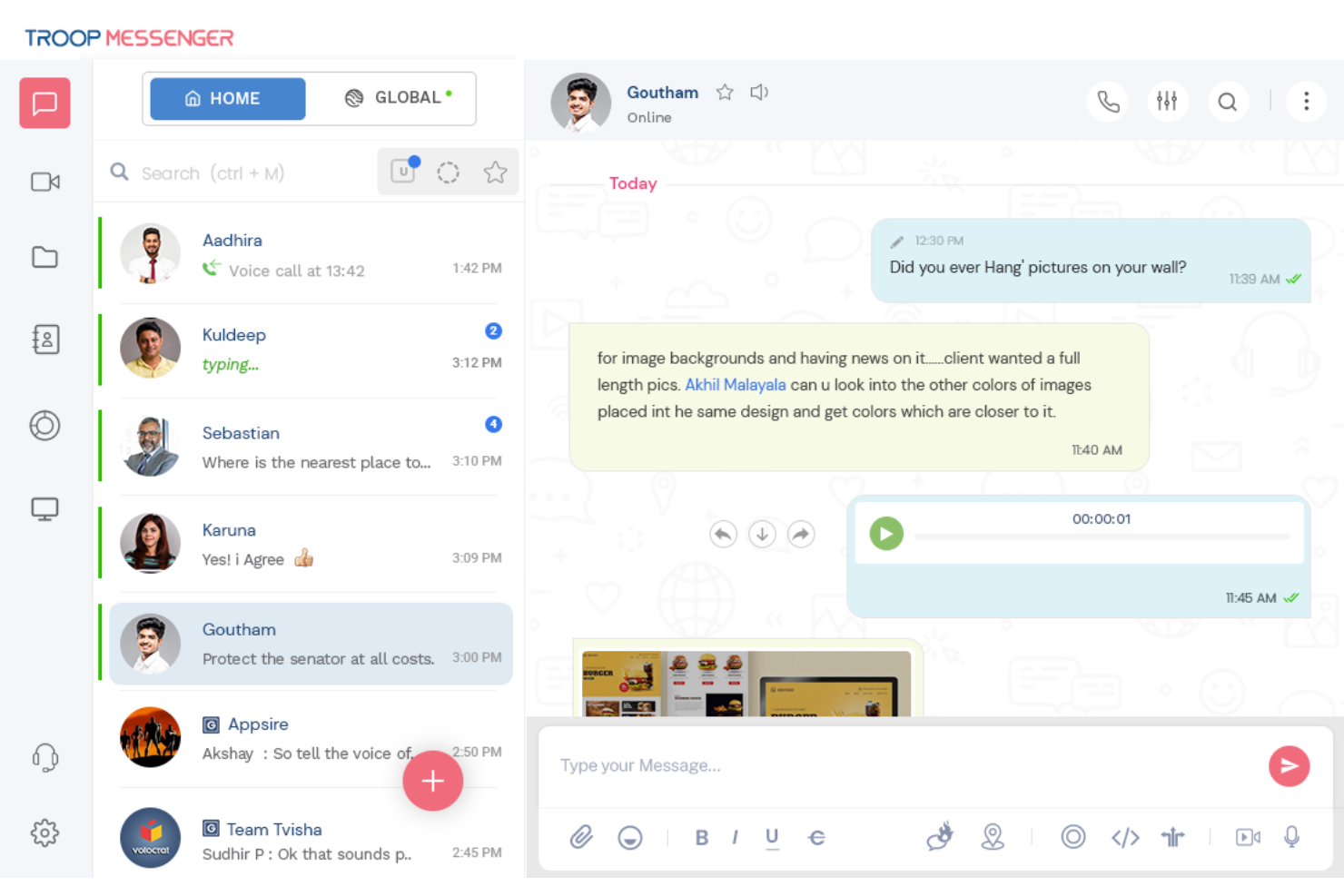
Troop Messenger è un'applicazione di messaggistica in tempo reale che aiuta le aziende a gestire la collaborazione e la comunicazione tra i team.
Perché ho scelto Troop Messenger: Ho selezionato Troop Messenger per la sua funzione burnout, che offre un metodo esclusivo per le chat private. Puoi impostare un timer e, una volta scaduto il tempo, il messaggio scompare. È un modo ingegnoso per avere una discussione senza lasciare alcuna prova. Un'altra funzione eccezionale è forkout, che ti consente di inviare un singolo messaggio o allegato a numerose persone senza creare un gruppo.
Funzionalità distintive e integrazioni di Troop Messenger:
Una funzionalità distintiva di Troop Messenger è la funzione 'info', che fornisce informazioni su ogni messaggio inviato e ricevuto, come l'orario di lettura e di consegna. La funzione 'recall' permette agli utenti di eliminare un messaggio sia dal mittente che dal destinatario, ma solo entro dieci minuti dall'invio.
Inoltre, i messaggi possono essere contrassegnati come importanti e l'opzione 'Rispondi più tardi' consente agli utenti di impostare un promemoria per rispondere quando avranno più tempo a disposizione.
Le integrazioni tramite Zapier includono Asana, GitHub, Gmail, Zoom, Google Calendar, Freshdesk, HubSpot, ClickUp e Microsoft Outlook.
Pros and Cons
Pros:
- Sicuro
- Include l'auto-messaggio
- Supporta più lingue
Cons:
- Nessuna registrazione integrata delle riunioni
- Filtri chat nascosti

Il miglior software di comunicazione d'emergenza
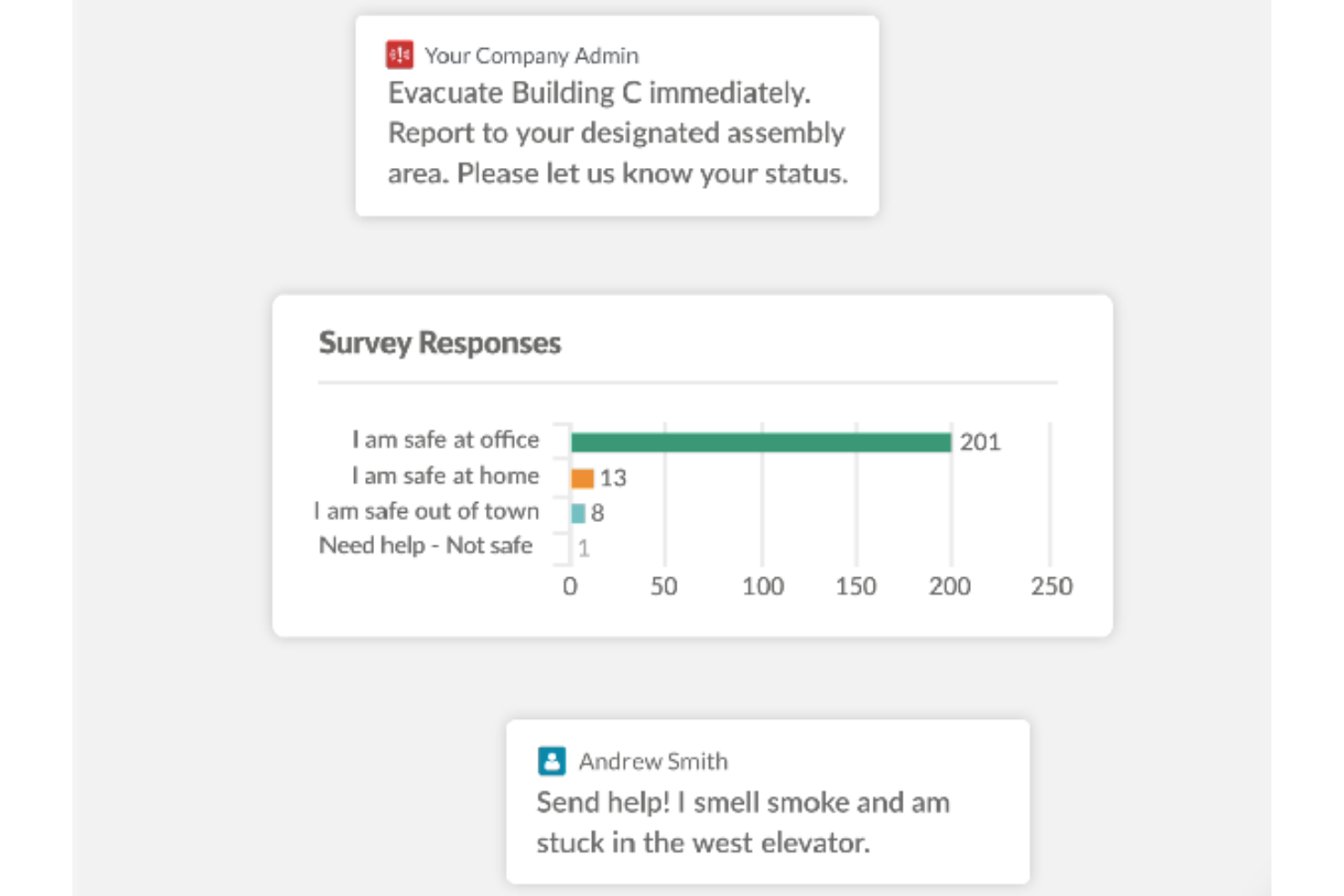
AlertMedia è un software di comunicazione d'emergenza e notifiche di massa che aiuta le aziende a informare i dipendenti in caso di situazioni di emergenza, garantendo che le persone giuste ricevano informazioni critiche quando necessario.
Perché ho scelto AlertMedia: Ho scelto AlertMedia per la sua costante dedizione alla sicurezza dei dipendenti. Questa soluzione completa offre notifiche di massa e un team di monitoraggio attivo 24/7 per una maggiore tranquillità. L'App di Monitoraggio della Sicurezza dei Dipendenti distingue AlertMedia perché trasforma un normale smartphone in un potente dispositivo di sicurezza, offrendo accesso immediato alle forze dell'ordine. Un altro fattore importante per me è stata la capacità dell'app di leggere e rispondere a messaggi urgenti dell'organizzazione.
Caratteristiche distintive e integrazioni di AlertMedia:
AlertMedia offre funzionalità distintive che migliorano la comunicazione bidirezionale, consentendo agli individui di confermare il proprio stato di sicurezza o condividere informazioni sugli eventi in corso. Gli utenti possono inviare notifiche facilmente tramite vari canali. AlertMedia propone anche modelli di messaggi già pronti che assicurano risposte coerenti durante le emergenze, risparmiando tempo prezioso.
Le integrazioni sono disponibili con Fusion Framework System.
Pros and Cons
Pros:
- Notifiche in tempo reale
- Sistema conforme a GDPR e CCPA
- Assistenza clienti reattiva
Cons:
- Nessuna prova gratuita
- Prezzi non trasparenti

Simpplr
Ideale per valutare il sentiment dei dipendenti
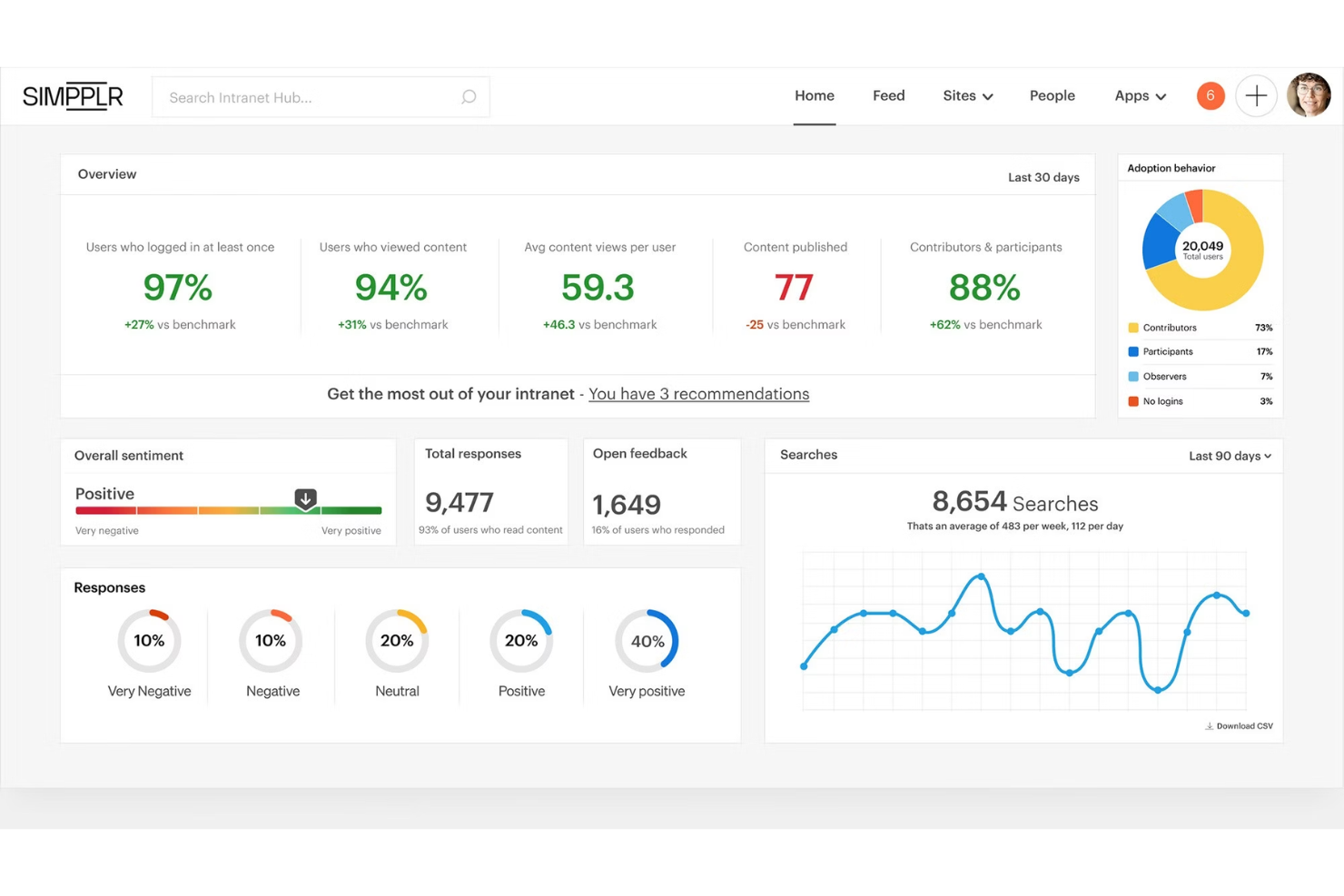
Simpplr è una piattaforma di comunicazione e coinvolgimento dei dipendenti progettata per semplificare la comunicazione interna nelle organizzazioni.
Perché ho scelto Simpplr: Ho scelto Simpplr per la sua funzionalità di analisi prescrittiva, che utilizza dati guidati dall'IA per fornire approfondimenti utili sul coinvolgimento dei dipendenti. Combina dati di utilizzo, analisi del sentiment, segnali comportamentali e feedback per offrire alle organizzazioni raccomandazioni personalizzate per azioni future. Inoltre, Simpplr include uno strumento di gestione del cambiamento che aiuta i leader a comprendere il sentiment dei dipendenti verso i cambiamenti organizzativi.
Funzionalità e integrazioni principali di Simpplr:
Simpplr dispone di una funzione di ricerca intelligente alimentata dall'IA che aiuta gli utenti a trovare i risultati più appropriati. La piattaforma ha un'interfaccia semplice e intuitiva che anche le persone non tecniche possono gestire facilmente, permettendo loro di organizzare proprietà in tutta l'organizzazione. Grazie alla personalizzazione della consegna dei contenuti, ogni dipendente può ricevere informazioni rilevanti per le proprie esigenze.
Le integrazioni includono BambooHR, Dropbox, Google Drive, Microsoft 365, Microsoft Teams, Okta, Salesforce, SharePoint/OneDrive, Slack e Confluence.
Pros and Cons
Pros:
- Interfaccia intuitiva
- Team di implementazione di supporto
- App mobile
Cons:
- Serve un preventivo personalizzato per conoscere il costo esatto
- Impossibile creare pagine nascoste

Flock
Ideale per comunicare con i clienti
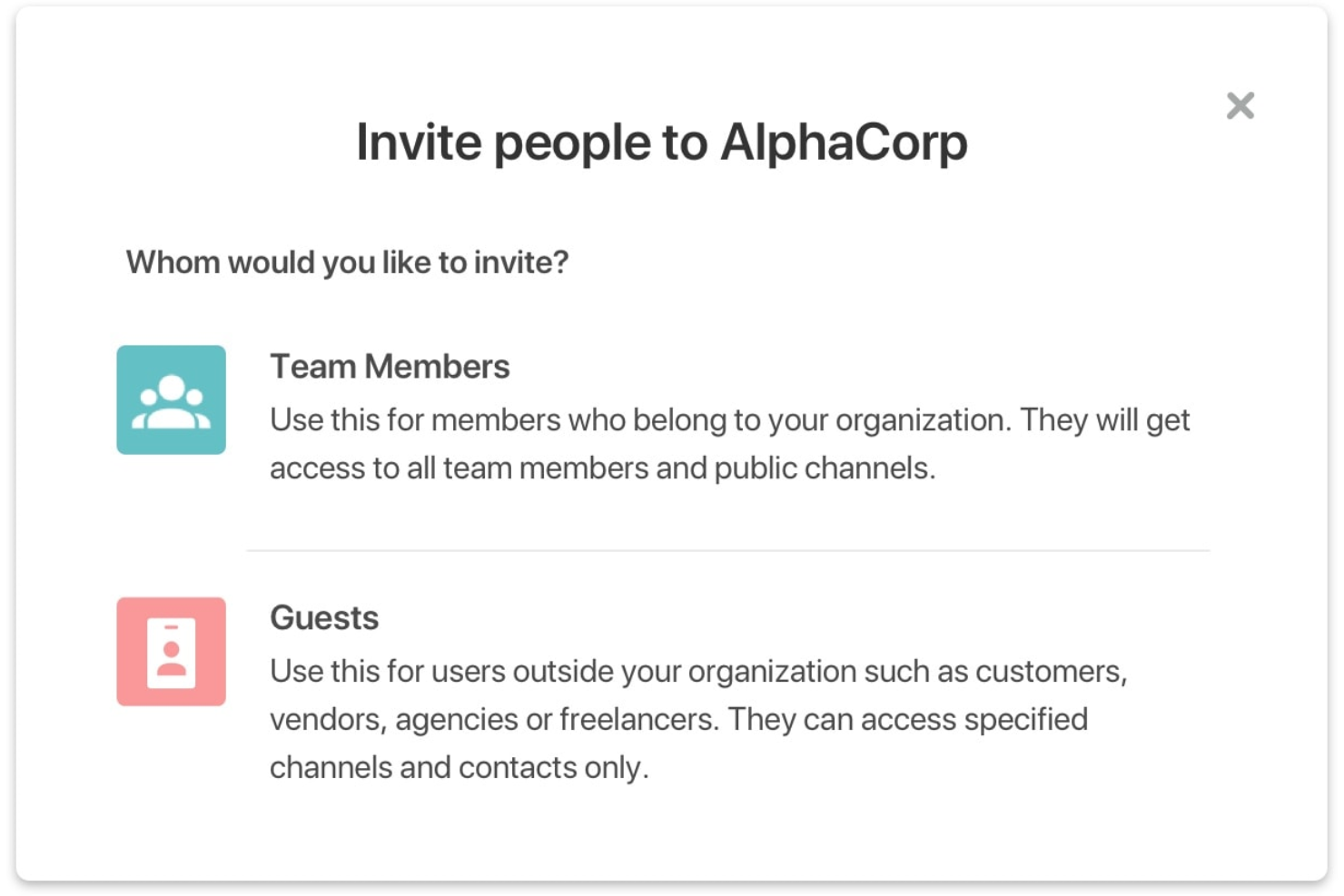
Flock è uno strumento di comunicazione e collaborazione progettato per semplificare la comunicazione tra i team e aumentare la produttività.
Perché ho scelto Flock: Ho scelto Flock per la sua notevole capacità di ampliare il cerchio della collaborazione. L'invito di utenti ospiti garantisce che le decisioni non vengano prese solo sulla base di opinioni interne, ma tengano conto anche dei preziosi feedback da parte di stakeholder esterni.
Un'altra caratteristica distintiva è l'opzione per i messaggi vocali. In alcuni momenti scrivere non riesce a catturare tutte le sfumature di un messaggio, quindi inviare note vocali aiuta a confrontare e valutare i toni, rendendo più semplice determinare il contesto o l'enfasi di una conversazione.
Caratteristiche e integrazioni distintive di Flock:
Una delle caratteristiche principali di Flock è il suo sistema di messaggistica a canali, che consente agli utenti di organizzare le loro conversazioni. Con questa funzione, gli utenti possono creare canali per progetti e priorità specifici, rendendo più facile tenere riunioni strategiche, sessioni di brainstorming e ottenere feedback immediato. Flock supporta anche le videoconferenze e le chiamate vocali direttamente nell'app, consentendo ai team di incontrarsi anche da posizioni differenti. Inoltre, la funzione di ricerca integrata in Flock aiuta gli utenti a trovare rapidamente le informazioni necessarie.
Le integrazioni includono Asana, Dropbox Business, GitHub, Google Analytics 360, Google Drive, Google Workspace, Jira, Mailchimp, Trello e Twitter.
Pros and Cons
Pros:
- Intuitivo
- App mobile
- Prezzi speciali per organizzazioni no-profit
Cons:
- Personalizzazione limitata
- Interfaccia affollata

GoToConnect
Miglior sistema di comunicazione telefonica virtuale

GoToConnect è un software tutto-in-uno per telefonate, riunioni e messaggistica pensato per le piccole imprese.
Perché ho scelto GoToConnect: Ho selezionato GoToConnect per le sue funzionalità di chiamata VOIP avanzate e di facile utilizzo, che consentono ai team di offrire un servizio clienti eccellente ovunque si trovino. Con funzioni come centralini virtuali e segreteria telefonica, è sempre possibile comunicare con clienti e colleghi. La segreteria telefonica virtuale consente di ascoltare i messaggi ovunque, facilitando la priorità di quelli importanti.
Caratteristiche distintive e integrazioni di GoToConnect:
GoToConnect permette alle aziende di attivare rapidamente nuovi numeri di telefono o mantenere quelli già esistenti. Offre conferenze audio per le aziende, supportando chiamate fino a 250 partecipanti. La videoconferenza è sicura e può essere utilizzata da ovunque e su qualsiasi dispositivo.
Le integrazioni includono Zendesk, Salesforce, Miro, Microsoft Teams, Google Calendar, Salesforce Lightning, Prezi, Docebo e CirQlive.
Pros and Cons
Pros:
- Facile da usare
- Assistenza clienti 24/7
- Eccellente qualità del suono
Cons:
- Dipende dalla connessione Internet
- Nessuna app mobile per il portale admin
Altre opzioni
Ecco alcuni altri strumenti per le comunicazioni che non sono entrati nella mia top 10, ma che vale comunque la pena prendere in considerazione:
- MyHub
Ideale per l'accesso mobile all'intranet
- Microsoft Teams - Frontline Workforce
Ideale per i lavoratori in prima linea
- Atlas
Ideale per la comunicazione coesa dei progetti
- Mattermost
Miglior software per comunicazioni sicure
- HubEngage
Il miglior software per comunicazioni multicanale
- Slack
Ideale per team da remoto


Come Valuto i Software di Comunicazione
Divido la mia valutazione tra le capacità di base — come la copertura su più canali e la sincronizzazione con l’HRIS — e i fattori di differenziazione che contano quando si comunica con una forza lavoro globale senza postazione fissa.
Funzionalità Principali (Requisiti di Base per Questa Lista)
Quando seleziono gli strumenti per la mia lista, valuto ciascuno su una scala da 0 (non offre la funzionalità) a 5 (eccelle in quest’area) per ogni funzionalità principale elencata qui sotto. Poi, calcolo il punteggio totale dello strumento in percentuale. Ogni strumento deve raggiungere un punteggio totale minimo del 65% per essere preso in considerazione.
- Messaggistica Multicanale: Esamino quanti canali di consegna supporta una piattaforma — email, SMS, notifiche push, in-app e desktop — e se sono gestiti da un unico flusso di invio.
- Segmentazione del Pubblico: La possibilità di indirizzare i messaggi per reparto, sede o ruolo è importante, soprattutto quando le risorse umane devono raggiungere il personale di magazzino separatamente dai team d’ufficio.
- Comunicazione Bidirezionale: Valuto se i dipendenti possono rispondere tramite commenti, sondaggi o questionari, poiché le trasmissioni unidirezionali non forniscono ai team HR il ciclo di feedback di cui hanno bisogno.
- Analisi del Coinvolgimento: Dashboard che mostrano tassi di apertura, ricevute di lettura e click-through a livello di segmento mi aiutano a valutare se uno strumento offre ai comunicatori una reale visibilità sulla copertura.
- Integrazione con HRIS: Collegarsi a sistemi come Workday, BambooHR o ADP per sincronizzare automaticamente i dati dei dipendenti e le strutture organizzative permette ai team HR di evitare la gestione manuale degli elenchi di distribuzione.
- Accessibilità Mobile: Verifico la presenza di una app mobile dedicata con notifiche push, dato che raggiungere i lavoratori in prima linea e senza postazione fissa che non hanno una email aziendale dipende completamente dall’accesso mobile.
Una volta che dispongo di un elenco di strumenti che soddisfano i criteri, considero cosa distingue ciascuna piattaforma.
Fattori di Differenziazione (Cosa Distingue i Fornitori)
Ecco come confronto e metto a confronto i diversi fornitori:
Funzionalità Distintive
Il supporto multilingue è fondamentale per le organizzazioni con forza lavoro globale — cerco piattaforme che traducano automaticamente i messaggi in modo che l’HR non debba creare manualmente versioni per ogni regione. La modalità di comunicazione in situazioni di crisi è un’altra funzionalità che valuto attentamente, poiché situazioni urgenti come gli incidenti di sicurezza richiedono conferme di lettura obbligatorie e consegne rapide. La pianificazione delle campagne con invio che tiene conto del fuso orario è anch’essa importante quando si coordina l’iscrizione aperta su più sedi.
Oltre le Funzionalità
Conformità e sicurezza sono molto importanti quando i dati dei dipendenti transitano tra sistemi — verifico la certificazione SOC 2 Type II, il supporto SSO/SAML e i controlli di accesso basati sui ruoli, specialmente per le organizzazioni in settori regolamentati come la sanità. Anche il supporto all’implementazione è un fattore che valuto, poiché l’introduzione di una nuova piattaforma di comunicazione a migliaia di dipendenti richiede manuali di adozione e linee guida per la gestione del cambiamento. Anche la trasparenza dei prezzi conta — valuto se i costi per dipendente sono chiari e se i canali premium come gli SMS sono inclusi o fatturati separatamente.
Come scegliere il miglior software per le comunicazioni
È facile perdersi in lunghi elenchi di funzionalità e strutture di prezzo complesse. Per aiutarti a rimanere concentrato mentre affronti il tuo processo di selezione del software, ecco un elenco di fattori da tenere a mente:
| Fattore | Cosa considerare |
|---|---|
| Scalabilità | Lo strumento può crescere insieme al numero dei dipendenti e alla struttura aziendale? Cerca livelli utente e ruoli amministrativi flessibili. Evita limiti rigidi sul numero di postazioni che impongono aggiornamenti anticipati. |
| Integrazioni | Si collega al tuo sistema informativo per le risorse umane, al calendario o agli strumenti di gestione dei progetti? Le integrazioni scadenti creano lavoro duplicato e messaggi persi. Verifica la disponibilità di API native rispetto a quelle personalizzate. |
| Personalizzazione | Puoi personalizzare il branding, le notifiche e i flussi di lavoro? I team delle risorse umane spesso hanno bisogno di flussi di approvazione o modelli di messaggi specifici. Evita gli strumenti con limiti uguali per tutti. |
| Semplicità d'uso | Il personale non tecnico lo adotterà rapidamente? Verifica la presenza di interfacce intuitive e la necessità minima di formazione. Le dashboard macchinose spesso rallentano l'implementazione. |
| Implementazione e onboarding | Quanto tempo e impegno interno richiederà la configurazione? Informati sul supporto per l'onboarding, sulle stime dei tempi e sull'assistenza per la migrazione dei dati. Prevedi almeno 2–6 settimane per l'implementazione. |
| Costo | Sono previste tariffe per utente, contratti annuali o costi amministrativi nascosti? Confrontali con l'utilizzo previsto e le esigenze di supporto. Prevedi un budget superiore di circa il 10–20% rispetto al prezzo base. |
| Misure di sicurezza | Supporta l'accesso SSO, l'accesso basato sui ruoli e la crittografia dei dati? Le comunicazioni delle risorse umane spesso contengono informazioni sensibili: verifica la conformità agli standard IT della tua organizzazione. |
| Disponibilità dell'assistenza | Quando qualcosa si guasta, quanto velocemente puoi ricevere aiuto? Cerca una chat dal vivo o rappresentanti dedicati. Le lunghe code per i ticket possono interrompere i flussi di lavoro urgenti delle risorse umane. |
Che cos'è il software per le comunicazioni?
Il software per le comunicazioni è un insieme di strumenti e applicazioni che contribuiscono a rendere più semplice ed efficiente la comunicazione interna all'interno di un'organizzazione. Questi strumenti consentono a dirigenti, manager e personale delle risorse umane di connettersi istantaneamente con i dipendenti tramite messaggi diretti o chiamate vocali e video, aiutandoli a condividere informazioni e collaborare più facilmente alle attività. Il software per le comunicazioni è inoltre ottimizzato per i dispositivi mobili, mantenendo i team connessi indipendentemente dal luogo da cui effettuano l'accesso.
Investire in un software di comunicazione affidabile può migliorare la produttività della tua organizzazione e aumentare il coinvolgimento, potenziando la collaborazione e la connettività tra i membri del team. Queste soluzioni aiutano inoltre le organizzazioni a comunicare su larga scala, inclusa la possibilità di segmentare facilmente i messaggi per team, reparti o sedi di lavoro, per una diffusione delle informazioni più pertinente.
Funzionalità degli strumenti di comunicazione online
Quando selezioni un software di comunicazione, presta attenzione alle seguenti funzionalità chiave:
- Messaggistica istantanea: Consente ai membri del team di comunicare internamente in tempo reale, aspetto importante per prendere decisioni rapide.
- Conferme di lettura: Mostra chi ha visualizzato i tuoi messaggi, così puoi monitorare la portata della comunicazione.
- Targeting del pubblico: Consente di inviare aggiornamenti a gruppi o reparti specifici per mantenere pertinenti le comunicazioni.
- Messaggistica bidirezionale: Permette ai dipendenti di rispondere o porre domande direttamente sulla piattaforma.
- Accesso da dispositivi mobili: Garantisce che i membri del team possano ricevere e inviare messaggi ovunque si trovino tramite app mobili.
- Supporto multimediale: Consente di includere immagini, file, video o documenti per rendere i messaggi più coinvolgenti.
- Videoconferenze: Permette comunicazioni faccia a faccia in tempo reale, contribuendo a costruire relazioni più solide.
- Fissaggio degli annunci: Mantiene i messaggi importanti visibili in cima a un feed o a un canale.
- Supporto linguistico: Fornisce traduzioni o localizzazione affinché i team globali possano comprendere i messaggi.
- Archivi consultabili: Permette di trovare rapidamente le comunicazioni passate quando necessario.
- Notifiche e avvisi: Consente di personalizzare le notifiche per assicurarsi che i membri del team siano informati sugli aggiornamenti importanti.
- Controlli amministrativi: Offre ai responsabili delle risorse umane e della comunicazione la possibilità di gestire le autorizzazioni e monitorare l'utilizzo.
- Sicurezza e conformità: Funzionalità di sicurezza avanzate e conformità agli standard del settore per proteggere le informazioni sensibili e garantire il rispetto dei requisiti normativi.
Scegliere gli strumenti giusti per la comunicazione online, dotati di queste funzionalità, può contribuire a migliorare la produttività complessiva e la collaborazione del tuo team. Concentrandoti sugli aspetti chiave più adatti alle caratteristiche specifiche della tua azienda, puoi assicurarti che il tuo team prenda decisioni in modo più efficace.
Vantaggi del software di comunicazione
L'implementazione di strumenti di comunicazione, sia per la gestione dei progetti, la gestione delle risorse umane o le operazioni aziendali complessive, offre diversi vantaggi al tuo team e alla tua azienda. Ecco alcuni dei vantaggi che puoi aspettarti:
- Abitudini di comunicazione migliorate: I promemoria integrati e le analisi aiutano i team a inviare messaggi in modo più chiaro e coerente.
- Aggiornamenti più rapidi: Puoi inviare messaggi rapidamente, così tutti ricevono senza ritardi le informazioni di cui hanno bisogno.
- Meno messaggi ignorati: Gli strumenti che raggiungono le persone attraverso più canali aiutano ad assicurarsi che il team non trascuri nulla di importante.
- Meno tempo dedicato a sollecitare le risposte: Gli strumenti per la raccolta dei feedback, come i sondaggi e il monitoraggio delle letture, aiutano a capire chi è coinvolto senza dover effettuare continui solleciti.
- Maggiore allineamento del team: Quando tutti vedono gli stessi aggiornamenti in un unico luogo, è più facile rimanere allineati.
- Pianificazione più semplice dei messaggi: La programmazione e i modelli rendono più facile preparare e inviare gli annunci in anticipo.
- Informazioni più accessibili: Grazie all'accesso da dispositivi mobili e alle funzionalità di ricerca, le persone possono trovare i messaggi passati quando ne hanno bisogno.
Investire in piattaforme di comunicazione può migliorare il modo in cui il tuo team interagisce e collabora, portando a risultati organizzativi migliori e a un ambiente di lavoro più sincronizzato.
Costi & prezzi del software di comunicazione
La scelta di un software per la comunicazione interna richiede la conoscenza dei diversi modelli e piani tariffari disponibili. I costi variano in base alle funzionalità, alle dimensioni del team, agli extra e ad altri fattori. La tabella seguente riassume i piani più comuni, i relativi prezzi medi e le funzionalità tipicamente incluse nelle soluzioni software per la comunicazione interna:
Tabella comparativa dei piani per gli strumenti di comunicazione
| Tipo di piano | Prezzo medio | Funzionalità comuni |
|---|---|---|
| Piano gratuito | $0 | Messaggistica di base, utenti limitati, spazio di archiviazione minimo e supporto della community. |
| Piano personale | $5–$10/utente/mese | Messaggistica individuale, cronologia dei messaggi, modelli di base e analisi semplici. |
| Piano aziendale | $12–$25/utente/mese | Canali di gruppo, pianificazione, integrazioni, monitoraggio dei messaggi e autorizzazioni degli utenti. |
| Piano per grandi aziende | $30–$60/utente/mese | Personalizzazione del marchio, sicurezza avanzata, controlli amministrativi, supporto dedicato e verifiche. |
Domande frequenti sui software di comunicazione
Ecco alcune risposte alle domande più comuni relative ai software di comunicazione e ai loro vantaggi:
Quali sono i vantaggi dell'utilizzo di un software di comunicazione?
Il software di comunicazione aiuta le organizzazioni a semplificare la comunicazione interna, aumentare il coinvolgimento dei dipendenti, migliorare la produttività e garantire che le informazioni importanti vengano diffuse in modo rapido ed efficiente.
Quali sono alcune buone pratiche per la comunicazione interna?
Le buone pratiche per la comunicazione interna includono la definizione di obiettivi chiari, la promozione di una comunicazione aperta e trasparente, l’utilizzo di canali appropriati per i diversi tipi di messaggi e la valutazione regolare dell’efficacia delle strategie di comunicazione. Per i responsabili delle risorse umane, tenersi aggiornati sulle ultime buone pratiche di comunicazione può davvero fare la differenza.
In che modo il software di comunicazione può migliorare le operazioni aziendali?
Il software di comunicazione può migliorare le operazioni aziendali facilitando la collaborazione in tempo reale, riducendo le barriere comunicative, aumentando il coinvolgimento dei dipendenti e semplificando i flussi di lavoro, con conseguente aumento della produttività e dell’efficienza.
Come posso integrare gli strumenti di comunicazione con gli altri software del mio stack tecnologico?
Per integrare gli strumenti di comunicazione con gli altri software del tuo insieme di tecnologie, inizia mappando le piattaforme che il tuo team utilizza già, come sistemi HR, calendari o strumenti di gestione dei progetti, e scegli soluzioni che si connettano facilmente a esse. Ad esempio, i responsabili delle risorse umane avranno bisogno di strumenti di comunicazione che si integrino con le piattaforme HRIS per coordinare gli aggiornamenti sui dipendenti e l’inserimento dei nuovi assunti, mentre chi gestisce i progetti avrà bisogno di strumenti di comunicazione per i progetti che si sincronizzino con strumenti come Asana o Jira, così da mantenere attività, aggiornamenti e discussioni in un unico posto. I migliori software di comunicazione supportano integrazioni native o piattaforme di automazione, in modo che tutto funzioni insieme senza ulteriore lavoro manuale.
Altre recensioni di software di comunicazione
Ho inoltre realizzato recensioni complete di altri software di comunicazione. Se ti interessa, dai un'occhiata:
- Software di comunicazione dei dipendenti per le comunicazioni interne
- App di comunicazione del team per team ibridi
- Soluzioni software intranet per connettere i team
- Software per il lavoro da remoto per team distribuiti
- Software di collaborazione da remoto per team ibridi
Considerazioni finali
La scelta del software di comunicazione giusto per la tua organizzazione dipende dalle tue esigenze specifiche e dal tuo budget. Ogni strumento presente in questo elenco offre vantaggi e può aiutarti a gestire diversi aspetti della comunicazione. Ricorda: il software ideale si integra perfettamente con i flussi di lavoro esistenti.
Prima di andare, iscriviti alla newsletter di People Managing People per rimanere aggiornato sui software di comunicazione più recenti.