

I 10 migliori software per la comunicazione tra dipendenti per il 2026

10 Elenco dei migliori software per la comunicazione con i dipendenti


I migliori software per la comunicazione con i dipendenti aiutano la tua organizzazione a mantenere tutti connessi, allineati e coinvolti, indipendentemente da dove lavori il tuo team.
Quando la comunicazione dipende dalle e-mail, dai messaggi sparsi e dai controlli manuali, le informazioni importanti vanno perse, le scadenze slittano e la coesione del team ne risente. La piattaforma di comunicazione giusta centralizza chat, annunci, feedback e collaborazione, consentendo a tutti di rimanere facilmente informati e coinvolti.
Basandomi sulla mia esperienza nel testare strumenti per le risorse umane e per le comunicazioni interne, ho esaminato e confrontato le principali piattaforme per la comunicazione con i dipendenti. In questa guida troverai soluzioni che semplificano l'interazione del team, migliorano la trasparenza e ti aiutano a creare un ambiente di lavoro più connesso e produttivo.
Perché fidarsi delle nostre recensioni sui software
Il nostro team testa e recensisce software dal 2012. In quanto esperti HR noi stessi, sappiamo quanto sia difficile — e importante — scegliere il software giusto.
Per questa guida, abbiamo valutato gli strumenti attraverso test pratici e ricerche indipendenti, assegnando un punteggio agli strumenti in base ai nostri criteri di selezione. Ci basiamo inoltre sulle competenze di leader di pensiero del settore e di professionisti HR attivi.
Le nostre recensioni riflettono il nostro giudizio editoriale umano, non un discorso di vendita.
Revisori esperti:
Tabella comparativa dei 10 migliori software per la comunicazione con i dipendenti
Questa tabella comparativa riassume i dettagli di base di ciascuna delle mie migliori selezioni di software per la comunicazione con i dipendenti. Puoi visualizzare affiancati i dettagli sui prezzi e sulla disponibilità di prove gratuite o demo, per trovare il software più adatto al tuo budget e alle esigenze della tua azienda.
| Tool | Best For | Trial Info | Price | ||
|---|---|---|---|---|---|
| 1 | Ideale per comunicazioni aziendali rapide e su larga scala | Demo gratuita disponibile | Prezzo su richiesta | Website | |
| 2 | Ideale per la comunicazione del riconoscimento | Demo gratuita disponibile | Da $2 a $5/utente/mese (minimo $3.000/anno) | Website | |
| 3 | Ideale per la comunicazione mobile-first con dipendenti senza postazione fissa | Prova gratuita di 14 giorni | Da $39/mese | Website | |
| 4 | Ideale per compliance e controlli di sicurezza | Prova gratuita di 14 giorni | Da $6dipendente/mese | Website | |
| 5 | La migliore intranet per la comunicazione interna dei dipendenti nelle PMI | Demo gratuita disponibile | Prezzo su richiesta | Website | |
| 6 | Migliore piattaforma intranet per comunicazione e gestione della conoscenza tramite AI | Demo gratuita disponibile | Prezzo su richiesta | Website | |
| 7 | Ideale per mostrare aggiornamenti aziendali | Piano gratuito disponibile | Da $8/schermo/mese | Website | |
| 8 | Ideale per la distribuzione di messaggi su più canali | Demo gratuita disponibile | Da $3/utente/mese | Website | |
| 9 | Ideale per riunioni video di alta qualità | Piano gratuito disponibile | Da $14.16/utente/mese (fatturato annualmente) | Website | |
| 10 | Ideale con strumenti AI per coinvolgimento e analisi del sentiment | Demo gratuita disponibile | Prezzi su richiesta. | Website |


Recensioni dei migliori software per la comunicazione con i dipendenti
Per aiutarti a trovare il miglior software per la comunicazione con i dipendenti, ho descritto in dettaglio le mie 10 scelte principali, evidenziando le funzionalità chiave che distinguono ogni sistema. Ho incluso anche uno screenshot per ciascuno, così puoi dare un’occhiata alla relativa interfaccia utente.

Haystack
Ideale per comunicazioni aziendali rapide e su larga scala

Haystack è una piattaforma di comunicazione interna progettata per le organizzazioni che desiderano tenere i dipendenti informati, connessi e coinvolti tramite aggiornamenti centralizzati e messaggi mirati tra reparti e sedi diverse.
Per chi è più indicato Haystack?
Haystack è adatto ad aziende di medie e grandi dimensioni con forza lavoro distribuita o senza postazione fissa che necessitano di un modo affidabile per raggiungere ogni dipendente con notizie aziendali tempestive.
Perché ho scelto Haystack
Haystack si è guadagnato un posto tra i migliori della mia lista per l'efficacia con cui riesce a inviare lo stesso messaggio a ogni dipendente, indipendentemente da dove lavori o dagli strumenti utilizzati. Adoro la funzione di consegna multicanale: scrivi un solo post e Haystack lo distribuisce contestualmente via email, Slack, Microsoft Teams, mobile e SMS. Per gli aggiornamenti urgenti, la funzione di allerta di emergenza permette di contattare lavoratori sul campo e senza scrivania via SMS quando un messaggio non può attendere. Mi affido anche alla funzione 'Segna come Letto Obbligatorio', che evidenzia gli avvisi critici, consente di monitorare chi li ha effettivamente visualizzati e di inviare promemoria a chi non lo ha fatto.
Funzionalità principali di Haystack
- Modelli di contenuto: Utilizza modelli predefiniti e salvati per creare post, pagine e annunci di eventi coerenti con il brand, senza dover iniziare da zero ogni volta.
- Flussi di approvazione: Imposta processi di approvazione riservati all'amministratore e permessi di pubblicazione personalizzabili per controllare chi può pubblicare contenuti e dove all'interno della piattaforma.
- Costruttore di immagini di copertina: Progetta intestazioni visivamente curate e pagine di risorse direttamente in Haystack senza bisogno di strumenti di design esterni.
- Comunicazioni pianificate: Pianifica e automatizza i post in anticipo per mantenere un calendario editoriale coerente in tutta l'organizzazione.
Integrazioni di Haystack
Le integrazioni includono Slack, Microsoft Teams, Google Drive, Atlassian Confluence, Jira, Box, Dropbox, Zoom, Tableau e Okta.
Pros and Cons
Pros:
- La pubblicazione multicanale assicura che ogni dipendente riceva gli aggiornamenti
- Gli avvisi SMS supportano comunicazioni urgenti o sensibili al tempo
- La ricerca aziendale aiuta il personale a trovare rapidamente documenti e risposte
Cons:
- Nessuna chat integrata o messaggistica per conversazioni in tempo reale
- Automazione dei flussi di lavoro limitata per catene di approvazione complesse

Ideale per la comunicazione del riconoscimento
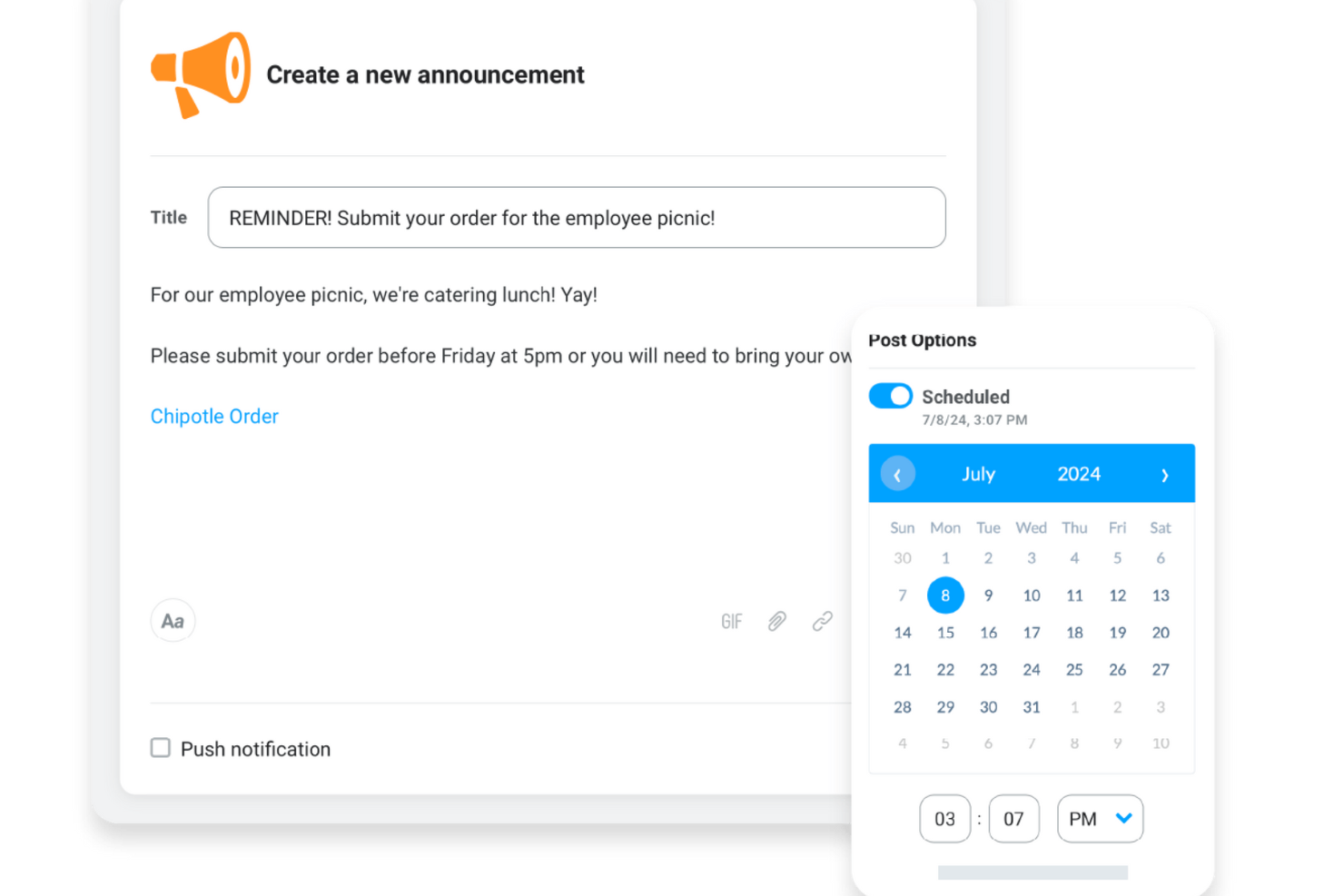
Motivosity aiuta i team HR e i responsabili delle persone in tutti i settori a migliorare la comunicazione interna rendendo facile per i dipendenti connettersi, condividere feedback e riconoscersi a vicenda in tempo reale.
Per chi è più indicato Motivosity?
Motivosity è particolarmente adatto per aziende di medie dimensioni che vogliono costruire una cultura dell’apprezzamento attraverso un riconoscimento dei dipendenti strutturato e visibile.
Perché ho scelto Motivosity
Motivosity merita il suo posto nella mia shortlist perché il riconoscimento è davvero integrato nel modo in cui la piattaforma comunica. Mi piace che il sistema peer-to-peer colleghi ogni apprezzamento direttamente a un valore aziendale—così, quando qualcuno del mio team evidenzia il grande lavoro di un collega, non è solo un bel gesto, ma un segnale visibile di ciò che rappresenta realmente l’organizzazione. Questo riconoscimento appare su un feed sociale aziendale dove i colleghi possono reagire, commentare e aggiungere GIF, il che rende la comunicazione più naturale e spontanea piuttosto che guidata dall’alto. Trovo inoltre utili le analisi basate sui valori: puoi vedere in tempo reale quali valori vengono rafforzati e dove fluisce il riconoscimento all’interno dell’organizzazione, offrendo alle risorse umane un modo concreto per monitorare la salute della cultura aziendale.
Funzionalità chiave di Motivosity
- Celebrazioni di traguardi: Attiva automaticamente post di riconoscimento per compleanni, anniversari di lavoro e tappe dell’onboarding così nessun momento importante passa inosservato.
- Comunicazione mirata: Invia annunci a dipendenti, reparti o team specifici assicurandoti che ognuno veda solo ciò che è rilevante per lui.
- Monitoraggio dell’engagement dei post: Vedi in tempo reale quali dipendenti hanno visualizzato o interagito con un post, così puoi seguire chi se lo fosse perso.
- Spazi per i dipendenti: Crea micro-comunità per ERG, gruppi di interesse o programmi aziendali dove i dipendenti possono connettersi e comunicare su temi condivisi.
Integrazioni di Motivosity
Le integrazioni includono Rippling, UKG Ready, ADP, Sage HR, Square Payroll, BambooHR, Deel e Dayforce.
Pros and Cons
Pros:
- Il feed in stile social incoraggia il riconoscimento e gli aggiornamenti frequenti
- Gli annunci programmati ti aiutano a gestire i tempi della comunicazione
- Gli Spaces organizzano le conversazioni per team o progetto
Cons:
- Analisi avanzate limitate rispetto agli strumenti dedicati solo alla comunicazione
- Le opzioni di branding personalizzato sono più limitate rispetto ad alcuni concorrenti
New Product Updates from Motivosity

Motivosity Launches Appreciation Intelligence With AI Coaching and Automation
Motivosity introduces Appreciation Intelligence™ with Appreciation Coach, Insights AI, Motivosity Agents, and an MCP Connector. The new capabilities help teams improve recognition, automate routine tasks, and access employee recognition insights faster. For more information, visit Motivosity's official site.

Ideale per la comunicazione mobile-first con dipendenti senza postazione fissa
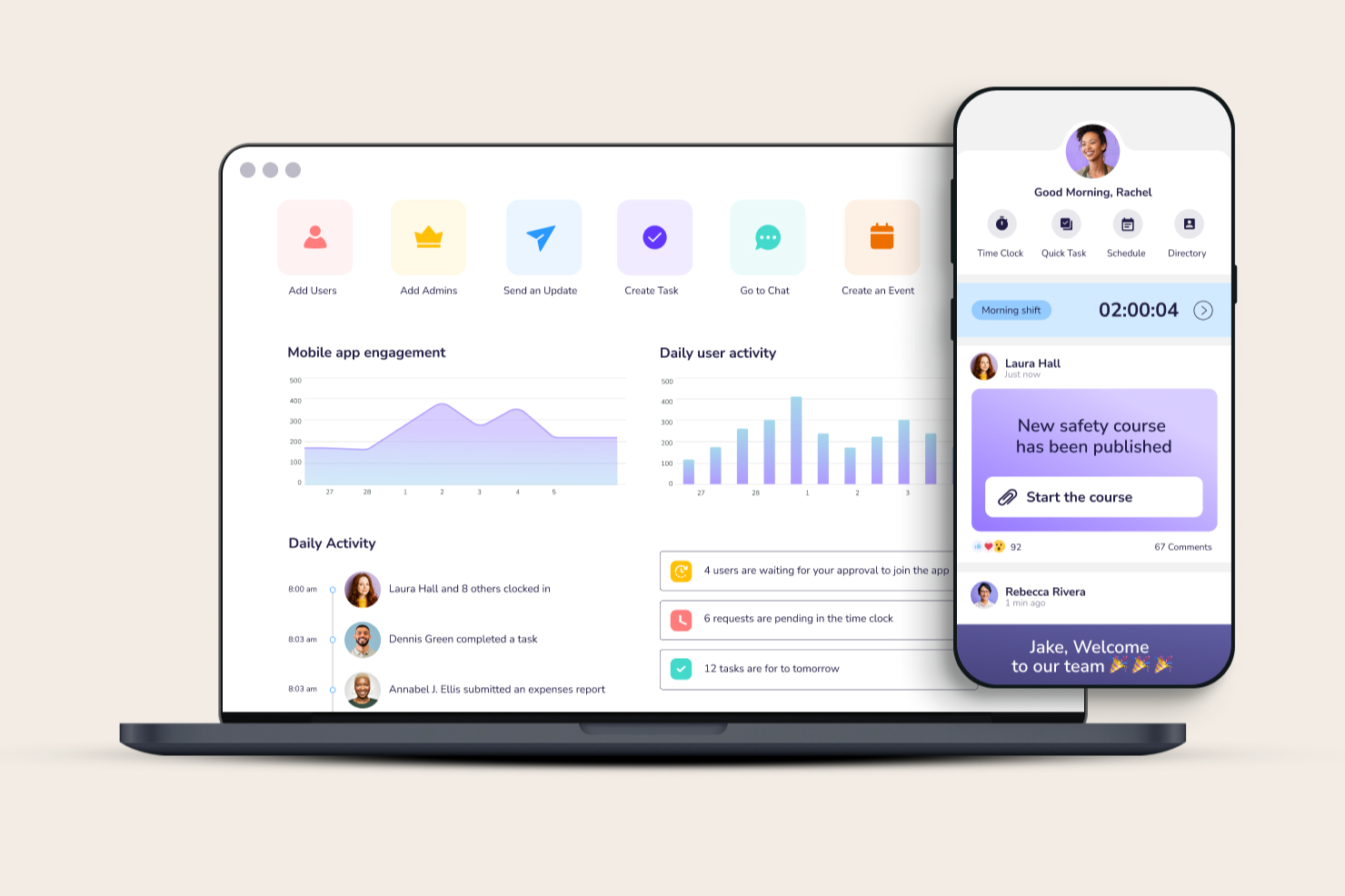
Connecteam è una piattaforma di comunicazione per dipendenti progettata per le aziende con team in prima linea, remoti o senza postazione fissa che hanno bisogno di mantenere tutti collegati, informati e coinvolti tramite messaggistica mobile, annunci e aggiornamenti in tempo reale.
Per chi è ideale Connecteam?
Connecteam è una soluzione ideale per piccole e medie imprese in settori come vendita al dettaglio, ospitalità, edilizia e sanità che si affidano a lavoratori a ore o su turni senza accesso regolare a una scrivania.
Perché ho scelto Connecteam
Connecteam si guadagna un posto nella mia shortlist perché è stato creato appositamente per affrontare le sfide comunicative legate alla gestione di team senza postazione fissa. Apprezzo la chat mobile che consente ai manager di inviare messaggi diretti o aggiornamenti di gruppo a team, turni o sedi specifiche—senza la necessità che i dipendenti abbiano un indirizzo email aziendale. Il feed delle notizie in-app è un'altra funzionalità su cui faccio affidamento, poiché permette di inviare annunci aziendali e aggiornamenti che i dipendenti possono leggere, commentare e a cui possono reagire direttamente dal proprio telefono. Per le organizzazioni composte principalmente da personale operativo, questo tipo di comunicazione orientata al mobile è davvero difficile da replicare con i tradizionali strumenti interni di comunicazione.
Caratteristiche principali di Connecteam
- Sondaggi e questionari: Invia sondaggi mirati o brevi questionari per raccogliere feedback dei dipendenti direttamente dall'app.
- Elenco dei dipendenti: Accedi a una lista contatti ricercabile e aggiornata per consentire ai membri del team di trovare e contattare subito i colleghi.
- Notifiche push: Invia avvisi in tempo reale a dipendenti, team o sedi specifici per assicurarti che i messaggi urgenti vengano visti.
- Moduli e checklist digitali: Crea e distribuisci moduli personalizzati che i dipendenti possono compilare e inviare dai loro dispositivi mobili.
Integrazioni di Connecteam
Le integrazioni includono QuickBooks, Gusto, Xero, ADP, Zapier, Wix, Lightspeed, PrismHR, Square e BambooHR.
Pros and Cons
Pros:
- Annunci mirati riducono il rumore
- Libreria mobile centralizzata mantiene sempre accessibili policy e risorse
- Interfaccia mobile-first progettata specificamente per team senza postazione fissa e su turni
Cons:
- Analisi avanzate limitate se non si utilizzano piani di fascia superiore
- La dashboard di amministrazione può sembrare affollata con più hub attivi
New Product Updates from Connecteam

Connecteam Expands Break and Timesheet Controls
Connecteam adds flexible break thresholds, personalized policies, auto-end options, a centralized exceptions report, and improved timesheet issue visibility to help teams manage breaks and timesheets more effectively. For more information, visit Connecteam’s official site.
 .
.
Ideale per compliance e controlli di sicurezza

ThoughtFarmer è una piattaforma intranet creata per le comunicazioni interne che combina la pubblicazione di notizie aziendali, l'engagement bidirezionale dei dipendenti, le rubriche del personale, la gestione della conoscenza e l'automazione dei flussi di lavoro in un unico hub.
Per chi è consigliato ThoughtFarmer?
ThoughtFarmer è particolarmente adatto per le organizzazioni di fascia media in settori regolamentati come i servizi finanziari e legali, dove i controlli di sicurezza e l’accesso ai contenuti con permessi sono imprescindibili.
Perché ho scelto ThoughtFarmer
ThoughtFarmer si guadagna un posto nella mia shortlist per la serietà con cui tratta il controllo dell’accesso ai contenuti. Apprezzo in particolar modo il fatto che i permessi siano costruiti direttamente sui gruppi di sicurezza di Active Directory, il che significa che un team di compliance può limitare le policy HR sensibili alle persone autorizzate senza dover gestire manualmente le liste. Il workflow integrato di revisione e approvazione dei contenuti è un ulteriore livello che garantisce che le comunicazioni ottengano i via libera necessari prima di essere pubblicate a livello aziendale.
Funzionalità principali di ThoughtFarmer
- FormFlow builder: Crea moduli digitali personalizzati e automatizza i flussi di approvazione direttamente nella piattaforma.
- Avvisi e notifiche intelligenti: Invia aggiornamenti urgenti come popup mirati, notifiche push o email in base al profilo utente.
- Ricerca universale intelligente: Trova informazioni dall’intranet, Google Drive o SharePoint tramite una barra di ricerca unica.
- Rubrica del personale e organigrammi: Visualizza i profili dei dipendenti, esplora la struttura organizzativa e individua rapidamente le competenze.
Integrazioni di ThoughtFarmer
ThoughtFarmer offre integrazioni native con tutto l'ecosistema Microsoft, oltre a Google Workspace, Okta, Slack e Teams. È disponibile un’API per integrazioni personalizzate.
Pros and Cons
Pros:
- Controlli granulari dei permessi per contenuti sensibili
- Workflow di approvazione integrati
- Sincronizzazione profonda con Active Directory per la gestione utenti
Cons:
- Esperienza mobile inferiore rispetto alle app dedicate
- Reportistica analitica meno avanzata

Hub
La migliore intranet per la comunicazione interna dei dipendenti nelle PMI

Hub è una piattaforma intranet creata per piccole e medie imprese che desiderano centralizzare le comunicazioni interne, condividere documenti e mantenere i dipendenti connessi e informati in un unico luogo.
Per chi è ideale Hub?
Hub è una soluzione adatta ai team HR e di comunicazione interna di piccole e medie imprese che necessitano di un'intranet dedicata senza la complessità delle piattaforme di livello enterprise.
Perché ho scelto Hub
Hub si guadagna un posto nella mia shortlist perché è progettato appositamente come intranet per PMI, il che significa che evita le complicazioni che rendono le piattaforme aziendali frustranti per i team più piccoli. Apprezzo particolarmente le pagine intranet personalizzabili, che permettono al mio team di costruire un hub interno personalizzato con feed di notizie, annunci e contenuti specifici per dipartimento senza bisogno di uno sviluppatore. I sondaggi e i questionari integrati sono utili per raccogliere rapidamente feedback dai dipendenti senza dover usare uno strumento separato. Per le comunicazioni interne, Hub mantiene aggiornamenti, documenti e conversazioni del team in un unico posto, dimensionato sulle esigenze delle PMI.
Funzionalità principali di Hub
- Contenuti obbligatori da leggere: Segna i contenuti come obbligatori così che i dipendenti debbano cliccare per confermare di averli letti, con promemoria automatici inviati a chi non l'ha fatto.
- Invio di email broadcast: Crea e invia email personalizzate a tutto il personale o a specifici gruppi di utenti direttamente da Hub, con opzioni di anteprima e salvataggio dei modelli.
- App mobile PWA: Permetti ai dipendenti di accedere all'intranet da qualsiasi dispositivo mobile senza dover scaricare dallo store, incluse notifiche push per i nuovi contenuti.
- Forum di gruppo: Crea spazi di gruppo pubblici, privati o nascosti dove i membri possono accedere a contenuti esclusivi e collaborare in discussioni a thread.
Integrazioni di Hub
Le integrazioni includono Microsoft 365 e Google Workspace; è disponibile anche un'API per integrazioni personalizzate.
Axero
Migliore piattaforma intranet per comunicazione e gestione della conoscenza tramite AI
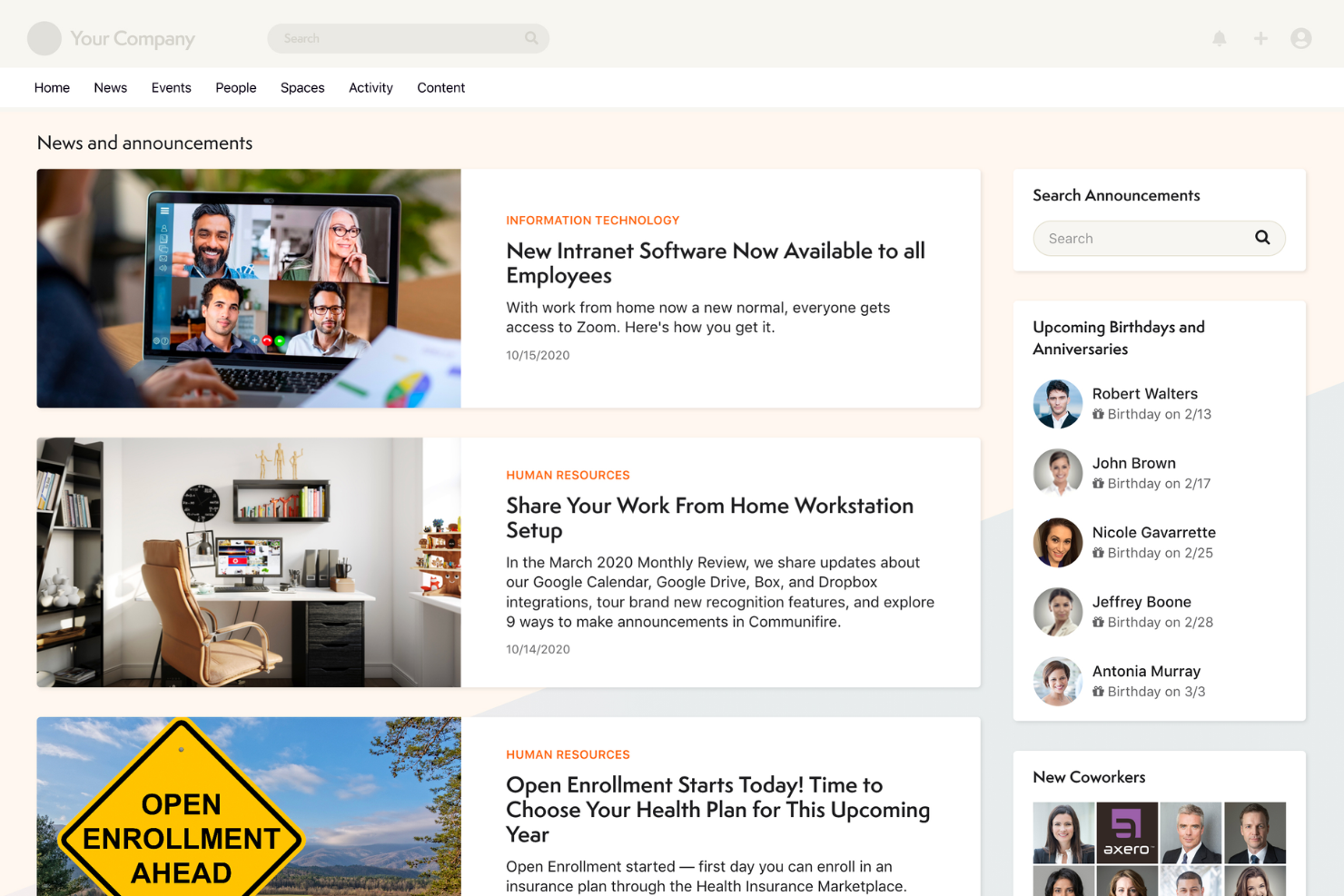
Axero è una piattaforma intranet pensata per le organizzazioni che desiderano centralizzare le comunicazioni interne, semplificare la condivisione delle conoscenze e connettere i dipendenti tra diversi reparti e sedi.
Per chi è ideale Axero?
Axero è adatto a medie e grandi organizzazioni che necessitano di una intranet strutturata per mantenere informati e allineati team distribuiti o ibridi.
Perché ho scelto Axero
Axero si guadagna un posto tra i migliori nella mia shortlist perché combina comunicazione interna e gestione della conoscenza basata su intelligenza artificiale in un'unica piattaforma intranet. Apprezzo particolarmente Axero Copilot, l'assistente AI integrato che si collega direttamente alla base di conoscenza dell'intranet per rispondere su richiesta alle domande dei dipendenti—così il team non deve cercare tra le cartelle o disturbare i colleghi per informazioni cui dovrebbe già avere accesso. Utilizzo anche la funzione di annunci mirati e broadcast per raggiungere gruppi specifici di dipendenti invece di inviare comunicazioni a tutta l'organizzazione, mantenendo così il messaggio rilevante. Lo strumento di lettura obbligatoria con analisi integrate è un'altra funzione su cui faccio affidamento per confermare che gli aggiornamenti critici siano stati effettivamente visti e presi in considerazione.
Funzionalità Principali di Axero
- Costruttore di newsletter: Crea newsletter interne personalizzate utilizzando modelli configurabili per condividere aggiornamenti aziendali in tutta l'organizzazione.
- Directory dei dipendenti: Crea profili ricercabili con campi personalizzati che evidenziano competenze, ruoli e interessi dei dipendenti, oltre alle informazioni di contatto di base.
- Personas: Crea gruppi di dipendenti personalizzati per automatizzare i permessi e fornire notizie mirate a segmenti specifici della forza lavoro.
- Wiki, articoli e blog: Pubblica contenuti interni in diversi formati con supporto per media incorporati, allegati e immagini.
Integrazioni Axero
Le integrazioni includono Slack, Microsoft Office 365, Google Workspace, Twilio, Microsoft Teams, Zoom, Salesforce SSO e SharePoint Online Documents.

Yodeck
Ideale per mostrare aggiornamenti aziendali

Yodeck è una piattaforma di digital signage progettata per i team HR e i professionisti della comunicazione interna che hanno bisogno di trasmettere aggiornamenti visivi, annunci e informazioni chiave in più sedi aziendali o cantieri.
Per chi è più adatto Yodeck?
Yodeck è particolarmente indicato per aziende e organizzazioni multi-sede con lavoratori senza postazione fissa o in prima linea che non possono essere raggiunti tramite e-mail o strumenti di chat.
Perché ho scelto Yodeck
Ho inserito Yodeck nella mia shortlist perché trasforma qualsiasi schermo in una bacheca aziendale live, senza bisogno dell'intervento dell'IT o di una configurazione complessa. Apprezzo in particolare la funzione di programmazione dei contenuti, che consente di pianificare aggiornamenti diversi per ogni schermo: ad esempio, il reparto produttivo vede promemoria di sicurezza durante i cambi di turno, mentre la hall dell'ufficio mostra i traguardi aziendali. I più di 500 template preimpostati rendono inoltre facile creare annunci accattivanti in pochi minuti, senza bisogno di un designer. Grazie alla gestione remota basata su cloud, posso aggiornare ogni schermo in tutte le sedi da una sola dashboard.
Funzionalità principali di Yodeck
- Editor di layout con zone multiple: Divide un singolo schermo in più regioni di contenuto per visualizzare simultaneamente diversi tipi di informazioni.
- Playlist basate su tag: Organizza e aggiorna i contenuti su più schermi tramite tag dei media, così le modifiche si applicano a tutti gli asset contrassegnati.
- Report di riproduzione: Monitora i dati di proof-of-play per confermare quale contenuto è stato mostrato, su quali schermi e quando.
- App chiosco interattiva: Trasforma gli schermi in display touch che consentono ai dipendenti di navigare e interagire direttamente con i contenuti.
Integrazioni di Yodeck
Le integrazioni includono Microsoft Teams, Viva Engage, Power BI, Grafana, Tableau, Canva, YouTube, Google Calendar e Google Slides.
Pros and Cons
Pros:
- Controllo remoto semplice degli schermi in più sedi
- Ampio supporto ai media per formati di comunicazione flessibili
- Strumenti di pianificazione dettagliata per annunci programmati
Cons:
- Richiede schermi e dispositivi fisici per iniziare
- Installazioni di grandi dimensioni potrebbero richiedere l'intervento dell'IT per la configurazione
Nectar
Ideale per la distribuzione di messaggi su più canali
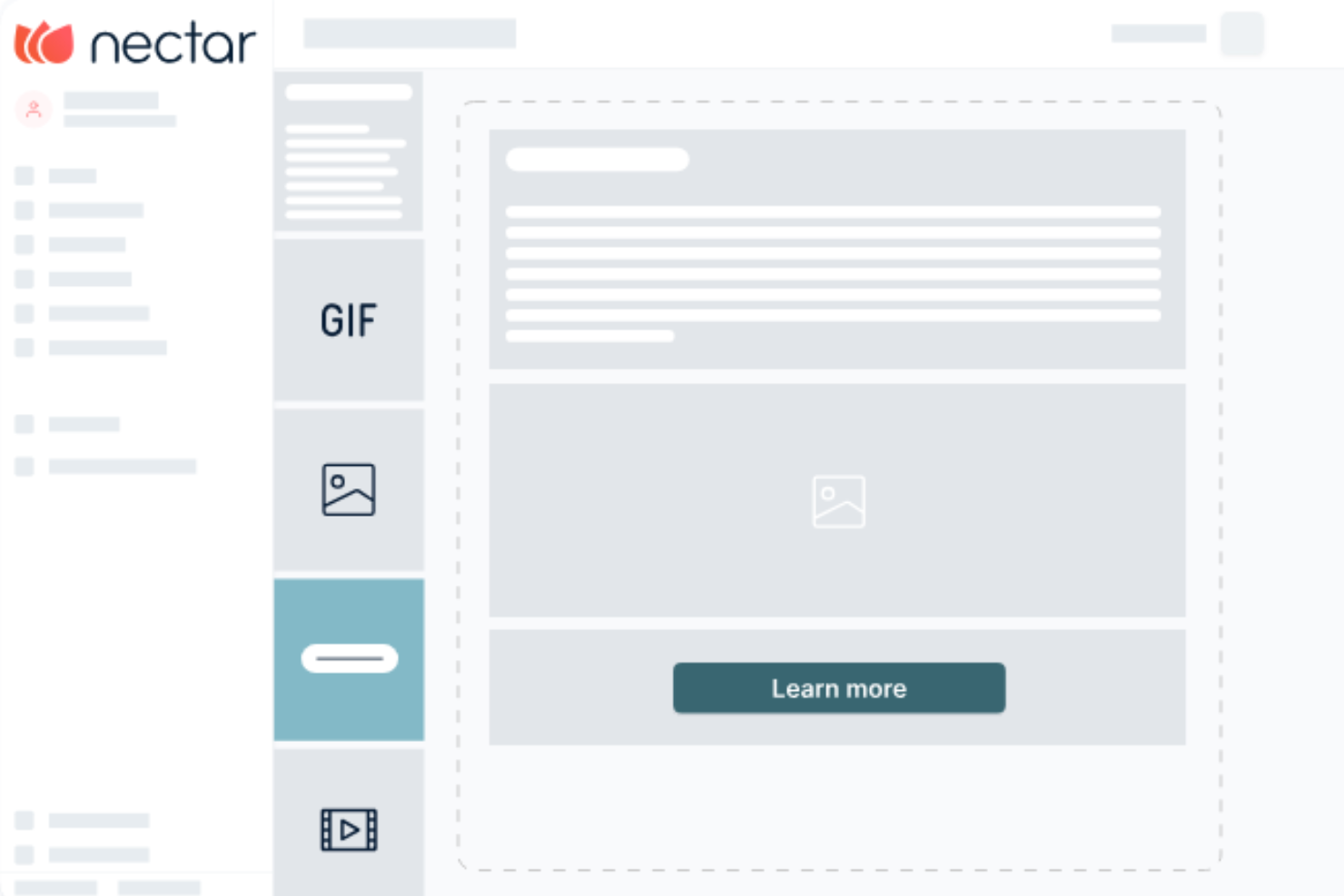
Nectar è una piattaforma di riconoscimento dei dipendenti con strumenti progettati per migliorare la comunicazione interna all’interno delle organizzazioni. Offre strumenti per creare messaggi coinvolgenti, condividere aggiornamenti su più canali e monitorare l’efficacia della comunicazione.
Il builder drag-and-drop di Nectar ti consente di realizzare annunci visivamente accattivanti in modo rapido, anche senza competenze di design. Questa funzionalità è utile per condividere aggiornamenti aziendali, inviti a eventi o cambiamenti di policy, assicurando che i tuoi messaggi attirino l’attenzione del team.
Inoltre, Nectar permette di programmare e inviare messaggi tramite SMS, email, Microsoft Teams e la propria piattaforma, raggiungendo il tuo team sui canali preferiti. Questa flessibilità garantisce che le informazioni importanti siano consegnate efficacemente, mantenendo tutti informati e coinvolti.
Le funzionalità includono la possibilità di segmentare il pubblico, consentendo di indirizzare gruppi specifici con messaggi personalizzati, il che aiuta a fornire informazioni rilevanti alle persone giuste. Nectar offre anche analytics per misurare i tassi di apertura e di clic, fornendo insight sull’impatto della comunicazione e sulle aree di miglioramento.
Le integrazioni includono Slack, Microsoft Teams, Google Workspace, Bamboo HR, Workday, Microsoft Outlook, Microsoft Azure, ADP Workforce Now, Paylocity, Rippling, Namely e Netsuite.
New Product Updates from Nectar

Nectar Enhances Clara AI With Live Platform Data
Nectar introduces live platform data access and expanded knowledge coverage for Clara AI. The updates improve response accuracy and speed while enabling Clara AI to answer questions across more recognition and rewards features. For more information, visit Nectar's official site.
 .
.
Zoom
Ideale per riunioni video di alta qualità

Zoom collega team distribuiti tramite riunioni video, chat e strumenti di collaborazione, pensati per organizzazioni che necessitano di una comunicazione interna affidabile tra sedi, dipartimenti e dispositivi diversi.
Per chi è Zoom?
Zoom è particolarmente indicato per team di medie e grandi dimensioni che fanno affidamento su una comunicazione video frequente per mantenere connessi i dipendenti da remoto o in modalità ibrida.
Perché ho scelto Zoom
Zoom merita il suo posto nella mia shortlist perché la qualità video per le riunioni interne è davvero difficile da superare. Audio e video HD con soppressione del rumore integrata garantiscono che chiamate plenarie e check-in di team risultino sempre chiare, anche quando i partecipanti si collegano da ambienti domestici rumorosi o da camere d’albergo. Apprezzo inoltre la vista multi-speaker, che sposta automaticamente il focus su chi sta parlando: questo evita che le riunioni numerose diventino caotiche. In aggiunta, l’AI Companion genera automaticamente i riepiloghi delle riunioni e i prossimi passi, così il mio team non deve più affannarsi a prendere appunti o inseguire le attività dopo ogni chiamata.
Funzionalità principali di Zoom
- Canali Team Chat: Organizza le conversazioni di team in canali dedicati, con link fissati, lavagne e file condivisi accessibili in un’unica scheda.
- Sottotitoli tradotti: Mostra sottotitoli in tempo reale in 33 lingue durante le riunioni, eliminando le barriere linguistiche per team interni multilingue.
- Zoom Clips: Registra e condividi brevi video asincroni con cattura dello schermo e della fotocamera, oltre a informazioni su reazioni e visualizzazioni.
- Sondaggi e questionari: Esegui sondaggi durante le riunioni o raccogli opinioni pre-riunione per strutturare l’agenda prima delle chiamate.
Integrazioni Zoom
Le integrazioni includono Google Workspace, Microsoft 365, Salesforce, HubSpot, Zendesk, Pipedrive, Dropbox e SharePoint.
Workvivo
Ideale con strumenti AI per coinvolgimento e analisi del sentiment
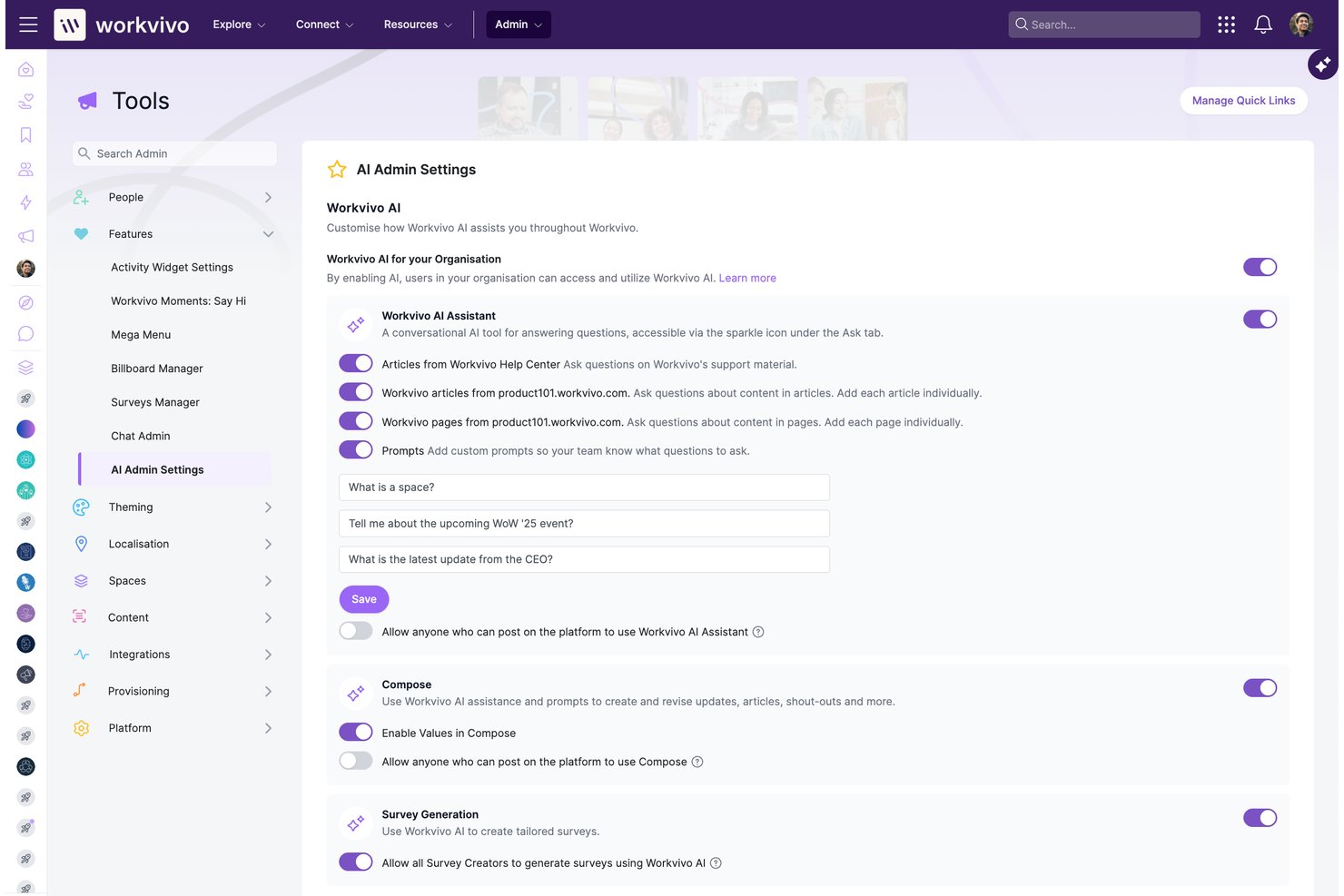
Workvivo è una piattaforma per l’esperienza dei dipendenti che combina comunicazioni interne, intranet, strumenti di coinvolgimento e ascolto dei dipendenti in un unico hub mobile-first progettato sia per i lavoratori in ufficio che per quelli in prima linea.
Per chi è più adatto Workvivo?
Workvivo è ideale per medie e grandi aziende con forza lavoro distribuita o in prima linea, dove i team di comunicazione interna e HR devono raggiungere ogni dipendente, non solo quelli alla scrivania.
Perché ho scelto Workvivo
Workvivo merita un posto nella mia shortlist perché i suoi strumenti di coinvolgimento e analisi del sentiment basati sull’IA sono realmente integrati nella piattaforma, non aggiunti come un’aggiunta tardiva. Apprezzo in particolare AI Catch Me Up, che fornisce briefing personalizzati per far sì che i dipendenti non perdano mai aggiornamenti importanti, e Seer, l’analisi del sentiment che utilizza l’intelligenza artificiale per individuare temi e tono emotivo nelle risposte ai sondaggi aperti. In pratica, ciò permette al mio team di comunicazione interna di agire sui feedback dei dipendenti prima che si verifichi il disimpegno.
Funzionalità principali di Workvivo
- Spazi: Organizza comunicazioni e community per dipartimento, progetto o gruppo di interesse per interazioni più focalizzate.
- Campagne e pianificazione: Pianifica e programma annunci multiformato e campagne interne su più canali.
- Workvivo TV: Trasmetti aggiornamenti urgenti e notizie importanti su display digitali per coinvolgere i dipendenti in sede e in prima linea.
- Livestream e podcast: Ospita trasmissioni video in tempo reale e programmi audio interni ai quali i dipendenti possono accedere on demand.
Integrazioni Workvivo
Workvivo offre integrazioni native con Zoom, Slack, Microsoft Teams, Workday, Google Workspace, Salesforce, ServiceNow e Azure Active Directory. È disponibile un’API per integrazioni personalizzate.
Pros and Cons
Pros:
- Analisi del sentiment AI nativa inclusa senza costi aggiuntivi
- Il feed sociale stimola l’interazione organica e bidirezionale tra i dipendenti
- Progettato per i lavoratori in prima linea senza email aziendale
Cons:
- La funzionalità chat richiede un componente aggiuntivo Zoom separato
- L’esperienza mobile e web può risultare inconsistente
Altri software per la comunicazione con i dipendenti
Ecco alcuni altri sistemi software per la comunicazione con i dipendenti che non sono entrati nell’elenco principale, ma che vale comunque la pena valutare:
- ClickUp
Ideale per la collaborazione e la comunicazione specifica ai progetti
- Blink
Ideale per raggiungere una forza lavoro senza scrivania
- Pumble
Ideale per utenti illimitati e cronologia messaggi senza limiti
- Guidde
Ideale per la comunicazione della conoscenza incentrata sul video
- Xoxoday
Ideale per le comunicazioni interne centralizzate
- SnapComms
Ideale per la comunicazione e il coinvolgimento dei dipendenti in mobilità
- Happeo
Migliore comunicazione basata sui canali
- Workshop
Ideale per comunicazioni email su larga scala
- Workmates
Il miglior sistema di newsfeed e annunci
- Jive
Ideale per mappare le relazioni tra i membri del team


Recensioni correlate sui software HR
Se non hai ancora trovato ciò che cerchi, dai un'occhiata a questi altri strumenti correlati che abbiamo testato e valutato:
- Software HR
- Software per le paghe
- Software per la selezione del personale
- Servizi per datori di lavoro ufficiali
- Sistemi di monitoraggio dei candidati
- Software per la gestione della forza lavoro
Come Valuto il Software di Comunicazione per i Dipendenti
Divido la mia valutazione tra requisiti di base—come la copertura multicanale e l'accesso mobile per il personale operativo—e i fattori differenzianti che distinguono un buon strumento da quello giusto per la tua forza lavoro.
Funzionalità di Base (Requisiti Fondamentali per Questa Lista)
Quando seleziono gli strumenti per la mia lista, valuto ciascuno su una scala da 0 (non offre la funzionalità) a 5 (eccelle in quest'area) per ogni funzionalità di base elencata di seguito. Poi, calcolo il punteggio totale dello strumento in percentuale. Ogni strumento deve raggiungere un punteggio totale minimo del 65% per essere considerato per l'inclusione.
- Consegna dei Messaggi Multicanale: Valuto attraverso quanti canali una piattaforma può raggiungere i dipendenti—push mobile, email, SMS, desktop, chat, e intranet—e se puoi orchestrare tutti questi canali da un unico invio.
- Segmentazione del Pubblico: Comunicare un aggiornamento di sicurezza al personale di magazzino o un promemoria sui benefit agli impiegati part-time richiede una segmentazione flessibile, quindi cerco filtri basati su attributi che si sincronizzino con il tuo HRIS.
- Comunicazione Bidirezionale: Controllo se i dipendenti possono fare più che leggere—strumenti che supportano commenti, reazioni, sondaggi e thread di domande e risposte offrono ai team HR un vero ciclo di feedback invece di una semplice bacheca digitale.
- Analisi del Coinvolgimento: Capire chi ha aperto un messaggio, quali sedi hanno bassi tassi di lettura e come si è comportata una campagna nel tempo è importante, quindi cerco dashboard che vadano oltre le semplici conferme di recapito.
- Creazione e Pubblicazione dei Contenuti: Le migliori piattaforme permettono di creare newsletter personalizzate, allegare video, usare modelli e programmare i post in anticipo—valuto quanto sia possibile fare direttamente senza ricorrere a strumenti di design esterni.
- Accesso Mobile e per il Personale Operativo: Molti dipendenti non hanno una email aziendale o una postazione fissa, quindi cerco app che supportino l'onboarding tramite numero di telefono, registrazione tramite QR code e accesso offline per chi lavora in movimento o sul campo.
Una volta che ho una lista di strumenti che soddisfano i criteri, considero ciò che distingue ogni piattaforma.
Fattori Differenzianti (Cosa Distingue i Fornitori)
Ecco come confronto e metto a confronto diversi fornitori:
Funzionalità Distintive
La gestione delle emergenze e degli avvisi in caso di crisi è un grande fattore differenziante: in caso di incidenti in sede o eventi meteorologici gravi, servono ricevute di lettura obbligatorie e percorsi di escalation che superino il rumore di fondo. Valuto anche se una piattaforma include sondaggi di clima e tracciamento del sentiment integrati, che permettono ai team HR di monitorare il morale senza passare a un altro strumento. Da segnalare anche le funzioni di riconoscimento tra colleghi, che trasformano una piattaforma di comunicazione in uno strumento per costruire la cultura aziendale.
Oltre le Funzionalità
La profondità dell'integrazione con l'HRIS è fondamentale: verifico se una piattaforma si sincronizza con sistemi come Workday o BambooHR per il provisioning automatico degli utenti e il mantenimento aggiornato dei segmenti man mano che i dipendenti cambiano ruolo o sede. Un altro aspetto che considero è la struttura dei prezzi, in particolare come i fornitori gestiscono una forza lavoro mista tra personale da ufficio e operativo, dato che i modelli a costo per singolo utente possono far crescere velocemente le spese. Valuto inoltre il supporto all'onboarding, perché diffondere un'app di comunicazione su migliaia di dipendenti richiede piani di lancio e linee guida per il change management, non solo un link al centro assistenza.
Come scegliere il software per la comunicazione con i dipendenti
Il software per la comunicazione con i dipendenti può aiutarti a condividere più facilmente le informazioni con il personale, creando un'esperienza lavorativa più informata e trasparente. Per capire quale software per la comunicazione con i dipendenti sia più adatto alle tue esigenze, devi innanzitutto individuare gli utenti principali e documentare le loro specifiche difficoltà.
Mentre definisci il tuo processo personalizzato di selezione del software per la comunicazione con i dipendenti, tieni a mente i seguenti punti:
- Quale problema stai cercando di risolvere - Inizia identificando le sfide che stai cercando di superare. Questo ti aiuterà a chiarire le caratteristiche e le funzionalità che il software di comunicazione deve offrire.
- Chi dovrà utilizzarlo - Per valutare costi e requisiti, considera chi utilizzerà il software e di quante licenze avrai bisogno. Per un software di comunicazione per dipendenti, probabilmente vorrai garantire l'accesso a livello di dipendente a tutta la forza lavoro, con accessi speciali per gli amministratori delle risorse umane e i responsabili. Una volta chiarito questo aspetto, è inoltre utile classificare le esigenze dei diversi utenti per identificare le priorità principali per gli utenti avanzati, i responsabili e i dipendenti, assicurandoti che siano tutte soddisfatte.
- Con quali altri strumenti deve funzionare - Chiarisci quali strumenti stai sostituendo, quali rimarranno e con quali strumenti dovrai integrarlo, come i sistemi di gestione delle risorse umane, i software per elenchi dei dipendenti, le applicazioni per l'accesso singolo o i sistemi operativi di lavoro come Microsoft 365 o Google Workspace. Dovrai decidere se gli strumenti devono integrarsi tra loro o, in alternativa, se puoi sostituire più strumenti con una piattaforma di comunicazione multicanale tutto-in-uno.
- Quali risultati sono importanti - Esamina le funzionalità che vuoi ottenere o migliorare e come misurerai il successo. Ad esempio, potresti voler digitalizzare gli attuali processi di formazione offline o offrire una migliore esperienza di apprendimento mobile ai dipendenti che lavorano da remoto. Potresti confrontare le funzionalità dei software di comunicazione fino allo sfinimento, ma se non stai pensando ai risultati che vuoi raggiungere, potresti sprecare molto tempo prezioso.
- Come funzionerebbe all'interno della tua organizzazione - Valuta la scelta del software insieme ai flussi di lavoro e ai sistemi esistenti. Analizza ciò che funziona bene e le eventuali aree problematiche che devono essere affrontate.
Ricorda che ogni azienda è diversa: non dare per scontato che un sistema di comunicazione per dipendenti funzionerà per la tua organizzazione solo perché è popolare.
Tendenze nei software di comunicazione per dipendenti
Poiché le organizzazioni continuano ad adattarsi ai modelli di lavoro da remoto, ibrido e in ufficio, anche la tecnologia alla base degli strumenti di comunicazione per dipendenti si sta trasformando. Ecco alcune tendenze che riflettono le esigenze e le preferenze attuali delle aziende e offrono indicazioni sul futuro della comunicazione sul posto di lavoro:
Funzionalità in rapida evoluzione
- Miglioramenti basati sull'intelligenza artificiale e sull'apprendimento automatico: le funzionalità basate sull'intelligenza artificiale, come le risposte automatiche e la distribuzione personalizzata dei contenuti, stanno diventando sempre più comuni. Questi progressi indicano uno spostamento verso piattaforme di comunicazione più intelligenti e reattive, in grado di adattarsi alle esigenze dei singoli utenti.
- Misure di sicurezza avanzate: con l'aumento delle minacce informatiche, le funzionalità di sicurezza avanzate, tra cui la crittografia end-to-end e i metodi avanzati di autenticazione degli utenti, si stanno evolvendo rapidamente. Questa tendenza sottolinea la crescente importanza di proteggere le comunicazioni interne sensibili dalle minacce esterne.
Funzionalità uniche e insolite
- Riunioni in realtà virtuale (VR): alcune piattaforme stanno iniziando a integrare la tecnologia VR per creare esperienze di riunione più coinvolgenti. Questo approccio innovativo mira a migliorare il coinvolgimento e a riprodurre le dinamiche delle interazioni di persona in un contesto remoto.
- Tecnologia di riconoscimento delle emozioni: alcuni strumenti all'avanguardia stanno sperimentando il riconoscimento delle emozioni per valutare il sentimento e i livelli di coinvolgimento dei dipendenti durante le videochiamate. Questa funzionalità insolita riflette un nuovo approccio alla comprensione e al miglioramento del benessere emotivo dei team remoti.
Con il continuo sviluppo di queste tendenze, i professionisti delle risorse umane e i dirigenti aziendali devono rimanere informati e adattabili, scegliendo soluzioni che affrontino le sfide attuali e siano pronte per il futuro del lavoro.
Che cos'è un software di comunicazione per dipendenti?
Il software di comunicazione per dipendenti comprende sistemi e applicazioni software digitali che aiutano le aziende a comunicare internamente con il proprio personale tramite messaggistica istantanea, messaggi di testo (SMS), telefonate o videochiamate. Per migliorare ulteriormente la collaborazione tra i team, queste piattaforme offrono funzionalità aggiuntive come canali di chat di gruppo, condivisione di file e notifiche e avvisi automatici, per garantire che tutti i dipendenti siano informati tempestivamente sulle informazioni o sugli aggiornamenti importanti.
Semplificando le comunicazioni interne tramite una piattaforma dedicata, potrai migliorare il flusso di informazioni all'interno della tua organizzazione. Comunicando in modo più efficace, i tuoi dipendenti si sentiranno più coinvolti e saranno maggiormente in grado di collaborare, aumentando i livelli complessivi di produttività. Questo vale per tutti i tipi di forza lavoro, indipendentemente dal fatto che il tuo team lavori in ufficio, in modalità ibrida, completamente da remoto, sul campo o con una combinazione di queste modalità.
Funzionalità dei software di comunicazione per dipendenti
Queste sono le principali funzionalità che ho valutato in dettaglio nella scelta finale dei migliori software di comunicazione per dipendenti basati sul cloud:
- Messaggistica istantanea: La funzionalità principale di qualsiasi software di comunicazione odierno è la messaggistica diretta e istantanea, che consente ai membri del team di interagire individualmente o in gruppo. Ciò permette di prendere decisioni rapidamente e garantisce che le informazioni circolino in modo fluido e tempestivo a tutti i livelli dell'organizzazione.
- Notifiche personalizzabili: La possibilità di personalizzare le notifiche aiuta i dipendenti a gestire la propria attenzione e a dare priorità alle informazioni in modo efficace. Questa personalizzazione previene il sovraccarico informativo e garantisce che i messaggi importanti non vengano trascurati.
- Condivisione dei file e collaborazione: La possibilità di condividere facilmente i file e modificare i documenti in modo collaborativo facilita il lavoro di squadra e lo scambio efficiente di idee. Questa funzionalità sostiene una cultura collaborativa e semplifica la gestione dei progetti.
- Strumenti per feedback e sondaggi: Gli strumenti integrati per raccogliere feedback o condurre sondaggi consentono di acquisire facilmente le opinioni dei dipendenti. Questi feedback sono preziosi per il miglioramento continuo e per garantire che le esigenze di comunicazione di tutti i dipendenti vengano soddisfatte.
- Base di conoscenza: L'accesso a una base di conoscenza aziendale riduce le domande ripetitive e aiuta le persone a trovare più rapidamente le informazioni di cui hanno bisogno, accelerando la risoluzione autonoma dei problemi.
- Videoconferenza: Le funzionalità di videoconferenza di alta qualità sono essenziali per replicare le interazioni faccia a faccia, soprattutto in un contesto di lavoro da remoto o ibrido. Questa funzionalità aiuta a mantenere i legami personali e favorisce un senso di comunità tra i membri del team.
- Aggiornamenti di stato: Molte app di messaggistica consentono ai membri del team di indicare la propria disponibilità attuale o di segnalare che sono assenti, in riunione o temporaneamente offline.
- Ricerca: Questa è una funzionalità importante e intuitiva che consente ai dipendenti di cercare rapidamente i vecchi messaggi per parola chiave.
- Analisi e reportistica: La possibilità di monitorare e analizzare i modelli di comunicazione fornisce informazioni utili sull'efficacia con cui le informazioni vengono condivise e ricevute. Queste analisi possono guidare i miglioramenti e aiutare a identificare eventuali lacune nella strategia di comunicazione interna.
- Compatibilità mobile: Un'applicazione ottimizzata per dispositivi mobili consente ai membri del team di rimanere connessi e informati, indipendentemente da dove si trovino. Questa flessibilità è essenziale per mantenere una forza lavoro dinamica e adattabile.
- Trasmissione sicura dei dati: Garantire che tutte le comunicazioni siano crittografate e sicure protegge le informazioni sensibili dagli accessi non autorizzati. Le misure di sicurezza sono imprescindibili per mantenere fiducia e riservatezza nelle comunicazioni interne.
Dando priorità a un software di comunicazione per dipendenti dotato di queste funzionalità, soddisferai le esigenze attuali e future e otterrai gli strumenti necessari per creare un ambiente di lavoro connesso, informato e coinvolto.
Vantaggi del software di comunicazione per dipendenti
Investire nella tecnologia per migliorare le capacità di comunicazione interna è una scelta strategica che può generare vantaggi significativi sia per gli utenti sia per le organizzazioni. Ecco alcuni dei vantaggi che puoi aspettarti investendo nel miglior software di comunicazione per dipendenti in base alle tue esigenze specifiche:
- Migliore circolazione delle informazioni: Facilitando lo scambio fluido di informazioni tra i diversi livelli dell'organizzazione, i tuoi utenti beneficiano di un accesso immediato alle informazioni di cui hanno bisogno, migliorando la produttività.
- Collaborazione potenziata: Fornendo piattaforme per la messaggistica in tempo reale, la condivisione dei file e gli spazi di lavoro collaborativi, il software di comunicazione per dipendenti migliora significativamente il lavoro di squadra. I team possono collaborare in modo più efficace, indipendentemente dalla loro posizione fisica, portando a una conclusione più rapida dei progetti e favorendo l'innovazione.
- Maggiore coinvolgimento: Funzionalità come sondaggi, strumenti per feedback e strumenti di riconoscimento sociale aiutano a misurare e aumentare il coinvolgimento dei dipendenti. I dipendenti coinvolti sono più produttivi, mostrano un morale più elevato e contribuiscono positivamente alla cultura del luogo di lavoro.
- Accessibilità mobile: Grazie alla compatibilità mobile, i dipendenti possono rimanere connessi e informati anche quando sono lontani dalle loro postazioni. Questa flessibilità è particolarmente vantaggiosa per i lavoratori da remoto o sul campo, garantendo che rimangano integrati nei loro team.
- Comunicazione sicura: La crittografia avanzata e i protocolli di sicurezza proteggono le informazioni sensibili dagli accessi non autorizzati. Le organizzazioni possono mantenere la riservatezza e la conformità alle normative sulla protezione dei dati, tutelando sia i propri interessi sia quelli dei dipendenti.
Come puoi vedere, adottare un software di comunicazione per dipendenti offre un vantaggio strategico migliorando la collaborazione e il modo in cui le informazioni vengono condivise e consultate all'interno di un'organizzazione.
Costi e prezzi del software di comunicazione per dipendenti
Le piattaforme di comunicazione per dipendenti sono disponibili in diverse forme e dimensioni, ciascuna progettata per soddisfare esigenze organizzative e budget differenti. Dalle versioni gratuite pensate per piccoli team o startup alle complete soluzioni di comunicazione aziendale che rispondono alle esigenze complesse delle grandi organizzazioni, è fondamentale comprendere le opzioni dei piani e i relativi prezzi.
Di seguito è riportata una panoramica delle opzioni di piano generalmente disponibili, inclusi il prezzo medio e le funzionalità comuni incluse in ciascun piano.
Tabella comparativa dei piani per il software di comunicazione dei dipendenti
| Tipo di piano | Prezzo medio | Funzionalità comunemente incluse |
|---|---|---|
| Gratuito | $0 | Messaggistica di base, condivisione di file, integrazioni limitate e limiti al numero di utenti |
| Base | $5-8 per utente/mese | Funzionalità di messaggistica avanzate, condivisione illimitata di file, alcune integrazioni e analisi di base |
| Standard | $10-15 per utente/mese | Messaggistica avanzata, integrazioni complete, maggiore spazio di archiviazione per i file, analisi avanzate e assistenza 24/7 |
| Premium | $20-30 per utente/mese | Tutte le funzionalità del piano Standard, oltre a integrazioni personalizzate, funzionalità di sicurezza avanzate, assistenza prioritaria e analisi avanzate |
| Aziendale | Prezzo personalizzato | Tutte le funzionalità del piano Premium, oltre a integrazioni illimitate, un processo di avvio personalizzato, un responsabile dedicato e conformità di sicurezza personalizzata |
Quando selezioni il piano più adatto a te, considera le dimensioni del tuo team, le funzionalità specifiche di cui hai bisogno e il tuo budget. Ricorda che la scelta migliore bilancia funzionalità e costi, assicurandoti di pagare solo per le funzionalità che il tuo team utilizzerà e da cui trarrà vantaggio.
Software per la comunicazione con i dipendenti: domande frequenti
Altre recensioni di software per la comunicazione e la collaborazione
Con la comunicazione tra dipendenti già in cima alle tue priorità, potresti anche dare un'occhiata a questi altri sistemi software:
- App di comunicazione per team ibridi
- Software e app per la comunicazione
- Soluzioni software intranet per connettere i team
- Sistemi di gestione dei documenti
- Software per il coinvolgimento dei dipendenti
- Piattaforme per l'esperienza dei dipendenti
- Software per il lavoro da remoto per team distribuiti
- Software per la collaborazione da remoto per team ibridi
- Strumenti di brainstorming per stimolare la creatività
- Software per videoconferenze per interagire con i team da remoto
E adesso?
Se stai cercando un software per la comunicazione tra dipendenti, contatta gratuitamente un consulente SoftwareSelect per ricevere consigli.
Compili un modulo e fai una breve conversazione durante la quale il consulente approfondirà le tue esigenze specifiche. In seguito riceverai una lista ristretta di software da valutare. Ti assisterà persino durante l'intero processo di acquisto, comprese le trattative sul prezzo.