

Le 10 migliori app di comunicazione del team per la collaborazione nel 2026

10 Elenco delle migliori app per la comunicazione del team


Con così tante app diverse disponibili per la comunicazione del team, capire quale sia quella giusta per la propria organizzazione è difficile. Sai di volere un'app che renda la comunicazione del team rapida ed efficiente, ma devi capire quale sia la migliore. In questo articolo ti aiuterò a fare una scelta semplice condividendo le mie opinioni personali su decine di app diverse per la comunicazione del team, così da aiutare il tuo team a condividere più facilmente le informazioni e coordinare le attività.
Perché fidarsi delle nostre recensioni sui software
Il nostro team testa e recensisce software dal 2012. In quanto esperti HR noi stessi, sappiamo quanto sia difficile — e importante — scegliere il software giusto.
Per questa guida, abbiamo valutato gli strumenti attraverso test pratici e ricerche indipendenti, assegnando un punteggio agli strumenti in base ai nostri criteri di selezione. Ci basiamo inoltre sulle competenze di leader di pensiero del settore e di professionisti HR attivi.
Le nostre recensioni riflettono il nostro giudizio editoriale umano, non un discorso di vendita.
Revisori esperti:
Le 10 migliori app per la comunicazione del team: tabella comparativa rapida
Questa tabella comparativa riassume i dettagli di base di ciascuna delle mie migliori app per la comunicazione del team. Puoi visualizzare fianco a fianco i dettagli sui prezzi e la disponibilità di prove gratuite o demo, per aiutarti a trovare l’app migliore per il tuo budget e le tue esigenze aziendali.
| Tool | Best For | Trial Info | Price | ||
|---|---|---|---|---|---|
| 1 | Ideale per la gestione di dipendenti senza postazione fissa | Prova gratuita di 14 giorni + demo gratuita disponibile | Da $29/mese (fatturato annualmente) | Website | |
| 2 | Ideale per la messaggistica interna multicanale | Demo gratuita disponibile | Prezzo su richiesta | Website | |
| 3 | Ideale per i riepiloghi conversazionali guidati dall'IA | Demo gratuita disponibile | A partire da $15/utente/mese (fatturazione annuale) | Website | |
| 4 | Ideale per costruire una comunità interna | Prova gratuita di 30 giorni | Da $6dipendente/mese | Website | |
| 5 | Ideale per PMI e team in crescita | Demo gratuita disponibile | Prezzi su richiesta | Website | |
| 6 | Ideale per piccole imprese | Piano gratuito + prova gratuita di 14 giorni disponibile | Da $24/sede/mese (fatturato annualmente) | Website | |
| 7 | Ideale per il supporto alle riunioni potenziato dall'IA | Piano gratuito disponibile | Da $14.16/utente/mese (fatturazione annuale) | Website | |
| 8 | Ideale per rafforzare la cultura aziendale | Demo gratuita disponibile | Prezzi su richiesta | Website | |
| 9 | Ideale per organizzazioni attente alla sicurezza | Prova gratuita di 30 giorni + demo gratuita disponibile | A partire da $2.50/utente/mese | Website | |
| 10 | Ideale per la cronologia dei messaggi illimitata | Prova gratuita di 7 giorni + piano gratuito + demo gratuita disponibile | A partire da $2.49/postazione/mese (fatturazione annuale) | Website |

Panoramica delle 10 migliori app per la comunicazione del team
Ecco una breve descrizione di ciascuna app per la comunicazione del team, che ne illustra il caso d’uso migliore e le funzionalità più importanti. Ho incluso anche alcune schermate per offrirti un’istantanea della loro interfaccia utente.

Ideale per la gestione di dipendenti senza postazione fissa

Connecteam è un'app di comunicazione per team orientata al mobile, pensata per le aziende con forza lavoro senza postazione fissa o ibrida che hanno bisogno di mantenere tutti connessi, gestire i turni e coordinare le operazioni quotidiane ovunque si trovino.
Per chi è ideale Connecteam?
Connecteam è particolarmente adatto per piccole e medie imprese di settori come edilizia, vendita al dettaglio, ospitalità e sanità che si affidano a team operativi o dislocati sul campo.
Perché ho scelto Connecteam
Ho scelto Connecteam come uno dei migliori perché è progettato appositamente per i team in cui la maggior parte dei dipendenti non lavora a una scrivania—come tecnici HVAC, squadre di pulizia o operatori domiciliari che devono restare in contatto senza disporre di un laptop aziendale o di un indirizzo email. Mi piace molto la funzione di rilevazione oraria abilitata al GPS, che consente al mio team di timbrare l’entrata e l’uscita direttamente dai cantieri mentre io posso monitorare le posizioni in tempo reale e assegnare lavori urgenti ovunque mi trovi. Anche la programmazione dei turni è fondamentale per le attività sul campo: posso allegare dettagli della commessa, checklist e note di contatto del cliente direttamente a ogni turno, così i tecnici arrivano sempre preparati. La chat interna permette ai dipendenti sul campo di contattare i clienti tramite l’app senza memorizzare dati personali—molto utile nella gestione di un team distribuito.
Funzionalità principali di Connecteam
- Feed di aggiornamenti: Pubblica comunicazioni aziendali e indirizzale a team specifici, reparti o sedi, con conferma di lettura per una verifica dell’effettiva visualizzazione.
- Sondaggi e questionari per dipendenti: Invia velocemente sondaggi o questionari tramite l’app per raccogliere riscontri dal team senza dover utilizzare strumenti esterni.
- Knowledge base: Conserva e condividi materiali di formazione, procedure operative e documenti aziendali in un archivio ricercabile accessibile dal cellulare.
- Gestione delle attività: Crea e assegna attività con scadenze, checklist e allegati fotografici in modo che i dipendenti sul campo sappiano sempre cosa è richiesto per ciascun intervento.
Integrazioni di Connecteam
Le integrazioni includono QuickBooks, Gusto, Xero, ADP, Wix, Lightspeed, PrismHR, Square, BambooHR e Accu-Time Systems.
New Product Updates from Connecteam

Connecteam Expands Break and Timesheet Controls
Connecteam adds flexible break thresholds, personalized policies, auto-end options, a centralized exceptions report, and improved timesheet issue visibility to help teams manage breaks and timesheets more effectively. For more information, visit Connecteam’s official site.
 .
.
Haystack
Ideale per la messaggistica interna multicanale

Haystack aiuta i team ibridi nelle organizzazioni in rapida evoluzione a centralizzare le comunicazioni interne, facilitando per i dipendenti di diverse sedi e reparti l'accesso alle informazioni e il mantenimento della connessione.
Per chi è più indicato Haystack?
Haystack è particolarmente adatto alle aziende di medie dimensioni con una forza lavoro ibrida o distribuita che necessitano di un modo strutturato per tenere informati i dipendenti tra i vari reparti.
Perché ho scelto Haystack
Haystack si guadagna un posto tra i migliori della mia lista grazie al modo in cui gestisce la distribuzione multicanale. Mi piace la possibilità di scrivere un unico post e inviarlo contemporaneamente tramite email, SMS, Slack, Microsoft Teams e notifiche push su dispositivi mobili; così i dipendenti ibridi ricevono il messaggio sul canale che effettivamente controllano. La funzione 'Obbligatorio' è particolarmente utile: segnala post specifici come letture obbligatorie e invia promemoria automatici a chi non li ha ancora aperti, togliendo l'incombenza del sollecito ai comunicatori. Trovo inoltre molto pratica la funzione di alias per autore: consente ai team di comunicazione di redigere e pubblicare annunci per conto dei dirigenti senza dover fornire l'accesso all'account.
Funzionalità principali di Haystack
- Comunicazioni programmate: Pianifica e metti in coda i post in anticipo così che gli annunci vengano inviati al momento giusto, senza intervento manuale.
- Analisi dei contenuti: Monitora i tassi di lettura, confronta il coinvolgimento tra i post e individua quali formati di messaggio riscuotono più successo tra i dipendenti.
- Permessi di pubblicazione e flussi di approvazione: Controlla chi può pubblicare e richiedi l'approvazione dell'amministratore prima che i contenuti vadano online, mantenendo le comunicazioni coerenti con il brand e accurate.
- Avvisi di emergenza: Invia notifiche SMS urgenti a tutti i dipendenti istantaneamente, assicurando che gli aggiornamenti critici raggiungano tutti indipendentemente dalla loro posizione.
Integrazioni di Haystack
Le integrazioni includono Slack, Microsoft Teams, Google Drive, Atlassian Confluence, Jira, Box, Dropbox, Microsoft OneDrive, Zoom e Tableau.
Nextiva
Ideale per i riepiloghi conversazionali guidati dall'IA
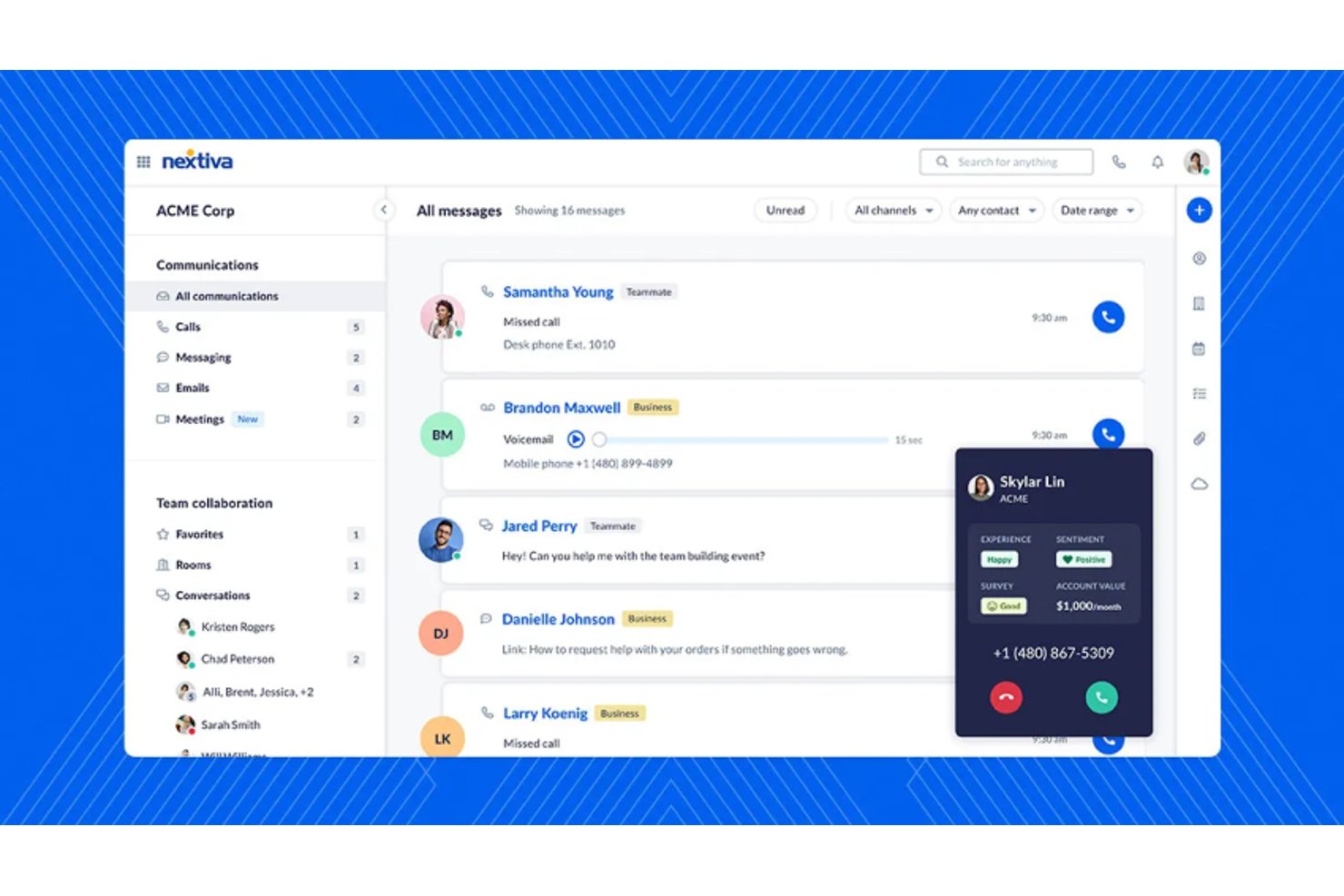
Nextiva è una piattaforma di comunicazione unificata basata su cloud che riunisce chiamate vocali, videoconferenze, chat di squadra e messaggistica SMS in un'unica app per team ibridi e distribuiti.
Per chi è ideale Nextiva?
Nextiva è adatta a piccole e medie imprese che hanno bisogno di gestire sia la comunicazione interna del team sia le interazioni con i clienti da un'unica piattaforma.
Perché ho scelto Nextiva
Nextiva merita il suo posto tra i migliori nella mia lista grazie alla capacità dell'IA di gestire in modo eccellente i riepiloghi delle conversazioni al termine di ogni chiamata. Dopo una videoconferenza o una telefonata, l’IA XBert di Nextiva genera automaticamente un riepilogo con i punti chiave e i prossimi passi, così nessuno deve affannarsi a ricontrollare gli appunti dopo la chiamata. Apprezzo anche l’analisi in tempo reale del sentiment, che segnala i cambiamenti di tono durante la chiamata in modo che i team ibridi possano correggere la rotta prima che una conversazione prenda una brutta piega.
Funzionalità chiave di Nextiva
- Canali di messaggistica di squadra: Crea canali pubblici o privati per organizzare la comunicazione del team e per argomento.
- Condivisione integrata di file: Condividi documenti, immagini e file direttamente all'interno delle chat o degli spazi riunione.
- Gestione dei ruoli utente e delle autorizzazioni: Imposta ruoli e permessi per controllare l'accesso alle conversazioni e ai canali sensibili.
- Integrazioni CRM e di produttività di terze parti: Connettiti con strumenti come Salesforce, HubSpot, Microsoft Teams e Google Workspace.
Integrazioni con Nextiva
Nextiva offre integrazioni native con Salesforce, HubSpot, Zendesk, Microsoft Dynamics, Zoho CRM, Oracle, ServiceNow, ConnectWise, Google Workspace, Microsoft Teams e altri ancora. È disponibile un’API per integrazioni personalizzate.
Pros and Cons
Pros:
- I riepiloghi automatici delle chiamate tramite IA fanno risparmiare tempo dopo le riunioni
- Voce, video e chat unificati in un’unica soluzione
- Forte affidabilità dell’operatività per team distribuiti
Cons:
- L’app mobile ha segnalato problemi di prestazioni
- La configurazione può essere complessa per i team piccoli

Ideale per costruire una comunità interna

ThoughtFarmer è una piattaforma intranet che combina comunicazioni interne, elenchi dei dipendenti, gestione della conoscenza e strumenti per creare comunità, pensata per organizzazioni ibride e distribuite.
Per chi è pensato ThoughtFarmer?
ThoughtFarmer è particolarmente adatto a organizzazioni di medie dimensioni (100–5.000 dipendenti) che necessitano di un hub centrale per connettere lavoratori in ufficio, da remoto e sul campo.
Perché ho scelto ThoughtFarmer
ThoughtFarmer merita il suo posto nella mia shortlist perché è una delle poche piattaforme intranet che integra la creazione di una comunità direttamente nello strato comunicativo. Mi piace che funzionalità come i riconoscimenti, il microblogging e i gruppi illimitati (ognuno con il proprio feed di notizie) offrano ai team ibridi uno spazio sociale condiviso che non dipende dall'essere nello stesso ufficio. Lo strumento Broadcast mi permette inoltre di inviare messaggi mirati a team specifici direttamente sui loro telefoni, assicurando che nessuno rimanga escluso.
Caratteristiche principali di ThoughtFarmer
- Ricerca intelligente universale: Trova rapidamente documenti, persone e contenuti all'interno dell'intranet e dei cloud collegati.
- Flussi di lavoro digitali FormFlow: Automatizza i processi documentali con moduli personalizzati per attività come l'onboarding e le richieste di ferie.
- Elenchi dei dipendenti: Sfoglia profili dettagliati, informazioni sui team e organigrammi per connetterti con i colleghi.
- App mobile nativa: Offre ai lavoratori remoti e sul campo pieno accesso a intranet e comunicazioni da qualsiasi dispositivo.
Integrazioni di ThoughtFarmer
ThoughtFarmer offre integrazioni native con Microsoft 365, SharePoint, OneDrive, Google Workspace, Microsoft Teams e Slack, con un'API disponibile per integrazioni personalizzate.
Pros and Cons
Pros:
- Messaggistica broadcast mirata per gruppi di dipendenti
- Funzionalità integrate di riconoscimento tra pari e messaggi di elogio
- Profili dei dipendenti dettagliati favoriscono la connessione
Cons:
- Nessuna chat o messaggistica in tempo reale integrata
- Non pensato per conversazioni rapide tra team

Hub
Ideale per PMI e team in crescita

Hub è una piattaforma Intranet moderna pensata per team ibridi che necessitano di uno spazio centrale dove condividere aggiornamenti, collaborare su progetti e mantenere tutti connessi, sia che si trovino in ufficio sia che lavorino da remoto.
Per chi è consigliato Hub?
Hub è una soluzione ideale per PMI e team in crescita che desiderano una intranet accessibile, facile da gestire e priva della complessità tipica delle piattaforme enterprise.
Perché ho scelto Hub
Ho inserito Hub nella mia shortlist perché offre a PMI e team in crescita una intranet realmente gestibile, che non richiede un team IT dedicato per l'attivazione o la manutenzione. Mi piace il fatto che il builder per la creazione dell'intranet brandizzata consenta a team più piccoli di realizzare un hub di comunicazione curato e coerente con il proprio brand, senza bisogno del supporto di sviluppatori. Anche nel mio team troviamo utili le funzionalità integrate di notizie e annunci per informare in tempo reale i dipendenti ibridi, un'esigenza spesso difficile da soddisfare senza una piattaforma centralizzata per le organizzazioni più piccole. La rubrica persone è un'altra funzione particolarmente vantaggiosa per i team che devono integrare nuove risorse in sedi diverse.
Funzionalità chiave di Hub
- Sondaggi pulse: Raccogli feedback dai dipendenti con possibilità di anonimato e punteggio nascosto per quantificare le risposte di tutto il team.
- Contenuti obbligatori: Contrassegna i contenuti come mandatori affinché i dipendenti debbano confermare la lettura, con promemoria automatici ai non lettori.
- Aggiornamenti di stato: Permetti ai dipendenti di indicare se sono in ufficio o fuori, con opzioni di stato personalizzabili in base alle modalità di lavoro del team.
- App mobile PWA: Consenti ai dipendenti ibridi e remoti di accedere pienamente all'intranet da qualsiasi dispositivo mobile senza bisogno di scaricare app dallo store.
Integrazioni di Hub
Le integrazioni native includono Slack, Microsoft Teams, Gmail, Google Drive, Microsoft OneDrive, Microsoft Outlook e Sharepoint.

Homebase
Ideale per piccole imprese

Homebase unisce messaggistica di squadra, pianificazione e monitoraggio delle presenze in un'unica piattaforma progettata per i team che lavorano a ore o su turni, che devono rimanere connessi e coordinati in ambienti di lavoro ibridi.
Per chi è ideale Homebase?
Homebase è particolarmente adatto per le piccole imprese nei settori vendita al dettaglio, ospitalità e ristorazione che gestiscono dipendenti a ore o su turni in una o poche sedi.
Perché ho scelto Homebase
Homebase si è guadagnato un posto nella mia lista perché raccoglie pianificazione, messaggistica e monitoraggio delle presenze in un unico luogo, senza la complessità che spesso mette in difficoltà i proprietari di piccole imprese. Mi piace come la funzione di messaggistica consenta ai manager di inviare promemoria sui turni e annunci direttamente sui telefoni dei dipendenti, un aspetto davvero utile quando il team è suddiviso tra turni in presenza e da remoto. Il piano gratuito copre sorprendentemente molte funzioni per una singola sede, inclusi messaggistica e pianificazione, quindi le piccole aziende non sono costrette a passare a un piano a pagamento solo per far comunicare il proprio team.
Funzionalità principali di Homebase
- Promemoria e avvisi dei turni: Notifica automaticamente ai dipendenti i turni imminenti, i cambi di programma e i ritardi nell'entrata tramite app, SMS o email.
- Messaggi diretti e di gruppo: Invia messaggi uno a uno o di gruppo a dipendenti specifici, ruoli o all'intero team direttamente dall'app.
- Richieste di scambio e copertura turni: Consenti ai dipendenti di richiedere scambi turno o coprire turni scoperti direttamente nell'app, con approvazione da parte del manager integrata.
- Riconoscimenti ai dipendenti: Premia i membri del team con riconoscimenti tramite l'app per incentivare coinvolgimento e morale all'interno del personale.
Integrazioni di Homebase
Le integrazioni includono Square, Toast, Clover, Shopify, Lightspeed, QuickBooks, Gusto, ADP, Paychex e Revel.

Zoom
Ideale per il supporto alle riunioni potenziato dall'IA

Zoom offre alle squadre ibride una piattaforma flessibile per riunioni video, chat e collaborazione, aiutando aziende di tutte le dimensioni a connettere dipendenti remoti e in ufficio con strumenti di comunicazione affidabili.
Per chi è ideale Zoom?
Zoom è la soluzione ideale per aziende di medie e grandi dimensioni che organizzano riunioni frequenti e hanno bisogno di una piattaforma di comunicazione affidabile, incentrata sul video, per team ibridi.
Perché ho scelto Zoom
Zoom si guadagna il suo posto nella mia shortlist grazie a come il suo AI Companion gestisce bene tutte quelle attività legate alle riunioni che spesso rallentano i team ibridi. Apprezzo in particolare i riepiloghi automatici delle riunioni e la cattura degli elementi d'azione: terminata una chiamata, il mio team non deve più sfogliare appunti per capire chi si occupa di cosa. AI Companion funziona anche su altre piattaforme come Google Meet e Microsoft Teams, così anche se un collega ospita una riunione fuori da Zoom, posso comunque ottenere trascrizione e riepilogo anche senza essere l'host. La funzione 'My Notes' è un'altra che utilizzo regolarmente: mi permette di annotare pensieri durante la riunione mentre l'IA li arricchisce e li espande in base al contesto.
Funzionalità principali di Zoom
- Stanze separate: Suddividi i partecipanti delle riunioni in gruppi più piccoli per discussioni o workshop mirati, poi riporta tutti alla sessione principale.
- Sottotitoli tradotti: Visualizza sottotitoli in tempo reale in 33 lingue, eliminando le barriere linguistiche nelle squadre ibride distribuite globalmente.
- Zoom Whiteboard: Collabora su una lavagna condivisa e interattiva utilizzando post-it, strumenti di disegno e connettori intelligenti, sia durante che fuori dalle riunioni.
- Sondaggi e questionari: Raccogli contributi o feedback del team direttamente in riunione tramite sondaggi integrati e questionari post-riunione.
Integrazioni Zoom

Workvivo
Ideale per rafforzare la cultura aziendale

Workvivo è una piattaforma di comunicazione interna progettata per team ibridi che desiderano mantenere tutti connessi, coinvolti e informati, ed è popolare tra le organizzazioni che mirano a migliorare la comunicazione e la collaborazione interna.
Per chi è ideale Workvivo?
Workvivo è particolarmente indicato per medie e grandi aziende con forza lavoro ibrida o distribuita, che necessitano di una piattaforma di comunicazione interna dedicata per mantenere i dipendenti allineati e ingaggiati.
Perché ho scelto Workvivo
Workvivo merita un posto nella mia lista perché considera la cultura aziendale una caratteristica fondamentale e non un ripensamento. Apprezzo molto come la funzione dei valori permetta ai team di collegare pubblicamente riconoscimenti e post direttamente ai valori aziendali, così il riconoscimento non è solo sociale—rafforza i comportamenti che contano davvero per l'organizzazione. La funzionalità degli spazi comunitari è un altro punto di forza: consente ai dipendenti di auto-organizzarsi attorno a interessi, località o team condivisi e aiuta a creare connessione in contesti ibridi dove raramente si condivide lo stesso spazio fisico.
Caratteristiche principali di Workvivo
- Sondaggi e questionari: Raccogli il sentiment dei dipendenti grazie a sondaggi interni e questionari rapidi che possono essere inviati a tutta l'organizzazione o a gruppi specifici.
- Live streaming: Trasmetti aggiornamenti aziendali, assemblee plenarie o messaggi della leadership a tutti i dipendenti in tempo reale.
- Traduzione automatica: Traduci automaticamente i contenuti nelle lingue madri dei dipendenti, mantenendo informati allo stesso modo team globali e ibridi.
- Directory delle persone e organigramma: Fornisci ai dipendenti una directory ricercabile e un organigramma visivo per comprendere le strutture dei team e trovare i colleghi.
Integrazioni Workvivo
Le integrazioni includono Zoom, Slack, Google Workspace, Microsoft 365, BambooHR, Workday, Sage HR, Personio, Paychex e Trello.
Ideale per organizzazioni attente alla sicurezza

Troop Messenger è una piattaforma di comunicazione progettata per aziende e organizzazioni che necessitano di messaggistica sicura, condivisione di file e strumenti di collaborazione ricchi di funzionalità per mantenere i team ibridi connessi e produttivi.
Per chi è Troop Messenger?
Troop Messenger è particolarmente adatto per enti governativi, organizzazioni della difesa e imprese in settori regolamentati che richiedono un rigoroso controllo sulla propria infrastruttura di comunicazione.
Perché ho scelto Troop Messenger
Ho selezionato Troop Messenger perché offre alle organizzazioni attente alla sicurezza il controllo su dove risiedono i loro dati. Mi piacciono in particolare le opzioni di self-hosting e installazione on-premise, che permettono ai team IT di mantenere tutti i messaggi e i file completamente all’interno della propria infrastruttura. Per team ibridi in ambito governativo, della difesa o in settori regolamentati, questa è una differenza rispetto agli strumenti solo cloud. La piattaforma include anche crittografia end-to-end e controlli amministrativi granulari, così il mio team può gestire gli accessi, monitorare le attività e far rispettare le policy di conformità senza dipendere dalla sicurezza di fornitori terzi.
Caratteristiche principali di Troop Messenger
- Burnout (finestra di chat privata): Una chat 1:1 che si autodistrugge, in cui i messaggi scompaiono automaticamente dopo che è scaduto il timer preimpostato.
- Tracciamento posizione: Consente di condividere la posizione in tempo reale dall’app mobile e visualizzare la cronologia delle posizioni dei membri remoti del team.
- Air-time group: Un gruppo in modalità broadcast dove solo l’amministratore può inviare messaggi, mantenendo le comunicazioni unidirezionali.
- Condivisione schermo nelle chiamate di gruppo: Condividi lo schermo durante una chiamata audio o video di gruppo senza bisogno dell’approvazione dell’host.
Integrazioni di Troop Messenger
Le integrazioni includono Dropbox, Google Drive, LDAP, Cattlecall, Mailtrim (in arrivo), GitHub (in arrivo), Jira Software (in arrivo) e Zapier. È disponibile un’API per integrazioni personalizzate.
Pumble
Ideale per la cronologia dei messaggi illimitata

Pumble è un'app di comunicazione per team che offre una cronologia dei messaggi illimitata, rendendola la scelta migliore per le aziende che cercano strumenti di comunicazione completi e affidabili. Dispone di funzionalità come canali, thread, condivisione di file, videoconferenze e accesso per ospiti, rendendolo uno strumento versatile ed efficiente per i team moderni.
Perché ho scelto Pumble: Pumble offre un'ampia gamma di funzionalità, tra cui comunicazione gratuita, videoconferenze e opzioni di sicurezza solide. Pumble punta a migliorare la comunicazione in vari contesti aziendali, dai servizi finanziari allo sviluppo software, ed è adatto sia ai team in presenza che a quelli remoti. Inoltre, Pumble è ideale per la cronologia dei messaggi illimitata perché permette ai team di mantenere e ricercare facilmente tutta la propria comunicazione. Questo è essenziale per garantire continuità in progetti a lungo termine ed evitare che informazioni importanti vadano perse nel tempo.
Funzionalità e integrazioni di spicco di Pumble:
Le funzionalità includono canali per conversazioni organizzate, messaggi diretti per comunicazioni individuali o di gruppo e thread per discussioni dettagliate all'interno dei canali. Supporta la comunicazione in tempo reale con opzioni per chiamate vocali e video, inclusa la condivisione dello schermo, e offre cronologia dei messaggi e condivisione di file illimitate per centralizzare l’archiviazione dei documenti. Inoltre, Pumble consente l’accesso per ospiti, notifiche personalizzabili e impostazioni di permessi per gestire efficacemente le interazioni del team.
Le integrazioni includono Zapier, GitHub, RSS e altri ancora.
Altre opzioni
Ecco altre valide opzioni che non sono rientrate nell'elenco delle migliori app per la comunicazione del team:
- Guidde
Ideale per la comunicazione della conoscenza incentrata sui video
- Spike
Ideale per connettere i team tramite email conversazionali
- Chanty
Ideale per la produttività del team e la gestione delle attività
- Xoxoday
Ideale con un sistema integrato di riconoscimento e premi
- Flock
Ideale per un canale privato per note personali
- SnapComms
Ideale per formati di comunicazione flessibili
- Workmates
Ideale per tracciare le revisioni di informazioni obbligatorie
- Guru
Ideale per condividere annunci interni
- Mattermost
Ideale per sviluppatori di programmi e altri team tecnici
- Slack
Ideale per organizzazioni che lavorano in modo asincrono
- LiveAgent
Ideale per i team di assistenza clienti
- Axero
Ideale per chat di team in tempo reale
- PeopleOne
Ideale per esperienze personalizzate


Come valuto le app per la comunicazione del team
Divido la mia valutazione tra requisiti di base indispensabili—come canali persistenti, controlli amministratore e chiamate—e fattori differenzianti come i riassunti AI, le integrazioni HRIS e le certificazioni di conformità.
Funzionalità di base (prerequisiti per questa lista)
Quando seleziono gli strumenti per la mia lista, valuto ciascuno su una scala da 0 (non offre la funzionalità) a 5 (eccelle in quest'area) per ogni funzione chiave elencata di seguito. Successivamente, calcolo il punteggio totale dello strumento in percentuale. Ogni strumento deve raggiungere un punteggio totale minimo del 75% per essere considerato per l'inclusione.
- Messaggistica in tempo reale: Controllo che ci siano conversazioni a thread, reazioni e cronologia persistente, così l’HR può riprendere discussioni sensibili come i follow-up sui reclami anche mesi dopo.
- Canali e gruppi: I canali privati sono fondamentali qui—i team HR hanno bisogno di spazi riservati per temi come la pianificazione delle retribuzioni che restano separati dai canali aziendali generali.
- Condivisione di file e ricerca: Valuto se sia possibile condividere documenti di policy e ritrovarli successivamente usando filtri per data, mittente o tipo di file nell’intera cronologia dei messaggi.
- Chiamate video e vocali: Chiamate integrate o nativamente incorporate sono essenziali per check-in HR e colloqui. Esamino la condivisione schermo, la registrazione e la capienza delle chiamate di gruppo.
- Gestione utenti e permessi: Strumenti come Slack e Microsoft Teams gestiscono questo aspetto in modo diverso, quindi valuto i controlli basati sui ruoli, il supporto SSO e le opzioni di provisioning SCIM.
- Integrazioni con terze parti: Cerco connettori con HRIS, ATS e calendari, per far sì che compiti di onboarding o la pianificazione di colloqui confluiscano direttamente nelle conversazioni di team.
Una volta che ho una lista di strumenti che soddisfano i criteri, considero cosa distingue ogni piattaforma.
Fattori differenzianti (cosa distingue i fornitori)
Ecco come metto a confronto i diversi fornitori:
Funzionalità distintive
Riassunti di canali e meeting basati su AI sono un fattore chiave per i team HR che gestiscono più gruppi di onboarding o numerose posizioni aperte contemporaneamente. Verifico quanto bene ogni strumento riassuma lunghe discussioni in elementi concreti e attuabili. Anche sondaggi e questionari integrati sono importanti perché consentono di raccogliere il sentiment dei dipendenti senza doverli spostare su un’altra piattaforma. Valuto inoltre l’automazione dei flussi di lavoro, come l’attivazione di checklist di onboarding o promemoria per presa visione delle policy direttamente all’interno della chat.
Oltre le funzionalità
Le certificazioni di sicurezza e conformità hanno un peso importante nella mia valutazione perché i canali HR spesso contengono dati sensibili dei dipendenti. Controllo la presenza di SOC 2, conformità GDPR e standard di crittografia. Anche le integrazioni HRIS e ATS influenzano la mia valutazione—strumenti che si collegano a piattaforme come Workday o Greenhouse permettono ai team HR di instradare aggiornamenti sulle assunzioni e compiti di onboarding senza cambiare contesto. Considero inoltre come ciascun fornitore gestisca il deployment per lavoratori senza scrivania o in prima linea, dato che l’accesso mobile è essenziale per raggiungere i dipendenti non presenti in ufficio.
Come scegliere gli strumenti per la comunicazione del team
Mentre segui il tuo esclusivo processo di selezione del software, tieni presenti i seguenti aspetti.
- Facilità d'uso: lo strumento di comunicazione dovrebbe essere intuitivo, per garantire elevati tassi di adozione da parte dei dipendenti. Gli strumenti complessi possono portare a un utilizzo ridotto, annullando i vantaggi derivanti dall'adozione dello strumento. Uno strumento intuitivo garantisce che tutti i reparti, dall'ingegneria alle risorse umane, possano utilizzarlo in modo efficace, massimizzandone così il valore.
- Integrazioni: lo strumento dovrebbe essere in grado di integrarsi con gli altri strumenti essenziali utilizzati quotidianamente dalla tua organizzazione. Questa flessibilità e adattabilità possono semplificare i flussi di lavoro e migliorare la produttività. Ad esempio, uno strumento di comunicazione che si integra con software per la gestione dei progetti, sistemi CRM e archiviazione cloud può centralizzare tutte le comunicazioni.
- Sicurezza: con la crescente minaccia della criminalità informatica, la sicurezza è una preoccupazione significativa. Lo strumento dovrebbe offrire funzionalità di sicurezza per proteggere i dati sensibili dell'azienda, consentendo al contempo le comunicazioni esterne necessarie. Ad esempio, uno strumento che offre la crittografia end-to-end può proteggere dalle violazioni dei dati.
- Scalabilità: lo strumento dovrebbe poter crescere insieme alla tua organizzazione senza compromettere le prestazioni. Uno strumento scalabile può gestire un numero crescente di utenti e dati senza rallentamenti o richiedere investimenti aggiuntivi significativi. Per le organizzazioni più grandi, il software per la comunicazione aziendale può offrire la scalabilità aggiuntiva necessaria per supportare team in crescita.
- Personalizzazione: lo strumento dovrebbe poter essere personalizzato per soddisfare le esigenze e le preferenze specifiche della tua organizzazione. Ciò include l'adattamento delle funzionalità, delle interfacce utente e dei flussi di lavoro a processi aziendali specifici. Ad esempio, uno strumento personalizzabile può essere adattato per supportare diversi stili di comunicazione, requisiti di progetto e strutture di team.
Cosa sono le app per la comunicazione del team?
Le app per la comunicazione del team sono strumenti digitali che semplificano la comunicazione di gruppo e rendono facile e veloce condividere informazioni e coordinare le attività da un dispositivo mobile (Android o iOS). Puoi utilizzarle per inviare messaggi istantanei, condividere file, gestire attività o avviare rapidamente una videochiamata. Sono un modo efficiente per sostituire email e riunioni con opzioni di comunicazione più rapide e flessibili.
Un'app di comunicazione del team scelta accuratamente può connettere rapidamente i dipendenti e migliorarne la produttività riducendo i ritardi nella comunicazione ed eliminando le riunioni non necessarie. Sono ricche di funzionalità che aiutano i colleghi a condividere idee, collaborare ai progetti e rimanere concentrati sulle attività, aumentando la trasparenza grazie all'aggiornamento simultaneo di tutti i membri.
Funzionalità delle app di comunicazione del team
Gli strumenti pratici per la comunicazione del team aiutano a semplificare la comunicazione, migliorare la collaborazione e garantire che tutti siano aggiornati. Ecco alcune delle funzionalità più importanti da cercare negli strumenti di comunicazione del team.
- Messaggistica istantanea: questa funzionalità consente ai membri del team di comunicare tramite la comunicazione interna in tempo reale, un aspetto importante per prendere decisioni e risolvere problemi rapidamente.
- Videoconferenze: le videochiamate consentono la comunicazione tramite videoconferenza faccia a faccia, contribuendo a creare relazioni più solide e garantendo che i segnali non verbali non vengano trascurati nelle riunioni virtuali.
- Condivisione di file: la possibilità di condividere documenti e file all'interno dello strumento di comunicazione garantisce che tutti abbiano accesso alle risorse necessarie senza dover cambiare piattaforma. Questa funzionalità è ideale per il brainstorming e altre attività di lavoro di squadra.
- Gestione delle attività: l'integrazione delle funzionalità di gestione delle attività aiuta i team a tenere traccia delle proprie responsabilità e scadenze, garantendo che le operazioni delle risorse umane e gli altri progetti procedano secondo i piani.
- Integrazione con altri strumenti: la facile integrazione con altri software, come i sistemi di gestione delle risorse umane (HRMS), gli strumenti di gestione dei progetti, i sistemi di gestione delle relazioni con i clienti (CRM), gli strumenti di collaborazione, i calendari e la posta elettronica, contribuisce a creare un flusso di lavoro unificato, riducendo la necessità di passare da un'applicazione all'altra.
- Funzionalità di ricerca: una funzionalità di ricerca consente ai membri del team di trovare rapidamente conversazioni passate, file e altre informazioni importanti, risparmiando tempo e migliorando l'efficienza.
- Notifiche e avvisi: le notifiche personalizzabili garantiscono che i membri del team siano consapevoli degli aggiornamenti importanti e possano rispondere tempestivamente, senza essere sommersi da avvisi non necessari.
- Ruoli utente e autorizzazioni: questa funzionalità consente agli amministratori di controllare l'accesso alle diverse parti dello strumento, garantendo che le informazioni sensibili siano accessibili solo a chi ne ha bisogno.
- Accesso da dispositivi mobili: disporre di un'app di comunicazione mobile garantisce che i membri del team possano rimanere connessi e produttivi anche quando non si trovano alla propria scrivania.
- Sicurezza e conformità: solide funzionalità di sicurezza e la conformità agli standard del settore proteggono le comunicazioni aziendali sensibili e garantiscono che l'organizzazione soddisfi i requisiti normativi.
Scegliere lo strumento di comunicazione del team giusto, dotato di queste funzionalità, può migliorare significativamente la collaborazione e la produttività all'interno del team. Concentrandosi su questi aspetti chiave, è possibile garantire che il team disponga delle risorse necessarie per comunicare in modo efficace e raggiungere i propri obiettivi.
Vantaggi delle app di comunicazione del team
Gli strumenti di comunicazione del team sono diventati indispensabili per facilitare l'interazione, la collaborazione e la produttività tra i membri del team. Di seguito sono riportati cinque vantaggi principali dell'utilizzo degli strumenti di comunicazione del team sia per gli utenti sia per le organizzazioni.
- Collaborazione migliorata: gli strumenti di comunicazione del team consentono la collaborazione in tempo reale, permettendo ai membri del team di lavorare insieme sui progetti, condividere idee e fornire feedback istantaneamente, indipendentemente dalla loro posizione fisica.
- Maggiore produttività: centralizzando la comunicazione e riducendo la necessità di lunghi scambi di e-mail, questi strumenti semplificano i flussi di lavoro e aiutano i team a concentrarsi sulle proprie attività, portando a una maggiore produttività.
- Maggiore trasparenza: questi strumenti forniscono una registrazione chiara di tutte le comunicazioni e delle decisioni prese, garantendo che tutti siano aggiornati e riducendo la probabilità di incomprensioni o di informazioni trascurate.
- Migliore gestione dei progetti e delle operazioni: grazie alle funzionalità integrate di gestione dei progetti o dell'azienda, gli strumenti di comunicazione del team aiutano a monitorare i progressi, impostare le scadenze e assegnare le attività, facilitando la gestione efficiente delle attività, il rispetto delle scadenze e il miglioramento dei processi.
- Maggiore flessibilità: gli strumenti di comunicazione del team supportano il lavoro da remoto consentendo ai membri del team di comunicare e collaborare da qualsiasi luogo, offrendo la flessibilità necessaria per adattarsi a diverse condizioni di lavoro e fusi orari.
Investire negli strumenti di comunicazione del team può migliorare significativamente il modo in cui il team interagisce e collabora, portando a risultati migliori e a un ambiente di lavoro più coeso. Sfruttando questi strumenti, le organizzazioni possono garantire che i propri team siano ben connessi, informati e produttivi.
Costi e prezzi delle app di comunicazione del team
Ecco una stima dettagliata dei piani medi di comunicazione del team e dei relativi costi. I dati derivano da un'analisi dei livelli di prezzo più comuni e delle funzionalità che offrono. Comprendendo queste strutture tariffarie, gli utenti possono valutare meglio le proprie esigenze e considerazioni di budget nella scelta degli strumenti di comunicazione del team.
Tabella comparativa dei piani per app di comunicazione per team
| Tipo di piano | Prezzo medio | Funzionalità comuni |
| Piano gratuito | $0 | Messaggistica di base, condivisione limitata di file, integrazioni limitate, sicurezza di base |
| Piano personale | $5-$10 per utente /mese | Messaggistica avanzata, videochiamate, maggiore spazio di archiviazione per i file, integrazioni, assistenza di base |
| Piano aziendale | $10-$20 per utente /mese | Messaggistica avanzata, videoconferenze, ampio spazio di archiviazione per i file, integrazioni avanzate, assistenza prioritaria |
| Piano per grandi aziende | $20+ per utente /mese | Funzionalità personalizzate, spazio di archiviazione illimitato, sicurezza avanzata, assistenza dedicata, strumenti per la conformità |
Domande frequenti sulle app di comunicazione del team
Hai ancora dubbi sulle app di comunicazione del team e su ciò che offrono? Ecco alcune risposte alle domande frequenti che dovrebbero chiarire ogni dubbio:
Come funzionano le app di comunicazione del team?
Le app di comunicazione del team sono sistemi software che consentono alle organizzazioni di comunicare con i dipendenti in diversi modi. In genere, queste app includono chat individuali e di gruppo, chiamate vocali e video, messaggi SMS/testuali e altre forme di comunicazione.\r\n\r\nSono una componente software essenziale per le organizzazioni che supportano il lavoro ibrido o da remoto oppure hanno team distribuiti che lavorano in fusi orari diversi. Le app di chat del team sono utili anche per i dipendenti che svolgono lavori in mobilità, come i fornitori di servizi o i dipendenti che svolgono attività sul campo.
Quali sono i principali vantaggi dell'utilizzo delle app di comunicazione del team?
La comunicazione del team è una delle principali difficoltà nella gestione dei team da remoto. Le app di comunicazione aiutano i team remoti a interagire tra loro e a sviluppare un senso di connessione, spesso con modalità divertenti per celebrare i risultati reciproci e portare un po’ di allegria nella giornata lavorativa. Inoltre, migliorano la comunicazione e la produttività sostituendo processi lenti come le email con chat immediate e in tempo reale. Questo accelera i flussi di lavoro, consente di trovare più rapidamente le risposte alle domande e riduce il tempo dedicato alle attività amministrative.\r\n\r\nMolte app di comunicazione del team includono anche funzionalità aggiuntive utili per i team remoti o ibridi, come elenchi di attività condivisi del team o altre funzioni di gestione delle attività. Queste aiutano a garantire che tutti siano sulla stessa lunghezza d’onda, indipendentemente dal fatto che lavorino dall’ufficio, da casa o dall’altra parte del mondo.
Quali funzionalità principali sono incluse nelle app di comunicazione del team?
Durante la ricerca dell’app di comunicazione del team perfetta, potresti ritrovarti a confrontare un sistema con un altro. Sebbene le tue esigenze specifiche possano variare in base alla configurazione della forza lavoro, è importante assicurarsi di scegliere con attenzione.\r\n\r\nEcco un breve elenco delle principali funzionalità che dovresti aspettarti di trovare nelle migliori app di chat del team:\r\n\u003cul\u003e\r\n \t\u003cli\u003eCanali di chat (sia pubblici che privati)\u003c/li\u003e\r\n \t\u003cli\u003eMessaggi diretti o strumenti per messaggi 1:1\u003c/li\u003e\r\n \t\u003cli\u003eChat di gruppo\u003c/li\u003e\r\n \t\u003cli\u003eCondivisione di file\u003c/li\u003e\r\n \t\u003cli\u003eVideoconferenze e conferenze audio\u003c/li\u003e\r\n \t\u003cli\u003eRegistrazione di messaggi audio e video\u003c/li\u003e\r\n \t\u003cli\u003eCondivisione dello schermo\u003c/li\u003e\r\n \t\u003cli\u003eMessaggistica SMS o testuale\u003c/li\u003e\r\n \t\u003cli\u003eNotifiche \u0026 promemoria\u003c/li\u003e\r\n \t\u003cli\u003eQuiz, sondaggi e strumenti per questionari\u003c/li\u003e\r\n \t\u003cli\u003eStrumenti di gestione delle attività\u003c/li\u003e\r\n \t\u003cli\u003eListe di controllo, moduli \u0026 liste di cose da fare\u003c/li\u003e\r\n \t\u003cli\u003eContenuti multimediali \u0026 emoji\u003c/li\u003e\r\n \t\u003cli\u003eElenco dei dipendenti\u003c/li\u003e\r\n \t\u003cli\u003eAnalisi\u003c/li\u003e\r\n \t\u003cli\u003eCrittografia dei dati \u0026 funzionalità di sicurezza\u003c/li\u003e\r\n\u003c/ul\u003e\r\nUsa questo elenco per valutare le app finaliste e assicurarti che includano le funzionalità di chat di cui hai bisogno.
Quanto costano in genere le app di comunicazione del team?
Le app di comunicazione del team presenti in questo elenco delle 10 migliori hanno prezzi compresi tra $2 e $88 per utente al mese, a seconda della completezza delle funzionalità offerte. Per iniziare, molti dei fornitori di app presenti in questo elenco offrono prove gratuite o piani gratuiti (noti anche come piani freemium), così puoi farti un’idea di come funziona la loro app prima di impegnarti.\r\n\r\nUn’app di comunicazione del team molto diffusa che funge anche da sistema di gestione della forza lavoro è Connecteam, che offre una gamma di \u003ca href=\u0022https://peoplemanagingpeople.com/tools/connecteam-pricing/\u0022\u003epiani tariffari convenienti\u003c/a\u003e, nel caso tu stia cercando un’opzione tutto-in-uno ma conveniente.
Esistono app gratuite per la comunicazione del team?
Diversi fornitori di app di comunicazione del team presenti in questo elenco offrono piani gratuiti (noti anche come piani freemium), tra cui Chanty, Flock, Spike e Mattermost.\r\n\r\nI piani freemium consentono di testare un’app prima di impegnarsi ad acquistarla. Tuttavia, è importante notare che in genere i piani freemium offrono solo funzionalità limitate rispetto ai piani a pagamento completi.\r\n\r\nEsistono anche alcuni piani gratuiti per sempre, tra cui Pumble, un’opzione interessante per le piccole imprese con budget limitati.
Altre recensioni di software
Cerchi altri modi per mantenere il tuo personale connesso e produttivo? Uno di questi altri elenchi di software potrebbe essere più adatto:
- Miglior software di gestione delle attività per l'efficienza del team
- Miglior software per il monitoraggio della produttività per i team ibridi
- Migliori soluzioni software intranet per connettere i team
- Miglior software per il lavoro da remoto per i team distribuiti
- Miglior software per la comunicazione tra dipendenti per le comunicazioni interne
- Miglior software per le comunicazioni e app di comunicazione
- Miglior software per la collaborazione da remoto per i team ibridi
- Miglior software per la definizione degli obiettivi per mantenere i team sulla buona strada
- Miglior software per il monitoraggio dei dipendenti da remoto
Altre risorse per i team distribuiti
Ecco una raccolta delle nostre principali risorse per aiutarti a gestire in modo più efficace i tuoi team da remoto e ibridi:
- Come migliorare le operazioni aziendali attraverso le comunicazioni interne, un podcast con Lizabeth Wesely-Casella di L-12 Services
- Come mantenere connessi i team virtuali, un podcast con Ben Hoffman di cityHUNT
- 27 migliori pratiche per la gestione dei team da remoto
- 4 elementi chiave per guidare i team da remoto nel nuovo mondo
- Formazione dei lavoratori da remoto: 5 strategie per il successo nell'era digitale
Qual è il prossimo passo?
Se stai cercando un'app di comunicazione per il team, contatta gratuitamente un consulente SoftwareSelect per ricevere consigli.
Compili un modulo e fai una breve conversazione durante la quale entreranno nei dettagli delle tue esigenze. Poi riceverai una selezione ristretta di software da esaminare. Ti assisteranno persino durante l'intero processo di acquisto, comprese le negoziazioni sul prezzo.