

Le 10 migliori piattaforme per eventi virtuali recensite nel 2026

10 Elenco delle migliori piattaforme per eventi virtuali


Le migliori piattaforme per eventi virtuali ti aiutano a ospitare esperienze online coinvolgenti e professionali, sia che tu stia organizzando una piccola riunione di squadra, un incontro aziendale generale o una grande conferenza globale.
La gestione degli eventi online può essere impegnativa senza gli strumenti giusti. Una piattaforma valida riunisce tutto ciò di cui hai bisogno: trasmissione in diretta, stanze per sessioni parallele, registrazione, analisi e funzionalità per creare contatti, così puoi offrire esperienze interattive e senza intoppi che mantengono il pubblico coinvolto.
Dopo aver testato decine di strumenti per eventi virtuali, ho selezionato un elenco delle migliori piattaforme, intuitive, affidabili e progettate per adattarsi a diversi stili di evento e disponibilità economiche. In questa guida troverai soluzioni che semplificano la pianificazione, migliorano il coinvolgimento dei partecipanti e rendono l’organizzazione di eventi virtuali semplice e senza sforzo.
Perché fidarsi delle nostre recensioni sui software
Il nostro team testa e recensisce software dal 2012. In quanto esperti HR noi stessi, sappiamo quanto sia difficile — e importante — scegliere il software giusto.
Per questa guida, abbiamo valutato gli strumenti attraverso test pratici e ricerche indipendenti, assegnando un punteggio agli strumenti in base ai nostri criteri di selezione. Ci basiamo inoltre sulle competenze di leader di pensiero del settore e di professionisti HR attivi.
Le nostre recensioni riflettono il nostro giudizio editoriale umano, non un discorso di vendita.
Revisori esperti:
Riepilogo delle migliori piattaforme per eventi virtuali
Questa tabella comparativa riassume i dettagli sui prezzi delle mie migliori piattaforme per eventi virtuali, per aiutarti a trovare quella più adatta al tuo budget e alle esigenze della tua azienda.
| Tool | Best For | Trial Info | Price | ||
|---|---|---|---|---|---|
| 1 | Ideale per eventi virtuali di team curati su misura | Nessuna prova gratuita disponibile | Da $2500 | Website | |
| 2 | Ideale per app mobile per eventi | Non disponibile | Da $2.495/evento | Website | |
| 3 | Migliore piattaforma per eventi virtuali per marketer B2B | Demo gratuita disponibile | Prezzo su richiesta | Website | |
| 4 | Ideale per le funzionalità di networking | Demo gratuita disponibile | Prezzo su richiesta | Website | |
| 5 | Miglior piattaforma per eventi virtuali dedicata al marketing degli eventi | Demo gratuita disponibile | Prezzi su richiesta | Website | |
| 6 | Ideale per conferenze virtuali | Piano gratuito disponibile | Da $9/utente/mese (minimo 10 posti, fatturazione annuale) | Website | |
| 7 | Ideale per la creazione di contenuti di alta qualità | Piano gratuito disponibile | Da $24/mese (fatturato annualmente) | Website | |
| 8 | Ideale per la collaborazione | Piano gratuito disponibile | A partire da $7/utente/mese (fatturato annualmente) | Website | |
| 9 | Ideale per eventi su larga scala | Demo gratuita disponibile | Da $499/utente/mese (fatturato annualmente) | Website | |
| 10 | La migliore piattaforma per eventi virtuali per accessibilità e inclusione | Demo gratuita disponibile | Prezzi su richiesta | Website |
Recensioni delle migliori piattaforme per eventi virtuali
Di seguito trovi le mie sintesi dettagliate delle migliori piattaforme per eventi virtuali incluse nel mio elenco. Le mie recensioni offrono un’analisi approfondita delle funzionalità principali, dei vantaggi & svantaggi, delle integrazioni e dei casi d’uso ideali di ogni strumento, per aiutarti a trovare quello più adatto a te.

Confetti
Ideale per eventi virtuali di team curati su misura

Confetti è una piattaforma coinvolgente per eventi virtuali rivolta alle organizzazioni che desiderano aumentare il coinvolgimento dei dipendenti e la coesione del team, soprattutto in contesti di lavoro da remoto. Offre una vasta gamma di attività ospitate dal vivo, come esercizi di team building, classi di benessere ed eventi legati alla diversità, equità e inclusione (DEI), progettati per favorire le connessioni e migliorare il morale. Affrontando sfide come la disconnessione tra i membri del team e la bassa motivazione dei dipendenti, Confetti offre una soluzione alle aziende che vogliono creare una forza lavoro più unita e motivata.
Perché ho scelto Confetti
Ho scelto Confetti perché eccelle nel fornire esperienze uniche e ospitate dal vivo, stimolando il coinvolgimento digitale e la coesione del gruppo. Un aspetto che spicca è l’ampia libreria con oltre 150 eventi curati, che include esercizi di team building e attività di benessere, consentendo di personalizzare le esperienze in base alle esigenze del team. Un’altra caratteristica che apprezzo è il supporto dedicato alla pianificazione degli eventi, che garantisce lo svolgimento senza intoppi delle attività, dall’ideazione al completamento. Queste funzionalità sono fondamentali per le organizzazioni che vogliono mantenere alto il morale e la connessione in un ambiente virtuale.
Caratteristiche principali di Confetti
Oltre alle funzionalità distintive, Confetti offre anche altre caratteristiche chiave:
- Event Hub: Questa funzione consente di mostrare tutti i tuoi eventi in un'unica posizione centralizzata, facilitando agli ospiti la consultazione e la registrazione.
- Integrazione CRM: Il CRM integrato di Confetti aiuta a gestire le informazioni e il coinvolgimento dei partecipanti, semplificando la comunicazione e i follow-up.
- Funzionalità di livestreaming: Questa funzione consente l’interazione e il coinvolgimento in tempo reale durante gli eventi virtuali, migliorando l’esperienza complessiva dei partecipanti.
- Creazione di moduli e reportistica: Crea facilmente moduli personalizzati e accedi a report dettagliati per raccogliere informazioni e misurare il successo dei tuoi eventi.
Integrazioni Confetti
Le integrazioni includono Salesforce, HubSpot, Google Analytics, Rule, Jobylon e Mailchimp. Confetti offre inoltre una REST API e webhooks per integrazioni personalizzate.
Pros and Cons
Pros:
- Sistema di prenotazione online intuitivo
- Ampia gamma di eventi dal vivo
- Supporto clienti dedicato
Cons:
- Capacità limitate di registrazione nativa
- Le funzionalità ibride possono variare in base al piano

Ideale per app mobile per eventi

Expo Pass è una piattaforma tecnologica per eventi progettata per supportare il coinvolgimento digitale in eventi dal vivo, virtuali e ibridi, includendo la funzionalità di app mobile per eventi. È rivolta agli organizzatori di eventi di vari settori che desiderano migliorare l'esperienza dei partecipanti grazie a strumenti efficienti di registrazione, check-in e coinvolgimento. Semplificando la gestione degli eventi, Expo Pass aiuta i team a gestire eventi complessi in modo più fluido sia per gli organizzatori che per i partecipanti.
Perché ho scelto Expo Pass
Ho scelto Expo Pass per la sua app mobile per eventi, che favorisce il coinvolgimento digitale mantenendo dettagli e interazioni dell'evento in un'unica piattaforma. I partecipanti possono consultare i programmi, ricevere aggiornamenti e partecipare a chat di networking tramite l'app, rendendo più facile restare connessi durante gli eventi virtuali. Gli strumenti di lead retrieval supportano anche gli espositori raccogliendo e organizzando le informazioni sui partecipanti in tempo reale.
Caratteristiche principali di Expo Pass
Oltre all'app mobile per eventi, Expo Pass offre:
- Stampa badge: Consente la creazione fluida dei badge in loco, garantendo un tocco professionale al tuo evento.
- Tracciamento delle presenze: Fornisce approfondimenti dettagliati sulla partecipazione dei presenti, aiutandoti a misurare il successo dell'evento.
- Pagine evento personalizzabili: Permette di progettare pagine evento che rispecchino il tuo brand, migliorando la presenza online del tuo evento.
- Analisi in tempo reale: Offre insight basati sui dati per aiutarti a comprendere il comportamento dei partecipanti e migliorare gli eventi futuri.
Integrazioni di Expo Pass
Le integrazioni includono Swoogo, Guidebook e Avery.
Pros and Cons
Pros:
- Centralizza l'attività e la partecipazione alle sessioni dei partecipanti
- Le notifiche push tengono informati i partecipanti in tempo reale
- Supporta il coinvolgimento digitale per eventi virtuali e ibridi
Cons:
- Gli strumenti di networking possono risultare limitati per grandi pubblico
- La reportistica sul coinvolgimento digitale è piuttosto basilare

Goldcast
Migliore piattaforma per eventi virtuali per marketer B2B

Goldcast è una piattaforma per eventi virtuali progettata specificamente per soddisfare le esigenze dei marketer B2B.
Perché ho scelto Goldcast: Goldcast descrive i suoi eventi splendidamente brandizzati come simili all'esperienza di guardare Netflix. L'interfaccia utente è elegante e accattivante, e i controlli studio integrati consentono agli utenti di creare esperienze di evento con un palco completamente personalizzato, sessioni Q&A dal vivo e sovrapposizioni grafiche.
Oltre all'impatto visivo, Goldcast raccoglie informazioni approfondite sui partecipanti e le integra nel tuo CRM affinché tu possa agire immediatamente sui lead della pipeline al termine dell’evento. Puoi anche ospitare hub di risorse per sponsor e condividere contenuti degli sponsor, massimizzando così il ritorno sull’investimento di ogni evento.
Caratteristiche distintive e integrazioni di Goldcast
Funzionalità includono generazione di lead, messaggistica, promemoria via email, programmazione eventi, acquisizione lead, condivisione di presentazioni, analisi, una lobby virtuale e personalizzazione del brand.
Integrazioni includono Drift, Eloqua, Enigamio, HubSpot, Marketo, SalesForce, Slack, Splash, Validar, Webooth e Wistia.
Pros and Cons
Pros:
- Progettata specificamente per il B2B
- Interfaccia visiva elegante
- Assistenza clienti super reattiva
Cons:
- Le stanze di networking hanno una capienza di 15 persone
- Richiede molta banda

Whova
Ideale per le funzionalità di networking
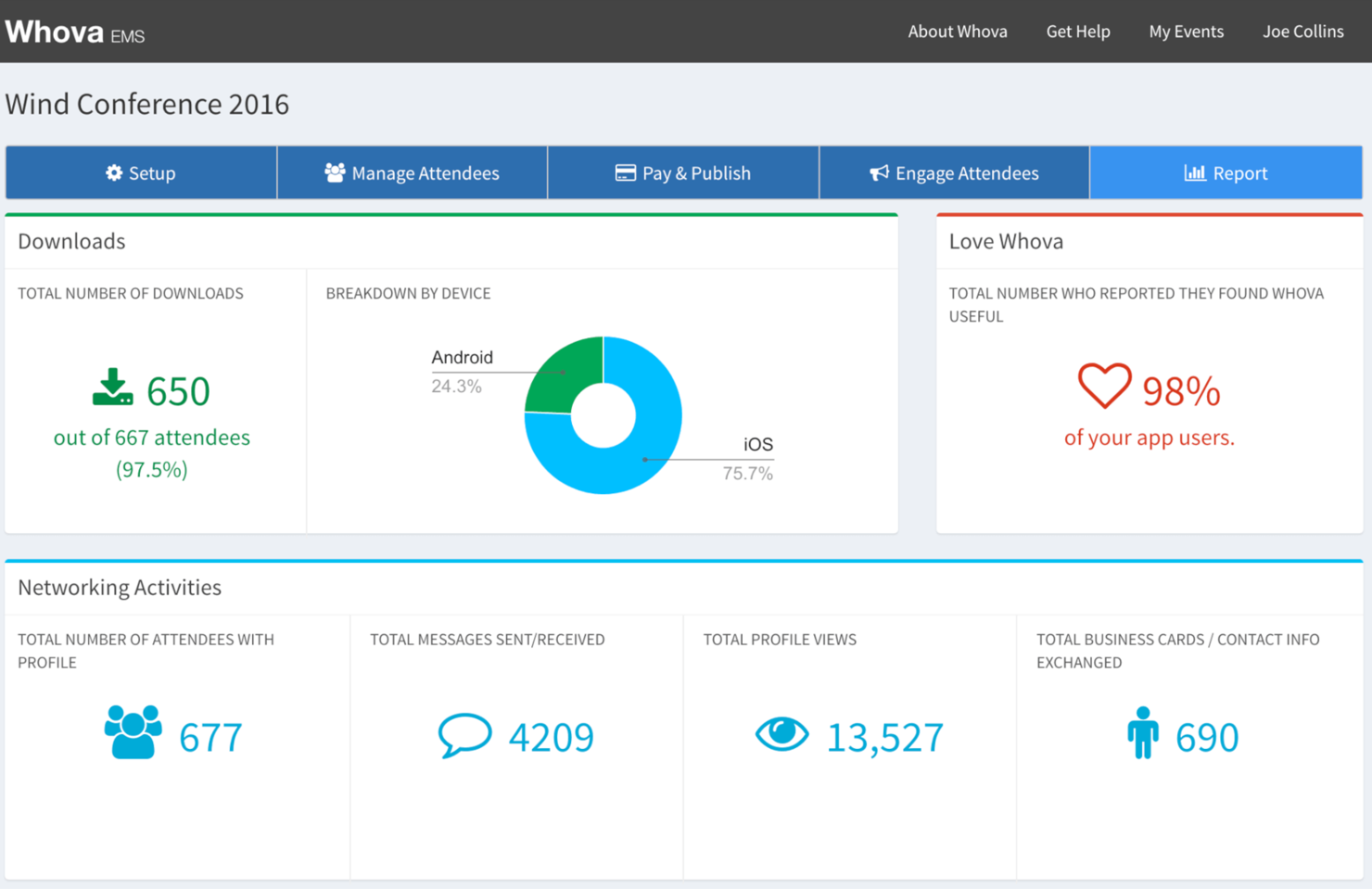
Whova è una piattaforma per conferenze virtuali progettata per organizzatori di eventi che desiderano aumentare il coinvolgimento dei partecipanti e le opportunità di networking. Supporta aziende e organizzazioni offrendo strumenti per la gestione degli eventi, l'interazione tra i partecipanti e le occasioni di networking.
Perché ho scelto Whova: Whova facilita il networking grazie alla sua bacheca della community e alle funzionalità di matchmaking tra partecipanti. Puoi creare gruppi di discussione e abilitare incontri individuali per favorire i contatti. Le funzionalità di sondaggio dal vivo e Q&A mantengono alta l'attenzione del pubblico durante tutto l'evento. La forte attenzione di Whova alle funzionalità di networking la rende una scelta eccellente per eventi in cui l'interazione tra partecipanti è fondamentale.
Funzionalità principali & integrazioni:
Funzionalità includono agende personalizzabili che soddisfano diverse esigenze dei partecipanti, annunci in tempo reale per tenere tutti informati e uno strumento di generazione di lead per aiutarti a entrare in contatto con potenziali clienti. La piattaforma offre anche gestione di espositori e sponsor per aumentare le opportunità di guadagno dell'evento.
Integrazioni includono Zoom, Slack, Salesforce, HubSpot, Google Calendar, Outlook, Mailchimp, Eventbrite, Stripe e PayPal.
Pros and Cons
Pros:
- Agende personalizzabili
- Annunci in tempo reale
- Strumenti efficaci per la generazione di lead
Cons:
- Curva di apprendimento per i nuovi utenti
- Richiede una connessione internet stabile

Hubilo
Miglior piattaforma per eventi virtuali dedicata al marketing degli eventi
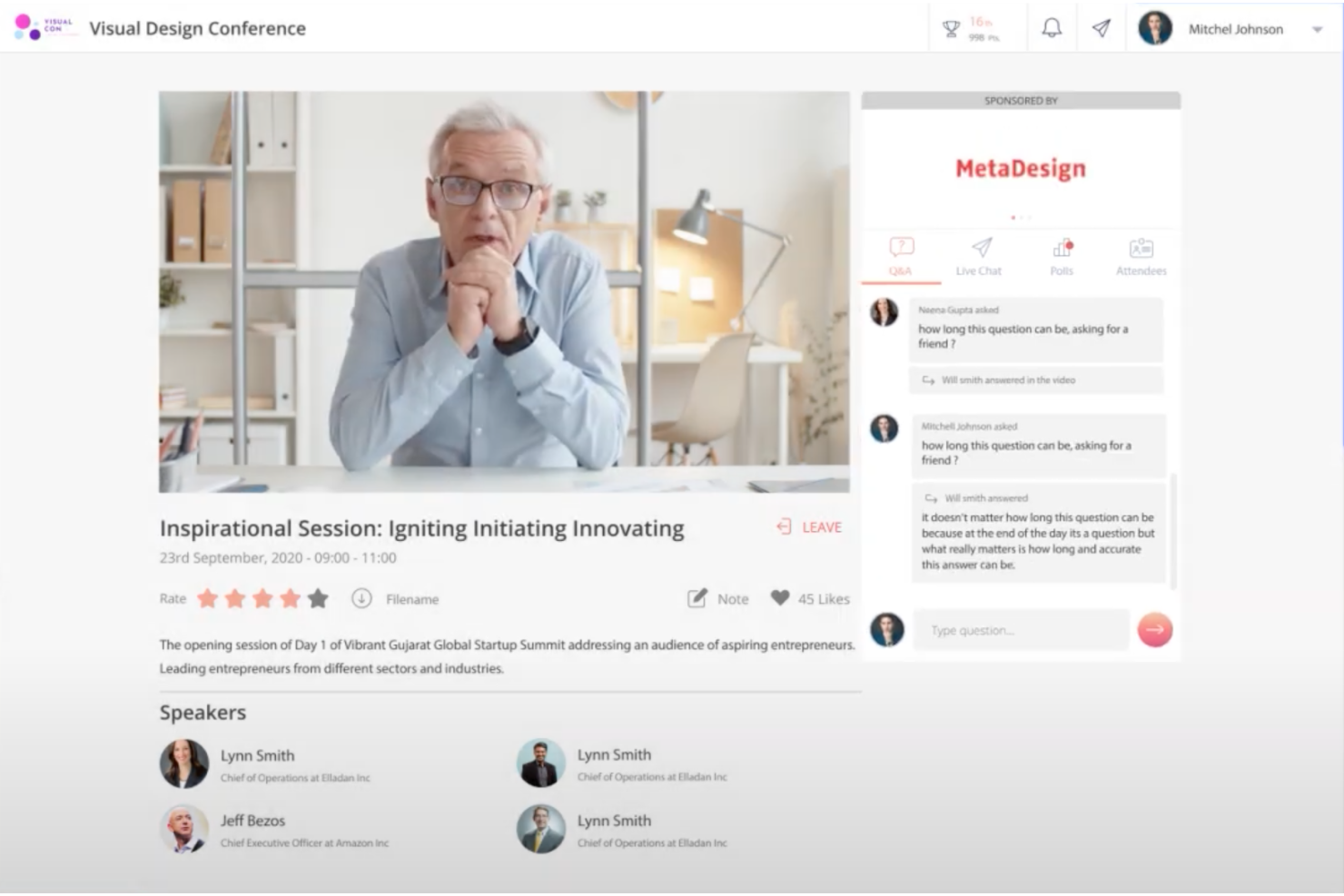
Hubilo è una piattaforma per eventi virtuali con diverse funzioni dedicate al marketing degli eventi.
Perché ho scelto Hubilo: Dalla pianificazione fino alla realizzazione, Hubilo può aiutarti in ogni fase del percorso di marketing per eventi. Il loro builder di landing page ti consente di creare e personalizzare la tua pagina di atterraggio con template, widget e moduli di registrazione. La gestione della biglietteria può essere fatta direttamente dalla loro piattaforma, e le campagne mirate ti permettono di raggiungere pubblici specifici.
Una volta che i partecipanti si sono iscritti, puoi aumentare la partecipazione inviando email di promemoria. Durante l'evento, i partecipanti possono visitare la lounge di networking, seguire gli interventi degli speaker sul palco e prendere parte ad attività di gamification.
Funzionalità e integrazioni principali di Hubilo
Funzionalità includono chat dal vivo, app mobile, coinvolgimento sui social media, analisi dei dati, sessioni sponsorizzate, landing page personalizzate, sfondi virtuali e posizionamento di banner e loghi per gli sponsor.
Integrazioni includono Captello, Interprefy, Kahoot, Kudo, Mailchimp, MootUp, Salesforce, Verbit e Vodium.
Pros and Cons
Pros:
- Eventi facili da configurare
- Altamente scalabile
- Ampie opportunità di branding
Cons:
- Materiali di onboarding non abbastanza approfonditi
- La networking lounge chiude dopo 60 minuti
Airmeet
Ideale per conferenze virtuali
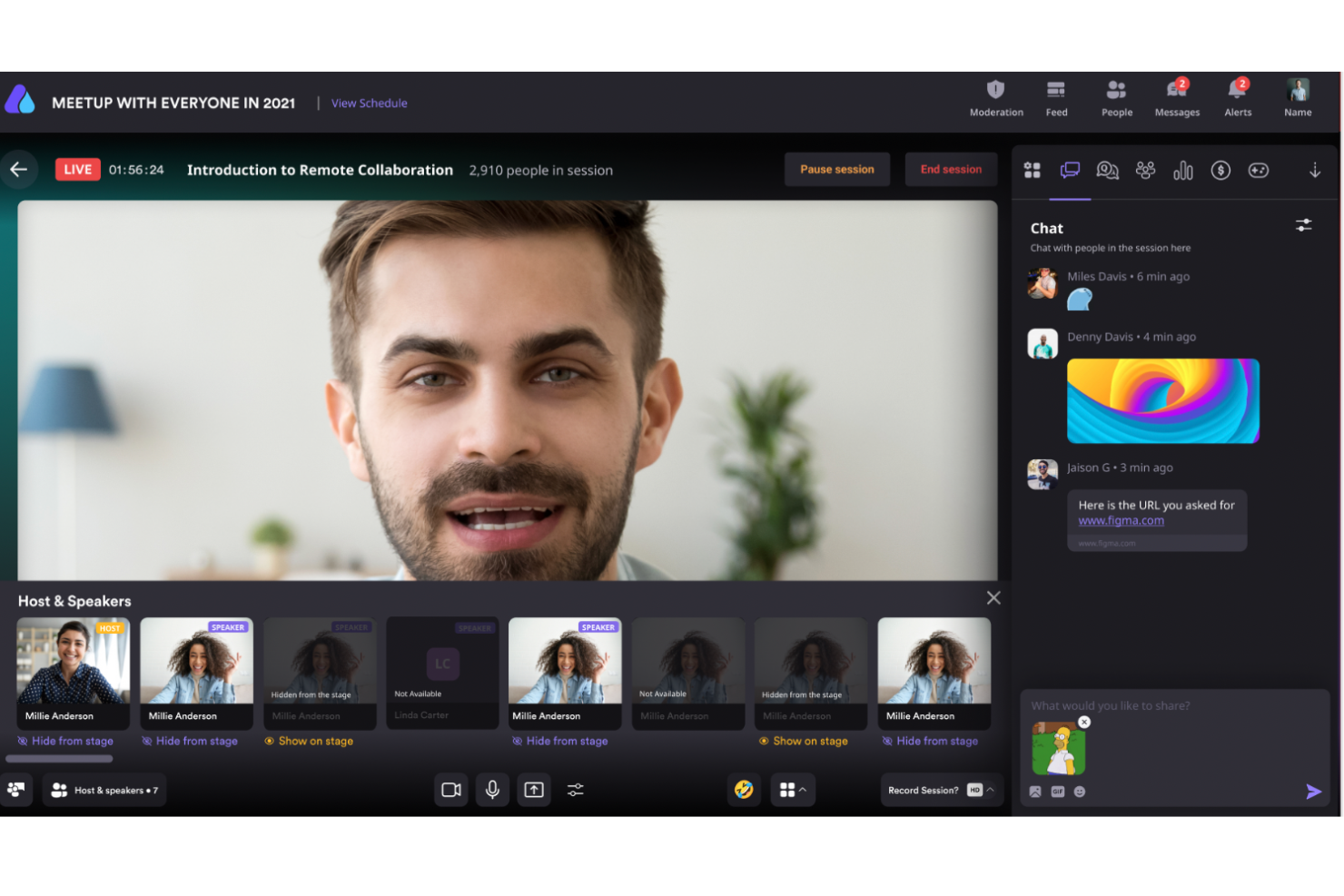
Airmeet è una piattaforma per eventi virtuali progettata per ospitare conferenze su larga scala ed eventi comunitari. È pensata per aziende e organizzazioni che necessitano di strumenti per gestire e coinvolgere ampi pubblici.
Perché ho scelto Airmeet: Airmeet è progettato per le conferenze virtuali, grazie a funzionalità come spazi virtuali personalizzabili e sessioni interattive. È possibile organizzare sessioni parallele e lounge di networking per favorire l’interazione tra i partecipanti. L’attenzione della piattaforma alla creazione di esperienze immersive la rende ideale per coinvolgere efficacemente vaste platee. La capacità di gestire grandi volumi di partecipanti garantisce lo svolgimento fluido degli eventi.
Caratteristiche principali e integrazioni:
Funzionalità includono palchi evento personalizzabili che consentono di progettare il layout dell’evento, strumenti di coinvolgimento del pubblico in tempo reale come sondaggi e domande/risposte, e una lounge sociale per il networking. La piattaforma offre anche analisi dettagliate per monitorare la partecipazione e il coinvolgimento dei partecipanti.
Integrazioni comprendono Zoom, Slack, Salesforce, HubSpot, Mailchimp, Eventbrite, Stripe, PayPal, Google Calendar e Zapier.
Pros and Cons
Pros:
- Analisi dettagliate fornite
- Strumenti di coinvolgimento in tempo reale
- Spazi virtuali personalizzabili
Cons:
- Non è possibile aggiungere informazioni LinkedIn ai profili dei partecipanti
- Alcune limitazioni sull'app mobile

Ideale per la creazione di contenuti di alta qualità

Come professionista alla ricerca di una piattaforma dinamica per eventi virtuali, Riverside potrebbe essere la soluzione ideale per esperienze digitali coinvolgenti. Progettato per la creazione di podcast e video di alta qualità, offre funzionalità come la registrazione in 4K e strumenti di editing basati su intelligenza artificiale che possono trasformare i tuoi webinar e le tue conferenze virtuali. Che tu sia un marketer, un educatore o un creatore di contenuti, le capacità di Riverside nello streaming live e nell'interazione con il pubblico possono soddisfare le tue esigenze di coinvolgimento digitale senza interruzioni.
Perché ho scelto Riverside
Ho scelto Riverside per la sua capacità impareggiabile di aumentare il coinvolgimento digitale attraverso la creazione di contenuti di alta qualità. La possibilità di registrazione in 4K garantisce che i tuoi eventi virtuali vengano trasmessi con la massima chiarezza, mentre gli strumenti di editing automatizzati consentono di perfezionare il contenuto con facilità. Inoltre, la funzione di live streaming di Riverside ti permette di trasmettere in full HD su più piattaforme, assicurando che il tuo messaggio raggiunga un pubblico più ampio. Queste caratteristiche lo rendono un'ottima scelta per chiunque desideri migliorare la propria esperienza di evento virtuale.
Funzionalità principali di Riverside
Oltre alle sue caratteristiche di spicco, ho trovato anche altre potenzialità che rendono Riverside un forte concorrente per il coinvolgimento digitale.
- Registrazione multi-traccia: Registra tracce audio e video separate per ogni partecipante, garantendo flessibilità nell'editing post-produzione.
- Strumenti di coinvolgimento del pubblico: Utilizza elementi interattivi come chat dal vivo e sessioni di domande e risposte per mantenere il pubblico coinvolto durante gli eventi virtuali.
- Opzioni di personalizzazione del brand: Personalizza i tuoi eventi con layout, loghi e grafiche personalizzate per allinearli all'identità del tuo brand.
- Trascrizioni automatiche: Genera automaticamente trascrizioni accurate e note dello spettacolo, rendendo più semplice il riutilizzo dei contenuti.
Integrazioni di Riverside
Al momento, Riverside non elenca integrazioni native.
Pros and Cons
Pros:
- Editing basato su testo potenziato dall'IA
- Piano gratuito senza carta di credito
- Trascrizione automatica e divisione in capitoli
Cons:
- Piano gratuito limitato a 720p
- Chrome richiesto per le migliori prestazioni
Ideale per la collaborazione

Google Meet è uno strumento di videoconferenza che fa parte di Google Workspace, progettato per facilitare eventi virtuali, webinar e sessioni collaborative. È ricco di funzionalità come la condivisione dello schermo e la chat in tempo reale, rendendolo una soluzione ideale per aziende, istituzioni educative e organizzazioni non profit.
Perché ho scelto Google Meet: Apprezzo la sua attenzione all'accessibilità e al coinvolgimento. Funzionalità come i sottotitoli e la trascrizione in tempo reale facilitano la partecipazione di tutti, aumentando l'inclusività dei tuoi eventi virtuali. La piattaforma offre anche strumenti interattivi come sondaggi e stanze per gruppi di lavoro, che permettono di incentivare la partecipazione e la collaborazione tra i partecipanti. Inoltre, Google Meet include la cancellazione del rumore, che aiuta a mantenere la chiarezza dell'audio riducendo i rumori di fondo, assicurando che il tuo messaggio venga ascoltato forte e chiaro.
Funzionalità e integrazioni principali di Google Meet
Le funzionalità includono la condivisione dal vivo di video YouTube, musica e giochi, permettendoti di creare esperienze interattive e coinvolgenti durante i tuoi eventi. Google Meet offre anche sottotitoli tradotti, che possono superare le barriere linguistiche e garantire la piena partecipazione di tutti.
Le integrazioni includono Amazon Alexa, Discord, Wix, Google Forms, Spotify, Moodle, Jotform, Calendly, Zoom, Salesforce, HubSpot e Slack.
Pros and Cons
Pros:
- Si integra perfettamente con gli strumenti di Google Workspace come Calendar, Gmail e Google Drive
- Strumenti come chat dal vivo, sondaggi per il pubblico e condivisione dello schermo migliorano l'interazione durante le riunioni
- La piattaforma è utilizzabile da browser, permettendo un accesso senza problemi da vari dispositivi, inclusi quelli mobili
Cons:
- Mancano funzionalità come l'analisi degli utenti, che può essere un limite per riunioni di grandi dimensioni
- Alcuni utenti segnalano ritardi nella condivisione dei video e cadute di chiamata

Bizzabo
Ideale per eventi su larga scala
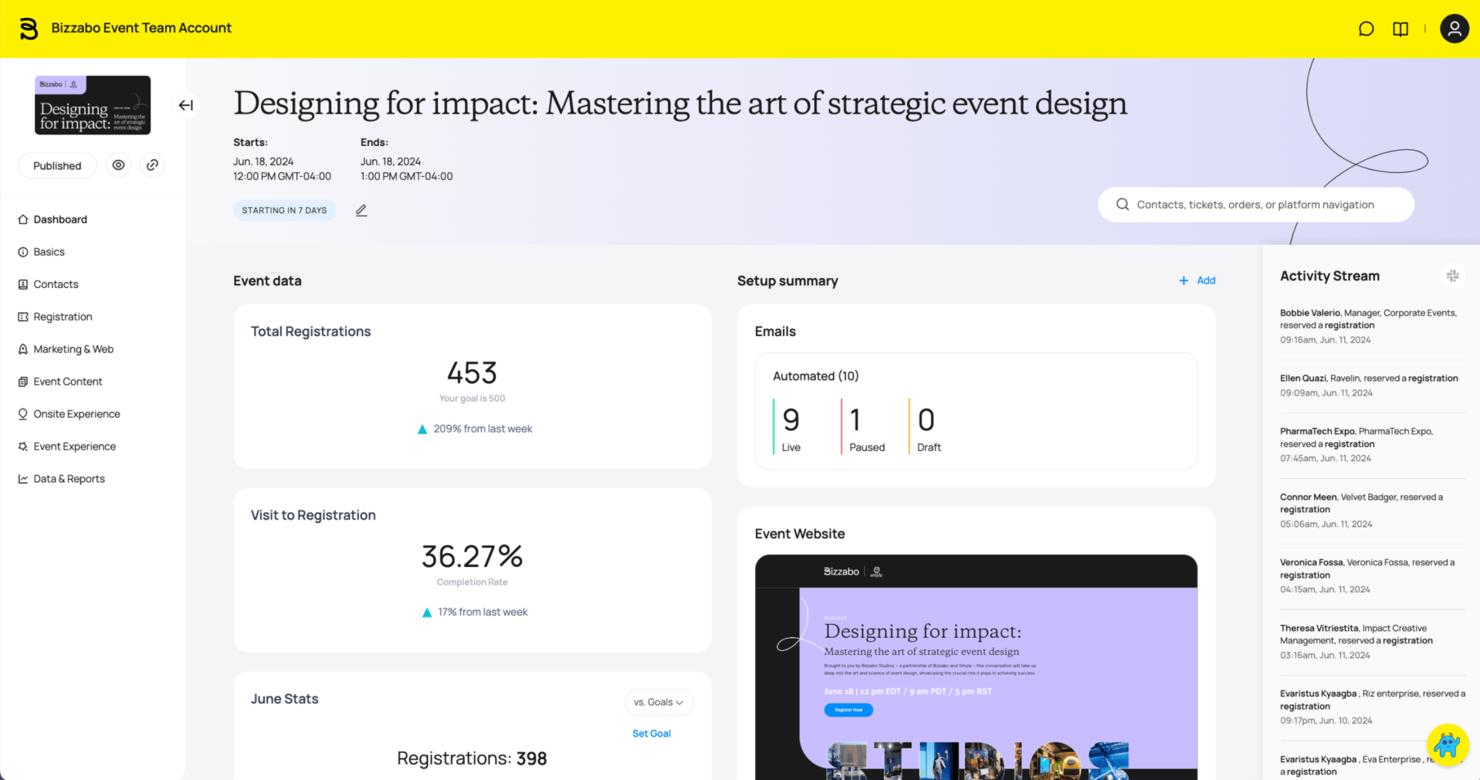
Bizzabo è una piattaforma di gestione eventi pensata per conferenze su larga scala ed eventi aziendali. Offre agli organizzatori strumenti per la registrazione, il marketing e il coinvolgimento dei partecipanti, garantendo così l'esecuzione ottimale dell'evento.
Perché ho scelto Bizzabo: Bizzabo è ideale per eventi di grandi dimensioni grazie alle sue soluzioni scalabili e ai suoi strumenti completi di gestione eventi. Permette di gestire facilmente la registrazione e la biglietteria, offrendo anche analisi in tempo reale per misurare il successo dell'evento. La capacità della piattaforma di gestire un elevato numero di partecipanti e strutture evento complesse la rende una scelta ideale per eventi di ampia portata. Le sue funzionalità di automazione del marketing amplificano ulteriormente la portata e l'impatto dell'evento.
Funzionalità principali & integrazioni:
Funzionalità includono un generatore di siti web drag-and-drop per creare pagine evento personalizzate, avanzati strumenti di email marketing per coinvolgere il pubblico e una piattaforma di networking per connettere i partecipanti. La piattaforma offre inoltre analisi approfondite per comprendere il comportamento dei partecipanti e migliorare gli eventi futuri.
Integrazioni includono Salesforce, Marketo, HubSpot, Slack, Mailchimp, Zoom, Eventbrite, Stripe, PayPal e Google Analytics.
Pros and Cons
Pros:
- Strumenti di gestione eventi completi
- Automazione avanzata del marketing
- Pagine evento personalizzabili
Cons:
- Curva di apprendimento iniziale ripida
- Funzionalità complesse da esplorare

SpotMe
La migliore piattaforma per eventi virtuali per accessibilità e inclusione
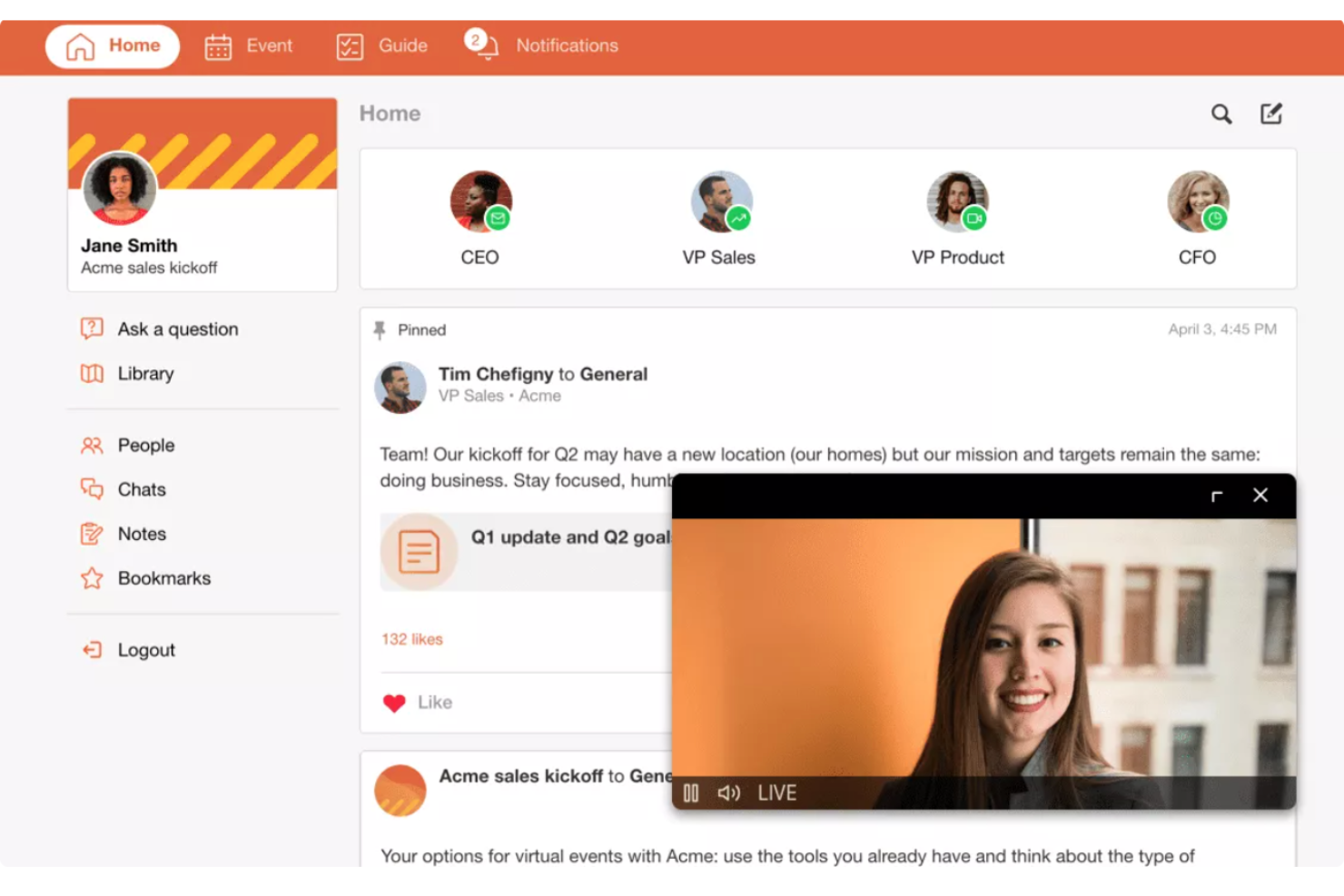
SpotMe è una piattaforma per eventi virtuali con ampie funzionalità di sottotitolazione e traduzione.
Perché ho scelto SpotMe: L'accessibilità dovrebbe rimanere una priorità per il tuo evento sia che si svolga in presenza o online. SpotMe offre uno strumento leader nel settore per traduzione, sottotitolazione e interpretariato, alimentato da Interprefy e AI-Media. Il servizio supporta quasi 20 lingue, ampliando la portata a partecipanti in tutte le località e con esigenze diverse.
Pagine di registrazione ottimizzate per la conversione, strumenti per il coinvolgimento dei partecipanti come domande e risposte e sondaggi, e sessioni breakout facili da gestire permettono ai gruppi di connettersi profondamente tra loro. I modelli di SpotMe includono contenuti preconfigurati, navigazioni e design, rendendo l'avvio semplice e veloce.
Funzionalità e integrazioni principali di SpotMe
Funzionalità includono feed di attività, live streaming, registrazione dei partecipanti, sessioni breakout, replay on-demand, sottotitolazione in tempo reale, strumenti di coinvolgimento e uno studio di design.
Integrazioni includono Eloqua, HubSpot, Marketo, Pardot, RainFocus, Salesforce e Veeva.
Pros and Cons
Pros:
- Interfaccia intuitiva
- Salva immediatamente le registrazioni dopo le dirette streaming
- Strumenti per l'accessibilità
Cons:
- Il processo di registrazione / download dei partecipanti richiede tempo
- La personalizzazione del backstage è complessa
Altre piattaforme per eventi virtuali
Ecco alcune opzioni aggiuntive di piattaforme per eventi virtuali che non sono state incluse nel mio elenco, ma che vale comunque la pena prendere in considerazione:
- EventMobi
Ideale per la personalizzazione del branding
- Accelevents
Migliore piattaforma per eventi virtuali per organizzazioni aziendali
- RingCentral Events
Miglior piattaforma per eventi virtuali di grandi dimensioni
- Microsoft Teams
Ideale per il coinvolgimento dei partecipanti tramite avatar
- ON24
Ideale per l'organizzazione di webinar
- Hivebrite
Ideale per il coinvolgimento della community
- SpatialChat
Ideale per ambienti virtuali interattivi
- Weve
Ideale per eventi di team building
- vFairs
Migliore piattaforma per eventi virtuali con location 3D realistiche
- EventsAir
La migliore piattaforma per eventi virtuali per garantire continuità tra eventi virtuali, ibridi e in presenza
- Kaltura
Ideale per le integrazioni video
- BigMarker
Migliore piattaforma per eventi virtuali per la personalizzazione del design
- PheedLoop
Ideale per eventi ibridi
- HeySummit
Ideale per la gestione dei relatori


Come valuto le piattaforme per eventi virtuali per il coinvolgimento digitale
Divido la mia valutazione in due livelli: la base che uno strumento deve soddisfare per gestire in modo affidabile un incontro aziendale di 1.000 persone e i fattori differenzianti che distinguono i fornitori per i team HR.
Funzionalità di base (requisiti fondamentali per questa lista)
Quando seleziono gli strumenti per la mia lista, valuto ciascuno su una scala da 0 (non offre la funzionalità) a 5 (eccelle in quest'area) per ogni funzionalità di base elencata di seguito. Successivamente, calcolo il punteggio totale dello strumento come percentuale. Ogni strumento deve raggiungere un punteggio totale minimo del 65% per poter essere considerato.
- Live streaming & broadcasting: Verifico se una piattaforma è in grado di trasmettere video HD in maniera affidabile per eventi multi-sessione come incontri aziendali con migliaia di partecipanti contemporanei.
- Strumenti di coinvolgimento interattivo: Qui sono importanti sondaggi integrati, Q&A, chat e reazioni—soprattutto per mantenere coinvolti i dipendenti da remoto durante lunghi onboarding o sessioni di L&D.
- Breakout room & networking: Cerco stanze per gruppi di lavoro configurabili che supportino attività come cerchi di mentoring in piccoli gruppi, introduzioni per nuove assunzioni o workshop di team.
- Gestione delle iscrizioni e dei partecipanti: Dalle pagine di iscrizione personalizzate ai flussi di invito, valuto quanto bene ogni piattaforma gestisce la logistica per far partecipare le persone giuste alle sessioni corrette.
- Analisi e reportistica dell’evento: I dati post-evento su partecipazione, coinvolgimento delle sessioni e partecipazione aiutano i team HR a dimostrare l’impatto dell’evento—quindi cerco report esportabili e dashboard.
- Integrazioni HR & collaborazione: La connessione con strumenti come Slack, Microsoft Teams, Workday e le più comuni piattaforme LMS è fondamentale per integrare gli eventi virtuali nei flussi di lavoro HR esistenti.
Una volta che ho una lista di strumenti che soddisfano i criteri, considero cosa distingue ciascuna piattaforma.
Fattori differenzianti (cosa distingue i fornitori)
Ecco come confronto e metto a confronto i diversi fornitori:
Funzionalità distintive
Le didascalie multilingue e le funzionalità di accessibilità sono importanti per i team HR che organizzano eventi in uffici globali—cerco funzioni integrate di traduzione in diretta e il supporto per lettori di schermo. Anche gli hub di contenuti on-demand sono un valore aggiunto, dato che i dipendenti in diversi fusi orari hanno bisogno di recuperare sessioni come walkthrough sull’iscrizione ai benefit. Valuto anche il livello di controllo che una piattaforma offre sulla personalizzazione del brand, dagli ingressi personalizzati ad ambienti scenografici che rafforzano l’identità aziendale durante gli eventi per la selezione del personale.
Oltre le funzionalità
Le certificazioni di sicurezza e conformità come SOC 2 e GDPR sono da verificare, soprattutto quando gli eventi raccolgono dati sensibili dei dipendenti durante onboarding o sessioni sui benefit. Valuto anche la scalabilità—se una piattaforma può gestire un workshop di 50 persone una settimana e un incontro aziendale di 5.000 persone la settimana successiva. Anche la trasparenza dei prezzi è fondamentale, poiché i budget HR devono giustificare i costi ricorrenti per programmi di eventi interni senza costi nascosti per registrazioni o componenti aggiuntivi.
Come scegliere una piattaforma per eventi virtuali
È facile perdersi in lunghi elenchi di funzionalità e strutture tariffarie complesse. Per aiutarti a rimanere concentrato mentre affronti il tuo specifico processo di selezione dello strumento, ecco una lista di controllo dei fattori da tenere a mente:
| Fattore | Cosa considerare |
|---|---|
| Scalabilità | La piattaforma può crescere insieme alla tua organizzazione? Considera le dimensioni future degli eventi e il numero di partecipanti. Assicurati che possa gestire i tuoi eventi più grandi senza problemi di prestazioni. |
| Integrazioni | Funziona con gli strumenti che già utilizzi? Verifica la compatibilità con il tuo CRM, il software di email marketing e quello di gestione dei progetti per semplificare i flussi di lavoro. |
| Personalizzazione | Puoi adattare la piattaforma al tuo marchio? Cerca opzioni per personalizzare layout, temi ed elementi del branding degli eventi, in modo che siano in linea con l'identità della tua organizzazione. |
| Facilità d'uso | La piattaforma è intuitiva sia per gli organizzatori sia per i partecipanti? Considera l'esperienza utente per evitare curve di apprendimento troppo ripide che potrebbero influire sull'adozione. |
| Implementazione e avviamento | Quanto tempo occorrerà per iniziare? Valuta i tempi di configurazione e la disponibilità di risorse per l'avviamento, come tutorial e assistenza, per garantire una transizione fluida. |
| Costo | Il prezzo rientra nel tuo budget? Analizza i diversi piani e i costi nascosti. Considera il costo per partecipante e gli eventuali sconti per i contratti a lungo termine. |
| Misure di sicurezza | I tuoi dati e i partecipanti sono protetti? Cerca la crittografia, la conformità alle leggi sulla protezione dei dati e funzionalità come i controlli degli accessi per proteggere le informazioni sensibili. |
| Disponibilità dell'assistenza | Quanto è accessibile l'assistenza quando ne hai bisogno? Verifica la disponibilità del supporto 24 ore su 24, 7 giorni su 7, i tempi di risposta e i canali disponibili, come chat, email o telefono, per garantire un'assistenza tempestiva. |
Cosa sono le piattaforme per eventi virtuali?
Le piattaforme per eventi virtuali sono soluzioni software che consentono alle organizzazioni di ospitare eventi online, permettendo ai partecipanti di prendervi parte da qualsiasi luogo. Questi strumenti sono comunemente utilizzati da organizzatori di eventi, professionisti delle risorse umane e responsabili del marketing per connettersi in modo efficiente con un pubblico numeroso. Funzionalità come lo streaming in diretta, la chat interattiva e il branding personalizzabile aiutano a coinvolgere i partecipanti e a creare esperienze memorabili. Nel complesso, queste piattaforme offrono un modo pratico e accessibile per organizzare eventi senza limiti geografici.
Funzionalità
Quando scegli le piattaforme per eventi virtuali, presta attenzione alle seguenti funzionalità chiave:
- Streaming in diretta: trasmetti gli eventi in tempo reale per coinvolgere i partecipanti e raggiungere un pubblico più ampio.
- Chat interattiva: facilita la comunicazione tra partecipanti e conduttori per migliorare il coinvolgimento e il networking.
- Branding personalizzabile: adatta i layout e i temi degli eventi all'identità della tua organizzazione e mantieni la coerenza del marchio.
- Analisi degli eventi: monitora le metriche di partecipazione e coinvolgimento per misurare il successo dei tuoi eventi.
- Funzionalità di registrazione: registra e archivia le sessioni degli eventi per consultarle in futuro o guardarle su richiesta.
- Networking basato sull'intelligenza artificiale: metti in contatto i partecipanti con interessi simili utilizzando l'intelligenza artificiale per favorire interazioni significative.
- Stand virtuali: crea spazi interattivi in cui gli espositori possano presentare prodotti e servizi durante gli eventi.
- Supporto multilingue: accogli il pubblico internazionale offrendo contenuti in più lingue.
- Misure di sicurezza: proteggi le informazioni sensibili con la crittografia e i controlli degli accessi per garantire la privacy dei dati.
Vantaggi
L'implementazione di piattaforme per eventi virtuali offre diversi vantaggi al tuo team e alla tua azienda. Ecco alcuni dei benefici che puoi aspettarti:
- Maggiore accessibilità: raggiungi un pubblico globale organizzando eventi online, eliminando le barriere geografiche e i costi di viaggio.
- Maggiore coinvolgimento: utilizza funzionalità interattive come la chat in diretta e il networking basato sull'intelligenza artificiale per mantenere i partecipanti coinvolti e connessi.
- Efficienza dei costi: risparmia sulle spese per sedi e logistica passando agli eventi virtuali, una soluzione conveniente per il budget.
- Informazioni basate sui dati: ottieni informazioni preziose dalle analisi degli eventi per comprendere il comportamento dei partecipanti e migliorare gli eventi futuri.
- Coerenza del marchio: mantieni l'identità del tuo marchio con opzioni di branding personalizzabili in linea con l'aspetto e lo stile della tua organizzazione.
- Flessibilità: offri l'accesso su richiesta alle sessioni registrate, consentendo ai partecipanti di consultare i contenuti quando preferiscono.
- Garanzia di sicurezza: proteggi i dati sensibili con misure di sicurezza avanzate, assicurando interazioni virtuali sicure e private.
Costi e prezzi
La selezione delle piattaforme per eventi virtuali richiede la comprensione dei vari modelli di prezzo e dei piani disponibili. I costi variano in base alle funzionalità, alle dimensioni del team, ai componenti aggiuntivi e ad altro ancora. La tabella seguente riassume i piani più comuni, i relativi prezzi medi e le funzionalità tipicamente incluse nelle soluzioni per piattaforme di eventi virtuali:
Tabella comparativa dei piani per piattaforme di eventi virtuali
| Tipo di piano | Prezzo medio | Funzionalità comuni |
|---|---|---|
| Piano gratuito | $0 | Ospitalità di eventi di base, capacità limitata di partecipanti e opzioni minime di personalizzazione del marchio. |
| Piano personale | $10-$30/utente/mese | Maggiore capacità di partecipanti, analisi di base e alcune opzioni di personalizzazione. |
| Piano aziendale | $50-$100/utente/mese | Analisi avanzate, personalizzazione del marchio avanzata, sessioni multiple e integrazione con altri strumenti. |
| Piano per grandi aziende | $200+/utente/mese | Personalizzazione su larga scala, supporto dedicato, funzionalità di sicurezza complete e capacità avanzate di creazione di reti professionali. |
Domande frequenti sulle piattaforme per eventi virtuali
Ecco alcune risposte alle domande comuni sulle piattaforme per eventi virtuali:
Le piattaforme per eventi virtuali possono supportare eventi ibridi?
Sì, molte piattaforme offrono oggi funzionalità ibride, consentendo di coinvolgere sia il pubblico in presenza sia quello da remoto con contenuti sincronizzati e strumenti di interazione.
I partecipanti possono fare rete durante un evento virtuale con la stessa efficacia di un evento in presenza?
La creazione di reti professionali in modalità virtuale può avvicinarsi all’efficacia degli eventi in presenza con gli strumenti e le strategie giusti. Le moderne piattaforme per eventi virtuali sono progettate per riprodurre la casualità e il coinvolgimento delle interazioni faccia a faccia attraverso funzionalità come le sale per sottogruppi, le “strette di mano” virtuali e l’abbinamento basato sull’intelligenza artificiale, che mette in contatto i partecipanti in base ai loro interessi e obiettivi. Anche le funzioni di chat, le riunioni video e le sessioni interattive di domande e risposte facilitano connessioni più profonde.
Sebbene le dinamiche possano essere diverse, il potenziale per interazioni significative rimane elevato, consentendo ai partecipanti di fare rete efficacemente da qualsiasi luogo. Questo articolo offre anche suggerimenti per aiutarti a costruire la tua rete professionale se desideri migliorare le tue competenze.
Come aiutano le piattaforme per eventi virtuali a coinvolgere i partecipanti?
Le piattaforme virtuali includono funzionalità come sondaggi in tempo reale, domande e risposte, chat, quiz, sale per sottogruppi e ludicizzazione per mantenere coinvolti i partecipanti. Alcune offrono sfide con classifiche o spazi virtuali per la creazione di reti professionali per riprodurre le esperienze in presenza. Questi strumenti non solo aumentano l’interazione, ma aiutano anche gli organizzatori a monitorare il coinvolgimento in tempo reale.
Quanto sono sicure le piattaforme per eventi virtuali?
La maggior parte delle piattaforme per eventi virtuali dà priorità alla sicurezza, ma è essenziale verificare le misure adottate. Cerca la crittografia, la conformità alle normative sulla protezione dei dati e le funzionalità di controllo degli accessi. Chiedi al fornitore informazioni sui suoi protocolli di sicurezza e su eventuali incidenti passati. Dovresti inoltre istruire il tuo team e i partecipanti sulle migliori pratiche, come l’utilizzo di password complesse e il riconoscimento dei tentativi di phishing, per migliorare ulteriormente la sicurezza.
Quali sono i prossimi passi:
Se stai cercando una piattaforma per eventi virtuali, contatta gratuitamente un consulente di SoftwareSelect per ricevere consigli.
Compili un modulo e fai una breve conversazione durante la quale verranno analizzati nel dettaglio i tuoi requisiti. Riceverai quindi una selezione ristretta di software da valutare. Ti supporteranno anche durante l'intero processo di acquisto, comprese le trattative sul prezzo.