

I 10 migliori strumenti di IA recensiti nel 2026

10 Elenco dei migliori strumenti di IA


L'IA non è più un semplice optional. Sta diventando una parte fondamentale del modo in cui le squadre innovano, prendono decisioni e rimangono competitive. Ho testato e recensito applicazioni moderne e ho visto quali strumenti di IA fanno davvero la differenza e quali invece non sono all'altezza.
Questo articolo analizza i migliori strumenti di IA in categorie come scrittura, automazione, analisi e collaborazione, offrendo una panoramica chiara delle soluzioni disponibili e degli strumenti che vale la pena adottare. Diamo un'occhiata alle funzionalità di IA che possono aiutarti a rimanere un passo avanti.
Perché fidarsi delle nostre recensioni sui software
Il nostro team testa e recensisce software dal 2012. In quanto esperti HR noi stessi, sappiamo quanto sia difficile — e importante — scegliere il software giusto.
Per questa guida, abbiamo valutato gli strumenti attraverso test pratici e ricerche indipendenti, assegnando un punteggio agli strumenti in base ai nostri criteri di selezione. Ci basiamo inoltre sulle competenze di leader di pensiero del settore e di professionisti HR attivi.
Le nostre recensioni riflettono il nostro giudizio editoriale umano, non un discorso di vendita.
Revisori esperti:
Tabella comparativa degli strumenti di IA
Questa tabella comparativa riassume i dettagli dei prezzi della mia selezione dei migliori strumenti di IA:
| Tool | Best For | Trial Info | Price | ||
|---|---|---|---|---|---|
| 1 | Ideale per gestione HR globale e paghe potenziate da AI | Demo gratuita disponibile | Da $5/dipendente/mese | Website | |
| 2 | Ideale per l’identificazione dei rischi di progetto tramite AI | Prova gratuita di 14 giorni | Da $9/utente/mese (fatturazione annuale) | Website | |
| 3 | Ideale per la scoperta delle conoscenze tramite l'intelligenza artificiale | Demo gratuita disponibile | Prezzi su richiesta | Website | |
| 4 | Ideale per l'automazione completa del reclutamento con IA | Demo gratuita disponibile | Prezzo su richiesta | Website | |
| 5 | Ideale per l’automazione delle policy di governance IA | Demo gratuita disponibile | Prezzo su richiesta | Website | |
| 6 | Il migliore per integrazioni con dati in tempo reale | Piano gratuito disponibile | Da $32/mese (fatturazione annuale) | Website | |
| 7 | Ideale per risposte non preimpostate, simili a quelle umane, basate sull'IA | Prova gratuita di 7 giorni + piano gratuito disponibile | Da $24.17/mese (fatturazione annuale) | Website | |
| 8 | Ideale per l’assistenza sui documenti d’ufficio | Piano gratuito disponibile | Da $21/utente/mese (fatturazione annuale) | Website | |
| 9 | Ideale per integrare l’IA nei flussi di lavoro creativi | Versione di prova gratuita di 7 giorni disponibile | Da $9.99/mese | Website | |
| 10 | Ideale per l’IA nei colloqui video | Demo gratuita disponibile | Prezzo su richiesta | Website |


Recensione dei migliori strumenti di IA
Di seguito trovi i miei riepiloghi dettagliati dei migliori strumenti di IA inclusi nel mio elenco. Le mie recensioni offrono una panoramica dettagliata delle caratteristiche principali, dei vantaggi e degli svantaggi, delle integrazioni e dei casi d’uso ideali di ogni strumento, per aiutarti a trovare quello più adatto a te.

Deel HR
Ideale per gestione HR globale e paghe potenziate da AI
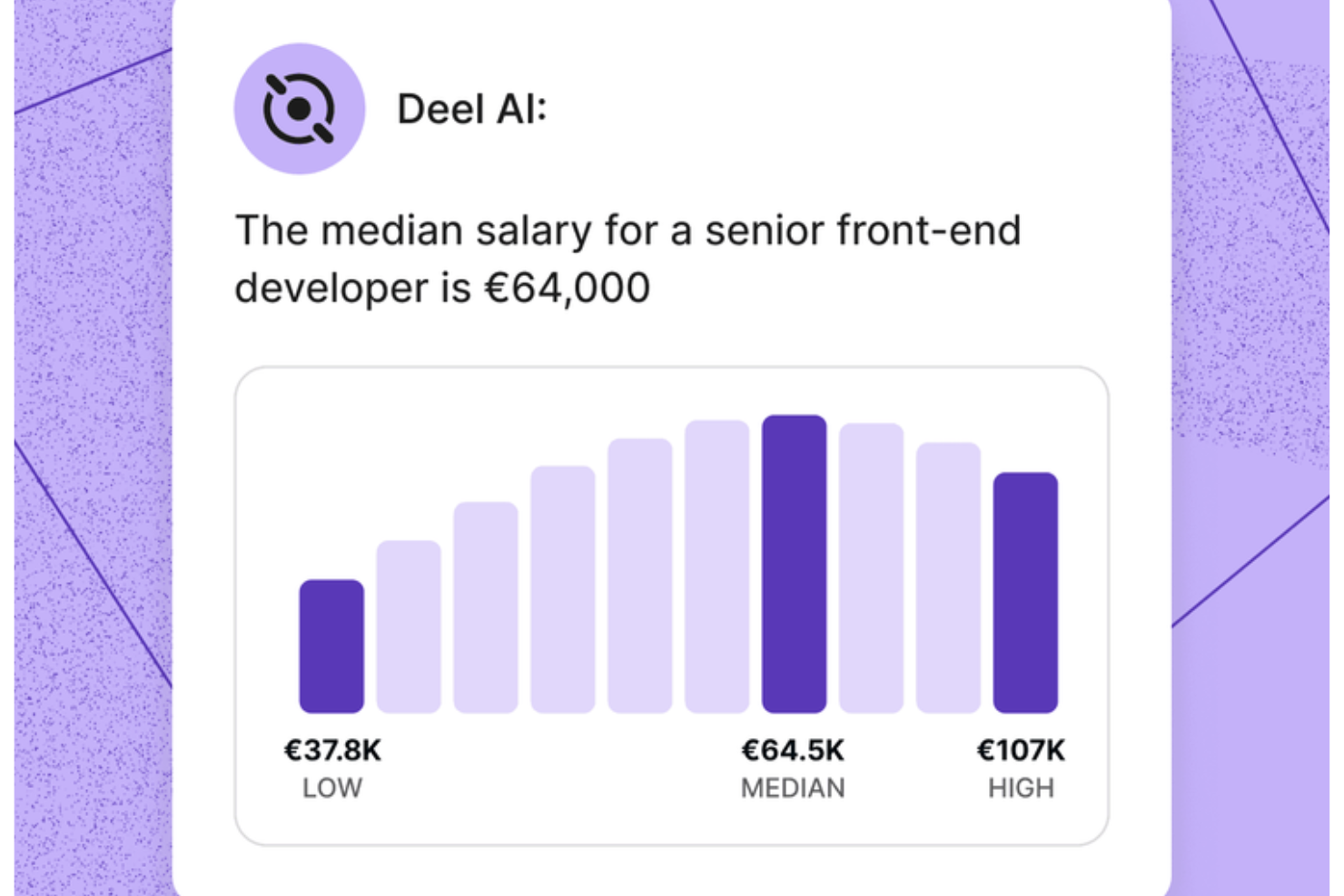
Il tuo team HR ottiene un esperto sempre disponibile con Deel AI, che offre chiarezza immediata su domande relative al personale e alla conformità globale senza rallentare i flussi di lavoro. Se gestisci un team distribuito o in rapida crescita, lo strumento ti aiuta a navigare la complessità HR combinando i tuoi dati interni con la consulenza di esperti presenti in oltre 150 paesi.
Perché ho scelto Deel
Ho scelto Deel perché mette a disposizione uno strumento di intelligenza artificiale che offre indicazioni pratiche in ambito HR e legale basate sui dati effettivi della tua forza lavoro. Lo strato contestuale di AI riconosce in quale area della piattaforma ti trovi e ti mostra riepiloghi, dettagli chiave o considerazioni sulla compliance senza dover effettuare ulteriori ricerche. Apprezzo anche il fatto che lo strumento attinga dal Knowledge Hub di Deel, verificato a livello globale, consentendoti di porre domande su buste paga, normative, policy o insight sul team e ricevere risposte immediate. Per i team che desiderano un tool AI in grado di gestire con affidabilità richieste specifiche in ambito HR e compliance globale, questo prodotto si distingue davvero.
Funzionalità principali di Deel
Oltre alla guida AI già menzionata, Deel offre altre funzionalità chiave:
- Elaborazione automatica delle buste paga: consente al tuo team di gestire le paghe in più paesi con calcoli automatici di stipendi e tasse.
- Generazione di contratti localizzati: puoi creare contratti adeguati alla normativa locale, garantendo la conformità alle leggi regionali del lavoro.
- Portali self-service per i dipendenti: i dipendenti possono accedere alle proprie informazioni sulla busta paga e gestire i propri dati personali, migliorando trasparenza e coinvolgimento.
- Onboarding di collaboratori autonomi: Deel offre workflow di onboarding personalizzabili, semplificando il processo di assunzione e garantendo la conformità alle normative locali.
Integrazioni di Deel
Deel si integra con piattaforme popolari come QuickBooks, Xero, Greenhouse, BambooHR, NetSuite, Workday, Gusto, Lever, Slack e SAP SuccessFactors.
Pros and Cons
Pros:
- Offre consulenze in ambito lavorativo per oltre 150 paesi
- Presenta insight e riepiloghi organizzativi direttamente dai dati del tuo team
- L'AI risponde a domande su talenti e forza lavoro utilizzando dati da esperti
Cons:
- Le indicazioni dell'AI potrebbero richiedere una revisione umana per scenari legali complessi
- Forte dipendenza dal Knowledge Hub proprietario per l'accuratezza
New Product Updates from Deel HR

Deel Expands Stablecoin Wallet to 80+ Countries
Deel expands its Stablecoin Wallet to 80+ countries with dollar-backed balances and optional rewards. This gives eligible contractors more ways to hold and manage earnings inside Deel. For more information, visit Deel’s official site.
 .
.
Ideale per l’identificazione dei rischi di progetto tramite AI
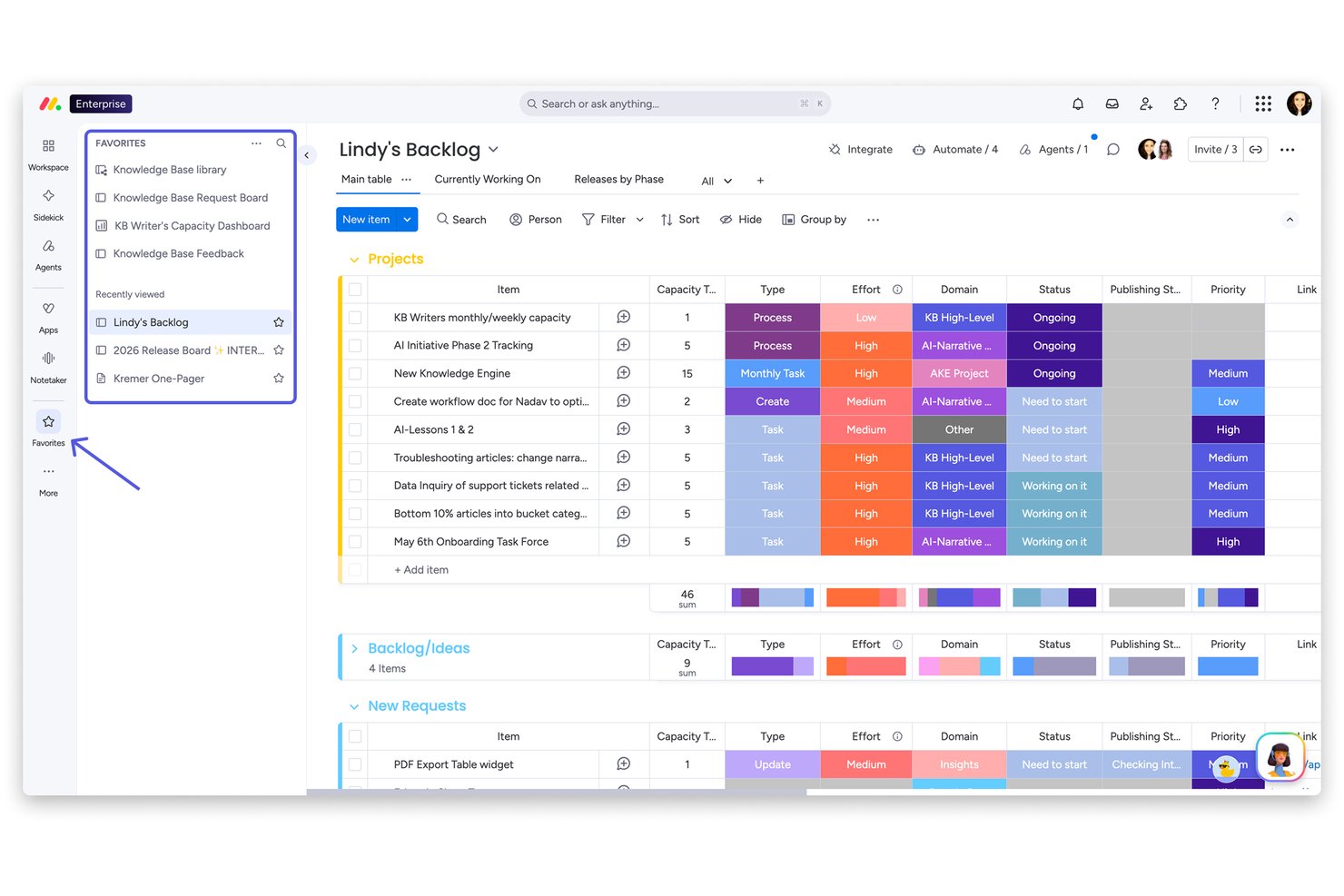
monday AI Workspace è una piattaforma di gestione del lavoro nativa per l’Intelligenza Artificiale che integra agenti AI, automazione dei flussi di lavoro e analisi predittiva dei progetti su gestione delle attività, monitoraggio dei portfolio e collaborazione di squadra.
Per chi è ideale monday AI Workspace?
È particolarmente adatta a team di medie e grandi dimensioni che gestiscono più progetti contemporaneamente e che necessitano di una visione a livello di portfolio e di un monitoraggio proattivo dei rischi.
Perché ho scelto monday AI Workspace
Ho scelto monday AI Workspace tra i migliori perché la funzione Portfolio Risk Insights fa davvero la differenza: l’AI esegue una scansione quotidiana di tutte le bacheche progetto collegate e genera una lista di rischi prioritari, ordinati per gravità. Quando emerge un rischio, posso avvisare il responsabile del progetto direttamente dalla vista e l’AI pre-compila un aggiornamento che riassume il problema con link alle attività rilevanti. La barra panoramica monitora inoltre le tendenze dei rischi su tutto il portfolio con un solo colpo d’occhio.
Funzionalità principali di monday AI Workspace
- Costruttore di flussi di lavoro AI: Crea e personalizza processi automatizzati utilizzando blocchi logici AI e semplici comandi in linguaggio naturale.
- Colonne dati alimentate dall’AI: Aggiungi colonne intelligenti alle bacheche che riassumono, analizzano o estraggono automaticamente testi dai dati di progetto.
- Assistente Sidekick AI: Ricevi risposte AI nell’app, suggerimenti per le attività e consigli di configurazione delle bacheche direttamente da un assistente conversazionale.
- Marketplace di integrazioni native: Connettiti con strumenti come Slack, HubSpot e Google Drive grazie a integrazioni preconfigurate e immediatamente utilizzabili.
Integrazioni di monday AI Workspace
monday AI Workspace offre integrazioni native con Slack, Salesforce, HubSpot, Google Drive, Zendesk, GitHub e Active Directory. Supporta anche Zapier e mette a disposizione un’API per integrazioni personalizzate.
Pros and Cons
Pros:
- L’AI segnala proattivamente i progetti a rischio
- Diversi agenti AI assistono nella gestione delle attività
- La visualizzazione portfolio mette in evidenza problemi tra progetti
Cons:
- Nessuna funzione AI specifica per analisi HR
- Mancano funzionalità AI per l’abbinamento dei talenti
New Product Updates from monday AI Workspace
monday AI Workspace Adds Human Approval Routing
monday AI Workspace adds a human-in-the-loop approval block to AI Workflows, sending approval requests and routing workflow paths based on responses. For more information, visit monday AI Workspace's official site.
Coveo
Ideale per la scoperta delle conoscenze tramite l'intelligenza artificiale
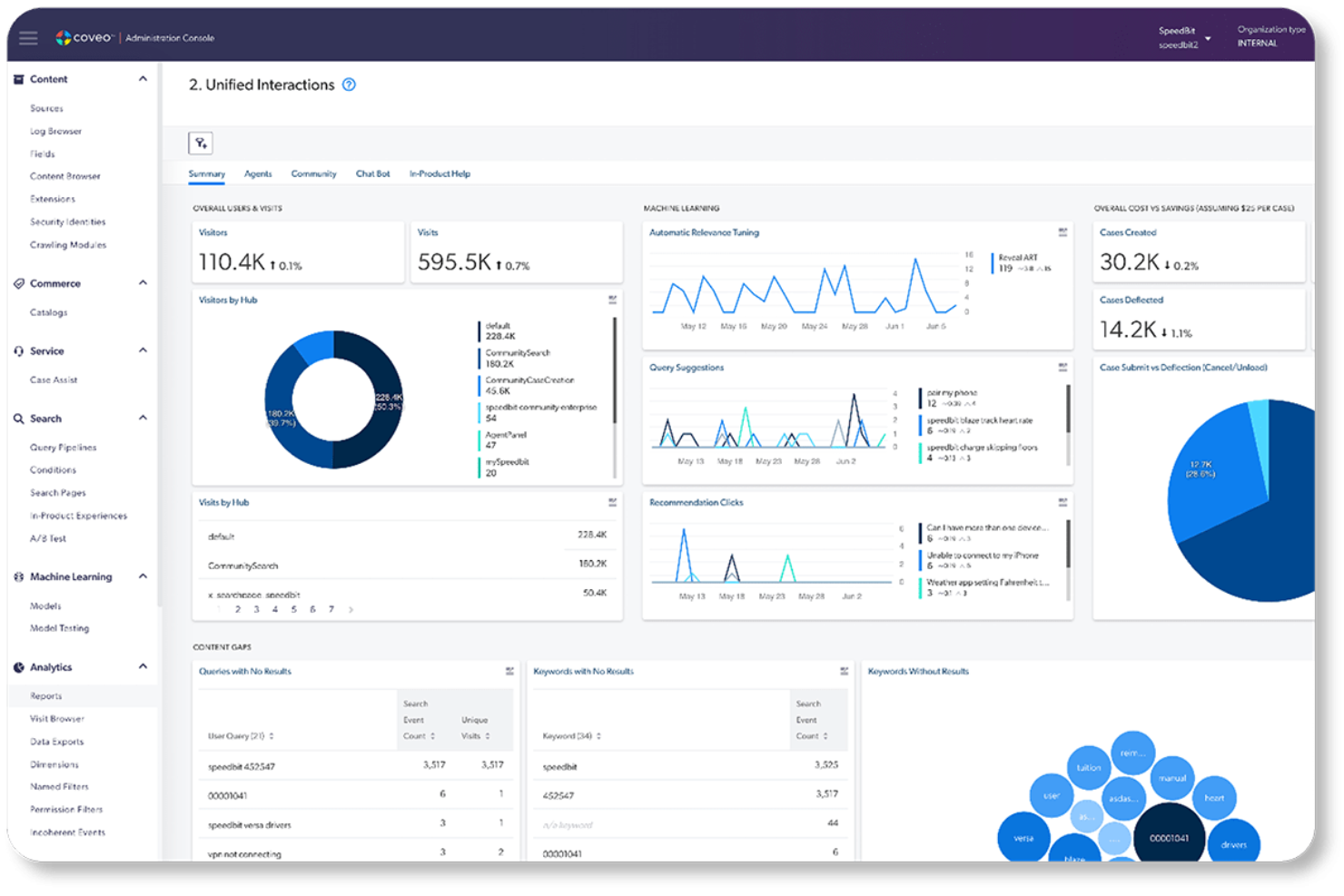
Coveo è una piattaforma aziendale di ricerca e rilevanza basata sull'intelligenza artificiale che unifica le conoscenze presenti nei sistemi aziendali, offrendo risultati di ricerca personalizzati, consigli sui contenuti e risposte generate dall'intelligenza artificiale negli ambienti di assistenza, commercio e lavoro.
Per chi è più adatto Coveo?
Coveo è particolarmente adatto alle grandi aziende di settori come l'alta tecnologia, i servizi finanziari e la sanità, che gestiscono ecosistemi di conoscenza complessi e frammentati distribuiti tra più sistemi e canali.
Perché ho scelto Coveo
Coveo è entrato nella mia rosa dei candidati per il modo in cui gestisce la scoperta delle conoscenze distribuite tra sistemi aziendali frammentati. Apprezzo in particolare la regolazione automatica della rilevanza, che apprende dal comportamento degli utenti reali per migliorare continuamente i risultati senza alcun intervento manuale. Si distingue anche l'API di recupero dei passaggi, che mostra l'estratto esatto di cui l'utente ha bisogno invece di limitarsi a indicare il documento sorgente.
Funzionalità principali di Coveo
- Indice di ricerca unificato: Centralizza i contenuti provenienti da più fonti, rendendo facilmente individuabili le conoscenze aziendali.
- Connettori aziendali preconfigurati: Si integra con sistemi come Salesforce, ServiceNow e Office 365 per offrire esperienze di ricerca fluide.
- Esperienza di navigazione dinamica: Adatta i filtri e la navigazione in base al comportamento degli utenti per rendere più intelligente la scoperta dei contenuti.
- Gestione della pipeline delle query: Consente agli amministratori di progettare, testare e ottimizzare la logica di ricerca e le strategie di classificazione attraverso un'interfaccia visiva.
Integrazioni di Coveo
Coveo offre integrazioni native con Salesforce, ServiceNow, Zendesk, Microsoft 365, Google Drive, Dropbox, SAP, Sitecore, Amazon S3 e Jira. È disponibile un'API per le integrazioni personalizzate.
Pros and Cons
Pros:
- La regolazione della rilevanza basata sull'apprendimento automatico non richiede aggiornamenti manuali
- Unifica la scoperta delle conoscenze tra sistemi aziendali frammentati
- Le risposte generate dall'intelligenza artificiale mostrano estratti precisi dei contenuti
Cons:
- La configurazione iniziale richiede un coinvolgimento significativo del reparto IT
- La configurazione della pipeline delle query può risultare complessa per gli amministratori non tecnici
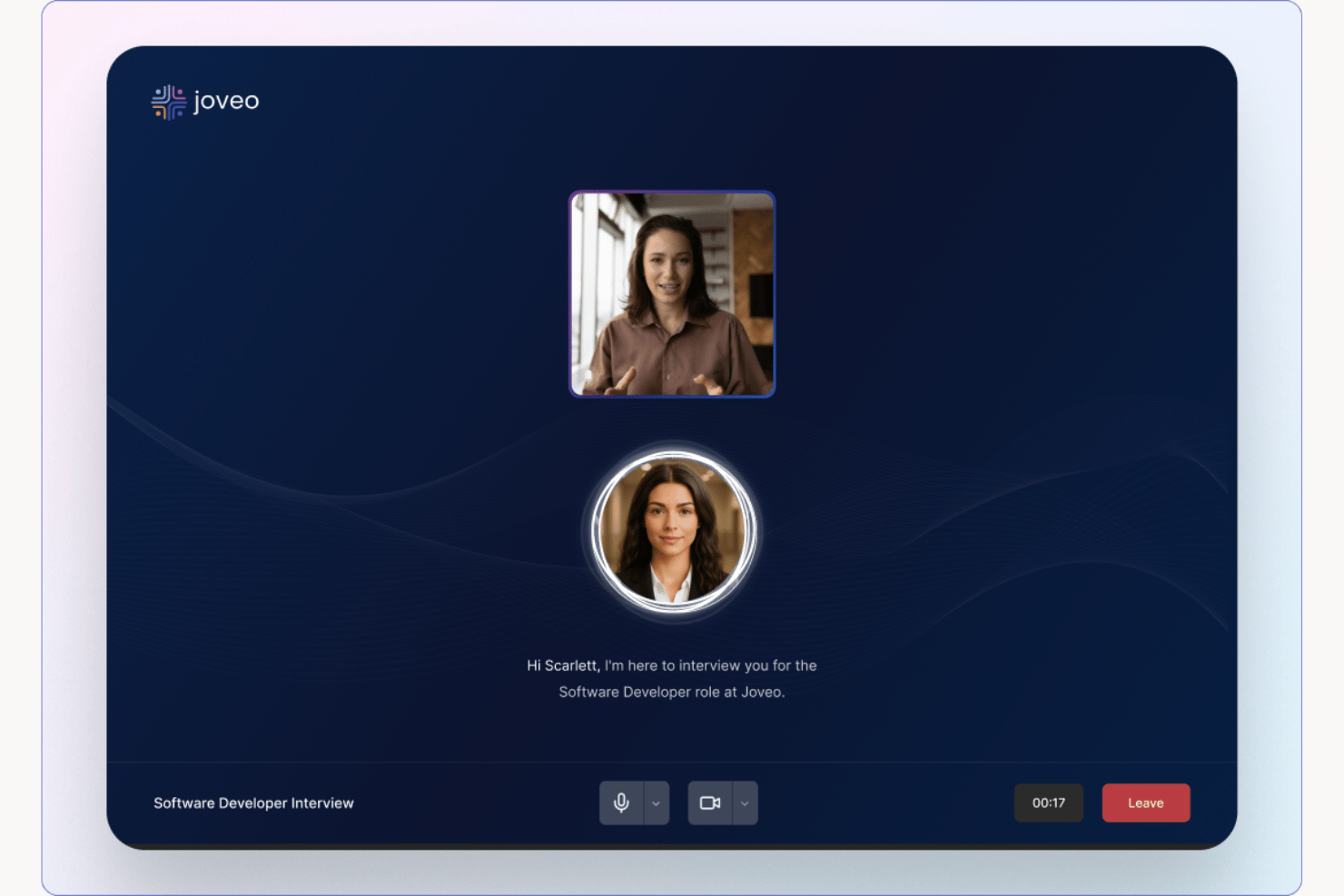
Joveo è una piattaforma di reclutamento basata sull'IA che combina pubblicità programmatica degli annunci di lavoro, siti di carriera potenziati dall'IA, screening conversazionale dei candidati, programmazione dei colloqui e analisi delle assunzioni in un unico sistema.
Per chi è più adatto Joveo?
Joveo è particolarmente indicato per i team di acquisizione talenti di medie e grandi imprese, agenzie di selezione del personale e fornitori di servizi RPO che gestiscono assunzioni ad alto volume attraverso molteplici canali.
Perché ho scelto Joveo
Joveo si guadagna un posto tra i migliori della mia lista perché copre l'intero funnel di reclutamento in un'unica piattaforma guidata dall'intelligenza artificiale, dalla pubblicazione degli annunci ai colloqui con i candidati. In particolare, apprezzo la capacità di MOJO Pro di riallocare la spesa pubblicitaria degli annunci di lavoro su centinaia di editori in tempo reale, riducendo gli sprechi di budget senza intervento manuale. L'IA conversazionale per lo screening gestisce automaticamente le domande dei candidati, il supporto alla candidatura e la programmazione dei colloqui, così il mio team non deve gestire manualmente ogni punto di contatto.
Caratteristiche principali di Joveo
- Generatore di siti di carriera IA: Crea istantaneamente pagine di carriera brandizzate e landing page utilizzando prompt generativi di IA.
- Gestione campagne di talento: Avvia e monitora campagne multicanale tramite web, email e SMS da un'unica dashboard.
- Assistente chat per l'analisi: Chatta direttamente con i dati di reclutamento per scoprire insight e tendenze delle prestazioni.
- Oltre 100 integrazioni ATS: Collegati con i principali sistemi di tracciamento dei candidati come Workday, iCIMS e Greenhouse.
Integrazioni di Joveo
Joveo offre integrazioni native con le principali piattaforme ATS tra cui Workday, Greenhouse, SmartRecruiters e iCIMS. È disponibile un'API per integrazioni personalizzate.
Pros and Cons
Pros:
- L'IA rialloca dinamicamente il budget degli annunci di lavoro in automatico
- L'intero funnel è coperto in un'unica piattaforma
- L'IA conversazionale gestisce screening e pianificazione dei colloqui
Cons:
- Le opzioni di personalizzazione dei report sono limitate
- La configurazione iniziale richiede un impegno di tempo significativo

Ideale per l’automazione delle policy di governance IA
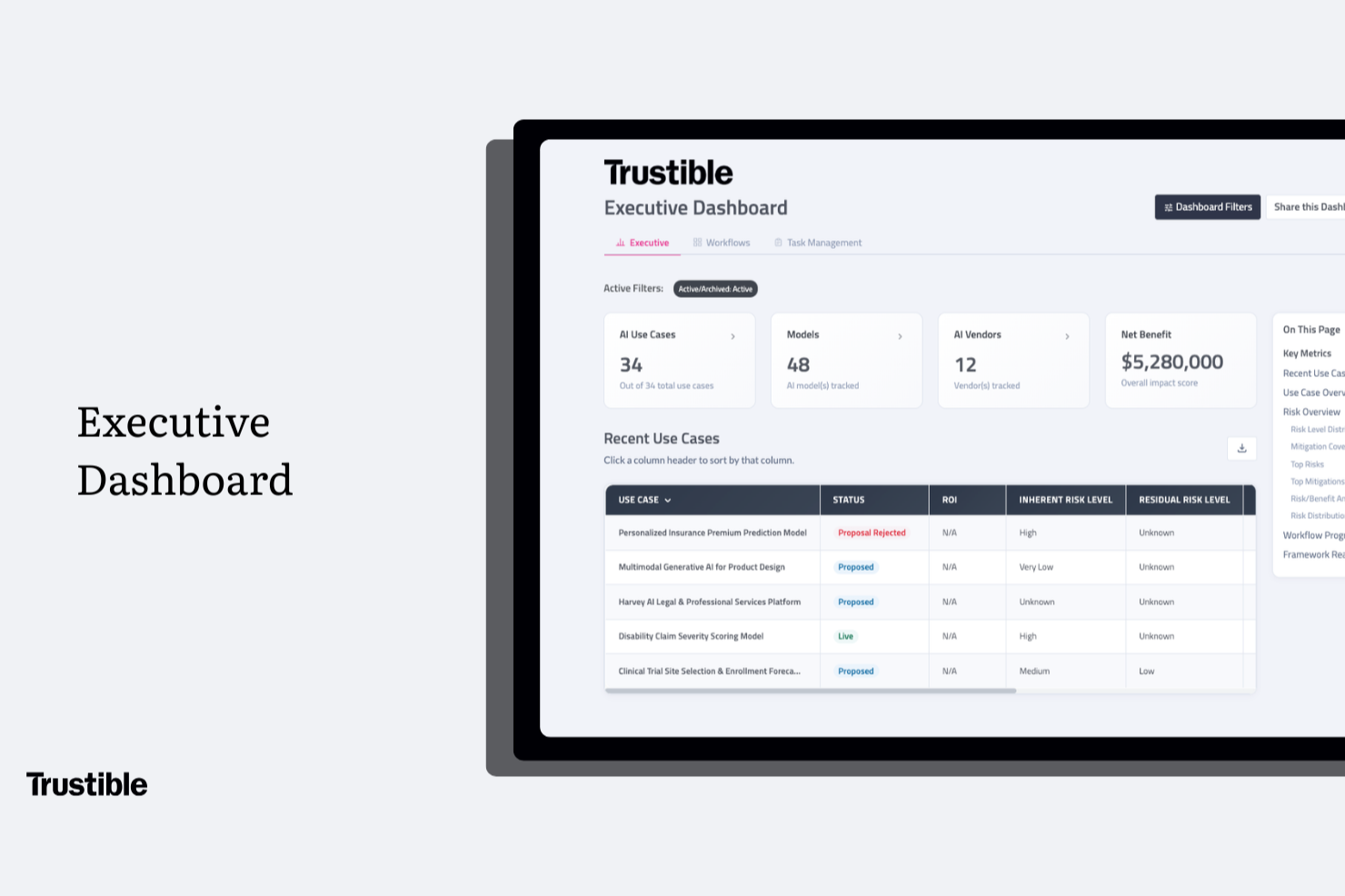
Trustible è una piattaforma appositamente progettata per la governance dell’IA che copre l’inventario dei casi d’uso, la valutazione dei rischi, le valutazioni d’impatto e la mappatura della conformità secondo framework come l’AI Act dell’UE e il NIST AI RMF.
A chi si rivolge Trustible?
Trustible è particolarmente adatto a responsabili della conformità, risk manager e responsabili della governance dell’IA in medie e grandi imprese operanti in settori regolamentati.
Perché ho scelto Trustible
Ho scelto Trustible come migliore piattaforma per l’automazione delle policy di governance dell’IA perché il suo motore di intake basato su regole valuta automaticamente ogni proposta di caso d’uso IA, la classifica in base al rischio e la indirizza al revisore più appropriato senza necessità di smistamento manuale. I casi d’uso a basso rischio possono essere approvati automaticamente in pochi minuti, mentre quelli ad alto rischio finiscono in una coda di revisione strutturata con contesto pre-caricato. Mi piace anche il fatto che le tassonomie di rischio e le librerie di mitigazione siano mantenute dagli esperti di governance interni di Trustible, così le policy alla base di queste decisioni automatizzate rimangono aggiornate al variare delle normative.
Caratteristiche principali di Trustible
- Inventario centralizzato dell’IA: Mantieni un registro unico di tutti i casi d’uso IA, modelli, agenti e fornitori in tutta l’organizzazione.
- Monitoraggio post-deployment: Programma revisioni periodiche e workflow di attestazione per monitorare i sistemi IA dopo la messa in produzione.
- Esportazione di prove pronte per audit: Genera registri di governance con marca temporale ed esporta pacchetti di conformità in PDF o Excel su richiesta.
- Dashboard di conformità per dirigenti: Visualizza punteggi di preparazione ai framework, copertura dei controlli e distribuzione del rischio su tutto il portafoglio in report pronti per il consiglio di amministrazione.
Integrazioni di Trustible
Il livello Enterprise di Trustible include integrazioni con stack IA e GRC già esistenti, ma le integrazioni native specifiche non sono chiaramente documentate sul sito del fornitore. Durante l’implementazione, il team di Trustible collega i tuoi sistemi come parte del processo di onboarding. Il supporto a Zapier e alle API non è chiaramente documentato.
Pros and Cons
Pros:
- Mappa i controlli su oltre 10 framework normativi
- I workflow agentici triagono automaticamente i casi d’uso a basso rischio
- Tassonomie dei rischi IA e delle mitigazioni curate da esperti
Cons:
- Nessuna integrazione nativa elencata pubblicamente
- Per conoscere i prezzi è necessario contattare il team commerciale

Chatbase
Il migliore per integrazioni con dati in tempo reale
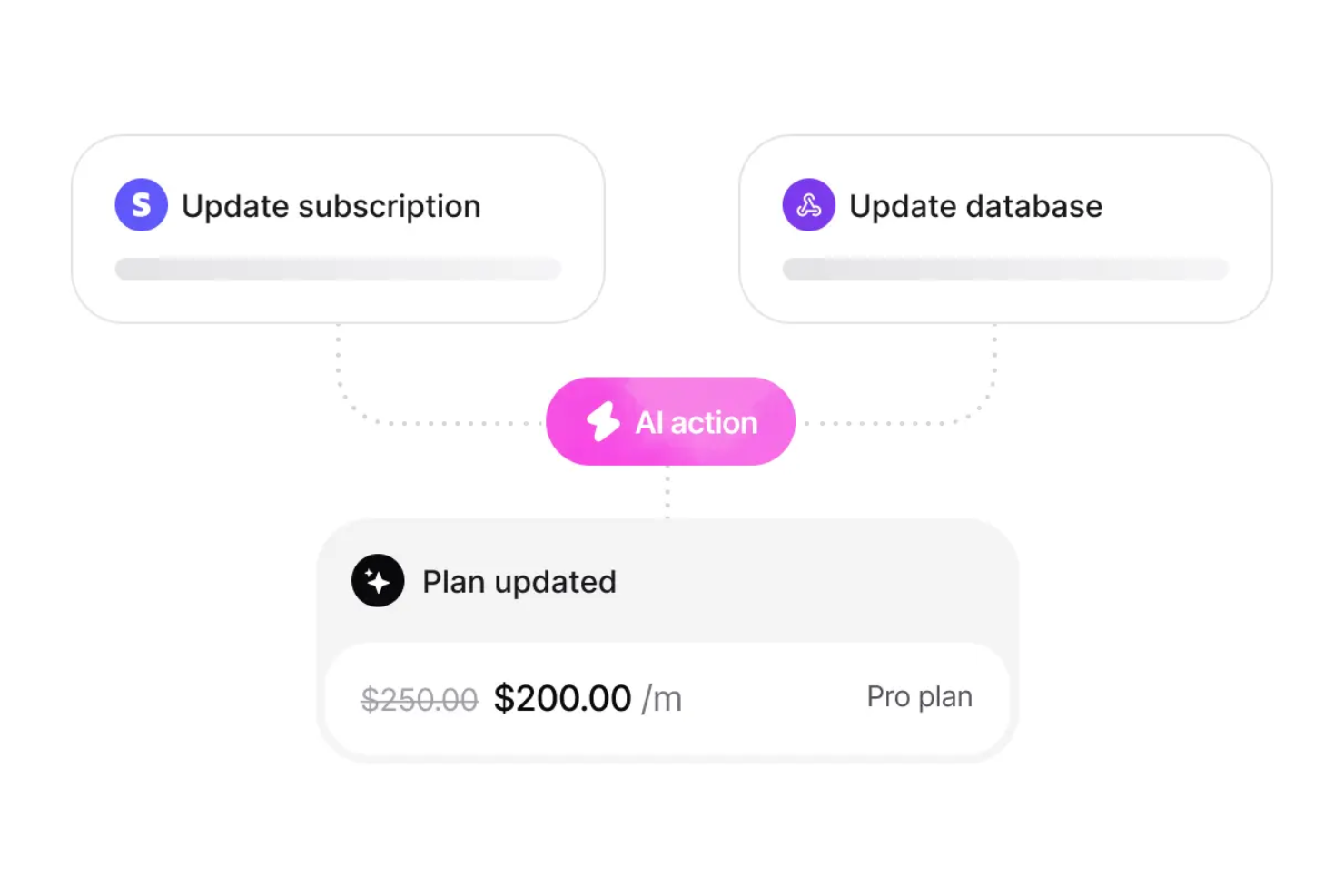
Chatbase è una piattaforma per chatbot AI che consente di creare, addestrare e distribuire chatbot personalizzati utilizzando i propri dati, con funzionalità di integrazioni in tempo reale, supporto multilingue e controlli avanzati di sicurezza.
Per chi è ideale Chatbase?
Chatbase è adatta a team e aziende che devono implementare chatbot AI utilizzando i propri dati su diversi canali e in più lingue.
Perché ho scelto Chatbase
Ho scelto Chatbase tra i migliori perché posso collegare i miei chatbot direttamente a database e API in tempo reale, permettendo loro di rispondere alle domande con informazioni sempre aggiornate. Il mio team utilizza Chatbase per sviluppare bot che prelevano dati in tempo reale dai sistemi interni, così gli utenti ricevono sempre risposte attuali. Mi piace anche la possibilità di impostare trigger e azioni personalizzate basate su cambiamenti nei dati live, una caratteristica che non ho trovato nella maggior parte delle altre piattaforme di chatbot AI.
Funzionalità principali di Chatbase
- Costruttore di chatbot no-code: Crea e personalizza chatbot tramite un'interfaccia drag-and-drop senza scrivere codice.
- Supporto multilingue: Implementa chatbot in grado di interagire in più lingue per un pubblico globale.
- Caricamento di basi di conoscenza personalizzate: Importa documenti, PDF e contenuti web per addestrare il tuo chatbot su dati specifici.
- Dashboard avanzata di analisi: Monitora le prestazioni del chatbot e le interazioni degli utenti con strumenti di analisi e reportistica dettagliata.
Integrazioni Chatbase
Chatbase offre integrazioni native con Zendesk, Notion, Slack, Stripe, Salesforce, Cal.com, Calendly, WhatsApp, Messenger, Make e Zapier. È disponibile un'API per integrazioni personalizzate.
Pros and Cons
Pros:
- Offre funzionalità di conformità GDPR e SOC 2
- Caricamento di basi di conoscenza personalizzate per l’addestramento
- Costruttore visuale di chatbot no-code incluso
Cons:
- A volte si verificano ritardi nella sincronizzazione dei dati in tempo reale
- Nessun supporto integrato per assistenti vocali
Tidio
Ideale per risposte non preimpostate, simili a quelle umane, basate sull'IA
Tidio è una piattaforma di assistenza clienti versatile, potenziata dall'intelligenza artificiale, progettata per migliorare l'interazione del tuo team con i clienti. È pensata per le piccole e medie imprese in settori come eCommerce e finanza, aiutando ad automatizzare le interazioni con i clienti e a semplificare i processi di supporto. Integrando chatbot basati sull'IA e funzionalità di live chat, Tidio consente alla tua azienda di gestire efficacemente le richieste dei clienti, ridurre i compiti di supporto di basso livello e migliorare la soddisfazione complessiva del cliente.
Perché ho scelto Tidio
Ho scelto Tidio per la sua capacità unica di automatizzare le interazioni dell'assistenza clienti tramite il suo Agente Lyro AI. Questa funzionalità offre risposte umane e non preimpostate alle domande più comuni dei clienti, contribuendo così a ridurre il carico di lavoro del tuo team di supporto. Inoltre, strumenti di IA come Flows permettono l'automazione di compiti strutturati, come la qualificazione dei lead e i promemoria di abbandono del carrello, rafforzando ulteriormente le attività di coinvolgimento del cliente. Queste caratteristiche rendono Tidio uno strumento prezioso per le aziende che desiderano ottimizzare il proprio servizio clienti con soluzioni basate sull'IA.
Funzionalità principali di Tidio
Oltre alle sue capacità di automazione basate sull'IA, Tidio offre varie altre funzionalità utili per il tuo team:
- Live Chat: Interagisci in tempo reale con i clienti per offrire assistenza immediata e migliorare l'esperienza utente.
- Sistema di ticketing: Gestisci e dai priorità alle richieste dei clienti in modo efficiente attraverso un processo di supporto strutturato.
- Strumenti di automazione proattiva: Automatizza i messaggi di follow-up e le interazioni per mantenere il coinvolgimento e l'informazione del tuo pubblico.
- Analisi e monitoraggio: Ottieni informazioni sulle interazioni con i clienti e sulle prestazioni dell'assistenza per prendere decisioni basate sui dati.
Integrazioni di Tidio
Le integrazioni includono Salesforce, Zendesk, Shopify, WhatsApp, WordPress, Instagram, Messenger, Zapier e Intercom.
Pros and Cons
Pros:
- Il chatbot IA gestisce automaticamente le richieste di routine
- Supporta oltre 120 integrazioni, inclusi Shopify e HubSpot
- La casella di posta multicanale centralizza chat, email e social
Cons:
- Sui piani base si applicano limiti all'uso dell'IA
- Il livello gratuito è poco efficace a causa delle restrizioni sulle funzionalità

Ideale per l’assistenza sui documenti d’ufficio
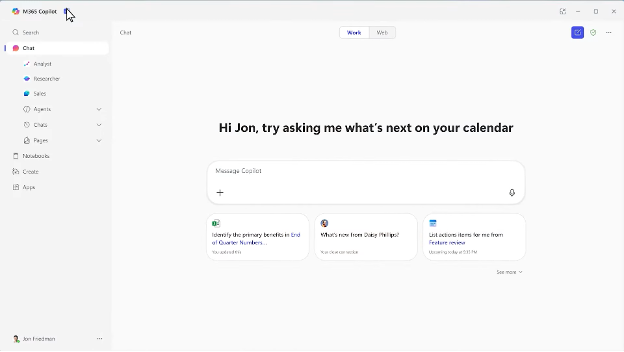
Microsoft Copilot è un assistente AI integrato in Microsoft 365, progettato per aiutare gli utenti nella creazione, modifica e analisi dei dati nei documenti. Supporta professionisti e team nelle attività quotidiane d’ufficio.
Perché ho scelto Microsoft Copilot: È pensato per l’assistenza sui documenti d’ufficio, offrendo funzionalità come suggerimenti intelligenti di testo e approfondimenti automatici sui dati. Queste funzionalità AI ti aiutano a redigere documenti e analizzare fogli di calcolo più rapidamente. L’integrazione di Copilot con le app di Microsoft 365 lo rende la scelta ideale per le aziende che già utilizzano questi strumenti. Puoi affidarti a lui per ottimizzare il flusso di lavoro e ridurre le operazioni manuali.
Caratteristiche principali & integrazioni:
Funzionalità includono collaborazione in tempo reale, controllo ortografico avanzato e automazione delle attività. Puoi lavorare ai documenti insieme al tuo team contemporaneamente, e lo strumento ti aiuta anche ad automatizzare le attività ripetitive.
Integrazioni includono Microsoft Word, Microsoft Excel, Microsoft PowerPoint, Microsoft Outlook, Microsoft Teams, OneDrive, SharePoint, Dynamics 365, Azure e Power BI.
Pros and Cons
Pros:
- Integrazione totale con Microsoft 365
- Automatizza le attività ripetitive in ufficio
- Fornisce suggerimenti intelligenti di testo
Cons:
- Limitato all’ecosistema Microsoft
- Può offrire intuizioni e sfumature limitate per compiti complessi

Ideale per integrare l’IA nei flussi di lavoro creativi

Per le aziende che desiderano migliorare i propri flussi di lavoro creativi, Adobe Firefly rappresenta una soluzione interessante. Progettato per ottimizzare la produzione di contenuti, Firefly è particolarmente attraente per le imprese che puntano a scalare la produttività creativa senza rinunciare alla qualità o alla conformità al brand. Sfruttando l'intelligenza artificiale generativa, affronta le sfide di ideazione, modifica e produzione in grande quantità, rendendolo uno strumento prezioso per i team di marketing, risorse umane e vendite.
Perché ho scelto Adobe Firefly
Ho scelto Adobe Firefly per la sua capacità unica di integrare l'intelligenza artificiale generativa direttamente nei flussi di lavoro creativi già esistenti, in particolare tramite strumenti come Adobe Photoshop e Illustrator. Questa integrazione consente al tuo team di accelerare la produzione di contenuti automatizzando i compiti di ideazione e modifica in quantità, mantenendo al contempo la coerenza del brand grazie a modelli di IA personalizzati. L'integrazione fluida di Firefly con l'ecosistema Adobe garantisce che il tuo team creativo possa concentrarsi su attività strategiche, migliorando sia la produttività che la creatività.
Caratteristiche principali di Adobe Firefly
Oltre alla sua integrazione con l'ecosistema Adobe, Firefly offre diverse funzionalità chiave:
- Produzione di contenuti: Semplifica l'ideazione e la modifica in grandi quantità, garantendo contenuti di alta qualità e conformi al brand.
- Modelli personalizzati: Permette alle aziende di addestrare l'IA con le proprie risorse di brand, mantenendo un'identità visiva coerente.
- Controlli amministrativi: Fornisce strumenti per la gestione degli accessi degli utenti e per garantire la conformità alle politiche del brand.
- Licenze in abbonamento: Offre opzioni di licenza flessibili che includono l'indennizzo sulla proprietà intellettuale e pieni diritti sui contenuti generati.
Integrazioni di Adobe Firefly
Le integrazioni includono Adobe Photoshop, Adobe Illustrator, Adobe Express, Adobe Creative Cloud, Adobe Experience Manager, Adobe Stock, Adobe Acrobat, Adobe Premiere Pro, Adobe After Effects e Adobe InDesign.
Pros and Cons
Pros:
- Montaggio video generativo basato su prompt
- Strumenti di controllo del movimento della fotocamera
- Sostituzione dello sfondo tramite IA
Cons:
- Output video limitati a cinque secondi
- Abbonamento necessario per funzionalità complete
HireVue
Ideale per l’IA nei colloqui video
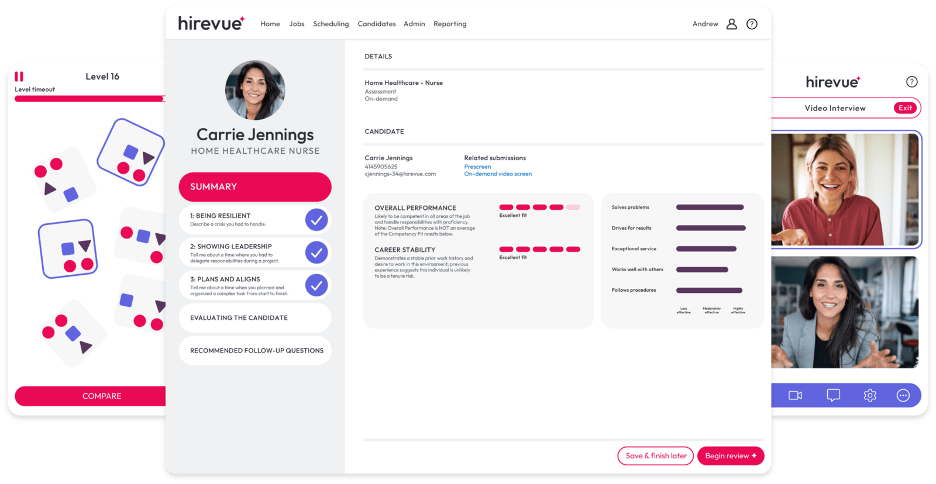
Hirevue è una piattaforma di colloqui digitali che sfrutta l'IA per semplificare il processo di selezione per recruiter e professionisti delle risorse umane. Si concentra su colloqui video e valutazioni, fornendo preziose informazioni sull'idoneità dei candidati.
Perché ho scelto Hirevue: Si specializza nell'IA per i colloqui video, offrendo funzionalità come valutazioni dei candidati basate sull'intelligenza artificiale e programmazione automatica dei colloqui. La piattaforma analizza le risposte dei candidati per identificare tratti e competenze chiave. La capacità di Hirevue di automatizzare e migliorare il processo di colloquio la distingue dai metodi tradizionali.
Funzionalità e integrazioni principali:
Funzionalità includono modelli di colloquio personalizzabili, strumenti di valutazione dei candidati e analisi in tempo reale. Puoi adattare i colloqui alle esigenze della tua azienda. Gli strumenti di valutazione forniscono indicazioni sulla performance dei candidati, aiutandoti a prendere decisioni di assunzione più consapevoli.
Integrazioni includono Workday, Greenhouse, iCIMS, SAP SuccessFactors, Oracle Taleo, ADP, Lever, SmartRecruiters, BambooHR e Jobvite.
Pros and Cons
Pros:
- Supporta il recruiting globale con valutazioni video multilingua
- Fornisce approfondimenti sui candidati grazie all'IA
- Automatizza la programmazione dei colloqui
Cons:
- Costoso per le organizzazioni di piccole dimensioni
- Personalizzazione limitata per settori specifici
Altri strumenti di IA
Ecco alcune altre opzioni di strumenti di IA che non sono state incluse nel mio elenco, ma che vale comunque la pena prendere in considerazione:
- Eightfold AI
Ideale per l'AI di talent matching
- Paradox
Ideale per chatbot di reclutamento
- Degreed
Ideale per percorsi di apprendimento guidati dall'IA
- Leapsome
Ideale per la gestione delle prestazioni tramite IA
- Trupeer
Ideale per la generazione di script tramite IA
- Carly AI
Ideale per trasformare la comunicazione in eventi


Come Valuto gli Strumenti di Intelligenza Artificiale
Ogni strumento presente in questa lista deve fornire una vera intelligenza artificiale in grado di fare davvero la differenza—che si tratti di individuare i rischi di abbandono prima che diventino dimissioni o di ridurre i tempi di assunzione grazie al matching intelligente dei candidati. Suddivido la mia valutazione nella funzionalità di base che ogni strumento deve possedere per poterne fare parte e nei fattori che distinguono le soluzioni buone da quelle eccellenti.
Funzionalità di Base (Requisiti Minimi per questa Lista)
Quando seleziono gli strumenti per la mia lista, assegno a ciascuno un punteggio da 0 (non offre la funzionalità) a 5 (eccelle in quest'area) per ogni funzionalità fondamentale riportata sotto. Poi, calcolo il punteggio totale dello strumento come percentuale. Ogni strumento deve raggiungere un punteggio totale minimo del 65% per essere preso in considerazione.
- Matching dei Talenti Basato su IA: Cerco lo scoring dei candidati guidato da ML che vada oltre il semplice confronto di parole chiave—gli strumenti devono inferire le competenze dal contesto e classificare i candidati in base ai criteri del ruolo.
- Analisi Predittiva delle Risorse Umane: Lo strumento deve prevedere reali outcome HR come il rischio di abbandono o i fabbisogni di personale, non solo mostrare cruscotti storici con l’etichetta "IA".
- Generazione di Contenuti con IA Generativa: Verifico se lo strumento genera contenuti HR utilizzabili (descrizioni di lavoro, lettere di offerta, bozze di policy) e permette di modificarne tono e contesto.
- Assistente Conversazionale: Un buon assistente IA gestisce domande come "Quanti giorni di ferie mi restano?" recuperando i dati in tempo reale, non semplicemente rimandando a una pagina FAQ statica.
- Automazione Intelligente dei Flussi di Lavoro: Valuto se le automazioni si adattano in base agli input—come l’assegnazione dei task di onboarding per dipartimento e ruolo—invece di seguire solo rigide regole if/then.
- Rilevamento dei Bias e Controlli di Equità: Gli strumenti devono segnalare linguaggio non inclusivo negli annunci o schemi di valutazione distorti e offrire log verificabili che i team HR possano effettivamente rivedere.
Dopo aver selezionato gli strumenti che rispettano questi criteri, considero ciò che distingue ciascuna piattaforma.
Fattori di Differenziazione (Cosa Distingue le Soluzioni)
Ecco come confronto e metto a fuoco i diversi fornitori:
Caratteristiche Distintive
La spiegabilità dei risultati offerti dall’IA conta molto qui—quando uno strumento segnala qualcuno come rischio di abbandono o scarta un candidato, i team HR devono comprenderne il motivo. Cerco anche motori di intelligence delle competenze che mappino le capacità delle persone raccomandando percorsi di mobilità interna, evitando nuove assunzioni dove già esiste la persona giusta. Un'ulteriore differenziazione arriva dall’analisi del sentiment, soprattutto per strumenti che analizzano sondaggi flash e feedback aperti per individuare cali di engagement prima che emergano nei dati di turn-over.
Oltre le Caratteristiche
La compliance e una governance responsabile dell’IA sono criteri fondamentali della mia valutazione—verifico se i fornitori documentano audit sui bias e rispettano regolamenti come il Regolamento AI UE o la Local Law 144 di NYC. Anche le integrazioni con HRIS sono importanti, perché un’IA che non si collega ai sistemi già in uso come Workday, BambooHR o ADP crea silos di dati che minano ogni insight prodotto. Infine valuto la postura sulla privacy, in particolare se i dati dei dipendenti vengono usati per addestrare foundation model e se esistono opzioni di residenza dei dati per regione.
Come scegliere gli strumenti di IA
È facile perdersi in lunghi elenchi di funzionalità e strutture tariffarie complesse. Per aiutarti a rimanere concentrato mentre affronti il tuo specifico processo di selezione delle applicazioni, ecco un elenco di fattori da tenere a mente:
| Fattore | Cosa considerare |
| Scalabilità | Lo strumento può crescere insieme alle tue esigenze? Cerca soluzioni in grado di gestire una maggiore quantità di dati e utenti senza cali di prestazioni. Verifica le opzioni di scalabilità. |
| Integrazioni | Funziona con i sistemi che già utilizzi? Assicurati che sia compatibile con gli strumenti attuali per evitare interruzioni e massimizzare l'efficienza. |
| Personalizzazione | Puoi adattarlo ai tuoi processi? Cerca flessibilità nelle impostazioni e nelle configurazioni, così da adattarlo ai tuoi flussi di lavoro specifici. |
| Semplicità d'uso | È facile da usare per la tua squadra? Testa l'interfaccia e la navigazione. Una curva di apprendimento ripida può ostacolarne l'adozione. |
| Implementazione e avviamento | Quanto rapidamente puoi iniziare? Valuta le risorse e il supporto disponibili per una transizione senza problemi, come la formazione e l'assistenza nella configurazione. |
| Costo | Rientra nel tuo budget? Confronta i piani tariffari con il tuo budget e considera il costo totale, incluse eventuali spese nascoste. |
| Misure di sicurezza | Sono presenti misure per la protezione dei dati? Verifica la crittografia, i controlli degli accessi e la conformità alle normative sui dati per proteggere le informazioni sensibili. |
| Disponibilità del supporto | Avrai un'assistenza affidabile quando ne avrai bisogno? Cerca opzioni di supporto 24 ore su 24, 7 giorni su 7, e valuta la qualità del servizio clienti offerto. |
Cosa sono gli strumenti di IA?
Gli strumenti di IA sono applicazioni software che utilizzano l'intelligenza artificiale, tra cui apprendimento automatico, elaborazione del linguaggio naturale, analisi predittiva e automazione, per eseguire attività che normalmente richiederebbero l'intervento umano. Aiutano le squadre ad analizzare i dati, generare contenuti, prendere decisioni e completare più rapidamente e accuratamente le attività di routine.
A differenza dei software tradizionali, che seguono regole fisse, gli strumenti di IA apprendono dai dati. Ciò consente loro di adattarsi nel tempo, identificare schemi e migliorare la qualità dei consigli o dei risultati che forniscono. Sono utilizzati da un'ampia gamma di professionisti nei settori delle risorse umane, del marketing, dell'ingegneria, delle operazioni, dell'assistenza clienti e della dirigenza, perché permettono di ottenere guadagni in termini di efficienza e di far emergere informazioni che sarebbe difficile individuare manualmente.
I tipi più comuni di strumenti di IA includono:
- Strumenti di IA generativa (ad es. ChatGPT, Claude) che creano testi, immagini o video
- Assistenti IA (ad es. Copilot, Gemini) che aiutano nella scrittura, nella ricerca e nelle attività d'ufficio
- Strumenti di analisi e di individuazione di informazioni utili che rilevano schemi in grandi insiemi di dati
- Strumenti di IA per il reclutamento e le risorse umane che valutano i candidati e supportano la gestione delle prestazioni
- Strumenti di automazione e gestione dei flussi di lavoro che gestiscono attività ripetitive o attivano azioni tra diversi sistemi
Nel complesso, questi strumenti aiutano le organizzazioni a semplificare le operazioni, personalizzare le esperienze, migliorare il processo decisionale e ampliare attività che tradizionalmente richiedevano molto tempo e impegno manuale. Poiché l'IA è sempre più integrata nei software di uso quotidiano, questi strumenti sono considerati sempre più componenti essenziali delle moderne dotazioni tecnologiche per il lavoro.
Caratteristiche degli strumenti di IA
Quando scegli gli strumenti di IA, presta attenzione alle seguenti caratteristiche principali:
- Elaborazione del linguaggio naturale: consente agli strumenti di comprendere e rispondere al linguaggio umano, rendendo le conversazioni con un bot IA o uno strumento di scrittura più intuitive e utili.
- Analisi predittiva: utilizza dati e apprendimento automatico per prevedere le tendenze, migliorare la pianificazione e supportare il processo decisionale nei contenuti, nel marketing e nelle operazioni.
- Funzionalità di apprendimento automatico: consentono all'IA di migliorare precisione e prestazioni man mano che elabora più dati, che si tratti di testo, audio o immagini.
- Gestione automatizzata delle attività: l'IA può gestire operazioni come la trascrizione, trascrivere appunti o generare riepiloghi da podcast e registrazioni di riunioni con l'IA, aiutando i team a risparmiare tempo.
- Visualizzazione dei dati: crea report visivi e grafici che aiutano gli utenti a interpretare più rapidamente i risultati senza dover analizzare dati grezzi o documenti di testo.
- Analisi del sentimento: aiuta a identificare il tono emotivo nei feedback dei clienti, nelle recensioni o nei contenuti social, consentendo ai team di reagire in modo rapido e appropriato.
- Modelli di IA personalizzabili: offrono alle aziende la flessibilità di adattare le funzionalità a usi specifici, ad esempio quando sono necessari editing di immagini di alta qualità, sintesi vocale o generazione automatizzata di contenuti.
- Informazioni in tempo reale: forniscono un feedback immediato durante attività come la trascrizione dal vivo, il monitoraggio delle prestazioni o i riepiloghi generati dagli assistenti per le riunioni.
- Supporto per le integrazioni: garantisce che gli strumenti funzionino bene con piattaforme come Google AI, Google Gemini, Adobe o altri servizi già utilizzati dal team per gestire i flussi di lavoro o pubblicare pagine web.
- Misure di sicurezza: proteggono le informazioni private e i dati delle riunioni attraverso la crittografia, il controllo degli accessi e gli standard di conformità.
- Funzionalità creative: alcuni strumenti di IA includono funzioni aggiuntive come generatori di immagini IA, editing video o la possibilità di generare immagini utilizzando piattaforme, utili per i team che producono contenuti visivi oltre al loro lavoro basato sul testo.
Vantaggi degli strumenti di IA
L'implementazione degli strumenti di IA offre diversi vantaggi al tuo team e alla tua azienda. Eccone alcuni che puoi aspettarti:
- Maggiore efficienza: una potente IA può automatizzare le attività ripetitive, aiutando il tuo team a risparmiare tempo e a concentrarsi su attività di maggior valore. Gli strumenti per la produttività e le funzionalità di gestione delle attività rendono i flussi di lavoro quotidiani più rapidi ed efficaci.
- Migliore processo decisionale: i sistemi di IA basati su dati in tempo reale e analisi predittive aiutano a prendere decisioni più intelligenti e accurate. Che tu stia valutando campagne o ottimizzando le operazioni, l'IA offre informazioni più chiare.
- Comunicazione ottimizzata: la scrittura tramite IA e la tecnologia del linguaggio naturale assistono nel supporto clienti, nella creazione di contenuti e nelle risposte automatizzate. Ciò rende la comunicazione più rapida e coerente sui social media, nelle interfacce di chat e nella messaggistica interna.
- Esperienze personalizzate: la generazione di contenuti tramite IA e i modelli personalizzabili consentono di adattare messaggi, offerte e percorsi degli utenti in base alle preferenze individuali. Questo porta a interazioni più pertinenti e a un maggiore coinvolgimento.
- Migliore comprensione dei dati: gli strumenti di visualizzazione trasformano informazioni complesse in report e dashboard chiari, consentendo ai team di interpretare prestazioni, tendenze e dati dei motori di ricerca senza dover effettuare analisi approfondite.
- Riduzione dei pregiudizi: i processi decisionali basati sull'IA possono contribuire a ridurre la soggettività del giudizio umano in attività come la selezione del personale, il servizio clienti o la moderazione dei contenuti, promuovendo risultati più equi.
- Risparmio sui costi: l'automazione dei flussi di lavoro, della produzione di contenuti e dei processi di routine contribuisce a ridurre i costi del lavoro e a migliorare la qualità dei risultati. I più recenti progressi dell'IA, come l'editing delle immagini e i generatori di video con IA, riducono inoltre la necessità di strumenti esterni o di affidarsi a servizi creativi esternalizzati.
Costi e prezzi degli strumenti di IA
La scelta degli strumenti di IA richiede la comprensione dei vari modelli di prezzo e dei piani disponibili. I costi variano in base alle funzionalità, alle dimensioni del team, ai componenti aggiuntivi e ad altri fattori. La tabella seguente riassume i piani più comuni, i relativi prezzi medi e le funzionalità tipicamente incluse nelle soluzioni basate su strumenti di IA:
Tabella di confronto dei piani per gli strumenti di IA
| Tipo di piano | Prezzo medio | Funzionalità comuni |
| Piano gratuito | $0 | Automazione di base, analisi dei dati limitata e integrazioni essenziali. |
| Piano personale | $5-$300/utente/mese | Analisi avanzate, impostazioni personalizzabili e supporto prioritario. |
| Piano aziendale | $30-$600/utente/mese | Report completi, strumenti per la collaborazione tra team e opzioni di sicurezza avanzate. |
| Piano per grandi aziende | Prezzo personalizzato | Personalizzazione completa, gestione dedicata dell'account e sicurezza di livello aziendale. |
Domande frequenti sugli strumenti di IA
Ecco alcune risposte alle domande comuni sugli strumenti di IA:
Quali problemi di compatibilità possono avere gli strumenti di IA con il mio stack tecnologico?
Quando introduci strumenti di IA nel tuo flusso di lavoro, è importante verificare che funzionino con i sistemi e le automazioni attuali. Alcune app e piattaforme di IA si collegano facilmente tramite API, ma i software meno recenti o le configurazioni personalizzate possono richiedere un maggiore impegno tecnico. Prima di adottare un prodotto di IA, esamina i requisiti di integrazione, i formati dei dati e verifica se lo strumento supporta connessioni senza codice o richiede il supporto di uno sviluppatore. Questo è particolarmente importante per i team che utilizzano agenti di IA, LLM o modelli linguistici di grandi dimensioni su più piattaforme.
Gli strumenti di IA possono gestire i dati sensibili in modo sicuro?
Sì, molte piattaforme di IA includono funzionalità di sicurezza per proteggere le informazioni sensibili, tra cui crittografia, controlli degli accessi e standard di conformità come il GDPR. Quando valuti soluzioni di IA generativa o chatbot di IA, richiedi la documentazione sulla conservazione dei dati, sulle informative sulla privacy e sulle certificazioni. Verifica sempre che qualsiasi piano gratuito di IA o servizio basato sul cloud soddisfi le esigenze di sicurezza della tua organizzazione prima della distribuzione.
Cosa dovrei considerare quando valuto il ROI degli strumenti di IA?
Per misurare il ROI, considera il valore ottenuto automatizzando il lavoro ripetitivo e migliorando la produttività. Monitora in che modo l’IA riduce le attività manuali, accelera la scrittura o i flussi di lavoro dei contenuti e supporta aree come la SEO, la ricerca e il processo decisionale. Considera sia il risparmio di tempo sia la qualità dei risultati. I casi di studio e i feedback dei clienti possono aiutarti a capire come team simili utilizzano gli strumenti di IA per migliorare le prestazioni e ridurre i costi operativi.
Quali sono le preoccupazioni o i limiti comuni degli strumenti di IA?
Gli strumenti di IA sono potenti, ma presentano anche dei limiti che gli acquirenti dovrebbero comprendere prima di adottarli. Le difficoltà principali includono problemi di accuratezza, poiché l’IA può generare risultati errati o incompleti presentandoli comunque con sicurezza. Molti strumenti sollevano inoltre considerazioni relative alla privacy e alla sicurezza dei dati, soprattutto quando richiedono l’accesso a file interni, messaggi o informazioni sui clienti. Le organizzazioni devono verificare come vengono archiviati, elaborati e protetti i dati.
Potresti inoltre riscontrare lacune nell’integrazione, distorsioni nei risultati e la necessità di una supervisione continua, poiché i team devono esaminare regolarmente il lavoro generato dall’IA per verificarne la qualità e l’equità. Inoltre, gli strumenti di IA possono introdurre costi nascosti attraverso prezzi basati sull’utilizzo o componenti aggiuntivi. Comprendere questi limiti ti aiuta a valutare dove l’IA si inserisce nel tuo flusso di lavoro e quali misure di sicurezza potresti dover adottare.