

I 10 migliori strumenti di onboarding basati sull’IA recensiti nel 2026

Selezione dei migliori strumenti di onboarding con IA


Trovare lo strumento di onboarding giusto può essere una sfida per professionisti delle risorse umane come te. Devi gestire molteplici attività e hai bisogno di una soluzione che semplifichi il processo di onboarding. Gli strumenti di onboarding con IA possono aiutarti automatizzando le attività ripetitive e migliorando il coinvolgimento dei nuovi assunti.
Nella mia esperienza di test e valutazione dei software, ho visto come gli strumenti di IA possano trasformare l'esperienza di onboarding. Fanno risparmiare tempo, riducono gli errori e offrono un'esperienza coerente ai nuovi dipendenti.
In questo articolo condividerò le mie migliori scelte tra gli strumenti di onboarding con IA. Troverai una valutazione imparziale e approfondita che mette in evidenza le caratteristiche distintive di ogni strumento. Rendiamo il tuo processo di onboarding più fluido ed efficiente.
Perché fidarsi delle nostre recensioni sui software
Il nostro team testa e recensisce software dal 2012. In quanto esperti HR noi stessi, sappiamo quanto sia difficile — e importante — scegliere il software giusto.
Per questa guida, abbiamo valutato gli strumenti attraverso test pratici e ricerche indipendenti, assegnando un punteggio agli strumenti in base ai nostri criteri di selezione. Ci basiamo inoltre sulle competenze di leader di pensiero del settore e di professionisti HR attivi.
Le nostre recensioni riflettono il nostro giudizio editoriale umano, non un discorso di vendita.
Revisori esperti:
Tabella comparativa degli strumenti di onboarding con IA
Questa tabella comparativa riassume i dettagli dei prezzi delle mie migliori selezioni di strumenti di onboarding con IA:
| Tool | Best For | Trial Info | Price | ||
|---|---|---|---|---|---|
| 1 | Ideale per benefici globali in oltre 100 paesi | Dimostrazione gratuita disponibile | A partire da $5/dipendente/mese | Website | |
| 2 | Ideale per la gestione dei documenti di onboarding | Demo gratuita disponibile | A partire da $8/utente/mese | Website | |
| 3 | Migliore con assistenza clienti interna 24/7 | Demo gratuita + prova gratuita disponibili | Prezzi su richiesta | Website | |
| 4 | Ideale per piani di onboarding individualizzati | Prova gratuita di 30 giorni + demo gratuita disponibile | Da $3,97/utente/mese | Website | |
| 5 | Ideale per la creazione di corsi con AI | Demo gratuita disponibile | Prezzo su richiesta | Website | |
| 6 | Ideale per un onboarding focalizzato sul coinvolgimento | Demo gratuita disponibile | Prezzi su richiesta | Website | |
| 7 | Ideale per guide interattive | Prova gratuita di 7 giorni + piano gratuito + demo gratuita disponibile | Da $18/creatore/mese (fatturato annualmente) | Website | |
| 8 | Ideale per analisi sull'onboarding degli utenti | Demo gratuita disponibile | Prezzo su richiesta | Website | |
| 9 | Ideale per l'automazione dei processi | Prova gratuita di 14 giorni + demo gratuita disponibile | Prezzi su richiesta | Website | |
| 10 | Ideale per l'integrazione tra HR e IT | Demo gratuita disponibile | Prezzo su richiesta | Website |

Recensioni dei migliori strumenti di onboarding con IA
Di seguito trovi i miei riepiloghi dettagliati dei migliori strumenti di onboarding con IA inclusi nella mia selezione. Le mie recensioni offrono uno sguardo approfondito alle caratteristiche principali, ai pro \u0026 contro, alle integrazioni e ai casi d’uso ideali di ogni strumento, per aiutarti a trovare quello più adatto a te.

Deel HR
Ideale per benefici globali in oltre 100 paesi

Deel ti aiuta a guidare i nuovi assunti attraverso la documentazione e la conformità con un'assistenza all'onboarding basata su AI integrata nella sua piattaforma HR globale, offrendo ai team HR e ai responsabili delle risorse umane un modo per ridurre le attività ripetitive e rispondere alle domande su politiche, buste paga e normative sul lavoro locali senza dover cercare tra i manuali.
Perché ho scelto Deel
Ho scelto Deel perché il suo assistente AI integrato aiuta il tuo team a gestire le domande sull'onboarding e i controlli di conformità direttamente dove lavori, senza dover passare da uno strumento o documento all’altro. Il modo in cui Deel AI utilizza i dati reali della tua forza lavoro e la sua conoscenza delle leggi sul lavoro locali significa che tu e il tuo team potete ottenere risposte chiare su contratti, buste paga e fasi dell'onboarding ogni volta che ne avete bisogno. Apprezzo anche che sia accessibile direttamente ai lavoratori, così durante l'onboarding le domande più comuni—come su ferie o politiche aziendali—trovano risposta senza distogliere il personale HR dalle attività strategiche.
Caratteristiche principali di Deel
Oltre al suo assistente AI per onboarding e conformità, Deel offre una suite di funzionalità che supporta i tuoi flussi di lavoro per l'onboarding e la gestione HR:
- Creazione automatica di offerte e contratti: Deel può generare contratti conformi e documenti di onboarding sulla base delle normative locali dei paesi in cui assumi.
- Automazione dei flussi di lavoro e del ciclo di vita: Puoi attivare fasi dell'onboarding come invio della documentazione, creazione account e configurazione delle attrezzature in base alla data di assunzione o ad altri eventi.
- Gestione delle spese: Semplifica il processo di tracciamento e rimborso delle spese dei dipendenti a livello globale.
- Strumenti di gestione dei talenti: Include funzionalità come riunioni, formazione e sondaggi per aumentare il coinvolgimento e la produttività degli impiegati.
Integrazioni di Deel
Le integrazioni includono QuickBooks, Xero, BambooHR, NetSuite, Greenhouse, Workday, Lever, Gusto, ADP e SAP SuccessFactors.
Pros and Cons
Pros:
- L'AI risponde alle domande HR 24/7 sulla base dei tuoi dati
- Supporta le linee guida di conformità locali in molti paesi
- Accessibile ai lavoratori per informazioni standard sull'onboarding
Cons:
- L'AI potrebbe non sostituire ovunque il parere legale di uno specialista
- Forte dipendenza dall'Hub delle Conoscenze proprietario per l'accuratezza
New Product Updates from Deel HR

Deel Expands Stablecoin Wallet to 80+ Countries
Deel expands its Stablecoin Wallet to 80+ countries with dollar-backed balances and optional rewards. This gives eligible contractors more ways to hold and manage earnings inside Deel. For more information, visit Deel’s official site.
 .
.
Ideale per la gestione dei documenti di onboarding
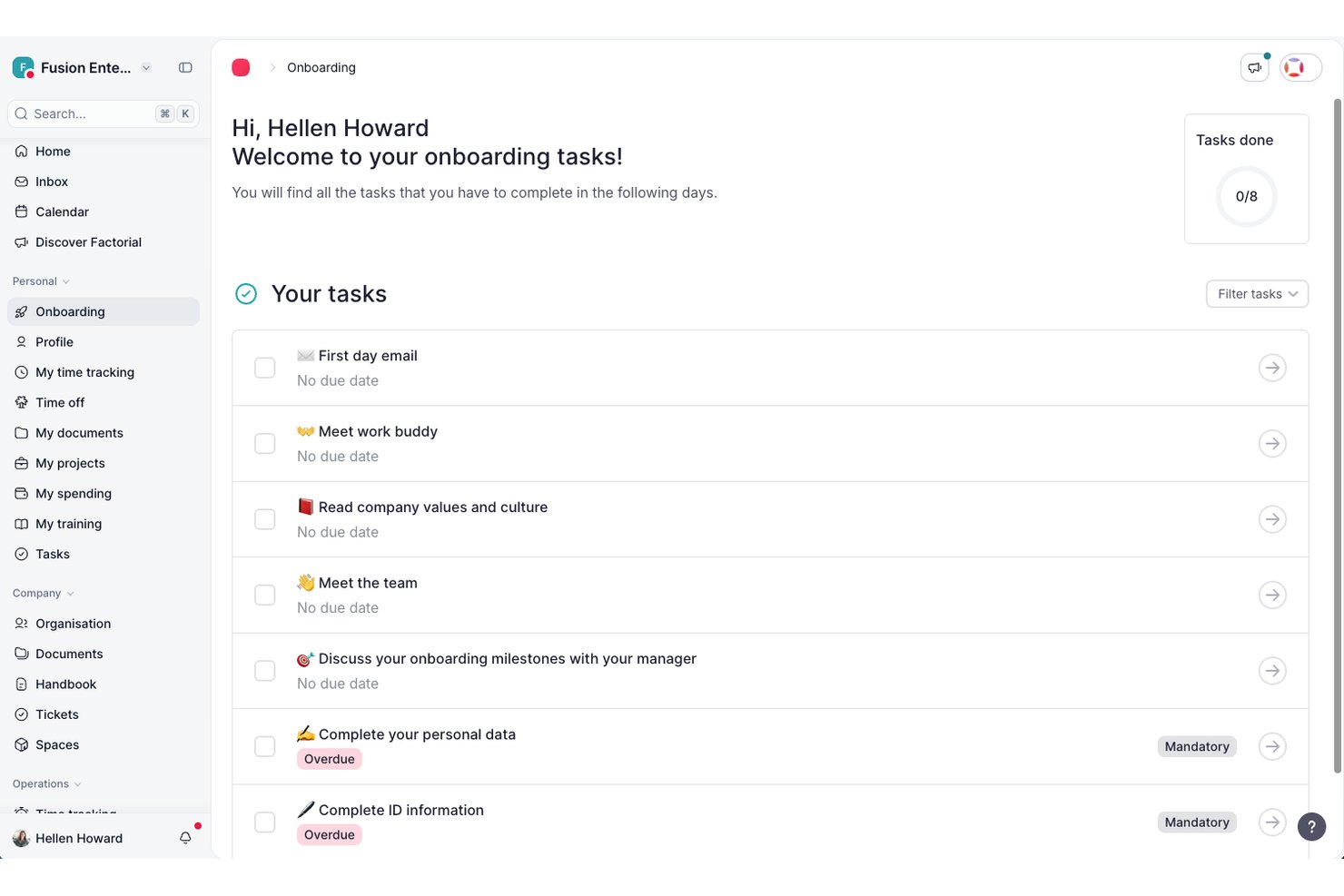
Factorial è una piattaforma HR che ti aiuta ad automatizzare le attività di onboarding, gestire la documentazione, assegnare flussi di lavoro e monitorare i progressi dei nuovi assunti utilizzando strumenti di IA integrati.
Per chi è più adatto Factorial?
Factorial è una soluzione ideale per le aziende di medie dimensioni che desiderano un'unica piattaforma HR per gestire l'onboarding insieme a buste paga, monitoraggio delle ore e gestione del personale.
Perché ho scelto Factorial
Factorial è una delle mie scelte principali perché apprezzo il modo in cui centralizza tutti i documenti di onboarding in un unico luogo, eliminando il continuo scambio di messaggi necessario per sollecitare le firme e gestire file sparsi. I nuovi assunti possono ricevere, esaminare e firmare elettronicamente contratti e documenti relativi alle policy prima del loro primo giorno. Apprezzo anche il fatto che Factorial permetta di creare modelli di documenti riutilizzabili per diversi ruoli, così il mio team non deve ricreare ogni volta la stessa documentazione quando inseriamo una nuova persona.
Funzionalità principali di Factorial
- Checklist di onboarding: Crea checklist specifiche per ruolo che assegnano automaticamente le attività ai nuovi assunti nella data di inizio.
- Portale self-service per i dipendenti: I nuovi assunti possono completare il proprio profilo, caricare i documenti richiesti e accedere autonomamente alle informazioni aziendali.
- Flussi di lavoro di onboarding personalizzati: Crea flussi di onboarding in più fasi che attivano azioni tra i team HR, IT e dirigenziali.
- Pubblicazione di offerte di lavoro assistita dall'IA: Genera e pubblica descrizioni delle posizioni lavorative utilizzando gli strumenti di IA integrati direttamente dalla piattaforma.
Integrazioni di Factorial
Factorial offre integrazioni native con Slack, Google Workspace, Microsoft 365, BambooHR, Personio e LinkedIn, oltre a fornire un'API per integrazioni personalizzate.
Pros and Cons
Pros:
- Supporta flussi di onboarding per reparto o ruolo
- Si integra con Slack, Google Workspace e BambooHR
- Modelli personalizzati di attività di onboarding per ruoli diversi
Cons:
- Opzioni limitate per la personalizzazione dei report avanzati
- Ritardi occasionali negli aggiornamenti dell'automazione dei flussi di lavoro

Absorb
Migliore con assistenza clienti interna 24/7
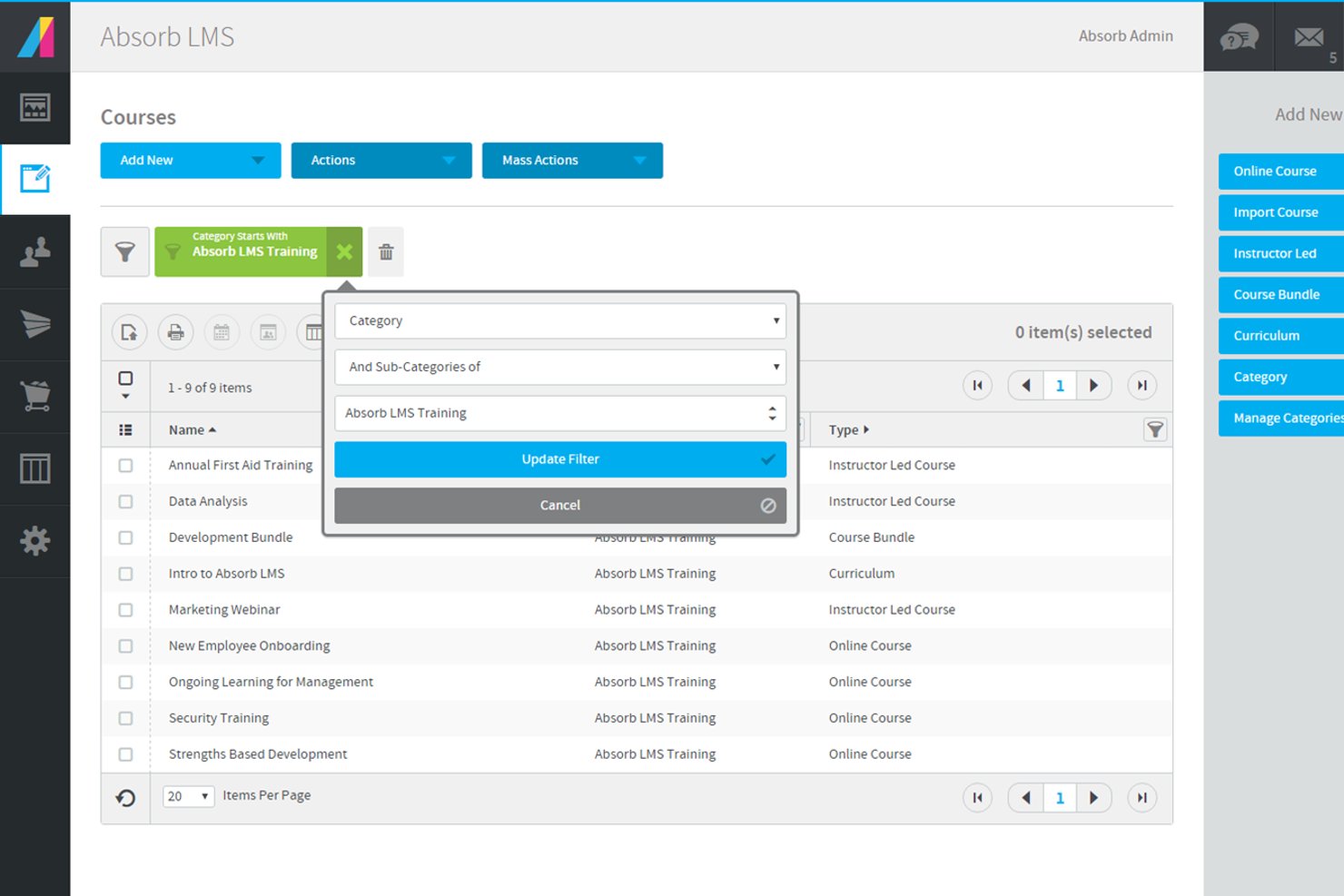
Absorb è un sistema di gestione dell'apprendimento (LMS) potenziato dall'intelligenza artificiale, progettato per supportare l'onboarding e la formazione dei dipendenti. Include la creazione di corsi assistita dall'IA, percorsi di apprendimento strutturati e integrazioni con sistemi HR e aziendali per semplificare l'erogazione dell'onboarding.
Per chi è ideale Absorb?
Absorb è indicato per i team HR e i responsabili della formazione in aziende di medie e grandi dimensioni che necessitano di un onboarding e una formazione scalabili e guidati dall'IA.
Perché ho scelto Absorb
Ho scelto Absorb perché il supporto clienti interno disponibile 24/7 può fare una grande differenza durante l'onboarding di dipendenti in diversi fusi orari. Il mio team può ricevere assistenza per la configurazione dei corsi o la risoluzione dei problemi in qualsiasi momento, anche fuori orario. Apprezzo inoltre che il supporto sia gestito dal team interno di Absorb invece che da operatori esterni. Questo significa che il mio team riceve indicazioni da specialisti che conoscono direttamente la configurazione della piattaforma e i flussi di lavoro dell'onboarding.
Caratteristiche principali di Absorb
- Generatore di corsi IA: Produci contenuti per l'onboarding utilizzando prompt e modelli assistiti dall'IA.
- Percorsi di apprendimento automatizzati: Assegna la formazione in base a ruolo, dipartimento o località.
- Portale personalizzato per studenti: Personalizza il branding e le dashboard per diversi gruppi di utenti.
- Integrazioni con sistemi HRIS: Sincronizza i dati dei dipendenti per automatizzare la creazione degli utenti.
Integrazioni Absorb
Absorb offre integrazioni native con ADP, Workday, Salesforce e altri sistemi aziendali. È disponibile un'API per integrazioni personalizzate.
Pros and Cons
Pros:
- Assistenza clienti interna 24/7 disponibile
- Integrazioni native con ADP, Workday, Salesforce
- Percorsi di apprendimento automatizzati per i nuovi assunti
Cons:
- Analisi avanzate limitate per il progresso dell'onboarding
- Le opzioni di personalizzazione del branding richiedono piani di livello superiore
New Product Updates from Absorb
Absorb Aura Adds Claude and ChatGPT Connections
Absorb Aura now connects to Claude or ChatGPT via MCP, enabling users to ask questions about their learning and the LMS directly inside the AI tool after a simple setup. For more information, visit Absorb's official site.
 .
.
Ideale per piani di onboarding individualizzati

iSpring LMS offre una piattaforma dinamica per le aziende che desiderano migliorare i processi di onboarding grazie a funzionalità AI. Si rivolge alle organizzazioni che intendono semplificare l'integrazione e la formazione dei dipendenti tramite piani di onboarding personalizzati e flussi di lavoro automatizzati. Affrontando problematiche come la qualità costante della formazione e la conservazione delle conoscenze, iSpring LMS aiuta a gestire in modo efficiente la produttività dei nuovi assunti e la crescita organizzativa.
Perché ho scelto iSpring LMS
Ho scelto iSpring LMS per la sua capacità di trasformare l'esperienza di onboarding grazie a funzionalità come piani di onboarding individualizzati e una gestione automatizzata della formazione. Il sistema intelligente di reinserimento garantisce che gli obblighi formativi e i programmi vengano rispettati senza intervento manuale, facendo risparmiare tempo prezioso al tuo team. Inoltre, la sua integrazione con sistemi CRM come Salesforce consente un allineamento fluido dei dati dei discenti, migliorando il processo di onboarding.
Funzionalità chiave di iSpring LMS
Oltre alle sue notevoli capacità di onboarding, iSpring LMS offre altre funzionalità preziose per il tuo team:
- Videoconferenze: Integra piattaforme come Zoom e Microsoft Teams per sessioni di formazione dal vivo e monitoraggio delle presenze.
- Integrazione HRIS: Sincronizza dati dei dipendenti e assegnazioni formative con i sistemi HR, garantendo una gestione fluida dei profili utente e delle conclusioni dei corsi.
- eCommerce: Automatizza l'iscrizione ai corsi tramite piattaforme come Shopify, consentendo la vendita online dei corsi.
- Librerie di contenuti: Accedi a contenuti eLearning pronti all'uso da piattaforme come Udemy e Go1 per arricchire rapidamente l'offerta formativa.
Integrazioni di iSpring LMS
Le integrazioni includono Salesforce, Zoom, Microsoft Teams, Google Meet, Microsoft Outlook, Shopify, Tilda, Udemy, Go1 e LinkedIn Learning.
Pros and Cons
Pros:
- Percorsi di onboarding basati sul ruolo
- Reinserimento automatico per conformità
- Knowledge base integrata
Cons:
- Personalizzazione avanzata limitata
- La profondità dei report può variare
New Product Updates from iSpring LMS

iSpring LMS Adds Multiple Observations to OJT Sessions
iSpring LMS now lets managers log multiple observations within one OJT session, grouping visits and auto-generating summary stats like averages, criterion results, and comparisons. For more information, visit iSpring LMS's official site.

SkyPrep
Ideale per la creazione di corsi con AI

SkyPrep aiuta le aziende a migliorare l'onboarding con strumenti di formazione basati sull'intelligenza artificiale che riducono il tempo di inserimento dei nuovi assunti in settori come tecnologia e sanità. La sua funzione di Generative AI trasforma materiali già esistenti, come manuali, politiche aziendali o documenti interni, in corsi strutturati e interattivi in pochi minuti, creando layout, generando contenuti visivi e realizzando blocchi modulari di apprendimento. Rimani sempre in controllo per personalizzare e distribuire la formazione, facendo di SkyPrep una scelta pratica per i team che vogliono modernizzare e scalare l'onboarding.
Perché ho scelto SkyPrep
Ho scelto SkyPrep perché le sue funzionalità basate sull'AI supportano direttamente l'onboarding su larga scala, mantenendo però il controllo sull'esperienza di apprendimento. Il generatore di valutazioni AI consente di creare valutazioni specifiche per ruolo, così i nuovi assunti vengono valutati in base agli obiettivi di apprendimento pertinenti. Apprezzo anche il fatto che le iscrizioni automatiche assegnino corsi di onboarding per dipartimento o ruolo, riducendo così la configurazione manuale e permettendo di concentrarsi su una strategia di onboarding di più alto livello invece che sull'amministrazione.
Funzionalità principali di SkyPrep
Oltre alle funzionalità potenziate dall'intelligenza artificiale, SkyPrep offre diverse altre caratteristiche che migliorano le sue capacità di onboarding:
- Flessibilità dei contenuti: Puoi creare corsi utilizzando diversi formati, inclusi documenti e video, offrendo un'esperienza di apprendimento dinamica.
- Approvazioni digitali: Questa funzione garantisce la conformità, raccogliendo firme elettroniche sicure per la presa visione delle policy.
- Percorsi di apprendimento: Percorsi formativi strutturati guidano i nuovi assunti durante il processo di onboarding, assicurando che nessun passaggio venga saltato.
- Dashboard gestionali: Offrono visibilità sui progressi dei dipendenti, aiutando i manager a individuare dove serve supporto.
Integrazioni di SkyPrep
Le integrazioni includono ADP, BambooHR, Paycor, Workday, G Suite, Okta, Salesforce, Microsoft Teams, Slack e Zoom. È disponibile un'API per integrazioni personalizzate.
Pros and Cons
Pros:
- Il generatore di valutazioni AI fa risparmiare tempo
- La generazione di contenuti AI incrementa il coinvolgimento
- La gamification aumenta la partecipazione degli utenti
Cons:
- La profondità dei report è limitata per l'analisi dei dati
- Alcune integrazioni richiedono configurazione manuale

Ideale per un onboarding focalizzato sul coinvolgimento

Enboarder è una piattaforma di onboarding basata sull'intelligenza artificiale progettata per i team HR al fine di migliorare il coinvolgimento dei dipendenti e semplificare i processi di inserimento. Offre percorsi di onboarding personalizzati e gestione della conformità, concentrandosi sul rafforzamento delle connessioni tra i dipendenti e sull'esperienza complessiva.
Perché ho scelto Enboarder: Il punto di forza di Enboarder risiede nella sua capacità di creare percorsi di onboarding personalizzati, favorendo il coinvolgimento fin dal primo giorno. Utilizza l'intelligenza artificiale per fornire approfondimenti in tempo reale tramite dashboard, permettendo di monitorare e migliorare il successo dell'onboarding.
La piattaforma gestisce in modo efficiente la conformità, riducendo il carico amministrativo sui team HR. Enboarder si integra inoltre facilmente con i sistemi HR esistenti, rendendolo una scelta idonea per un onboarding focalizzato sul coinvolgimento.
Funzionalità principali & integrazioni:
Funzionalità includono percorsi di onboarding personalizzati, gestione della conformità e approfondimenti in tempo reale tramite dashboard. La piattaforma rafforza le connessioni tra i dipendenti facilitando interazioni significative. Supporta anche i processi di offboarding per raccogliere conoscenze essenziali e restituire le attrezzature.
Integrazioni includono Microsoft Teams, Workday, BambooHR, ADP, SuccessFactors e altri ancora.
Pros and Cons
Pros:
- Percorsi di onboarding guidati dall'IA
- Supporta i processi di offboarding
- Approfondimenti in tempo reale tramite dashboard
Cons:
- Richiede integrazione con sistemi HR
- Opzioni di personalizzazione limitate

Guidde
Ideale per guide interattive

Guidde è una piattaforma di onboarding interattiva progettata per creare esperienze di apprendimento coinvolgenti per i nuovi dipendenti. Serve team HR e manager fornendo strumenti per sviluppare guide e tutorial interattivi che migliorano il processo di integrazione.
Perché ho scelto Guidde: Guidde si concentra sulla creazione di guide interattive che rendono l'onboarding coinvolgente e informativo. Offre funzionalità come tutorial passo dopo passo e walkthrough interattivi per aiutare i nuovi assunti a imparare in modo efficiente.
Lo strumento permette di personalizzare facilmente i contenuti, assicurandosi che siano allineati alle esigenze specifiche della tua azienda. Nella mia esperienza, l'approccio interattivo di Guidde aiuta il tuo team a offrire un'esperienza di onboarding più dinamica che aumenta la fidelizzazione dei dipendenti.
Caratteristiche principali e integrazioni:
Caratteristiche includono tutorial passo dopo passo, walkthrough interattivi e creazione di contenuti personalizzabili. La piattaforma supporta l'integrazione multimediale, permettendo di migliorare le guide con video e immagini. Offre inoltre analisi per monitorare il coinvolgimento degli utenti e l'efficacia delle guide.
Integrazioni includono Slack, Microsoft Teams, Zoom, Google Workspace e altri.
Pros and Cons
Pros:
- Creazione di guide interattive
- Supporta l'integrazione multimediale
- Monitora il coinvolgimento degli utenti
Cons:
- Configurazione iniziale complessa
- Personalizzazione limitata in alcune aree
Whatfix
Ideale per analisi sull'onboarding degli utenti

Whatfix è una piattaforma di digital adoption progettata per migliorare l'onboarding degli utenti e la formazione attraverso guide interattive e analisi. È rivolta principalmente alle aziende che vogliono aumentare l'adozione del software e la produttività dei dipendenti offrendo supporto e guida direttamente nell'applicazione.
Perché ho scelto Whatfix: Whatfix offre analisi dettagliate che permettono di comprendere come gli utenti interagiscono con il software, rendendolo uno strumento prezioso per ottimizzare i processi di onboarding. Fornisce walkthrough e tooltip integrati per guidare gli utenti, riducendo la curva di apprendimento.
Il software offre anche formazione guidata all'interno dell'app che supporta l'esperienza dei nuovi assunti sugli strumenti principali, migliorando l'adozione del software e l'esperienza dei dipendenti.
Caratteristiche e integrazioni principali:
Caratteristiche includono walkthrough, dashboard dei dati, analisi predittiva e personalizzazione per supportare un onboarding efficace. La piattaforma supporta la creazione di contenuti per materiali formativi e consente di personalizzare l'interfaccia utente. Offre inoltre feedback in tempo reale per aiutarti ad adattare le guide secondo necessità.
Integrazioni includono Salesforce, Workday, ServiceNow, Microsoft Dynamics 365 e SAP SuccessFactors.
Pros and Cons
Pros:
- Analisi dettagliate sugli utenti
- Funzionalità di guida in-app
- Feedback in tempo reale
Cons:
- Il piano standard non prevede integrazioni
- Prezzi poco trasparenti

Ideale per l'automazione dei processi

Process Street è uno strumento di gestione dei flussi di lavoro progettato per aiutare i team ad automatizzare compiti ripetitivi e gestire processi ricorrenti. È pensato per le aziende che desiderano migliorare l'efficienza creando e gestendo flussi di lavoro e checklist dettagliate.
Perché ho scelto Process Street: Process Street semplifica l'automazione dei processi, rendendolo ideale per i team che vogliono ridurre il lavoro manuale. Mette a disposizione un'interfaccia intuitiva per creare checklist e flussi di lavoro, garantendo coerenza nell'esecuzione dei compiti. La piattaforma permette ai team HR di ottimizzare i processi ricorrenti riducendo la necessità di una supervisione manuale dispendiosa in termini di tempo e offre logica condizionale per personalizzare i flussi di lavoro in base a criteri specifici. Secondo la mia esperienza, la capacità di Process Street di automatizzare e standardizzare i processi aiuta il tuo team a concentrarsi su attività più strategiche.
Funzionalità principali & integrazioni:
Le funzionalità includono la creazione di checklist, l'automazione dei flussi di lavoro e la logica condizionale per personalizzare i processi. La piattaforma supporta il completamento autonomo delle attività per garantire responsabilità e rispetto delle scadenze. Offre anche tracciabilità delle modifiche per seguire le revisioni e mantenere la conformità.
Le integrazioni includono Slack, Zapier, Salesforce, Google Workspace, Microsoft Teams e altre ancora.
Pros and Cons
Pros:
- Interfaccia intuitiva
- Supporta l'assegnazione dei compiti
- Offre tracciabilità delle modifiche
Cons:
- Funzionalità avanzate limitate
- Nessun accesso offline
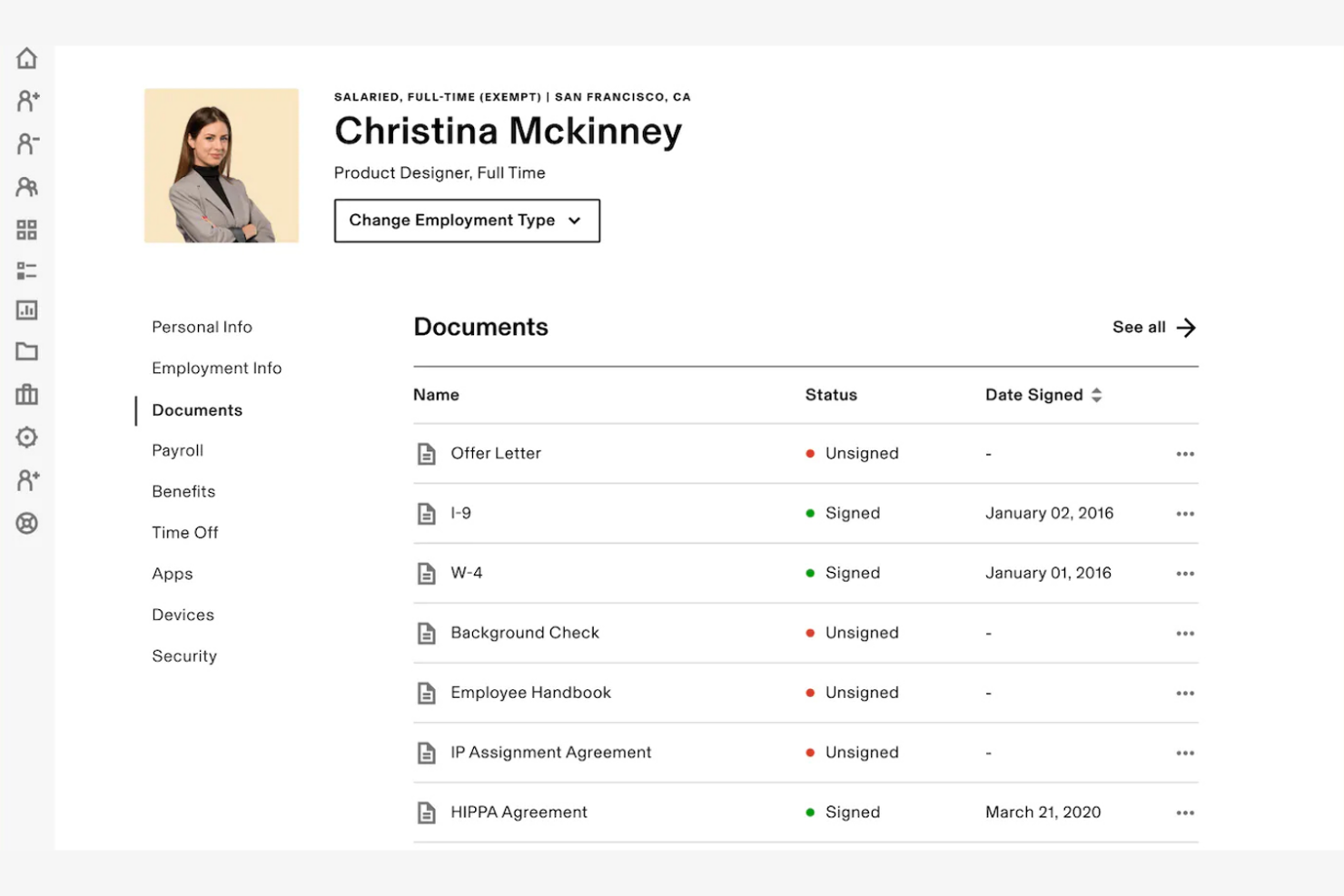
Rippling è una piattaforma tutto-in-uno per HR e IT progettata per le aziende che desiderano gestire i dati dei dipendenti e i dispositivi in un'unica posizione centralizzata. Serve professionisti delle risorse umane e team IT automatizzando onboarding, gestione delle buste paga, benefit e dispositivi.
Perché ho scelto Rippling: Rippling unisce le funzioni HR e IT, consentendo di gestire senza problemi dati dei dipendenti e dispositivi. I suoi flussi di lavoro automatizzati gestiscono tutto, dall'onboarding all'offboarding, garantendo la conformità e riducendo le attività manuali.
Con la funzione di gestione dei dispositivi, puoi facilmente assegnare, tracciare e gestire i dispositivi dei dipendenti. La piattaforma unificata di Rippling colma il divario tra HR e IT, rendendolo ideale per le aziende che desiderano soluzioni integrate.
Funzionalità e integrazioni di rilievo:
Le funzionalità includono flussi di lavoro automatizzati per onboarding e offboarding, gestione dei dispositivi e gestione delle buste paga. La piattaforma supporta l'amministrazione dei benefit, aiutandoti a gestire efficacemente i vantaggi dei dipendenti. Offre anche strumenti per la gestione della conformità, assicurando che la tua azienda rispetti i requisiti normativi.
Le integrazioni includono Slack, Microsoft 365, Google Workspace, QuickBooks, Xero, Okta, Zoom e altre ancora.
Pros and Cons
Pros:
- Unisce le funzioni HR e IT
- Funzionalità per la gestione dei dispositivi
- Strumenti di gestione della conformità
Cons:
- Setup complesso
- L'integrazione richiede competenze tecniche
Altri strumenti di onboarding con IA
Ecco alcune opzioni aggiuntive di strumenti di onboarding con IA che non sono entrate nella mia selezione, ma che vale comunque la pena prendere in considerazione:
- Moveworks
Ideale per l'automazione del supporto in tempo reale
- Leena AI
Ideale per l'automazione HR basata sull'intelligenza artificiale
- Click Boarding
Ideale per la gestione della conformità
- Guider
Ideale per l'integrazione della mentorship
- DeepHow
Ideale per l'apprendimento basato su video
- Onboarded
Ideale per soluzioni di onboarding da remoto
- Boilerplate
Ideale per flussi di lavoro personalizzabili
- Exec
Ideale per la formazione personalizzata tramite roleplay
- TaskRay
Ideale per flussi di lavoro di onboarding in Salesforce
- EducateMe LMS
Ideale per il coaching con roleplay guidati da AI
- Trupeer
Ideale per automatizzare i flussi di onboarding


Come valuto le piattaforme di onboarding AI
Ogni strumento qui presentato deve offrire un reale valore aggiunto grazie all’IA—come la creazione automatica di piani specifici per ruolo o l’individuazione dei neoassunti meno coinvolti—e non solo aggiungere un chatbot ad una checklist. Valuto ogni opzione sia sulle funzionalità di base richieste che sui fattori distintivi che separano le soluzioni buone da quelle eccellenti.
Funzionalità di base (Requisiti minimi per questa lista)
Quando seleziono gli strumenti per la mia lista, assegno a ciascuno un punteggio da 0 (non offre la funzionalità) a 5 (eccelle in quest’area) per ogni funzionalità di base elencata di seguito. Poi, trasformo il totale del punteggio in percentuale. Ogni strumento deve raggiungere un punteggio totale minimo del 65% per essere considerato per l’inclusione.
- Automazione dei workflow tramite IA: Verifico se la piattaforma sfrutta l’intelligenza artificiale per gestire attività come l’invio automatizzato delle lettere di assunzione, l’avvio della fornitura IT o l’assegnazione della formazione—invece di basarsi solo su trigger predefiniti.
- Assistente virtuale IA: Un buon assistente per l’onboarding risponde in tempo reale a domande su ferie o iscrizione ai benefit; quindi analizzo la profondità della comprensione linguistica e il supporto sui diversi canali.
- Percorsi di onboarding personalizzati: Valuto come la piattaforma adatta i piani a diversi ruoli, dipartimenti o sedi—ad esempio predisponendo un percorso di 90 giorni diverso per ingegneri e commerciali.
- Generazione di contenuti tramite IA: Cerco IA generativa che rediga email di benvenuto, checklist di onboarding o guide formative specifiche per ruolo, invece di fare affidamento solo su modelli statici.
- Analisi predittiva e insight: Le migliori piattaforme rilevano segnali come punteggi di engagement bassi o attività incomplete: verifico quindi se l’IA segnala per tempo chi è a rischio di abbandono.
- Integrazioni con HRIS & altri strumenti: Valuto le connessioni nativamente integrate con piattaforme come Workday, BambooHR, ADP e strumenti di firma elettronica per assicurare che i flussi dati siano bidirezionali e senza interventi manuali.
Una volta identificati gli strumenti che soddisfano questi criteri, considero cosa differenzia ciascuna piattaforma.
Fattori distintivi (Cosa rende un fornitore unico)
Ecco come confronto i diversi fornitori:
Funzionalità chiave
L’automazione del preboarding è un elemento distintivo importante—cerco strumenti che inviino e-mail di benvenuto, richieste di dotazioni e raccolta di documenti prima ancora dell’inizio, così che il neoassunto arrivi preparato. L’analisi del sentiment è altrettanto rilevante, in particolare per team distribuiti dove il rischio di mancare segnali di disingaggio è maggiore. Gli strumenti che analizzano le risposte ai sondaggi e ai check-in per individuare persone a rischio offrono al reparto HR un grande vantaggio. Per le organizzazioni globali valuto anche una IA multilingue che adatti automaticamente le risposte dei chatbot e i contenuti formativi alla lingua preferita di ciascun neoassunto.
Oltre le funzionalità
La conformità e la sicurezza dei dati pesano molto nella mia valutazione: le piattaforme di onboarding trattano dati sensibili come codici fiscali e coordinate bancarie. Controllo la conformità SOC 2, la preparazione al GDPR e la trasparenza delle policy sull’uso dei dati da parte dell’IA. Anche la rapidità di implementazione è importante: verifico se una piattaforma offre template preconfigurati e amministrazione self-service così che il team HR possa attivarla senza dover attendere l’IT. Infine, considero i risultati misurabili: i fornitori che condividono dati comparativi o casi studio di clienti con miglioramenti su time-to-productivity e retention offrono ben più sicurezza agli acquirenti.
Come scegliere gli strumenti di onboarding con IA
È facile perdersi in lunghi elenchi di funzionalità e strutture di prezzo complesse. Per aiutarti a rimanere concentrato mentre affronti il tuo processo di selezione del software, ecco una lista di controllo dei fattori da tenere a mente:
| Fattore | Cosa considerare |
|---|---|
| Scalabilità | Come crescerà lo strumento insieme alla tua azienda? Assicurati che sia in grado di gestire un numero crescente di dipendenti senza problemi di prestazioni. Cerca limiti per gli utenti o piani a più livelli. |
| Integrazioni | Funziona con i tuoi sistemi attuali? Verifica se si collega agli strumenti per le risorse umane, le paghe e la comunicazione, così da evitare silos di dati. |
| Personalizzazione | Puoi adattarlo ai tuoi processi? Valuta la flessibilità dei flussi di lavoro e dei modelli per adeguarli alle tue specifiche esigenze di onboarding. |
| Facilità d'uso | È facile da usare sia per le risorse umane sia per i nuovi assunti? Considera la semplicità dell'interfaccia e la disponibilità di risorse di supporto per un'esperienza fluida. |
| Implementazione e onboarding | Quanto tempo richiede la configurazione? Valuta il tempo e le risorse necessari per rendere operativo lo strumento. Cerca assistenza o formazione per l'onboarding. |
| Costo | Rientra nel tuo budget? Confronta i modelli di prezzo e i costi totali, comprese eventuali commissioni nascoste. Considera il valore che offre rispetto al prezzo. |
| Misure di sicurezza | Come protegge i tuoi dati? Verifica gli standard di crittografia, i controlli degli accessi e la conformità alle normative sulla protezione dei dati. |
| Disponibilità dell'assistenza | Quali opzioni di assistenza sono disponibili? Assicurati di poter ricevere aiuto tempestivo, tramite chat dal vivo, telefono o un account manager dedicato. |
Cosa sono gli strumenti di onboarding con IA?
Gli strumenti di inserimento basati sull'AI sono soluzioni software progettate per automatizzare e migliorare il processo di inserimento dei dipendenti. I professionisti delle risorse umane e i responsabili utilizzano generalmente questi strumenti per migliorare l'integrazione e il coinvolgimento dei nuovi assunti. I flussi di lavoro automatizzati, i moduli di formazione e l'analisi dei dati aiutano nella gestione delle attività, nell'apprendimento e nel monitoraggio delle prestazioni. Questi strumenti fanno risparmiare tempo, riducono gli errori e aumentano l'efficienza complessiva del processo di inserimento.
Funzionalità
Quando selezioni gli strumenti di inserimento basati sull'AI, presta attenzione alle seguenti funzionalità chiave:
- Flussi di lavoro automatizzati: semplificano il processo di inserimento assegnando automaticamente le attività e inviando promemoria, facendo risparmiare tempo e riducendo gli errori manuali.
- Moduli di formazione: forniscono percorsi di apprendimento strutturati affinché i nuovi assunti acquisiscano rapidamente le competenze e le conoscenze necessarie.
- Analisi dei dati: offre informazioni sui progressi e sull'efficacia del processo di inserimento, aiutando i team HR a prendere decisioni basate sui dati.
- Modelli personalizzabili: consentono alle aziende di adattare i materiali e i processi di inserimento alle proprie esigenze e alla propria cultura.
- Funzionalità di integrazione: si collegano ai sistemi HR, di gestione delle buste paga e di comunicazione esistenti per garantire un flusso dei dati uniforme e ridurre le ridondanze.
- Feedback in tempo reale: consente la comunicazione immediata tra i nuovi assunti e il reparto HR, garantendo una rapida risoluzione dei problemi e un miglioramento continuo.
- Misure di sicurezza: proteggono i dati sensibili dei dipendenti tramite la crittografia e la conformità alle normative sulla protezione dei dati.
- Supporto multilingue: risponde alle esigenze di forze lavoro diversificate fornendo materiali per l'inserimento in più lingue.
- Monitoraggio delle attività: tiene traccia delle attività completate e in sospeso per garantire che nulla venga trascurato durante il processo di inserimento.
- Guide interattive: coinvolgono i nuovi assunti con istruzioni dettagliate ed elementi interattivi per migliorare l'apprendimento e la memorizzazione.
Vantaggi
L'implementazione di strumenti di inserimento basati sull'AI offre diversi vantaggi al tuo team e alla tua azienda. Ecco alcuni dei vantaggi che puoi aspettarti:
- Risparmio di tempo: automatizza le attività ripetitive, lasciando al reparto HR più tempo da dedicare alle attività strategiche.
- Maggiore coinvolgimento: le guide interattive e il feedback in tempo reale mantengono i nuovi assunti connessi e motivati.
- Informazioni basate sui dati: l'analisi fornisce informazioni preziose sull'efficacia del processo di inserimento e sulle aree da migliorare.
- Coerenza: modelli e flussi di lavoro standardizzati garantiscono un'esperienza di inserimento uniforme per tutti i nuovi dipendenti.
- Apprendimento migliore: i moduli di formazione e il supporto multilingue rispondono a esigenze e preferenze di apprendimento diverse.
- Riduzione degli errori: i flussi di lavoro automatizzati riducono al minimo gli errori manuali e garantiscono la conformità alle politiche aziendali.
- Inserimento più rapido: i processi semplificati e il monitoraggio delle attività aiutano i nuovi assunti a diventare produttivi più velocemente.
Costi e prezzi
La scelta degli strumenti di inserimento basati sull'AI richiede una conoscenza dei vari modelli di prezzo e dei piani disponibili. I costi variano in base alle funzionalità, alle dimensioni del team, ai componenti aggiuntivi e ad altri fattori. La tabella seguente riassume i piani più comuni, i relativi prezzi medi e le funzionalità tipicamente incluse nelle soluzioni di strumenti di inserimento basati sull'AI:
Tabella di confronto dei piani per gli strumenti di inserimento basati sull'AI
| Tipo di piano | Prezzo medio | Funzionalità comuni |
|---|---|---|
| Piano gratuito | $0 | Modelli di inserimento di base, accesso limitato degli utenti e supporto via e-mail. |
| Piano personale | $5- $19,000/ utente/mese | Modelli personalizzabili, automazione delle attività e analisi di base. |
| Piano aziendale | $30-$32,000/ utente/mese | Analisi avanzate, integrazioni con i sistemi HR e supporto multilingue. |
| Piano aziendale avanzato | $100+-$58,000/ utente/mese | Personalizzazione completa, responsabile account dedicato e opzioni di supporto premium. |
Domande frequenti sugli strumenti di onboarding basati sull'IA
Ecco alcune risposte alle domande comuni sugli strumenti di onboarding basati sull’IA:
In che modo gli strumenti di onboarding basati sull'IA riducono il tempo necessario per raggiungere la produttività?
Gli strumenti di onboarding basati sull’IA automatizzano le attività ripetitive e personalizzano la formazione, aiutando i nuovi assunti a diventare operativi più rapidamente. Utilizzano l’analisi dei dati per identificare le lacune nell’apprendimento e fornire risorse mirate. Questo approccio riduce fino al 40% il tempo necessario ai dipendenti per raggiungere la piena produttività.
Qual è in genere la tempistica di implementazione degli strumenti di onboarding basati sull'IA?
L’implementazione degli strumenti di onboarding basati sull’IA richiede solitamente dalle 4 alle 8 settimane. Questa tempistica comprende la configurazione del sistema, l’integrazione con gli strumenti esistenti e la personalizzazione del processo di onboarding in base alle esigenze specifiche dell’azienda. È importante prevedere del tempo per i test e la formazione del team.
In che modo gli strumenti di onboarding basati sull'IA garantiscono la sicurezza dei dati?
Gli strumenti di onboarding basati sull’IA utilizzano la crittografia e i controlli di accesso per proteggere i dati dei dipendenti. Sono conformi alle normative sulla protezione dei dati, come il GDPR e l’HIPAA. È importante verificare che lo strumento scelto disponga di solide misure di sicurezza e aggiorni regolarmente i propri protocolli per proteggere dai data breach.
Gli strumenti di onboarding basati sull'IA possono aiutare a garantire la conformità?
Sì, gli strumenti di onboarding basati sull’IA possono automatizzare il monitoraggio della conformità e la documentazione. Garantiscono che i nuovi assunti completino la formazione e la documentazione necessarie, riducendo il rischio di non conformità. Questi strumenti possono inoltre fornire promemoria e aggiornamenti automatici per mantenere il team informato su eventuali modifiche alle normative.
In che modo gli strumenti di onboarding basati sull'IA personalizzano l'esperienza di onboarding?
Gli strumenti di onboarding basati sull’IA utilizzano dati e analisi per adattare il processo di onboarding alle esigenze di ciascun dipendente. Offrono percorsi e contenuti di apprendimento personalizzati, garantendo che i nuovi assunti ricevano informazioni pertinenti. Questa personalizzazione aumenta il coinvolgimento e aiuta i dipendenti a sentirsi più connessi all’azienda.
Quali sono alcune difficoltà comuni associate agli strumenti di onboarding basati sull'IA?
Tra le difficoltà comuni rientrano la complessità della configurazione iniziale e la curva di apprendimento per gli utenti. È fondamentale disporre di un piano di implementazione chiaro e fornire una formazione adeguata al team. Inoltre, garantire che lo strumento si integri senza problemi con i sistemi esistenti può rappresentare un ostacolo che richiede un’attenta pianificazione.