


Recensione QuickBooks Payroll: Vantaggi, Svantaggi, Caratteristiche e Prezzi



In this review, I'll share my hands-on analysis and evaluation of QuickBooks Payroll. If you're searching for the best payroll software, check out my top picks first.
QuickBooks Payroll is a popular payroll software, but it's essential to understand its strengths and weaknesses. This detailed review will cover the pros and cons, features, and functionality to help you determine if it suits your needs.
QuickBooks Payroll Evaluation Summary
- From $50/month
- 30-day free trial
Perché fidarsi delle nostre recensioni sui software
Il nostro team testa e recensisce software dal 2012. In quanto esperti HR noi stessi, sappiamo quanto sia difficile — e importante — scegliere il software giusto.
Per questa guida, abbiamo valutato gli strumenti attraverso test pratici e ricerche indipendenti, assegnando un punteggio agli strumenti in base ai nostri criteri di selezione. Ci basiamo inoltre sulle competenze di leader di pensiero del settore e di professionisti HR attivi.
Le nostre recensioni riflettono il nostro giudizio editoriale umano, non un discorso di vendita.
Revisori esperti:
QuickBooks Payroll Overview
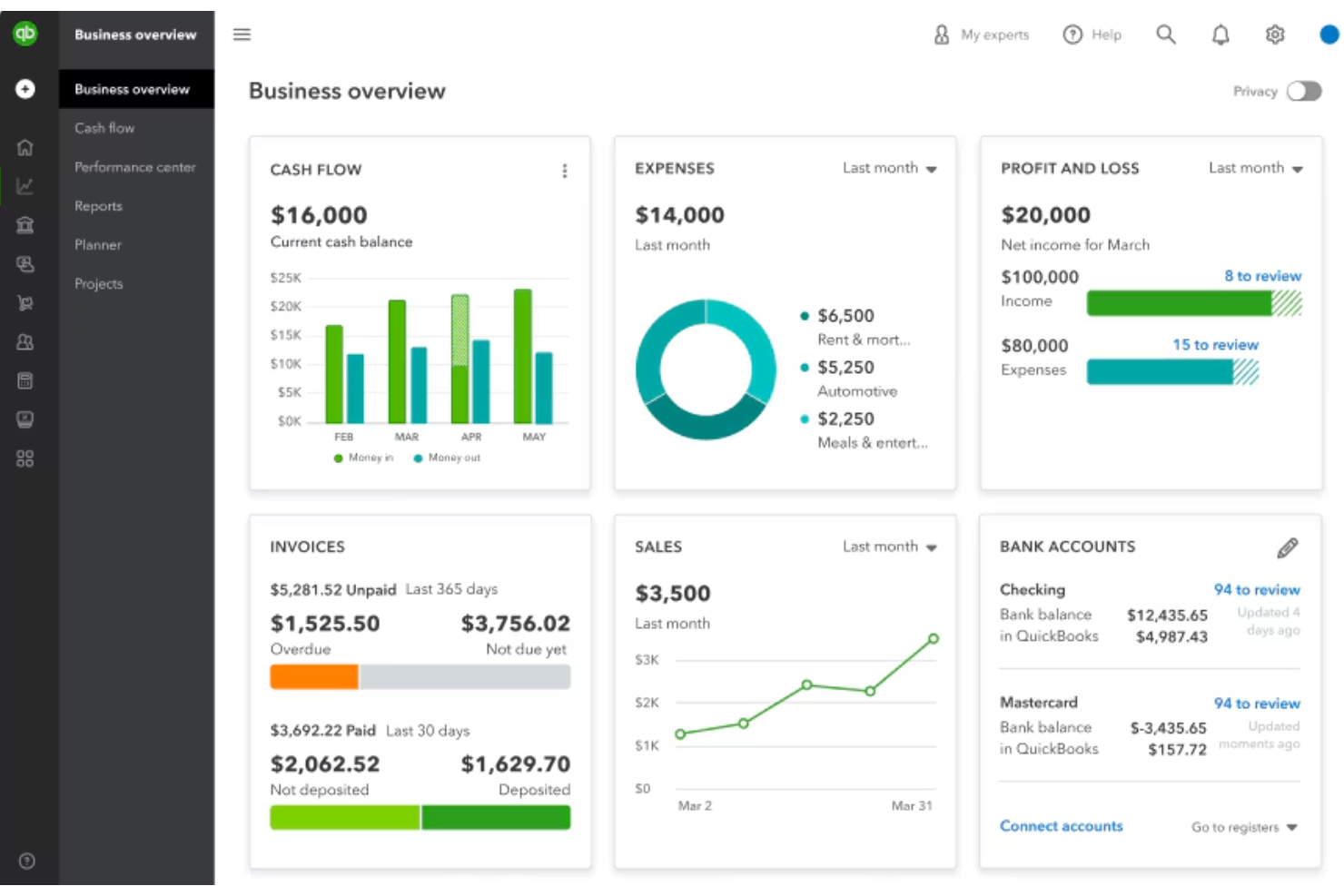
QuickBooks Payroll, part of the QuickBooks Online suite, simplifies payroll management by handling employee paychecks, automating tax computations, and ensuring compliance with labor laws. It benefits businesses by ensuring accurate payroll processing, reducing administrative burdens, and timely employee payouts.
QuickBooks Payroll addresses common issues such as calculating payroll taxes, filing tax forms, and keeping up with new payroll requirements. Key features include automatic tax calculations, employee direct deposits, and real-time payroll reports.
pros
-
You can run payroll in just a few clicks.
-
It calculates and files your payroll taxes for you.
-
You get automatic pay reminders so you don’t miss deadlines.
cons
-
You can't easily customize reports to fit your needs.
-
It struggles with handling complex pay structures.
-
You might wait a while to get help from support.
-

Justworks
Visit WebsiteThis rating combines scores from multiple user review sites to reflect overall customer sentiment about the product.4.6 -
Small Improvements
Visit WebsiteThis rating combines scores from multiple user review sites to reflect overall customer sentiment about the product.4.3 -
HiBob
Visit WebsiteThis rating combines scores from multiple user review sites to reflect overall customer sentiment about the product.4.5





Come Testiamo e Valutiamo i Nostri Strumenti
Abbiamo impiegato anni per costruire, perfezionare e migliorare il nostro sistema di test e valutazione dei software. Il modello è progettato per cogliere le sfumature della scelta del software e per evidenziare cosa rende uno strumento efficace, concentrandosi sugli aspetti più critici del processo decisionale. Di seguito puoi vedere esattamente come funziona la nostra valutazione e attribuzione dei punteggi secondo sette criteri. Questo ci consente di fornire una valutazione imparziale del software basandoci su funzionalità principali, caratteristiche distintive, facilità d’uso, onboarding, assistenza clienti, integrazioni, recensioni dei clienti e rapporto qualità/prezzo.
Funzionalità Principali (25% del punteggio finale)
Il punto di partenza della nostra valutazione sono sempre le funzionalità principali dello strumento. Possiede le funzioni di base che l’utente si aspetta? Alcune di queste funzioni sono disponibili solo in piani a prezzi più alti? In sostanza, ci aspettiamo che uno strumento rispecchi almeno le capacità base dei concorrenti.
Caratteristiche Distintive (25% del punteggio finale)
Successivamente valutiamo le funzionalità particolari che superano le funzionalità di base tipiche degli strumenti della sua categoria. Un punteggio alto riflette caratteristiche specializzate o uniche che rendono il prodotto più veloce, efficiente, o che offrono ulteriore valore all’utente. Valutiamo inoltre quanto sia semplice integrare il software con altri strumenti tradizionalmente presenti nel tech stack per espanderne funzionalità e utilizzo. Gli strumenti che offrono numerose integrazioni native, collegamenti di terze parti e accesso API per creare integrazioni personalizzate ricevono i punteggi migliori.
Facilità d’Uso (10% del punteggio finale)
Consideriamo quanto sia veloce e semplice svolgere i compiti definiti dalle funzionalità principali utilizzando lo strumento. I software con punteggi alti sono ben progettati, intuitivi, dispongono di app mobili, offrono modelli preimpostati e rendono semplici anche i compiti più complessi.
Onboarding (10% del punteggio finale)
Sappiamo quanto sia importante una rapida adozione di una nuova piattaforma all’interno di un team, quindi valutiamo quanto sia facile imparare e utilizzare uno strumento con una formazione minima. Valutiamo quanto rapidamente un membro del team possa iniziare a utilizzare lo strumento senza esperienza. Le soluzioni con punteggio alto richiedono poco o nessun supporto.
Assistenza Clienti (10% del punteggio finale)
Esaminiamo quanto sia facile e veloce ricevere supporto o trovare aiuto tramite telefono, chat dal vivo o knowledge base. Gli strumenti e le aziende che forniscono un’assistenza in tempo reale ottengono i punteggi migliori, mentre i chatbot ottengono i risultati peggiori.
Recensioni dei Clienti (10% del punteggio finale)
Oltre ai nostri test e valutazioni, consideriamo il punteggio net promoter dei clienti attuali e passati. Analizziamo la loro propensione, se potessero scegliere, a selezionare di nuovo lo strumento per le sue funzionalità principali. Un software con un punteggio alto riflette un elevato net promoter score da parte dei clienti attuali o passati.
Rapporto Qualità/Prezzo (10% del punteggio finale)
Infine, considerando tutti gli altri criteri, esaminiamo il prezzo medio dei piani base rispetto alle funzionalità principali e teniamo conto del valore degli altri criteri di valutazione. I software che offrono di più, a meno, ottengono un punteggio più alto.
Core Features
Automated Payroll Processing
QuickBooks Payroll automates the payroll process, ensuring employees are paid accurately and on time. This feature includes automatically calculating wages, deductions, and taxes, reducing the risk of human error and saving time for payroll administrators.
Tax Filing and Compliance
QuickBooks Payroll handles federal and state tax filings automatically. It calculates, files, and pays payroll taxes, ensuring compliance with tax regulations. This feature also includes year-end filings and the generation of W-2 and 1099 forms for employees and contractors.
Direct Deposit
QuickBooks Payroll offers direct deposit options for employees, allowing them to receive their paychecks directly into their bank accounts. This feature supports next-day and same-day direct deposits, providing flexibility and convenience for both employers and employees.
Employee Self-Service Portal
The software includes a workforce portal where employees can access their pay stubs, W-2s, and other payroll-related information. Employees can also update their personal information, view paid time off balances, and track their hours worked.
Time Tracking
QuickBooks Payroll integrates with QuickBooks Time, a time-tracking app that allows employees to clock in and out, track their hours, and submit timesheets. This feature ensures accurate employee time tracking and simplifies the payroll process by automatically syncing time data with payroll.
Benefits Administration
QuickBooks Payroll enables employers to manage employee benefits, including health insurance, retirement plans, and workers' compensation. The software partners with providers like SimplyInsured and Guideline to offer competitive benefits packages and streamline the workflow.

Ease of Use
QuickBooks Payroll is easier to use than alternative payroll applications. The intuitive and straightforward user interface makes it accessible for first-time users. The setup process includes step-by-step instructions and live support. Its integration with QuickBooks Online accounting further simplifies the user experience by combining payroll and accounting tasks on one platform. Based on my experience and research, QuickBooks Payroll's ease of use is one of its strongest advantages.

QuickBooks Payroll Specs
- 2-Factor Authentication
- 360 Degree Feedback
- API
- Application Tracking
- Attendance Tracking
- Batch Permissions & Access
- Compliance Tracking
- Dashboard
- Data Export
- Data Import
- Data Visualization
- Employee Database
- Employee Engagement
- Employee Incentive Management
- Employee Onboarding
- Employee Training
- Expense Tracking
- External Integrations
- Feedback Management
- Multi-User
- Notifications
- Payroll
- Performance Appraisal
- Scheduling
- Time Management
- Timesheets
- Travel Management
- Vacation & Absence Calendar
Alternatives to QuickBooks Payroll



QuickBooks Payroll FAQs
What is QuickBooks Payroll?
Is there a mobile app for QuickBooks Payroll?
Is QuickBooks Payroll HIPAA compliant?
Is QuickBooks Payroll SOC 2 compliant?
Is QuickBooks Payroll easy to use?
Is QuickBooks Payroll FedRAMP certified?
Is QuickBooks Payroll GDPR compliant?
How secure is QuickBooks Payroll?
Cosa c’è dopo?
Per rimanere aggiornato su tutte le novità nella gestione delle persone, iscriviti alla nostra newsletter dedicata a leader e manager. Riceverai approfondimenti e offerte dedicate a chi guida team e ai professionisti delle risorse umane direttamente nella tua casella di posta.