

10 alternativer til OfficeSpace for arealplanlegging i 2026

Beste alternativer til OfficeSpace – kortliste


Et godt alternativ til OfficeSpace bør hjelpe teamet ditt med å bestille, administrere og optimalisere arbeidsområder uten problemene som følger med rigide kontorleieavtaler. Hvis du ser etter de beste programvarealternativene for skrivebordsbestilling, vurderer du sannsynligvis fleksibilitet, digital bestilling, analyse eller bedre administrasjonsverktøy for å forbedre måten folk arbeider i og samhandler med områdene deres på.
Med hybridarbeid, varierende bemanning og nye krav til samsvar kan den riktige plattformen gjøre den daglige kontorhverdagen enklere og la deg tilpasse deg raskt. Denne veiledningen fremhever de beste alternativene til OfficeSpace, slik at du kan sammenligne de beste valgene og finne et oppsett som passer teamets arbeidsflyt, kultur og fremtidige planer.
Hva er OfficeSpace?
OfficeSpace er en programvareplattform for administrasjon av kontorlokaler og arbeidsplasser som hjelper organisasjoner med å organisere, fordele og overvåke arbeidsplassressurser på tvers av flere lokasjoner. Team kan bruke den til bestilling av skrivebord, bestilling av møterom, planlegging av rom og analyse av arealutnyttelse for å støtte hybridarbeid og arbeid på kontoret.
OfficeSpace er utviklet for virksomheter som trenger bedre oversikt over arbeidsmiljøet sitt, og kombinerer funksjoner for administrasjon av lokaler med verktøy for planlegging av arbeidsplassen for å optimalisere kontorbruken, redusere planleggingskonflikter som dobbeltbestillinger og støtte skiftende behov i arbeidsstyrken. Plattformen gir også innsikt i kontorbelegg, trender på arbeidsplassen og ressursfordeling, slik at organisasjoner kan ta informerte beslutninger om arealplanlegging.
Sammenligningstabell for alternativer til OfficeSpace
Denne sammenligningstabellen oppsummerer prisdetaljene for mine beste utvalgte alternativer til OfficeSpace:
| Tool | Best For | Trial Info | Price | ||
|---|---|---|---|---|---|
| 1 | Best for integrated workplace safety compliance | Free plan + free demo available | From $500/month | Website | |
| 2 | Best for easy migration from legacy platforms | Free demo available | Pricing upon request | Website | |
| 3 | Best for interactive office floorplans | Free demo available | Pricing upon request | Website | |
| 4 | Best for sustainability tracking features | Free demo available | From $99/month | Website | |
| 5 | Best for visitor management integration | Free plan + free demo available | From $362/location/month (billed annually) | Website | |
| 6 | Best for automated booking workflows | Free demo available | Pricing upon request | Website | |
| 7 | Best for advanced analytics reporting | Free demo available | From £99/month | Website | |
| 8 | Best for coworking space operators | Free demo available | Pricing upon request | Website | |
| 9 | Best for real estate portfolio oversight | Free demo available | Pricing upon request | Website | |
| 10 | Best for integration with Microsoft Outlook | 30-day free trial + free demo available | Pricing upon request | Website |

Why Trust Our Software Recommendations
Our team has been testing and reviewing software since 2012. As HR experts ourselves, we know how difficult—and important—it is to choose the right software.
For this guide, we evaluated tools using hands-on testing and independent research, scoring tools using our selection criteria. We also draw on insights from industry thought leaders and practicing HR experts.
Our reviews reflect our human editorial judgment, not a sales pitch.
Expert reviewers:
Anmeldelser av de beste alternativene til OfficeSpace
Nedenfor finner du mine detaljerte sammendrag av de beste alternativene til OfficeSpace som kom med på kortlisten. Anmeldelsene mine gir en detaljert gjennomgang av funksjonene, de beste bruksområdene og integrasjonene til hver plattform, slik at du kan finne den beste for deg.

elia
Best for integrated workplace safety compliance
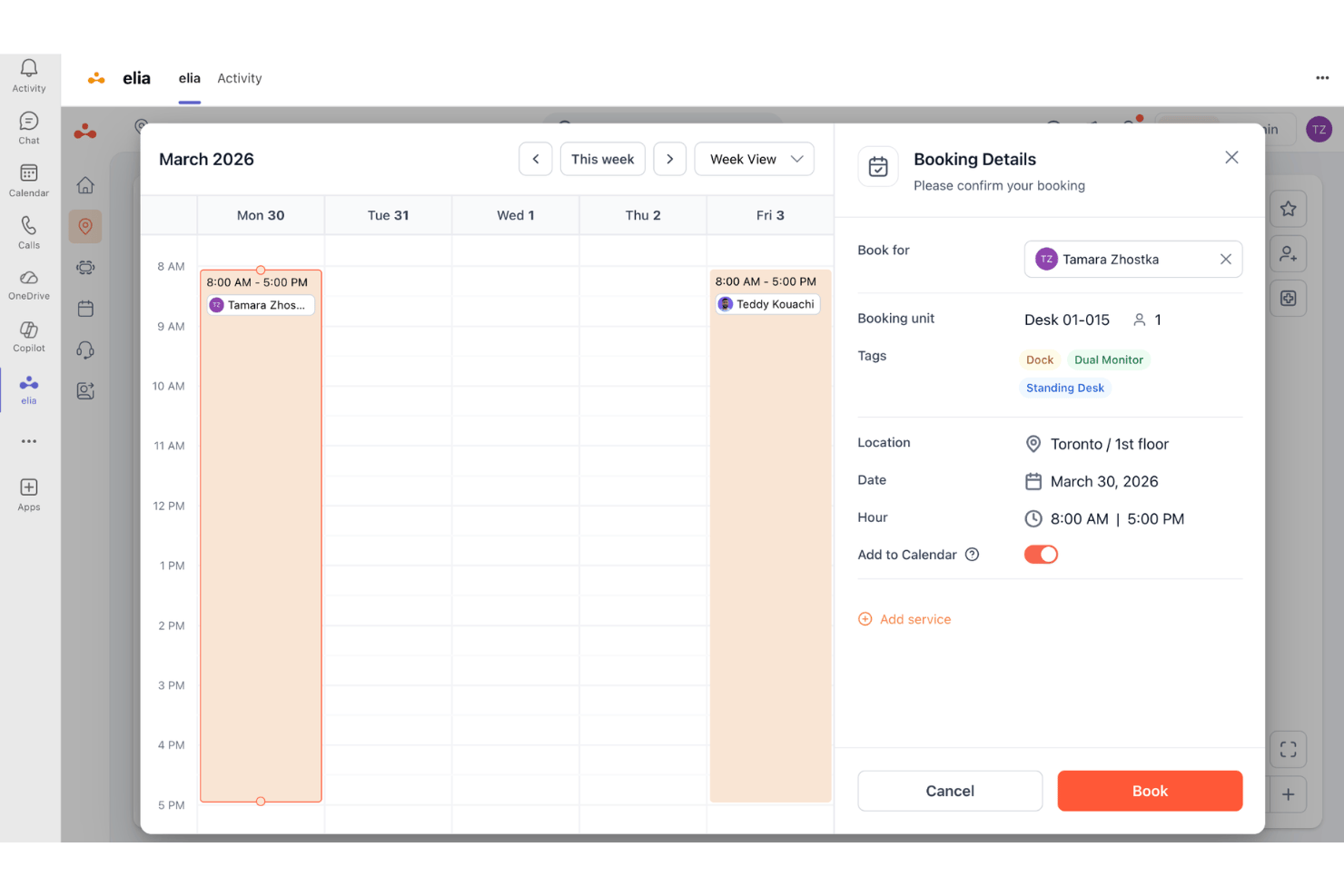
elia is a workplace management platform for hybrid teams that combines desk and room booking, occupancy analytics, and built-in health and safety tools—making it a strong fit for organizations that need to manage space and compliance in one place.
Who Is elia Best For?
elia is a good fit for facilities and workplace experience teams at mid-sized to large organizations managing hybrid offices across multiple locations.
Why elia Is a Good OfficeSpace Alternative
I've included elia in my top picks because no other tool on this list natively combines workspace booking with a dedicated Health & Safety Management module. I particularly like how it handles first responder tracking and automated compliance monitoring, keeping audit records current without manual upkeep. When an incident occurs, my team can log it directly in elia and know the compliance trail is already taken care of.
elia Key Features
- Interactive floor plan builder: Create and customize digital floor plans to reflect workspace layouts for easy navigation and booking.
- Desk and room occupancy sensors: Use integrated hardware to track real-time utilization of desks and meeting spaces.
- Automated workplace requests: Allow employees to submit maintenance, catering, or IT requests directly from the platform.
- Visitor management system: Register visitors, notify hosts, and maintain secure visitor logs through a built-in interface.
elia Integrations
elia offers native integrations with Microsoft 365, Google Workspace, Slack, and specific tools within those ecosystems, including Google Calendar, Microsoft Teams, and Microsoft Outlook.
Pros and Cons
Pros:
- Strong multi-site workplace management support
- Offers visitor management and automated check-ins
- Built-in health and safety compliance tools
Cons:
- Limited analytics customization for enterprise reporting
- Floor plan setup can be time-consuming

Best for easy migration from legacy platforms
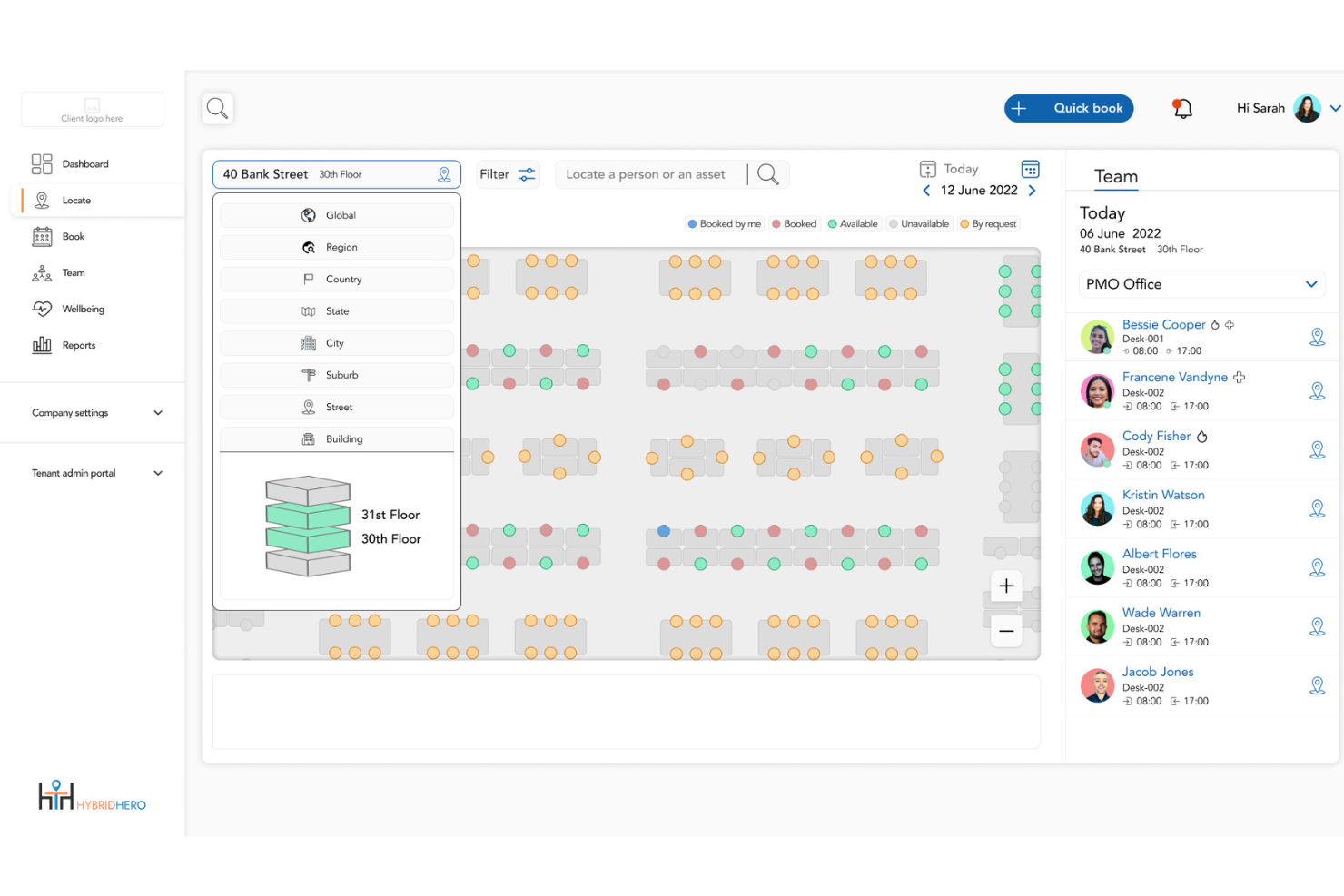
Hybrid Hero is a workplace management platform that helps HR and facilities teams run hybrid offices across multiple locations, with tools for desk booking, room scheduling, visitor management, and space utilization analytics built into a single platform.
Who Is Hybrid Hero Best For?
It's a strong fit for mid-size to enterprise organisations managing hybrid workforces across multiple office locations or sites.
Why Hybrid Hero Is a Good OfficeSpace Alternative
I picked Hybrid Hero as one of the best because its Switch Programme is the most structured migration path I've seen in this category. It delivers a 1-page migration plan, contract exit guidance, and a named migration contact within 48 hours of a free 15-minute assessment. Parallel running means you're not paying for two platforms at once, and the 30-day live guarantee removes the risk from switching entirely.
Hybrid Hero Key Features
- Drag-and-drop floor plan builder: Quickly map out office layouts and update desk assignments with a visual editor.
- Amenity-based desk search: Find available desks based on specific amenities like monitors, standing desks, or quiet zones.
- Visitor management kiosk: Enable contactless guest check-in, badge printing, and host notifications from a dedicated touchscreen or tablet.
- Automated desk release: Automatically free up booked but unused desks for others to book when no check-in occurs.
Hybrid Hero Integrations
Hybrid Hero offers native integrations with Microsoft 365, Google Workspace, Microsoft Teams, and Slack. SSO is supported via Okta, Microsoft Entra ID, and Google, and an API is available for custom integrations.
Pros and Cons
Pros:
- Automated desk release recovers unused bookings quickly
- Supports multi-location teams across multiple time zones
- Guided migration removes risk of switching platforms
Cons:
- Smaller vendor with limited third-party reviews available
- Fewer out-of-the-box analytics than larger competitors

Robin
Best for interactive office floorplans
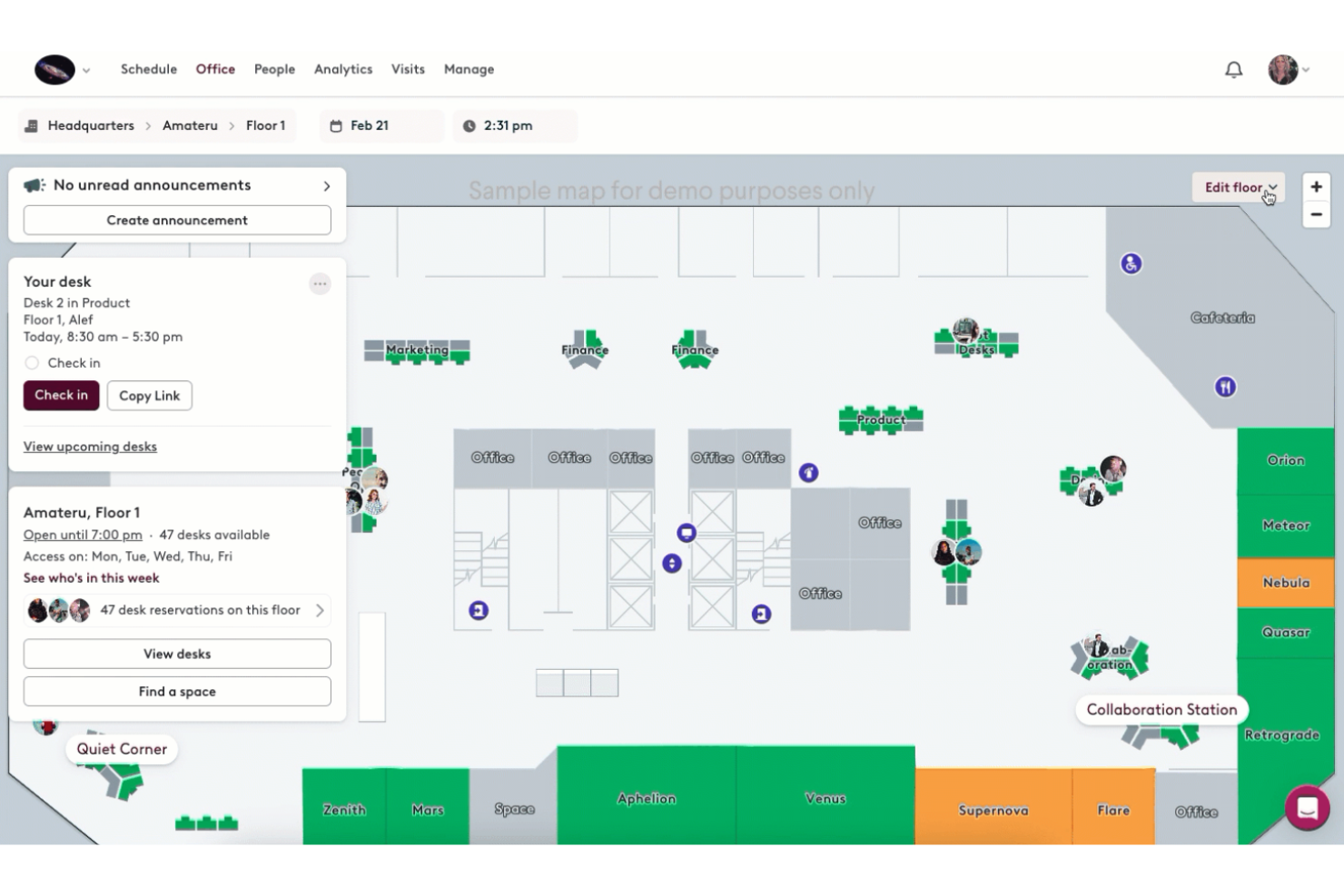
Robin gives teams and workplace managers a flexible way to oversee office layouts, coordinate desk usage, and manage meeting spaces. If you want customizable workspace planning and real-time visibility into how your office is actually used, Robin is going to stand out.
Who Is Robin Best For?
Robin suits hybrid workplaces and office managers who need a dynamic way to oversee desks, rooms, and seating assignments across locations.
Why Robin Is a Good OfficeSpace Alternative
I picked Robin largely because of its interactive floorplans, which let you see exactly who's sitting where in real time. When my team is planning a busy office day, I can pull up the live floor map and spot available desks or rooms instantly.
I also appreciate Robin's "neighborhood" feature, which lets you group teams into designated zones on the map. That makes coordinating in-office days for specific departments much easier than manually managing a spreadsheet or booking calendar.
Robin Key Features
- Desk booking: Reserve desks directly through tools like Slack, Microsoft Teams, or Outlook without switching platforms.
- Visitor management: Pre-register guests, manage check-ins, and maintain visit logs from one place.
- Meeting services: Set up customizable workflows for room preparation requests like catering, AV setup, and room configuration.
- Workplace analytics: Build custom reports on space usage and occupancy to inform office planning decisions.
Robin Integrations
Robin offers native integrations with Slack, Microsoft Teams, Google Workspace, Microsoft 365, Okta, and Zoom. An API is available for custom integrations.
Pros and Cons
Pros:
- Extensive visitor management and registration options
- Custom neighborhood zones for team seating
- Interactive maps display real-time desk availability
Cons:
- Floorplan setup requires upfront configuration effort
- Some users report occasional calendar sync issues
YAROOMS
Best for sustainability tracking features
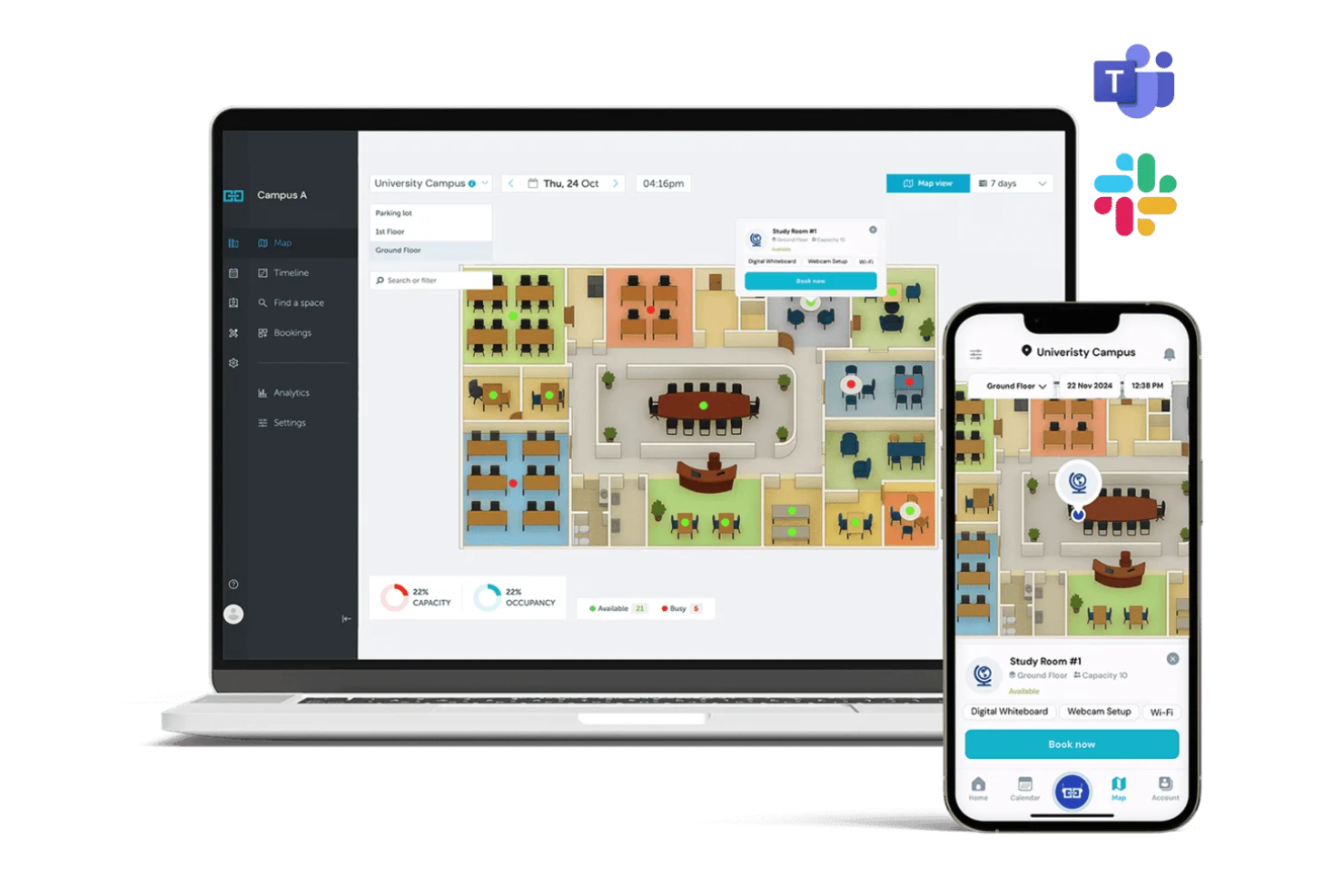
YAROOMS is a workplace management platform built for organizations focused on flexible work and responsible space use. I think facilities and workplace teams who need configurable booking, analytics, and space policies for modern offices will find YAROOMS a practical choice.
Who Is YAROOMS Best For?
YAROOMS is well-suited for sustainability-focused facilities managers at mid-sized to large organizations seeking detailed workplace utilization insights.
Why YAROOMS Is a Good OfficeSpace Alternative?
Sustainability tracking is what sets YAROOMS apart from most workspace management tools I've used. I picked it specifically because it tracks CO2 Scope 2 emissions from office equipment use and Scope 3 emissions from employee commutes—something I haven't seen built directly into competing platforms.
I like that you can also estimate future resource consumption across utilities like electricity, water, and gas, and monitor progress against reduction targets over time. For organizations with ESG reporting obligations, that level of built-in carbon visibility makes YAROOMS a genuinely different option in this category.
YAROOMS Key Features
- Interactive office map: Browse and book available desks directly on a visual floor plan, with wayfinding directions to navigate the office.
- Hybrid work scheduling: Let employees set their in-office or remote status each day, giving managers visibility into who's on-site and when.
- Visitor management: Pre-register guests, collect digital signatures, and print visitor badges from a centralized reception flow.
- Parking space booking: Reserve parking spots in advance alongside desk and room reservations, reducing commute friction on office days.
YAROOMS Integrations
YAROOMS offers native integrations with Microsoft Teams, Microsoft 365, Google Workspace, Okta, Azure Active Directory, and Zapier. An API is available for custom integrations.
Pros and Cons
Pros:
- Enables users to find and book next to colleagues
- Workspace booking linked to employee attendance
- Sustainability dashboards with real-time emission data
Cons:
- Mobile app less intuitive for complex bookings
- Limited customization of usage analytics reports

Envoy
Best for visitor management integration

Envoy is a workplace management platform designed for companies that need secure, automated check-ins, space booking, and seamless visitor handling. It’s a solid fit for HR teams or operations leads looking to manage hybrid workspaces and welcome guests with confidence.
Who Is Envoy Best For?
Envoy is a strong option for HR and facilities teams at mid-sized and large businesses that need secure, streamlined visitor processes.
Why Envoy Is a Good OfficeSpace Alternative?
I picked Envoy primarily for how it handles visitor management within a larger workplace setup. When a guest arrives, Envoy automatically notifies the host, triggers custom NDA or safety document signing, and logs the visit—all without any manual follow-up from my team.
I also appreciate that visitor flows are fully customizable, so different types of guests, like contractors, interviewees, or clients, move through different check-in experiences. That level of separation between visitor types is something I haven't found as cleanly implemented in most other workplace tools.
Envoy Key Features
- Desk booking: Reserve hot desks or assigned spaces directly from Slack, Microsoft Teams, or Envoy's mobile app.
- Space analytics: Track real-time and historical occupancy data to see which areas are being used across your office.
- Delivery management: Log incoming packages and automatically notify employees when deliveries arrive at the front desk.
- Employee scheduling: Coordinate in-office days across teams so employees can see when colleagues plan to be on-site.
Envoy Integrations
Envoy offers native integrations with Slack, Google Workspace, Microsoft Teams, Okta, Box, Cisco Meraki, Zoom, Salesforce, Azure Active Directory, and Kisi. An API is available for custom integrations.
Pros and Cons
Pros:
- Mobile app interface is exceptionally clean and user-friendly
- Custom visitor workflows for different guest types
- Real-time visitor and desk check-in tracking
Cons:
- Visitor badge printing occasionally malfunctions
- Space booking interface is slow with large offices

Best for automated booking workflows
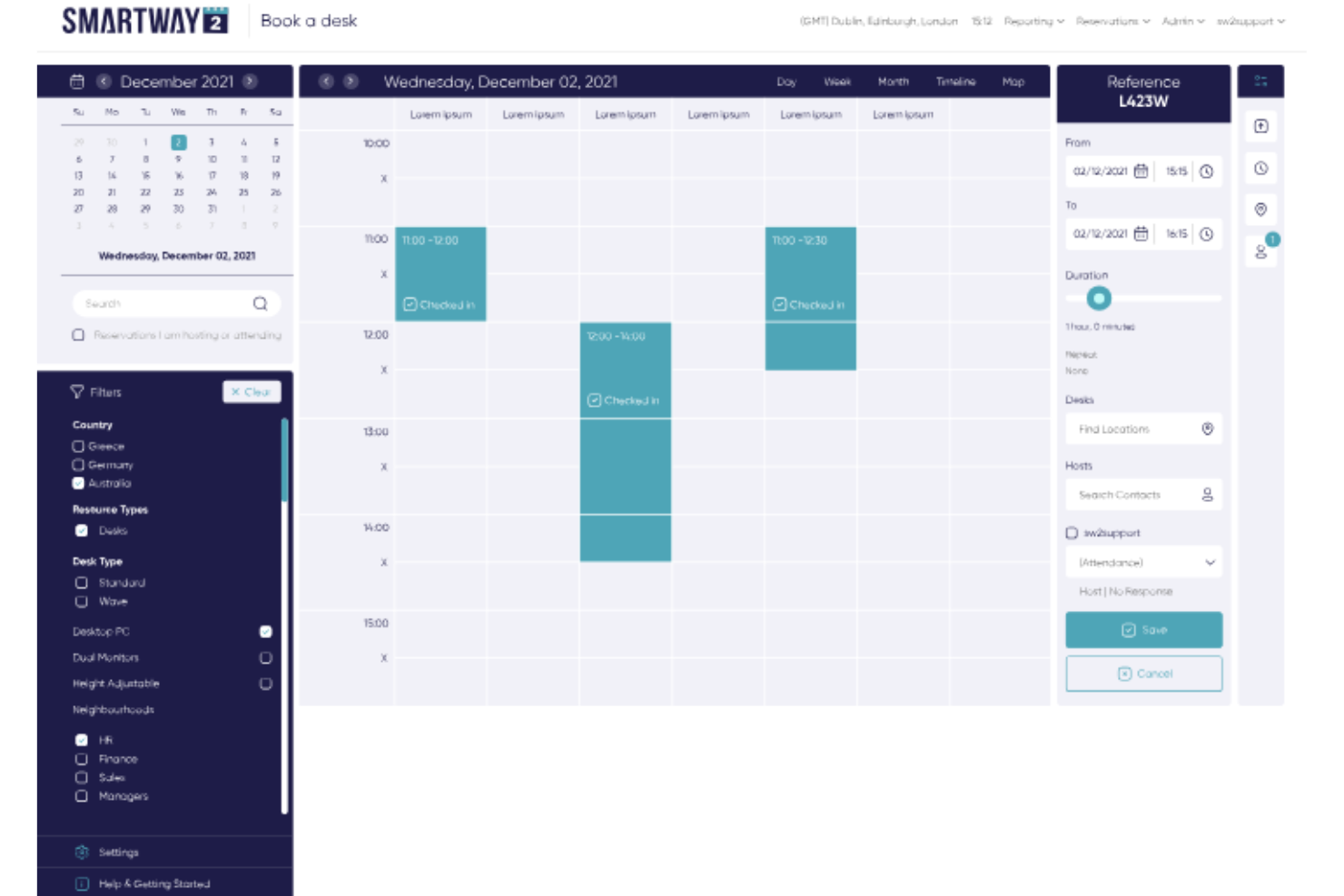
Smartway2 is a workspace booking platform that helps organizations automate meeting room, desk, and resource reservations for flexible offices. It’s a great fit for businesses needing precise control over workspace availability, rules, and real-time usage.
Who Is Smartway2 Best For?
Smartway2 suits facilities and workplace managers at mid-to-large organizations that need advanced resource scheduling, space optimization, and customizable booking rules.
Why Smartway2 Is a Good OfficeSpace Alternative?
I picked Smartway2 because of how far its booking automation actually goes. You can set rules that automatically release unconfirmed reservations, block back-to-back bookings, or restrict certain spaces by team or role—without any manual intervention.
I especially appreciate the conditional booking logic, where a room can be auto-approved or flagged for review based on criteria like group size or booking duration. For workplace teams managing dozens of spaces across a hybrid office, that kind of rule-based control saves a lot of administrative back-and-forth.
Smartway2 Key Features
- Catering and services booking: Add catering orders, AV equipment, or room layout preferences directly to a booking at the time of reservation.
- Digital concierge: Recommends desks, rooms, and resources based on who you're working with and what kind of work you need to do that day.
- Conference room display panels: Color-coded LED panels outside rooms show live availability and let you create, edit, or cancel bookings on the spot.
- Workplace analytics: View utilization data across desks, rooms, floors, and buildings, including no-show rates and service orders, with custom report exports.
Smartway2 Integrations
Smartway2 offers native integrations with Microsoft 365, Outlook, Google Workspace, Microsoft Teams, Cisco Webex, Zoom, Crestron, and HID, and provides an API for custom integrations.
Pros and Cons
Pros:
- Supports complex approval and security settings
- Real-time desk and meeting room availability
- Fully automated booking rules and workflows
Cons:
- Occasional delays updating space availability
- Initial setup can be time-consuming

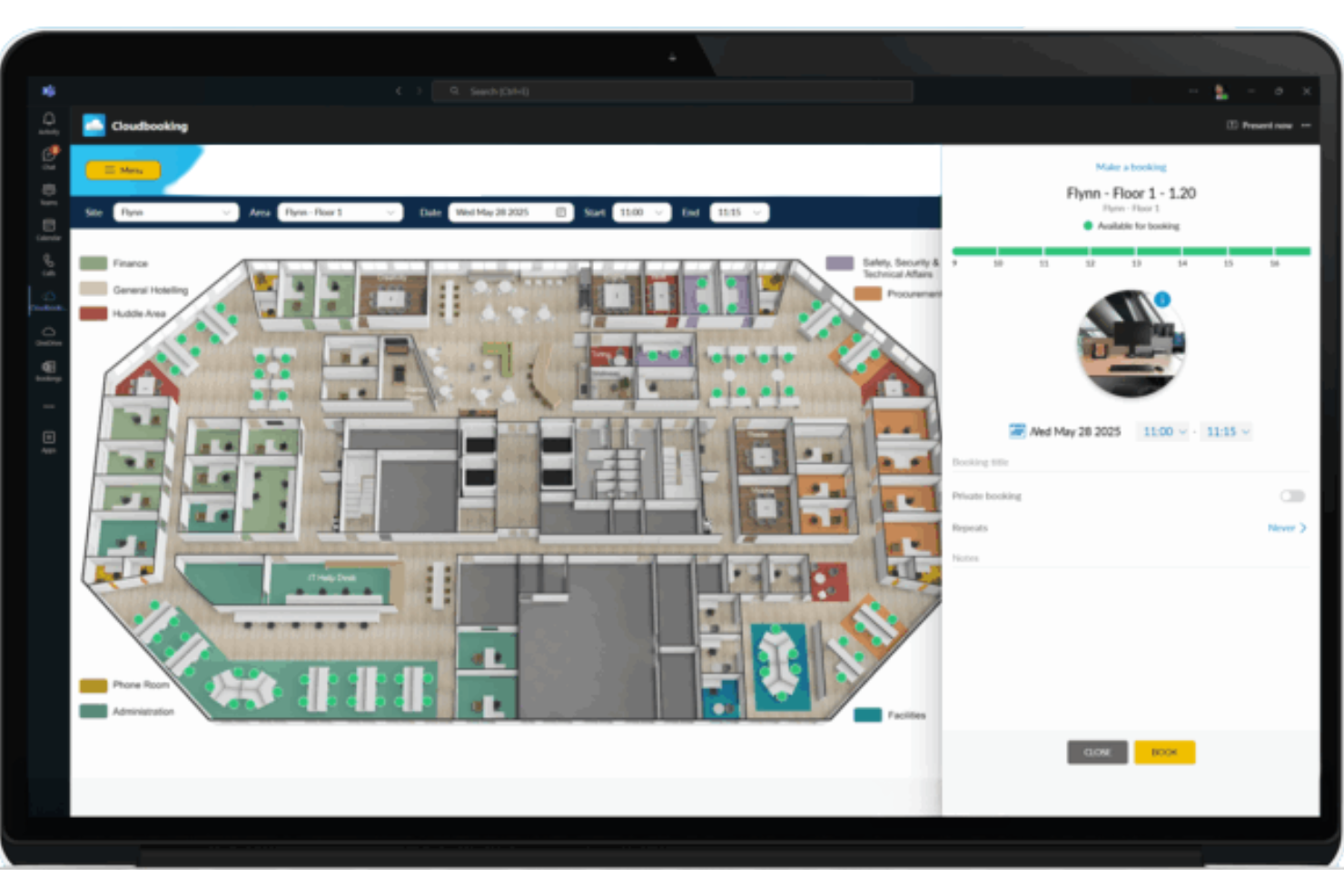
Cloudbooking is a workspace management platform built for organizations that need precision and insight when handling shared offices. It’s a great fit for companies seeking deeper visibility into desk, room, and visitor usage across multiple sites.
Who Is Cloudbooking Best For?
Cloudbooking is ideal for facilities teams at large enterprises that need centralized control over workspace reservations and in-depth usage insights.
Why Cloudbooking Is a Good OfficeSpace Alternative?
I picked Cloudbooking specifically for how detailed its analytics reporting gets. You can pull occupancy heatmaps, peak usage trends, and no-show rates across every desk, room, and floor in your portfolio—filtered by date, department, or location.
I find the custom report builder especially useful when I need to present utilization data to leadership or justify real estate decisions. For any team trying to right-size office space based on actual behavior, that level of reporting depth is hard to match.
Cloudbooking Key Features
- Interactive 3D floorplans: View live desk and room availability across your office via custom-built digital floorplans on mobile, web, and kiosks.
- Visitor management: Pre-register visitors, run mandated safety checks, and issue photo ID badges from a self-service kiosk.
- Car park booking: Reserve parking spaces alongside desk and room bookings through the same platform.
- QR code check-in/out: Let employees check in and out of desks and rooms by scanning a QR code, enabling real-time occupancy tracking.
Cloudbooking Integrations
Cloudbooking offers native integrations with Microsoft 365, Microsoft Outlook, Google Workspace, Okta, Azure Active Directory, and has an API for custom integrations.
Pros and Cons
Pros:
- Scalable for global multi-site deployments
- Custom reporting builder supports unique data needs
- Granular usage analytics for desks and rooms
Cons:
- Initial onboarding process can be lengthy
- Limited control over real-time notification settings

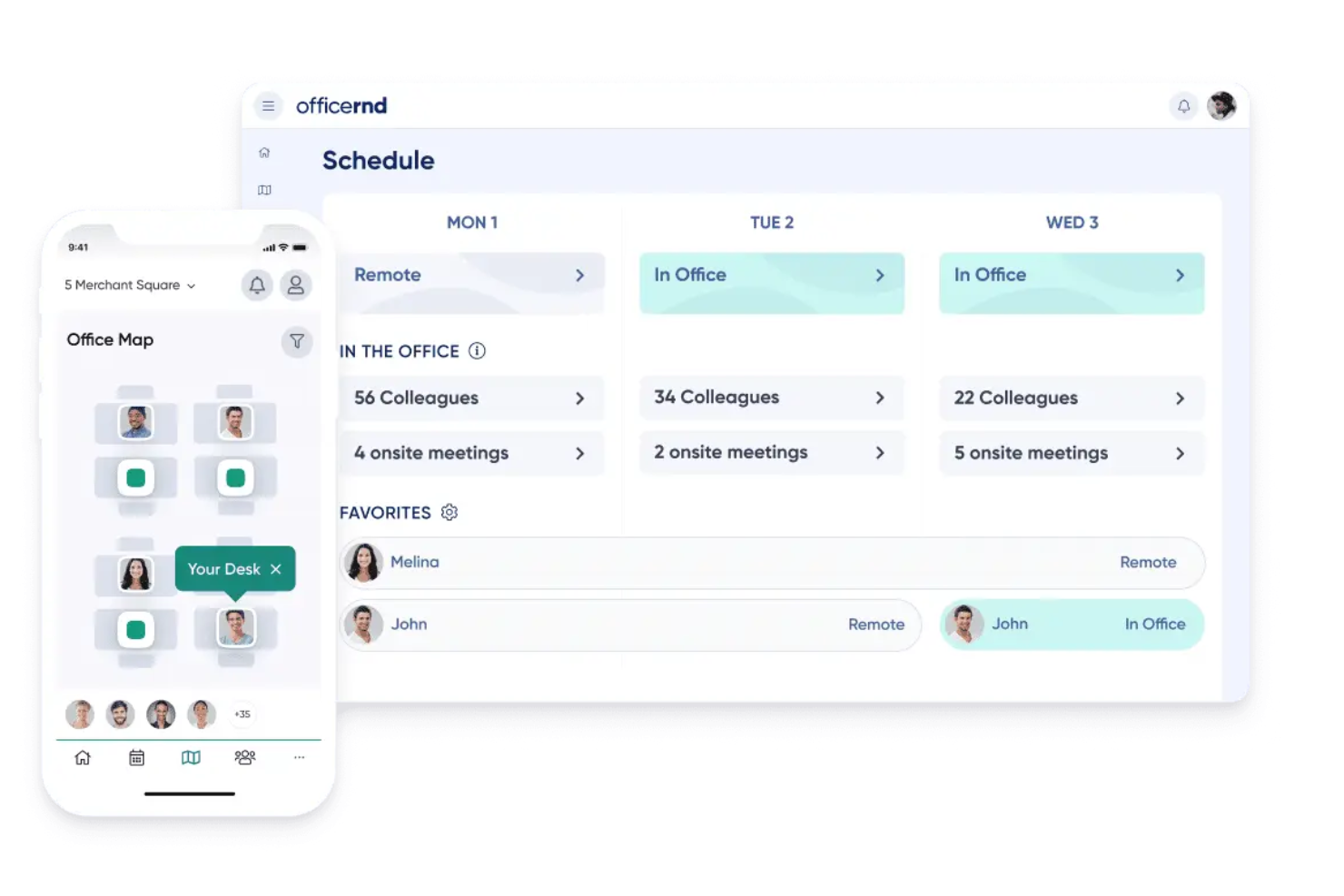
OfficeRnD is designed for operators who need to manage, optimize, and grow flexible workspaces. If you’re looking to streamline booking, billing, and member engagement across coworking locations, OfficeRnD brings those workflows into a single, easy-to-administer platform.
Who Is OfficeRnD Best For?
OfficeRnD is a strong option for community managers and workspace operators who oversee multiple coworking locations and want centralized control over memberships and resources.
Why OfficeRnD Is a Good OfficeSpace Alternative?
I picked OfficeRnD specifically because of how well it handles the operational complexity of running coworking spaces. The member portal lets members book desks, meeting rooms, and private offices, manage their own plans, and handle invoices without needing to contact staff.
I also appreciate the built-in billing engine, which automates recurring membership charges, day passes, and resource fees across multiple locations. For coworking operators juggling high member turnover and varied plan types, that combination of self-service and automated billing removes a significant amount of manual admin work.
OfficeRnD Key Features
- Growth hub: Run a built-in e-commerce engine for your coworking space, including online plan purchases, day pass sales, and automated contract generation.
- AI hub: Use an AI sales agent to capture and respond to membership inquiries and convert leads into bookings without manual follow-up.
- Data hub: Access advanced reporting and analytics powered by Looker, covering occupancy trends, revenue per desk, and booking behavior across locations.
- Visitor hub: Manage guest reception, pre-registration, and delivery tracking directly within the same platform your team uses for day-to-day operations.
OfficeRnD Integrations
OfficeRnD offers 40+ native integrations, including Xero, QuickBooks, Stripe, Google Workspace, Microsoft 365, Docusign, Slack, Kisi, Salto, and Zapier. An API is available for building custom integrations.
Pros and Cons
Pros:
- Customizable billing cycles for varied memberships
- Automated resource allocation across multiple locations
- Member self-service booking and plan management
Cons:
- Limited options for custom branding adjustments
- Reporting templates require manual customization

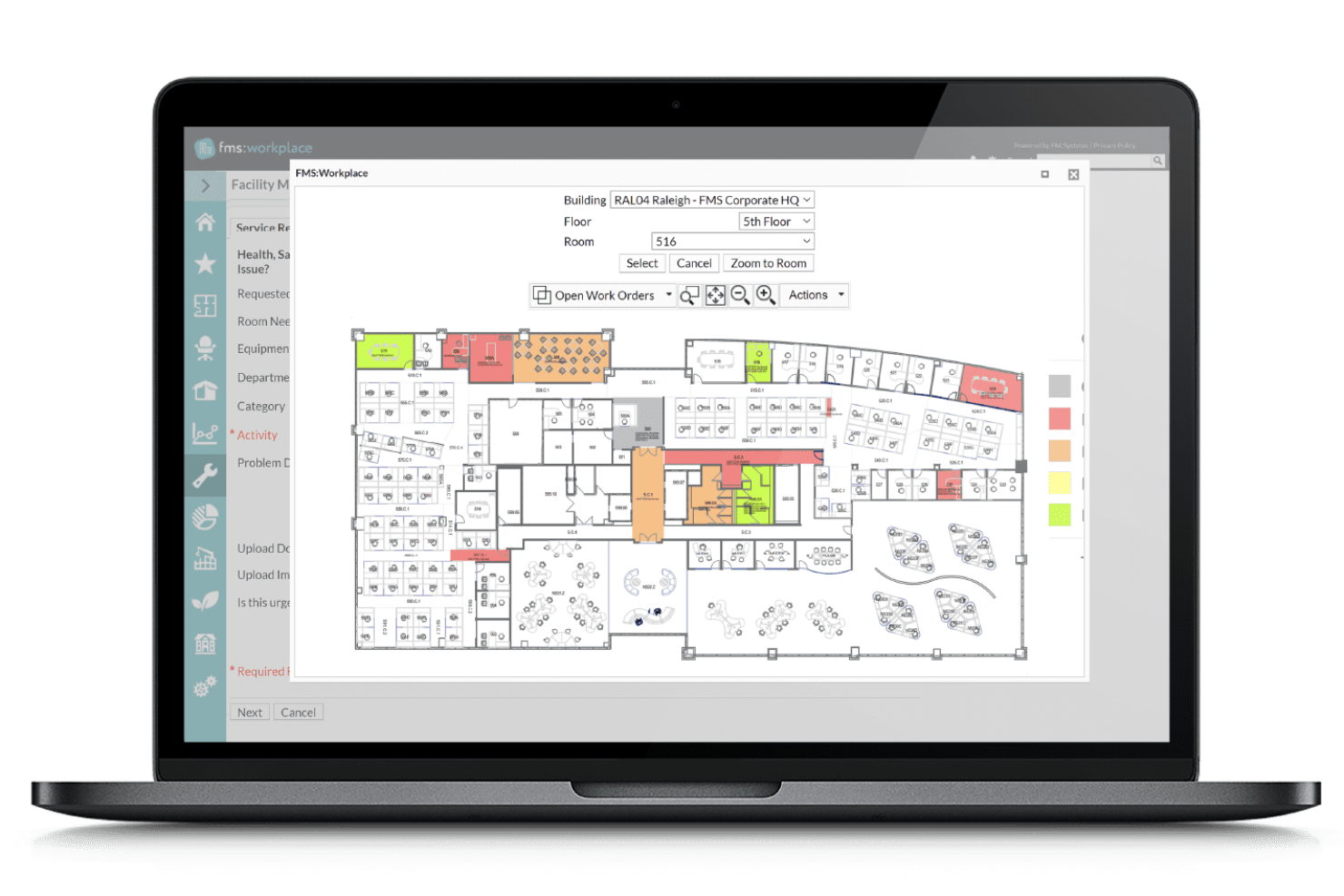
FM:Systems is a workplace management platform designed for organizations that need to optimize real estate assets across multiple properties.
Who Is FM:Systems Best For?
FM:Systems is a good choice for enterprise real estate teams who need to manage and analyze workspace and property data at scale.
Why FM:Systems Is a Good OfficeSpace Alternative?
I picked FM:Systems for its real estate portfolio management capabilities, which go deeper than most workplace tools. The lease administration module lets you track critical lease dates, rent escalations, and obligations across your entire property portfolio from a single dashboard.
I also appreciate the space utilization analytics, which pull in sensor and badge data to show how different floors and buildings are actually being used—not just how they're planned. For enterprise teams managing dozens of properties, that visibility makes it much easier to decide where to consolidate, expand, or renegotiate.
FM:Systems Key Features
- Strategic scenario planning: Model "what-if" space scenarios to visualize how portfolio changes align with future business needs before committing to them.
- Move management: Automate employee relocation planning and execution across facilities, reducing disruption and manual coordination.
- IoT workplace sensors: Deploy sensors to capture real-time occupancy, air quality, noise, and temperature data across your buildings.
- Automated work order ticketing: Log, route, and track maintenance requests through a centralized system to prevent facility downtime.
FM:Systems Integrations
FM:Systems offers native integrations with AutoCAD, Revit, Okta, Microsoft Power BI, Microsoft Teams, and Microsoft 365, and provides an API for custom integrations.
Pros and Cons
Pros:
- Visual floorplan editing with CAD integration
- Strong lease and asset lifecycle tracking
- Customizable dashboards for occupancy analytics
Cons:
- Floorplan updates sometimes require specialist support
- Reporting setup can be complex
DeskFlex
Best for integration with Microsoft Outlook
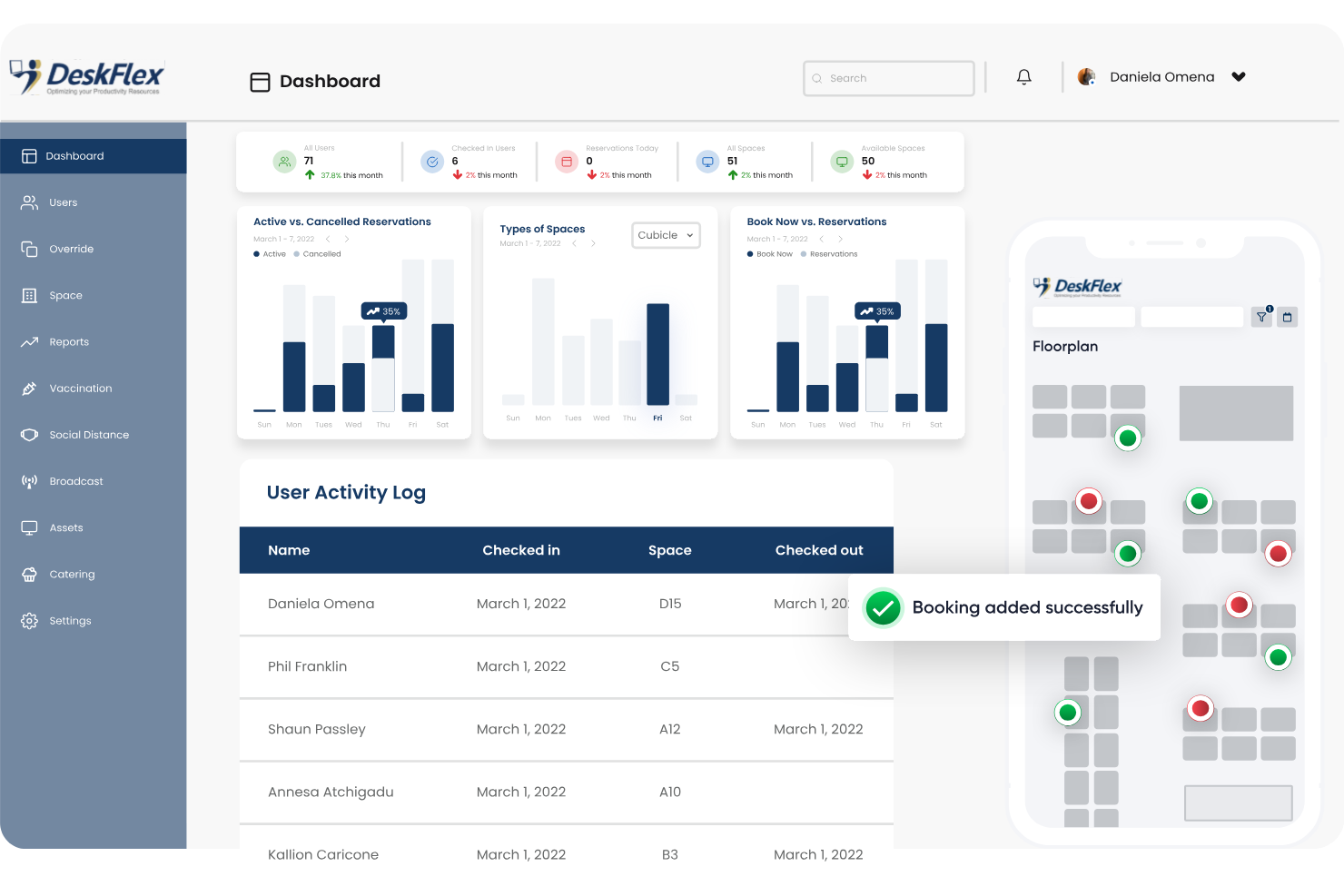
DeskFlex is a flexible workspace booking system designed for businesses and organizations looking to optimize their office environments. I think it’s well-suited for companies aiming to manage shared desks, meeting rooms, and parking spaces all from a single platform.
Who Is DeskFlex Best For?
Facility managers and IT teams in midsize and large companies needing centralized office resource scheduling.
Why DeskFlex Is a Good OfficeSpace Alternative?
The Microsoft Outlook integration is the main reason I'd recommend DeskFlex to teams already running on Microsoft 365. I appreciate that employees can book desks, meeting rooms, and equipment directly from the Outlook interface—without switching to a separate app or portal.
The MS Exchange sync keeps calendars updated across devices automatically, so when someone books a room in Outlook, that reservation reflects instantly across the organization. For companies where Outlook is the daily hub for scheduling, DeskFlex fits right into an existing workflow rather than asking people to adopt a separate tool.
DeskFlex Key Features
- Point-and-click floor maps: Browse a visual map of your office to find and book an available desk or room by clicking directly on the layout.
- Visitor management: Register guests before they arrive and manage check-ins from the same platform used for desk and room bookings.
- QR code check-in: Let employees check in to their booked desk or room by scanning a QR code, which also helps flag and release no-show bookings.
- Booking approvals: Route reservation requests to a manager for approval when certain rooms or equipment require controlled access.
DeskFlex Integrations
DeskFlex offers native integrations across the Microsoft ecosystem, including Microsoft Outlook, Exchange, and Microsoft 365. An API is available for custom integrations.
Pros and Cons
Pros:
- Facilities reports for space utilization analysis
- Customizable desk and room booking workflows
- Outlook calendar reservations sync instantly
Cons:
- Floor map setup requires vendor assistance
- Mobile app navigation can be inconsistent
Andre alternativer til OfficeSpace
Her er noen flere alternativer til OfficeSpace som ikke kom med på kortlisten min, men som likevel er verdt å ta en titt på:
- Joan Desk Booking
For wireless desk booking devices
- Skedda
For self-service desk reservations
- Eden
For workplace services management
- Archie
For easy office access management


How I Evaluate OfficeSpace Alternatives
I split my evaluation into baseline criteria—desk booking, floor plans, hybrid scheduling—and differentiators that separate tools for large multi-site portfolios from smaller-team deployments.
Core Functionality (Table Stakes For This List)
When I'm selecting tools for my list, I rank each one on a scale from 0 (does not offer the functionality) to 5 (excels in this area) for each core functionality listed below. Then, I calculate the tool's total score into a percentage. Each tool needs to achieve a minimum total score of 65% to be considered for inclusion.
- Desk & Room Booking: I evaluate whether employees can self-serve reservations for desks, rooms, and shared assets across web and mobile without needing admin involvement.
- Interactive Floor Plans: Each tool should offer visual maps with real-time availability so employees can find open desks and navigate unfamiliar offices during cross-site visits.
- Space Utilization Analytics: I look for occupancy dashboards and utilization reports that help facilities and HR leaders make informed decisions about consolidating floors or expanding capacity.
- Hybrid Work Scheduling: Teams coordinating in-office days need colleague visibility and team scheduling, so I check how each platform handles weekly planning and attendance tracking.
- HRIS & Directory Integration: Syncing employee records from platforms like Workday, BambooHR, or ADP matters, so I evaluate native connectors along with SSO and calendar integrations.
- Visitor & Employee Management: I look at how each tool handles guest pre-registration, badge printing, and employee check-ins to support front-desk workflows and compliance requirements.
Once I have a list of tools that meet this criteria, I consider what sets each platform apart.
Differentiating Factors (What Sets Vendors Apart)
Here's how I compare and contrast different vendors:
Standout Features
Neighborhoods and zoning controls matter when teams need assigned areas within a shared floor—think engineering clustered near QA while sales has its own zone. I also evaluate move management tools, since office reorganizations without drag-and-drop stacking plans tend to become spreadsheet nightmares. IoT sensor integration is another factor I weigh, because booking data alone rarely tells the full story of how space is actually used.
Beyond Features
Implementation speed matters here—I check whether vendors offer CAD import and floor plan digitization services, since a tool is only useful once your maps are live. Pricing models also vary widely across this category. Some charge per desk, others per user or per location, so I evaluate whether modular pricing lets you pay only for booking, analytics, or visitor management as needed. Privacy safeguards around occupancy tracking and employee location data are another area I look into, especially for organizations operating across multiple regions.
Hvorfor se etter et alternativ til OfficeSpace?
Selv om OfficeSpace er et godt valg blant alternativene til OfficeSpace, er det flere grunner til at enkelte brukere ser etter andre løsninger. Det kan hende du ser etter et alternativ til OfficeSpace fordi …
- Du trenger støtte for svært distribuerte eller globale team
- Du ønsker mer avanserte funksjoner for analyse og rapportering
- Du trenger flere integrasjoner med HR- eller fasilitetsverktøy
- Du foretrekker større mulighet til å tilpasse bestillingsarbeidsflyter
- Du må oppfylle samsvarskrav i bestemte regioner
Hvis noe av dette høres kjent ut, har du kommet til rett sted. Listen min inneholder flere alternativer til OfficeSpace som er bedre egnet for team som møter disse utfordringene med OfficeSpace og ser etter alternative løsninger.
Viktige funksjoner i OfficeSpace
Her er noen av de viktigste funksjonene i OfficeSpace, slik at du kan sammenligne hva alternative løsninger tilbyr:
- Bestilling av skrivebord: Reserver delte skrivebord eller arbeidsstasjoner ved behov eller på forhånd, med oversikt over tilgjengelighet i sanntid for scenarier med arbeid på stedet, hybridarbeid eller fleksible arbeidsplasser.
- Romplanlegging: Bestill møterom med filtre for kapasitet, preferanser for utstyr og konflikthåndtering, slik at du alltid har riktig plass til teamøktene dine.
- Interaktive plantegninger: Naviger i og velg områder ved hjelp av et digitalt kart over arbeidsplassen, slik at det blir enklere å se hva som er tilgjengelig og hvor teamene befinner seg.
- Besøkshåndtering: Registrer gjester, automatiser innsjekkinger, skriv ut adgangskort og følg besøkendes bevegelser for å sikre en trygg og imøtekommende arbeidsplassopplevelse.
- Analyse av arealutnyttelse: Følg bruksmønstre og beleggsgrad med oversikter og rapporter som gir grunnlag for fremtidige beslutninger om eiendom og forbedrer ressursfordelingen.
- Flyttehåndtering: Planlegg, koordiner og gjennomfør flytting av ansatte eller endringer i arbeidsområder, med automatiserte varsler og detaljert fremdriftsoppfølging.
- Vedlikeholdsforespørsler: Send inn, følg opp og administrer servicehenvendelser til driftsavdelingen for å løse problemer raskt og holde arbeidsplassen i god drift.
- Håndheving av retningslinjer: Fastsett bestillingsregler, kapasitetsgrenser og rengjøringsplaner for å overholde organisasjonens retningslinjer og ivareta behovene for helse og sikkerhet.
- Mobil tilgang: Administrer bestillinger, innsjekkinger og opplysninger om områder via en mobilapp for ansatte som er på farten eller arbeider på flere steder.