

10 beste AI-verktøy for opplæring og utvikling gjennomgått i 2026

10 De beste AI-verktøyene for opplæring og utvikling – kortliste


Det blir stadig mer krevende å holde opplærings- og utviklingsprogrammer effektive. Team har ulike læringsstiler, begrenset tid og et konstant press om å utvikle nye ferdigheter. AI-verktøy kan bidra ved å støtte innholdsproduksjon, personalisering av læringen, ferdighetssporing og raskere programutvikling.
Jeg har testet og vurdert en rekke AI-verktøy som er utviklet spesielt for opplæring og utvikling, med fokus på hvor godt de støtter reelle læringsprosesser. Målet mitt er å gi deg en tydelig og objektiv oversikt over alternativene som faktisk forbedrer læringsresultatene og reduserer manuelt arbeid.
I denne artikkelen finner du mine beste anbefalinger, sammen med de viktigste funksjonene, fordelene og begrensningene. Når du er ferdig, vil du ha en god forståelse av hvilke verktøy som kan løfte opplæringsprogrammene dine og støtte teamets utvikling.
Why Trust Our Software Recommendations
Our team has been testing and reviewing software since 2012. As HR experts ourselves, we know how difficult—and important—it is to choose the right software.
For this guide, we evaluated tools using hands-on testing and independent research, scoring tools using our selection criteria. We also draw on insights from industry thought leaders and practicing HR experts.
Our reviews reflect our human editorial judgment, not a sales pitch.
Expert reviewers:
Sammenligningstabell: AI-verktøy for opplæring og utvikling
Denne sammenligningstabellen oppsummerer prisopplysningene for mine beste anbefalinger blant AI-verktøy for opplæring og utvikling:
| Tool | Best For | Trial Info | Price | ||
|---|---|---|---|---|---|
| 1 | Best for real-world AI simulations | Free plan + free trial + free demo available | From $20/user/month (billed annually) | Website | |
| 2 | Best for structured employee training paths | Free demo + 30-day free trial available | From $3.97/user/month (billed annually) | Website | |
| 3 | Best for AI content creation | 14-day free trial | Pricing upon request | Website | |
| 4 | Best for AI-assisted course creation | Free plan + free demo available | From $119/month (billed annually) | Website | |
| 5 | Best intuitive interface | Free demo available | Pricing upon request | Website | |
| 6 | Best for interactive courses | 14-day free trial available | From $970/author (billed annually) | Website | |
| 7 | Best for AI-generated training paths | Free demo available | From $5/user/month | Website | |
| 8 | Best for healthcare AI roleplay practice | 14-day free trial | From $50/seat/month | Website | |
| 9 | Best for dedicated L&D teams | Free demo available | Pricing upon request | Website | |
| 10 | Best for AI roleplay coach | Free demo available | Pricing upon request | Website |


Vurdering av de beste AI-verktøyene for opplæring og utvikling
Nedenfor finner du mine detaljerte sammendrag av de beste AI-verktøyene for opplæring og utvikling som kom med på kortlisten. Vurderingene mine gir en detaljert oversikt over de viktigste funksjonene, fordelene \u0026 ulempene, integrasjonene og de ideelle bruksområdene for hvert verktøy, slik at du kan finne det som passer best for deg. Jeg støtte på problemer med å få tilgang til detaljert informasjon fra de oppgitte kildene. Jeg vil likevel bruke informasjonen jeg har, til å fullføre oppgaven så godt som mulig.

Exec
Best for real-world AI simulations
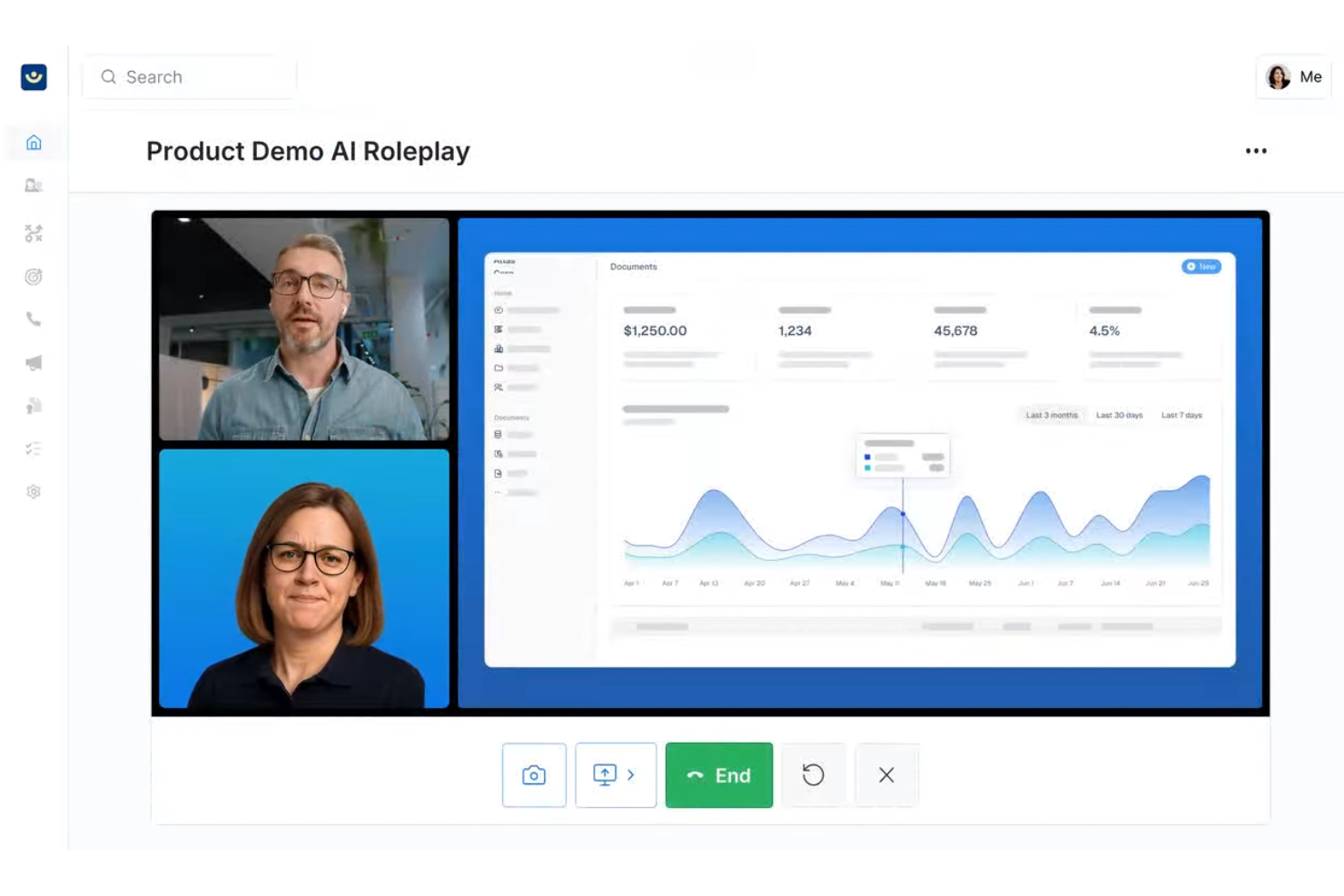
Exec uses AI to create immersive training simulations for organizations that want to help employees build practical skills through hands-on, scenario-based learning.
Who Is Exec Best For?
Exec is a good fit for L&D teams at mid-size to enterprise organizations that need to train employees on complex, real-world situations through practice-based learning.
Why I Picked Exec
I picked Exec as one of the best because of how closely its AI simulations mirror real-world conditions. The voice-based AI roleplay engine doesn't just run through scripted prompts—it responds naturally, raises objections, and adapts based on how the conversation unfolds. I especially like that you can configure AI characters with specific traits, industry context, and your company's actual product details, so practice sessions feel like the real thing rather than a generic exercise. The screen share feature also lets reps practice live product demos in front of an interactive AI audience that responds like actual stakeholders.
Exec Key Features
- AI scorecard: Automatically evaluates simulation performance against custom criteria and surfaces coaching insights for managers to review.
- Custom learning paths: Build structured training programs that sequence simulations and content modules based on role or skill level.
- Analytics dashboard: Track individual and team progress across simulations with data on completion rates and performance trends.
- Content library: Access a collection of pre-built simulation templates that teams can adapt for their specific training needs.
Exec Integrations
Integrations are available via an API.
Pros and Cons
Pros:
- Customizable scenarios align with specific business objectives.
- Provides instant feedback to reinforce learning and skill retention.
- Realistic AI roleplays enhance communication skills in high-pressure situations.
Cons:
- Initial setup and scenario design can be complex and time-consuming.
- Primarily optimized for English-speaking organizations, limiting global reach.

Best for structured employee training paths
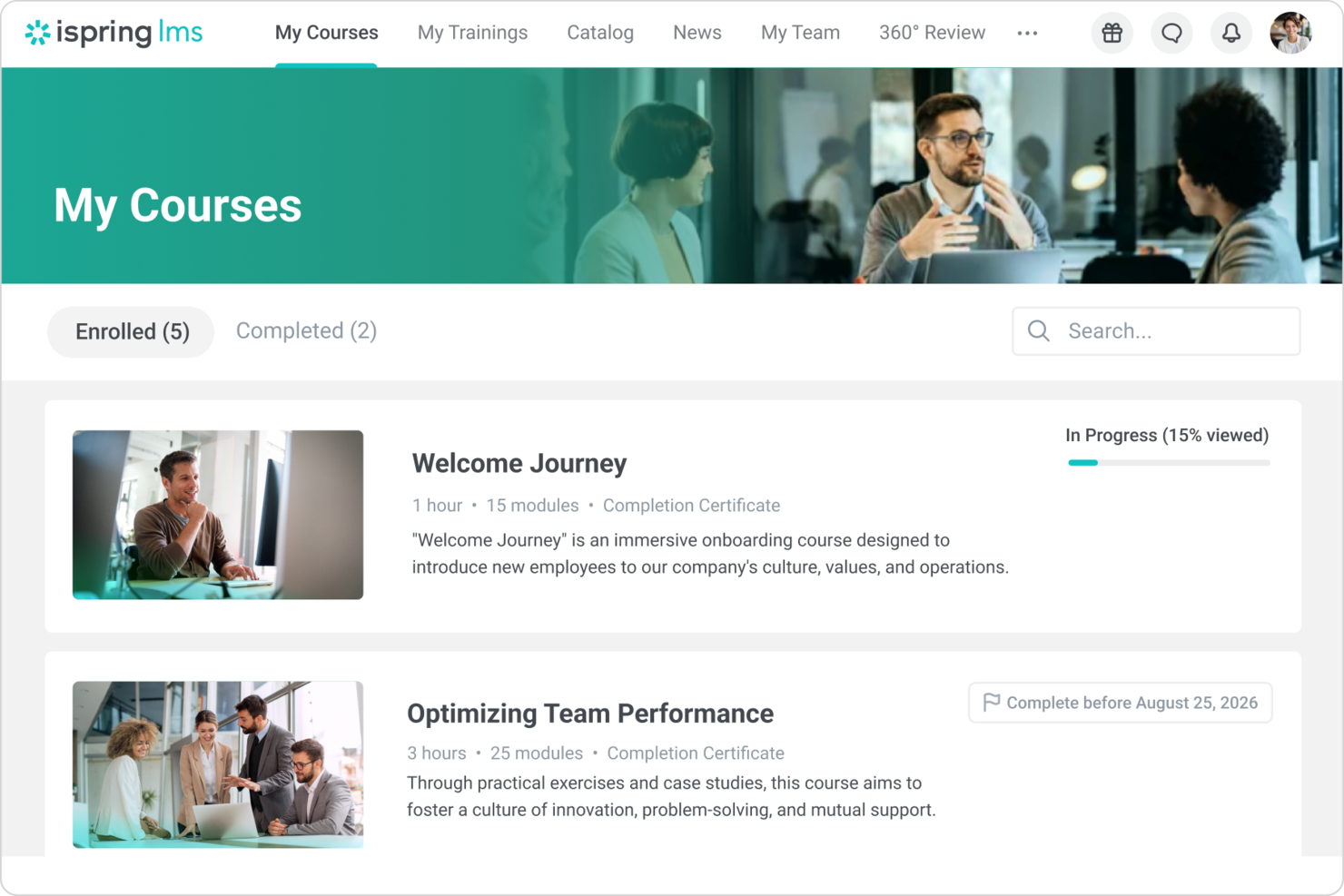
iSpring LMS is a cloud-based learning management system designed for HR teams and training managers who need to deliver, track, and manage employee development programs with built-in course authoring and detailed analytics.
Who Is iSpring LMS Best For?
iSpring LMS is a strong fit for mid-sized businesses and enterprises that need a dedicated platform for structured, scalable employee training programs.
Why I Picked iSpring LMS
iSpring LMS earns its spot on my shortlist because of how well it handles structured learning paths for employee training. I like that you can sequence courses, assign them by role or department, and set completion rules so learners move through content in a defined order. My team uses the built-in course authoring tool to build training directly in the platform, which keeps everything in one place rather than juggling separate tools. The auto-enrollment rules are especially useful—new hires get assigned the right training tracks automatically based on their job profile.
iSpring LMS Key Features
- AI-powered course authoring: Use a built-in AI assistant to generate course text, quiz questions, images, and course translations directly inside the platform.
- 360-degree review: Collect structured performance feedback from peers, managers, and direct reports to assess employee competencies and identify skill gaps.
- Gamification: Award learners points and badges and display progress on leaderboards to encourage course completion.
- Mobile app with offline access: Learners can complete training on iOS or Android without an internet connection, with progress syncing automatically when they reconnect.
iSpring LMS Integrations
Integrations include Salesforce, MS Azure, MS Exchange, BambooHR, Udemy, Go1, LinkedIn Learning, and other popular course libraries.
Pros and Cons
Pros:
- Strong compliance and progress reporting
- Automated enrollment reduces admin effort
- Clear role-based learning paths
Cons:
- No real-time skills benchmarking
- Limited advanced workflow customization
New Product Updates from iSpring LMS

iSpring LMS Adds Multiple Observations to OJT Sessions
iSpring LMS now lets managers log multiple observations within one OJT session, grouping visits and auto-generating summary stats like averages, criterion results, and comparisons. For more information, visit iSpring LMS's official site.
SkyPrep
Best for AI content creation
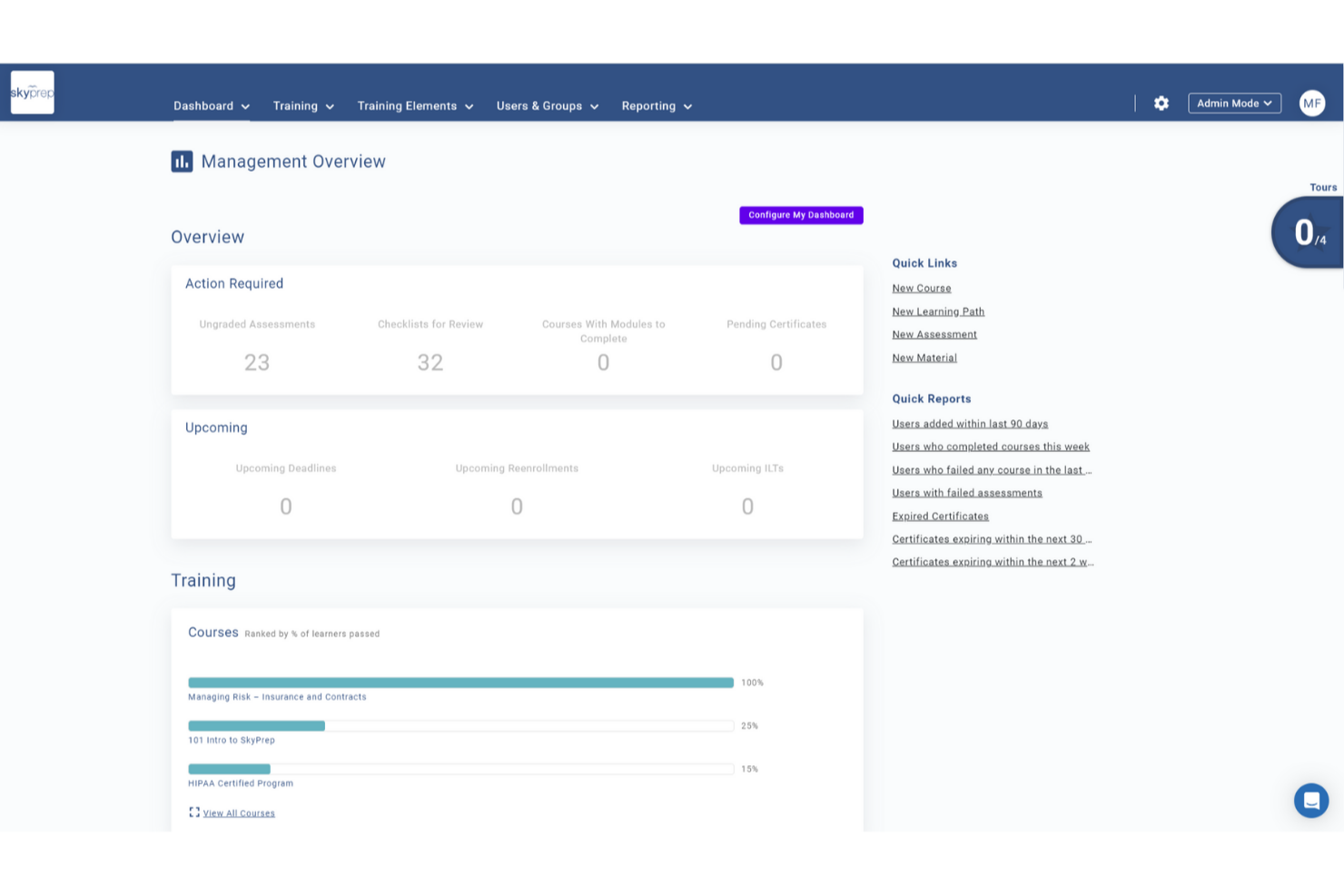
SkyPrep is a learning management platform designed for HR teams and training professionals who want to automate course creation, deliver engaging learning experiences, and track employee development with AI-powered tools.
Who Is SkyPrep Best For?
SkyPrep is a strong fit for mid-sized businesses and growing organizations that need a straightforward way to build, deliver, and manage employee training programs at scale.
Why I Picked SkyPrep
I picked SkyPrep as one of the best for AI content creation because it takes a genuinely different approach to course building. Instead of starting from a blank page, my team can upload existing materials and let SkyPrep's AI generate a full course outline with structured content blocks. From there, the Smart Convert feature lets us turn those content blocks into quizzes or flashcards without rebuilding anything from scratch. I also like the AI voiceover generation, which converts written course content into natural-sounding audio—useful when rolling out training to learners who absorb information better through listening than reading.
SkyPrep Key Features
- Gamification: Add points, badges, and leaderboards to courses to increase learner engagement and motivation.
- Automated course enrollment: Automatically assign courses to users based on roles, groups, or onboarding triggers.
- Custom reporting and analytics: Generate out-of-the-box reports on learner progress, course completion, and training impact.
- Multi-tenant LMS: Run separate training portals for different clients, departments, or brands from a single account.
SkyPrep Integrations
Integrations include ADP, Workday, BambooHR, Salesforce, HubSpot, Zoom, Microsoft Teams, Stripe, PayPal, and Okta.
Pros and Cons
Pros:
- Gamification increases learner participation
- AI content generation boosts engagement
- AI assessment builder saves time
Cons:
- Some integrations require manual setup
- Reporting depth limited for analytics

Best for AI-assisted course creation
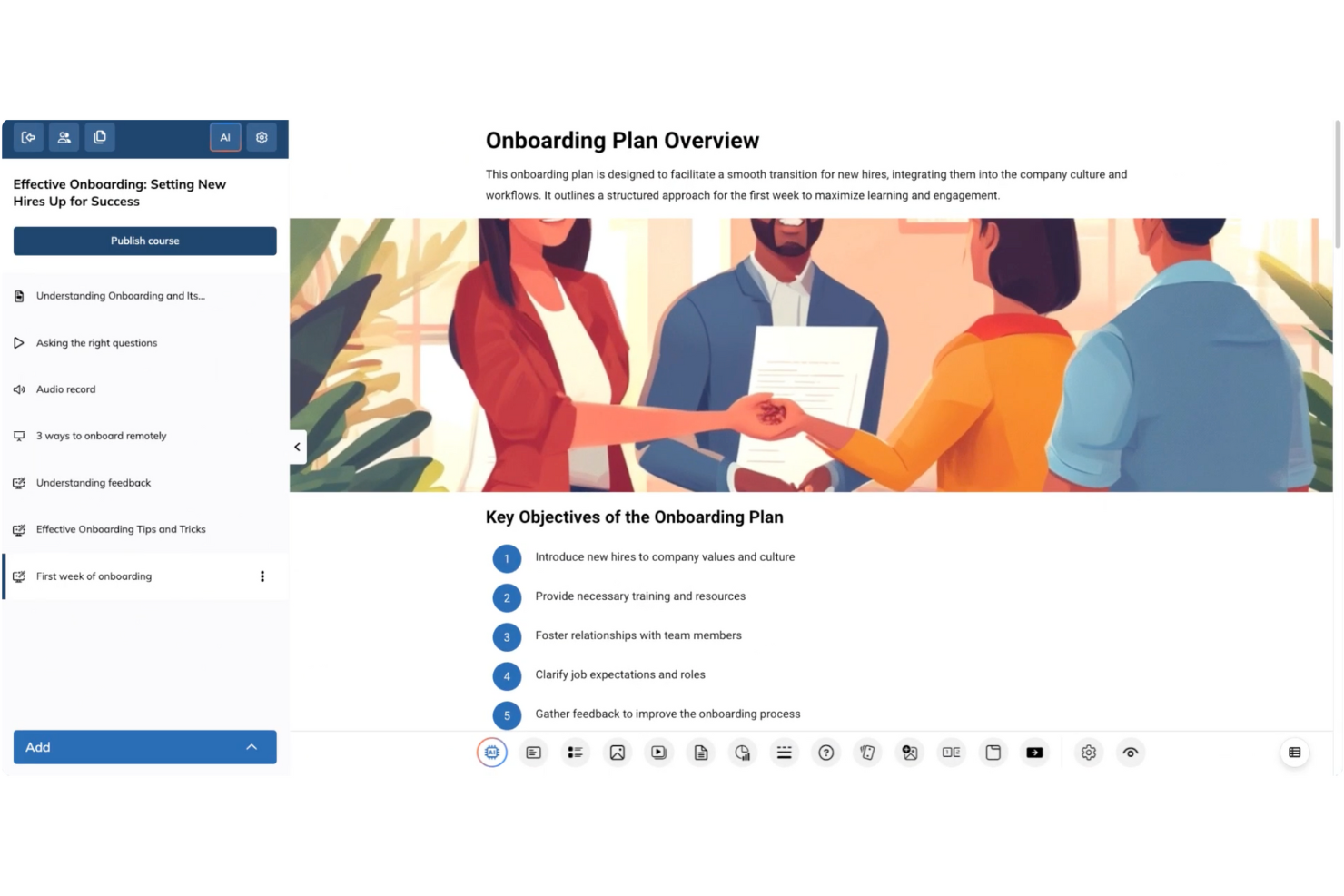
TalentLMS is a cloud-based learning management system for HR teams, trainers, and organizations that want to deliver engaging, scalable training programs with built-in automation and AI-driven features for content creation and learner management.
Who Is TalentLMS Best For?
TalentLMS is a strong fit for small to mid-sized businesses that need a straightforward platform to build, deliver, and manage employee training programs at scale.
Why I Picked TalentLMS
TalentLMS earns its spot as one of the best on my shortlist because of how useful its AI course creation tools are. I particularly like TalentCraft, the built-in AI content creator that turns a topic or idea into a full course—complete with flashcards, summaries, and visuals. The Content Companion feature also lets me refine existing material with AI suggestions to rewrite, shorten, or improve clarity without rebuilding from scratch. On top of that, the AI Test Creator generates assessments directly from course content, which reduces manual work when building out a full training program.
TalentLMS Key Features
- Branching learning paths: Build adaptive training sequences that route learners to different content based on their quiz results or progress.
- Automation rules: Set triggers to auto-enroll users, send reminders, or assign certifications based on specific learner actions or milestones.
- Built-in reporting and analytics: Track learner progress, course completion rates, and assessment scores from a centralized dashboard.
- Blended learning support: Combine self-paced online modules with instructor-led training sessions in a single course structure.
TalentLMS Integrations
Integrations include BambooHR, Salesforce, TalentHR, Sage People, ADP Workforce Now, Intercom, Zendesk Chat, Zoom, Microsoft Teams, and GoTo.
Pros and Cons
Pros:
- AI-assisted content suggestions help build courses faster
- Onboarding and training templates reduce setup time
- Gamification features increase learner engagement
Cons:
- Customization options might not meet all specific needs
- Advanced interactive course creation may require additional tools
New Product Updates from TalentLMS
TalentLMS Adds Learning Paths, AI Video, and Learner Experience Updates
TalentLMS introduced updates across learning management, content creation, and learner experience, including Learning Paths for Groups, AI video generation in TalentCraft, video bookmarking, and expanded administration tools. For more information, visit TalentLMS’s official site.

Absorb
Best intuitive interface
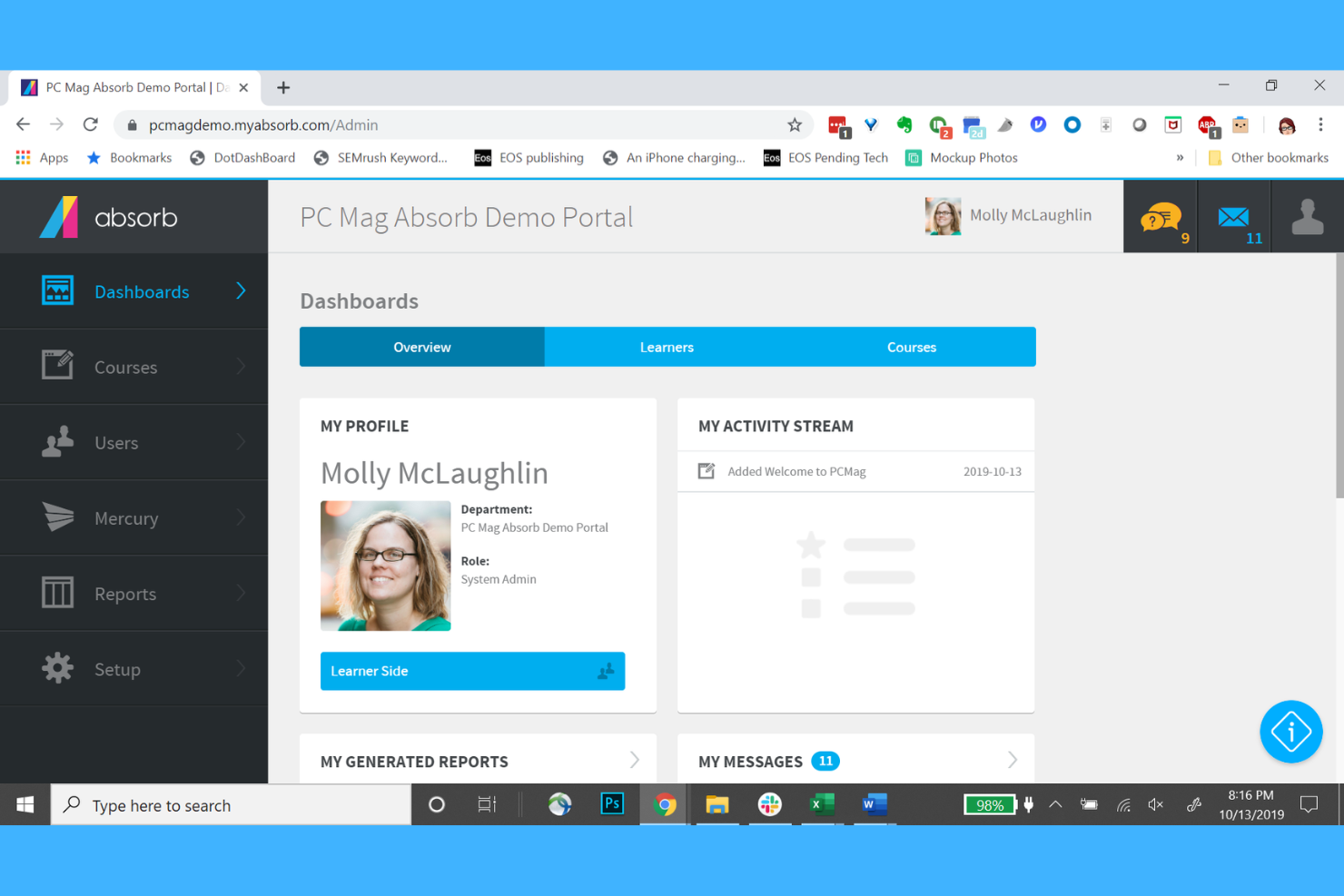
Absorb is a cloud-based learning management system designed for HR teams and organizations that want to deliver personalized, AI-powered training and development programs to employees at scale.
Who Is Absorb Best For?
Absorb is a good fit for mid-size to enterprise organizations with dedicated L&D or HR teams managing structured employee training programs.
Why I Picked Absorb
Absorb earns a spot on my shortlist thanks to one of the cleanest interfaces I've used in an LMS. The learner-facing experience is designed so that employees can find and launch courses without any hand-holding—search results are ranked by AI based on past behavior, so the most relevant content surfaces first. I also like Intelligent Assist, which lets admins type natural-language requests like "show me all users who didn't complete compliance training" and instantly pulls up a pre-populated report. For L&D teams managing large learner populations, this frictionless navigation on both sides of the platform makes a real operational difference.
Absorb Key Features
- AI-powered course recommendations: Automatically suggests relevant learning content to each learner based on their role, history, and development goals.
- Automated enrollment rules: Assigns courses to learners automatically based on criteria like job title, department, or onboarding status.
- Built-in content authoring: Create and edit training content directly within the platform without needing a separate authoring tool.
- Customizable learner portal: Brand and configure the learner-facing interface to match your organization's identity and training structure.
Absorb Integrations
Integrations include Salesforce, Zoom, Google Workspace, Microsoft Teams, Adobe Connect, Shopify, Stripe, PayPal, and Okta.
Pros and Cons
Pros:
- E-commerce capabilities
- Automated course enrollment
- Customizable branding options
Cons:
- Pricing not transparent
- Higher cost for small teams
New Product Updates from Absorb
Absorb Expands Instructor-Led Course Session Management
Absorb adds multi-class sessions, recurring classes, conflict indicators, and learner enrollment during setup for instructor-led courses. These updates give admins more control over scheduling and session management. For more information, visit Absorb’s official site.
 .
.
Best for interactive courses
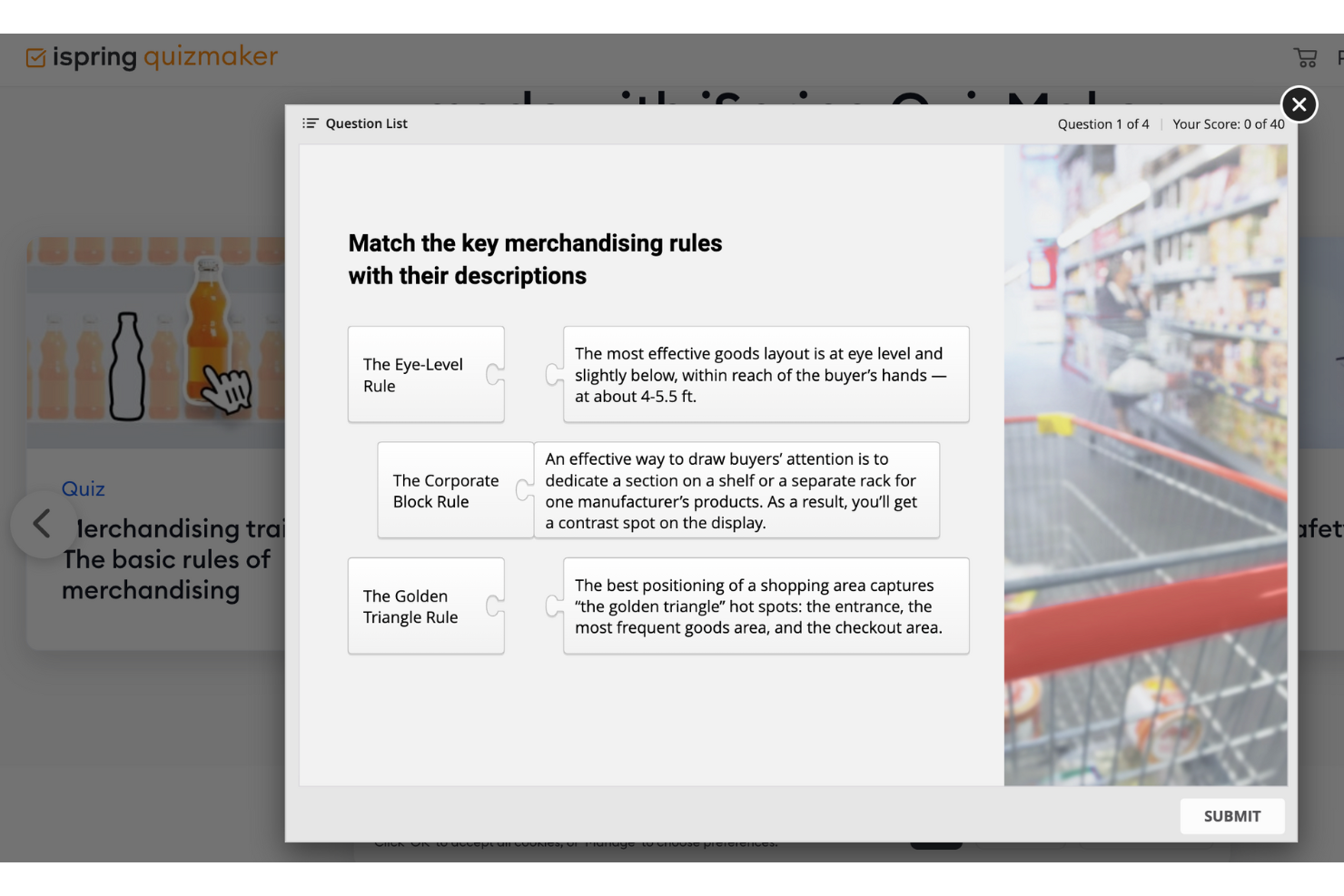
iSpring Suite is an e-learning authoring toolkit for HR teams, L&D professionals, and educators who want to create engaging training content, quizzes, and simulations that work across devices and integrate with most learning management systems.
Who Is iSpring Suite Best For?
iSpring Suite is a great fit for L&D teams and instructional designers at mid-sized to large organizations who need to build and deploy structured training programs at scale.
Why I Picked iSpring Suite
iSpring Suite is one of my top picks because I love how it turns existing PowerPoint slides into fully interactive training courses without requiring any e-learning development experience. The branched dialogue simulations are a standout for me—my team uses them to build realistic role-play scenarios for sales and compliance training, where learners navigate different conversation paths based on their choices. I also rely heavily on the QuizMaker tool, which supports 14 question types, including drag-and-drop and hotspot questions that go well beyond basic multiple-choice. The built-in AI Assistant generates outlines, quiz questions, and text edits directly inside the authoring environment.
iSpring Suite Key Features
- Screen recording and video editor: Capture on-screen workflows and edit training videos directly within the iSpring Suite environment.
- Content library: Access a built-in library of pre-built templates, characters, backgrounds, and icons to speed up course design.
- SCORM and xAPI publishing: Export finished courses in SCORM, xAPI, or AICC formats for compatibility with any major LMS.
- Narration and text-to-speech: Add voiceover narration to slides or generate AI-powered audio from written text without recording equipment.
iSpring Suite Integrations
Integrations include Moodle, Blackboard, Canvas, Brightspace, TalentLMS, LearnDash, Docebo, SAP Litmos, and Cornerstone OnDemand.
Pros and Cons
Pros:
- Includes dialogue simulations
- Supports multimedia content creation
- Converts PowerPoint to eLearning
Cons:
- Requires technical skills for complex tasks
- Limited customization options

Deel HR
Best for AI-generated training paths
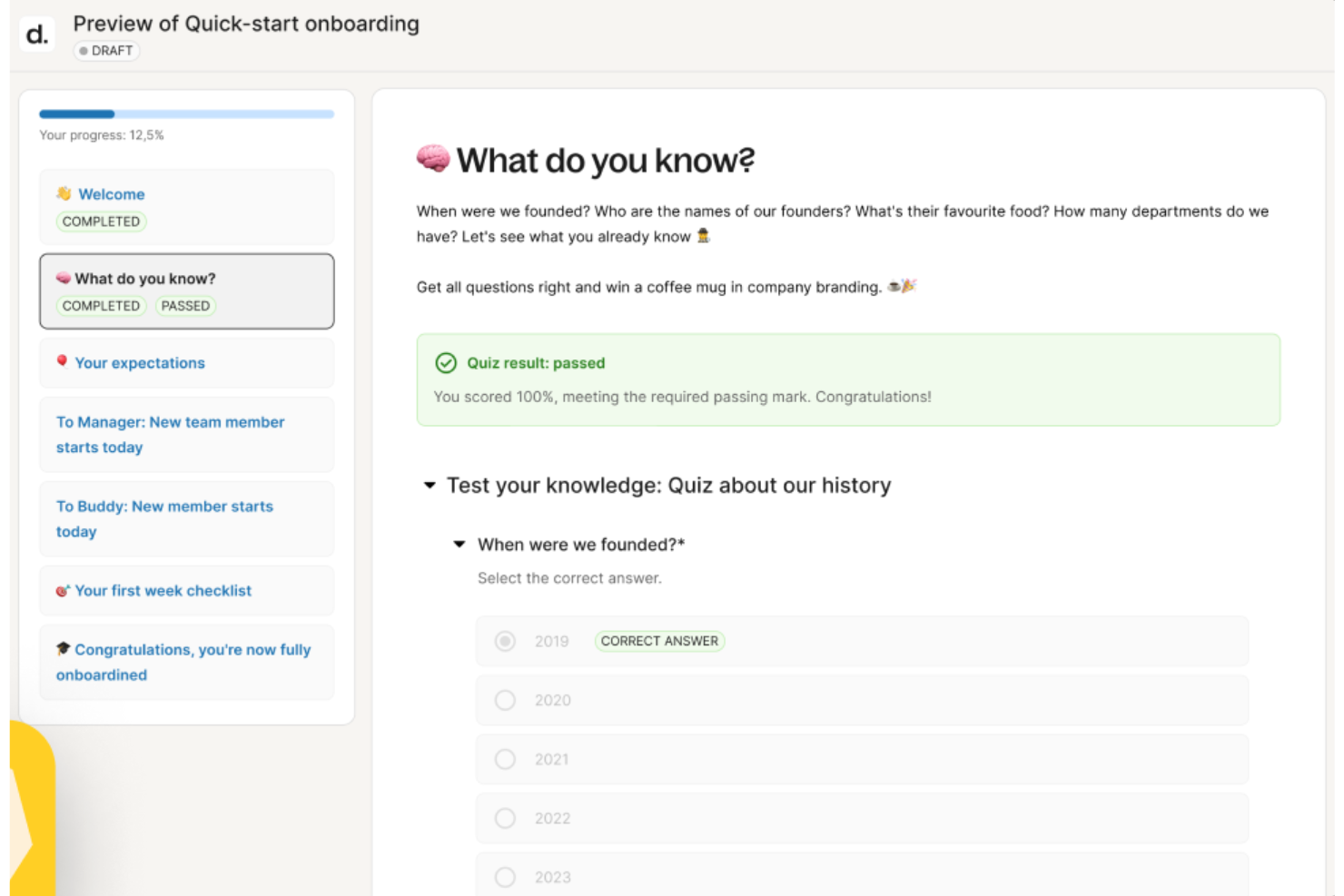
Deel HR gives HR teams and people leaders a platform to manage global talent, automate onboarding, and deliver personalized employee development using AI-driven tools that address modern training and upskilling needs.
Who Is Deel HR Best For?
Deel HR is a strong fit for mid-size to enterprise HR teams managing distributed or global workforces who need to centralize people operations and employee development in one place.
Why I Picked Deel HR
I picked Deel HR as one of the best because I love how its AI doesn't just sit in the background—it actively shapes how learning and development gets built. Through Deel Engage, the platform's built-in AI drafts competency libraries, training content, and feedback frameworks in minutes, so my team isn't starting from scratch every time we need to build a development path. I use this to generate role-specific learning content that reflects what our org needs, rather than relying on generic templates. The AI also ties directly into career progression frameworks, so when I'm building a training path for a specific role, it's informed by the job architecture already defined in the system.
Deel HR Key Features
- 360° performance review cycles: Run configurable review cycles that collect both anonymous and open feedback using quantitative and qualitative methods across your entire workforce.
- OKR and goal tracking: Define company, team, and individual OKRs with customizable cycles, real-time progress tracking, and the ability to adjust goals as priorities shift.
- Employee pulse surveys: Build and launch eNPS and pulse surveys to collect recurring feedback on development, career growth, and satisfaction, with results feeding into centralized analytics dashboards.
- Career progression frameworks: Define role expectations and advancement criteria that connect directly to employee development plans and inform how learning content gets assigned.
Deel HR Integrations
Integrations include FaceUp, Snowflake, DefensX, Microsoft Finance, Kintsugi, ReFresh OS, Revo.ai, Keeper, Human Interest, and Everyminute.
Pros and Cons
Pros:
- Supports ongoing learning through auto-assigned feedback surveys
- Links competencies to reviews for targeted development planning
- AI drafts training courses and career paths in minutes
Cons:
- Not built for external certification tracking or compliance training logs
- Lacks advanced LMS features for structured course delivery
New Product Updates from Deel HR

Deel Expands Stablecoin Wallet to 80+ Countries
Deel expands its Stablecoin Wallet to 80+ countries with dollar-backed balances and optional rewards. This gives eligible contractors more ways to hold and manage earnings inside Deel. For more information, visit Deel’s official site.
 .
.
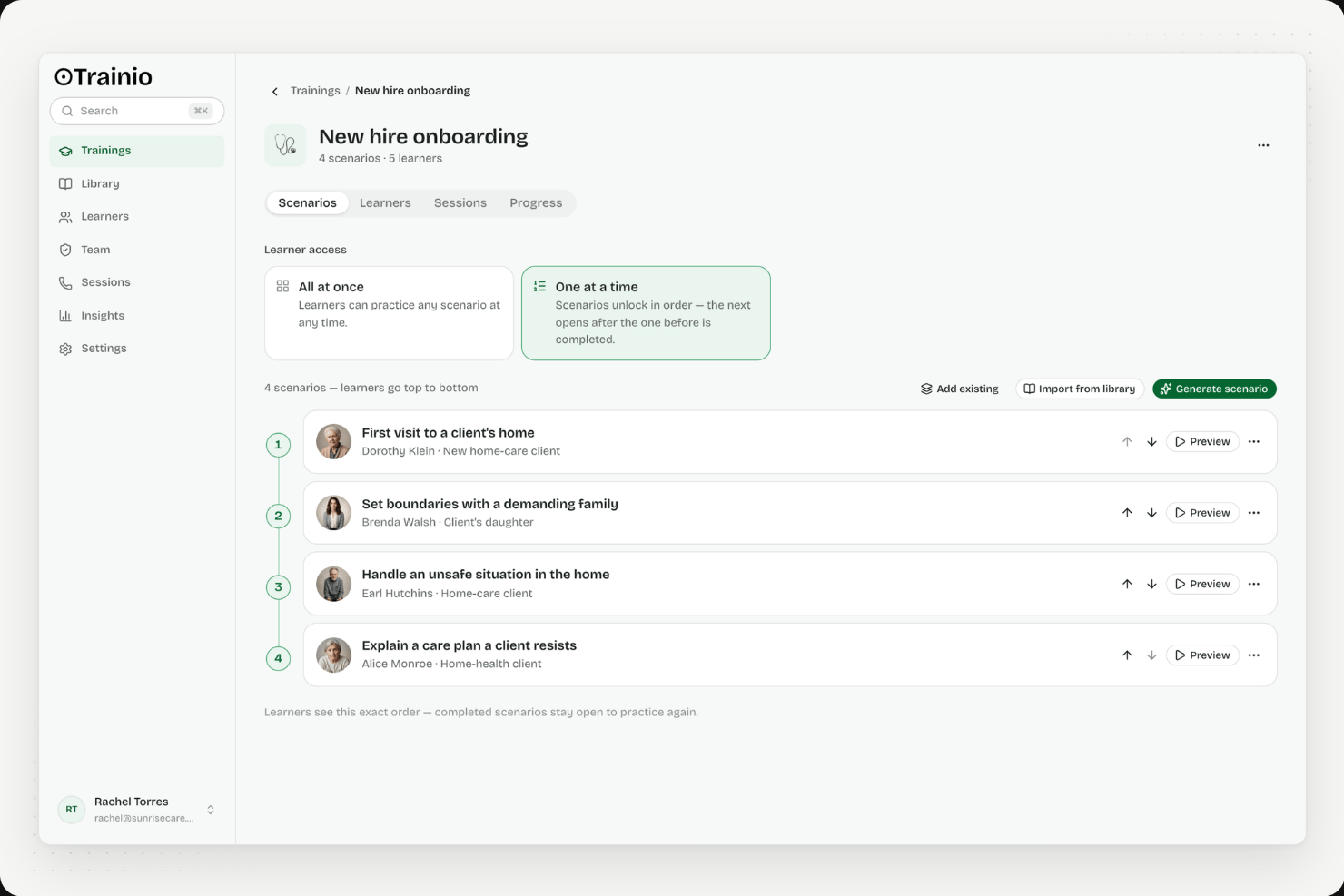
Trainio is a voice-first AI roleplay platform purpose-built for healthcare, offering a library of 1,000+ communication scenarios, custom scenario creation from SOPs, rubric-based session scoring, and a built-in knowledge hub for staff reference.
Who Is Trainio Best For?
Trainio is a strong fit for healthcare organizations that need scalable, voice-based communication practice for patient-facing staff across clinical and care settings.
Why I Picked Trainio
Trainio earns its spot on my list because it's the only AI training tool I've found purpose-built specifically for healthcare communication practice. I love that its voice-first roleplay simulates real patient and family interactions, with AI personas that actually escalate when a staff member responds poorly and de-escalate when they get it right. Its 1,000+ ready-made scenarios span settings like behavioral health, hospice, and dental, so a memory care team can practice de-escalation on day one without custom setup.
Trainio Key Features
- Knowledge Hub: A built-in repository where staff can store and search SOPs, protocols, call scripts, and PDFs, or query an AI assistant grounded exclusively in your uploaded documents.
- Rubric-based session scoring: Every roleplay session is evaluated against a consistent rubric, producing a pass/fail score, full transcript, and itemized AI feedback delivered instantly after each session.
- Manager readiness dashboard: Tracks scores, session history, and progress by individual, team, and site, with exportable reports designed to meet CARF and Joint Commission audit requirements.
- Role-based scenario assignment: Administrators assign scenario sets by role, team, or location, with automated enrollment and reminders so staff are practice-ready from day one.
Trainio Integrations
Trainio documents integrations with Slack, Zoom, Google Calendar, and Zapier. Enterprise adds SSO, HRIS integration, and API/MCP access for custom connections; SCORM import is also supported.
Pros and Cons
Pros:
- Scenario library tailored for healthcare communication
- Rubric-based feedback ensures consistent session scoring
- Voice-based AI roleplay simulates real interactions
Cons:
- No multimedia or video content creation
- Does not generate traditional eLearning courses

Continu
Best for dedicated L&D teams
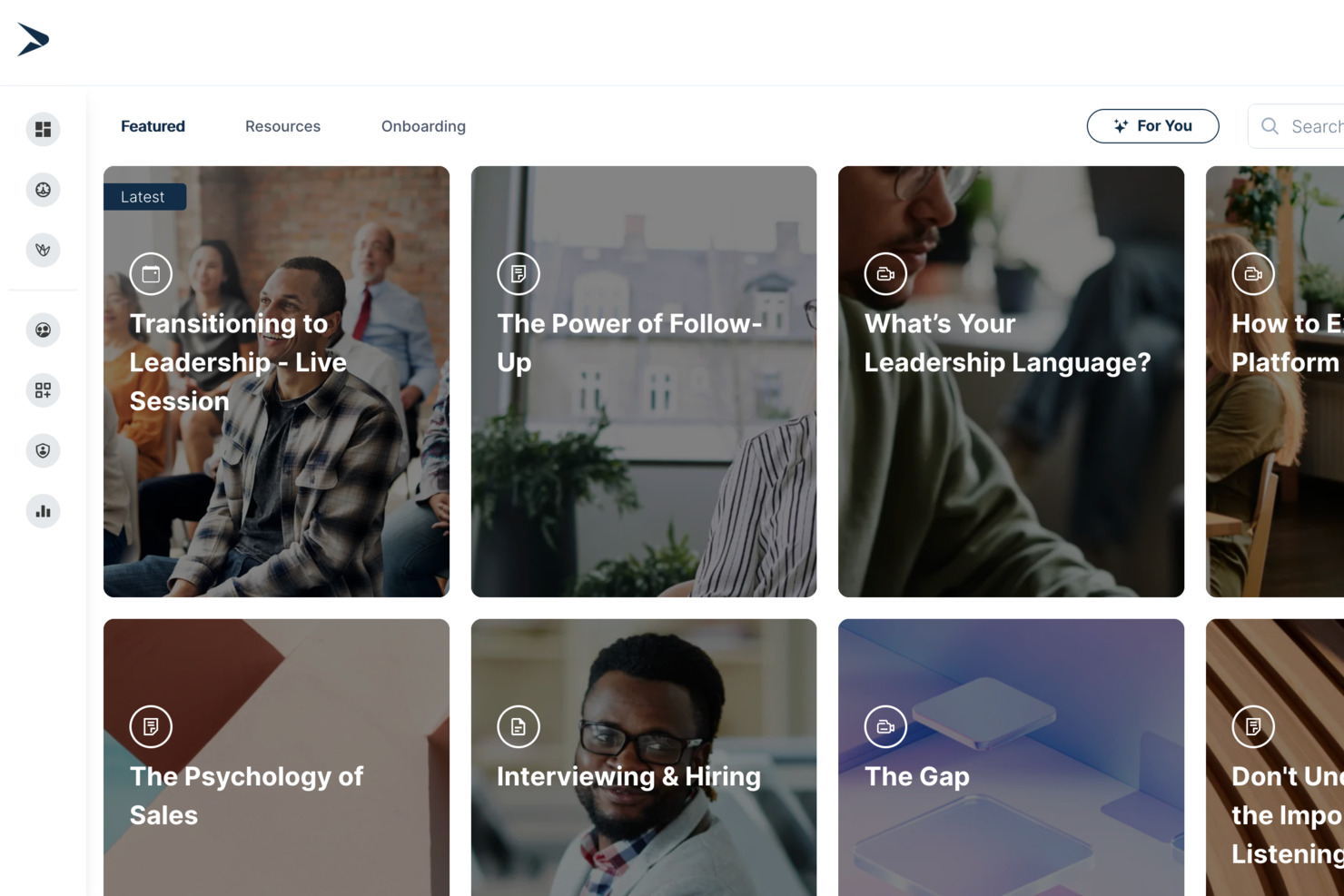
Continu is an AI-powered learning management system designed for teams that need a centralized hub for content creation, training delivery, and employee development.
Who Is Continu Best For?
Continu is a strong fit for mid-to-large organizations with dedicated L&D teams who need a scalable platform for employee training and development.
Why I Picked Continu
I've included Continu in my top picks because its native integrations with tools like Slack, Salesforce, and Google Workspace let my team surface learning content directly inside the apps they already use daily. I also like how Continu connects with HRIS platforms to auto-enroll learners based on role or department changes—no manual assignment needed.
Continu Key Features
- AI-powered content recommendations: Continu surfaces personalized learning content for each learner based on their role, activity, and progress.
- Authoring tools: Build courses, assessments, and learning paths directly inside the platform without needing a separate content creation tool.
- Learning paths: Group related courses into structured sequences that guide learners through a topic step by step.
- Reporting dashboards: Track completion rates, assessment scores, and engagement data across teams and departments.
Continu Integrations
Continu offers native integrations with Slack, Salesforce, Google Workspace, Okta, Workday, and BambooHR. It also provides an API for custom integrations.
Pros and Cons
Pros:
- Automated assignment for role-specific AI modules
- Easy integration with HRIS like Workday
- Prebuilt content library for AI onboarding
Cons:
- Admin dashboard lacks granular access controls
- Limited gamification for AI training engagement
New Product Updates from Continu
Continu Adds Smarter Content Management
Continu adds Intelligent Tagging and Descriptions and richer content details to improve how learning content is organized and maintained. These updates reduce manual work and give teams more consistent, detailed content records. For more information, visit Continu’s official site.
 .
.
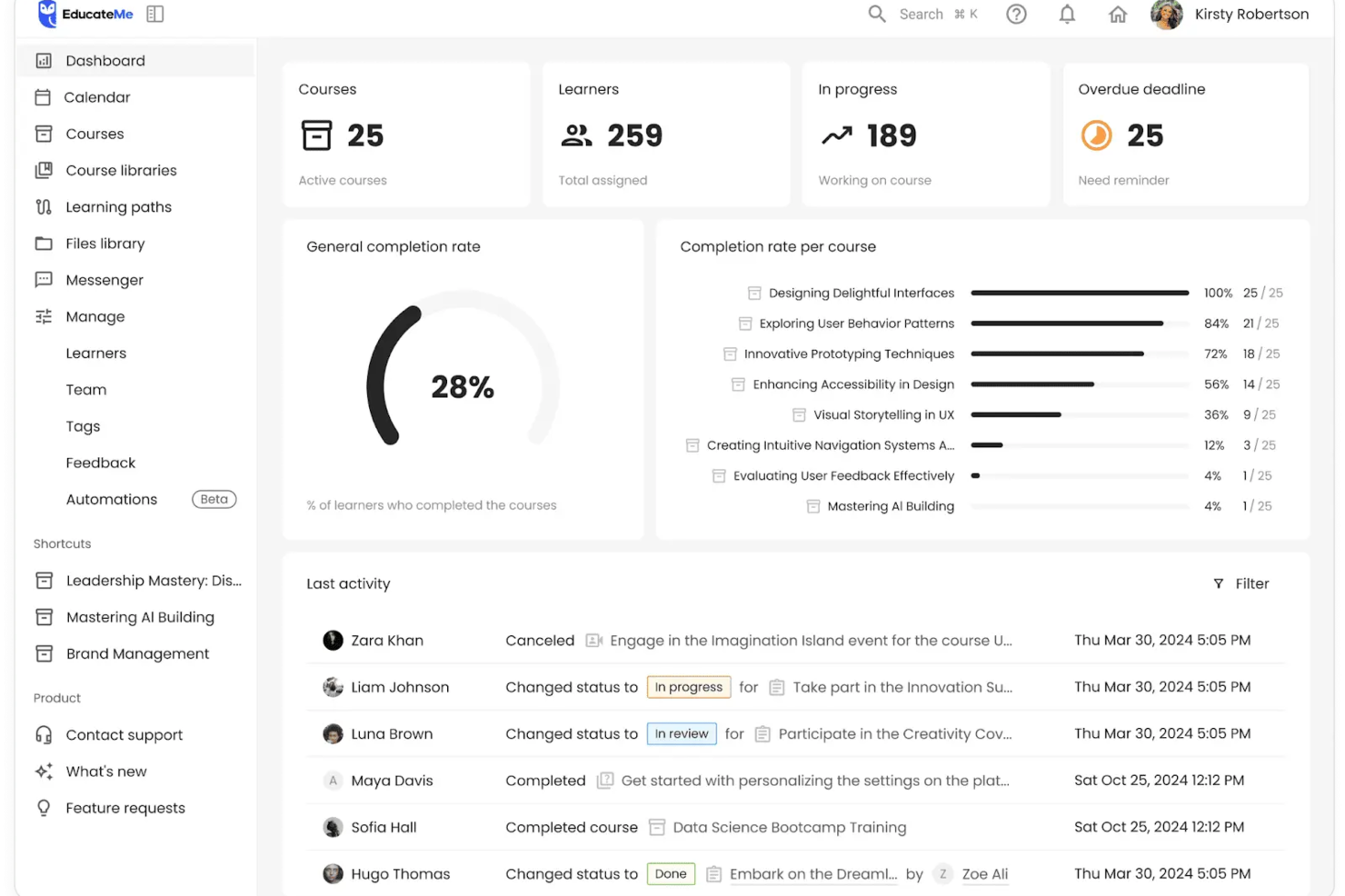
EducateMe LMS is a learning management platform designed for HR teams and training professionals who want to deliver interactive, AI-driven training experiences that adapt to each learner’s needs.
Who Is EducateMe LMS Best For?
EducateMe LMS is a strong fit for mid-sized companies and growing teams that need a structured, scalable way to run employee training and development programs.
Why I Picked EducateMe LMS
EducateMe LMS earns its spot on my shortlist because of how well its AI roleplay coach handles scenario-based practice at scale. I like that you can generate a full roleplay scenario from a single prompt—whether that's a sales call, a difficult performance conversation, or a compliance scenario—and then layer in branching logic and guardrails to keep the AI on topic. In practice, that means my team can run through realistic, high-stakes conversations without needing a live facilitator every time. The rubric-based feedback is also a real differentiator: learners get consistent, specific coaching after each session rather than vague impressions.
EducateMe LMS Key Features
- AI course creation assistant: Generate full course outlines, modules, and quiz questions from a prompt, with the AI available throughout the build process.
- Learning paths: Sequence courses into structured journeys that guide learners through topics in a set order.
- Automation: Set up automatic enrollments, reminders, and course assignments to reduce manual admin work.
- Live event hosting: Run live training sessions with Zoom integration, including automatic session recording and participant management.
EducateMe LMS Integrations
Integrations include Zoom, Stripe, Slack, IBM, and Zapier; an API is available for custom connections.
Pros and Cons
Pros:
- Strong performance analytics dashboard
- Automated AI content creation
- Built-in AI roleplay coaching
Cons:
- AI tools require onboarding
- Advanced features require setup
Andre AI-verktøy for opplæring og utvikling
Her er noen flere AI-verktøy for opplæring og utvikling som ikke kom med på kortlisten min, men som likevel er verdt å se nærmere på:
- Factorial
For integrating with HR analytics and automation
- Elai
For AI video creation
- Valamis
For workforce development
- Docebo
For enterprise scalability
- Paradiso LMS
For multilingual support
- TalentCards
For mobile training
- Coursebox AI
For course management
- Arist
For text-based learning
- Fuse Universal
For continuous learning
- 5Mins.ai
For microlearning


How I Evaluate AI Tools for Training Development
I only include tools that use AI to meaningfully speed up course creation or personalize learning—not platforms that slap an AI label on basic authoring features. I split my evaluation into core functionality every tool must deliver to qualify and differentiating factors that separate the best fit from the rest.
Core Functionality (Table Stakes For This List)
When I'm selecting tools for my list, I rank each one on a scale from 0 (does not offer the functionality) to 5 (excels in this area) for each core functionality listed below. Then, I calculate the tool's total score into a percentage. Each tool needs to achieve a minimum total score of 65% to be considered for inclusion.
- AI-Powered Content Generation: I evaluate whether a tool can turn source materials—like policy PDFs, onboarding docs, or SME recordings—into structured courses without heavy manual rework.
- AI Assessment Creation: Good tools auto-generate quizzes and knowledge checks from course content, so I look at question variety, difficulty options, and answer key accuracy.
- Personalized Learning Paths: I check whether the AI adapts recommendations based on a learner's role, skill level, or progress rather than just serving static, one-size-fits-all sequences.
- AI Media Conversion: Converting a written SOP into a video walkthrough with AI voiceover or avatars saves L&D teams hours, so I look at output quality and format options.
- Skill Gap Analytics: The AI should surface meaningful patterns—like which teams are falling behind on compliance modules—instead of just showing completion percentages.
- LMS and HRIS Integration: I check for native connectors with platforms like Workday, SAP SuccessFactors, Cornerstone, or Docebo, plus SCORM/xAPI export support.
Once I have a list of tools that meet the criteria, I consider what sets each platform apart.
Differentiating Factors (What Sets Vendors Apart)
Here's how I compare and contrast different vendors:
Standout Features
Multilingual AI translation is a major differentiator for distributed teams—I evaluate whether a tool can localize compliance training across regions without manual re-authoring. AI roleplay simulations also stand out, especially for manager development or customer-facing roles where learners practice real conversations with AI characters. I look at content refresh capabilities too, since the best platforms flag outdated material and suggest updates automatically instead of forcing L&D teams into quarterly manual audits.
Beyond Features
Data privacy matters more here than in typical L&D tools because AI platforms process employee performance data through third-party LLMs. I check whether vendors disclose their AI providers and offer controls over data retention. Speed-to-value is another priority—I evaluate how quickly an L&D team can go from uploading a policy document to deploying a finished course. For regulated industries like healthcare or finance, I also look at audit trail depth, version control, and approval workflows for AI-generated content.
Slik velger du AI-verktøy for opplæring og utvikling
Det er lett å gå seg vill i lange funksjonslister og kompliserte prismodeller. For å hjelpe deg med å holde fokus mens du går gjennom den unike prosessen din for valg av programvare, får du her en sjekkliste over faktorer du bør ha i tankene:
| Faktor | Hva du bør vurdere |
| Skalerbarhet | Vil verktøyet vokse sammen med organisasjonen din? Vurder hvor mange brukere det kan støtte, og om det kan håndtere økte datamengder etter hvert som opplæringsbehovene dine vokser. |
| Integrasjoner | Fungerer verktøyet med de eksisterende systemene dine? Kontroller kompatibiliteten med HR-programvaren, kommunikasjonsverktøyene og andre plattformer for å sikre smidige arbeidsprosesser. |
| Tilpasningsmuligheter | Kan du tilpasse verktøyet til dine spesifikke behov? Se etter alternativer for å justere merkevareprofilering, kursinnhold og brukerroller uten omfattende teknisk kunnskap. |
| Brukervennlighet | Er grensesnittet brukervennlig? Sørg for at teamet enkelt kan navigere i verktøyet uten behov for konstant støtte. Det kan spare tid og redusere frustrasjon. |
| Implementering og innføring | Hvor lang tid tar det å komme i gang? Vurder oppsettprosessen, tilgjengelige opplæringsressurser og støtten under overgangen for å sikre en smidig innføring. |
| Kostnad | Hva er de totale eierkostnadene? Ta hensyn til abonnementsavgifter, skjulte kostnader og forventet avkastning på investeringen. Sammenlign prisplanene for å finne en som passer budsjettet ditt. |
| Sikkerhetstiltak | Hvordan beskytter verktøyet dataene dine? Se etter kryptering, tilgangskontroller og samsvar med personvernregler for å holde informasjonen din sikker. |
| Tilgjengelig brukerstøtte | Hvilke støttealternativer er tilgjengelige? Kontroller om det finnes støtte døgnet rundt, responstider og kvaliteten på hjelpen som tilbys, slik at du kan få hjelp når du trenger det. |
Hva er AI-verktøy for opplæring og utvikling?
Verktøy for AI-opplæring og -utvikling er programvareløsninger som bruker kunstig intelligens til å forbedre lærings- og kompetanseutviklingsprosesser. Disse verktøyene brukes vanligvis av HR-medarbeidere, kursholdere og pedagoger til å levere personaliserte og effektive opplæringsprogrammer. Automatisert innholdslevering, adaptive læringsstier og sanntidsanalyse bidrar til å tilpasse opplæringen til individuelle behov og følge med på fremdriften. Alt i alt gjør disse verktøyene opplæringen mer effektiv og engasjerende for brukerne.
Funksjoner i verktøy for AI-opplæring og -utvikling
Når du velger AI-drevne verktøy for opplæring og utvikling, bør du se etter følgende viktige funksjoner:
- Adaptive læringsstier: Tilpass innholdet til den enkelte elevens behov for å sikre personaliserte opplæringsopplevelser.
- Automatisert innholdslevering: Planlegger og leverer opplæringsmateriell automatisk, noe som sparer tid og reduserer manuelt arbeid.
- Sanntidsanalyse: Gir innsikt i elevens fremdrift og engasjement, slik at du kan ta datadrevne beslutninger.
- Elementer for spillifisering: Bruk poeng og merker til å motivere elever og øke engasjementet.
- Støtte for multimedia: Gjør det mulig å inkludere videoer, bilder og lyd for å berike læringsinnholdet.
- Moduler for virtuell virkelighet: Tilbyr oppslukende læringsopplevelser ved å simulere scenarier fra virkeligheten.
- Tilpassbare kursmaler: Gjør kursopprettingen raskere ved å tilby ferdiglagde strukturer som kan tilpasses behovene dine.
- Oversettelsesadministrasjon: Legger til rette for kurs på flere språk, slik at opplæringen blir tilgjengelig for en global arbeidsstyrke.
- Integrasjonsmuligheter: Sikrer kompatibilitet med eksisterende systemer og muliggjør dataflyt og effektive arbeidsprosesser.
- Sikkerhetstiltak: Beskytter sensitive data gjennom kryptering og tilgangskontroller og sikrer samsvar med personvernregelverket.
Fordeler med AI i verktøy for opplæring og utvikling
Implementering av AI-verktøy for opplæring og utvikling gir flere fordeler for teamet og virksomheten din. Her er noen av fordelene du kan se frem til:
- Personaliserte læringsopplevelser: AI tilpasser opplæringen til hver enkelt elevs behov, noe som øker engasjement og læringsutbytte.
- Effektiv tidsbruk: Automatisert innholdslevering reduserer arbeidsbelastningen for kursholdere, slik at de kan fokusere på mer strategiske oppgaver.
- Økt engasjement: Elementer for spillifisering og multimediestøtte gjør læringen interaktiv og underholdende.
- Bedre beslutningstaking: Sanntidsanalyse gir innsikt som hjelper deg med å forbedre opplæringsprogrammene for bedre resultater.
- Global tilgjengelighet: Oversettelsesadministrasjon gjør opplæringsmateriell tilgjengelig på flere språk, slik at det når ut til et bredere publikum.
- Kostnadseffektivitet: Ved å optimalisere opplæringsprosesser og resultater kan AI-verktøy føre til kostnadsbesparelser over tid.
- Forbedret sikkerhet: Med sikkerhetstiltak på plass forblir dataene dine beskyttet og i samsvar med regelverket.
Kostnader og priser for AI-verktøy for opplæring og utvikling
Valg av AI-verktøy for opplæring og utvikling krever en forståelse av de ulike prismodellene og abonnementene som er tilgjengelige. Kostnadene varierer basert på funksjoner, teamstørrelse, tillegg og mer. Tabellen nedenfor oppsummerer vanlige abonnementer, gjennomsnittsprisene deres og typiske funksjoner som er inkludert i AI-verktøy for opplæring og utvikling:
Sammenligningstabell for abonnementer for AI-verktøy for opplæring og utvikling
| Abonnementstype | Gjennomsnittspris | Vanlige funksjoner |
| Gratisabonnement | $0 | Grunnleggende kursoppretting, begrenset brukertilgang og brukerstøtte fra fellesskapet. |
| Personlig abonnement | $10-$100/bruker/måned | Standard kursoppretting, grunnleggende rapportering og støtte via e-post. |
| Bedriftsabonnement | $75-$720/bruker/måned | Avansert analyse, integrasjoner med andre verktøy og prioritert brukerstøtte. |
| Virksomhetsabonnement | $100-$1290/bruker/måned | Tilpassbare funksjoner, dedikert kundeansvarlig og full API-tilgang. |
Vanlige spørsmål om AI-verktøy for opplæring og utvikling
Her er noen svar på vanlige spørsmål om AI-verktøy for opplæring og utvikling:
Hvordan kan AI brukes i opplæring og utvikling?
AI kan følge med på elevenes fremgang og gi innsikt som bidrar til å forbedre opplæringsstrategier. Ved å utnytte AI-genererte data kan du identifisere utviklingstrekk i prestasjonene og anbefale nødvendige forbedringer i opplæringen. Dette sikrer at teamet ditt får relevant opplæring til riktig tid, slik at ferdighetene forbedres.
Hva er 30 %-regelen for AI?
30 %-regelen innebærer å balansere AI og menneskelig innsats, der AI håndterer omtrent 70 % av en oppgave, mens mennesker håndterer de resterende 30 %. Denne tilnærmingen sikrer effektivitet samtidig som menneskelig kontroll og kreativitet ivaretas, spesielt i miljøer for opplæring og utvikling.
Hvordan bruker man AI i opplæringskurs?
AI kan forutsi kompetansegap og opplæringsbehov ved hjelp av prediktiv analyse. Ved å analysere prestasjoner og læringsvaner anbefaler AI relevante opplæringsprogrammer. Denne proaktive tilnærmingen hjelper organisasjonen med å videreutvikle kompetansen til arbeidsstyrken, slik at den forblir konkurransedyktig i bransjen.
Hvordan bruker man AI-verktøy til utvikling?
Vurder problemene du løser, og hvordan AI kan gjøre løsningene mer effektive. AI kan automatisere repetitive oppgaver, analysere store datasett og komme med prognoser. Eksperimenter med ulike AI-verktøy for å finne dem som passer best til utviklingsbehovene og arbeidsflyten din.
Hva er fordelene ved å bruke AI i opplæring?
AI tilpasser læringsopplevelser, slik at de blir mer engasjerende og effektive. Det automatiserer administrative oppgaver og frigjør tid for kursholdere. AI tilbyr også sanntidsanalyse, som gir innsikt i hvor effektiv opplæringen er, og hjelper deg med å ta datadrevne beslutninger for å forbedre resultatene.
Hvordan forbedrer AI-verktøy engasjementet hos elever?
AI-verktøy bruker funksjoner som spillbasert læring, støtte for multimedia og adaptive læringsbaner for å øke engasjementet. Disse elementene skaper interaktive og personlige læringsopplevelser som holder elevene motiverte og engasjerte i opplæringen.