

10 beste lønnssystemer med ett trykk – gjennomgått i 2026

Beste programvare for Single Touch Payroll


Det er krevende nok å håndtere lønn uten å måtte ta hensyn til lovpålagte rapporteringskrav i tillegg. For australske virksomheter innebærer samsvar med Single Touch Payroll (STP) at lønn, PAYG-trekk og superannuasjon rapporteres direkte til ATO i hver lønnskjøring. Dette er ikke valgfritt – og feil kan føre til alvorlige administrative utfordringer og risiko for manglende overholdelse.
Programvare for Single Touch Payroll er utviklet for å gjøre denne prosessen enklere ved å automatisere rapportering i sanntid og redusere manuell dataregistrering. Det riktige systemet bidrar til å sikre nøyaktighet, sørger for at du oppfyller kravene i STP fase 2, og sparer HR- eller økonomiavdelingen for verdifull tid.
Jeg har gjennomgått og evaluert en rekke lønnsløsninger som er kompatible med STP, for å hjelpe deg med å finne det beste alternativet for virksomheten din. I denne veiledningen finner du mine beste anbefalinger, der hver løsning er vurdert ut fra funksjoner for samsvar, brukervennlighet, skalerbarhet og samlet verdi.
Enten du driver en liten australsk virksomhet, et voksende mellomstort selskap eller håndterer lønn i en stor virksomhet, finnes det en løsning her som kan forenkle rapporteringen og gi deg større trygghet i lønnsprosessen.
Why Trust Our Software Recommendations
Our team has been testing and reviewing software since 2012. As HR experts ourselves, we know how difficult—and important—it is to choose the right software.
For this guide, we evaluated tools using hands-on testing and independent research, scoring tools using our selection criteria. We also draw on insights from industry thought leaders and practicing HR experts.
Our reviews reflect our human editorial judgment, not a sales pitch.
Expert reviewers:
Sammenligningstabell for programvare for Single Touch Payroll
Denne sammenligningstabellen oppsummerer prisdetaljene for mine beste utvalgte programmer for Single Touch Payroll:
| Tool | Best For | Trial Info | Price | ||
|---|---|---|---|---|---|
| 1 | Best for payroll embedded in accounting workflows | 30-day free trial | From $38/month | Website | |
| 2 | Best for unified HR, payroll, and benefits | Free demo available | Pricing upon request | Website | |
| 3 | Best real-time payroll for large enterprises | Free demo available | Pricing upon request | Website | |
| 4 | Best for global payroll and tax compliance | Free demo available | Pricing upon request | Website | |
| 5 | Best for scalable, modular payroll | Free demo available | Pricing upon request | Website | |
| 6 | Best for highly regulated industries | Free plan available | From 1.65 AUD/employee/month | Website | |
| 7 | Best for payroll teams needing granular control over STP reporting fields | 3-month free trial available | From 5 AUD/month | Website | |
| 8 | Best for mobile-first employee payslip access | 30-day free trial available | From 9.95 AUD/month | Website | |
| 9 | Best for straightforward, low-cost STP payroll solutions | Free plan available | From 0.99 AUD/employee/month | Website | |
| 10 | Best for custom payroll rule configurations | Free demo available | Pricing upon request | Website |
Beste programvare for Single Touch Payroll
Nedenfor finner du mine detaljerte sammendrag av den beste programvaren for Single Touch Payroll som kom med på kortlisten min. Anmeldelsene mine gir en detaljert gjennomgang av de viktigste funksjonene, fordelene og ulempene, integrasjonene og ideelle bruksområdene for hvert verktøy, slik at du kan finne det beste alternativet for deg.

Best for payroll embedded in accounting workflows

QuickBooks is a payroll solution designed for small businesses that offers essential payroll management functions. It helps your team manage payroll, tax calculations, and compliance efficiently.
Why I picked QuickBooks: QuickBooks caters specifically to small businesses with features such as automated pay day runs, tax penalty protection, and next-day direct deposit. The platform offers an easy-to-navigate interface, making it accessible even for those with limited payroll experience. It also provides mobile access, allowing you to manage payroll on-the-go. Its focus on small businesses ensures that the features are tailored to meet the needs of smaller teams without overwhelming complexity.
Standout features and integrations:
Features include automated payroll processing, tax penalty protection, and next-day direct deposit. You can also access payroll reports to keep track of expenses and employee hours. The mobile app ensures you can manage payroll tasks from anywhere.
Integrations include TSheets, Expensify, Gusto, Shopify, Square, PayPal, BILL, Mailchimp, and more.
Pros and Cons
Pros:
- Customizable payroll reports
- Combines payroll and accounting
- Mobile app flexibility
Cons:
- Limited international payroll support
- Additional fees for some features

Best for unified HR, payroll, and benefits
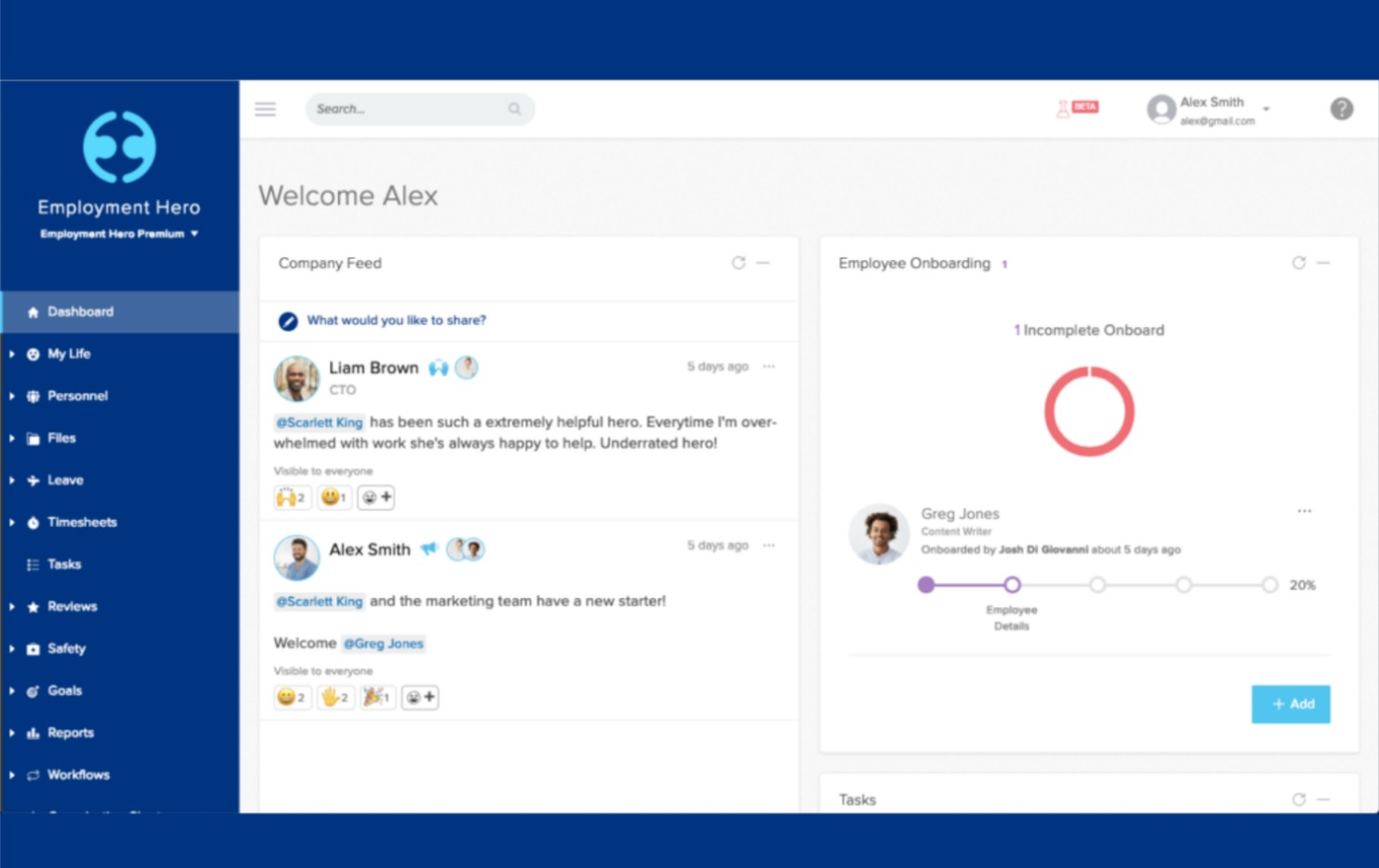
Employment Hero is a human resources and payroll platform designed for small to medium-sized businesses, offering a suite of HR, payroll, and benefits management tools. It helps your team manage payroll while integrating various HR functions in one place.
Why I picked Employment Hero: Employment Hero combines HR and payroll functions, providing an integrated solution for small to medium-sized organisations. Its features include STP-compliant and automated payroll processing. The platform also offers an employee self-service portal, which empowers your team to manage their own information. Additionally, Employment Hero's benefits management tool helps you offer competitive employee perks to enhance overall employee satisfaction.
Standout features and integrations:
Features include an employee self-service portal that allows your team to manage their personal information and access payslips. The platform offers automated leave management, making it easy to track and approve requests. You can also utilize performance management tools to set goals and track employee progress.
Integrations include Xero, MYOB, QuickBooks, Deputy, Tanda, KeyPay, Netsuite, Salesforce, and more.
Pros and Cons
Pros:
- Automated leave management
- Employee self-service portal
- Integrated HR and payroll functions
Cons:
- Extensive setup and training time required
- Limited advanced analytics
Dayforce
Best real-time payroll for large enterprises
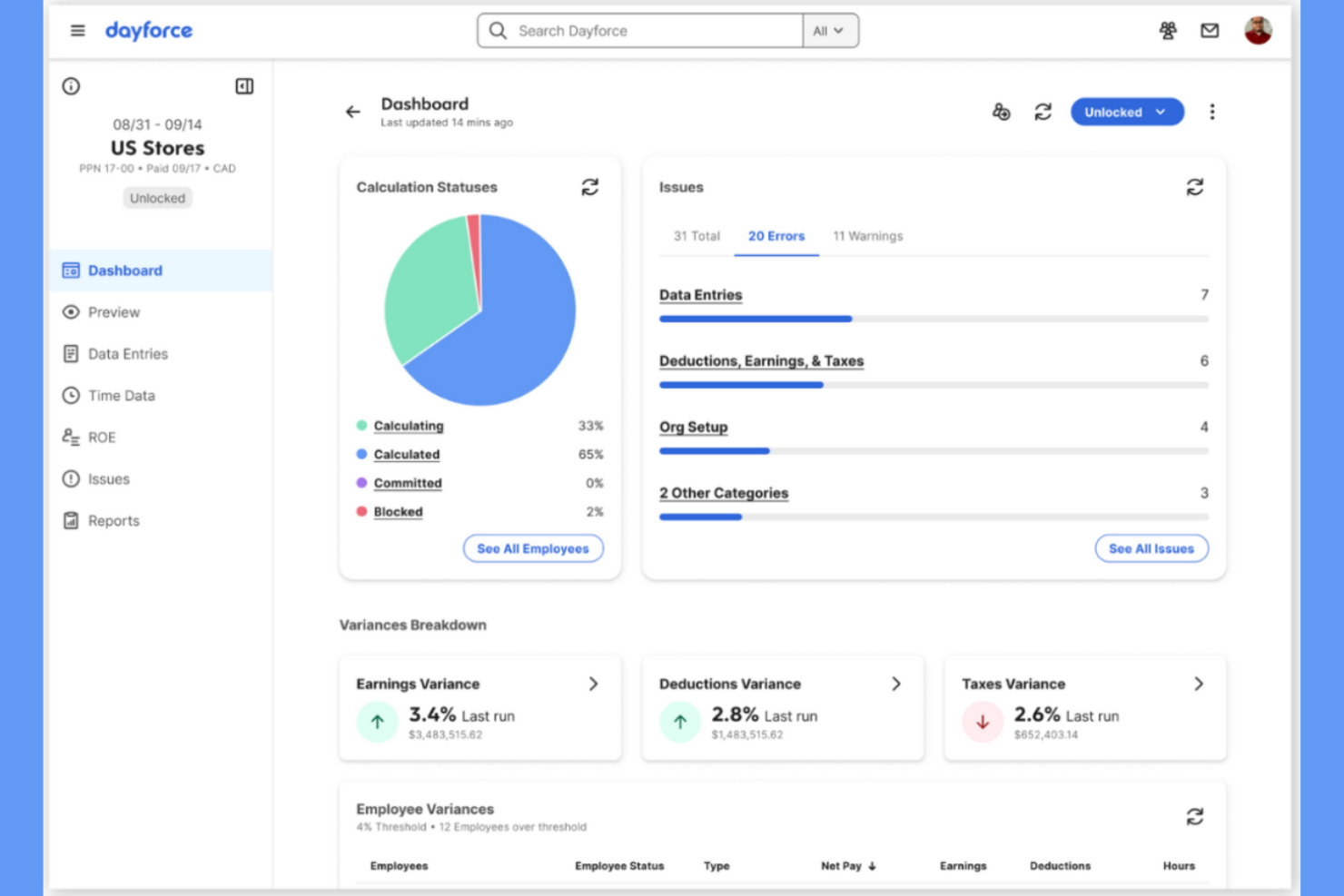
Dayforce is a full human capital management platform tailored for large enterprises. It provides payroll, HR, and workforce management solutions to help your team handle complex payroll needs with real-time data and insights.
Why I picked Dayforce: Dayforce excels in serving large enterprises with its unified data model that delivers real-time updates and calculations. This feature supports complex payroll requirements, including diverse income types, ensuring accuracy and compliance. The platform's scalability accommodates growing business needs and is ideal for large teams. Additionally, Dayforce offers advanced analytics to help you make informed decisions based on real-time data.
Standout features and integrations:
Features include real-time payroll processing, which ensures accurate calculations and compliance. The platform provides advanced workforce analytics, enabling you to gain insights into your team's performance and productivity. You can also customize reporting to meet your organization's specific needs.
Integrations include Salesforce, ADP, Workday, SAP SuccessFactors, Oracle, Microsoft Dynamics, Kronos, Cornerstone OnDemand, Talentsoft, and more.
Pros and Cons
Pros:
- Scales across large organizations
- Automated compliance for complex payroll
- Real-time payroll reporting and workforce data
Cons:
- Complex initial setup and configuration
- Limited reporting and support
ADP
Best for global payroll and tax compliance

ADP is an extensive payroll and HR management solution designed for multinational companies. It offers payroll processing, compliance management, and HR services, catering to businesses with a global presence.
Why I picked ADP: ADP excels in serving multinational companies with features such as global payroll management and compliance with international regulations. It supports multiple currencies and languages, making it suitable for businesses operating across different countries. The platform provides real-time analytics, helping you make informed decisions about your workforce. Additionally, ADP's scalability ensures it can accommodate growing business needs.
Standout features and integrations:
Features include global payroll management, which supports multiple currencies and languages. The platform offers compliance management to ensure adherence to international regulations. You can also access real-time analytics to gain insights into your workforce and make data-driven decisions.
Integrations include Workday, SAP SuccessFactors, Oracle, Microsoft Dynamics, Salesforce, NetSuite, QuickBooks, Xero, Sage, BambooHR, and more.
Pros and Cons
Pros:
- Integrated HR, reporting, and analytics
- Scalable for growing and multinational businesses
- Extensive real-time analytics capabilities
Cons:
- High implementation costs
- Requires training for full utilization


The Access Group offers an all-in-one payroll solution designed for businesses looking for scalable options. It supports payroll management and compliance functions, making it suitable for growing companies.
Why I picked The Access Group: The Access Group provides scalable payroll solutions, accommodating businesses as they expand. It features automated payroll processing for compliance with single-touch payroll requirements. The platform's user-friendly interface allows your team to manage payroll tasks efficiently. Additionally, it offers detailed reporting tools, including STP Phase 2 and end of the financial year, and offers insights into payroll expenses and trends.
Standout features and integrations:
Features include automated payroll processing, which simplifies tasks and ensures compliance. You can access detailed reporting tools to analyze payroll expenses and trends. The platform also offers a user-friendly interface that makes managing payroll tasks straightforward.
Integrations include Xero, MYOB, QuickBooks, Sage, SAP, Oracle, Microsoft Dynamics, Attache, NetSuite, and more.
Pros and Cons
Pros:
- Supports strong compliance and reporting
- Integrates well with HR and workforce systems
- Scalable for mid-to-large organisations with complex needs
Cons:
- Complex reporting setup for basic payroll users
- Pricing and feature depth may be overkill for smaller teams

SeSQue Payroll is a single-touch payroll software tailored for micro and small businesses in Australia, ensuring compliance with the government agencies. It offers cloud-based payroll management, allowing you to handle single-touch payroll reporting with ease.
Why I picked SeSQue Payroll: SeSQue Payroll is designed with compliance-focused firms in mind, providing features such as ATO-compliant single touch payroll reporting and secure cloud access. The intuitive interface simplifies payroll system tasks, making it accessible for small businesses without technical expertise. SeSQue Payroll's transparent pricing ensures no hidden fees, which is helpful for budget-conscious teams. The ability to generate pay-as-you-go statements and process superannuation contributions further enhances its appeal to compliance-focused users.
Standout features and integrations:
Features include secure cloud-hosted access, which allows you to manage payroll and pay runs from any device. The software offers payslip generation and the ability to email employee income statements directly to employees. It also supports ABA payment file generation for easy payment processing.
Integrations include Beam Clearing House, ATO, and more.
Pros and Cons
Pros:
- Fast setup and refined ATO lodgement
- Supports superannuation processing
- Lightweight cloud solution for Australian small businesses
Cons:
- Basic plan lacks features
- Limited advanced payroll features
Best for payroll teams needing granular control over STP reporting fields
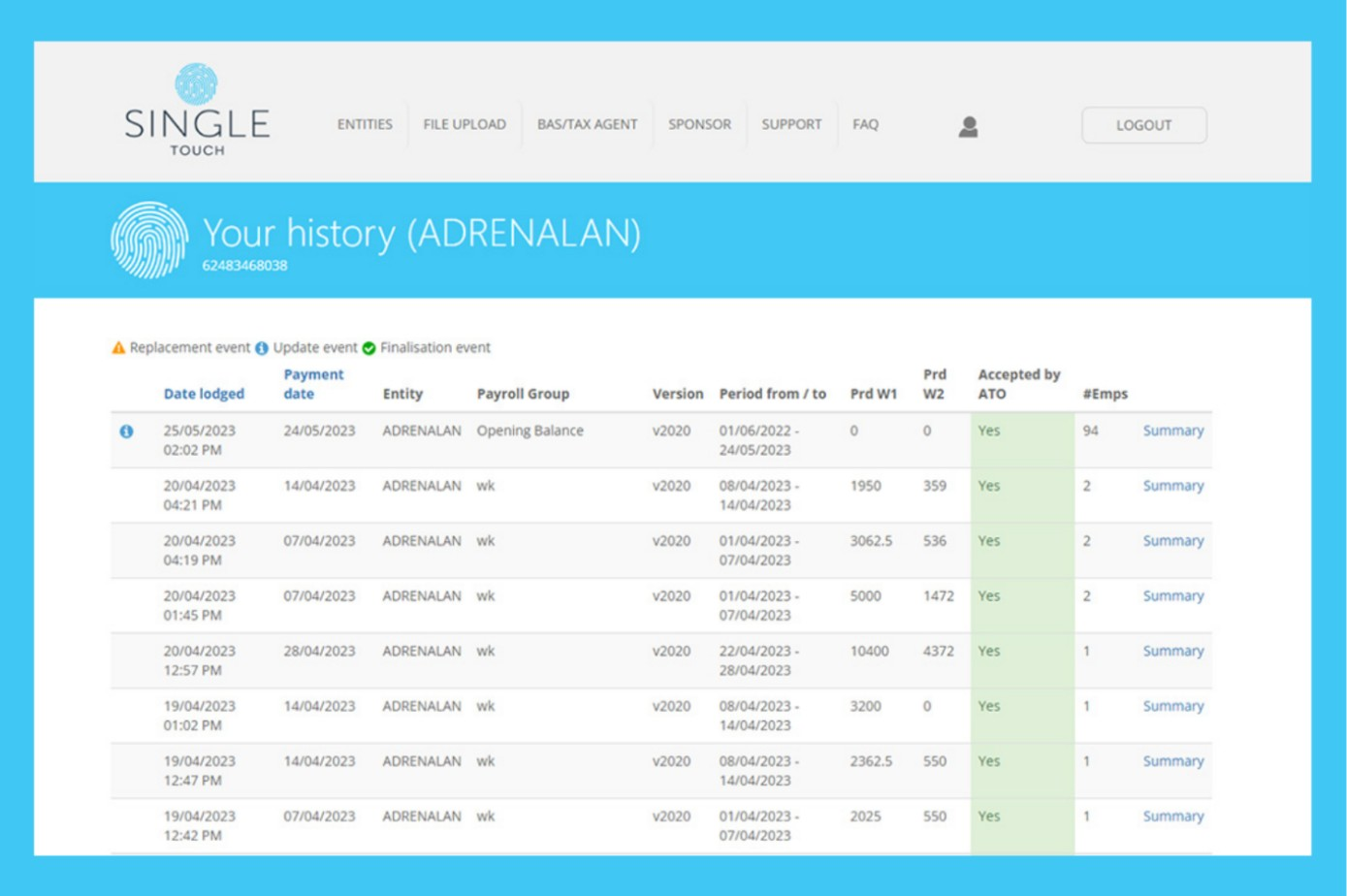
Single Touch is a payroll software specifically designed for Australian businesses, focusing on compliance with local regulations. It helps your team manage payroll and tax reporting efficiently within the Australian context.
Why I picked Single Touch: Single Touch is tailored to meet the needs of Australian businesses, ensuring compliance with Australian taxation office STP requirements. Its features include automated tax calculations and direct ATO reporting, including PAYG withholding, superannuation, and year-to-date information, which are central to compliance.
The software's straightforward interface makes it easy for your team to handle payroll tasks without extensive training. Additionally, it provides detailed payroll reports that help you keep track of employee payments, tax obligations, and exemptions.
Standout features and integrations:
Features include automated tax calculations, which ensure your payroll is always accurate. The software provides direct reporting to the ATO, saving you time on compliance tasks. You can also generate detailed payroll reports to analyze your business's payroll expenses.
Integrations include MYOB, Xero, QuickBooks, Reckon, Sage, SAP, Oracle, Microsoft Dynamics, Attache, and more.
Pros and Cons
Pros:
- Flexible solutions for varying business needs
- Detailed payroll reporting
- Direct ATO reporting and automated tax calculations
Cons:
- Limited broader paywall features
- Reporting and analytics features are not as advanced or customizable as some other tools
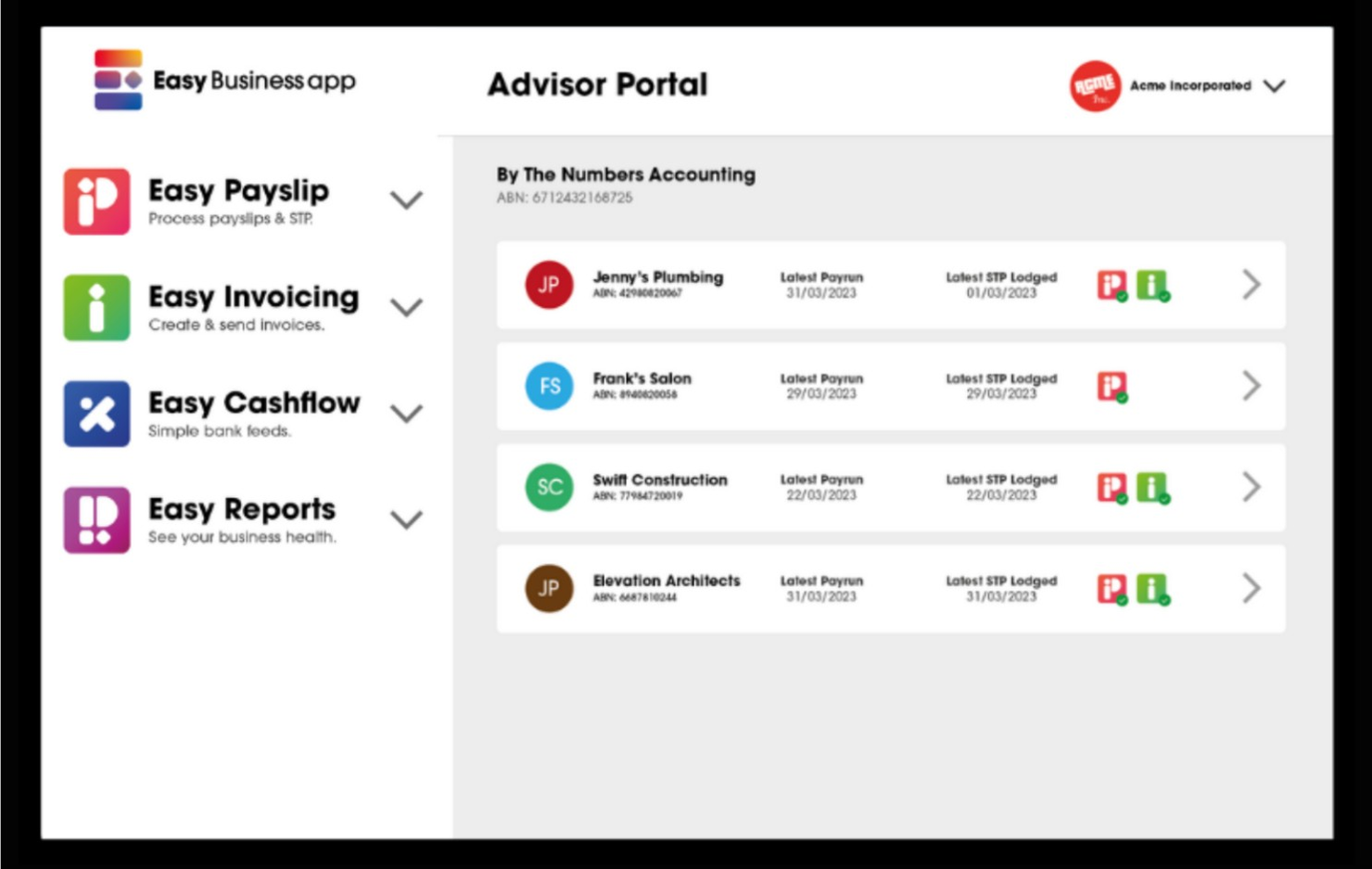
Easy Payslip is a mobile-friendly payroll solution designed for small businesses, offering payroll and compliance management features. It allows your team to manage payroll tasks conveniently from any mobile device.
Why I picked Easy Payslip: Easy Payslip provides mobile access and is perfect for small businesses that need flexibility. Its features include easy payslip generation and direct ATO reporting, ensuring compliance with Australian regulations. The app's user-friendly interface allows you to manage payroll tasks without needing a desktop computer. Additionally, Easy Payslip supports multiple payment methods, offering versatility in how you pay your employees.
Standout features and integrations:
Features include a simple payslip generation process that allows you to create and send payslips directly from your mobile device. The app supports multiple payment methods, giving you the flexibility to choose how to pay your staff. You can also track employee information and contributions to ensure compliance.
Integrations include Xero, SAP, and more.
Pros and Cons
Pros:
- Designed for small businesses and casual payroll use
- Clear interface with easy payslip generation
- Supports multiple payment methods
Cons:
- May lack advanced features
- Limited desktop functionality

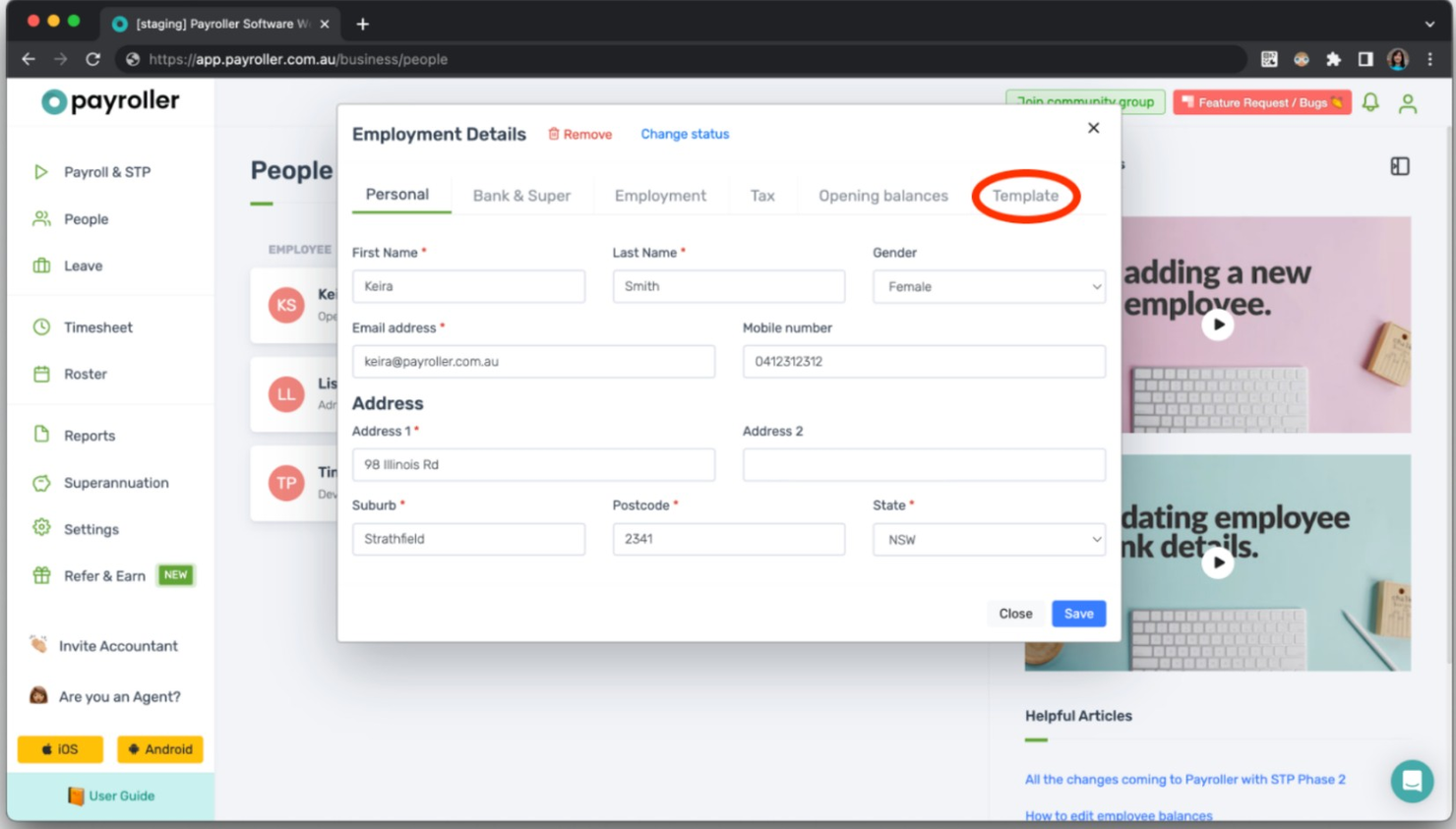
Payroller is a payroll software solution designed for small businesses, offering essential payroll management and compliance features. It helps your team manage payroll tasks efficiently without breaking the bank.
Why I picked Payroller: Payroller is ideal for those seeking an affordable payroll solution, with features such as automated payroll processing and STP compliance. It offers a user-friendly interface that simplifies payroll tasks for small business owners. The platform provides access to detailed payroll reports, helping you keep track of finances. Additionally, Payroller supports various payment methods, allowing flexibility in how you pay your employees.
Standout features and integrations:
Features include a straightforward payroll processing system that automates calculations and compliance tasks. The software offers detailed payroll reports, giving you insights into financial data. You can also manage employee leave and track superannuation information and contributions.
Integrations include Xero, QuickBooks, Sage, Microsoft Dynamics, and more.
Pros and Cons
Pros:
- Focuses on essential payroll features
- Easy-to-navigate dashboard for core payroll tasks
- Straightforward pricing with clear cost per employee
Cons:
- Limited third-party integration and customization options
- Lacks advanced automation

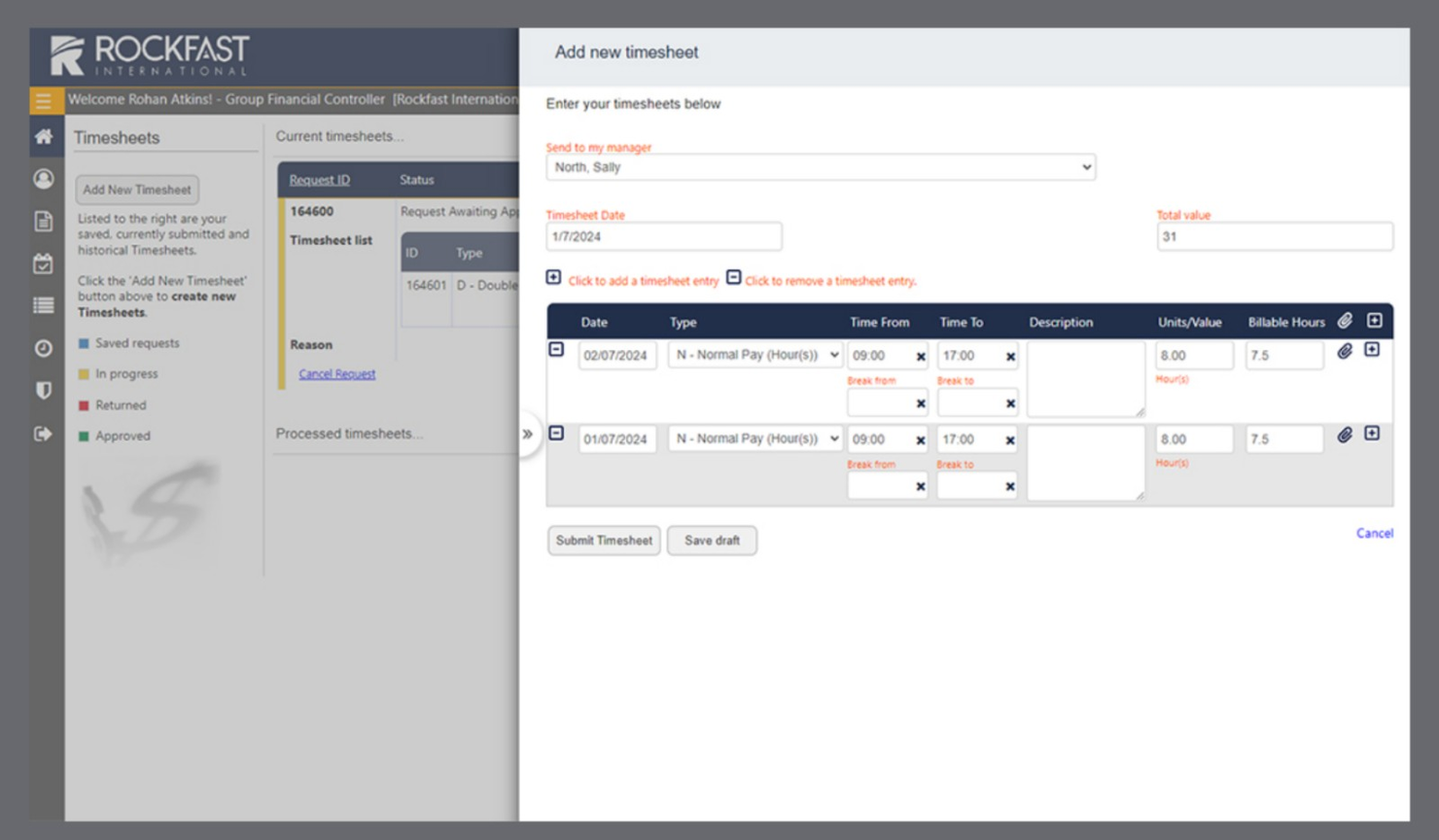
Rockfast's STP software is designed for businesses of all sizes, focusing on payroll management and HR functions. It provides automated payroll processing and secure cloud hosting that simplifies tax lodgement and reduces errors.
Why I picked Rockfast: Rockfast offers custom payroll solutions with features such as formula-based multinational tax estimates and complex award calculations. Its secure cloud hosting ensures data safety while providing employee self-service options. The software is designed to comply with single-touch reporting standards, making it suitable for businesses needing reliable and accurate payroll management. Additionally, Rockfast's support team is Australian-based and offers accessible assistance.
Standout features and integrations:
Features include formula-based tax calculations that accommodate multi-national requirements. The software supports complex award and benefit calculations, ensuring compliance with industry standards. It also offers employee self-service options, so your team has secure access to their payroll information.
Integrations include MYOB, Xero, QuickBooks, Sage, Pronto, Attache, and more.
Pros and Cons
Pros:
- Strong security that meets ISO 27001 standards for payroll data
- Formula-based tax calculations
- Customizable deployment for cloud or on-premise payroll services
Cons:
- Complexity may be higher for small teams
- Complex award calculations
Annen programvare for Single Touch Payroll
Her er noen andre alternativer for programvare for Single Touch Payroll som ikke kom med på kortlisten min, men som likevel er verdt å se nærmere på:
- ClockOn
For payroll powered by time tracking
- RomeoHR
For HR-led payroll for startups and SMEs
- FreshBooks
For freelancer invoicing and small teams
- Xero
For integrated accounting and payroll
- Reckon
For simple payroll and compliance
- Square
For retail sales and payment tracking
- Free Accounting Software
For no-cost bookkeeping tools
- CloudPayroll
For layered or complex STP reporting requirements


How I Evaluate Single Touch Payroll Software
I evaluate each tool on two levels: core non-negotiables like ATO-certified STP lodgement and Phase 2 compliance, then differentiators that matter to Australian payroll teams.
Core Functionality (Table Stakes For This List)
When I'm selecting tools for my list, I rank each one on a scale from 0 (does not offer the functionality) to 5 (excels in this area) for each core functionality listed below. Then, I calculate the tool's total score into a percentage. Each tool needs to achieve a minimum total score of 65% to be considered for inclusion.
- ATO STP Lodgement: I check whether the tool lodges payroll data directly to the ATO each pay run, or if it requires a third-party gateway or manual file export.
- STP Phase 2 Compliance: Each tool should support disaggregated gross income, income stream types, and employment conditions as required under Phase 2.
- Australian Payroll Processing: I evaluate how well the platform handles PAYG, super guarantee, leave accruals, and Modern Award interpretation for AU pay runs.
- SuperStream Super Contributions: Tools like Xero and KeyPay offer built-in clearing houses, so I look at whether super payments flow through a SuperStream-compliant channel.
- Digital Employee Onboarding: I look for electronic TFN declarations, Super Choice forms, and ATO-connected submission so new hires skip paper-based processes.
- Payroll Records & Audit Trail: Every STP submission should be logged and traceable, with finalisation events and income statements accessible via myGov at tax time.
Once I have a list of tools that meet this criteria, I consider what sets each platform apart.
Differentiating Factors (What Sets Vendors Apart)
Here's how I compare and contrast different vendors:
Standout Features
An award interpretation engine is a major differentiator. Tools like KeyPay and Employment Hero can automatically apply Modern Award pay rates, penalties, and loadings based on rostered shifts, which saves hours of manual calculation. Rostering and timesheet integration pairs well here, pulling worked hours directly into pay runs so nothing gets keyed in twice. For bookkeepers managing multiple clients, I also evaluate multi-entity payroll management—the ability to lodge STP across several ABNs from one dashboard changes how practices handle payroll at scale.
Beyond Features
First, I confirm each vendor appears on the ATO's official register of STP-enabled software and provides a Software Service ID for authorisation. A tool that's slow to update for legislative changes—like a new super guarantee rate—creates real compliance risk. I also evaluate how well the platform connects to Australian accounting tools like Xero or MYOB and SuperStream clearing houses. Business size fit matters too; a micro-employer with two staff needs a very different workflow than a bookkeeping practice running payroll across dozens of ABNs.
Slik velger du programvare for Single Touch Payroll
Det er lett å gå seg vill i lange funksjonslister og kompliserte prismodeller. For å hjelpe deg med å holde fokus mens du går gjennom den unike prosessen med å velge programvare, har jeg laget en sjekkliste over faktorer du bør ha i tankene:
| Faktor | Hva bør du vurdere? |
|---|---|
| Skalerbarhet | Kan programvaren vokse sammen med virksomheten din? Vurder om den kan håndtere et økende antall ansatte og større kompleksitet uten at det er nødvendig med hyppige oppgraderinger eller utskiftninger. |
| Integrasjoner | Fungerer den sammen med verktøyene du allerede bruker? Se etter kompatibilitet med regnskapsprogramvaren, HR-systemene og andre viktige applikasjoner for å unngå datasiloer. |
| Tilpasningsmuligheter | Kan du tilpasse programvaren etter behovene dine? Sjekk om den tillater justeringer av arbeidsflyter, rapporter og brukertillatelser slik at den passer til de spesifikke prosessene dine. |
| Brukervennlighet | Er grensesnittet brukervennlig? Sørg for at teamet ditt enkelt kan navigere i det uten omfattende opplæring, noe som kan spare tid og redusere frustrasjon. |
| Implementering og innføring | Hvor raskt kan du komme i gang? Vurder tilgangen til opplæringsressurser, støtte for datamigrering og tiden som kreves for full innføring. |
| Kostnad | Hva blir den totale kostnaden? Vurder prismodellen, inkludert eventuelle oppstartsgebyrer, abonnementskostnader og mulige tillegg, for å sikre at løsningen passer budsjettet ditt. |
| Sikkerhetstiltak | Hvor sikre er dataene dine? Kontroller programvarens datakryptering, tilgangskontroller og samsvar med relevante sikkerhetsstandarder for å beskytte sensitive lønnsopplysninger. |
| Krav til samsvar | Oppfyller den lovpålagte standarder? Sørg for at programvaren støtter samsvar med lokale skattelover og rapporteringsforpliktelser for å unngå bøter og feil. |
Hva er programvare for lønnsrapportering i ett trinn?
Programvare for lønnsrapportering i ett trinn er et verktøy som er utviklet for å automatisere lønnsrapportering direkte til offentlige skattemyndigheter, særlig innenfor Australias regelverk. HR-fagfolk og lønnsadministratorer bruker disse verktøyene for å sikre samsvar med lokale rapporteringskrav, samtidig som de opprettholder nøyaktigheten i lønnsbehandlingen. Funksjoner som automatisert skatterapportering, administrasjon av ansattopplysninger og innebygde samsvarskontroller bidrar til å redusere feil og oppfylle kravene fra Australias skattemyndighet. Samlet sett sparer disse verktøyene tid og forenkler lønnsadministrasjonen for australske virksomheter.
Funksjoner
Når du velger programvare for lønnsrapportering i ett trinn, bør du se etter følgende viktige funksjoner:
- Automatisert lønnsbehandling: Effektiviserer lønnsberegninger og sørger for betalinger til rett tid.
- Rapportering for overholdelse av skatteregler: Genererer og sender automatisk nødvendige skatterapporter til myndighetene.
- Selvbetjeningsportal for ansatte: Gjør det mulig for ansatte å få tilgang til lønnsslipper og oppdatere personopplysninger.
- Registrering av arbeidstid og oppmøte: Overvåker de ansattes arbeidstid og integrerer dataene i lønnsbehandlingen.
- Tilpassbar rapportering: Tilbyr skreddersydde rapporter som dekker virksomhetens spesifikke behov og gir innsikt.
- Integrasjonsmuligheter: Fungerer sammen med eksisterende regnskaps- og HR-systemer for å unngå datasiloer.
- Mobiltilgang: Gjør det mulig å administrere lønn på farten via mobile enheter.
- Sikkerhetstiltak: Beskytter sensitive lønnsdata med kryptering og tilgangskontroller.
- Støtte for flere valutaer: Forenkler lønnsbehandlingen for virksomheter som opererer i flere land.
- Skalerbarhet: Tilpasser seg virksomhetens voksende behov og håndterer flere ansatte og økt kompleksitet.
Fordeler
Implementering av programvare for lønnsrapportering i ett trinn gir flere fordeler for teamet og virksomheten din. Her er noen av fordelene du kan se frem til:
- Tidsbesparelser: Automatiserer lønnsoppgaver og frigjør tid til andre HR-ansvarsområder.
- Nøyaktighet: Reduserer feil i lønnsberegninger og skatterapportering.
- Sikret regelverksetterlevelse: Sørger for at skatteregler og rapporteringskrav overholdes.
- Bedre tilgang for ansatte: Gir ansatte enkel tilgang til lønnsopplysningene sine.
- Kostnadseffektivitet: Minimerer manuelle prosesser og reduserer de samlede kostnadene ved lønnsbehandlingen.
- Datasikkerhet: Beskytter sensitive opplysninger med sterk kryptering og sikkerhetstiltak.
- Skalerbarhet: Vokser sammen med virksomheten din ved å håndtere flere ansatte og komplekse lønnsbehov.
Kostnader og priser
Valg av programvare for lønnsrapportering i ett trinn krever en forståelse av de ulike prismodellene og abonnementene som er tilgjengelige. Kostnadene varierer basert på funksjoner, teamstørrelse, tillegg og mer. Tabellen nedenfor oppsummerer vanlige abonnementer, gjennomsnittsprisene deres og typiske funksjoner som er inkludert i programvareløsninger for lønnsrapportering i ett trinn:
Sammenligningstabell for abonnementer for programvare for lønnsrapportering i ett trinn
| Abonnementstype | Gjennomsnittspris | Vanlige funksjoner |
|---|---|---|
| Gratisabonnement | $0 | Grunnleggende lønnsbehandling, overholdelse av skatteregler og selvbetjeningsportal for ansatte. |
| Personlig abonnement | $5-$25/bruker/måned | Automatisert lønnsbehandling, innsending av skattemeldinger, selvbetjening for ansatte og grunnleggende brukerstøtte. |
| Bedriftsabonnement | $30-$50/bruker/måned | Avansert rapportering, integrasjonsmuligheter, mobiltilgang og forbedret sikkerhet. |
| Virksomhetsabonnement | $60-$100/bruker/måned | Tilpassbare funksjoner, støtte for flere valutaer, prioritert brukerstøtte og skalerbarhet. |
Vanlige spørsmål om lønnssystemer med én innsending
Her er noen svar på vanlige spørsmål om lønnssystemer med én innsending:
Hva innebærer samsvar med kravene til lønnsrapportering med én innsending?
Samsvar med kravene til lønnsrapportering med én innsending innebærer å oppfylle spesifikke rapporteringskrav fastsatt av skattemyndighetene. Det innebærer å sende inn lønnsopplysninger, som ansattes lønn og skattetrekk, direkte til myndighetene for hver lønnskjøring. For å overholde kravene bør du sørge for at programvaren støtter denne funksjonen, og at den oppdateres jevnlig for å gjenspeile eventuelle endringer i regelverket. Dette kan spare teamet ditt for mulige sanksjoner og sikre nøyaktig rapportering.
Kan et lønnssystem med én innsending håndtere flere lønningsplaner?
Ja, de fleste lønnssystemer med én innsending kan håndtere flere lønningsplaner. Denne fleksibiliteten gjør det mulig å tilpasse systemet til ulike ansattgrupper, for eksempel fastlønnede og timelønnede, i samme system. Kontroller om programvaren du vurderer, støtter denne funksjonen, særlig hvis teamet ditt har ulike lønnssykluser. Det forenkler lønnshåndteringen og sikrer punktlige utbetalinger til alle ansatte.
Er det vanskelig å overføre data til et lønnssystem med én innsending?
Nei, dataoverføring er vanligvis ikke vanskelig, men det krever grundig planlegging. De fleste programvareleverandører tilbyr verktøy og støtte for dataimport, slik at du kan overføre informasjon fra de eksisterende systemene dine. Før du starter, bør du samle inn alle nødvendige data, for eksempel opplysninger om ansatte og lønnshistorikk, for å sikre en smidig overgang. Kontakt leverandøren for hjelp ved behov, og benytt deg av tilgjengelige ressurser for dataoverføring.
Hvor ofte oppdateres lønnssystemer med én innsending?
Lønnssystemer med én innsending oppdateres vanligvis jevnlig for å overholde endringer i regelverket og forbedre funksjonaliteten. Oppdateringer kan omfatte nye funksjoner, sikkerhetsforbedringer og feilrettinger. Det er viktig å velge en leverandør som tilbyr regelmessige oppdateringer, slik at programvaren fungerer problemfritt og er i samsvar med de nyeste lovkravene. Du finner vanligvis oppdatert informasjon i programvarens versjonsmerknader eller på brukerstøtteportalen.
Kan et lønnssystem med én innsending integreres med regnskapsverktøyene mine?
Ja, mange lønnsplattformer med én innsending kan integreres med populære regnskapssystemer. Disse integrasjonene bidrar til å synkronisere lønnskostnader, automatisere posteringer og holde økonomiske opplysninger oppdatert. Før du velger leverandør, bør du kontrollere hvilke regnskapsverktøy som støttes, for å sikre god dataflyt mellom systemene dine.
Støtter lønnssystemer med én innsending selvbetjeningsfunksjoner for ansatte?
Mange lønnsløsninger med én innsending tilbyr selvbetjeningsfunksjoner for ansatte, noe som gjør det enklere å få tilgang til lønnsopplysninger. Ansatte kan se lønnsslipper, oppdatere personopplysninger og følge med på betalingsoversikter uten hjelp fra administrator. Dette reduserer manuelt arbeid for teamet ditt og forbedrer den generelle effektiviteten i lønnshåndteringen.