

10 beste nettbaserte læringsplattformer i 2026

Kortliste over de beste nettbaserte læringsplattformene


Nettbaserte læringsplattformer er digitale verktøy som lar deg få tilgang til kurs, opplæring og utdanningsressurser hvor som helst. Hvis du leter etter de beste nettbaserte læringsplattformene, ønsker du sannsynligvis å utvikle kompetansen din, støtte teamets utvikling eller finne fleksible måter å lære nye emner på. Med så mange tilgjengelige alternativer er det vanskelig å vite hvilke plattformer som tilbyr den rette kombinasjonen av innholdskvalitet, brukeropplevelse og funksjoner for dine behov. Denne veiledningen hjelper deg med å sammenligne de beste plattformene, forstå hva som skiller dem fra hverandre og ta et trygt valg for læringsmålene dine i 2026.
Hvorfor du kan stole på våre programvareanbefalinger
Teamet vårt har testet og anmeldt programvare siden 2012. Vi er selv HR-eksperter, så vi vet hvor vanskelig og hvor viktig det er å velge riktig programvare.
I denne guiden har vi vurdert verktøyene gjennom praktisk testing og uavhengig research og gitt dem poeng ut fra våre utvelgelseskriterier. Vi bygger også på innsikt fra ledende eksperter i bransjen og erfarne HR-eksperter.
Anmeldelsene våre bygger på vår egen redaksjonelle vurdering. De er ikke et salgsargument.
Ekspertanmeldere:
Sammenligningstabell for nettbaserte læringsplattformer
Denne sammenligningstabellen oppsummerer prisopplysningene for mine utvalgte nettbaserte læringsplattformer:
| Tool | Best For | Trial Info | Price | ||
|---|---|---|---|---|---|
| 1 | Simple, flexible learning management for teams and businesses | Free plan + free demo available | From $119/month (billed annually) | Website | |
| 2 | Best for rapid learning content deployment | Free trial available | From $3.97/user/month (billed annually) | Website | |
| 3 | Extensive course marketplace for professional and personal development | Free trial available | From $35/month | Website | |
| 4 | AI-powered learning platform for enterprise training | Free demo available | Pricing upon request | Website | |
| 5 | All-in-one platform for online courses and memberships | 14-day free trial available | From $71/month (billed annually) | Website | |
| 6 | Simple course creation and sales for individuals and businesses | Free trial available | From $29/month | Website | |
| 7 | Professional development courses integrated with LinkedIn profiles | Free trial available | From $39.99/month | Website | |
| 8 | Collaborative learning platform for modern teams | Free demo available | From $8/user/month (billed annually) | Website | |
| 9 | University-level courses from top institutions | Free plan available | Pricing upon request | Website | |
| 10 | Free, mastery-based learning for all ages | Free plan available | From $4/month | Website |


Anmeldelser av de beste nettbaserte læringsplattformene
Nedenfor finner du mine detaljerte sammendrag av de beste nettbaserte læringsplattformene som kom med på kortlisten. Anmeldelsene mine gir en grundig gjennomgang av funksjonene, de beste bruksområdene og prisene for hver plattform, slik at du kan finne den som passer best for deg.

Simple, flexible learning management for teams and businesses
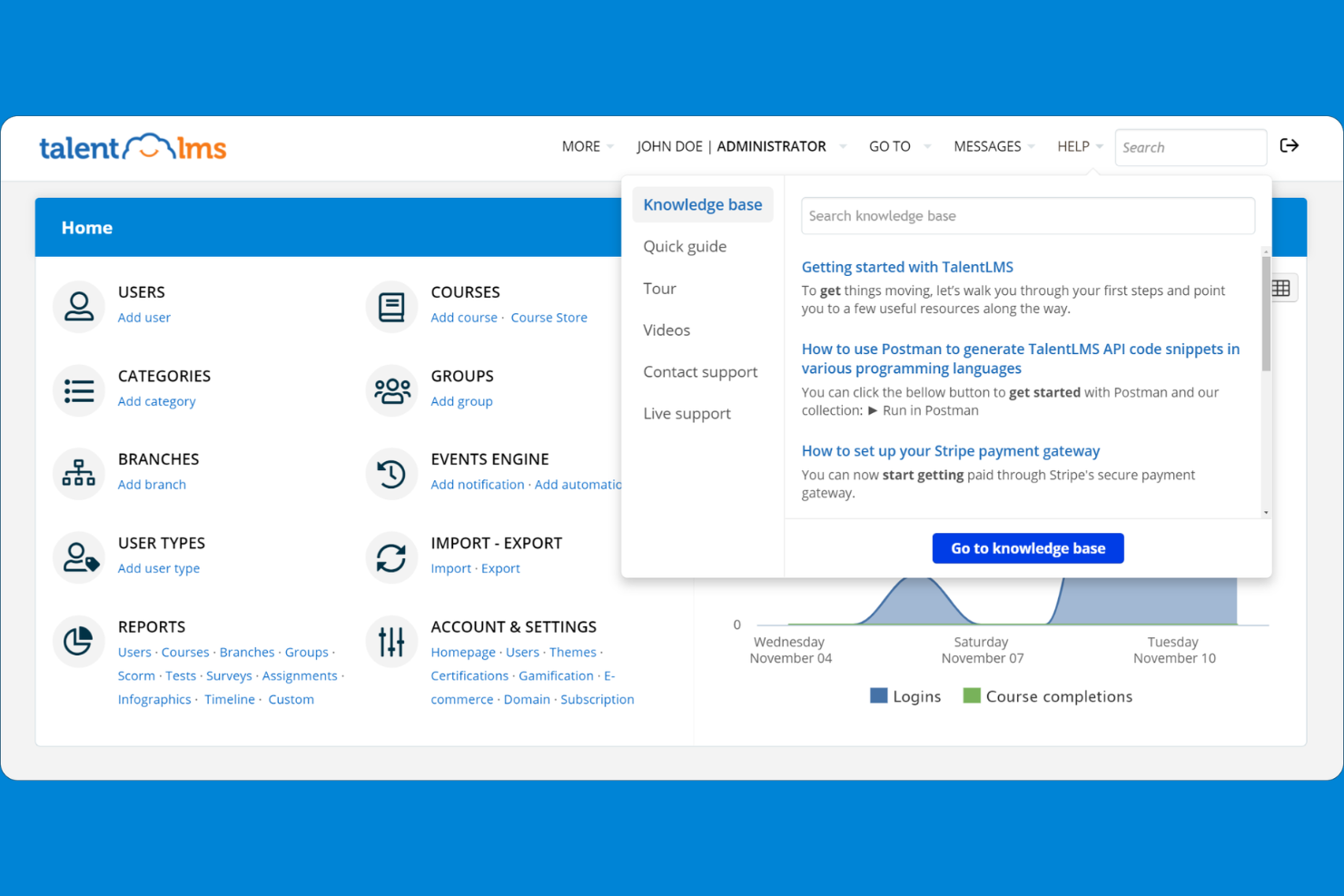
TalentLMS is a cloud-based learning management system designed for businesses and organizations that want to deliver training at scale. It appeals to HR teams and trainers looking for customizable course creation, user management, and reporting tools.
Who Is TalentLMS Best For?
TalentLMS suits HR teams and trainers at small to midsize businesses seeking scalable online training solutions.
Why I Picked TalentLMS
I picked TalentLMS because it offers a simple, flexible learning management experience that fits the needs of growing teams. I like that I can quickly create and assign courses to different user groups and track their progress in real time. The platform’s branching paths and customizable learning portals help my team deliver targeted training for various departments. In practice, this flexibility means we can adapt our training programs as our business evolves.
TalentLMS Key Features
- SCORM and xAPI support: Import and deliver interactive, standards-compliant learning content.
- Assessment engine: Build quizzes, tests, and surveys directly into courses.
- Video conferencing integration: Connect with Zoom, Microsoft Teams, and Webex for live sessions.
- Mobile learning app: Learners can access courses and materials from iOS and Android devices.
TalentLMS Integrations
Integrations include BambooHR, Salesforce, Zoom, Microsoft Teams, GoTo, ADP Workforce Now, Intercom, Sage People, Shopify, and LinkedIn Learning.
Pros and Cons
Pros:
- Integrates with major HR and video platforms
- Offers extensive reporting and analytics tools
- Supports SCORM, xAPI, and cmi5 content standards
Cons:
- Mobile app lacks some desktop functionalities
- Limited advanced gamification features
New Product Updates from TalentLMS
TalentLMS Adds Learning Paths, AI Video, and Learner Experience Updates
TalentLMS introduced updates across learning management, content creation, and learner experience, including Learning Paths for Groups, AI video generation in TalentCraft, video bookmarking, and expanded administration tools. For more information, visit TalentLMS’s official site.

Best for rapid learning content deployment

iSpring LMS is an online learning platform with a built-in course authoring suite, AI content creation, learning tracks, gamification, and performance review tools all in one place.
Who Is iSpring LMS Best For?
iSpring LMS is a strong fit for HR and L&D teams at mid-sized companies that need to build, deliver, and track employee training without a lengthy setup process.
Why I Picked iSpring LMS
iSpring LMS is one of my top picks because I love how quickly you can go from zero to live training. The built-in AI course creator lets you upload your existing files, describe the topic, and get a full course draft with knowledge checks in any language. On top of that, the ready-made course library from iSpring Academy means you can assign training on compliance, sales, or leadership instantly, without authoring anything from scratch. Auto-enrollment rules then handle assigning those courses to the right learners automatically.
iSpring LMS Key Features
- Learning tracks: Organize courses into structured sequences with chapters, deadlines, and prerequisites to guide learners through a defined path.
- Mobile learning app: Learners can access courses on iOS and Android, with an offline mode that syncs progress once they reconnect.
- Gamification: Assign points, badges, and leaderboard rankings to learners as they complete courses and assessments.
- SCORM/xAPI content import: Upload externally authored SCORM 1.2, SCORM 2004, xAPI, and cmi5 packages directly into the LMS.
iSpring LMS Integrations
iSpring LMS offers native integrations with Zoom, Microsoft Teams, Google Meet, BambooHR, OrangeHRM, Salesforce, Microsoft Outlook, Microsoft Entra ID, Shopify, Udemy, Go1, LinkedIn Learning, and GoodHabitz, among others. It also connects with Albato for workflow automation and provides a REST API for custom integrations.
Pros and Cons
Pros:
- Fast implementation with minimal setup time
- Offline mobile app for iOS and Android
- Includes a built-in authoring toolkit
Cons:
- Limited library of ready-made courses
- Branding and interface customization options are basic
New Product Updates from iSpring LMS

iSpring LMS Adds Multiple Observations to OJT Sessions
iSpring LMS now lets managers log multiple observations within one OJT session, grouping visits and auto-generating summary stats like averages, criterion results, and comparisons. For more information, visit iSpring LMS's official site.

Extensive course marketplace for professional and personal development
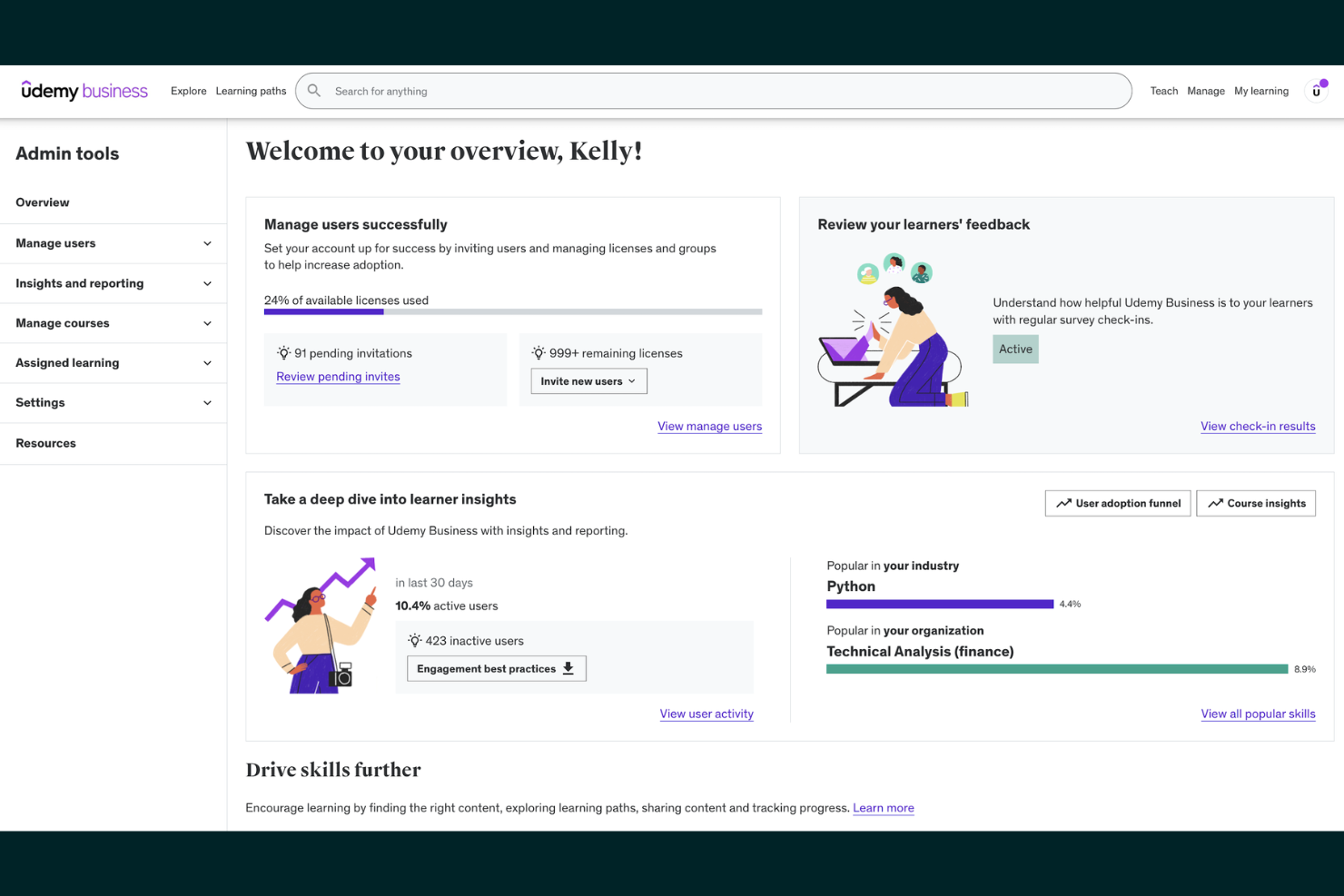
Udemy offers a vast online course marketplace designed for professionals, teams, and organizations seeking flexible skill development. It’s a strong fit for businesses that want to provide employees with access to a wide range of technical and soft skills training.
Who Is Udemy Best For?
Udemy suits HR teams and business leaders at organizations of any size looking to offer diverse, on-demand learning options for employees.
Why I Picked Udemy
I chose Udemy because it offers an extensive course marketplace that covers both professional and personal development topics. My team can quickly find courses on everything from project management to wellness, all in one place. I appreciate that instructors from various industries contribute fresh, up-to-date content regularly. In practice, this means we’re never limited by subject or skill level when assigning training.
Udemy Key Features
- Course progress tracking: Users can monitor their advancement through each course with visual indicators.
- Mobile app access: Learners can view and complete courses on iOS and Android devices.
- Custom learning paths: Admins can assign curated course collections to individuals or teams.
- Certificate of completion: Learners receive a digital certificate after finishing a course.
Udemy Integrations
Integrations include Microsoft Teams, Slack, LinkedIn Learning, Cornerstone, Degreed, and more.
Pros and Cons
Pros:
- Mobile app supports offline course access
- Certificates available for completed courses
- Self-paced and instructor-led course formats
Cons:
- Few native integrations with HR platforms
- Certificates are not accredited or standardized
Docebo
AI-powered learning platform for enterprise training
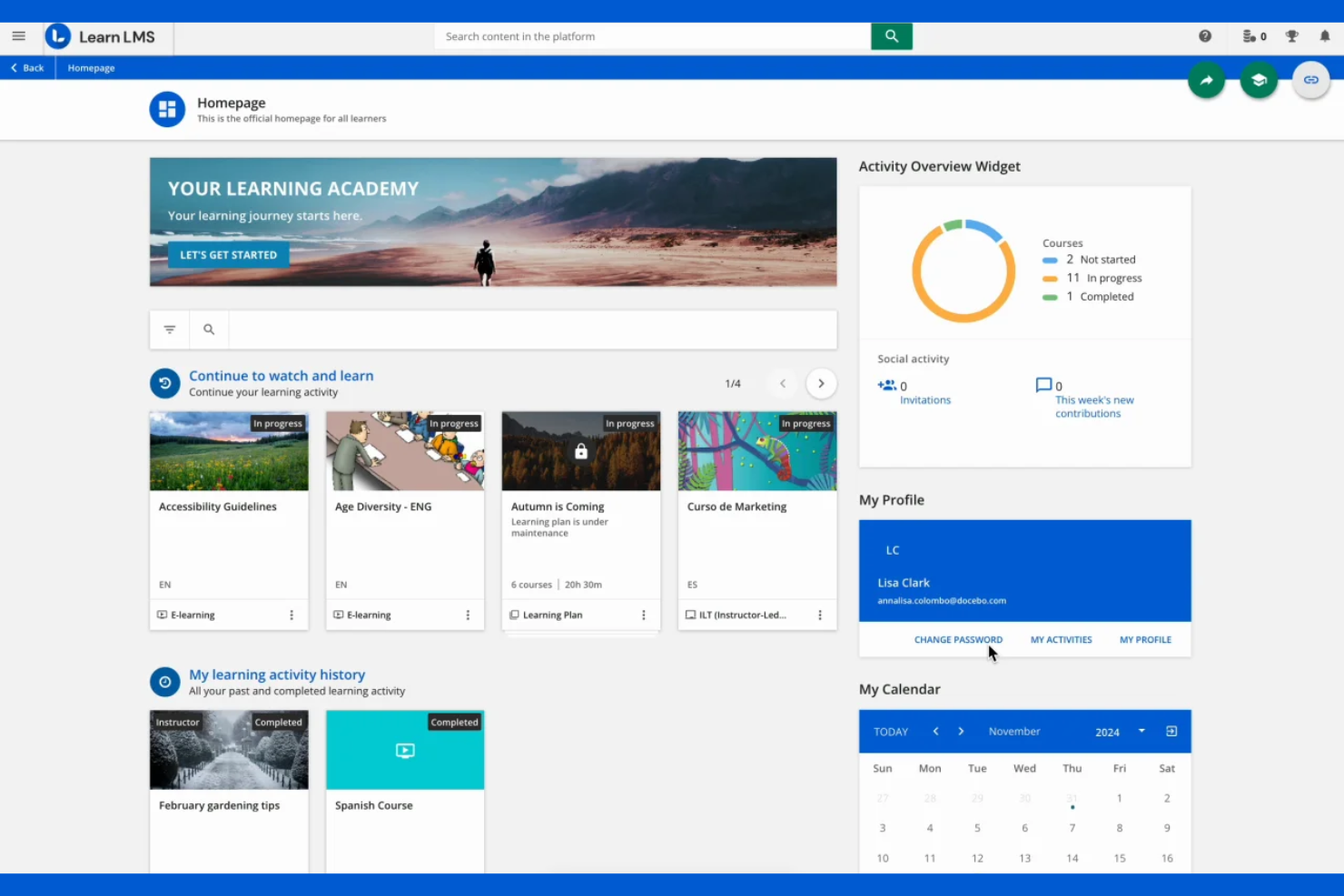
Docebo is a cloud-based learning platform designed for enterprises that need to deliver, manage, and track employee training at scale. It appeals to organizations seeking advanced automation, content management, and personalized learning experiences.
Who Is Docebo Best For?
Docebo suits HR and L&D teams at large enterprises that need scalable, AI-driven training and compliance solutions.
Why I Picked Docebo
I picked Docebo because its AI-powered learning platform helps my team automate content recommendations and personalize training paths for each learner. I like that we can use its virtual coach to answer learner questions in real time. The platform’s advanced analytics let us track engagement and measure training impact across departments. In practice, this means we deliver targeted, scalable training that adapts to our organization’s needs.
Docebo Key Features
- Content marketplace: Access ready-made courses from third-party providers directly within the platform.
- ILT classroom management: Schedule, track, and manage instructor-led training sessions.
- Multi-domain management: Create and manage separate learning environments for different audiences or brands.
- Custom reporting engine: Build and export tailored reports on learner progress and course performance.
Docebo Integrations
Integrations include Salesforce, Microsoft Teams, HubSpot, Dropbox, Facebook, Accredible, ADP Workforce Now, BambooHR, Amazon S3, and OpenSesame.
Pros and Cons
Pros:
- Integrates with major HR and video platforms
- Offers extensive reporting and analytics tools
- Supports SCORM, xAPI, and cmi5 content standards
Cons:
- Mobile app lacks some desktop functionalities
- User management can be complex for large orgs

Kajabi
All-in-one platform for online courses and memberships
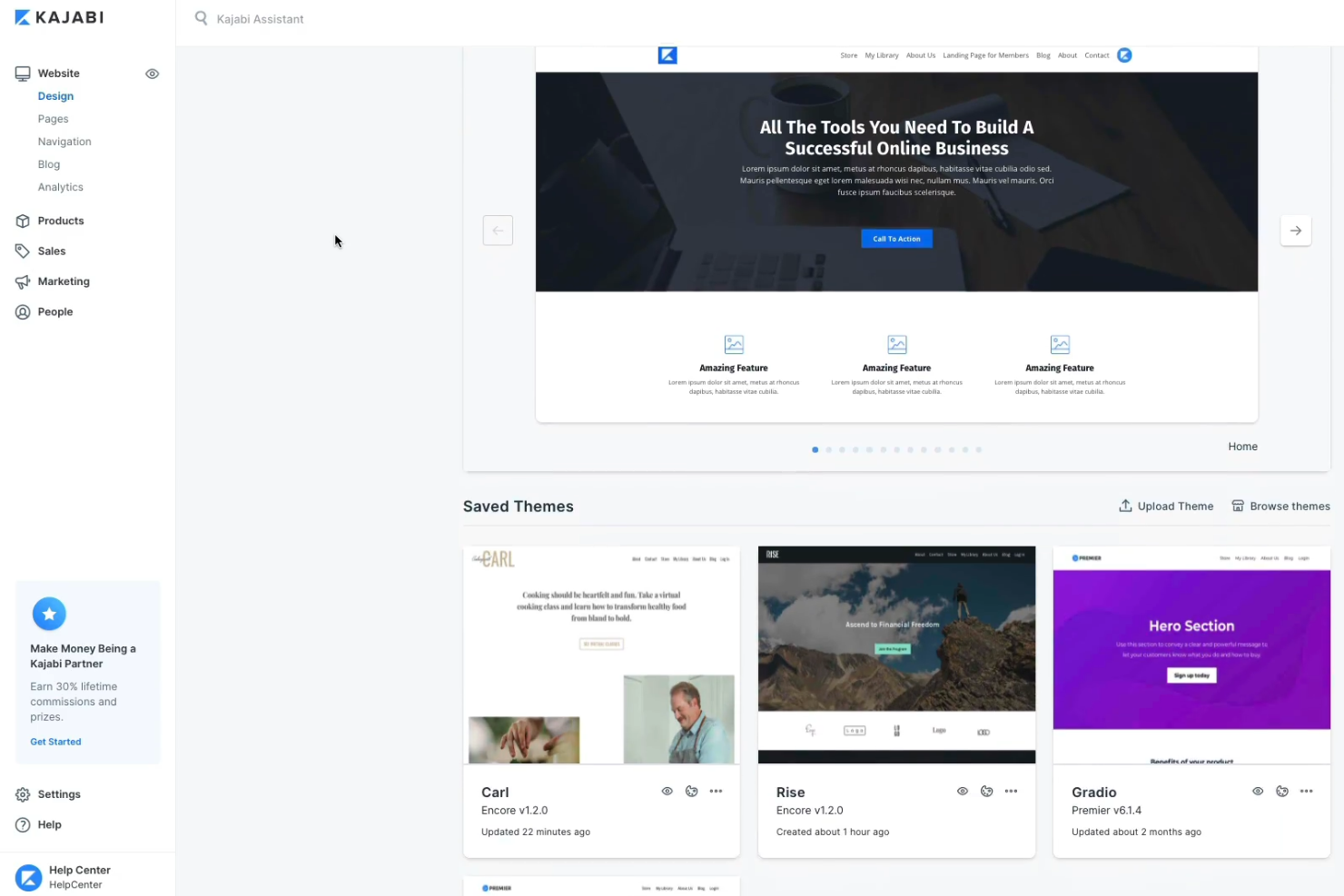
Kajabi offers creators, coaches, and small businesses a way to build, market, and sell online courses and digital products from one platform. It appeals to those seeking to manage content, payments, and community engagement without juggling multiple tools.
Who Is Kajabi Best For?
Kajabi suits solo creators, coaches, and small businesses looking to monetize online courses, memberships, and digital products.
Why I Picked Kajabi
I picked Kajabi because it lets my team manage online courses, memberships, and digital products all in one place. I like that we can build landing pages, automate email marketing, and handle payments without third-party tools. The platform’s all-in-one approach means we don’t have to juggle multiple subscriptions or integrations. In practice, this helps us launch and scale our online learning offerings quickly and efficiently.
Kajabi Key Features
- Community spaces: Create private or public online communities for learners.
- Quizzes and assessments: Build interactive quizzes to test knowledge and track progress.
- Drip content scheduling: Release course modules on a set schedule automatically.
- Mobile app: Give users access to courses and content on iOS and Android devices.
Kajabi Integrations
Integrations include Stripe, PayPal, Mailchimp, ConvertKit, ActiveCampaign, Aweber, Google Analytics, Facebook Pixel, Zapier, and ClickFunnels.
Pros and Cons
Pros:
- Mobile app for learners and creators
- Community and membership management features
- Built-in website and landing page builder
Cons:
- Limited advanced reporting and analytics options
- No built-in course marketplace for discovery

Simple course creation and sales for individuals and businesses
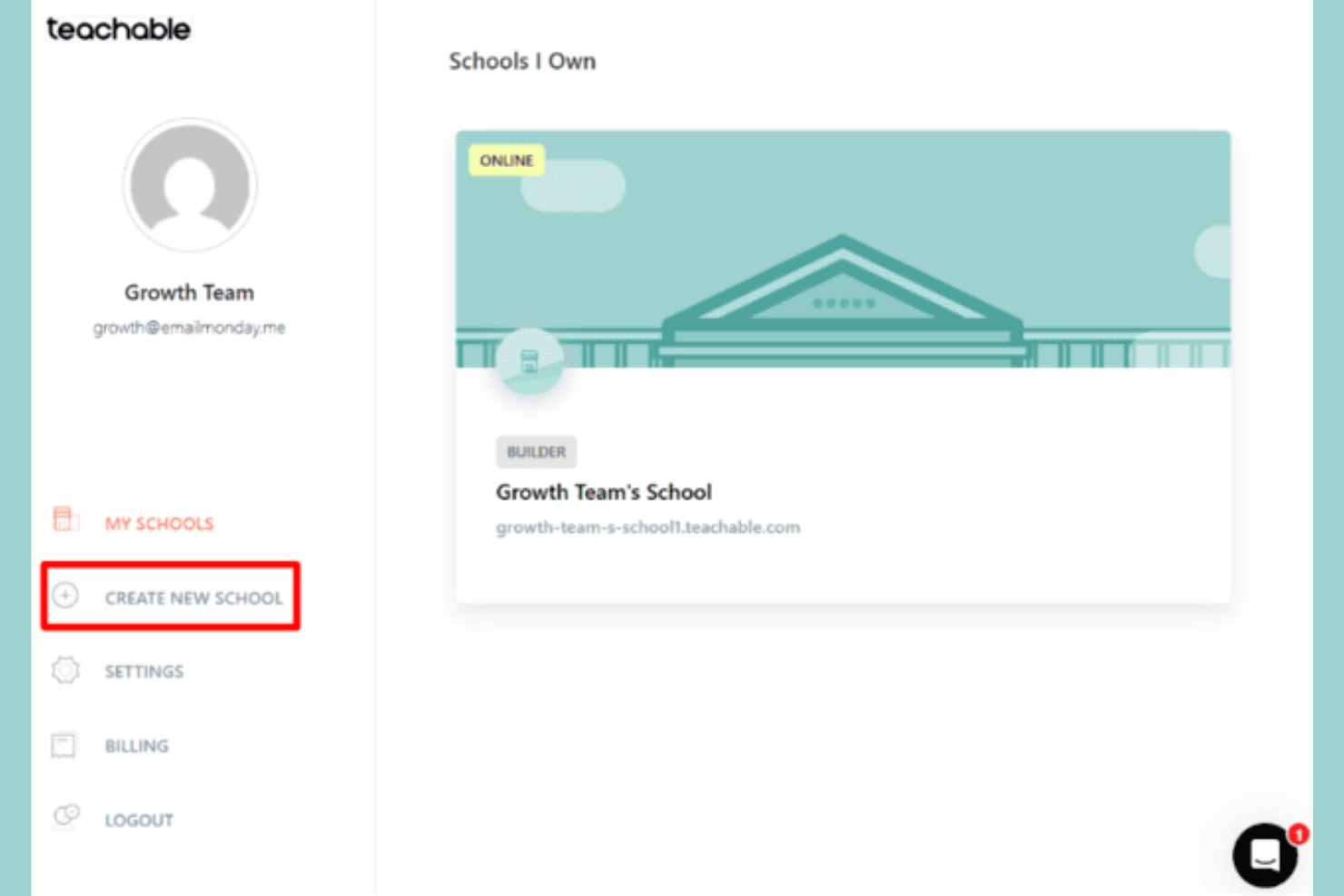
Teachable gives creators, coaches, and entrepreneurs a platform to build and sell online courses, coaching, and digital downloads. It appeals to those who want to monetize expertise with flexible content delivery and built-in payment processing.
Who Is Teachable Best For?
Teachable fits solo creators, coaches, and small businesses looking to launch and sell online courses or coaching programs.
Why I Picked Teachable
I picked Teachable because it lets my team quickly create and sell courses without needing technical skills. I like that we can offer coaching, digital downloads, and courses from a single dashboard. The built-in sales and checkout tools make it easy to monetize content. In practice, this means we can launch new offerings and manage payments without extra plugins or services.
Teachable Key Features
- Course compliance controls: Set requirements for lecture completion and enforce content progression.
- Integrated quizzes: Add graded or ungraded quizzes to course modules.
- Student progress tracking: Monitor learner activity and completion rates in real time.
- Custom certificates: Issue branded certificates of completion to students automatically.
Teachable Integrations
Integrations include Mailchimp, ConvertKit, Google Analytics, Segment, Zapier, Facebook Pixel, Sumo, Circle, Accredible, and Shopify.
Pros and Cons
Pros:
- Mobile app for learners and creators
- Community and membership management features
- Built-in website and landing page builder
Cons:
- No SCORM or xAPI content support
- Fewer native integrations than some competitors

Professional development courses integrated with LinkedIn profiles
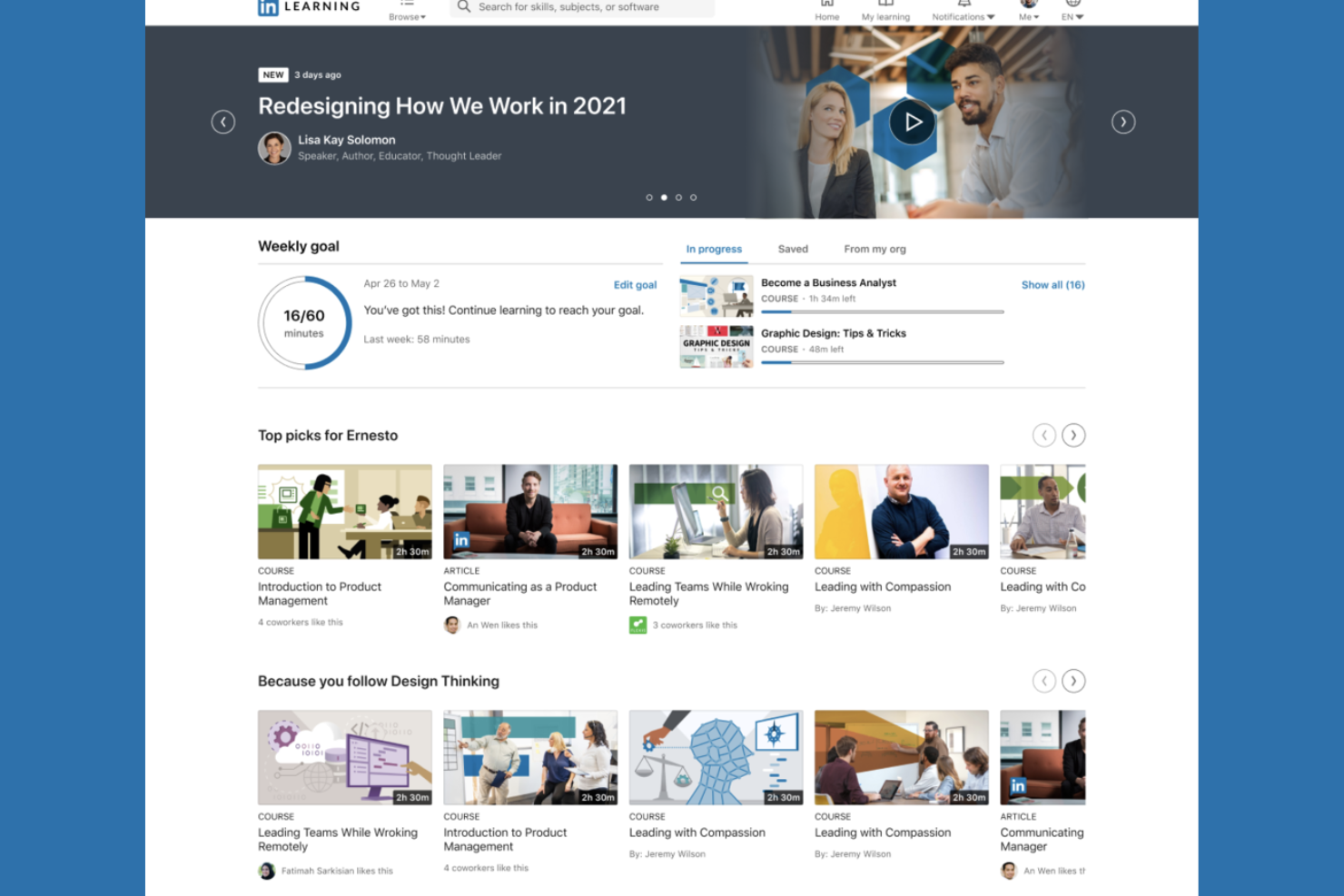
LinkedIn Learning offers a curated library of professional courses designed for organizations and individuals aiming to upskill in business, technology, and creative fields. It’s a strong choice for HR teams and business leaders seeking learning content that aligns with career growth and industry trends.
Who Is LinkedIn Learning Best For?
HR teams and business leaders at organizations seeking professional development content tied to LinkedIn profiles and career advancement.
Why I Picked LinkedIn Learning
I picked LinkedIn Learning because it connects professional development directly to users’ LinkedIn profiles, making skill-building visible to employers and peers. I like that my team can assign courses and track completions within the platform. The integration with LinkedIn’s network means learning achievements are automatically showcased. In practice, this helps reinforce a culture of growth and career advancement across our organization.
LinkedIn Learning Key Features
- Curated learning paths: Users can follow structured course sequences for specific skills or roles.
- Skill assessments: Learners can test their knowledge before and after courses.
- Mobile app access: Courses are available on iOS and Android devices for learning on the go.
- Admin analytics dashboard: Admins can view usage data and course engagement metrics.
LinkedIn Learning Integrations
Native integrations are not currently listed.
Pros and Cons
Pros:
- Mobile app supports offline course access
- Certificates available for completed courses
- Self-paced and instructor-led course formats
Cons:
- Limited options for live, interactive sessions
- Course quality varies by instructor

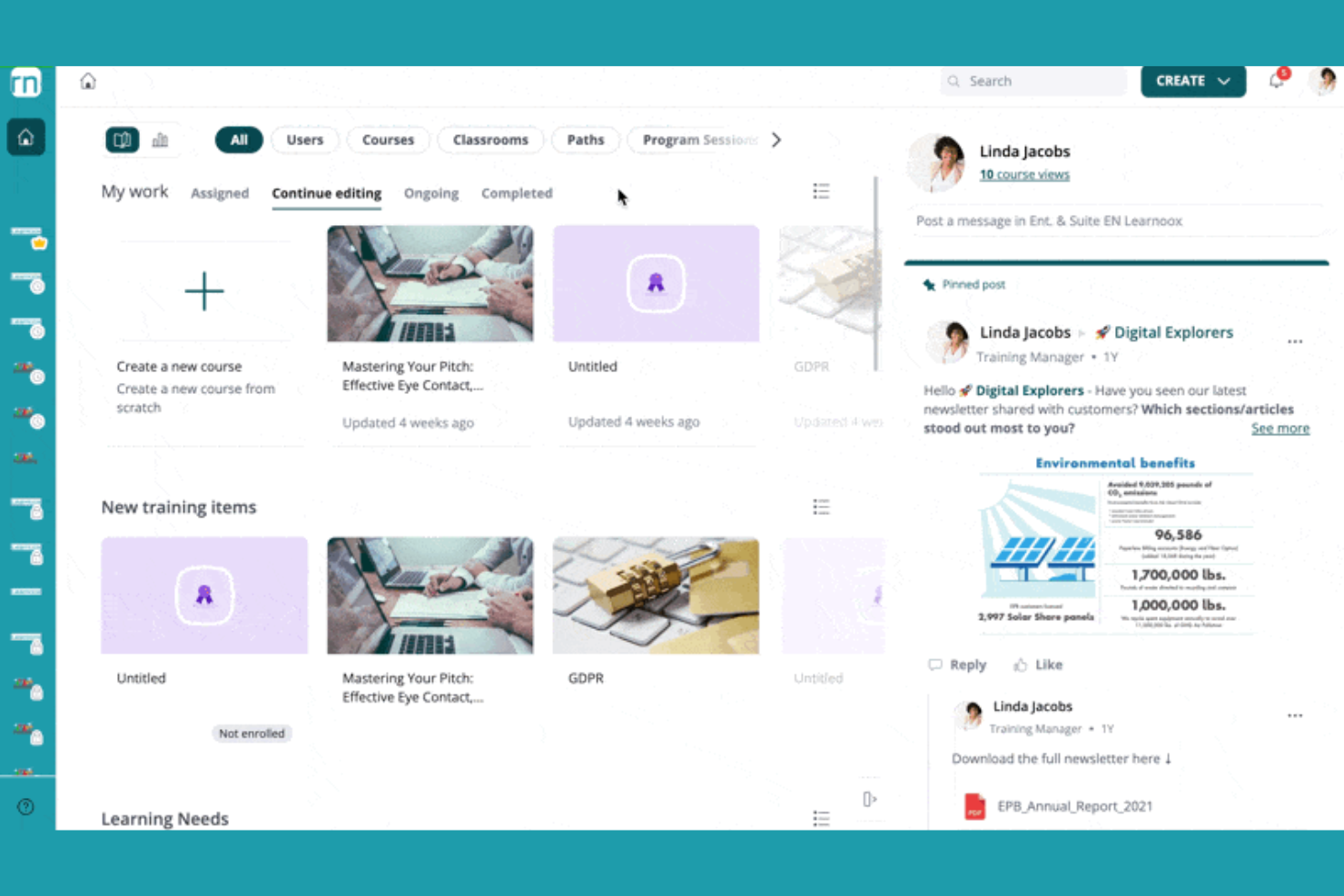
360Learning offers a collaborative learning platform designed for organizations that want to create, share, and manage training programs at scale. It appeals to HR teams and L&D professionals seeking to boost engagement and knowledge sharing across their workforce.
Who Is 360Learning Best For?
360Learning suits HR and L&D teams at mid-sized to large organizations focused on collaborative employee training.
Why I Picked 360Learning
I picked 360Learning because it puts collaborative learning at the center of our training strategy. I like that my team can co-author courses, gather peer feedback, and update content quickly as needs change. The platform’s built-in discussion forums and reaction features help us capture knowledge from across the organization. In practice, this means we can keep training relevant and encourage active participation from every department.
360Learning Key Features
- Automated learning paths: Assign and sequence courses for different roles or teams.
- Integrated assessment builder: Create quizzes and knowledge checks within courses.
- Mobile learning app: Enable learners to access training on iOS and Android devices.
- Analytics dashboard: Track learner progress, course completion, and engagement metrics.
360Learning Integrations
Integrations include BambooHR, Salesforce, Slack, Microsoft Teams, LinkedIn Learning, Coursera, Google Drive, Canva, SAP SuccessFactors, and Snowflake.
Pros and Cons
Pros:
- Automated learning paths for role-based training
- Built-in peer feedback and discussion tools
- Collaborative course authoring for teams
Cons:
- SCORM and xAPI support requires add-ons
- No built-in course marketplace for discovery
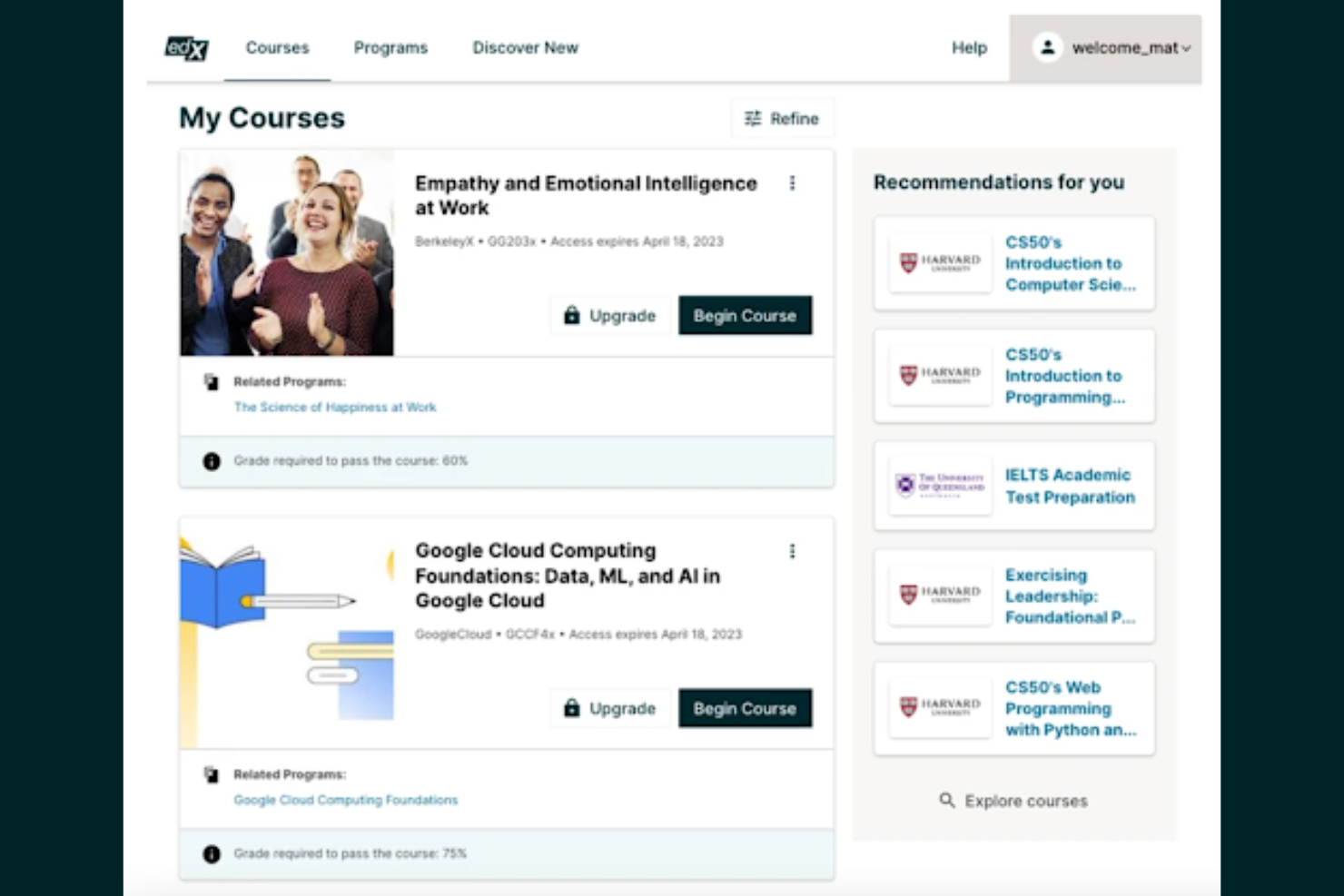
edX offers access to university-level courses designed for professionals, students, and organizations seeking high-quality, flexible online education. It’s a strong choice if you want to learn from top institutions or need recognized credentials for career advancement.
Who Is edX Best For?
Professionals and students seeking university-level courses from top institutions across a wide range of subjects.
Why I Picked edX
I picked edX because it gives my team access to university-level courses from top institutions, which is rare among online learning platforms. I appreciate that we can enroll in MicroMasters and professional certificate programs directly from universities. The platform also offers verified certificates, making it easier to showcase learning achievements. In practice, this means we can pursue recognized credentials without leaving our desks.
edX Key Features
- Self-paced learning: Users can start courses anytime and progress at their own speed.
- Course discussion forums: Learners interact with peers and instructors through integrated discussion boards.
- Mobile app access: Courses and materials are available via iOS and Android apps.
- Audit track option: Users can access course content for free without earning a certificate.
edX Integrations
Integrations include Single Sign-On, Blackboard, Canvas, Cornerstore, Degreed, EdCast, Moodle, and more.
Pros and Cons
Pros:
- Verified certificates for completed courses
- Wide range of subjects and disciplines
- Courses from top universities and institutions
Cons:
- Certificates require payment even after completion
- Limited instructor interaction in most courses

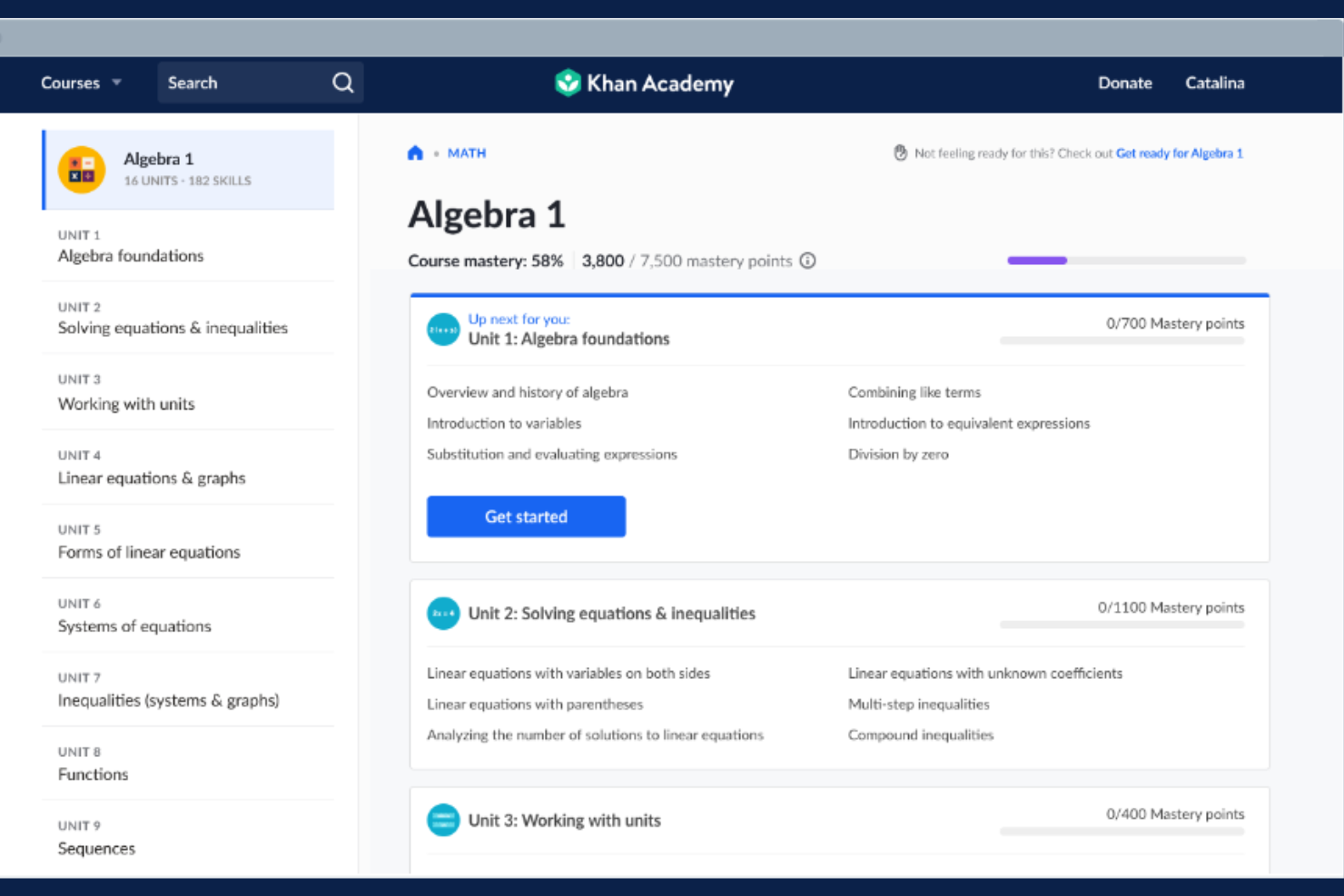
Khan Academy offers a nonprofit online learning platform with a wide range of interactive lessons and practice exercises. It’s a strong fit for educators, training managers, and organizations seeking accessible, self-paced learning for diverse teams.
Who Is Khan Academy Best For?
Khan Academy suits educators and organizations seeking free, mastery-based online learning for diverse age groups.
Why I Picked Khan Academy
I picked Khan Academy because it offers truly free, mastery-based learning for all ages, which is rare among online learning platforms. I like that my team can assign interactive exercises and track progress across a wide range of subjects. The mastery system ensures learners build a strong foundation before moving on. In practice, this helps us support continuous, self-paced development for everyone.
Khan Academy Key Features
- Teacher dashboard: Lets educators assign content and monitor student progress.
- Interactive quizzes: Provides instant feedback on practice questions.
- Video lessons: Offers thousands of instructional videos across subjects.
- Personalized learning paths: Adapts content to each learner’s pace and skill level.
Khan Academy Integrations
Native integrations are not currently listed.
Pros and Cons
Pros:
- Wide subject coverage, including math and science
- Mastery-based progression reinforces concept retention
- Entirely free for learners and educators
Cons:
- Content depth varies by subject area
- Certificates are not industry-recognized
Andre nettbaserte læringsplattformer
Her er noen flere alternativer for nettbaserte læringsplattformer som ikke kom med på kortlisten min, men som likevel er verdt å se nærmere på:
- FutureLearn
Accredited courses from leading universities and institutions
- Top Hat
Interactive teaching platform for higher education
- Class
Virtual classroom software built on Zoom
- Thinkific
Course creation platform for entrepreneurs and educators
- Moodle
Open-source LMS for customizable online learning
- Coursera
University-level courses and professional certificates online
- EzyCourse
All-in-one platform for selling online courses
- Absorb
Scalable LMS for enterprise training needs
- Pearson+
Digital textbooks and study tools for students
- Connections Academy
Full-time online school for K-12 students
- Grafy
AI-powered platform for interactive learning content


How I Evaluate Online Learning Platforms
I look at online learning platforms in two layers: the baseline requirements every tool must meet and the differentiators that set the right fit apart for L&D teams handling onboarding and upskilling.
Core Functionality (Table Stakes For This List)
When I'm selecting tools for my list, I rank each one on a scale from 0 (does not offer the functionality) to 5 (excels in this area) for each core functionality listed below. Then, I calculate the tool's total score into a percentage. Each tool needs to achieve a minimum total score of 65% to be considered for inclusion.
- Course Authoring & Content Management: I check whether you can build courses natively, upload SCORM/xAPI files, and organize a content library—say, housing compliance videos alongside manager-led slide decks.
- Learner Progress Tracking: Tracking should show who started, who finished, and where learners stall, so an L&D manager can spot a team that's behind on required onboarding modules.
- Assessments & Certifications: I evaluate how the platform handles quizzes, knowledge checks, and certificate issuance—especially automated recertification reminders for things like annual safety training.
- Learning Paths & Course Assignments: Each tool should let you build sequenced paths and assign them by role, department, or location, like auto-enrolling new hires into a structured 30-60-90-day program.
- Reporting & Analytics: Reports need to go beyond basic completions. I look for dashboards that surface training trends, filter by team or region, and export data for leadership reviews.
- HRIS & HR Systems Integration: The platform should sync with your HRIS so employee records, roles, and org changes flow in without manual updates—platforms like BambooHR, Workday, or SAP SuccessFactors.
Once I have a list of tools that meet the criteria, I consider what sets each platform apart.
Differentiating Factors (What Sets Vendors Apart)
Here's how I compare and contrast different vendors:
Standout Features
Skills and competency mapping is a big differentiator—I look for platforms that tie courses directly to skill profiles so talent development specialists can pinpoint gaps across teams. AI-powered personalization adds another layer, recommending content based on role, goals, or past activity instead of relying on manual assignments. Mobile learning with offline access also matters, especially for organizations with frontline workers who need to complete training away from a desk.
Beyond Features
Content library access is a major consideration—I check whether a platform includes built-in courses or integrates with providers like LinkedIn Learning or OpenSesame, since building every course from scratch isn't realistic for smaller L&D teams. Compliance and security standards also carry real weight, particularly SOC 2 and GDPR readiness, because these platforms store sensitive employee data. I also evaluate pricing transparency, looking at whether vendors charge per user, per active user, or via flat-rate tiers, and whether implementation or content costs are clearly disclosed.
Slik velger du nettbaserte læringsplattformer
Det er lett å gå seg vill i lange funksjonslister og kompliserte prisstrukturer. For å hjelpe deg med å holde fokus mens du går gjennom den unike prosessen din for valg av programvare, får du her en sjekkliste over faktorer du bør ha i tankene:
| Faktor | Hva bør du vurdere? |
|---|---|
| Skalerbarhet | Kan plattformen håndtere det nåværende og forventede antallet lærende uten ytelsesproblemer eller ekstra kostnader? |
| Integrasjoner | Kan den kobles til HRIS-, CRM- eller innholdsbibliotekene dine uten behov for manuell dataregistrering og uten hull i arbeidsflyten? |
| Tilpasningsmuligheter | Kan du tilpasse merkevareprofilering, kursstruktur og brukerroller slik at de passer organisasjonens behov og retningslinjer? |
| Brukervennlighet | Vil administratorer og lærende raskt forstå hvordan de skal navigere i og bruke plattformen med minimal opplæring? |
| Implementering og innføring | Hvor lang tid vil det ta å lansere løsningen, og hvilke ressurser eller hvilken støtte tilbyr leverandøren under oppsett og migrering? |
| Kostnad | Er prisnivåene tydelige, og samsvarer de med bruksmønstrene, antallet brukere og de viktigste funksjonene du trenger? |
| Sikkerhetstiltak | Tilbyr plattformen SSO, datakryptering og samsvar med relevante personvernstandarder for regionen eller bransjen din? |
| Tilgjengelig kundestøtte | Hvilke kanaler for kundestøtte og svartider tilbys, og samsvarer de med teamets behov for løpende hjelp? |
Hva er nettbaserte læringsplattformer?
Nettbaserte læringsplattformer er digitale systemer som gjør det mulig for organisasjoner å opprette, levere og administrere opplæringsinnhold for lærende. Disse plattformene støtter kursproduksjon, påmelding av lærende, fremdriftssporing og vurderinger i et sentralisert miljø. HR-team og undervisere bruker dem til å tilby opplæring, faglig utvikling og samsvarsopplæring i stor skala, ofte med verktøy for samarbeid og rapportering.
Funksjoner i nettbaserte læringsplattformer
Vær oppmerksom på følgende viktige funksjoner når du velger nettbaserte læringsplattformer:
- Verktøy for kursutvikling: Bygg, rediger og organiser opplæringsmoduler ved hjelp av multimedieinnhold, quizer og interaktive elementer på plattformen.
- Administrasjon av deltakerpåmelding: Tildel kurs til enkeltpersoner eller grupper, automatiser påmeldinger og administrer brukertilgang basert på roller eller avdelinger.
- Fremdriftssporing: Overvåk deltakernes aktivitet, fullføringsgrad for kurs og tiden de bruker på opplæring, gjennom dashbord og rapporter.
- Vurderinger og quizer: Opprett tester, quizer og kunnskapssjekker for å vurdere deltakernes forståelse og læringsutbytte.
- Sertifikatadministrasjon: Utsted, spor og administrer sertifikater for fullføring av kurs eller oppfyllelse av samsvarskrav.
- Rapportering og analyse: Generer detaljerte rapporter om deltakernes engasjement, prestasjoner og opplæringens effektivitet for interessenter.
- Tilgjengelighet på mobile enheter: Gjør det mulig for deltakere å få tilgang til kurs og materiell fra smarttelefoner eller nettbrett, slik at fleksible læringsmiljøer støttes.
- Diskusjonsfora: Legg til rette for samhandling mellom deltakere, spørsmål og svar samt kunnskapsdeling i kurs eller på tvers av plattformen.
- Integrasjonsmuligheter: Koble til HR-systemer, innholdsbiblioteker eller kommunikasjonsverktøy for å effektivisere arbeidsflyter og datadeling.
Vanlige AI-funksjoner i nettbaserte læringsplattformer
I tillegg til standardfunksjonene i nettbaserte læringsplattformer som er nevnt ovenfor, tar mange av disse løsningene i bruk AI med funksjoner som:
- Personlige læringsanbefalinger: Foreslår kurs og ressurser til deltakere basert på interessene, rollene og tidligere aktivitet ved hjelp av AI-drevne algoritmer.
- Automatisk innholdskategorisering: Bruker AI til å analysere og kategorisere kursmateriell, slik at det blir enklere å organisere og søke etter relevant innhold.
- Intelligent quizgenerering: Oppretter automatisk quizer og vurderinger fra kursinnhold, noe som sparer tid for instruktører og sikrer samsvar med læringsmålene.
- AI-drevet deltakeranalyse: Identifiserer mønstre i deltakernes atferd og forutsier hvilke brukere som står i fare for å falle fra, slik at administratorer kan gripe inn tidlig for å forbedre resultatene.
- Chatboter med naturlig språk: Gir umiddelbar, AI-drevet støtte til deltakere, svarer på spørsmål og veileder brukere gjennom plattformen eller kursmateriellet.
Fordeler med nettbaserte læringsplattformer
Implementering av nettbaserte læringsplattformer gir flere fordeler for teamet og virksomheten din. Her er noen av fordelene du kan se frem til:
- Sentralisert opplæringsadministrasjon: Administrer alle kurs, deltakernes fremdrift og rapportering fra én enkelt, organisert plattform.
- Skalerbar læringslevering: Lever enkelt opplæring til team av alle størrelser, på tvers av flere lokasjoner eller avdelinger.
- Fleksibel tilgang: Gjør det mulig for deltakere å fullføre kurs når det passer dem og fra hvilken som helst enhet, noe som støtter fjernarbeid og hybridarbeid.
- Datadrevet innsikt: Bruk analyse- og rapporteringsfunksjoner til å spore engasjement, identifisere kompetansegap og måle opplæringens effektivitet.
- Enhetlig læringsopplevelse: Standardiser innhold og vurderinger for å sikre at alle deltakere får opplæring av samme kvalitet.
- Raskere introduksjon og kompetanseutvikling: Effektiviser opplæringen av nyansatte og den løpende utviklingen med automatiserte læringsløp og tilgjengelige ressurser.
- Forbedret samarbeid: Frem læring mellom kolleger og kunnskapsdeling gjennom diskusjonsfora og interaktive kurselementer.
Kostnader og priser for nettbaserte læringsplattformer
Valg av nettbaserte læringsplattformer krever en forståelse av de ulike prismodellene og abonnementene som er tilgjengelige. Kostnadene varierer basert på funksjoner, teamstørrelse, tillegg og mer. Tabellen nedenfor oppsummerer vanlige abonnementer, gjennomsnittsprisene deres og typiske funksjoner som er inkludert i løsninger for nettbaserte læringsplattformer:
Sammenligningstabell for abonnementer på nettbaserte læringsplattformer
| Plantype | Gjennomsnittspris | Vanlige funksjoner |
|---|---|---|
| Gratisplan | $0 | Grunnleggende kursoppretting, begrenset antall brukerplasser, enkel rapportering og brukerstøtte i fellesskapet. |
| Personlig plan | $10-$30/bruker/måned | Tilgang til individuelle kurs, fremdriftssporing, sertifikater og brukerstøtte via e-post. |
| Bedriftsplan | $25-$60/bruker/måned | Teamadministrasjon, avansert analyse, integrasjoner, tilpasset merkevarebygging og prioritert brukerstøtte. |
| Virksomhetsplan | $60-$120/bruker/måned | Ubegrenset antall brukere, dedikert kundeansvarlig, tilpassede integrasjoner, avansert sikkerhet og brukerstøtte i henhold til SLA. |
Vanlige spørsmål om nettbaserte læringsplattformer
Her er noen svar på vanlige spørsmål om nettbaserte læringsplattformer:
Hvordan støtter nettbaserte læringsplattformer opplæring i etterlevelse?
Nettbaserte læringsplattformer lar deg tildele obligatoriske kurs, følge med på gjennomføringen og generere rapporter om etterlevelse. Dette hjelper HR-team med å sikre at ansatte oppfyller regulatoriske krav, og gjør revisjoner enklere ved hjelp av sentraliserte oppføringer.
Kan nettbaserte læringsplattformer integreres med HR-systemer?
Ja, de fleste nettbaserte læringsplattformer tilbyr integrasjoner med HRIS, lønnssystemer og andre forretningssystemer. Dette muliggjør automatisk opprettelse av brukere, effektivisert rapportering og enklere administrasjon av ansattdata på tvers av plattformer.
Hva bør jeg vurdere når jeg migrerer til en ny nettbasert læringsplattform?
Planlegg for datamigrering, introduksjon av brukere og overføring av innhold. Undersøk om den nye plattformen tilbyr importverktøy, migreringsstøtte og opplæringsressurser for å minimere avbrudd og hjelpe brukerne med å tilpasse seg raskt.
Passer nettbaserte læringsplattformer for fjernarbeidende eller hybride team?
Ja, disse plattformene er utviklet for distribuerte arbeidsstyrker. De tilbyr mobil tilgang, asynkron læring og samarbeidsverktøy, slik at ansatte kan lære hvor som helst og i sitt eget tempo.
Hvordan måler jeg hvor effektive de nettbaserte læringsprogrammene mine er?
Hvordan måler jeg hvor effektive de nettbaserte læringsprogrammene mine er?