

10 beste programvareløsninger for bedriftskommunikasjon i 2026

Beste programvare for bedriftskommunikasjon – kortliste


Programvare for bedriftskommunikasjon viser til digitale plattformer som hjelper organisasjoner med å håndtere intern meldingsutveksling, møter, fildeling og samarbeid på tvers av team og lokasjoner. Hvis du ser etter den beste programvaren for bedriftskommunikasjon, leter du sannsynligvis etter verktøy som kan støtte sikker, effektiv og skalerbar kommunikasjon etter hvert som arbeidsstyrken vokser eller blir mer distribuert.
Denne listen hjelper deg med å sammenligne ledende alternativer, forstå hvilke funksjoner som er viktigst for ulike bransjer, og velge løsninger som passer organisasjonens behov for samsvar, integrasjoner og arbeidsflyt.
Hvorfor du kan stole på våre programvareanbefalinger
Teamet vårt har testet og anmeldt programvare siden 2012. Vi er selv HR-eksperter, så vi vet hvor vanskelig og hvor viktig det er å velge riktig programvare.
I denne guiden har vi vurdert verktøyene gjennom praktisk testing og uavhengig research og gitt dem poeng ut fra våre utvelgelseskriterier. Vi bygger også på innsikt fra ledende eksperter i bransjen og erfarne HR-eksperter.
Anmeldelsene våre bygger på vår egen redaksjonelle vurdering. De er ikke et salgsargument.
Ekspertanmeldere:
Sammenligningstabell for programvare for bedriftskommunikasjon
Bruk denne sammenligningstabellen til å se gjennom prisdetaljene for mine beste utvalg av programvare for bedriftskommunikasjon.
| Tool | Best For | Trial Info | Price | ||
|---|---|---|---|---|---|
| 1 | Best for enterprise-wide intranet communications | Free demo available | Pricing upon request | Website | |
| 2 | Best for fostering company culture | Free demo available | Pricing upon request | Website | |
| 3 | Best for large-scale video meetings | Free plan available | From $14.16/user/month (billed annually) | Website | |
| 4 | Best with integrated productivity apps | 14-day free trial available | From $7/user/month (billed annually) | Website | |
| 5 | Best for end-to-end encrypted messaging | Free plan available | From €7.45/user/month (billed annually) | Website | |
| 6 | Best with Microsoft 365 integration | Free plan + 1-month free trial available | From $4/user/month (billed annually) | Website | |
| 7 | Best for AI-powered voice transcription | 14-day free trial + free demo available | Pricing upon request | Website | |
| 8 | Best for regulated document collaboration | Free demo available | Pricing upon request | Website | |
| 9 | Best for healthcare communication compliance | Free demo available | Pricing upon request | Website | |
| 10 | Best for secure financial sector messaging | Free demo available | Pricing upon request | Website |
Anmeldelser av den beste programvaren for bedriftskommunikasjon
Nedenfor finner du mine detaljerte sammendrag av programvaren for bedriftskommunikasjon som kom med på kortlisten min. Anmeldelsene mine gir en grundig gjennomgang av funksjonene, de beste bruksområdene og integrasjonene for hver plattform, slik at du kan finne den beste løsningen for deg.

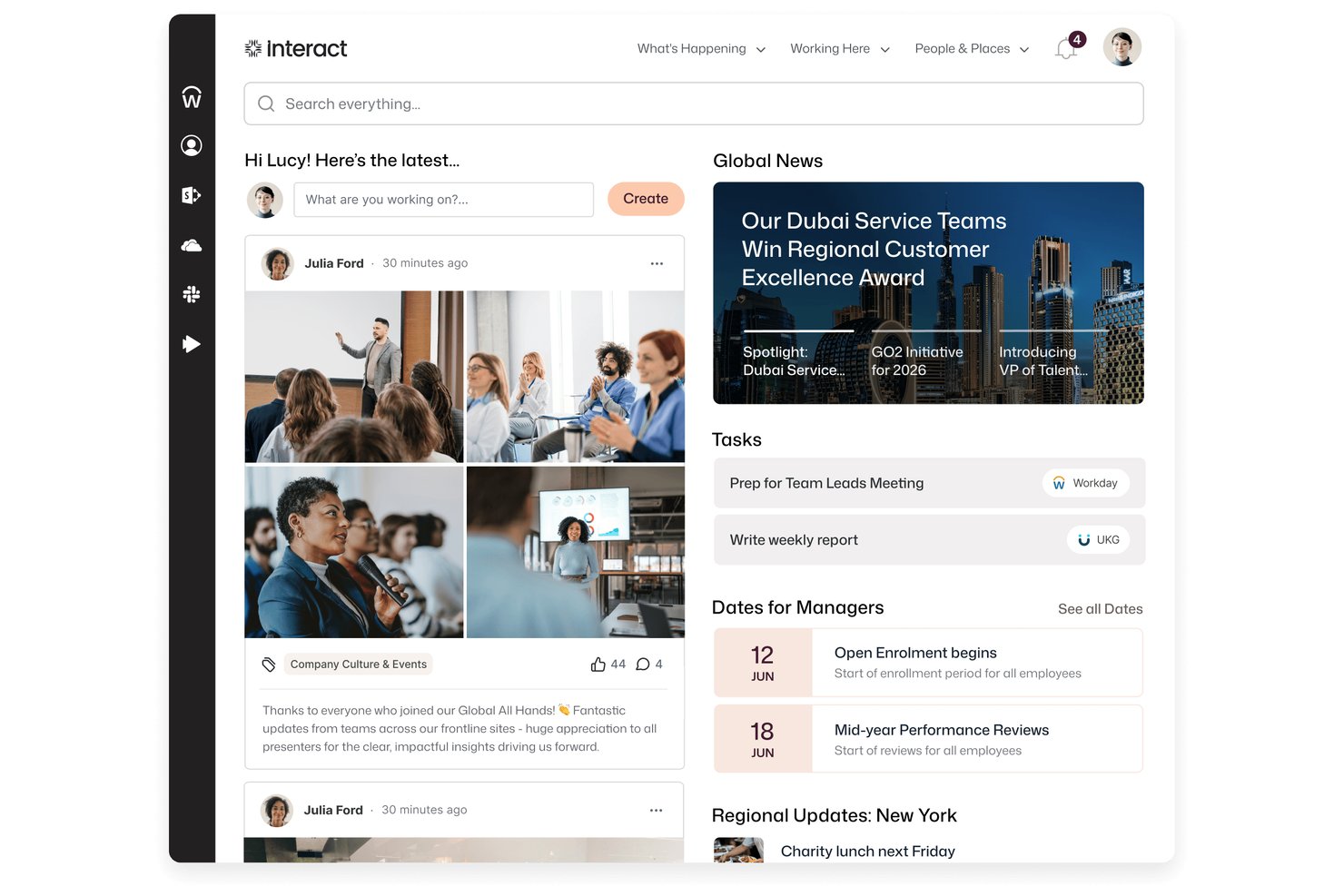
Interact Software is an AI-native enterprise intranet platform that brings together targeted employee communications, personalized content, knowledge management, pulse surveys, and frontline mobile access in one place.
Who Is Interact Software Best For?
Interact Software is a strong fit for large enterprises with distributed or frontline workforces that need a centralized intranet for targeted communications, knowledge sharing, and employee engagement.
Why I Picked Interact Software
I've included Interact Software in my top picks because it's one of the few platforms built specifically around enterprise-wide intranet communications, with targeted broadcasts that reach employees across desktop, mobile, email, SMS, and digital signage from a single publish. I particularly like the mandatory-read feature, which flags content as required and tracks who's actually read it—useful when you need accountability across 200 offices. Persona-based targeting lets you push the right message to trustees, frontline workers, or regional managers without managing separate distribution lists.
Interact Software Key Features
- Pulse surveys and polls: Run custom surveys or quick polls to collect employee sentiment and feedback directly through the intranet.
- People directory and org chart: Browse employee profiles, view reporting lines, and search for colleagues by name, skill, or location.
- Workplace Search: Search across the intranet and connected third-party systems like SharePoint and Google Drive from a single search bar.
- Onboarding homepages: Build tailored intranet homepages for new starters that surface relevant resources, tools, and content from day one.
Interact Software Integrations
Interact Software claims over 100 integrations, including native integrations with Microsoft 365, SharePoint, Microsoft Teams, Google Workspace, ServiceNow, Workday, UKG, and SAP SuccessFactors. It also provides a REST API, webhooks, and a custom connector framework.
Pros and Cons
Pros:
- Search helps employees find internal answers
- Nontechnical staff can publish intranet updates
- Targeted broadcasts reach dispersed employee groups
Cons:
- Messaging lacks threads and searchable history
- No native voice or video meetings
Workvivo
Best for fostering company culture
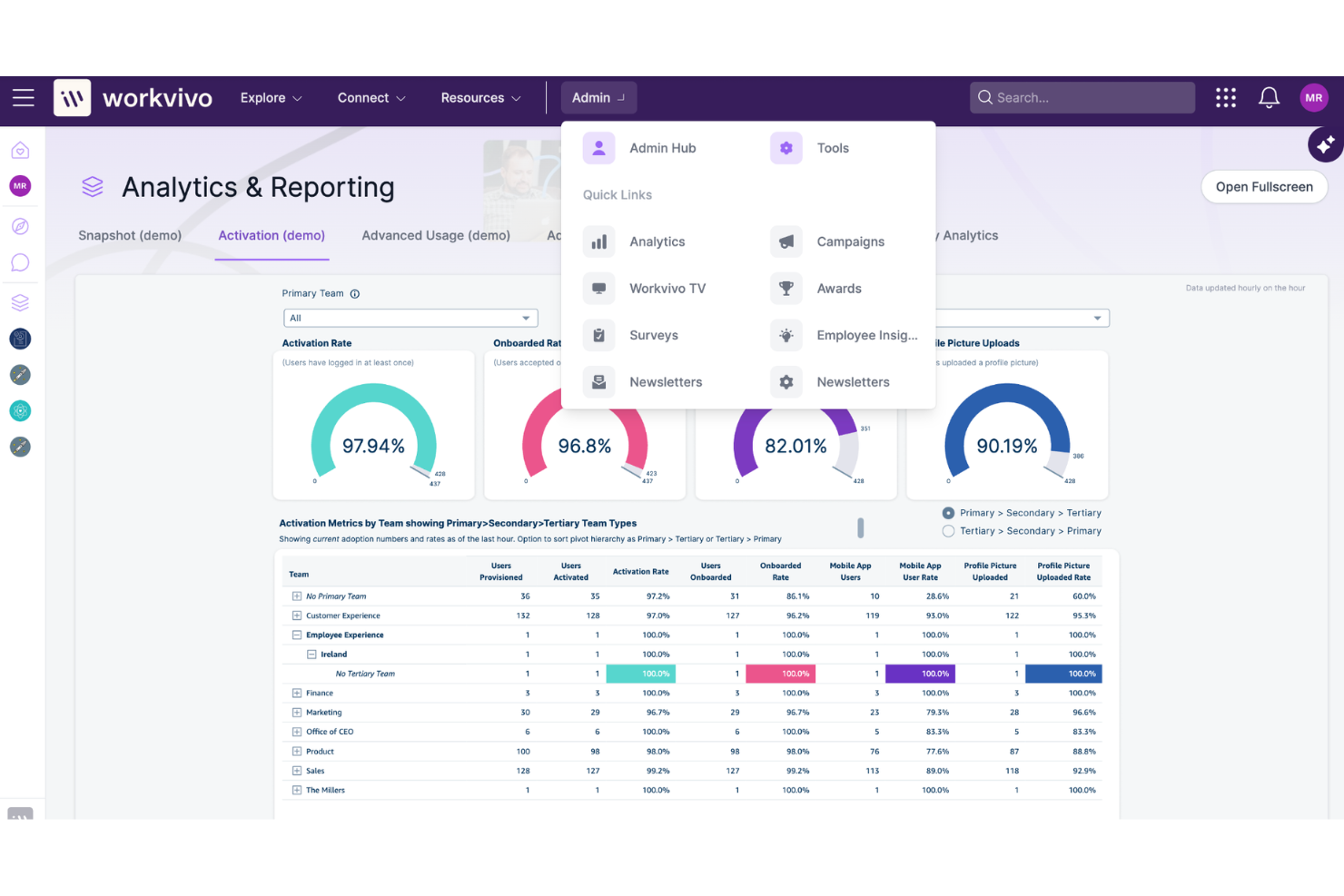
If you’re looking to build a stronger sense of community and recognition across your organization, Workvivo is designed with company culture at its core. This platform appeals to HR leaders and internal communications teams who want to connect employees through social feeds, shout-outs, and interactive spaces. Workvivo helps organizations foster belonging and engagement, especially in distributed or hybrid workplaces.
Why I Picked Workvivo
Fostering company culture takes more than just sharing updates, which is why I picked Workvivo for this list. Workvivo centers its platform around social interaction, letting employees post updates, celebrate achievements, and recognize peers in a public space. I appreciate how the platform includes community spaces and interest groups, so people can connect beyond their day-to-day roles. These features help organizations create a sense of belonging and shared purpose, even when teams are spread out or working remotely.
Workvivo Key Features
Some other features that make Workvivo stand out for enterprise communication include:
- Pulse surveys: Collect real-time feedback from employees on engagement and sentiment.
- Event management: Organize, promote, and track attendance for company events and activities.
- Document sharing: Upload and distribute important files and resources within the platform.
- Mobile app: Give employees access to all features and updates from their smartphones.
Workvivo Integrations
Integrations include Microsoft 365, Google Workspace, Slack, Zoom, Workday, BambooHR, and Microsoft Teams.
Pros and Cons
Pros:
- Event management tools for company-wide activities
- Pulse surveys gather real-time employee feedback
- Social feed encourages peer-to-peer recognition
Cons:
- Integrations require setup by IT administrators
- Limited formatting options for long-form posts

Zoom
Best for large-scale video meetings
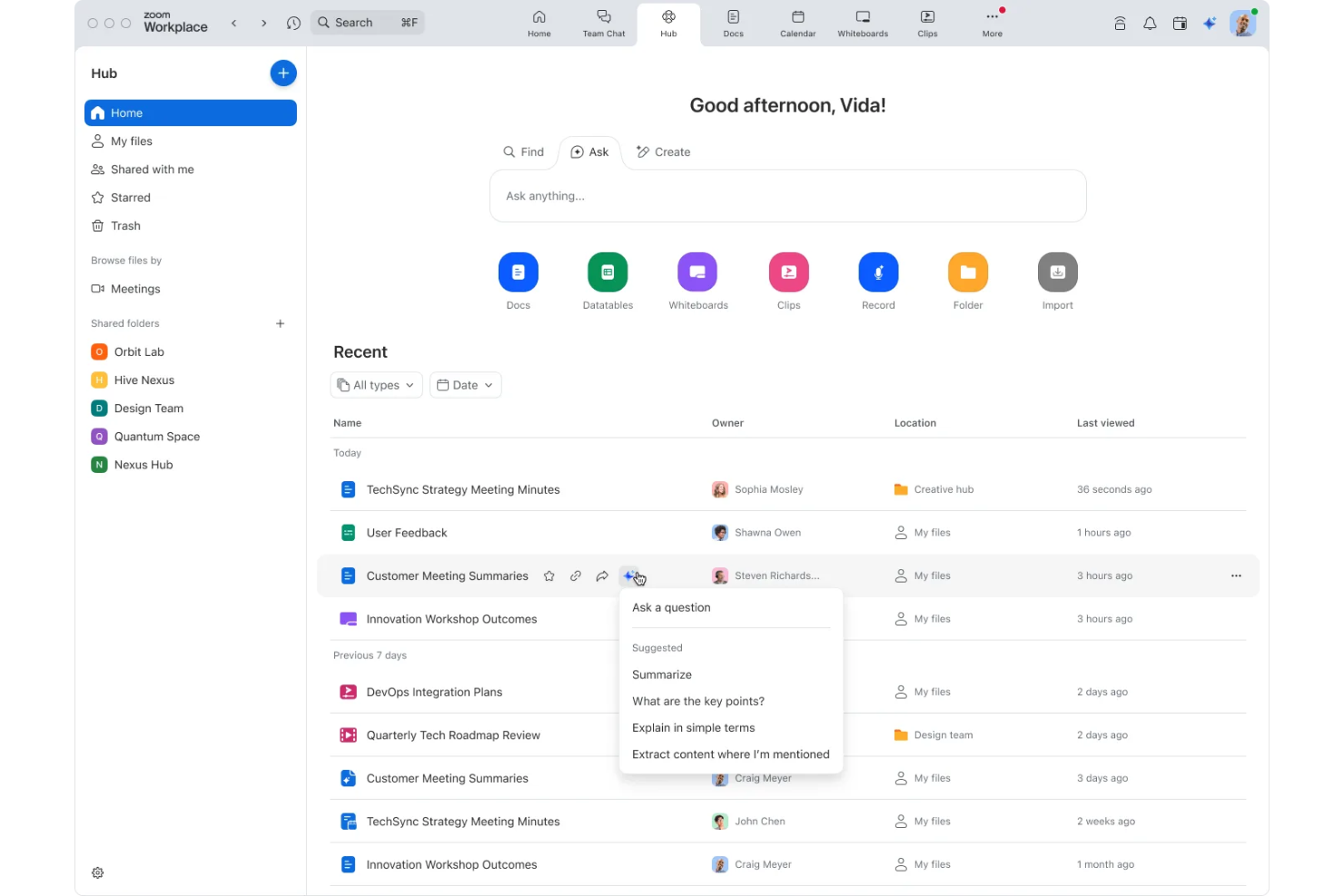
When your organization needs to host large-scale video meetings or webinars, Zoom offers a platform built for reliability and scale. It’s especially useful for enterprises that require high-capacity virtual events, interactive training, or company-wide broadcasts. Zoom’s features help teams manage participant engagement and technical quality, even with thousands of attendees.
Why I Picked Zoom
For organizations that need to connect large groups in real time, Zoom stands out for its ability to support high-capacity video meetings and webinars. I picked Zoom because it allows up to thousands of participants in a single session, with features like breakout rooms and live polling to keep engagement high. Its webinar mode offers controls for managing attendee participation and Q&A, which is essential for company-wide meetings or external events. These capabilities make Zoom a strong choice for enterprises that prioritize reliable, large-scale virtual communication.
Zoom Key Features
Some other features that make Zoom appealing for enterprise teams include:
- Cloud recording and transcription: Automatically save and transcribe meetings for later review or compliance needs.
- Virtual backgrounds and branding: Customize meeting visuals with company logos or professional backdrops.
- End-to-end encryption: Protect sensitive conversations with advanced security for video, audio, and chat.
- Integration with calendar platforms: Schedule and join meetings directly from Google Calendar, Outlook, or other calendar tools.
Zoom Integrations
Integrations include Microsoft Teams, Slack, Google Workspace, Salesforce, HubSpot, Dropbox, Box, Okta, Zendesk, and Trello.
Pros and Cons
Pros:
- Breakout rooms allow for group collaboration
- Webinar mode includes attendee registration tools
- Supports up to 1,000 interactive meeting participants
Cons:
- Lacks advanced moderation controls
- Limited in-meeting file sharing options
Best with integrated productivity apps
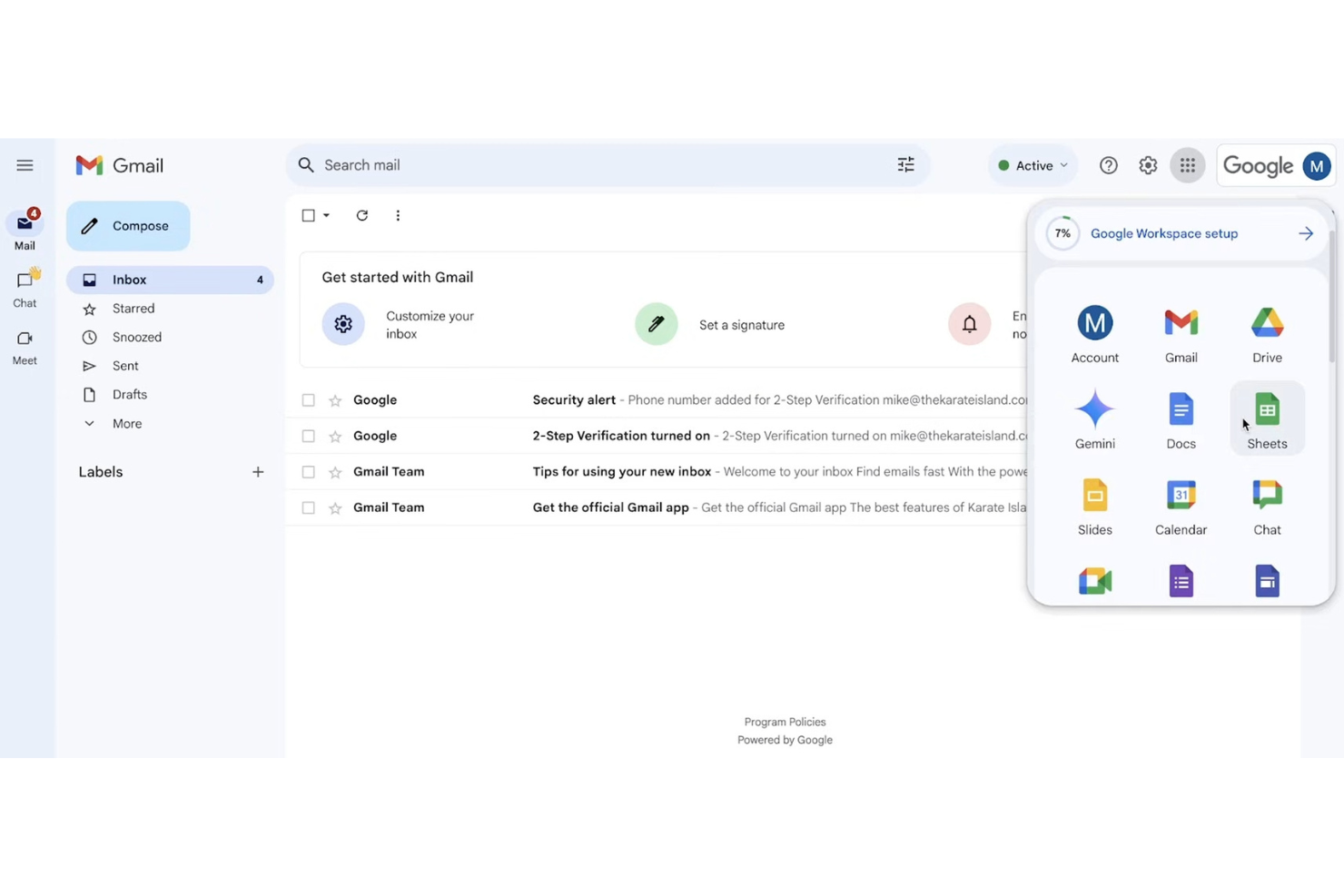
If your team relies on real-time collaboration across documents, spreadsheets, and chat, Google Workspace brings all these tools together in one platform. It’s a strong fit for organizations that want integrated productivity apps with secure communication and file sharing. Google Workspace helps distributed teams stay connected and work together without switching between multiple software tools.
Why I Picked Google Workspace
What sets Google Workspace apart is how it combines communication and productivity tools in a single, unified environment. I picked Google Workspace because it lets teams move between Gmail, Google Chat, and Google Meet while collaborating on Docs, Sheets, and Slides in real time. Shared calendars and Drive storage keep everyone organized and ensure files are always accessible. This level of integration helps enterprise teams communicate, share, and create without barriers or silos.
Google Workspace Key Features
Some other features that make Google Workspace valuable for enterprise teams include:
- Admin console: Manage users, devices, and security settings from a centralized dashboard.
- Data loss prevention (DLP): Set rules to prevent sensitive information from being shared outside your organization.
- AppSheet integration: Build custom business apps without coding, directly from your Workspace data.
- Vault for eDiscovery: Archive, retain, and search emails and chats for compliance and legal needs.
Google Workspace Integrations
Integrations include Tableau, SAP, Figma, Miro, Box, Salesforce, HubSpot, and Okta.
Pros and Cons
Pros:
- Strong spam filtering for business email
- Integrated video meetings within calendar events
- Real-time document editing with team chat
Cons:
- Offline access setup can be inconsistent
- External sharing controls require admin configuration

Wire
Best for end-to-end encrypted messaging
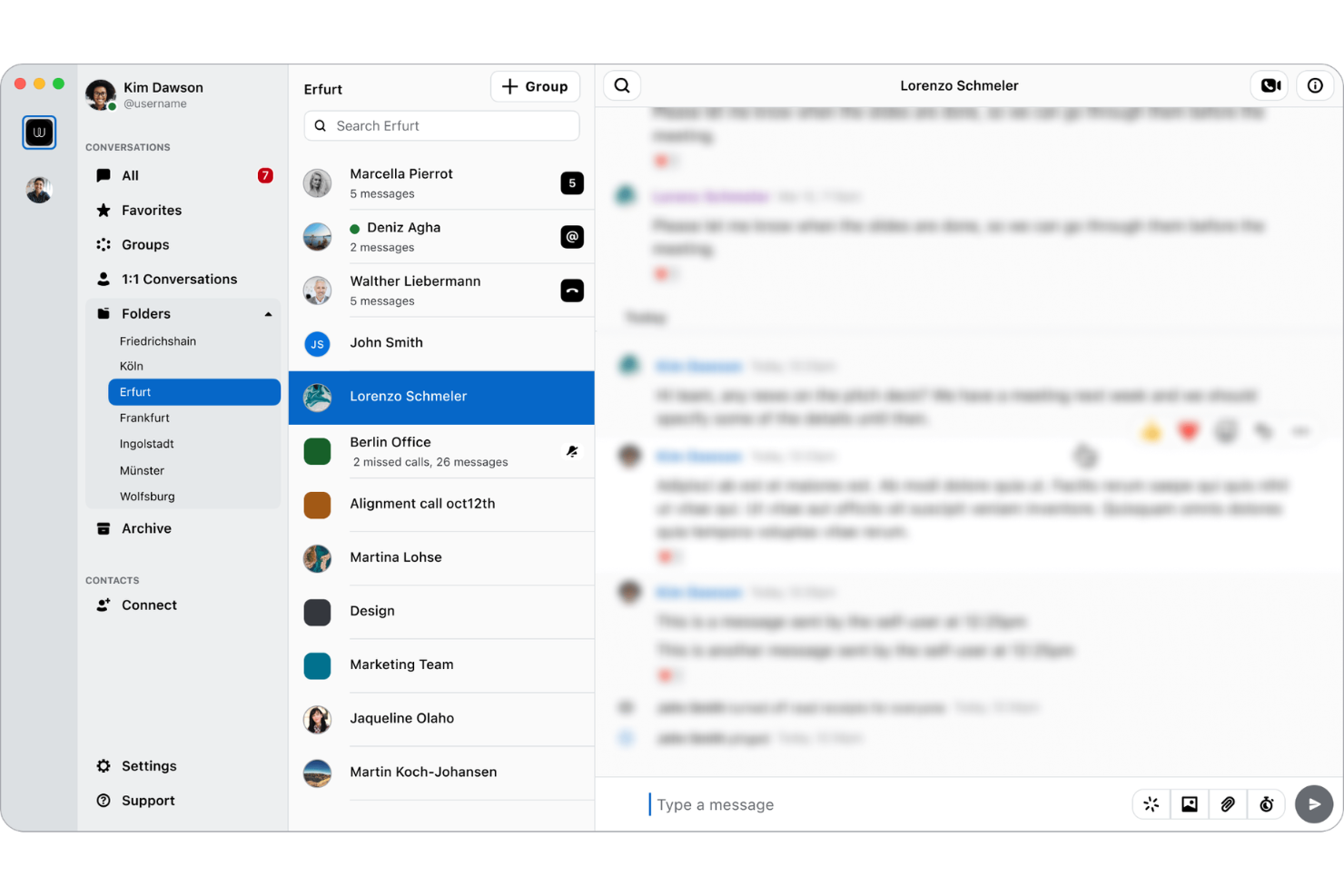
Wire offers end-to-end encrypted messaging designed for organizations that need to protect sensitive conversations and data. It’s a strong fit for security-conscious teams in sectors like government, legal, and finance, where privacy and compliance are non-negotiable. Wire helps you keep internal communications confidential while supporting secure file sharing and group collaboration.
Why I Picked Wire
For teams that need to prioritize privacy, Wire delivers true end-to-end encrypted messaging across all conversations. The platform encrypts messages, calls, and shared files by default, so sensitive business information stays protected at every stage. I like that Wire offers secure group chats and guest rooms, which let you collaborate with external partners without compromising security. These features make Wire a strong choice for organizations where confidential communication is essential.
Wire Key Features
Some other features that make Wire useful for enterprise teams include:
- Multi-device synchronization: Access your messages and calls across desktop, mobile, and web.
- Self-hosting option: Deploy Wire on your own infrastructure for maximum data control.
- Compliance reporting tools: Generate reports to support GDPR and other regulatory requirements.
- User management dashboard: Manage team members, permissions, and access from a centralized admin panel.
Wire Integrations
Native integrations are not currently listed.
Pros and Cons
Pros:
- GDPR compliance features are built-in
- Self-hosting option supports strict data residency
- End-to-end encryption for all communications
Cons:
- Limited admin controls for large organizations
- No native integrations with third-party tools
Best with Microsoft 365 integration
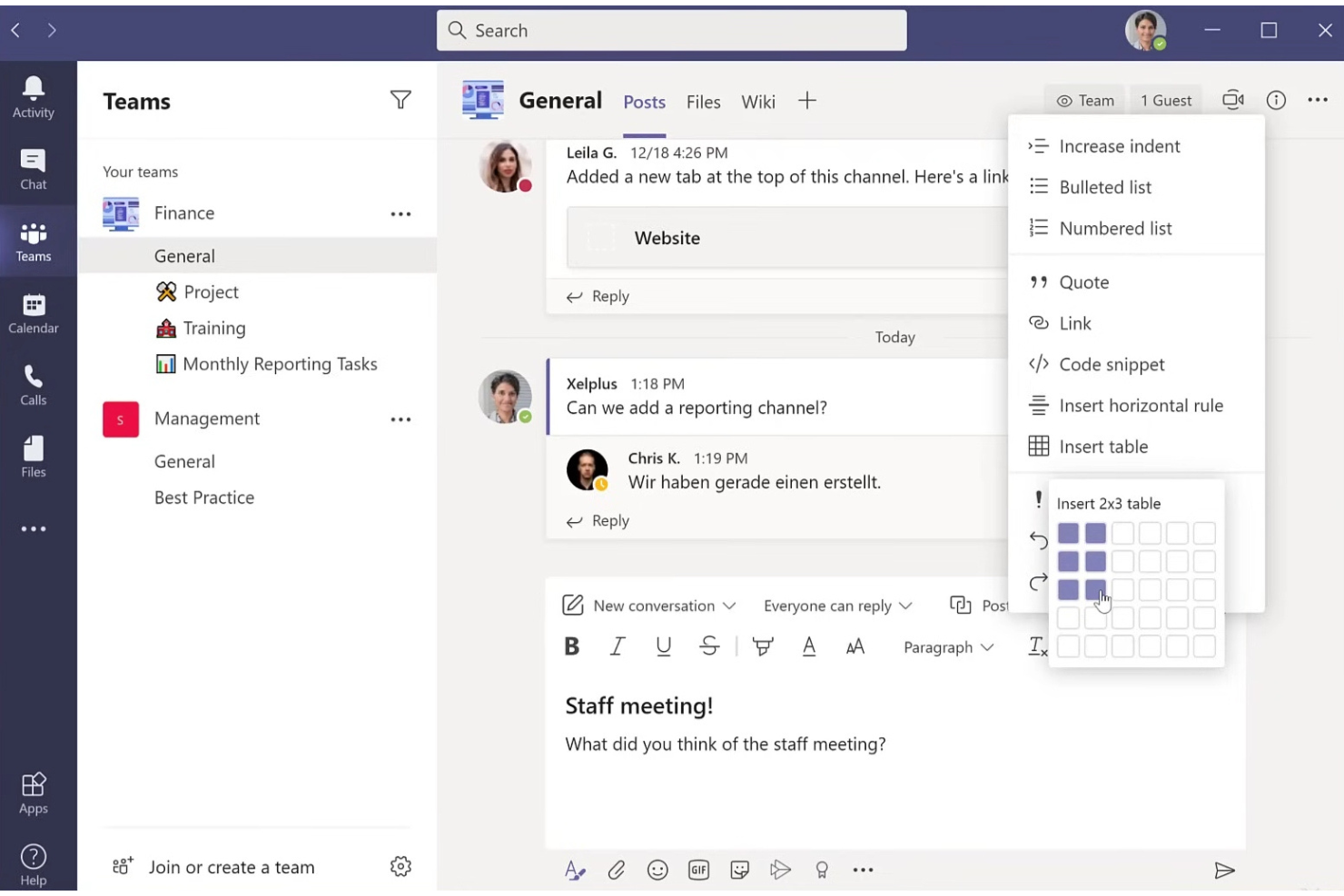
If your organization relies on Microsoft 365, Microsoft Teams offers a unified space for chat, meetings, and collaboration that’s tightly woven into the Microsoft ecosystem. It’s especially useful for enterprises that want to connect communication with document management, scheduling, and productivity tools already in use. Teams helps reduce context switching by letting users access files, calendars, and workflows directly within the same platform they use to communicate.
Why I Picked Microsoft Teams
For organizations already invested in Microsoft 365, Teams stands out because it brings communication and collaboration directly into the tools employees use every day. I picked Microsoft Teams for its deep integration with apps like Outlook, SharePoint, and OneDrive, which lets users schedule meetings, share files, and co-author documents without leaving the platform. Teams also supports threaded conversations and persistent chat within channels, making it easier to keep project discussions organized alongside related files and tasks. This level of integration helps enterprises create a more connected and efficient digital workspace.
Microsoft Teams Key Features
Some other features in Microsoft Teams that support enterprise communication include:
- Live event broadcasting: Host webinars and large-scale virtual events for up to 20,000 attendees.
- Customizable tabs: Add third-party apps, dashboards, or websites directly into team channels for quick access.
- Breakout rooms: Split meeting participants into smaller groups for focused discussions or workshops.
- Direct guest access: Invite external partners or clients to join meetings and collaborate securely.
Microsoft Teams Integrations
Integrations include Outlook, SharePoint, OneDrive, Trello, Asana, ServiceNow, Salesforce, Adobe Creative Cloud, GitHub, and Zoom.
Pros and Cons
Pros:
- Offers live event and webinar hosting
- Allows external guest access for collaboration
- Deep integration with Microsoft 365 applications
Cons:
- Video quality varies with participant bandwidth
- Channel organization can become cluttered
Dialpad
Best for AI-powered voice transcription
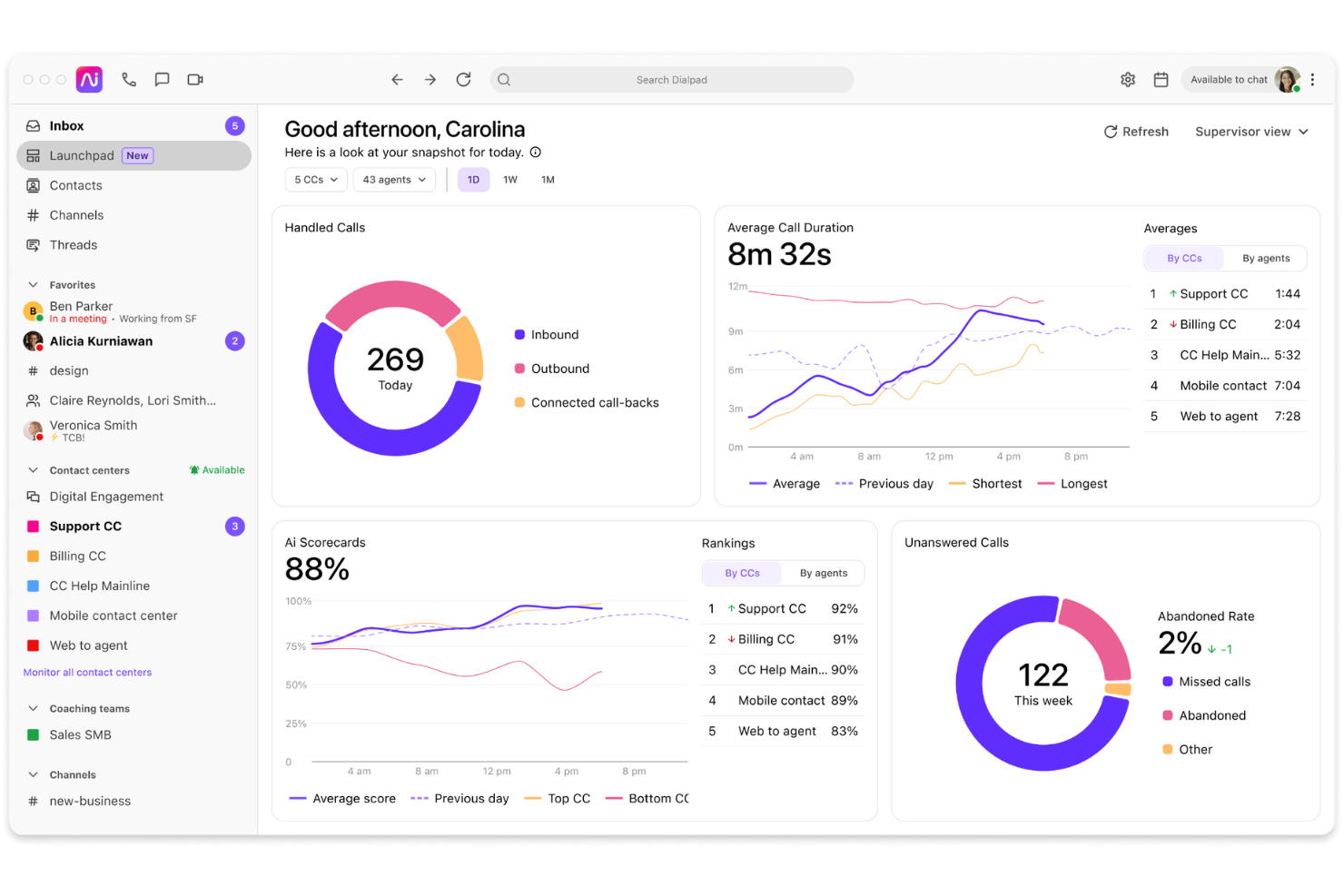
Dialpad offers enterprise communication software with built-in AI voice transcription, making it a strong choice for teams that rely on accurate call records and searchable conversations. It’s especially useful for organizations in sales, support, or compliance-heavy industries that need real-time insights from calls and meetings. If your business values integrated calling, messaging, and AI-driven analytics, Dialpad is designed to meet those needs.
Why I Picked Dialpad
I chose Dialpad for this list because its AI-powered voice transcription stands out in the enterprise communication software space. The platform automatically transcribes calls and meetings in real time, making it easy for teams to capture and search conversations without manual note-taking. I also like that Dialpad’s AI can highlight action items and key topics, which helps organizations stay organized and compliant. These features are especially valuable for businesses that need accurate records for training, quality assurance, or regulatory purposes.
Dialpad Key Features
Some other features in Dialpad that support enterprise communication include:
- Multi-device support: Access calls, messages, and meetings from desktop, mobile, or web apps to stay connected wherever you work.
- Team messaging: Send direct messages or create group chats for quick, organized communication within your organization.
- Integrated video conferencing: Host video meetings directly from the platform without needing a separate tool.
- Call routing and IVR: Set up custom call flows and interactive voice response menus to direct callers to the right department or team member.
Dialpad Integrations
Integrations include Google Workspace, Microsoft Teams, Salesforce, HubSpot, Gmail, Google Calendar, Zendesk, Okta, Slack, and Front.
Pros and Cons
Pros:
- Multi-device access for remote and hybrid teams
- Built-in team messaging and video conferencing
- Real-time AI transcription for calls and meetings
Cons:
- Limited advanced analytics in lower-tier plans
- Occasional transcription inaccuracies with accents
OpenText
Best for regulated document collaboration
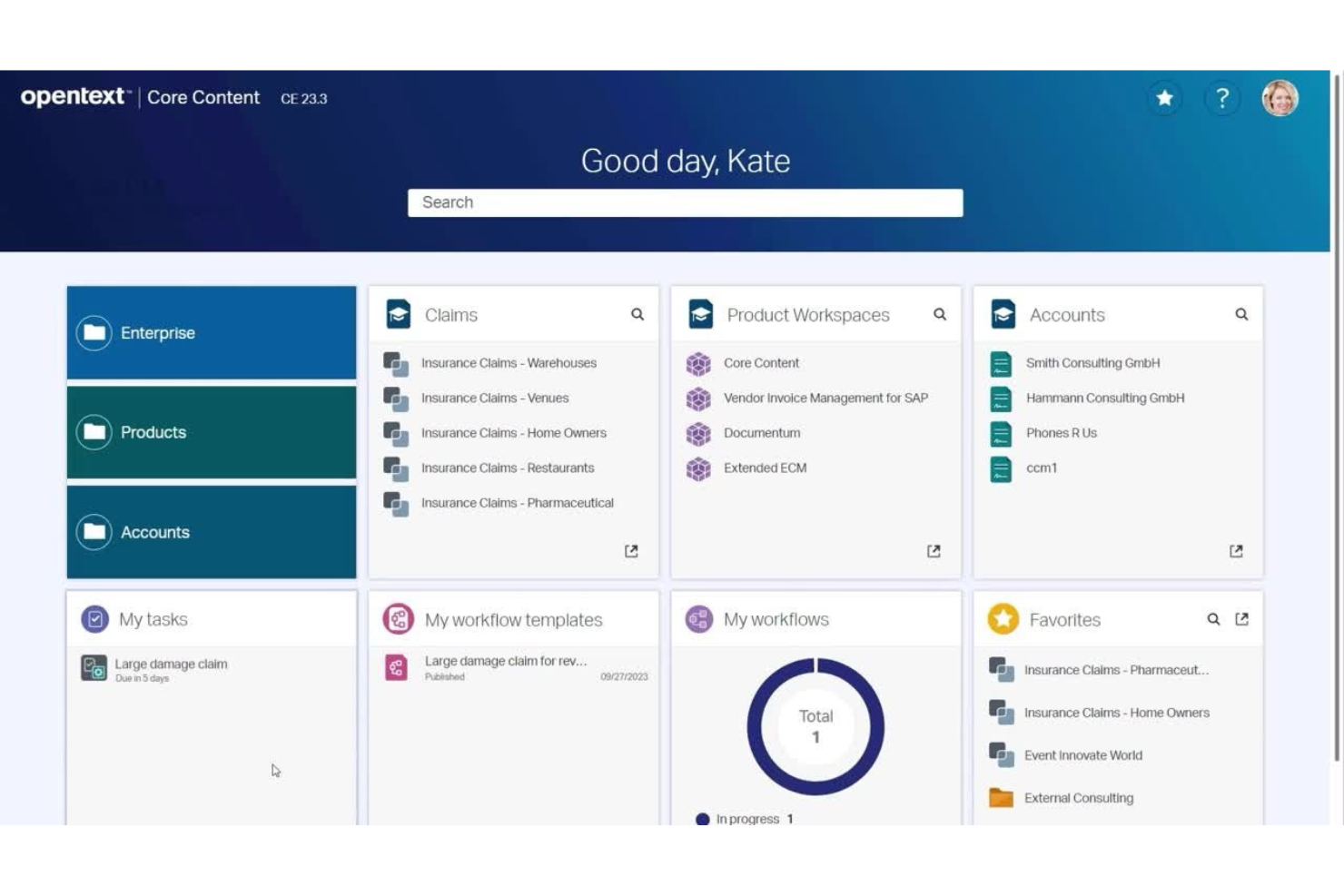
OpenText is designed for organizations that need to collaborate on documents while meeting strict regulatory and compliance standards. It’s especially useful for teams in highly regulated industries like finance, legal, and healthcare, where secure document sharing and audit trails are essential. OpenText helps you manage sensitive content, control access, and maintain compliance throughout the document lifecycle.
Why I Picked OpenText
When regulated document collaboration is a top priority, OpenText stands out for its focus on compliance and security. The platform offers granular access controls and detailed audit trails, which help organizations meet industry regulations and internal governance requirements. I appreciate that OpenText supports secure document sharing and version control, making it easier for teams to collaborate without risking data breaches or compliance violations. These features make OpenText a strong choice for businesses that need to manage sensitive documents and maintain strict oversight.
OpenText Key Features
Some other features that make OpenText valuable for enterprise teams include:
- Automated workflow management: Set up document review and approval processes with customizable workflows.
- eDiscovery tools: Search, collect, and preserve documents for legal and compliance needs.
- Digital signature support: Enable secure signing and authentication of documents within the platform.
- Content archiving: Store and manage historical documents with retention policies and easy retrieval.
OpenText Integrations
Integrations include SAP, Microsoft 365, Salesforce, Google Workspace, Microsoft Azure, and more.
Pros and Cons
Pros:
- Includes built-in digital signature tools
- Offers granular document access permissions
- Supports strict regulatory requirements
Cons:
- Search speed can lag with large repositories
- Interface can feel complex for new users

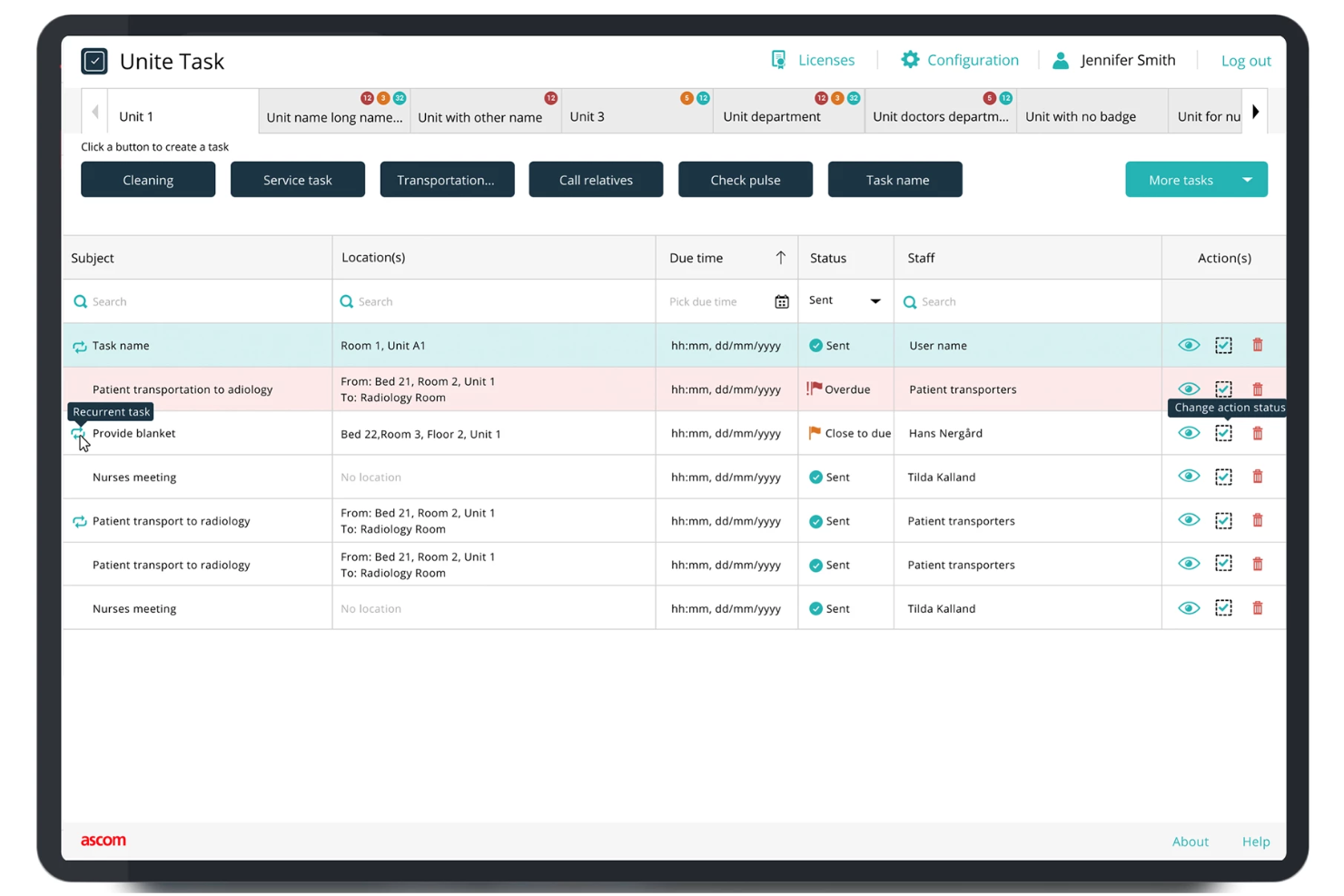
Designed for hospitals and clinical environments, Ascom specializes in secure, compliant communication for healthcare teams. The platform connects caregivers, devices, and patient data while supporting strict regulatory requirements like HIPAA. Ascom helps healthcare organizations coordinate care, reduce delays, and maintain privacy across every shift.
Why I Picked Ascom
Healthcare organizations face unique compliance and privacy challenges, which is why Ascom is a strong fit for this list. The platform is purpose-built to support secure messaging, voice, and alerting that align with healthcare regulations like HIPAA. I appreciate that Ascom integrates with clinical systems and medical devices, helping teams coordinate care while maintaining strict data security. These features make Ascom especially valuable for hospitals and clinics that need to protect patient information while improving communication.
Ascom Key Features
Some other features that make Ascom useful for healthcare teams include:
- Alarm management: Route and prioritize clinical alerts to the right staff members.
- Mobile device support: Enable secure communication on smartphones, pagers, and dedicated medical devices.
- Location tracking: Monitor staff and equipment locations within healthcare facilities.
- Nurse call integration: Connect nurse call systems directly to staff communication devices.
Ascom Integrations
Integrations are not publicly listed.
Pros and Cons
Pros:
- Offers location tracking for staff and assets
- Complies with HIPAA and healthcare regulations
- Supports nurse call and alarm integrations
Cons:
- Limited collaboration features beyond messaging
- Hardware setup can require onsite installation
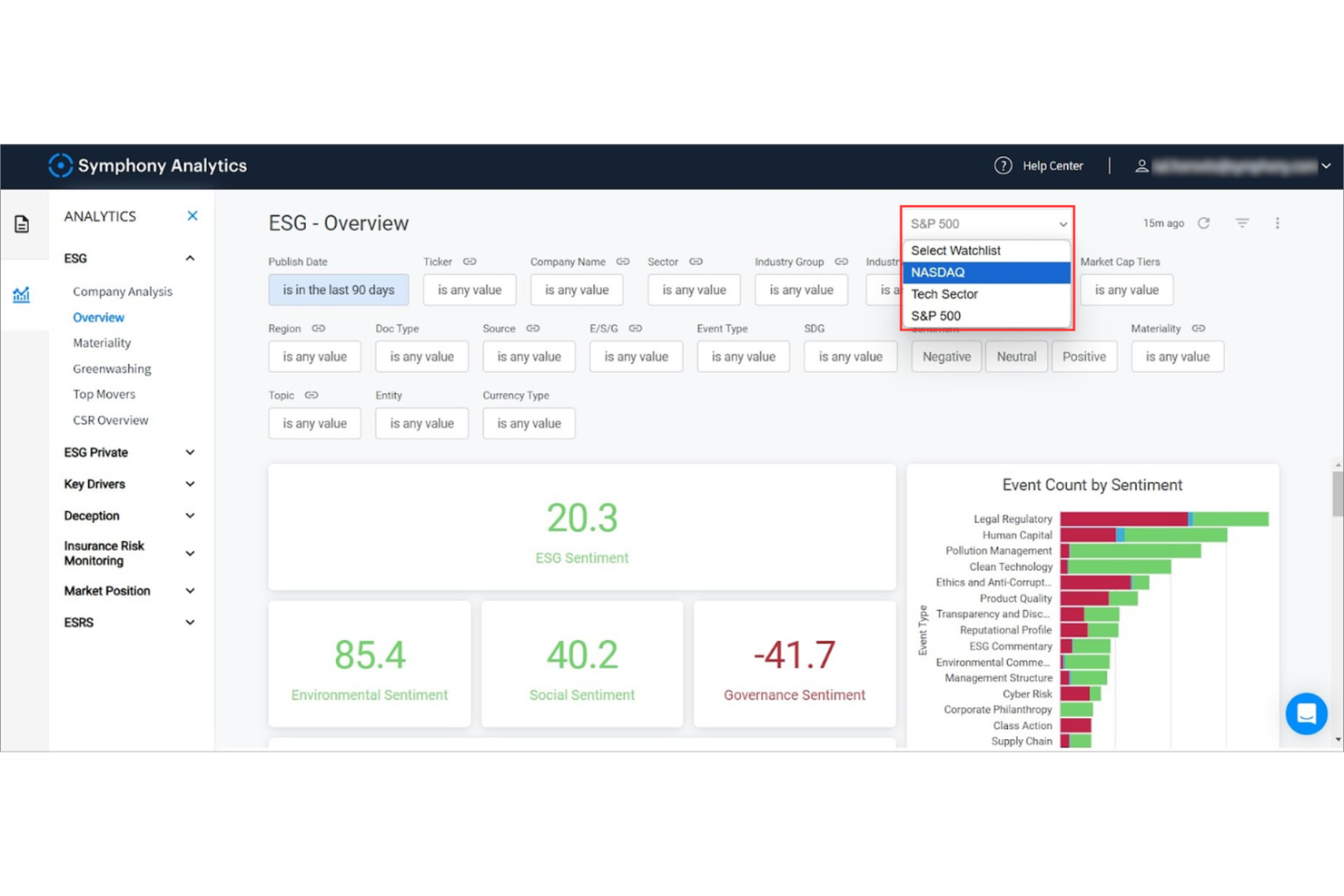
Built for organizations where data privacy and compliance are non-negotiable, Symphony delivers secure messaging tailored to the financial sector. This platform is a strong fit for banks, investment firms, and regulated industries that need encrypted communication and audit-ready workflows. Symphony helps teams collaborate confidently while meeting strict regulatory and security standards.
Why I Picked Symphony
Security and compliance are top priorities for financial institutions, which is why Symphony stands out for this list. The platform offers end-to-end encryption for all messages and files, helping organizations protect sensitive information and meet regulatory requirements. I appreciate that Symphony includes built-in compliance tools, such as message retention and audit trails, which are essential for firms operating under strict oversight. These features make Symphony a strong choice for teams that need to balance fast communication with rigorous security standards.
Symphony Key Features
Some other features that make Symphony valuable for enterprise communication include:
- Bots and workflow automation: Automate repetitive tasks and simplify processes with customizable bots.
- Secure file sharing: Share documents and files within encrypted conversations.
- Federated directory: Connect with external partners and clients while maintaining security controls.
- Mobile and desktop apps: Access all messaging and collaboration features across devices.
Symphony Integrations
Integrations include Zoom, WhatsApp, Microsoft Teams, Salesforce, ServiceNow, Jira, and more.
Pros and Cons
Pros:
- Workflow automation with customizable bots
- Built-in compliance and audit trail features
- End-to-end encryption for all communications
Cons:
- Some integrations need additional configuration
- Interface updates require frequent user retraining
Annen programvare for bedriftskommunikasjon
Her er noen flere alternativer for programvare for bedriftskommunikasjon som ikke kom med på kortlisten min, men som likevel er verdt å se nærmere på:
- Slack
For customizable workflow automation
- Staffbase
For frontline employee engagement
- Hub
For targeted internal news delivery
- RingCentral
For multi-location team collaboration
- Chanty
For simple team chat interface
- Rocket.Chat
For on-premise deployment option
- Connecteam
For mobile workforce coordinatio
- Bitrix24
With built-in CRM integration
- SharePoint
For document management workflows
- TextUs
For SMS-based team communication


How I Evaluate Enterprise Communication Software
I evaluate tools in two layers: baseline capabilities for broadcasting HR updates to a global workforce, and the differentiators that make one option a better fit.
Core Functionality (Table Stakes For This List)
When I'm selecting tools for my list, I rank each one on a scale from 0 (does not offer the functionality) to 5 (excels in this area) for each core functionality listed below. Then, I calculate the tool's total score into a percentage. Each tool needs to achieve a minimum total score of 65% to be considered for inclusion.
- Multi-Channel Messaging: I check whether the platform supports DMs, group channels, and threaded conversations across desktop and mobile, so HR can handle sensitive 1:1s and team-wide updates in one place.
- Company-Wide Broadcasts: The ability to target announcements by department, location, or role matters here, especially when HR needs to push benefits enrollment reminders to specific employee segments.
- Video & Voice Conferencing: I look for integrated video meetings with screen sharing and recording, which covers everything from new-hire orientation sessions to company town halls.
- Enterprise-Grade Security: Each tool's compliance certifications, SSO/SAML support, encryption standards, and role-based permissions get evaluated since HR communications often contain sensitive personnel data.
- HRIS & Directory Integrations: Prebuilt connectors to platforms like Workday, BambooHR, or SAP SuccessFactors help keep org charts and user provisioning current without manual data entry.
- File Sharing & Collaboration: I evaluate how each tool handles document sharing, previews, and version control, particularly for distributing updated handbooks, policy documents, and onboarding packets within conversation threads.
Once I have a list of tools that meet the criteria, I consider what sets each platform apart.
Differentiating Factors (What Sets Vendors Apart)
Here's how I compare and contrast different vendors:
Standout Features
Frontline worker access is a major differentiator. I look for SMS fallback, kiosk modes, or mobile-first experiences that reach warehouse, retail, and field employees who don't have corporate email. Built-in pulse surveys and polls also matter because they let HR capture real-time sentiment after policy changes or open enrollment without adding a separate tool. I evaluate AI-powered assistants too, which can summarize long threads or draft announcements and save HR teams hours of writing time each week.
Beyond Features
Compliance and data governance weigh heavily in my evaluation. HR teams share sensitive employee data daily, so I check for data residency options, message retention policies, and eDiscovery support. The integration ecosystem also matters—tools that connect with your existing HRIS and SSO providers reduce manual provisioning headaches when onboarding hundreds of new hires. I also evaluate total cost of ownership, including how vendors handle add-on pricing for storage, compliance modules, and seasonal workforce fluctuations.
Slik velger du programvare for bedriftskommunikasjon
Det er lett å gå seg vill i lange funksjonslister og kompliserte prisstrukturer. For å hjelpe deg med å holde fokus mens du arbeider deg gjennom den unike prosessen med å velge programvare, får du her en sjekkliste over faktorer du bør ha i tankene:
| Faktor | Hva du bør vurdere |
| Skalerbarhet | Vil programvaren støtte organisasjonen din etter hvert som den vokser? Sjekk brukergrenser, prishopp og hvor enkelt det er å legge til eller fjerne brukere. |
| Integrasjoner | Kan den kobles til HRIS-, prosjektstyrings- eller dokumentlagringsverktøyene dine? Bekreft innebygde integrasjoner og eventuelle ekstrakostnader. |
| Tilpasningsmuligheter | Kan du tilpasse kanaler, tillatelser og varsler slik at de passer teamets struktur og arbeidsflyter? Unngå verktøy som tvinger deg til rigide oppsett. |
| Brukervennlighet | Vil de ansatte ta det i bruk raskt? Se etter tydelig navigasjon, minimalt behov for opplæring og positive tilbakemeldinger fra lignende organisasjoner. |
| Implementering og innføring | Hvor lang tid vil det ta å rulle det ut? Spør om støtte til migrering, opplæringsressurser og om du vil trenge bistand fra IT-avdelingen. |
| Kostnad | Er alle kostnadene tydelige på forhånd? Vurder avgifter per bruker, kostnader for tilleggstjenester og kontraktsvilkår. Sammenlign de totale eierkostnadene, ikke bare listeprisen. |
| Sikkerhetstiltak | Oppfyller verktøyet standardene dine for databeskyttelse? Se etter ende-til-ende-kryptering, tilgangskontroller og revisjonslogger. |
| Krav til samsvar | Vil programvaren hjelpe deg med å oppfylle bransje- eller regionspesifikke regelverk som GDPR eller HIPAA? Be om dokumentasjon og støtte ved revisjoner. |
Hva er programvare for bedriftskommunikasjon?
Programvare for virksomhetskommunikasjon er en digital plattform som gjør det mulig for ansatte å utveksle meldinger, dele filer og samarbeide i sanntid på tvers av en organisasjon. Disse verktøyene støtter sikker, sentralisert kommunikasjon gjennom chat, tale, video og dokumentdeling. De hjelper team med å koordinere arbeidet, opprettholde oversikter over samtaler og sørge for at informasjon flyter effektivt, enten de ansatte er på kontoret, jobber eksternt eller er geografisk spredt over hele verden.
Funksjoner i programvare for virksomhetskommunikasjon
Når du velger programvare for virksomhetskommunikasjon, bør du se etter følgende nøkkelfunksjoner:
- Direktemeldinger: Gjør det mulig for ansatte å ha private samtaler én til én for raske spørsmål, oppdateringer eller konfidensielle diskusjoner.
- Gruppechatkanaler: Gjør det mulig for team eller avdelinger å kommunisere i egne områder, slik at samtaler holdes organisert etter tema eller prosjekt.
- Fildeling: Lar brukere laste opp, sende og få tilgang til dokumenter, bilder og andre filer direkte i plattformen, noe som reduserer avhengigheten av e-post.
- Tale- og videosamtaler: Støtter lyd- og videokommunikasjon i sanntid for møter, innsjekkinger eller hastesamtaler uten at man må forlate programvaren.
- Søkbar meldingshistorikk: Gir mulighet til å søke i tidligere samtaler og filer, slik at det blir enkelt å hente frem viktig informasjon ved behov.
- Bruker- og tilgangsstyring: Gir administratorer kontroll over hvem som har tilgang til bestemte kanaler, filer eller funksjoner, og støtter sikkerhet og samsvar.
- Varsler og meldinger: Holder brukerne informert om nye meldinger, omtaler eller viktige oppdateringer, med tilpassbare innstillinger for å redusere forstyrrelser.
- Tilgang fra flere enheter: Gjør det mulig for ansatte å bruke programvaren på stasjonære datamaskiner, bærbare datamaskiner, nettbrett og smarttelefoner, slik at kommunikasjon er mulig fra hvor som helst.
- Integrasjon med andre verktøy: Kobler seg til kalendere, prosjektstyringssystemer eller HR-systemer for å sentralisere arbeidsflyter og redusere behovet for å bytte mellom kontekster.
Fordeler med programvare for virksomhetskommunikasjon
Implementering av programvare for virksomhetskommunikasjon gir flere fordeler for teamet og virksomheten din. Her er noen av fordelene du kan se frem til:
- Raskere beslutningstaking: Meldinger, samtaler og fildeling i sanntid hjelper team med å løse problemer og ta beslutninger uten forsinkelser.
- Forbedret informasjonssikkerhet: Ende-til-ende-kryptering og tilgangskontroller beskytter sensitive samtaler og dokumenter mot uautorisert tilgang.
- Bedre samkjøring av teamet: Gruppekanaler og søkbar meldingshistorikk sørger for at alle er oppdatert, og reduserer misforståelser og dobbeltarbeid.
- Forbedret samarbeid på avstand: Tilgang fra flere enheter og videokonferanser støtter distribuerte team som arbeider fra ulike steder eller tidssoner.
- Forenklet samsvarsadministrasjon: Innebygde revisjonslogger og retningslinjer for datalagring hjelper organisasjoner med å oppfylle regulatoriske krav og opprettholde registre.
- Mindre overbelastning av e-post: Sentralisert chat og fildeling reduserer avhengigheten av e-post, slik at kommunikasjonen blir mer fokusert og håndterlig.
- Enklere introduksjon av nyansatte: Organiserte kanaler og søkbare arkiver hjelper nye ansatte med raskt å få tilgang til viktig informasjon og bli en del av teamet.
Kostnader og priser for programvare for virksomhetskommunikasjon
Valg av programvare for virksomhetskommunikasjon krever en forståelse av de ulike prismodellene og abonnementene som er tilgjengelige. Kostnadene varierer basert på funksjoner, teamstørrelse, tillegg og mer. Tabellen nedenfor oppsummerer vanlige abonnementer, gjennomsnittsprisene deres og typiske funksjoner som er inkludert i løsninger for virksomhetskommunikasjon:
Sammenligningstabell for programvare for virksomhetskommunikasjon
| Abonnementstype | Gjennomsnittspris | Vanlige funksjoner |
| Gratisabonnement | $0 | Grunnleggende meldinger, begrensede videosamtaler og minimal lagringsplass. |
| Personlig abonnement | $5-$15/bruker/måned | Meldinger, videokonferanser, fildeling og grunnleggende integrasjoner. |
| Forretningsabonnement | $20-$35/bruker/måned | Avanserte meldinger, videokonferanser av høy kvalitet, forbedret sikkerhet og integrasjoner med tredjepartsapper. |
| Virksomhetsabonnement | $40-$60/bruker/måned | Tilpassbare funksjoner, samsvarsverktøy, avansert analyse, prioritert brukerstøtte og ubegrenset lagringsplass. |
Vanlige spørsmål om kommunikasjonsprogramvare for virksomheter
Her er noen svar på vanlige spørsmål om kommunikasjonsprogramvare for virksomheter:
Hvordan støtter kommunikasjonsprogramvare for virksomheter eksterne og hybride team?
Kommunikasjonsprogramvare for virksomheter gjør det mulig for eksterne og hybride team å samarbeide i sanntid gjennom direktemeldinger, videosamtaler og skjermdeling. Disse samarbeidsverktøyene holder alle tilkoblet, uavhengig av hvor de befinner seg, og bidrar til å opprettholde enhetlig forretningskommunikasjon og tilgang til informasjon på tvers av distribuerte team. Ved å tilby et samlet knutepunkt for fjernarbeid sørger dette kommunikasjonssystemet for at arbeidsmiljøet forblir produktivt og samkjørt.
Kan kommunikasjonsprogramvare for virksomheter integreres med verktøy for HR og prosjektstyring?
Ja, de fleste kommunikasjonsverktøy for virksomheter tilbyr integrasjoner med HR-systemer, prosjektstyringsplattformer og andre kommunikasjonsverktøy. Disse integrasjonene bidrar til å optimalisere og sentralisere arbeidsflyter, redusere manuell dataregistrering og sørge for at informasjon flyter sømløst mellom ulike kommunikasjonskanaler. Denne tilkoblingen forbedrer den samlede medarbeideropplevelsen ved å gjøre det enklere for de rette personene å få tilgang til dataene de trenger.
Hvilke sikkerhetsfunksjoner bør jeg se etter i kommunikasjonsprogramvare for virksomheter?
Se etter ende-til-ende-kryptering, brukerautentisering, tilgangskontroller og revisjonslogger. Disse funksjonene bidrar til å beskytte sensitive virksomhetsdata, sørge for at bare autoriserte brukere får tilgang til kommunikasjonsplattformen og støtte etterlevelse av personvernregler. Implementering av disse protokollene er en hjørnestein i effektiv kommunikasjon og sørger for at internkommunikasjonen forblir privat og sikker mot eksterne trusler.
Hvor lang tid tar det å implementere kommunikasjonsprogramvare for virksomheter?
Implementeringstiden varierer ut fra virksomhetens størrelse og kompleksitet. Små team kan være i gang på én dag, mens større virksomheter kan trenge flere uker på å gå over fra et gammelt intranett eller et eldre system. Suksess avhenger av godt planlagte kommunikasjonsstrategier som omfatter migrering, opplæring og integrasjon med eksisterende systemer for å fremme bedre samarbeid.
Hva er de vanligste utfordringene ved innføring av kommunikasjonsprogramvare for virksomheter?
Vanlige utfordringer omfatter brukermotstand mot endringer, problemer med datamigrering og distraksjoner som ofte finnes i grensesnitt som ligner på sosiale medier. For å forbedre medarbeiderkommunikasjonen bør virksomheter fokusere på segmentering av informasjon for å unngå varslingsutmattelse. Planlegging av opplæring og trinnvis utrulling kan bidra til å håndtere disse utfordringene og forbedre innføringsgraden i hele virksomheten.