

10 beste programvarer for strategisk planlegging i 2026

10 Beste programvare for strategisk planlegging – kortliste


Med så mange ulike programvareløsninger for strategisk planlegging tilgjengelig, er det vanskelig å finne ut hvilken som passer best for dine behov. Du vet at du ønsker programvare som kan hjelpe deg med å sette, følge opp og nå forretningsmål, samt støtte mer informerte beslutninger, men du må finne ut hvilket system som er best. I dette innlegget hjelper jeg deg med å gjøre valget enklere ved å dele mine vurderinger av den beste programvaren for strategisk planlegging, slik at du kan tydeliggjøre selskapets visjon, fordele ressurser effektivt og legge en plan for hvordan selskapet skal nå forretningsmålene sine.
Hvorfor du kan stole på våre programvareanbefalinger
Teamet vårt har testet og anmeldt programvare siden 2012. Vi er selv HR-eksperter, så vi vet hvor vanskelig og hvor viktig det er å velge riktig programvare.
I denne guiden har vi vurdert verktøyene gjennom praktisk testing og uavhengig research og gitt dem poeng ut fra våre utvelgelseskriterier. Vi bygger også på innsikt fra ledende eksperter i bransjen og erfarne HR-eksperter.
Anmeldelsene våre bygger på vår egen redaksjonelle vurdering. De er ikke et salgsargument.
Ekspertanmeldere:
Sammenligningstabell for programvare for strategisk planlegging
Denne sammenligningstabellen oppsummerer prisopplysningene for mine utvalgte programvareløsninger for strategisk planlegging:
| Tool | Best For | Trial Info | Price | ||
|---|---|---|---|---|---|
| 1 | Best for global workforce and headcount planning | Free demo available | From $5/user/month | Website | |
| 2 | Best for headcount planning | 14-day free trial; Free demo available | From $18/user/month | Website | |
| 3 | Best for connecting all business units | Free demo available | Pricing upon request | Website | |
| 4 | Best for data visualization | Free demo available | Pricing upon request | Website | |
| 5 | Best for visual whiteboard planning | Free plan + 14-day free trial available | From $8/user/month (billed annually) | Website | |
| 6 | Best for collaborative strategic planning | Free plan + 14-day free trial available | From $18/user/month | Website | |
| 7 | Best for workforce scenario modeling | Free demo available | Pricing upon request | Website | |
| 8 | Best for enterprises | Free demo available | Pricing upon request | Website | |
| 9 | Best for retailers | Free demo available | Pricing upon request | Website | |
| 10 | Best for workforce planning | Free demo available | Pricing upon request | Website |


Anmeldelser av den beste programvaren for strategisk planlegging
Nedenfor finner du mine detaljerte sammendrag av den beste programvaren for strategisk planlegging som kom med på kortlisten. Anmeldelsene mine gir en grundig gjennomgang av de viktigste funksjonene, fordelene og ulempene, integrasjonene og ideelle bruksområdene for hvert verktøy, slik at du kan finne det som passer best for deg.

Deel HR
Best for global workforce and headcount planning

Deel is a comprehensive Employer of Record (EOR) service designed to facilitate global workforce expansion by simplifying hiring, onboarding, payroll, and compliance processes for international contractors and employees.
Why I picked Deel: The platform offers global compliance management, which is crucial for companies operating in multiple countries. This emphasis on compliance helps inform strategic planning in the realm of hiring and ongoing employment and contracts, ensuring businesses stay on top of changing regulations as they affect their international employees and contractors.
Additionally, its real-time reporting and AI capabilities provide business leaders with up-to-date information on payroll costs, employee headcounts, and compliance status. This real-time data allows for quick, informed decision-making, ensuring that payroll operations are always aligned with the company's strategic goals.
Deel Standout Features and Integrations
Features include an HRIS, payroll automation, benefits administration, specialized HR support, in-house visa and work immigration support, contract management, and employee engagement tools, like a learning management system.
Integrations include Xero, Bob, Okta, Expensify, BambooHR, Slack, QuickBooks, and NetSuite.
Pros and Cons
Pros:
- Strong emphasis on compliance management
- Global payroll automation
- In-house visa and work permit support
Cons:
- Could offer more robust features for visual planning
- Limited customization options
New Product Updates from Deel HR

Deel Expands Stablecoin Wallet to 80+ Countries
Deel expands its Stablecoin Wallet to 80+ countries with dollar-backed balances and optional rewards. This gives eligible contractors more ways to hold and manage earnings inside Deel. For more information, visit Deel’s official site.
 .
.
Best for headcount planning

monday CRM is a customizable customer relationship management platform designed to help teams manage their sales pipelines, track customer interactions, and automate routine tasks. It offers a centralized workspace where you can oversee all aspects of your sales process, from lead generation to post-sale activities.
Why I picked monday CRM: I like that monday CRM offers headcount planning capabilities. The platform allows you to create and manage hiring plans with customizable tables, dashboards, and automation. You can track hiring timelines, monitor the status of planned versus filled positions, and ensure that your team scales in alignment with business goals. The visual dashboards provide insights into workforce distribution across different departments, helping you make informed decisions about resource allocation.
It also offers robust sales planning tools, which help you set revenue targets, forecast sales, and track team performance. You can organize sales teams by region, role, or pipeline stage, making it easier to analyze progress and adjust strategies as needed.
monday CRM Standout Features and Integrations
Features include lead scoring, sales forecasting, activity tracking, email templates, goal setting, performance analytics, territory management, contact management, deal management, task assignments, and file sharing.
Integrations include Slack, Google Drive, Gmail, Google Calendar, Jira, GitHub, Trello, Dropbox, Typeform and many more, accessible through a paid plan with Zapier.
Pros and Cons
Pros:
- High customizability & automation-friendly
- Robust integration capabilities
- Advanced reporting and analytics
Cons:
- Lacks diagramming features for creating strategies
- Not a dedicated strategic planning software
New Product Updates from monday CRM

monday CRM Adds Meta Conversions API Integration
monday CRM now lets you connect Meta Conversions API and sync lead status back to Meta, improving targeting and conversions via a new Meta integration automation recipe. For more information, visit monday CRM's official site.

Phocas
Best for connecting all business units

Phocas is a business intelligence and financial analysis software that provides organizations with in-depth reports and planning capabilities.
Why I picked Phocas: When it comes to strategic planning, Phocas helps you connect data from all your business units, like sales, marketing, and HR, providing a centralized place to align overall business goals with financial targets.
Its business planning feature offers capabilities like sales forecasting, customer demand predictions, scenario planning, budgeting, and model pricing strategies. Users can also customize reports and compare budgets with actual spending to help organizations strategize effectively.
Phocas Standout Features and Integrations
Features include customizable dashboards, Phocas AI for answering queries, an ad-hoc analysis layer, financial statements, rebate management, CRM functionalities, collaborative workflows, privacy compliance, and security controls.
Integrations include MYOB, Netsuite, Oracle, QAD, Retail Express, Epicor, IFS, Jonas Metals Software, Acumatica, Accolent, Datafile, Enapps, Kerridge, Khaos Control, MAM Software, Merlin, Microsoft, Sage, SAP, Sympac, SYSPRO, Xero, and more.
Pros and Cons
Pros:
- Planning for all business departments
- Strong forecasting capabilities
- Customizable reports and dashboards
Cons:
- Amount of data can be overwhelming
- Learning curve for new users

Best for data visualization
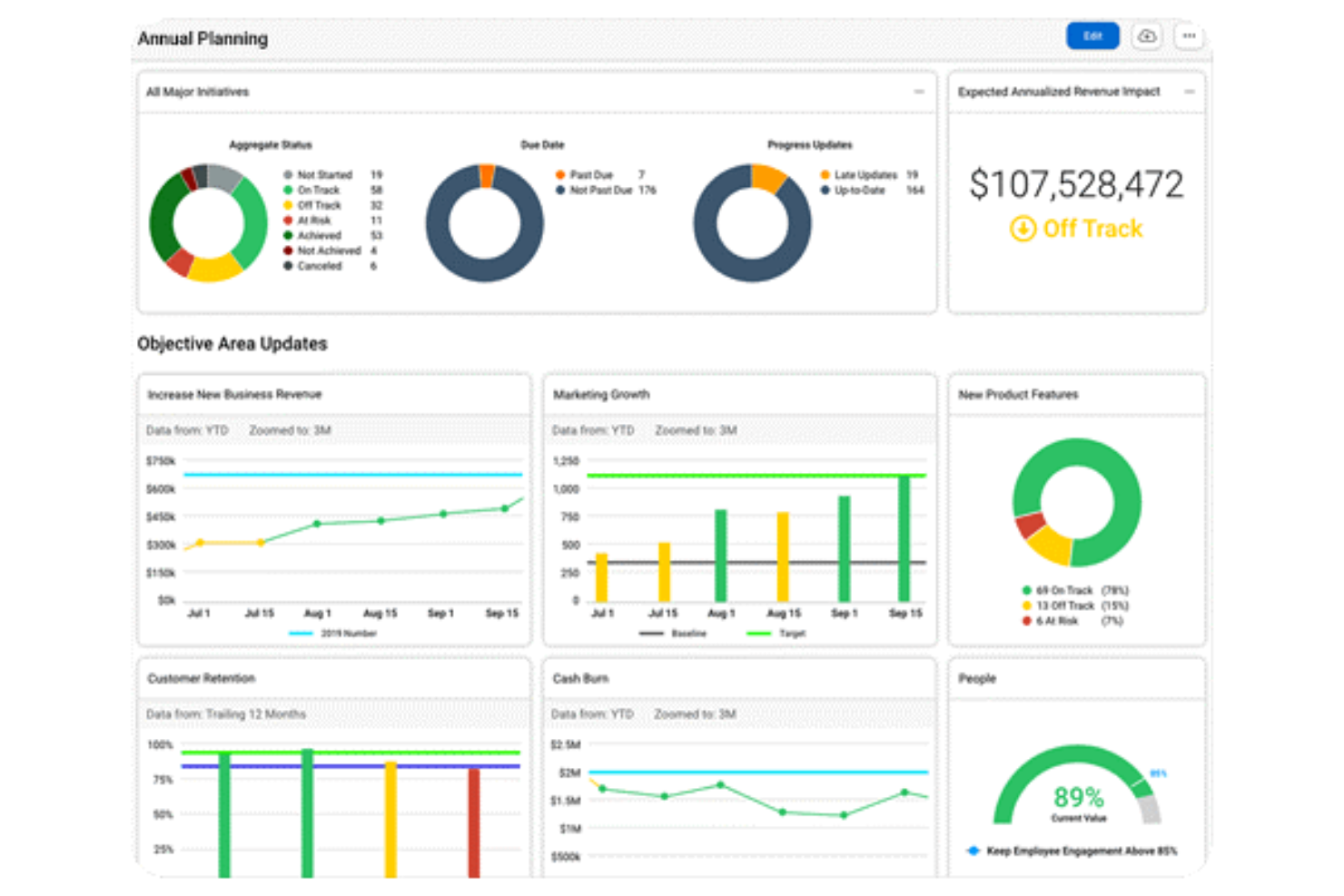
AchieveIt is a strategy software that helps teams identify pressing issues by visualizing their data in different ways.
Why I picked AchieveIt: AchieveIt offers a clean interface and is not difficult to use. The software creates useful dashboards you can use to steer meetings and conversations, and its reports help you identify gaps in your strategic plans.
AchieveIt enables you to visualize your data as you like. You can organize your goals and ideas in trees, lists, Gantt charts, or Kanban boards. You can create multi-plan views to understand what’s happening across multiple departments, and use filters to get a granular view of different business metrics. AchieveIt is a great tool for data-driven organizations.
AchieveIt Standout Features and Integrations
Features include goal planning, dashboard creation, task management, performance assessment, and automation.
Integrations are available natively through the software’s open API. Their implementation team will work with you directly to connect to other tools.
Pros and Cons
Pros:
- Templates help you organize your business strategy
- Real-time updates for increased visibility
- Automation features
Cons:
- Setting up goal and milestone dates could be easier
- No portfolio management features

Miro
Best for visual whiteboard planning

Miro is a visual workspace tool that provides a platform for project management, collaboration, and integration with other applications. It is distinguished by its capacity to support visual innovation workspaces, enabling teams to efficiently build, iterate, and design.
Why I picked Miro: I chose Miro because it offers a comprehensive suite of collaborative tools and templates that facilitate the entire strategic planning process. Its standout feature is the ability to visualize complex strategies and data using its infinite whiteboard, which is crucial for aligning teams and communicating plans across an organization.
I like that it also has an interactive presentation mode, a central hub for tracking projects and resources, and seamless integration with other platforms, which collectively enhance the strategic planning and execution experience across your organization.
Miro Standout Features and Integrations
Features include real-time collaboration tools, such as sticky notes and comments, an infinite canvas, custom frames and shapes, presentation mode, Miro Assist AI, document and image embedding, voting and polling features, mind mapping tools, screen sharing, timeline and roadmap planning, access control, and permissions management.
Integrations include Zoom, Figma, Asana, Microsoft Teams, Jira, Slack, Monday.com, Confluence, Google Drive, Box, Airtable, Notion, Azure, and Webex. Some integrations are limited to paid plans only.
Pros and Cons
Pros:
- Built-in communication features for streamlined collaboration
- Free forever plan available
- Intuitive and easy setup
Cons:
- Visitor/guest accounts locked to paid plans only
- Free version does not allow high-quality export to pdf
New Product Updates from Miro
Miro Adds Japan Data Residency for Enterprise Customers
Miro has introduced Japan data residency for enterprise customers, offering in-region storage for production data, backups, and metadata, plus in-region compute infrastructure. For more information, visit Miro's official site.

Best for collaborative strategic planning

Quantive Results is a strategy execution platform that helps you plan your business strategy, set goals, and track your progress, all while keeping teams aligned.
Why I picked Quantive Results: What makes this platform stand out is its features for collaborating. Your leadership team can use the whiteboards and the ready-made retrospective templates to plan your business strategy as a collective effort. Commenting is also available in your KPI tracking, helping you raise questions, give context, and spark ideas together.
In addition to mapping out your high-level strategy, you can also set and track goals with the software. OKRs and KPIs can be established, and goals can be cascading and linked to others to show how work flows and contributes to the broader objectives. The software also has AI that helps you set KPIs and connect related goals.
Quantive Results Standout Features and Integrations
Features include pre-built OKR templates, multi-level goal setting, multiple key result types, tags, OKR and task alignment, automated notifications, advanced access permissions, and reporting and analytics tools.
Integrations include Slack, Microsoft Teams, Asana, Miro, Jira, SurveySparrow, BambooHR, Workable, Humaans, and Rally, among others. You can also access additional integrations with a paid Zapier account.
Pros and Cons
Pros:
- Account management and custom onboarding with enterprise plan
- Free basic plan with unlimited users
- Ready-made templates available
Cons:
- Scale plan limited to 249 users
- All integrations not included in all plans

Best for workforce scenario modeling
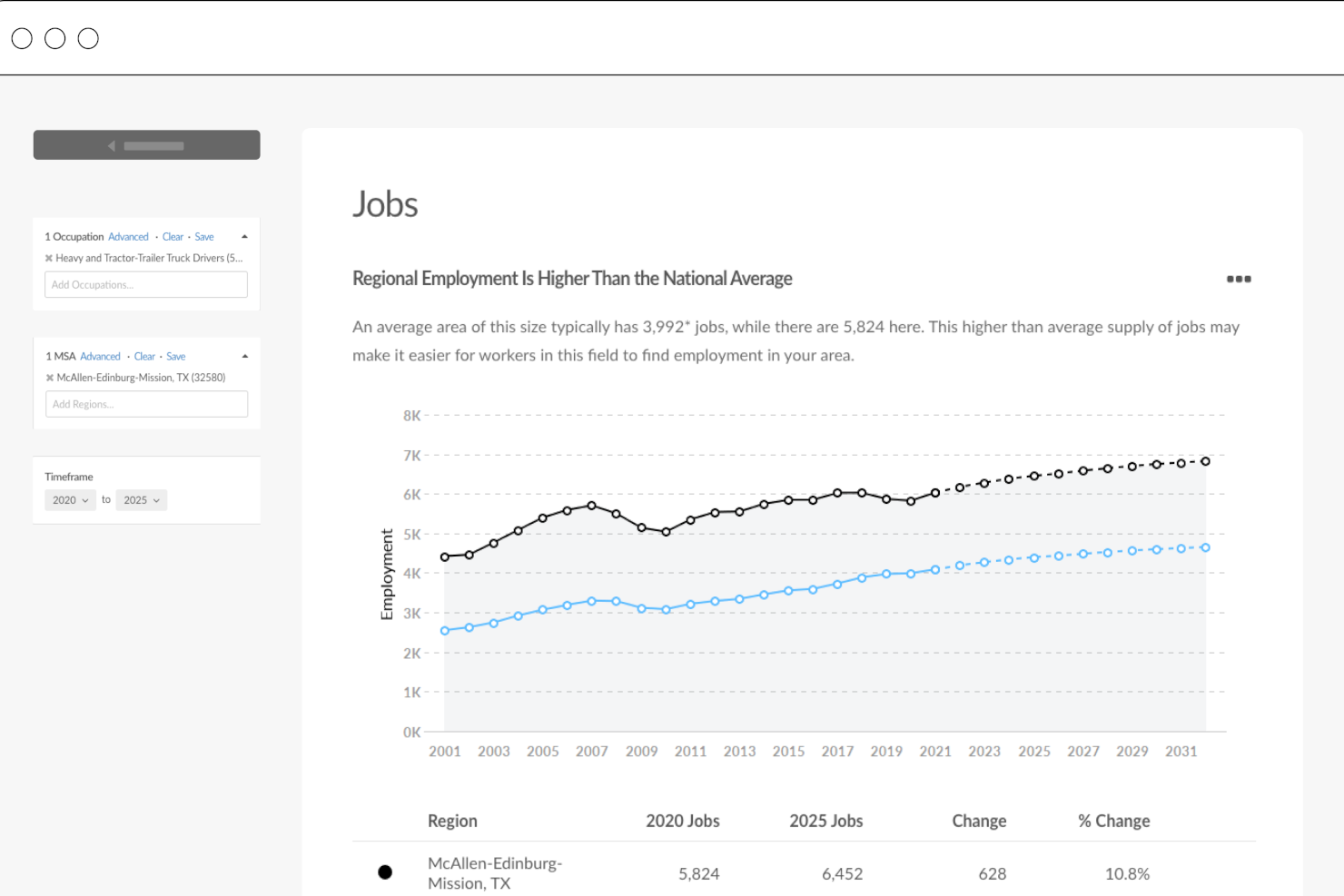
Lightcast is a cloud-based strategic planning software that facilitates long-term workforce planning, budgeting, forecasting, and reporting processes for corporations.
Why I picked Lightcast: Their software helps you create a comprehensive view of your organization's projected future, along with actionable insights and data analytics to help you make better data-driven decisions. You can use Lightcast to create and analyze multiple scenarios, evaluate the potential impact of each scenario on your organization, and adjust your plans accordingly. Their scenario modeling covers workforce and headcount planning, as well as talent acquisition capabilities such as skill-based hiring, and DEI & salary benchmarking data.
Their customizable dashboards provide a quick overview of all relevant information and can be modified to plot key metrics and identify any areas for improvement. To help you understand complex data quickly and easily, their software includes a range of charts and graphs, as well as other visualizations that can be customized according to your business preferences.
Lightcast Standout Features and Integrations
Features include scenario modeling tools, data insights, workflow management tools, and recruitment-specific talent acquisition tools.
Integration details are not available, though Lightcast does have an API to help you connect their system to other applications you're already using.
Pros and Cons
Pros:
- Integrated benchmarking data is useful for staying competitive in the global talent marketplace
- Additional consulting services are also available
- Able to dissect employment trends across different sectors and regions
Cons:
- No free trial available
- Pricing details are not transparent

Best for enterprises
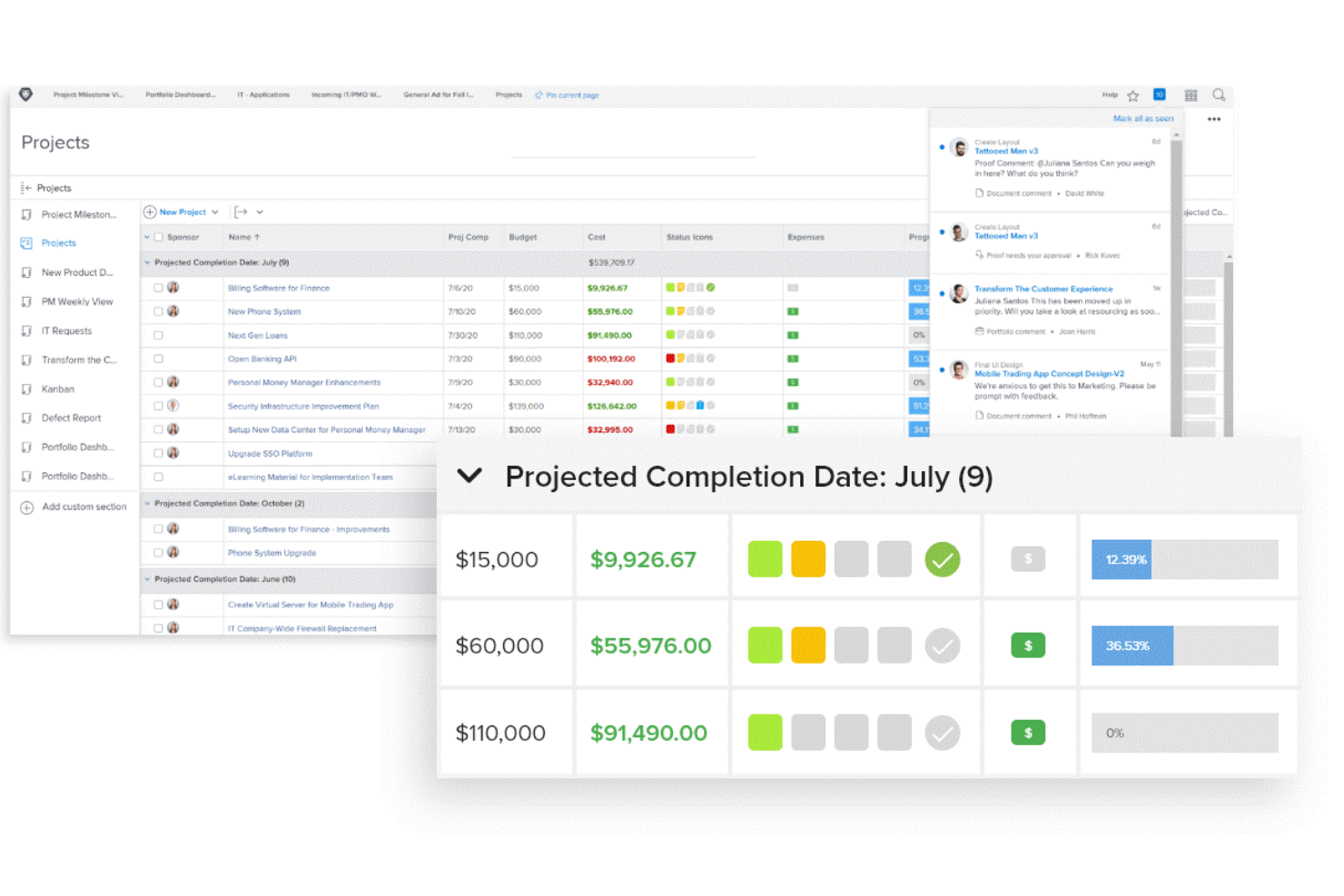
Adobe Workfront is a strategic planning and project management solution that enables enterprises to organize their day-to-day activities so they can achieve their long-term goals.
Why I picked Adobe Workfront: Adobe Workfront is an end-to-end planning and management solution. The software has a clean interface, allowing people to start using it without too much training. As a planning tool, Adobe Workfront is great because it enables you to create connections between tasks and your high-level goals.
Adobe Workfront makes it easy to transform a plan into an actionable project that’s neatly separated into multiple tasks. You can assign tasks to different departments and individuals, and you can track their progress in responsive dashboards. Managers can send updates and status reports to keep everyone on the same page and working toward the end goal.
Adobe Workfront Standout Features and Integrations
Features include demand management, work management, portfolio planning, worker experience tools, and reporting.
Integrations are available natively with dozens of solutions, including Adobe Creative Cloud, Box, Google Workspace, Jira, Microsoft Outlook, Salesforce, and Slack.
Pros and Cons
Pros:
- Easy to create and manage cross-department tasks
- Encourages user participation
- Superb project management features
Cons:
- Some screens can become busy at times, making the tool difficult to navigate
- Advanced features have a learning curve

Jedox
Best for retailers

Jedox is a strategic planning and business performance software that helps mid-sized and large retailers plan their sales strategies.
Why I picked Jedox: Jedox helps retailers that have multiple point-of-sale systems plan for the future. The solution connects your sales, HR, and business performance data to create scenario models that take into account your workforce, wages, locations, competitors, return rates, and SKUs. The models help you budget your initiatives and react to market disruptors.
Jedox enables you to create detailed purchasing plans and workflows so you can reduce overstock and sales losses. The scenario models help you plan for seasonal selling cycles, so you can increase your profits.
Jedox Standout Features and Integrations
Features include demand planning, revenue forecasting, churn predictions, smart insights, and analytics.
Integrations are available natively with several apps, including Microsoft Excel, Microsoft Power BI, Oracle, SAP, Salesforce, and Tableau.
Pros and Cons
Pros:
- Can analyze huge sets of data to create scenario models
- Dynamic reports
- Flexible dashboards that are easy to follow
Cons:
- UI could be improved
- Report builder can be buggy at times

Best for workforce planning
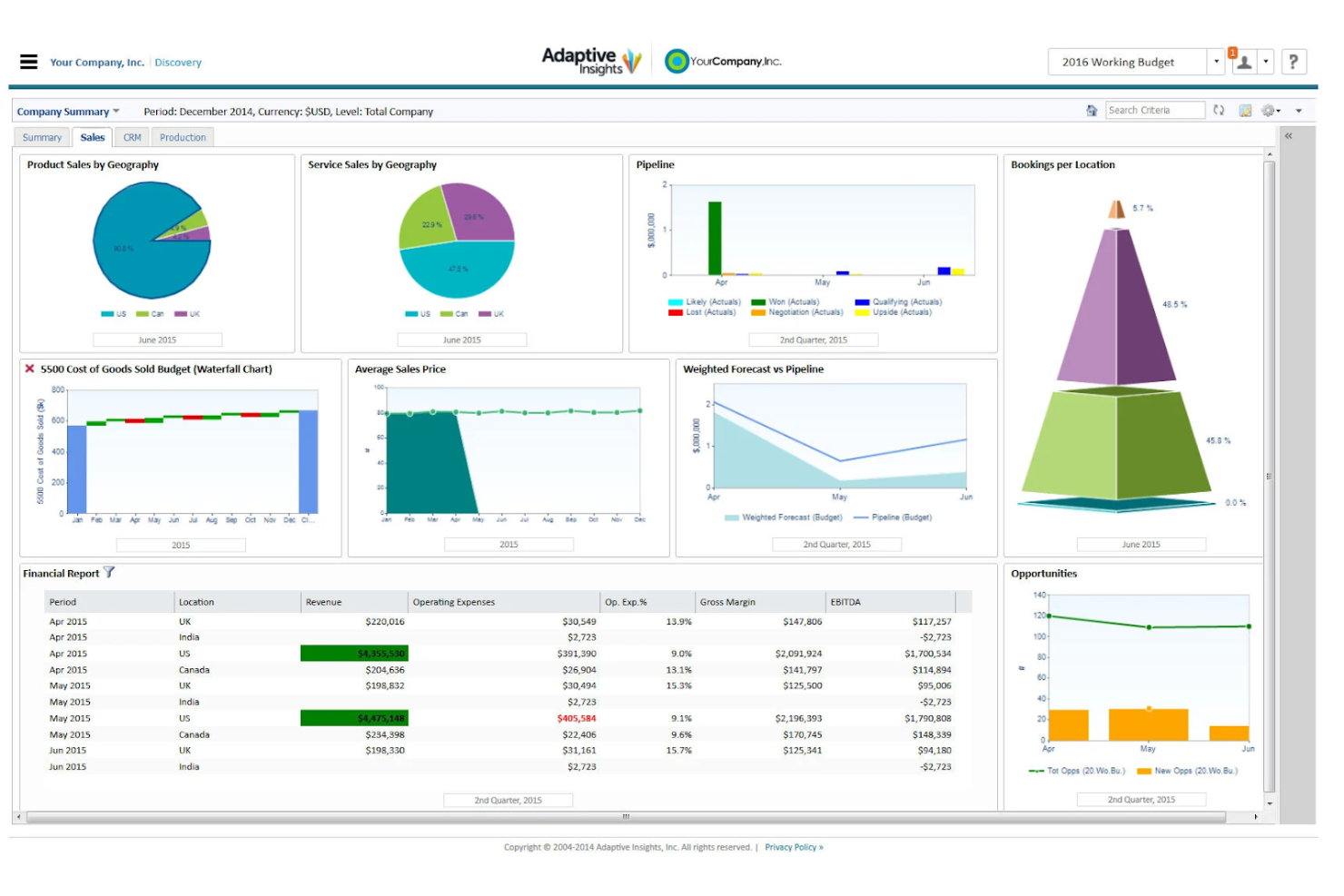
Workday Adaptive Planning is a strategic planning tool that enables medium and large businesses to manage their workforce.
Why I picked Workday Adaptive Planning: Workday Adaptive Planning helps you bring together your HR, finance, and operations data so you can gain a thorough understanding of your workforce dynamics. The software’s reporting features make it easy to spot how your existing hiring models and retention plans affect your costs, so you can develop long-term strategies to optimize your workforce.
Workday Adaptive Planning enables you to link your workforce data to financial models so you can deliver your hiring plans on time and within budget. Their built-in reports help you model your team’s skill capacity based on location or cost, allowing you to plan ahead for different scenarios. Thanks to its ability to plan for large workforces, this tool is a great option for mid-sized or large organizations.
Workday Adaptive Planning Standout Features and Integrations
Features include forecasting, strategy planning, milestones tracking, resource management, and performance management.
Integrations are available natively with several tools, including Microsoft Dynamics, Oracle PeopleSoft, Sage Intacct, Salesforce, and SAP.
Pros and Cons
Pros:
- Accounts for seasonality, multiple locations, and different geographies
- Forecasting helps you prepare for different scenarios
- Role-based reporting enables managers to track their team’s performance
Cons:
- User interface could be improved
- Has a learning curve
Annen programvare for strategisk planlegging
Her er noen flere alternativer for programvare for strategisk planlegging som ikke kom med på kortlisten min, men som likevel er verdt å undersøke:
- Aha! Roadmaps
For SaaS and tech businesses
- Knovos Cascade
For startups
- Planview Portfolios
For capacity planning
- Rhythm Systems
For cross-departmental planning
- Spider Strategies
For KPI tracking
- Elate
For dynamic planning
- Strategypoint
For simple strategy management
- Peoplebox.ai
For fast-growing companies
- Wrike
For charting tasks, projects, and milestones
- Anaplan
Strategic planning software for sales planning


How I Evaluate Strategic Planning Software
When a CHRO needs to align headcount plans to a three-year growth strategy, I structure my evaluation into baseline must-haves and the differentiators that separate good tools from great ones.
Core Functionality (Table Stakes For This List)
When I'm selecting tools for my list, I rank each one on a scale from 0 (does not offer the functionality) to 5 (excels in this area) for each core functionality listed below. Then, I calculate the tool's total score into a percentage. Each tool needs to achieve a minimum total score of 65% to be considered for inclusion.
- Strategic Roadmapping: I evaluate whether a tool lets you build multi-year plans with milestones and dependencies, like mapping a three-year talent acquisition strategy across regions.
- Goal & OKR Management: Each tool should offer structured goal-setting with cascading, so a CHRO's workforce retention target flows down into team-level action items.
- Scenario Planning & Modeling: I look for multi-variable modeling that lets you compare outcomes side by side, such as projecting headcount needs under different growth and attrition rates.
- Initiative Execution Tracking: Assigning owners, setting deadlines, and flagging at-risk initiatives matters here, especially when HR teams run parallel programs like DEI rollouts and L&D overhauls.
- Dashboards & Reporting: I check for customizable, real-time dashboards that can surface KPI progress in executive-ready formats without heavy manual formatting.
- Strategy Alignment & Cascading: The tool should connect enterprise-level priorities to department and individual goals, giving leaders clear line-of-sight from board objectives to frontline HR work.
Once I have a list of tools that meet this criteria, I consider what sets each platform apart.
Differentiating Factors (What Sets Vendors Apart)
Here's how I compare and contrast different vendors:
Standout Features
I look for tools that pull live workforce data from your HRIS or HCM platform, so headcount and attrition numbers feed directly into strategic plans without manual updates. AI-powered insights also matter—some platforms can flag when an initiative is trending off-target or surface talent risks before they escalate. Collaborative strategy workspaces are another differentiator, especially during annual planning cycles where HR leaders need to co-create priorities with finance and operations in real time.
Beyond Features
Strategic plans often contain sensitive workforce data like compensation benchmarks, succession pipelines, and restructuring timelines. I check for SOC 2 Type II compliance and granular role-based permissions to keep that information secure. Implementation support also weighs heavily, because rolling out a strategy platform mid-planning cycle without guided onboarding can stall adoption across leadership. For multi-entity organizations, I look at whether the tool scales across regions and business units with localized planning views.
Slik velger du programvare for strategisk planlegging
Det er lett å gå seg vill i lange funksjonslister og komplekse prismodeller. For å hjelpe deg med å holde fokus mens du går gjennom den unike prosessen med å velge programvare, får du her en sjekkliste over faktorer du bør ha i mente:
| Faktor | Hva du bør vurdere |
|---|---|
| Skalerbarhet | Kan programvaren vokse sammen med teamet ditt? Se etter verktøy som støtter et økende antall brukere og større datamengder uten problemer. Tenk på fremtidige behov og hvordan verktøyet vil tilpasse seg. |
| Integrasjoner | Fungerer den sammen med de nåværende systemene dine? Kontroller at den er kompatibel med eksisterende verktøy, som CRM- eller ERP-systemer, for å unngå datasiloer og sikre sømløse arbeidsflyter. |
| Tilpasningsmuligheter | Kan du tilpasse den etter behovene dine? Vurder hvor omfattende tilpasningsmulighetene er, slik at verktøyet kan passe til de spesifikke prosessene og arbeidsflytene dine. Unngå verktøy som er for rigide. |
| Brukervennlighet | Er den brukervennlig? Sørg for at teamet ditt raskt kan ta den i bruk. Se etter intuitive grensesnitt og minimale opplæringskrav for å sikre høy adopsjon. |
| Implementering og innføring | Hvor lang tid tar det å sette opp løsningen? Vurder tiden og ressursene som kreves for en smidig overgang. Se etter verktøy med tydelige prosesser for innføring og god støtte. |
| Kostnad | Er den innenfor budsjettet? Sammenlign prismodeller og skjulte kostnader. Se lenger enn prislappen for å finne ut om løsningen gir god valuta for pengene over tid. |
| Sikkerhetstiltak | Er dataene dine sikre? Sørg for at programvaren oppfyller sikkerhetsstandardene dine. Se etter kryptering, tilgangskontroller og samsvar med bransjereguleringer. |
| Tilgjengelig kundestøtte | Får du hjelp når du trenger det? Undersøk leverandørens alternativer for kundestøtte og åpningstider. Sørg for at du får tilgang til rask hjelp hvis det oppstår problemer. |
Hva er programvare for strategisk planlegging?
Programvare for strategisk planlegging er et verktøy som hjelper organisasjoner med å sette mål, følge fremdriften og fordele ressurser effektivt. Fagpersoner som ledere, teamledere og ledere på høyt nivå bruker disse verktøyene til å samordne teamene sine og forbedre beslutningstakingen. Funksjoner som målsetting, resultatoppfølging og dataanalyse støtter effektiv planlegging og gjennomføring. Alt i alt hjelper disse verktøyene team med å jobbe smartere og nå målene sine.
Funksjoner
Når du velger programvare for strategisk planlegging, bør du se etter følgende viktige funksjoner:
- Målsetting: Gjør det mulig for team å definere og følge opp mål, slik at alle er samkjørte og fokuserte på felles resultater.
- Resultatoppfølging: Overvåker fremdrift og resultatmålinger, slik at team kan holde kursen og ta datadrevne beslutninger.
- Ressursfordeling: Forvalter ressurser effektivt og sikrer optimal bruk av tid og materialer i prosjekter.
- Dataanalyse: Gir innsikt gjennom datavisualisering, noe som muliggjør bedre beslutningstaking og strategisk planlegging.
- Rapportering og oversikter: Tilbyr visuelle rapporter og oversikter for raskt å få et overblikk over fremdrift og resultatmålinger.
- Integrasjonsmuligheter: Kobles sammen med eksisterende verktøy, noe som sikrer sømløs dataflyt og reduserer manuelt arbeid.
- Tilpassbare maler: Tilbyr maler som kan tilpasses spesifikke behov, noe som sparer tid og sikrer konsistens.
- Samarbeidsverktøy: Legger til rette for kommunikasjon og samarbeid, slik at teammedlemmer kan jobbe effektivt sammen.
- Scenarioplanlegging: Hjelper team med å forutse og forberede seg på ulike fremtidige scenarioer, noe som styrker den strategiske motstandskraften.
- Sikkerhetstiltak: Sikrer databeskyttelse gjennom kryptering og tilgangskontroller, samtidig som konfidensialitet og etterlevelse opprettholdes.
Fordeler
Implementering av programvare for strategisk planlegging gir flere fordeler for teamet og virksomheten din. Her er noen av fordelene du kan se frem til:
- Bedre samkjøring: Sikrer at alle har samme forståelse gjennom målsetting og fremdriftsoppfølging, noe som forbedrer teamsamordningen.
- Bedre beslutningstaking: Bruker dataanalyse og rapporteringsfunksjoner til å gi innsikt som veileder strategiske valg.
- Effektiv ressursbruk: Forvalter ressurser effektivt, sikrer optimal fordeling og reduserer sløsing.
- Forbedret samarbeid: Tilbyr verktøy for kommunikasjon og samarbeid, slik at teammedlemmer kan jobbe mer effektivt sammen.
- Økt tilpasningsevne: Scenarioplanlegging forbereder teamet ditt på ulike fremtidige scenarioer og styrker fleksibiliteten og motstandskraften.
- Tidsbesparelser: Tilbyr tilpassbare maler og automatiseringsfunksjoner, noe som reduserer manuelt arbeid og gjør prosessene raskere.
- Datasikkerhet: Sikrer databeskyttelse gjennom sikkerhetstiltak, slik at informasjonen din holdes trygg og i samsvar med kravene.
Kostnader & priser
Valg av programvare for strategisk planlegging krever en forståelse av de ulike prismodellene og abonnementene som er tilgjengelige. Kostnadene varierer basert på funksjoner, teamstørrelse, tillegg og mer. Tabellen nedenfor oppsummerer vanlige abonnementer, gjennomsnittsprisene deres og typiske funksjoner som er inkludert i programvareløsninger for strategisk planlegging:
Sammenligningstabell for abonnementer for strategisk planlegging
| Abonnementstype | Gjennomsnittspris | Vanlige funksjoner |
|---|---|---|
| Gratisabonnement | $0 | Grunnleggende målsetting, begrenset resultatoppfølging og grunnleggende rapportering. |
| Personlig abonnement | $5-$25/bruker/måned | Målsetting, resultatoppfølging, dataanalyse og grunnleggende integrasjoner. |
| Forretningsabonnement | $30-$70/bruker/måned | Avansert rapportering, ressursfordeling, samarbeidsverktøy og integrasjoner. |
| Virksomhetsabonnement | $75-$150/bruker/måned | Tilpassbare maler, scenarioplanlegging, forbedret sikkerhet og prioritert brukerstøtte. |
Vanlige spørsmål om programvare for strategisk planlegging
Her er noen svar på vanlige spørsmål om programvare for strategisk planlegging:
Hvordan støtter programvare for strategisk planlegging samordning på tvers av funksjoner?
Programvaren gir teamene et felles område der de kan utforme, se og oppdatere strategiske prioriteringer. Hver avdeling kan knytte målene sine til selskapets overordnede mål. Du kan se hvordan arbeidet bidrar på tvers av team, og unngå overlapping eller manglende samordning. Dette hjelper ledelsen og teamlederne med å koordinere tiltak uten behov for lange møter. Dashbord og visuelle veikart gjør kommunikasjonen enklere.
Hvilke typer data kan importeres til programvare for strategisk planlegging?
Du kan vanligvis importere regneark, prosjektdata, OKR-er eller resultatmålinger. Noen plattformer tillater API-tilkoblinger eller datasynkronisering fra forretningsverktøy som CRM- eller BI-programvare. Dette gir teamet tilgang til sanntidsdata knyttet til hvert initiativ. Du slipper å legge inn alt manuelt hvis systemene dine kobles godt sammen. Sørg bare for at de importerte dataene passer inn i planleggingsstrukturen din.
Hvor ofte bør en plattform for strategisk planlegging oppdateres?
Det avhenger av hvordan organisasjonen din håndterer planleggingssyklusene sine. Noen team oppdaterer fremdriften månedlig eller kvartalsvis, mens andre gjør det ukentlig. Plattformen fungerer best når oppdateringene er konsekvente og knyttet til teamets vaner for gjennomgang. Du kan angi påminnelser eller tildele ansvarlige for å oppfordre til oppdateringer. Det viktigste er å gjøre prosessen til en del av teamets rutine.
Kreves det opplæring for å bruke programvare for strategisk planlegging?
Ja, det kreves vanligvis noe opplæring for å bruke programvare for strategisk planlegging effektivt. Mange leverandører tilbyr veiledninger, webinarer og støttemateriell for å hjelpe deg i gang. Benytt deg av disse ressursene for å sikre at teamet forstår hvordan programvaren skal brukes, og kan utnytte fordelene maksimalt.