

10 beste programvarer for arbeidsstyrkeplanlegging gjennomgått for 2026

10 Beste programvare for arbeidsstyrkeplanlegging – kortliste


Den beste programvaren for arbeidsstyrkeplanlegging hjelper deg med å forutse bemanningsbehov, optimalisere fordelingen av arbeidsstyrken og ligge i forkant av virksomhetens behov.
Når arbeidsstyrkedata er spredt på tvers av regneark eller isolerte systemer, er det vanskelig å ta nøyaktige bemanningsbeslutninger. Det riktige planleggingsverktøyet samler data om antall ansatte på ett sted, automatiserer scenariomodellering og gir deg oversikt over fremtidige ressursbehov. Dermed kan du unngå både underbemanning og overbemanning.
Med utgangspunkt i min erfaring med å vurdere et bredt utvalg av HR- og arbeidsstyrkeverktøy har jeg samlet de beste plattformene for arbeidsstyrkeplanlegging. De er intuitive, skalerbare og utviklet for å støtte både kortsiktig skiftplanlegging og langsiktig strategisk planlegging.
I denne veiledningen finner du løsninger som reduserer bemanningsrisikoen, gjør arbeidsstyrken mer fleksibel og hjelper deg med å planlegge smartere etter hvert som virksomheten utvikler seg.
Why Trust Our Software Recommendations
Our team has been testing and reviewing software since 2012. As HR experts ourselves, we know how difficult—and important—it is to choose the right software.
For this guide, we evaluated tools using hands-on testing and independent research, scoring tools using our selection criteria. We also draw on insights from industry thought leaders and practicing HR experts.
Our reviews reflect our human editorial judgment, not a sales pitch.
Expert reviewers:
Sammenligningstabell: Programvare for arbeidsstyrkeplanlegging
Denne sammenligningstabellen oppsummerer prisopplysningene for mine utvalgte programmer for arbeidsstyrkeplanlegging.
| Tool | Best For | Trial Info | Price | ||
|---|---|---|---|---|---|
| 1 | Best for global workforce visibility | Free demo available | From $5/user/month | Website | |
| 2 | Best for live workforce resource management | 30-day free trial | From $7/user/month | Website | |
| 3 | Best for tracking real-time capacity | Free plan available; 14-day free trial | From $9/user/month (billed annually) | Website | |
| 4 | Best for payroll-focused planning for enterprises | Free demo available | Pricing upon request | Website | |
| 5 | Best for complex compensation planning | Free demo available | Contact for pricing | Website | |
| 6 | Best for staff forecasting | Free demo available | From $500/month | Website | |
| 7 | Best for location-based workforce planning | Free demo available | Pricing upon request | Website | |
| 8 | Best for AI-driven workforce planning | 30-day free trial + free demo | Pricing upon request | Website | |
| 9 | Best for scheduling and payroll forecasting | 30-day free trial | From $2.99/user/month | Website | |
| 10 | Best for a simplified drag-and-drop planning tool | Free demo + free plan available | From $5/employee/month (billed annually) | Website |


Anmeldelser av den beste programvaren for arbeidsstyrkeplanlegging
Her er en kort beskrivelse av de 15 beste programmene for arbeidsstyrkeplanlegging, med fokus på hvert verktøys beste bruksområde og noen bemerkelsesverdige funksjoner. Les videre for å finne flere bonusalternativer nederst på listen.

Deel HR
Best for global workforce visibility

Deel helps international teams get a clear, unified view of their entire workforce, including employees and contractors across multiple countries. It’s a strong fit for executive teams that need accurate, real-time headcount data to plan staffing levels, manage payroll operations, and support cross-border growth.
Why I Picked Deel
I picked Deel because it gives your team one reliable place to see who works where, how they’re classified, and what it costs to employ them. For example, you can track employees and contractors side by side, which helps you forecast staffing needs without having to merge data from multiple HR tools.
Deel also supports global payroll and localized benefits administration, making it easier for international teams to understand the financial impact of workforce changes, and I like that you can quickly generate reports on headcount, compensation, and time off, helping you make decisions with current and accurate data.
Lastly, the platform allows employees to self-serve essential information, reducing admin work for HR teams.
Deel Key Features
Here are some key features worth highlighting:
- Time Off Management: Centralizes PTO tracking so teams can see availability across countries.
- Compensation Reporting: Breaks down salary and contractor costs to support budgeting and forecasting.
- Workforce Analytics: Displays trends in headcount, hiring, and turnover to guide planning decisions.
- Document Management: Stores contracts and compliance documents to keep international records organized.
Deel Integrations
Integrations include Ashby, BambooHR, Expensify, Greenhouse, HiBob, NetSuite, Okta, OneLogin, QuickBooks, Xero, Workday, and Workable.
Pros and Cons
Pros:
- Built-in global payroll supports international workforce planning
- Quick reporting on headcount, compensation, and time off
- Central source of truth for employee and contractor data
Cons:
- Limited customization for advanced workforce modeling scenarios
- Some analytics require manual configuration for deeper insights
New Product Updates from Deel HR

Deel Expands Stablecoin Wallet to 80+ Countries
Deel expands its Stablecoin Wallet to 80+ countries with dollar-backed balances and optional rewards. This gives eligible contractors more ways to hold and manage earnings inside Deel. For more information, visit Deel’s official site.
 .
.
Runn
Best for live workforce resource management
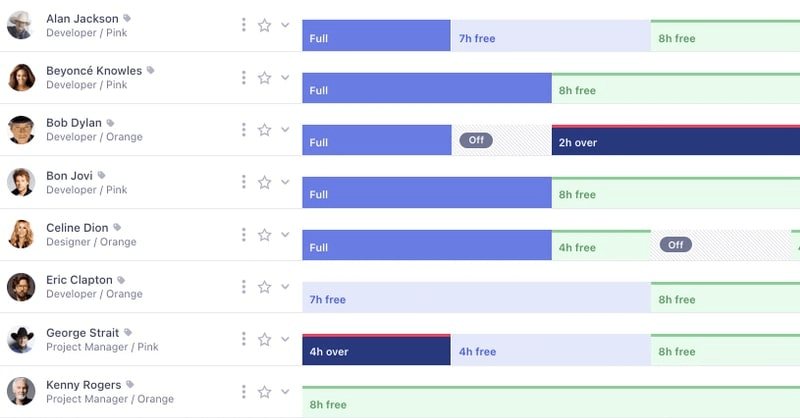
Runn is a resource planning tool that provides real-time insights for project management, workforce allocation, and forecasting. It supports planning, tracking, and forecasting for work projects and allows for in-depth capacity management.
Why I picked Runn: It provides detailed insights into team capacity, project allocation, and forecasting, helping organizations visualize workload distribution, track billable and non-billable hours, and predict future hiring needs. Runn’s ability to offer real-time, high-level views of resource utilization makes it especially effective for agile teams looking to optimize project timelines and manage workforce capacity efficiently.
Runn can also help you catch resource bottlenecks and detect when an employee is overbooked, then transfer their shifts to another staff member. You can also run numerous what-if scenarios to see the impacts of project delays and how they could impact capacity.
Runn Standout Features and Integrations:
Features include dynamic scenario planning, project planning, capacity management, real-time project forecasting, resource scheduling, drag-and-drop scheduling tools, and integrated timesheets.
Integrations are available with AlexisHR, BambooHR, CharlieHR, Clockify, and Harvest. Runn also has a Full REST API that allows you to integrate Runn with any other third-party applications as needed.

Best for tracking real-time capacity
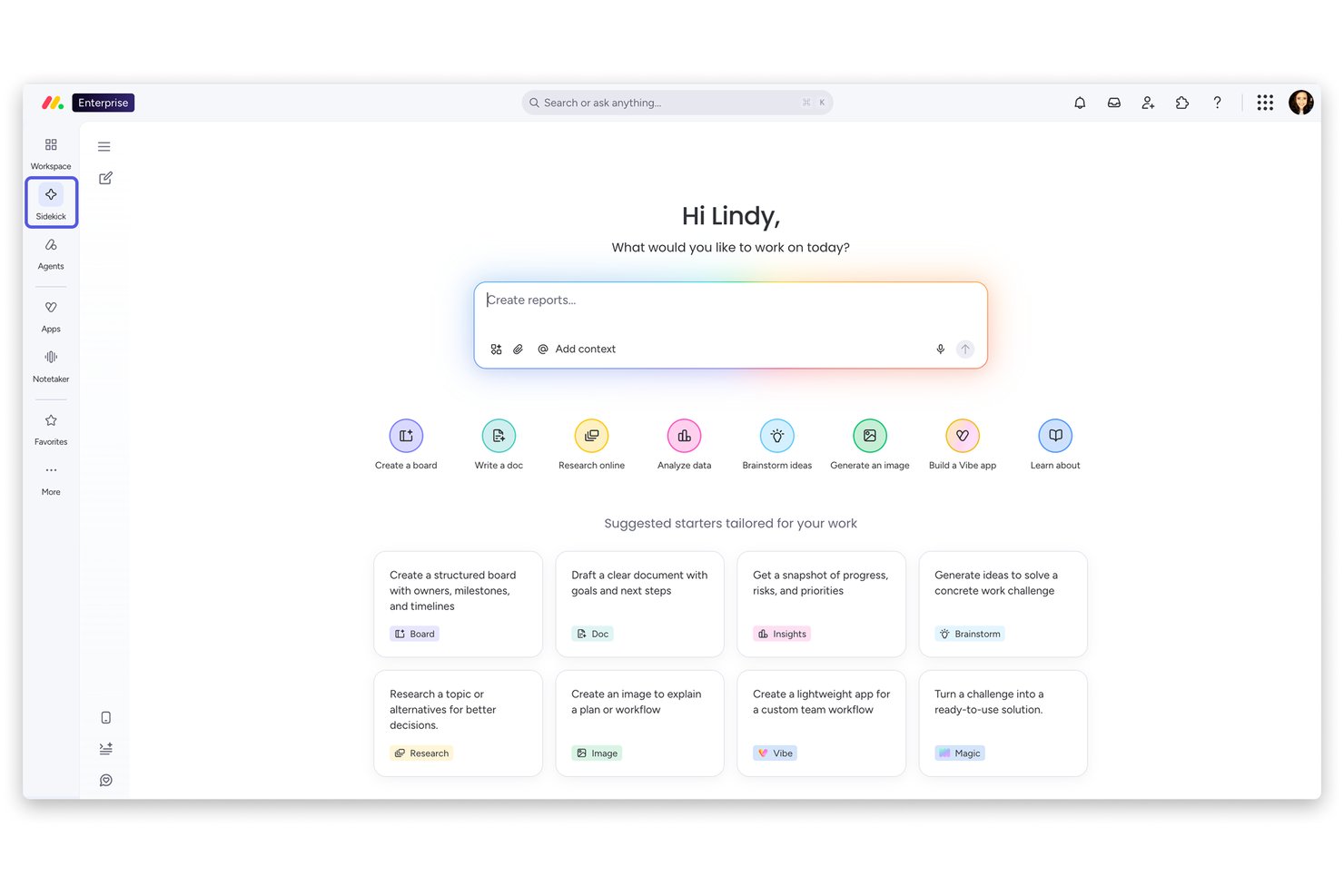
monday AI Workspace is a work management platform that combines AI-powered resource planning, workload visualization, capacity tracking, and portfolio-level dashboards across teams and projects.
Who Is monday AI Workspace Best For?
It's a strong fit for mid-size to enterprise organizations that need cross-functional capacity visibility across multiple teams and projects in one configurable platform.
Why I Picked monday AI Workspace
I picked monday AI Workspace as one of the best because its workload view gives you an instant, color-coded read on who's overloaded and who has capacity to spare. I love how the AI layer goes further, flagging capacity gaps before they become missed deadlines and suggesting load redistributions across teams. In practice, my team can see utilization across hundreds of projects simultaneously from a single executive dashboard.
monday AI Workspace Key Features
- Executive dashboards: Centralizes portfolio-level resource data with customizable, real-time charts and widgets.
- Resource planner: Lets you track and allocate resources by skill set, project, and availability.
- AI workflow builder: Embeds AI-driven automations directly into planning boards to automate repetitive tasks.
- Multi-project timeline view: Visualizes overlapping projects and deadlines across all your teams in one screen.
monday AI Workspace Integrations
monday AI Workspace offers native integrations with Slack, Microsoft Teams, Google Workspace, Salesforce, HubSpot, Jira, GitHub, Zendesk, Zoom, Dropbox, and connects with Zapier. An API is available for custom integrations.
Pros and Cons
Pros:
- AI-powered capacity and utilization insights
- Customizable dashboards for executive visibility
- Real-time workload tracking across teams
Cons:
- Lacks dedicated org chart visualization
- No headcount forecasting or scenario modeling
New Product Updates from monday AI Workspace
monday AI Workspace Adds Human Approval Routing
monday AI Workspace adds a human-in-the-loop approval block to AI Workflows, sending approval requests and routing workflow paths based on responses. For more information, visit monday AI Workspace's official site.

Vena
Best for payroll-focused planning for enterprises

Vena is designed for finance and HR teams that need detailed workforce planning tied directly to budgeting. It’s especially useful for enterprises that rely on Excel-driven processes but want stronger data accuracy, controlled access, and cross-department alignment.
Why I Picked Vena
I picked Vena because it gives you a clear view of future staffing needs by connecting your workforce plans directly to payroll data, hiring pipelines, and financial forecasts.
Vena’s pre-built workflows allow you to model changes to headcount or compensation, and instantly see how they affect budgets through, and your team can also collaborate in real time while maintaining strict access controls for sensitive salary information.
I also like that Vena keeps familiar Excel templates but layers built-in logic on top, so you reduce manual errors without giving up the flexibility of spreadsheets. These strengths make it a strong fit for organizations that plan workforce strategy alongside financial planning.
Vena Key Features
Here are some key features worth highlighting:
- Pre-Built Labor Models: Ready-made templates help you forecast labor costs, benefits, and new-hire impacts.
- Compensation Planning Tools: Track salary, merit increases, and variable pay with configurable rules.
- Scenario Modeling: Compare multiple headcount or payroll scenarios to guide hiring and cost decisions.
- Role-Based Access Controls: Protect sensitive compensation data while allowing broad collaboration.
Vena Integrations
Integrations include ADP, Workday, BambooHR, PeopleSoft, NetSuite, Sage Intacct, Microsoft Dynamics 365, Salesforce, and QuickBooks.
Pros and Cons
Pros:
- Strong headcount forecasting tied to financial models
- Detailed payroll and benefits logic for US, CA, and UK
- Uses Excel templates your team already understands
Cons:
- May not suit teams wanting a non-spreadsheet interface
- Requires setup time to customize templates
New Product Updates from Vena
Vena Adds Analytics Agent and Expands MCP Capabilities
Vena adds an Analytics Agent in open beta and expands Vena MCP for governed financial data access across enterprise AI tools. These updates support deeper financial analysis, recurring AI workflows, and controlled use of Vena data outside finance. For more information, visit Vena’s official site.
 .
.
Aeqium
Best for complex compensation planning

Aeqium is built for companies that need to manage complex compensation cycles across multiple teams, budgets, and approval layers. It gives HR and finance leaders a clear view of salary changes, equity planning, and pay structures so they can run compensation processes without relying on spreadsheets.
Why I Picked Aeqium
I picked Aeqium because it lets you design compensation cycles that match your organization’s exact workflows. For example, you can set custom approval chains, define budgeting rules, and control how managers submit and review recommendations, which helps you run reliable cycles every year.
I also like its compensation bands tool that help you build structured pay ranges for every role, ensuring your team maintain equity and reduce ad-hoc decision making.
You get real-time data pulled directly from your HR systems, so you’re not managing outdated spreadsheets or manual imports, plus managers have a centralized workspace for salary, equity, and promotion decisions, making your planning cycles more consistent.
Aeqium Key Features
Here are some key features worth highlighting:
- Total Rewards Statements: Give employees personalized summaries of salary, equity, and benefits.
- Interactive Offer Letters: Build and send customized offer packages that reflect compensation rules.
- Employee Portal: Let managers and employees access compensation insights in one place.
- Pay Equity Analysis: Identify pay gaps across roles or teams using structured compensation data.
Aeqium Integrations
Integrations include ADP Workforce Now, BambooHR, Gusto, Justworks, Paylocity, QuickBooks, RUN Powered by ADP, and DocuSign.
Pros and Cons
Pros:
- Centralized hub for salary, equity, and promotion planning
- Clear compensation bands that support equitable pay decisions
- Customizable workflows for complex compensation cycles
Cons:
- No built-in org chart modeling for headcount planning
- Limited analytics depth compared to enterprise planning suites

Rotageek
Best for staff forecasting

Rotageek is a workforce management and scheduling platform that helps businesses optimize labor planning and improve productivity. It caters to various industries, including retail, healthcare, and hospitality, by offering digital scheduling and forecasting solutions.
Why I Picked Rotageek: I picked Rotageek because it offers digital scheduling and auto scheduling powered by AI, which can greatly improve how you manage your workforce. These features help you create and manage employee schedules while considering various factors like employee availability and labor demand. This can lead to more accurate scheduling and better allocation of resources.
Another reason I chose Rotageek is its staff forecasting feature, which uses data analytics to predict labor needs. This helps you anticipate demand and make informed staffing decisions, which can enhance your operational efficiency. By having a clearer picture of future workforce requirements, you can plan better and ensure you have the right number of staff at the right time.
Rotageek Standout Features and Integrations:
Features include leave and absence tracking, which helps you manage employee time off and ensure adequate staffing levels. The clocking in/out management feature allows you to track employee attendance and working hours accurately. Additionally, customizable reporting provides insights into various metrics, helping you make data-driven decisions for your business.
Integrations include Appointedd, Axsium, Grosvenor Technology, Hastee, IRIS HR and Payroll, L2P Healthcare, Limber, Locums Nest, Level On-Demand Pay, OB&Co Retail Transformation, Predyktable, and Rethink Productivity.

Best for location-based workforce planning
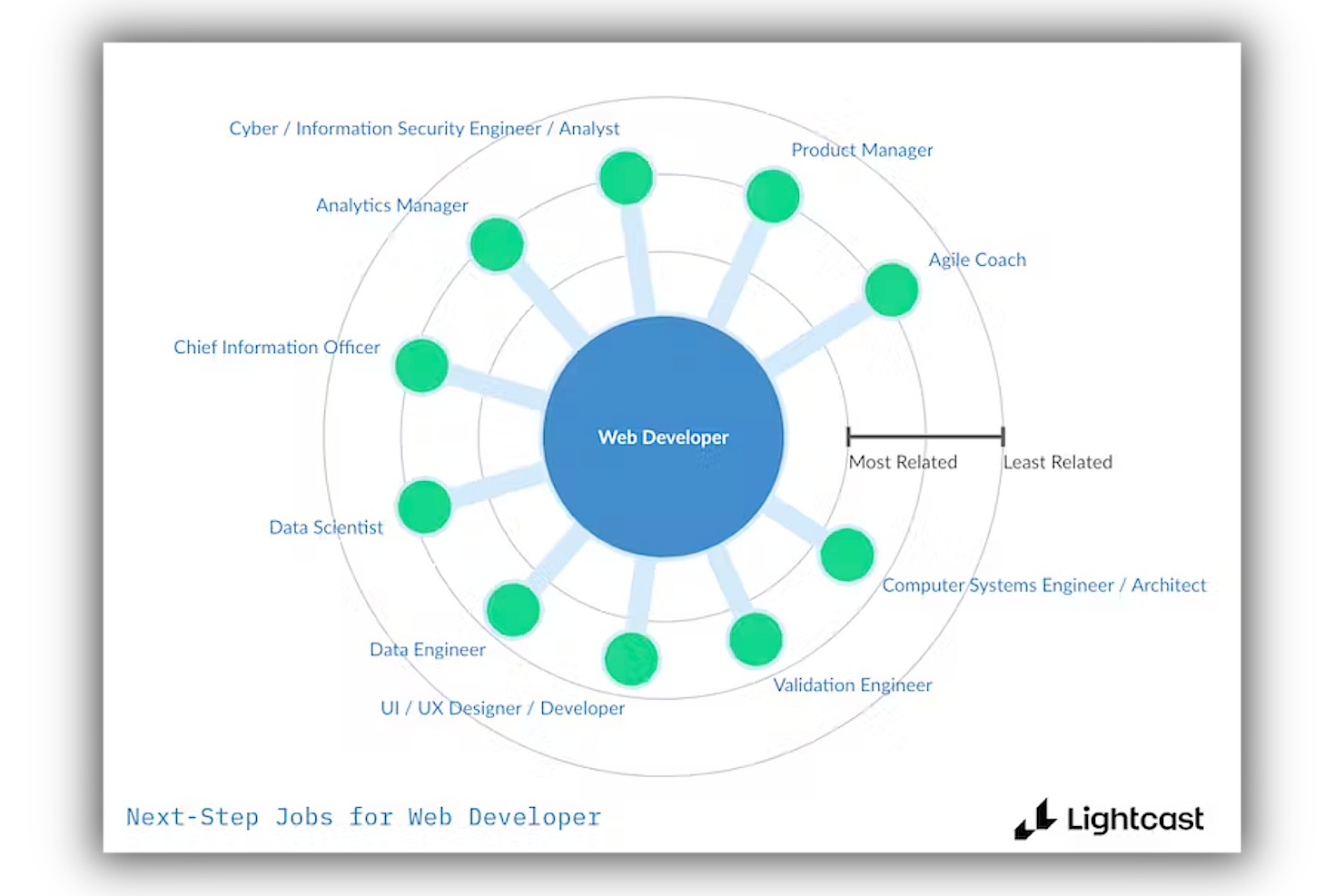
Lightcast, previously known as Emsi Burning Glass, provides data-driven workforce planning solutions using labor market analytics to enhance talent strategy and decision-making.
Why I picked Lightcast: As a labor market analytics company, Lightcast was created to facilitate the needs of corporate and staffing firms when it comes to understanding employment, economic trends, and training requirements across different locations. It offers a robust skills taxonomy, comprehensive reports, and insights for executive talent meetings, as well as blue-collar worker representation.
Lightcast also offers access to global data to help organizations power their existing workforce planning process, providing the vital information required to find the right talent, train an entire workforce, and develop a winning talent strategy in a dynamic labor market.
Lightcast Standout Features and Integrations:
Features include real-time labor market data, advanced talent mapping to identify skill gaps, and customizable workforce analytics tools to support strategic decision-making. Using Lightcast, you can leverage actionable skills data to help drive your talent acquisition strategies, respond or adapt to growing skills trends, and develop robust learning and development programs.
A workforce consulting service is also available to help optimize your existing workforce planning process using targeted recommendations, personalized analysis, and custom data sets.
Integrations include Microsoft Power BI, Tableau, Salesforce, SAP SuccessFactors, Oracle, ADP, Greenhouse, Workday, and LinkedIn. Lightcast also offers a data API to help businesses integrate with other data sets that are important for strategic workforce planning.
Visier
Best for AI-driven workforce planning

Visier offers advanced workforce analytics and planning solutions, empowering data-driven decision-making for HR and business leaders.
Why I picked Visier: It helps businesses forecast staffing needs, anticipate talent gaps, and identify potential risks. The platform’s predictive analytics enable HR teams to align workforce strategies with business objectives, helping to optimize headcount, talent acquisition, and resource allocation based on real-time data.
You can identify internal opportunities employees could move to based on their current skill set and assess whether they would be the right fit for the position. The software also offers Guided Diversity Planning to help set goals that support diversity initiatives.
In addition, Visier uses AI-enhanced analytics to help determine who is most at risk of leaving your organization, and why. This software allows you to see the impact your engagement initiatives (such as better compensation or policy changes) have on overall employee turnover.
Visier Standout Features and Integrations:
Features include predictive analytics to forecast workforce trends and potential talent shortages, scenario planning tools to test different workforce models for long-term strategic planning, and pre-built analytics models that are ready to use to make implementation faster.
Integrations include Workday, SAP, UKG Pro, Oracle Hyperion, Oracle Netsuite, and others.

Planday
Best for scheduling and payroll forecasting
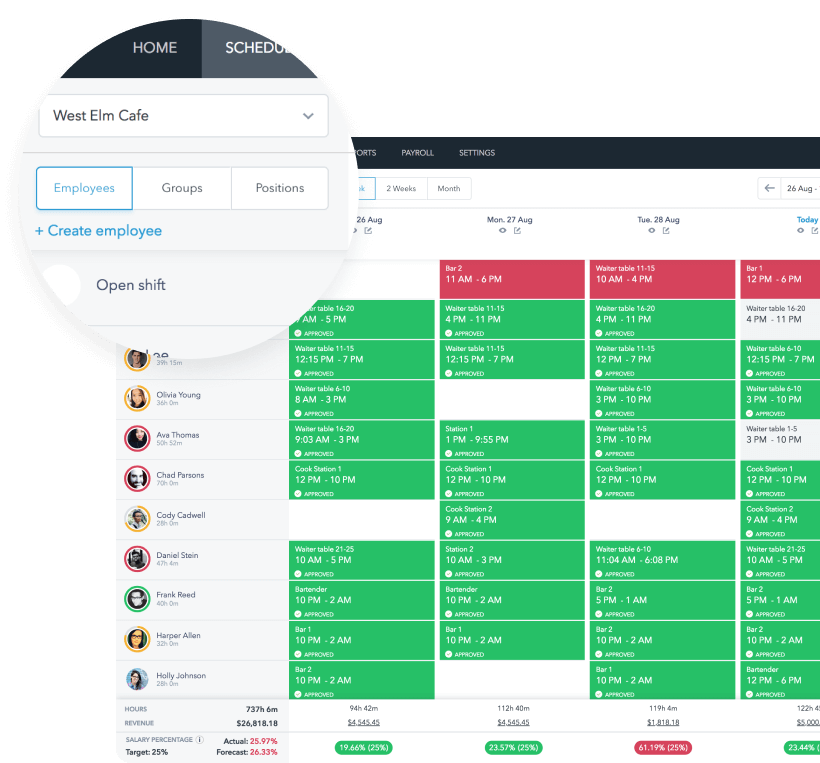
Planday offers cloud-based workforce planning and management solutions designed to simplify staff scheduling, communication, and payroll integrations for businesses of all sizes.
Why I picked Planday: The platform assists with simplified workforce planning by combining scheduling, time tracking, and real-time staff availability into one unified platform, enhancing operational efficiency.
Planday helps teams manage employee scheduling, including vacations, availability, payroll, and more. You can also use your current payroll information (working hours, vacation time, overtime) to forecast your future payroll costs, and set up compliance warnings to warn you when staff have been assigned too many hours, or shifts too close together.
Planday Standout Features and Integrations:
Features include employee scheduling tools, compliance monitoring tools, an integrated punch clock with GPS tracking abilities, integrated communication tools, reporting and analytics, and a mobile app.
Integrations include ADP, Sage 50, Microsoft Dynamics, QuickBooks Online, Heartland Payroll, TriNet, Xero, Clover, Square, Apicbase, Tenzo, and others.
ChartHop
Best for a simplified drag-and-drop planning tool

ChartHop is designed for HR teams and executives who need a clearer, more flexible way to plan headcount and map out workforce changes. Its visual approach helps you see how staffing decisions affect budgets, teams, and future scenarios so you can act with confidence.
Why I Picked ChartHop
I picked ChartHop because it gives you a visual, interactive way to plan headcount without relying on static spreadsheets. Its drag-and-drop org chart lets you model new roles, reorganizations, or hiring plans while instantly seeing the budget and reporting impacts.
You can also pull data from HRIS, payroll, and ATS systems into one view, so your team is always working with real-time information, and I like that you can compare multiple planning scenarios side by side, which helps you choose the most cost-effective or strategic option. For exec teams that need clean workforce insights fast, ChartHop offers a highly approachable setup.
ChartHop Key Features
Here are some key features worth highlighting:
- Scenario Planning: Build and compare multiple workforce plans with budget, role, and reporting changes.
- Compensation Planning: Centralize salary, bonus, and equity data for collaborative comp cycles.
- DEI Dashboards: Track representation, pay equity, and workforce trends with built-in analytics.
- Role-Based Permissions: Control who can view or edit sensitive headcount and compensation data.
ChartHop Integrations
Integrations include BambooHR, Workday, Greenhouse, ADP, Gusto, Namely, Rippling, UKG, Lever, and Slack.
Pros and Cons
Pros:
- Pulls HR, payroll, and ATS data into a unified workforce view
- Scenario modeling helps compare budget or staffing options quickly
- Visual org charts make headcount planning more intuitive
Cons:
- Advanced analytics require well-maintained source data
- Can feel complex for very small teams
New Product Updates from ChartHop
ChartHop Adds Role and Filter Controls for Ask ChartHop
AI Pro customers can now set access controls for Ask ChartHop in AI settings, restricting who can use the assistant by role or filter criteria. For more information, visit ChartHop's official site.
 .
.Annen programvare for arbeidsstyrkeplanlegging
Her er noen flere gode alternativer som ikke kom med på listen over den beste programvaren for arbeidsstyrkeplanlegging. Jeg hadde ikke plass til en fullstendig anmeldelse av hvert av disse, men de er likevel verdt å vurdere:
- OrgChart
For strategic position-based planning
- Workday Adaptive Planning
For enterprise workforce planning
- Planful
For scalable workforce forecasting
- eResource Scheduler
For drag-and-drop interface
- Connecteam
For GPS-enabled employee location tracking
- ActivTrak
For real-time workforce visibility
- Wrike
For role-based task allocation
- Paylocity
For integrated headcount planning
- ADP Workforce Now
For data-driven workforce planning
- Saviom
For skill-based resource allocation
- Agentnoon
For data-driven org planning
- Precursive
Resource management in Salesforce for staffing your projects
- ClearCo
All-in-one platform to align business needs with workforce planning analytics
- Anaplan
Scalable and strategic HR planning software
- Inspire
Workforce planning software to set employee goals and track progress toward those goals over time


Relaterte anmeldelser av HR-programvare
Hvis du fortsatt ikke har funnet det du leter etter her, kan du se nærmere på disse andre relaterte verktøyene som vi har testet og vurdert:
- HR-programvare
- Lønnsprogramvare
- Rekrutteringsprogramvare
- Tjenester for formell arbeidsgiver
- Systemer for sporing av jobbsøkere
- Programvare for arbeidsstyring
How I Evaluate Workforce Planning Software
I split my evaluation into baseline requirements—like headcount forecasting and scenario modelling—and the differentiators that separate a tool worth buying from one that just checks boxes.
Core Functionality (Table Stakes For This List)
When I'm selecting tools for my list, I rank each one on a scale from 0 (does not offer the functionality) to 5 (excels in this area) for each core functionality listed below. Then, I calculate the tool's total score as a percentage. Each tool needs to achieve a minimum total score of 65% to be considered for inclusion.
- Headcount Planning & Forecasting: I evaluate whether a tool lets you build forward-looking headcount plans by department, location, and role—not just view a static roster.
- Scenario Modelling: The ability to compare "what-if" scenarios side by side matters here, like modelling a hiring freeze against a planned expansion.
- Skills & Capability Mapping: I look for structured skills inventories tied to roles, with gap analysis that shows where your workforce falls short of future demand.
- Workforce Cost & Budget Alignment: Each tool should connect headcount plans to compensation data and budgets so you can see the financial impact of every staffing decision.
- HRIS & Data Integrations: Real-time data sync with your core HR stack is what I check for—tools that rely solely on manual CSV uploads score lower here.
- Workforce Analytics & Reporting: Dashboards and reports should surface actionable KPIs like attrition trends and span of control, not just raw employee counts.
Once I have a list of tools that meet the criteria, I consider what sets each platform apart.
Differentiating Factors (What Sets Vendors Apart)
Here's how I compare and contrast different vendors:
Standout Features
Position management is a big differentiator—I look for tools that track roles independently of the people in them, which makes planning around vacancies and future positions much cleaner. Org design capabilities also matter, especially drag-and-drop restructuring with real-time cost impact analysis. I evaluate collaborative planning workflows too, where HR, finance, and department heads co-author and approve plans in a shared workspace instead of passing spreadsheets back and forth.
Beyond Features
Integration depth is one of the first things I check—workforce plans are only as good as the data feeding them, so I evaluate how well each tool syncs with your HRIS, ATS, and finance systems. Company size and industry fit also shape my assessment, since a platform built for 50,000-employee enterprises often overwhelms a 500-person team. I consider implementation timelines too, because workforce planning tools with long rollouts risk losing stakeholder buy-in before your first plan is even built.
Slik velger du programvare for arbeidsstyrkeplanlegging
Programvare for arbeidsstyrkeplanlegging kan hjelpe deg med å analysere fordelingen av den nåværende arbeidsstyrken og forutsi fremtidige behov. For å finne ut hvilken programvare for arbeidsstyrkeplanlegging som passer best for dine behov, må du først identifisere de viktigste brukerne og dokumentere de spesifikke utfordringene deres.
Når du går gjennom din egen unike prosess for valg av programvare, bør du ha følgende punkter i bakhodet:
- Hvilket problem prøver du å løse – Begynn med å identifisere utfordringene du prøver å overkomme. Dette vil hjelpe deg med å avklare hvilke funksjoner og hvilken funksjonalitet programvaren for bemanningsplanlegging må tilby.
- Hvem trenger å bruke det – For å vurdere kostnader og krav bør du ta hensyn til hvem som skal bruke programvaren, og hvor mange lisenser du trenger. For verktøy for bemanningsplanlegging vil du sannsynligvis ønske å begrense tilgangen til de mest erfarne HR-medarbeiderne og ledere på øverste nivå. Når dette er avklart, er det også nyttig å rangere behovene til de ulike brukerne dine for å identifisere de viktigste prioriteringene for de avanserte brukerne. Det kan også være lurt å vurdere kurs i bemanningsplanlegging for ledere og andre interessenter, slik at alle brukere får mest mulig ut av verktøyet.
- Hvilke andre verktøy må det fungere sammen med – Avklar hvilke verktøy du erstatter (hvis noen), og hvilke verktøy du må integrere med, for eksempel HR-administrasjonssystemer, prosjektstyringsverktøy eller arbeidsplattformer som Microsoft Office 365 eller Google Workspace.
- Hvilke resultater er viktige – Gå gjennom hvilke funksjoner du ønsker å få eller forbedre, og hvordan du vil måle suksess. Det kan for eksempel være at du ønsker å gjennomføre en organisasjonsomfattende kompetanseanalyse for å avdekke eventuelle mangler i medarbeidernes samlede kunnskapsgrunnlag. Du kan sammenligne programvarefunksjoner til du blir blå i ansiktet, men hvis du ikke tenker på hvilke resultater du ønsker å oppnå, kan du sløse bort mye verdifull tid.
- Hvordan det vil fungere i organisasjonen din – Vurder programvarevalget opp mot eksisterende arbeidsflyter og systemer. Evaluer hva som fungerer godt, og hvilke områder som må følges opp.
Husk at alle virksomheter er forskjellige — ikke anta at et verktøy for bemanningsplanlegging vil fungere for organisasjonen din bare fordi det er populært.
Trender innen programvare for bemanningsplanlegging i 2025
Programvare for bemanningsplanlegging utvikler seg kontinuerlig for å møte endrede organisatoriske behov og ta i bruk avansert teknologi. Her er flere nye trender som påvirker systemer for bemanningsplanlegging i dag:
- Integrering av KI: Integreringen av KI i programvare for bemanningsplanlegging har gått fra å være en eksperimentell funksjon til å bli en kjernefunksjonalitet. Denne teknologien hjelper HR-team med å tolke komplekse datakilder og implementere intelligente automatiseringer, noe som forbedrer beslutningstaking og strategisk planlegging.
- Helhetlig arbeidsstyrkeinnsikt (TWI): Det er et økt fokus på TWI, en helhetlig tilnærming som utnytter eksterne data fra arbeidsmarkedet for mer informert bemanningsplanlegging og -styring. Denne trenden er særlig relevant med tanke på økningen i ikke-fast arbeidskraft og behovet for at organisasjoner tilpasser seg et mer fleksibelt arbeidslandskap.
- HR-systemer uten brukergrensesnitt: Bruken av HR-systemer uten brukergrensesnitt (der behandling av data i bakenden er separert eller frakoblet brukergrensesnittet i frontenden) øker, noe som gir mer tilpasningsdyktige og fleksible brukergrensesnitt. Disse systemene gjør det mulig for HR-teknologi å integreres sømløst med andre applikasjoner gjennom API-er, og støtter et mer sammenkoblet og effektivt digitalt HR-økosystem.
- Avansert analyse og rapportering: Mange plattformer har utvidet analysefunksjonene sine, slik at HR-team kan gjennomføre grundige analyser av data knyttet til medarbeiderbevaring, prognoser for antall ansatte og talentanskaffelse. Dette fokuset på analyse understreker etterspørselen etter innsiktsbasert bemanningsplanlegging.
Mens du fortsetter jakten på den beste programvaren for bemanningsplanlegging for deg, bør du ha disse nye trendene i tankene. Investering i et system som utnytter disse nye funksjonene, slik som funksjonene i programvare for mobil arbeidsstyring, vil hjelpe organisasjonen din med å forbli strategisk og datadrevet, slik at dere oppnår bedre resultater på lang sikt.
Hva er programvare for bemanningsplanlegging?
Programvare for bemanningsplanlegging er et verktøy som er utviklet for å hjelpe organisasjoner med å styre menneskelige ressurser strategisk. Det legger til rette for analyse, prognoser og planlegging av bemanningsbehov for å tilpasse disse til virksomhetens mål. Denne programvaren hjelper med å identifisere nåværende og fremtidige bemanningsbehov, kompetansegap og arbeidsmarkedstrender.
Formålet er å muliggjøre effektiv planlegging av rekruttering, opplæring og utvikling, slik at riktig antall medarbeidere med nødvendige ferdigheter er tilgjengelig når det trengs. Ved å tilby datadrevet innsikt støtter programvare for bemanningsplanlegging informerte beslutninger og hjelper virksomheter med å optimalisere arbeidsstyrken, redusere kostnader og forberede seg på fremtidige utfordringer og vekst.
Funksjoner i programvare for bemanningsplanlegging
Når du velger programvare for bemanningsplanlegging, bør du se etter følgende viktige funksjoner:
- Etterspørselsprognoser: Verktøy for arbeidsstyrkeplanlegging bidrar til å forutsi fremtidige bemanningsbehov basert på historiske data, salgsprognoser, sesongtrender og strategiske mål. Nøyaktige prognoser støtter proaktive ansettelsesbeslutninger og budsjettplanlegging.
- Scenariomodellering: De beste plattformene lar deg bygge «hva hvis»-scenarier – for eksempel endringer i etterspørsel, budsjettkutt eller ekspansjonsplaner – for å forstå hvordan ulike strategier vil påvirke bemanningsnivåer, kostnader og produktivitet før beslutninger tas.
- Kartlegging av ferdigheter og kompetanse: Disse verktøyene registrerer ansattes ferdigheter, kvalifikasjoner, sertifiseringer og karriereambisjoner i en sentralisert database. Dette gjør det enkelt å identifisere interne kompetansegap og planlegge målrettede strategier for utvikling, etterfølgerplanlegging og omskolering.
- Kapasitetsplanlegging: Programvare for arbeidsstyrkeplanlegging hjelper deg med å avgjøre om dagens antall ansatte kan møte fremtidige arbeidsmengder. Dette omfatter analyse av tilgjengelige timer, behov for overtid og forventet arbeidsvolum for å holde produktiviteten på et optimalt nivå.
- Budsjettering og kostnadsanalyse: Plattformer for arbeidsstyrkeplanlegging lar deg modellere lønnskostnader, utgifter til personalgoder, overtidskostnader og rekrutteringskostnader. Denne funksjonen hjelper virksomheter med å ta informerte økonomiske beslutninger som er direkte knyttet til arbeidsstyrkeplanlegging.
- Analyse av kompetansegap: Programvaren identifiserer områder der organisasjonen mangler ferdighetene eller antallet ansatte som trengs for å nå nåværende eller fremtidige mål. Ved å synliggjøre gap kan du planlegge rekruttering, opplæring eller omfordeling av ressurser mer effektivt.
- Optimalisering av arbeidsstyrken: Disse verktøyene bidrar til å balansere arbeidsbelastninger, flytte ressurser og tilpasse teamets kapasitet til virksomhetens prioriteringer. Dette forbedrer effektiviteten og reduserer risikoen for at ansatte blir utbrent eller at det oppstår flaskehalser i produktiviteten.
- Integrerte HR- og virksomhetsdata: Robuste løsninger for arbeidsstyrkeplanlegging henter inn data fra HR-systemer (f.eks. HRIS, ATS og systemer for resultatstyring) og virksomhetssystemer (f.eks. salg og drift) for å gi et helhetlig bilde av arbeidsstyrkens effektivitet og faktorene som driver etterspørselen.
- Visualiseringsinstrumentpaneler: Interaktive instrumentpaneler viser nøkkeltall som trender i antall ansatte, ferdighetsdekning, kostnadsprognoser og talenttilgang. Ledere bruker denne visuelle innsikten til å kommunisere planer, følge fremdrift og begrunne beslutninger.
- Verktøy for scenariosamarbeid: Plattformer for arbeidsstyrkeplanlegging inneholder ofte funksjoner som lar team samarbeide om planer, dele innsikt, kommentere scenarier og samordne strategier for arbeidsstyrken på tvers av avdelinger.
Vanlige KI-funksjoner i programvare for arbeidsstyrkeplanlegging
Mange løsninger for arbeidsstyrkeplanlegging tar i bruk KI for å forbedre prognoser, beslutningstaking og effektivitet, for eksempel:
- Prediktive prognoser for arbeidsstyrken: KI analyserer historiske trender, etterspørselsmønstre, sesongvariasjoner og signaler fra virksomheten for å forutsi bemanningsbehov med større nøyaktighet enn tradisjonelle modeller.
- Automatisert registrering av kompetansegap: KI identifiserer gap mellom organisasjonens nåværende kompetansebeholdning og fremtidige kompetansekrav, og anbefaler målrettede tiltak for utvikling eller rekruttering.
- Intelligent scenariooptimalisering: KI vurderer flere «hva hvis»-scenarier og anbefaler de mest effektive planene basert på kostnader, produktivitet, etterlevelse og strategiske prioriteringer – noe som bidrar til å eliminere manuell prøving og feiling.
- Sammenkobling og anbefalinger for talenter: KI foreslår interne kandidater til ledige stillinger eller ledertalentprogrammer basert på ferdigheter, prestasjoner, karriereinteresser og potensiell egnethet – noe som støtter etterfølgerplanlegging og intern mobilitet.
- KI-drevet kostnadsmodellering: KI simulerer raskt kostnadseffektene av ansettelsesplaner, lønnsendringer, endringer i personalgoder eller reduksjoner i arbeidsstyrken, slik at ledere kan forstå de økonomiske konsekvensene før beslutningene ferdigstilles.
- Dynamiske varsler om antall ansatte: KI overvåker kontinuerlig data om arbeidsstyrken for å varsle HR-ledere når trender i sanntid avviker fra prognoseplanene – for eksempel ved uventede økninger i personalavgang eller plutselig mangel på arbeidskraft.
- KI-forbedrede instrumentpaneler: Intelligente instrumentpaneler viser automatisk viktig innsikt, fremhever trender og foreslår tolkninger som ledere kanskje ikke ville oppdaget manuelt, noe som fremskynder beslutningstakingen.
- Scenariobaserte veiledningsinnsikter: Noen plattformer bruker KI til å tilby strategiske forslag knyttet til planleggingsscenarier, for eksempel anbefalte tidsplaner for ansettelser, prioriteringer for omskolering eller innsikt om omfordeling av budsjettet.
Fordeler med programvare for arbeidsstyrkeplanlegging
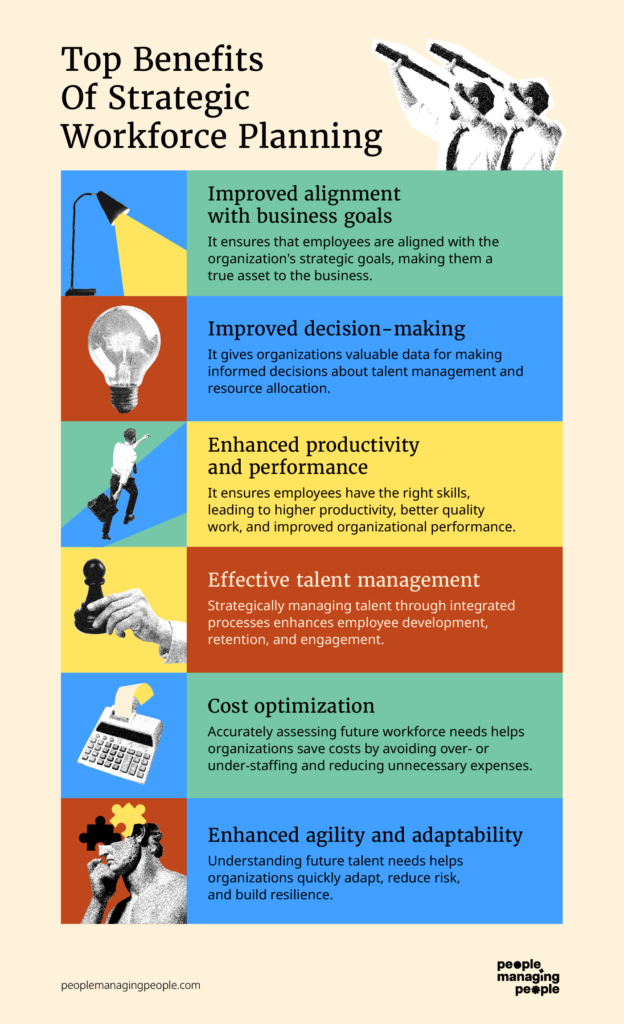
Ved å forstå fordelene som verktøy for arbeidsstyrkeplanlegging kan tilby, kan det bli enklere å få støtte for den økonomiske investeringen i denne typen programvare. Her er flere fordeler du kan forvente ved å ta i bruk programvare for arbeidsstyrkeplanlegging i organisasjonen:
- Bedre styring av arbeidskraftkostnader: Denne programvaren gjør det mulig å spore og prognostisere arbeidskraftkostnader nøyaktig, noe som hjelper virksomheter med å budsjettere effektivt og redusere unødvendige utgifter. Ved å analysere historiske data og aktuelle trender kan organisasjoner ta velinformerte beslutninger for å styre arbeidskraftkostnadene proaktivt.
- Strategisk utvikling av arbeidsstyrken: Ved å prognostisere fremtidige behov for arbeidsstyrken og analysere kompetansebeholdningen kan virksomheter utvikle arbeidsstyrken strategisk gjennom målrettede opplæringsprogrammer og rekrutteringsinnsats. Denne fremtidsrettede tilnærmingen støtter langsiktige forretningsmål og vekst.
- Forbedret talentforvaltning: Programvare for arbeidsstyrkeplanlegging bidrar til å identifisere kompetansegap, planlegge fremtidige bemanningsbehov og utvikle etterfølgerplaner. Dette sikrer at organisasjonen er forberedt på vekst og kan tilpasse seg endringer i markedet.
- Mer strategisk rekrutteringsinnsats: Programvare for arbeidsstyrkeplanlegging kan avdekke kompetansegap i en organisasjon, slik at teamene kan tilpasse rekrutteringsstrategiene sine for å rette seg mot fremtidige ansettelser med spesifikke, nødvendige ferdigheter. Denne strategiske tilnærmingen sikrer at nyansatte fyller viktige roller, noe som styrker selskapets samlede kunnskap og kompetanse.
- Bedre datadrevet beslutningstaking: Tilgang til sanntidsdata og analyser gjør virksomheter i stand til å ta kunnskapsbaserte beslutninger om bemanning, arbeidskraftkostnader og fremtidige ansettelsesplaner. Enkelte AI-verktøy for arbeidsstyrkeplanlegging gir verdifull prediktiv innsikt.
Som du kan se, gir programvare for arbeidsstyrkeplanlegging mange fordeler som hjelper ledergrupper med å optimalisere sin mest verdifulle ressurs – arbeidsstyrken. Disse fordelene kan føre til betydelige forbedringer i organisasjonens resultater, konkurranseevne og evne til å nå langsiktige driftsmål.
Kostnader & priser for programvare for arbeidsstyrkeplanlegging
Når du undersøker programvare for arbeidsstyrkeplanlegging, er det viktig å forstå de ulike tilgjengelige abonnements- og prismodellene. Disse verktøyene er utviklet for å støtte en rekke organisatoriske behov, fra små virksomheter som trenger grunnleggende funksjonalitet, til store virksomheter som krever omfattende funksjoner og tilpasningsmuligheter.
Prisene kan variere betydelig basert på antall brukere, funksjonenes omfang og nivået på støtten som tilbys. De fleste systemer tar en månedlig avgift per bruker, selv om noen også tilbyr en fast månedsavgift. På grunn av disse programvaresystemenes avanserte natur oppgir mange leverandører priser først på forespørsel.
Nedenfor har jeg beskrevet de vanligste abonnementsalternativene, inkludert et gratisnivå for dem som nettopp har begynt, eller som har minimale behov.
Sammenligningstabell for programvare for arbeidsstyrkeplanlegging
| Abonnementstype | Gjennomsnittspris | Vanlige funksjoner |
|---|---|---|
| Gratis | $0 | Grunnleggende planlegging, begrenset rapportering og tilgang for et lite team |
| Grunnleggende | $2-8 per bruker/måned | Utvidet planlegging, grunnleggende analyser, mobiltilgang og støtte for små og mellomstore team |
| Profesjonell | $10-30 per bruker/måned | Avanserte analyser, integrasjonsmuligheter, tilpasningsalternativer og prioritert støtte |
| Virksomhet | Tilpasset pris | Omfattende funksjonssett, avanserte tilpasningsmuligheter, dedikert støtte og skalerbarhet for store organisasjoner |
Når du velger et abonnement for programvare for arbeidsstyrkeplanlegging, bør du ta hensyn til både dagens behov og fremtidig vekst. Jeg anbefaler å starte med et abonnement som dekker de umiddelbare behovene dine, samtidig som det gir fleksibilitet til å skalere etter hvert som organisasjonen utvikler seg.
Vanlige spørsmål om programvare for arbeidsstyrkeplanlegging
Lurer du fortsatt på programvare for arbeidsstyrkeplanlegging og hvordan det skiller seg fra arbeidsstyring? Disse svarene på vanlige spørsmål vi har fått om begge programtypene, bør gjøre forskjellene tydeligere.
Hvilke programvareintegrasjoner er viktige for programvare for arbeidsstyrkeplanlegging?
Se etter integrasjoner med HRIS-, lønns-, bemanningsplanleggings- og analyseplattformene dine. Sømløs datadeling mellom disse systemene bidrar til bedre prognoser og automatiserer manuelle oppgaver.
Hvordan kan programvare for arbeidsstyrkeplanlegging forbedre etterfølgerplanlegging?
Verktøy for arbeidsstyrkeplanlegging gir deg tydelig oversikt over talentpipelines og ferdighetsberedskap for viktige roller. Det betyr at du kan oppdage potensielle ledere tidlig og sette i gang opplærings- eller mentorprogrammer på forhånd.
Hvilke utfordringer møter selskaper når de tar i bruk programvare for arbeidsstyrkeplanlegging?
Vanlige utfordringer omfatter dårlig datakvalitet, manglende støtte fra interessenter eller kompleks integrasjon med eksisterende systemer. Ved å få støtte fra ledelsen og rydde opp i arbeidsstyrkedataene før lansering forbedrer du sjansene for å lykkes.
Hvilke data bør jeg klargjøre før jeg tar i bruk programvare for arbeidsstyrkeplanlegging?
Samle inn aktuelle medarbeiderdata, organisasjonskart, stillingsbeskrivelser og historiske trender for ansettelser. Jo mer komplette dataene dine er, desto bedre kan programvaren bidra til prognoser, identifisere mangler og støtte beslutningstaking.
Andre ressurser for å optimalisere den strategiske planleggingen
Som du kan se, er arbeidsstyrkeplanlegging i stor grad forankret i strategi. Hvis du ser etter andre typer programvare som kan hjelpe deg med den strategiske planleggingen, er disse andre listene også verdt en rask titt:
- Programvare for strategisk planlegging
- Programvare for personanalyse
- Programvare for etterfølgerplanlegging
Merk at selv om det er noe overlapp mellom arbeidsstyrkeplanlegging og etterfølgerplanlegging, er de ikke det samme. Se artikkelen vår som forklarer hva etterfølgerplanlegging er, for en mer detaljert gjennomgang.