

De 10 beste appene for ansattkommunikasjon vurdert i 2026

Beste apper for ansattkommunikasjon


I den hektiske verdenen innen HR-ledelse kan det å holde teamet ditt tilkoblet føles som en balansegang. Du skal sørge for at alle er på samme side, men tradisjonelle metoder er ikke lenger tilstrekkelige. Det er her apper for ansattkommunikasjon kommer inn.
Jeg har brukt tid på å undersøke disse verktøyene for internkommunikasjon for å forstå hvordan de virkelig kan gjøre en forskjell for teamet ditt. Fra å styrke samarbeidet til å sørge for at alles stemme blir hørt, tar disse appene tak i utfordringene du møter hver dag.
I denne artikkelen deler jeg mine beste anbefalinger etter grundig testing og analyse. Du vil oppdage hvilken app som passer teamets unike behov. La oss se nærmere på hvordan disse løsningene kan støtte kommunikasjonen på arbeidsplassen din.
Hvorfor du kan stole på våre programvareanbefalinger
Teamet vårt har testet og anmeldt programvare siden 2012. Vi er selv HR-eksperter, så vi vet hvor vanskelig og hvor viktig det er å velge riktig programvare.
I denne guiden har vi vurdert verktøyene gjennom praktisk testing og uavhengig research og gitt dem poeng ut fra våre utvelgelseskriterier. Vi bygger også på innsikt fra ledende eksperter i bransjen og erfarne HR-eksperter.
Anmeldelsene våre bygger på vår egen redaksjonelle vurdering. De er ikke et salgsargument.
Ekspertanmeldere:
Sammenligningstabell for apper for ansattkommunikasjon
Denne sammenligningstabellen oppsummerer prisopplysningene for mine beste anbefalinger av apper for ansattkommunikasjon:
| Tool | Best For | Trial Info | Price | ||
|---|---|---|---|---|---|
| 1 | Best for policy sign-off and compliance tracking | 30-day free trial + free demo available | From $2.77/user/month (billed annually) | Website | |
| 2 | Best for AI-driven employee engagement | Free demo available | Pricing upon request | Website | |
| 3 | Best for mobile-first teams | Free plan + 14-day free trial + free demo available | From $29/month (billed annually) | Website | |
| 4 | Best for publish-once multichannel intranet comms | Free demo available | Pricing upon request | Website | |
| 5 | Best for HRIS-synced audience targeting | Free demo available | Pricing upon request | Website | |
| 6 | Best for recognition-driven culture comms | Free demo available | Pricing upon request | Website | |
| 7 | Best for frontline workers | Free trial + free demo available | From $3.75/user/month (billed annually) | Website | |
| 8 | Best for internal comms analytics and AI insights | 14-day free trial + free demo available | Pricing upon request | Website | |
| 9 | Best for regulated-industry broadcast compliance | 14-day free trial + free demo available | From $9/user/month (billed annually) | Website | |
| 10 | Best for leadership communications | Free demo available | Pricing upon request | Website |

Anmeldelser av de beste appene for ansattkommunikasjon
Nedenfor finner du mine detaljerte sammendrag av de beste appene for ansattkommunikasjon som kom med på listen min. Anmeldelsene mine gir et detaljert innblikk i de viktigste funksjonene, fordeler & ulemper, integrasjoner og ideelle bruksområder for hvert verktøy, slik at du kan finne det som passer best for deg.

Jostle
Best for policy sign-off and compliance tracking
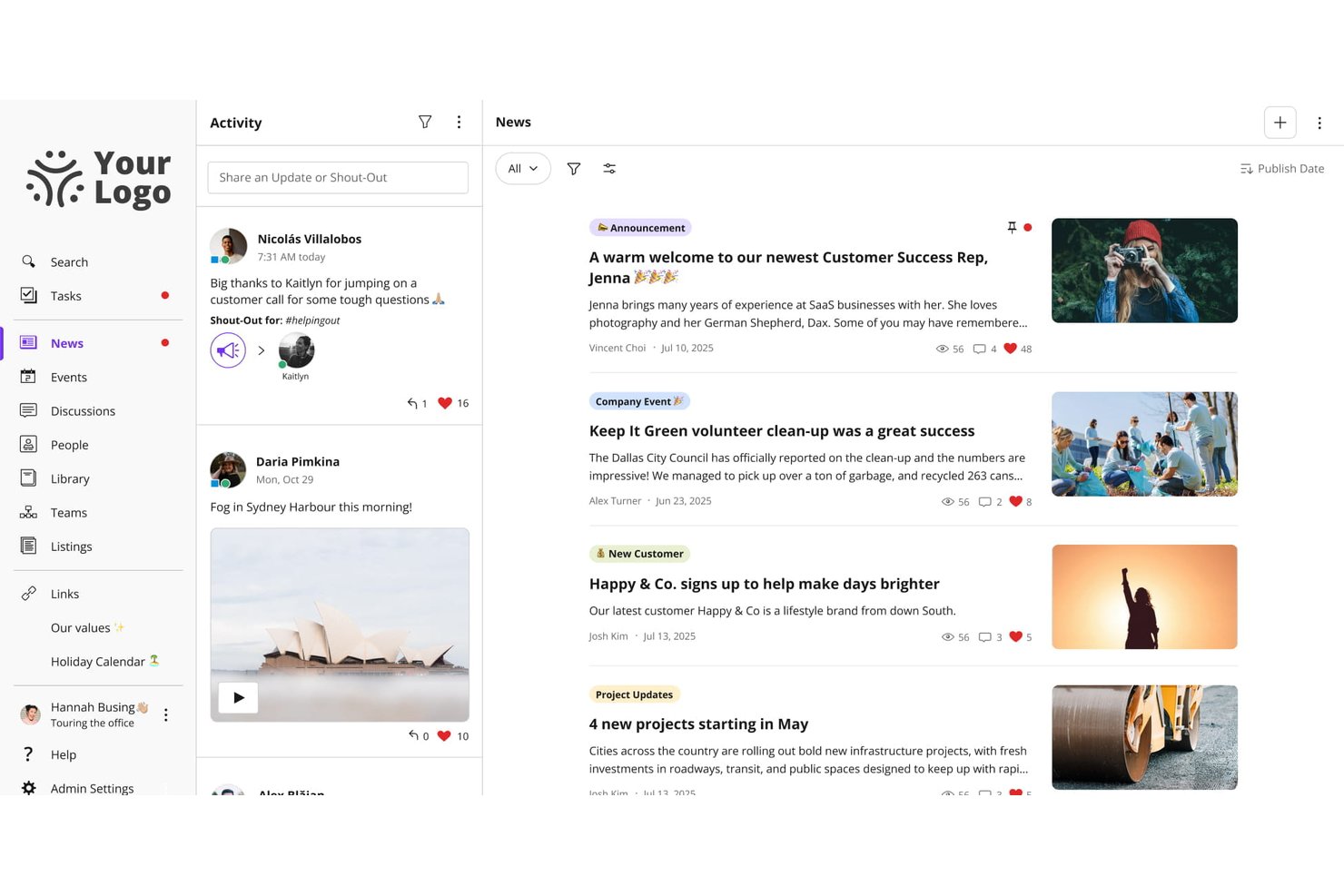
Jostle is an employee communication platform built around a company news feed, a searchable document library, and group messaging, with tools for targeted broadcasting, policy sign-off, and employee recognition.
Who Is Jostle Best For?
Jostle is a strong fit for HR and internal communications teams that need a structured way to distribute policies, track sign-off, and keep a well-organized document library.
Why I Picked Jostle
Jostle earns its spot on my shortlist because of how seriously it treats policy compliance. The Sign-Off feature lets you attach a mandatory read confirmation to any News post or Library document, then pull a timestamped report showing exactly who acknowledged it and when—which is genuinely useful during audits or regulatory reviews. I also like that Library topics have named owners and scheduled review cycles, so policies don't quietly go stale.
Jostle Key Features
- Targeted news publishing: Publish company updates to specific teams, departments, locations, or employee types, with audiences that update automatically as roles change.
- JostleAI knowledge assistant: An AI tool that answers employee questions using only the Library documents each user is permitted to see, citing its sources.
- Weekly AI digest: A personalized email digest written by AI and sent weekly, reaching employees who rarely log in directly to the platform.
- HRIS sync and auto-provisioning: User profiles and groups sync with HR systems like Workday, BambooHR, and ADP, so new hires get the right content access from day one.
Jostle Integrations
Jostle offers documented integrations with Google Workspace, Microsoft 365, Slack, Bonusly, Workday, BambooHR, ADP Workforce Now, UKG, and BI tools including Power BI. It also supports API and SFTP sync for custom HRIS connections, plus about 50 Zapier connections.
Pros and Cons
Pros:
- Library reviews help prevent stale policies
- Targeted broadcasts reach changing employee groups
- Policy sign-offs produce timestamped compliance records
Cons:
- Mobile app reliability draws reviewer complaints
- Frontline account setup requires manual workarounds

Best for AI-driven employee engagement
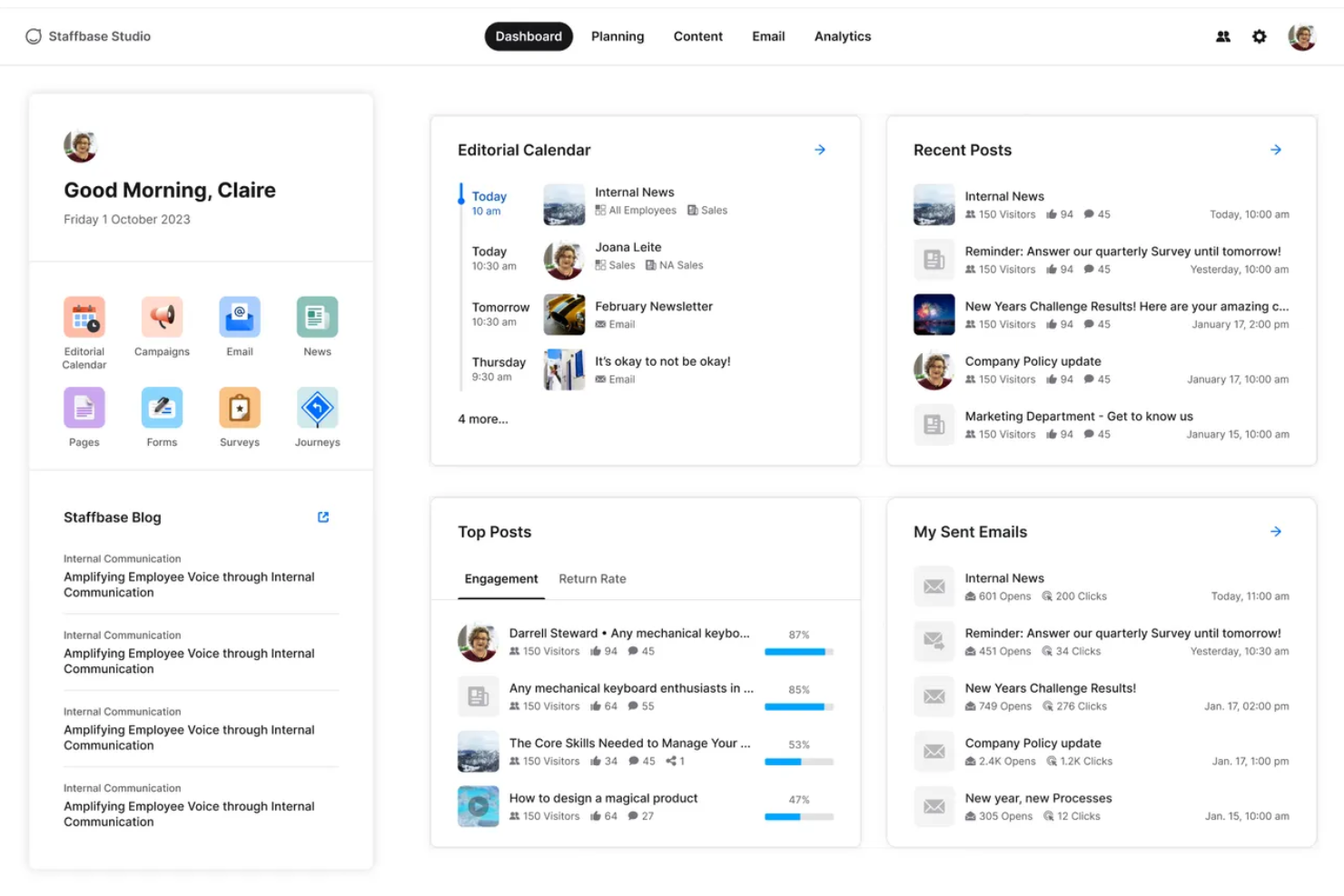
Staffbase is an employee communication platform that brings together a branded mobile app, multi-channel messaging, an editorial intranet, AI writing tools, and engagement analytics into one system built for both desk-based and frontline workers.
Who Is Staffbase Best For?
Staffbase is a strong fit for mid-size to enterprise organizations with large frontline or deskless workforces that need to reach every employee through a single, AI-powered communication platform.
Why I Picked Staffbase
Staffbase earns its spot on my shortlist because AI isn't a bolt-on feature here—it's woven into every layer of the platform. I'm particularly impressed by Companion, which helps communicators draft, rewrite, and adjust tone directly in the editorial interface, and Navigator, an employee-facing chatbot that answers HR questions using only verified company content. The auto-translation across 110+ languages keeps analytics unified in a single post, which I think is a genuine edge for global teams.
Staffbase Key Features
- Mandatory read acknowledgments: Employees confirm they've read specific posts, generating a compliance-grade audit trail for policy and safety communications.
- Pulse surveys: Built-in surveys let employees respond directly from the mobile app, with results tracked via participation metrics and NPS scores.
- Employee directory with org chart: A searchable directory with customizable profiles and org chart visualization supports people discovery across large, distributed teams.
- Microsoft 365 integration: Staffbase connects natively with Teams, SharePoint, and Microsoft Copilot, surfacing company content directly within the tools employees already use.
Staffbase Integrations
Staffbase offers native integrations with Workday, ADP Workforce, SAP, Oracle, Microsoft 365, Okta, Google Drive, and ServiceNow. It also provides open APIs, an SDK, and MCP Server support for custom integrations and AI agent connections.
Pros and Cons
Pros:
- Multilingual posts unify analytics and feedback
- Native mobile app offers offline capability
- AI embedded in writing and analytics tools
Cons:
- Email content design options are limited
- No transparent or self-serve pricing available
Best for mobile-first teams
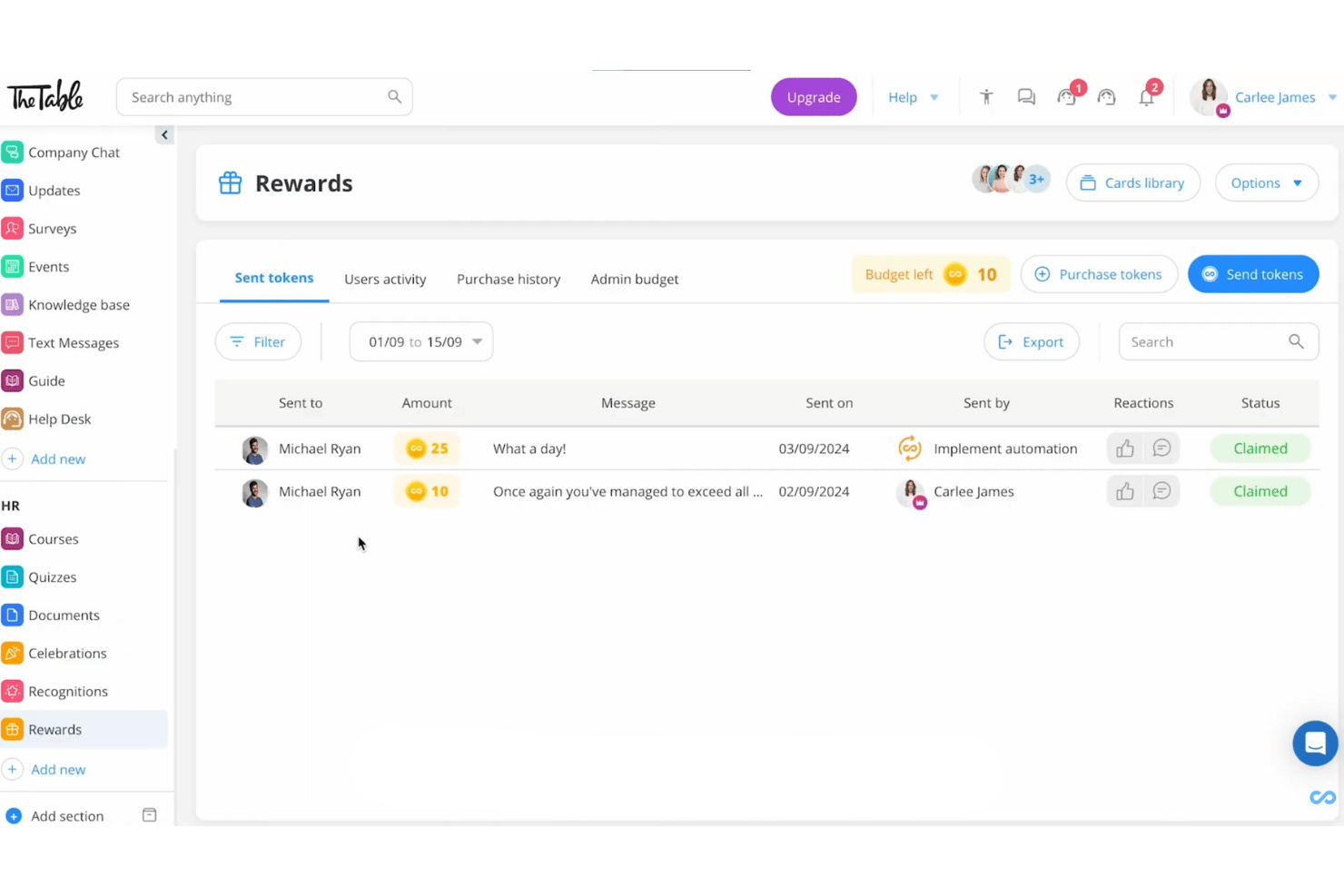
Connecteam is a mobile-first employee communication app built for deskless and frontline teams, offering chat, company-wide broadcasts, a knowledge base, surveys, recognition tools, and HR content distribution in a single platform.
Who Is Connecteam Best For?
Connecteam is a strong fit for frontline and deskless teams in industries like hospitality, retail, construction, and healthcare, where most employees work without a corporate email or desk.
Why I Picked Connecteam
Connecteam earns its spot on my shortlist because it's purpose-built for the one scenario most communication tools struggle with: reaching workers who have no corporate email, no desk, and no time to log into a browser. I love that employees can join via QR code or phone number, and the Updates feed delivers segmented broadcasts with AI auto-translation, so a multilingual construction or hospitality crew all receive messages in their own language without any extra admin work.
Connecteam Key Features
- Read & Sign workflows: Employees can review and e-sign policy documents or compliance materials directly in the app, with admin tracking of completion status.
- Knowledge Base: A centralized content repository where teams can store and access SOPs, handbooks, and company policies from any mobile device.
- Pulse surveys and polls: Admins can send anonymous or standard surveys to collect employee feedback and sentiment from frontline workers on mobile.
- Token-based recognition and rewards: Managers and peers can send recognition with redeemable reward tokens, which employees can exchange for gift cards from major vendors.
Connecteam Integrations
Connecteam offers native integrations with ADP Workforce Now, BambooHR, Gusto, QuickBooks Online, Xero, Paychex Flex, Google, Okta, and Microsoft Azure Active Directory, plus an open API and Zapier.
Pros and Cons
Pros:
- Read receipts and e-signatures for compliance needs
- Multilingual auto-translation for announcements and chat
- Onboards frontline workers without email addresses
Cons:
- Reporting lacks dashboards and sentiment analysis
- No offline mode for low-connectivity sites
New Product Updates from Connecteam

Connecteam Expands Break and Timesheet Controls
Connecteam adds flexible break thresholds, personalized policies, auto-end options, a centralized exceptions report, and improved timesheet issue visibility to help teams manage breaks and timesheets more effectively. For more information, visit Connecteam’s official site.
 .
.
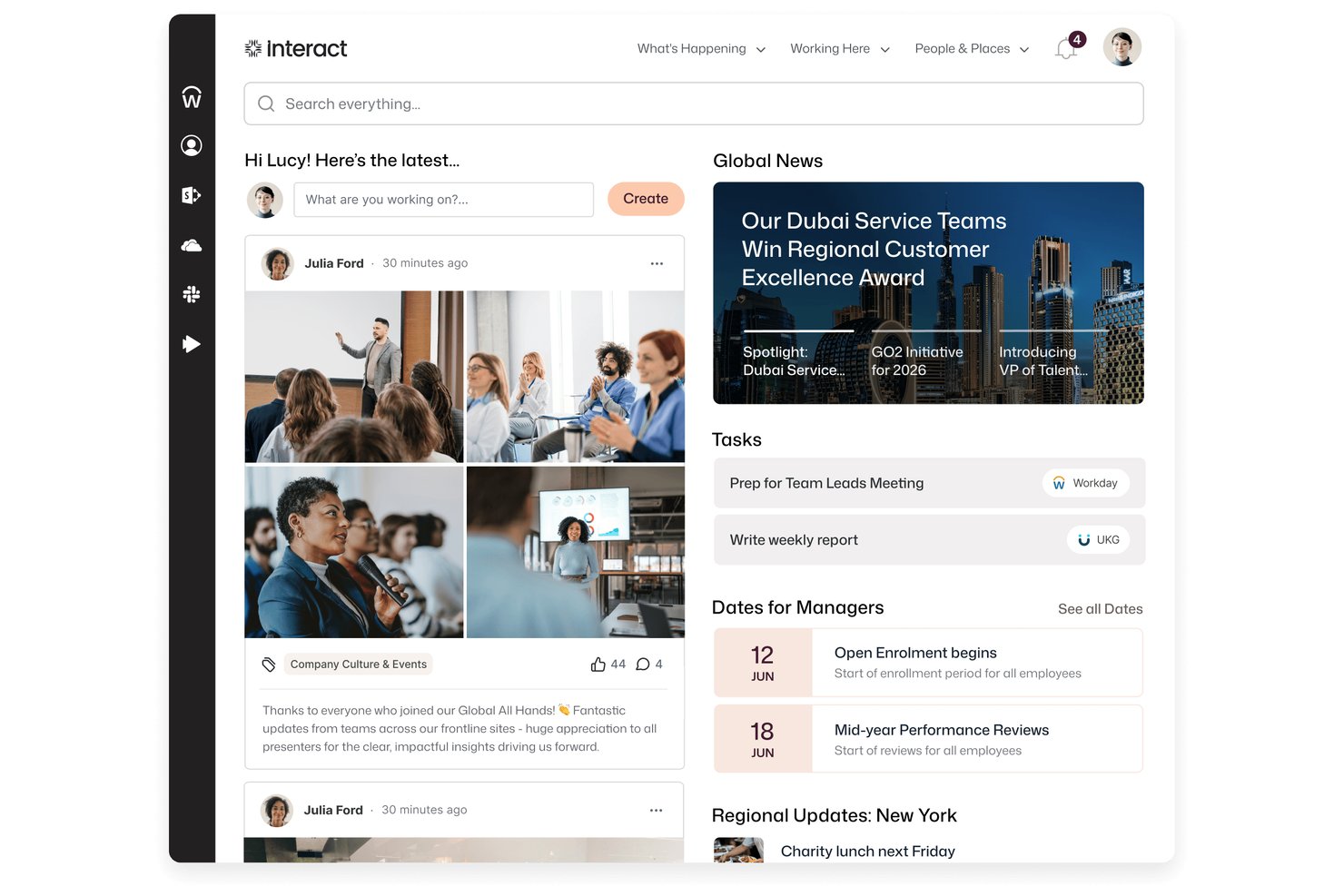
Interact Software is an AI-native employee experience platform that brings intranet, internal communications, HR tools, and multichannel broadcast messaging together in one system.
Who Is Interact Software Best For?
Interact Software is a strong fit for enterprise internal communications teams managing dispersed workforces across multiple locations, channels, and languages.
Why I Picked Interact Software
I picked Interact Software as one of the best because its publish-once multichannel delivery is genuinely hard to replicate: one update goes to the intranet, email, mobile app, SMS, Teams, Slack, and digital signage simultaneously, with targeting by role and location already baked in. I also like that mandatory-read acknowledgment tracking means you can confirm who's actually seen a critical policy update, not just who received it. Auto-translation across more than 100 languages makes that same message land for a global frontline workforce without any extra steps.
Interact Software Key Features
- Pulse surveys and polls: Run custom surveys and quick polls to collect employee feedback and measure sentiment across your workforce.
- Cue AI assistant: An AI layer that answers employee questions in plain language, links responses to source content, and can complete actions in connected systems like Workday and ServiceNow.
- Employee communities and forums: Let employees create and participate in topic-based communities, discussion forums, and social feeds for peer-to-peer collaboration.
- Editorial calendar and campaign management: Plan, schedule, and manage internal communications campaigns from a centralized calendar view.
Interact Software Integrations
Interact Software offers marketplace integrations with Workday, ServiceNow, Slack, Salesforce, Google, Box, Concur, SuccessFactors, Zendesk, and Microsoft 365, including Microsoft Teams. It also provides REST API and webhook access for custom integrations.
Pros and Cons
Pros:
- Reviewers praise centralized company news
- Mandatory-read tracking supports policy follow-through
- Publish announcements across seven channels
Cons:
- Complex pages take time to maintain
- Engagement analytics can require staff exports

Haystack
Best for HRIS-synced audience targeting
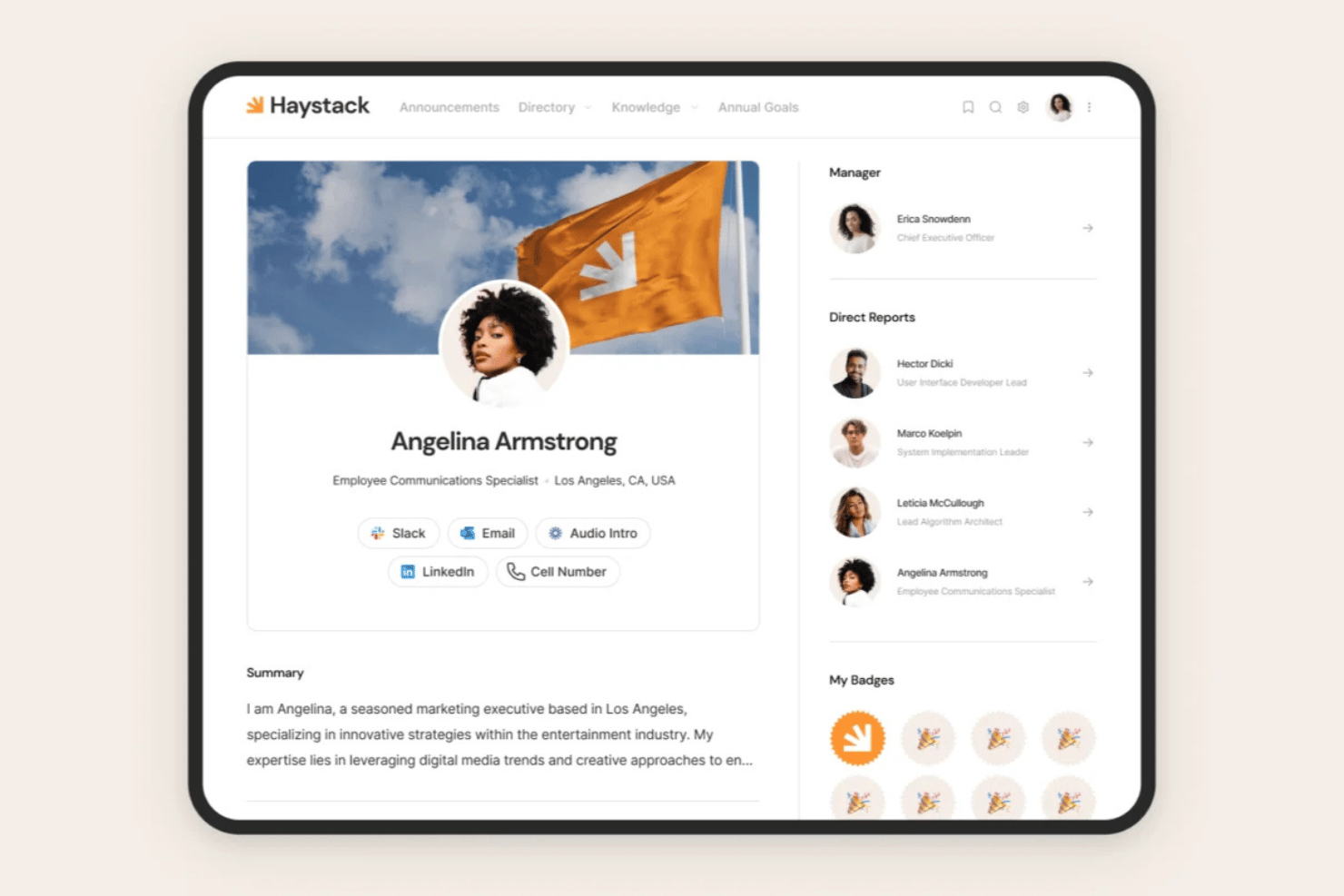
Haystack is an employee communication and intranet platform that combines multi-channel broadcasts, a social intranet feed, peer recognition, knowledge management, and HRIS-synced audience targeting in one place.
Who Is Haystack Best For?
Haystack is a strong fit for HR and internal communications teams managing mixed workforces—where some employees are desk-based and others aren't—across organizations with complex HRIS environments.
Why I Picked Haystack
I've included Haystack in my top picks because its HRIS-synced audience targeting is genuinely best-in-class. With 50+ HRIS integrations and SCIM auto-provisioning, distribution lists update automatically when employees change roles or locations. I also love the Must Read feature, which tracks mandatory acknowledgment and sends follow-up reminders, so no critical message slips through in a mixed desk and frontline workforce.
Haystack Key Features
- Multi-channel broadcasts: Compose one message and publish it simultaneously across email, SMS, push notifications, Slack, Microsoft Teams, and the in-app feed.
- Social intranet feed: A social-media-style feed with threaded comments, emoji reactions, and user-generated posts for two-way communication between employees and leadership.
- AI-powered translation: Automatically translate content into 50+ languages, making communications accessible to multilingual and globally distributed workforces.
- Emergency Alerts: Push urgent, time-sensitive messages to employees via SMS without requiring a Wi-Fi connection or corporate email address.
Haystack Integrations
Haystack offers 50+ integrations, including Workday, BambooHR, ADP, UKG, Slack, Microsoft 365, Confluence, SharePoint, and Okta. Its open API supports custom integrations, while SCIM and SAML enable automated provisioning and single sign-on.
Pros and Cons
Pros:
- AI translation covers over 50 languages
- HRIS-synced audience targeting updates automatically
- Mobile app supports frontline workers without email
Cons:
- No native direct messaging or team chat
- Sentiment analytics require add-on purchase
Workvivo
Best for recognition-driven culture comms
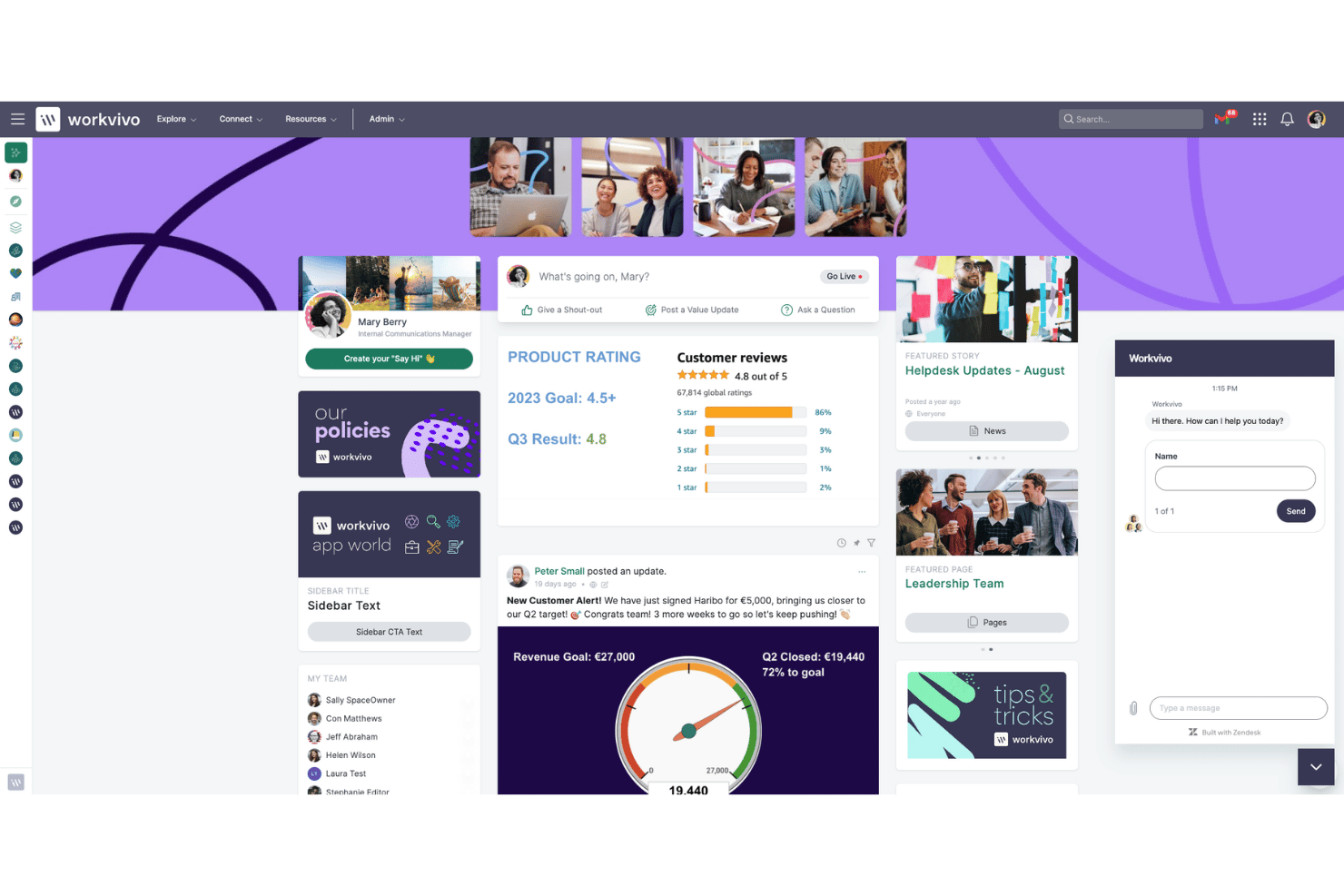
Workvivo is an employee communication platform that blends a social-media-style activity feed with structured broadcasting tools, peer recognition, lifecycle automation, and AI-powered engagement analytics.
Who Is Workvivo Best For?
Workvivo is a strong fit for mid-to-large enterprises with mixed workforces—desk and frontline—where peer recognition and culture-building are as important as reaching every employee.
Why I Picked Workvivo
I picked Workvivo as one of the best because recognition is genuinely baked into how communication works here, not bolted on as a separate module. Peer-to-peer Shoutouts tie directly to company values, so when a frontline worker in a warehouse gets recognized publicly in the activity feed, it reinforces culture in the same breath as it informs. I also love that Read & Acknowledge lets me require confirmation on critical posts, giving me a compliance-grade audit trail without pulling employees into a separate system.
Workvivo Key Features
- Workvivo Journeys: Automates lifecycle communications—like onboarding sequences and policy rollouts—triggered by employee data attributes.
- Workvivo TV: Turns physical screens in warehouses, retail floors, or factories into live content channels with no per-device login required.
- Auto-translation: Automatically translates content into 90+ languages in real time for global and multilingual workforces.
- Seer people intelligence: Runs AI-powered sentiment analysis and 12-factor engagement surveys with a built-in Radar Heat Map for spotting risk and opportunity.
Workvivo Integrations
Workvivo advertises 40+ out-of-the-box integrations, including Workday, UKG, BambooHR, SAP SuccessFactors, Microsoft 365, Google Workspace, Slack, Salesforce, Okta, and Zoom. REST APIs and webhooks support custom connections.
Pros and Cons
Pros:
- Multilingual auto-translation reaches global teams
- Built-in peer recognition and shoutout features
- Mandatory read and acknowledge for compliance
Cons:
- Notification overload can bury important updates
- Real-time chat requires separate purchase
Blink
Best for frontline workers
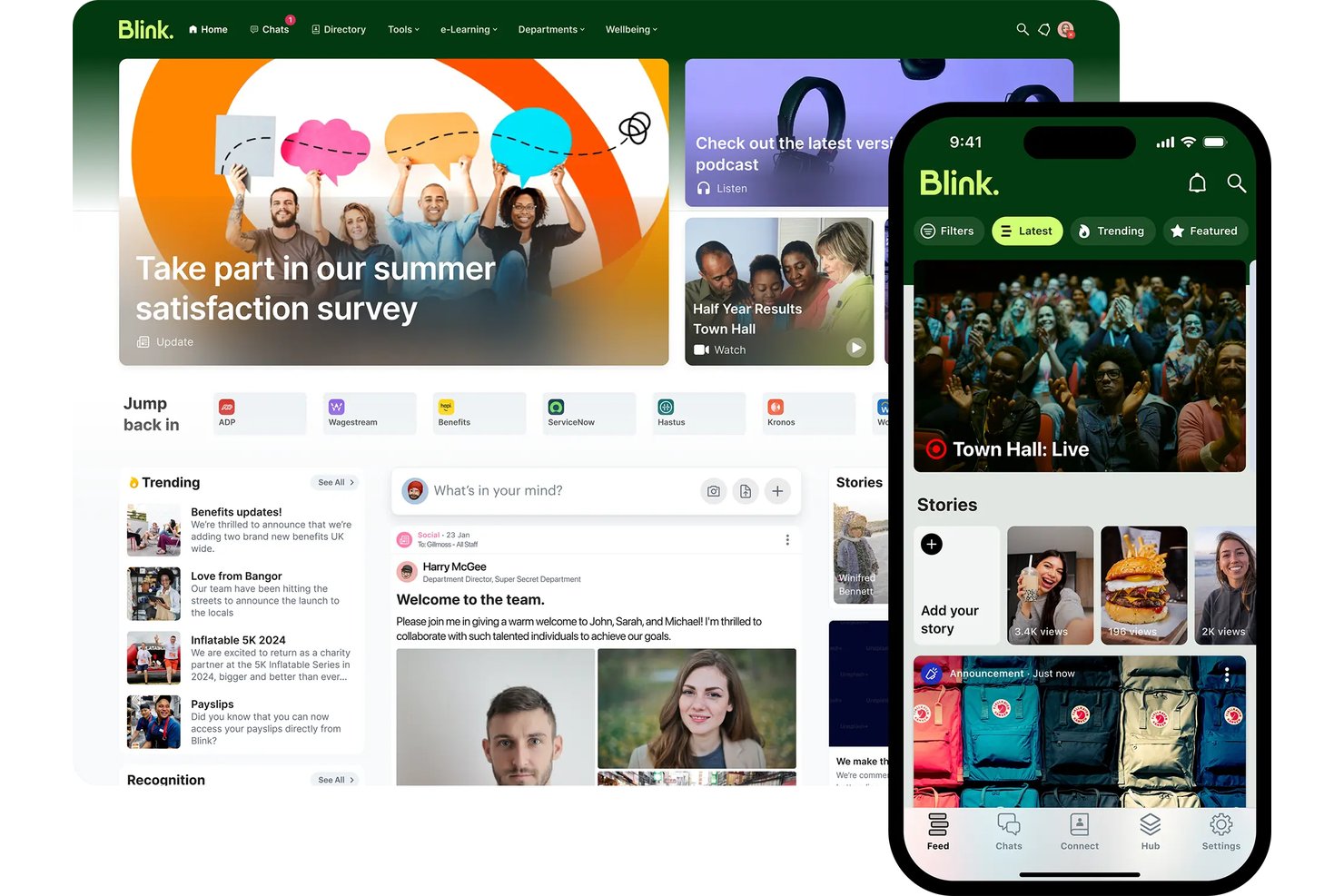
Blink is a mobile-first employee communication app built around chat, a social news feed, knowledge hub, surveys, and recognition tools for reaching frontline and deskless workforces without corporate email.
Who Is Blink Best For?
Blink is a strong fit for organizations with large frontline or deskless workforces—think retail, hospitality, logistics, and healthcare—where reaching employees without corporate email is a daily reality.
Why I Picked Blink
Blink earns its spot on my shortlist because no other tool I've reviewed is as deliberately built for workers who don't sit at a desk. I love that employees at a Domino's or Dollar Tree location can onboard with just a phone number or QR code—no corporate email, no IT ticket. Blink's AI Listening Agent is also genuinely impressive: it runs adaptive, conversational pulse surveys rather than static forms, which is why response rates are claimed to be 3x higher than traditional methods.
Blink Key Features
- Mandatory read acknowledgments: Require employees to confirm they've read specific posts or policies, with audit logs and automated reminders for non-readers.
- Blink Kudos recognition: Employees can send peer-to-peer recognition posts visible on the public newsfeed, with customizable award types.
- Knowledge Hub: A centralized content repository for storing and governing policies, procedures, and onboarding materials with access controls.
- Employee Journeys: Structured onboarding and milestone content paths that guide new hires through setup without requiring IT involvement.
Blink Integrations
Blink has 50+ integrations, including Workday, ADP, iTrent, Cornerstone, Okta, Microsoft 365, Google Workspace, ServiceNow, and Jira. Enterprise customers can use the open API and webhooks for custom integrations.
Pros and Cons
Pros:
- AI surveys drive high response from workers
- Mandatory read compliance for frontline policies
- Employees onboard with just a phone number
Cons:
- Posts can’t be edited by admins after publishing
- Advanced analytics require higher plan tiers

Poppulo
Best for internal comms analytics and AI insights
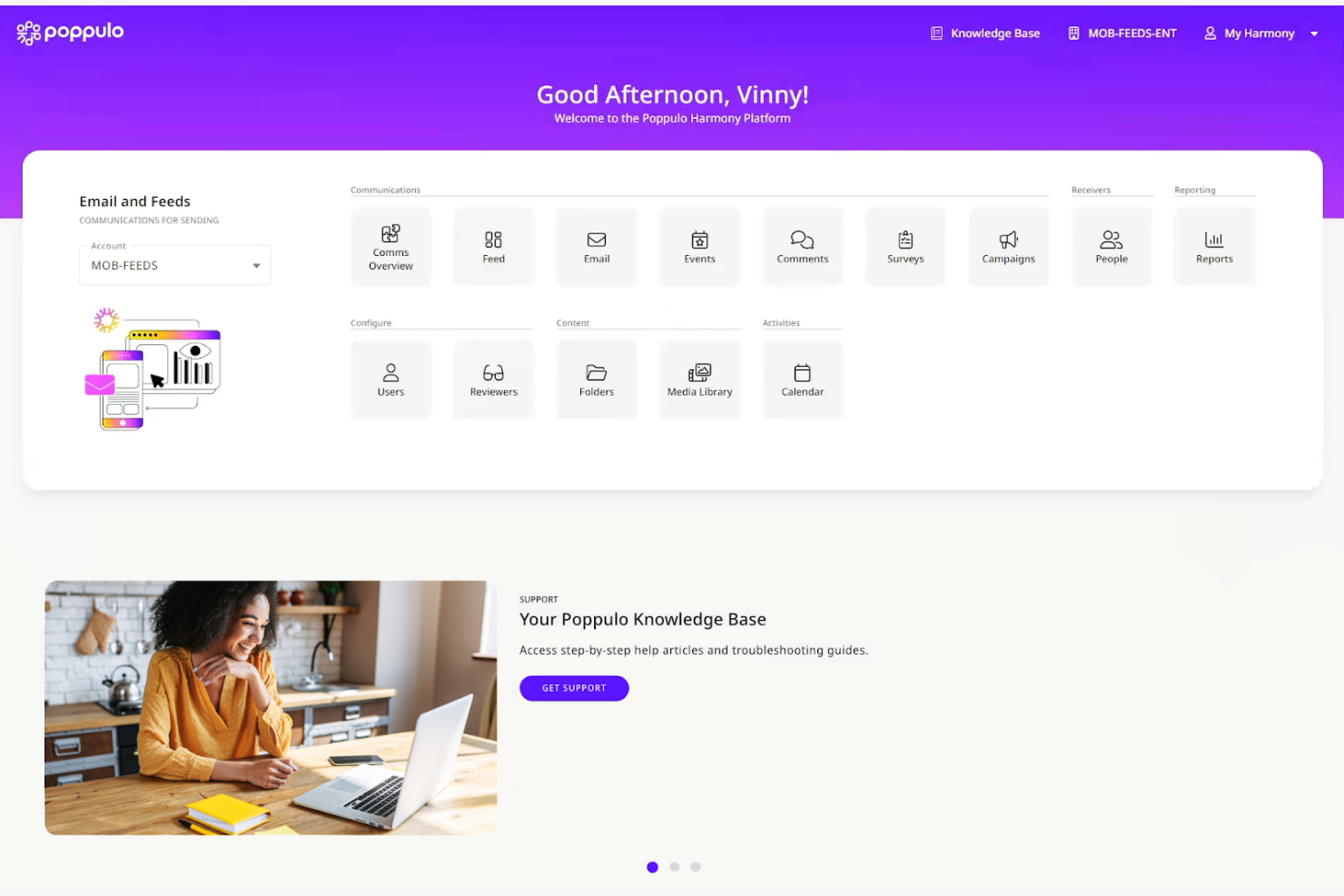
Poppulo is an enterprise employee communication platform that unifies email, mobile app, digital signage, Microsoft Teams, and SharePoint publishing into a single interface, with built-in AI content tools, cross-channel analytics, and audience segmentation.
Who Is Poppulo Best For?
Poppulo is a strong fit for enterprise internal communications teams that need to reach both desk-based and frontline employees across multiple channels from one platform.
Why I Picked Poppulo
Poppulo earns its spot on my shortlist because the analytics depth here is genuinely unlike anything else I've seen in the employee comms space. The Comms Coach chatbot benchmarks your email performance against industry data in plain language, and the Analyze AI Agent surfaces sentiment patterns across channels without requiring you to dig through raw reports. I also love that cross-channel dashboards cover email, mobile, digital signage, and intranet in one view, so you're never piecing together results from separate tools.
Poppulo Key Features
- Multilingual auto-translation: Automatically translates email content into 54+ languages, including right-to-left scripts, using AI-assisted machine translation with a human-in-the-loop review workflow.
- Mandatory read acknowledgments: Tracks whether employees have read specific communications and requires documented confirmation, designed for safety alerts and compliance-sensitive policy updates.
- HRIS-synced audience segmentation: Syncs directly with Workday, SAP, Oracle PeopleSoft, and Microsoft Entra ID to build and update employee distribution lists automatically based on live HR data.
- Branded frontline mobile app: A white-labeled iOS and Android app that gives deskless and frontline workers access to company communications without requiring a corporate email address.
Poppulo Integrations
Poppulo offers native integrations across the Microsoft ecosystem, including Microsoft 365 and Entra ID, plus Workday, SAP, Oracle PeopleSoft, Okta, Power BI, Tableau, and Canva. An API supports custom integrations.
Pros and Cons
Pros:
- Supports must-read employee acknowledgments
- AI-powered content and sentiment insights included
- Deep analytics across all communication channels
Cons:
- Some AI agent features still unreleased
- Email template customization options are limited

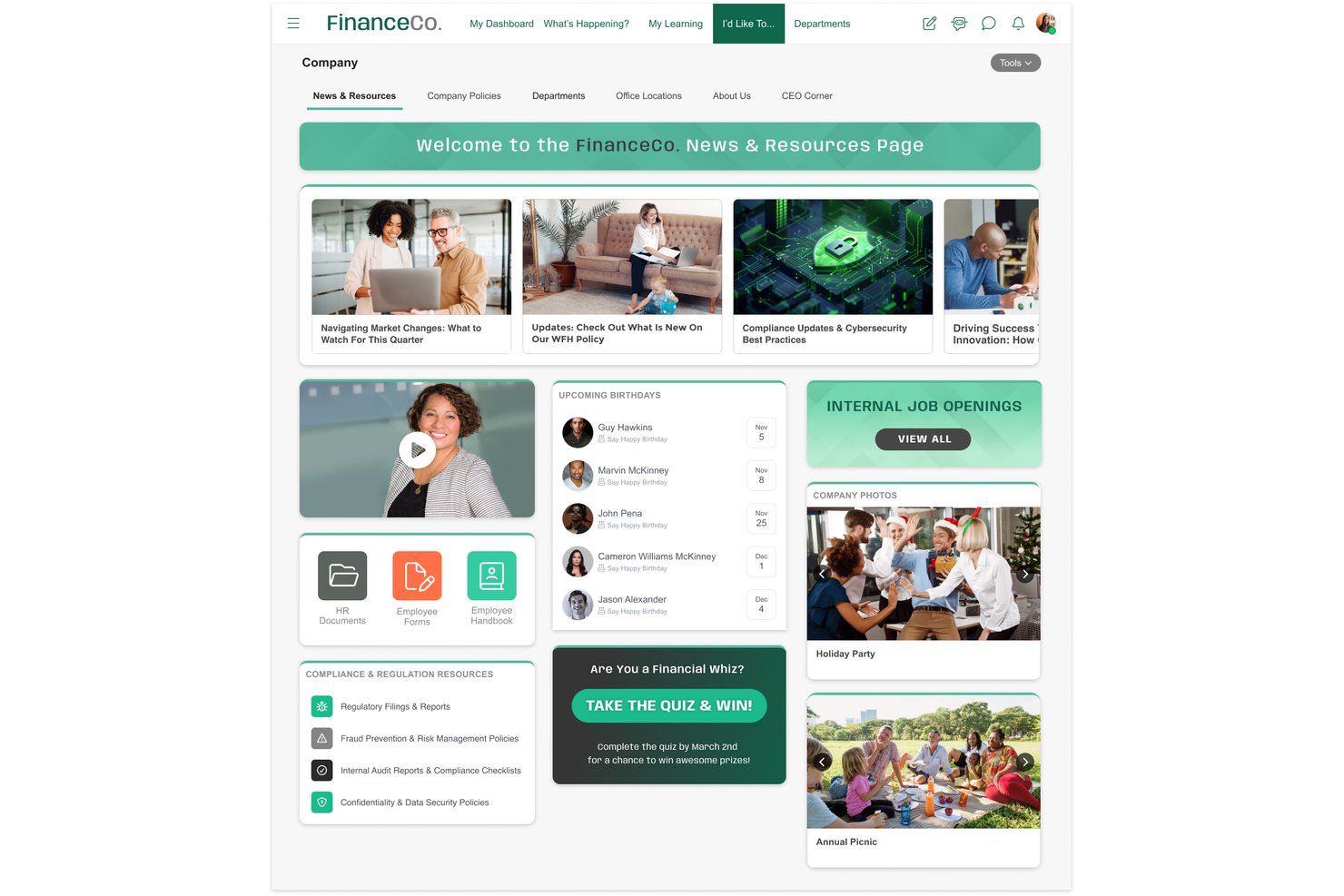
MangoApps is an employee communication platform that unifies multi-channel broadcasting, frontline mobile access, campaign journeys, pulse surveys, and recognition into a single app.
Who Is MangoApps Best For?
MangoApps is a strong fit for HR and internal comms teams in regulated industries like healthcare, government, and manufacturing that need documented proof of message receipt across a mixed desk and frontline workforce.
Why I Picked MangoApps
MangoApps earns its spot on my shortlist because of how seriously it takes compliance in regulated industries. I'm particularly impressed by its mandatory-read acknowledgment system: you can send a policy update, track exactly who has confirmed receipt, collect e-signatures, and trigger automated follow-ups to anyone who hasn't responded. For healthcare or government teams, that's documented proof of message receipt built directly into the broadcast workflow. Campaign Journeys also let you sequence multi-channel messages across mobile, SMS, and digital signage from a single publish action.
MangoApps Key Features
- Campaign journeys: Build sequenced, multi-channel message campaigns that automatically deliver communications across mobile, SMS, and email in a defined order.
- Pulse surveys and eNPS: Run anonymous pulse surveys, eNPS, onboarding, and exit surveys with conditional logic, auto-reminders, and trend tracking built in.
- 50-language auto-translation: Automatically publish posts in 50+ languages at the point of sending, with employees receiving content in their preferred language without any extra steps.
- Live broadcasting: Host live town halls and leadership updates with real-time multilingual interpretation streamed directly through the platform.
MangoApps Integrations
MangoApps offers 200+ integrations, including Workday, UKG, ADP Workforce Now, Microsoft Teams, SharePoint, OneDrive, Google Drive, and Cornerstone. Its open REST API, webhooks, and SCIM 2.0 support custom connectivity and provisioning.
Pros and Cons
Pros:
- Campaigns deploy across email, SMS, and signage
- Offline mobile app access for frontline staff
- Built-in read receipts with e-signatures
Cons:
- In-platform file collaboration requires Microsoft licenses
- Feature volume makes navigation overwhelming
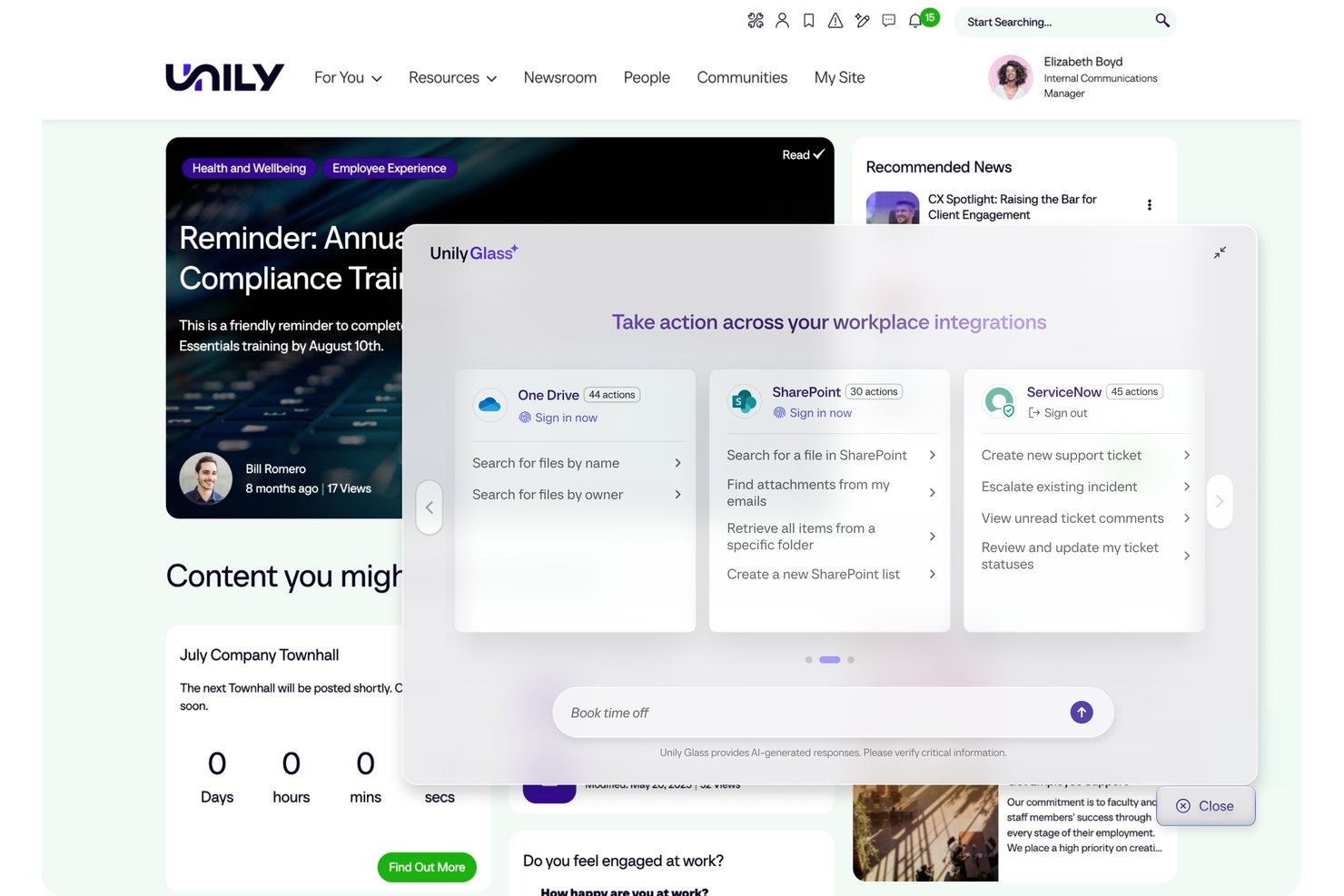
Unily is an enterprise employee communication and digital workplace platform that combines multi-channel broadcasting, AI-powered content creation, mobile access for frontline workers, and engagement analytics in one environment.
Who Is Unily Best For?
Unily is built for large enterprises with 1,000+ employees that need to reach both desk-based and frontline workers through a centralized communications hub.
Why I Picked Unily
Unily earns its spot on my list because its Broadcast Center is genuinely purpose-built for leadership communications at scale. I love that a single communicator can push an executive message across email, Microsoft Teams, Slack, and mobile push simultaneously, with AI auto-translation into 40+ languages handling multilingual workforces in one step. Mandatory read acknowledgments with tracking make compliance-grade documentation possible for safety and policy updates.
Unily Key Features
- Unily Glass: A conversational AI interface that lets employees complete tasks across connected systems like Workday and ServiceNow without leaving the platform.
- Indi AI agent: Drafts communications, generates images and video, and builds branded intranet pages from a single prompt within governance workflows.
- ScreenCloud digital signage: Extends reach to frontline workers without personal devices by displaying content on shared screens in break rooms and production floors.
- Pulse surveys and ideation portal: Captures employee feedback and ideas directly within the platform alongside broadcast communications.
Unily Integrations
Unily offers 50+ native integrations, including Workday, ServiceNow, Salesforce, Slack, ScreenCloud, and Microsoft 365. REST APIs, SDKs, and webhooks support custom integrations.
Pros and Cons
Pros:
- Mandatory read tracking supports compliance needs
- AI auto-translation handles 40+ languages
- Broadcasts reach both desk and frontline workers
Cons:
- Real-time chat costs extra per add-on
- Custom pricing requires direct contact
Andre apper for ansattkommunikasjon
Her er noen flere alternativer for apper for ansattkommunikasjon som ikke kom med på listen min, men som likevel er verdt å ta en titt på:
- Simpplr
For AI-powered intranet and comms
- Haiilo
Social intranet features
- LumApps
For enterprise-wide multilingual broadcasts
- Hub
For all-inclusive pricing and free onboarding
- Slack
For integrations
- Microsoft Teams
For Microsoft 365-native team messaging
- Beekeeper
For QR code onboarding without email
- WorkJam
For deskless worker communications
- Cerkl Broadcast
For personalized employee news digests
- Firstup
For enterprise journey-based comms
- Microsoft Viva Engage
For Microsoft 365-native community comms
- YOOBIC
For multi-store retail communications


How I Evaluate Employee Communication Apps
I split my evaluation into baseline features every tool must cover and the differentiators that separate a true frontline comms platform from a basic chat app.
Core Functionality (Table Stakes For This List)
When I'm selecting tools for my list, I rank each one on a scale from 0 (does not offer the functionality) to 5 (excels in this area) for each core functionality listed below. I then calculate the tool's total score into a percentage, using 75% as a benchmark to help assess its overall fit for the list.
- Multi-Channel Messaging: I look at whether the platform unifies chat, DMs, group channels, and push notifications—or forces teams to patch together separate tools to cover basic formats.
- Company-Wide Broadcasts: I evaluate targeting depth—specifically whether admins can segment by department or location, schedule sends, and require acknowledgment on critical announcements.
- Mobile Employee Access: I check whether frontline workers can sign up and log in without a corporate email address, and whether the app delivers full functionality on iOS and Android.
- Directory & Segmentation: I look for dynamic employee groups that sync from an HRIS or Active Directory, so messaging audiences stay accurate without manual list maintenance.
- Engagement Analytics: I evaluate whether communicators can track reach, read rates, and reactions at the campaign level—not just see a basic delivery confirmation on individual messages.
- Content & Media Sharing: I check whether the platform supports in-app video playback, document previews, and centralized file libraries rather than simple attachment uploads.
Once I have a list of tools that meet the criteria, I consider what sets each platform apart.
Differentiating Factors (What Sets Vendors Apart)
Here's how I compare and contrast different vendors:
Standout Features
Mandatory read acknowledgments matter most for safety-critical or policy-driven communications—I look for compliance-grade confirmations with follow-up nudges, not just a basic "seen" receipt. For global workforces, multilingual auto-translation is essential; I check whether translation happens in-message and in real time. I also evaluate pulse survey tools, specifically whether feedback is collected in the same channel as the broadcast, so leaders aren't stitching together separate listening tools.
Beyond Features
Pricing structure matters more than most buyers expect. I look at whether deskless workers are billed at a lower rate than desk-based employees, since high-turnover workforces in retail or healthcare can make per-seat costs unpredictable fast. I also check for white-labeling depth—a branded app with custom icons and push notifications lands differently with frontline teams than a generic platform. Finally, HRIS integration quality determines whether your employee directory stays accurate automatically or requires someone to manually manage it every time there's a hire or departure.
Slik velger du apper for ansattkommunikasjon
Det er lett å gå seg vill i lange funksjonslister og kompliserte prismodeller. For å hjelpe deg med å holde fokus mens du går gjennom den unike prosessen med å velge programvare, får du her en sjekkliste over faktorer du bør ha i tankene:
| Faktor | Hva du bør vurdere |
|---|---|
| Skalerbarhet | Kan appen vokse sammen med teamet ditt? Vurder fremtidig vekst og om verktøyet støtter større team eller økte datamengder uten ytelsesproblemer. |
| Integrasjoner | Kan den integreres med verktøyene du allerede bruker? Kontroller kompatibiliteten med eksisterende programvare, for eksempel e-post, kalendere og systemer for prosjektstyring. |
| Tilpasningsmuligheter | Kan du tilpasse den etter behovene dine? Se etter alternativer for å tilpasse arbeidsflyter, varsler og brukerroller slik at de passer til de spesifikke prosessene dine. |
| Brukervennlighet | Er den brukervennlig for alle teammedlemmer? Vurder hvor lang tid det tar å lære løsningen, og om det finnes opplæringsressurser som gjør det enklere å ta den i bruk. |
| Implementering og innføring | Hvor raskt kan du komme i gang? Vurder tiden og ressursene som kreves for oppsett, opplæring og full utrulling i hele organisasjonen. |
| Kostnad | Passer den inn i budsjettet ditt? Sammenlign prisplaner, skjulte gebyrer og verdien du får for prisen. Vurder langsiktige kostnader og potensiell avkastning på investeringen. |
| Sikkerhetstiltak | Er kommunikasjonen din sikker? Se etter kryptering, tiltak for databeskyttelse og samsvar med bransjestandarder for å sikre informasjonen. |
| Tilgjengelig kundestøtte | Når kan du få hjelp? Kontroller om kundestøtte er tilgjengelig i arbeidstiden din og gjennom foretrukne kommunikasjonskanaler som telefon, chat eller e-post. |
Hva er kommunikasjonsapper for ansatte?
Kommunikasjonsapper for ansatte er digitale verktøy som er utviklet for å legge til rette for kommunikasjon og samarbeid i organisasjoner. Disse verktøyene brukes vanligvis av HR-medarbeidere, teamledere og ansatte i ulike bransjer for å forbedre informasjonsdeling og teamkoordinering. Funksjoner for meldinger, videokonferanser og fildeling bidrar til å holde teamene tilkoblet og informert. Samlet sett forbedrer disse verktøyene effektiviteten på arbeidsplassen og fremmer et mer sammensveiset arbeidsmiljø.
Funksjoner
Her er de viktigste funksjonene alle gode kommunikasjonsapper for ansatte bør ha:
- Meldinger: Legger til rette for kommunikasjon i sanntid mellom teammedlemmer, slik at informasjon kan utveksles raskt.
- Videokonferanser: Gjør virtuelle møter ansikt til ansikt mulig, noe som forbedrer samarbeid og engasjement på avstand.
- Fildeling: Forenkler prosessen med å sende og motta dokumenter og sørger for at alle har tilgang til nødvendige ressurser.
- Oppgavehåndtering: Hjelper team med å organisere og prioritere oppgaver, noe som øker produktiviteten og ansvarligheten.
- Tilpassbare varsler: Lar brukerne tilpasse varsler etter egne preferanser, slik at distraksjoner reduseres og viktige oppdateringer får oppmerksomhet.
- Analyse og rapportering: Gir innsikt i kommunikasjonsmønstre og engasjement, slik at team kan forbedre strategiene sine.
- Mobiltilgang: Sørger for at ansatte kan holde kontakten og være informert, også når de er på farten.
- Sikkerhetstiltak: Beskytter sensitiv informasjon med kryptering og samsvar med bransjestandarder.
- Integrasjonsmuligheter: Kobler sammen eksisterende verktøy som e-post og kalendere og skaper en samlet arbeidsflyt.
- Tilgang uten nett: Lar brukerne se og samhandle med innhold uten internettilkobling, slik at de har kontinuerlig tilgang til informasjon.
Fordeler
Implementering av kommunikasjonsapper for ansatte gir flere fordeler for teamet og virksomheten din. Her er noen av fordelene du kan se frem til:
- Bedre samarbeid: Meldingsapper i sanntid og videokonferanser hjelper teamet ditt med å samarbeide effektivt, uavhengig av hvor medlemmene befinner seg.
- Økt produktivitet: Funksjoner for oppgavehåndtering bidrar til å holde alle organiserte og på rett spor, noe som øker den samlede effektiviteten.
- Større engasjement: Tilpassbare varsler og sosiale funksjoner holder de ansatte informert og tilkoblet og fremmer en følelse av fellesskap.
- Bedre beslutningstaking: Analyse og rapportering gir verdifulle måltall og innsikt i kommunikasjonstrender, slik at du kan ta velinformerte valg.
- Sikker kommunikasjon: Sikkerhetstiltak beskytter sensitiv informasjon og gir deg trygghet når du deler data.
- Fleksibilitet: Mobiltilgang og tilgang uten nett sørger for at teamet kan holde kontakten og være produktivt, også når medlemmene er på farten.
- Effektiviserte arbeidsflyter: Integrasjonsmuligheter kobler sammen verktøyene du allerede bruker og skaper et mer effektivt arbeidsmiljø.
Kostnader og priser
Ved valg av apper for medarbeiderkommunikasjon er det nødvendig å forstå de ulike prismodellene og abonnementene som er tilgjengelige. Kostnadene varierer basert på funksjoner, teamstørrelse, tillegg og mer. Tabellen nedenfor oppsummerer vanlige abonnementer, gjennomsnittsprisene deres og typiske funksjoner som er inkludert i løsninger for apper for medarbeiderkommunikasjon:
Sammenligningstabell for abonnementer for apper for medarbeiderkommunikasjon
| Abonnementstype | Gjennomsnittspris | Vanlige funksjoner |
|---|---|---|
| Gratisabonnement | $0 | Grunnleggende meldinger, begrenset fildeling og grunnleggende oppgavehåndtering. |
| Personlig abonnement | $5-$15/bruker/måned | Utvidede meldinger, videokonferanser, fildeling og grunnleggende integrasjoner. |
| Bedriftsabonnement | $20-$100/bruker/måned | Avansert oppgavehåndtering, analyse, tilpassbare varsler og flere integrasjonsalternativer. |
| Virksomhetsabonnement | $150-$500+/bruker/måned | Full tilpasning, avanserte sikkerhetsfunksjoner, dedikert kundestøtte og omfattende integrasjoner. |
Vanlige spørsmål
Her er noen svar på vanlige spørsmål om apper for medarbeiderkommunikasjon:
Hvordan kan apper for medarbeiderkommunikasjon forbedre fjernarbeid?
Disse appene kan forbedre fjernarbeid betydelig ved å tilby verktøy for medarbeiderkommunikasjon som holder teamet samlet, uavhengig av hvor de befinner seg. De tilbyr funksjoner som direktemeldinger, videosamtaler og fildeling, noe som bidrar til å opprettholde samarbeid og produktivitet. Et fjernteam kan for eksempel bruke videokonferanser til å holde virtuelle møter og meldinger til å holde kontakten gjennom dagen. Disse verktøyene gjør det også mulig å gi tilbakemeldinger og dele oppdateringer i sanntid, slik at alle er oppdatert. Ved å integreres med annen programvare skaper de et sentralisert knutepunkt for alle kommunikasjonsbehov.
Er apper for medarbeiderkommunikasjon sikre?
Ja, de fleste apper for medarbeiderkommunikasjon prioriterer sikkerhet for å beskytte dataene dine. De inkluderer ofte kryptering, databeskyttelsestiltak og samsvar med bransjestandarder. Før du velger et verktøy, bør du se etter funksjoner som ende-til-ende-kryptering og alternativer for brukerautentisering. Det er også lurt å gjennomgå appens personvernerklæring og tjenestevilkår. For sensitive bransjer bør du se etter apper som tilbyr ytterligere sikkerhetssertifiseringer. Regelmessige oppdateringer og støtte fra leverandøren kan også sikre at appen forblir beskyttet mot potensielle trusler.
Kan apper for medarbeiderkommunikasjon bidra til økt engasjement?
Ja, kommunikasjonsapper gjør det enklere for medarbeidere å holde kontakten, dele tilbakemeldinger og holde seg informert. Funksjoner som avstemninger, chatter og kunngjøringer bidrar til at alle føler seg involvert og oppmuntrer til åpen diskusjon, samtidig som de knytter sammen medarbeidernes opplevelser.
Hvordan får jeg teamet mitt til å ta i bruk et nytt kommunikasjonsverktøy?
Få først støtte fra ledelsen, og kommuniser deretter fordelene til teamet. Tilby opplæring, fremhev tidsbesparende funksjoner og innhent tilbakemeldinger under utrullingen. Etter hvert som teamet tilpasser seg, bør du sørge for å ta opp bekymringer raskt for å øke aksepten.
Hvordan støtter apper for medarbeiderkommunikasjon teamsamarbeid?
Apper for medarbeiderkommunikasjon støtter teamsamarbeid ved å tilby plattformer for kommunikasjon og prosjektstyring i sanntid. De lar teammedlemmer dele ideer og tilbakemeldinger umiddelbart, enten via meldinger eller videosamtaler. Funksjoner for oppgavehåndtering gjør det mulig å tildele og følge opp ansvar, slik at alle vet hvilken rolle de har. Et team kan for eksempel bruke delte kalendere til å planlegge møter og verktøy for dokumentsamarbeid til å arbeide med prosjekter samtidig. Disse appene fremmer et samarbeidsorientert miljø ved å holde all kommunikasjon og alle ressurser samlet på ett tilgjengelig sted.
Kan kommunikasjonsapper integreres med annen HR-programvare?
Mange plattformer for medarbeiderkommunikasjon støtter integrasjoner med HRIS-, lønns- eller planleggingsverktøy. Se etter ferdigbygde integrasjoner eller API-er, slik at du kan automatisere oppdateringer eller utløse varsler fra de eksisterende systemene dine.