

De 10 beste programvarene for AI-beslutninger, vurdert i 2026

10 Beste programvare for AI-basert beslutningstaking – kortliste


HR-fagfolk står overfor konstante utfordringer når det gjelder å ta velinformerte beslutninger. Du trenger verktøy for å analysere data, forutsi resultater og ta beslutninger som gagner teamet og organisasjonen din. Programvare for AI-basert beslutningstaking kan tilby disse funksjonene, slik at du kan behandle data effektivt og ta bedre beslutninger.
Disse verktøyene er nødvendige for dem som ønsker å forbedre beslutningsnøyaktigheten og driftseffektiviteten. I denne artikkelen deler jeg mine beste anbefalinger for programvare for AI-basert beslutningstaking, med fokus på deres unike funksjoner og egenskaper, slik at du kan velge det riktige verktøyet for dine behov.
Why Trust Our Software Recommendations
Our team has been testing and reviewing software since 2012. As HR experts ourselves, we know how difficult—and important—it is to choose the right software.
For this guide, we evaluated tools using hands-on testing and independent research, scoring tools using our selection criteria. We also draw on insights from industry thought leaders and practicing HR experts.
Our reviews reflect our human editorial judgment, not a sales pitch.
Expert reviewers:
Sammenligningstabell for programvare for AI-basert beslutningstaking
Denne sammenligningstabellen oppsummerer prisopplysningene for mine beste anbefalinger innen programvare for AI-basert beslutningstaking:
| Tool | Best For | Trial Info | Price | ||
|---|---|---|---|---|---|
| 1 | Best for AI-powered global workforce decisions | Free demo available | From $5/user/month | Website | |
| 2 | Best for early executive talent identification | Free demo available | Pricing upon request | Website | |
| 3 | Best for data visualization | 14-day free trial | Pricing upon request | Website | |
| 4 | Best for business planning | Free demo available | Pricing upon request | Website | |
| 5 | Best for customer engagement | Free demo available | Pricing upon request | Website | |
| 6 | Best for AI model deployment | Free plan available | Pricing upon request | Website | |
| 7 | Best for AI research | Free demo available | Included in Google’s existing subscriptions and developer tools | Website | |
| 8 | Best for real-time insights | Free demo available upon request | Pricing upon request | Website | |
| 9 | Best for non-technical users | Free trial available | From $20/user/month for a 10 user minimum | Website | |
| 10 | Best for decision management | 14-day free trial | Pricing upon request | Website |
Anmeldelse av den beste programvaren for AI-basert beslutningstaking
Nedenfor finner du mine detaljerte sammendrag av den beste programvaren for AI-basert beslutningstaking som kom med på kortlisten min. I anmeldelsene ser jeg på de viktigste funksjonene, fordelene & ulempene, integrasjonene og ideelle bruksområder for hvert verktøy.

Deel HR
Best for AI-powered global workforce decisions
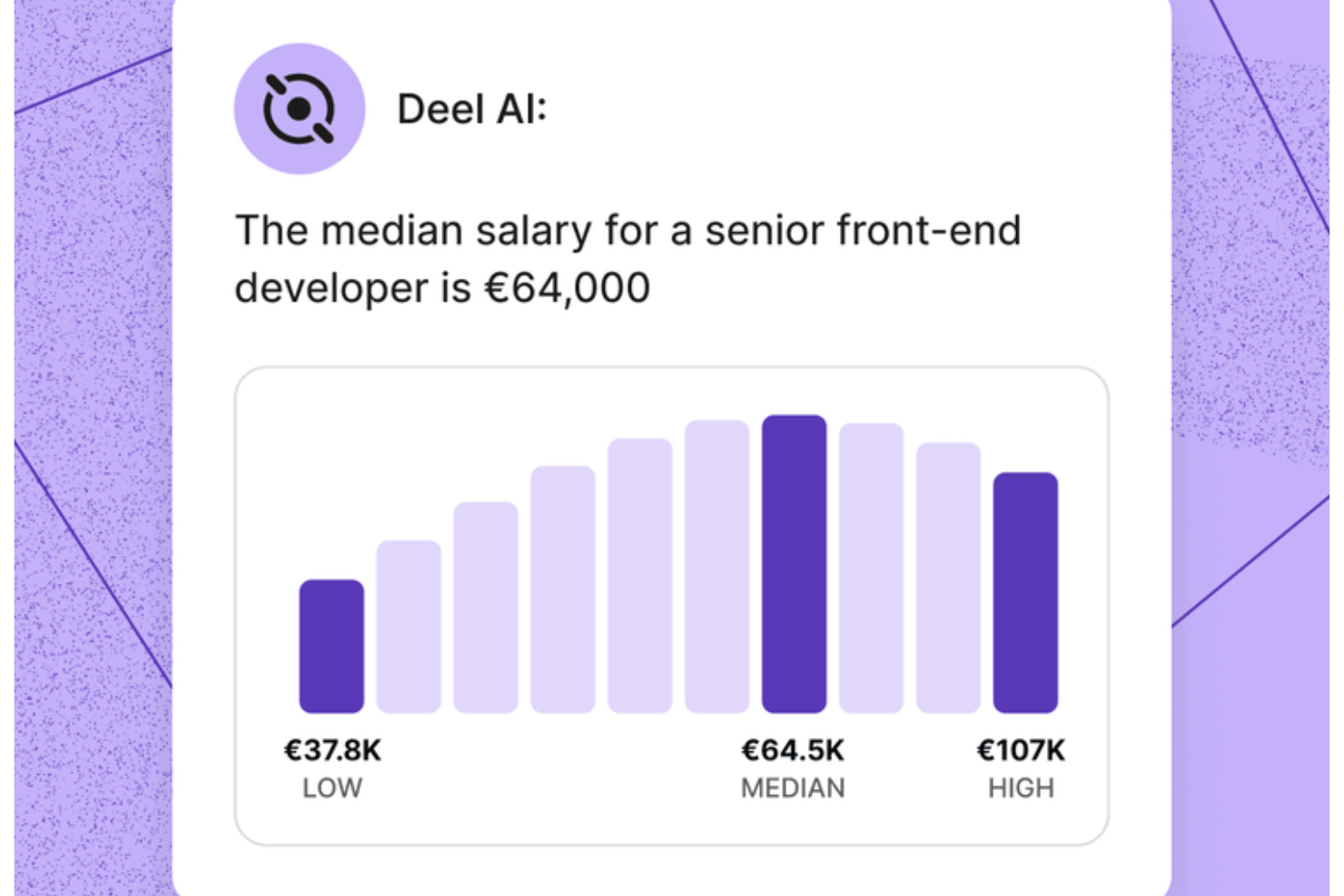
Deel AI gives you a way to handle HR and legal questions with confidence by pairing your team’s data with expert-backed insights from 150+ countries. If you manage a distributed workforce or support teams across regions, you get an always-available assistant that helps you understand compliance requirements, workforce details, and day-to-day HR tasks without digging through documents or waiting on support.
Why I Picked Deel
I picked Deel because its AI assistant acts as a built-in compliance and HR expert that continuously interprets your data and global employment rules. You get features like contextual, page-aware insights that surface summaries, key details, and compliance considerations right where you're working. I also like that Deel AI answers nuanced HR questions — from payslips to local regulations — pulling from a Knowledge Hub built by legal and HR experts across 150+ countries. This makes it a strong fit for anyone needing AI decision support grounded in real workforce and compliance data.
Deel Key Features
In addition to the AI-driven compliance and insight capabilities I highlighted above, you’ll find these helpful if you're choosing AI decision-making software:
- Instant Q&A for employees: Workers can ask Deel AI about payslips, time off, and internal policies so your team spends less time handling repetitive questions.
- HR insights from your people data: The system combines your existing data with Deel’s Knowledge Hub to deliver insights tailored to your workforce.
- AI-generated reports and org insights: Lets you create organization summaries, view key data, and receive compliance suggestions using your internal context.
- 24/7 AI support: Provides always-available guidance on HR tasks and product questions, helping you keep work moving in any time zone.
Deel Integrations
Integrations include BambooHR, Workday, Xero, QuickBooks, Expensify, Netsuite, Greenhouse, Okta, Slack, and Microsoft 365. An API is available for custom integrations.
Pros and Cons
Pros:
- Employees can self-serve HR questions without manager involvement
- Context-aware insights summarize HR pages as you view them
- AI offers instant answers on local labor laws in 150+ countries
Cons:
- Heavy dependence on proprietary Knowledge Hub for accuracy
- AI guidance may require human review for complex legal scenarios
New Product Updates from Deel HR

Deel Expands Stablecoin Wallet to 80+ Countries
Deel expands its Stablecoin Wallet to 80+ countries with dollar-backed balances and optional rewards. This gives eligible contractors more ways to hold and manage earnings inside Deel. For more information, visit Deel’s official site.
 .
.
Best for early executive talent identification
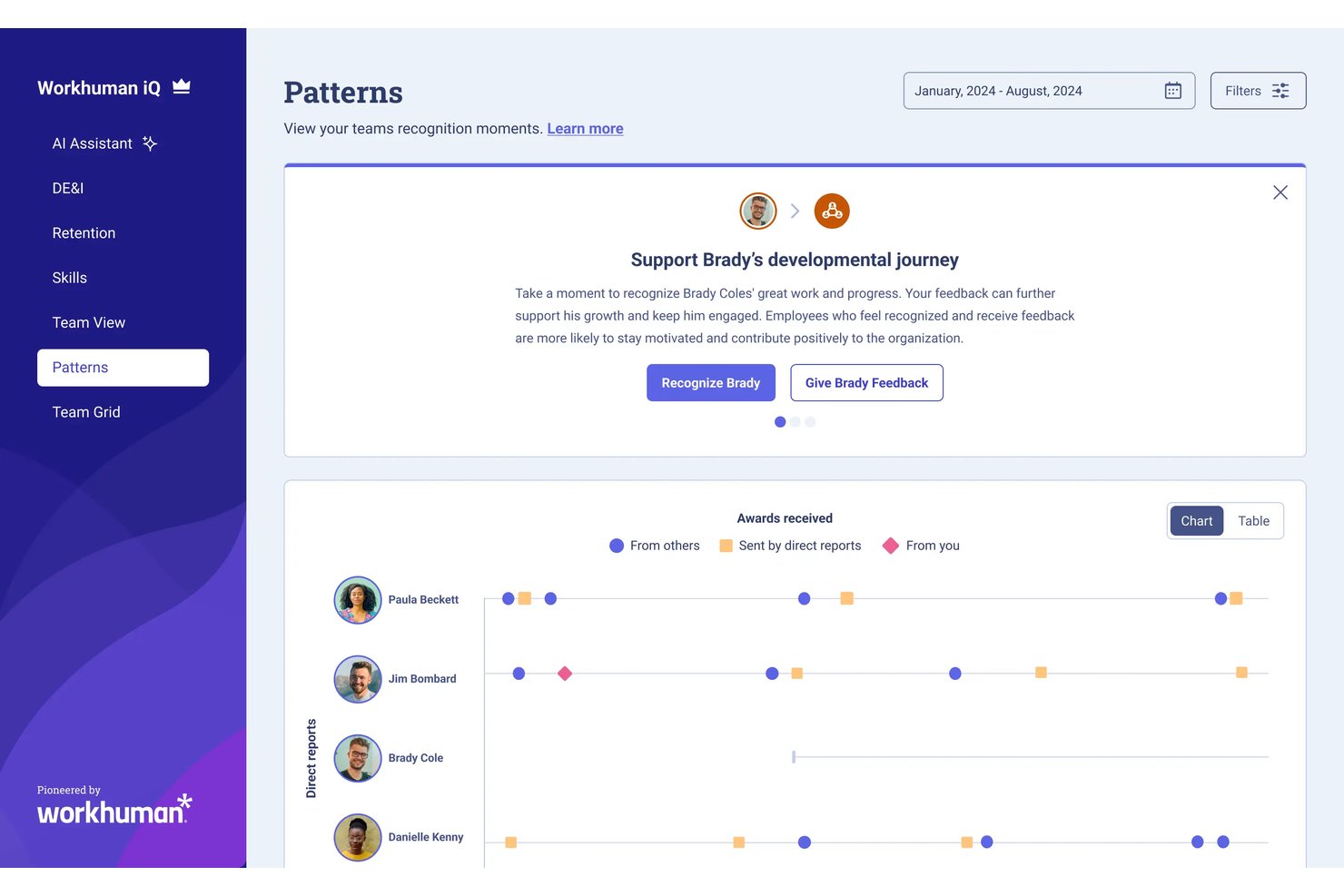
Workhuman Future Leaders is an AI-powered succession planning tool that uses recognition and behavioral data to identify high-potential employees on a path to senior leadership.
Who Is Workhuman Future Leaders Best For?
It's a strong fit for large enterprises with established recognition programs that need a data-driven approach to succession planning and leadership pipeline development.
Why I Picked Workhuman Future Leaders
Workhuman Future Leaders earns its spot on my shortlist because the Ascend AI engine identifies high-potential employees three to five years before they're ready for senior roles. I like that it learns each organization's unique leadership signals from real recognition and behavioral data, not manager nominations or gut feel. Its self-learning models recalibrate in real time as leaders advance and roles shift, so the talent signals stay current.
Workhuman Future Leaders Key Features
- Behavior pattern analysis: Surfaces employees whose behavior matches leadership traits using recognition and HR data.
- Workday HCM integration: Syncs user recognition and rewards activity with core HR records for seamless data flow.
- Microsoft Teams and Slack apps: Lets users give and receive recognition directly within popular collaboration tools.
- Culture Hub feed: Centralizes recognition, celebrations, and interactive engagement in a unified digital workspace.
Workhuman Future Leaders Integrations
Pros and Cons
Pros:
- Provides organizational culture heatmaps for succession
- Uncovers high-potential talent before promotion cycles
- Recognizes leadership signals from real-world behavior
Cons:
- Limited visibility into model decision logic
- Setup requires existing recognition program data
Tableau
Best for data visualization

Tableau is a data visualization tool for data analysts, business intelligence professionals, and decision-makers. It transforms raw data into interactive, shareable metrics, providing insights through visual analytics to support informed decision-making.
Why I picked Tableau: It's renowned for data visualization, offering AI-driven analytics and natural language processing. These features allow you to explore data through intuitive visual formats. Tableau's drag-and-drop interface simplifies complex data analysis, making it accessible for your team. While Tableau isn’t strictly an AI decision-making platform, its AI-assisted analytics and industry-leading visualization capabilities make it a great tool for uncovering the insights that drive smarter business decisions.
Standout features & integrations:
Features include interactive dashboards that allow for deep data exploration. The platform also supports real-time data updates, ensuring your analyses remain up to date. Its storytelling feature helps you present data insights to stakeholders.
Integrations include Salesforce, AWS, Google Cloud, Microsoft Excel, SAP, Oracle, IBM, Alteryx, Snowflake, and Dropbox.
Pros and Cons
Pros:
- Storytelling feature for presentations
- Supports real-time data updates
- Interactive data dashboards
Cons:
- Requires training for advanced features
- Can be resource-intensive

Anaplan
Best for business planning

Anaplan is a cloud-based platform for business planning and performance management. It is used by finance, sales, and operations teams and provides AI-driven modeling and forecasting capabilities to improve strategic planning and decision-making.
Why I picked Anaplan: It's ideal for business planning with its advanced modeling and forecasting tools. With Anaplan's AI capabilities, you can simulate various business scenarios and optimize resources. Its collaborative features enable your team to align on strategic goals and track performance in real-time. The flexibility to customize models ensures that your planning processes are tailored to your specific business needs.
Standout features & integrations:
Features include its in-memory Hyperblock engine, which recalculates complex models instantly across departments. Connected Planning links finance, sales, supply chain, and workforce models, keeping teams aligned on shared assumptions. Finally, multi-dimensional modeling lets you build granular scenarios across products, regions, customers, or time periods, giving you deeper insights into the drivers behind business performance.
Integrations include Salesforce, Microsoft Excel, Workday, Tableau, SAP, Oracle, Google Cloud, AWS, and Microsoft Azure.
Pros and Cons
Pros:
- Collaborative tools for team alignment
- Real-time data updates
- Customizable modeling for specific needs
Cons:
- Rigid structure for ad-hoc use
- Slow initial model setup

Best for customer engagement

Pega Decision Hub is an AI-driven platform for marketers and customer experience teams to support customer engagement through real-time decisioning and predictive analytics. It offers capabilities to personalize customer interactions and optimize marketing strategies.
Why I picked Pega Decision Hub: It excels at customer engagement by leveraging AI to analyze customer data in real time. This allows your team to personalize interactions based on current customer behavior. Pega's predictive analytics help anticipate customer needs and guide decision-making. Its ability to integrate with existing marketing systems ensures easy transition and maximizes your team's efficiency.
Standout features & integrations:
Features include adaptive learning that refines decision-making processes over time. The platform provides a centralized dashboard for monitoring customer interactions. Additionally, it supports omnichannel engagement, ensuring consistent communication across various platforms.
Integrations include Salesforce, Adobe, Microsoft Dynamics, AWS, Google Cloud, and Twilio.
Pros and Cons
Pros:
- Adaptive learning for improved decisions
- Supports omnichannel engagement
- Real-time data processing
Cons:
- Complexity may overwhelm small teams
- Requires technical expertise for setup

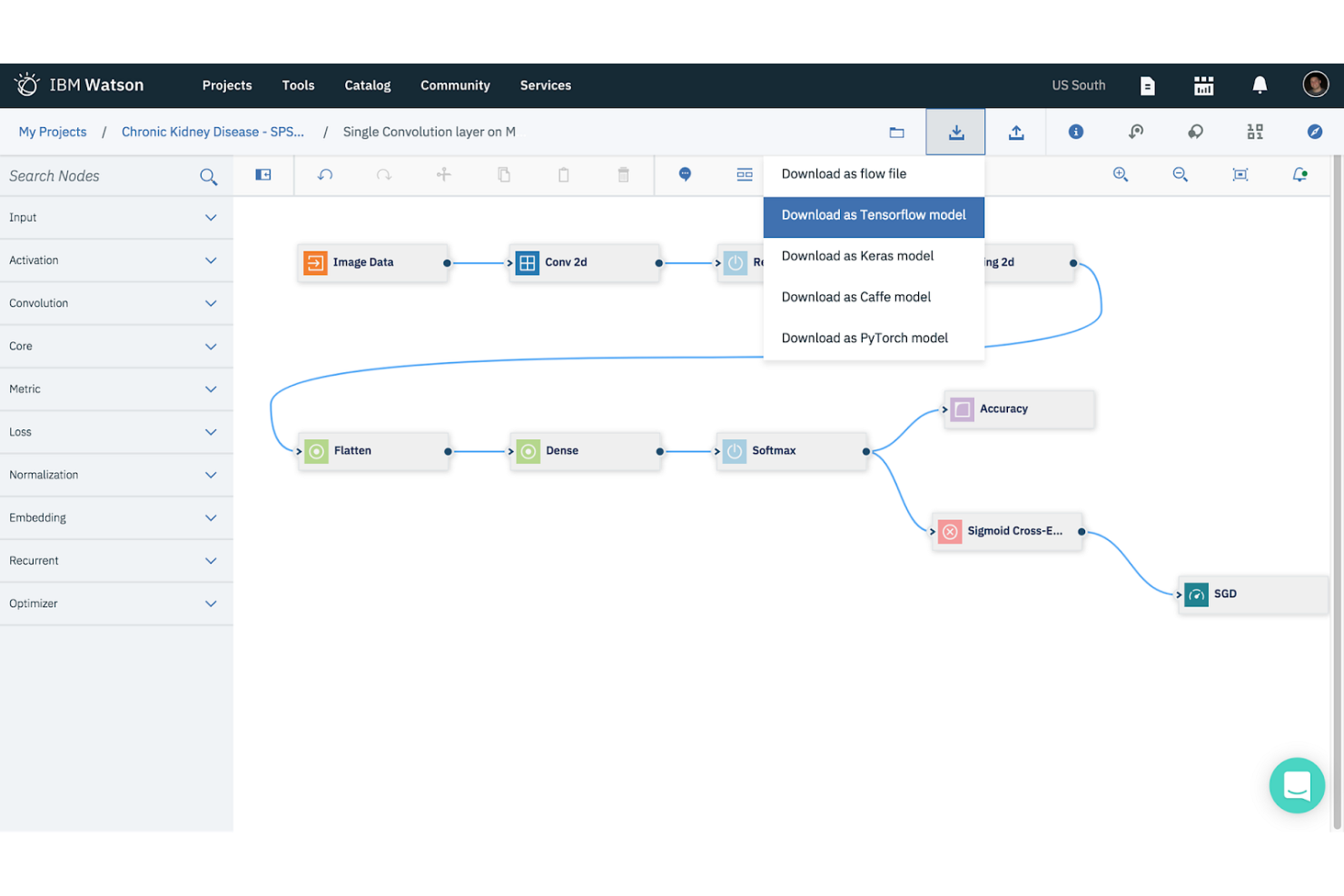
IBM Watson Studio is a data science and AI platform for data scientists, developers, and analysts. It facilitates the building, training, and deployment of AI models, enabling users to derive insights and make data-driven decisions.
Why I picked IBM Watson Studio: It's tailored for AI model deployment with features like automated model building and deployment pipelines. These tools help your team quickly create and deploy AI solutions without deep technical expertise. Watson Studio's collaboration features allow multiple users to work on projects simultaneously. Its support for open-source frameworks ensures flexibility and adaptability for various AI projects.
Standout features & integrations:
Features include a user-friendly interface that simplifies data preparation and model training. The platform supports automated machine learning, allowing you to build models with minimal manual intervention. Watson Studio also offers tools for data visualization and analysis.
Integrations (frameworks) include popular platforms such as IBM Cloud, Apache Spark, Hadoop, Python, R, TensorFlow, and Keras.
Pros and Cons
Pros:
- Offers automated machine learning
- Facilitates collaboration among users
- Supports open-source frameworks
Cons:
- Complex initial setup
- Requires technical expertise


Google DeepMind is a research-focused AI lab that advances AI through both research and applications. It serves researchers, AI developers, and organizations looking to push the boundaries of AI technology and applications.
Why I picked Google DeepMind: It's a leader in AI research, offering capabilities like reinforcement learning and neural network development. These features help you understand and develop cutting-edge AI solutions. DeepMind's focus on ethical AI ensures that your projects align with best practices in AI safety and responsibility. Its research outputs advance fields such as healthcare and energy efficiency, demonstrating its impact and innovation.
Standout features & integrations:
Features include research breakthroughs in reinforcement learning, generative models, and neural network architectures. DeepMind’s work on systems like AlphaFold, AlphaZero, and advanced planning agents demonstrates what state-of-the-art AI can achieve in complex decision environments.
Integrations include frameworks that DeepMind uses in research, such as Google's ecosystem, TensorFlow, PyTorch, JAX, Scikit-learn, NumPy, OpenAI Gym, Pandas, and Matplotlib.
Pros and Cons
Pros:
- Contributions to diverse fields
- Focus on ethical AI practices
- Pioneering AI research and development
Cons:
- Requires advanced technical expertise
- Primarily research-focused, not for commercial use


Oracle RTD is an AI-powered decision management tool for enterprises needing real-time data analysis and decision-making. It enables businesses to make immediate, data-driven decisions by analyzing customer interactions and other data points in real time.
Why I picked Oracle RTD: It focuses on real-time insights, with features such as real-time data processing and predictive analytics. These capabilities allow your team to respond to market changes and customer behaviors. Oracle RTD's machine learning algorithms predict outcomes and optimize decisions. Finally, its ability to process data in real time sets it apart for businesses that need to act fast.
Standout features & integrations:
Features include adaptive learning, which improves decision accuracy over time, and a user-friendly interface that simplifies complex data analysis. Additionally, its scenario-based modeling prepares you for a range of business situations.
Integrations include APIs and web services that allow Oracle RTD to connect with customer-facing applications, CRM systems, websites, and back-office data sources.
Pros and Cons
Pros:
- Scenario-based modeling for planning
- Adaptive learning improves over time
- Supports real-time data analysis
Cons:
- Complex rule-model setup
- Heavy integration requirements
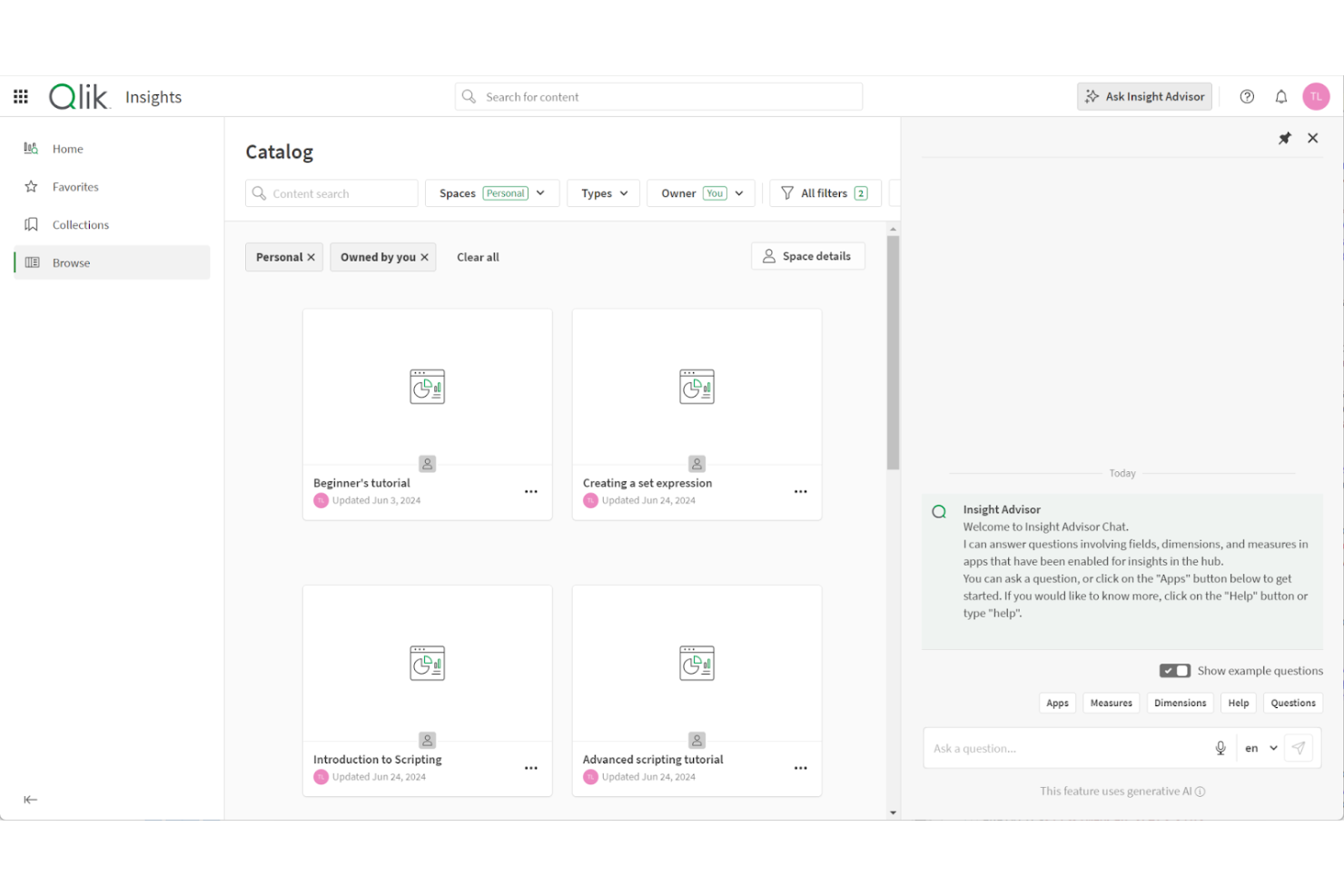
Qlik Analytics is a cloud-based data analytics platform for exploring and understanding data across multiple sources. It’s for businesses that want to turn raw data into insights without requiring advanced technical skills.
Why I picked Qlik Analytics: It lets your team ask questions in natural language and receive instant AI-driven insights. Its associative analytics engine lets you explore data relationships without writing queries or code, helping uncover patterns that traditional tools miss. Insight Advisor generates dashboards, spreadsheets, visualizations, and predictions, making advanced analysis accessible even to non-technical users.
Standout features & integrations:
Features include conversational analytics for natural-language queries, adaptive visualizations that surface hidden data relationships, and built-in storytelling tools that turn insights into shareable presentations.
Integrations include Microsoft Excel, Google Sheets, Snowflake, Amazon Redshift, Databricks, Salesforce, Google BigQuery, Oracle, SAP, and Microsoft Power BI.
Pros and Cons
Pros:
- Offers guided AI-assisted insights
- Works well for cross-department collaboration
- Lets you explore data without coding
Cons:
- Requires setup for complex data
- May feel limited for data engineers


SAS Intelligent Decisioning is a decision management platform for business analysts and decision makers, offering tools to automate and optimize decision processes. It provides AI-driven capabilities for data analysis and decision management to help with business operations.
Why I picked SAS Intelligent Decisioning: It excels at decision management, with features such as model management and business rule automation. These allow you to implement and manage decision logic across your organization. The platform supports real-time decision-making, which is essential for dynamic business environments. For example, fast-moving markets or high-volume customer service operations. Additionally, its ability to integrate machine learning models ensures that you leverage advanced analytics for informed decisions.
Standout features & integrations:
Features include intuitive dashboards, automated business rules, and scenario analysis. These features help your team visualize data insights and make informed decisions.
Integrations with the SAS Viya ecosystem and major enterprise platforms, including cloud services and CRM/ERP systems.
Pros and Cons
Pros:
- Provides advanced analytics
- Customizable decision logic
- Supports real-time decision making
Cons:
- Requires training for full utilization
- Limited data-type flexibility
Annen programvare for AI-basert beslutningstaking
Her er noen flere alternativer innen programvare for AI-basert beslutningstaking som ikke kom med på kortlisten min, men som likevel er verdt å se nærmere på:
- GiniMachine
For credit scoring
- DataRobot
For automated machine learning
- Movable Ink
For personalized marketing
- Aera Technology
For enterprise analytics
- Braze
For personalized customer journeys
- High Touch Technologies
For data sync across platforms


How I Evaluate AI Decision Making Software
I look for tools that go beyond dashboards and reports to deliver AI outputs HR teams can actually act on—like flagging flight risks before they resign or recommending equitable pay adjustments across roles. My evaluation splits into two layers: the core functionality a tool needs to qualify and the differentiating factors that separate good options from great ones.
Core Functionality (Table Stakes For This List)
When I'm selecting tools for my list, I rank each one on a scale from 0 (does not offer the functionality) to 5 (excels in this area) for each core functionality listed below. Then, I calculate the tool's total score into a percentage. Each tool needs to achieve a minimum total score of 65% to be considered for inclusion.
- AI-Powered Recommendations: I evaluate whether the tool generates actionable next steps—like suggesting which candidates to advance or flagging compensation misalignments—rather than just presenting charts.
- Predictive Analytics Models: Tools should include ML models that forecast outcomes like attrition risk or quality of hire, and I look for visible accuracy metrics and retraining capabilities.
- HR Data Integration: I check for native connectors to major HRIS, ATS, and payroll platforms so HR teams can feed real employee data into models without manual CSV wrangling.
- Explainability & Bias Controls: Each tool should surface why it made a recommendation—feature importance, audit trails, and fairness dashboards that help HR teams answer compliance questions.
- Scenario Modeling & Simulation: I look for the ability to run what-if analyses, such as modeling how a restructuring or merit cycle change would impact headcount costs and retention.
- Decision Workflow Automation: The tool should let HR teams act on AI outputs through triggered workflows, approval chains, or write-backs into existing HR systems.
Once I have a list of tools that meet the criteria, I consider what sets each platform apart.
Differentiating Factors (What Sets Vendors Apart)
Here's how I compare and contrast different vendors:
Standout Features
A skills intelligence graph adds real depth to succession and mobility decisions by mapping what employees can do today against what the org will need tomorrow. I also look for a generative AI copilot that lets HR leaders ask natural-language questions—like "which teams have the highest attrition risk this quarter?"—and get plain-language answers instead of raw reports. External benchmarking data matters too, since comp and talent recommendations are far more useful when contextualized against market norms.
Beyond Features
Compliance and ethical AI governance carry extra weight in this category—I check whether vendors offer bias audit reports and alignment with emerging regulations like the EU AI Act, since automated HR decisions carry real legal exposure. Data privacy is closely tied; I evaluate PII masking, role-based access controls, and whether the vendor trains its models on customer data across tenants. Time-to-value also matters. I look for prebuilt HR use case templates that let teams start generating insights within weeks rather than months.
Slik velger du programvare for AI-basert beslutningstaking
Det er lett å gå seg vill i lange funksjonslister og komplekse prismodeller. For å hjelpe deg med å holde fokus mens du arbeider deg gjennom din unike prosess for valg av programvare, har jeg laget en sjekkliste over faktorer du bør ha i bakhodet:
| Faktor | Hva du bør vurdere |
|---|---|
| Skalerbarhet | Kan programvaren vokse sammen med virksomheten din? Vurder om den kan håndtere økt datamengde eller flere brukere uten ytelsesproblemer. |
| Integrasjoner | Kan den kobles til de eksisterende verktøyene dine? Sjekk om den støtter integrasjoner med blant annet CRM-, ERP- eller dataanalyseplattformer. |
| Tilpasningsmuligheter | Kan du tilpasse den til arbeidsflytene dine? Se etter muligheter til å justere innstillinger og funksjoner slik at de passer til prosessene i teamet ditt. |
| Brukervennlighet | Er den brukervennlig for teamet ditt? Evaluer grensesnittet og behovet for opplæring for å sikre problemfri bruk blant ikke-tekniske brukere. |
| Implementering og innføring | Hvor raskt kan du komme i gang? Vurder hvor mye tid og hvilke ressurser som trengs til oppsettet, og se etter tilgjengelig opplæring eller støtte under overgangen. |
| Kostnad | Passer den inn i budsjettet ditt? Sammenlign programvarens pris med funksjonene og fordelene den tilbyr, og ta eventuelle skjulte kostnader med i vurderingen. |
| Sikkerhetstiltak | Beskytter den dataene dine? Sørg for at den har sikkerhetstiltak på høyt nivå, som kryptering og tilgangskontroller, for å holde informasjonen din trygg. |
| Tilgjengelig kundestøtte | Kan du få hjelp når du trenger det? Sjekk om det finnes kundestøtte døgnet rundt, og hvor raskt leverandørens kundeservice svarer. |
Hva er programvare for AI-basert beslutningstaking?
Programvare for AI-basert beslutningstaking er et verktøy som bruker kunstig intelligens til å analysere data, forutsi resultater og støtte beslutningsprosesser. Disse verktøyene brukes ofte av forretningsanalytikere, dataforskere og ledere som trenger å ta datadrevne beslutninger raskt og nøyaktig.
Funksjonene omfatter prediktiv analyse, sanntidsdatabehandling og automatisert rapportering, som bidrar til å identifisere trender, optimalisere strategier og forbedre effektiviteten. Samlet sett gir disse verktøyene verdifull innsikt som styrker beslutningstakingen og fører til bedre forretningsresultater.
Funksjoner
Når du velger programvare for AI-beslutningstaking, bør du se etter følgende viktige funksjoner:
- Prediktiv analyse: Bruker AI til å forutsi fremtidige trender og resultater, slik at du kan ta informerte beslutninger.
- Sanntidsdatabehandling: Analyserer data umiddelbart, slik at du kan ta tidsriktige og relevante beslutninger.
- Automatisert rapportering: Genererer rapporter automatisk, sparer tid og sikrer nøyaktighet i datapresentasjonen.
- Integrering av maskinlæring: Inkluderer maskinlæringsmodeller for å støtte dataanalyse og prediksjoner.
- Datavisualisering: Presenterer data i lettforståelige visuelle formater, slik at du raskt kan få innsikt.
- Scenarioplanlegging: Simulerer ulike scenarier for å evaluere mulige strategier og resultater.
- Adaptiv læring: Datadrevne beslutningsprosesser forbedrer systemet som helhet kontinuerlig.
- Tilpassbare instrumentpaneler: Lar deg tilpasse grensesnittet etter dine spesifikke behov og arbeidsprosesser.
- Omnikanalengasjement: Sikrer konsekvent kommunikasjon på tvers av flere plattformer.
- Sikkerhetstiltak: Beskytter sensitive data med kryptering og tilgangskontroller, og sikrer dataintegriteten.
Fordeler
Implementering av programvare for AI-beslutningstaking gir flere fordeler for teamet og virksomheten din. Her er noen av fordelene du kan se frem til:
- Mer konsistente beslutninger: AI-algoritmer bruker den samme logikken hver gang, reduserer gjetting og sikrer at beslutningene forblir samkjørte på tvers av team.
- Bedre samkjøring på tvers av team: Delte data og sentraliserte beslutningsmodeller sørger for at avdelingene arbeider ut fra de samme antakelsene og prioriteringene.
- Høyere avkastning på data: AI omgjør rådata, historiske data og sanntidsdata til handlingsrettede anbefalinger som gir målbare forretningsresultater.
- Færre operative flaskehalser: Automatiserte beslutningstrinn effektiviserer arbeidsflyter og eliminerer forsinkelser forårsaket av manuelle godkjenninger eller gjennomganger.
- Raskere respons på markedsendringer: Adaptive AI-modeller oppdateres raskt, slik at teamet kan reagere på endret kundeatferd eller skiftende forretningsforhold.
- Bedre kundeopplevelser: Personlige anbefalinger og raskere beslutningssykluser fører til mer relevante og tilfredsstillende interaksjoner.
- Bedre styring og etterlevelse: AI-plattformer logger beslutningsforløp og gir åpenhet, noe som gjør revisjoner og regulatorisk rapportering enklere.
- Redusert forretningsrisiko: Tidlig oppdagelse av avvik, problemer med etterlevelse eller ytelsesfall bidrar til å forhindre kostbare problemer før de eskalerer.
Kostnader og priser
Ved valg av programvare for AI-beslutningstaking må du forstå de tilgjengelige prismodellene og abonnementene. Kostnadene varierer basert på funksjoner, teamstørrelse, tillegg og mer. Tabellen nedenfor oppsummerer standardabonnementer, gjennomsnittsprisene deres og typiske funksjoner som er inkludert i AI-verktøy:
Sammenligningstabell for abonnementer på programvare for AI-beslutningstaking
| Abonnementstype | Gjennomsnittspris | Vanlige funksjoner |
|---|---|---|
| Gratisabonnement | $0 | Grunnleggende analyse, begrenset databehandling og brukerstøtte fra fellesskapet. |
| Personlig abonnement | $10-$30/bruker/måned | Datavisualisering, prediktiv analyse og støtte via e-post. |
| Forretningsabonnement | $50-$100/bruker/ måned | Sanntidsdatabehandling, tilpassbare instrumentpaneler og prioritert brukerstøtte. |
| Virksomhetsabonnement | $150-$300/bruker/ måned | Avansert maskinlæring, fullstendige integrasjonsmuligheter og dedikert brukerstøtte. |
Vanlige spørsmål om programvare for AI-beslutninger
Her er noen svar på vanlige spørsmål om programvare for AI-beslutninger:
Kan programvare for AI-beslutninger integreres med eksisterende systemer?
Ja, de fleste verktøy for AI-beslutninger kan integreres med de eksisterende systemene dine. Se etter verktøy som tilbyr API-tilgang og støtte for populære plattformer som CRM, ERP og verktøy for dataanalyse. Dette sikrer at du kan opprettholde de nåværende arbeidsflytene dine samtidig som du utnytter AI-funksjoner. Sjekk integrasjonsalternativene før kjøp for å unngå kompatibilitetsproblemer.
Hvordan vurderer jeg skalerbarheten til programvare for AI-beslutninger?
For å vurdere skalerbarheten bør du undersøke om programvaren kan håndtere økt datamengde og antall brukere uten ytelsesproblemer. Se etter funksjoner som skybasert infrastruktur og fleksible prisplaner som legger til rette for vekst. Hvis virksomheten din planlegger å ekspandere, må du sørge for at programvaren kan vokse sammen med deg.
Hvilke opplæringsressurser er tilgjengelige for programvare for AI-beslutninger?
De fleste plattformer tilbyr en rekke opplæringsressurser, blant annet videoveiledninger, webinarer og dokumentasjon. Noen kan tilby interaktive produktomvisninger eller en kunnskapsbase for selvstyrt læring. Før du velger programvare, bør du undersøke opplæringsmateriellet for å sikre at teamet ditt raskt kan komme i gang og utnytte funksjonene best mulig ved hjelp av AI.
Hvor viktig er kundestøtte når man velger programvare for AI-beslutninger?
God kundestøtte bidrar til å løse problemer raskt og minimere nedetid når du velger programvare for AI-beslutninger. Se etter leverandører som tilbyr kundestøtte døgnet rundt, direktechat og dedikerte kundeansvarlige. Vurder kundestøtteteamets responstid og kompetanse ved å lese kundeanmeldelser eller kontakte dem med spørsmål før kjøp.
Finnes det sikkerhetsproblemer knyttet til programvare for AI-beslutninger?
Ja, sikkerhet er en viktig faktor. Sørg for at programvaren inkluderer sterk kryptering, tilgangskontroller og samsvar med personvernforordninger som GDPR. Kontroller leverandørens sikkerhetssertifiseringer og spør om deres historiske praksis for datainnsamling. Det er avgjørende å beskytte sensitiv informasjon for å opprettholde tillit og etterleve regelverket.