

Coachingprogramvare hjelper HR-team med å koble ansatte sammen med coacher eller mentorer, administrere utviklingsprogrammer og måle resultater. Den rette plattformen kan koble coaching til HRIS-data, lederutvikling, medarbeiderprestasjoner og mål for å beholde ansatte.
Jeg evaluerte 20 verktøy for å hjelpe deg med å sammenligne matching, styring, konfidensialitet, integrasjoner og måling av avkastning før du velger en plattform for organisasjonen din.
Hvorfor du kan stole på våre programvareanbefalinger
6,700+
Reviews
20
Industry experts
16+
Evaluation factors
14
Years
Teamet vårt har testet og anmeldt programvare siden 2012. Vi er selv HR-eksperter, så vi vet hvor vanskelig og hvor viktig det er å velge riktig programvare.
I denne guiden har vi vurdert verktøyene gjennom praktisk testing og uavhengig research og gitt dem poeng ut fra våre utvelgelseskriterier. Vi bygger også på innsikt fra ledende eksperter i bransjen og erfarne HR-eksperter.
Anmeldelsene våre bygger på vår egen redaksjonelle vurdering. De er ikke et salgsargument.
Ekspertanmeldere:
- Phil GrayCOO
 Kim BehnkeHR Tech Editor & Analyst
 Josh BarkerPeople Ops Manager

Sammenligningstabell for coachingprogramvare
Sammenlign priser og spesifikasjoner side om side for de beste plattformene som kom med på kortlisten min.
Score legend (out of 5)
- Excellent4.5–5
- Good4–4.4
- Average3–3.9
- Below average2–2.9
- Poor1–1.9
Sorted by: Default
| Tool | Starting Price | Website | |||||||
|---|---|---|---|---|---|---|---|---|---|
Best for enterprise-wide expert-to-employee matching | 4.0 out of 5 | 5 | 3 | 3 | 4 | 5 | 4 | Pricing upon request Free demo available | Website |
Best for bulk coaching program deployment | 3.8 out of 5 | 4 | 4 | 4 | 3 | 4 | 4 | $12/year Free demo + 14-day free trial available | Website |
Best for enterprise coaching ROI measurement | 3.8 out of 5 | 3 | 4 | 4 | 4 | 4 | 4 | Pricing upon request Free demo available | Website |
Best for mentoring program matching | 4.0 out of 5 | 5 | 4 | 2 | 4 | 5 | 4 | Pricing upon request Free demo available | Website |
Best for white-label coaching program delivery | 3.8 out of 5 | 4 | 4 | 3 | 4 | 4 | 4 | Pricing upon request Free demo available | Website |
Best for org-wide coaching with 4,000+ coaches | 4.7 out of 5 | 5 | 5 | 4 | 5 | 5 | 4 | Pricing upon request Free demo available | Website |
Best for coaching programs tied to HRIS data | 4.0 out of 5 | 5 | 4 | 3 | 4 | 4 | 4 | Pricing upon request Free demo available | Website |
Best for human and AI-led coaching with 360 feedback | 4.0 out of 5 | 5 | 3 | 4 | 4 | 4 | 4 | Pricing upon request Free demo available | Website |
Best for AI-backed 1:1 coaching | 4.2 out of 5 | 5 | 4 | 4 | 4 | 4 | 4 | Pricing upon request Free demo available | Website |
Best for AI-matched coaching via Teams or Slack | 4.2 out of 5 | 5 | 4 | 2 | 4 | 5 | 5 | Pricing upon request Free demo available | Website |


Anmeldelser av coachingprogramvare
Nedenfor finner du en detaljert gjennomgang av hvert verktøy, med viktige funksjoner, bruksområder og priser for å hjelpe deg med å velge det rette for teamet ditt.
 Best for enterprise-wide expert-to-employee matching
- Free demo available
- Pricing upon request
Visit WebsiteCustomer Rating:4.8/5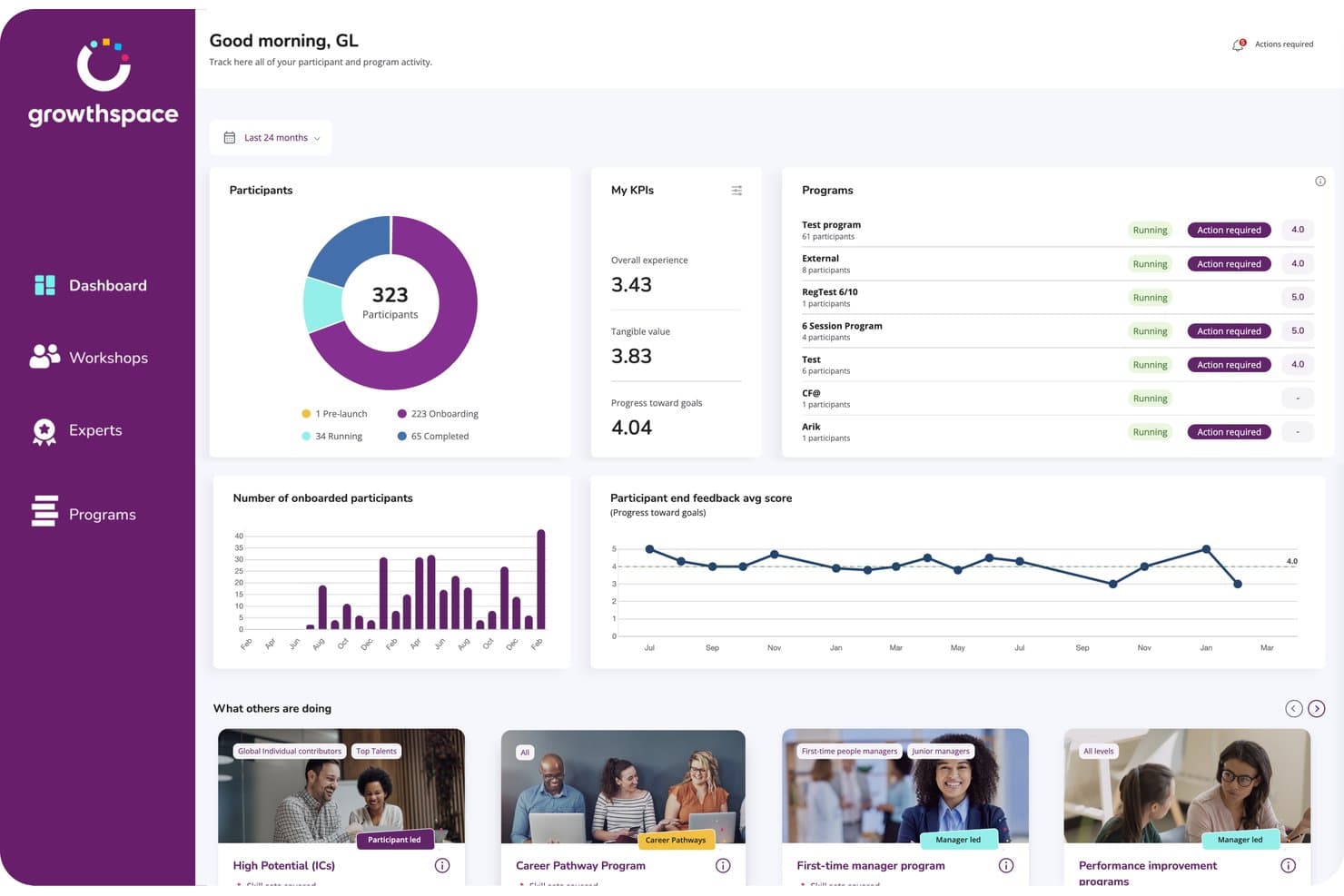
GrowthSpace tracks participant progress and program KPIs in one dashboard. GrowthSpace is an enterprise coaching platform that matches employees with external domain experts for skill development.
Who Is GrowthSpace Best For?
L&D teams at global enterprises that run skill-by-skill development programs across several languages and time zones.
Why I Picked GrowthSpace
GrowthSpace earns its spot on my shortlist because of how it matches employees with domain experts: functional expertise, seniority, language, time zone, and skill goals all feed the pairing. I'm talking about a network of 2,800+ vetted experts across 65+ countries. The sprint format, five sessions over 6–8 weeks on one named skill, gives each development goal a defined scope and end date.
GrowthSpace Key Features
- Multiple program formats: Choose from 1:1 sprints, group cohorts, workshops, or internal mentoring programs.
- 360° manager feedback: Manager input feeds into impact assessments, connecting program outcomes to performance reviews and engagement data.
- White-label branding: Apply your organization's branding, custom metrics, and communication templates across the platform.
- ExpertX AI agent suite: Turn internal knowledge into on-demand training using agents for role-play practice, presentations, coaching feedback, and knowledge Q&A.
GrowthSpace Integrations
GrowthSpace offers integrations with Microsoft Viva Learning, Slack, Zoom, Microsoft Teams, and HRIS systems. It also offers an API for custom connections
Pros and Cons
Pros:
- Enterprise cohorts support large-scale delivery
- Structured sprints make goals measurable
- AI matching spans multiple experts
Cons:
- Scheduling might cause friction among some participants
- Five-session sprints can feel limiting
Learn more about GrowthSpace: Best for bulk coaching program deployment
- Free demo + 14-day free trial available
- From $12/year
Visit WebsiteCustomer Rating:4.5/5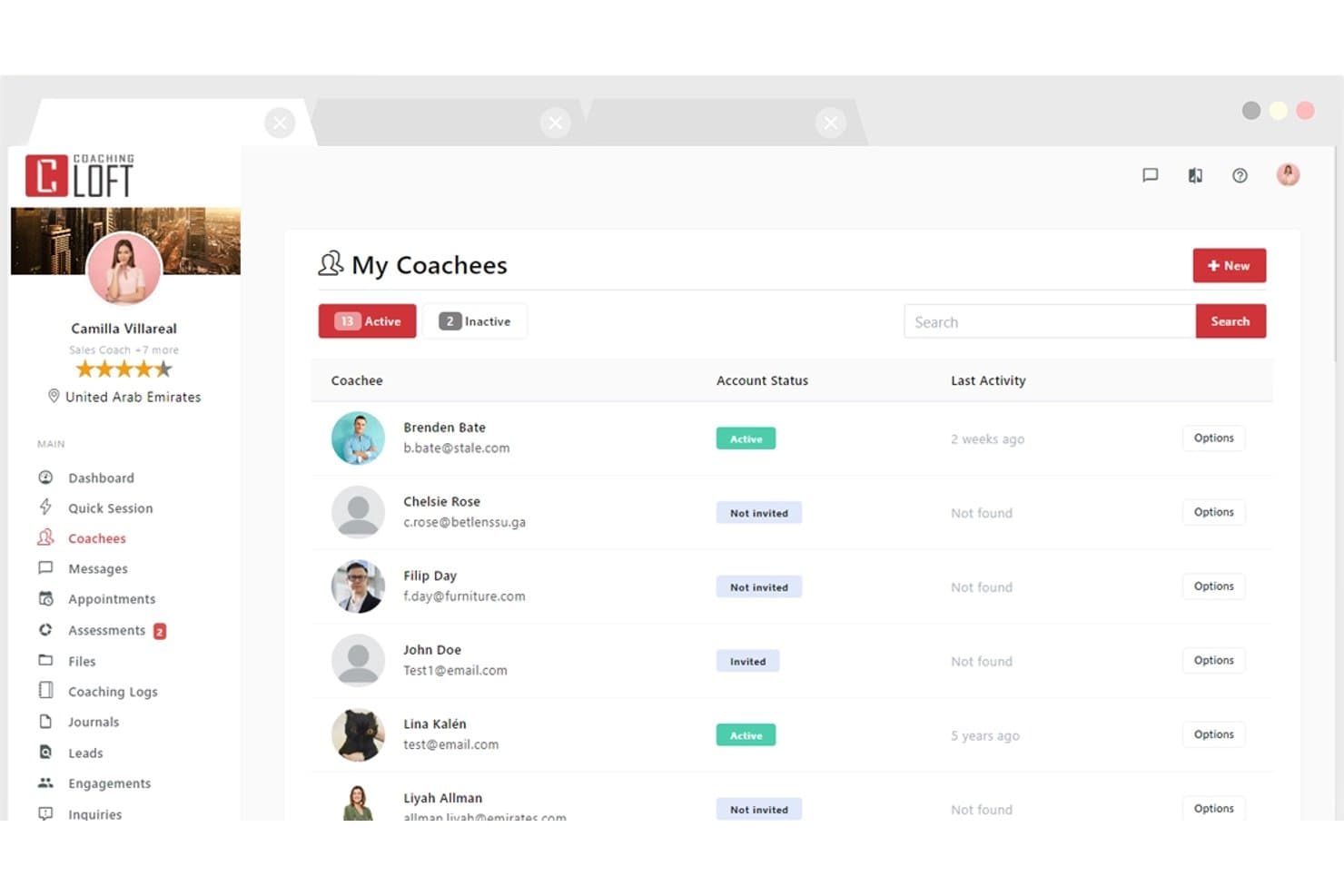
Coaching Loft lets users manage and track all active coachees in one place. Coaching Loft is a coaching management platform that handles scheduling, client portals, and progress tracking for coaches and program administrators.
Who Is Coaching Loft Best For?
Coaching Loft is a strong fit for HR leaders and program administrators rolling coaching out to a large employee base.
Why I Picked Coaching Loft
Coaching Loft earns its spot on my shortlist for how it handles bulk rollouts. I've used its bulk engagement assignment tool to push up to 1,000 engagements in a single upload, which makes rolling out a company-wide coaching initiative far less painful than doing it coach by coach. Pair that with reusable engagement templates and AI-powered coach matching, and you've got a setup that scales without sacrificing structure.
Coaching Loft Key Features
- 360° multi-rater feedback: Collect structured feedback on coachees from peers, managers, and direct reports using built-in or custom assessment templates.
- Native video conferencing: Run coaching sessions directly in the platform without switching tools.
- Client portal: Every coachee gets a free portal to manage scheduling, goals, session history, tasks, and shared files.
- Enterprise Panel dashboards: Admins get visibility into coach and coachee activity, session volume, feedback, and ROI reporting across the organization.
Coaching Loft Integrations
Coaching Loft offers integrations with Leadfeeder, Mailchimp, HubSpot, PayPal, Microsoft Teams, Zoom, and Zapier. It also supports an open API for custom integrations.
Pros and Cons
Pros:
- Supports multi-rater assessments
- Free client portals support
- Bulk program deployment supports 1,000 engagements
Cons:
- No native session recording
- Limited storage restricts video-heavy coaching practices
Learn more about Coaching Loft: 3Best for enterprise coaching ROI measurement
Ezra
- Free demo available
- Pricing upon request
Visit WebsiteCustomer Rating:4/5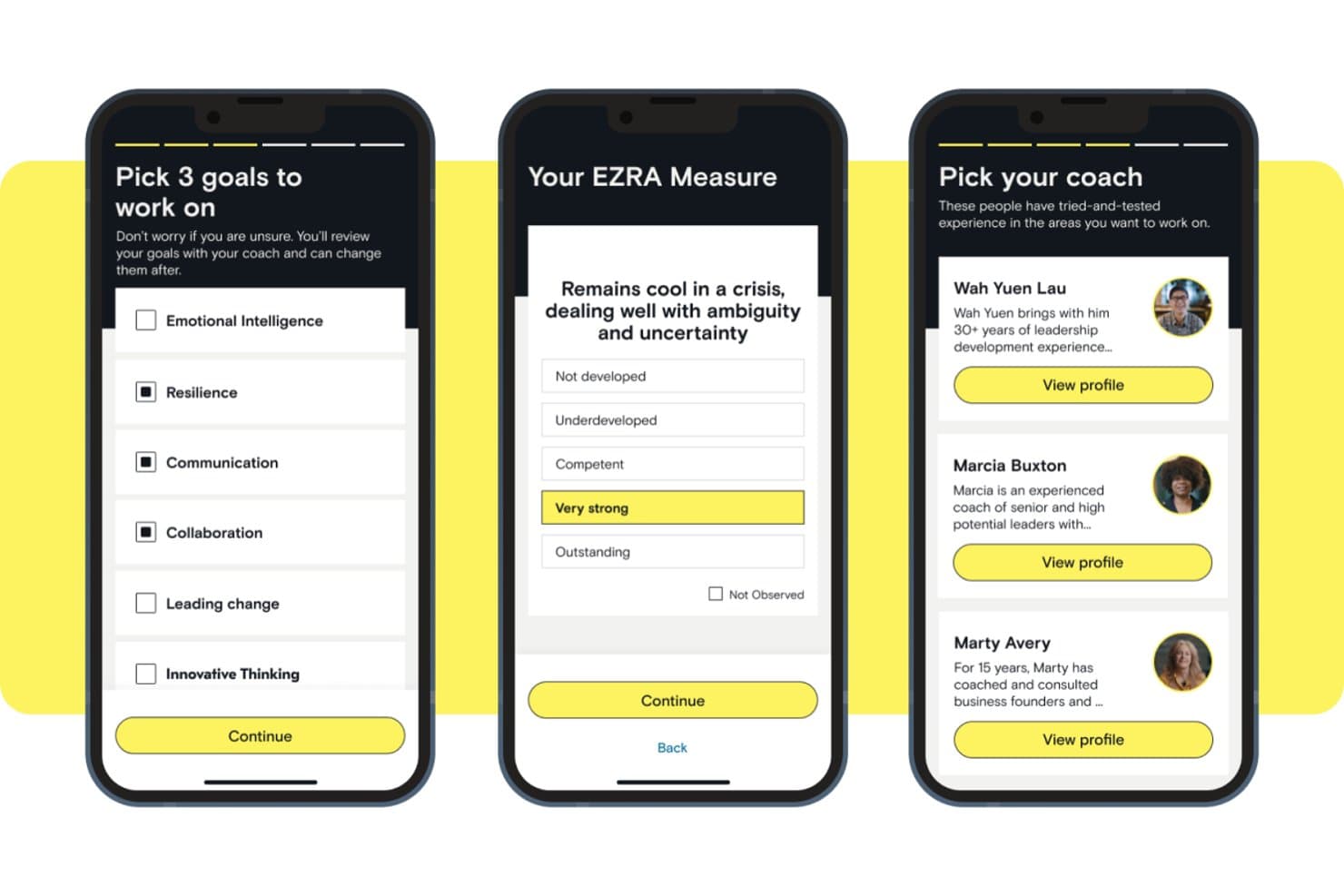
Ezra lets users set goals, self-assess, and pick a coach. Ezra is a managed coaching platform that connects employees with a network of ICF-certified coaches for 1:1 and executive coaching.
Who Is Ezra Best For?
Ezra is a strong fit for enterprise HR and L&D leaders accountable for reporting coaching results to executive sponsors.
Why I Picked Ezra
I included Ezra because it builds reporting for program sponsors into the product. EZRA Measure pulls session ratings, manager feedback, and progress tracking into sponsor-facing reports, giving HR and L&D leaders figures for budget reviews. A booking gate requires a session rating before the next booking, and Ezra reports near-100% feedback capture as a result.
Ezra Key Features
- Cai AI assistant: Gives participants a space to practice scenarios and receive real-time feedback between live coaching sessions.
- Multi-tier program library: Choose from EZRA Edge, EZRAx, or Focus, plus 20 pre-built Focus curricula covering topics like resilience, change navigation, and goal setting.
- Native in-app video: Coaching sessions run through Ezra's own video tool inside the mobile app, so participants don't need a separate conferencing platform.
- Lifecycle-triggered coaching: Connect coaching programs to HR suite to start coaching at key employee lifecycle moments.
Ezra Integrations
Ezra has integrations with SAP SuccessFactors and Microsoft Entra ID for single sign-on and user provisioning. No public API or broader integrations directory is documented.
Pros and Cons
Pros:
- Participants choose coaches and schedules
- Structured programs span career levels
- Near-100% session feedback capture
Cons:
- Lacks specific niche integrations
- Independent coaches cannot license the platform
Learn more about Ezra:
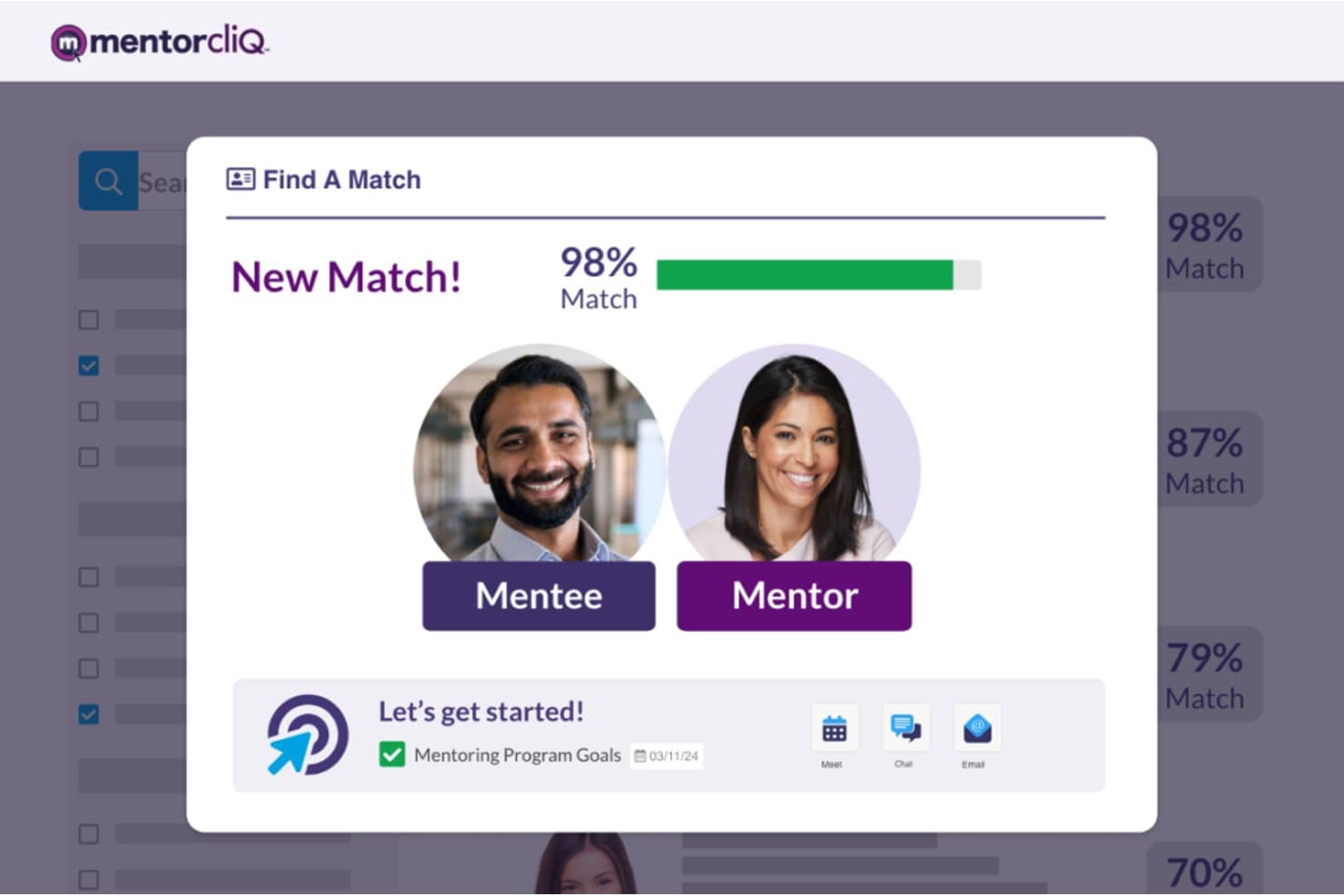
MentorcliQ matches mentors and mentees with a 98% compatibility score. MentorcliQ is an enterprise online coaching platform that supports structured mentoring programs through AI-powered participant matching, goal tracking, program curriculum management, and reporting analytics.
Who Is MentorcliQ Best For?
MentorcliQ is a strong fit for L&D teams at mid-to-large enterprises running several mentoring tracks at once.
Why I Picked MentorcliQ
MentorcliQ is on my list for the control it gives admins over matching. Its Smart Matching engine analyzes skills, goals, and engagement potential, and admins can override or approve matches before they're confirmed. It also supports peer, reverse, and cross-functional relationships, so matching logic follows the program design.
MentorcliQ Key Features
- Micro-surveys: Short monthly check-ins emailed to participants capture progress data and mentoring hours to feed program analytics.
- Program curriculum templates: Pre-built program templates support mentoring types like onboarding, peer, and leadership development.
- Real-time analytics dashboard: Tracks participation, engagement, satisfaction, retention, and internal mobility across all active programs.
MentorcliQ Integrations
MentorcliQ integrates with Microsoft 365, Google Calendar, Outlook, Slack, and Zoom. It also supports HRIS and employee database connections, SSO, and an open API for custom integrations.
Pros and Cons
Pros:
- Structured curricula support multi-track coaching
- Goal and milestone tracking spans programs
- AI matching supports organizational coaching cohorts
Cons:
- No independent coach practice management
- No native video session recording
Learn more about MentorcliQ: Best for white-label coaching program delivery
- Free demo available
- Pricing upon request
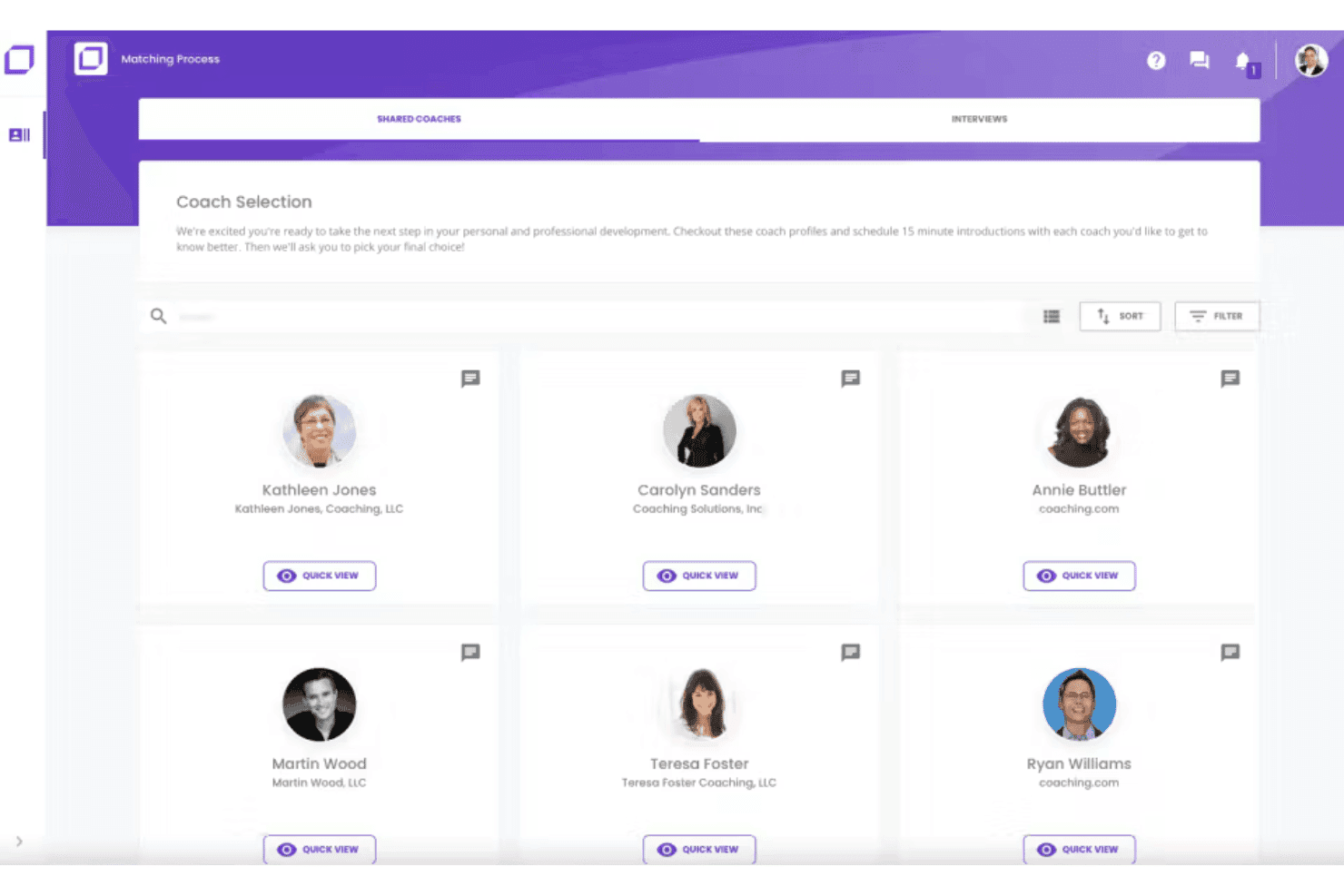
Coaching.com matches users with coaches via a visual selection interface. Coaching.com is a coaching management platform that combines session scheduling, goal tracking, program templates, and group coaching in an all-in-one system.
Who Is Coaching.com Best For?
Coaching.com is a good fit for coaching business firms and program administrators that deliver coaching under their own brand, including HR and L&D teams running multi-coach programs.
Why I Picked Coaching.com
I chose Coaching.com for its white-label tooling. The branded client portal supports custom colors, logos, and branded email notifications, so coaching clients never see the brand name. A white-label marketplace lets coaching firms list their own coaches, packages, and pricing, with automated commission handling.
Coaching.com Key Features
- Goal planning and milestone tracking: Set personalized client goals, build out action plans with milestones, and collect stakeholder feedback tied to each engagement.
- Hogan Assessments integration: Assign and manage Hogan personality assessments, schedule debriefs, and translate results into tracked action plans.
- Group coaching module: Build and run multiple group engagements that blend group and 1:1 sessions, with group-level analytics and integrated video conferencing.
- AI-supported reporting dashboards: View visual dashboards covering engagement themes, completion rates, coach capacity, financials, and client satisfaction across your entire program.
Coaching.com Integrations
Coaching.com documents integrations with Google Calendar, Slack, Google Meet, Stripe, Hogan, TruSource, Okta, and Zoom. It also supports API integrations for custom connections.
Pros and Cons
Pros:
- Program templates support sequenced cohort delivery
- Goal tracking connects milestones with stakeholder feedback
- White-label portals support a polished client experience
Cons:
- Basic session notes only
- Setup can feel cumbersome for solo business coaches
Learn more about Coaching.com: Best for org-wide coaching with 4,000+ coaches
- Free demo available
- Pricing upon request
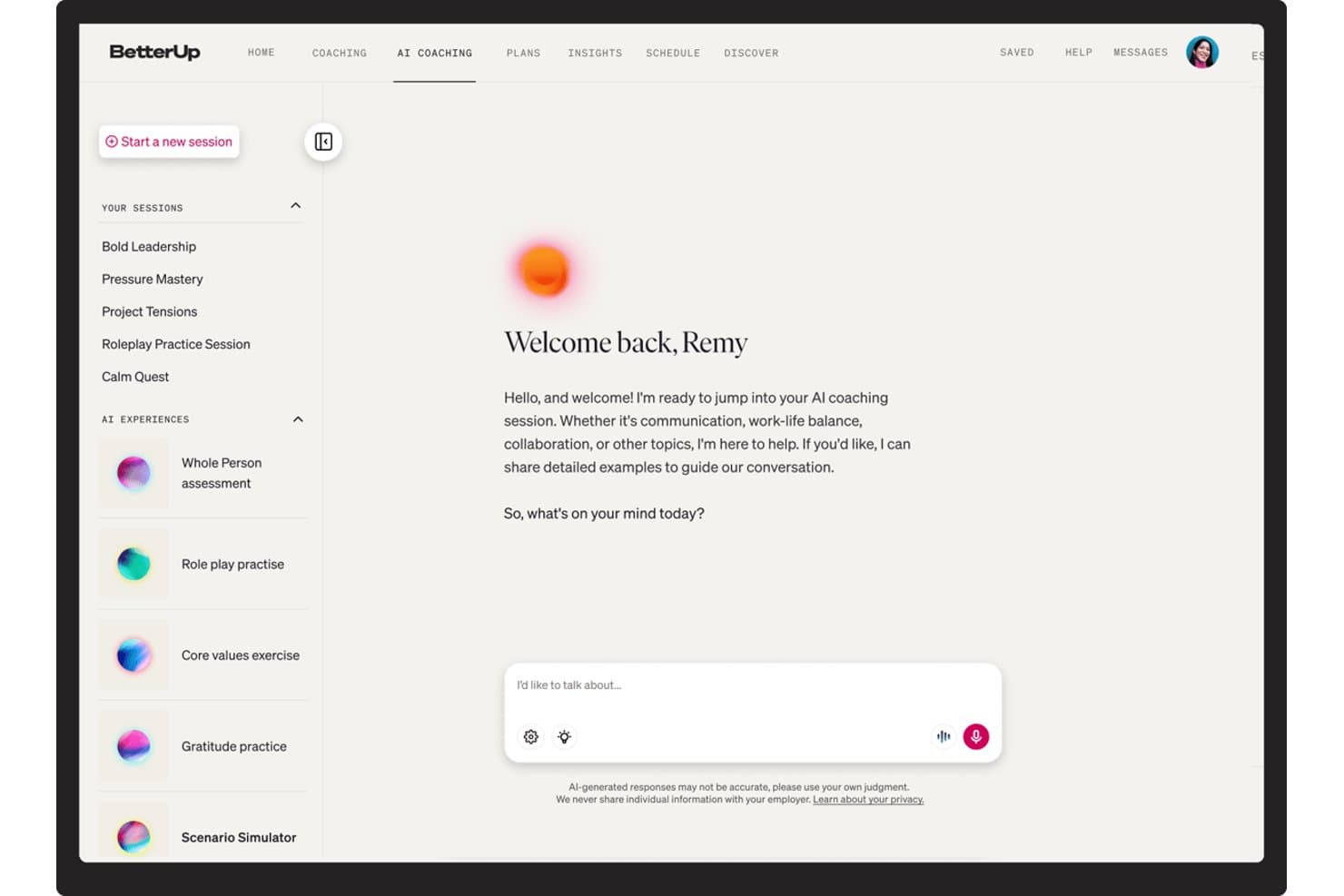
BetterUp offers AI coaching sessions on communication and work-life balance. BetterUp is an enterprise coaching platform that delivers 1:1 coaching, group coaching, and AI-powered coaching across your workforce through a network of ICF-certified coaches.
Who Is BetterUp Best For?
BetterUp is a strong fit for enterprise teams that roll coaching out to hundreds of employees at once, including companies with EU or US data-residency requirements.
Why I Picked BetterUp
BetterUp is my pick for rolling coaching out at scale. A network of 4,000+ ICF-certified coaches and AI-assisted matching let HR teams assign coaches to hundreds of employees without pairing people by hand. BetterUp reports 98% first-match accuracy. I also like the Whole Person assessment tracks dimensions such as emotional regulation and cognitive agility, giving coaches and admins a record of progress across sessions.
BetterUp Key Features
- Multi-modal coaching delivery: BetterUp supports 1:1 video sessions, group coaching circles, AI roleplay, and always-on AI chat coaching embedded in Slack and Microsoft Teams.
- Milestone Moments triggers: Coaching starts automatically at career transitions such as a first-time manager appointment, return from leave, or a reorg..
- Performance intelligence dashboards: Admins get aggregated, de-identified reporting across activation, utilization, skill adoption, retention risk, and goal achievement, all tied to business metrics in Quarterly Business Reviews.
- Enterprise-grade security controls: BetterUp holds SOC 2 Type II and ISO 27001 certifications, supports US or EU data residency, and maintains a strict confidentiality boundary.
BetterUp Integrations
BetterUp integrates with Workday, Salesforce, Slack, Microsoft Teams, SAP SuccessFactors, and Degreed. It also offers an API for custom connections.
Pros and Cons
Pros:
- Programs span one-to-one, group, and AI coaching
- Keeps coaching data secure and private
- Coaching triggered at career transitions
Cons:
- Coach quality can vary across the network
- No tools for independent coach practices
Learn more about BetterUp: Best for coaching programs tied to HRIS data
- Free demo available
- Pricing upon request
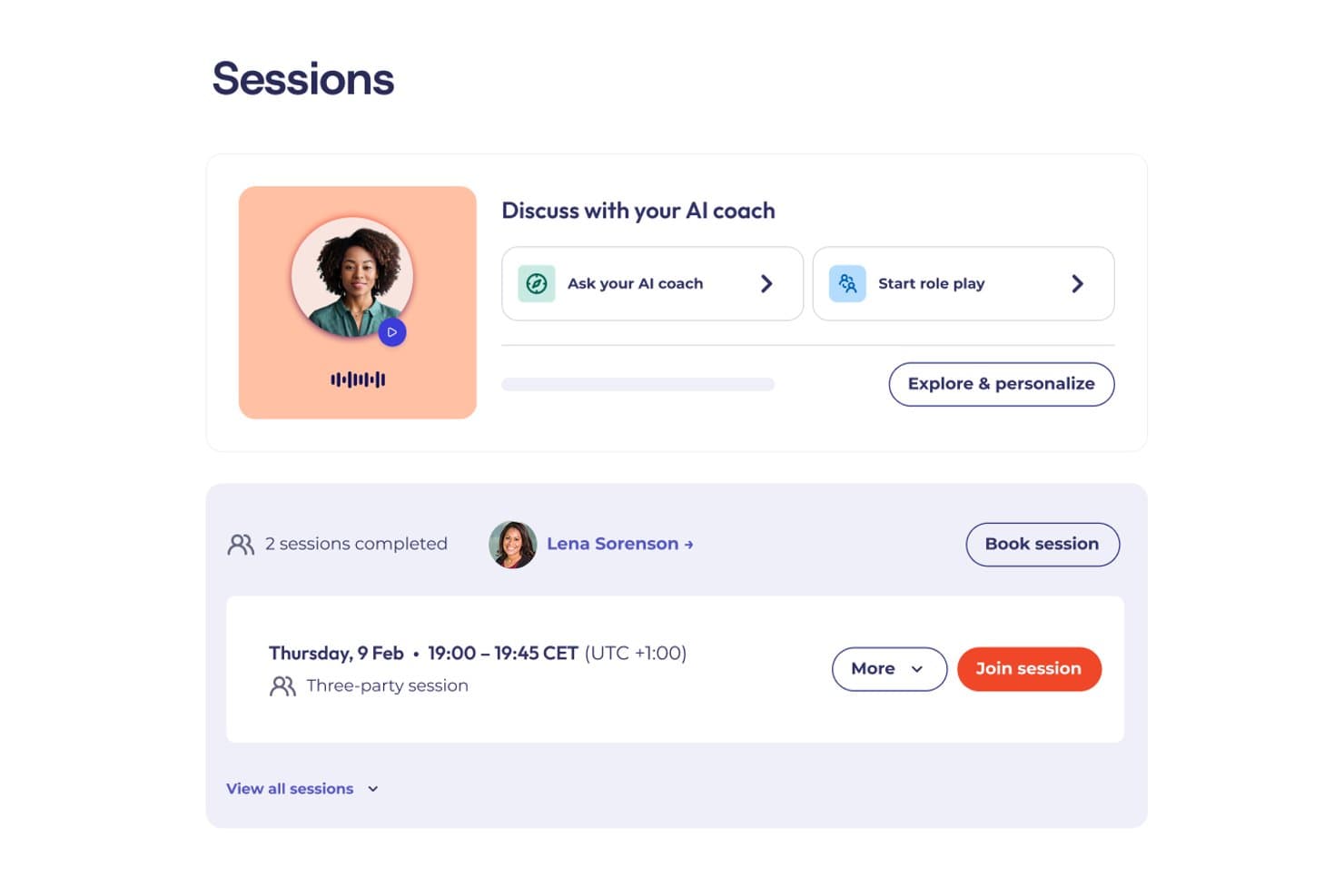
CoachHub lets users book sessions and chat with an AI coach. CoachHub is an enterprise digital coaching platform that connects employees with ICF-certified coaches through a global network.
Who Is CoachHub Best For?
CoachHub is a strong fit for enterprise HR teams that want coaching programs connected to their HRIS records.
Why I Picked CoachHub
I picked CoachHub for its HRIS connection. Native Workday and SAP integrations let HR teams pull employee data into the platform to nominate, activate, and track coachees without manual entry. The Insights dashboard links session engagement, goal attainment, and behavioral progress to business outcomes tracked in the HRIS, and the (im)PACT measurement model connects coaching activity to retention and OKR data.
CoachHub Key Features
- AI coach-coachee matching: Pairs employees with coaches based on goals, personality, learning style, language, and leadership level.
- CoachHub Academy content library: Access 8,000+ micro-learning activities—videos, articles, and exercises—organized into curated learning paths.
- 360° feedback and self-assessments: Collect structured input from peers, managers, and direct reports, with re-assessments built into the program timeline.
- AIMY: A standalone conversational AI coaching tool available 24/7 to all employees, with goal-oriented prompts, video role-plays, and self-assessments.
CoachHub Integrations
CoachHub offers native integrations with Microsoft Teams and Workday. Its open API supports custom HRIS integration.
Pros and Cons
Pros:
- Re-assessments built into programs
- 24/7 AI coach for all employees
- High-quality ICF-accredited coach access
Cons:
- Human sessions cannot be recorded or transcribed
- Built for employers, not independent coaches
Learn more about CoachHub: Best for human and AI-led coaching with 360 feedback
- Free demo available
- Pricing upon request
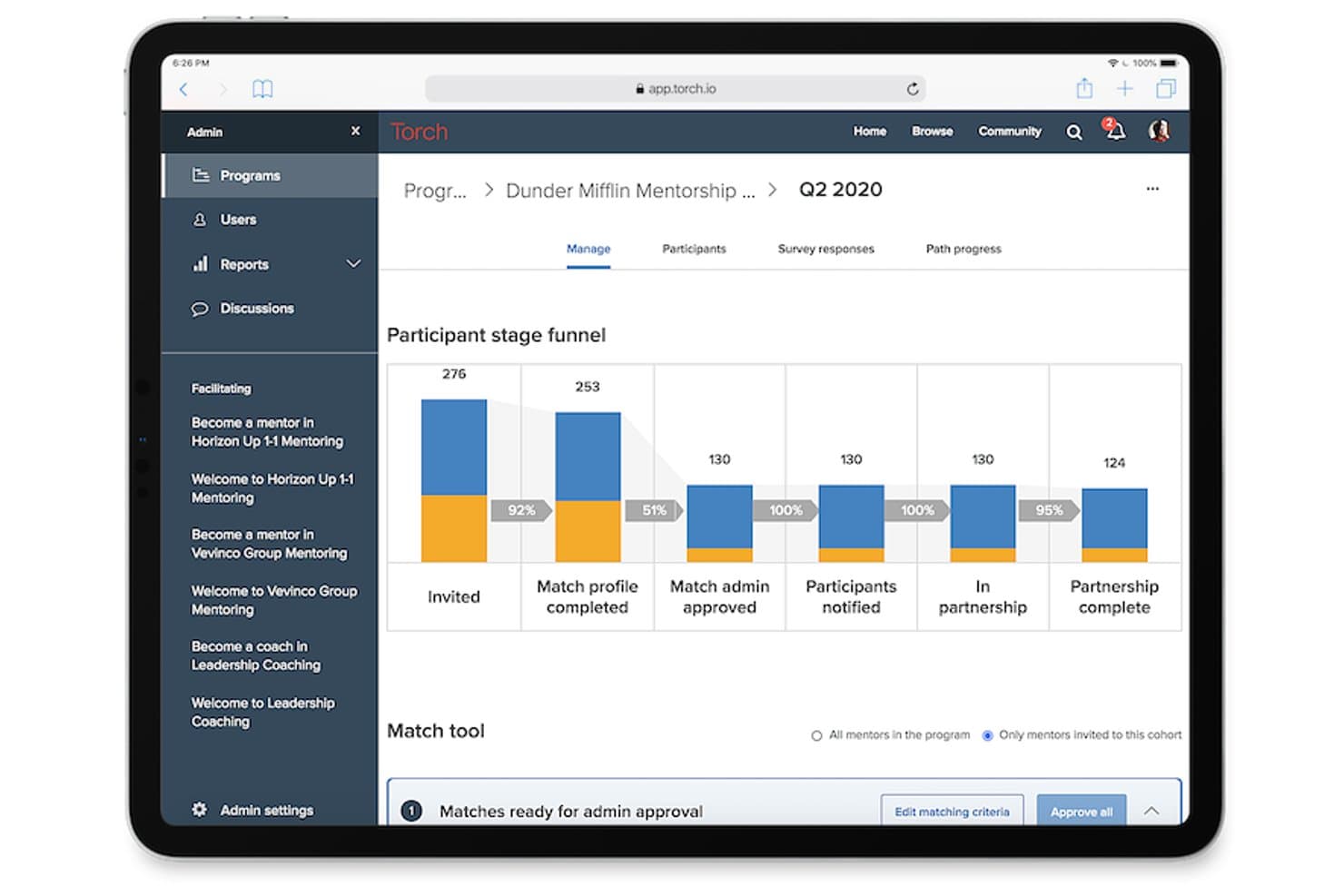
Torch tracks mentorship participant stages from invite to partnership complete. Torch is a leadership coaching platform that connects employees with a curated network of human coaches.
Who Is Torch Best For?
Torch works best for mid-market and enterprise HR teams that want an external, vetted coach network for leadership programs.
Why I Picked Torch
Torch earns its spot on my shortlist because it genuinely combines human coaching with AI in a way that goes beyond a chatbot add-on. I'm particularly impressed by Spark, Torch's AI agent, which runs adaptive role-play simulations for real scenarios like delivering difficult feedback or managing change resistance. Paired with Torch 360, which captures multi-stakeholder feedback at program start and close, you get a measurable arc of leadership behavior change that most standalone coaching tools can't match.
Torch Key Features
- Coach shortlisting: Sends each participant a curated list of three vetted coaches to review and select from, with the option to rematch if the fit isn't right.
- Group coaching cohorts: Run structured group programs for 6–9 participants over 3–6 months using pre-built or co-created curricula.
- Org Intelligence dashboards: Aggregate anonymized coaching signals across the organization to surface leadership capability gaps, burnout indicators, and talent risk at a program level.
Torch Integrations
Torch offers native integrations with Zoom and Slack, plus SAML SSO for identity-provider access.
Pros and Cons
Pros:
- Anonymized talent-risk signals by program
- Pre-built or co-created group curricula
- Curated coach matching with rematching
Cons:
- Engagement prompts between sessions can feel sparse
- User interface is not intuitive
Learn more about Torch:
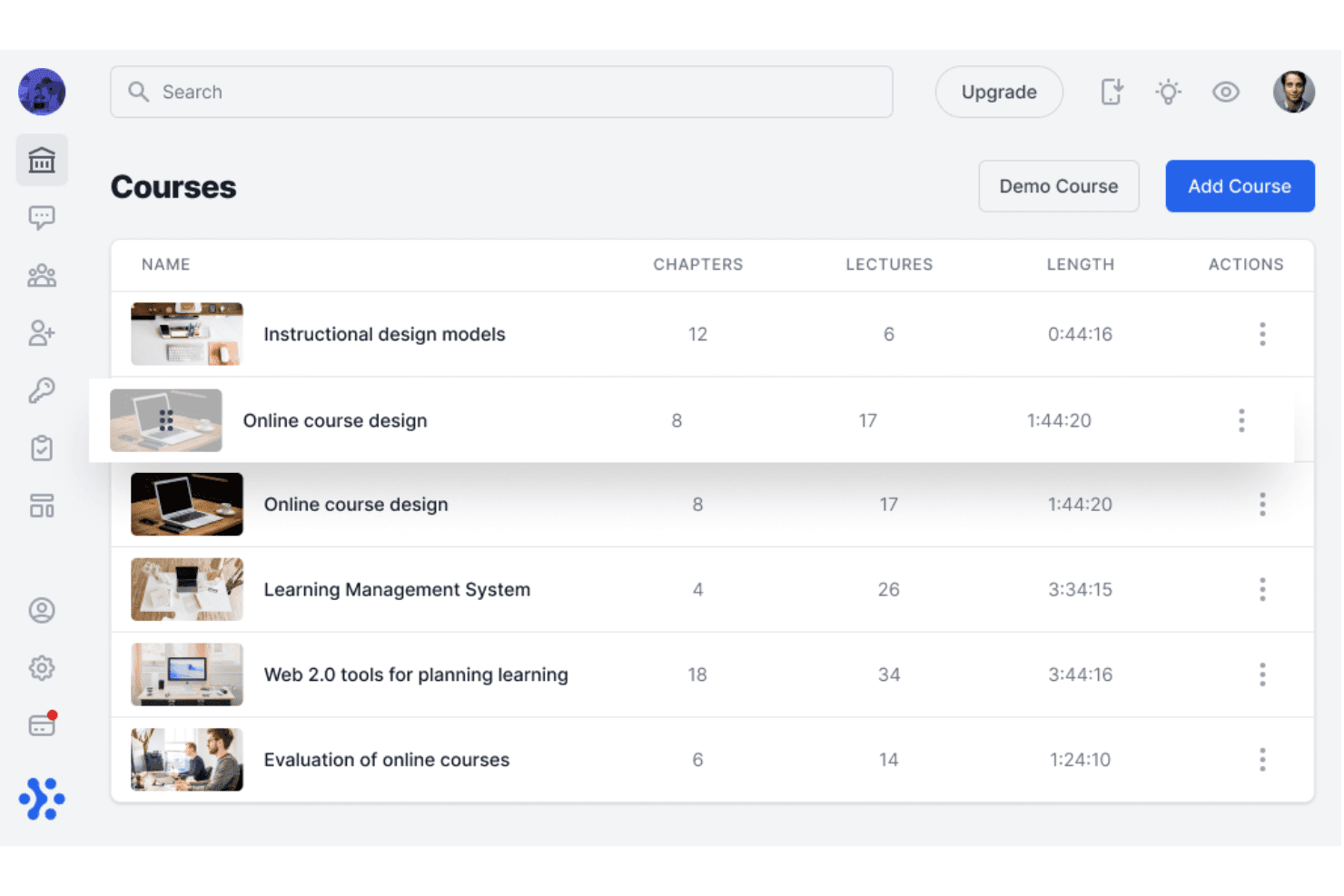
Sharpist organizes coaching courses by chapters, lectures, and length. Sharpist is an enterprise digital coaching platform that pairs employees with human coaches and an AI Coach.
Who Is Sharpist Best For?
Sharpist is well suited to European enterprises and multinational organizations that need to run structured leadership coaching programs at scale while maintaining strict data privacy standards.
Why I Picked Sharpist
I chose Sharpist for how its AI Coach picks up where each human session ends. After a 1:1 session, it reads the human coach's summary and keeps working with the employee through chat or voice. Pair that with a matching engine backed by both a proprietary algorithm and a team of psychologists, which claims a 97% match success rate, and you get a platform where AI and human coaching reinforce each other in a way I haven't seen elsewhere.
Sharpist Key Features
- Flexible credit pool: HR allocates a shared credit budget that learners can spend across 1:1 sessions, group coaching, and different session lengths.
- 2,000+ micro-task library: Coaches assign curated tasks, including articles, self-reflection exercises, and journals, from a library mapped to 32 leadership focus areas to reinforce learning between sessions.
- Real-time L&D dashboard: Get a live view of registration, credit usage, engagement, goal progress, and benchmarking data across the coaching program.
- Group coaching sessions: Live cohort sessions run for 60–90 minutes with 4–8 participants, letting you extend coaching access across teams.
Sharpist Integrations
Sharpist has no public API, and no named HRIS, LMS, or calendar integrations are documented.
Pros and Cons
Pros:
- Transferable credits support mixed coaching formats
- Large library of micro-tasks between sessions
- Live dashboard with CSV export
Cons:
- No standalone tools for independent coach practices
- Limited platform languages
Learn more about Sharpist: Best for AI-matched coaching via Teams or Slack
- Free demo available
- Pricing upon request
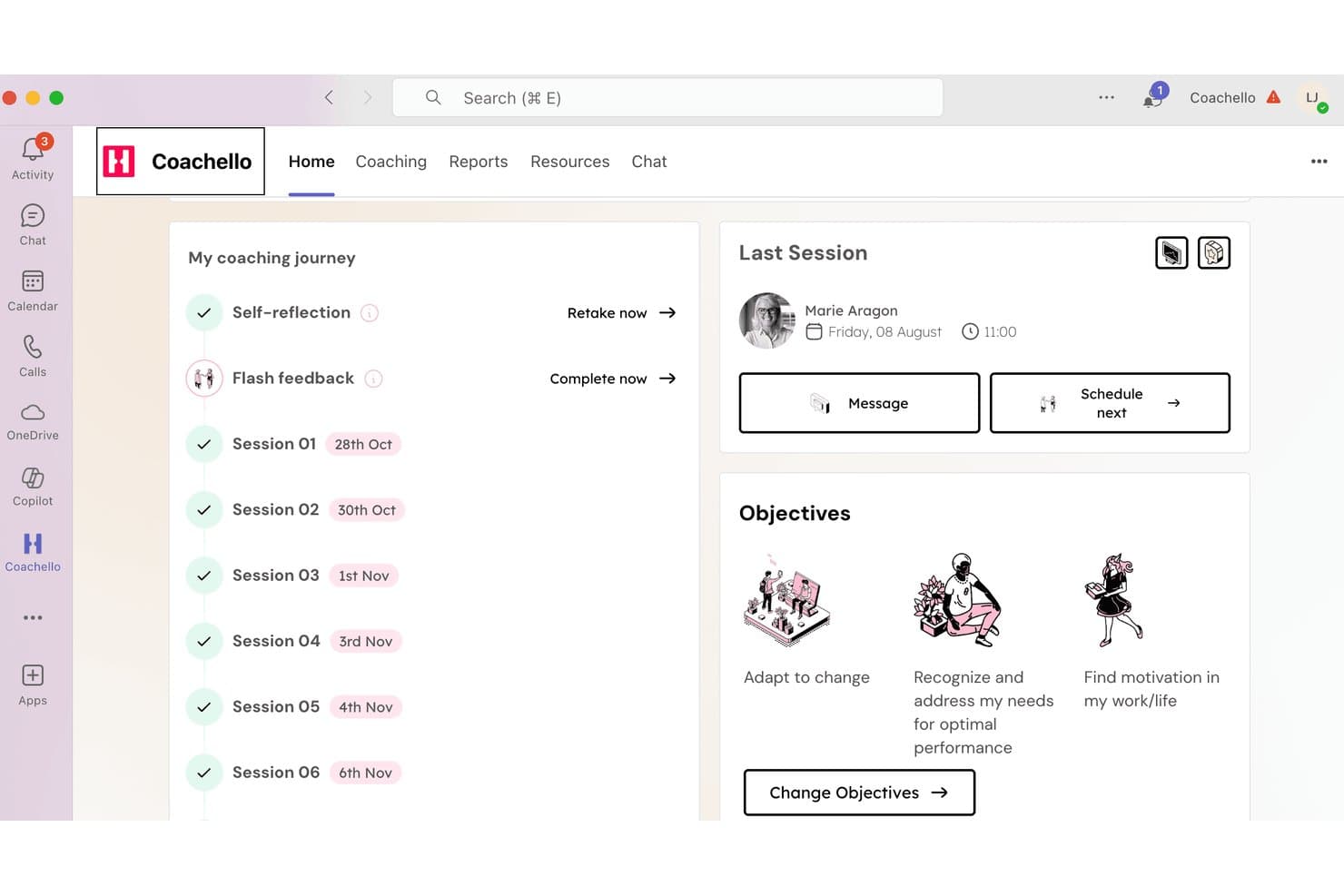
Coachello tracks coaching sessions, objectives, and progress in one dashboard. Coachello is an enterprise coaching platform that brings together human 1:1 coaching, AI coaching, AI roleplays, group workshops, and an internal coach hub, delivered natively inside Microsoft Teams or Slack.
Who Is Coachello Best For?
Coachello is a strong fit for teams that rely on Microsoft Teams or Slack to deliver coaching programs.
Why I Picked Coachello
I picked Coachello as one of the best because its AI matching engine lives natively inside Microsoft Teams and Slack, so coachees get coach recommendations, book sessions, and complete their entire coaching journey. The matching itself weighs expertise, language, time zone, and goals, then surfaces three vetted ICF PCC/MCC coaches with intro videos for review before a chemistry call. I also like that AI role-plays let employees practice real conversations, like giving feedback or navigating conflict, scored against custom rubrics directly in the platform.
Coachello Key Features
- AI assessment debriefs: Walks coachees through any psychometric assessment—personality, 360, or competency—and co-creates an exportable individual development plan.
- Drag-and-drop program builder: Assemble 1:1 sessions, group coaching, and workshops into cohorts, set enrollment rules, and attach custom KPIs in one interface.
- Multi-stakeholder 360 flash feedback: Coachees request pulse feedback from peers and managers directly inside Teams, feeding results into the coaching journey.
- Power BI and Tableau export: HR dashboards with utilization, NPS, and skill-gap heat maps can be pushed to your existing BI tools for broader workforce reporting.
Coachello Integrations
Coachello integrates with Microsoft Teams and Slack. No public API has been clearly documented.
Pros and Cons
Pros:
- Skill-gap heat maps in HR dashboards
- Program Builder supports cohort-based coaching
- AI helps match coachees with the right coach
Cons:
- Mobile access remains limited for users
- Roleplay avatars can lag or repeat questions
Learn more about Coachello:
Annen coachingprogramvare
Her er noen flere plattformer som ikke kom med på kortlisten min, men som likevel er verdt å sjekke ut:
- 11Sounding BoardBest for multi-stakeholder coaching program governance
- 12SkillsoftBest for coaching tied to a global skills platform
- 13TogetherBest for criteria-based employee coaching
- 14Simply.CoachBest for solo coaches managing multiple clients
- 15QooperBest for scaling internal coaching programs
- 16ChronusBest for multi-program mentoring and coaching
- 17DelentaBest for coaching ops with ICF-aligned logs
- 18CoachAccountableBest for client progress tracking between sessions
- 19AceUpBest for coaching scaled across teams and org levels
How I Evaluate Coaching Software
I split my evaluation into three parts: core functionality (booking sessions and tracking goals over time) carries the most weight; standout features like AI-powered session insights set vendors apart; and beyond features, I consider privacy controls, HRIS integrations, and pricing flexibility.
Core Functionality (Table Stakes For This List)
When I'm selecting tools for my list, I score each one on a scale from 0 (does not offer the functionality) to 5 (excels in this area) for each core functionality listed below. I then convert the total into a percentage to help assess each tool's overall fit, with extra weight on any functionalities I've deemed essential.
- Session Scheduling (Essential): I check for calendar sync, automated reminders, rescheduling flows, and whether the platform handles bulk session booking across multiple coaches.
- Client Progress Tracking (Essential): I look for structured goal frameworks with session-by-session history, not just free-text notes, plus dashboards that give both coach and coachee visibility into milestones.
- Secure Communication Tools: I evaluate whether messaging and video are built in with encryption and access controls, or if the platform just links out to a third-party tool with no security layer.
- Coach-Coachee Matching: Matching criteria matter here. I look at whether the platform supports skills, goals, and availability filters, and whether admins can override automated suggestions.
- Program & Curriculum Management: I check how flexibly admins can build multi-session tracks, reuse templates across cohorts, and adapt sequencing for different development paths.
- Reporting on Coaching Outcomes: I look for dashboards that go beyond session counts to show engagement trends, completion rates, and progress metrics aggregated across the organization.
Once I have a list of tools that meet the criteria, I consider what sets each platform apart.
Differentiating Factors (What Sets Vendors Apart)
Here's how I compare and contrast different vendors:
Standout Features
AI-powered session insights are a big differentiator. I look for platforms that auto-transcribe and summarize coaching conversations, surfacing recurring themes so coaches spend less time on notes and more time on development. Multi-stakeholder feedback tools also matter—when managers and peers can contribute 360-degree input, the coachee's development picture gets richer and coaching stays aligned with team goals. I also evaluate white-label branding options, especially for internal L&D teams that need a consistent, organization-specific experience across global offices.
Beyond Features
Data privacy tops my list. Coaching surfaces sensitive personal and performance information, so I check whether vendors offer configurable visibility controls—for example, keeping coach session notes visible only to the coachee while giving HR aggregated, anonymized outcome data. I also evaluate HRIS and talent system integrations, since pulling employee skills and role data into coach-coachee matching cuts manual work for program administrators and keeps development aligned with performance cycles. Flexible pricing matters too, especially for organizations piloting a coaching program in one department before scaling organization-wide.
Slik velger du coachingprogramvare
Velg riktig programvare ved å teste om den beskytter sensitive samtaler, støtter programutformingen din og produserer dokumentasjon du kan bruke i beslutninger om arbeidsstyrken.
| Hvis prioriteten din er … | Se etter … |
|---|---|
| Hvis prioriteten din er …Konfidensiell coaching | Se etter …Skriftlige regler som skiller private notater fra aggregert HR-rapportering |
| Hvis prioriteten din er …Bedre matching med coacher | Se etter …Dokumenterte matchingkriterier og en prosess for overstyring av administrator |
| Hvis prioriteten din er …HRIS-tilkoblede programmer | Se etter …En oppdatert integrasjonsveiledning som viser datafelter for ansatte og tidspunkt for synkronisering |
| Hvis prioriteten din er …Målbar utvikling | Se etter …Eksempler på resultatrapporter som viser engasjement, fullføring og fremdrift mot mål |
| Hvis prioriteten din er …Fleksibel utrulling | Se etter …Pris- og kontraktsvilkår som støtter et pilotprosjekt før bredere implementering |
Slik vurderer du kortlisten din
- Test konfidensialiteten: Be om leverandørens matrise for datasynlighet, og bekreft skriftlig hvem som har tilgang til notater, mål, meldinger og rapporter.
- Test datahåndteringen: Be om et oppdatert dataflytdiagram, en plan for oppbevaring og en prosess for sletting før du deler informasjon om ansatte.
- Gjennomfør en avgrenset prøveperiode: Opprett ett coachingløp i løpet av en 14-dagers evaluering, gjennomfør en eksempeløkt og eksporter deltakeroppføringen som blir resultatet.
- Bekreft supportpåstandene: Send inn én henvendelse før kjøp med et spørsmål om matching eller rapportering, og noter deretter svartiden og eskaleringsveien.
- Velg hva du vil prioritere: Bestem om prioriteten din er et bredt eksternt coachnettverk eller bedre intern programstyring, fordi plattformer sjelden maksimerer begge deler.
Hva er coachingprogramvare?
Coachingprogramvare er en plattform som hjelper organisasjoner med å koble ansatte sammen med coacher, administrere utviklingsprogrammer, planlegge økter og følge fremdriften. Den støtter privat kommunikasjon, målsetting, tilbakemeldinger, rapportering og integrasjoner med HR-systemer. HR-team bruker den til å koordinere coaching i stor skala, samtidig som konfidensiell informasjon fra øktene beskyttes og deltakelse, fullføring og utviklingsresultater måles.
Funksjoner i coachingprogramvare
Når du skal velge riktig programvare for coaching av teamet ditt, bør du se etter følgende viktige funksjoner:
- Matching av coacher: Kobler ansatte sammen med de riktige coachene basert på mål, ferdigheter, tid og preferanser. HR kan justere matchingen når som helst.
- Planlegging av økter: Lar coacher og ansatte bestille, flytte eller gjenta møter ved hjelp av delte kalendere og automatiske påminnelser.
- Måloppfølging: Hjelper brukerne med å sette mål og følge fremdriften. Coacher kan knytte notater fra øktene direkte til disse hovedmålene.
- Sikker kommunikasjon: Holder meldinger, filer og videolenker private. Tydelige tillatelser holder sensitive samtaler adskilt fra administratorvisninger.
- Programadministrasjon: Hjelper HR med å sette opp coachingløp, administrere grupper og bruke ferdige maler for enhetlige læringsløp.
- Tilbakemeldinger og vurderinger: Samler inn enkle spørreundersøkelser og vurderinger fra kolleger og ledere for å vise styrker og utviklingsområder.
- Rapportering og analyse: Viser fullføring av økter, fremdrift og samlet aktivitet i oversiktlige dashbord, slik at HR kan måle resultatene.
- Systemintegrasjoner: Kobler coachingprogramvaren til HR-verktøyene og arbeidskalenderne dine, slik at informasjonen oppdateres automatisk.
- Personvern og kontroll: Beskytter private notater og resultater ved å kontrollere hvem som kan se bestemte detaljer, i motsetning til overordnede teamdata.
Vanlige AI-funksjoner i coachingprogramvare
I tillegg til standardfunksjonene som er nevnt ovenfor, har mange plattformer nå integrert AI gjennom funksjoner som:
- Generering av personaliserte handlingsplaner: Gjør målene, refleksjonene og vurderingsresultatene til en coachingdeltaker om til foreslåtte utviklingsaktiviteter. Coacher kan gjennomgå, redigere og tildele disse anbefalingene mellom øktene.
- Forslag til coaching-spørsmål: Anbefaler oppfølgingsspørsmål basert på utfordringene, målene eller tidligere svar fra en coachingdeltaker. Dette gir coacher flere innspill når de trenger å utforske en problemstilling grundigere.
- Simuleringer av øvingssituasjoner: Oppretter interaktive rollespilløvelser for situasjoner som vanskelige samtaler, delegering eller forberedelse til jobbintervjuer. Coachingdeltakere kan øve på ulike svar og få tilbakemeldinger før de bruker dem på jobb.
- Oppdagelse av risiko for manglende engasjement: Analyserer deltakelsesmønstre, uteblitte økter, svartid og aktivitetsnivå for å identifisere mulig manglende engasjement. Programadministratorer kan bruke disse signalene til å avgjøre når en deltaker kan ha behov for oppfølging.
- Ressursanbefalinger: Kobler coachingtemaer med relevante øvelser, artikler, videoer eller læringsressurser fra plattformens innholdsbibliotek. Anbefalingene kan endres etter hvert som coachingdeltakerens mål og utviklingsbehov utvikler seg.
- Coaching-søk med naturlig språk: Lar brukere søke i coachingoppføringer, ressurser eller programdata ved hjelp av dagligdags språk. En administrator kan for eksempel spørre hvilke utviklingstemaer som forekommer oftest i en gruppe.
Fordeler med coachingprogramvare
En plattform for coaching av ansatte gir flere fordeler. Her er noen av fordelene du kan se frem til:
- Koordinert programadministrasjon: Programmaler, regler for påmelding, gruppeadministrasjon og planleggingsverktøy hjelper HR-team med å organisere coachingtiltak.
- Målbar utvikling: Målrammeverk, historikk over økter, milepælsdashbord og resultatrapporter viser deltakelse og fremdrift over tid.
- Bedre matching av coacher: Kriterier basert på mål, ferdigheter, erfaring, preferanser og tilgjengelighet hjelper deltakerne med å komme i kontakt med egnede coacher.
- Beskyttede samtaler: Innstillinger for tillatelser, private meldinger, kontrollerte notater og synlighetsregler bidrar til å skille konfidensiell coachinginformasjon fra samlet HR-rapportering.
- Nyttigere innsikt fra øktene: AI-transkripsjon, sammendrag, tilbakevendende temaer, handlingsplaner og foreslåtte spørsmål gir coacher strukturert informasjon til oppfølging.
- Bedre beslutninger om arbeidsstyrken: Tilbakemeldingsverktøy, engasjementsdata, fullføringsgrad og anonymiserte rapporter hjelper HR-team med å evaluere coachingprogrammer.
Kostnader og priser for coachingprogramvare
Å velge riktig plattform krever en forståelse av de ulike prismodellene og abonnementene som er tilgjengelige. Kostnadene varierer basert på funksjoner, teamstørrelse, tillegg og mer. Tabellen nedenfor oppsummerer vanlige abonnementer, gjennomsnittspriser og typiske inkluderte funksjoner.
Sammenligningstabell for coachingprogramvare
| Abonnementstype | Gjennomsnittspris | Vanlige funksjoner |
|---|---|---|
| AbonnementstypeGratisabonnement | Gjennomsnittspris$0/bruker/måned | Vanlige funksjonerGrunnleggende matching av coacher, begrenset planlegging, målsporing og deltakerprofiler. |
| AbonnementstypePersonlig abonnement | Gjennomsnittspris$5-$25/bruker/måned | Vanlige funksjonerPlanlegging av økter, fremdriftssporing, meldinger, kalenderintegrasjon og grunnleggende rapportering. |
| AbonnementstypeForretningsabonnement | Gjennomsnittspris$25-$75/bruker/måned | Vanlige funksjonerAvansert matching, programadministrasjon, tilbakemeldingsverktøy, analyse og HRIS-integrasjoner. |
| AbonnementstypeStorbedriftsabonnement | Gjennomsnittspris$75-$200/bruker/måned | Vanlige funksjonerTilpassede arbeidsflyter, avanserte personvernkontroller, dedikert brukerstøtte, profilering med eget varemerke og rapportering for hele organisasjonen. |
Vanlige spørsmål om coachingprogramvare
Her er noen svar på vanlige spørsmål:
Hvordan beskytter coachingprogramvare konfidensiell informasjon fra økter?
Coaching- og læringsplattformer beskytter konfidensiell informasjon gjennom rollebaserte tillatelser og separate synlighetsinnstillinger. Før lansering bør du spørre hvem som kan se notater, mål, meldinger, vurderinger og rapporter. Retningslinjene dine bør sørge for at private øktnotater forblir mellom coachen og coachingdeltakeren. HR kan i stedet motta anonymiserte data om deltakelse eller resultater. Be om et dataflytdiagram, en oppbevaringsplan og en prosess for sletting. Test disse kontrollene i løpet av en prøveperiode. Eksporter et eksempel på en deltakeroppføring og bekreft at begrenset innhold forblir skjult for administratorer.
Kan coachingprogramvare kobles til et HRIS?
Ja, enkelte plattformer kan kobles til HRIS- og talentsystemer. Bekreft hvilken integrasjon som er tilgjengelig, før du signerer en kontrakt. Sjekk hvilke medarbeiderfelter som overføres, for eksempel avdeling, rolle, sted og leder. Spør hvor ofte systemene synkroniseres, og hva som skjer når en medarbeider bytter rolle. Du bør også kontrollere om tilkoblingen støtter oppdateringer én vei eller begge veier. Hvis det ikke finnes en innebygd integrasjon, bør du spørre om støttede API-er, filimporter og trinn for administratorgjennomgang.
Hvordan bør HR teste coachingprogramvare før kjøp?
HR bør gjennomføre en definert prøveperiode med en realistisk coachingarbeidsflyt. Opprett ett program, registrer eksempeldeltakere, planlegg en økt, registrer et mål og eksporter deltakeroppføringen. Test matchingsregler, påminnelser, omplanlegging, tillatelser, rapportering og sletting av data. Be leverandøren forklare uklare resultater. Send inn et spørsmål til brukerstøtten før prøveperioden avsluttes. Registrer responstid, kvaliteten på svaret og veien videre for eskalering. Denne prosessen avdekker mangler som produktdemonstrasjoner ofte skjuler.
Erstatter coachingprogramvare en menneskelig coach?
Nei, disse plattformene støtter programadministrasjon og coachingarbeid i stedet for å erstatte menneskelig dømmekraft. En plattform kan foreslå spørsmål, oppsummere økter, anbefale ressurser eller varsle om endringer i deltakelsen. Coacher må fortsatt tolke kontekst, håndtere sensitive opplysninger og velge passende tiltak. Undersøk hvordan leverandøren håndterer AI-generert innhold, og om coacher kan redigere eller avvise forslag. Bekreft også om deltakerne får beskjed når AI behandler informasjon fra økter. Sørg for menneskelig gjennomgang i alle beslutninger som gjelder medarbeiderutvikling.