

De 10 beste verktøyene for forretningsanalyse i 2026

10 Kortliste over de beste programvarene for forretningsintelligens


Det kan være overveldende å navigere i HR-kompleksitet. Du må håndtere data, medarbeidernes behov og strategiske mål. Programvare for forretningsintelligens kan gjøre disse utfordringene enklere og omdanne kaos til klarhet.
Etter min erfaring gir de riktige verktøyene innsikt som gjør teamet ditt i stand til å ta informerte beslutninger. Du finner løsninger som håndterer dine unike utfordringer, fra analyse av arbeidsstyrketrender til optimalisering av ressursfordelingen.
Jeg har testet og vurdert den beste programvaren for forretningsintelligens på markedet uavhengig. Denne artikkelen gir deg en objektiv oversikt over de beste tilgjengelige alternativene, med fokus på funksjonene som betyr mest for teamet ditt.
Why Trust Our Software Recommendations
Our team has been testing and reviewing software since 2012. As HR experts ourselves, we know how difficult—and important—it is to choose the right software.
For this guide, we evaluated tools using hands-on testing and independent research, scoring tools using our selection criteria. We also draw on insights from industry thought leaders and practicing HR experts.
Our reviews reflect our human editorial judgment, not a sales pitch.
Expert reviewers:
Sammenligningstabell for programvare for forretningsintelligens
Tabellen nedenfor sammenligner prisopplysningene for mine beste utvalgte programmer for forretningsintelligens.
| Tool | Best For | Trial Info | Price | ||
|---|---|---|---|---|---|
| 1 | Augment your data and predict future trends | 15-day free trial | From $30/month (billed annually) | Website | |
| 2 | Best for automated, no-code dashboards | Free plan available | From $29/month | Website | |
| 3 | Create dashboards and answer client questions on the same platform | 14-day free trial | From $120/month (billed annually) | Website | |
| 4 | Create white-labeled analytics experiences | 7-day free trial | Pricing upon request | Website | |
| 5 | Track the efficiency of your departments or team members | Free demo available | Pricing upon request | Website | |
| 6 | Simplify recurring reporting tasks with automation | Free trial + free demo available | From $265/month (billed annually) | Website | |
| 7 | Transform raw data into data-driven stories | 14-day free trial | From $279/month | Website | |
| 8 | Best for turning data into AI-driven insights | Free demo available | Pricing upon request | Website | |
| 9 | Save time with custom report templates | Free demo available | Pricing upon request | Website | |
| 10 | Plan for the future with forecasting features | Free demo available | Pricing upon request | Website |
De beste systemene for programvare for forretningsintelligens
Her er en kort beskrivelse av hvert system for forretningsintelligens, med det beste bruksområdet for hvert verktøy, noen bemerkelsesverdige funksjoner og skjermbilder som gir deg et innblikk i brukergrensesnittet.

Augment your data and predict future trends

Zoho Analytics is a business intelligence (BI) tool that helps organizations collect and track data. The software pulls data from multiple sources and organizes it into clean dashboards, allowing you to slice and dice the information however you want.
With Zoho Analytics, you can track key business metrics to identify behavioral trends. The software’s AI-driven management module helps you augment your data so you can predict future trends and generate insights.
Zoho Analytics integrates with hundreds of popular apps, including Salesforce, Google Drive, QuickBooks, Zendesk, HubSpot, and Mailchimp.
Zoho Analytics costs from $24/month. The software also offers a 15-day free trial.
New Product Updates from Zoho Analytics

Zoho Analytics Adds Exogenous Variables to Multivariate Forecasting
Zoho Analytics introduces exogenous variables for multivariate forecasting using the VARX model. This helps forecasts account for external drivers such as marketing spend, discounts, and seasonality. For more information, visit Zoho Analytics’ official site.
 .
.
Signara
Best for automated, no-code dashboards

Signara is a marketing analytics platform that uses agentic AI and deterministic KPI calculations to automate dashboard creation, driver analysis, and decision-ready reporting from connected data sources.
Who Is Signara Best For?
Signara is a good fit for marketing teams and analysts who need automated, presentation-ready reporting without manual data wrangling.
Why I Picked Signara
I picked Signara as one of the best because its approach to data privacy is built into how the platform processes data, not bolted on as an afterthought. Signara runs read-only queries against your connected sources and never stores your raw data, which means sensitive marketing and revenue data stays where it lives. Every KPI is computed with a deterministic, auditable formula, so there's a full audit trail behind every number in every report.
Signara Key Features
- Agentic AI report generation: Signara's AI agent automatically builds full analytics reports from your connected data without manual configuration.
- Driver analysis: Identifies which variables are most responsible for changes in your KPIs across a given time period.
- AI-written narratives: Generates plain-language explanations of your data trends directly inside each report.
- PPTX export: Converts completed reports into presentation-ready PowerPoint files formatted for stakeholder sharing.
The search didn't return Signara-specific Zapier or API results. Based on the official website content I gathered, I have enough information to write the integrations section accurately.
Signara Integrations
Signara offers a small set of native connectors, including Snowflake, Databricks, BigQuery, PostgreSQL, MySQL, Google Sheets, and HubSpot, along with support for Excel, CSV, TSV, and JSON file uploads.
Pros and Cons
Pros:
- PPTX export produces presentation-ready decks instantly
- Deterministic calculations prevent AI hallucination risks
- AI-generated narratives explain KPI changes automatically
Cons:
- No real-time dashboard refresh on lower plans
- Limited to marketing-focused KPI reporting

Create dashboards and answer client questions on the same platform

Klipfolio is an analytics and BI platform that helps businesses take control of their data. The solution enables you to customize your dashboard to track KPIs with multiple charts and graphs at a time.
Klipfolio allows your team members to collaborate by leaving each other notes directly on the charts. Clients can ask questions on the charts they’re referencing, so you can provide detailed answers.
Klipfolio integrates with dozens of solutions, including Google Analytics, ActiveCampaign, Ahrefs, Adobe Analytics, Basecamp, Dropbox, Harvest, and HubSpot.
Klipfolio costs from $99/month. The software also offers a 14-day free trial.

Sisense
Create white-labeled analytics experiences

Sisense is a BI solution that helps product developers create bespoke solutions for their clients. The tool allows developers to create white-labeled analytics and integrate them into their products or services.
The highlight of this solution is that it enables you to deliver consistent brand experiences. Even though the analytics platform you embed into your client’s product relies on Sisense’s architecture and machine learning capabilities, you can customize its look and feel to your brand.
Sisense integrates with multiple solutions, including Google Ads, Facebook Insights, SAP Analytics Cloud, Dropbox, GitHub, Oracle BI, and Google Search Console.
Sisense offers custom pricing upon request, as well as a free trial.

Grow
Track the efficiency of your departments or team members
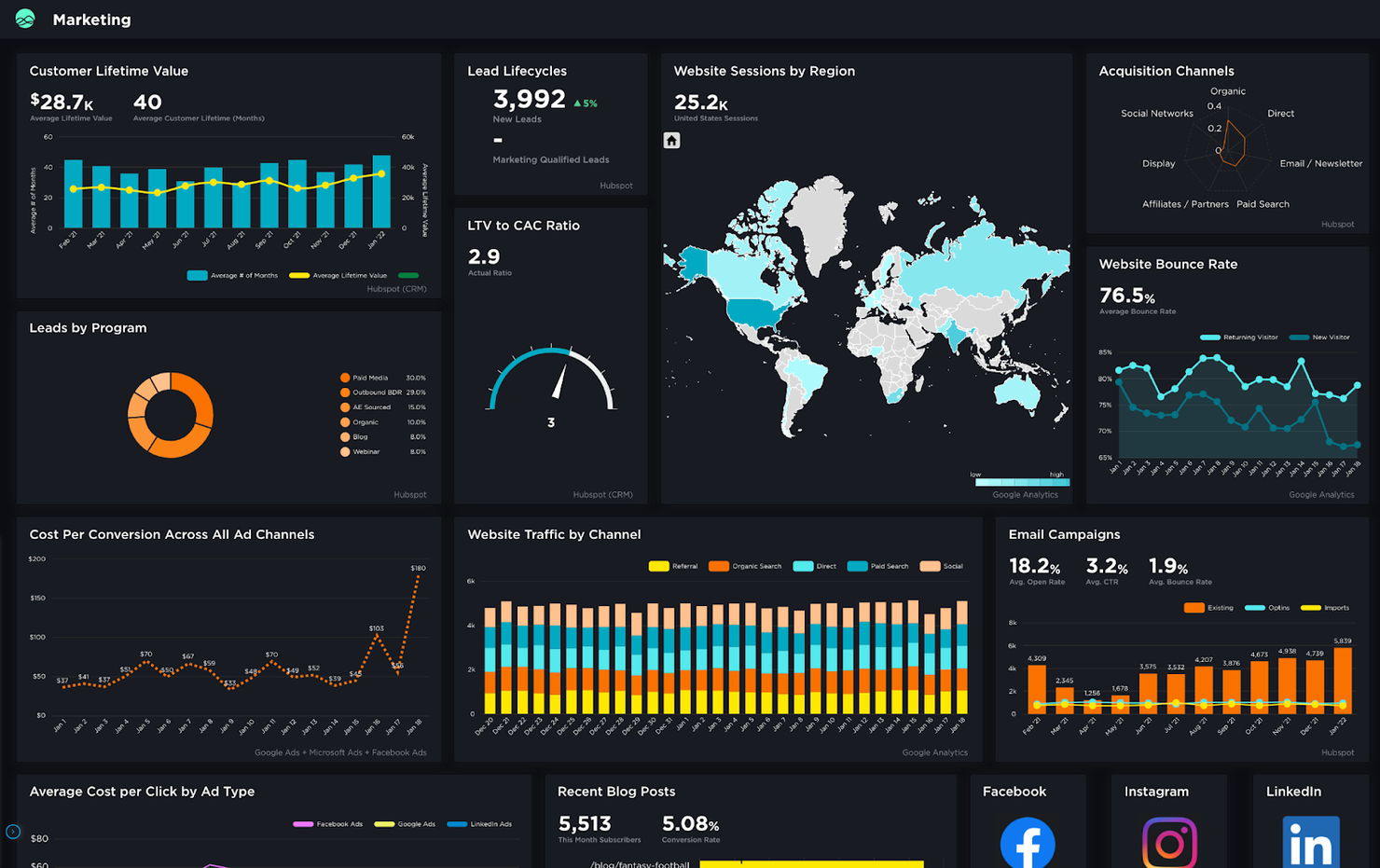
Grow is a modern BI tool that helps you make informed business decisions. The software is highly customizable and allows you to track and manipulate data in order to uncover valuable insights. The solution offers multiple pre-made templates that allow you to turn raw data into structured reports you can understand.
Grow’s Leaderboard dashboards allow you to track the efficiency of different teams or team members. These dashboards help you understand which departments or members of your organization lead in sales or other metrics based on custom criteria.
Grow integrates with dozens of popular solutions, including ActiveCampaign, Airtable, Asana, Box, FreshBooks, Google Ads, HubSpot, Salesforce, and Shopify.
Grow offers custom pricing upon request. The software also offers a free trial on demand.

ClicData
Simplify recurring reporting tasks with automation

ClicData is a cloud-based BI solution that makes it easy to track your data and interpret it with the help of interactive dashboards. The tool allows you to collaborate with team members and create reports that offer insights into your activity.
One of the things I liked about ClicData is that you can schedule automatic reports and share them with your team and external collaborators via email. This helps you save time when preparing recurring reports. In addition, you can access ClicData directly in your browser, and the solution is compatible with mobile devices, so you can check your data while on the go.
ClicData integrates with dozens of solutions, including Google Analytics, Bing Ads, QuickBooks, SurveyMonkey, WooCommerce, and Basecamp.
ClicData costs from $75/month. The software also offers a 15-day free trial.

Cluvio
Transform raw data into data-driven stories

Cluvio is a cloud-based BI and analytics solution that enables data-driven teams and businesses to find actionable insights from data using SQL and R. The solution helps you track KPIs in real time with interactive dashboards.
This software made the list thanks to the variety of charts and graphs it offers. With Cluvio, you can transform unstructured data into data-driven stories and help your clients understand what’s happening in their organizations. The tool enables you to share dashboards with collaborators via secure links, allowing them to view your dashboards and reports without altering them.
Cluvio integrates with dozens of tools, including Google Cloud, Google Big Query, MySQL, PostgreSQL, Amazon Redshift, and Amazon Web Services.
Cluvio costs from $249/month. The software also offers a 14-day free trial.

Athenic
Best for turning data into AI-driven insights
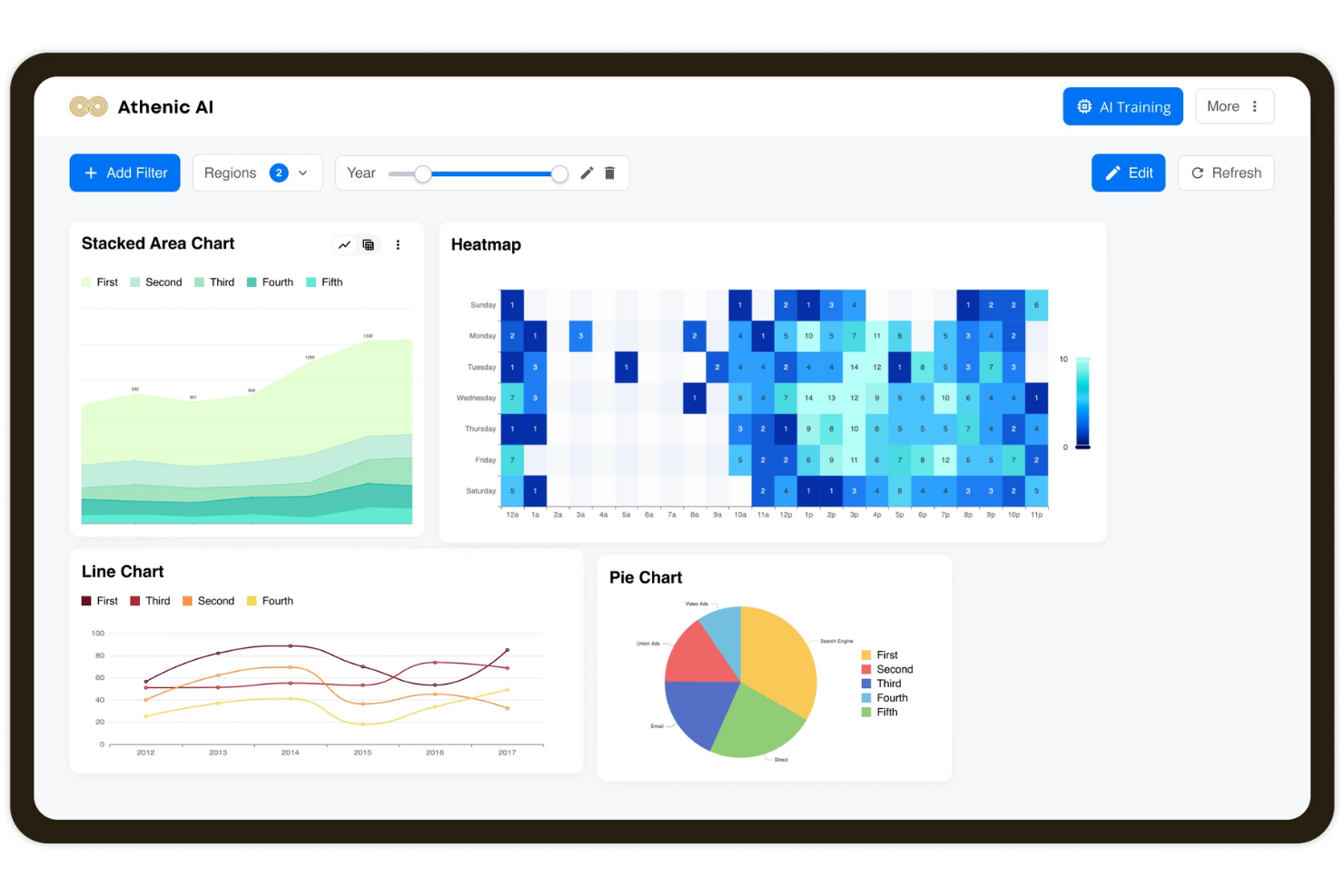
Athenic is an AI-powered business intelligence platform designed to simplify data analysis and enhance decision-making. The tool enables teams to interact with their data through conversational queries, visualize insights instantly, and leverage a powerful knowledge graph for structured, accurate answers. Its Agentic deep research capabilities allow for in-depth data exploration, helping organizations uncover patterns and make informed decisions faster.
The highlight of Athenic is its AI-driven approach to data interaction. With conversational AI and customizable language models, teams can ask questions naturally and generate visualizations in seconds. This makes Athenic especially valuable for organizations seeking to improve BI adoption and collaboration, while supporting both startups and large enterprises.
Athenic integrates with multiple solutions, including Notion, Stripe, AWeber, Asana, Google Calendar, SQL Databases, Data Warehouses, CRMs, ERPs, Marketing Platforms, Python SDK, and REST API.

NetSuite SuiteAnalytics is a BI software that helps businesses make better decisions by allowing them to make sense of big data. The solution is versatile and flexible but has a bit of a learning curve if you’re not familiar with Netsuite’s app ecosystem.
NetSuite SuiteAnalytics pulls data from multiple data sources and helps you understand what’s happening in your organization with real-time searches, KPI tracking, and excellent reporting features. You can customize your reports and create report templates that include business-specific formulas so you can save time in the long run.
NetSuite SuiteAnalytics integrates with dozens of tools via third-party integrators like Zapier.
NetSuite SuiteAnalytics offers custom pricing upon request, as well as a free demo.
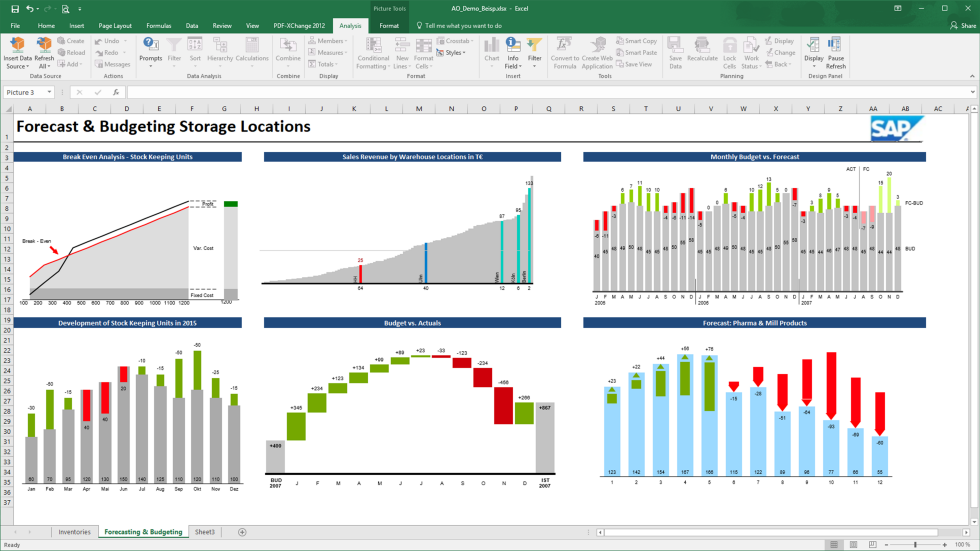
SAP BusinessObjects is a BI tool that enables you to manage your business and resources effectively with predictive analytics. The solution can perform heavy-duty tasks like breaking down large datasets, but it also helps business users who are not versed in SQL to create complex reports.
This software offers a lot of customization options and enables you to create personalized reports with a drag-and-drop editor. The software supports automated deliveries and notifies users when their reports are ready, so you can run it in the background. The tool’s forecasting features enable you to identify potential bottlenecks before they become problematic, so you can reallocate your resources and improve your efficiency.
SAP Business Intelligence integrates with multiple apps, including other business intelligence tools like SAP Roambi and Toucan, but also with solutions like Microsoft Excel, MS PowerPoint, Zoho Expense, MongoDB, DocuWare, and OneStream.
SAP BusinessObjects offers custom pricing upon request. The software also offers a free demo.
Annen programvare for forretningsintelligens
Her er noen flere alternativer som ikke kom med på listen over den beste programvaren for forretningsintelligens:
- Microsoft Power BI
Combine multiple visualizations to create comprehensive reports
- Coefficient
For interactive spreadsheet reporting
- Phocas
Break down your financial data and create straightforward reports
- Metric Insights
Track your data with a mobile BI solution
- bipp Analytics
Give your web applications reporting features with an embedded BI solution
- Funnel
BI platform that helps you break down your marketing data.
- Domo
Low-code BI platform that enables you to share your reports securely with team members and external collaborators.
- Tableau
BI software that helps you uncover insights with customizable dashboards and reports.
- Looker
Browser-based business intelligence tool that helps you compile large datasets.
- Supermetrics
BI tool that enables you to collect and visualize marketing data.


How I Evaluate Business Intelligence Software
My evaluation splits into two layers: the baseline—connecting to Workday and powering attrition dashboards—and the differentiators that set BI tools apart for HR.
Core Functionality (Table Stakes For This List)
When I'm selecting tools for my list, I rank each one on a scale from 0 (does not offer the functionality) to 5 (excels in this area) for each core functionality listed below. Then, I calculate the tool's total score into a percentage. Each tool needs to achieve a minimum total score of 65% to be considered for inclusion.
- Data Integration & Connectors: I check whether the platform connects natively to common HR systems like Workday, BambooHR, or ADP, plus general databases and cloud warehouses.
- Interactive Dashboards & Visualizations: Drill-downs, cross-filtering, and chart variety matter here—I look at how easily you can explore headcount trends or turnover by department.
- Self-Service Reporting & Ad Hoc Queries: HR teams need to pull their own reports without waiting on IT, so I evaluate drag-and-drop builders and guided query tools.
- Predictive Analytics & Forecasting: I look for built-in forecasting—things like attrition risk scoring or workforce demand modeling—beyond basic trend lines on a chart.
- Data Modeling & Transformation: Defining reusable metrics like cost-per-hire or span of control requires a semantic layer or calculated fields, so I evaluate how each tool handles that.
- Sharing, Scheduling & Permissions: Role-based access is essential when dashboards contain sensitive compensation or PII data, so I check for row-level security and scheduled distribution.
Once I have a list of tools that meet this criteria, I consider what sets each platform apart.
Differentiating Factors (What Sets Vendors Apart)
Here's how I compare and contrast different vendors:
Standout Features
Pre-built HR dashboards make a real difference for people ops teams who need turnover or DEI visuals on day one instead of building from scratch. Natural language querying is another feature I evaluate closely—it lets an HR leader type "what's our attrition rate by department?" and get a chart back instantly. I also consider embedded analytics, since surfacing headcount data directly inside your HRIS means managers actually engage with the insights.
Beyond Features
Compliance and data security weigh heavily when dashboards contain salary bands or performance reviews. I check for SOC 2 Type II certification, SSO support, and row-level security that restricts managers to only their direct reports' data. Pricing transparency also matters—I evaluate whether licensing scales reasonably as you move from a small HR analytics team to a company-wide rollout. Finally, I consider implementation timelines and onboarding resources, because a tool that takes six months to deploy can stall a workforce planning initiative.
Slik velger du programvare for forretningsintelligens
Det er lett å gå seg vill i lange funksjonslister og kompliserte prismodeller. For å hjelpe deg med å holde fokus når du går gjennom den unike prosessen med å velge programvare, får du her en sjekkliste over faktorer du bør ha i tankene:
| Faktor | Hva du bør vurdere |
|---|---|
| Skalerbarhet | Kan programvaren vokse med virksomheten din? Vurder om den støtter økende datamengder og antall brukere uten redusert ytelse. |
| Integrasjoner | Påse at den kan kobles til eksisterende systemer som CRM eller ERP. Undersøk om det finnes begrensninger eller ekstra kostnader for integrasjoner. |
| Tilpasningsmuligheter | Gir den deg mulighet til å tilpasse dashbord og rapporter etter behovene dine? Vær oppmerksom på verktøy som tilbyr begrensede tilpasningsmuligheter. |
| Brukervennlighet | Er grensesnittet intuitivt for teamet ditt? Unngå verktøy med en bratt læringskurve som kan kreve omfattende opplæring. |
| Implementering og innføring | Hvor lang tid tar det å implementere løsningen? Se etter løsninger med en tydelig innføringsprosess, inkludert opplæringsressurser og brukerstøtte. |
| Kostnad | Finnes det skjulte gebyrer? Sammenlign prismodeller og sørg for at du forstår hva som er inkludert i grunnprisen, og hva som er tillegg. |
| Sikkerhetstiltak | Vurder tiltakene for databeskyttelse. Følger løsningen bransjestandarder som GDPR eller ISO 27001? |
| Tilgjengelig brukerstøtte | Hva slags brukerstøtte tilbyr leverandøren? Se etter brukerstøtte døgnet rundt og flere brukerstøttekanaler som chat, e-post og telefon. |
Hva er programvare for forretningsintelligens?
Programvare for forretningsanalyse er et verktøy som hjelper organisasjoner med å analysere data for å ta velinformerte beslutninger. Fagpersoner som dataanalytikere, ledere og direktører bruker disse verktøyene for å få innsikt og forbedre forretningsstrategier. Funksjoner for datavisualisering, rapportering og integrasjon bidrar til å forstå trender, identifisere muligheter og optimalisere driften. Disse verktøyene gir brukerne tydelig og handlingsrettet innsikt, noe som forbedrer beslutningsprosessene.
Funksjoner
Når du velger programvare for forretningsanalyse, bør du se etter følgende viktige funksjoner:
- Datavisualisering: Gjør komplekse datasett om til lettforståelige visuelle formater, slik at brukerne raskt kan få innsikt.
- Oppretting av instrumentpaneler: Gjør det mulig for brukerne å bygge tilpassede instrumentpaneler for å overvåke viktige måleverdier og trender i sanntid.
- Rapportering og analyse: Gir detaljerte rapporter og analyser som støtter datadrevne beslutninger.
- Integrasjonsmuligheter: Kobler seg til eksisterende systemer som CRM og ERP for sømløs dataflyt og omfattende analyse.
- Tilgang til data i sanntid: Tilbyr oppdatert informasjon, slik at virksomheten kan reagere raskt på endrede forhold.
- Prediktiv analyse: Bruker historiske data til å forutsi fremtidige trender og resultater, noe som gjør det enklere å planlegge proaktivt.
- Tilpassbare varsler: Varsler brukerne om betydelige endringer eller avvik i dataene, slik at de holdes informert om kritisk utvikling.
- Mobil tilgjengelighet: Sikrer at brukerne kan få tilgang til data og innsikt hvor som helst, noe som gir større fleksibilitet og bedre reaksjonsevne.
- Sikkerhetstiltak: Beskytter sensitive data med sikkerhetstiltak i tråd med bransjestandarder, og sikrer samsvar og dataintegritet.
Fordeler
Implementering av programvare for forretningsanalyse gir flere fordeler for teamet og virksomheten din. Her er noen av fordelene du kan se frem til:
- Bedre beslutningstaking: Tilgang til sanntidsdata og analyser hjelper brukerne med å ta velinformerte beslutninger raskt.
- Forbedret datanøyaktighet: Integrasjonsmuligheter sikrer datakonsistens på tvers av systemer, noe som reduserer feil og avvik.
- Økt effektivitet: Automatisert rapportering og tilpassbare varsler sparer tid ved å redusere manuelle oppgaver knyttet til databehandling.
- Bedre strategisk planlegging: Prediktive analyser gir innsikt i fremtidige trender og bidrar til langsiktig planlegging og prognoser.
- Større åpenhet: Instrumentpaneler og datavisualisering gjør det enkelt å dele innsikt og resultater med interessenter.
- Fleksibilitet og mobilitet: Mobil tilgjengelighet gjør det mulig for brukerne å få tilgang til viktige data og innsikter på farten.
- Bedre datasikkerhet: Sikkerhetstiltak beskytter sensitiv informasjon og sikrer samsvar med standarder for databeskyttelse.
Kostnader & priser
Valg av programvare for forretningsanalyse krever en forståelse av de ulike prismodellene og abonnementene som er tilgjengelige. Kostnadene varierer basert på funksjoner, teamstørrelse, tillegg og mer. Tabellen nedenfor oppsummerer vanlige abonnementer, gjennomsnittsprisene deres og typiske funksjoner som er inkludert i programvareløsninger for forretningsanalyse:
Sammenligningstabell for abonnementer for programvare for forretningsanalyse
| Abonnementstype | Gjennomsnittspris | Vanlige funksjoner |
|---|---|---|
| Gratisabonnement | $0 | Grunnleggende rapportering, begrensede datakilder og brukerstøtte fra fellesskapet. |
| Personlig abonnement | $5-$25/bruker/måned | Ad hoc-analyse, datavisualisering og kundestøtte via e-post. |
| Forretningsabonnement | $30-$60/bruker/måned | Avanserte analyser, oppretting av instrumentpaneler og integrasjon med andre verktøy. |
| Bedriftsabonnement | $100+/bruker/måned | Tilpassbare løsninger, forbedret sikkerhet, dedikert kundestøtte og fullstendige analyser. |
Vanlige spørsmål
Hva er forskjellen mellom BI-programvare og dataanalyseverktøy?
BI-programvare fokuserer på å gi innsikt og visualiseringer fra historiske data for å støtte beslutningstaking. Dataanalyseverktøy inkluderer derimot ofte prediktiv analyse og mer avansert datamodellering. Hvis du ønsker å forstå tidligere resultater og ta informerte beslutninger, passer BI-programvare godt. For prediktive funksjoner bør du vurdere å integrere dataanalyseverktøy.
Hvor lang tid tar det å implementere BI-programvare?
Implementeringstiden varierer avhengig av verktøyets kompleksitet og organisasjonens behov. Enkle oppsett kan ta noen dager, mens mer komplekse integrasjoner kan ta flere uker. For å fremskynde prosessen bør du sørge for å ha en tydelig plan, involvere viktige interessenter og benytte deg av leverandørens støtte- og opplæringsressurser.
Trenger jeg teknisk kompetanse for å bruke programvare for forretningsinnsikt?
Nei, du trenger ikke nødvendigvis teknisk kompetanse for å bruke BI-programvare. Mange verktøy er utviklet med brukervennlige grensesnitt og tilbyr dra-og-slipp-funksjonalitet som gjør dem enkle å bruke. Det kan imidlertid være nyttig å ha en grunnleggende forståelse av datakonsepter. Se etter verktøy med god støtte og opplæringsmateriell som kan hjelpe teamet ditt.