

Os melhores concorrentes do BambooHR ajudam a gerir tarefas de recursos humanos, salários e desempenho, oferecendo simultaneamente diferentes vantagens em termos de personalização, integrações ou preços, para se adaptarem melhor às necessidades da sua organização.
Embora o BambooHR seja uma escolha popular para pequenas e médias empresas, não é uma solução adequada para todos. Dependendo da dimensão e estrutura da sua equipa ou das funcionalidades prioritárias, outra plataforma poderá oferecer maior escalabilidade, melhores capacidades de elaboração de relatórios ou mais flexibilidade.
Com base na minha experiência como antiga especialista de recursos humanos, testei e comparei as principais alternativas ao BambooHR que simplificam as funções essenciais de recursos humanos, melhoram a eficiência e se adaptam a diferentes orçamentos. Neste guia, encontrará opções de confiança que ajudam a simplificar a gestão das suas pessoas e apoiam o crescimento da sua equipa.
O que é o BambooHR?
O BambooHR é um sistema de informação de recursos humanos (HRIS) baseado na nuvem, concebido principalmente para pequenas e médias empresas.
O pacote inclui funcionalidades como a gestão das informações dos colaboradores, o recrutamento e a integração (recebe boas avaliações), a gestão do desempenho, o acompanhamento de licenças e o processamento salarial.
A ferramenta pretende tornar os processos de recursos humanos mais eficientes, melhorar a organização e os relatórios de dados e reforçar o desenvolvimento e o envolvimento dos colaboradores.
Why Trust Our Software Recommendations
6,700+
Reviews
20
Industry experts
16+
Evaluation factors
14
Years
Our team has been testing and reviewing software since 2012. As HR experts ourselves, we know how difficult—and important—it is to choose the right software.
For this guide, we evaluated tools using hands-on testing and independent research, scoring tools using our selection criteria. We also draw on insights from industry thought leaders and practicing HR experts.
Our reviews reflect our human editorial judgment, not a sales pitch.
Expert reviewers:
- Phil GrayCOO
 Kim BehnkeHR Tech Editor & Analyst
 Josh BarkerPeople Ops Manager

Tabela de comparação das alternativas ao BambooHR
Este quadro comparativo resume os detalhes dos preços das minhas principais escolhas entre os concorrentes do BambooHR.
| Tool | Best For | Trial Info | Price | ||
|---|---|---|---|---|---|
| 1 | Best for unified payroll and HR in one database | Free demo available | Pricing upon request | Website | |
| 2 | Best for BambooHR users adding global payroll | Free demo available | From $5/user/month | Website | |
| 3 | Best for hands-on payroll tax filings | Free demo available | From $8/user/month | Website | |
| 4 | Best for dynamic workforce planning and analytics | Free demo available | Pricing upon request | Website | |
| 5 | Best as AI for business | Free trial + Free demo available | From $8/user/month | Website | |
| 6 | Best for company-wide goal alignment | Free demo available | Pricing upon request | Website | |
| 7 | Best for scalable recruitment workflows | Free demo available | Pricing upon request | Website | |
| 8 | Best for automation and performance insights | 14-day free trial | Pricing upon request | Website | |
| 9 | Best for time and attendance management | 30-day free trial + free demo available | From $80/month | Website | |
| 10 | Best for mobile-first onboarding | 60-day free trial; free demo available | From $192/month | Website |


Avaliações dos melhores concorrentes e alternativas ao BambooHR
Apresentamos abaixo os meus resumos detalhados das melhores alternativas ao BambooHR que chegaram à minha seleção. As minhas avaliações oferecem uma análise detalhada das principais funcionalidades, vantagens e desvantagens, integrações e casos de utilização ideais de cada ferramenta, para o ajudar a encontrar a melhor opção para si.
 Best for unified payroll and HR in one database
- Free demo available
- Pricing upon request
Visit WebsiteCustomer Rating:4.3/5
Paycom is an all-in-one HR and payroll platform for workforce management. Paycom is an all-in-one HR and payroll platform that centralizes HR, payroll, talent acquisition, time tracking, and performance management in a single system. It’s a strong alternative to BambooHR for organizations that want deeper payroll integration and employee-driven data management.
Who Is Paycom Best For?
Paycom is best suited for mid-sized to large organizations that want employees to manage and verify their own HR and payroll information directly within the system.
Why I Picked Paycom
I picked Paycom because its employee self-service model goes beyond simple profile access. Employees enter and maintain their own information, which flows automatically across payroll, benefits, and time off without HR reentry. Beti® adds another layer by allowing employees to review and approve their payroll before submission, helping catch errors at the source. The IWant AI tool also lets employees retrieve HR data on demand, which encourages real adoption rather than passive access.
Paycom Key Features
- GONE time-off automation: Automatically approves or denies time-off requests based on predefined rules.
- Manager on-the-Go: Enables managers to complete approvals and HR tasks from mobile devices.
- Direct Data Exchange: Tracks employee software usage and quantifies adoption impact.
- Applicant tracking: Posts roles to job boards and flows candidate data directly into onboarding.
Paycom Integrations
Paycom provides API access for custom integrations and supports select connections with accounting and recruiting platforms. Public documentation on open native integrations is limited.
Pros and Cons
Pros:
- Strong employee self-service with payroll verification
- Integrated payroll built directly into the HR platform
- Mobile app supports full employee HR functionality
Cons:
- System navigation can feel complex for new users
- Limited publicly documented third-party integrations
 Best for BambooHR users adding global payroll
- Free demo available
- From $5/user/month
Visit WebsiteCustomer Rating:4.8/5
Deel HR centralizes multi-country payroll cycles and statuses in one view. Deel HR gives distributed teams a central place to manage employee records and people operations, helping HR teams coordinate onboarding and pay as their workforce spans countries.
Who Is Deel HR Best For?
Deel HR suits teams using BambooHR that need to add payroll support for employees across multiple countries.
Why I Picked Deel HR
I rate Deel HR as Best for BambooHR users adding global payroll because it pairs worker records with payroll operations across countries. I value its handling of local tax deductions and filings, plus country-specific compliance reporting, when employees work across multiple markets.
Deel HR Key Features
- Time-off management: Track leave requests and route them through approval workflows.
- Time and attendance: Record employee work hours in Deel HR.
- Expense management: Track employee expenses alongside HR information.
- Performance management: Manage employee performance within the HR platform.
Deel HR Integrations
Deel offers an official BambooHR integration for syncing employee and contract information, documents, and supported time-off workflows; available data and sync direction depend on the workflow. Deel also connects with Zapier and offers APIs for custom integrations.
Pros and Cons
Pros:
- Reviewers praise reliable, on-time payments
- Centralizes records across worker types
- Global payroll handles local tax filings
Cons:
- Users report slow loading and delayed transfers
- Payroll cost breakdowns are hard to find
 Best for hands-on payroll tax filings
- Free demo available
- From $8/user/month
Visit WebsiteCustomer Rating:4.6/5
Justworks offers an Invoices dashboard where users can view processing dates, total debit amounts, and payment statuses, with options to add payments or export invoices. Justworks is a cloud-based HR platform built for small and midsize businesses that want to simplify payroll, benefits, compliance, and onboarding tasks while scaling their people operations confidently.
Who Is Justworks Best For?
HR teams and business owners at small to midsize U.S.-based companies managing multi-state payroll, benefits, and compliance needs.
Why I Picked Justworks
I picked Justworks as one of the best because I can manage detailed payroll tax filings for all US states from a single dashboard, handle W-2 and 1099 processing, and keep all federal, state, and local compliance tasks under one roof.
Justworks Key Features
- Automated onboarding checklists: Streamline new hire setup with customizable digital task lists.
- Document storage and e-signature: Store employee documents securely and collect e-signatures for compliance needs.
- Employee self-service portal: Allow employees to manage their PTO, benefits elections, and personal details online.
- HR reporting tools: Generate and export workforce and payroll reports with customizable filters.
Justworks Integrations
Justworks offers native integrations with QuickBooks, Xero, Greenhouse, Lever, and Slack, and provides an API for custom integrations.
Pros and Cons
Pros:
- Provides access to health and retirement benefits
- Automates employee onboarding and offboarding workflows
- Handles payroll compliance across all US states
Cons:
- Reporting features are limited in customization
- Lacks built-in performance management tools
Learn more about Justworks: Best for dynamic workforce planning and analytics
- Free demo available
- Pricing upon request
Visit WebsiteCustomer Rating:4.5/5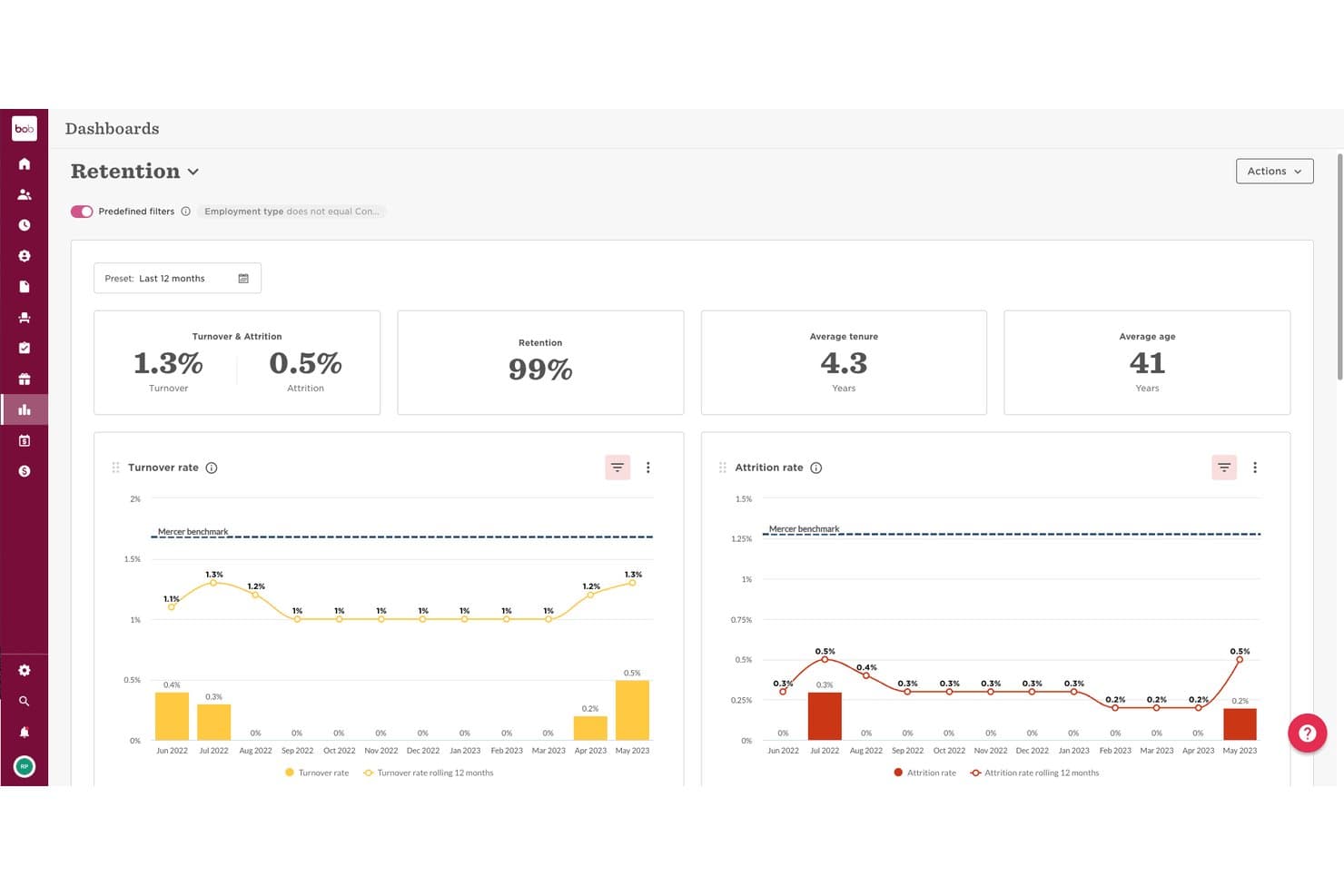
HiBob offers a Retention Dashboard with turnover, attrition, retention rate, average tenure, and age metrics visualized over 12 months. HiBob is a modular HRIS built for scaling mid-sized companies that need a people platform to connect HR, payroll, and workforce planning without juggling disconnected tools.
Who Is HiBob Best For?
HiBob is a strong fit for People Ops teams at companies with 50 to 1,000 employees managing distributed or hybrid workforces across multiple regions.
Why I Picked HiBob
I picked HiBob as one of the best because its workforce planning capabilities go well beyond what BambooHR offers. I rely on its scenario planning tools to model headcount changes before they happen, and the 150+ built-in metrics across 35+ dashboards give my team a real-time view of workforce trends. Bob AI lets me query people data in plain language, cutting the time I'd spend building custom reports from scratch.
HiBob Key Features
- Customizable employee database: Organize records with unlimited custom fields, document management, and detailed org charts.
- Automated onboarding workflows: Set up task-driven flows for new hires with e-signatures and preboarding capabilities.
- Integrated benefits administration: Manage benefits enrollment, tracking, and eligibility from the same people platform.
- Role-based permissions: Control access and enforce security with granular permission settings across modules and data.
HiBob Integrations
HiBob offers native integrations with platforms like Slack, Microsoft Teams, Greenhouse, DocuSign, Okta, Google Workspace, Workable, and Jira, plus an API for custom integrations.
Pros and Cons
Pros:
- Built-in pulse surveys and eNPS tracking
- Highly configurable org chart and people directory
- Strong workforce planning and scenario modeling tools
Cons:
- Payroll is limited to select regions only
- Reporting setup requires significant admin time
 Best as AI for business
- Free trial + Free demo available
- From $8/user/month
Visit WebsiteCustomer Rating:4.4/5
Factorial's AI Analytics generates headcount reports with insights and recommendations. Factorial is an AI for business platform that helps HR teams handle day-to-day operations, including planning timetables, creating reports, and answering employee questions about policies.
Who Is Factorial Best For?
Factorial is a good fit for HR professionals who want AI assistance with employee support and routine workforce administration.
Why I Picked Factorial
I picked Factorial as a BambooHR alternative because its AI for business assists with day-to-day operations. It can help plan timetables, create reports, and answer employee questions about policies, covering practical tasks HR teams handle throughout the workweek.
Factorial Key Features
- Absence management : Employees can submit time-off requests, and managers can review them against a shared team calendar.
- Applicant tracking : Create career pages and job ads, centralize candidate details, and manage applications.
- Document management : Store employee documents and set up approval workflows with selected reviewers.
- Payroll tools : Create and distribute payslips in bulk, and connect payroll providers through an open API.
Factorial Integrations
Factorial’s marketplace lists integrations with Google Workspace, Slack, Microsoft Azure, DATEV LODAS, Sage 200, LinkedIn, Recruitee, Okta, Microsoft Power BI, and Zapier. It also offers a public API for custom integrations.
Pros and Cons
Pros:
- Team calendars make absence planning easier
- Employees manage leave, documents, and onboarding themselves
- AI answers policy questions and plans timetables
Cons:
- Complex reporting and workflows remain limited
- Payroll depth trails dedicated payroll platforms
 Best for company-wide goal alignment
- Free demo available
- Pricing upon request
Visit WebsiteCustomer Rating:4.3/5
Mitratech Perform lets users build custom surveys with rating scale questions. Mitratech Perform combines reviews, employee development, and ongoing feedback in a performance management platform for HR teams coordinating consistent processes across an organization.
Who Is Mitratech Perform Best For?
Mitratech Perform suits HR teams that need to align employee goals with company-wide priorities.
Why I Picked Mitratech Perform
I picked Mitratech Perform for the “Best for company-wide goal alignment” category because it supports cascading goals at company, team, and individual levels. Teams can set SMART or metric-based targets and link them to reviews, helping HR see whether employee assessments reflect broader priorities.
Mitratech Perform Key Features
- Review templates: Create review forms with unlimited templates and 100+ competencies.
- 360-degree feedback: Gather input from managers, peers, direct reports, and external contributors.
- Pulse surveys: Send employee surveys and check-ins before one-to-one meetings.
- Performance reporting: Track trends, review rater bias, and view succession insights.
Mitratech Perform Integrations
Mitratech Perform supports HRIS integrations with Workday, ADP Workforce Now, ADP Enterprise, BambooHR, UKG Pro, Paylocity, Paycor, and TalentReef. It also offers an API for custom connections and SFTP data feeds for other HRIS platforms, including TriNet.
Pros and Cons
Pros:
- Goals link employee targets to company priorities
- Review reminders and status tracking support completion
- Customizable 360 reviews gather peer feedback
Cons:
- Goal progress offers only three update choices
- Navigation changes can confuse infrequent reviewers
Learn more about Mitratech Perform: Best for scalable recruitment workflows
- Free demo available
- Pricing upon request
Visit WebsiteCustomer Rating:4.4/5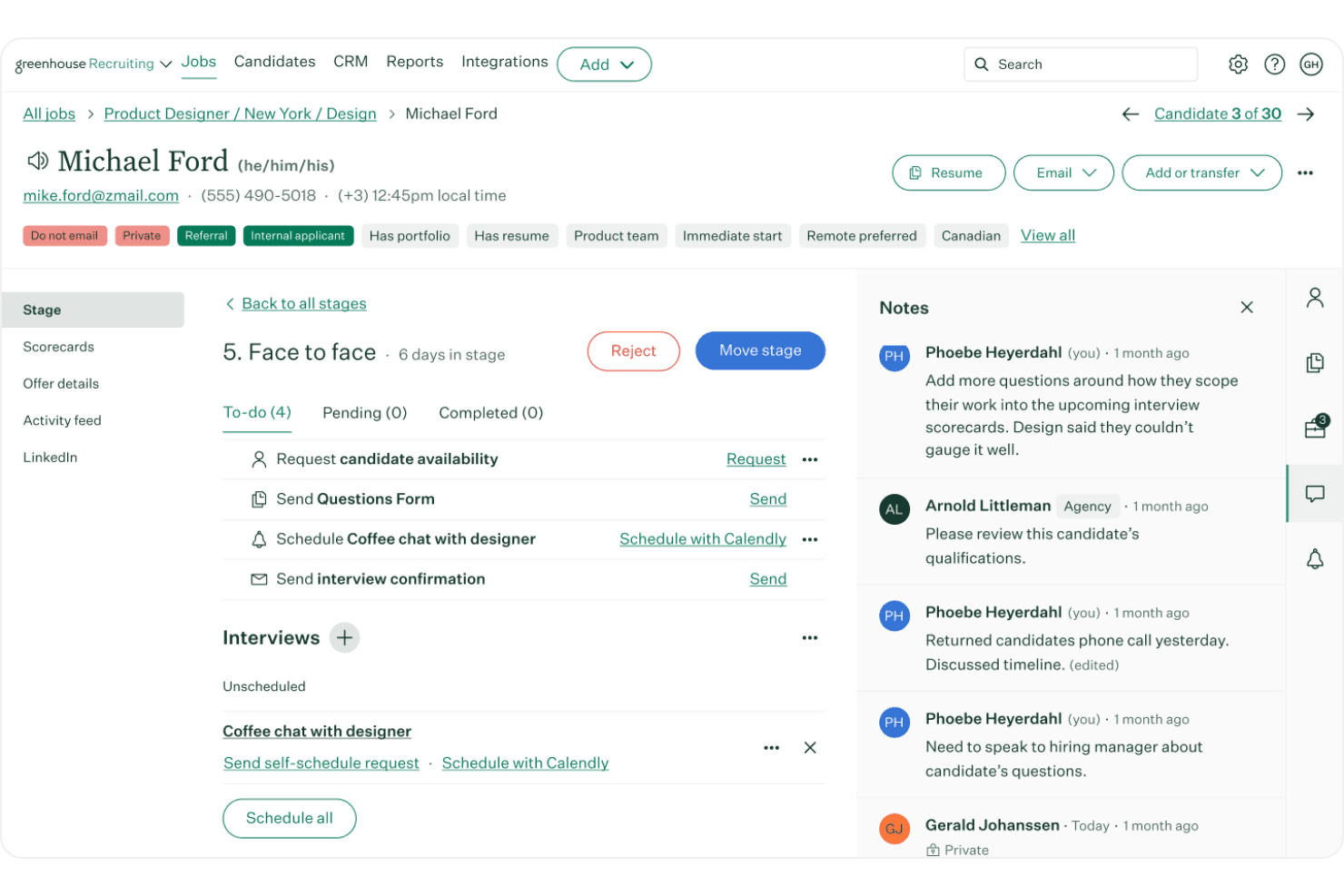
Greenhouse centralizes candidate tracking, notes, and interview scheduling. Greenhouse is recruiting software for organizations that need to coordinate hiring teams, manage candidate pipelines, and create consistent processes as hiring needs grow.
Who Is Greenhouse Best For?
Greenhouse suits recruiting teams at growing organizations that need consistent hiring workflows across multiple roles.
Why I Picked Greenhouse
I picked Greenhouse as a BambooHR alternative for its “Best for scalable recruitment workflows” fit. Standardized interview plans and scorecards help hiring teams assess applicants against the same role criteria across multiple openings, while documented decision workflows keep feedback tied to each process.
Greenhouse Key Features
- Job board distribution: Post and promote open roles across more than 1,000 job boards.
- Talent pools: Group and nurture prospective candidates and past applicants.
- Candidate self-scheduling: Let candidates select interview times from available options.
- Branded careers pages: Feature your employer brand and integrate Greenhouse job listings with your website.
Greenhouse Integrations
Greenhouse offers 400+ pre-built integrations, including Google Calendar, Outlook 365, Calendly, LinkedIn Recruiter System Connect, Docusign, Checkr, and Workday. It also provides an open API for custom integrations.
Pros and Cons
Pros:
- Candidate self-scheduling reduces interview coordination
- Centralized pipelines coordinate recruiters and hiring managers
- Scorecards standardize feedback across hiring teams
Cons:
- Bulk actions require extra manual steps
- Custom reporting often requires exports or workarounds
 Best for automation and performance insights
- 14-day free trial
- Pricing upon request
Visit WebsiteCustomer Rating:4.7/5
Sloneek tracks employee work locations and hours in one view. Sloneek is an HR management platform for growing businesses that brings employee data, onboarding, attendance, and people operations together, helping HR teams reduce manual admin and support employees throughout the work lifecycle.
Who Is Sloneek Best For?
Sloneek suits HR teams that want to automate people operations and gain clearer insights into employee performance.
Why I Picked Sloneek
I picked Sloneek, labeled “Best for automation and performance insights,” because it combines people-operations automation with a focus on employee performance. It brings employee data, onboarding, and attendance together, helping HR reduce manual admin across the employee lifecycle. I value that focus when comparing BambooHR alternatives.
Sloneek Key Features
- Document signing: Create and electronically sign HR documents in the platform.
- Asset records: Track company equipment assigned to employees.
- Employee surveys: Create surveys to gather employee feedback.
- Applicant tracking: Manage hiring activities with Sloneek’s ATS.
Sloneek Integrations
Sloneek documents integrations with Google Workspace, Microsoft Entra ID, Okta, Slack, Jira, Google Calendar, and Outlook for sign-in, user imports, absence-calendar syncing, and time-tracking workflows. It also provides a public API for custom integrations.
Pros and Cons
Pros:
- Keeps employee records, documents, and assets together
- Adds goals and 360° performance feedback
- Automates attendance and absence workflows
Cons:
- Reviewers report occasional slow loading and bugs
- Country-specific legal setup can take work
Learn more about Sloneek: Best for time and attendance management
- 30-day free trial + free demo available
- From $80/month
Visit WebsiteCustomer Rating:4.5/5
TimeTrex tracks employee punch times and overtime in a weekly timesheet view. For employers managing hourly or distributed teams, TimeTrex brings workforce and HR administration together to help reduce manual work across employee records, payroll, and scheduling.
Who Is TimeTrex Best For?
TimeTrex is a good fit for HR and operations teams managing attendance and work hours for shift-based employees.
Why I Picked TimeTrex
I picked TimeTrex as a BambooHR alternative because it’s Best for time and attendance management. I like its GPS geofencing and facial recognition options, which help verify that mobile staff clock in at the correct job site. Real-time attendance updates also give HR a clearer view of hours before payroll processing.
TimeTrex Key Features
- Payroll processing: Calculates wages and supports tax filings, paystubs, and direct deposit.
- Shift scheduling: Create shifts based on employee availability, skills, and staffing demand.
- Leave management: Employees submit time-off requests, and managers review approvals.
- Employee records: Maintain profiles and manage onboarding, performance, and benefits.
TimeTrex Integrations
TimeTrex lists integrations with ADP, Intuit QuickBooks, Sage, Paychex, Ceridian, Surepay, CompuPay, Tyler Technologies, and Vensure Employer Services. It also offers an API for custom integrations to sync employee records, time punches, and reports.
Pros and Cons
Pros:
- Detailed labor reports support job costing
- GPS geofencing verifies remote clock-ins
- Real-time attendance feeds payroll calculations
Cons:
- Custom reports can require developer help
- Dated dashboard can feel cluttered
Learn more about TimeTrex: Best for mobile-first onboarding
- 60-day free trial; free demo available
- From $192/month
Visit WebsiteCustomer Rating:4.8/5
WorkBright automates I-9 document scanning and sends SMS reminders. WorkBright is an employee onboarding platform for employers with hourly, seasonal, or distributed teams, helping HR staff manage new-hire paperwork and prepare employees across locations.
Who Is WorkBright Best For?
WorkBright suits HR teams that need new hires to complete onboarding paperwork on smartphones, especially when employees aren’t regularly at a desk.
Why I Picked WorkBright
I picked WorkBright as a BambooHR alternative because its focus is “Best for mobile-first onboarding.” New hires can complete paperwork on smartphones, which suits hourly and seasonal staff who aren’t regularly at a desk. HR teams can also prepare employees across locations.
WorkBright Key Features
- I-9 and E-Verify case management: Track verification cases, review status, and handle next steps in WorkBright.
- Automated document checks: Use OCR, document analysis, and compliance checks to flag potential errors or altered documents.
- Employment forms library: Access more than 200 state and federal forms.
- HR system integrations: Connect WorkBright with HRIS platforms through no-code integrations or its open API.
WorkBright Integrations
WorkBright offers 200+ no-code integrations, including ADP, Workday, and UKG, with two-way HRIS data sync. It also provides an open API for custom integrations.
Pros and Cons
Pros:
- Seasonal workflows reuse employee paperwork
- I-9 case tracking supports compliance follow-up
- Mobile paperwork suits deskless new hires
Cons:
- Focused on onboarding, not full employee lifecycle
- Some hires struggle with logins and uploads
Learn more about WorkBright:
Outras alternativas ao BambooHR
Eis algumas alternativas adicionais ao BambooHR que não chegaram à minha seleção, mas que continuam a merecer atenção:
- 11FreshteamBest for candidate sourcing and applicant tracking
- 12GoCoBest for ease-of-use
- 13HiBobBest for deepening company culture and employee engagement
- 14IntelliHRBest for managing compliance and advanced data analysis
- 15WorkdayBest for streamlining HR processes
- 16Kallidus SaplingBest for creating customizable workflows and automating processes
- 17UKG ProBest for learning management and high-volume recruiting
- 18NamelyBest for performance management
- 19TriNet HR PlusBest for benefits management and mobile access
- 20Sage HRBest for expense management and unlimited recruiting
- 21RipplingBest for quick onboarding automation
- 22ClearCoBest for AI-powered applicant tracking
- 23PaylocityBest for comprehensive HR management
- 24Keka HRBest for integrating HR, payroll, and projects
How I Evaluate BambooHR Competitors
I split my evaluation into two layers: the baseline capabilities—employee records, PTO tracking, onboarding—and the differentiators that separate the best-fit options from the rest.
Core Functionality (Table Stakes For This List)
When I'm selecting tools for my list, I rank each one on a scale from 0 (does not offer the functionality) to 5 (excels in this area) for each core functionality listed below. Then, I calculate the tool's total score into a percentage. Each tool needs to achieve a minimum total score of 75% to be considered for inclusion.
- Centralized Employee Database: I check whether the platform stores employee records, documents, and org charts in one place with custom fields and role-based access controls.
- Onboarding & Offboarding Workflows: Each tool should handle new hire task lists, e-signatures, and equipment provisioning rather than requiring separate tools or manual checklists.
- Time & Leave Management: I evaluate how the platform handles PTO requests, accrual policies, and time tracking, including whether employees can self-serve through a portal or mobile app.
- Payroll & Benefits Administration: Whether native or through integrations, I look for payroll processing, tax filing, and benefits enrollment that keep data synced with employee records.
- Performance Management: Goal setting, review cycles, and feedback tools matter here. Some platforms like Gusto keep this light, while others like Rippling go deeper with OKRs.
- HR Reporting & Analytics: I look at whether the tool provides customizable dashboards and exportable reports on headcount, turnover, and compliance data beyond canned templates.
Once I have a list of tools that meet this criteria, I consider what sets each platform apart.
Differentiating Factors (What Sets Vendors Apart)
Here's how I compare and contrast different vendors:
Standout Features
A built-in applicant tracking system is a big differentiator because it keeps hiring and onboarding connected in a single workflow. I also look at employee engagement tools like pulse surveys and eNPS tracking, which help HR teams spot retention risks before they become turnover problems. For companies with distributed teams, global payroll support separates platforms like Deel and Rippling from more domestically focused options.
Beyond Features
Pricing transparency matters a lot in this space. Some vendors publish clear per-employee-per-month rates, while others require a sales call just to get a ballpark. I also evaluate integration ecosystems closely, since most HR teams rely on connections to payroll providers, accounting tools like QuickBooks, and communication apps like Slack. Finally, I consider how well a platform scales. A 20-person startup outgrowing its HR tool within a year is a common and avoidable problem.
Por que razão procurar uma alternativa ao BambooHR?
Embora o BambooHR seja uma opção sólida no que diz respeito a sistemas HRIS, existem várias razões pelas quais poderá querer optar por uma alternativa ao BambooHR, incluindo:
1. Funcionalidades avançadas limitadas
O BambooHR é excelente para as tarefas essenciais de recursos humanos, mas não dispõe de funcionalidades mais aprofundadas, como análises avançadas, planeamento de remunerações e gestão organizacional complexa. Se estiver a expandir-se rapidamente ou precisar de ferramentas estratégicas de recursos humanos, poderá ultrapassar rapidamente as capacidades da plataforma.
2. Limitações no processamento salarial
O seu sistema de processamento salarial nativo (TRAXPayroll) apenas é compatível com os Estados Unidos e é relativamente básico. Se já tiver, ou planear contratar, colaboradores a nível global, precisará de sistemas adicionais para gerir o processamento salarial internacional.
3. Personalização básica
Os fluxos de trabalho personalizados e os relatórios são algo limitados em comparação com plataformas mais robustas. Isto pode ser uma desvantagem se os seus processos forem únicos ou estiverem a evoluir rapidamente.
4. Lacunas nas integrações
O BambooHR integra-se com muitas ferramentas, mas as integrações nem sempre são profundas ou perfeitas. Poderá precisar de soluções alternativas ou de ferramentas adicionais para criar um conjunto completo de tecnologias de RH.
Consenso: O consenso entre a comunidade de RH é que o BambooHR é excelente para empresas mais pequenas, mas não é recomendado como solução escalável se a sua organização tiver mais de 400 empregados ou planear atingir esse número em breve.
Principais funcionalidades do BambooHR
Ao selecionar alternativas ao BambooHR, procure as seguintes funcionalidades principais:
- Portal de autosserviço dos colaboradores: As alternativas devem disponibilizar ferramentas intuitivas de autosserviço que permitam aos colaboradores atualizar os seus dados pessoais, consultar informações profissionais, pedir folgas e aceder a documentos de RH. Isto reduz a carga administrativa sobre os RH e dá aos colaboradores maior autonomia.
- Aplicação móvel: As principais alternativas disponibilizam funcionalidades móveis robustas que permitem fazer pedidos de folga, atualizar perfis, conceder aprovações e receber notificações, permitindo que colaboradores e gestores se mantenham ligados em qualquer lugar.
- Ferramentas de envolvimento dos colaboradores (incluindo eNPS): As alternativas mais completas disponibilizam inquéritos integrados de envolvimento dos colaboradores, avaliações rápidas e acompanhamento do eNPS para medir o moral, identificar pontos fortes ou lacunas culturais e apoiar estratégias de retenção a longo prazo.
- Relatórios & análise: As alternativas disponibilizam frequentemente relatórios mais avançados do que o BambooHR, oferecendo maior personalização, painéis em tempo real e análises mais abrangentes que incluem métricas de RH, conformidade, tendências laborais e informações sobre o desempenho.
- Integração e saída de colaboradores: Procure plataformas que simplifiquem as transições através de fluxos de trabalho automatizados, listas de verificação baseadas em funções, recolha digital de documentos e percursos de integração personalizados. Estas ferramentas ajudam os novos colaboradores a sentirem-se apoiados e garantem uma saída organizada e em conformidade.
- Funcionalidades de contratação: As principais alternativas incluem funcionalidades avançadas de ATS, como distribuição de ofertas de emprego, seleção de currículos, agendamento de entrevistas, grelhas de avaliação de candidatos e modelos de e-mail automatizados, para apoiar um recrutamento mais rápido e eficiente.
- Permissões de acesso: As alternativas de nível empresarial disponibilizam definições granulares de permissões, garantindo que as informações sensíveis ficam restringidas, permitindo simultaneamente a colaboração entre equipas. Estas funcionalidades são especialmente úteis para equipas em crescimento com vários administradores.
- Integrações: As alternativas ao BambooHR disponibilizam frequentemente integrações mais fortes ou flexíveis, ligando-se de forma simples a sistemas de processamento salarial, ferramentas de desempenho, plataformas de aprendizagem, sistemas de acompanhamento de candidatos, armazenamento de documentos e soluções de início de sessão único (SSO).
Funcionalidades de AI comuns nas alternativas ao BambooHR
Muitas alternativas ao BambooHR incorporam agora AI para melhorar a automatização de RH, a experiência dos colaboradores e a tomada de decisões, por exemplo:
- Seleção de candidatos baseada em AI: A AI avalia automaticamente os currículos, faz corresponder os candidatos aos requisitos das funções e classifica os candidatos, ajudando a reduzir o tempo de contratação e a melhorar a qualidade dos candidatos.
- Informações preditivas sobre rotatividade e envolvimento: A AI analisa padrões de assiduidade, histórico de desempenho, feedback sobre perceções e dinâmica das equipas para identificar colaboradores em risco e apoiar proativamente a retenção.
- Fluxos de trabalho automatizados de integração: A AI atribui tarefas de integração, define lembretes, personaliza os fluxos de trabalho por função ou departamento e garante que todos os documentos são entregues atempadamente.
- Análise inteligente do desempenho: A AI destaca tendências nas avaliações de desempenho, identifica lacunas de competências e recomenda oportunidades de desenvolvimento ou intervenções de acompanhamento.
- Agendamento inteligente e previsão de folgas: A AI prevê aumentos nos pedidos de PTO, lacunas de pessoal, riscos de horas extraordinárias e desequilíbrios na carga de trabalho das equipas, ajudando os gestores a planear de forma mais eficaz.
- Chatbots de apoio aos colaboradores com tecnologia de AI: Os chatbots respondem a perguntas comuns de RH relacionadas com políticas, benefícios, saldos de PTO e etapas de integração, reduzindo as questões repetitivas dirigidas aos RH.
- Informações avançadas de relatórios: A AI melhora os painéis ao revelar tendências ocultas, valores atípicos ou riscos de conformidade e ao recomendar os passos seguintes com base nos dados.
- Ferramentas de mobilidade interna potenciadas por IA: Alguns concorrentes da BambooHR utilizam IA para recomendar candidatos internos para funções em aberto, identificar oportunidades de planeamento da sucessão e associar os colaboradores a percursos de desenvolvimento.