

O software de gestão de freelancers é um sistema digital para organizar, pagar e colaborar com trabalhadores contratados em grande escala. Se está a gerir a integração de contratantes, pagamentos internacionais ou problemas de conformidade, precisa de ferramentas concebidas para a complexidade do trabalho pontual e baseado em projetos. Neste guia, vou ajudá-lo a comparar rapidamente o melhor software de gestão de freelancers, para que possa identificar a opção mais adequada à sua pilha tecnológica de RH e concentrar-se mais no apoio às suas pessoas e projetos.
Why Trust Our Software Recommendations
6,700+
Reviews
20
Industry experts
16+
Evaluation factors
14
Years
Our team has been testing and reviewing software since 2012. As HR experts ourselves, we know how difficult—and important—it is to choose the right software.
For this guide, we evaluated tools using hands-on testing and independent research, scoring tools using our selection criteria. We also draw on insights from industry thought leaders and practicing HR experts.
Our reviews reflect our human editorial judgment, not a sales pitch.
Expert reviewers:
- Phil GrayCOO
 Kim BehnkeHR Tech Editor & Analyst
 Josh BarkerPeople Ops Manager

Tabela comparativa de software de gestão de freelancers
Esta tabela comparativa resume os detalhes de preços das minhas principais escolhas de software de gestão de freelancers:
| Tool | Best For | Trial Info | Price | ||
|---|---|---|---|---|---|
| 1 | Best for scaling global contractor teams | Free demo available | Pricing upon request | Website | |
| 2 | Best for rapid talent onboarding | Free demo available | Pricing upon request | Website | |
| 3 | Best for centralized invoicing and payments | Free demo available | Pricing upon request | Website | |
| 4 | Best for centralized HR and compliance insights | Free demo available | From $5/user/month | Website | |
| 5 | Best for end-to-end compliance management | Free plan available | Pricing upon request | Website | |
| 6 | Best for streamlined cross-border payouts | Free demo available | From $599/user/month (billed annually) | Website | |
| 7 | Best for sourcing pre-vetted creative experts | Free plan available | From $129/month | Website | |
| 8 | Best for access to diverse freelance talent pools | Free plan available | From 5% service fee/contract | Website | |
| 9 | Best for workflow automation with freelancers | Free demo available | Pricing upon request | Website | |
| 10 | Best for managing large contingent workforces | Free demo available | Pricing upon request | Website |


Análises do melhor software de gestão de freelancers
Apresento abaixo os meus resumos detalhados do melhor software de gestão de freelancers que integrou a minha seleção. As minhas análises oferecem uma visão detalhada das funcionalidades, dos preços e dos casos de utilização mais adequados de cada plataforma, para ajudá-lo a encontrar a melhor opção para si.
 Best for scaling global contractor teams
- Free demo available
- Pricing upon request
Visit WebsiteCustomer Rating:4.4/5
Worksuite offers a talent pool dashboard with freelancer profiles and filters. Worksuite is a contractor management platform built for enterprise-scale contingent workforce programs, covering onboarding, compliance, contract lifecycle management, global payments, and direct talent sourcing across multiple entities and regions.
Who Is Worksuite Best For?
Worksuite is a strong fit for enterprise HR and procurement teams managing large, distributed contractor networks across multiple countries or business entities.
Why I Picked Worksuite
Worksuite earns its spot on my shortlist because of how it handles the complexity that actually breaks other platforms at scale. I specifically like its configurable entity-level onboarding workflows, which let you set distinct rules, compliance checkpoints, and approval chains per brand, region, or legal entity without rebuilding everything from scratch each time. The built-in classification engine and Agent of Record (AOR) integration stand out to me, because worker misclassification risk is baked into compliance from day one rather than managed separately. Add payments across 190+ countries with consolidated invoicing, and you've got a system that genuinely holds up when your contractor program spans multiple regions.
Worksuite Key Features
- Private talent pool builder: Create and manage curated, searchable pools of your own vetted contractors to reduce reliance on external marketplaces.
- Workflow builder: Configure custom review, approval, and compliance gate sequences tailored to your organization's structure rather than working around a fixed template.
- Contract lifecycle management: Handle contract creation, negotiation, e-signatures, renewal triggers, and expiry alerts all within the same platform.
- Business intelligence dashboard: Track contractor spend, headcount, compliance status, and time-to-onboard across every entity and region in real time.
Worksuite Integrations
Integrations include NetSuite, QuickBooks, Xero, Salesforce, HubSpot, monday.com, Airtable, Google Workspace, Slack, and Asana.
Pros and Cons
Pros:
- Payments across 190+ countries and currencies
- Supports multi-brand and multi-entity structures
- Risk mitigation engine included
Cons:
- Requires a heavy implementation phase
- Delayed capital release cycle
Learn more about Worksuite: Best for rapid talent onboarding
- Free demo available
- Pricing upon request
Visit WebsiteCustomer Rating:4.7/5
Worksome includes a dashboard for workforce analytics and spend insights. Worksome is a freelancer management system that brings sourcing, compliance classification, contract generation, and global payments into a single automated workflow.
Who Is Worksome Best For?
Worksome is a strong fit for mid-size to enterprise companies that engage contract talent at high volume and need to move from hire decision to active engagement quickly.
Why I Picked Worksome
I've included Worksome in my top picks because its instant onboarding feature genuinely earns that label. When you hire a contractor, Worksome's AI generates compliant contracts across every timezone in minutes, moving a new engagement from "contract sent" to "work started" faster than any other tool I've seen in this space. I also like the AI-powered project-to-talent mapping, which matches open roles against your existing talent ecosystem before you ever post externally.
Worksome Key Features
- Global payments in 150+ countries: Pay contractors across borders, with automatic currency optimization, consolidated invoicing, and built-in tax verification.
- Prepay and factoring: Guarantee contractor payouts within a set timeframe while your organization pays Worksome on a deferred schedule of 30 to 60 days.
- AI job description assistant: Generate polished job descriptions from a brief role summary, with one-click editing and auto-fill for skills and experience fields.
- Worksome Intelligence insights: Access AI-driven commentary on hiring trends, spend breakdowns, and workforce performance data across your entire external talent program.
Worksome Integrations
Integrations include SAP SuccessFactors, Sage, Workday, Xero, NetSuite, QuickBooks, Asana, monday.com, Trello, and Google Docs.
Pros and Cons
Pros:
- Dedicated case manager assigned per account
- Supports multi-currency contractor invoicing
- Built-in worker classification and AOR coverage
Cons:
- Complex initial configuration flow
- Extended treasury disbursement window
Learn more about Worksome: Best for centralized invoicing and payments
- Free demo available
- Pricing upon request
Visit WebsiteCustomer Rating:4.6/5
TalentDesk.io provides a dashboard for task tracking and spend analytics. TalentDesk.io is a freelancer and vendor management platform that handles onboarding, project and task tracking, global payments, and compliance for companies managing external workforces.
Who Is TalentDesk.io Best For?
TalentDesk.io is a strong fit for operations and finance teams at small to mid-sized companies that regularly work with large pools of freelancers, contractors, or vendors across multiple countries.
Why I Picked TalentDesk.io
TalentDesk.io earns its spot on my shortlist because of how well it handles the invoicing chaos that comes with managing a large freelancer pool. Instead of collecting and reconciling dozens of individual invoices, I get one consolidated invoice that covers all freelancer payments across 190+ countries and 55+ currencies. I also like that you can set spend caps at the task level, so budgets don't slip before anyone notices. The parent/child organization setup is a nice touch, too, letting separate entities each get their own consolidated invoice.
TalentDesk.io Key Features
- Customizable onboarding templates: Build contractor onboarding flows that capture the specific documents, tax forms, and information your team needs from day one.
- Searchable talent directory: Filter your freelancer roster by skills, location, rate, and availability to find the right person for a task without digging through emails.
- Agent of Record (AOR) service: TalentDesk signs contracts on your behalf and handles AML and KYC verification checks for global contractors.
- 1099 filing and tax form collection: Collect W-9 and W-8BEN forms during onboarding and file 1099s directly from the platform.
TalentDesk.io Integrations
Integrations include Google Sheets, Airtable, Slack, Typeform, HubSpot, Jira, Microsoft Outlook, and Gmail.
Pros and Cons
Pros:
- Responsive and hands-on customer success team
- One-step worksheet approval for batch payments
- Consolidated invoicing across multiple currencies
Cons:
- Limited mobile feature
- Locked purchase order status
Learn more about TalentDesk: Best for centralized HR and compliance insights
- Free demo available
- From $5/user/month
Visit WebsiteCustomer Rating:4.8/5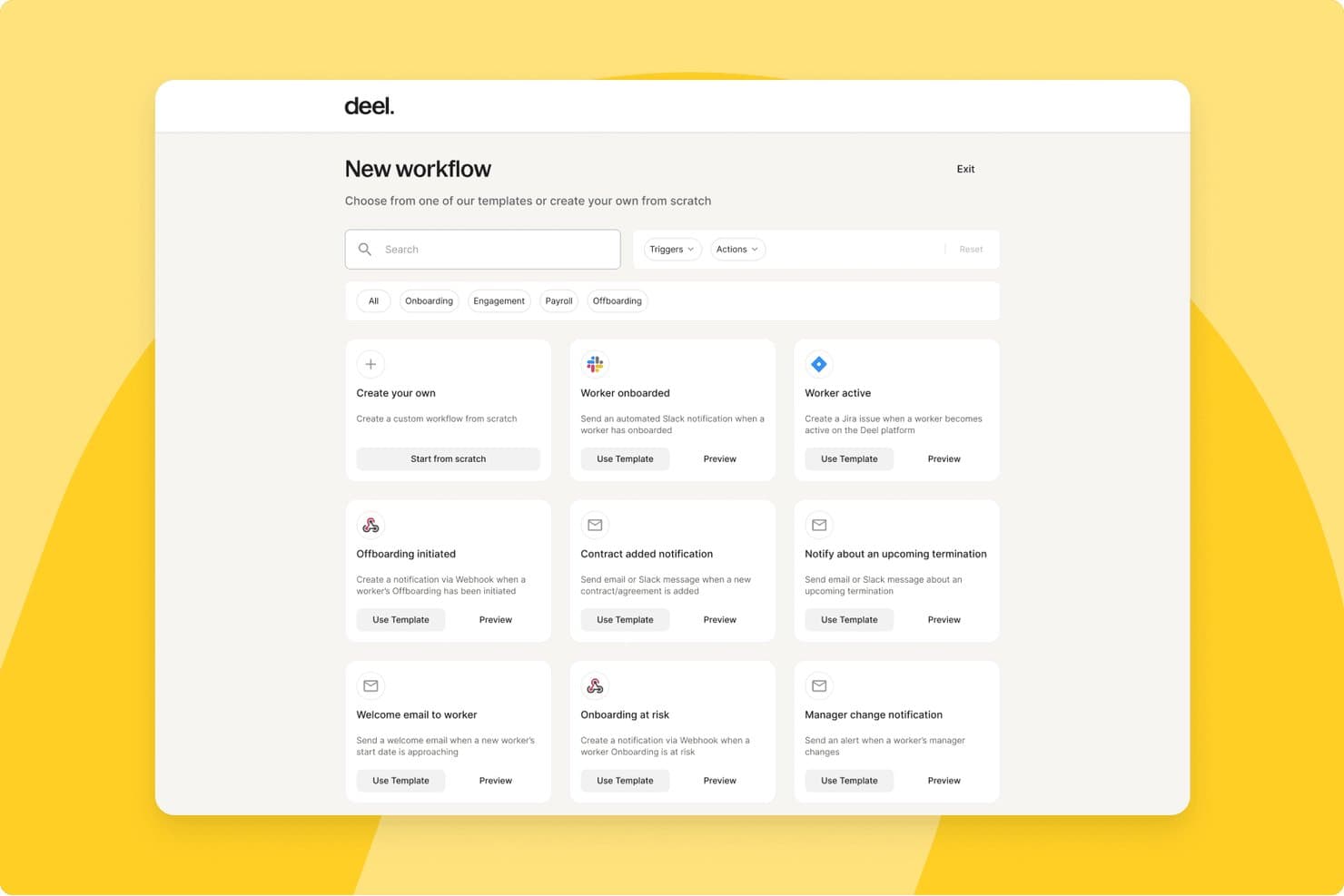
Deel HR offers a workflow automation dashboard where users can create custom workflows or choose from pre-built templates for onboarding, offboarding, payroll, and contractor management. Deel HR is a global workforce management platform that handles contractor onboarding, compliance, multi-currency payments, tax documentation, and contract management for teams working with freelancers and independent contractors across 150+ countries.
Who Is Deel HR Best For?
HR operations teams at mid-size to enterprise companies that regularly engage contractors across multiple countries will get the most from Deel HR.
Why I Picked Deel HR
Deel HR earns its spot on my shortlist because of how it handles compliance visibility across a global contractor roster. I love that contracts automatically update when local laws change, so my team isn't manually tracking regulatory shifts across dozens of jurisdictions. The misclassification safeguards built into contractor onboarding give me a real safety net when engaging workers in countries with complex classification rules.
Deel HR Key Features
- Automated invoicing and global mass payouts: Generate, approve, and pay contractor invoices in 120+ currencies with batch payments.
- Freelancer profile database: Maintain searchable contractor records with custom fields, engagement history, and rate tracking.
- Integrated tax document collection: Automatically collect W-9, W-8BEN, 1099, and international equivalents from contractors.
- Document management and e-signature: Generate, sign, and store contracts, NDAs, and SOWs in a secure digital archive.
Deel HR Integrations
Deel HR offers integrations with QuickBooks, Xero, BambooHR, Expensify, NetSuite, Sage Intacct, Greenhouse, Workday, SAP, and ADP, among others available through its app store. It also connects with Zapier and provides an API for custom integrations.
Pros and Cons
Pros:
- Jurisdiction-specific contract templates built in
- Automated tax document collection across jurisdictions
- Strong global contractor compliance coverage
Cons:
- Support response times can be slow
- Limited project and deliverables tracking features
 Best for end-to-end compliance management
- Free plan available
- Pricing upon request
Visit WebsiteCustomer Rating:4.7/5
YunoJuno offers a contract analytics dashboard with spend and contract insights. YunoJuno is a freelancer management system that covers the full contractor lifecycle, including sourcing, onboarding, contract management, global compliance checks, and payments across 165+ countries.
Who Is YunoJuno Best For?
YunoJuno is a strong fit for mid-size to enterprise companies that regularly hire contractors across multiple countries and need to manage classification risk and compliance at scale.
Why I Picked YunoJuno
YunoJuno earns its spot on my shortlist because no other tool I've used handles end-to-end compliance management as thoroughly. I particularly like the misclassification indemnification coverage, which protects your business from legal fees, taxes, and penalties tied to contractor classification errors. The platform also runs instant worker classification across 165+ countries and keeps a full audit trail of every classification decision, which I find invaluable when managing contractors across multiple jurisdictions.
YunoJuno Key Features
- Auto-generated contract templates: Generate contracts from project details like rate, dates, and contract type, with NDAs and client policies added automatically.
- Background and right-to-work checks: Run KYC, AML, ID, and right-to-work screening via built-in integrations with Amiqus and Veremark before contracts are issued.
- Real-time spend dashboards: View and filter contractor spend by team, department, project, location, or PO from a single reporting dashboard.
- SOW management: Standardize statements of work and track project milestones directly within the platform.
YunoJuno Integrations
Integrations include Salesforce, Sage, Workday, Xero, Notion, Slack, monday.com, QuickBooks, ADP Workforce Now, and Asana.
Pros and Cons
Pros:
- Automated contracts tailored by role and location
- Built-in human-assisted freelancer sourcing support
- Includes misclassification indemnification coverage
Cons:
- Requires manual applicant vetting
- Targeted freelance pool focus
Learn more about YunoJuno: Best for streamlined cross-border payouts
- Free demo available
- From $599/user/month (billed annually)
Visit WebsiteCustomer Rating:2.9/5
Remote tracks each new hire's onboarding progress step by step. Remote is a global HR and contractor management platform that handles international hiring, contractor onboarding, payroll, and compliance across 200+ countries from a single system.
Who Is Remote Best For?
Remote is a strong fit for globally distributed companies that need to pay contractors and employees across multiple countries without setting up local entities.
Why I Picked Remote
I picked Remote as one of the best because of how it handles payouts for distributed contractor teams. You can pay contractors in 70+ currencies, including stablecoins and virtual wallets, from a single platform. I also like the bulk invoicing, recurring payments, and employer-initiated invoice features, which cut down manual back-and-forth considerably. The auto-detection of inactive contractors means you're only ever billed for people who are actually working, which keeps costs honest.
Remote Key Features
- Localized contractor agreements: Generate contracts tailored to local labour laws in 170+ countries, with options to create, edit, and sign directly in the platform.
- Misclassification risk detection: Built-in AI-powered tools flag potential misclassification risks, with optional indemnity coverage up to $100,000 per contractor through the Contractor Management Plus plan.
- Smart contractor onboarding: Automate the collection of documentation and bring contractors up to speed without manual back-and-forth.
- Remote Watchtower: A team of on-the-ground international experts monitors labour law changes globally and keeps your contracts and processes current.
Remote Integrations
Integrations include BambooHR, HiBob, Personio, Workday, Greenhouse, QuickBooks, Xero, NetSuite, Slack, and Vanta.
Pros and Cons
Pros:
- AI-powered contractor misclassification risk detection
- Owns legal entities in 180+ countries
- Built-in IP and invention rights protection
Cons:
- Extended support ticket resolution
- No built-in talent sourcing or vetting
 Best for sourcing pre-vetted creative experts
- Free plan available
- From $129/month

Fiverr Pro offers a lead management dashboard for tracking contacts and activity. Fiverr Pro is a curated freelancer marketplace that connects businesses with hand-vetted professionals across creative, technical, and business disciplines for project-based hiring.
Who Is Fiverr Pro Best For?
Fiverr Pro is a strong fit for marketing teams and creative directors at small to mid-sized businesses who need on-demand access to skilled freelancers for design, copy, or video work.
Why I Picked Fiverr Pro
I've included Fiverr Pro in my top picks because of how seriously it takes talent vetting. Every freelancer is reviewed by domain experts before being accepted, and that bar stays high throughout their time on the platform. When I need a specialist, I can use the talent sourcing service, where Fiverr Pro's team interviews and vets candidates and delivers a shortlist with recommendations. I also like the custom vetting option, which lets me layer in my own screening criteria before making a hire.
Fiverr Pro Key Features
- Shared freelancer network: Save and revisit your team's preferred freelancers across projects, making it easy to rehire known talent.
- Purchase approval permissions: Set custom approval rules so team members can hire within defined spend limits.
- AI-assisted project brief generator: Generate a project brief with AI to receive a curated shortlist of matching freelancer offers.
- Legal document management: Upload, send, and collect e-signatures on NDAs and contracts directly within the platform.
Fiverr Pro Integrations
Integrations include WordPress, Shopify, PrestaShop, Adobe Commerce, Wix, WooCommerce, Magento, Drupal, Webflow, and Squarespace.
Pros and Cons
Pros:
- Built-in NDA and contract e-signatures
- Dedicated project managers coordinate complex work
- Freelancers vetted by domain experts before acceptance
Cons:
- Requires manual data entry
- Limited specialized search parameters
Learn more about Fiverr Pro: Best for access to diverse freelance talent pools
- Free plan available
- From 5% service fee/contract

Upwork includes a dashboard for contracts, payments, and hires. Upwork is a freelance marketplace where businesses post jobs, search a global talent pool, manage contracts, track billable hours, and process payments through a single platform.
Who Is Upwork Best For?
Upwork is a strong fit for small to mid-sized businesses and startups that need on-demand access to freelance talent across a wide range of skills and project types.
Why I Picked Upwork
I picked Upwork as one of the best options because no other freelancer management platform gives you access to a talent pool this broad across so many skill categories. What I find especially useful is the AI-assisted talent matching, which surfaces relevant candidates based on your job post without requiring manual searching. I also like the Project Catalogue feature, where freelancers list predefined scopes of work at set prices, so you can hire for a specific task without writing a full job post.
Upwork Key Features
- Built-in time tracker: Freelancers log hours directly in the platform, with optional screenshot capture for hourly contracts.
- Escrow-based milestone payments: Funds are held in escrow and released only after you approve a milestone or deliverable.
- Talent badges and work history: Freelancer profiles display verified job success scores, past client reviews, and earnings history.
- Saved talent lists: Organize and revisit vetted freelancers in curated lists for faster hiring on repeat or future projects.
Upwork Integrations
Upwork offers enterprise-level integrations with ATS, HRIS, and spend management systems, along with VMS partnerships with SAP Fieldglass and Flextrack. An API is available for custom integrations, and Upwork connects with Zapier.
Pros and Cons
Pros:
- Freelancer profiles show verified job success scores
- Escrow payments protect both sides of the contracts
- Covers 8,000+ skill categories across freelance roles
Cons:
- Inconsistent mediation resolution time
- No built-in vetting before freelancers can apply
Learn more about Upwork: Best for workflow automation with freelancers
- Free demo available
- Pricing upon request

WorkMarket offers a freelancer dashboard with assignments, talent, and pricing. WorkMarket is an independent contractor management system built by ADP that handles onboarding, verification, work assignment management, compliance support, and payments for 1099 workers and freelancers.
Who Is WorkMarket Best For?
WorkMarket is a strong fit for large enterprises that manage high volumes of field-based or project-based 1099 contractors across multiple locations.
Why I Picked WorkMarket
WorkMarket earns its spot on my shortlist because of how far it takes workflow automation across the full contractor lifecycle. I particularly like its custom automation rules engine, where you can define business-specific triggers and logic to move work orders, assignments, and payments through your pipeline without manual hand-offs. In practice, that means my team can generate a ticket in an external CRM, pass it directly into WorkMarket for contractor assignment, and route completed work data back to our accounting system automatically. That end-to-end automation, built around your own business rules, is what sets WorkMarket apart.
WorkMarket Key Features
- Labour Clouds: Organize contractors into groups by skill set, geography, or certification so you can quickly find and deploy the right worker for a given job.
- Assignment templates: Build reusable templates for recurring work orders to reduce setup time and maintain consistency across high-volume assignments.
- Contractor mobile app: Workers can check in and out, upload deliverables, communicate via SMS, and submit work for approval directly from a mobile device.
- Electronic 1099-NEC filing: WorkMarket prepares and files 1099-NEC forms with the IRS and applicable state agencies on your behalf at year-end.
WorkMarket Integrations
Integrations include AutoTask, ConnectWise, and Salesforce.
Pros and Cons
Pros:
- Flexible pay by milestone, project, or hour
- Bulk work order publishing to large groups
- AI-powered freelancer recommendations by skill
Cons:
- Mobile app lacks key web features
- 30-day waiting period for payouts
Learn more about WorkMarket:

Beeline provides a dashboard for headcount, spend, and supplier analytics. Beeline is a vendor management system (VMS) built for managing contingent and external workforces, covering contractor sourcing, supplier management, compliance, time and expense tracking, and independent contractor engagement.
Who Is Beeline Best For?
Beeline is a strong fit for large enterprises and procurement teams that manage high volumes of contingent workers, staffing suppliers, and extended workforce programs.
Why I Picked Beeline
Beeline earns its spot on my shortlist because no other tool in this space is built as exclusively for large, complex contingent workforce programs as this one. What stands out to me is the SOW management module, which covers the full lifecycle from sourcing through to invoicing, so you can track outsourced project work the same way you track individual contractors. I also like the global localization capabilities, which handle fiscal, legal, cultural, and language differences across countries without requiring custom workarounds. With $68B+ in annual spend under management and 6.1M assignments created annually, this is a platform built for serious scale.
Beeline Key Features
- Supplier performance analytics: Track and compare supplier rates, performance data, and spend across your entire contingent labour program in real time.
- Automated approval workflows: Move requisitions through hiring steps with simplified, click-reduced workflows and built-in automated approvals.
- Audit trail and classification safeguards: Enforce contract policies, multi-tier supplier rules, and compliance checks with a complete audit trail for every worker engagement.
- Direct sourcing module: Source and engage contingent talent directly, bypassing traditional staffing suppliers where appropriate.
Beeline Integrations
Beeline has completed over 2,000 integrations across HR, finance, sourcing, and IT systems, connecting with platforms like Workday, SAP, Oracle, Coupa, Kronos, and Okta. It offers 300+ RESTful APIs through its Developer Portal, along with plug-and-play connectors, data feeds, and iPaaS support for custom configurations.
Pros and Cons
Pros:
- Multi-vendor requisition and submission tracking
- Automates onboarding, time tracking, and invoicing
- Supports large, global contingent workforce programs
Cons:
- Managed configuration change requests
- Steep learning curve for analytics tools
Learn more about Beeline:
Outro software de gestão de freelancers
Eis algumas opções adicionais de software de gestão de freelancers que não integraram a minha seleção, mas que vale a pena consultar:
- 11MultiplierBest for multi-country payroll in one platform
- 12HubstaffBest for integrated time tracking and productivity
- 13WorkMotionBest for automated employment status transitions
- 14AvatureBest for customizable talent acquisition workflows
- 15Field NationBest for managing onsite project-based work
- 16WorkGeniusBest for AI-powered talent matching
How I Evaluate Freelancer Management Software
I evaluate freelancer management software in two layers: the baseline every tool must hit to qualify—contractor onboarding, classification checks, global payouts—and what separates the best from the rest.
Core Functionality (Table Stakes For This List)
When I'm selecting tools for my list, I rank each one on a scale from 0 (does not offer the functionality) to 5 (excels in this area) for each core functionality listed below. Then, I calculate the tool's total score into a percentage. Each tool needs to achieve a minimum total score of 65% to be considered for inclusion.
- Freelancer Onboarding & Database: I look for a centralized talent pool where freelancers can self-onboard, upload documents, and maintain profiles with skills, rates, and availability.
- Worker Classification & Compliance: Each tool should offer classification checks that flag misclassification risk before a contract goes out—not just collect tax forms after the fact.
- Contracts & E-Signature: I evaluate whether you can templatize SOWs and NDAs, send them for e-signature, and store executed copies without toggling to a separate tool.
- Project & Engagement Tracking: The platform should let you assign deliverables, log hours, and track milestones so managers aren't chasing updates across spreadsheets and chat threads.
- Invoicing & Global Payments: I check for multi-currency payout support and consolidated invoice approvals, especially for teams paying freelancers across multiple regions at once.
- Tax Document Management: Automated 1099 generation and collection matters here—I look for tools that handle year-end filings rather than forcing manual prep in spreadsheets.
- Approvals & Budget Controls: Multi-level approval chains and per-project budget visibility help finance and hiring managers stay aligned on contractor spend before invoices clear.
- HRIS/ERP/Accounting Integrations: I check for native connectors to platforms like QuickBooks, NetSuite, or Workday so contractor data flows into your existing financial and HR systems.
Once I have a list of tools that meet this criteria, I consider what sets each platform apart.
Differentiating Factors (What Sets Vendors Apart)
Here's how I compare and contrast different vendors:
Standout Features
AI talent matching is a big differentiator—platforms that recommend freelancers based on skills, past ratings, and budget save hiring managers from manually sifting through a growing talent pool. I also evaluate whether a vendor offers Agent of Record services, which shift misclassification liability off your organization. Spend analytics matter too. Real-time dashboards that break down contractor costs by project, department, or cost center give finance teams the visibility they need to manage budgets proactively.
Beyond Features
Global coverage is one of the first things I evaluate—some platforms support payouts in a handful of countries while others cover 150+, which matters when your freelancer base spans multiple regions. Pricing models vary widely too. I look at whether a vendor charges flat per-contractor fees or takes a percentage of each payment, since that distinction changes your total cost dramatically as headcount scales. Security certifications like SOC 2 Type II and GDPR compliance also carry weight, especially for teams handling sensitive contractor data across jurisdictions.
Como escolher software de gestão de freelancers
É fácil ficar preso a listas extensas de funcionalidades e estruturas de preços complexas. Para o ajudar a manter o foco enquanto percorre o seu processo específico de seleção de software, apresentamos uma lista de verificação dos fatores a ter em conta:
| Fator | O que deve considerar |
| Escalabilidade | A solução consegue lidar com o seu volume atual de freelancers e com o crescimento previsto? Considere se irá precisar de adicionar mais centenas de utilizadores ou expandir-se para novas unidades de negócio mais tarde. |
| Integrações | A ferramenta liga-se ao seu HRIS, aos sistemas de processamento salarial, de gestão de projetos ou de faturação? Avalie a possibilidade de existirem silos de dados ou trabalho duplicado se não houver integrações. |
| Personalização | Pode ajustar fluxos de trabalho, modelos de documentos ou cadeias de aprovação para se adaptarem à sua empresa? Verifique se existem formatos rígidos ou custos ocultos associados ao suporte à personalização. |
| Facilidade de utilização | A sua equipa e os freelancers irão adotar rapidamente o software? Procure uma interface clara, necessidades mínimas de formação e um design intuitivo, em vez de um painel de controlo vistoso. |
| Implementação e integração inicial | Quanto tempo será necessário para integrar completamente a sua equipa e os freelancers? Informe-se sobre o suporte à migração, os ambientes de testes e os recursos disponíveis para a gestão da mudança. |
| Custo | Analise os escalões de preços para utilizadores ativos, as taxas de transação ou os suplementos ocultos. Certifique-se de que a plataforma se adequa ao seu orçamento atual e futuro, sem despesas inesperadas. |
| Medidas de segurança | A plataforma cumpre os requisitos da sua empresa em matéria de privacidade de dados, encriptação e controlo de acesso? Solicite documentação para confirmar a conformidade com as normas do setor. |
| Requisitos de conformidade | A classificação local dos trabalhadores, a assinatura digital e a documentação fiscal são geridas em todas as regiões onde contrata? Verifique se as ferramentas correspondem à sua exposição ao risco regulamentar. |
O que é software de gestão de freelancers?
O software de gestão de freelancers consiste em plataformas digitais que ajudam as empresas a organizar, integrar, gerir e pagar a prestadores de serviços independentes ou trabalhadores freelance. Estas ferramentas centralizam as atribuições de projetos, os contratos, a documentação de conformidade, as comunicações e os pagamentos num só lugar. Ao facilitarem o acompanhamento do desempenho dos freelancers e a gestão das tarefas administrativas, ajudam os profissionais de RH a reduzir o esforço manual e os riscos de incumprimento ao trabalhar com uma força de trabalho externa.
Funcionalidades
Eis as principais funcionalidades que qualquer excelente software de gestão de freelancers deve ter:
- Base de dados de freelancers: Armazene perfis, dados de contacto, contratos e histórico de trabalho de cada freelancer num diretório seguro e pesquisável, que pode atualizar e consultar facilmente.
- Acompanhamento de projetos e atribuições: Atribua tarefas ou projetos a freelancers, defina prazos, monitorize o progresso e faça ajustes à medida que as necessidades do projeto mudam.
- Fluxos de trabalho de integração: Oriente os novos freelancers através de etapas de integração digitais e normalizadas, incluindo a recolha de documentos, verificações de antecedentes e assinatura de contratos.
- Pagamentos automatizados: Trate da faturação, das aprovações e dos pagamentos automatizados para que os freelancers sejam pagos de forma exata e atempada através dos métodos de pagamento preferidos.
- Gestão de documentos: Armazene, partilhe e atualize contratos, NDAs, documentos fiscais e outra documentação essencial, facilitando o acesso e o acompanhamento à medida que os regulamentos mudam.
- Monitorização da conformidade: Acompanhe e assegure a correta classificação dos trabalhadores, o cumprimento da legislação laboral local e a recolha de formulários fiscais para reduzir os riscos de classificação incorreta.
- Registo de tempo e despesas: Permita que os freelancers registem horas e submetam despesas relativas aos projetos, dando aos gestores uma visão mais clara do trabalho efetivamente realizado.
- Relatórios e análises: Gere relatórios padrão e personalizados sobre despesas, estado dos projetos, produtividade e conformidade para apoiar a tomada de decisões e as auditorias internas.
- Ferramentas de colaboração: Partilhe ficheiros, envie atualizações e comunique diretamente com os freelancers dentro da plataforma para manter todos alinhados e os projetos organizados.
Funcionalidades comuns de IA do software de gestão de freelancers
Para além das funcionalidades padrão do software de gestão de freelancers acima indicadas, muitas destas soluções estão a integrar IA com funcionalidades como:
- Correspondência de talentos baseada em IA: O sistema analisa automaticamente os requisitos do projeto e os perfis dos freelancers para recomendar a melhor opção para cada atribuição, reduzindo a seleção manual e poupando tempo valioso.
- Recomendações inteligentes de remuneração: A IA analisa dados de mercado e tendências históricas de contratação para sugerir valores justos e competitivos para funções ou competências específicas, ajudando tanto os contratantes como os freelancers a tomar decisões informadas.
- Previsão preditiva de projetos: O software utiliza métricas históricas de desempenho para estimar os prazos dos projetos, assinalar lacunas de recursos e prever potenciais riscos de entrega antes de surgirem problemas.
- Verificações automatizadas de conformidade: A IA monitoriza as alterações à legislação laboral local e aos regulamentos relativos ao estatuto dos prestadores de serviços, assinalando potenciais problemas ou recomendando medidas para manter a conformidade à medida que integra novos freelancers.
- Chatbots de linguagem natural: As interfaces de conversação baseadas em IA respondem às perguntas dos freelancers, orientam os utilizadores durante os processos de integração ou pagamento e fornecem apoio automático de autoajuda 24 horas por dia, 7 dias por semana.
Benefícios
A implementação de software de gestão de freelancers proporciona vários benefícios à sua equipa e à sua empresa. Eis alguns dos que pode esperar:
- Supervisão centralizada: Gira os dados dos freelancers, os contratos e as comunicações numa única plataforma para facilitar o acesso e obter maior controlo.
- Integração eficiente: Os fluxos de trabalho digitais automatizados ajudam os novos freelancers a submeter documentação, aceitar contratos e familiarizar-se rapidamente com as funções.
- Pagamentos exatos e atempados: As funcionalidades integradas de faturação e pagamento garantem que os prestadores de serviços são pagos de acordo com os marcos ou as horas registadas, com menos esforço manual.
- Redução do risco de incumprimento: As ferramentas de conformidade integradas acompanham o estatuto dos trabalhadores, gerem a documentação e alertam para potenciais problemas de classificação ou regulamentares.
- Processos escaláveis: Os fluxos de trabalho organizados para publicar projetos, gerir atribuições e processar pagamentos facilitam a expansão da sua força de trabalho freelance à medida que as necessidades da empresa crescem.
- Colaboração melhorada: As mensagens na aplicação e a partilha de documentos ajudam a sua equipa e os freelancers a manterem-se alinhados ao longo de cada projeto.
- Informações acionáveis: Os painéis e os relatórios personalizados fornecem dados sobre o desempenho dos freelancers, as tendências de custos e o estado dos projetos, ajudando as equipas de RH a tomar decisões mais informadas.
Custos e preços
A seleção de software de gestão de freelancers requer uma compreensão dos vários modelos de preços e planos disponíveis. Os custos variam consoante as funcionalidades, a dimensão da equipa, os complementos e outros fatores. A tabela abaixo resume os planos comuns, os respetivos preços médios e as funcionalidades normalmente incluídas nas soluções de software de gestão de freelancers:
Tabela de comparação de planos de software de gestão de freelancers
| Tipo de plano | Preço médio | Funcionalidades comuns |
| Plano gratuito | $0 | Perfis básicos de freelancers, publicação simples de projetos, gestão limitada de contratos e relatórios básicos. |
| Plano pessoal | $10-$25/utilizador/mês | Funcionalidades de diretório alargadas, ferramentas de integração inicial limitadas, processamento básico de pagamentos e suporte por e-mail. |
| Plano empresarial | $25-$60/utilizador/mês | Fluxos de trabalho avançados de integração inicial, automatização de contratos, integrações de pagamentos, monitorização da conformidade e mensagens na aplicação. |
| Plano para grandes empresas | $60-$150/utilizador/mês | Fluxos de trabalho personalizados, acesso à API, análise avançada, ferramentas de conformidade internacional, suporte premium e gestão de conta dedicada. |
Perguntas frequentes
Eis algumas respostas a perguntas comuns sobre software de gestão de freelancers:
Preciso de software de gestão de freelancers se contratar apenas alguns prestadores de serviços?
Não, o software de gestão de freelancers é mais valioso para empresas que gerem muitos freelancers ou projetos complexos. Com apenas alguns prestadores de serviços, as folhas de cálculo ou os processos manuais podem ser suficientes. À medida que a sua força de trabalho freelance cresce, as ferramentas especializadas de gestão da força de trabalho ajudam as pequenas empresas a gerir melhor o trabalho freelance e a contratar freelancers de forma mais eficiente.
Como é que o software de gestão de freelancers ajuda no processamento de pagamentos?
Estas plataformas automatizam a faturação e os pagamentos — calculando os montantes com base nos contratos, nos marcos ou nas horas trabalhadas. Suportam vários métodos de pagamento e moedas, reduzindo o acompanhamento manual e garantindo que os freelancers são pagos corretamente e a tempo. Isto também ajuda a estruturar os acordos de subcontratação, garantindo que os contratos com freelancers são cumpridos e facilitando o pagamento fiável a freelancers em diferentes projetos e colaboradores.
O que devo procurar em termos de segurança?
Procure software com encriptação, controlos de acesso baseados em funções, registos de auditoria e avaliações de segurança regulares realizadas por terceiros. Certifique-se de que a plataforma segue as normas do setor e permite gerir as permissões tanto dos utilizadores internos como dos freelancers externos, especialmente quando utiliza ferramentas de comunicação partilhadas em ambientes de trabalho remoto distribuído.
O software de gestão de freelancers pode integrar-se com as minhas outras ferramentas de RH?
Sim, muitas soluções integram-se com sistemas de informação de recursos humanos (HRIS), processamento salarial, acompanhamento de projetos, sistemas de armazenamento de documentos e plataformas mais abrangentes de gestão da força de trabalho. Deve confirmar os conectores específicos ou as opções de API disponíveis antes de escolher uma plataforma, especialmente se depender de determinadas ferramentas para coordenar equipas, gerir um algoritmo interno de atribuição de tarefas ou apoiar fluxos de trabalho estruturados de desenvolvimento e produção de software.
É difícil integrar freelancers através destas plataformas?
Não, a maioria das plataformas simplifica o processo ao disponibilizar um processo estruturado de integração inicial, fluxos de trabalho digitais, assinaturas eletrónicas e listas de verificação para contratos com freelancers e documentos necessários. Isto ajuda tanto as equipas de RH como os freelancers independentes a começar mais rapidamente, com menos acompanhamentos manuais. Também melhora a coordenação de funções em design web, design gráfico e outros modelos de trabalho remoto, garantindo uma comunicação mais fluida e expectativas mais claras desde o primeiro dia.