

Why Trust Our Software Recommendations
6,700+
Reviews
20
Industry experts
16+
Evaluation factors
14
Years
Our team has been testing and reviewing software since 2012. As HR experts ourselves, we know how difficult—and important—it is to choose the right software.
For this guide, we evaluated tools using hands-on testing and independent research, scoring tools using our selection criteria. We also draw on insights from industry thought leaders and practicing HR experts.
Our reviews reflect our human editorial judgment, not a sales pitch.
Expert reviewers:
- Phil GrayCOO
 Kim BehnkeHR Tech Editor & Analyst
 Josh BarkerPeople Ops Manager

Tabela de comparação de software de gestão de equipas de trabalho remotas
Esta tabela de comparação resume os detalhes de preços das minhas principais escolhas de software de gestão de equipas de trabalho remotas.
| Tool | Best For | Trial Info | Price | ||
|---|---|---|---|---|---|
| 1 | Best as an AI for business | Free trial + Free demo available | From $8/user/month | Website | |
| 2 | Best for automated global compliance insights | Free demo available | From $5/user/month | Website | |
| 3 | Best for employee productivity analytics | Free plan + 14-day free trial available | From $10/user/month (billed annually) | Website | |
| 4 | Best with customizable AI HR workflow tools | Free plan + free demo available | From $2/user/month (billed annually) | Website | |
| 5 | Best for burnout tracking in distributed teams | 14-day free trial + free demo available | From $3.99/user/month (billed annually) | Website | |
| 6 | Best for flexible scheduling tools | 30-day free trial + free demo available | From $80/month | Website | |
| 7 | Best for compliance-backed activity monitoring | 14-day free trial | From $5/user/month | Website | |
| 8 | Best for detailed time tracking reports | 14-day free trial | Pricing upon request | Website | |
| 9 | Best for enterprise workforce management | 30-day free trial + free demo available | Pricing upon request | Website | |
| 10 | Best for integrated payroll and HR | Free demo available | Pricing upon request | Website |


Avaliações de software de gestão de equipas de trabalho remotas
Abaixo encontram-se os meus resumos detalhados do software de gestão de equipas de trabalho remotas que integrou a minha seleção. As minhas avaliações apresentam uma análise detalhada das funcionalidades, integrações e preços de cada software para ajudar a encontrar a melhor opção para si.
 Best as an AI for business
- Free trial + Free demo available
- From $8/user/month
Visit WebsiteCustomer Rating:4.4/5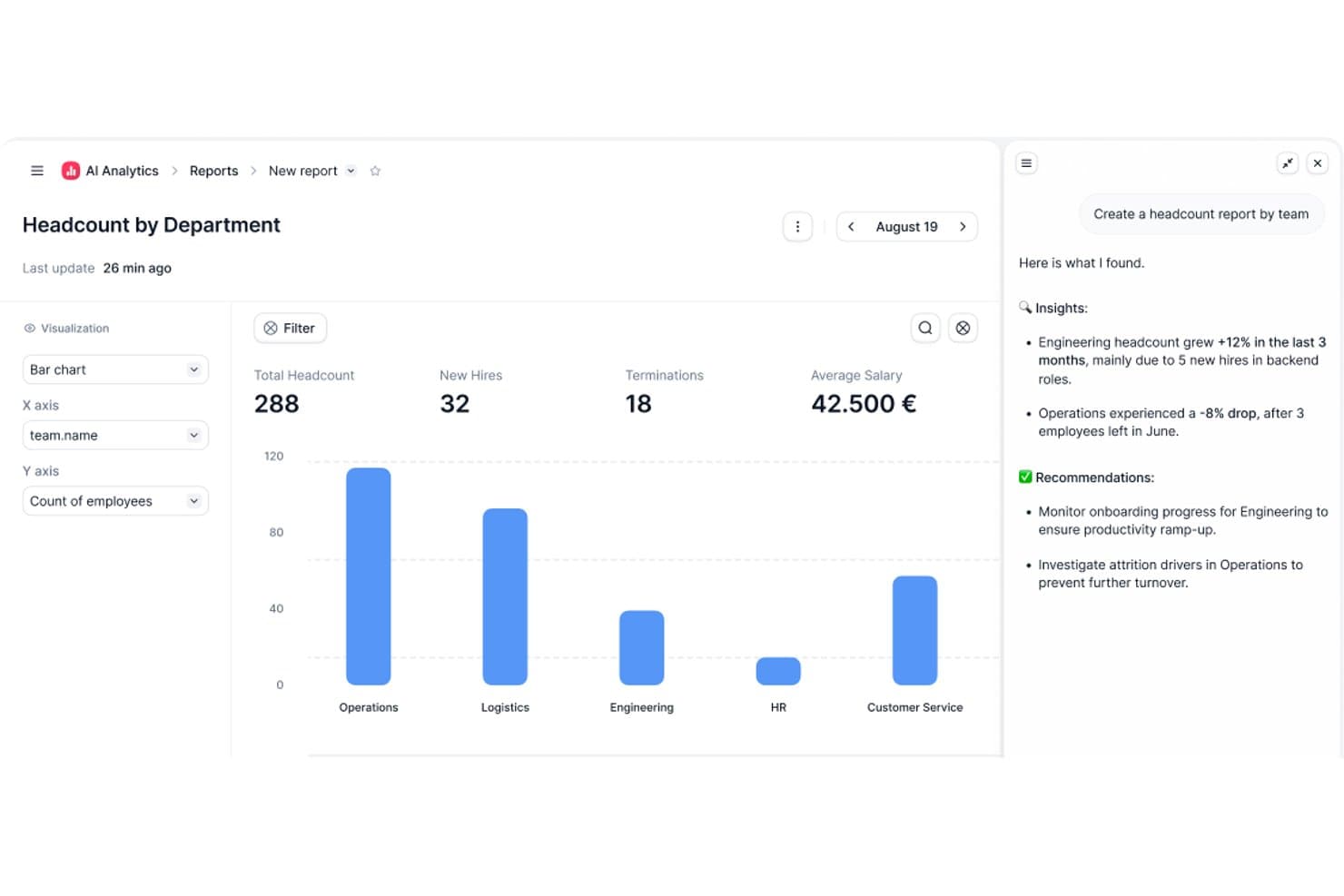
Factorial's AI Analytics generates headcount reports with insights and recommendations. Factorial is an AI-powered HR and workforce management platform that covers time tracking, shift scheduling, onboarding, performance management, and employee engagement across distributed teams.
Who Is Factorial Best For?
Factorial is a strong fit for mid-market companies in Europe that want AI to handle everyday HR operations—from scheduling and reporting to answering employee policy questions.
Why I Picked Factorial
I picked Factorial as one of the best because its AI-for-business positioning goes well beyond a chatbot add-on. Factorial One handles real operational work: building timetables, generating cost and performance reports from a natural language prompt, and answering employee policy questions on the spot. I especially like that the AI agent is embedded directly in Microsoft Teams, so remote employees get HR answers without ever leaving the tools they're already in.
Factorial Key Features
- Multi-method time tracking: Employees can clock in and out via mobile app, QR code, facial recognition, or GPS geolocation, with offline sync for areas with poor connectivity.
- Geofencing: Managers can set location boundaries that validate or restrict clock-ins based on where an employee physically is when they start their shift.
- eNPS and pulse surveys: Built-in employee sentiment tools let you run Net Promoter Score surveys, team pulse checks, and climate surveys across distributed teams.
- Automated onboarding workflows: Digital task checklists, legally recognized e-signatures, and self-service document access guide new remote hires through onboarding without manual hand-holding.
Factorial Integrations
Factorial's documented integrations include Slack, Microsoft Teams, Google Workspace, Microsoft Outlook, Okta, DATEV, Sage, Silae, and a3innuva. It also offers an open API and Zapier.
Pros and Cons
Pros:
- Offline clock-ins preserve attendance data remotely
- Multi-method tracking suits distributed and deskless teams
- AI handles timetable planning and reports
Cons:
- No native global payroll or EOR support
- No time zone-aware scheduling automation
 Best for automated global compliance insights
- Free demo available
- From $5/user/month
Visit WebsiteCustomer Rating:4.8/5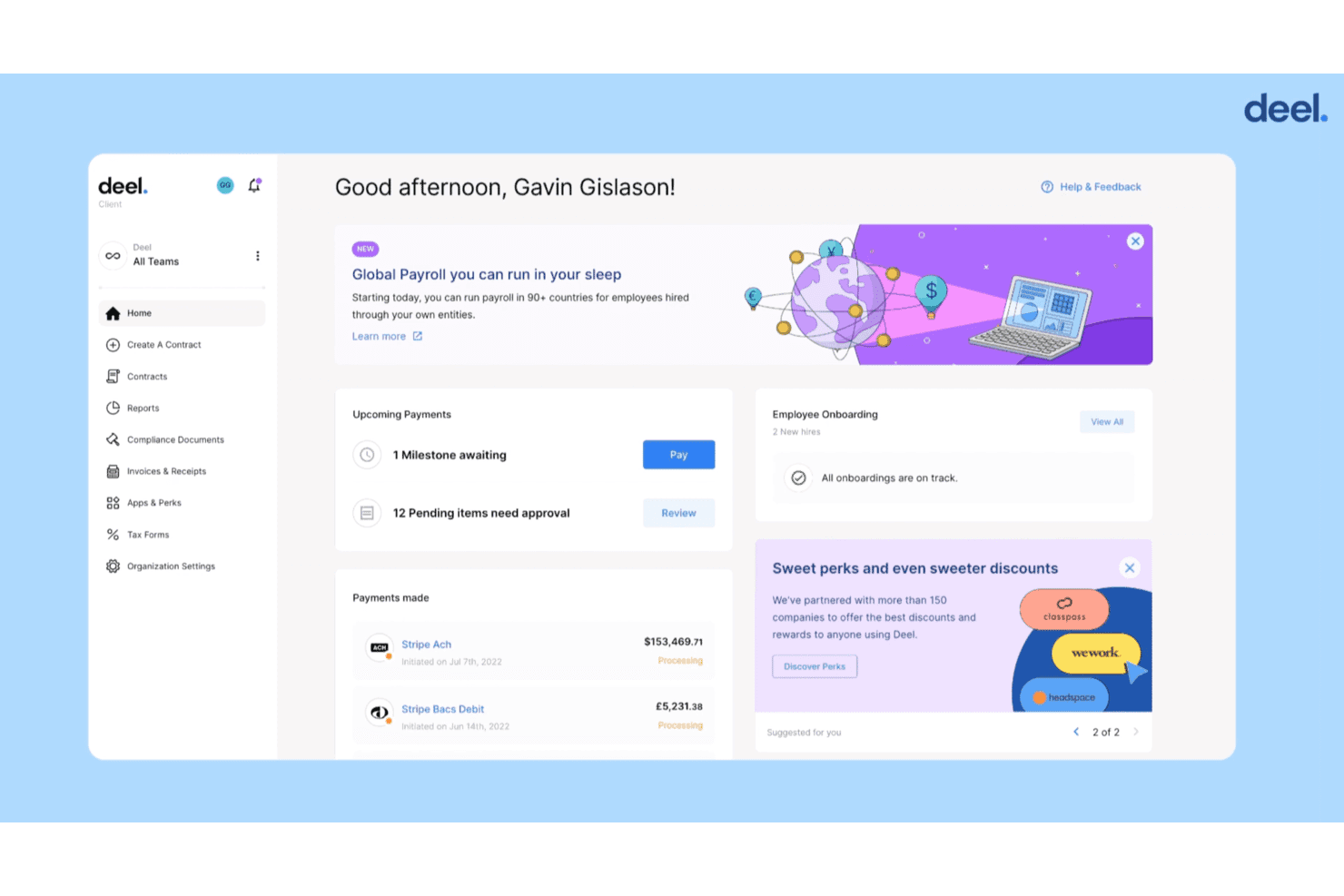
Deel HR self-service platform gives users powerful management features without having to switch tools. Deel HR is a global HR platform that combines EOR, contractor management, payroll, compliance, onboarding, and people analytics for distributed teams across 150+ countries.
Who Is Deel HR Best For?
Deel HR is a strong fit for global HR and compliance managers at mid-size to enterprise companies building or scaling remote teams across multiple countries.
Why I Picked Deel HR
I picked Deel HR because no other tool I've used handles cross-border compliance with this level of automation. When my team adds a new hire in a country like Brazil or Germany, Deel automatically applies the correct labor law templates, tax rules, and statutory benefits without requiring manual research. The built-in compliance insights dashboard flags regulatory changes in real time, so I'm not scrambling to catch up when local laws shift.
Deel HR Key Features
- Global payroll engine: Run payroll for employees and contractors in 150+ countries with automated currency conversion and local tax calculations.
- HR document management: Store, manage, and control access to contracts, onboarding packets, and compliance documents in a centralized dashboard.
- Slack and Teams integrations: Push HR notifications, contract workflows, and payment updates directly into your team’s main communication channels.
- People analytics and dashboards: Access dashboards that visualize headcount, leave, demographics, and remote workforce trends for distributed teams.
Deel HR Integrations
Deel HR offers integrations with QuickBooks, Xero, BambooHR, Expensify, NetSuite, Sage Intacct, Greenhouse, Workday, SAP, and ADP, among others available through its app store. It also connects with Zapier and provides an API for custom integrations.
Pros and Cons
Pros:
- End-to-end EOR and contractor management in one place
- Real-time regulatory change alerts for HR teams
- Automated country-specific compliance across 150+ countries
Cons:
- Reporting customization options can feel restrictive
- Time tracking features are limited compared to competitors
 Best for employee productivity analytics
- Free plan + 14-day free trial available
- From $10/user/month (billed annually)
Visit WebsiteCustomer Rating:4.5/5
ActivTrak offers a productivity dashboard with workforce efficiency and focus analytics. ActivTrak is a workforce analytics platform that tracks employee productivity, app and website usage, schedule adherence, and location policy compliance across remote and hybrid teams.
Who Is ActivTrak Best For?
ActivTrak is a strong fit for mid-sized companies in knowledge-work industries that need visibility into how remote employees spend their working hours.
Why I Picked ActivTrak
ActivTrak earns its spot on my shortlist because its productivity analytics go well beyond basic time tracking—it ties workforce activity data directly to performance outcomes and risk signals. I particularly like the productivity coaching dashboard, which flags employees showing signs of burnout or declining output and groups them by status so managers can act before issues escalate.
The location adherence reporting is also genuinely useful: it compares productivity across remote, hybrid, and onsite setups without relying on GPS or personal device tracking. And the real-time signals and alarms feature catches things like mouse jiggler use or policy violations the moment they happen, which is where the risk mitigation angle really delivers.
ActivTrak Key Features
- Activity classification: Tracks which apps and websites employees use and breaks time down by category to show how much of each workday goes toward core work.
- Schedule adherence monitoring: Shows when employees deviate from assigned schedules and flags late arrivals or early departures in real time.
- Non-digital activity tracking: Syncs with Google Calendar and Outlook to pull in offline meetings and offsite events for a complete picture of each workday.
- AI insights: Tracks adoption and usage of AI tools like Microsoft Copilot, ChatGPT, and Gemini across teams to show where AI is shaping workflows.
ActivTrak Integrations
ActivTrak offers native integrations with Google Calendar, Microsoft Outlook, and Microsoft Entra ID for calendar syncing and user provisioning, and connects to HRIS platforms including Workday, ADP, BambooHR, and UKG Pro through an add-on. The ActivConnect API enables custom data connections to BI tools like Power BI, Looker Studio, and Tableau, as well as platforms like Salesforce, Jira, and ServiceNow for deeper workforce analytics.
Pros and Cons
Pros:
- Privacy-first tracking avoids invasive monitoring
- Workload reports reveal uneven task distribution
- Compares remote, hybrid, and onsite productivity
Cons:
- App classifications need constant manual tuning
- Tracking agents disconnect and need reconnecting
Learn more about ActivTrak: Best with customizable AI HR workflow tools
- Free plan + free demo available
- From $2/user/month (billed annually)
Visit WebsiteCustomer Rating:4.8/5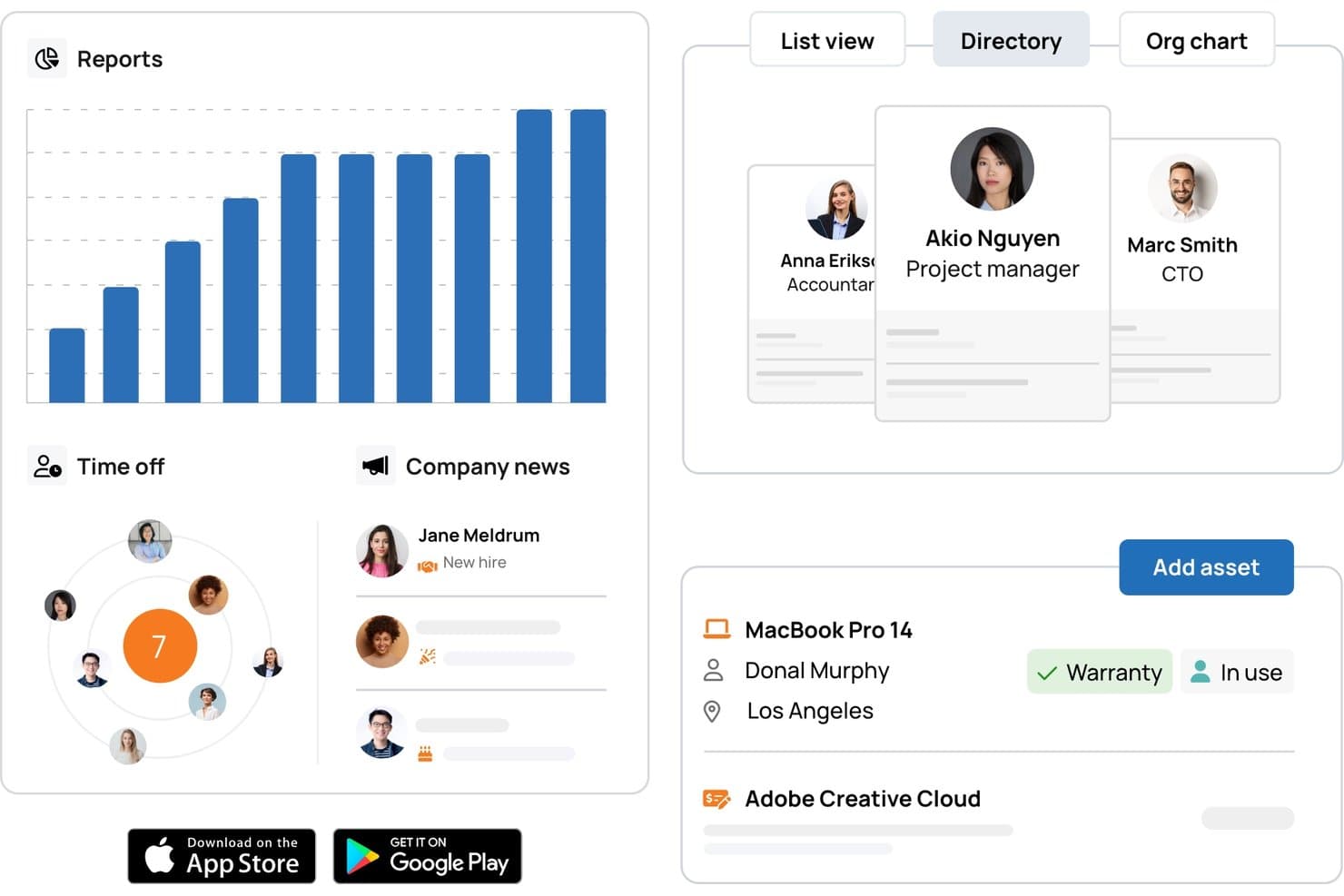
TalentHR offers a centralized HR dashboard with reports, time-off tracking, company news, employee directory, and asset management tools for workforce oversight. TalentHR is a cloud-based HR management platform designed for remote workforce management, offering integrated tools for employee records, time off tracking, onboarding, compliance, and customizable workflow automation.
Who Is TalentHR Best For?
TalentHR suits HR teams in small to mid-sized businesses managing distributed or remote workforces across multiple locations.
Why I Picked TalentHR
I picked TalentHR as one of the best because I use its customizable AI-powered HR workflow tools to automate onboarding, manage compliance documentation, and tailor performance cycles for geographically dispersed teams.
TalentHR Key Features
- Time off management: Automates PTO requests, approvals, and balance tracking for all employees.
- Employee self-service portal: Lets team members update their details, documents, and manage requests online.
- People analytics dashboard: Visualizes key workforce data, including headcount, demographics, and department structure.
- Multi-language support: Provides platform access and documentation in several languages for global teams.
TalentHR Integrations
Integrations include Google Calendar, Microsoft Outlook Calendar, TalentLMS, Zapier, Slack, and WordPress
Pros and Cons
Pros:
- Employee self-service for leave and records
- Advanced analytics for remote workforce tracking
- AI tools automate remote HR workflows
Cons:
- Native integrations are limited
- No built-in payroll processing
Learn more about TalentHR: Best for burnout tracking in distributed teams
- 14-day free trial + free demo available
- From $3.99/user/month (billed annually)
Visit WebsiteCustomer Rating:4.6/5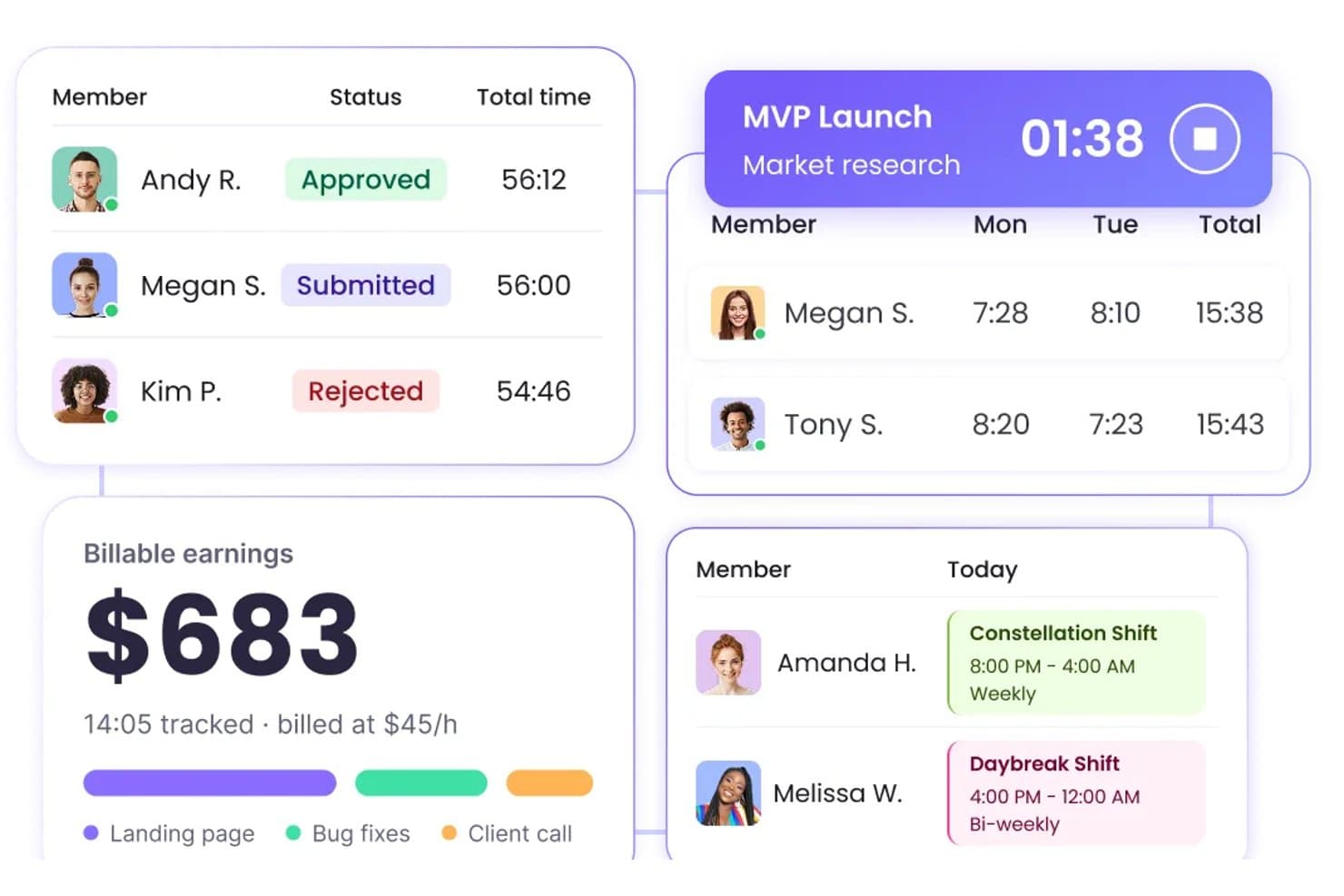
WebWork Time Tracker manages team timesheets, shifts, and billable earnings in one place. WebWork Time Tracker is a time tracking and productivity monitoring tool that covers attendance, activity levels, GPS tracking, shift scheduling, and built-in team communication for distributed and remote workforces.
Who Is WebWork Time Tracker Best For?
WebWork Time Tracker is a strong fit for remote work program leads and managers overseeing distributed or freelance teams who need detailed time, activity, and wellness visibility.
Why I Picked WebWork Time Tracker
WebWork Time Tracker earns its spot on my shortlist because of how seriously it takes burnout visibility for distributed teams. I love that it surfaces burnout risk metrics, like overwork patterns, missed breaks, and irregular hours, alongside an AI assistant that sends automated burnout alerts to managers before the situation escalates. It also lets me set healthy work-hour limits by team or job title, so I'm not just tracking time but actively protecting capacity across time zones.
WebWork Time Tracker Key Features
- GPS tracking and geofencing: Mobile apps automatically clock field and remote workers in and out when they enter or leave a defined job-site radius.
- Kiosk mode: Teams share a single device for clock-ins and clock-outs, with each worker using a personal PIN to log their own time.
- Shift scheduling: Managers build and assign shifts across time zones, ensuring coverage for distributed teams without manual coordination.
- Built-in team chat and video meetings: Workers and managers communicate directly inside WebWork via channel-based chat and video calls, without switching to a separate tool.
WebWork Time Tracker Integrations
WebWork Time Tracker offers native integrations with Slack, Asana, Jira, ClickUp, Deel, Gusto, Google Calendar, and Outlook Calendar. It provides a public API for custom integrations, plus Zapier.
Pros and Cons
Pros:
- Activity dashboards reveal remote work patterns
- GPS supports distributed field teams
- Burnout alerts flag overwork risks
Cons:
- No HRIS or labor-law compliance tools
- Screenshots can feel intrusive
Learn more about WebWork Time Tracker : Best for flexible scheduling tools
- 30-day free trial + free demo available
- From $80/month
Visit WebsiteCustomer Rating:4.5/5
TimeTrex offers department-level PTO, shift, and daily schedule tracking with filters. TimeTrex is a workforce management platform with time & attendance tracking, employee scheduling, payroll processing, geofencing-based clock-ins, and HR management built into a single cloud-accessible system.
Who Is TimeTrex Best For?
TimeTrex suits mid-sized businesses with hourly or shift-based workforces that need integrated time tracking, scheduling, and payroll in one platform.
Why I Picked TimeTrex
TimeTrex is one of my top picks because I love how its scheduling tools handle both simple and complex scenarios without requiring a rebuild from scratch each time. The drag-and-drop interface, paired with reusable shift templates, makes it easy to set up multi-week rotating schedules. I also find the bottom-up availability system useful: employees submit their own time-off requests, which then move through multi-level approvals, keeping managers from chasing confirmations manually.
TimeTrex Key Features
- GPS-based time clock: Employees clock in and out from their mobile device with GPS location capture, giving managers a verified record of where remote workers are when they punch in.
- Overtime and absence tracking: TimeTrex automatically flags overtime thresholds and logs all absence types, keeping records current without manual entry.
- Employee self-service portal: Workers can view their schedules, pay stubs, and HR documents through a self-service portal, reducing back-and-forth with managers.
- Customizable pay rules: Set up location-specific, role-specific, or contract-specific pay rules that calculate automatically at payroll run.
TimeTrex Integrations
TimeTrex offers integrations with payroll and accounting platforms, including ADP, QuickBooks, Sage, Paychex, and Surepay, as well as Ceridian, CompuPay, Tyler Technologies, and Vensure Employer Services. It also provides an API for custom integrations.
Pros and Cons
Pros:
- GPS and geofencing verify remote punches
- Free open-source edition available for self-hosting
- Built-in payroll with automated tax calculations
Cons:
- Manual tax filing is required
- Some modules look dated and cluttered
Learn more about TimeTrex: Best for compliance-backed activity monitoring
- 14-day free trial
- From $5/user/month
Visit WebsiteCustomer Rating:5/5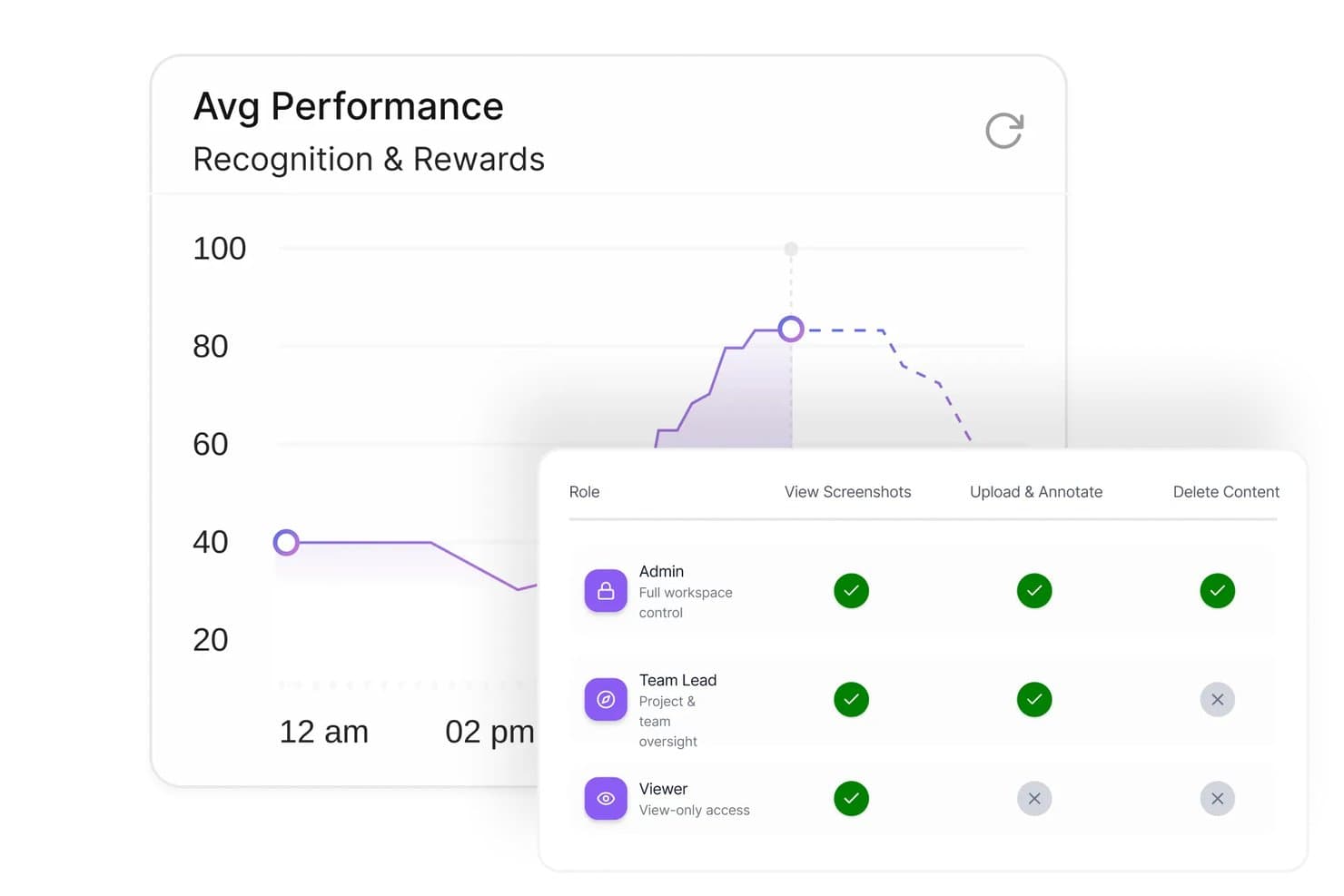
Modge tracks performance and manages role-based access permissions for remote teams. Modge is a remote workforce management platform that combines automatic time tracking, activity and productivity monitoring, shift scheduling, attendance, and compliance-backed timesheets and payroll exports.
Who Is Modge Best For?
Modge is a strong fit for managers and HR operations teams overseeing distributed or remote employees who need audit-ready activity monitoring alongside scheduling and timesheet workflows.
Why I Picked Modge
Modge earns its spot on my shortlist because of how seriously it treats the compliance side of employee monitoring. I've included it here specifically for teams that need audit-ready records: timesheets lock after approval, manual edits land in an audit trail, and the DPA commits to breach notification within 72 hours. On top of that, the Premium tier's suspicious-activity detection flags mouse-jigglers and scripted inputs, giving managers a defensible record rather than just a hunch.
Modge Key Features
- Automatic time tracking: The desktop agent records session start and end times and active apps, then sends sessions directly to timesheets.
- Shift scheduling with time zones: Build one-time, weekly, or biweekly shifts and assign them to individuals or teams across different time zones.
- Leave management with approvals: Employees submit time-off requests, managers approve or deny with comments, and approved hours are added to the matching timesheet.
- Payroll-ready exports: Export timesheet data as a generic CSV, Wise, PayPal, or PDF format for processing.
Modge Integrations
Modge’s documented native integration is Stripe for client invoice payments. It also offers Wise- and PayPal-formatted payroll CSV exports and a public API for custom integrations.
Pros and Cons
Pros:
- Audit trails support defensible timesheet approvals
- Dashboards surface activity and productivity trends
- Automated time capture cuts payroll follow-ups
Cons:
- No built-in messaging or team check-ins
- Project tracking lacks task-status workflows
Learn more about Modge: Best for detailed time tracking reports
- 14-day free trial
- Pricing upon request
Visit WebsiteCustomer Rating:4.5/5
Time Doctor offers a team productivity dashboard with time tracking, project analytics, and real-time employee activity monitoring. Time Doctor is a workforce analytics and time tracking platform that monitors work hours, web and app usage, attendance, and productivity across remote and hybrid teams.
Who Is Time Doctor Best For?
Time Doctor is a natural fit for SMBs and mid-sized companies managing distributed teams, freelancers, or offshore contractors who bill clients by the hour.
Why I Picked Time Doctor
I've included Time Doctor in my top picks because its time tracking goes deeper than most tools in this space, particularly for teams managing freelancers and offshore contractors. I like that it captures billable hours at the project and task level, so invoicing clients is backed by precise data rather than estimates.
The client login access feature is something I haven't seen many competitors offer—it lets you give clients direct visibility into logged hours without sharing your full account. On top of that, the work-life balance analytics flag overwork patterns across remote employees, which I find genuinely useful for spotting burnout risk before it affects output.
Time Doctor Key Features
- Schedule and attendance tracking: Log employee schedules, track attendance, and monitor leave and break time across your remote workforce.
- Productivity ratings: Categorize websites and apps as productive or unproductive to generate per-user productivity scores.
- Screenshot capture: Take automated screenshots at set intervals to provide visual records of active work sessions.
- Web and app usage reporting: See a full breakdown of which websites and applications each employee spends time on during work hours.
Time Doctor Integrations
Time Doctor offers 60+ integrations spanning project management, payroll, help desk, CRM, and HRIS categories, including Asana, Jira, Trello, Slack, Salesforce, HubSpot, BambooHR, Gusto, ADP Workforce Now, and Zendesk. An API is also available for custom integrations.
Pros and Cons
Pros:
- Video screen recording on Premium plan
- Task-level rates improve client invoicing
- Offline tracking syncs when reconnected
Cons:
- No GPS tracking for field teams
- Screenshot monitoring can hurt morale
Learn more about Time Doctor: Best for enterprise workforce management
- 30-day free trial + free demo available
- Pricing upon request
Visit WebsiteCustomer Rating:4.3/5
Workday offers a time tracking dashboard with shift summaries, submitted hours monitoring, and manager approval workflows. Workday is an enterprise workforce management platform covering scheduling, time tracking, absence management, labor optimization, and demand forecasting across global and frontline workforces.
Who Is Workday Best For?
Workday is built for large enterprises and multinational organizations that need to manage complex, distributed workforces across multiple regions and regulatory environments.
Why I Picked Workday
I've included Workday in my top picks because it's the only tool on this shortlist where scheduling automation and workforce analytics aren't bolted-on features—they're baked into the core platform.
I like that Workday's AI assistant, Sana, actively automates manager tasks like approvals and schedule adjustments, which means my team isn't stuck in manual workflows when demand shifts. The labor optimization engine uses demand forecasting to match staffing levels against operational needs in real time, so scheduling decisions are driven by data rather than guesswork.
The Time and Scheduling Hub consolidates time tracking, scheduling, and absence management in a single view, which cuts down the context-switching that slows managers down across large, distributed teams.
Workday Key Features
- Frontline worker self-service: Lets frontline employees clock in, view their schedules, and add or drop shifts directly from a mobile device.
- Global labor cost visibility: Surfaces labor cost dashboards that visualize spending trends and headcount data across regions in a single view.
- Compliance-aware time tracking: Captures time data in a format that forwards directly to HR and payroll systems while supporting local legislative requirements.
- Operational analytics: Identifies workforce cost trends and optimization opportunities using built-in reporting across the full employee lifecycle.
Workday Integrations
Workday offers integrations through its Integration Cloud and Workday Marketplace, connecting to partners like Salesforce, ADP, Slack, and Google Cloud. Workday Orchestrate provides a low-code visual builder and a library of connectors for real-time and batch integrations with third-party systems.
Pros and Cons
Pros:
- Regular product updates without manual upgrades
- Unified dashboard for time and absence data
- AI automates scheduling and approvals
Cons:
- Pricing increases significantly over time
- Implementation costs are high for mid-market teams
Learn more about Workday: 10Best for integrated payroll and HR
Dayforce
- Free demo available
- Pricing upon request
Visit WebsiteCustomer Rating:4.3/5
Dayforce offers a workforce scheduling dashboard with real-time shift tracking, clock-in monitoring, and employee status visibility across locations. Dayforce is an AI-powered HCM platform covering HR, payroll, time tracking, workforce scheduling, talent management, and analytics in a single unified system.
Who Is Dayforce Best For?
Dayforce is a strong fit for mid-to-large enterprises in industries like retail, healthcare, and manufacturing with complex scheduling and compliance needs across multiple locations.
Why I Picked Dayforce
Dayforce earns its spot as one of the best on my shortlist because its single-data-model architecture means payroll, scheduling, and analytics aren't just connected—they're running off the same record in real time. What I find genuinely useful is the continuous payroll calculation engine: rather than batching pay runs at the end of a cycle, Dayforce calculates earnings, deductions, and taxes as time data comes in.
That means when a remote manager adjusts a shift mid-week, the labor cost impact is already visible in the analytics dashboard before payroll closes. The AI-driven scheduling engine also uses historical trends and seasonal data to auto-generate shift coverage, factoring in pay rates, staff preferences, and demand—which is a real advantage when you're managing distributed teams across multiple locations.
Dayforce Key Features
- Mobile employee self-service: Lets employees view schedules, submit time-off requests, and swap shifts directly from a mobile device.
- Absence and leave management: Tracks leave balances, accruals, and requests across multiple leave policies in a single system.
- Multi-jurisdiction compliance management: Applies location-specific labor rules automatically to time and pay records across regions.
- Configurable workforce reporting: Lets managers build and schedule custom reports across HR, time, and payroll data without IT support.
Dayforce Integrations
Dayforce offers marketplace integrations through the Dayforce Exchange, where partner solutions like LinkedIn Learning, DocuSign, Boomi, and Microsoft Dynamics 365 connect to the platform. Its built-in Integration Studio lets you build and manage integrations in a low-code environment, and an API is available for custom integrations.
Pros and Cons
Pros:
- Quarterly releases add features automatically
- GPS clock-ins support distributed teams
- Single database avoids duplicate data
Cons:
- Global settings conflict across entities
- Custom report requests can take months
Learn more about Dayforce:
Outro software de gestão de equipas de trabalho remotas
Eis algumas opções adicionais de software de gestão de equipas de trabalho remotas que não integraram a minha seleção, mas que ainda vale a pena consultar:
- 11InsightfulBest for automated activity tracking
- 12TogglBest for simple time tracking
- 13MonitaskBest for time tracking with screenshots
- 14TeramindBest for workforce monitoring and analytics
- 15HubstaffBest for time tracking with GPS
- 16DeskTimeBest for automatic productivity tracking
- 17RemoteBest for global payroll and HR support
- 18monday AI WorkspaceBest for visual remote team workflows
- 19ConnecteamBest for deskless team management
- 20ADPBest for workforce time and attendance
- 21RipplingBest for automated HR and payroll
- 22UKGBest for scheduling and compliance
- 23ClickUpBest for all-in-one task management
- 24BambooHRBest for core HR workforce management
- 25VeriatoBest for insider threat monitoring
- 26ProdoscoreBest for remote productivity analytics
How I Evaluate Remote Workforce Management Software
I evaluate remote workforce tools in two layers—baseline capabilities like time tracking and compliance, and differentiators like async workflows and global payroll that set the best options apart.
Core Functionality (Table Stakes For This List)
When I'm selecting tools for my list, I rank each one on a scale from 0 (does not offer the functionality) to 5 (excels in this area) for each core functionality listed below. Then, I calculate the tool's total score into a percentage. Each tool needs to achieve a minimum total score of 65% to be considered for inclusion.
- Time & Attendance Tracking: I check whether clock-in/out, overtime rules, and reporting adapt to employees spread across multiple time zones without manual workarounds.
- Remote Employee Scheduling: Shift planning should account for time zone differences automatically, so a manager in London can schedule a team member in Manila with ease.
- Productivity & Activity Monitoring: I evaluate how each tool surfaces task progress and work output for distributed teams while still offering privacy controls employees trust.
- Onboarding & Employee Records: Digital onboarding workflows, e-signatures, and centralized profiles matter here—especially for remote hires who never visit a physical office.
- Communication & Collaboration Tools: Whether built-in or through integrations with Slack or Microsoft Teams, I look for ways remote teams can stay connected beyond email.
- Compliance & Multi-Region Support: I look at how well the platform handles labor law and tax requirements across different jurisdictions where remote workers are based.
Once I have a list of tools that meet the criteria, I consider what sets each platform apart.
Differentiating Factors (What Sets Vendors Apart)
Here's how I compare and contrast different vendors:
Standout Features
Global payroll and EOR capabilities matter when your team spans multiple countries—I look for platforms that let you hire and pay without setting up local entities. Async workflow automation is another differentiator I evaluate, since approval chains and PTO requests shouldn't require real-time coordination across time zones. I also check for wellness and burnout monitoring features that flag overtime patterns before they become retention problems.
Beyond Features
Integration depth matters a lot here. I check whether platforms connect natively with tools like BambooHR, Slack, and Google Workspace, plus whether they offer open API access for custom builds. Data security is equally important—I look for SOC 2 Type II certification and data residency options, since employee records cross borders regularly. Scalability and pricing also shape my evaluation, particularly whether a platform supports mixed workforces of full-time employees, contractors, and freelancers under one pricing model.
Como escolher software de gestão de equipas de trabalho remotas
É fácil ficar preso a listas extensas de funcionalidades e estruturas de preços complexas. Para ajudar a manter o foco enquanto conduz o seu processo específico de seleção de software, eis uma lista de verificação dos fatores a ter em conta:
| Fator | O que considerar |
|---|---|
| FatorEscalabilidade | O que considerarA plataforma consegue suportar o crescimento futuro, novas equipas ou alterações à sua política de trabalho remoto sem interrupções? |
| FatorIntegrações | O que considerarConsegue ligar-se às ferramentas de processamento salarial, HRIS, comunicação e relatórios que a sua equipa já utiliza? |
| FatorPersonalização | O que considerarPode adaptar os fluxos de trabalho, as análises, os alertas ou as funções de acesso para corresponder às suas políticas e estruturas específicas? |
| FatorFacilidade de utilização | O que considerarCom que rapidez os funcionários se conseguem adaptar à utilização diária e a interface é intuitiva para os membros da equipa menos familiarizados com tecnologia? |
| FatorImplementação e integração inicial | O que considerarQue recursos, formação e apoio disponibiliza o fornecedor para garantir uma transição rápida e sem problemas? |
| FatorCusto | O que considerarTem uma visão clara dos custos totais — incluindo a configuração, as taxas mensais e quaisquer encargos por integrações ou apoio adicionais? |
| FatorMedidas de segurança | O que considerarO software disponibiliza encriptação, controlos de acesso e capacidades de auditoria para manter os dados dos funcionários seguros? |
| FatorDisponibilidade do apoio | O que considerarTerá acesso a um apoio responsivo durante o horário de funcionamento da sua empresa, especialmente se a sua equipa estiver distribuída globalmente? |
O que é o software de gestão de equipas de trabalho remotas?
O software de gestão de equipas de trabalho remotas é uma plataforma baseada na nuvem que ajuda as organizações a coordenar e apoiar equipas distribuídas, incluindo trabalhadores remotos e funcionários em regime híbrido. Estas ferramentas ajudam na gestão do tempo, no planeamento e na gestão do desempenho, proporcionando às equipas visibilidade sobre as operações diárias e a produtividade.
Incluem frequentemente funcionalidades avançadas, como relatórios detalhados, análises e acesso a dados em tempo real, ajudando os gestores a tomar melhores decisões e decisões mais rigorosas baseadas em dados. As equipas de RH e de operações também as utilizam para melhorar o desempenho dos funcionários, apoiar os processos de recursos humanos e aumentar a eficiência operacional global.
Funcionalidades
Ao selecionar software de gestão de equipas de trabalho remotas, procure as seguintes funcionalidades essenciais:
- Registo de tempo e assiduidade: Monitoriza quando os funcionários começam e terminam o trabalho e fazem pausas durante o dia, fornecendo registos fiáveis para o processamento salarial e a conformidade.
- Monitorização da atividade: Regista as aplicações e os sites utilizados pelos funcionários, fornecendo informações sobre os fluxos de trabalho diários e os níveis de produtividade.
- Gestão de tarefas e projetos: Permite às equipas atribuir tarefas, atualizar informações e monitorizar o progresso de projetos e tarefas, proporcionando maior clareza e coordenação ao trabalho distribuído.
- Gestão de horários dos funcionários: Cria e gere horários de trabalho, regista ausências e automatiza a atribuição de turnos para manter a cobertura e reduzir conflitos.
- Partilha e armazenamento de documentos: Centraliza ficheiros, recursos e políticas para que a sua equipa remota possa aceder com segurança a informações atualizadas a partir de qualquer lugar.
- Controlos de acesso baseados em funções: Restringe o acesso a dados sensíveis e funcionalidades essenciais com base nas funções dos funcionários, apoiando a segurança dos dados e a conformidade.
- Relatórios e análises: Gera relatórios acionáveis sobre assiduidade, produtividade e conformidade, ajudando a identificar tendências, resolver desafios e planear de forma proativa.
- Ferramentas de comunicação: Disponibiliza canais para mensagens em tempo real, anúncios ou atualizações, melhorando a colaboração e o alinhamento entre os funcionários remotos.
- Capacidades de integração: Liga-se a plataformas de processamento salarial, recursos humanos e gestão empresarial para reduzir a introdução manual de dados e garantir que a informação flui sem problemas entre sistemas.
Funcionalidades comuns de IA do software de gestão de equipas remotas
Para além das funcionalidades padrão do software de gestão de equipas remotas listadas acima, muitas destas soluções estão a incorporar IA com funcionalidades como:
- Informações automatizadas sobre a produtividade: Utiliza algoritmos de IA para analisar a atividade dos utilizadores e identificar rapidamente padrões de trabalho, desvios ou riscos, fornecendo aos gestores dados acionáveis sem necessidade de análise manual.
- Deteção de anomalias nos registos de tempo: Monitoriza os registos de tempo e assiduidade dos funcionários, assinala automaticamente inconsistências ou comportamentos suspeitos e ajuda a prevenir fraudes relacionadas com o tempo de trabalho.
- Recomendações inteligentes de horários: Utiliza IA para sugerir padrões de turnos ideais, equilibrar cargas de trabalho e acomodar as preferências dos funcionários com base em dados históricos.
- Alertas preditivos sobre o envolvimento dos funcionários: Analisa tendências de comunicação e de fluxos de trabalho para detetar sinais precoces de desmotivação, permitindo um apoio proativo e reduzindo o risco de rotatividade.
- Análise de sentimentos na comunicação da equipa: Utiliza o processamento de linguagem natural para avaliar o tom das mensagens, do feedback e dos inquéritos, ajudando os líderes a identificar problemas de moral antes que estes se agravem.
Benefícios
A implementação de software de gestão de equipas remotas proporciona vários benefícios à sua equipa e à sua empresa. Eis alguns dos benefícios que pode esperar:
- Maior visibilidade: Obtenha informações em tempo real sobre padrões de trabalho remoto, assiduidade e produtividade através de painéis centralizados e relatórios automatizados.
- Conformidade simplificada: Recorra ao registo automatizado do tempo, a trilhos de auditoria e a ferramentas de gestão de políticas para ajudar a cumprir os requisitos da legislação laboral e regulamentares.
- Agendamento simplificado: Utilize as funcionalidades integradas de agendamento e gestão de turnos para reduzir erros manuais e equilibrar as cargas de trabalho de forma mais eficaz.
- Maior segurança dos dados: Proteja as informações dos funcionários com controlos de acesso, encriptação e ferramentas de privacidade especificamente concebidos para equipas distribuídas.
- Gestão centralizada de documentos: Mantenha ficheiros, políticas e recursos importantes facilmente acessíveis a todos, independentemente da localização.
- Integração perfeita: Ligue o software de gestão de equipas remotas às suas plataformas existentes de recursos humanos, processamento salarial e comunicação para simplificar os fluxos de dados e minimizar a duplicação.
- Integração mais rápida: Apoie os novos funcionários com interfaces de utilizador intuitivas, recursos de formação e fluxos de trabalho orientados que ajudam as equipas remotas a atingir rapidamente a plena produtividade.
Custos e preços
A seleção de software de gestão de equipas remotas exige uma compreensão dos vários modelos de preços e planos disponíveis. Embora existam ferramentas gratuitas de monitorização de funcionários e outras funcionalidades de gestão do trabalho, a maioria das funcionalidades avançadas requer planos pagos. Os custos variam consoante as funcionalidades, a dimensão da equipa, os complementos e outros fatores. A tabela abaixo resume os planos mais comuns, os seus preços médios e as funcionalidades normalmente incluídas nas soluções de software de gestão de equipas remotas:
Tabela de comparação de planos de software de gestão de equipas remotas
| Tipo de plano | Preço médio | Funcionalidades comuns |
|---|---|---|
| Tipo de planoPlano gratuito | Preço médio$0 | Funcionalidades comunsRegisto básico do tempo, acesso limitado dos utilizadores, relatórios padrão e suporte por e-mail. |
| Tipo de planoPlano pessoal | Preço médio$5–$10/utilizador/mês | Funcionalidades comunsRegisto do tempo e da assiduidade, integrações limitadas, resumos da atividade e gestão básica de tarefas. |
| Tipo de planoPlano empresarial | Preço médio$12–$25/utilizador/mês | Funcionalidades comunsGestão de projetos, agendamento avançado, análise da produtividade, integrações e suporte prioritário. |
| Tipo de planoPlano empresarial avançado | Preço médio$30–$50/utilizador/mês | Funcionalidades comunsFluxos de trabalho personalizados, acesso à API, conformidade reforçada, segurança avançada e gestão dedicada da conta. |
Perguntas frequentes sobre software de gestão de equipas remotas
Eis algumas respostas a perguntas frequentes sobre software de gestão de equipas remotas:
Como é que o software de gestão de equipas remotas ajuda os gestores a supervisionar equipas distribuídas?
O software de gestão de equipas remotas proporciona aos gestores visibilidade sobre a assiduidade, o progresso das tarefas e a atividade dos colaboradores, permitindo-lhes apoiar a produtividade e equilibrar as cargas de trabalho sem necessitarem de reuniões presenciais de acompanhamento.
O software de gestão de equipas remotas é compatível com equipas internacionais?
Sim, muitas plataformas disponibilizam funcionalidades como suporte para fusos horários, interfaces multilingues e ferramentas de conformidade regionais para ajudar a gerir equipas em diferentes países e regiões.
É difícil implementar software de gestão de equipas remotas numa organização de grande dimensão?
Não, a maioria das soluções oferece assistência na integração, integrações com ferramentas de RH e processamento salarial, bem como recursos de formação para os utilizadores, pelo que a implementação é normalmente viável — mesmo para empresas de maior dimensão com estruturas complexas.
Até que ponto estão protegidos os dados dos colaboradores no software de gestão de equipas remotas?
A maioria das soluções modernas utiliza funcionalidades como encriptação de dados, controlos de acesso granulares e auditorias de segurança regulares para ajudar a proteger informações sensíveis sobre a força de trabalho contra acessos não autorizados.
O que devo procurar ao escolher uma ferramenta de gestão de equipas remotas?
Concentre-se nas funcionalidades que correspondem às necessidades da sua equipa — como agendamento flexível, controlo do tempo, suporte à conformidade, relatórios e opções de integração —, bem como na facilidade de utilização e na escalabilidade à medida que a sua organização cresce.