

Encontrar os talentos certos é difícil, e analisar inúmeros currículos pode ser avassalador. Quer garantir que está a contratar as pessoas certas, mas o enorme volume pode ser intimidante.
O software de triagem de currículos com IA pode ajudar. Estas ferramentas utilizam algoritmos avançados para identificar os melhores candidatos, poupando-lhe tempo e esforço. Analisam os currículos rapidamente, concentrando-se nas competências e na experiência relevantes para a sua equipa.
Analisei e testei várias ferramentas de triagem de currículos com IA, utilizando os meus conhecimentos de gestão de RH para fornecer uma análise imparcial. Neste artigo, partilho as minhas principais escolhas, com foco nas suas capacidades de IA e na forma como podem ser úteis para si. Vamos descobrir a solução que melhor se adapta às suas necessidades.
Why Trust Our Software Recommendations
6,700+
Reviews
20
Industry experts
16+
Evaluation factors
14
Years
Our team has been testing and reviewing software since 2012. As HR experts ourselves, we know how difficult—and important—it is to choose the right software.
For this guide, we evaluated tools using hands-on testing and independent research, scoring tools using our selection criteria. We also draw on insights from industry thought leaders and practicing HR experts.
Our reviews reflect our human editorial judgment, not a sales pitch.
Expert reviewers:
- Phil GrayCOO
 Kim BehnkeHR Tech Editor & Analyst
 Josh BarkerPeople Ops Manager

Tabela comparativa de software de triagem de currículos com IA
Esta tabela comparativa resume os detalhes de preços das minhas principais escolhas de software de triagem de currículos com IA:
| Tool | Best For | Trial Info | Price | ||
|---|---|---|---|---|---|
| 1 | Best as AI for business | Free trial + Free demo available | From $8/user/month | Website | |
| 2 | Best for outcome-linked high-volume screening | Free demo available | Pricing upon request | Website | |
| 3 | Best for custom recruitment analytics | Free demo available | Pricing upon request | Website | |
| 4 | Best for custom resume evaluation workflows | Free plan + 14-day free trial + free demo available | From $9/user/month (billed annually) | Website | |
| 5 | Best for multi-stage candidate screening | Free trial available | From $99/month | Website | |
| 6 | Best for talent matching | Free demo available | Pricing upon request | Website | |
| 7 | Best for intelligent resume analysis | No free trial available | Pricing upon request | Website | |
| 8 | Best for collaborative hiring | Free demo available | From $299/month | Website | |
| 9 | Best for recruiting companies | Free plan available | From $29.98/month (billed quarterly) | Website | |
| 10 | Best for conversational AI | Free demo available | Pricing upon request | Website |


Análise do melhor software de triagem de currículos com IA
Seguem-se os meus resumos detalhados do melhor software de triagem de currículos com IA que integrou a minha lista restrita. As minhas análises oferecem uma visão detalhada das principais funcionalidades, vantagens e desvantagens, integrações e casos de utilização ideais de cada ferramenta, para o ajudar a encontrar a melhor opção para si.
 Best as AI for business
- Free trial + Free demo available
- From $8/user/month
Visit WebsiteCustomer Rating:4.4/5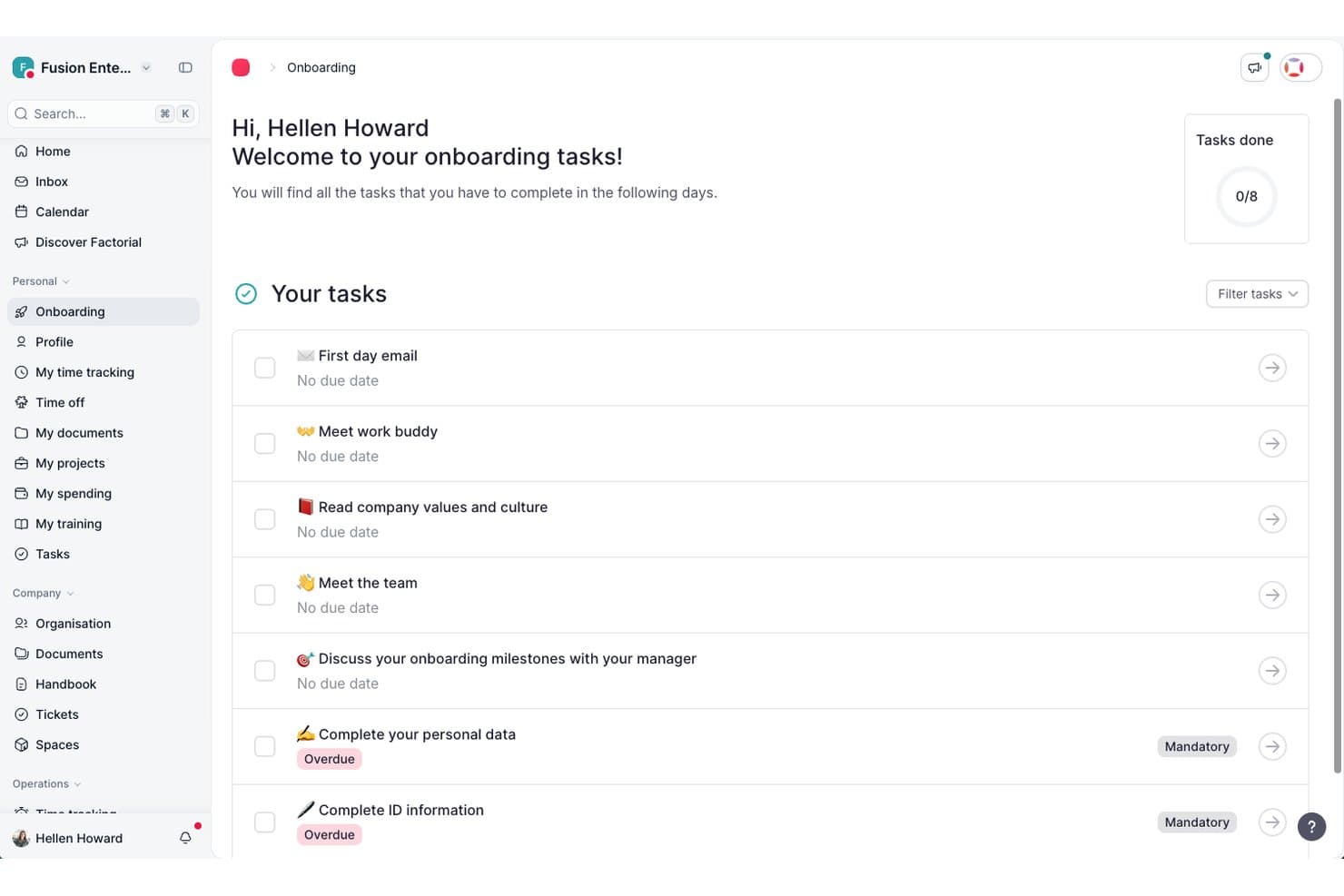
Factorial guides new hires through onboarding tasks in one place. Factorial is a broad HR and business platform that uses AI to support recruitment workflows, including CV parsing, candidate filtering, and hiring-stage management within an integrated ATS.
Who Is Factorial Best For?
Factorial is a strong fit for HR managers and recruiters at small to mid-sized businesses who want AI-assisted hiring tools built into a broader people management platform.
Why I Picked Factorial
I've included Factorial in my top picks because it approaches hiring as one part of a broader AI-driven business operation rather than a standalone task. Its AI CV screening parses and filters candidate applications automatically, while AI candidate matching compares CVs against job requirements to surface the most relevant applicants. I also like that hiring pipelines are fully customizable per role, so AI evaluations are guided by specific criteria rather than generic logic.
Factorial Key Features
- AI job description generator: Uses AI to draft job descriptions based on the role you're hiring for, so you can get postings live faster.
- AI-powered phone screening: Factorial's AI call feature contacts candidates directly, evaluates the conversation against role-specific criteria, and generates a report for your review.
- Customizable hiring pipeline: Build and adjust recruitment stages per role, with automatic candidate emails triggered as applicants move between phases.
- Hiring-funnel analytics: Track metrics like time-to-hire, quality of hire, and offer acceptance rates across your active roles from a single dashboard.
Factorial Integrations
Factorial has marketplace integrations with Recruitee and LinkedIn, plus a two-way InfoJobs connection for job publishing and ATS workflows. It offers a public API, webhooks, SDKs, an MCP server, and Zapier support.
Pros and Cons
Pros:
- Shared evaluation notes support recruiter collaboration
- Role-specific AI calls generate evaluation reports
- Bulk CV parsing supports common document formats
Cons:
- No documented bias-screening controls
- Candidate recommendations lack transparent ranking scores
 Best for outcome-linked high-volume screening
- Free demo available
- Pricing upon request
Visit WebsiteCustomer Rating:4.6/5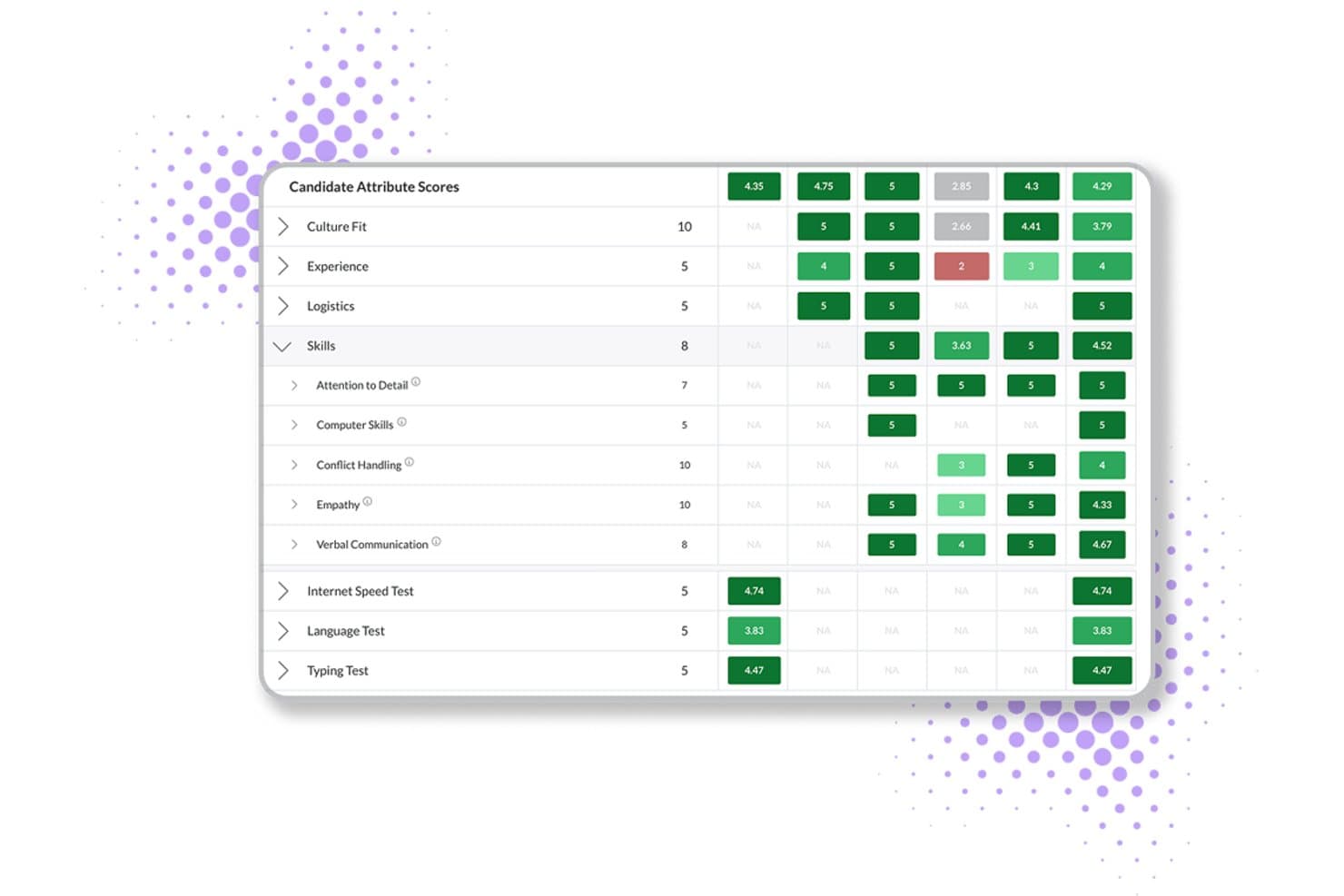
Journeyfront scores candidates across skills, culture fit, and tests. Journeyfront is an AI-powered ATS that combines resume scoring, behavioral assessments, predictive analytics, and hiring-class management for high-volume recruiting operations.
Who Is Journeyfront Best For?
Journeyfront is built for high-volume hiring teams in BPO, contact center, and warehouse environments that need to connect screening decisions to real post-hire outcomes.
Why I Picked Journeyfront
I picked Journeyfront as one of the best because it's the only tool on my list that closes the loop between screening decisions and real post-hire outcomes. Its AI Resume Review scores resumes against job-specific rubrics and feeds into a unified scorecard alongside assessments and interview results. In high-volume BPO or contact center hiring, that means a hiring class built in Journeyfront today can be traced back to 90-day retention and performance data tomorrow.
Journeyfront Key Features
- Predictive behavioral assessments: Candidates complete turnover-risk assessments that forecast 30, 60, 90, and 180-day attrition before a hire is made.
- AI-powered language testing: Built-in language proficiency tests use AI scoring aligned to CEFR levels, removing the need for a third-party language assessment tool.
- Fraud detection flagging: The platform automatically flags VPN use, duplicate IPs, and location changes to surface suspicious applicant activity during high-volume screening.
- Two-way SMS and WhatsApp messaging: Recruiters can send and receive candidate messages directly in the platform via SMS or WhatsApp without switching to a separate communication tool.
Journeyfront Integrations
Journeyfront lists an ecosystem of 400+ vendors, including Workday, Oracle, UKG Pro, BambooHR, Checkr, Sterling, SHL, and Versant. An Open API supports custom integrations, while ATS and HRIS integrations are available as add-ons.
Pros and Cons
Pros:
- Built-in fraud detection for high-volume hiring
- Explainable AI scores with human override
- Directly connects screening to post-hire outcomes
Cons:
- No public third-party bias audit available
- AI resume review feature still in beta
Learn more about Journeyfront: Best for custom recruitment analytics
- Free demo available
- Pricing upon request
Visit WebsiteCustomer Rating:4.4/5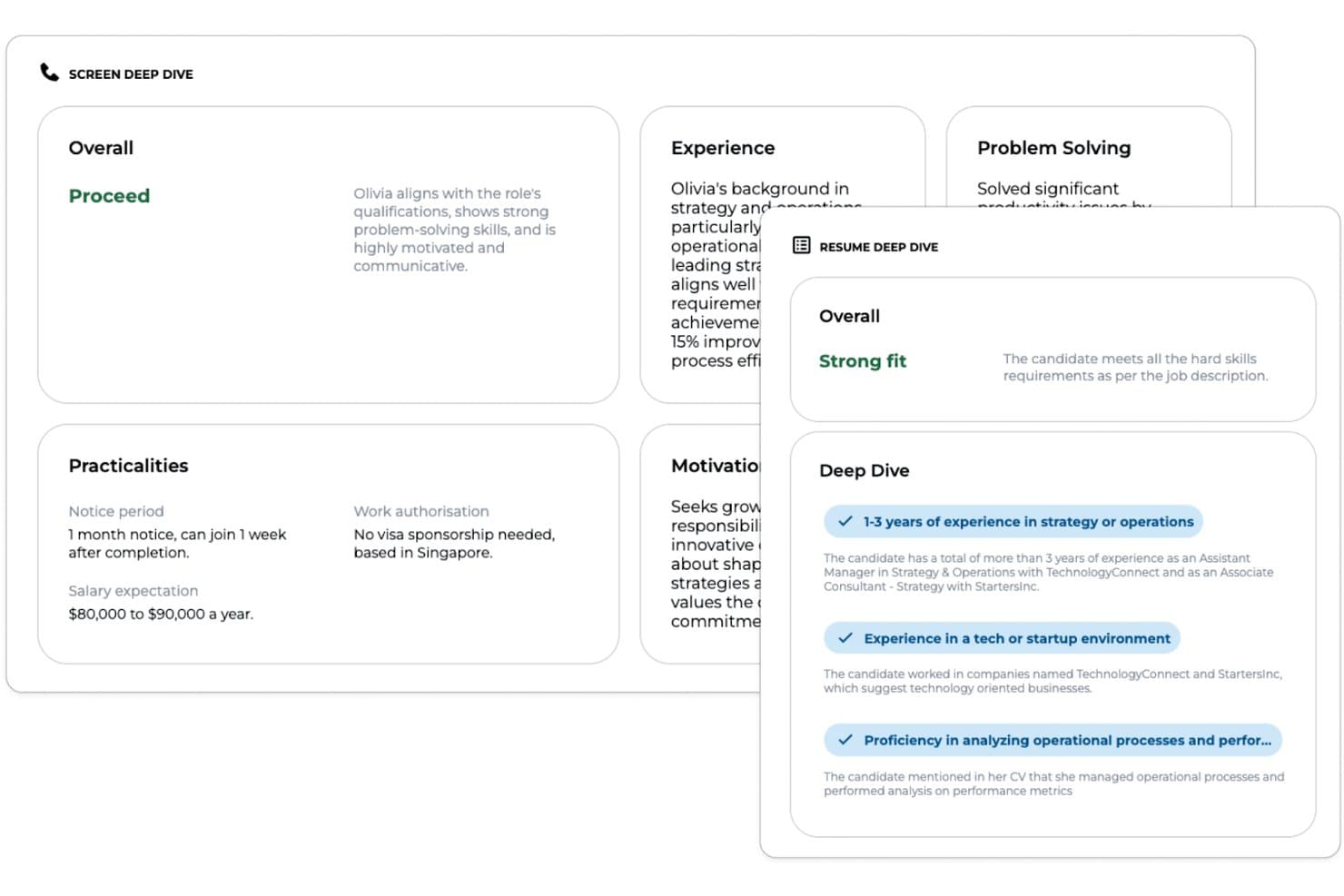
Greenhouse offers an AI-powered candidate screening tool that provides resume deep dives, screen deep dives, and fit assessments with detailed justifications for each evaluation criterion. Greenhouse is an enterprise recruitment platform that offers customizable AI-powered resume parsing, advanced candidate scoring tools, DE&I modules, and seamless integrations for organizations looking to optimize talent acquisition workflows.
Who Is Greenhouse Best For?
Greenhouse is a strong choice for large and mid-sized recruiting teams that need customizable workflows and deep integration with existing HR systems.
Why I Picked Greenhouse
I picked Greenhouse because I use its robust reporting suite to track every hiring step, build custom analytics dashboards, and drill into hiring funnel data for granular talent insights. The reporting API lets my team connect analytics straight into BI tools.
Greenhouse Key Features
- AI resume parsing: Extracts candidate data from multiple file types using natural language processing.
- Customizable candidate scorecards: Let hiring teams create evaluation templates based on job requirements.
- Structured interviewing workflows: Guides users through standardized interview processes for fair candidate assessments.
- Bulk candidate actions: Enable batch movement, communication, and dispositioning of large candidate pools.
Greenhouse Integrations
Greenhouse offers 400+ native integrations, including Workday, ADP, SAP SuccessFactors, Oracle, UKG, LinkedIn, DocuSign, Zoom, Slack, BambooHR, and Google Workspace. An API is available for custom integrations.
Pros and Cons
Pros:
- Powerful workflows for high-volume screening
- Advanced candidate scorecard configuration tools
- Custom analytics for every recruitment stage
Cons:
- Onboarding automation can feel complex
- Native AI matching requires third-party add-ons
 Best for custom resume evaluation workflows
- Free plan + 14-day free trial + free demo available
- From $9/user/month (billed annually)
Visit WebsiteCustomer Rating:4.6/5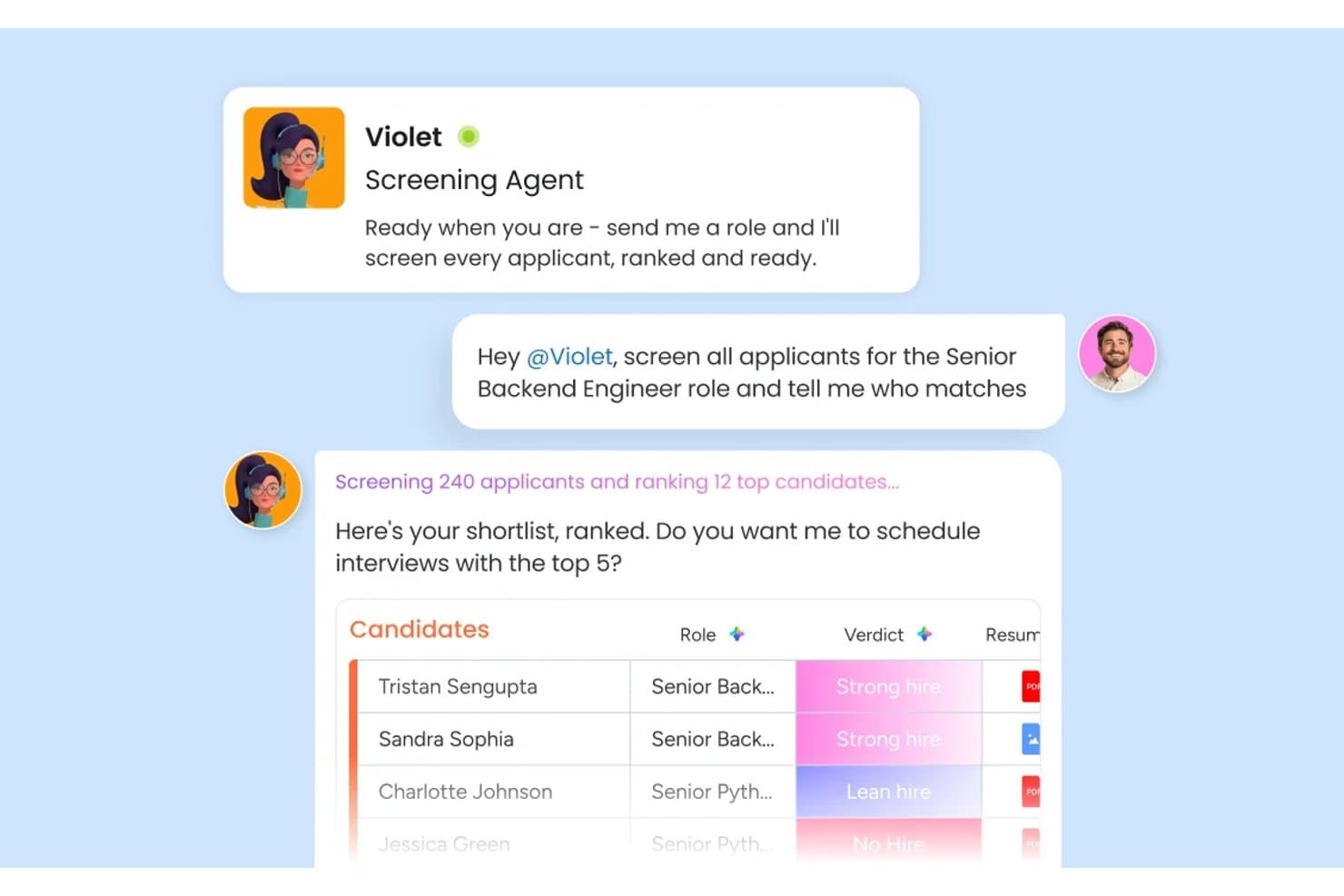
monday AI Workspace offers an AI screening agent called Violet that automatically screens hundreds of applicants and ranks top candidates with hire verdicts. monday AI Workspace is a configurable work OS that lets recruiting teams build custom AI-powered candidate screening pipelines using automated resume parsing, candidate scoring, and cross-team hiring workflows.
Who Is monday AI Workspace Best For?
It's a strong fit for HR operations teams at mid-size organizations that want to build and own their recruiting workflows rather than conform to a rigid, pre-built ATS.
Why I Picked monday AI Workspace
I picked monday AI Workspace because of how much flexibility it gives my team to define what "qualified" actually means for each role. The Screening Agent scores every submission against criteria I set, and the AI Extract Info action pulls structured resume data directly into my board columns. What I find most useful is building custom AI actions in plain language, like prompting the tool to compare a resume against a specific job description and flag skill gaps automatically.
monday AI Workspace Key Features
- Interview coordination agent: Handles scheduling, reminders, and notifications for candidate interviews across global time zones.
- AI Sidekick: Provides an in-platform assistant to summarize candidate profiles and support decision-making in real time.
- Customizable hiring dashboards: Lets teams visualize pipeline status, stages, and team workload using drag-and-drop widgets.
- Automated communication workflows: Triggers templated emails and candidate status updates based on screening actions or candidate movements.
monday AI Workspace Integrations
monday AI Workspace offers hundreds of native integrations, including Slack, Google Workspace, Microsoft 365, Salesforce, Jira, GitHub, Zoom, Dropbox, HubSpot, and Zendesk. It also supports Zapier and provides an API for custom integrations.
Pros and Cons
Pros:
- Visual dashboard tracks pipeline status instantly
- AI supports multi-stage hiring workflows
- Customizable candidate scoring without code
Cons:
- Automation setup requires repeated manual prompts
- Can feel complex for small teams
Learn more about monday AI Workspace:
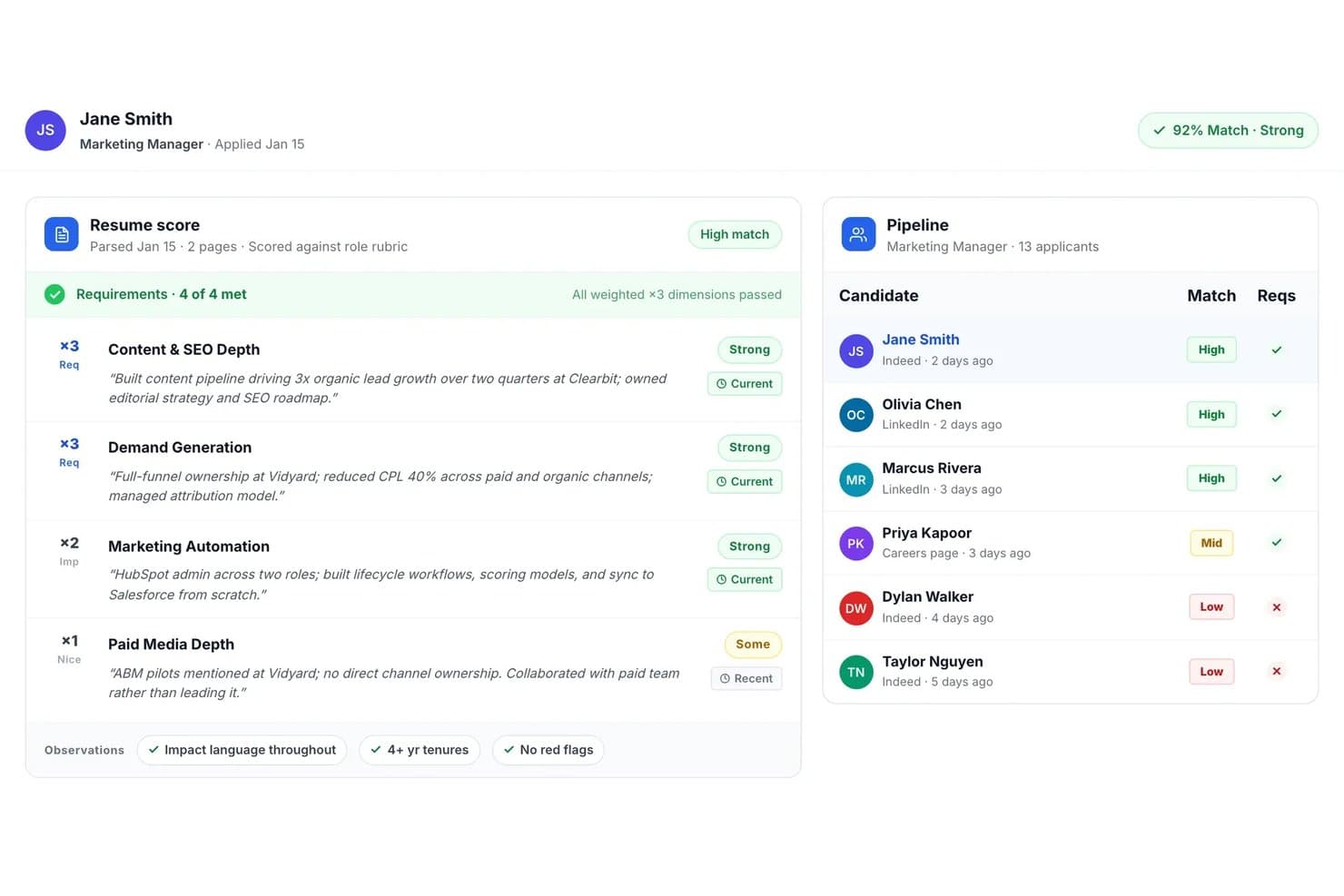
Truffle offers AI-powered resume screening that scores candidates against role rubrics, highlights requirement matches, and ranks applicants in a pipeline view. Truffle is an AI-driven resume screening platform that automatically parses, scores, ranks, and matches candidates to job descriptions with built-in multi-stage screening tools for high-volume recruiting teams.
Who Is Truffle Best For?
Truffle fits high-volume recruiters and HR teams at startups and mid-sized companies hiring for roles across multiple locations or business units.
Why I Picked Truffle
I picked Truffle as one of the best because I can launch one-click multi-stage candidate screening for every job. My team gets AI-powered ranking, instant structured shortlist summaries, and built-in async interview and skills screeners in a single flow.
Truffle Key Features
- Blind resume screening: Automatically hides candidates’ personal identifiers to support unbiased evaluation.
- Evidence-linked AI match scores: Presents match scores that include direct links to supporting resume details and criteria.
- Bulk resume uploading: Allows users to upload and process hundreds of resumes simultaneously for each role.
- ATS and HRIS integrations: Connects with major systems like Ashby, Breezy HR, and more through Zapier and open API.
Truffle Integrations
Truffle offers native integrations with Ashby, Breezy HR, and Indeed, and connects with Zapier. An open API is available for custom integrations.
Pros and Cons
Pros:
- Fast bulk processing for high-volume roles
- Built-in async skills and interview screening
- Automated shortlist with evidence-linked AI scores
Cons:
- No multilingual resume parsing support
- Limited advanced reporting and analytics tools
Learn more about Truffle:

Eightfold AI matches candidates to roles using skill-based insights. Eightfold AI caught my attention because it uses AI to deeply analyze candidate skills and experience, focusing on real job fit instead of just keyword matching. This platform is a match for companies with high-volume or complex hiring needs, where surfacing the strongest, most relevant talent quickly really matters.
I appreciate how it maps existing skills to open roles and internal mobility paths for clearer talent decisions.
Eightfold AI’s Best For
- Large organizations with high-volume resume screening needs
- Companies prioritizing talent matching and internal mobility
Eightfold AI’s Not Great For
- Small companies with basic screening requirements
- Teams wanting deep, customizable workflow automation
What sets Eightfold AI apart
Eightfold AI is built around the idea that skills and actual experience should drive hiring, not just matching keywords on a resume. In practice, it sifts through large volumes of applicants and brings forward people who have proven abilities that align with open roles. Unlike basic screening tools or recruiting features in something like Workday, Eightfold expects you to trust its AI to surface relevant candidates you might miss with manual filtering.
Tradeoffs with Eightfold AI
Eightfold AI optimizes for automated skill-based matching, but you give up detailed manual control and customization over the screening process. If you want to tweak how every filter works, you'll probably feel limited.
Pros and Cons
Pros:
- Centralizes workforce planning data
- Makes hiring decisions more diverse
- AI uncovers full candidate potential
Cons:
- Best with structured HR
- Complex for small organizations
Learn more about Eightfold AI: 7Best for intelligent resume analysis
Alex
- No free trial available
- Pricing upon request
Visit WebsiteCustomer Rating:4.5/5
Alex conducting an automated interview and confirming availability through 24/7 scheduling. Alex lands on my list because of how well it uses AI to break down resumes into structured, relevant insights. I picked it after seeing its natural language processing sift out meaningful skills and experience patterns that basic keyword scanners miss.
What I like is that Alex recognizes job-specific context, so you get more accurate talent matches when screening high volumes of diverse resumes. This makes it stand out for teams who want deeper, more intelligent resume analysis, not just faster filtering.
Alex’s Best For
- High-volume recruiters screening diverse candidate pools
- HR teams needing context-aware resume parsing and insights
Alex’s Not Great For
- Companies with narrow, highly specialized hiring needs
- Teams wanting detailed reference or background checks
What sets Alex apart
Alex approaches resume screening with a context-driven analysis model instead of simple keyword matching or rule-based scoring. Unlike tools like Lever or Greenhouse that stick to more surface-level filtering, Alex interprets whole resume narratives and ties skills back to job needs in practical, job-specific ways.
I often see recruitment teams using it to improve relevance when handling large, varied candidate pools.
Tradeoffs with Alex
Alex optimizes for intelligent context parsing, but you lose access to some advanced sourcing or referral management tools, so it isn’t great when internal mobility or referrals drive most of your hires.
Pros and Cons
Pros:
- Supports multilingual candidate interviews
- Built in fraud detection tools
- Automates high volume interviews
Cons:
- Advanced features need configuration
- Pricing not publicly available
Learn more about Alex:

Workable simplifies hiring with sourcing, evaluation, and communication tools. Workable stands out for me when hiring gets collaborative and resume volumes get overwhelming. I like how its AI filters candidate pools and highlights strong matches right inside your collaborative hiring pipelines. Teams are able to comment, rate, and move candidates forward together, all in one place.
I appreciate how candidate scoring is transparent and integrates with real team feedback, which cuts down on back-and-forth review cycles.
Workable’s Best For
- Collaborative hiring teams screening high volumes of resumes
- Organizations wanting AI-driven candidate scoring with transparent team input
Workable’s Not Great For
- Companies handling infrequent or one-off hiring
- Teams needing deep sourcing or candidate relationship management
What sets Workable apart
Workable builds the hiring process around collaboration and transparency rather than just automation. Unlike something like Lever, which focuses heavily on pipeline analytics, Workable expects you to pull multiple stakeholders into candidate evaluations and shortlisting directly in the platform. This tends to work best when you want hiring managers and interviewers embedded in resume review and feedback, not just recruiters.
Tradeoffs with Workable
Workable optimizes for collaborative hiring, but advanced candidate sourcing or deep recruitment marketing capabilities are less visible. You lose out if your process depends on outreach and long-term talent pipelines.
Pros and Cons
Pros:
- Teams collaborate more effectively
- AI aids sourcing and screening
- Unified hiring and HR platform
Cons:
- Need manual setup for integrations
- Features vary by plan tier
Learn more about Workable: Best for recruiting companies
- Free plan available
- From $29.98/month (billed quarterly)

Jobscan optimizes resumes for better ATS matching. Jobscan earns its spot for how it automates resume screening with recruiter-quality keyword and skills matching. When agencies face high volumes or tricky client needs, I see them using Jobscan’s ATS optimization to align resumes with each job’s real requirements.
I like that I can run side-by-side comparisons showing exactly how well a candidate’s resume matches the must-haves. This focus on concrete fit speeds up shortlisting when accuracy matters most.
Jobscan’s Best For
- Recruiting firms processing high-volume candidate pools
- Agencies needing precise ATS-driven resume matching
Jobscan’s Not Great For
- Internal HR teams screening limited applicant numbers
- Companies wanting deep AI interview or assessment features
What sets Jobscan apart
Jobscan is designed around matching resumes to job descriptions using recruiter-style logic, rather than just filtering on broad keywords as you find in basic ATS tools. In practice, this works best for agencies or hiring teams dealing with huge applicant pools who need objective, skills-based matches surfaced before deeper review.
Unlike LinkedIn Recruiter, which centers on search and relationship-building, Jobscan zeroes in on optimizing each resume for an exact role and its real requirements.
Tradeoffs with Jobscan
Jobscan optimizes for accurate, high-volume screening, but you give up broader candidate engagement or interview workflow features, which means you’ll need another tool for end-to-end recruiting.
Pros and Cons
Pros:
- Offers resume and LinkedIn analysis
- Includes ATS-friendly resume builder
- Helps identify missing keywords
Cons:
- Limited features for recruiters
- Focuses on individual applicants
Learn more about Jobscan:

Paradox automates candidate chats with conversational AI. Paradox is my pick here because of the conversational AI that’s built into its screening and scheduling experience. When I evaluate AI resume screening tools for high-volume hiring, what sets Paradox apart is how it uses AI chat to screen candidates in real time, answer questions, and move qualified people straight to the next step. I like that teams can automate early engagement and uncover strong-fit candidates without adding extra steps or delays.
Paradox’s Best For
- High-volume recruiting teams using AI chat for screening
- Organizations automating early candidate screening and scheduling
Paradox’s Not Great For
- Companies needing advanced skills assessments
- Teams that require detailed manual resume reviews
What Sets Paradox Apart
Paradox is unique because it builds the entire screening experience around conversational AI. Instead of expecting recruiters to review resumes directly, the system runs guided chat-based interviews that mimic the give-and-take of a recruiter conversation. I see this work well when organizations want to automate high-volume resume screens but still give candidates the sense of a two-way interaction.
Tradeoffs with Paradox
Paradox optimizes for fast, automated screening using natural language, but you lose the depth and nuance of traditional résumé analysis, which means some details or context may get missed at the earliest stage.
Pros and Cons
Pros:
- Works across time zones
- Instant interview scheduling
- Applications accessible through multiple platforms
Cons:
- Human recruiters still needed to manage final steps
- Chat flows require setup
Learn more about Paradox:
Outro software de triagem de currículos com IA
Eis algumas opções adicionais de software de triagem de currículos com IA que não integraram a minha lista restrita, mas que ainda assim vale a pena conhecer:
- 11HarverBest for volume hiring
- 12CoveyBest for candidate engagement
- 13PestoBest for tech recruitment
- 14HaiTalentBest for fast track hiring
- 15ResumeScreening.aiBest for real-time feedback
- 16BrainnerBest for automated candidate ranking
- 17Zoho RecruitBest for customizable workflows
- 18ManatalBest for social media recruitment
How I Evaluate AI Resume Screening Software
Any tool on this list needs to do more than slap an "AI" label on basic keyword filters—it has to genuinely reduce screening time and surface better-fit candidates from high-volume applicant pools. I split my evaluation into core functionality every tool must have to qualify, and differentiating factors that separate good options from great ones.
Core Functionality (Table Stakes For This List)
When I'm selecting tools for my list, I rank each one on a scale from 0 (does not offer the functionality) to 5 (excels in this area) for each core functionality listed below. Then, I calculate the tool's total score into a percentage. Each tool needs to achieve a minimum total score of 65% to be considered for inclusion.
- AI-Powered Resume Parsing: I check whether the tool can extract structured data—skills, job titles, education, certifications—from resumes across formats like PDF and DOCX with high accuracy.
- Candidate Scoring & Ranking: Each tool should generate AI-driven match scores and ranked shortlists, so recruiters reviewing 500+ applicants can quickly focus on the top candidates.
- Semantic Job Description Matching: I look for matches that go beyond keyword overlap to understand context, like recognizing that a "people operations lead" aligns with an "HR manager" role.
- Bias Mitigation Controls: Features like blind screening, demographic anonymization, or explainable scoring help me gauge how seriously a platform addresses fairness in automated decisions.
- Bulk Resume Processing: High-volume hiring teams need to screen thousands of resumes per role, so I evaluate whether the tool handles large batches without slowdowns or manual workarounds.
- ATS and HRIS Integration: The tool should connect with platforms like Greenhouse, Workday, or iCIMS so screened candidates flow directly into existing recruiting workflows.
Once I have a list of tools that meet this criteria, I consider what sets each platform apart.
Differentiating Factors (What Sets Vendors Apart)
Here's how I compare and contrast different vendors:
Standout Features
Skills inference is a big differentiator—tools that identify unstated competencies from a candidate's work history surface talent that pure keyword matching would miss. I also evaluate whether a platform lets recruiting teams train custom AI models on their own hiring data and success profiles. Predictive hiring analytics add another layer, giving talent acquisition managers visibility into quality-of-hire trends and pipeline health over time.
Beyond Features
Compliance and AI governance matter a lot here—I check whether vendors publish bias audits and support evolving regulations like the EU AI Act or NYC Local Law 144. Hiring volume fit is equally important, since a tool built for enterprise BPO recruiting often won't suit a mid-market team filling a handful of specialized roles. I also look at time-to-value, including how quickly teams can calibrate scoring models and connect to their existing ATS.
Como escolher software de triagem de currículos com IA
É fácil perder-se em listas extensas de funcionalidades e estruturas de preços complexas. Para o ajudar a manter o foco enquanto percorre o seu processo específico de seleção de software, eis uma lista de fatores a ter em conta:
| Fator | O que considerar |
| Escalabilidade | O software pode acompanhar o crescimento da sua empresa? Certifique-se de que consegue lidar com um aumento do volume de currículos sem problemas de desempenho à medida que as suas necessidades de contratação aumentam. |
| Integrações | Funciona com os seus sistemas atuais? Verifique a compatibilidade com o seu ATS, HRIS e outras ferramentas essenciais para evitar interrupções nos fluxos de trabalho. |
| Personalização | Pode adaptá-lo às suas necessidades? Procure opções para ajustar definições, fluxos de trabalho e relatórios de modo a corresponderem aos seus processos de contratação. |
| Facilidade de utilização | A interface é intuitiva? Um design fácil de utilizar reduz o tempo de formação e os erros, beneficiando a produtividade da sua equipa desde o primeiro dia. |
| Implementação e integração inicial | Quanto tempo demora a ficar operacional? Considere o tempo e os recursos necessários para a configuração, a formação e a migração de dados. |
| Custo | Enquadra-se no seu orçamento? Compare os planos de preços e esteja atento a taxas ocultas. Certifique-se de que as funcionalidades justificam o custo para a sua equipa. |
| Medidas de segurança | Os dados dos seus candidatos estão protegidos? Procure encriptação, conformidade com a privacidade dos dados e atualizações de segurança regulares para proteger informações sensíveis. |
| Disponibilidade do apoio | Existe ajuda quando é necessária? Verifique se existem opções de apoio 24 horas por dia, 7 dias por semana, e gestores de conta dedicados para prestar assistência em momentos críticos. |
O que é o software de triagem de currículos com IA?
O software de triagem de currículos com IA é uma ferramenta que automatiza o processo de análise e avaliação dos currículos dos candidatos a emprego utilizando inteligência artificial. Os profissionais de RH e os recrutadores utilizam estas ferramentas para identificar rapidamente os candidatos qualificados, reduzindo o tempo necessário para contratar e melhorando a eficiência do recrutamento.
Funcionalidades como a análise de palavras-chave, a classificação de candidatos e a filtragem automatizada ajudam a estabelecer correspondências entre os candidatos e os requisitos das funções, melhorando o processo de recrutamento.
De um modo geral, estas ferramentas permitem poupar tempo e melhorar a qualidade das contratações através da utilização de capacidades de IA.
Funcionalidades
Eis as principais funcionalidades que qualquer excelente software de triagem de currículos com IA deve ter:
- Análise de palavras-chave: Identifica palavras-chave relevantes nos currículos para estabelecer correspondências eficientes entre os candidatos e as descrições das funções.
- Classificação de candidatos: Classifica automaticamente os candidatos com base nas suas qualificações e adequação à função, poupando tempo no processo de seleção.
- Filtragem automatizada: Filtra os candidatos não qualificados utilizando critérios predefinidos, permitindo aos recrutadores concentrarem-se nos melhores talentos.
- Avaliações de competências: Avalia as competências técnicas e interpessoais dos candidatos através de testes baseados em IA, garantindo uma boa adequação à função.
- Análise preditiva: Fornece informações sobre o potencial e o desempenho futuro dos candidatos, contribuindo para decisões de contratação fundamentadas.
- Fluxos de trabalho personalizáveis: Permitem às equipas adaptar o processo de recrutamento às suas necessidades específicas, melhorando a eficiência.
- Feedback em tempo real: Fornece feedback instantâneo sobre os currículos, ajudando os candidatos a melhorar as suas candidaturas.
- Análise da diversidade e inclusão: Analisa as práticas de contratação para promover uma força de trabalho diversificada e inclusiva.
- Análise de currículos: Extrai e organiza rapidamente informações dos currículos, reduzindo a introdução manual de dados.
- Agendamento de entrevistas: Automatiza o agendamento de entrevistas, simplificando a coordenação entre candidatos e recrutadores.
Benefícios
A implementação de software de triagem de currículos com IA proporciona vários benefícios à sua equipa e à sua empresa. Eis alguns dos benefícios que pode esperar:
- Poupança de tempo: Automatiza o processo de análise de currículos, libertando tempo da sua equipa para outras tarefas importantes.
- Melhoria da qualidade dos candidatos: Utiliza funcionalidades de IA, como a classificação de candidatos, para garantir que apenas os candidatos mais adequados são considerados.
- Melhoria da tomada de decisões: Fornece análises preditivas que oferecem informações sobre o potencial dos candidatos, contribuindo para melhores decisões de contratação.
- Redução de preconceitos: Promove contratações justas através da utilização de critérios baseados em IA, minimizando os preconceitos humanos no processo de seleção.
- Eficiência de custos: Reduz o custo por contratação ao automatizar tarefas e melhorar a eficácia das estratégias de recrutamento.
- Escalabilidade: Processa facilmente volumes maiores de currículos, sendo adequado para empresas em crescimento com necessidades de contratação cada vez maiores.
- Melhor experiência dos candidatos: Oferece feedback em tempo real e uma comunicação eficiente, melhorando a experiência geral dos candidatos a emprego.
Custos e preços
A seleção de software de triagem de currículos com IA requer uma compreensão dos vários modelos de preços e planos disponíveis. Os custos variam consoante as funcionalidades, o tamanho da equipa, os complementos e outros fatores. A tabela abaixo resume os planos mais comuns, os respetivos preços médios e as funcionalidades normalmente incluídas nas soluções de software de triagem de currículos com IA:
Tabela de comparação de planos de software de triagem de currículos com IA
| Tipo de plano | Preço médio | Funcionalidades comuns |
| Plano gratuito | $0 | Análise básica de currículos, correspondência limitada de candidatos e acesso restrito a análises. |
| Plano pessoal | $29.99 - 299/utilizador/mês | Análise de palavras-chave, classificação de candidatos e ferramentas básicas de elaboração de relatórios. |
| Plano empresarial | $100-$359/utilizador/mês | Filtragem avançada, avaliações de competências e integração com sistemas ATS. |
| Plano empresarial de grande escala | $199- $500/utilizador/mês | Fluxos de trabalho personalizáveis, análise preditiva e apoio dedicado ao cliente. |
Perguntas frequentes
Eis algumas respostas a perguntas comuns sobre software de análise de currículos com IA:
Quão transparentes são as decisões da IA na análise de currículos?
A maioria das ferramentas não explica totalmente por que razão um candidato fica classificado mais acima ou mais abaixo, o que pode ser frustrante. Procure plataformas que mostrem quais as competências ou palavras-chave que influenciaram as suas decisões. Isto ajuda a sua equipa a compreender o raciocínio da IA e a confiar nas suas recomendações.
O que acontece se a sua ferramenta de IA atribuir uma classificação demasiado baixa a um candidato forte?
Até as melhores ferramentas podem não identificar talento com percursos profissionais invulgares ou currículos criativos. Deve incluir sempre uma “segunda análise” humana para os candidatos que possam passar despercebidos. É uma boa salvaguarda.
Qual é a precisão destas ferramentas de IA em comparação com a análise humana?
São rápidas e consistentes, mas não são perfeitas. Uma dependência excessiva de palavras-chave ou modelos significa que bons candidatos podem ser ignorados. Será melhor combinar IA e avaliação humana.
A ferramenta adapta-se ao longo do tempo ou é necessário recalibrá-la constantemente?
Sim, adapta-se. Mas, à medida que os mercados de trabalho e as competências evoluem, os seus critérios também devem evoluir. Deve rever e atualizar as definições, os limiares e os filtros pelo menos de poucos em poucos meses para manter tudo otimizado.
E quanto aos currículos que não têm um aspeto normalizado ou não seguem um formato típico — a IA consegue identificá-los?
Nem sempre. Se um currículo tiver um esquema criativo, utilizar uma formatação invulgar ou não incluir as palavras-chave esperadas, a IA poderá ter dificuldade em analisá-lo corretamente. Para contratações mais pouco convencionais, poderá continuar a ser necessária uma pessoa responsável pela validação final.