

10 Best UK Contractor Management Software Reviewed in 2026

Best UK Contractor Management Software Shortlist


Managing contractors can be a headache, especially when you're juggling compliance, onboarding, and safety standards. You need a reliable cloud-based solution to make this process smoother and more efficient to ensure success stories.
In my experience, contractor management software can be a game-changer for your team. It helps you keep track of everything from contracts to compliance, reducing stress and allowing you to achieve results in less time.
I've independently tested and reviewed the best contractor management software available in the UK. In this article, I'll share unbiased insights and highlight top picks to help you make an informed decision.
You're in the right place to find a solution that fits your needs and alleviates those daily challenges.
Why Trust Our Software Reviews
We’ve been testing and reviewing HR software systems since 2019. As HR experts ourselves, we know how critical and difficult it is to make the right decision when selecting software.
We invest in deep research to help our audience make better software purchasing decisions. We’ve tested more than 2,000 tools for different HR management use cases and written over 1,000 comprehensive software reviews. Learn how we stay transparent & our software review methodology.
Best UK Contractor Management Software Summary
This comparison chart summarizes pricing details for my top UK contractor management software selections to help you find the best one for your budget and business needs.
| Tool | Best For | Trial Info | Price | ||
|---|---|---|---|---|---|
| 1 | Best for UK contractor compliance globally | Free demo available | From $599/employee/month | Website | |
| 2 | Best for automated invoicing workflows | Free demo available | Pricing upon request | Website | |
| 3 | Best for contract management | Free demo available | Pricing upon request | Website | |
| 4 | Best for large construction companies | Free demo available | From $10,000/year (billed annually) | Website | |
| 5 | Best for residential construction | Free demo available | Pricing upon request | Website | |
| 6 | Best for safety training | Free demo available | Pricing upon request | Website | |
| 7 | Best for real estate management | Free demo available | Pricing upon request | Website | |
| 8 | Best for visitor management | Free demo available | Pricing upon request | Website | |
| 9 | Best for health and safety compliance | Free demo available | From £549/month (billed annually) | Website | |
| 10 | Best for site inspections | Free demo available | From £245/month (up to 25 site staff) | Website |
Best UK Contractor Management Software Review
Below are my detailed summaries of the best UK contractor management software that made it onto my shortlist. My reviews offer a detailed look at the key features, pros and cons, integrations, and ideal use cases of each tool to help you find the best one for you.

Best for UK contractor compliance globally
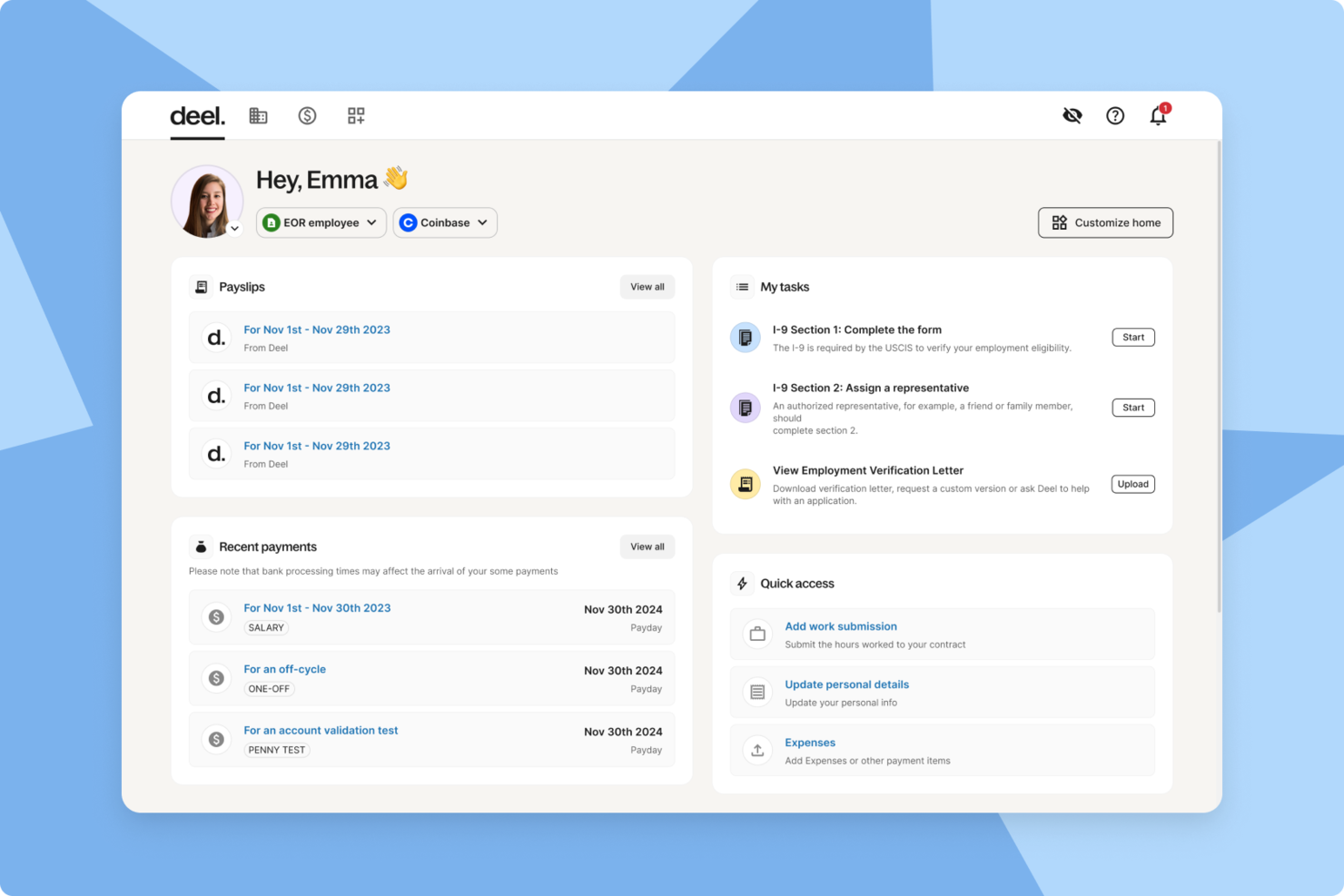
If you're managing a growing contractor workforce in the UK, Deel can help you stay compliant while keeping payments and onboarding organized. Built for companies hiring across borders, Deel centralizes contract creation, payroll, and compliance in one platform. This makes it easier to engage UK-based contractors while also supporting international hires under local regulations.
Why I Picked Deel
I picked Deel because it helps you manage UK contractor compliance without needing to navigate local regulations on your own. Its localized contract generation can align agreements with UK legal requirements, which may reduce the risk of misclassification issues. I also like that its automated payroll supports multiple currencies, so you can pay UK and international contractors accurately and on time from the same system. If you are scaling across borders, Deel can help you handle contractor payments and compliance with less manual oversight.
Deel Key Features
In addition to its compliance and payroll capabilities, I also found these features valuable:
- Global Hiring and Onboarding: Enables you to hire and onboard contractors in over 150 countries, ensuring a smooth start for your new team members.
- AI-Powered Worker Classification: Automatically classifies workers correctly to prevent misclassification and associated penalties.
- Automated Invoicing: Generates invoices based on approved work, reducing errors and ensuring timely payments.
- Time Tracking Tools: Allows contractors to log their hours, while managers can monitor productivity and generate reports.
Deel Integrations
Integrations include SAP SuccessFactors, NetSuite, Slack, Google Workspace, Stello AI, Rydoo, Sphere - Finch, Humaans, Monitask, and OpenSesame.
Pros and Cons
Pros:
- Integrates with major HR systems
- Built-in compliance and contract management
- Global payroll across 150 countries
Cons:
- Limited directory customization options
- Reporting features lack advanced filtering

Worksome
Best for automated invoicing workflows
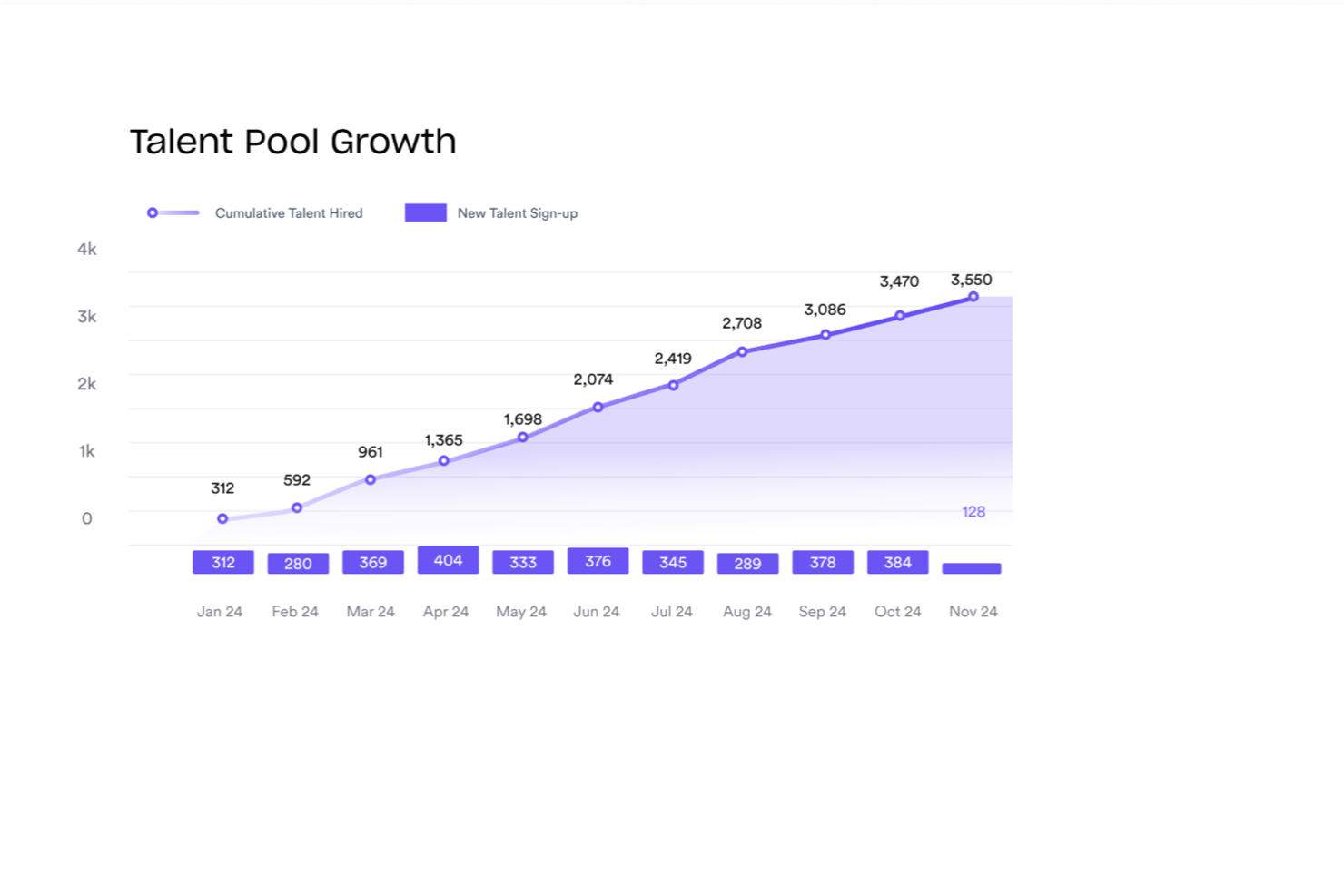
Worksome is a contractor management platform that helps with worker classification, IR35 compliance, contract generation, onboarding, invoicing, and global payments for businesses that engage freelancers and contractors.
Who is Worksome Best For?
Worksome is best for mid-size to enterprise companies that regularly engage contractors and need compliant, scalable processes for classification, contracts, and payments.
Why I Picked Worksome
I've included Worksome in my top picks because its billing module keeps every invoice and supplier payment in one place, with filtering tools that let you identify, track, and allocate purchase orders without digging through emails or spreadsheets. I also like that the consolidated billing view covers both direct contractor payments and third-party supplier invoices together. Paired with prepay and factoring options, Worksome gives finance teams control over when money goes out, while contractors get paid within a guaranteed timeframe of 0 to 45 days.
- IR35 classification tool: Classifies contractors against UK IR35 rules and stores status determinations (SDSs) in the platform.
- Automated contract generation: Produces compliant contracts based on worker classification and sends them for digital signature without manual drafting.
- Right-to-work verification: Runs background screening checks on contractors, including right-to-work checks, as part of the onboarding workflow.
- Internal talent pool: Enables building a searchable database of previously engaged contractors so you can re-engage vetted workers without starting from scratch.
Worksome Integrations
Worksome integrates with Zapier and connects with HRIS, accounting, and project management tools such as SAP SuccessFactors, Sage, Workday, Xero, NetSuite, QuickBooks, Asana, monday.com, Trello, Google Docs, and Google Sheets. A public API is also available for custom integrations.
Pros and Cons
Pros:
- Automated worker classification reduces misclassification risk
- Payments across 150+ countries supported
- Built-in IR35 status determination tools
Cons:
- Payment request workflow can feel confusing
- Limited built-in project management features

Best for contract management

SpotDraft is a contract management platform well-suited for construction businesses that need to manage complex contracts, subcontracts, and legal documentation efficiently. It helps construction teams streamline contract creation, tracking, and compliance while keeping all agreements centralized in one system.
Why I picked SpotDraft: SpotDraft is a strong fit for construction firms dealing with high contract volumes across owners, subcontractors, and suppliers. Its AI-powered contract lifecycle management simplifies drafting and reviewing construction contracts, change orders, and agreements, while automated approval workflows reduce delays between legal, procurement, and project teams. Compliance tracking helps ensure contracts align with regulatory and project requirements, lowering risk across multiple sites. SpotDraft’s automation and centralized visibility make it especially valuable for construction companies looking to improve contract control and reduce legal bottlenecks.
Standout Features and Integrations:
Features include automated contract drafting that reduces manual entry and errors. Approval workflows simplify the process of getting contracts signed off. Real-time collaboration tools improve team productivity and communication.
Integrations include Salesforce, Slack, Docusign, Google Forms, Microsoft Teams, HubSpot, Dropbox, Box, and more.
Pros and Cons
Pros:
- Customizable templates
- Strong compliance tracking
- Real-time collaboration tools
Cons:
- Lacks bulk operational features
- Occasional UX glitches and workflow friction

Procore
Best for large construction companies

Procore is a construction management software aimed at large construction companies, providing a broad range of tools for project management, collaboration, and financial management. It's designed for contractors, owners, and subcontractors across various construction sectors.
Why I picked Procore: Procore is tailored for large construction firms, offering features such as project financials that help manage large-scale projects efficiently. The platform's emphasis on collaboration and communication ensures your team stays connected. Procore's extensive suite of tools supports every phase of construction management, making it a versatile choice for large projects.
Standout Features and Integrations:
Features include tools for bid management, project execution, and financial management. Procore Helix, their AI layer, offers insights and analytics. Resource management features help with planning and tracking.
Integrations include Microsoft Office, QuickBooks, Sage 300, NetSuite, and more.
Pros and Cons
Pros:
- Extensive project management features
- Strong collaboration tools
- Supports large-scale projects
Cons:
- Complex for simple projects
- High pricing for small firms

Best for residential construction

Buildertrend is a construction management software designed for custom home builders and remodelers. It refines project management, client communication, and financials, providing tools to improve efficiency and collaboration. Buildertrend incorporated CoConstruct’s financial management and client engagement tools, among others, after acquiring it in 2021.
Why I picked Buildertrend: Buildertrend is tailored for residential construction, offering features such as client and team communication tools that keep everyone on the same page. It provides project scheduling and budgeting capabilities, ensuring you stay on track and within budget. The software's ability to handle selections and change orders makes it a valuable asset for custom builders. Its focus on residential projects ensures it meets the specific needs of home builders.
Standout Features and Integrations:
Features include project scheduling that helps you plan and track tasks efficiently. Budgeting tools support accurate cost tracking and reporting. The selections management feature allows clients to make informed choices and stay updated.
Integrations include QuickBooks, Xero, Google Calendar, Microsoft Outlook, and more.
Pros and Cons
Pros:
- Supports change order management
- Detailed budgeting features
- Efficient selections management
Cons:
- Mobile app limitations
- Customization options for templates are restricted

Best for safety training

Human Focus is a health and safety training platform built to support high-risk industries, with a strong fit for construction. It helps construction firms deliver online safety training and manage compliance across sites, roles, and contractors.
Why I picked Human Focus: Human Focus works especially well for construction teams that need consistent, compliant safety training across multiple projects. It offers a broad library of construction-relevant courses covering site safety, risk management, and legal requirements. Training modules can be customized for specific roles, sites, or hazards, making it easier to address real-world construction risks. Its compliance tracking tools help managers monitor certifications, identify gaps, and stay aligned with health and safety regulations, while the online delivery ensures flexible access for site-based and remote workers.
Standout Features and Integrations:
Features include an extensive library of safety courses that cover various industry needs. Customizable training modules allow you to adapt content to your specific requirements. Compliance tracking helps you monitor and report on training progress and standards adherence.
Integrations are not currently listed by Human Focus.
Pros and Cons
Pros:
- Industry-specific training options
- Flexible online access
- Customizable training modules
Cons:
- Course content quality varies
- Some users report technical frustrations


MRI Software is a real estate management solution tailored for property managers, owners, and investors. It provides tools for property management, financials, and investment management, helping users optimize their real estate operations.
Why I picked MRI Software: MRI Software is ideal for real estate management, offering features such as lease administration and tenant management that keep your properties running smoothly. It provides strong financial management tools, ensuring accurate budgeting and forecasting. The software's flexibility to adapt to various property types makes it a versatile choice for real estate professionals.
Standout Features and Integrations:
Features include advanced lease administration for tracking lease terms and conditions. Property accounting tools support thorough financial reporting and analysis. Investment management features help you assess and optimize your real estate portfolio.
Integrations are not currently listed by MRI Software.
Pros and Cons
Pros:
- Investment management capabilities
- Versatile for different property types
- Effective financial management tools
Cons:
- Reporting tools can be weak
- Interface feels dated and clunky

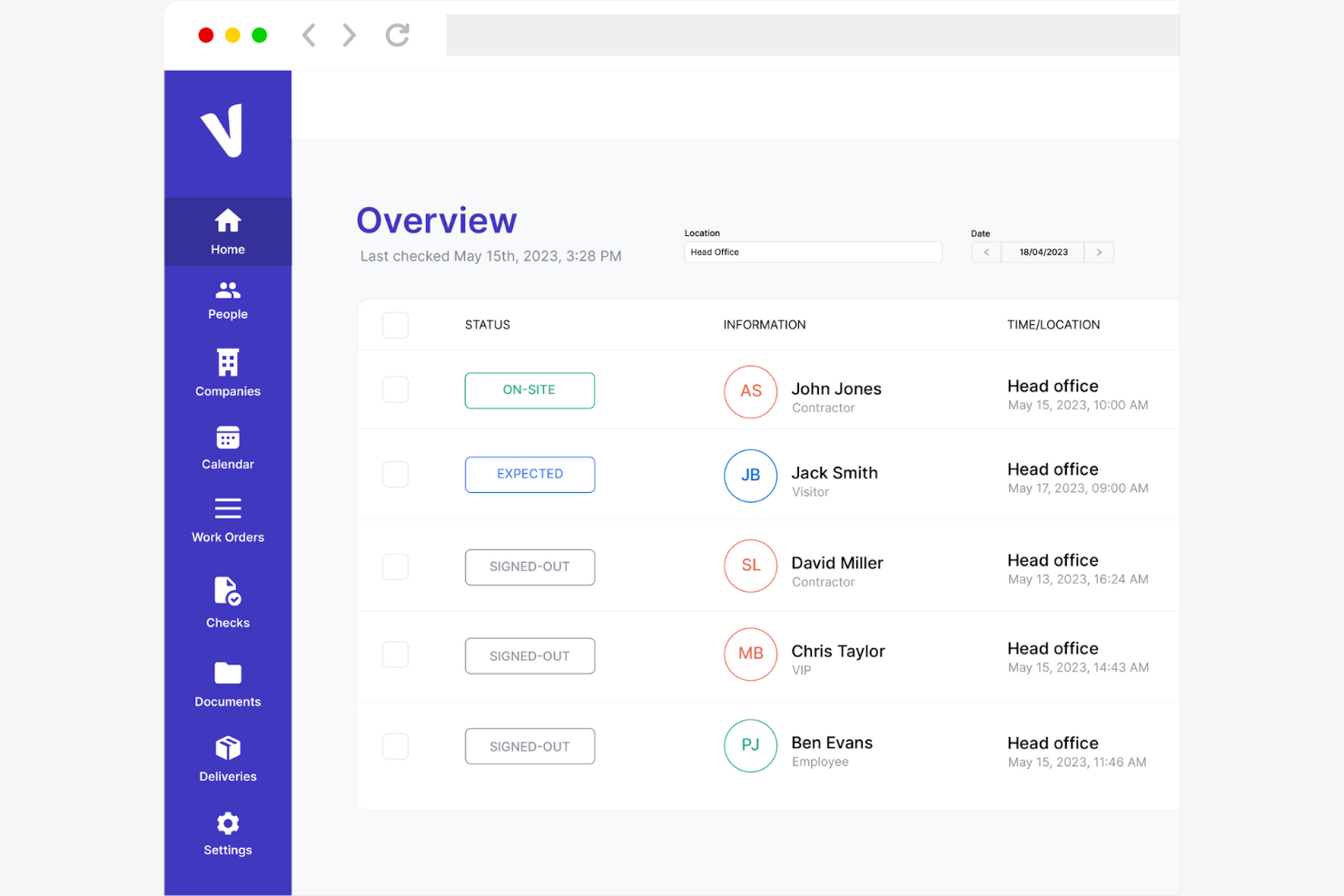
ProVisit is a visitor management system designed for workplaces and events. It offers features such as QR code sign-in and document management to help improve the visitor experience.
Why I picked ProVisit: ProVisit excels in visitor management with features such as contactless sign-in options that ensure a smooth entry process. It also offers real-time monitoring and notifications for site arrivals, making it ideal for managing large numbers of visitors. The ability to print photo ID passes adds a layer of professionalism. ProVisit's compliance checks help ensure your team adheres to safety and GDPR policies.
Standout Features and Integrations:
Features include customizable kiosks for sign-in, real-time visitor monitoring, and instant badge printing for smooth inductions. Alerts notify you of site arrivals or access issues. Document management allows easy upload and storage of important files.
Integrations include Paxton Access Control.
Pros and Cons
Pros:
- Compliance with GDPR policies
- Customizable kiosks
- User-friendly interface
Cons:
- Variable pricing options
- Potential integration limitations


Heresafe is a contractor management software designed to improve safety and compliance across various workplaces. It serves industries that require stringent safety checks and offers features such as automated contractor management and real-time dashboards.
Why I picked Heresafe: Heresafe excels in health and safety compliance by providing automated workflows that help you manage on-site contractor activities efficiently. The self-service Supplier Portal allows contractors to manage their information, ensuring they meet your safety standards. Heresafe's focus on eliminating paper processes reduces errors and speeds up compliance checks.
Standout Features and Integrations:
Features include automated contractor management to simplify operations. Real-time dashboards provide insights into compliance and safety metrics. The self-service Supplier Portal helps contractors update their details and manage compliance tasks.
Integrations are not currently listed by Heresafe.
Pros and Cons
Pros:
- Self-service portal for contractors
- Real-time visibility dashboards
- Focuses on safety compliance
Cons:
- Some workflows are less effective than in competitor systems
- Requires setup and training


Site Manager Pro is a contractor management software tailored for subcontractors in the UK construction industry, focusing on trades such as brickwork and carpentry. It improves site inspections, workflow management, and compliance through mobile access and real-time data.
Why I picked Site Manager Pro: Site Manager Pro excels in site inspections with features such as custom inspection tools and digital snag lists. Real-time data access allows your team to manage workflows efficiently from any device. Automated reminders for certificate renewals ensure compliance with industry standards and site safety. The software's focus on reducing paperwork and improving communication makes it ideal for subcontractors.
Standout Features and Integrations:
Features include smart quality assurance tools to digitalize snag lists and quality checks. Its products and orders management simplifies supplier interactions. Automated billing supports quick payment applications based on booked wages.
Integrations are not currently listed by Site Manager Pro.
Pros and Cons
Pros:
- Strong customer support
- Automated compliance reminders
- Custom inspection tools
Cons:
- Training may be required for new users
- UI feels outdated
Other UK Contractor Management Software
Here are some additional UK contractor management software options that didn’t make it onto my shortlist, but are still worth checking out:
- Access Construction
For integrated HR solutions
- ecoPortal
For environmental compliance
- Avetta
For supply chain risk management
- Bluebeam
For document management in construction
- HireGlobal
For pre-vetted global talent pools
- BigChange
For field service management
- QuickWorks
For manufacturing scheduling


Related Reviews
How I Evaluate Contractor Management Software UK
I split my evaluation into baseline criteria—like IR35 compliance and UK right-to-work checks—and differentiators that set vendors apart for contingent workforce teams.
Core Functionality (Table Stakes For This List)
When I'm selecting tools for my list, I rank each one on a scale from 0 (does not offer the functionality) to 5 (excels in this area) for each core functionality listed below. Then, I calculate the tool's total score into a percentage. Each tool needs to achieve a minimum total score of 65% to be considered for inclusion.
- IR35 Compliance Tools: I check whether platforms offer structured IR35 assessments with audit trails, not just static guidance—think CEST-style questionnaires with SDS output.
- Right-to-Work Verification: Each tool should handle digital RTW checks, share codes, biometric ID, and expiry alerts so your team isn't chasing documents over email.
- Contractor Onboarding & Contracts: I look for e-signature contracts, SoW templates, and self-service portals where contractors submit their own details and documents.
- Timesheets & Invoicing: Platforms should connect timesheet approvals to invoice generation with VAT handling, rather than requiring manual reconciliation in spreadsheets.
- Contractor Payments: I evaluate whether a tool supports GBP payouts and multi-currency payments, especially for teams managing a mix of UK-based and overseas contractors.
- Contractor Lifecycle Management: A central record for each contractor covering onboarding through offboarding, with renewal tracking and expiry alerts, is what I look for here.
Once I have a list of tools that meet the criteria, I consider what sets each platform apart.
Differentiating Factors (What Sets Vendors Apart)
Here's how I compare and contrast different vendors:
Standout Features
AI-driven IR35 assessments are a real differentiator. Some platforms cross-reference contract clauses and working practices against HMRC case law, giving your team defensible determinations rather than guesswork. I also look for AWR tenure tracking, which flags when contractors approach the 12-week qualifying period so you can act before equal-treatment obligations kick in. Umbrella company and PSL management matters too, especially if you're juggling multiple agencies and need visibility into margins and compliance across your supply chain.
Beyond Features
Integration with your existing UK payroll and finance tools like Sage or Xero is something I evaluate closely, since manual data re-entry between systems defeats the purpose. Pricing transparency matters too—I check whether vendors charge per contractor, bundle AOR/EOR fees separately, and offer month-to-month terms for fluctuating headcount. Risk transfer is another factor I weigh: some platforms provide Agent of Record services that shift IR35 misclassification liability off your organisation, which can be a deciding factor for teams with large contractor populations.
How To Choose UK Contractor Management Software
It's easy to get bogged down in long feature lists and complex pricing structures. To help you stay focused as you work through your unique software selection process, here's a checklist of factors to keep in mind:
| Factor | What To Consider |
|---|---|
| Scalability | Will the software grow with your team? Consider future expansion and choose a tool that can support increased contractor numbers without a hitch. |
| Integrations | Does it connect with your existing tools? Ensure it works well with your HR, payroll, and project management systems to avoid data silos. |
| Customizability | Can you tailor it to fit your processes? Look for options that let you customize workflows and reports to match your team's needs and ensure smoother business operations. |
| Ease of use | Is it user-friendly for all team members? Choose software with an intuitive interface to minimize training time and keep everyone on board. |
| Implementation and onboarding | How easy is it to get started? Evaluate the support and resources available for setup and training, such as tutorials and customer service. |
| Cost | Does it fit your budget? Compare pricing plans and consider long-term costs, including potential add-ons or hidden fees. |
| Security safeguards | Are your data and contractor information safe? Look for software with strong encryption, regular updates, and compliance with data protection regulations. |
| Support availability | How accessible is help when you need it? Check for 24/7 support, multiple contact options, and a responsive support team to assist with any issues that arise. |
What Is UK Contractor Management Software?
UK contractor management software is a tool designed to help businesses efficiently manage contractor-related tasks and compliance. These tools are generally used by HR professionals, project managers, and procurement teams to ensure smooth contractor operations and compliance with regulations. Features such as onboarding, compliance tracking, and reporting help with managing contractor information and ensuring legal adherence. Overall, these tools provide value by simplifying contractor management and reducing administrative burdens.
Features
When selecting UK contractor management software, keep an eye out for the following key features:
- Onboarding: Simplifies the process of bringing new contractors into your organization, ensuring they have all the necessary information and documentation.
- Compliance tracking: Monitors contractor certifications and regulatory requirements to help your business stay compliant with industry standards.
- Reporting and analytics: Provide insights into contractor performance and operations, helping you make data-driven decisions.
- Document management: Centralizes storage and management of contractor-related documents, making it easy to access and update information.
- Customized workflows: Allow you to tailor processes to fit your specific business needs, enhancing efficiency and productivity.
- Real-time collaboration: Facilitates communication and teamwork among contractors and internal teams, ensuring everyone stays informed and aligned.
- Risk assessment: Identifies potential risks associated with contractors and helps you mitigate them proactively.
- Mobile access: Enables contractors and managers to access the system from anywhere, providing flexibility and convenience.
- Integration capabilities: Connect with existing HR and project management tools to ensure a smooth and continuous flow of data and eliminate silos.
- Security safeguards: Protect sensitive contractor data with encryption and compliance with data protection regulations.
Benefits
Implementing contractor management software in the UK provides several benefits for your team and your business. Here are a few you can look forward to:
- Improved compliance: Ensure your contractors meet legal and industry standards by tracking certifications and regulatory requirements.
- More efficiency: Automate manual tasks such as onboarding and document management to save time and reduce errors.
- Better decision-making: Provide data-driven insights through reporting and analytics, helping you make informed decisions about contractor performance and operations.
- Increased collaboration: Facilitate communication and teamwork with real-time collaboration tools, keeping everyone aligned and informed.
- Flexibility and convenience: Offer mobile access, allowing contractors and managers to work from anywhere, which improves productivity.
- Reduced risk: Identify and mitigate potential risks associated with contractors, protecting your business from compliance and operational issues.
Costs & Pricing
Selecting contractor management software in the UK requires an understanding of the various pricing models and plans available. Costs vary based on features, team size, add-ons, and more. The table below summarizes common plans, their average prices, and typical features included in contractor management software UK solutions:
Plan Comparison Table for UK Contractor Management Software
| Plan Type | Average Price | Common Features |
|---|---|---|
| Free Plan | £0 | Basic onboarding, limited document storage, and basic reporting. |
| StarterPlan | £549+/month | Onboarding automation, compliance tracking, and basic analytics. |
| Plus Plan | £1000+/month | Advanced reporting, real-time collaboration, and integration capabilities. |
| Pro Plan | £1500+month | Customizable workflows, extensive security features, and dedicated support. |
UK Contractor Management Software FAQs
Here are some answers to common questions about contractor management software in the UK:
What is the main purpose of contractor management software?
The main purpose of contractor management software is to help businesses manage and oversee their contractor workforce more efficiently. It centralizes contractor data, simplifies processes such as onboarding and compliance tracking, and provides tools for communication and performance monitoring. This type of software ensures your team can manage contractors effectively, reducing administrative burdens and improving operational efficiency.
Can contractor management software integrate with my existing systems?
Yes, most contractor management software solutions offer integration capabilities with common systems such as HR, payroll, and project management tools. Before purchasing, check if the software supports integration with your current systems. This ensures uninterrupted data flow and helps prevent data silos, making your team’s workflow smoother.
How secure is contractor management software?
Security is a priority for contractor management software providers. These solutions typically offer encryption, regular security updates, and compliance with data protection regulations. When evaluating options, consider what security measures are in place to protect your contractor data. Strong security features are essential to safeguarding sensitive information and maintaining trust.
How can I ensure my team adopts new contractor management software?
To ensure successful adoption, involve your team in the selection process and provide adequate training. Look for software that offers user-friendly interfaces and thorough onboarding support, such as tutorials and webinars. Encourage feedback and provide ongoing support to address any challenges. Engaging your team from the start will help them feel invested in the new system.
What's Next:
If you're in the process of researching contractor management software UK, connect with a SoftwareSelect advisor for free recommendations.
You fill out a form and have a quick chat where they get into the specifics of your needs. Then you'll get a shortlist of software to review. They'll even support you through the entire buying process, including price negotiations.