

10 Best AI Job Description Generator in 2026

Best AI Job Description Generator Shortlist


An AI job description generator is a tool that uses artificial intelligence to write or improve job ads for you. If you’re searching for a faster way to create clear, inclusive, and accurate job descriptions, you’re not alone. HR pros and recruiters are under constant pressure to attract talent, avoid biased language, and keep up with shifting hiring demands. This guide will help you quickly compare the best AI job description generators in 2026, so you can pick the right one to simplify your process and support your hiring goals.
Why Trust Our Software Recommendations
Our team has been testing and reviewing software since 2012. As HR experts ourselves, we know how difficult—and important—it is to choose the right software.
For this guide, we evaluated tools using hands-on testing and independent research, scoring tools using our selection criteria. We also draw on insights from industry thought leaders and practicing HR experts.
Our reviews reflect our human editorial judgment, not a sales pitch.
Expert reviewers:
AI Job Description Generator Comparison Table
This comparison table summarizes pricing details for my top AI job description generator selections:
| Tool | Best For | Trial Info | Price | ||
|---|---|---|---|---|---|
| 1 | Best for project role description creation | 7-day free trial + free demo available | From $99/month (billed annually) | Website | |
| 2 | Best for matching skills to job requirements | Free demo available | Pricing upon request | Website | |
| 3 | Best for startup and small business simplicity | Free demo available | Pricing upon request | Website | |
| 4 | Best with built-in corporate cliche detection | Free demo available | Pricing upon request | Website | |
| 5 | Best for gender bias analysis in descriptions | 7-day free trial + free demo available | From $165/team/month (billed annually) | Website | |
| 6 | Best for global hiring language consistency | Free demo available | Pricing upon request | Website | |
| 7 | Best for real-time inclusive language guidance | Free demo available | Pricing upon request | Website | |
| 8 | Best for complex job taxonomy management | Not available | Pricing upon request | Website | |
| 9 | Best for compliance-focused job architecture | Free demo available | Pricing upon request | Website | |
| 10 | Best for structured, bias-reducing job content | Free demo available | From $4,900/year | Website |
Best AI Job Description Generator Reviews
Below are my detailed summaries of the best AI job description generators that made it onto my shortlist. My reviews offer a detailed look at the features, best use cases, and integrations of each platform to help you find the best one for you.
AvaHR
Best for project role description creation

AvaHR is an applicant tracking system with a built-in AI job description generator, offering pre-built role templates, multi-board job posting, and AI-powered candidate scoring tools.
Who Is AvaHR Best For?
AvaHR works well for small to mid-sized businesses that need an all-in-one hiring platform without dedicated recruitment staff.
Why I Picked AvaHR
I picked AvaHR as one of the best because it includes ready-to-use job description templates for project-related roles like project manager, technical project manager, senior project manager, and junior project manager. When you're spinning up a new PM hire, you can pull one of those templates directly into a job post without writing from scratch. The built-in AI job description generator then helps optimize the copy for job board SEO, which matters when you're posting to 100+ boards simultaneously from the same platform.
AvaHR Key Features
- AI candidate scoring: AvaHR scores and ranks applicants based on how well they match your posted job requirements.
- Branded careers page builder: Create a custom careers page to host your job postings on your company's site without third-party tools.
- Custom screening questions: Add role-specific screening questions to your job posts to filter applicants before they enter your pipeline.
- Collaborative hiring tools: Invite team members to review candidates, leave feedback, and work together to move applicants through hiring stages.
AvaHR Integrations
AvaHR connects with a range of apps through Zapier, including Gusto, BambooHR, Checkr, Slack, Google Calendar, Calendly, Salesforce, HubSpot, Microsoft Teams, and ADP Workforce Now. An API is also available for custom integrations.
Pros and Cons
Pros:
- Pipeline triggers automate actions at each stage
- Culture profiles highlight workplace with multimedia
- AI job description writer produces strong drafts
Cons:
- eSignatures require an additional fee on lower plans
- Lacks Boolean and custom candidate filters

Skima.ai
Best for matching skills to job requirements
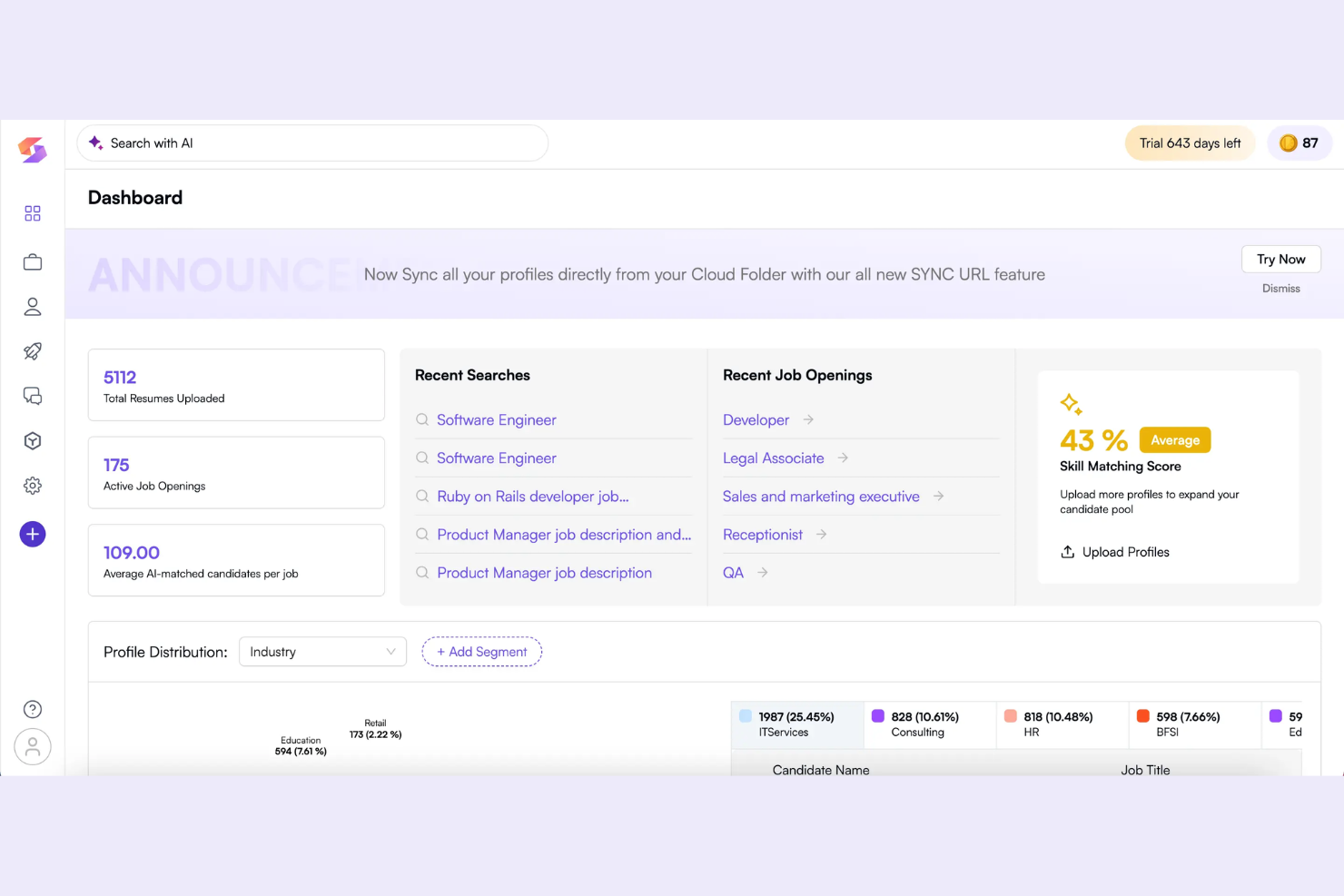
Skima.ai is an AI-powered job description generator designed to analyze roles, identify key skills, and automate the drafting of job requirements and responsibilities.
Who Is Skima.ai Best For?
Skima.ai suits HR teams or recruiters at growth-stage companies who need to analyze and match candidate skills precisely to job requirements.
Why I Picked Skima.ai
I picked Skima.ai because it automatically analyzes job descriptions and matches needed skills from a proprietary global skills taxonomy. I can benchmark roles and ensure only the most relevant competencies are included for each position.
Skima.ai Key Features
- AI-powered job description generator: Creates tailored job descriptions using machine learning models.
- Job content editor: Let teams refine generated job descriptions within the platform.
- Skill gap analysis: Compares current employee skills to role expectations.
- Role library: Provides a repository of pre-defined roles and related competencies.
Skima.ai Integrations
Integrations include Avature, BambooHR, Breathe, BreezyHR, Bullhorn, Capsule, Caterer, CatererGlobal, CATS, and Ceipal.
Pros and Cons
Pros:
- Automates job description creation with AI
- Benchmarking up-to-date skills data
- Provides a global library of skill taxonomies
Cons:
- Requires administrative user training
- Customization of templates is limited

GoHire
Best for startup and small business simplicity
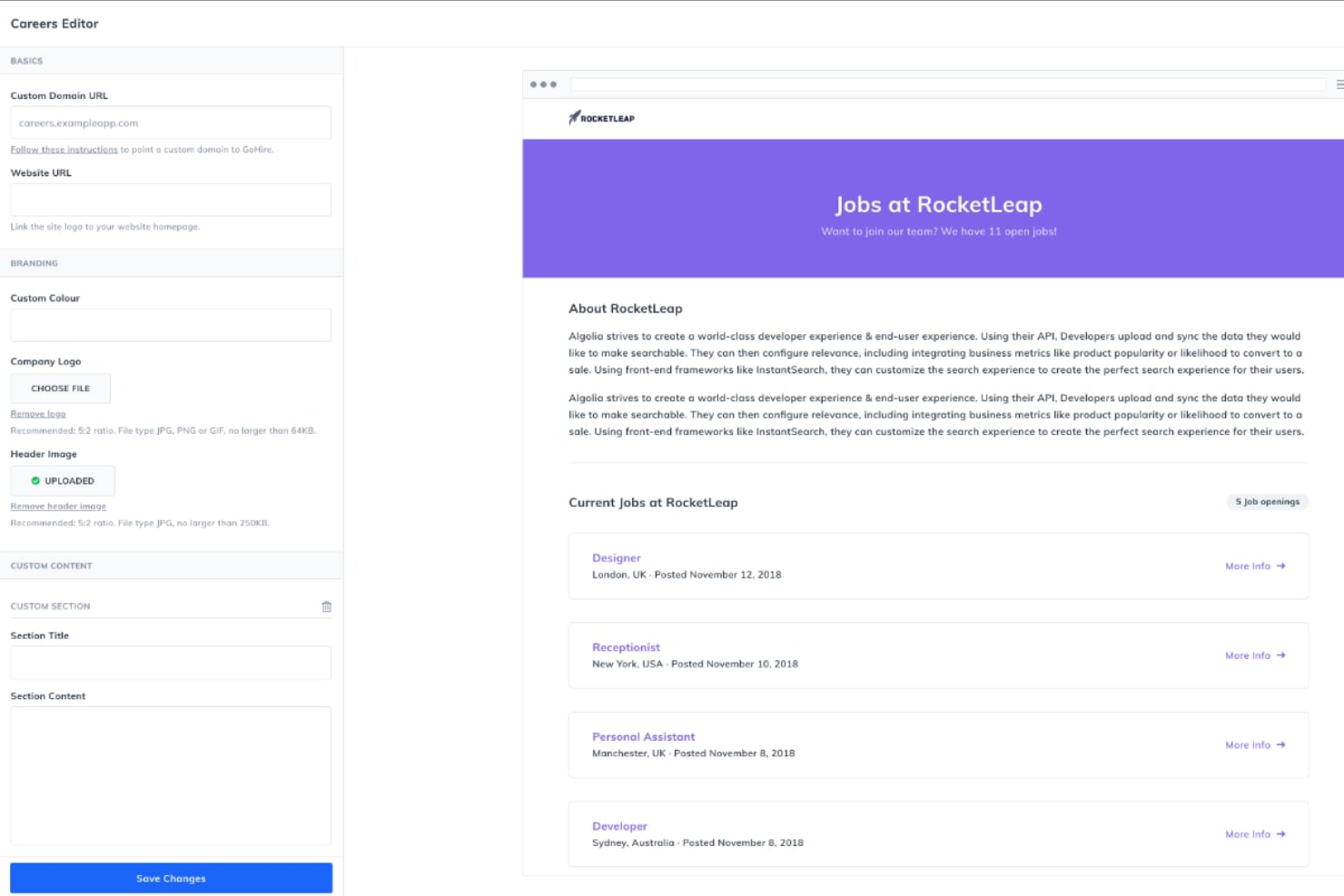
GoHire is a recruitment software platform designed for small businesses and startups that supports posting jobs, managing applicants, and generating job descriptions using AI.
Who Is GoHire Best For?
GoHire suits small business owners and startup founders who want an all-in-one hiring and job description generator tool without complex setup or extra overhead.
Why I Picked GoHire
I picked GoHire as one of my go-tos for AI job description generation because I can launch new jobs with AI-powered templates and push postings to multiple sites from a single dashboard. I like how simple it is to quickly edit and publish listings.
GoHire Key Features
- Candidate pipeline management: Drag-and-drop candidates through custom pipeline stages.
- Collaborative team hiring: Invite team members to review and comment on applicants.
- Candidate messaging portal: Send emails and updates to applicants directly from the dashboard.
- Branded careers page: Create and customize a hosted job listings page for your company.
GoHire Integrations
GoHire offers native integrations with LinkedIn, Indeed, ZipRecruiter, Glassdoor, and Google Jobs. An API is available for custom integrations.
Pros and Cons
Pros:
- Job templates tailored for small business hiring
- Direct job publishing to multiple boards
- AI auto-fills job descriptions from prompts
Cons:
- Limited customization for approval workflows
- No bulk editing for AI-generated descriptions

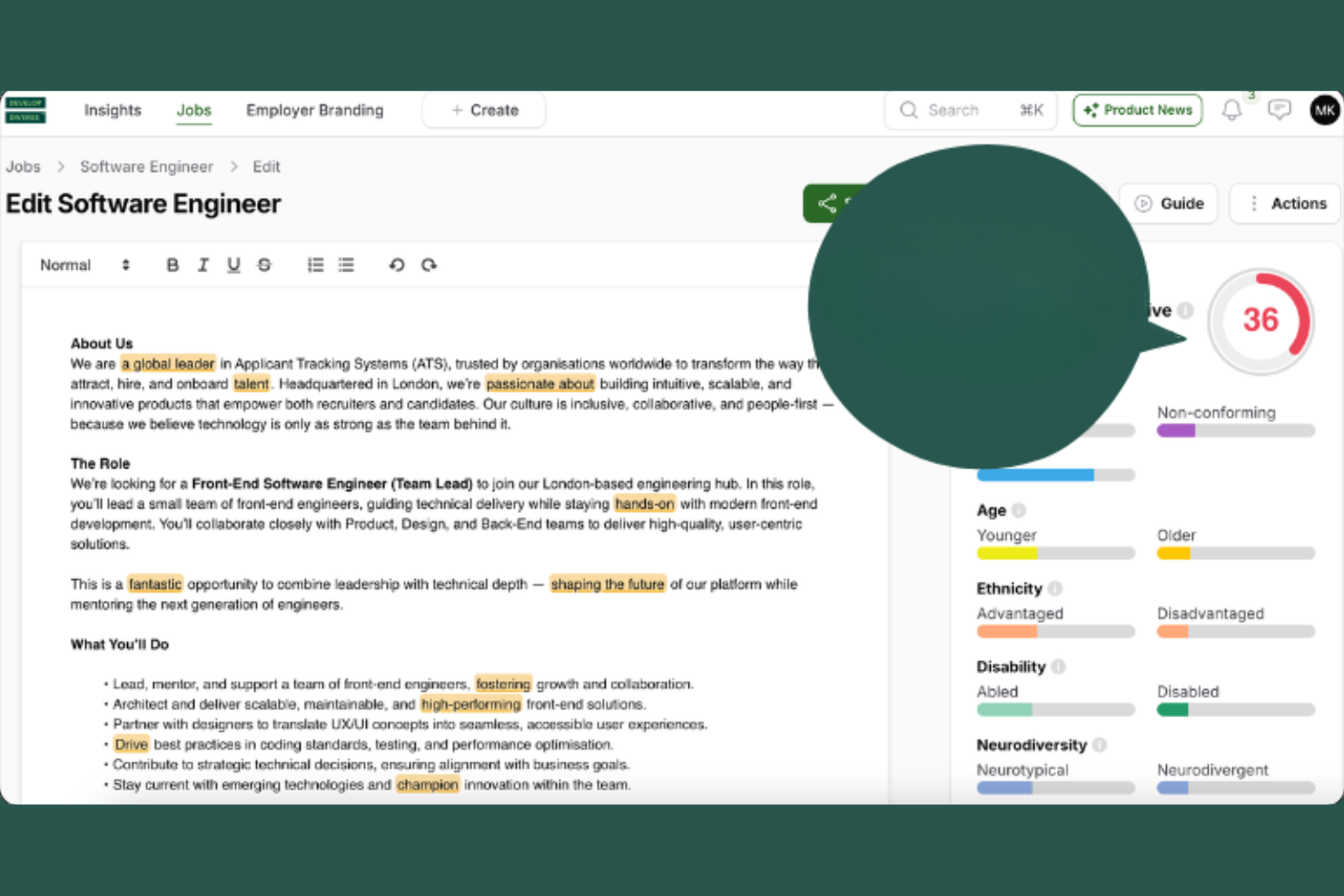
Develop Diverse is an AI-driven job description generator designed to help organizations analyze language, flag biased terms, and optimize content for inclusive recruitment campaigns.
Who Is Develop Diverse Best For?
Talent acquisition teams and HR professionals in larger organizations want to identify and reduce biased or exclusionary language in job postings.
Why I Picked Develop Diverse
I picked Develop Diverse as one of the best because I actually use its real-time language analysis to spot corporate clichés and exclusionary phrases that can slip into job descriptions. I also rely on its automatic suggestions to rewrite text instantly.
Develop Diverse Key Features
- Bias detection for gender and age: Flags language that may reinforce gender or age bias in job descriptions.
- Reporting dashboard: Visualizes language analytics and improvement trends across all edited job ads.
- Custom language filters: Let you let the detection conform to preferred company standards or requirements.
- Team collaboration tools: Allow users to review and edit job content simultaneously.
Develop Diverse Integrations
Develop Diverse offers native integrations with Greenhouse, Workday, Teamtailor, HR-ON, SAP SuccessFactors, and SmartRecruiters. It also has a Microsoft Word add-in that brings its inclusive editor directly into your documents.
Pros and Cons
Pros:
- Delivers in-depth analytics on language choices
- Supports team workflows with advanced user roles
- Flags age-related and stereotypical language
Cons:
- Custom recognition setup requires manual effort
- Lacks export options to major ATS platforms

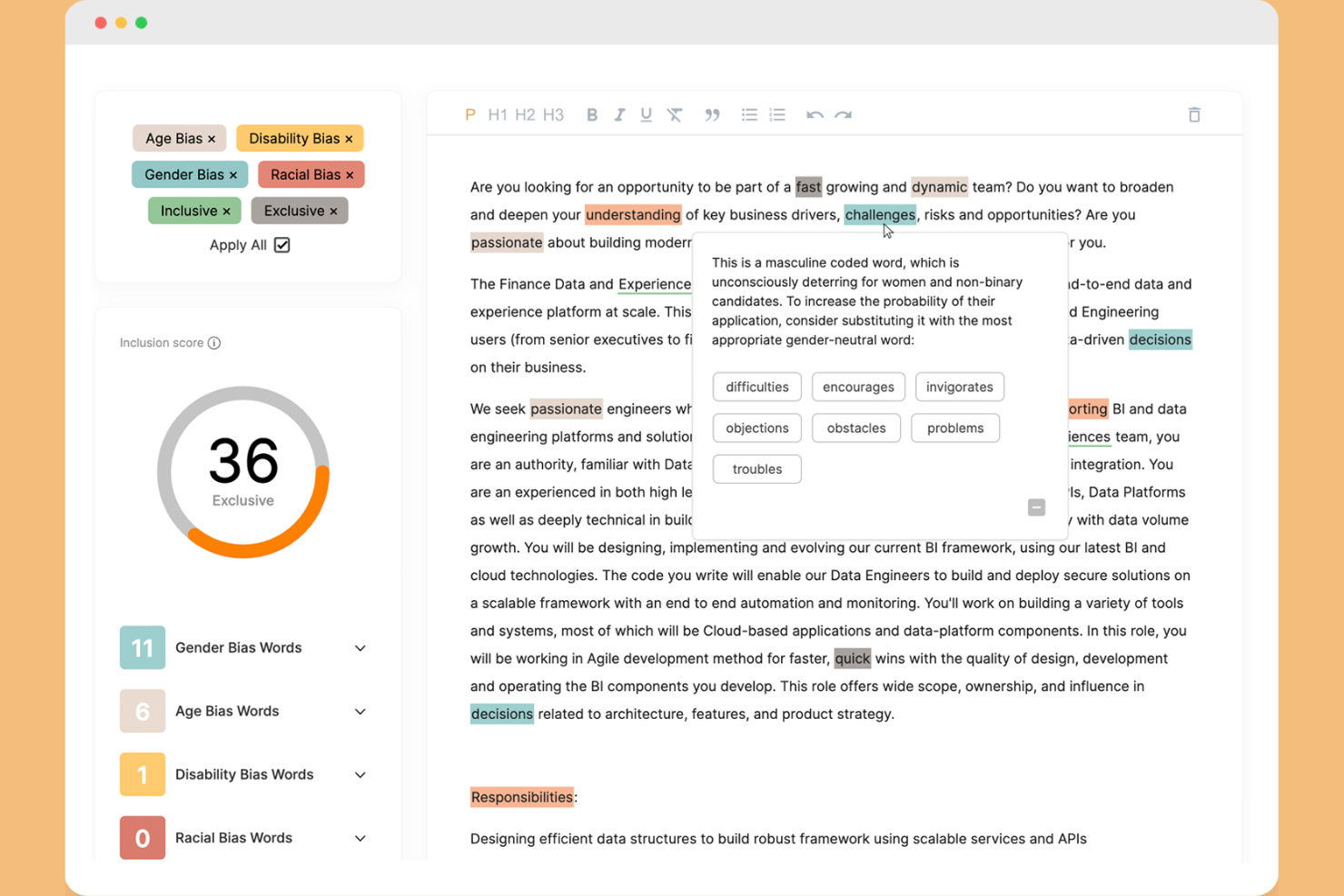
UInclude is an AI-powered job description analysis tool built to scan, review, and assess job descriptions for inclusive language, especially focusing on detecting and addressing gender-coded words.
Who Is UInclude Best For?
Recruiters and HR teams who want to screen job descriptions for gender-coded and exclusive language across multiple open roles.
Why I Picked UInclude
I included UInclude because I can upload job ads or paste text and immediately see a breakdown of masculine, feminine, and neutral-coded words. I rely on its colour-coded and word suggestions whenever I need to review gender bias in hiring content.
UInclude Key Features
- Bulk job description analysis: Upload multiple job ads at once for simultaneous review.
- Diversity scoring dashboard: Tracks and displays inclusive language metrics by role or department.
- Team account management: Let multiLet recruiters or hiring managers collaborate on projects.
- PDF report export: Exports analysis results into downloadable PDF files.
UInclude Integrations
It offers an API for custom integrations.
Pros and Cons
Pros:
- Allows bulk analysis of multiple descriptions
- Visualizes diversity metrics per department
- Highlights subtle gender-coded language instantly
Cons:
- Limited industry-specific language customization
- No ready-made ATS or HRIS exports

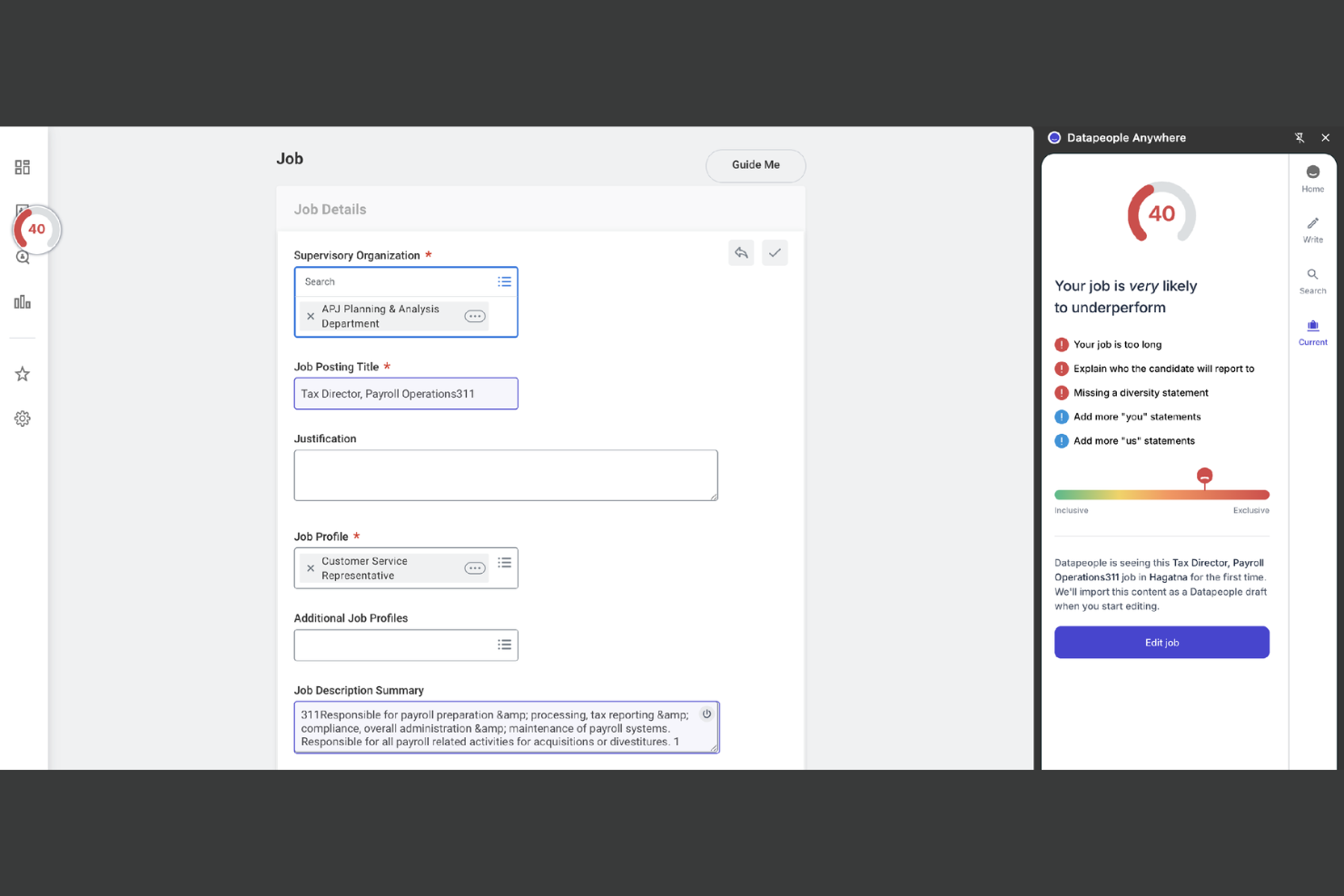
Datapeople is an AI-driven job description generator and hiring content platform that analyzes language, provides editing guidance, and enables consistency across all recruitment materials.
Who Is Datapeople Best For?
Global talent acquisition teams need to ensure consistent job description language across diverse hiring markets.
Why I Picked Datapeople
I picked Datapeople because I rely on its ability to enforce consistent language standards across global job postings. I like how it flags regional language issues automatically, and my team uses its real-time guidance to craft job descriptions that fit multiple hiring locations.
Datapeople Key Features
- Job scorecard: Rates each job description based on predefined quality factors.
- Recruiter collaboration tools: Let recruiters and hiring managers edit drafts together.
- Real-time readability scoring: Analyzes and scores job text for clarity as you write.
- Integrated approvals workflow: Tracks and manages job description approval steps within the platform.
Datapeople Integrations
Datapeople offers native integrations with Greenhouse, Workday, and SmartRecruiters. An API is available for custom integrations.
Pros and Cons
Pros:
- Collaborative editing for hiring managers
- Monitors internal vocabulary standards
- Enforces global branding compliance standards
Cons:
- No customizable job description templates
- Requires local market language fluency


Textio is an AI-powered writing guidance platform for recruiting teams that analyzes job descriptions in real time, highlighting language patterns and helping teams make data-informed edits.
Who Is Textio Best For?
Textio is a strong choice for recruiting, and HR teams at global enterprises focused on improving language across high-volume hiring efforts.
Why I Picked Textio
I picked Textio because I rely on its real-time inclusivity feedback and highlighted language suggestions as I write job descriptions. I like being able to instantly see flagged problem phrases and swap in recommendations supported by up-to-date language data.
Textio Key Features
- Highlight colour visualization: Highlights language patterns by impact types using distinct colours.
- Dynamic scoring meter: Rates how inclusive or effective your writing is as you edit.
- Analytics dashboard: Shows aggregate trends, usage stats, and language data for your org.
- Bulk job description upload: Let you analyze and review multiple job descriptions at once.
Textio Integrations
Textio offers native integrations with Greenhouse, Workday, and SAP SuccessFactors. An API is available for custom integrations.
Pros and Cons
Pros:
- Tracks writing quality metrics across job templates
- Provides instant editing suggestions as you type
- Flags biased or exclusive language automatically
Cons:
- Restricts batch file processing limits
- Limited support for non-English job postings
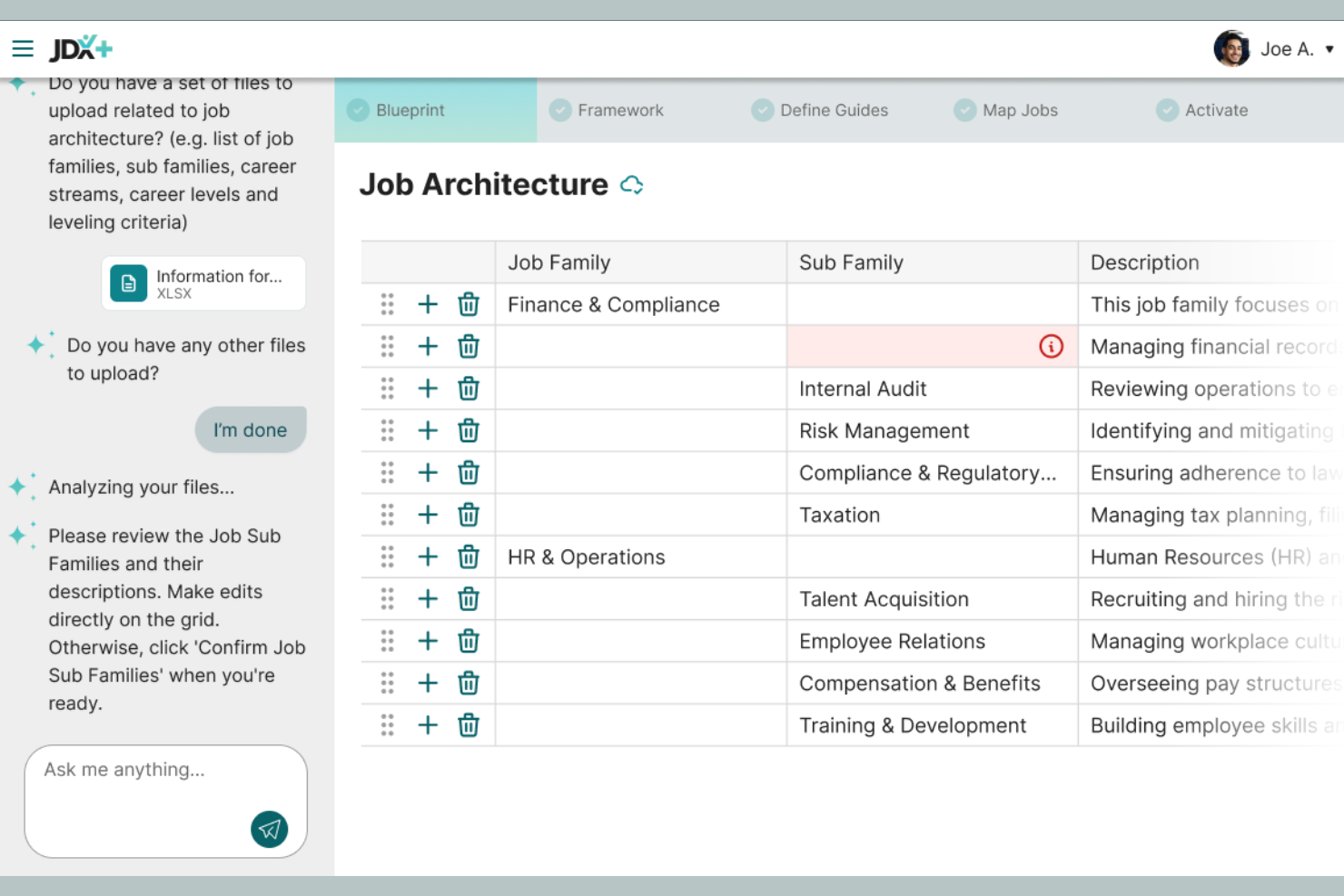
JDXpert is a job description management platform that offers tools for detailed job documentation, framework building, and advanced job attribute tracking tailored to complex organizational structures.
Who Is JDXpert Best For?
HR teams in mid-to-large enterprises need to manage extensive job catalogues and centralize detailed role documentation across departments.
Why I Picked JDXpert
I picked JDXpert as one of the best because I rely on its granular job taxonomy tools and dynamic job family structures. My team uses its customizable attribute builder and bulk job update workflows to manage extensive, ever-changing job descriptions efficiently.
JDXpert Key Features
- Job description version control: Tracks and manages historical versions of all job descriptions.
- Competency library: Provides a built-in competency framework for mapping to roles.
- Approval workflow engine: Automates multi-level reviews and sign-offs for job documents.
- Job analysis questionnaire: Includes digital forms to collect detailed role information from stakeholders.
JDXpert Integrations
Integrations include Workday, SAP SuccessFactors, Oracle, UKG, iCIMS, Lever, Payscale, and BetterComp.
Pros and Cons
Pros:
- Audit trails for every job description change
- Supports mass role attribute updates
- Handles detailed job structures and hierarchies
Cons:
- Requires heavy setup for initial taxonomy building
- Needs legacy software installation files
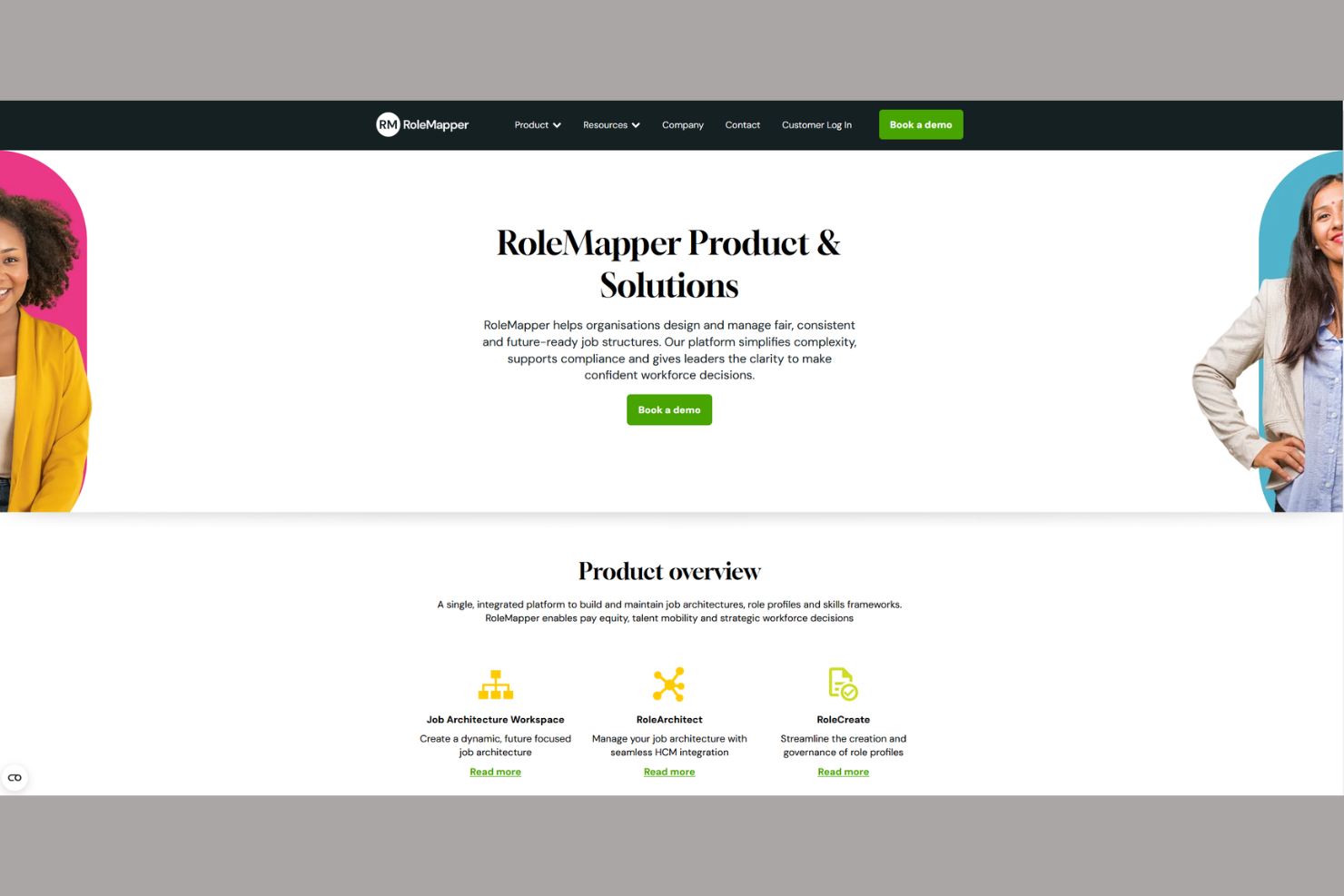
RoleMapper is an AI-powered job architecture platform designed for building, managing, and updating structured job descriptions with compliance controls and content governance.
Who Is RoleMapper Best For?
HR leaders and compliance teams in regulated industries who need to standardize and govern job description content across large workforces.
Why I Picked RoleMapper
I picked RoleMapper as one of the best because I rely on its built-in rules engine for enforcing compliance standards across job descriptions. My team uses its permission controls and audit logging to confidently manage regulated content.
RoleMapper Key Features
- AI-powered job description builder: Dynamically generates and updates job descriptions based on organizational templates.
- Bulk editing tools: Allows you to edit multiple job descriptions and roles at once.
- Content versioning: Tracks historical changes for job descriptions over time.
- Skills and competency libraries: Provides structured libraries for easy mapping to roles.
RoleMapper Integrations
Integrations include Workday and Zoom.
Pros and Cons
Pros:
- Compliance controls for regulated job content
- Bulk editing for job descriptions and hierarchies
- Built-in audit trails for job changes
Cons:
- Lacks drag-and-drop manual database schema mapping
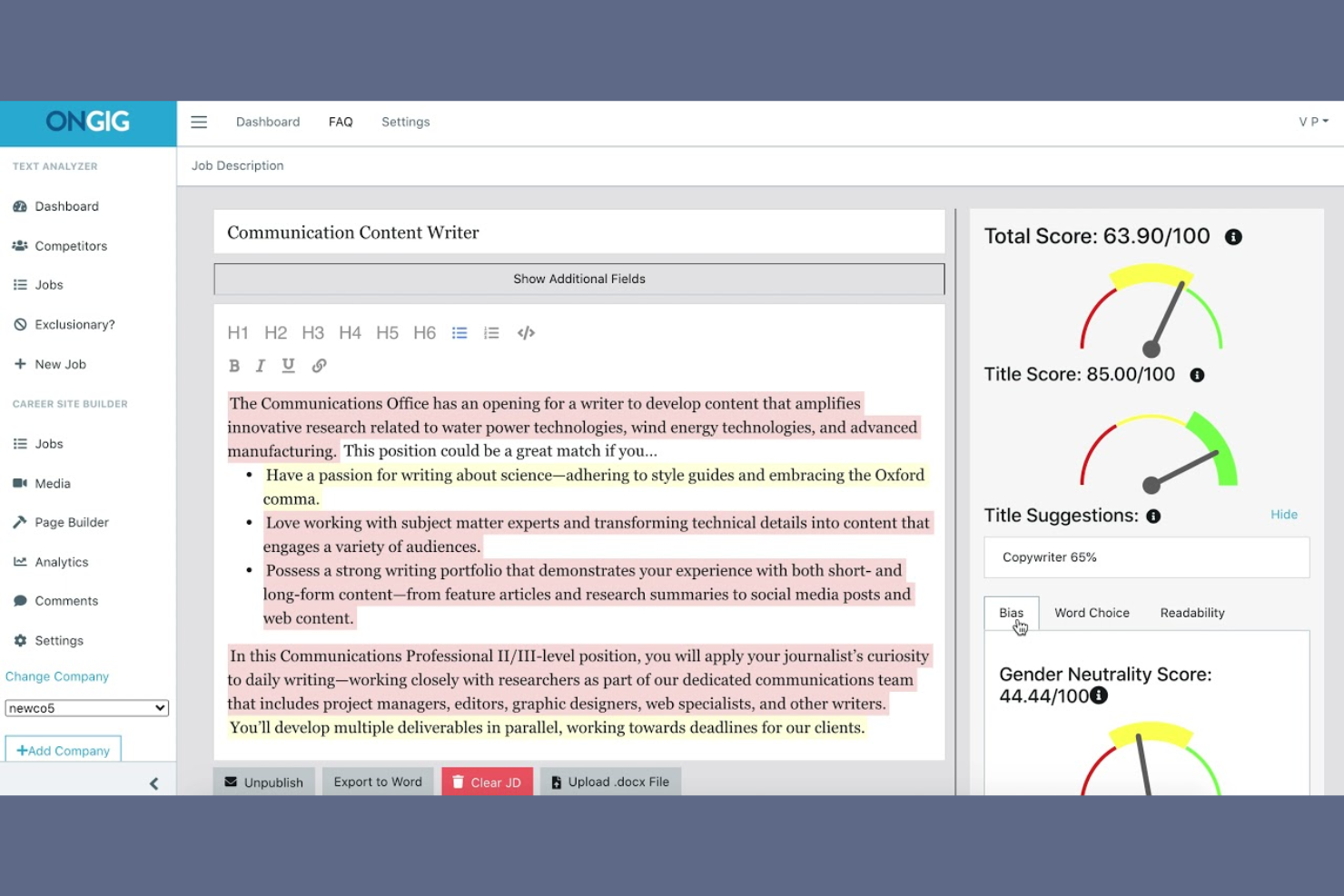
Ongig is a cloud-based job description software that uses AI to automate writing, editing, and optimizing job content for HR and recruiting teams.
Who Is Ongig Best For?
HR leaders and talent acquisition teams at mid-sized to large organizations are looking to standardize and optimize job descriptions.
Why I Picked Ongig
I picked Ongig because its platform focuses on structured, bias-reducing job content. I use its inline bias alerts to flag problematic language, and the editor structures every job description with consistent sections like requirements and responsibilities.
Ongig Key Features
- Collaborative editing: Multiple users can co-edit and review job descriptions in real time.
- Content analytics dashboard: Track word counts, readability scores, and content trends across your descriptions.
- Custom branding tools: Add your company’s logo, fonts, and colours to all job descriptions.
- Automated job posting: Publish finalized job descriptions directly to multiple job boards from one interface.
Ongig Integrations
Ongig offers native integrations with Greenhouse, iCIMS, SAP SuccessFactors, Workday, and SmartRecruiters. An API is also available for custom integrations.
Pros and Cons
Pros:
- Offers real-time collaboration for teams
- Ensures consistent structure across all postings
- Detects discriminatory tone patterns
Cons:
- Limited export format options for job descriptions
- Installation involves server provisioning
Other AI Job Description Generator
Here are some additional AI job description generator options that didn’t make it onto my shortlist, but are still worth checking out:
- JobTarget
For targeted distribution automation
- Workable
For fast collaborative workflow setup
- ClearCo
For integrating job workflows with onboarding
- Grammarly
For grammar and clarity enhancements
- Recooty
For centralized job vacancy management
- Jasper
For customizable AI writing templates
- Simplified
For instant multi-language description drafts


How I Evaluate AI Job Description Generators
Every tool on this list needs to do more than wrap a basic prompt around an LLM—I look for AI that actually saves recruiters time by turning a job title and a few inputs into a publish-ready JD. I split my evaluation into core functionality a tool must have to qualify and differentiating factors that separate good options from great ones.
Core Functionality (Table Stakes For This List)
When I'm selecting tools for my list, I rank each one on a scale from 0 (does not offer the functionality) to 5 (excels in this area) for each core functionality listed below. Then, I calculate the tool's total score into a percentage. Each tool needs to achieve a minimum total score of 65% to be considered for inclusion.
- AI-Powered JD Generation: I check whether the tool can produce a full, structured job description from just a title, level, and a handful of skills—not just fill in blanks on a static template.
- Bias & Inclusivity Analysis: Each tool should flag exclusionary language across dimensions like gender, age, and ability, then suggest alternatives rather than just highlighting problems.
- Customizable JD Templates: I look for editable templates with branded sections—like a company intro block or standard benefits footer—that teams can reuse across departments and roles.
- Tone & Style Controls: Recruiters posting for a startup and a financial services firm need different voices. The tool should let users adjust tone, length, and reading level per output.
- Skills & Competency Suggestions: Strong tools recommend relevant skills and qualifications based on role context, pulling from labor market data rather than relying on a small static list.
- Export & ATS Integration: I evaluate whether generated JDs can be exported to formats like DOCX or PDF and pushed into platforms like Greenhouse, Workday, or Lever without manual rework.
Once I have a list of tools that meet this criteria, I consider what sets each platform apart.
Differentiating Factors (What Sets Vendors Apart)
Here's how I compare and contrast different vendors:
Standout Features
SEO and job board optimization are major differentiators. Tools that structure titles and keywords for platforms like Indeed and Google for Jobs save recruiters from manual tweaks and directly boost applicant volume. I also look at brand voice customization, specifically whether the AI can learn a company's tone and EVP so outputs stay consistent across hundreds of postings. For global hiring teams, multilingual generation matters a lot. I check whether a tool can localize JDs across languages without losing role-specific accuracy.
Beyond Features
I pay close attention to data security and AI governance—specifically, whether a vendor discloses how inputs are handled and if the company data trains their models. ATS integration depth also matters. A tool that syncs with your existing requisition workflow in Greenhouse or Workday saves far more time than one that only exports files. Implementation speed is another factor I weigh, especially for teams where hiring managers with limited AI experience need to contribute to JD reviews and approvals.
How to Choose AI Job Description Generator
It’s easy to get bogged down in long feature lists and complex pricing structures. To help you stay focused as you work through your unique software selection process, here’s a checklist of factors to keep in mind:
| Factor | What to Consider |
|---|---|
| Scalability | Will the tool support your growth if hiring increases quickly or shifts across regions or departments? Make sure it can handle fluctuating hiring demands. |
| Integrations | Does it natively connect with your ATS, HRIS, or key hiring platforms? Confirm integrations are easy to configure and well supported. |
| Customizability | Can you tailor templates, prompts, and compliance notices to fit your organization, locations, and values? Avoid rigid, one-size-fits-all generators. |
| Ease of use | How quickly can your team generate and edit descriptions? Is the interface accessible to non-technical users without extra training or support? |
| Implementation and onboarding | What does the initial setup require in terms of time, IT resources, and training? Look for onboarding support like chatbots, tours, or template libraries. |
| Cost | Does pricing align with your current and future hiring needs? Watch for costs that increase with user seats or job volumes. Confirm all fees up front. |
| Security safeguards | How does the provider protect company and candidate data? Review encryption, access controls, and data privacy certifications for compliance. |
| Support availability | What support channels are offered, and during what hours? Consider whether live chat, phone support, or dedicated account managers are important for your team. |
What Are AI Job Description Generators?
AI job description generators are software tools that use artificial intelligence to create, tailor, and optimize job postings. These tools analyze existing descriptions, roles, and skill requirements to generate clear and relevant content for open positions. They help HR teams draft, refine, and update job descriptions faster while promoting consistency and reducing bias across postings.
Features of AI Job Description Generator
When selecting an AI job description generator, keep an eye out for the following key features:
- AI-powered content generation: Automatically drafts job descriptions based on a role, keyword, or prompt, saving you time and standardizing language across postings.
- Customization options: Let you adjust templates, tone, and language to reflect your company’s culture, values, and unique position requirements.
- Bias detection and removal: Scans generated content for potentially biased language, helping you create more inclusive job descriptions.
- Integrated compliance checks: Verifies descriptions against labour laws or best practice guidelines to help ensure legal compliance and minimize risk.
- Role-specific templates: Offers ready-to-use templates tailored to a wide range of job titles, functions, and seniority levels.
- Collaboration tools: Enable team members to review, comment, or edit job descriptions together within the platform.
- Multi-language support: Allows you to generate descriptions in multiple languages, supporting international and diverse recruitment efforts.
- Export and publishing options: Provides direct exporting or publishing capabilities to your career site, job boards, or HR platforms.
- Skills and keyword recommendations: Suggests relevant skills and keywords to improve visibility on job boards and attract qualified candidates.
- Usage analytics: Tracks and reports on how generated descriptions perform or are used, informing future hiring and content strategies.
Benefits of AI Job Description Generator
Implementing an AI job description generator provides several benefits for your team and your business. Here are a few you can look forward to:
- Faster job description creation: AI drafts and refines job postings quickly, cutting the time spent on manual writing.
- Improved consistency: Standardized templates and language promote uniformity across roles and hiring teams.
- Bias reduction: Built-in detection tools help minimize biased or exclusive language in your job descriptions.
- Enhanced compliance: Automated compliance checks help ensure legal accuracy and alignment with regulatory guidelines.
- Better candidate targeting: AI suggests skills and keywords to attract the most relevant and qualified applicants.
- Easier collaboration: Shared editing and commenting features allow hiring managers and stakeholders to contribute in one place.
- Support for global hiring: Multi-language capabilities and localization options help reach a wider, international talent pool.
Costs and Pricing of AI Job Description Generator
Selecting an AI job description generator requires an understanding of the various pricing models and plans available. Costs vary based on features, team size, add-ons, and more. The table below summarizes common plans, their average prices, and typical features included in AI job description generator solutions:
Plan Comparison Table for AI Job Description Generator
| Plan Type | Average Price | Common Features |
|---|---|---|
| Free Plan | $0 | Basic AI job description generation, a limited number of templates, and standard export options. |
| Personal Plan | $5-$25/user/month | Unlimited job descriptions, access to all templates, customization options, and simple collaboration tools. |
| Business Plan | $30-$80/user/month | Role-specific templates, collaboration tools, compliance checks, analytics, and multi-language support. |
| Enterprise Plan | $100+/user/month | Custom branding, workflow automation, advanced integrations, dedicated support, and enhanced security features. |
AI Job Description Generator FAQs
Here are some answers to common questions about the AI job description generator:
Can AI job description generators eliminate hiring bias?
No, AI job description generators cannot fully eliminate bias, but they can help reduce it. Most AI tools scan for gendered wording or exclusive terms, but human review is still important to ensure descriptions are fair and inclusive. Using a free AI job description generator to source top talent helps standardize your language, which can pull in more top candidates from diverse backgrounds, including specialized fields like healthcare.
Are AI-generated job descriptions accurate?
Yes, AI-generated job descriptions are generally accurate for standard roles and requirements. However, you should review and edit to ensure alignment with specific skills, job responsibilities, or unique company needs. Adding detailed years of experience and clear requirements ensures you attract the perfect candidate while preserving your unique company name and culture. This human touch helps transform a generic outline into a compelling job description.
How do I customize AI-generated job descriptions for my organization?
Most platforms let you adjust templates, add custom sections, or set a preferred language. Look for free tools with flexible editing, company-specific prompts, and collaboration features so your team can tailor content before publishing. Infusing your exact expectations into the template is the key to creating a high-quality job description that targets the right candidates.
What integrations should I look for in an AI job description generator?
You should look for integration with your applicant tracking system (ATS), HRIS, and job boards. This makes it easier to export descriptions, post jobs, and maintain data consistency across your systems. Deep integration improves your overall AI recruiting workflow, making it simple to share openings on social media and boost your visibility through seo best practices.
Is it safe to share sensitive job data with these tools?
Yes, as long as you choose reputable platforms that offer data encryption, access controls, and clear privacy policies. Always verify compliance with relevant data protection regulations before sharing company or candidate information during your recruitment process. Protecting this data ensures your path to writing the perfect job description remains secure.
Can small businesses benefit from AI job description generators?
Yes, small businesses can benefit by saving time, improving consistency, and accessing ready-made templates—even without dedicated HR teams. These systems can even help generate tailored interview questions for your hiring managers. Look for plans and features that fit smaller hiring volumes and budgets to effectively source the right candidates.