

10 Best Anonymous Employee Feedback Tools in 2026

Best Anonymous Employee Feedback Tool Shortlist


Collecting honest employee feedback is essential for building trust and improving workplace culture, but it is not always easy to do well. Employees may hesitate to share concerns openly, especially when feedback feels traceable or uncomfortable. Anonymous employee feedback tools help remove that barrier by giving people a safe way to share their perspectives without fear of repercussions.
I’ve spent years testing and reviewing HR software, with a focus on tools that genuinely improve communication and decision-making. From my experience, the right anonymous feedback platform can uncover issues early, surface meaningful insights, and help teams respond more effectively to employee needs. In this article, I’ll share the tools that stand out and explain what makes them effective in real-world HR environments.
In this article, I'll share my top picks for anonymous feedback tools. You'll get unbiased reviews focused on the features and benefits that matter most to you. Let's find the best fit for your team.
Why Trust Our Software Recommendations
Our team has been testing and reviewing software since 2012. As HR experts ourselves, we know how difficult—and important—it is to choose the right software.
For this guide, we evaluated tools using hands-on testing and independent research, scoring tools using our selection criteria. We also draw on insights from industry thought leaders and practicing HR experts.
Our reviews reflect our human editorial judgment, not a sales pitch.
Expert reviewers:
Anonymous Employee Feedback Tool Comparison Table
This comparison table summarizes pricing details for my top anonymous employee feedback tool selections:
| Tool | Best For | Trial Info | Price | ||
|---|---|---|---|---|---|
| 1 | Best for linking pulse surveys to performance data | 30-day free trial + free demo available | From $3/user/month (billed annually) | Website | |
| 2 | Best with enforced anonymity rules | Free plan + free trial + free demo available | From $4/user/month (billed annually) | Website | |
| 3 | Best for interactive presentations | Free plan available | From $14/user/month (billed annually) | Website | |
| 4 | Best for custom surveys | Free plan available | From $30/user/month (billed annually) | Website | |
| 5 | Best for user-friendly interfaces | Free plan available | From $28/month (billed annually) | Website | |
| 6 | Best for secure data handling | Free plan available | From $120/month (billed annually) | Website | |
| 7 | Best for culture insights | Free demo available | Pricing upon request | Website | |
| 8 | Best for live audience polling | Not available | From $120/user/year (billed annually) | Website | |
| 9 | Best for budget-conscious users | Free plan available | From $20/month | Website | |
| 10 | Best for diverse survey templates | Free trial available | From $19.99/month (billed annually) | Website |
Best Anonymous Employee Feedback Tool Reviews
Below are my detailed summaries of the best anonymous employee feedback tools that made it onto my shortlist. My reviews offer a detailed look at the key features, pros and cons, integrations, and ideal use cases of each tool to help you find the best one for you.

Best for linking pulse surveys to performance data
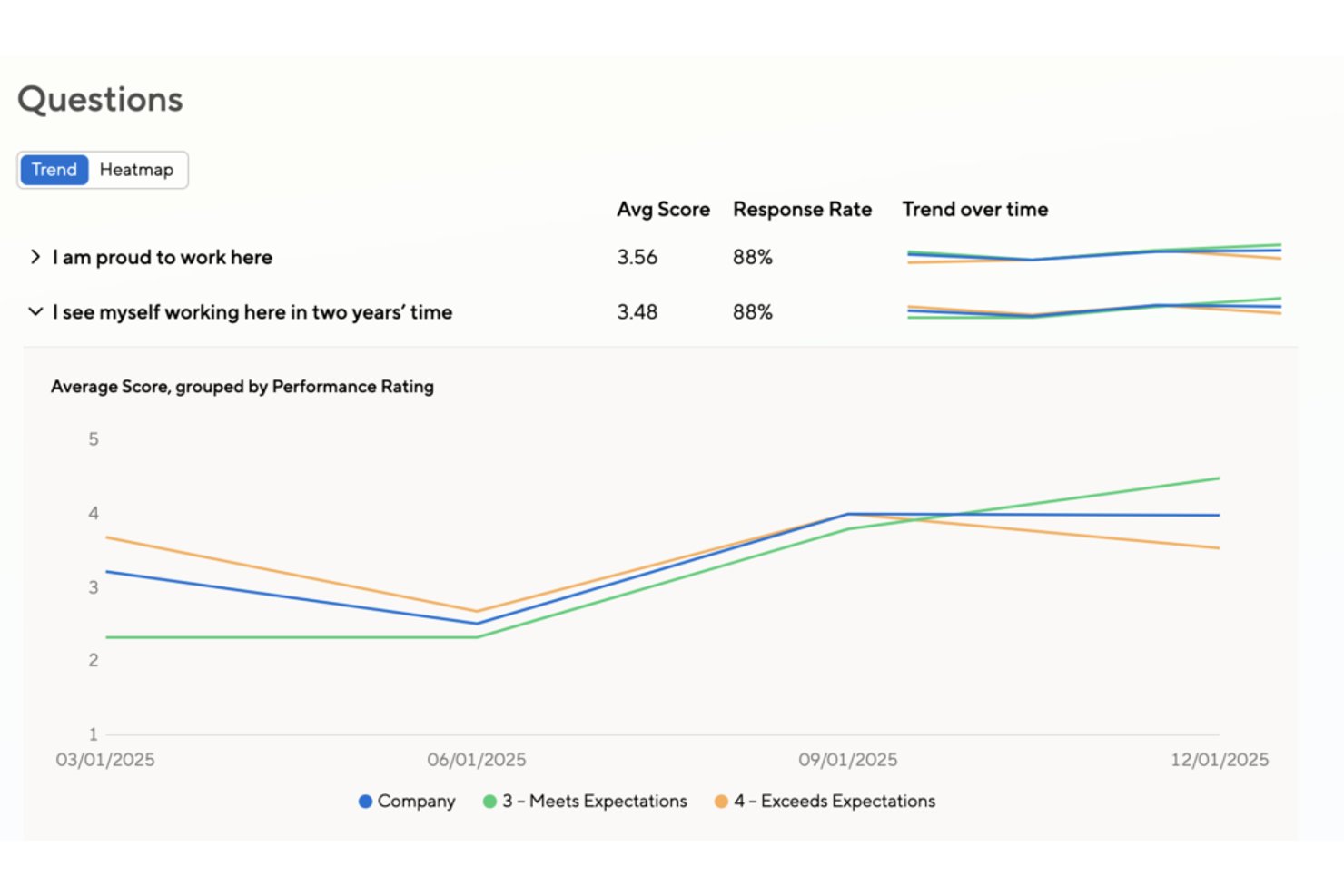
Small Improvements is a performance management platform that includes a pulse survey module for collecting confidential employee feedback, with built-in scheduling, eNPS, Slack delivery, and results grouped by department, role, and performance data.
Who Is Small Improvements Best For?
Small Improvements suits mid-sized teams that already use it for performance reviews and want to layer in pulse surveys without switching to a separate tool.
Why I Picked Small Improvements
I picked Small Improvements as one of the best because it's the only tool on this list that lets you group pulse survey results by performance rating data from your review cycles. That means if you run a recurring monthly pulse and want to see how engagement scores differ between high performers and the rest of the team, you can do that without leaving the platform. I also like how surveys can be answered directly inside Slack, which removes friction and keeps response rates up.
Small Improvements Key Features
- Recurring pulse survey scheduler: Set surveys to repeat weekly, biweekly, monthly, or quarterly, with a custom end date and automatic weekend skipping.
- eNPS question support: Run an employee Net Promoter Score question on its own or alongside custom rating and free-text questions in the same survey.
- Heatmap reporting: View results as a heatmap that highlights lower-scoring groups across departments, locations, and managers at a glance.
- Automatic survey reminders: The platform sends timed reminders to non-respondents—24 hours before deadline for weekly surveys and 7 days out for monthly ones.
Small Improvements Integrations
Small Improvements offers integrations with BambooHR, Workday, Personio, Rippling, Namely, Workable, Slack, Okta, OneLogin, and Google Workspace. Slack supports two-way survey delivery, allowing employees to answer directly within Slack.
Pros and Cons
Pros:
- Heatmaps reveal lower-scoring employee groups
- Recurring schedules support regular pulse checks
- Groups feedback by performance ratings
Cons:
- No anonymous replies or follow-up workflows
- Confidentiality falls short of true anonymity

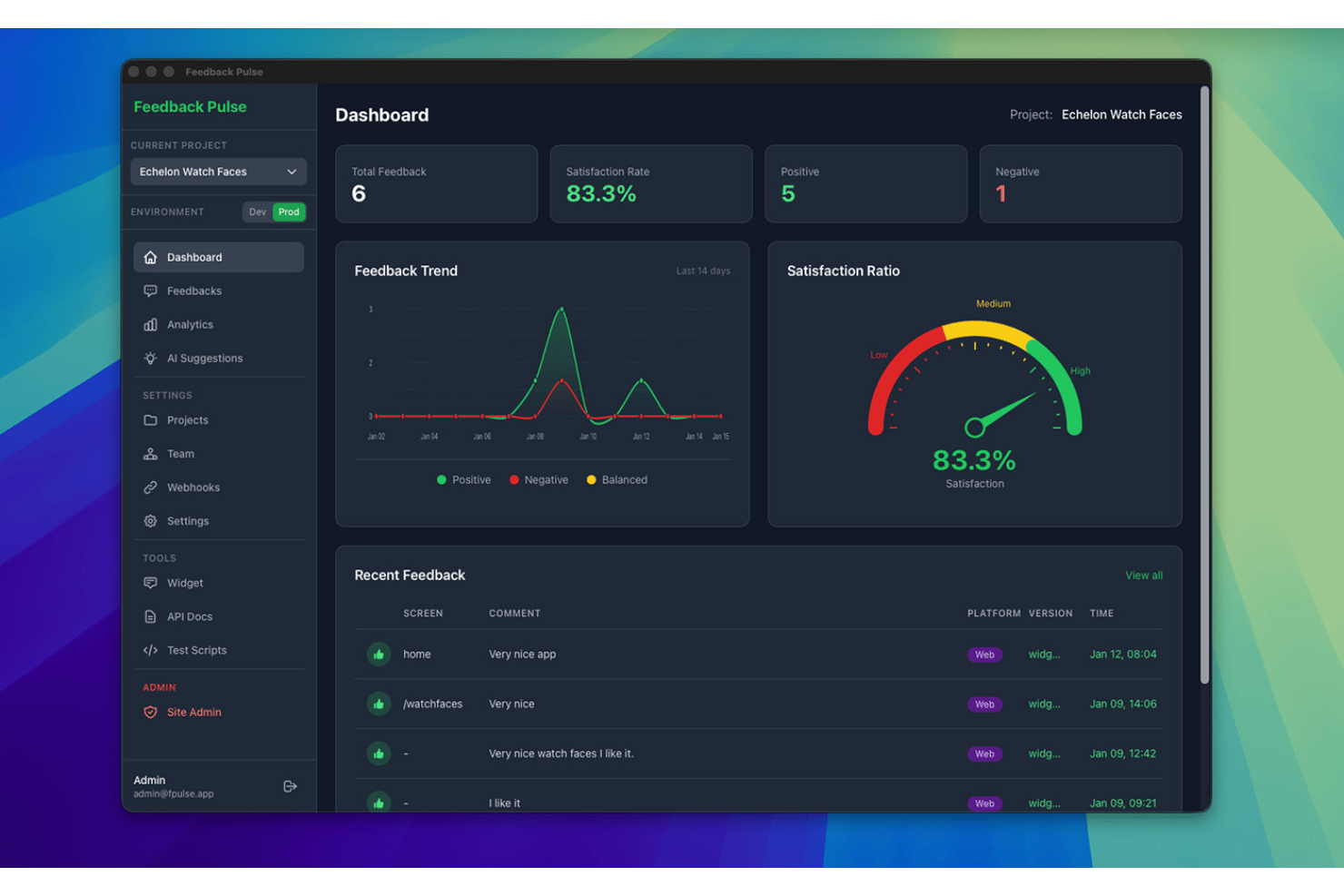
FeedbackPulse is an anonymous employee feedback software designed for HR and people teams to run automated pulse surveys, aggregate responses, and guarantee employee anonymity by enforcing technical privacy safeguards.
Who Is FeedbackPulse Best For?
HR and people teams at small to midsize organizations that need simple, secure, and technically enforced anonymous feedback.
Why I Picked FeedbackPulse
I picked FeedbackPulse as one of the best because it enforces technical anonymity rules that can't be bypassed. I like how the platform locks feedback results until a minimum response threshold is met and never reveals respondent identities.
FeedbackPulse Key Features
- Automated pulse survey scheduling: Set up recurring pulse surveys with automatic delivery to all team members.
- Role-based admin access: Control survey management and results access with granular admin permissions.
- Filterable aggregate dashboards: View feedback trends by department, location, or manager without exposing individual responses.
- GDPR-compliant EU hosting: Store and process employee feedback securely on servers based in the EU.
FeedbackPulse Integrations
Native integrations are not currently listed.
Pros and Cons
Pros:
- Dashboards display only aggregated group data
- Results locked unless minimum responses met
- Technical anonymity threshold prevents response tracing
Cons:
- Limited advanced analytics and dashboards
- No two-way anonymous messaging

Best for interactive presentations

Mentimeter is an interactive presentation tool designed for educators, corporate trainers, and event organizers to engage audiences through live polls and quizzes. It aims to enhance participation and gather real-time feedback during presentations.
Why I picked Mentimeter: It focuses on creating interactive presentations that keep your audience engaged with features such as multiple-choice polls and quizzes. The tool can also display real-time results that change as responses come in.
Standout features & integrations:
Features include customizable presentation templates that can be tailored for various themes, the ability to create word clouds and other visualizations of audience input, and audience Q&A hosting capabilities.
Integrations include Microsoft Teams, Zoom, Hopin, Google Slides, Microsoft PowerPoint, Google Meet, and more.
Pros and Cons
Pros:
- Interactive polls and quizzes
- Dynamic, real-time result displays Interactive polls and quizzes
- Strong support for education and training programs
Cons:
- Learning curve for new users
- Limited customization options
Best for custom surveys

SurveyMonkey is a versatile survey tool aimed at businesses, educational institutions, and nonprofits seeking to gather detailed feedback. It provides customizable surveys that cater to a wide range of data collection needs, from market research to employee engagement.
Why I picked SurveyMonkey: It focuses on offering custom surveys that allow you to tailor questions to your specific needs and goals. With features such as skip logic and question randomization, you can create dynamic surveys that improve response quality. The platform also provides advanced reporting tools to analyze your data.
Standout features & integrations:
Features include an extensive question bank to help you choose the right questions, mobile-friendly survey designs for on-the-go feedback collection, and automated survey distribution to help save you time.
Integrations include Salesforce, Mailchimp, HubSpot, Microsoft Teams, Google Drive, Dropbox, and more.
Pros and Cons
Pros:
- Automated distribution features
- Mobile app accessibility Automated distribution features
- Extensive question customization
Cons:
- May need technical support for setup
- May require training for advanced features

Typeform
Best for user-friendly interfaces

Typeform is an online form builder that caters to businesses, educators, and marketers looking to create engaging surveys and forms. It focuses on delivering an enjoyable user experience with its interactive and conversational design.
Why I picked Typeform: It offers a user-friendly design that enhances the experience for both creators and respondents. Its design features enable you to create conversational, visually appealing forms that help make filling out surveys engaging without overwhelming your audience.
Standout features & integrations:
Features include customizable, interactive layouts, logic jumps to personalize the form experience based on user responses, and the ability to embed forms on websites.
Integrations include Mailchimp, Slack, Google Forms, HubSpot, Salesforce, Airtable, Trello, and more.
Pros and Cons
Pros:
- Embedding options for smooth integration
- Logic jumps for personalized experiences
- Engaging conversational forms
Cons:
- Limited customization in lower tiers
- Data export complexities

Best for secure data handling

SmartSurvey is a survey tool designed for businesses and organizations that prioritize data security and compliance. It serves industries such as health care and government, offering secure survey creation and data collection.
Why I picked SmartSurvey: It provides secure data handling with features such as GDPR, CCPA, and HIPAA compliance and data encryption, keeping your data protected. The tool also offers customizable survey options to meet your specific requirements.
Standout features & integrations:
Features include automated calculations and reporting, scheduled surveys to routinely gather insights, and accessible surveys with assistive technology and multilingual support.
Integrations include Salesforce, Google Analytics, HubSpot, Mailchimp, Slack, Microsoft Teams, and more.
Pros and Cons
Pros:
- Accessible surveys available
- Automated analytics and reporting
- GDPR, CCPA, and HIPAA compliance
Cons:
- Potentially dated user interface
- Less suitable for smaller teams

Best for culture insights

CultureMonkey is an employee engagement platform designed for HR teams and managers to gather insights into workplace culture. It helps businesses in various sectors understand employee sentiments and foster a positive work environment.
Why I picked CultureMonkey: It offers deep culture insights through its specialized feedback tools. With features such as pulse surveys, you can regularly check in on employee morale. The platform includes sentiment analysis to help you interpret feedback effectively and create an action plan for addressing employee concerns.
Standout features & integrations:
Features include customizable surveys that let you tailor questions to your company's needs, automated reporting to save time on data analysis, and benchmarking tools to compare your results with industry standards.
Integrations include Slack, Microsoft Teams, Google Workspace, Workday, WhatsApp, and more.
Pros and Cons
Pros:
- Automated reporting features
- Regular pulse surveys
- Offers deep culture insights
Cons:
- Limited custom questions in surveys
- Learning curve for new features


Poll Everywhere is an interactive polling tool designed for university educators, corporate presenters, and event organizers to engage with audiences in real time. It allows users to create polls, quizzes, and Q&A sessions to gather live feedback and boost participation.
Why I picked Poll Everywhere: It focuses on live audience polling, making it a good option for interactive presentations and events. Features such as real-time response collection and instant result displays can help keep your audience engaged. The platform supports various question types, allowing you to tailor polls to your needs.
Standout features & integrations:
Features include customizable poll designs to match your branding, multi-device support for easy participation, and detailed reporting tools to analyze audience feedback after each session.
Integrations include PowerPoint, Google Slides, Microsoft Teams, Keynote, Webex, and Slack.
Pros and Cons
Pros:
- Strong reporting tools
- Customizable poll designs
- Multi-device participation
Cons:
- Participant caps in free or lower tiers
- Most suited for large-scale use


FreeOnlineSurveys is a survey tool designed for small businesses, educators, and nonprofits seeking cost-effective solutions for gathering feedback. It provides essential survey creation and data collection features without breaking the bank.
Why I picked FreeOnlineSurveys: It offers budget-friendly survey options that make it accessible for small teams. With features such as unlimited questions and responses, you can gather comprehensive data without limits. The tool includes basic analytics to help interpret your results.
Standout features & integrations:
Features include customizable survey templates to get you started quickly, real-time reporting to view results as they come in, and mobile compatibility for on-the-go data collection.
Integrations are not publicly listed.
Pros and Cons
Pros:
- Includes basic analytics
- Cost-effective for small teams
- Unlimited questions and responses
Cons:
- Less support for large teams
- Best suited for schools and nonprofits


ProProfs Survey Maker is an intuitive online survey tool designed for businesses, educational institutions, and organizations to gather feedback on customer satisfaction and employee engagement. It helps users create, distribute, and report surveys.
Why I picked ProProfs Survey Maker: Its diverse survey templates cater to various feedback needs. The tool offers over 20 question types, customizable templates, and strong security options. It uses AI to simplify survey creation, making it accessible for users without technical expertise. The focus on diverse templates ensures your team can quickly gather the insights needed to make informed decisions.
Standout features & integrations:
Features include anonymous employee surveys for honest feedback, customizable branding that can be tailored to match your company's identity, and automatic scoring that helps simplify data analysis.
Integrations include Salesforce, Mailchimp, Campaign Monitor, WordPress, and more.
Pros and Cons
Pros:
- Large selection of survey questions
- AI-assisted survey creation
- Customizable templates
Cons:
- Advanced features may require training
- May require initial setup time
Other Anonymous Employee Feedback Tool
Here are some additional anonymous employee feedback tool options that didn’t make it onto my shortlist, but are still worth checking out:
- Incogneato
For anonymous surveys
- Shout
For private feedback collection
- Sparkbay
For talent management
- WorkTango
For employee engagement
- Jotform
For form design
- HiBob
For HR management integration
- Engagement Multiplier
For business impact insights
- SurveyKing
For market research
- Stribe
For employee intranet


How I Evaluate Anonymous Employee Feedback Tools
I evaluate these tools in two layers: baseline anonymity and survey capabilities that qualify a vendor, then the differentiators—like benchmarking data and manager dashboards—that determine best fit.
Core Functionality (Table Stakes For This List)
When I'm selecting tools for my list, I rank each one on a scale from 0 (does not offer the functionality) to 5 (excels in this area) for each core functionality listed below. Then, I calculate the tool's total score into a percentage. Each tool needs to achieve a minimum total score of 65% to be considered for inclusion.
- Anonymity Protection & Safeguards: I check how each tool strips identifiers and enforces minimum response thresholds—for example, whether a three-person team's results are suppressed to prevent managers from guessing who said what.
- Survey & Pulse Creation: Each tool should offer configurable templates for engagement, eNPS, and pulse surveys with flexible scheduling, so HR teams can run a quick weekly check-in or a full quarterly engagement cycle.
- Two-Way Anonymous Messaging: I look for tools that let HR or managers reply to anonymous submissions and hold a real conversation—like following up on a concern about workload—without ever revealing the employee's identity.
- Sentiment & Reporting Analytics: Dashboards should aggregate responses with trend tracking and team-level segmentation while respecting anonymity thresholds, giving people ops leaders a clear picture of where morale is shifting.
- Multi-Channel Distribution: I evaluate whether employees can submit feedback through the channels they already use—Slack, Teams, email, mobile app, or a web link—rather than requiring a separate login that adds friction.
- Action Planning & Follow-Up: Tools that let you tag themes, assign owners, and track resolution help close the loop, so feedback about onboarding gaps or manager communication actually turns into visible change.
Once I have a list of tools that meet this criteria, I consider what sets each platform apart.
Differentiating Factors (What Sets Vendors Apart)
Here's how I compare and contrast different vendors:
Standout Features
AI-powered theme detection matters because it surfaces patterns—like recurring frustration with promotion criteria—that manual tagging would miss across hundreds of open-ended responses. I also look for external benchmarking data, which helps HR leaders understand whether a 65% engagement score is strong for their industry or a red flag. Manager-level dashboards are another differentiator, giving people managers direct visibility into their team's sentiment without compromising anonymity. These features separate a basic survey tool from a platform that drives real action.
Beyond Features
Trust and anonymity transparency are the first things I evaluate—employees won't participate if they don't believe the tool protects them. I check whether vendors publish their anonymization methodology and offer configurable response thresholds. Data privacy compliance also matters, especially for organizations with employees across multiple jurisdictions where GDPR or similar regulations apply. HRIS integration depth determines how easily you can sync org structures and demographics into the platform without manual CSV uploads every survey cycle.
How to Choose an Anonymous Employee Feedback Tool
It’s easy to get bogged down in long feature lists and complex pricing structures. To help you stay focused as you work through your unique software selection process, here’s a checklist of factors to keep in mind:
| Factor | What to Consider |
|---|---|
| Scalability | Can the tool grow with your team? Consider future expansion and whether the tool can handle an increase in users or data as your organization grows. |
| Integrations | Does it connect with your existing systems? Check for compatibility with your HR software, communication platforms, and data analysis tools to ensure smooth workflows. |
| Customizability | Can you tailor it to your needs? Look for options to customize surveys, reports, and dashboards to match your processes and branding. Avoid tools with rigid structures. |
| Ease of use | Is it intuitive for all users? A tool that’s easy to navigate reduces training time and increases adoption across teams. Try demos to assess user-friendliness firsthand. |
| Implementation and onboarding | How quickly can you get started? Evaluate the setup process and availability of onboarding resources like tutorials, guides, and support to ensure a swift transition. |
| Cost | Does it fit your budget? Analyze pricing structures, including hidden fees or tiered plans, to ensure you’re getting good value without overspending. Consider long-term costs. |
| Security safeguards | How does it protect sensitive data? Verify encryption standards, data handling practices, and compliance with regulations to ensure employee information stays secure. |
| Support availability | Can you access help when needed? Ensure the vendor offers reliable support channels like chat, email, or phone, and verify their response times to avoid downtime. |
What Is an Anonymous Employee Feedback Tool?
An anonymous employee feedback tool is a software solution that allows employees to provide candid feedback without revealing their identities. HR professionals and managers typically use these tools to gather honest insights into workplace culture and employee satisfaction. Survey creation, data analysis, and secure data handling help with collecting and understanding employee sentiments. Overall, these tools promote open communication and help improve workplace environments by addressing employee concerns.
Features
When selecting an anonymous employee feedback tool, keep an eye out for the following key features:
- Anonymous feedback collection: Allows employees to share their thoughts without fear of identification, encouraging honesty and openness.
- Real-time analytics: Provides immediate insights into feedback data, helping you address issues quickly.
- Customizable surveys: Enable the tailoring of questions and design to fit specific organizational needs and branding.
- Secure data handling: Protects sensitive employee information with encryption and compliance with data regulations.
- Pulse surveys: Offers regular short surveys to track employee sentiment and engagement over time.
- Sentiment analysis: Analyzes feedback text to gauge overall employee mood and satisfaction.
- Multi-language support: Accommodates diverse workforces by allowing surveys in multiple languages.
- Benchmarking tools: Allow comparison of your organization's performance against industry standards.
- Integration capabilities: Connects with existing HR and communication systems to streamline feedback processes.
- Mobile compatibility: Ensures employees can provide feedback from any device, increasing participation rates.
Benefits
Implementing an anonymous employee feedback tool provides several benefits for your team and your business. Here are a few you can look forward to:
- Improved communication: Encourages open dialogue and honest feedback by allowing employees to share thoughts anonymously.
- Increased engagement: Regular pulse surveys and real-time analytics help keep employees engaged and connected with the organization.
- Enhanced decision-making: Detailed analytics and sentiment analysis provide insights that inform better management decisions.
- Stronger trust: Secure data handling and anonymity build trust between employees and management, fostering a positive work environment.
- Cultural insights: Customizable surveys and benchmarking tools reveal insights into workplace culture and areas for improvement.
- Higher participation rates: Mobile compatibility and multi-language support ensure more employees can participate in feedback processes.
- Timely issue resolution: Real-time feedback collection allows for quick identification and resolution of workplace issues.
Costs & Pricing
Selecting an anonymous employee feedback tool requires an understanding of the various pricing models and plans available. Costs vary based on features, team size, add-ons, and more. The table below summarizes common plans, their average prices, and typical features included in anonymous employee feedback tool solutions:
Plan Comparison Table for Anonymous Employee Feedback Tool
| Plan Type | Average Price | Common Features |
|---|---|---|
| Free Plan | $0 | Basic survey creation, limited responses, and minimal analytics. |
| Personal Plan | $5-$25/user/month | Customizable surveys, basic analytics, real-time feedback, and email support. |
| Business Plan | $30-$75/user/month | Advanced analytics, integration capabilities, priority support, and customizable branding. |
| Enterprise Plan | $100+/user/month | Comprehensive security features, dedicated account manager, full customization, and API access. |
Anonymous Employee Feedback Tool FAQs
Here are some answers to common questions about anonymous employee feedback tools:
How do anonymous employee feedback tools ensure anonymity?
These tools ensure anonymity by removing identifying information and using secure data handling processes. They often use encryption and anonymization techniques to protect respondents’ identities. When setting up the tool, ensure it offers strong privacy settings and clearly communicates anonymity to encourage honest survey responses from your team.
Can I customize the questions in the feedback tool?
Yes, most anonymous employee feedback tools allow you to customize questions to fit your organization’s needs. You can tailor surveys to address specific issues or gather insights on particular topics. Look for tools with flexible survey templates and easy-to-use customization features to make this process straightforward.
Do these tools integrate with other HR software?
Yes, many anonymous employee feedback tools offer integration with popular HR systems. This allows you to streamline data collection and analysis by connecting feedback with other HR metrics. Before purchasing, check that the tool integrates with your current systems to ensure a smooth workflow.