

10 Best Enterprise Onboarding Software Reviewed in 2026

Best Enterprise Onboarding Software Shortlist


Navigating the complexities of onboarding new employees can be a headache for HR teams. You're juggling paperwork, training schedules, and making sure new team members feel welcome. That's where enterprise onboarding software steps in. It simplifies the process and helps your team focus on what really matters: building a great company culture.
I've spent years in the HR management industry, testing and reviewing software independently. My goal is to give you an unbiased look at the best solutions out there. In this article, you'll find a well-researched review of top enterprise onboarding software. You'll discover tools that can help your team tackle onboarding and offboarding challenges with ease and efficiency.
Why Trust Our Software Reviews
We’ve been testing and reviewing HR software systems since 2019. As HR experts ourselves, we know how critical and difficult it is to make the right decision when selecting software.
We invest in deep research to help our audience make better software purchasing decisions. We’ve tested more than 2,000 tools for different HR management use cases and written over 1,000 comprehensive software reviews. Learn how we stay transparent & our software review methodology.
Best Enterprise Onboarding Software Summary
This comparison chart summarizes pricing details for my top enterprise onboarding software selections to help you find the best one for your budget and business needs.
| Tool | Best For | Trial Info | Price | ||
|---|---|---|---|---|---|
| 1 | Best for all-in-one HR and IT onboarding | Free demo available | From $8/user/month | Website | |
| 2 | Best for event-based role onboarding journeys | Free demo available | Pricing upon request | Website | |
| 3 | Best for easy onboarding features with no IT setup | Free demo available | Pricing upon request | Website | |
| 4 | Best contextual in-app training guidance | Free demo available | Pricing upon request | Website | |
| 5 | Best for interactive SCORM-ready training modules | Free plan available | From $100/month | Website | |
| 6 | Best digital adoption platform for enterprises | Free demo available | Pricing upon request | Website | |
| 7 | Best for HR integration with the Zoho ecosystem | 30-day free trial | From $1.50/user/month | Website | |
| 8 | Best for mobile training for hospitality teams | 14-day free trial | From $79/month | Website | |
| 9 | Best for workflow-linked project onboarding | Free plan available | From $7/user/month (billed annually) | Website | |
| 10 | Best for no-code SaaS user onboarding | 14-day free trial | From $299/month (billed annually) | Website |
Best Enterprise Onboarding Software Review
Below are my detailed summaries of the best enterprise onboarding software that made it onto my shortlist. My reviews offer a detailed look at the key features, pros and cons, integrations, and ideal use cases of each tool to help you find the best one for you.

Best for all-in-one HR and IT onboarding
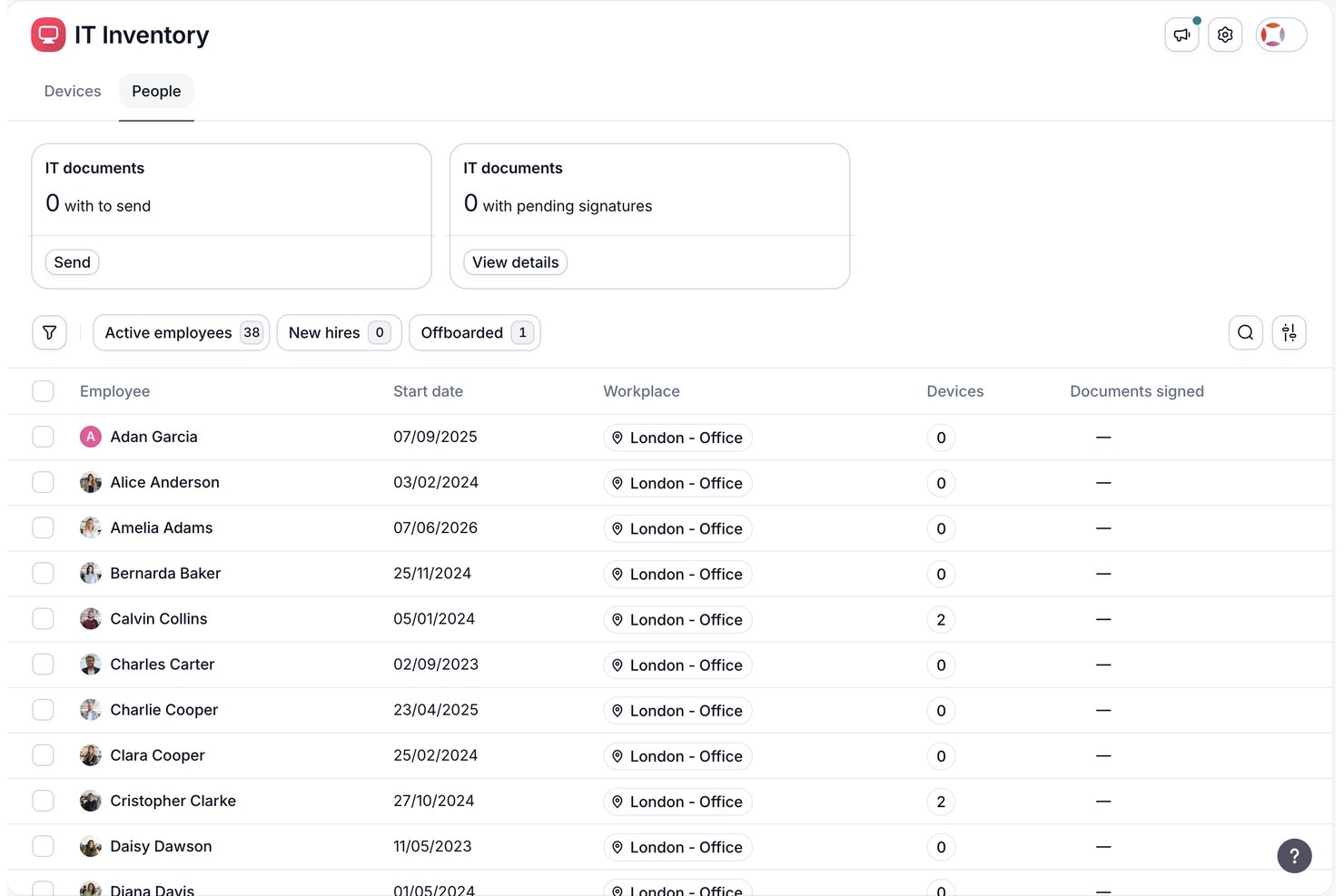
Factorial is an all-in-one HR platform that combines onboarding workflows, document management, e-signatures, IT provisioning, and talent management tools in a single system.
Who Is Factorial Best For?
Factorial is a strong fit for European and globally distributed mid-market companies that want HR and IT onboarding managed in one platform.
Why I Picked Factorial
I've included Factorial in my top picks because it's one of the few HR platforms that bundles IT provisioning directly into the onboarding workflow. Its SaaS Management and IT Inventory modules let you assign role-based equipment kits and trigger software access automatically on day one, with no ITSM tool required. The native MDM layer adds zero-touch device provisioning, which is a real advantage when you're onboarding distributed teams across multiple countries.
Factorial Key Features
- Employee Welcome Space: A preboarding portal that gives new hires self-service access to tasks, company documents, and cultural resources before their start date.
- Legal e-signature: Send individually or in bulk to collect legally binding signatures on contracts, policies, and compliance documents.
- Factorial One AI agent: An AI layer that generates on-demand HR reports and surfaces workforce insights through conversational queries.
- 360° performance reviews: Structured review cycles with competency tracking and analytics that connect directly to post-onboarding development plans.
Factorial Integrations
Factorial offers marketplace integrations with Okta, Teamtailor, Workable, Recruitee, Sage, DATEV, Microsoft Power BI, and more. It also provides a public API and Zapier for custom integrations.
Pros and Cons
Pros:
- Preboarding portal supports global distributed teams
- Native device provisioning and SaaS management
- All-in-one HR and IT onboarding workflows
Cons:
- Reporting is less robust than top competitors
- No native integration with Workday or ADP

Best for event-based role onboarding journeys

Enboarder's intelligent employee onboarding software is designed for HR teams looking to personalize the induction experience. It focuses on structured onboarding journeys, compliance management, and relationship building.
Why I picked Enboarder: Enboarder excels at creating personalized experiences through features such as structured onboarding programs and real-time metrics from its engagement dashboard. These tools help your team tailor the onboarding system to meet individual employee needs. Compliance management ensures that all necessary regulations are met, reducing the risk of oversights. Employee relationship management features support building strong connections from day one.
Standout features and integrations:
Features include structured onboarding journeys with step-by-step guidance for new hires, compliance management to keep your team on track with regulations, and an engagement dashboard for real-time insights. These features ensure a smooth onboarding process while allowing customization to fit your team's needs.
Integrations include Workday, BambooHR, ADP, SAP SuccessFactors, Oracle, UKG Pro, Greenhouse, Lever, Microsoft Teams, and more.
Pros and Cons
Pros:
- Strong automation to reduce manual tasks and improve accountability
- Intuitive drag-and-drop workflow builder
- Personalized onboarding journeys for an engaging new hire experience
Cons:
- Not ideal for non-HR software users
- Pricing can be a barrier for smaller teams
HR Cloud
Best for easy onboarding features with no IT setup

HR Cloud is a human resources management system designed for businesses seeking essential HR functionalities. It primarily serves small to medium-sized businesses with features including employee onboarding, document management, and time tracking.
Why I picked HR Cloud: HR Cloud offers straightforward onboarding tools that are easy for your team to implement. This HR platform simplifies the onboarding process with customizable checklists and automated workflows. Document management ensures all employee files are organized and accessible. HR Cloud also provides time tracking, helping you manage employee hours efficiently.
Standout features and integrations:
Features include a self-service portal that empowers employees to manage their information. The platform also offers performance management tools to assess and improve employee performance. Additionally, HR Cloud provides an employee engagement module to foster a positive workplace culture.
Integrations include Slack, ADP, QuickBooks, Microsoft Teams, Google Workspace, Zapier, Okta, G Suite, and more.
Pros and Cons
Pros:
- Workflow automation saves HR time
- Customizable checklists
- Simple onboarding processes
Cons:
- Mobile app has limited features
- Limited advanced features and customization options
Whatfix
Best contextual in-app training guidance

Whatfix is a digital adoption platform designed for enterprises aiming to enhance user onboarding and software training. It caters to large organizations by providing tools for creating in-app guidance and training content.
Why I picked Whatfix: Whatfix specializes in in-app guidance, offering features such as interactive walkthroughs and tooltips that help users navigate software effectively. These tools ensure your team can support users directly within the application. Whatfix's analytics provide insights into user interactions, helping you identify areas for improvement. The platform also allows for easy content creation, so you can tailor training to your needs.
Standout features and integrations:
Features include a content editor that allows you to create and update guidance materials easily. The platform also offers multilingual support, making it accessible for global teams. Additionally, Whatfix provides detailed usage analytics to track user engagement and identify trends.
Integrations include Salesforce, SAP SuccessFactors, Microsoft Dynamics, ServiceNow, Oracle, Workday, SharePoint, Google Workspace, Slack, Zendesk, and more.
Pros and Cons
Pros:
- Intuitive flow creation without coding skills
- Supports multilingual content
- Effective in-app guidance tools
Cons:
- Analytics may be limited for some users
- Initial setup can be complex for new users

Best for interactive SCORM-ready training modules

Coassemble is an online training platform and LMS designed for teams looking to create and deliver interactive learning experiences. It caters primarily to educators, trainers, and HR professionals seeking to enhance employee experience and training.
Why I picked Coassemble: Coassemble specializes in interactive training modules, offering features such as customizable course templates and drag-and-drop functionality. These tools allow your team to create engaging content quickly and efficiently. With its quiz and assessment capabilities, you can ensure that learning objectives are met. The platform's analytics provide insights into learner progress and engagement.
Standout features and integrations:
Features include customizable branding, which allows you to maintain brand consistency across tutorials and training materials. The platform also offers a mobile-friendly interface, making it accessible for users on the go. Additionally, Coassemble provides detailed analytics to track learner enrollment, progress, and retention, and measure training effectiveness.
Integrations include Zapier, BambooHR, Slack, Google Drive, Microsoft Teams, Salesforce, Mailchimp, Shopify, HubSpot, PayPal, and more.
Pros and Cons
Pros:
- Engaging interactive learning experiences, including quiz and assessment tools
- Detailed learner analytics
- Intuitive and interactive course templates
Cons:
- Occasional technical glitches and performance issues
- Limited advanced features and scalability
WalkMe
Best digital adoption platform for enterprises

WalkMe is a digital adoption platform designed for enterprises looking to improve user engagement and training. It serves large organizations by providing tools to guide users through software applications effectively.
Why I picked WalkMe: WalkMe’s focus on digital adoption platforms sets it apart by offering features such as interactive walkthroughs and in-app guidance. These tools help your team ensure users understand and utilize software features fully. WalkMe's analytics provide insights into user behavior, allowing you to optimize training and support. The platform's customization options let you tailor the experience to fit your organization's needs.
Standout features and integrations:
Features include in-app guidance that provides real-time assistance to users as they navigate software applications. The platform also offers behavioral analytics to track how users interact with the software, helping you identify areas for improvement. Additionally, WalkMe includes a training module to create and deliver educational content within the application.
Integrations include Salesforce, Microsoft Dynamics, ServiceNow, Workday, SAP SuccessFactors, Oracle, Google Workspace, Microsoft Office 365, Slack, Zendesk, and more.
Pros and Cons
Pros:
- Detailed behavioral analytics
- Supports large-scale enterprise deployments
- Effective in-app guidance
Cons:
- Can be resource-intensive for smaller teams
- Complexity in setup

Best for HR integration with the Zoho ecosystem

Zoho People is a mobile-first, all-in-one HR management platform and HRIS designed for businesses of all sizes. It focuses on automating and simplifying HR processes and serves HR teams to efficiently manage employee records, onboarding needs, performance, and attendance.
Why I picked Zoho People: Zoho People integrates well with the Zoho suite, making it a great choice if your team already uses Zoho products. This integration allows for smooth data flow between applications and enhances productivity. The platform's features include employee onboarding checklists, self-service portals, and performance tracking, which are essential for complete HR management. Zoho People's customizability ensures it can adapt to your specific business and employee lifecycle needs.
Standout features and integrations:
Features include a flexible leave management system that helps your team manage employee absences and requests efficiently. The platform also has the capacity to assign mentors and offers a performance appraisal module to track and assess employee achievement. Additionally, Zoho People provides a centralized document management system to store and organize important employee documents.
Integrations include Zoho CRM, Zoho Books, Zoho Recruit, G Suite, QuickBooks, Zapier, Slack, Microsoft Teams, Office 365, and more.
Pros and Cons
Pros:
- Customizable workflows and automation
- Centralized document storage
- Easy-to-use interface and mobile access
Cons:
- Extensive features can be overwhelming
- Complex setup for small teams

Innform
Best for mobile training for hospitality teams

Innform is an online training platform tailored for the hospitality industry, helping teams manage training and compliance. It focuses on delivering training content, tracking progress, and ensuring compliance with industry standards.
Why I picked Innform: Innform offers specialized features for hospitality businesses, such as customizable courses designed for different roles within the industry. The platform's compliance tracking helps your team stay aligned with industry regulations. With its user-friendly interface, you can easily create and distribute training materials. The analytics feature provides employee data insights into learner progress and training effectiveness.
Standout features and integrations:
Features include a mobile-friendly design that allows your team to access training on the go via a mobile app. The platform also offers multilingual support, which is crucial for diverse teams in the hospitality industry. Additionally, Innform provides detailed reporting tools to help you monitor training outcomes and identify areas for improvement.
Integrations include Microsoft Teams, Slack, Google Workspace, Zoom, Dropbox, Salesforce, HubSpot, and more.
Pros and Cons
Pros:
- Simple course creation interface
- Flexible certification and tracking
- Tailored for hospitality training
Cons:
- Limited advanced analytics and automation
- Mobile experience could be improved


Atlassian is a suite of collaboration tools designed for software, IT, and business teams. It focuses on project management, knowledge sharing, and service delivery.
Why I picked Atlassian: Atlassian excels in project-based onboarding with tools like Jira and Confluence, which help manage projects and share knowledge effectively. Jira's project tracking and task management features are ideal for keeping your team aligned on specific projects. Confluence enhances collaboration by allowing team members to create, share, and work on documents together. This makes Atlassian a strong choice for teams focused on project-based tasks.
Standout features and integrations:
Features include project and progress tracking with Jira, document collaboration through Confluence, and service desk delivery with Jira Service Management. These features help you manage projects efficiently and facilitate team collaboration. The platform's AI-powered tools, such as Rovo, further enhance productivity by automating routine tasks.
Integrations include Slack, Microsoft Teams, GitHub, Google Workspace, Dropbox, Salesforce, Zoom, Trello, Zendesk, Asana, and more.
Pros and Cons
Pros:
- Centralized knowledge hub for continuity
- Extensive customization options
- Project management focus
Cons:
- Potential complexity and performance friction
- Steep learning curve for non-technical users


Userpilot is a product experience platform designed for teams focused on enhancing user onboarding and engagement. It helps businesses create personalized in-app experiences to guide users effectively.
Why I picked Userpilot: Userpilot excels in product onboarding by offering tools to build interactive walkthroughs and tooltips without coding. These features allow your team to craft tailored user journeys and ensure users get the most out of your product. The platform's real-time analytics provide insights into user behavior, helping you improve the onboarding process. Userpilot supports A/B testing, enabling you to optimize user experiences based on data.
Standout features and integrations:
Features include a visual editor that lets you customize in-app experiences easily. The platform also offers a feedback collection tool to gather user insights directly within the app. Additionally, Userpilot provides goal tracking to monitor user progress and engagement effectively.
Integrations include Segment, Mixpanel, Amplitude, Google Analytics, Intercom, HubSpot, Zendesk, and more.
Pros and Cons
Pros:
- Real-time user analytics
- Strong product usage analytics
- No coding required for setup
Cons:
- Initial learning curve
- Can be costly at scale
Other Enterprise Onboarding Software
Here are some additional enterprise onboarding software options that didn’t make it onto my shortlist, but are still worth checking out:
- Moveworks
For AI-driven HR issue support
- Waybook
For automated SOP and process documentation
- Gusto
For automated US payroll and compliance
- Docebo
For delivering AI-powered employee learning
- ADP Workforce Now
Automated payroll for mid-sized companies
- Greenhouse
Applicant tracking system for hiring
- Paylocity
For integrating payroll and HR processes
- Workday
Cloud-based workforce analytics
- LumApps
For enhancing internal communication tools
- CareerPlug
For automating hiring workflows efficiently
- Rippling
For managing employee devices and IT
- BambooHR
For simplifying HR tasks for SMB teams


How I Evaluate Enterprise Onboarding Software
I split my evaluation into two layers: baseline requirements every tool must meet—pre-boarding portals, e-signatures, HRIS integrations—and the differentiators that set the best apart.
Core Functionality (Table Stakes For This List)
When I'm selecting tools for my list, I rank each one on a scale from 0 (does not offer the functionality) to 5 (excels in this area) for each core functionality listed below. Then, I calculate the tool's total score into a percentage. Each tool needs to achieve a minimum total score of 65% to be considered for inclusion.
- Pre-boarding Workflows: I look for platforms that let new hires complete welcome tasks, review team introductions, and upload documents through a portal before day one.
- Digital Document Management: Compliant e-signature capture and form handling matter here, especially for offer letters, tax forms, and policy acknowledgments across regions.
- Workflow Automation: I evaluate whether task assignments, reminders, and approvals can be configured by role and routed across HR, IT, and hiring managers automatically.
- HRIS & System Integrations: The tool should connect with major HRIS, ATS, payroll, and IT provisioning platforms like Workday, SAP SuccessFactors, or ServiceNow.
- Enterprise Scalability & Compliance: Multi-location and multi-country support is key, including role-based permissions, audit trails, and localized compliance for tax and labor rules.
- Onboarding Analytics & Reporting: I check for dashboards that track completion rates, task progress, and time-to-productivity across departments, locations, and hiring cohorts.
Once I have a list of tools that meet this criteria, I consider what sets each platform apart.
Differentiating Factors (What Sets Vendors Apart)
Here's how I compare and contrast different vendors:
Standout Features
Crossboarding and offboarding support matters a lot at the enterprise level. Organizations with frequent internal transfers and promotions need platforms that manage role transitions and structured exits—not just new hire workflows. AI-powered assistants also stand out when they can field routine new hire questions about benefits enrollment or IT access without waiting on HR. Mobile-first design is another factor I evaluate, since new hires in field or remote roles should complete tasks from a phone as easily as a laptop.
Beyond Features
Implementation support is a big deal at the enterprise level. I look for vendors that provide dedicated implementation managers and pre-built workflow templates, since rolling out onboarding across dozens of locations takes real change management. Multi-entity support is another factor I evaluate closely—organizations running multiple brands or legal entities need a single tenant that handles separate workflows and permissions without spinning up extra instances. Security certifications like SOC 2 Type II and data residency options also carry weight, especially for teams onboarding across regulated industries.
How to Choose Enterprise Onboarding Software
It’s easy to get bogged down in long feature lists and complex pricing structures. To help you stay focused as you work through your unique software selection process, here’s a checklist of factors to keep in mind:
| Factor | What to Consider |
|---|---|
| Scalability | Can the software grow with your company? Consider if it supports increasing user numbers and complex workflows without a hitch. |
| Integrations | Does it connect with existing tools like HR systems or communication platforms? Make sure it fits seamlessly into your current tech stack. |
| Customizability | How flexible is the tool in adapting to your unique processes? Look for options to customize workflows, templates, and user roles. |
| Ease of use | Is the interface intuitive for all users? Ensure that your team can navigate and use the tool without extensive training. |
| Implementation and onboarding | How long will it take to get up and running? Check for available support, such as training sessions and onboarding specialists, to ease the transition. |
| Cost | Does the pricing fit your budget? Watch for hidden fees and compare annual vs. monthly costs to find the best deal. |
| Security safeguards | Are data protection measures in place? Ensure the software complies with security standards and offers features like encryption and access controls. |
| Support availability | What level of customer support is offered? Look for 24/7 support options and check if there are dedicated account managers for ongoing assistance. |
What Is Enterprise Onboarding Software?
Enterprise onboarding software is a tool designed to simplify and automate the process of integrating new employees into a company. HR professionals and onboarding specialists typically use these tools to ensure a smooth transition for new hires. Automated workflows, document management, and training modules help with managing tasks, tracking progress, and ensuring compliance. These tools provide value by reducing administrative burdens and enhancing the onboarding experience for both new employees and HR teams.
Features
When selecting enterprise onboarding software, keep an eye out for the following key features:
- Automated workflows: Reduce repetitive manual tasks by automating the onboarding process, saving time, and reducing manual errors.
- Document management: Organize and store all employee-related documents in one secure location for easy access and compliance.
- Training modules: Provide new hires with access to learning resources and training materials to help them get up to speed quickly.
- Customizable templates: Tailor onboarding processes to fit specific company needs and roles, ensuring a personalized experience for each new hire.
- Analytics and reporting: Gain insights into the effectiveness of your onboarding process and make data-driven improvements.
- Integration capabilities: Connect easily with existing HR systems and communication tools to create a unified workflow.
- Employee self-service portals: Empower employees to manage their own onboarding tasks, such as completing forms and updating personal information.
- Performance tracking: Monitor new hire progress and performance to ensure they meet key milestones and expectations.
- Compliance management: Ensure all legal and regulatory requirements are met through automated checks and reminders.
- In-app guidance: Offer real-time assistance and support to new hires as they navigate through software applications or onboarding tasks.
Benefits
Implementing enterprise onboarding software provides several benefits for your team and your business. Here are a few you can look forward to:
- Reduced administrative tasks: Automating workflows and document management takes repetitive tasks off your team's plate, freeing up time for more strategic work.
- Improved employee integration: Training modules and performance tracking help new hires adjust to their roles faster, ensuring they become productive team members quickly.
- Enhanced compliance: Compliance management features ensure all necessary legal requirements are met, reducing the risk of penalties or fines.
- Increased employee engagement: Customizable templates and self-service portals provide a personalized onboarding experience, which makes new hires feel valued from their first day.
- Better decision-making: Analytics and reporting offer insights into the onboarding process, allowing you to make data-driven improvements and optimize outcomes.
- Efficient resource allocation: Integration capabilities ensure that your existing tools work together smoothly tomaximize the efficiency of your HR processes.
Costs & Pricing
Selecting enterprise onboarding software requires an understanding of the various pricing models and plans available. Costs vary based on features, team size, add-ons, and more. The table below summarizes common plans, their average prices, and typical features included in enterprise onboarding software solutions:
Plan Comparison Table for Enterprise Onboarding Software
| Plan Type | Average Price | Common Features |
|---|---|---|
| Free Plan | $0 | Basic onboarding tasks, limited user support, and minimal customization. |
| Personal Plan | $5-$25/user/month | Automated workflows, document management, and basic analytics. |
| Business Plan | $25-$50/user/month | Customizable templates, training modules, and integration capabilities. |
| Enterprise Plan | $50-$100/user/month | Advanced analytics, compliance management, and dedicated account support. |
Enterprise Onboarding Software FAQs
Here are some answers to common questions about enterprise onboarding software:
How do I determine which software is best for my company?
Start by evaluating your company’s specific needs, such as the size of your team and the complexity of your onboarding processes. Consider the software’s scalability, integration capabilities, and ease of use. Look for solutions that align with your existing tools and workflows. Demo different platforms to see which one feels intuitive and meets your requirements. Prioritize features that address your primary pain points and ensure the software can grow with your business.
Can enterprise onboarding software integrate with existing HR systems?
Yes, most enterprise onboarding software can integrate with existing HR systems. These integrations help ensure a smooth flow of information between platforms, reducing manual data entry and errors. Check if the software supports native integrations with your current systems or if third-party connectors are available. Integration can enhance productivity by keeping all your systems aligned and up-to-date.
What support options are typically available with these software solutions?
Enterprise onboarding software often comes with various support options, including live chat, email support, and phone assistance. Some providers offer dedicated account managers or onboarding specialists to help you get started. Look for platforms with comprehensive support resources, such as knowledge bases, community forums, and training webinars. Choose a provider that aligns with your support needs to ensure a smooth implementation and ongoing use.
How long does it typically take to implement enterprise onboarding software?
The implementation timeline can vary based on the complexity of your processes and the features you choose. Generally, it can take anywhere from a few weeks to a couple of months. Ensure you allocate time for data migration, customization, and team training. Work closely with the software provider to outline a clear plan and timeline. Proper planning and communication with your team will help ensure a successful rollout.
Can enterprise onboarding software support global teams and multiple locations?
Yes, many onboarding platforms offer multilingual experiences and location-specific workflows. This helps large organizations deliver consistent onboarding across regions. It also ensures new users receive content tailored to their location, role, and compliance requirements.
Does enterprise onboarding software include analytics to measure onboarding success?
Most enterprise platforms provide analytics dashboards to track completion rates, new-hire progress, and engagement. These insights help HR teams identify bottlenecks and improve onboarding workflows. Analytics also allow organizations to measure onboarding effectiveness over time.
What’s Next:
If you're in the process of researching enterprise onboarding software, connect with a SoftwareSelect advisor for free recommendations.
You fill out a form and have a quick chat where they get into the specifics of your needs. Then you'll get a shortlist of software to review. They'll even support you through the entire buying process, including price negotiations.