

10 Free Corporate Wellness Software in 2026

Free Corporate Wellness Software Shortlist


Free corporate wellness software includes platforms that offer no-cost plans or free trials to help organizations support employee health, engagement, and well-being. If you’re searching for ways to boost workplace wellness without adding to your budget, you’re not alone—HR teams need accessible tools that fit evolving workforce needs and tight resources. This list will help you quickly compare trusted free corporate wellness software, so you can find the right fit for your team and start building a healthier, more engaged workplace.
Why Trust Our Software Reviews
Our team has been testing and reviewing software since 2012. As HR experts ourselves, we know how difficult—and important—it is to choose the right software.
For this guide, we evaluated tools using hands-on testing and independent research, scoring tools using our selection criteria. We also draw on insights from industry thought leaders and and practicing HR experts.
Our reviews reflect our human editorial judgment, not a sales pitch.
Free Corporate Wellness Software Comparison Table
The table below compares pricing for my top free corporate wellness software selections.
| Tool | Best For | Trial Info | Price | ||
|---|---|---|---|---|---|
| 1 | Best for team wellness challenges | Free demo available | From $800/month | Website | |
| 2 | Best for incentive-based wellness programs | Free demo available | Pricing upon request | Website | |
| 3 | Best for personalized well-being journeys | Free demo available | Pricing upon request | Website | |
| 4 | Best for engagement and well-being insights | Free demo available | Pricing upon request | Website | |
| 5 | Best for mentoring with wellness focus | Free demo available | Pricing upon request | Website | |
| 6 | Best for on-demand wellness content | 14-day free trial + free demo available | Pricing upon request | Website | |
| 7 | Best for gamified wellness tracking | Free demo available | From $80/month (billed annually) | Website | |
| 8 | Best for evidence-based wellness programs | Free demo available | From $0.50/employee/month | Website | |
| 9 | Best for health screenings and programs | Free demo available | Pricing upon request | Website | |
| 10 | Best for desktop well-being reminders | 14-day free trial + free demo available | From £500+ VAT/year | Website |
Free Corporate Wellness Software Reviews
Below are my detailed summaries of the best free corporate wellness software that made it onto my shortlist. My reviews offer a detailed look at the features, best use cases, and pricing of each platform to help you find the best one for you.

YuMuuv
Best for team wellness challenges

If you’re looking for a wellness platform that makes it easy to launch and manage activity challenges, YuMuuv is worth considering. The tool is designed for HR teams and organizations that want to boost employee engagement through automated wellness initiatives. YuMuuv helps you track participation and progress, making it easier to foster a culture of health in your workplace.
Who Is YuMuuv Best For?
YuMuuv is a strong fit for HR teams at small to midsize organizations that want to run automated wellness challenges and track employee activity.
Why I Picked YuMuuv
What stands out to me about YuMuuv is its focus on automated activity challenges and analytics, which is especially valuable for HR teams looking to keep wellness programs running with minimal manual effort. The platform lets you set up recurring or one-time challenges, automatically track participation, and generate detailed reports on engagement and outcomes. I appreciate that YuMuuv’s analytics help you quickly see which activities resonate with your team, so you can adjust your wellness strategy as needed. This makes it a practical choice for organizations that want to drive participation and measure impact without a lot of administrative overhead.
YuMuuv Key Features
Some other features I found useful for teams considering YuMuuv include:
- Custom challenge creation: Build unique wellness challenges tailored to your organization’s goals and culture.
- Team-based competition: Organize employees into teams to encourage friendly competition and collaboration.
- Multi-language support: Offer the platform in several languages to accommodate diverse workforces.
- Device and app syncing: Connect with popular fitness trackers and apps for automatic activity tracking.
YuMuuv Integrations
Integrations include Apple Health, Google Fit, Garmin, Fitbit, Polar, Suunto, Android, iPhone, Apple Watch, and Wear OS by Google.
What's Free?
YuMuuv offers a free demo, but does not provide a free-forever plan. Access to full features and ongoing use requires a paid subscription after the demo period.
Pros and Cons
Pros:
- Offers multi-language platform options
- Supports team and individual wellness challenges
- Automated step and activity tracking available
Cons:
- Social interaction tools are basic compared to peers
- Custom branding options are restricted
Best for incentive-based wellness programs
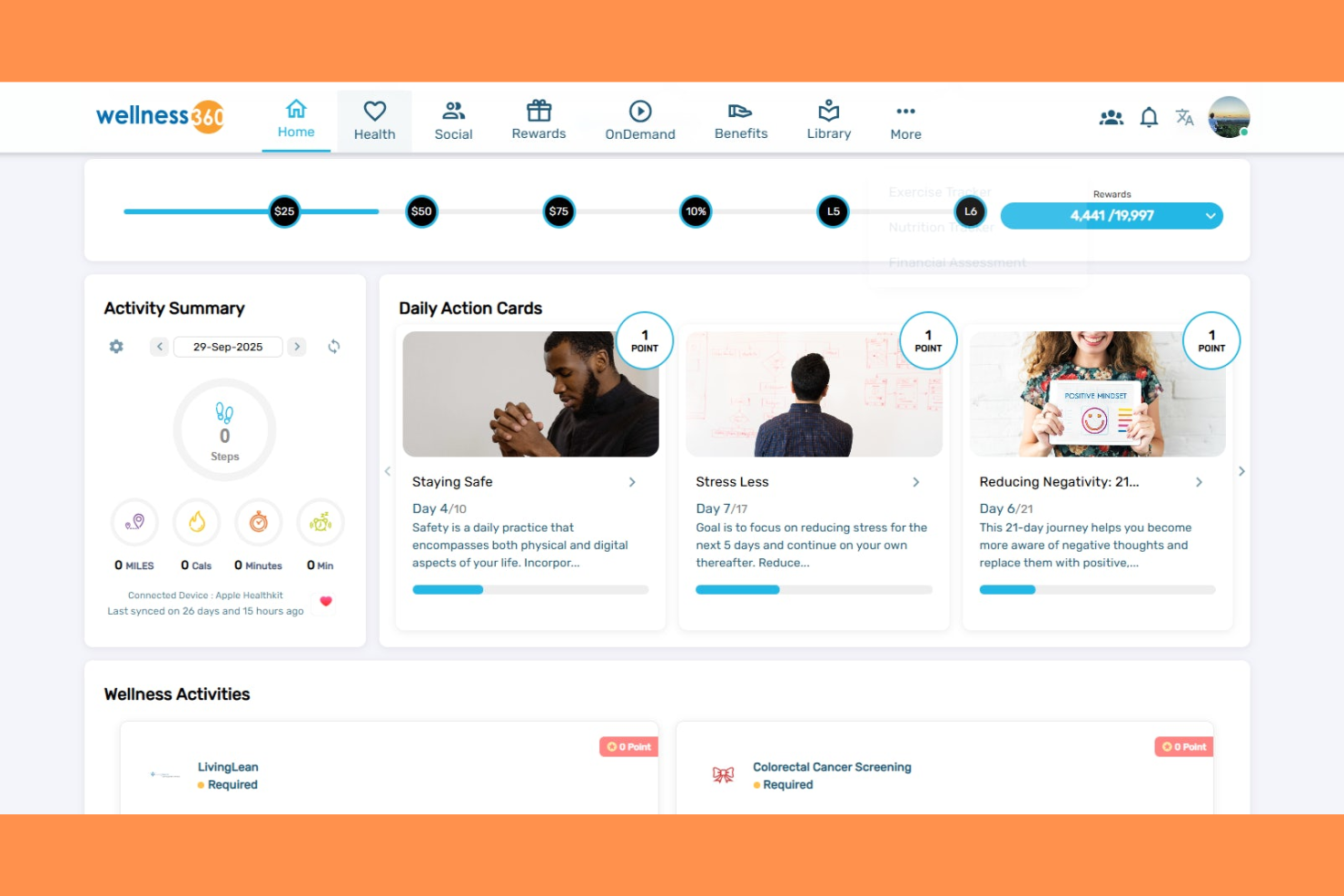
If you’re searching for a wellness platform that adapts to your organization’s unique needs, Wellness360 is worth a look. The software is designed for HR teams and business leaders who want to motivate employees with tailored wellness programs. It helps address challenges like engagement, participation tracking, and managing incentives in one place.
Who Is Wellness360 Best For?
Wellness360 is a strong fit for mid-sized to large organizations seeking customizable wellness programs with built-in incentive management.
Why I Picked Wellness360
I picked Wellness360 because its customizable wellness platform with incentive management stands out for organizations that want to tailor programs to their workforce. The platform lets you design wellness challenges, track participation, and automate rewards, which is especially useful for HR teams managing diverse employee needs. I appreciate that you can set up different incentive structures and monitor engagement through detailed reporting tools. These features make it easier to drive participation and measure the impact of wellness initiatives without relying on a one-size-fits-all approach.
Wellness360 Key Features
Some other features I found valuable for organizations considering Wellness360 include:
- Health risk assessments: Employees can complete digital health risk assessments to identify wellness priorities and track progress.
- Social wellness challenges: The platform supports team-based and individual challenges to encourage friendly competition and engagement.
- Integrated biometric screenings: Wellness360 offers options to schedule, track, and manage biometric screenings directly within the platform.
- Resource library: Users have access to a library of wellness articles, videos, and educational materials to support ongoing learning.
Wellness360 Integrations
Integrations include Fitbit, Apple, Garmin, MyFitnessPal, Strava, Headspace, Google Fit, Samsung Health, Okta, Workday, and more.
What's Free?
Wellness360 offers a free demo so you can explore the platform’s features before committing. There is no free-forever plan, and access to the full platform requires contacting the vendor for pricing and setup.
Pros and Cons
Pros:
- Integrated biometric screenings for health tracking
- Social wellness challenges boost team engagement
- Incentive management supports diverse reward options
Cons:
- Customization may require vendor assistance
- Limited public documentation for administrators

Best for personalized well-being journeys
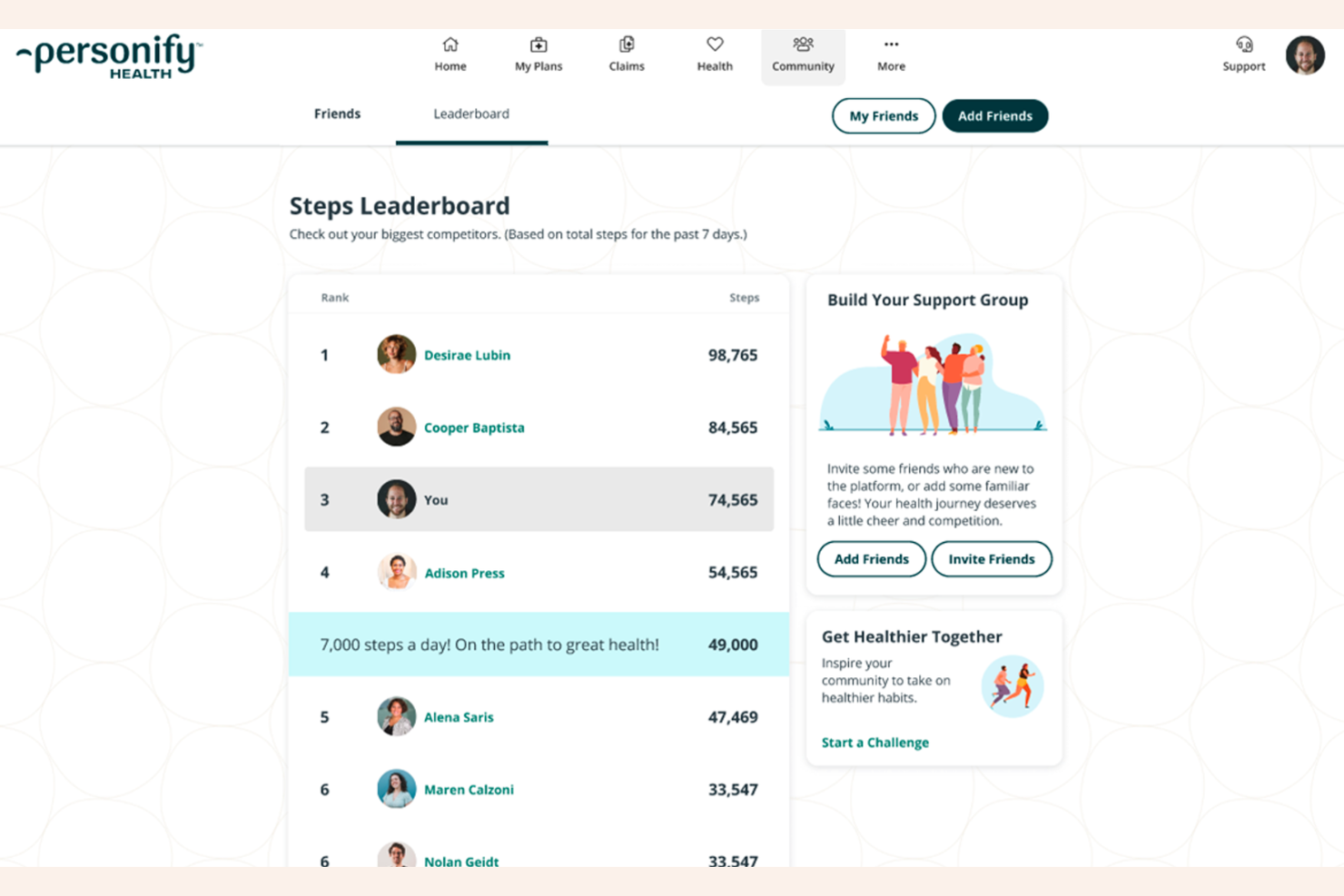
If you’re looking for a wellness platform that adapts to your team’s unique needs, Personify Health is worth considering. This solution is designed for HR leaders and benefits managers who want to deliver personalized, data-driven wellness experiences. It helps organizations address employee health, engagement, and productivity with tailored programs and actionable insights.
Who Is Personify Health Best For?
Personify Health is a strong fit for mid-sized to large organizations seeking to deliver personalized wellness programs across diverse employee populations.
Why I Picked Personify Health
I chose Personify Health because its approach to wellness is highly personalized and data-driven, which stands out in the free corporate wellness software space. The platform uses advanced analytics to tailor wellness programs to each employee’s needs, helping HR teams deliver more relevant and engaging experiences. I appreciate that it offers real-time reporting and actionable insights, making it easier to measure program impact and adjust strategies. These features make Personify Health a strong option for organizations that want to move beyond one-size-fits-all wellness solutions.
Personify Health Key Features
Some other features that make Personify Health appealing for corporate wellness programs include:
- Mobile app access: Employees can participate in wellness activities and track progress directly from their smartphones.
- Incentive management: The platform allows you to set up and manage rewards for healthy behaviors and program participation.
- Health risk assessments: Built-in tools help identify employee health risks and recommend targeted interventions.
- Personalized content library: Users can access a wide range of wellness resources tailored to their interests and needs.
Personify Health Integrations
Native integrations are not currently listed.
What's Free?
Personify Health offers a free demo so you can explore its features before committing. There is no free-forever plan, and access to the full platform requires contacting the sales team for pricing and setup details.
Pros and Cons
Pros:
- Health risk assessments included
- Incentive management for healthy behaviors
- Personalized wellness recommendations for each user
Cons:
- Program design options are somewhat rigid
- Navigation can be difficult for new users

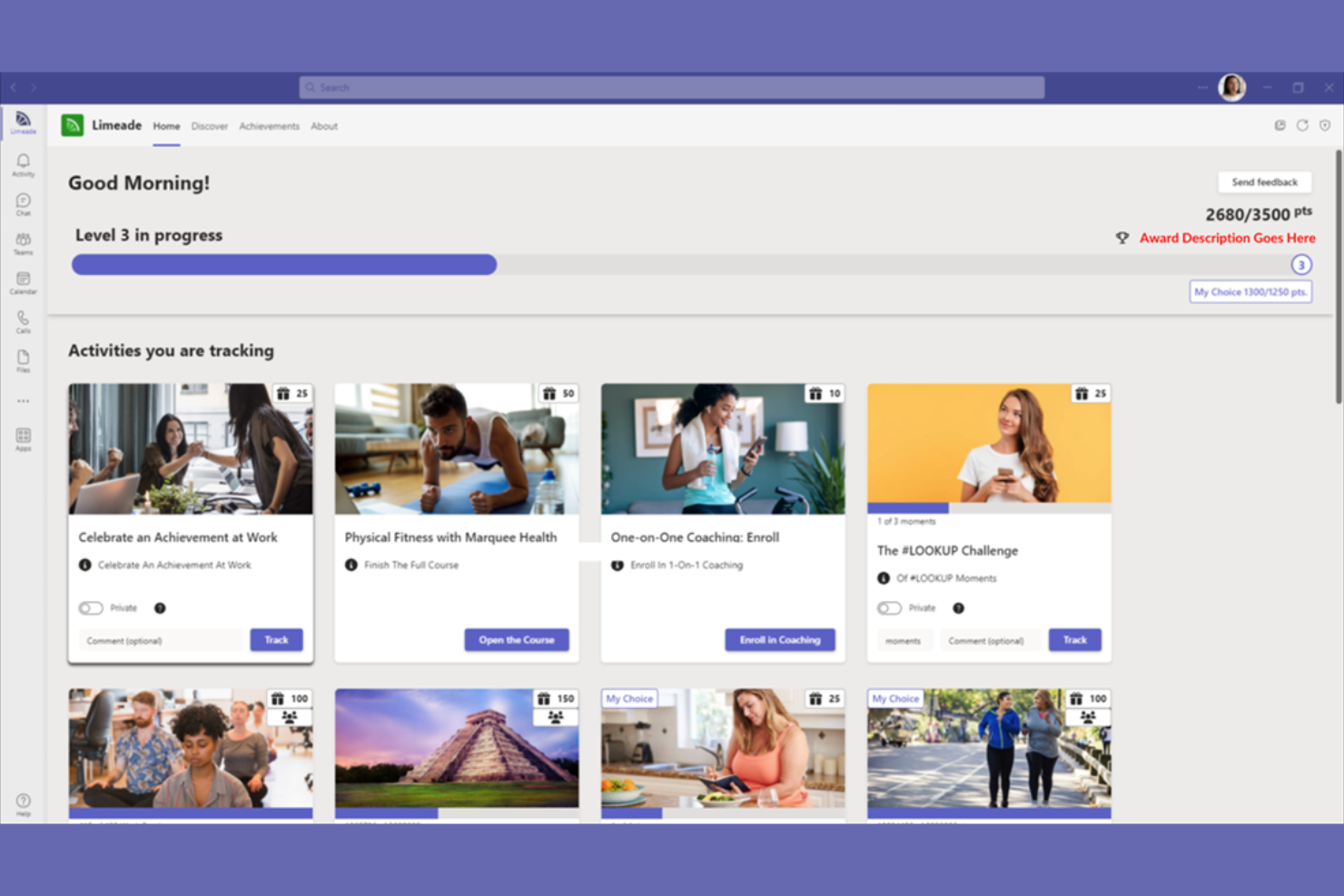
If you’re searching for a wellness platform that addresses the full spectrum of employee well-being, Limeade is worth a closer look. This solution is designed for organizations that want to support physical, emotional, and social health in one place. Limeade can help HR teams foster engagement and create a culture of care across diverse workforces.
Who Is Limeade Best For?
Limeade is a good fit for mid-sized to large organizations seeking to deliver holistic well-being programs across diverse employee populations.
Why I Picked Limeade
I picked Limeade because its focus on holistic well-being programs with engagement analytics stands out in the free corporate wellness software space. The platform brings together physical, emotional, and social health initiatives, allowing HR teams to address multiple dimensions of employee wellness in one place. I appreciate that Limeade includes built-in engagement analytics, so you can track participation and measure the impact of your programs. This combination makes it easier to create targeted wellness strategies and demonstrate their value to leadership.
Limeade Key Features
Some other features in Limeade that support a well-rounded wellness program include:
- Personalized activity challenges: Users can join or create wellness challenges tailored to their interests and goals.
- Social recognition tools: Employees can recognize and celebrate each other’s achievements within the platform.
- Resource library: Access a curated collection of articles, videos, and guides on well-being topics.
- Survey and feedback tools: Collect employee input and measure satisfaction with wellness initiatives.
Limeade Integrations
Native integrations are not currently listed.
What's Free?
Limeade offers a free demo for interested organizations. There is no free-forever plan or limited-time free trial publicly available, and access to the platform requires contacting the company for more details.
Pros and Cons
Pros:
- Provides real-time engagement analytics dashboards
- Includes built-in employee recognition features
- Offers holistic well-being content and activities
Cons:
- Limited self-service options for program customization
- Setup process can be lengthy for large companies

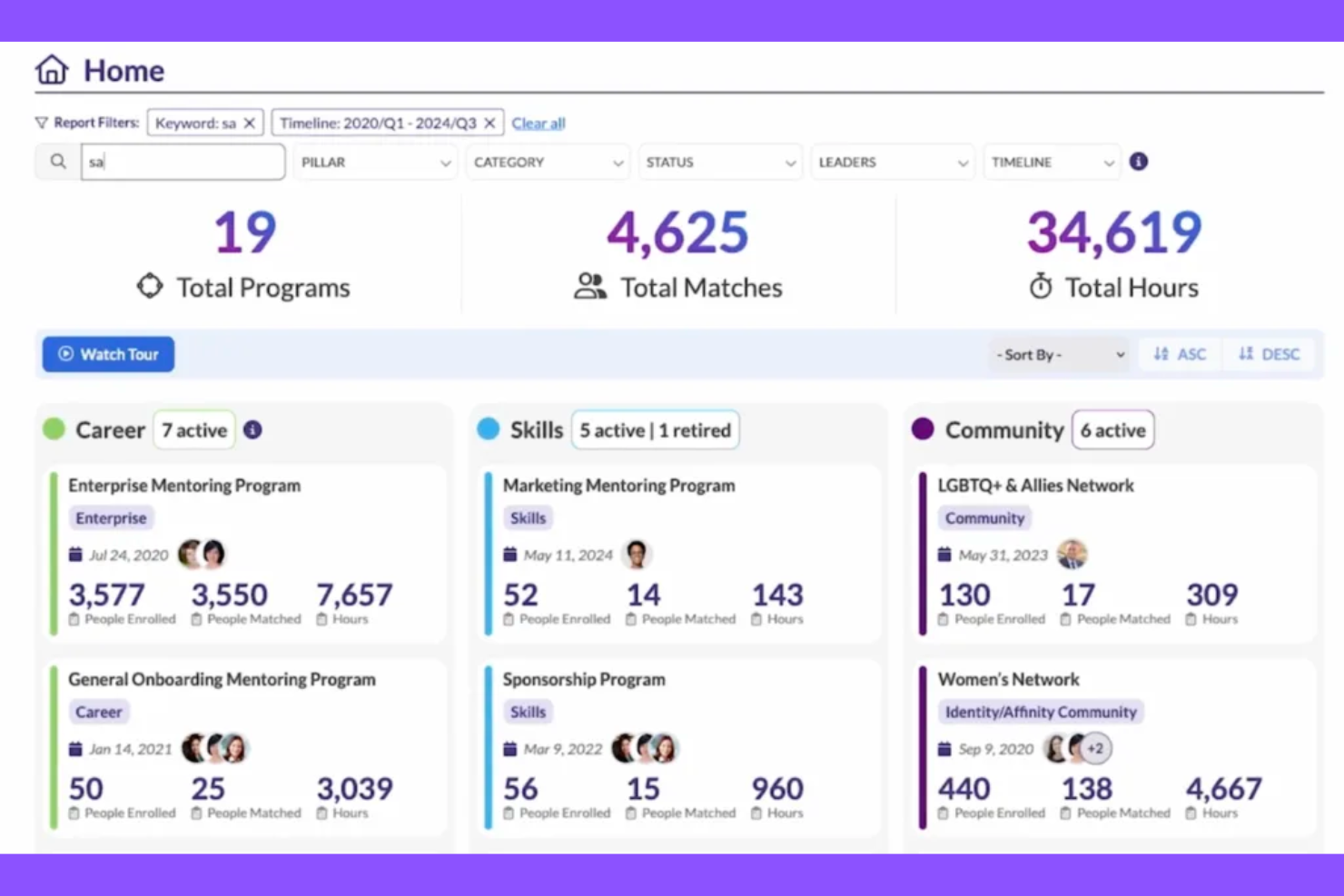
MentorcliQ is a mentoring software platform designed to help organizations build structured employee development programs. It’s a strong fit for HR teams and people leaders who want to foster engagement, learning, and retention through guided mentorship. If you’re looking for a way to connect employees for growth and support, MentorcliQ offers tools to manage and scale mentoring initiatives.
Who Is MentorcliQ Best For?
MentorcliQ is well-suited for HR teams at mid-sized to large organizations that want to formalize and scale employee mentoring programs.
Why I Picked MentorcliQ
I picked MentorcliQ because its structured mentoring programs directly support employee development and well-being, which are core to any corporate wellness strategy. The platform’s matching algorithm helps HR teams pair mentors and mentees based on skills, goals, and interests, making the mentoring process more impactful. I also appreciate the built-in tracking and reporting tools that let you measure engagement and outcomes over time. These features make MentorcliQ a strong choice for organizations that want to foster connection, growth, and support as part of their wellness initiatives.
MentorcliQ Key Features
Some other features that make MentorcliQ useful for HR teams and wellness program managers include:
- Program management dashboard: Lets you oversee multiple mentoring programs and track their progress in one place.
- Resource library: Provides access to mentoring guides, templates, and best practices for participants.
- Automated communications: Sends reminders, updates, and prompts to keep mentors and mentees engaged throughout the program.
- Customizable registration forms: Allows you to tailor participant sign-up forms to collect relevant information for matching and reporting.
MentorcliQ Integrations
Native integrations are not currently listed.
What's Free?
MentorcliQ does not offer a free-forever plan, but you can request a free demo to see the platform in action. There is no mention of a limited-time free trial or free tier for ongoing use.
Pros and Cons
Pros:
- Automated communications keep participants engaged
- Program management dashboard centralizes oversight
- Structured mentor matching supports employee growth
Cons:
- Reporting features may require admin training
- Focuses on mentoring, not holistic wellness
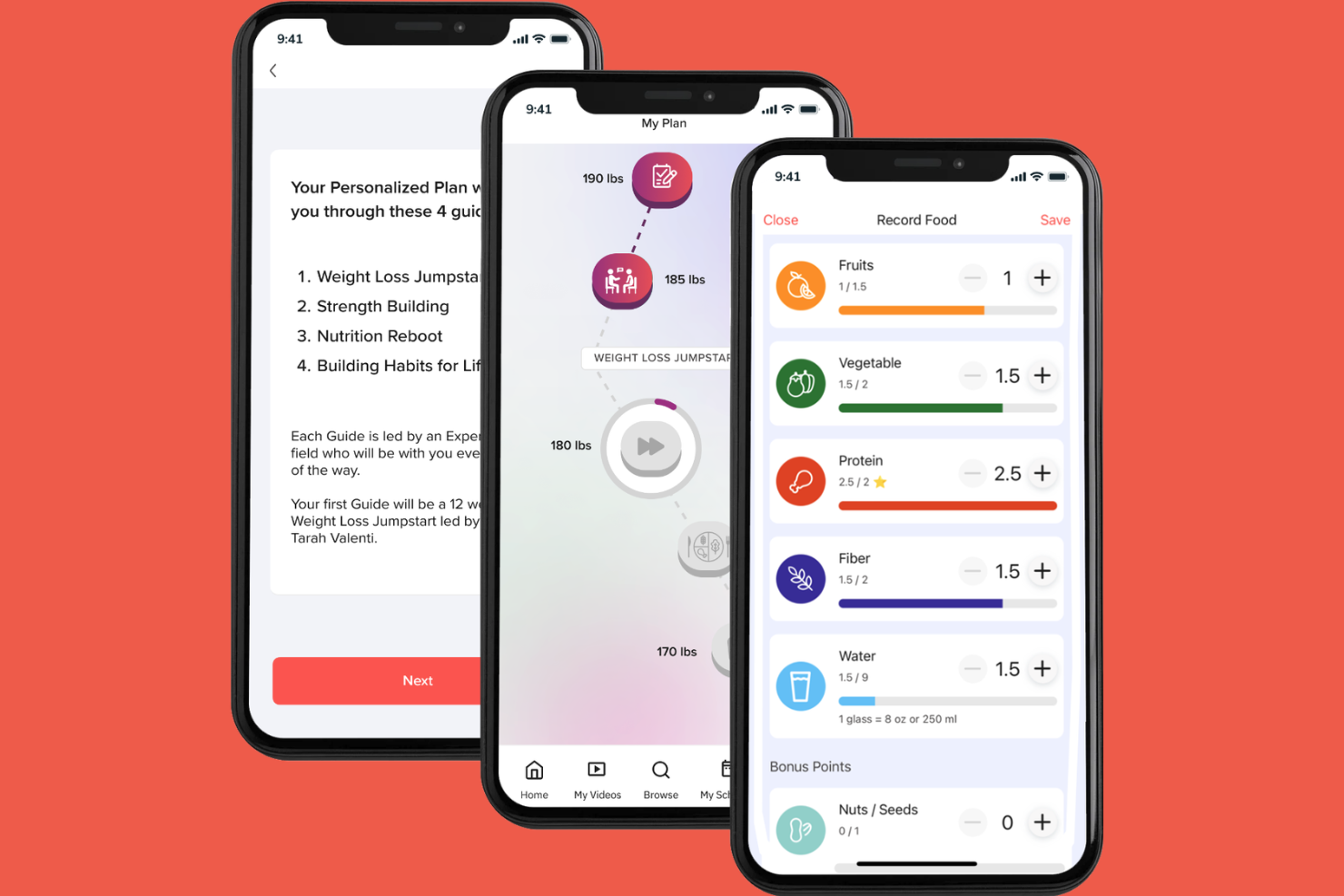
If you’re looking for a wellness platform that brings together fitness, nutrition, sleep, and mental health resources, Grokker is worth considering. It’s designed for HR teams and business leaders who want to offer employees a wide range of on-demand well-being content. Grokker helps organizations address employee stress, burnout, and engagement with a flexible, digital-first approach.
Who Is Grokker Best For?
Grokker suits HR teams at mid-sized to large organizations seeking a digital platform to support holistic employee well-being.
Why I Picked Grokker
I picked Grokker because its holistic well-being platform stands out for organizations that want to offer more than just step challenges or meditation breaks. The on-demand video content covers fitness, nutrition, sleep, and mental health, giving employees a wide range of resources to support their overall well-being. I appreciate that Grokker also includes expert-led programs and community features, which help drive engagement and accountability. For HR teams searching for a free corporate wellness solution that addresses multiple aspects of employee health, Grokker’s approach is both flexible and detailed.
Grokker Key Features
Some other features I found valuable for organizations considering Grokker include:
- Customizable challenges: Create and manage company-wide wellness challenges tailored to your team’s interests.
- Progress tracking dashboard: Monitor employee participation and engagement with real-time analytics.
- Well-being surveys: Collect feedback on employee wellness needs and program effectiveness.
- Resource library: Access a curated collection of articles, recipes, and expert advice for ongoing support.
Grokker Integrations
Integrations include Apple Watch, Fitbit, Garmin, and an API is also available for custom integrations.
What's Free?
Grokker offers a free demo for organizations interested in exploring the platform. There is no free-forever plan, and access to features is limited during the demo period.
Pros and Cons
Pros:
- Provides real-time analytics and reporting
- Offers expert-led programs and challenges
- Wide variety of wellness video content
Cons:
- Topic variety can feel narrow in some areas
- Limited visibility into content before signup


If you’re looking for a wellness platform that uses technology to drive engagement, Vantage Fit is worth considering. It’s designed for HR teams and business leaders who want to motivate employees with activity tracking, gamified challenges, and health assessments. The platform helps organizations encourage healthy habits and boost participation in wellness initiatives.
Who Is Vantage Fit Best For?
Vantage Fit is a strong choice for HR teams at mid-sized and large organizations seeking to run company-wide wellness challenges and reward programs.
Why I Picked Vantage Fit
I picked Vantage Fit because its AI-powered wellness challenges and rewards system stands out for organizations that want to drive engagement through technology. The platform uses AI to personalize wellness journeys and automate challenge recommendations, which helps keep employees motivated and involved. I also appreciate that Vantage Fit includes a built-in rewards catalog, making it easy for HR teams to recognize healthy behaviors. These features make it a strong option for companies seeking a dynamic, tech-driven approach to corporate wellness.
Vantage Fit Key Features
Some other features that make Vantage Fit appealing for HR teams include:
- Health risk assessments: Employees can complete digital health assessments to identify wellness priorities.
- Step and activity tracking: The platform automatically tracks steps and physical activity through connected devices.
- In-app social feed: Users can share achievements and updates with colleagues in a dedicated social space.
- Customizable wellness surveys: HR teams can create and distribute wellness surveys to gather employee feedback.
Vantage Fit Integrations
Integrations include Google Fit, Apple Health, Fitbit, Garmin, Strava, Samsung Health, Slack, Microsoft Teams, and an API for custom integrations.
What's Free?
Vantage Fit offers a free demo for organizations interested in exploring its features. There is no free-forever plan, and access to full functionality or ongoing use requires a paid subscription after the demo period.
Pros and Cons
Pros:
- Includes mindfulness and meditation activities
- Built-in food and calorie tracking
- Wide variety of wellness challenge types
Cons:
- Some features require minimum user count
- No indoor run or treadmill tracking


WellSteps is a wellness platform designed for organizations that want to run tailored health campaigns and track employee participation. It’s a good fit for HR teams in mid-sized businesses or public sector organizations looking for structured wellness programming. The platform helps address challenges like low engagement and the need for measurable wellness outcomes.
Who Is WellSteps Best For?
WellSteps suits mid-sized organizations and public sector employers seeking structured, customizable wellness programs for their teams.
Why I Picked WellSteps
I picked WellSteps because its customizable wellness campaigns and incentive management tools stand out for organizations that want to drive real engagement. The platform lets HR teams design campaigns tailored to their workforce, from step challenges to nutrition programs, and automate reward distribution based on participation. I appreciate that WellSteps includes built-in tracking and reporting, so you can measure the impact of each campaign. These features make it a strong option for companies looking to motivate employees and manage wellness incentives without a lot of manual effort.
WellSteps Key Features
Some other features that make WellSteps useful for HR teams include:
- Health risk assessments: Employees can complete digital assessments to identify personal health risks and track progress over time.
- Wellness content library: Access a range of articles, videos, and resources on nutrition, fitness, and mental health topics.
- Mobile app access: Employees can participate in wellness activities and track progress directly from their smartphones.
- Automated communications: The platform sends reminders, updates, and motivational messages to keep employees engaged throughout campaigns.
WellSteps Integrations
Native integrations are not currently listed.
What's Free?
WellSteps offers a free demo so you can explore the platform’s features before committing. There is no free-forever plan, and access is limited to the demo experience only.
Pros and Cons
Pros:
- Health risk assessments included for all users
- Automated incentive tracking and distribution
- Customizable wellness campaigns for diverse needs
Cons:
- Incentive options may require manual setup
- Limited mental health program depth
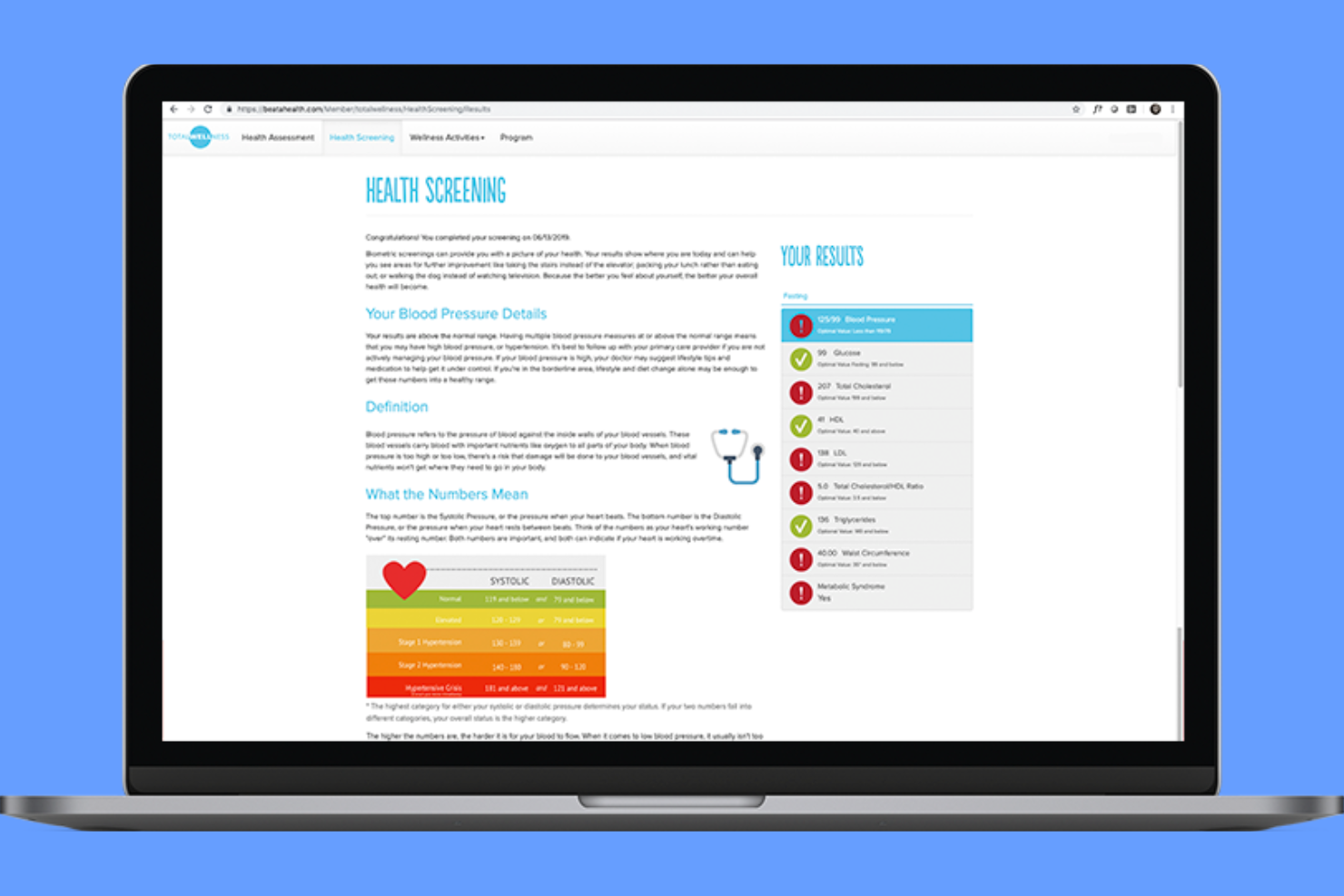
If you’re looking for a wellness partner that specializes in on-site health services, TotalWellness could be a strong fit. The platform is designed for HR teams and organizations that want to offer biometric screenings and flu shot clinics at their workplace. It helps companies simplify the logistics of employee health events and support workforce well-being with professional on-site services.
Who Is TotalWellness Best For?
TotalWellness is a good fit for mid-sized to large organizations seeking onsite biometric screenings and workplace health services across multiple locations.
Why I Picked TotalWellness
I picked TotalWellness because its focus on nationwide onsite biometric screenings sets it apart from other wellness platforms. For HR teams that want to bring health services directly to their employees, TotalWellness coordinates everything from staffing to supplies for on-site events. I appreciate that they also offer flu shot clinics, making it easier for organizations to support preventive care. These services help companies create a culture of health while minimizing the administrative burden on internal teams.
TotalWellness Key Features
Some other features make TotalWellness useful for organizations looking to support employee health beyond onsite screenings:
- Online wellness portal: Employees can access health resources, track participation, and view screening results in a secure online platform.
- Customizable wellness challenges: HR teams can launch step challenges, nutrition programs, and other activities to engage employees year-round.
- Health coaching services: Employees have the option to connect with certified health coaches for personalized guidance.
- Aggregate reporting: Administrators receive group-level data and insights to help evaluate program impact and plan future initiatives.
TotalWellness Integrations
Native integrations are not currently listed.
What's Free?
TotalWellness offers a free demo for organizations interested in its services. There is no free-forever plan, and access to features is limited to the demo experience only.
Pros and Cons
Pros:
- Health coaching services included in programs
- Offers flu shot clinics for employees
- On-site biometric screenings available nationwide
Cons:
- Focuses mainly on onsite services
- Limited digital wellness content compared to peers

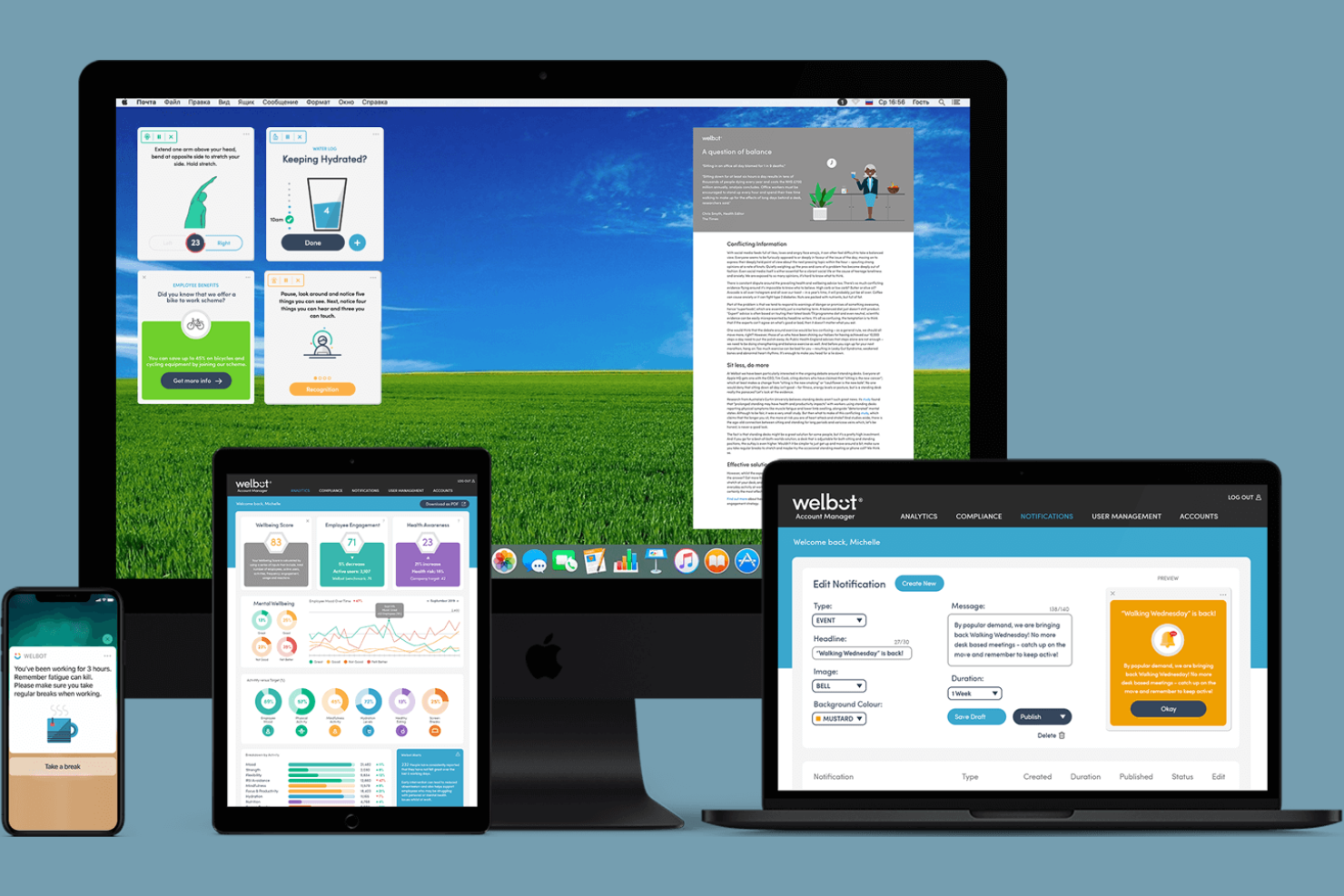
If you’re looking for a wellness platform that nudges employees toward healthier habits throughout the workday, Welbot is worth considering. This tool is designed for organizations that want to support well-being with science-backed, personalized micro-interventions. It’s especially useful for HR teams aiming to address sedentary behavior, stress, and digital fatigue in a proactive way.
Who Is Welbot Best For?
Welbot suits HR teams in mid-sized to large organizations that want to promote daily well-being habits among desk-based employees.
Why I Picked Welbot
I picked Welbot because its approach to employee well-being centers on personalized, science-backed micro-interventions, which is rare among free corporate wellness tools. Welbot delivers targeted nudges throughout the workday, such as movement reminders, mindfulness prompts, and hydration suggestions, all tailored to each user’s needs. This proactive, evidence-based model helps address common workplace issues like inactivity and stress before they become bigger problems. For organizations seeking a wellness solution that goes beyond generic content and actually encourages daily healthy behaviors, Welbot stands out.
Welbot Key Features
Some other features that make Welbot a strong option for workplace wellness programs include:
- Admin dashboard: Lets HR teams monitor engagement and track participation in real time.
- Customizable content modules: Allow organizations to tailor well-being content to their workforce’s needs.
- Anonymous feedback tools: Enable employees to share well-being feedback without revealing their identity.
- Automated well-being surveys: Send regular check-ins to assess employee mood and stress levels.
Welbot Integrations
Native integrations are not currently listed.
What's Free?
Welbot offers a free demo for organizations to explore its features. There is no free-forever plan, and access is limited to a demonstration version rather than ongoing use.
Pros and Cons
Pros:
- Anonymous feedback tools protect employee privacy
- Science-backed interventions encourage healthy daily habits
- Personalized nudges support individual well-being needs
Cons:
- No mobile app for on-the-go access
- Limited language support for global teams
Other Free Corporate Wellness Software
Here are some additional free corporate wellness software options that didn’t make it onto my shortlist, but are still worth checking out:
- Remote Team Wellness
For virtual wellness workshops
- Wellable
For customizable wellness programs
- IncentFit
For activity-based wellness rewards
- Reward Gateway
For well-being and employee recognition
- Headspace
For mindfulness and meditation at work
- TELUS Health
For detailed employee wellness solutions
- Talkspace
For online therapy for teams
- Modern Health
For workplace mental health support
- Sprout Wellness
For employee wellness programs
- Calm Health
For digital mental health programs
- BetterHelp
For virtual employee counselling


How I Evaluate Free Corporate Wellness Software
I split my evaluation into core must-haves—like functional wellness challenges and activity tracking on a genuine free plan—and differentiators like HIPAA compliance and HRIS integrations.
Core Functionality (Table Stakes For This List)
When I'm selecting tools for my list, I rank each one on a scale from 0 (does not offer the functionality) to 5 (excels in this area) for each core functionality listed below. Then, I calculate the tool's total score into a percentage. Each tool needs to achieve a minimum total score of 65% to be considered for inclusion.
- Genuinely Free Access Tier: I check whether the free plan is functional enough to actually run a wellness program—not just a gated demo that nudges you toward a sales call.
- Wellness Challenge Management: I look for the ability to launch step challenges, hydration goals, or mindfulness streaks and evaluate how much flexibility HR teams get to customize them.
- Health Activity Tracking: Whether employees can log workouts manually or sync data from wearables like Fitbit or Apple Health matters—I evaluate the range of input methods available.
- Employee Engagement Mechanics: Points, leaderboards, and peer recognition keep participation alive after launch week, so I look at how each tool motivates ongoing involvement.
- Multi-Pillar Wellbeing Content: I evaluate whether the platform covers more than just fitness—mental health resources, financial literacy, and nutrition content signal a well-rounded offering.
- Wellness Reporting & Analytics: HR teams need to show leadership that a program is working, so I look for dashboards that surface participation rates and engagement trends.
Once I have a list of tools that meet this criteria, I consider what sets each platform apart.
Differentiating Factors (What Sets Vendors Apart)
Here's how I compare and contrast different vendors:
Standout Features
A native mobile app makes a big difference for deskless or remote employees who aren't going to sit at a desktop to log a lunchtime walk. I also evaluate whether platforms offer a configurable rewards marketplace—gift cards, charitable donations, or PTO conversions give HR teams real leverage to sustain participation past the first month. Personalized wellness journeys stand out too. Assessment-based recommendations that adapt content to individual goals keep employees engaged instead of scrolling past generic tips.
Beyond Features
Free plan transparency matters a lot here. I look at whether a vendor clearly discloses user caps and feature restrictions upfront, or buries limitations behind signup walls. Data privacy is another priority—wellness platforms handle sensitive health information, so I check for HIPAA and GDPR compliance along with anonymized reporting that protects individual employees. I also evaluate HRIS and communication integrations. A tool that syncs with BambooHR or pushes challenge reminders through Slack removes the manual admin work that burns out lean HR teams fast.
How to Choose Free Corporate Wellness Software
It’s easy to get bogged down in long feature lists and complex pricing structures. To help you stay focused as you work through your unique software selection process, here’s a checklist of factors to keep in mind:
| Factor | What to Consider |
|---|---|
| Scalability | Will the software support your organization as it grows? Check user limits and upgrade options. |
| Integrations | Does it connect with your HRIS, payroll, or fitness devices? Confirm compatibility with your stack. |
| Customizability | Can you tailor wellness programs, branding, and incentives to your workforce’s needs? |
| Ease of use | Will both admins and employees find it intuitive? Test workflows and navigation before rollout. |
| Implementation and onboarding | How long will setup take, and what resources are needed? Look for clear guides and onboarding support. |
| Cost | Are there hidden fees, upgrade requirements, or user caps? Clarify what’s included in the free plan. |
| Security safeguards | Does the vendor meet your data privacy and security standards? Ask about encryption and compliance. |
| Support availability | What support channels are offered, and during what hours? Consider your team’s needs for assistance. |
What Is Free Corporate Wellness Software?
Free corporate wellness software is a digital platform that organizations use to promote employee health and well-being without incurring licensing fees. These wellness apps often function as an all-in-one solution with features like wellness challenges, gamification, goal setting, activity tracking, and integrations with wearable devices to support physical health and encourage healthier lifestyles. HR teams use them to improve the employee experience, support work-life balance, and reduce absenteeism and healthcare costs. These tools also help foster behavior change, enable peer recognition, and improve the overall work environment, especially for remote work and small business teams. While they offer a cost-effective way to deliver employee benefits and support comprehensive wellness initiatives, free plans may still have limits based on the number of employees, integrations, or advanced features compared to paid options.
Features of Free Corporate Wellness Software
Let’s go over the features commonly found in corporate wellness software, and which ones are usually included in free vs. paid plans.
Typically Free Corporate Wellness Software Features
- Wellness challenges: Create and manage step, hydration, or activity challenges to encourage healthy competition among employees.
- Basic activity tracking: Allow employees to log daily activities such as walking, cycling, or meditation, often through manual entry or basic device sync.
- Participation reporting: Access simple dashboards or reports showing who is engaging with wellness programs and challenge progress.
- Educational resources: Provide articles, videos, or tips on nutrition, exercise, and mental health for employee self-guided learning.
- Team leaderboards: Display rankings for individuals or teams participating in wellness challenges to boost motivation.
- Reminders and notifications: Send automated emails or in-app alerts to prompt participation in wellness activities or upcoming events.
- User profiles: Let employees set up basic profiles to track their own wellness progress and participation history.
- Limited device integration: Connect with a small selection of popular fitness trackers or apps for automatic activity syncing.
Typically Paid Corporate Wellness Software Features
- Customizable program design: Build tailored wellness programs with unique branding, goals, and incentive structures to fit organizational needs.
- Advanced analytics and reporting: Access in-depth data on engagement, health outcomes, and ROI, with exportable and customizable reports.
- Biometric screening integration: Schedule, track, and manage biometric screenings directly within the platform for a holistic view of employee health.
- Incentive management: Automate the distribution of rewards, gift cards, or points based on participation and achievement.
- Mental health support tools: Offer access to counseling, mindfulness apps, or stress management resources integrated into the platform.
- HRIS and payroll integrations: Seamlessly connect with HR systems to sync employee data and automate eligibility or incentive payouts.
- Mobile app with full functionality: Provide a dedicated mobile app with all features, including advanced tracking, notifications, and resources.
- Custom reporting and benchmarking: Generate tailored reports and compare wellness outcomes against industry benchmarks.
- Dedicated account management: Receive personalized support from a vendor representative for program setup, troubleshooting, and optimization.
- Multi-language and global support: Enable wellness programs for international teams with language options and region-specific resources.
Benefits of Free Corporate Wellness Software
Implementing free corporate wellness software provides several benefits for your team and your business. Here are a few you can look forward to:
- Cost savings: Access essential wellness tools and resources without adding to your HR budget or incurring licensing fees.
- Increased employee engagement: Use wellness challenges, leaderboards, and activity tracking to motivate participation and foster a sense of community.
- Simplified program management: Manage wellness initiatives, track participation, and generate basic reports from a single platform.
- Accessible health education: Offer employees curated articles, videos, and tips to support their physical and mental well-being.
- Easy onboarding: Get started quickly with intuitive interfaces, onboarding guides, and minimal setup requirements.
- Scalable for small teams: Support wellness programs for smaller organizations or pilot groups without worrying about user minimums or complex contracts.
- Data-driven insights: Gain visibility into participation trends and engagement levels to inform future wellness strategies.
Costs and Pricing of Corporate Wellness Software
I realize you came to this article looking for the best corporate wellness software options that are available for free. However, since free plans only offer limited features, there's a good chance you'll need to scale your plan up in the future.
The table below summarizes common plans, their average prices, and typical features included in corporate wellness software:
Plan Comparison Table for Corporate Wellness Software
| Plan Type | Average Price | Common Features |
|---|---|---|
| Free Plan | $0 | Basic wellness challenges, activity tracking, limited reporting, access to educational resources, and simple reminders. |
| Personal Plan | $5–$15/user/month | Improved activity tracking, more challenge options, basic incentive management, and limited device integrations. |
| Business Plan | $15–$30/user/month | Customizable programs, advanced analytics, incentive automation, HRIS integrations, and mobile app access. |
| Enterprise Plan | $30–$50/user/month | Biometric screening integration, dedicated account management, custom reporting, global support, and advanced security features. |
Free Corporate Wellness Software FAQs
Here are some answers to common questions about free corporate wellness software:
What limitations should I expect with free corporate wellness software?
Free corporate wellness software usually limits the number of users, integrations, and available features. You may only get basic reporting, a small selection of wellness challenges, and minimal customization options. Advanced analytics, incentive management, and HR system integrations are typically reserved for paid plans.
Can free corporate wellness software integrate with fitness trackers?
Yes, some free corporate wellness software can integrate with popular fitness trackers, but options are often limited. Most free plans support only basic device connections or manual activity entry, while broader integration with multiple devices is usually part of paid tiers.
Is employee data secure in free corporate wellness software?
Yes, reputable vendors use standard security measures even in free plans, such as data encryption and privacy controls. However, always review the vendor’s privacy policy and security documentation to ensure their safeguards meet your organization’s requirements.
How do I transition from a free plan to a paid plan?
Most vendors allow you to upgrade directly within the platform. Your data and user accounts typically carry over, but it’s important to confirm migration details and any additional setup steps with the vendor before upgrading.
Are there hidden costs with free corporate wellness software?
No, most free plans are genuinely free, but you should watch for limits on users, features, or support. Some vendors may charge for add-ons, integrations, or advanced support, so always review the terms before committing.