

10 Best Business Communication Apps Reviewed in 2026

Best Business Communication Apps Shortlist


In the fast-paced world of HR, keeping your team connected and informed is a top priority. The struggle of juggling emails, meetings, huddles, and instant messaging can feel overwhelming. Business communication apps simplify the chaos, making it easier for you and your team to collaborate and stay organized.
I've spent years testing and reviewing these tools, focusing on how they can solve your specific challenges. In this article, I'll share my top picks, highlighting what makes each one stand out. You'll find various perspectives to help you choose the best apps for your team, ensuring you make a well-founded decision. Let's dive into the world of business communication apps and find the perfect solution for you.
Why Trust Our Software Recommendations
Our team has been testing and reviewing software since 2012. As HR experts ourselves, we know how difficult—and important—it is to choose the right software.
For this guide, we evaluated tools using hands-on testing and independent research, scoring tools using our selection criteria. We also draw on insights from industry thought leaders and practicing HR experts.
Our reviews reflect our human editorial judgment, not a sales pitch.
Expert reviewers:
Best Business Communication Apps Summary
This comparison chart summarizes pricing details for my top business communication app selections to help you find the best one for your budget and business needs.
| Tool | Best For | Trial Info | Price | ||
|---|---|---|---|---|---|
| 1 | Best for mobile workforce management | 14-day free trial | From $29/month (billed annually) | Website | |
| 2 | Best for targeted comms & knowledge sharing | Free demo available | Pricing upon request | Website | |
| 3 | Best for secure team chats | 30-day free trial + free demo available | From $2.50/user/month | Website | |
| 4 | Best for small team collaboration | 30-day free trial + free plan available | From $4.50/user/month (billed annually) | Website | |
| 5 | Best for Microsoft 365 users | Free trial available | From $4.00/user/month (billed annually) | Website | |
| 6 | Best for organizing emails and chats | 5 free licenses available | From $29/user/month | Website | |
| 7 | Best for task tracking | Free plan available | From $10.99/user/month (billed annually) | Website | |
| 8 | Best for shift scheduling | Free trial + free plan available | From $1.70/user/month (billed annually) | Website | |
| 9 | Best for community building | Free plan available | From $2.99/user/month | Website | |
| 10 | Best for Google Workspace users | 14-day free trial available | From $4.60/month (billed annually) | Website |
Best Business Communication App Reviews
Below are my detailed summaries of the best business communication apps that made it onto my shortlist. My reviews offer a detailed look at the key features, pros and cons, integrations, and ideal use cases of each tool to help you find the best apps for your business.

Best for mobile workforce management
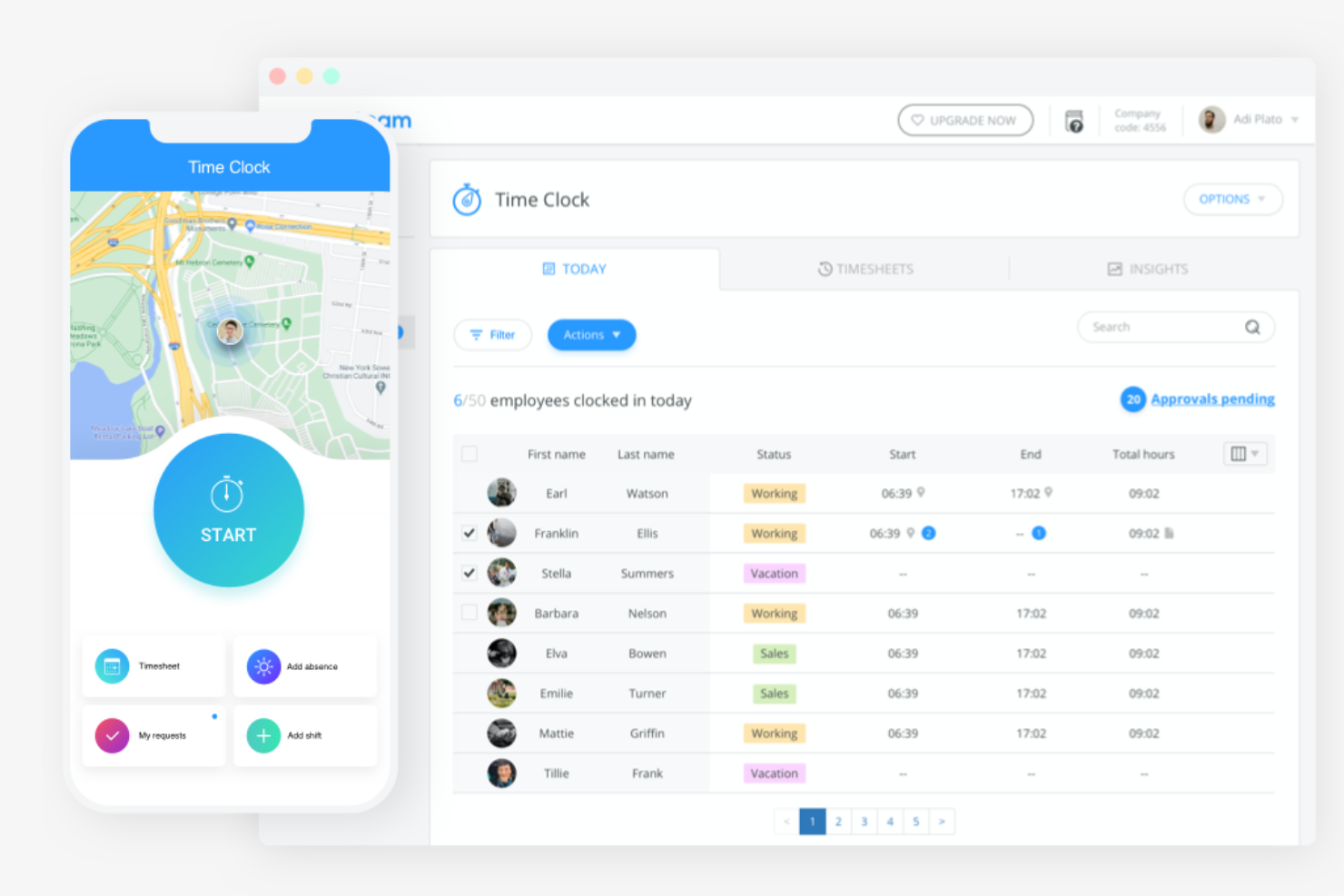
Connecteam is an all-in-one employee management app designed for deskless teams. It's tailored for various industries, including construction, healthcare, and retail, serving both medium and small businesses.
Why I picked Connecteam: It stands out for mobile workforce management, essential for deskless teams. With scheduling and time tracking in one app, your team stays organized on the go. Task management features help assign and monitor tasks efficiently. Communication tools ensure everyone stays informed, enhancing team collaboration.
Standout features and integrations:
Features include time tracking, which lets you monitor hours. Task management allows you to assign and track tasks with ease. Scheduling tools help you plan shifts effectively.
Integrations include Gusto, Paychex, QuickBooks, Zapier, and more.
Pros and Cons
Pros:
- Suitable for small to midsize businesses
- Customizable task management
- Mobile-friendly for deskless teams
Cons:
- Can feel pricey for small teams
- Fewer third-party integrations
New Product Updates from Connecteam

Connecteam Expands Break and Timesheet Controls
Connecteam adds flexible break thresholds, personalized policies, auto-end options, a centralized exceptions report, and improved timesheet issue visibility to help teams manage breaks and timesheets more effectively. For more information, visit Connecteam’s official site.
 .
.
Hub
Best for targeted comms & knowledge sharing

Hub is an employee intranet and internal communications platform designed to centralize company news, resources, and knowledge in one place. It helps internal comms and HR teams move away from scattered email updates by delivering targeted, role-relevant content through a single source of truth. With strong audience targeting, mobile access, and integrations across common workplace tools, Hub supports engagement across desk-based and frontline teams.
Why I Picked Hub
I picked Hub because it helps you reduce information overload by moving away from one-size-fits-all internal messaging. Instead of broadcasting every update to everyone, Hub lets you deliver targeted news and resources using smart tags, so critical information reaches only the teams, locations, or roles that actually need it. While it integrates with Slack and Microsoft Teams to keep updates visible in the tools you already use, its real value is acting as a central, trusted hub where employees can find verified answers on their own, cutting down on repeat questions and email follow-ups.
Hub Key Features
In addition to its integration capabilities, Hub offers a variety of features that support business communication:
- Audience targeting: Broadcast news alerts and automated newsletters tailored by department, location, or seniority.
- Personalized content feed: Provides each employee with a custom homepage showing role-relevant announcements and resources.
- Central knowledge hub: Organizes manuals, FAQs, and policies into one searchable source of truth to reduce repeat questions.
- Must-read compliance tools: Uses click-to-confirm acknowledgments with tracking and automated reminders.
- Employee engagement tools: Supports two-way communication through anonymous polls, pulse surveys, and employee stories.
Hub Integrations
Integrations include Slack, Microsoft Teams, SharePoint, Google Workspace, Confluence, Jira, Box, OneDrive, Microsoft Entra ID, Office 365, OneLogin, and Okta.
Pros and Cons
Pros:
- Centralized knowledge management hub
- Built-in employee engagement tools
- Strong Slack and Teams integrations
Cons:
- Pricing not publicly disclosed
- Limited advanced layout customization
Best for secure team chats

Troop Messenger is a team communication tool designed for businesses prioritizing security. It's popular among industries requiring secure and private messaging, such as government and defense.
Why I picked Troop Messenger: Security is a top priority for Troop Messenger, making it ideal for sensitive communications. End-to-end encryption ensures your messages stay private, and admins can control which contact information users see, such as the CEO's phone number. Self-destructing messages add another layer of confidentiality. Multi-factor authentication protects your team's access, keeping your data safe.
Standout features and integrations:
Features include read receipts, which let you know when messages are read. Group messaging and calling allow for easy team discussions, while remote screen sharing helps you collaborate effectively.
Integrations include Google Drive, Dropbox, LDAP, Zapier, and more.
Pros and Cons
Pros:
- Multi-factor authentication available
- Self-destructing message feature
- Strong encryption for messages
Cons:
- Occasional connectivity issues
- May require technical knowledge

Flock
Best for small team collaboration

Flock is a team chat app and collaboration tool designed for small businesses to improve productivity and employee communication. It helps teams manage conversations, tasks, and projects within one platform, promoting efficient collaboration.
Why I picked Flock: It's ideal for small team collaboration, offering features that foster communication and task management. Channels allow your team to organize discussions by topic or project. The built-in task manager lets you assign and track tasks. Video conferencing helps your team connect without leaving the app.
Standout features and integrations:
Features include shared notes, which allow your team to collaborate on documents in real time. Polls and surveys help collect team feedback quickly. The reminder feature ensures your team never misses important deadlines.
Integrations include Google Drive, Dropbox, Trello, Asana, GitHub, Twitter, Mailchimp, Todoist, Zapier, Zendesk, and more.
Pros and Cons
Pros:
- Supports video conferencing
- Built-in task management
- User-friendly for small teams
Cons:
- Occasional functionality issues
- No message threads

Best for Microsoft 365 users

Microsoft Teams is an all-in-one collaboration platform that integrates with Microsoft 365, providing tools for chat, video conferencing, and file sharing. It's widely used by businesses that rely on Microsoft products, offering a centralized hub for communication and teamwork.
Why I picked Microsoft Teams: Integration with Microsoft 365 is a key benefit, making it ideal for users of Microsoft products. You can schedule huddles directly from Outlook and access shared files through OneDrive. The platform supports large video conferences, ensuring your team stays connected. Customizable channels help organize team discussions effectively.
Standout features and integrations:
Features include virtual backgrounds for video calls, which add professionalism to your meetings. The whiteboard feature allows for real-time brainstorming sessions. Built-in polls help you gather team opinions quickly.
Integrations include Microsoft Outlook, OneDrive, SharePoint, Power BI, Trello, Asana, GitHub, Salesforce, Slack, Zoom, and more.
Pros and Cons
Pros:
- Built-in real-time collaboration tools
- Supports large video meetings
- Easy integration with Microsoft products
Cons:
- Challenging for a deskless workforce
- Overwhelming for new users

Clariti
Best for organizing emails and chats

Clariti is a business productivity app designed to improve team collaboration by consolidating emails, chats, calls, to-dos, and documents into a single platform. It's primarily used by small to midsize businesses and startups to improve productivity and communication.
Why I picked Clariti: Organizing emails and chats is key, and Clariti excels in this area. Workspaces link related items, reducing the time you spend searching for information. This structure helps eliminate silos, making your communication more efficient. It's a strong alternative to traditional messaging apps, offering a unified approach to team collaboration.
Standout features and integrations:
Features include context-based messaging, which keeps your conversations organized by topic. The ability to link emails and chats in one view helps you track communications efficiently. Task management tools let you create and assign to-dos, ensuring your team stays on track.
Integrations include Google Drive, Dropbox, OneDrive, Box, Slack, Trello, Asana, GitHub, Zoom, Microsoft Teams, and more.
Pros and Cons
Pros:
- Reduces information silos
- Offers task management features
- Consolidates multiple communication tools
Cons:
- Basic features limited than rivals
- Can feel slow or laggy sometimes


Asana is a project management tool designed to help teams organize and track their work efficiently. It's used by businesses of all sizes to manage tasks, projects, and workflows within a single platform.
Why I picked Asana: Task tracking is a core feature, allowing you to manage tasks with ease. You can create tasks, set deadlines, and assign them to team members, ensuring everyone knows their responsibilities. The timeline view helps you visualize project progress, making it easier to stay on track. Customizable project templates save you time by standardizing workflows.
Standout features and integrations:
Features include milestones, which let you mark key project achievements and keep your team motivated. The workload feature helps you balance team capacity by showing who is available for more tasks. Automation rules reduce manual work by automating repetitive tasks.
Integrations include Slack, Microsoft Teams, Google Drive, Dropbox, Salesforce, Zoom, GitHub, Trello, Jira, Zapier, and more.
Pros and Cons
Pros:
- Balances team workload efficiently
- Visual timeline for project tracking
- Effective for task management
Cons:
- Complexity in managing large projects
- Limited native time-tracking features

Sling is a scheduling and communication tool designed for businesses that need to manage employee shifts. It's widely used by industries with variable work schedules, such as restaurants and retail, to simplify scheduling and improve team communication.
Why I picked Sling: Shift scheduling is a key feature, making it ideal for businesses with dynamic schedules. It allows you to create and manage shifts, reducing scheduling conflicts. The clock feature helps track employee hours accurately. Messaging capabilities ensure your team stays informed about schedule changes and announcements.
Standout features and integrations:
Features include task management, which helps you assign and oversee tasks efficiently. The newsfeed feature keeps your team updated with company announcements. Reporting tools provide insights into labor costs and employee hours.
Integrations include Toast, Shopify, Gusto, Harbortouch, and more.
Pros and Cons
Pros:
- Supports task management
- Accurate time tracking
- Effective shift management
Cons:
- Mobile UI feels clunky
- Not ideal for large enterprises


Discord is a communication platform designed for creating communities through text, voice, and video channels. It's popular among gamers, creators, and groups looking to build interactive and engaging community spaces.
Why I picked Discord: Community building is a strong suit, offering a platform where users can create and manage their own servers. Voice channels allow for real-time communication, making it easy to host discussions and events. Custom roles and permissions help you manage your community effectively. Bots and automation tools improve interaction and engagement within your server.
Standout features and integrations:
Features include screen sharing, which lets your team present and collaborate visually. The push-to-talk feature reduces background noise during voice chats. Server templates allow you to set up new servers quickly and efficiently.
Integrations include Spotify, Twitch, YouTube, Reddit, Facebook, Twitter, Steam, PayPal, GitHub, Zapier, and more.
Pros and Cons
Pros:
- Provides screen sharing capabilities
- Offers real-time voice communication
- Supports large communities
Cons:
- Not ideal for formal business use
- Can be resource-intensive

Google Chat is an employee communication tool designed for teams using Google Workspace, offering instant messaging and collaboration features. It enables users to engage in direct conversations and group chats to manage projects efficiently.
Why I picked Google Chat: As part of the broader Google ecosystem, this team chat app integrates seamlessly with Google Workspace, making it an ideal choice for teams already invested in Google tools. You can initiate chats directly from Gmail, improving workflow efficiency. The platform supports threaded conversations, helping you keep discussions organized. Real-time collaboration features ensure your team stays connected and productive.
Standout features and integrations:
Features include smart replies, which offer quick response suggestions, saving time in conversations. The search functionality lets you find past messages and files. Custom notifications help you manage your attention and stay focused on priorities.
Integrations include Google Drive, Google Meet, Gmail, Google Calendar, Google Docs, Google Sheets, Google Slides, Google Keep, Google Tasks, Google Forms, and more.
Pros and Cons
Pros:
- Customizable notifications
- Strong search functionality
- Smooth integration with Google Workspace
Cons:
- Restricted file upload size
- Limited third-party integration options
Other Business Communication Apps
Here are some additional business communication app options that didn’t make it onto my shortlist but are still worth checking out:
- Vonage Business Communications
For VoIP services
- Slack
For integrating third-party tools
- Staffbase
For employee engagement
- Basecamp
For remote team collaboration
- ProofHub
For project management integration
- Chanty
For AI-powered task management
- Pumble
For unlimited message history
- Zoom
For video conferencing quality


How I Evaluate Business Communication Apps
I evaluate in two layers: core functionality a tool must have—like persistent chat and video for interviews—and differentiators like HRIS integrations and compliance controls that set the best apart.
Core Functionality (Table Stakes For This List)
When I'm selecting tools for my list, I rank each one on a scale from 0 (does not offer the functionality) to 5 (excels in this area) for each core functionality listed below. Then, I calculate the tool's total score into a percentage. Each tool needs to achieve a minimum total score of 65% to be considered for inclusion.
- Real-Time Messaging: I check for persistent one-on-one and group chat with threading and search, since HR teams need to revisit past conversations around things like benefits questions.
- Voice & Video Conferencing: Tools should include integrated video and voice calling so teams can run remote interviews, onboarding walkthroughs, and employee check-ins without a separate app.
- Channels & Group Spaces: I look for organized public and private channels that let HR segment discussions by topic—like a dedicated space for hiring managers or a private channel for employee relations.
- File Sharing & Collaboration: The ability to share offer letters, handbooks, or training materials directly in a conversation matters, so I evaluate attachment support, previews, and storage integrations.
- Mobile & Desktop Access: Frontline and remote employees often rely on their phones, so I evaluate whether mobile apps maintain full feature parity with the desktop experience.
- Security & Access Controls: I look at encryption standards, role-based permissions, and admin audit trails to confirm the tool can handle sensitive HR conversations and protect employee data.
Once I have a list of tools that meet this criteria, I consider what sets each platform apart.
Differentiating Factors (What Sets Vendors Apart)
Here's how I compare and contrast different vendors:
Standout Features
Broadcast announcements with read receipts and mandatory acknowledgments matter when you're rolling out a new PTO policy and need confirmation every employee saw it. I also evaluate workflow automation bots that can trigger onboarding sequences—like welcome messages, checklist reminders, and intro prompts—without manual effort from your HR team. For organizations with a global workforce, built-in message translation helps HR communicate across languages without relying on external tools.
Beyond Features
HR tech stack integrations are a big differentiator—I check whether a platform connects natively with HRIS and ATS tools like BambooHR or Greenhouse so employee data flows into the communication layer without manual syncing. Compliance and data governance also carry real weight, especially for HR teams handling sensitive conversations around performance issues or accommodations. I look for configurable retention policies, legal hold, and audit logs. Frontline reach is another factor I evaluate: whether warehouse or retail staff can onboard via QR code or SMS without needing a company email.
How to Choose Business Communication Apps
Long feature lists and complex pricing structures can overwhelm you. To help you stay focused as you work through your unique software selection process, here's a checklist of factors to keep in mind:
| Factor | What To Consider |
|---|---|
| Scalability | Will the app grow with your team? Consider whether it can handle increased users or data. Avoid tools that may limit your future growth. |
| Integrations | Does it connect with tools you already use, like CRM or project management software? Ensure smooth workflow integration to avoid disruptions. |
| Customizability | Can you tailor the app to fit your specific needs? Look for customizable dashboards and workflows that align with your processes. |
| Ease of use | Is the interface intuitive enough for quick adoption? A steep learning curve can slow down productivity. Opt for user-friendly designs. |
| Implementation and onboarding | How long will it take to get started? Check if the vendor offers resources such as tutorials and support to ease the transition. |
| Cost | Does the pricing fit your budget? Compare features against price to ensure you get value. Watch for hidden fees or charges for additional users. |
| Security safeguards | Are data protection measures in place? Look for encryption and compliance with standards like GDPR. Security lapses can lead to data breaches. |
| Support availability | Is help available when you need it? Consider the vendor's support hours and channels, like chat or phone, to ensure you can get assistance promptly. |
What Are Business Communication Apps?
Business communication apps are tools designed to facilitate and improve communication within organizations. Professionals in HR, project management, and remote work environments typically use these tools to improve collaboration and productivity. Instant messaging, video conferencing, and file-sharing features help keep teams connected, allowing them to manage tasks and share information efficiently. Overall, these tools simplify communication and coordination, leading to more effective teamwork.
Features
When selecting business communication apps, keep an eye out for the following key features:
- Messaging: Enables real-time text communication, allowing teams to stay connected and share information quickly.
- Video conferencing: Provides face-to-face virtual meetings, promoting collaboration and reducing the need for in-person discussions.
- File sharing: Allows users to exchange documents and files, ensuring everyone has access to the necessary resources.
- Task management: Helps organize and assign tasks, ensuring team members know their responsibilities and deadlines.
- Calendar integration: Manages time effectively by syncing with calendars to schedule meetings.
- End-to-end encryption: Protects sensitive information by securing communications against unauthorized access.
- Customizable notifications: Permit users to tailor alerts to their preferences, minimizing distractions, allowing them to focus on priorities.
- Analytics and reporting: Define communication patterns and usage, helping teams improve efficiency.
- Mobile access: Ensures users can connect and collaborate from any location, supporting remote work and flexibility.
Benefits
Implementing business communication apps provides several benefits for your team and your business. Here are a few you can look forward to:
- Improved collaboration: Real-time messaging and video conferencing features help your team collaborate more effectively, regardless of location.
- Increased productivity: Task management and calendar integration ensure that everyone knows their responsibilities and deadlines, reducing time wasted on coordination.
- Improved security: End-to-end encryption protects sensitive communications, giving you peace of mind about data security.
- Greater flexibility: Mobile access allows your team to stay connected and productive from anywhere, supporting remote and hybrid work models.
- Better organization: File sharing and customizable notifications help your team keep track of important information and reduce distractions.
- Insightful analytics: Reporting features provide awareness of communication patterns, allowing you to identify areas for improvement.
- Cost efficiency: Consolidating communication tools helps reduce expenses and simplifies your tech stack.
Costs & Pricing
Selecting business communication apps requires an understanding of the various pricing models and plans available. Costs vary based on features, team size, add-ons, and more. The table below summarizes common plans, their average prices, and typical features included in business communication app solutions:
Plan Comparison Table for Business Communication Apps
| Plan Type | Average Price | Common Features |
|---|---|---|
| Free Plan | $0 | Basic messaging, limited file sharing, and basic task management. |
| Personal Plan | $1.70-$29/user/month | Improved messaging, video calls, increased storage, and basic integrations. |
| Business Plan | $3.40-$40/user/month | Advanced collaboration tools, extensive integrations, custom notifications, and analytics. |
| Enterprise Plan | $8.55+/user/month | Full feature set, dedicated support, advanced security, and customization options. |
Business Communication Apps FAQs
Here are some answers to common questions about business communication apps:
What are the system requirements for business communication apps?
Most business communication apps run on multiple operating systems, including Windows, macOS, iOS, and Android. You’ll need a reliable internet connection and an up-to-date browser or app version. Check the specific app’s website for detailed system requirements. Some apps may require specific hardware for optimal performance, such as a webcam for video chats.
Can business communication apps integrate with other software?
Yes, most business communication apps offer integration with other software to increase productivity. You can connect with tools such as CRM systems, project management apps, and cloud storage services. Look for apps that support integrations with the tools your team typically uses to ensure a smooth workflow.
Are business communication apps secure?
Yes, security is a priority for most business communication apps. They often include features such as end-to-end encryption, two-factor authentication, and compliance with data protection standards. Always review an app’s security measures before implementing it to ensure it meets your organization’s needs.
How do I choose the right business communication app for my team?
Start by assessing your team’s needs, such as the size of your team, the required features, and your budget. Consider usability, integration capabilities, and customer support options. Trial periods and demos can help you choose the best app for your workflow before committing.
What's Next:
If you're in the process of researching business communication apps, connect with a SoftwareSelect advisor for free recommendations.
You fill out a form and have a quick chat where they get into the specifics of your needs. Then you'll get a shortlist of software to review. They'll even support you through the entire buying process, including price negotiations.