

10 Best Employee Communication Apps Reviewed in 2026

Best Employee Communication Apps Shortlist


In the fast-paced world of HR management, keeping your team connected can feel like a juggling act. You're tasked with ensuring everyone is on the same page, but traditional methods just don't cut it anymore. That's where employee communication apps come in.
I've spent time diving into these internal communication tools to understand how they can truly make a difference for your team. From boosting collaboration to making sure everyone's voice is heard, these apps address the challenges you face daily.
In this article, I'll share my top picks after thorough testing and analysis. You'll discover which app suits your team's unique needs. Let's explore how these solutions can support communication in your workplace.
Why Trust Our Software Reviews
Our team has been testing and reviewing software since 2012. As HR experts ourselves, we know how difficult—and important—it is to choose the right software.
For this guide, we evaluated tools using hands-on testing and independent research, scoring tools using our selection criteria. We also draw on insights from industry thought leaders and practicing HR experts.
Our reviews reflect our human editorial judgment, not a sales pitch.
Expert reviewers:
Employee Communication Apps Comparison Table
This comparison table summarizes pricing details for my top employee communication app selections:
| Tool | Best For | Trial Info | Price | ||
|---|---|---|---|---|---|
| 1 | Best for mobile-first teams | 14-day free trial | From $29/month (billed annually) | Website | |
| 2 | Best for AI-driven employee engagement | Free demo available | Pricing upon request | Website | |
| 3 | Best for HRIS-synced audience targeting | Free demo available | Pricing upon request | Website | |
| 4 | Best for policy sign-off and compliance tracking | Free trial available | From $75/month | Website | |
| 5 | Best for all-inclusive pricing and free onboarding | Free demo available | Pricing upon request | Website | |
| 6 | Best for recognition-driven culture comms | Free demo available | Pricing upon request | Website | |
| 7 | Best for frontline workers | Free trial available | From $3.75/user/month (billed annually) | Website | |
| 8 | Best for internal comms analytics and AI insights | 14-day free trial + free demo available | Pricing upon request | Website | |
| 9 | Best for regulated-industry broadcast compliance | 14-day free trial | From $9/user/month | Website | |
| 10 | Best for leadership communications | Free demo available | Pricing upon request | Website |

Best Employee Communication App Reviews
Below are my detailed summaries of the best employee communication apps that made it onto my shortlist. My reviews offer a detailed look at the key features, pros & cons, integrations, and ideal use cases of each tool to help you find the best one for you.

Best for mobile-first teams
My Evaluation Score
- Engagement Analytics
- 3/5
- Mobile Employee Access
- 5/5
- Company-Wide Broadcasts
- 5/5
- Content & Media Sharing
- 5/5
- Multi-Channel Messaging
- 5/5
- Employee Directory & Segmentation
- 4/5
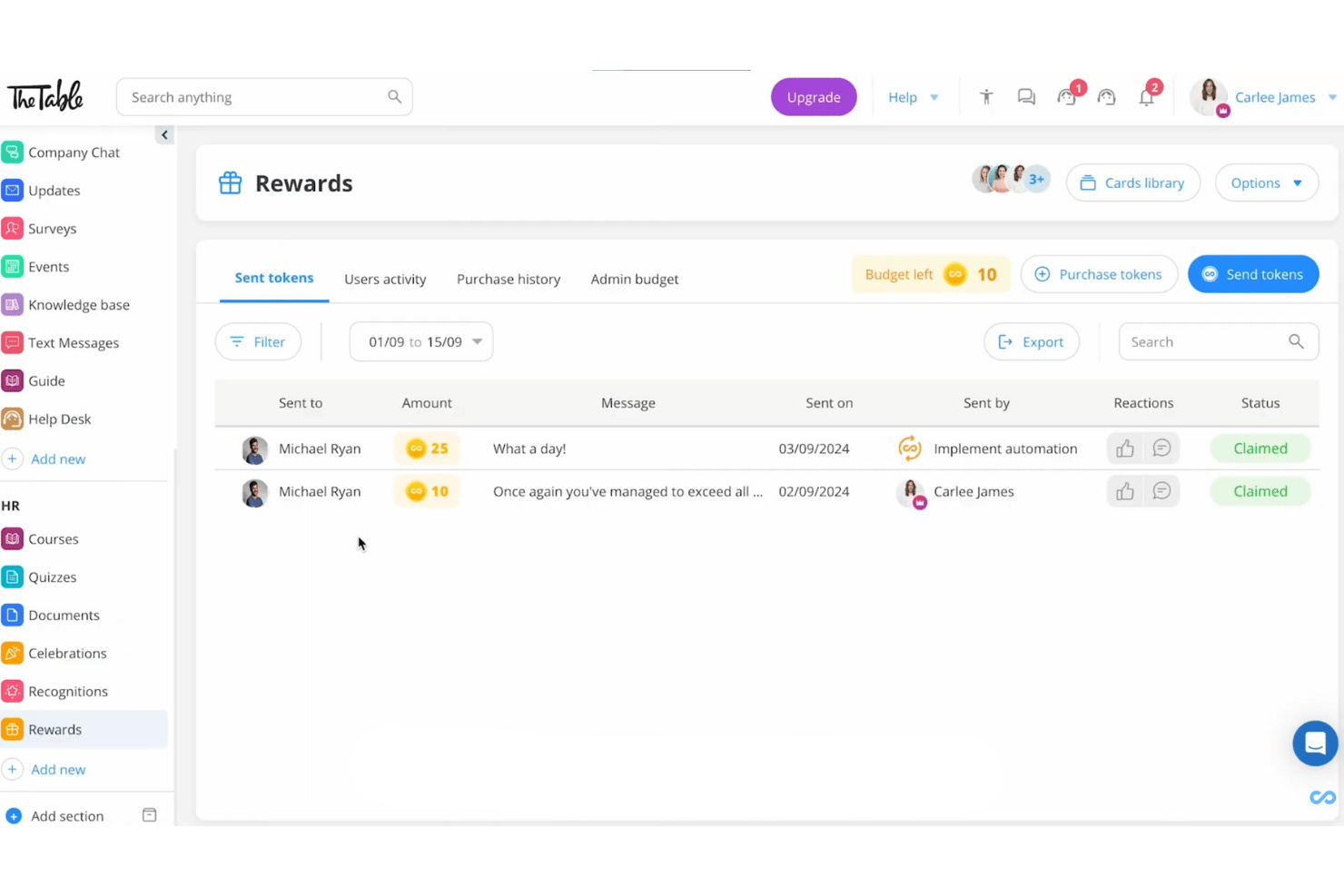
Connecteam is a mobile-first employee communication app built for deskless and frontline teams, offering chat, company-wide broadcasts, a knowledge base, surveys, recognition tools, and HR content distribution in a single platform.
Who Is Connecteam Best For?
Connecteam is a strong fit for frontline and deskless teams in industries like hospitality, retail, construction, and healthcare, where most employees work without a corporate email or desk.
Why I Picked Connecteam
Connecteam earns its spot on my shortlist because it's purpose-built for the one scenario most communication tools struggle with: reaching workers who have no corporate email, no desk, and no time to log into a browser. I love that employees can join via QR code or phone number, and the Updates feed delivers segmented broadcasts with AI auto-translation, so a multilingual construction or hospitality crew all receive messages in their own language without any extra admin work.
Connecteam Key Features
- Read & Sign workflows: Employees can review and e-sign policy documents or compliance materials directly in the app, with admin tracking of completion status.
- Knowledge Base: A centralized content repository where teams can store and access SOPs, handbooks, and company policies from any mobile device.
- Pulse surveys and polls: Admins can send anonymous or standard surveys to collect employee feedback and sentiment from frontline workers on mobile.
- Token-based recognition and rewards: Managers and peers can send recognition with redeemable reward tokens, which employees can exchange for gift cards from major vendors.
Connecteam Integrations
Connecteam offers native integrations with ADP Workforce Now, BambooHR, Gusto, QuickBooks Online, Xero, Paychex Flex, Google, Okta, and Microsoft Azure Active Directory, plus an open API and Zapier.
Pros and Cons
Pros:
- Read receipts and e-signatures for compliance needs
- Multilingual auto-translation for announcements and chat
- Onboards frontline workers without email addresses
Cons:
- Reporting lacks dashboards and sentiment analysis
- No offline mode for low-connectivity sites
New Product Updates from Connecteam

Connecteam Expands Break and Timesheet Controls
Connecteam adds flexible break thresholds, personalized policies, auto-end options, a centralized exceptions report, and improved timesheet issue visibility to help teams manage breaks and timesheets more effectively. For more information, visit Connecteam’s official site.
 .
.
Best for AI-driven employee engagement
My Evaluation Score
- Engagement Analytics
- 5/5
- Mobile Employee Access
- 5/5
- Company-Wide Broadcasts
- 5/5
- Content & Media Sharing
- 4/5
- Multi-Channel Messaging
- 5/5
- Employee Directory & Segmentation
- 5/5
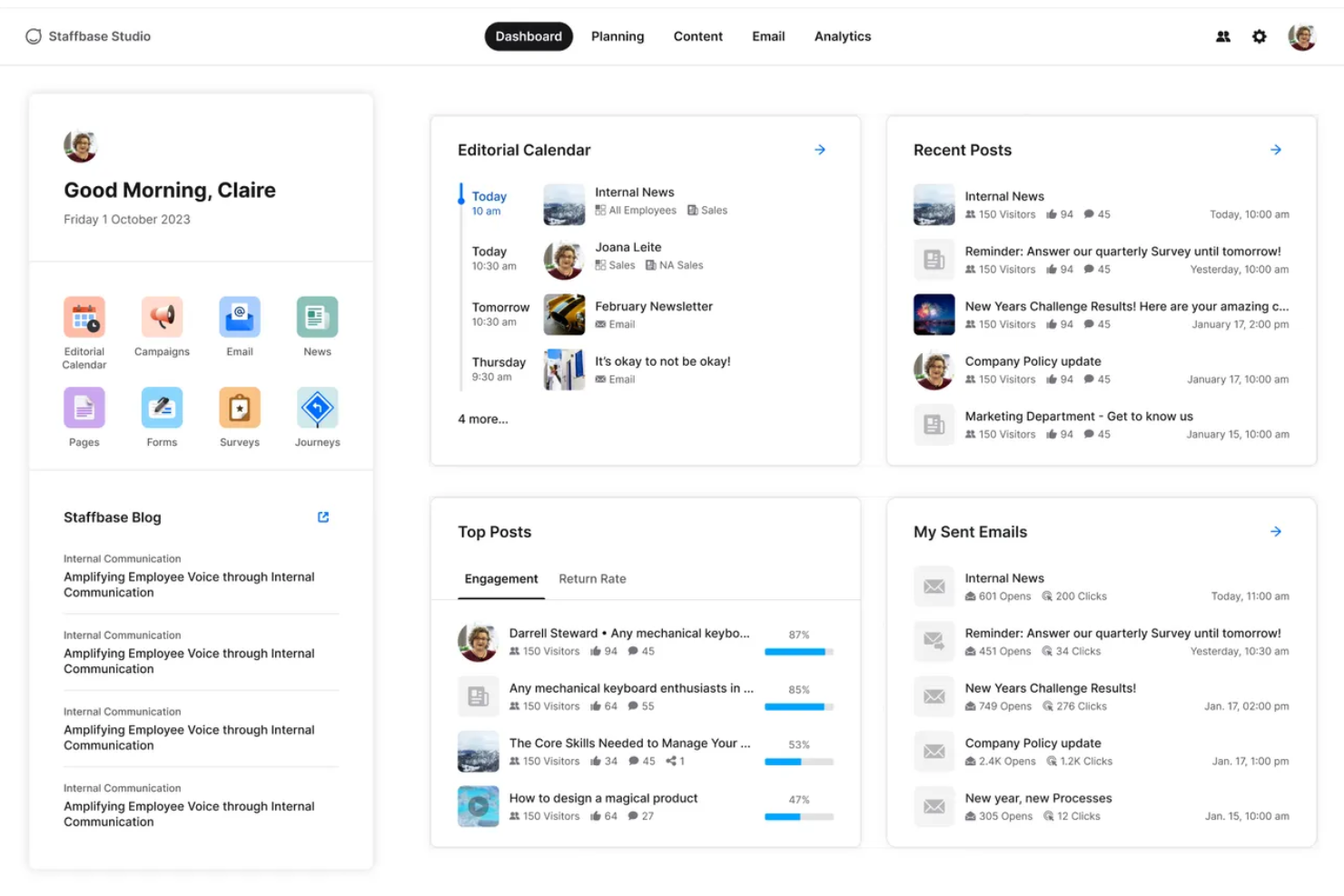
Staffbase is an employee communication platform that brings together a branded mobile app, multi-channel messaging, an editorial intranet, AI writing tools, and engagement analytics into one system built for both desk-based and frontline workers.
Who Is Staffbase Best For?
Staffbase is a strong fit for mid-size to enterprise organizations with large frontline or deskless workforces that need to reach every employee through a single, AI-powered communication platform.
Why I Picked Staffbase
Staffbase earns its spot on my shortlist because AI isn't a bolt-on feature here—it's woven into every layer of the platform. I'm particularly impressed by Companion, which helps communicators draft, rewrite, and adjust tone directly in the editorial interface, and Navigator, an employee-facing chatbot that answers HR questions using only verified company content. The auto-translation across 110+ languages keeps analytics unified in a single post, which I think is a genuine edge for global teams.
Staffbase Key Features
- Mandatory read acknowledgments: Employees confirm they've read specific posts, generating a compliance-grade audit trail for policy and safety communications.
- Pulse surveys: Built-in surveys let employees respond directly from the mobile app, with results tracked via participation metrics and NPS scores.
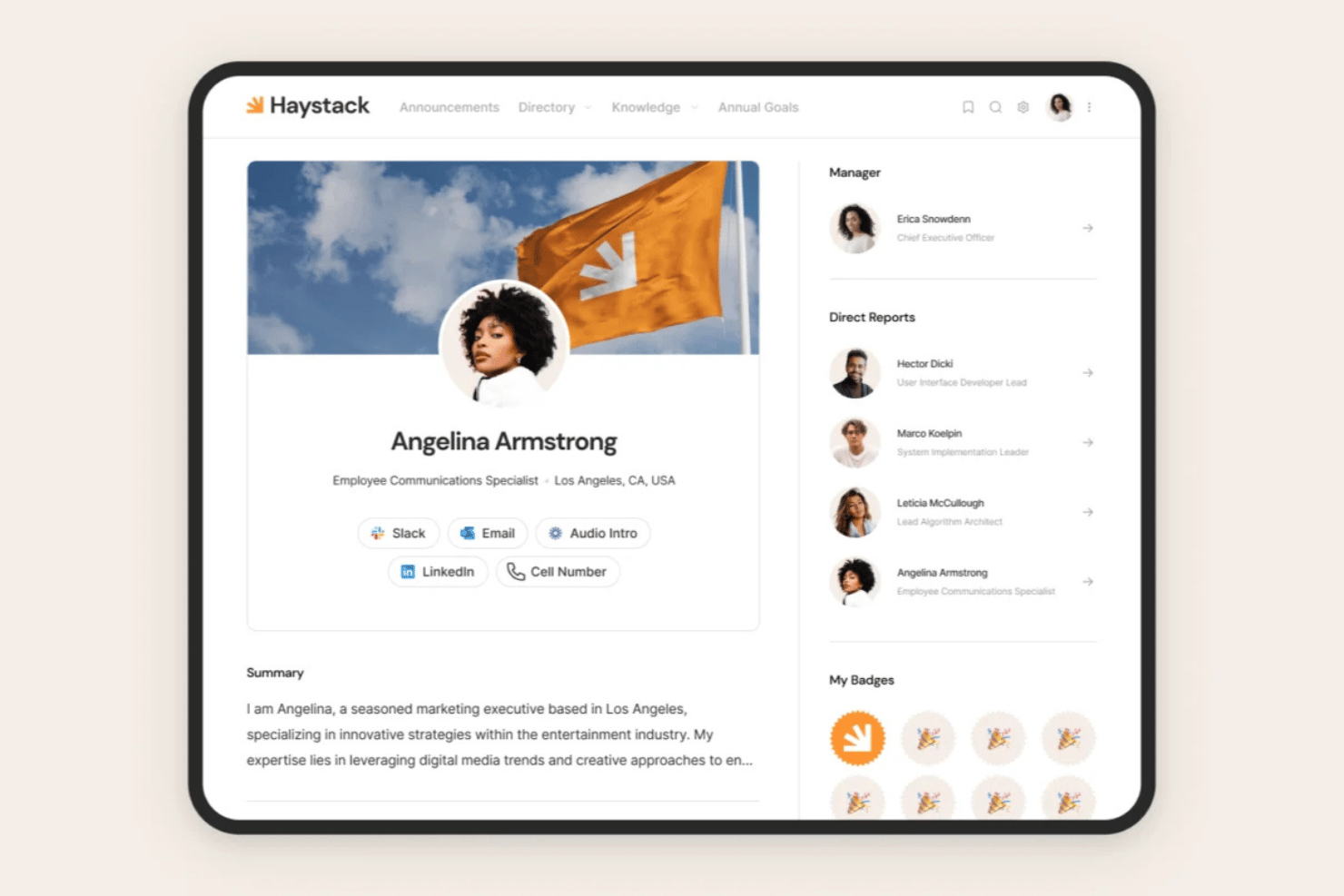
- Employee directory with org chart: A searchable directory with customizable profiles and org chart visualization supports people discovery across large, distributed teams.
- Microsoft 365 integration: Staffbase connects natively with Teams, SharePoint, and Microsoft Copilot, surfacing company content directly within the tools employees already use.
Staffbase Integrations
Staffbase offers native integrations with Workday, ADP Workforce, SAP, Oracle, Microsoft 365, Okta, Google Drive, and ServiceNow. It also provides open APIs, an SDK, and MCP Server support for custom integrations and AI agent connections.
Pros and Cons
Pros:
- Multilingual posts unify analytics and feedback
- Native mobile app offers offline capability
- AI embedded in writing and analytics tools
Cons:
- Email content design options are limited
- No transparent or self-serve pricing available

Haystack
Best for HRIS-synced audience targeting
My Evaluation Score
- Engagement Analytics
- 4/5
- Mobile Employee Access
- 5/5
- Company-Wide Broadcasts
- 5/5
- Content & Media Sharing
- 5/5
- Multi-Channel Messaging
- 4/5
- Employee Directory & Segmentation
- 5/5
Haystack is an employee communication and intranet platform that combines multi-channel broadcasts, a social intranet feed, peer recognition, knowledge management, and HRIS-synced audience targeting in one place.
Who Is Haystack Best For?
Haystack is a strong fit for HR and internal communications teams managing mixed workforces—where some employees are desk-based and others aren't—across organizations with complex HRIS environments.
Why I Picked Haystack
I've included Haystack in my top picks because its HRIS-synced audience targeting is genuinely best-in-class. With 50+ HRIS integrations and SCIM auto-provisioning, distribution lists update automatically when employees change roles or locations. I also love the Must Read feature, which tracks mandatory acknowledgment and sends follow-up reminders, so no critical message slips through in a mixed desk and frontline workforce.
Haystack Key Features
- Multi-channel broadcasts: Compose one message and publish it simultaneously across email, SMS, push notifications, Slack, Microsoft Teams, and the in-app feed.
- Social intranet feed: A social-media-style feed with threaded comments, emoji reactions, and user-generated posts for two-way communication between employees and leadership.
- AI-powered translation: Automatically translate content into 50+ languages, making communications accessible to multilingual and globally distributed workforces.
- Emergency Alerts: Push urgent, time-sensitive messages to employees via SMS without requiring a Wi-Fi connection or corporate email address.
Haystack Integrations
Haystack offers 50+ integrations, including Workday, BambooHR, ADP, UKG, Slack, Microsoft 365, Confluence, SharePoint, and Okta. Its open API supports custom integrations, while SCIM and SAML enable automated provisioning and single sign-on.
Pros and Cons
Pros:
- AI translation covers over 50 languages
- HRIS-synced audience targeting updates automatically
- Mobile app supports frontline workers without email
Cons:
- No native direct messaging or team chat
- Sentiment analytics require add-on purchase

Jostle
Best for policy sign-off and compliance tracking
My Evaluation Score
- Engagement Analytics
- 3/5
- Mobile Employee Access
- 2/5
- Company-Wide Broadcasts
- 5/5
- Content & Media Sharing
- 4/5
- Multi-Channel Messaging
- 3/5
- Employee Directory & Segmentation
- 4/5
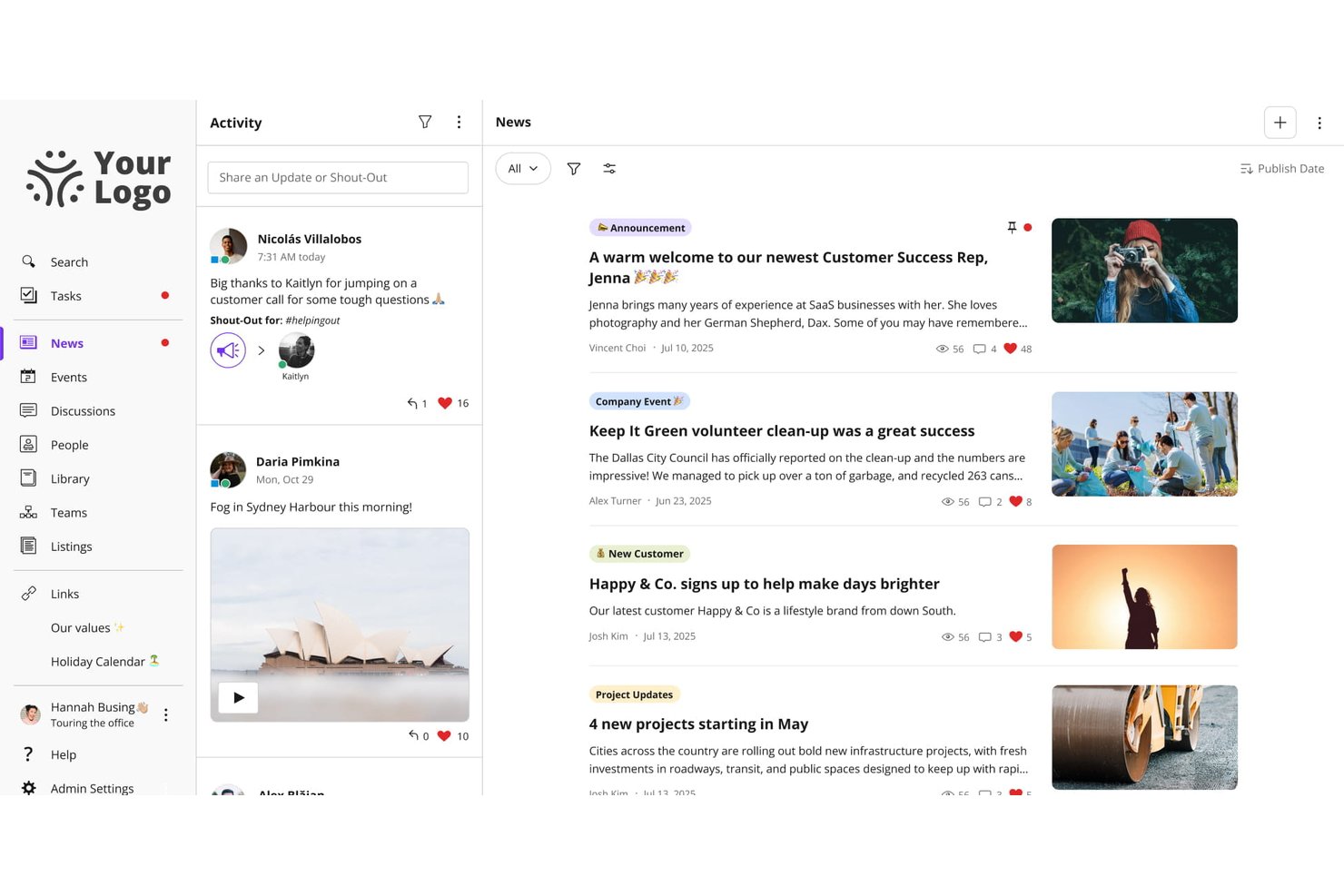
Jostle is an employee communication platform built around a company news feed, a searchable document library, and group messaging, with tools for targeted broadcasting, policy sign-off, and employee recognition.
Who Is Jostle Best For?
Jostle is a strong fit for HR and internal communications teams that need a structured way to distribute policies, track sign-off, and keep a well-organized document library.
Why I Picked Jostle
Jostle earns its spot on my shortlist because of how seriously it treats policy compliance. The Sign-Off feature lets you attach a mandatory read confirmation to any News post or Library document, then pull a timestamped report showing exactly who acknowledged it and when—which is genuinely useful during audits or regulatory reviews. I also like that Library topics have named owners and scheduled review cycles, so policies don't quietly go stale.
Jostle Key Features
- Targeted news publishing: Publish company updates to specific teams, departments, locations, or employee types, with audiences that update automatically as roles change.
- JostleAI knowledge assistant: An AI tool that answers employee questions using only the Library documents each user is permitted to see, citing its sources.
- Weekly AI digest: A personalized email digest written by AI and sent weekly, reaching employees who rarely log in directly to the platform.
- HRIS sync and auto-provisioning: User profiles and groups sync with HR systems like Workday, BambooHR, and ADP, so new hires get the right content access from day one.
Jostle Integrations
Jostle offers documented integrations with Google Workspace, Microsoft 365, Slack, Bonusly, Workday, BambooHR, ADP Workforce Now, UKG, and BI tools including Power BI. It also supports API and SFTP sync for custom HRIS connections, plus about 50 Zapier connections.
Pros and Cons
Pros:
- Library reviews help prevent stale policies
- Targeted broadcasts reach changing employee groups
- Policy sign-offs produce timestamped compliance records
Cons:
- Mobile app reliability draws reviewer complaints
- Frontline account setup requires manual workarounds

Hub
Best for all-inclusive pricing and free onboarding
My Evaluation Score
- Engagement Analytics
- 4/5
- Mobile Employee Access
- 2/5
- Company-Wide Broadcasts
- 4/5
- Content & Media Sharing
- 5/5
- Multi-Channel Messaging
- 4/5
- Employee Directory & Segmentation
- 4/5
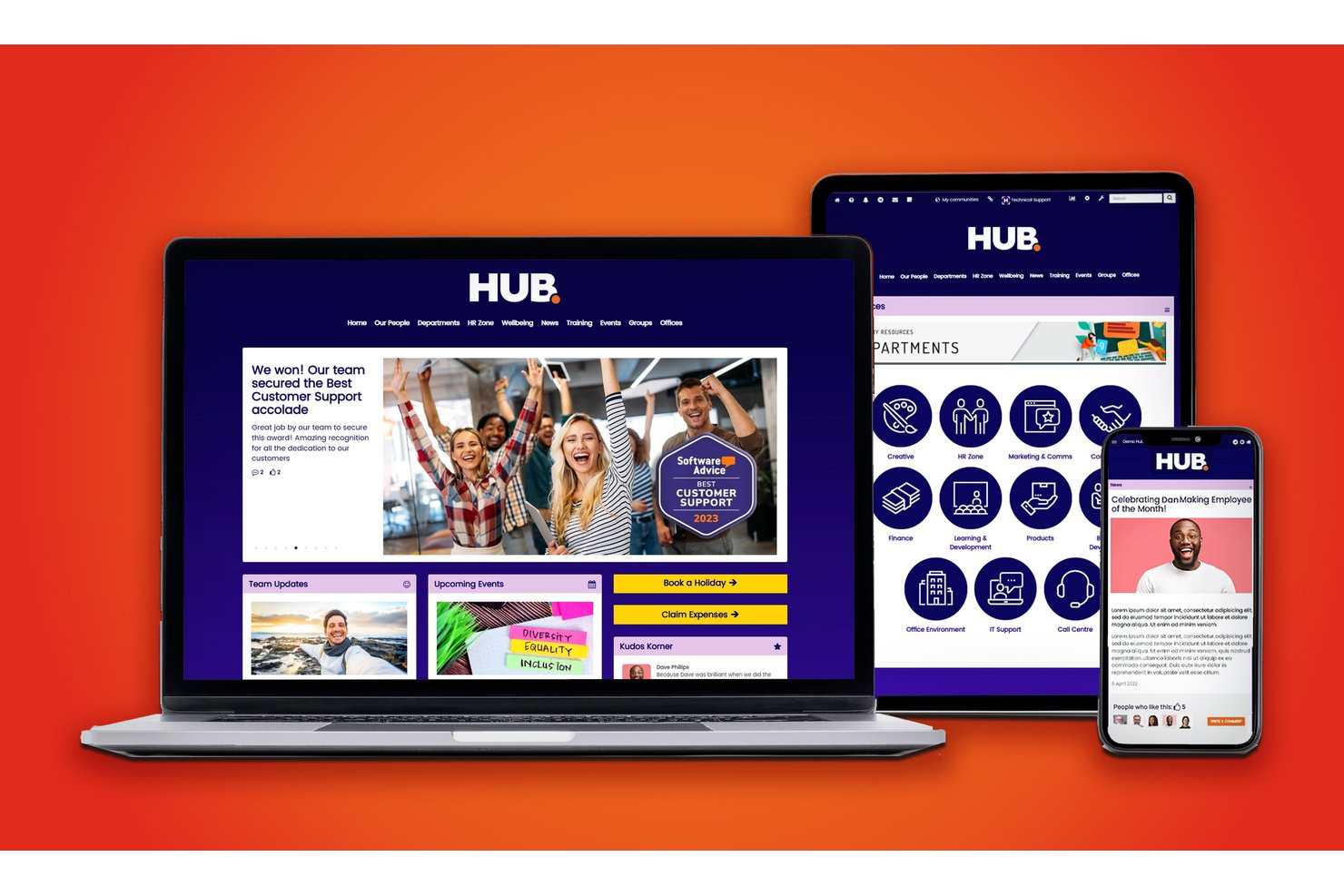
HUB is an intranet and employee communication platform that combines targeted news broadcasting, two-way engagement tools, AI-assisted content, smart workflows, and analytics into a single, no-code environment for HR and internal comms teams.
Who Is Hub Best For?
HUB is a strong fit for mid-market companies whose HR and internal comms teams need to manage employee communications without relying on IT.
Why I Picked Hub
HUB earns its spot on my shortlist because every feature, including AI writing assistance, pulse surveys, and must-read alerts, is available from day one with no tiered upgrade path. I love that the free onboarding includes two days of personalized 1-on-1 sessions, so my team isn't left piecing together a comms strategy from a help doc. In practice, that means we're broadcasting targeted announcements and tracking engagement reports from week one.
Hub Key Features
- Personalized user homepage: Each user sees a tailored dashboard with relevant news, tasks, and resources based on their role and location.
- Granular permission controls: Admins can assign access and publishing rights at page, group, or document levels across the organization.
- Employee recognition tools: Built-in kudos system lets colleagues send peer recognition and celebrate milestones right in the platform.
- Multi-site management: Manage communications, branding, and content for multiple office locations or business units from one central intranet.
Hub Integrations
HUB offers native integrations with SharePoint, Google Workspace, Box, Microsoft Teams, Slack, BambooHR, Confluence, and more. An API is available for custom integrations.
Pros and Cons
Pros:
- Must-read alerts with read-receipt tracking
- AI writing tools built into the editor
- Includes free personalized onboarding sessions
Cons:
- Reporting dashboards lack real-time filtering
- No dedicated mobile app for frontline workers
Workvivo
Best for recognition-driven culture comms
My Evaluation Score
- Engagement Analytics
- 5/5
- Mobile Employee Access
- 5/5
- Company-Wide Broadcasts
- 5/5
- Content & Media Sharing
- 5/5
- Multi-Channel Messaging
- 4/5
- Employee Directory & Segmentation
- 5/5
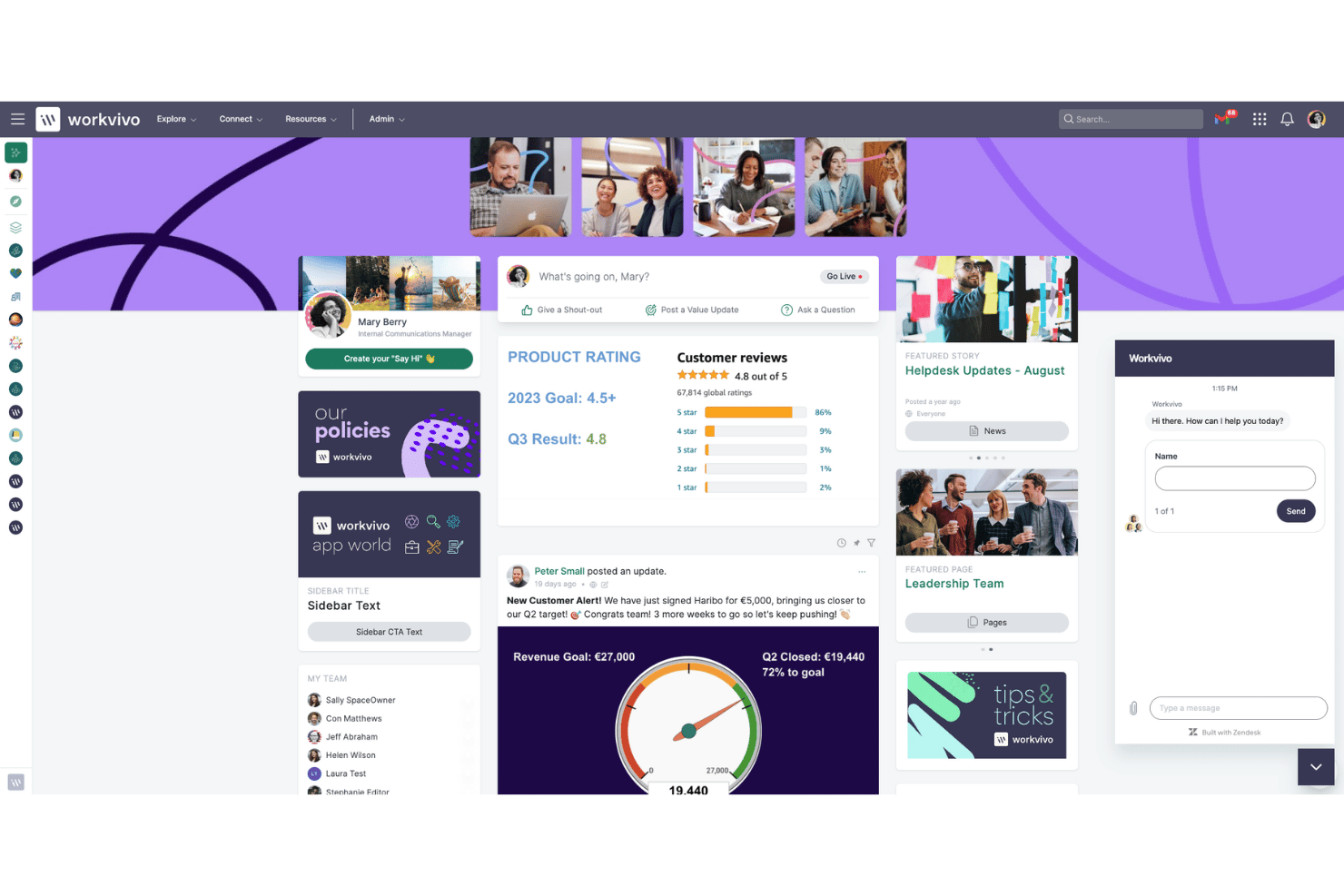
Workvivo is an employee communication platform that blends a social-media-style activity feed with structured broadcasting tools, peer recognition, lifecycle automation, and AI-powered engagement analytics.
Who Is Workvivo Best For?
Workvivo is a strong fit for mid-to-large enterprises with mixed workforces—desk and frontline—where peer recognition and culture-building are as important as reaching every employee.
Why I Picked Workvivo
I picked Workvivo as one of the best because recognition is genuinely baked into how communication works here, not bolted on as a separate module. Peer-to-peer Shoutouts tie directly to company values, so when a frontline worker in a warehouse gets recognized publicly in the activity feed, it reinforces culture in the same breath as it informs. I also love that Read & Acknowledge lets me require confirmation on critical posts, giving me a compliance-grade audit trail without pulling employees into a separate system.
Workvivo Key Features
- Workvivo Journeys: Automates lifecycle communications—like onboarding sequences and policy rollouts—triggered by employee data attributes.
- Workvivo TV: Turns physical screens in warehouses, retail floors, or factories into live content channels with no per-device login required.
- Auto-translation: Automatically translates content into 90+ languages in real time for global and multilingual workforces.
- Seer people intelligence: Runs AI-powered sentiment analysis and 12-factor engagement surveys with a built-in Radar Heat Map for spotting risk and opportunity.
Workvivo Integrations
Workvivo advertises 40+ out-of-the-box integrations, including Workday, UKG, BambooHR, SAP SuccessFactors, Microsoft 365, Google Workspace, Slack, Salesforce, Okta, and Zoom. REST APIs and webhooks support custom connections.
Pros and Cons
Pros:
- Multilingual auto-translation reaches global teams
- Built-in peer recognition and shoutout features
- Mandatory read and acknowledge for compliance
Cons:
- Notification overload can bury important updates
- Real-time chat requires separate purchase
Blink
Best for frontline workers
My Evaluation Score
- Engagement Analytics
- 5/5
- Mobile Employee Access
- 5/5
- Company-Wide Broadcasts
- 5/5
- Content & Media Sharing
- 4/5
- Multi-Channel Messaging
- 5/5
- Employee Directory & Segmentation
- 5/5
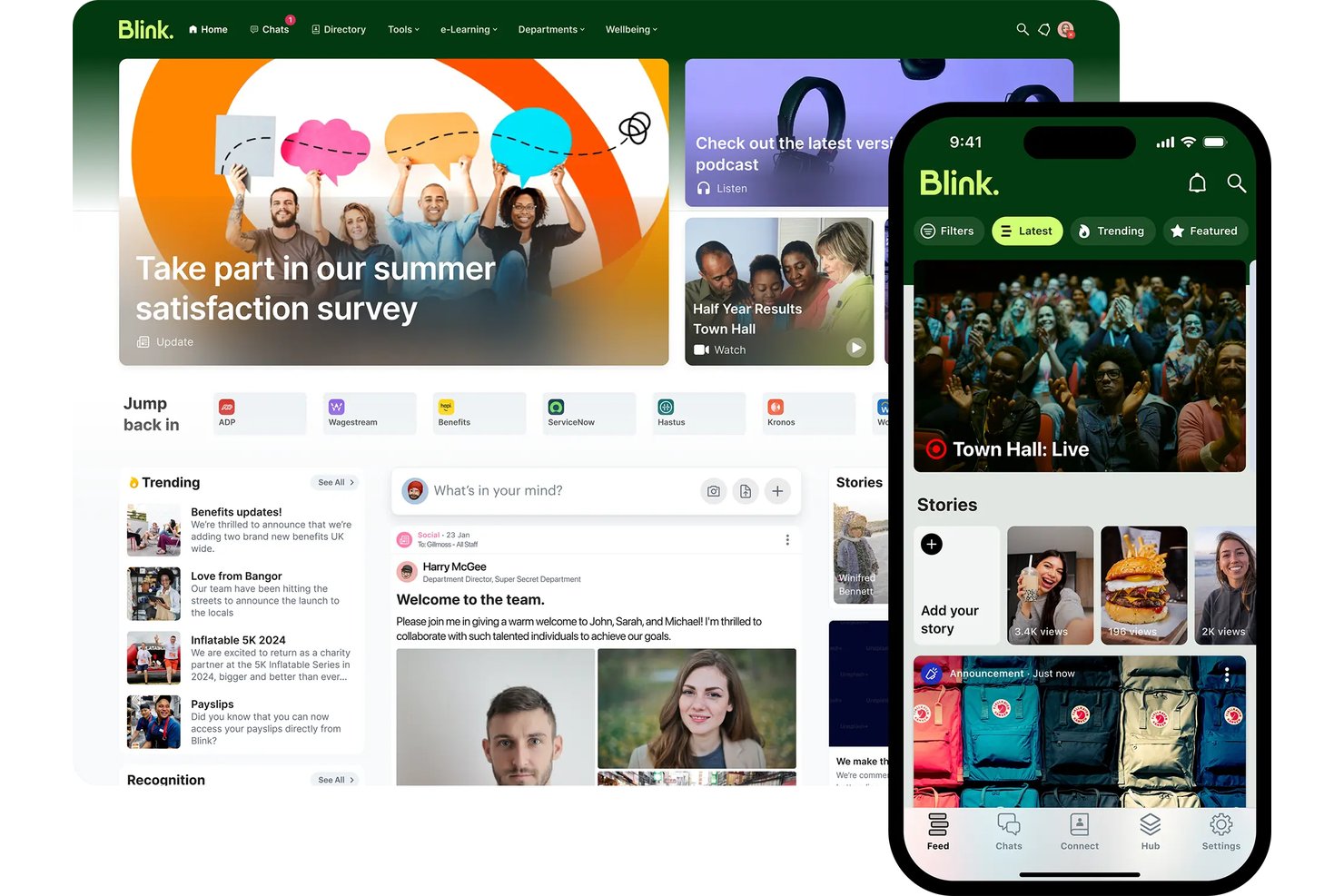
Blink is a mobile-first employee communication app built around chat, a social news feed, knowledge hub, surveys, and recognition tools for reaching frontline and deskless workforces without corporate email.
Who Is Blink Best For?
Blink is a strong fit for organizations with large frontline or deskless workforces—think retail, hospitality, logistics, and healthcare—where reaching employees without corporate email is a daily reality.
Why I Picked Blink
Blink earns its spot on my shortlist because no other tool I've reviewed is as deliberately built for workers who don't sit at a desk. I love that employees at a Domino's or Dollar Tree location can onboard with just a phone number or QR code—no corporate email, no IT ticket. Blink's AI Listening Agent is also genuinely impressive: it runs adaptive, conversational pulse surveys rather than static forms, which is why response rates are claimed to be 3x higher than traditional methods.
Blink Key Features
- Mandatory read acknowledgments: Require employees to confirm they've read specific posts or policies, with audit logs and automated reminders for non-readers.
- Blink Kudos recognition: Employees can send peer-to-peer recognition posts visible on the public newsfeed, with customizable award types.
- Knowledge Hub: A centralized content repository for storing and governing policies, procedures, and onboarding materials with access controls.
- Employee Journeys: Structured onboarding and milestone content paths that guide new hires through setup without requiring IT involvement.
Blink Integrations
Blink has 50+ integrations, including Workday, ADP, iTrent, Cornerstone, Okta, Microsoft 365, Google Workspace, ServiceNow, and Jira. Enterprise customers can use the open API and webhooks for custom integrations.
Pros and Cons
Pros:
- AI surveys drive high response from workers
- Mandatory read compliance for frontline policies
- Employees onboard with just a phone number
Cons:
- Posts can’t be edited by admins after publishing
- Advanced analytics require higher plan tiers

Poppulo
Best for internal comms analytics and AI insights
My Evaluation Score
- Engagement Analytics
- 5/5
- Mobile Employee Access
- 4/5
- Company-Wide Broadcasts
- 5/5
- Content & Media Sharing
- 5/5
- Multi-Channel Messaging
- 5/5
- Employee Directory & Segmentation
- 5/5
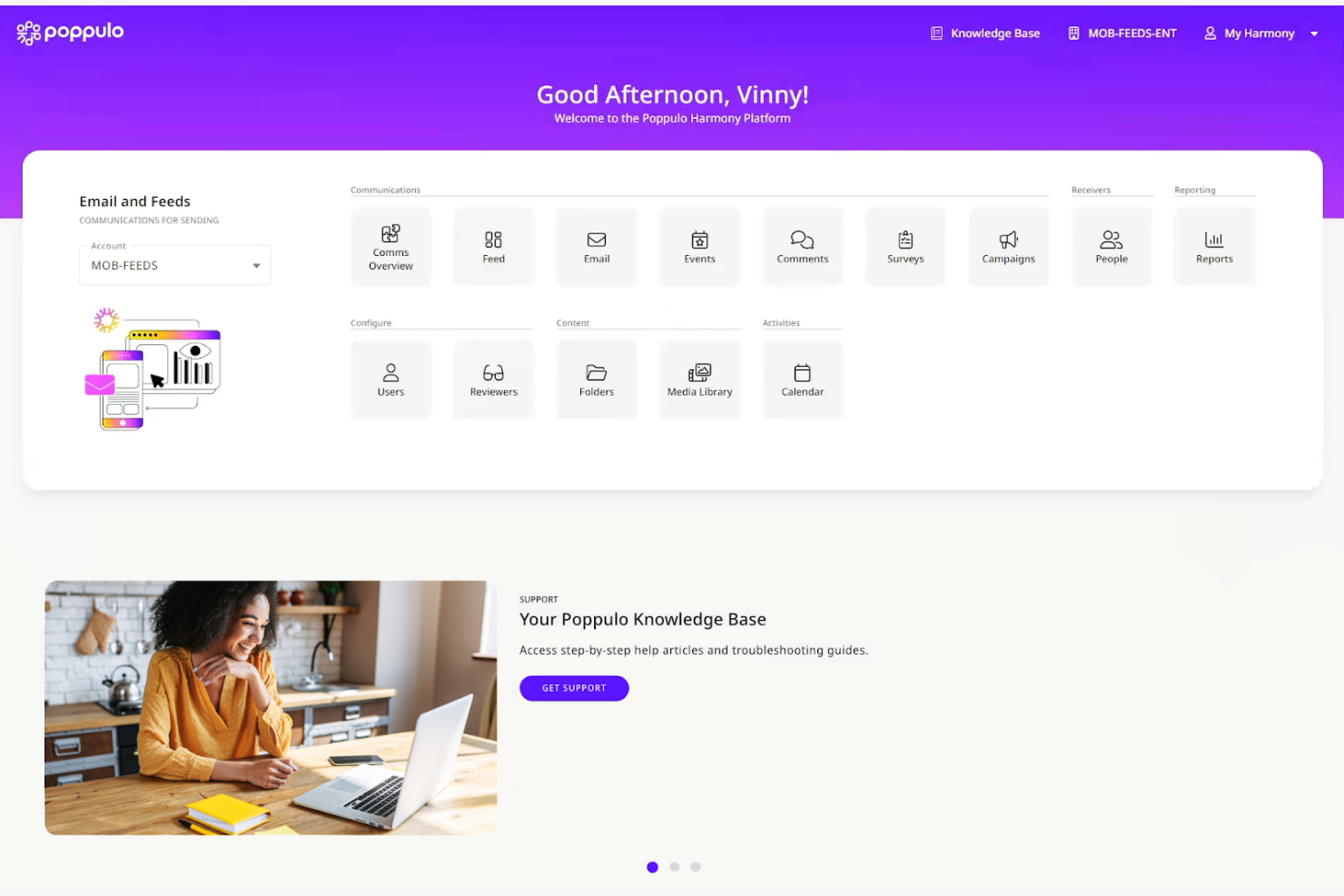
Poppulo is an enterprise employee communication platform that unifies email, mobile app, digital signage, Microsoft Teams, and SharePoint publishing into a single interface, with built-in AI content tools, cross-channel analytics, and audience segmentation.
Who Is Poppulo Best For?
Poppulo is a strong fit for enterprise internal communications teams that need to reach both desk-based and frontline employees across multiple channels from one platform.
Why I Picked Poppulo
Poppulo earns its spot on my shortlist because the analytics depth here is genuinely unlike anything else I've seen in the employee comms space. The Comms Coach chatbot benchmarks your email performance against industry data in plain language, and the Analyze AI Agent surfaces sentiment patterns across channels without requiring you to dig through raw reports. I also love that cross-channel dashboards cover email, mobile, digital signage, and intranet in one view, so you're never piecing together results from separate tools.
Poppulo Key Features
- Multilingual auto-translation: Automatically translates email content into 54+ languages, including right-to-left scripts, using AI-assisted machine translation with a human-in-the-loop review workflow.
- Mandatory read acknowledgments: Tracks whether employees have read specific communications and requires documented confirmation, designed for safety alerts and compliance-sensitive policy updates.
- HRIS-synced audience segmentation: Syncs directly with Workday, SAP, Oracle PeopleSoft, and Microsoft Entra ID to build and update employee distribution lists automatically based on live HR data.
- Branded frontline mobile app: A white-labeled iOS and Android app that gives deskless and frontline workers access to company communications without requiring a corporate email address.
Poppulo Integrations
Poppulo offers native integrations across the Microsoft ecosystem, including Microsoft 365 and Entra ID, plus Workday, SAP, Oracle PeopleSoft, Okta, Power BI, Tableau, and Canva. An API supports custom integrations.
Pros and Cons
Pros:
- Supports must-read employee acknowledgments
- AI-powered content and sentiment insights included
- Deep analytics across all communication channels
Cons:
- Some AI agent features still unreleased
- Email template customization options are limited
My Evaluation Score
- Engagement Analytics
- 5/5
- Mobile Employee Access
- 5/5
- Company-Wide Broadcasts
- 5/5
- Content & Media Sharing
- 5/5
- Multi-Channel Messaging
- 5/5
- Employee Directory & Segmentation
- 5/5
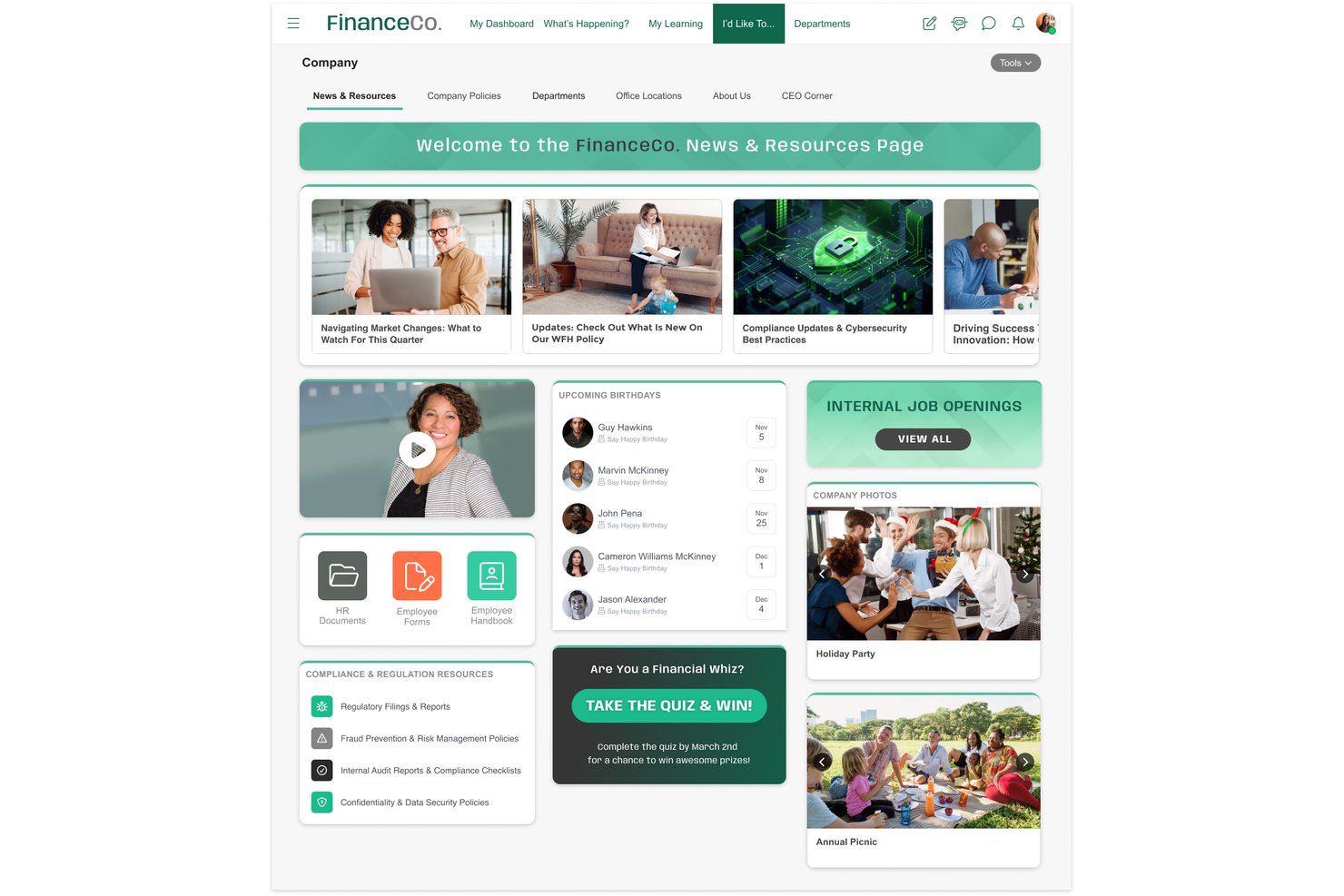
MangoApps is an employee communication platform that unifies multi-channel broadcasting, frontline mobile access, campaign journeys, pulse surveys, and recognition into a single app.
Who Is MangoApps Best For?
MangoApps is a strong fit for HR and internal comms teams in regulated industries like healthcare, government, and manufacturing that need documented proof of message receipt across a mixed desk and frontline workforce.
Why I Picked MangoApps
MangoApps earns its spot on my shortlist because of how seriously it takes compliance in regulated industries. I'm particularly impressed by its mandatory-read acknowledgment system: you can send a policy update, track exactly who has confirmed receipt, collect e-signatures, and trigger automated follow-ups to anyone who hasn't responded. For healthcare or government teams, that's documented proof of message receipt built directly into the broadcast workflow. Campaign Journeys also let you sequence multi-channel messages across mobile, SMS, and digital signage from a single publish action.
MangoApps Key Features
- Campaign journeys: Build sequenced, multi-channel message campaigns that automatically deliver communications across mobile, SMS, and email in a defined order.
- Pulse surveys and eNPS: Run anonymous pulse surveys, eNPS, onboarding, and exit surveys with conditional logic, auto-reminders, and trend tracking built in.
- 50-language auto-translation: Automatically publish posts in 50+ languages at the point of sending, with employees receiving content in their preferred language without any extra steps.
- Live broadcasting: Host live town halls and leadership updates with real-time multilingual interpretation streamed directly through the platform.
MangoApps Integrations
MangoApps offers 200+ integrations, including Workday, UKG, ADP Workforce Now, Microsoft Teams, SharePoint, OneDrive, Google Drive, and Cornerstone. Its open REST API, webhooks, and SCIM 2.0 support custom connectivity and provisioning.
Pros and Cons
Pros:
- Campaigns deploy across email, SMS, and signage
- Offline mobile app access for frontline staff
- Built-in read receipts with e-signatures
Cons:
- In-platform file collaboration requires Microsoft licenses
- Feature volume makes navigation overwhelming
My Evaluation Score
- Engagement Analytics
- 5/5
- Mobile Employee Access
- 5/5
- Company-Wide Broadcasts
- 5/5
- Content & Media Sharing
- 5/5
- Multi-Channel Messaging
- 5/5
- Employee Directory & Segmentation
- 5/5
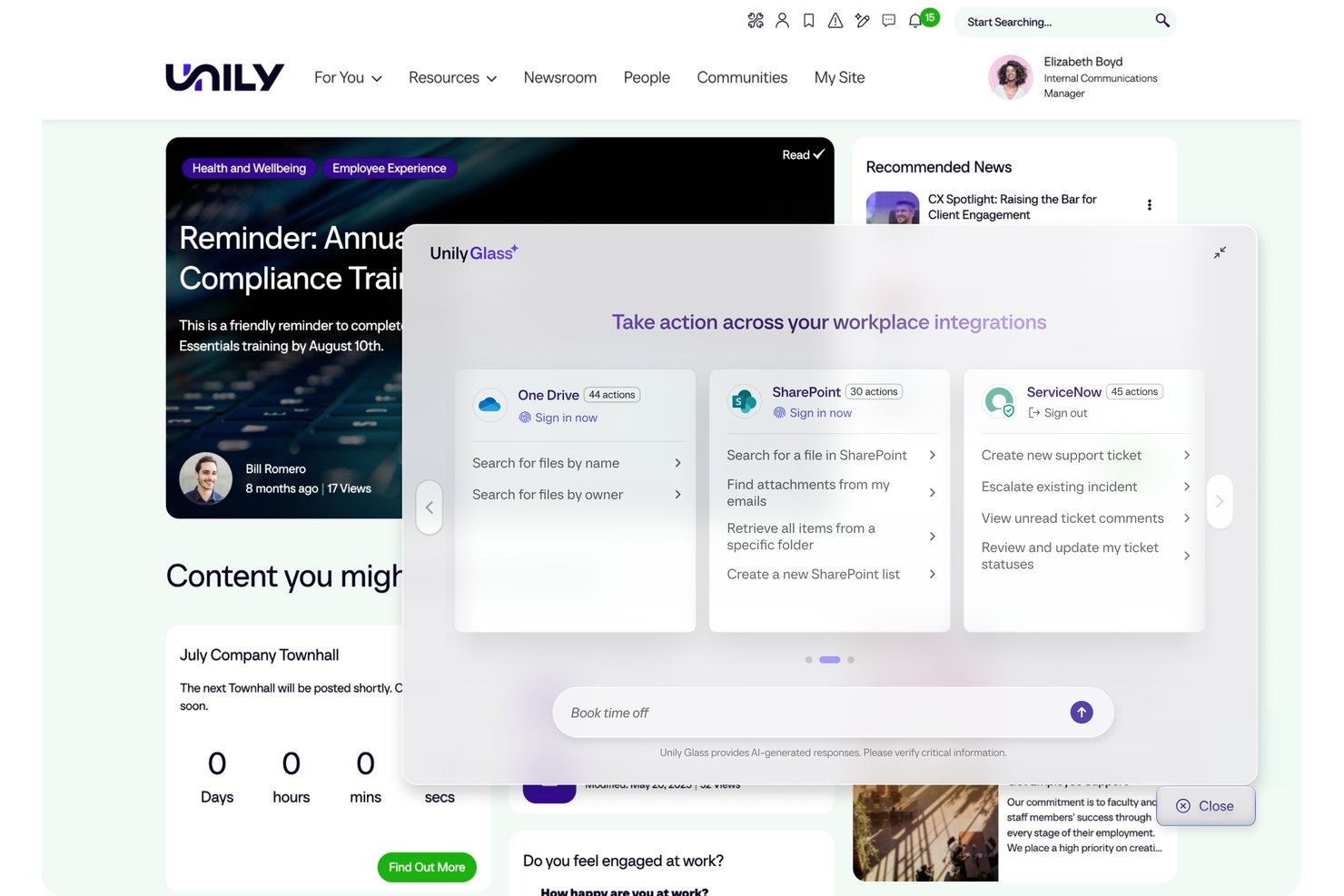
Unily is an enterprise employee communication and digital workplace platform that combines multi-channel broadcasting, AI-powered content creation, mobile access for frontline workers, and engagement analytics in one environment.
Who Is Unily Best For?
Unily is built for large enterprises with 1,000+ employees that need to reach both desk-based and frontline workers through a centralized communications hub.
Why I Picked Unily
Unily earns its spot on my list because its Broadcast Center is genuinely purpose-built for leadership communications at scale. I love that a single communicator can push an executive message across email, Microsoft Teams, Slack, and mobile push simultaneously, with AI auto-translation into 40+ languages handling multilingual workforces in one step. Mandatory read acknowledgments with tracking make compliance-grade documentation possible for safety and policy updates.
Unily Key Features
- Unily Glass: A conversational AI interface that lets employees complete tasks across connected systems like Workday and ServiceNow without leaving the platform.
- Indi AI agent: Drafts communications, generates images and video, and builds branded intranet pages from a single prompt within governance workflows.
- ScreenCloud digital signage: Extends reach to frontline workers without personal devices by displaying content on shared screens in break rooms and production floors.
- Pulse surveys and ideation portal: Captures employee feedback and ideas directly within the platform alongside broadcast communications.
Unily Integrations
Unily offers 50+ native integrations, including Workday, ServiceNow, Salesforce, Slack, ScreenCloud, and Microsoft 365. REST APIs, SDKs, and webhooks support custom integrations.
Pros and Cons
Pros:
- Mandatory read tracking supports compliance needs
- AI auto-translation handles 40+ languages
- Broadcasts reach both desk and frontline workers
Cons:
- Real-time chat costs extra per add-on
- Custom pricing requires direct contact
Other Employee Communication Apps
Here are some additional employee communication app options that didn’t make it onto my shortlist but are still worth checking out:
- Simpplr
For AI-powered intranet and comms
- Haiilo
Social intranet features
- LumApps
For enterprise-wide multilingual broadcasts
- Slack
For integrations
- Microsoft Teams
For Microsoft 365-native team messaging
- Beekeeper
For QR code onboarding without email
- WorkJam
For deskless worker communications
- Cerkl Broadcast
For personalized employee news digests
- Firstup
For enterprise journey-based comms
- Microsoft Viva Engage
For Microsoft 365-native community comms
- YOOBIC
For multi-store retail communications


How I Evaluate Employee Communication Apps
I split my evaluation into baseline features every tool must cover and the differentiators that separate a true frontline comms platform from a basic chat app.
Core Functionality (Table Stakes For This List)
When I'm selecting tools for my list, I rank each one on a scale from 0 (does not offer the functionality) to 5 (excels in this area) for each core functionality listed below. I then calculate the tool's total score into a percentage, using 75% as a benchmark to help assess its overall fit for the list.
- Multi-Channel Messaging: I look at whether the platform unifies chat, DMs, group channels, and push notifications—or forces teams to patch together separate tools to cover basic formats.
- Company-Wide Broadcasts: I evaluate targeting depth—specifically whether admins can segment by department or location, schedule sends, and require acknowledgment on critical announcements.
- Mobile Employee Access: I check whether frontline workers can sign up and log in without a corporate email address, and whether the app delivers full functionality on iOS and Android.
- Directory & Segmentation: I look for dynamic employee groups that sync from an HRIS or Active Directory, so messaging audiences stay accurate without manual list maintenance.
- Engagement Analytics: I evaluate whether communicators can track reach, read rates, and reactions at the campaign level—not just see a basic delivery confirmation on individual messages.
- Content & Media Sharing: I check whether the platform supports in-app video playback, document previews, and centralized file libraries rather than simple attachment uploads.
Once I have a list of tools that meet the criteria, I consider what sets each platform apart.
Differentiating Factors (What Sets Vendors Apart)
Here's how I compare and contrast different vendors:
Standout Features
Mandatory read acknowledgments matter most for safety-critical or policy-driven communications—I look for compliance-grade confirmations with follow-up nudges, not just a basic "seen" receipt. For global workforces, multilingual auto-translation is essential; I check whether translation happens in-message and in real time. I also evaluate pulse survey tools, specifically whether feedback is collected in the same channel as the broadcast, so leaders aren't stitching together separate listening tools.
Beyond Features
Pricing structure matters more than most buyers expect. I look at whether deskless workers are billed at a lower rate than desk-based employees, since high-turnover workforces in retail or healthcare can make per-seat costs unpredictable fast. I also check for white-labeling depth—a branded app with custom icons and push notifications lands differently with frontline teams than a generic platform. Finally, HRIS integration quality determines whether your employee directory stays accurate automatically or requires someone to manually manage it every time there's a hire or departure.
How to Choose Employee Communication Apps
It's easy to get bogged down in long feature lists and complex pricing structures. To help you stay focused as you work through your unique software selection process, here's a checklist of factors to keep in mind:
| Factor | What to Consider |
|---|---|
| Scalability | Can the app grow with your team? Consider future growth and whether the tool supports larger teams or increased data without performance issues. |
| Integrations | Does it integrate with your current tools? Check compatibility with existing software, such as email, calendars, and project management systems. |
| Customizability | Can you tailor it to fit your needs? Look for options to customize workflows, notifications, and user roles to match your specific processes. |
| Ease of Use | Is it user-friendly for all team members? Evaluate the learning curve and whether training resources are available to simplify adoption. |
| Implementation and Onboarding | How quickly can you get started? Consider the time and resources needed for setup, training, and full deployment across your organization. |
| Cost | Does it fit your budget? Compare pricing plans, hidden fees, and the value offered for the price. Consider long-term costs and potential ROI. |
| Security Safeguards | Are your communications secure? Look for encryption, data protection measures, and compliance with industry standards to ensure information safety. |
| Support Availability | When can you get help? Check if support is available during your working hours and through preferred communication channels such as phone, chat, or email. |
What Are Employee Communication Apps?
Employee communication apps are digital tools designed to facilitate communication and collaboration within organizations. These tools are typically used by HR professionals, team leaders, and employees across various industries to improve information sharing and team coordination. Messaging, video conferencing, and file-sharing features help with keeping teams connected and informed. Overall, these tools enhance workplace efficiency and foster a more cohesive working environment.
Features
Here are the core features any great employee communication app should have:
- Messaging: Facilitates real-time communication among team members, enabling quick information exchange.
- Video conferencing: Allows for virtual face-to-face meetings, improving remote collaboration and engagement.
- File sharing: Simplifies the process of sending and receiving documents, ensuring everyone has access to necessary resources.
- Task management: Helps teams organize and prioritize tasks, enhancing productivity and accountability.
- Customizable notifications: Let users tailor alerts to their preferences, reducing distractions and focusing on important updates.
- Analytics and reporting: Provides insights into communication patterns and engagement, helping teams refine their strategies.
- Mobile access: Ensures employees can stay connected and informed, even when on the go.
- Security safeguards: Protect sensitive information with encryption and compliance with industry standards.
- Integration capabilities: Connect with existing tools such as email and calendars, creating a unified workflow.
- Offline access: Allows users to view and interact with content without an internet connection, ensuring continuous access to information.
Benefits
Implementing employee communication apps provides several benefits for your team and your business. Here are a few you can look forward to:
- Improved collaboration: Real-time messaging apps and video conferencing help your team work together effectively, regardless of location.
- Increased productivity: Task management features help keep everyone organized and on track, boosting overall efficiency.
- Enhanced engagement: Customizable notifications and social features keep employees informed and connected, fostering a sense of community.
- Better decision-making: Analytics and reporting provide valuable metrics and insights into communication trends, helping you make informed choices.
- Secure communication: Security safeguards protect sensitive information, giving you peace of mind when sharing data.
- Flexibility: Mobile and offline access ensure your team can stay connected and productive, even when they're on the move.
- Streamlined workflows: Integration capabilities connect your existing tools, creating a more efficient work environment.
Costs and Pricing
Selecting employee communication apps requires an understanding of the various pricing models and plans available. Costs vary based on features, team size, add-ons, and more. The table below summarizes common plans, their average prices, and typical features included in employee communication app solutions:
Plan Comparison Table for Employee Communication Apps
| Plan Type | Average Price | Common Features |
|---|---|---|
| Free Plan | $0 | Basic messaging, limited file sharing, and basic task management. |
| Personal Plan | $5-$15/user/month | Enhanced messaging, video conferencing, file sharing, and basic integrations. |
| Business Plan | $20-$100/user/month | Advanced task management, analytics, customizable notifications, and more integration options. |
| Enterprise Plan | $150-$500+/user/month | Full customization, advanced security features, dedicated support, and comprehensive integrations. |
FAQs
Here are some answers to common questions about employee communication apps:
How can employee communication apps improve remote work?
These apps can significantly improve remote work by providing employee communication tools that keep your team connected, regardless of location. They offer features such as instant messaging, video calls, and file sharing, which help maintain collaboration and productivity. For example, a remote team can use video conferencing to hold virtual meetings and messaging to keep in touch throughout the day. These tools also allow for real-time feedback and updates, ensuring everyone is on the same page. By integrating with other software, they create a centralized hub for all communication needs.
Are employee communication apps secure?
Yes, most employee communication apps prioritize security to protect your data. They often include encryption, data protection measures, and compliance with industry standards. Before choosing a tool, check for features such as end-to-end encryption and user authentication options. It’s also wise to review the app’s privacy policies and terms of service. For sensitive industries, look for apps that offer additional security certifications. Regular updates and support from the provider can also ensure your app remains secure against potential threats.
Can employee communication apps help improve engagement?
Yes, communication apps make it easier for employees to connect, share feedback, and stay informed. Features such as polls, chats, and announcements help everyone feel involved and encourage open discussion, connecting employee experiences.
How do I encourage my team to adopt a new communication tool?
Get leadership buy-in first, then communicate the benefits to the team. Offer training, highlight time-saving features, and collect feedback during rollout. As your team adapts, be sure to address concerns quickly to boost acceptance.
How do employee communication apps support team collaboration?
Employee communication apps support team collaboration by providing platforms for real-time communication and project management. They allow team members to share ideas and feedback instantly, whether through messaging or video calls. Task management features help assign and track responsibilities, ensuring everyone knows their role. For example, a team can use shared calendars to schedule meetings and document collaboration tools to work on projects simultaneously. These apps foster a collaborative environment by keeping all communication and resources in one accessible place.
Can communication apps integrate with other HR software?
Many employee communication platforms support integrations with HRIS, payroll, or scheduling tools. Check for prebuilt integrations or APIs so you can automate updates or trigger notifications from your existing systems.