



Folks HR vs. Collage HR: Comparison & Expert Reviews For 2026


Choosing the right HR software can feel overwhelming, especially when your current tools no longer keep up with hiring, onboarding, or day-to-day employee management. As your team grows, the need for a platform that simplifies work instead of adding more complexity becomes clearer.
This article walks you through Folks HR and Collage HR in a straightforward way so you can understand what each one offers and decide which solution fits your team best.
Folks HR vs. Collage HR: An Overview
Folks HR


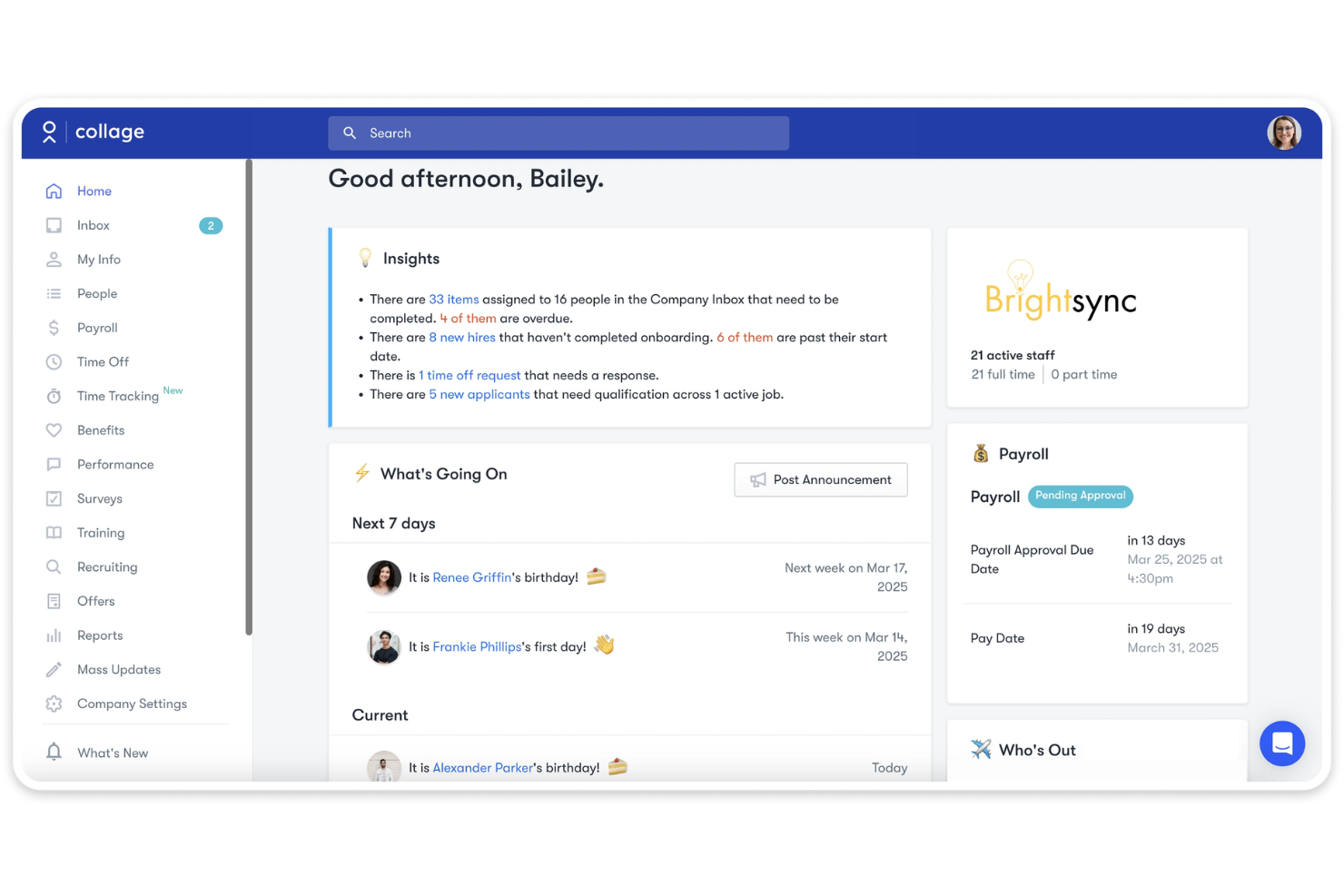
Collage HR
Why Trust Our Software Recommendations
Our team has been testing and reviewing software since 2012. As HR experts ourselves, we know how difficult—and important—it is to choose the right software.
For this guide, we evaluated tools using hands-on testing and independent research, scoring tools using our selection criteria. We also draw on insights from industry thought leaders and practicing HR experts.
Our reviews reflect our human editorial judgment, not a sales pitch.
Expert reviewers:
Folks HR vs. Collage HR Pricing Comparison
| Folks HR | Collage HR | |
|---|---|---|
| Free Trial | Free demo available | Free demo available |
| Pricing | Modular pricing, from $6/employee/month (module-dependent) | From $8/user/month |
Folks HR vs. Collage HR Pricing & Hidden Costs
Collage HR offers transparent, tiered pricing based on the features you choose, making it easier for teams to estimate costs as they grow. Folks HR provides transparent starting prices, with costs depending on the modules (HRIS, ATS, or Payroll) you choose to support your organization's needs. When comparing the two, the best approach is to assess which platform’s pricing model aligns with your budget, required features, and long-term scalability.
Folks HR vs. Collage HR Feature Comparison
Folks HR offers a wide range of tools for managing employees, from onboarding, PTO tracking, and document management to deeper recruitment and performance features like AI resume matching and 360 reviews, plus payroll support. Collage HR also delivers a centralized HRIS that combines core HR functions with payroll, benefits administration, timesheets, applicant tracking, and access to HR advisory services.
| Folks HR | Collage HR | |
|---|---|---|
| 2-Factor Authentication | ||
| API | ||
| Application Tracking | ||
| Attendance Tracking | ||
| Batch Permissions & Access | ||
| Compliance Tracking | ||
| Dashboard | ||
| Data Export | ||
| Data Import | ||
| Data Visualization | ||
| Employee Database | ||
| Employee Engagement | ||
| Employee Incentive Management | ||
| Employee Onboarding | ||
| Employee Training | ||
| Expense Tracking | ||
| External Integrations | ||
| Feedback Management | ||
| Multi-User | ||
| Notifications | ||
| Payroll | ||
| Scheduling | ||
| Timesheets | ||
| Travel Management | ||
| Vacation & Absence Calendar |
Folks HR vs. Collage HR Integrations
| Integration | Folks HR | Collage HR |
| QuickBooks | ✅ | ✅ |
| Xero | ✅ | ❌ |
| ADP | ✅ | ❌ |
| Microsoft 365 | ❌ | ✅ |
| Slack | ❌ | ✅ |
| Applauz | ✅ | ✅ |
| Gusto | ❌ | ❌ |
| Merinio | ✅ | ❌ |
| Greenhouse | ❌ | ✅ |
| Lever | ❌ | ✅ |
| BambooHR | ❌ | ✅ |
| API | ✅ | ✅ |
| Zapier | ❌ | ✅ |
Folks HR offers fewer native integrations and relies more on API-based setups, which can require extra configuration but allow customization. Collage HR supports a wider range of plug-and-play integrations that help teams streamline workflows, reduce manual tasks, and keep HR data automatically synced across the tools they already use.
Folks HR vs. Collage HR Security, Compliance & Reliability
| Factor | Folks HR | Collage HR |
| Data Encryption | Uses secure HTTPS transmission and stores data on protected infrastructure hosted in Canada. | Stores client data in secure AWS Montreal data centres and uses bank-level encryption and industry best practices for protection. |
| Regulatory Compliance | Folks HR is SOC 2 Type 2 certified, demonstrating audited security and data protection controls. | Their privacy policy explains data handling practices but does not reference any specific privacy laws. |
| Uptime Guarantee | Folks HR does not provide a specific uptime SLA and notes secure hosting and reliable infrastructure without a formal guarantee. | Collage HR does not publish a specific uptime guarantee and describes its infrastructure as secure and reliable without offering a formal SLA. |
| Access Control | Folks HR offers role-based access control, letting organizations restrict who can view or manage sensitive HR data. | Collage HR supports multi-factor authentication (MFA) through SSO providers such as Okta, which enhances secure access and identity management. |
Folks HR and Collage HR both deliver dependable security and privacy practices, with Folks HR highlighting certified controls and permission management, while Collage HR focuses on secure cloud hosting, strong encryption, and MFA-based access. Both position themselves as reliable and secure HR platforms.
Folks HR vs. Collage HR Ease of Use
| Factor | Folks HR | Collage HR |
| User Interface | An intuitive, well-organized layout makes the platform easy for teams to navigate. | A clear and user-friendly design helps teams adapt quickly and move through tasks with ease. |
| Onboarding Experience | Offers a simple setup process that allows teams to get started quickly once employee data is added. | Collage HR provides a guided onboarding structure that helps teams set up their account with clear steps. |
| Setup | Folks HR requires minimal setup, allowing quick deployment. | Collage HR has a straightforward setup process with clear instructions. |
| Support | Offers support through email and contact forms; live chat is not publicly confirmed. | Provides support via email, phone, and help center resources. |
Both platforms are easy to use overall, with Folks HR keeping things simple through an intuitive interface and quick setup, and Collage HR offering clear guidance, structured onboarding, and broad support options to help teams get started smoothly.
Folks HR vs Collage HR: Pros & Cons
Folks HR
- Simple and intuitive interface that’s easy for teams to adopt.
- Fast onboarding supported by tutorials, guided steps, and clear workflows.
- Natively bilingual (English and French), with deep roots in Quebec and strong alignment with Canadian SMB compliance.
- Not designed for enterprises that require complex or deeply customized workflows.
- Reporting and analytics may feel limited for data-heavy HR teams.
- The integration ecosystem is smaller than that of enterprise HR platforms.
Collage HR
- Centralizes HR, payroll, and benefits in one platform
- Canadian compliance tools are built-in and regularly updated
- Responsive customer support with HR guidance included
- Reporting and analytics features are less advanced than others
- Limited integrations with third-party business tools
- Lacks advanced workflow automation for complex HR processes
Best Use Cases for Folks HR and Collage HR
Folks HR
- Recruiters & Hiring Teams Helpful for recruiters who need AI resume parsing, ATS workflows, job posting distribution, and automated interview scheduling.
- Small & Mid-Sized Businesses (SMBs) Ideal for growing SMBs that need an affordable, easy-to-use HR system to manage people data, onboarding, time-off, and performance in one place.
- Manufacturing Companies Useful for manufacturing teams that need organized training records, certifications, compliance tracking, and workforce visibility.
- Construction Companies Great for construction firms needing tools for tracking accidents, certifications, training, and scheduling across dispersed job sites.
- Canadian Companies With dedicated Canadian payroll and data stored in Canada, Folks makes it easier for Canadian companies to pay their employees compliantly.
- Professional Services Firms Works well for service-based organizations that need streamlined timesheets, performance tools, and centralized employee data to support billable workflows.
Collage HR
- Canadian SMBs Collage HR's compliance tools and payroll features are tailored for Canadian small and midsize businesses.
- Nonprofit Organizations Nonprofits benefit from Collage HR's affordable pricing and simple benefits management.
- HR Departments HR teams can centralize employee profiles, onboarding, and document management.
- Remote Teams Remote teams in Canada can use Collage HR's digital onboarding and self-service features.
- Professional Services Firms with straightforward HR needs can automate payroll and benefits easily.
- Growing Startups Startups scaling in Canada get quick onboarding and compliance support.
Who Should Use Folks HR, and Who Should Use Collage HR?
Folks HR is well-suited for Canadian small to mid-sized organizations and teams across industries that want a simple, easy-to-manage HR system. If your organization is more mature or is growing its HR function, Folks HR provides deeper, end-to-end lifecycle management. It stands out in particular for teams that are actively hiring, thanks to its more advanced and configurable ATS—featuring AI-powered resume parsing and candidate matching, LinkedIn sourcing, multi-board job distribution, and customizable hiring workflows.
Collage HR is great if you’re a small to mid-sized, primarily Canadian business looking for a clean, easy-to-adopt all-in-one HR and payroll platform that simplifies core HR tasks, benefits administration, and employee self-service without the complexity or overhead of a more robust HR system. It's also ideal if you want more hands-on support bundled into all tiers, with dedicated HR experts ("HR on Call") for support on legislation, employee relations, and day-to-day HR questions.
Differences Between Folks HR and Collage HR
| Folks HR | Collage HR | |
|---|---|---|
| HR Advisory and Expert Access | Focuses support on payroll and general product guidance without a dedicated on-call HR advisory service. | Provides “HR on Call,” offering access to HR professionals for broader HR guidance. |
| Integration Focus | Highlights API access and limited native integrations. | Integrates with Xero, Google Workspace, Microsoft 365, Slack, Zapier, and more. |
| Pricing Model | Modular pricing for HRIS, ATS, and Payroll. Option to purchase an all-in-one solution (Premium) with all three included. | Simple tiered pricing for HR, HR plus payroll, and enterprise packages. |
| Recruitment & Performance | Offers advanced ATS and performance tools (AI-powered resume parsing, job postings, scheduling, reviews). | Offers standard ATS and performance management, but not advanced AI parsing or multi-layered review modules. |
| Support Model | Provides email support, a contact form, and a help center. | Offers email and a help center, and adds phone support options. |
| Visit Folks HROpens new window | Read Collage HR ReviewOpens new window |
Similarities Between Folks HR and Collage HR
| Applicant Tracking (ATS) | Both tools provide an ATS that allows teams to post jobs, track applicants, and manage structured hiring workflows. |
|---|---|
| Core HRIS Capabilities | Both platforms include foundational HRIS features such as employee records, onboarding workflows, and document storage to centralize daily HR operations. |
| HR Reporting & Analytics | Both solutions provide reporting dashboards that give teams visibility into workforce metrics for more informed HR decision-making. |
| Payroll | Each platform offers built-in payroll functionality that helps automate pay processing and reduce manual administrative work. |
| Performance Management | Both systems include performance review tools that support structured evaluations and help teams manage employee development cycles. |
| Visit Folks HROpens new window Read Collage HR ReviewOpens new window | |