

Küçük işletmeler için İK uyumluluk sistemi, ekibinizin uyumluluğunu korumasına ve maliyetli hatalardan kaçınmasına yardımcı olmak üzere istihdam yasalarını, yönetmelikleri ve şirket politikalarını yönetmenizi sağlayan İK yazılımıdır.
Doğru çözümü arıyorsanız, yönetmeliklerin ne kadar hızlı değişebileceğini ve küçük ekiplerin kritik güncellemeleri veya belgeleri gözden kaçırmasının ne kadar kolay olduğunu biliyorsunuzdur.
Bu liste, 2026'da küçük işletmeler için en iyi İK uyumluluk sistemlerini karşılaştırmanıza yardımcı olacak; böylece ihtiyaçlarınıza uyan, çalışanlarınızı destekleyen ve işletmenizi koruyan bir platform bulabileceksiniz.
Why Trust Our Software Recommendations
6,700+
Reviews
20
Industry experts
16+
Evaluation factors
14
Years
Our team has been testing and reviewing software since 2012. As HR experts ourselves, we know how difficult—and important—it is to choose the right software.
For this guide, we evaluated tools using hands-on testing and independent research, scoring tools using our selection criteria. We also draw on insights from industry thought leaders and practicing HR experts.
Our reviews reflect our human editorial judgment, not a sales pitch.
Expert reviewers:
- Phil GrayCOO
 Kim BehnkeHR Tech Editor & Analyst
 Josh BarkerPeople Ops Manager

Küçük İşletmeler için İK Uyumluluk Sistemi Karşılaştırma Tablosu
Bu karşılaştırma tablosu, küçük işletmeler için en iyi İK uyumluluk sistemlerinin fiyatlandırma ayrıntılarını özetlemektedir
Sorted by: Default
| Tool | Starting Price | Website | |
|---|---|---|---|
Best for small business HR compliance support | Not rated | Pricing upon request Free demo available | Website |
Best for centralized global workforce records | 4.8 out of 5 | $5/user/month Free demo available | Website |
Best for hourly team compliance | 4.2 out of 5 | $99/month Free plan + 30-day free trial + free demo available | Website |
Best for intuitive policy management | 4.8 out of 5 | $2/user/month Free plan + free demo available | Website |
Best for global workforce compliance | 4.9 out of 5 | $29/user/month Free demo available | Website |
Best for international employment compliance | 2.9 out of 5 | $599/user/month Free demo available | Book Demo |
Best for scalable compliance solutions | 4.2 out of 5 | Pricing upon request Free demo available | Website |
Best for automated compliance alerts | 4.1 out of 5 | Pricing upon request Free demo available | Website |
Best for unified compliance across systems | Not rated | $8/user/month Free demo available | Website |
Best for industry-specific compliance guidance | Not rated | Pricing upon request Free demo available | Website |


Küçük İşletmeler için İK Uyumluluk Sistemi İncelemeleri
Kısa listeme giren küçük işletmeler için İK uyumluluk sistemlerine ilişkin ayrıntılı özetlerim aşağıda yer alıyor. İncelemelerim, size en uygun sistemi bulmanıza yardımcı olmak için her sistemin özelliklerine, en uygun kullanım alanlarına ve fiyatlandırmasına ayrıntılı bir bakış sunuyor.
 Best for small business HR compliance support
- Free demo available
- Pricing upon request

Mitratech Mineral manages HR compliance with policy tools and legal guidance. Mitratech Mineral is an HR compliance platform that helps small and mid-sized businesses manage employment law requirements through compliance monitoring, employee handbook tools, HR guidance, policy resources, and employee training.
Who Is Mitratech Mineral Best For?
Mitratech Mineral is a strong fit for small business owners and HR generalists who need practical compliance support without maintaining an in-house legal or compliance team.
Why I Picked Mitratech Mineral
I picked Mitratech Mineral because it gives small businesses access to both compliance tools and experienced HR professionals in one platform. Instead of researching employment laws independently or hiring outside consultants, users receive personalized compliance alerts, attorney-reviewed resources, and expert guidance when complex workplace situations arise. I also like that the platform combines handbook management, employee training, and compliance planning, making it easier for lean HR teams to stay organized as regulations evolve.
Mitratech Mineral Key Features
- Mineral Intelligence™: Monitor changing employment laws and receive personalized compliance recommendations based on your business.
- Smart Employee Handbook Plus: Create and maintain compliant employee handbooks with automatic policy updates and multi-state support.
- Employee training library: Deliver workplace compliance and employee development training through built-in online courses.
- Compliance calendar: Track important federal and state compliance deadlines from one centralized dashboard.
Mitratech Mineral Integrations
Mitratech Mineral primarily operates through partnerships with payroll providers, insurance brokers, PEOs, and HCM platforms. It is also available through the PrismHR Marketplace. Public documentation of native integrations remains limited, and Zapier support is not currently documented.
Pros and Cons
Pros:
- Expert HR support
- Built-in HR training
- Personalized compliance guidance
Cons:
- Limited native integrations
- Handbook tools may cost extra
Learn more about Mitratech Mineral: Best for centralized global workforce records
- Free demo available
- From $5/user/month
Visit WebsiteCustomer Rating:4.8/5
Deel HR dashboard showing payroll, compliance tasks, employment verification, and contractor management tools in one centralized platform for small businesses. Deel HR is an HR compliance platform for small businesses that brings together global employee records, automated compliance tools, onboarding workflows, and document management in one system.
Who Is Deel HR Best For?
Deel HR suits small businesses and HR teams managing global employees, contractors, and compliance across multiple countries.
Why I Picked Deel HR
I picked Deel HR as one of the best because I can keep all global workforce records in one place, no matter where my team members are based. I use Deel HR to store contracts, compliance documents, and personal data for employees and contractors across multiple countries. The platform lets me quickly access and update records, which helps my team stay organized and audit-ready.
Deel HR Key Features
- Automated worker classification: Instantly determines contractor or employee status based on local laws.
- Global onboarding workflows: Guides new hires through country-specific onboarding steps and document collection.
- E-signature support: Lets you send, sign, and store contracts and compliance documents digitally.
- Custom document templates: Allows you to create and manage templates for contracts, NDAs, and HR policies.
Deel HR Integrations
Deel HR offers native integrations with BambooHR, Workday, Greenhouse, HiBob, QuickBooks, Xero, NetSuite, Expensify, Okta, and Slack. An API is available for custom integrations.
Pros and Cons
Pros:
- Native integrations with major HR and payroll tools
- Country-specific onboarding workflows for new hires
- Built-in contract and document management tools
Cons:
- Some integrations require higher-tier plans
- Limited customization of onboarding workflows
 Best for hourly team compliance
- Free plan + 30-day free trial + free demo available
- From $99/month (billed annually)
Visit WebsiteCustomer Rating:4.2/5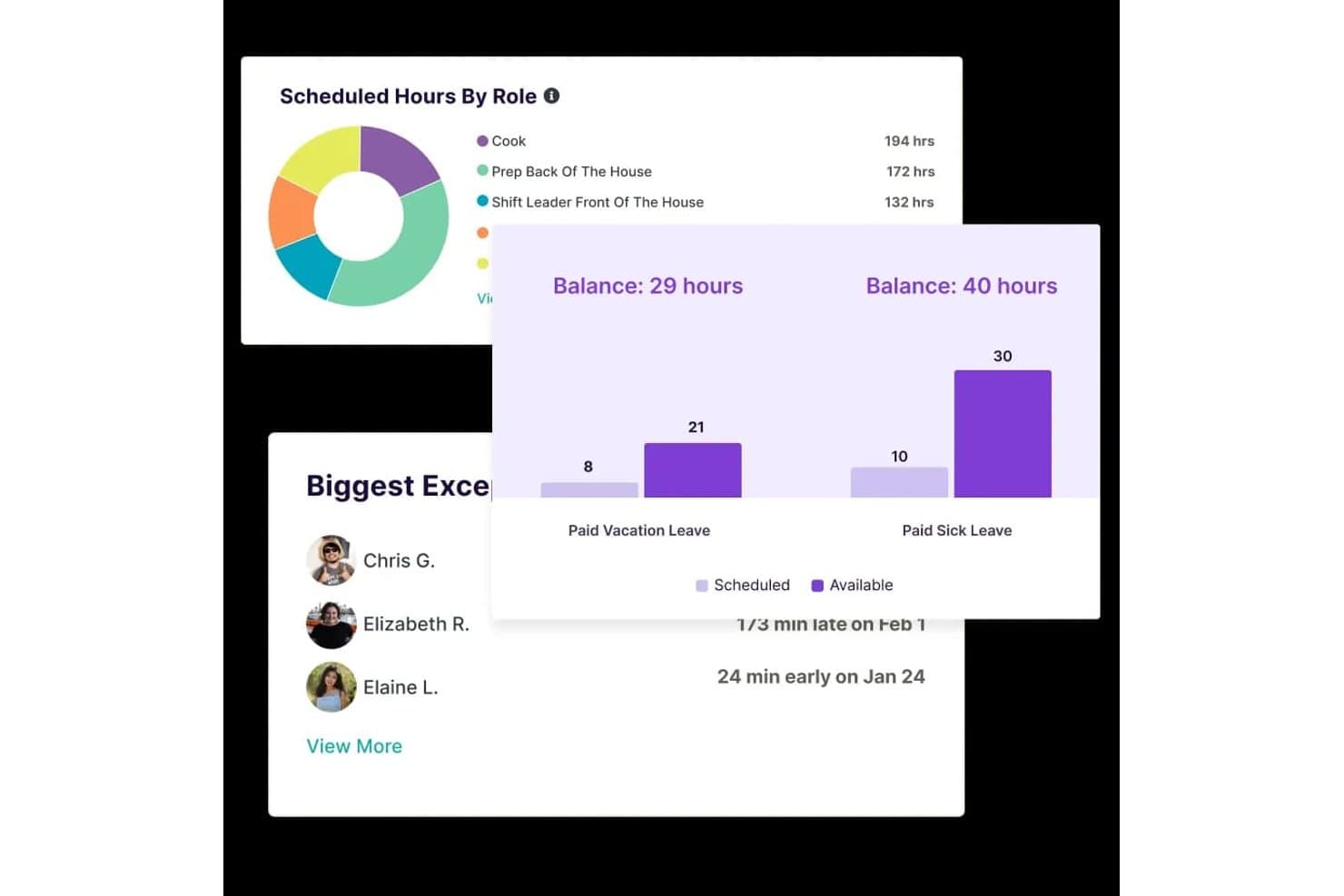
Homebase tracks scheduled hours, leave balances, and attendance exceptions. Homebase is a workforce management platform for small businesses with hourly teams that combines scheduling, time tracking, payroll, and HR compliance tools including labor-law alerts, new-hire onboarding, and certified HR advisor access.
Who Is Homebase Best For?
Homebase fits small business owners managing hourly teams who want scheduling, time tracking, and basic wage-and-hour compliance in one place without hiring dedicated HR staff.
Why I Picked Homebase
I've included Homebase in my top picks because it's built around the compliance pressures that come with running a team of hourly workers, not office employees. I love that it checks schedules against federal, state, and provincial child-labor rules before you publish them, flagging conflicts automatically. Its HR Pro tier also pushes email alerts when local labor laws change, like a minimum-wage increase taking effect in your area, and pairs that with certified HR advisors who can review your policies and build a custom handbook.
Homebase Key Features
- New-hire self-onboarding: Invite new employees to complete required federal and state forms, e-sign documents, and upload paperwork before their first day.
- Certification expiration alerts: Track required employee certifications and receive automatic alerts 10 days before any certification expires.
- FLSA-compliant timesheet storage: Store time cards, including edits, for 4+ years on paid plans to support recordkeeping requirements.
- Break and overtime tracking: Monitor employee breaks and overtime across locations and send alerts when employees approach overtime thresholds.
Homebase Integrations
Homebase lists various integrations, including ADP, Gusto, Paychex, QuickBooks, and Square Payroll. It also offers a JSON API for custom integrations, though data-sync behavior isn’t specified.
Pros and Cons
Pros:
- Certification alerts flag upcoming expirations
- Edited time cards support FLSA recordkeeping
- Overtime and missed-break alerts support wage compliance
Cons:
- No exempt-status guidance or misclassification flags
- HR compliance tools require the top-tier plan
 Best for intuitive policy management
- Free plan + free demo available
- From $2/user/month (billed annually)
Visit WebsiteCustomer Rating:4.8/5
TalentHR offers a dashboard interface displaying quick access to HR documents and links. TalentHR offers small businesses a straightforward way to create, update, and share HR policies without the usual complexity. If you need a system that makes policy management accessible for non-specialists and keeps your team aligned, this platform is designed for you. Its focus on intuitive workflows helps you maintain compliance and clarity as your business grows.
Why I Picked TalentHR
What sets TalentHR apart is its focus on making policy management simple and accessible for small businesses. I picked TalentHR because it lets you build, edit, and distribute HR policies directly within the platform, so you can keep everyone on the same page without extra steps.
The policy library feature helps you organize documents and updates, while built-in acknowledgment tracking ensures employees review and accept new policies. These tools make it easier for small teams to stay compliant and maintain clear communication around workplace rules.
TalentHR Key Features
In addition to its policy management tools, TalentHR offers several other features for small business HR compliance:
- Employee Records Management: Store and update employee information, documents, and contracts in a centralized location.
- Time Off Tracking: Monitor leave balances, approve requests, and generate reports on absences.
- Customizable Workflows: Set up approval processes and notifications tailored to your organization’s needs.
- Role-Based Access Controls: Assign permissions to users based on their role to protect sensitive HR data.
TalentHR Integrations
Integrations include Slack, Google Calendar, Zapier, TalentLMS, WordPress, Google Workspace, and more. An API is also available for custom integrations.
Pros and Cons
Pros:
- Role-based permissions for sensitive HR data
- Built-in document templates for HR policies
- Policy acknowledgment tracking for compliance audits
Cons:
- Limited analytics for compliance reporting
- No built-in payroll processing features
Learn more about TalentHR: Best for global workforce compliance
- Free demo available
- From $29/user/month
Visit WebsiteCustomer Rating:4.9/5
Deel offers a dashboard displaying compliance tracking with onboarding status to simplify HR management. Deel is designed for small businesses that need to manage HR compliance across multiple countries. If you’re hiring international employees or contractors, Deel helps you navigate local labor laws, contracts, and payroll requirements in over 150 countries. This platform is especially useful for teams expanding globally who want to reduce compliance risks and administrative overhead.
Why I Picked Deel
For small businesses hiring internationally, Deel stands out for its focus on global workforce compliance. Deel offers localized contract templates and automated compliance checks, helping you stay aligned with labor laws in each country where you operate.
I picked Deel because it also manages international payroll and tax filings, reducing the risk of costly compliance errors. These features make Deel a strong choice for small businesses that want to confidently expand their teams across borders without getting bogged down in legal complexity.
Deel Key Features
Some other features that make Deel useful for small business HR compliance include:
- Document Management Portal: Store, organize, and access compliance documents for all employees and contractors.
- Automated Onboarding Workflows: Guide new hires through country-specific onboarding steps and required documentation.
- Expense Management Tools: Submit, approve, and track expenses for global team members within the platform.
- Customizable Permissions: Set user roles and access levels to control who can view or edit sensitive HR and compliance information.
Deel Integrations
Integrations include SAP SuccessFactors, NetSuite, Slack, Google Workspace, Rydoo, Humaans, OpenSesame, Ramp, Thatch, and more.
Pros and Cons
Pros:
- Contractor misclassification risk assessment tools
- Real-time support for international HR questions
- Built-in compliance document storage
Cons:
- Some integrations require enterprise plan
- No built-in time tracking feature
Learn more about Deel Payroll: Best for international employment compliance
- Free demo available
- From $599/user/month (billed annually)
Visit WebsiteCustomer Rating:2.9/5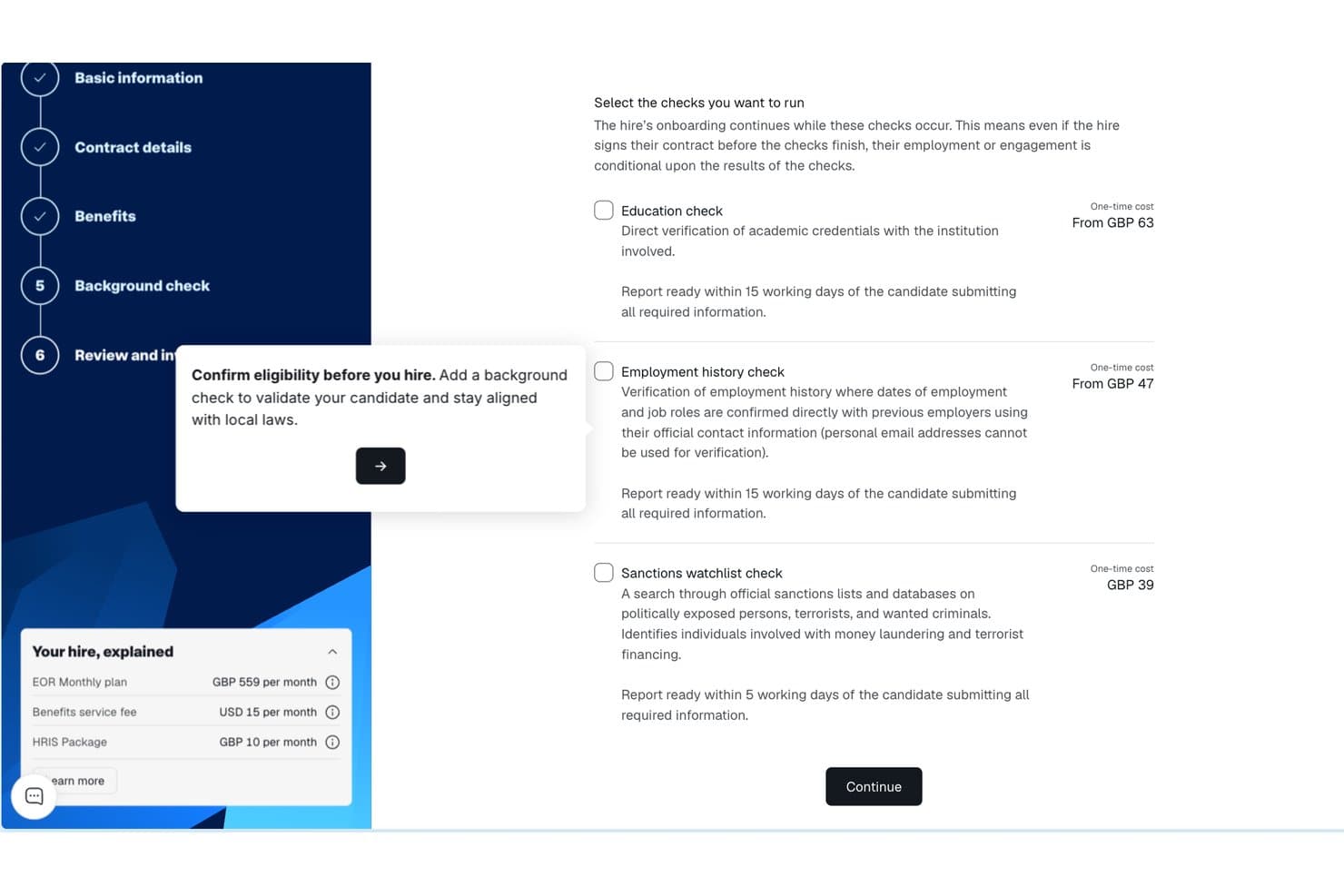
Remote background check selection screen with education, employment, and sanctions options. Remote gives small businesses a way to compliantly hire and manage employees in other countries without setting up local entities. If you’re expanding your team internationally, Remote handles employment contracts, payroll, and benefits in line with local laws. This platform is especially useful for HR teams that want to reduce legal risk and simplify cross-border employment.
Why I Picked Remote
Unlike many HR platforms, Remote is purpose-built to help small businesses manage international employment compliance without needing to set up their own legal entities abroad. I picked Remote because it acts as the legal employer of record, handling employment contracts, payroll, and statutory benefits in each country where you hire.
The platform also manages local tax withholdings and ensures your employment practices align with local labor laws. For small businesses looking to expand globally while minimizing compliance risks, Remote offers a focused solution that addresses the complexities of cross-border employment.
Remote Key Features
Some other features that make Remote valuable for small business HR compliance include:
- Self-Service Employee Portal: Employees can access payslips, contracts, and personal information directly.
- Automated Time Off Tracking: Track and manage leave requests and approvals in one place.
- IP Protection Agreements: Generate and manage intellectual property agreements for international hires.
- Localized Benefits Administration: Offer and administer country-specific benefits packages through the platform.
Remote Integrations
Integrations include QuickBooks, Zapier, HiBob, BambooHR, NetSuite, Xero, Zelt, Carta, Workday, Google Workspace, and more.
Pros and Cons
Pros:
- Localized benefits management for each country
- Automated onboarding for international employees
- Built-in IP and invention rights protection
Cons:
- Payroll processing limited to employees, not contractors
- No built-in performance management tools
 Best for scalable compliance solutions
- Free demo available
- Pricing upon request
Visit WebsiteCustomer Rating:4.2/5
Paychex dashboard displays workflow management tools in a centralized user interface. Paychex gives small businesses access to compliance tools that can scale as their needs change. If you’re looking for a solution that combines payroll, HR, and risk management with built-in compliance support, this platform is designed to adapt as your business grows. Paychex stands out for its ability to handle complex regulatory requirements across multiple states and industries.
Why I Picked Paychex
What drew me to Paychex is its ability to scale compliance support as your business grows or regulations change. Paychex offers automated tax filing and reporting, which helps small businesses stay current with federal, state, and local requirements.
I also appreciate its built-in HR compliance library, which provides up-to-date resources and templates for policies and documentation. These features make Paychex a strong fit for small businesses that need a compliance system capable of adapting to new locations, headcounts, or industry rules.
Paychex Key Features
Some other features that make Paychex useful for small business HR compliance include:
- Employee Handbook Builder: Create and update custom employee handbooks with compliance guidelines.
- Onboarding Tools: Digitally collect new hire forms and manage onboarding checklists.
- Time and Attendance Tracking: Monitor employee hours and attendance with automated tools.
- ACA Compliance Management: Track and report Affordable Care Act requirements directly within the platform.
Paychex Integrations
Integrations include QuickBooks, Sage Intacct, Xero, Jirav, 7shifts, Clover, BambooHR, goHappy, and more.
Pros and Cons
Pros:
- Employee handbook builder with legal updates
- Dedicated compliance support specialists available
- Automated state and federal tax filing
Cons:
- No built-in learning management system
- Limited customization for compliance reports
 8Best for automated compliance alerts
ADP
- Free demo available
- Pricing upon request
Visit WebsiteCustomer Rating:4.1/5
ADP offers an HR compliance system for small businesses, making it easy to manage employee changes from one centralized dashboard. If you need a system that keeps your business updated on changing employment laws, ADP offers automated compliance alerts designed for small teams. This platform suits businesses that want proactive notifications and built-in guidance to help avoid compliance mistakes. ADP can help you manage complex regulations without needing a dedicated compliance expert on staff.
Why I Picked ADP
I chose ADP because its automated compliance alerts help small businesses stay ahead of regulatory changes without extra manual effort. The system monitors federal, state, and local employment laws, then sends real-time notifications when something changes that could affect your business.
I also like that ADP includes built-in compliance checklists and document management, so you can track what needs attention and keep records organized. These features make it easier for small teams to avoid compliance gaps and reduce risk.
ADP Key Features
Some other features in ADP that small businesses may find useful include:
- Employee Handbook Wizard: Create and update a compliant employee handbook tailored to your business and location.
- HR Policy Library: Access a library of pre-built HR policies that you can customize for your organization.
- Onboarding Tools: Digitally onboard new hires with compliance-focused forms and checklists.
- Workforce Analytics: Generate reports on workforce trends, turnover, and compliance-related metrics.
ADP Integrations
Integrations include QuickBooks, Xero, Sage, Workday, HealthEquity, ZipRecruiter, ClockShark, JazzHR, OrgChart, and more.
Pros and Cons
Pros:
- Employee handbook creation and updates included
- Built-in compliance checklists for HR tasks
- Automated alerts for federal and state changes
Cons:
- Integration setup can be time-consuming
- Limited customization for compliance workflows
Learn more about ADP: Best for unified compliance across systems
- Free demo available
- From $8/user/month (billed annually)

Rippling's Compliance 360 dashboard displays a searchable list of open compliance issues with employee details and deadlines. Rippling brings HR, payroll, and IT compliance together in one platform, making it easier for small businesses to manage requirements across multiple systems. If you’re juggling employee data, device security, and payroll compliance, Rippling’s unified approach helps you keep everything in sync. It’s a strong fit for teams that want to automate compliance tasks, support accurate recordkeeping, and even outsource certain administrative functions while reducing the risk of gaps between disconnected tools within the HR department.
Why I Picked Rippling
Unlike many HR tools that focus on a single area, Rippling connects HR, payroll, and IT compliance in one place, which is especially useful for small businesses managing multiple systems. I picked Rippling because it automatically syncs employee data across HR and IT, so compliance updates happen everywhere at once.
The platform also lets you set up automated workflows for onboarding, offboarding, and policy management, reducing the risk of compliance gaps. For teams that want to avoid juggling separate tools and manual updates, Rippling’s unified compliance approach stands out.
Rippling Key Features
Some other features that make Rippling useful for small business HR compliance include:
- Custom Policy Builder: Create and manage company policies tailored to your organization’s needs.
- Automated Document Collection: Request, collect, and store compliance documents from employees in one place.
- Time Off Tracking: Monitor and manage employee leave balances and requests with built-in compliance checks.
- E-signature Collection: Gather legally binding signatures on compliance documents directly within the platform.
Rippling Integrations
Integrations include Slack, Google Workspace, Microsoft 365, Salesforce, Asana, Zoom, Jira, QuickBooks Online, Xero, and more.
Pros and Cons
Pros:
- Centralized dashboard for tracking compliance tasks
- Automated compliance alerts for multiple jurisdictions
- Syncs HR, payroll, and IT compliance data
Cons:
- Reporting exports can be slow during peak times
- Limited in-app guidance for complex compliance issues
Learn more about Rippling:

TriNet offers a Workforce Analytics dashboard displaying recently viewed reports in an organized interface. TriNet specializes in HR compliance solutions tailored to the unique needs of different industries, making it a strong choice for small businesses with specific regulatory requirements. If your team operates in healthcare, technology, retail, or another highly regulated field, TriNet offers guidance and tools designed for your environment. This platform helps you manage risk and stay compliant with industry-specific laws and standards that generic HR systems may overlook.
Why I Picked TriNet
Unlike many HR platforms that take a one-size-fits-all approach, TriNet stands out for its focus on industry-specific compliance guidance. This is especially important for small businesses in fields like healthcare, finance, or manufacturing, where regulations can be complex and constantly changing.
I picked TriNet because it offers tailored compliance resources, including industry-focused policy templates and access to HR experts who understand your sector’s requirements. With these features, your business can address compliance risks that generic HR systems might miss.
TriNet Key Features
Some other features that TriNet offers for small business HR compliance include:
- Payroll Processing: Manage payroll, tax filings, and wage calculations directly within the platform.
- Employee Benefits Administration: Offer and administer health, dental, vision, and retirement plans for your team.
- Time and Attendance Tracking: Track employee hours, manage PTO, and monitor attendance trends.
- HR Analytics Dashboard: Access real-time reports on workforce metrics, compliance status, and HR activities.
TriNet Integrations
Native integrations are not currently listed.
Pros and Cons
Pros:
- Employee handbook templates tailored by industry
- Automated tax filing and reporting features
- Industry-specific compliance resources for multiple sectors
Cons:
- Some features require contacting support to enable
- Platform updates may disrupt ongoing workflows
Learn more about TriNet:
Küçük İşletmeler için Diğer İK Uyumluluk Sistemleri
Kısa listeme girmeyen ancak yine de göz atmaya değer bazı ek küçük işletme İK uyumluluk sistemi seçenekleri şunlardır:
- 11GustoBest for integrated payroll and benefits
- 12Keka HRBest for implementation and onboarding support
- 13PaycomBest for customizable compliance checklists
- 14HiBobBest for real-time compliance tracking
- 15BambeeBest for dedicated HR manager support
- 16PaycorBest for compliance training resources
- 17LatticeBest for compliance-focused performance reviews
- 18NamelyBest for mid-sized business compliance needs
- 19BLR HR HeroBest for expert-authored compliance templates
- 20SixFiftyBest for automated legal document generation
How I Evaluate HR Compliance Systems for Small Business
I split my evaluation into baseline requirements—like multi-jurisdiction law tracking and I-9 management—and differentiators that separate the best tools for lean HR teams.
Core Functionality (Table Stakes For This List)
When I'm selecting tools for my list, I rank each one on a scale from 0 (does not offer the functionality) to 5 (excels in this area) for each core functionality listed below. Then, I calculate the tool's total score into a percentage. Each tool needs to achieve a minimum total score of 65% to be considered for inclusion.
- Labor Law Compliance Tracking: I check whether the platform monitors federal, state, and local law changes and sends alerts—for example, when a new paid leave mandate takes effect in a jurisdiction where you have employees.
- Employee Records Management: Secure, organized personnel files matter, so I evaluate how each tool handles document storage, retention schedules, and access permissions for sensitive items like offer letters and disciplinary records.
- Policy & Handbook Management: I look for tools that let you build and distribute employee handbooks with e-signature acknowledgment tracking, especially those offering state-specific policy templates you can customize.
- Mandatory Reporting & Filings: Each tool should support key government forms and filings like I-9s, W-4s, EEO-1 reports, and ACA submissions, with built-in error checks to reduce rejected or late filings.
- Compliance Training Tracking: I evaluate whether the platform assigns, delivers, or tracks required training—like anti-harassment or workplace safety courses—and sends reminders before certifications expire.
- Audit Trails & Reporting: Clear, timestamped logs of every administrative and employee action are what I look for here, along with the ability to generate export-ready compliance reports ahead of an audit.
Once I have a list of tools that meet the criteria, I consider what sets each platform apart.
Differentiating Factors (What Sets Vendors Apart)
Here's how I compare and contrast different vendors:
Standout Features
Access to certified HR advisors is a major differentiator, especially when a small team needs guidance on a tricky termination or leave request. I also look for multi-state compliance automation, which matters as soon as you hire your first remote employee in a new jurisdiction. Built-in compliance risk assessments round things out—tools that score your current posture and flag gaps give you a clear action plan before issues escalate.
Beyond Features
Pricing and plan structure matter here—I evaluate whether a vendor's per-employee pricing stays realistic as a small team grows from 10 to 50 people. Integrations are equally important; a compliance system that connects with your existing payroll provider and benefits carriers keeps data consistent without manual re-entry. I also consider onboarding support, since an office manager juggling HR duties needs guided setup and ready-made compliance checklists, not a self-serve knowledge base alone.
Küçük İşletmeler için İK Uyumluluk Sistemi Nasıl Seçilir?
Uzun özellik listeleri ve karmaşık fiyatlandırma yapıları arasında kaybolmak kolaydır. Kendinize özgü yazılım seçim sürecinizi yürütürken odaklanmanızı korumanıza yardımcı olmak için göz önünde bulundurmanız gereken faktörlerin bir kontrol listesi aşağıda yer alıyor:
| Faktör | Göz önünde bulundurulması gerekenler |
|---|---|
| FaktörÖlçeklenebilirlik | Göz önünde bulundurulması gerekenlerSistem, işletmeniz büyüdükçe, yeni konumlar ekledikçe veya çalışan sayınız arttıkça sizi destekleyecek mi? Kullanıcı sınırlarını ve yükseltme seçeneklerini kontrol edin. |
| FaktörEntegrasyonlar | Göz önünde bulundurulması gerekenlerAraç, bordro, İKYS veya belge yönetimi sistemlerinize bağlanıyor mu? Manuel çalışmayı önlemek için yerel entegrasyonları doğrulayın. |
| FaktörÖzelleştirilebilirlik | Göz önünde bulundurulması gerekenlerİş akışlarını, eğitim atamalarını ve raporlamayı politikalarınıza ve mevzuat gereksinimlerinize göre uyarlayabiliyor musunuz? Katı ve herkese uyan tek tip kurulumlardan kaçının. |
| FaktörKullanım kolaylığı | Göz önünde bulundurulması gerekenlerİK ekibiniz ve çalışanlarınız arayüzü kullanışlı bulacak mı? Anlaşılır gezinme ve asgari eğitim gereksinimlerini test edin. |
| FaktörUygulama ve işe alıştırma | Göz önünde bulundurulması gerekenlerSistemi çalışır duruma getirmeniz ne kadar sürecek? Veri aktarımı desteği, işe alıştırma kaynakları ve tipik değer elde etme süresi hakkında bilgi isteyin. |
| FaktörMaliyet | Göz önünde bulundurulması gerekenlerFiyatlandırma kademeleri şeffaf ve öngörülebilir mi? Gizli ücretlere, kullanıcı başına ücretlere veya uyumluluk modülleri için ek maliyetlere dikkat edin. |
| FaktörGüvenlik önlemleri | Göz önünde bulundurulması gerekenlerSistem şifreleme, erişim denetimleri ve denetim günlükleri sunuyor mu? Veri gizliliği ve uyumluluk standartlarınızı karşıladığından emin olun. |
| FaktörDestek erişilebilirliği | Göz önünde bulundurulması gerekenlerHangi destek kanalları sunuluyor ve hangi saatlerde hizmet veriliyor? 7/24 yardıma veya uyumluluk uzmanlarına erişime ihtiyacınız olup olmadığını değerlendirin. |
Küçük İşletmeler için İK Uyumluluk Sistemi Nedir?
Küçük işletmeler için bir İK uyumluluk sistemi, kuruluşların insan kaynakları işlevleri genelindeki uyumluluğu yönetmesine, izlemesine ve belgelemesine yardımcı olan İK yazılımıdır. Bu platformlar, çalışan yaşam döngüsü boyunca İK operasyonlarını, temel İK süreçlerini ve daha geniş kapsamlı HCM süreçlerini destekler.
İK profesyonelleri ve küçük işletme sahipleri bu sistemleri aday takibi, yetenek yönetimi ve COBRA ile sağlık sigortası düzenlemeleri gibi gerekliliklere uyum sağlama görevlerini yürütmek için kullanır.
Birçok araç, iş akışlarını kolaylaştırmak ve çalışan bağlılığını ve elde tutma oranını iyileştirmek için bordro yazılımıyla da entegre olur. Kullanıcı dostu bir yaklaşımla bu sistemler uyumluluk faaliyetlerini merkezileştirir, riski azaltır ve ekiplerin düzenli kalmasına ve denetime hazır olmasına yardımcı olur.
Özellikler
Küçük bir işletme için İK uyumluluk sistemi seçerken aşağıdaki temel özelliklere dikkat edin:
- Uyumluluk eğitimi yönetimi: Çalışanların mevzuat ve şirket standartlarını karşılaması için gerekli eğitim kurslarını atayın, planlayın ve tamamlanma durumlarını izleyin.
- Belge depolama ve yönetimi: Politikalar, sertifikalar ve denetim kayıtları gibi uyumlulukla ilgili belgeleri güvenli bir şekilde depolayın, düzenleyin ve geri alın.
- Politika onaylarının izlenmesi: Politikaları çalışanlara dağıtın ve herkesin önemli belgeleri inceleyip kabul ettiğinden emin olmak için dijital onayları takip edin.
- Otomatik hatırlatıcılar ve uyarılar: Uyumluluk görevlerini zamanında yürütmek için yaklaşan eğitim son tarihleri, politika güncellemeleri veya süresi dolan sertifikalarla ilgili bildirimler ayarlayın.
- Olay ve soruşturma takibi: İş yeri olaylarını kaydedin, takip işlemlerini belgeleyin ve denetimler veya hukuki incelemeler için kayıtları saklayın.
- Özelleştirilebilir uyumluluk raporlaması: Denetimler veya iç incelemeler için eğitim tamamlanması, politika onayları ve diğer uyumluluk ölçütleri hakkında raporlar oluşturun ve dışa aktarın.
- Role dayalı erişim denetimleri: Hassas uyumluluk verilerine erişimi kullanıcı rollerine göre sınırlandırarak yalnızca yetkili personelin belirli bilgileri görüntüleyebilmesini veya düzenleyebilmesini sağlayın.
- Mevzuat güncelleme bildirimleri: Uyumluluk gerekliliklerinizi etkileyebilecek ilgili istihdam yasaları veya düzenlemelerindeki değişiklikler hakkında uyarılar alın.
- İş akışı otomasyonu: Manuel iş yükünü azaltmak için işe alım kontrol listeleri veya yinelenen eğitim atamaları gibi tekrarlanan uyumluluk süreçlerini otomatikleştirin.
- Denetim izi kaydı: Şeffaflığı ve hesap verebilirliği desteklemek için sistem içindeki uyumlulukla ilgili tüm işlemlerin ve değişikliklerin ayrıntılı kaydını tutun.
Avantajlar
Küçük bir işletme için İK uyumluluk sisteminin uygulanması ekibiniz ve işletmeniz için çeşitli avantajlar sağlar. Yararlanabileceğiniz avantajlardan bazıları şunlardır:
- Azalan uyumluluk riski: Merkezileştirilmiş takip ve otomatik hatırlatıcılar, işletmenizin mevzuat gerekliliklerini karşılamasına ve maliyetli cezalardan kaçınmasına yardımcı olur.
- Daha hızlı denetim hazırlığı: Düzenli belge depolama ve denetim izi kaydı, denetimler sırasında uyumluluk kayıtlarının toplanmasını ve sunulmasını kolaylaştırır.
- Gelişmiş çalışan hesap verebilirliği: Politika onaylarının izlenmesi ve eğitim yönetimi, çalışanların gerekli uyumluluk görevlerini anlamasını ve tamamlamasını sağlar.
- İK için zaman tasarrufu: İş akışı otomasyonu ve özelleştirilebilir raporlama manuel işi azaltır ve İK personelinin daha yüksek değer sağlayan faaliyetlere zaman ayırmasını sağlar.
- Uyumluluk durumuna ilişkin daha iyi görünürlük: Gerçek zamanlı gösterge panoları ve raporlama, eğitim tamamlanma durumu, politika onayları ve bekleyen görevler hakkında net bir görünüm sunar.
- Gelişmiş veri güvenliği: Role dayalı erişim denetimleri ve güvenli belge yönetimi, hassas uyumluluk bilgilerini yetkisiz erişime karşı korur.
- Mevzuat değişikliklerine uyarlanabilirlik: Mevzuat güncelleme bildirimleri ve özelleştirilebilir iş akışları, yasalar ve gereklilikler değiştikçe işletmenizin güncel kalmasına yardımcı olur.
Maliyetler ve Fiyatlandırma
Küçük bir işletme için İK uyumluluk sistemi seçmek, mevcut çeşitli fiyatlandırma modellerinin ve planların anlaşılmasını gerektirir. Maliyetler özelliklere, ekip büyüklüğüne, eklentilere ve daha fazlasına bağlı olarak değişir. Aşağıdaki tablo, küçük işletmelere yönelik İK uyumluluk sistemlerinde yaygın planları, bunların ortalama fiyatlarını ve genellikle sunulan özellikleri özetlemektedir:
Küçük işletmeler için İK uyumluluk sistemi plan karşılaştırma tablosu
| Plan Türü | Ortalama Fiyat | Yaygın Özellikler |
|---|---|---|
| Plan TürüÜcretsiz Plan | Ortalama Fiyat$0 | Yaygın ÖzelliklerTemel uyumluluk belgelerinin depolanması, sınırlı eğitim atamaları ve basit raporlama. |
| Plan TürüBireysel Plan | Ortalama Fiyat$5-$15/kullanıcı/ay | Yaygın ÖzelliklerUyumluluk eğitimi yönetimi, belge depolama, otomatik hatırlatıcılar ve temel politika takibi. |
| Plan Türüİşletme Planı | Ortalama Fiyat$15-$30/kullanıcı/ay | Yaygın ÖzelliklerÖzelleştirilebilir uyumluluk iş akışları, gelişmiş raporlama, olay takibi ve role dayalı erişim denetimleri. |
| Plan TürüKurumsal Plan | Ortalama Fiyat$30-$50/kullanıcı/ay | Yaygın ÖzelliklerMevzuat güncelleme bildirimleri, denetim izi kaydı, özel destek ve gelişmiş güvenlik önlemleri. |
Küçük İşletmeler için İK Uyumluluk Sistemi SSS
Küçük işletmeler için İK uyumluluk sistemleri hakkında sık sorulan bazı soruların yanıtları aşağıdadır:
Küçük işletmemin bir İK uyumluluk sistemine ihtiyacı olup olmadığını nasıl anlayabilirim?
Çalışan eğitimlerini, politika onaylarını veya mevzuat belgelerini manuel olarak yönetiyorsanız büyük olasılıkla bir İK uyumluluk sistemine ihtiyacınız vardır. Bu araçlar hataları azaltmaya, zamandan tasarruf etmeye ve işletmeniz büyürken yasal gereklilikleri karşılamanızı sağlamaya yardımcı olur.
İK uyumluluk sistemleri birden fazla eyalette bulunan veya uzaktan çalışan ekipler konusunda yardımcı olabilir mi?
Evet, çoğu İK uyumluluk sistemi konuma özel gereklilikleri takip ederek ve dijital politika dağıtımı ile eğitim olanağı sunarak birden fazla eyalette bulunan ve uzaktan çalışan ekipleri destekler. Bu, farklı yargı bölgelerinde ve çalışma düzenlerinde uyumluluğunuzu korumanıza yardımcı olur.
İşletmem büyüyorsa bir uyumluluk sisteminde nelere dikkat etmeliyim?
Ölçeklenebilirlik, esnek kullanıcı yönetimi ve özelleştirilebilir iş akışları sunan bir sistem arayın. İşletmeniz büyüdükçe daha fazla kullanıcıyı yönetebilen, yeni düzenlemelere uyum sağlayabilen ve diğer İK araçlarıyla entegre olabilen bir sisteme ihtiyacınız olacaktır.
Bir İK uyumluluk sisteminin uygulanması ne kadar sürer?
Uygulama süresi değişiklik gösterir, ancak çoğu küçük işletme birkaç gün ila birkaç hafta içinde başlatabilir. Süreyi etkileyen faktörler arasında veri aktarımı, kullanıcı eğitimi ve uyumluluk ihtiyaçlarınızın karmaşıklığı yer alır.
İK Uyumluluk Sistemleri hassas çalışan verileri için yeterince güvenli midir?
Evet, saygın İK uyumluluk sistemleri hassas verileri korumak için şifreleme, erişim denetimleri ve denetim günlükleri kullanır. Satın almadan önce sistemin sektörünüzün veri gizliliği ve güvenlik standartlarını karşıladığını mutlaka doğrulayın.