

Paycom oldukça itibarlı ve güçlü bir bordro yönetimi yazılımı olsa da ihtiyaçlarınız için en iyi çözüm olmayabilir.
Farklı sektörlerde ve çeşitli ekip büyüklüklerinde İK ve bordro yazılımlarını inceleyerek yıllar geçirdim.
Bu makalede, kuruluşunuz için en iyi aracı güvenle seçebilmeniz amacıyla en iyi Paycom alternatiflerini; öne çıkan özelliklerini, güçlü yönlerini ve ideal kullanım alanlarını vurgulayarak ayrıntılı şekilde ele alacağım.
Paycom nedir?
Paycom, bordro ve İK görevlerini verimli bir şekilde yönetmek için tasarlanmış bir bordro yazılımıdır. Genellikle çalışan verilerini yönetmek için güvenilir bir sisteme ihtiyaç duyan İK profesyonelleri ve bordro yöneticileri tarafından kullanılır.
Bordro işlemleri, zaman takibi ve çalışanların kendi kendine hizmet alabilmesi gibi özellikler hataları azaltmaya ve zamandan tasarruf etmeye yardımcı olur. Genel olarak Paycom, karmaşık İK süreçlerini ekibiniz için basitleştirerek değer sunar.
Paycom Rakipleri Karşılaştırma Tablosu
Bu karşılaştırma tablosu, bütçenize ve işletmenizin ihtiyaçlarına uygun bir çözüm bulmanıza yardımcı olmak için en iyi Paycom rakiplerimin fiyatlandırma ve ücretsiz deneme seçeneklerini öne çıkarır.
Score legend (out of 5)
- Excellent4.5–5
- Good4–4.4
- Average3–3.9
- Below average2–2.9
- Poor1–1.9
Sorted by: Default
| Tool | Starting Price | Website | |||||||||
|---|---|---|---|---|---|---|---|---|---|---|---|
Best for advanced analytics | Not rated | 3 | 4 | 4 | 4 | 4 | 4 | Not rated | Not rated | Pricing upon request Free demo available | Website |
Best for payroll with employee career paths | Not rated | 3 | 5 | 3 | 4 | Not rated | Not rated | 4 | 3 | $15/user/month Free demo available | Website |
Best for managed Paycom migrations | Not rated | 3 | 3 | 4 | 4 | 4 | 4 | Not rated | Not rated | Pricing upon request Free demo available | Website |
Best for planning phased HCM rollouts | Not rated | 4 | 3 | 3 | 4 | 4 | 3 | Not rated | Not rated | Pricing upon request Not available | Website |
Best for carrying hires into payroll | Not rated | 3 | 4 | 3 | 4 | 4 | 4 | Not rated | Not rated | $9/user/month Free demo available | Website |
Best for customizable solutions | Not rated | 4 | 3 | 4 | 4 | 4 | 4 | Not rated | Not rated | Pricing upon request Free demo available | Website |
Best for integrated HR management | Not rated | 4 | 4 | 4 | 4 | 5 | 4 | Not rated | Not rated | $8/user/month Free demo available | Website |
Best for pay calculated as time is captured | Not rated | 4 | 4 | 4 | 4 | 4 | 4 | Not rated | Not rated | Pricing upon request 60-day free trial | Website |
Best for personalized support | Not rated | 3 | 3 | 4 | 4 | 4 | 4 | Not rated | Not rated | Pricing upon request Free demo available | Website |
Best for unlimited payroll without run fees | Not rated | 4 | 3 | 4 | 4 | 4 | 4 | Not rated | Not rated | $49/month Free trial + free demo available | Book Demo |


Why Trust Our Software Recommendations
6,700+
Reviews
20
Industry experts
16+
Evaluation factors
14
Years
Our team has been testing and reviewing software since 2012. As HR experts ourselves, we know how difficult—and important—it is to choose the right software.
For this guide, we evaluated tools using hands-on testing and independent research, scoring tools using our selection criteria. We also draw on insights from industry thought leaders and practicing HR experts.
Our reviews reflect our human editorial judgment, not a sales pitch.
Expert reviewers:
- Phil GrayCOO
 Kim BehnkeHR Tech Editor & Analyst
 Josh BarkerPeople Ops Manager

En İyi Paycom Rakipleri İncelemeleri
Aşağıda, kısa listeme giren en iyi Paycom rakiplerinin ayrıntılı özetlerini bulabilirsiniz. İncelemelerim, sizin için en iyi seçeneği bulmanıza yardımcı olmak amacıyla her aracın temel özelliklerine, artılarına ve eksilerine, entegrasyonlarına ve ideal kullanım alanlarına ayrıntılı bir bakış sunar.
 Best for advanced analytics
- Free demo available
- Pricing upon request
Visit WebsiteCustomer Rating:4.3/5
Paylocity supports payroll, talent acquisition, and compliance across all team sizes Paylocity is a Human Capital Management (HCM) platform designed for businesses of all sizes, including small to enterprise-level organizations. It assists HR professionals with payroll management, talent acquisition, and compliance tasks.
Why it's a good Paycom competitor: Paylocity's advanced analytics provide deeper insights into your HR data, enabling you to make informed decisions. Features like accounting automation and spend analytics provide added value in managing finances. The platform’s AI-powered automation helps reduce manual work, enhancing efficiency in your HR operations.
Standout Features & Integrations:
Features include employee self-service, compliance tools, and expense management. These tools help your team manage HR tasks more effectively. Paylocity also offers centralized asset management to streamline operations.
Integrations include QuickBooks, SAP SuccessFactors, Workday, ADP, BambooHR, Xero, NetSuite, Microsoft Dynamics, Salesforce, and Oracle.
Pros and Cons
Pros:
- Centralized asset management
- AI-powered automation
- Advanced analytics capabilities
Cons:
- Learning curve for new users
- Requires initial setup time
 Best for payroll with employee career paths
- Free demo available
- From $15/user/month
Visit WebsiteCustomer Rating:4.3/5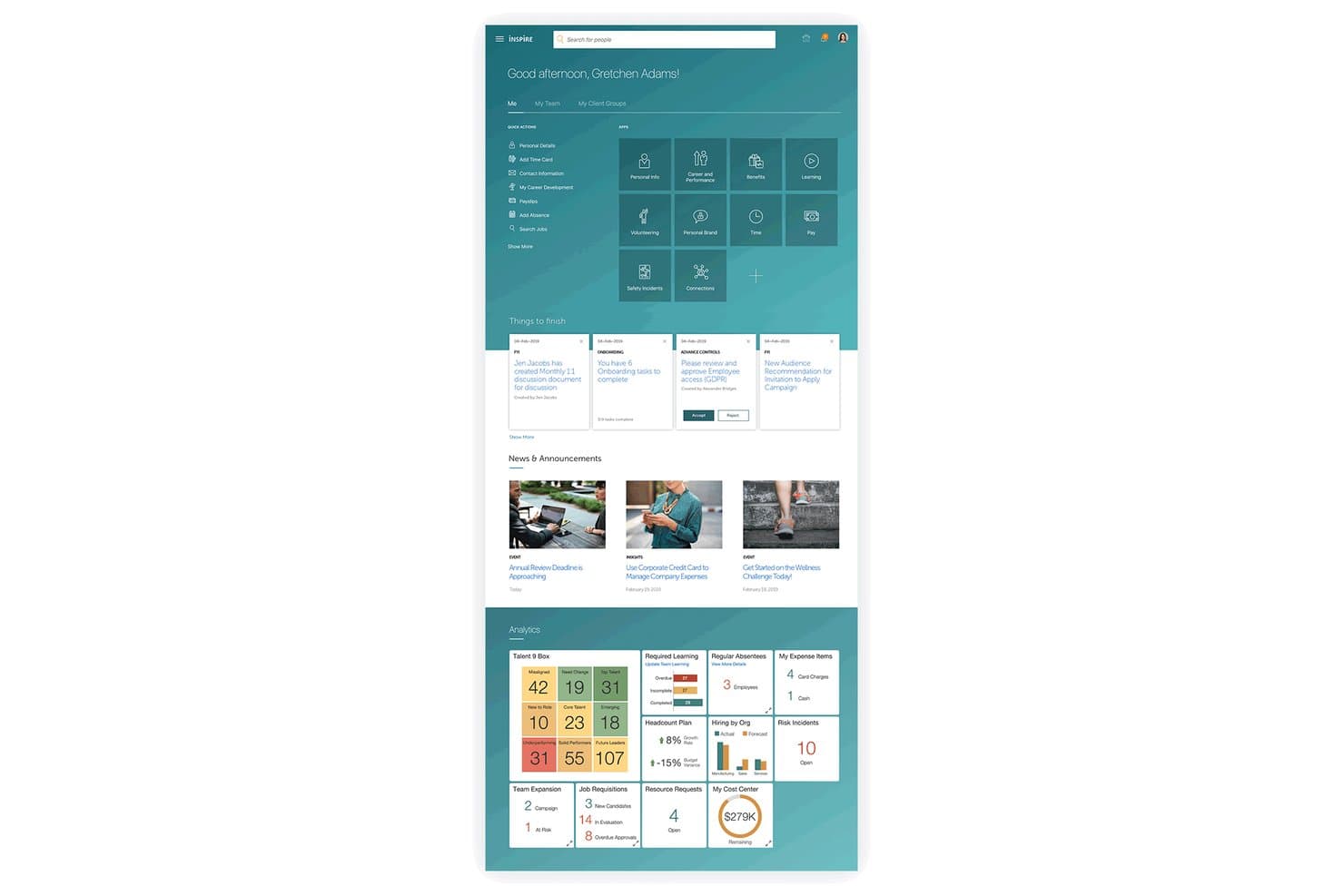
Oracle HCM Cloud centralizes HR tasks, analytics, and news in one dashboard. Oracle Fusion Cloud HCM is an enterprise-grade HR platform that connects payroll, talent management, workforce scheduling, and employee self-service in a single cloud system built for large, complex, or globally distributed organizations.
Who Is Oracle HCM Cloud Best For?
Oracle Fusion Cloud HCM is a strong fit for large, globally distributed organizations that need enterprise-grade HR, payroll, and talent management under one platform.
Why I Picked Oracle HCM Cloud
Oracle HCM Cloud earns its spot on my shortlist because it's one of the few platforms that genuinely connects payroll with structured career development, so an employee's growth trajectory is visible alongside their compensation history. I particularly like how Succession Planning and Career Development use skills data to surface internal mobility opportunities and recommend personalized learning paths. That same skills layer feeds directly into payroll and workforce planning, so when someone moves into a new role, the compensation and reporting structures follow automatically.
Oracle HCM Cloud Key Features
- Global payroll engine: Processes payroll natively across 60+ countries, with partner extensions covering 160+ countries for multinational workforce support.
- AI anomaly detection: Automatically flags irregular payroll transactions and HCM activity during processing runs to surface issues before finalization.
- Workforce scheduling: Forecasts labor demand and builds schedules that balance staffing needs, worker preferences, and local labor rules.
- Advanced HCM Controls: Monitors user access and system activity in real time, flagging unauthorized actions and high-risk payroll transactions for review.
Oracle HCM Cloud Integrations
Oracle HCM Cloud integrates with ADP Global Payroll, ADP Workforce Now, Dayforce aPay, Neeyamo, Ramco, Indeed, and LinkedIn through partner connections and marketplace integrations. Documented REST APIs support custom integrations.
Pros and Cons
Pros:
- Employee portal exposes pay stubs and time-off
- Payroll anomaly alerts flag irregular transactions early
- Career paths connect skills with internal mobility
Cons:
- Time-entry navigation frustrates some reviewers
- US tax filing depends on external providers
Learn more about Oracle HCM Cloud: Best for managed Paycom migrations
- Free demo available
- Pricing upon request
Visit WebsiteCustomer Rating:4.5/5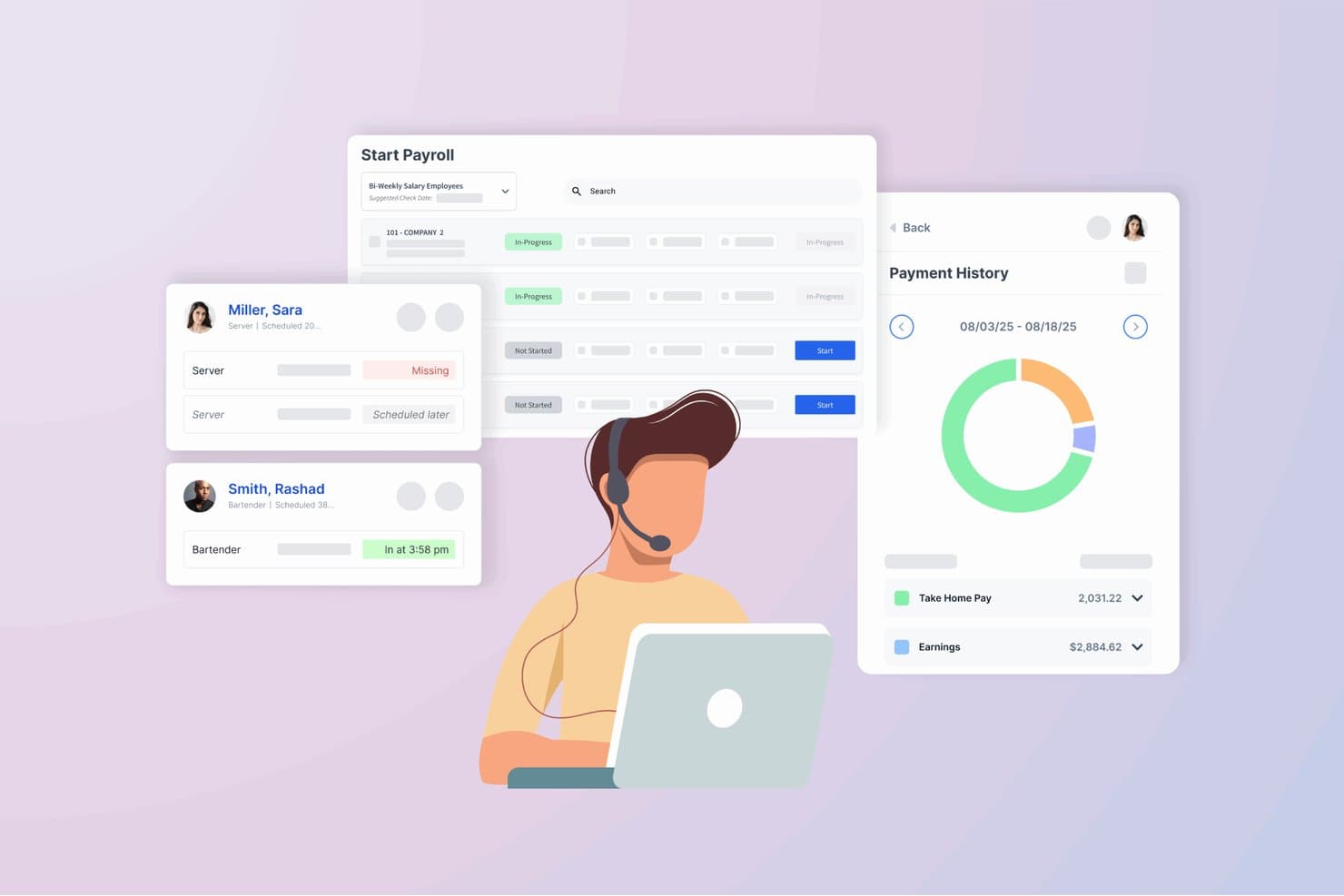
Netchex centralizes payroll, scheduling, and pay history in one view. Netchex is a full-service, cloud-based payroll and HR platform built for small to mid-sized businesses that need a single system to handle payroll processing, tax filing, time and attendance, benefits administration, and compliance.
Who Is Netchex Best For?
Netchex is a strong fit for small to mid-sized businesses that want a single platform to replace Paycom without losing payroll, HR, or compliance functionality in the process.
Why I Picked Netchex
I picked Netchex as one of the best because it's built specifically to handle the kind of full-system transitions that Paycom migrations require. I appreciate that Netchex assigns a dedicated implementation team to manage data mapping, historical payroll records, and tax setup from day one. Its unified platform covers payroll, time tracking, and benefits administration in one place, so there's no scrambling to reconnect tools post-migration.
Netchex Key Features
- Recruiting and applicant tracking: A built-in ATS lets you post jobs, manage candidates, and move applicants through a hiring pipeline without leaving the platform.
- Employee self-service portal: Employees can access pay stubs, update personal information, request time off, and enroll in benefits directly from a self-service dashboard.
- Garnishment management: Netchex handles wage garnishment calculations and payments automatically, keeping deductions compliant with applicable legal requirements.
- Custom reporting builder: A configurable reporting tool lets you generate payroll, HR, and workforce reports using filters and fields you define.
Netchex Integrations
Netchex’s integrations directory lists 145+ named partners, including The Standard and Inn-Flow. Its API supports custom connections to HR, payroll, benefits, and time data.
Pros and Cons
Pros:
- Reviewers praise responsive, knowledgeable payroll support
- Payroll, HR, and timekeeping share one platform
- Dedicated implementation team manages payroll migrations
Cons:
- Some timekeeping reports omit employees
- PTO tracking issues recur in reviews
Learn more about Netchex: Best for planning phased HCM rollouts
- Not available
- Pricing upon request
Visit WebsiteCustomer Rating:4.3/5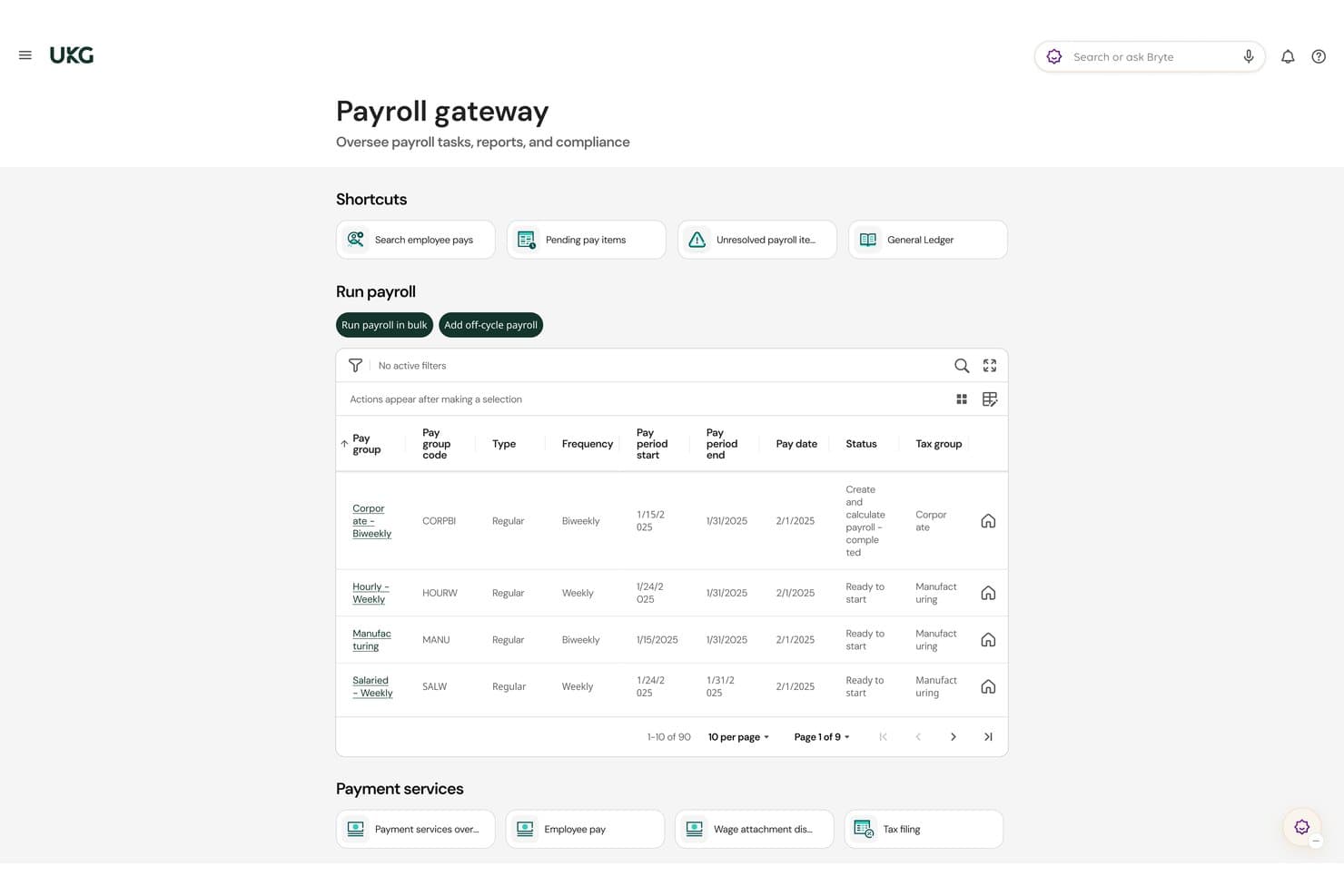
UKG Pro centralizes payroll management across multiple pay groups and schedules. UKG Pro is a full-suite HCM platform built for mid-to-large organizations that need payroll, HR, talent management, and workforce analytics under one roof.
Who Is UKG Pro Best For?
UKG Pro is a strong fit for mid-to-large organizations that want to roll out HR, payroll, and talent tools in stages rather than all at once.
Why I Picked UKG Pro
I picked UKG Pro as one of the best because it's built specifically for organizations that can't swap out their entire HR stack overnight. Its modular architecture lets you deploy payroll first, then layer in talent management or workforce analytics when you're ready, without disrupting what's already live. I also appreciate how its deployment roadmap tools give HR teams a clear view of rollout milestones across each phase.
UKG Pro Key Features
- Payroll processing: UKG Pro handles multi-state payroll calculations with built-in tax compliance tools.
- Benefits administration: Employees can enroll in and manage benefits directly through a self-service portal.
- Performance management: Managers can set goals, track progress, and conduct reviews within the platform.
- People analytics: Pre-built dashboards surface workforce trends like turnover, headcount, and compensation data.
UKG Pro Integrations
UKG Pro offers marketplace integrations with Workato, Flexspring, PlanSource, Benefitfocus, and JazzHR. Its developer APIs support custom connections for employee, payroll, benefits, and workforce data.
Pros and Cons
Pros:
- Configurable settings support complex organizations
- Centralizes payroll and employee records
- Modules support staged HCM rollouts
Cons:
- Support quality varies across cases
- Custom reporting can be difficult
Learn more about UKG Pro: Best for carrying hires into payroll
- Free demo available
- From $9/user/month
Visit WebsiteCustomer Rating:4.1/5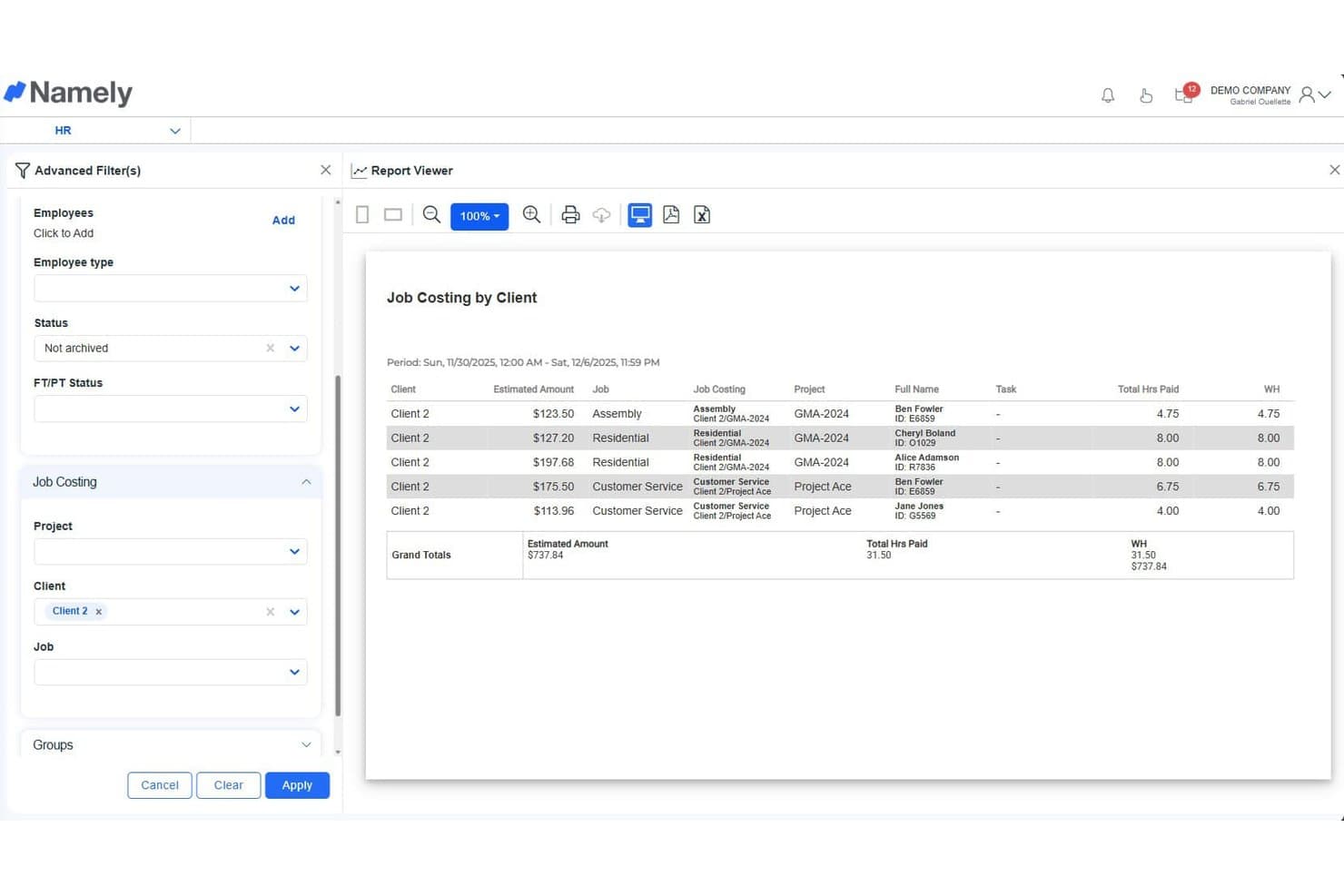
Namely tracks job costing by client, hours, and estimated amounts. Namely is an HR platform built for mid-sized companies that brings together hiring, onboarding, payroll, and benefits in one place—cutting out the manual handoffs that slow HR teams down.
Who Is Namely Best For?
Namely is a strong fit for mid-sized companies that want hiring and payroll to live in the same system, so new hires move from offer to first paycheck without manual re-entry.
Why I Picked Namely
I picked Namely as one of the best because it eliminates the data handoff problem that plagues most HR stacks. When a hire is made, their details carry directly into payroll without any re-entry, so your first payroll run for a new employee is based on the same record created at the offer stage. I especially like how Namely's onboarding workflows connect tax forms, direct deposit setup, and benefits elections to the payroll engine in one continuous flow.
Namely Key Features
- Performance review builder: Create and assign customizable performance review templates directly within the platform, with automated reminders for managers and employees.
- Time and attendance tracking: Log employee hours through Namely's time clock tools, with data feeding directly into payroll calculations each pay period.
- PTO policy management: Configure accrual rules, approval workflows, and balance tracking for different employee groups from a single admin view.
- HR analytics dashboard: Access pre-built reports on headcount, turnover, and compensation data to surface workforce trends without manual exports.
Namely Integrations
Namely offers integrations through its partner ecosystem, including Greenhouse, Lever, Okta, OneLogin, Slack, Replicon, and Human Interest. Its open API supports custom connections.
Pros and Cons
Pros:
- Time data feeds payroll calculations
- Onboarding connects tax forms and benefits elections
- Hiring records carry into payroll
Cons:
- Support responses can be slow
- Payroll corrections can be challenging
Learn more about Namely: Best for customizable solutions
- Free demo available
- Pricing upon request
Visit WebsiteCustomer Rating:4.2/5
Paychex supports small to mid-sized teams with payroll, benefits, and compliance management Paychex is a payroll and HR solution designed for small to mid-sized businesses. It helps HR teams manage payroll, benefits, and compliance tasks efficiently.
Why it's a good Paycom competitor: Paychex offers customizable solutions that cater to your business's specific needs. The platform provides flexible payroll processing options and robust compliance support. It also features employee benefits management to help you attract and retain talent. Paychex's adaptability makes it a strong choice for businesses seeking tailored HR solutions.
Standout Features & Integrations:
Features include time and attendance tracking, HR administration, and tax services. These features help your team manage HR tasks effectively. Paychex also offers retirement services to support your employees' financial planning.
Integrations include QuickBooks, Xero, Microsoft Dynamics, Salesforce, BambooHR, Sage, NetSuite, Intacct, Zoho Books, and FreshBooks.
Pros and Cons
Pros:
- Robust compliance support
- Flexible payroll processing
- Customizable solutions
Cons:
- Learning curve for new users
- Initial setup complexity
 Best for integrated HR management
- Free demo available
- From $8/user/month (billed annually)

Rippling unifies HR, IT, and finance by automating payroll, benefits, and device management Rippling is a unified platform that combines HR, IT, and finance operations for businesses of all sizes. It serves HR professionals by automating payroll, benefits, and device management.
Why it's a good Paycom competitor: Rippling integrates HR management with IT and finance functions, offering a more comprehensive solution for your team. Its centralized platform allows you to manage payroll and employee devices from a single dashboard. The automation features reduce manual tasks and improve efficiency. Rippling's flexibility in handling various business operations sets it apart.
Standout Features & Integrations:
Features include device management, benefits administration, and payroll automation. These features help your team streamline HR and IT tasks. Rippling also offers an employee self-service portal to enhance user experience.
Integrations include QuickBooks, Xero, Slack, Google Workspace, Microsoft 365, Salesforce, Dropbox, ADP, Okta, and BambooHR.
Pros and Cons
Pros:
- Automation reduces manual tasks
- Centralized management dashboard
- Unified platform for HR and IT
Cons:
- Learning curve for new users
- Initial setup complexity
Learn more about Rippling: Best for pay calculated as time is captured
- 60-day free trial
- Pricing upon request

Dayforce HCM supports payroll, benefits, and workforce management in a cloud platform Dayforce HCM is a cloud-based human capital management platform designed for businesses of all sizes. It helps HR professionals manage payroll, benefits, and workforce management.
Why it's a good Paycom competitor: Dayforce HCM by Ceridian is a powerful all-in-one payroll and workforce management solution that excels in accuracy and compliance. Its continuous calculation engine ensures payroll data is updated in real time, eliminating batch processing delays and reducing errors.
Designed to meet complex labor law requirements, Dayforce streamlines payroll, scheduling, and compliance within a single platform.
Standout Features & Integrations:
Features include real-time workforce analytics, employee self-service, and talent management tools to optimize HR operations. Its compensation management module aligns pay with performance, while built-in compliance management ensures adherence to global labor standards. The platform also includes scheduling, time tracking, and benefits administration, giving organizations a 360° view of their workforce.
Integrations include ADP, QuickBooks, SAP, SuccessFactors, Workday, Oracle, Microsoft Dynamics, Salesforce, NetSuite, and BambooHR.
Pros and Cons
Pros:
- Continuous calculation engine
- Built-in compliance tools
- Real-time data access
Cons:
- Learning curve for new users
- Complex initial setup
Learn more about Dayforce HCM:

Checkwriters supports small to mid-sized teams with payroll, benefits, and compliance management Checkwriters is a comprehensive payroll and HR platform designed for small to medium-sized businesses. It helps HR teams manage payroll processing, benefits, and compliance.
Why it's a good Paycom competitor: Checkwriters offers personalized support, ensuring your team gets the help they need when managing HR tasks. The platform provides flexible payroll solutions that can be tailored to fit your business requirements. Its compliance management features help you stay up-to-date with labor laws and regulations. Checkwriters' focus on personalized service makes it an attractive option for businesses seeking hands-on support.
Standout Features & Integrations:
Features include payroll processing, benefits administration, and compliance management. These tools help your team manage HR tasks efficiently. Checkwriters also offers employee self-service portals to enhance user experience and engagement.
Integrations include QuickBooks, Xero, BambooHR, Sage, ADP, Paychex, Paylocity, Gusto, Intuit, and NetSuite.
Pros and Cons
Pros:
- Compliance management features
- Flexible payroll solutions
- Personalized support
Cons:
- Learning curve for new users
- Initial setup complexity
Learn more about Checkwriters: 10Best for unlimited payroll without run fees
Gusto
- Free trial + free demo available
- From $49/month
Visit WebsiteCustomer Rating:4.6/5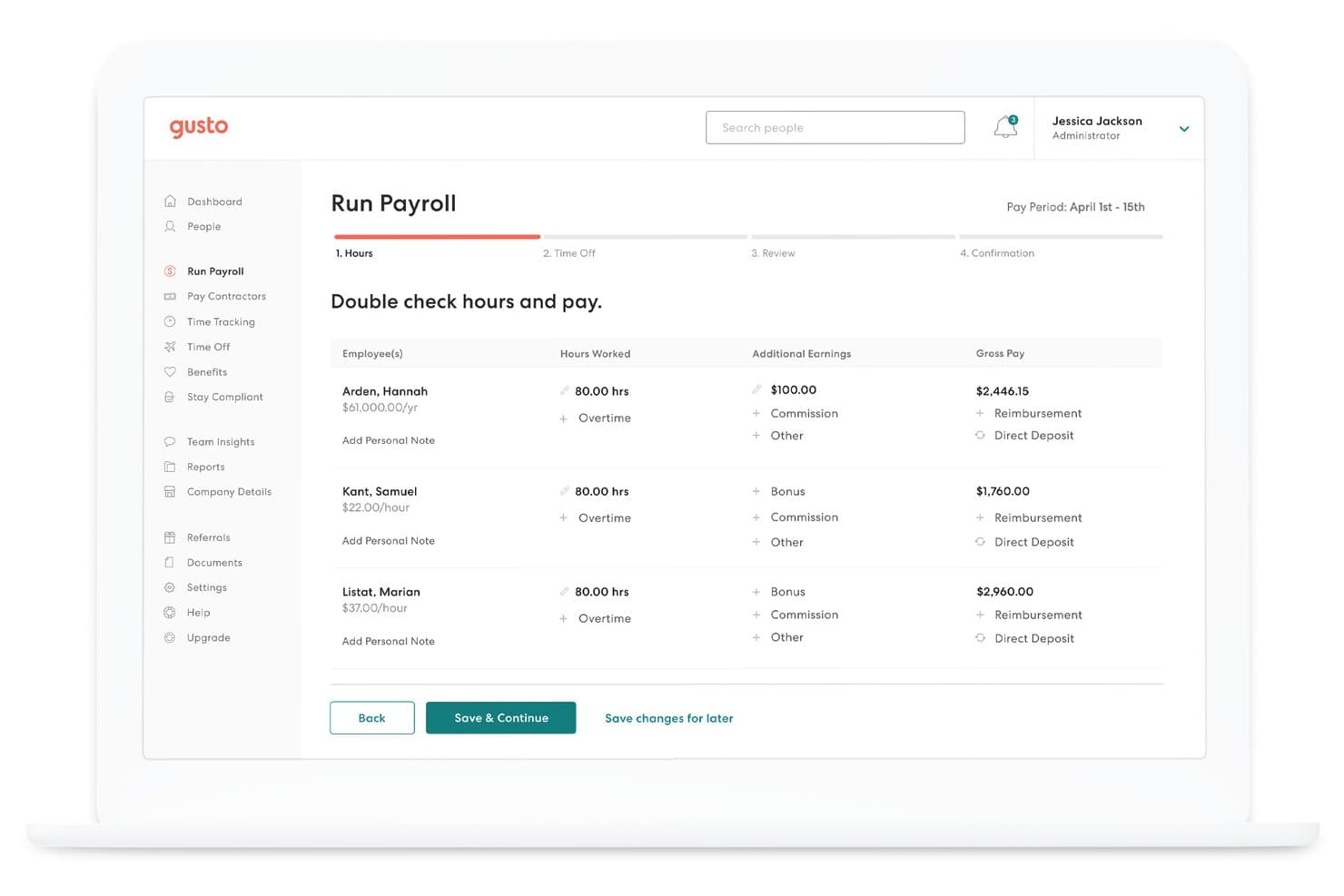
Gusto lets users review employee hours and pay before processing payroll. Gusto is a full-service payroll and HR platform built for small to mid-sized businesses that want to handle payroll, benefits, and compliance in one place without the complexity of enterprise systems.
Who Is Gusto Best For?
Gusto is a strong fit for small to mid-sized businesses that want to run payroll as often as needed without worrying about per-run fees adding up.
Why I Picked Gusto
I picked Gusto as one of the best Paycom alternatives because it lets you run payroll as many times as you need each month without tacking on extra fees per run. That matters if your business pays contractors on a different schedule than salaried staff, or if you need to issue off-cycle checks after a bonus approval. Gusto also handles multi-state tax filings automatically and offers built-in new hire reporting, so compliance doesn't pile up as a separate to-do.
Gusto Key Features
- Benefits administration: Gusto lets you manage health insurance, dental, vision, and 401(k) plans directly within the platform alongside payroll.
- Employee self-service portal: Employees can access pay stubs, tax documents, and personal information without routing requests through HR.
- Contractor payments: Gusto supports paying both W-2 employees and 1099 contractors in the same platform, with automatic form generation at year-end.
- Onboarding checklists: New hires can complete paperwork, sign offer letters, and set up direct deposit before their first day through a guided digital flow.
Gusto Integrations
Gusto lists 154 integrations, including QuickBooks Online, Xero, Sage Intacct, QuickBooks Time, and Timesheets.com. It offers API documentation for partner-built integrations, but customers can’t directly connect their own systems through the API.
Pros and Cons
Pros:
- Employees access pay stubs and tax forms
- Automated multi-state tax filings reduce admin
- Unlimited payroll runs without per-run fees
Cons:
- Basic plan limits payroll to one state
- No dedicated advisor for hands-on guidance
Diğer Paycom Rakipleri
İşte kısa listeme giremeyen ancak yine de incelemeye değer bazı ek Paycom rakipleri
- 11ADP Workforce NowBest for broad benefits carrier connections
- 12isolvedBest for payroll marketplace integrations
- 13BambooHRBest for payroll that matches your ledger
- 14TriNetBest for PEO-based HR outsourcing
- 15WorkdayBest for payroll analytics
- 16JustworksBest for transparent payroll pricing
- 17SAP SuccessFactorsBest for real-time insights
How I Evaluate Paycom Competitors
I split my evaluation into three parts, starting with what carries the most weight: whether a platform can run full-cycle payroll with automated tax filing and maintain a centralized employee system of record. From there, I look for standout capabilities like advanced people analytics. Beyond features, I consider implementation support and total cost of ownership.
Core Functionality (Table Stakes For This List)
When I'm selecting tools for my list, I score each one on a scale from 0 (does not offer the functionality) to 5 (excels in this area) for each core functionality listed below. I then convert the total into a percentage to help assess each tool's overall fit, with extra weight on any functionalities I’ve deemed essential.
- Payroll Processing (Essential): I look for full-cycle payroll with accurate calculations, direct deposit, and automated tax filing and remittance across the organization’s locations.
- Core HR Management (Essential): I assess whether employee records, onboarding tasks, and compliance documents sit in one system and stay current as people change roles.
- Time & Attendance: I check whether hours, schedules, overtime rules, and PTO flow into payroll without repeated manual reconciliation.
- Benefits Administration: I look for enrollment, eligibility, deductions, and carrier connections that support employees through open enrollment and plan changes.
- Employee Self-Service: I assess whether employees can access pay statements, request time off, and update personal details through a portal or app.
- Talent Management: I compare recruiting, onboarding, and performance workflows, including how well they connect with employee records through the hire-to-development lifecycle.
Once I have a list of tools that meet the criteria, I consider what sets each platform apart.
Differentiating Factors (What Sets Vendors Apart)
Here's how I compare and contrast different vendors:
Standout Features
I look for platforms built on a single codebase rather than stitched-together acquisitions, because real-time data consistency across payroll, HR, and talent modules eliminates sync delays that cause payroll errors. I also evaluate built-in people analytics—specifically, whether dashboards offer predictive reporting on turnover and labor cost trends, not just static headcount snapshots. Transparent per-employee pricing matters too; I check whether modules like an ATS or benefits carry hidden add-on fees that inflate total cost over time.
Beyond Features
I evaluate total cost of ownership beyond the sticker price, including implementation fees, support tier charges, and annual escalations buried in contract terms. Scalability matters just as much—I check whether a platform handles multi-entity and multi-location growth without forcing a migration to a higher-tier product. A company adding its third regional office shouldn't need to re-implement its entire HR system.
Neden Bir Paycom Alternatifi Aramalısınız?
Paycom iyi bir bordro yazılımı seçeneği olsa da bazı kullanıcıların alternatif çözümler aramasının çeşitli nedenleri vardır. Şu nedenlerle bir Paycom alternatifi arıyor olabilirsiniz…
- Küçük işletmeler için ideal değildir
- Daha iyi uluslararası desteğe ihtiyacınız vardır
- Gelişmiş özelleştirme seçeneklerinden yoksundur
- Daha sezgisel kullanıcı arayüzleri arıyorsunuzdur
- Daha esnek fiyatlandırma planlarına ihtiyacınız vardır
- Belirli sektör ihtiyaçları için uygun değildir
Bunlardan herhangi biri size uyuyorsa doğru yere geldiniz. Listemde, Paycom ile ilgili bu zorluklarla karşılaşan ve alternatif çözümler arayan ekipler için daha uygun çeşitli bordro yazılımı seçenekleri bulunuyor.
Paycom'un Temel Özellikleri
Alternatif çözümlerin sunduklarını karşılaştırabilmeniz için Paycom'un bazı temel özelliklerini burada bulabilirsiniz:
- Bordro Çözümleri: Doğruluk ve verimliliği sağlamak için kapsamlı bordro işleme, vergi yönetimi ve gider yönetimi.
- Yetenek Edinimi: İşe alım sürecini kolaylaştırmak için aday takibi, işe alım ve geçmiş kontrollerine yönelik araçlar.
- Yetenek Yönetimi: Çalışanların gelişimini desteklemek için performans yönetimi, ücret bütçelemesi ve çalışan öz hizmeti.
- İK Yönetimi: İK görevlerini basitleştirmek için yan haklar yönetimi, uyumluluk yönetimi ve belge yönetimi.
- Zaman ve İş Gücü Yönetimi: İş gücü yönetimini optimize etmek için zaman takibi, planlama ve iş gücü tahsisi.
- Otomatikleştirilmiş İK Süreçleri: Daha iyi verimlilik için yan haklara kaydı, personel güncellemelerini ve çalışan bildirimlerini kolaylaştırır.
- Yönetici Hareketliliği: Esneklik için Hareket Halindeki Yönetici® aracılığıyla uzaktan yönetim olanakları sunar.
- Özelleştirilebilir Raporlama: Bilinçli karar almayı desteklemek için çalışanların yazılım kullanımına ve yatırım getirisine ilişkin içgörüler sağlar.
- Uyumluluk Desteği: Uyumluluğu sağlamak için kullanıcıları istihdam yasalarındaki değişiklikler hakkında bilgilendirir.
- Çalışan Geri Bildirimi: İletişimi geliştirmek için çalışan sorularına anında yanıt verilmesini kolaylaştırır.