

Serbest çalışan yönetim yazılımı, sözleşmeli çalışanları geniş ölçekte organize etmek, ödemelerini yapmak ve onlarla iş birliği yürütmek için kullanılan dijital bir sistemdir. Yüklenici işe alımı, sınır ötesi ödemeler veya uyumlulukla ilgili sorunlarla uğraşıyorsanız, esnek ve proje tabanlı çalışmanın karmaşıklığı için tasarlanmış araçlara ihtiyacınız vardır. Bu rehberde, en iyi serbest çalışan yönetim yazılımlarını hızlıca karşılaştırmanıza yardımcı olacağım; böylece İK teknoloji yığınınıza en uygun seçeneği belirleyebilir ve çalışanlarınızı ve projelerinizi desteklemeye daha fazla odaklanabilirsiniz.
Why Trust Our Software Recommendations
6,700+
Reviews
20
Industry experts
16+
Evaluation factors
14
Years
Our team has been testing and reviewing software since 2012. As HR experts ourselves, we know how difficult—and important—it is to choose the right software.
For this guide, we evaluated tools using hands-on testing and independent research, scoring tools using our selection criteria. We also draw on insights from industry thought leaders and practicing HR experts.
Our reviews reflect our human editorial judgment, not a sales pitch.
Expert reviewers:
- Phil GrayCOO
 Kim BehnkeHR Tech Editor & Analyst
 Josh BarkerPeople Ops Manager

Serbest Çalışan Yönetim Yazılımları Karşılaştırma Tablosu
Bu karşılaştırma tablosu, en iyi serbest çalışan yönetim yazılımı seçimlerimin fiyatlandırma ayrıntılarını özetlemektedir:
Sorted by: Default
| Tool | Starting Price | Website | |
|---|---|---|---|
Best for scaling global contractor teams | 4.4 out of 5 | Pricing upon request Free demo available | Book Demo |
Best for rapid talent onboarding | 4.7 out of 5 | Pricing upon request Free demo available | Website |
Best for centralized invoicing and payments | 4.6 out of 5 | Pricing upon request Free demo available | Website |
Best for centralized HR and compliance insights | 4.8 out of 5 | $5/user/month Free demo available | Website |
Best for end-to-end compliance management | 4.7 out of 5 | Pricing upon request Free plan available | Website |
Best for streamlined cross-border payouts | 2.9 out of 5 | $599/user/month Free demo available | Book Demo |
Best for sourcing pre-vetted creative experts | Not rated | $129/month Free plan available | Website |
Best for access to diverse freelance talent pools | Not rated | From 5% service fee/contract Free plan available | Website |
Best for workflow automation with freelancers | Not rated | Pricing upon request Free demo available | Website |
Best for managing large contingent workforces | Not rated | Pricing upon request Free demo available | Website |


En İyi Serbest Çalışan Yönetim Yazılımları İncelemeleri
Aşağıda, kısa listeme giren en iyi serbest çalışan yönetim yazılımlarına ilişkin ayrıntılı özetlerimi bulabilirsiniz. İncelemelerim, her platformun özelliklerine, fiyatlandırmasına ve en uygun kullanım alanlarına ayrıntılı bir bakış sunarak sizin için en iyi seçeneği bulmanıza yardımcı olur.
 Best for scaling global contractor teams
- Free demo available
- Pricing upon request
Visit WebsiteCustomer Rating:4.4/5
Worksuite offers a talent pool dashboard with freelancer profiles and filters. Worksuite is a contractor management platform built for enterprise-scale contingent workforce programs, covering onboarding, compliance, contract lifecycle management, global payments, and direct talent sourcing across multiple entities and regions.
Who Is Worksuite Best For?
Worksuite is a strong fit for enterprise HR and procurement teams managing large, distributed contractor networks across multiple countries or business entities.
Why I Picked Worksuite
Worksuite earns its spot on my shortlist because of how it handles the complexity that actually breaks other platforms at scale. I specifically like its configurable entity-level onboarding workflows, which let you set distinct rules, compliance checkpoints, and approval chains per brand, region, or legal entity without rebuilding everything from scratch each time. The built-in classification engine and Agent of Record (AOR) integration stand out to me, because worker misclassification risk is baked into compliance from day one rather than managed separately. Add payments across 190+ countries with consolidated invoicing, and you've got a system that genuinely holds up when your contractor program spans multiple regions.
Worksuite Key Features
- Private talent pool builder: Create and manage curated, searchable pools of your own vetted contractors to reduce reliance on external marketplaces.
- Workflow builder: Configure custom review, approval, and compliance gate sequences tailored to your organization's structure rather than working around a fixed template.
- Contract lifecycle management: Handle contract creation, negotiation, e-signatures, renewal triggers, and expiry alerts all within the same platform.
- Business intelligence dashboard: Track contractor spend, headcount, compliance status, and time-to-onboard across every entity and region in real time.
Worksuite Integrations
Integrations include NetSuite, QuickBooks, Xero, Salesforce, HubSpot, monday.com, Airtable, Google Workspace, Slack, and Asana.
Pros and Cons
Pros:
- Payments across 190+ countries and currencies
- Supports multi-brand and multi-entity structures
- Risk mitigation engine included
Cons:
- Requires a heavy implementation phase
- Delayed capital release cycle
Learn more about Worksuite: Best for rapid talent onboarding
- Free demo available
- Pricing upon request
Visit WebsiteCustomer Rating:4.7/5
Worksome includes a dashboard for workforce analytics and spend insights. Worksome is a freelancer management system that brings sourcing, compliance classification, contract generation, and global payments into a single automated workflow.
Who Is Worksome Best For?
Worksome is a strong fit for mid-size to enterprise companies that engage contract talent at high volume and need to move from hire decision to active engagement quickly.
Why I Picked Worksome
I've included Worksome in my top picks because its instant onboarding feature genuinely earns that label. When you hire a contractor, Worksome's AI generates compliant contracts across every timezone in minutes, moving a new engagement from "contract sent" to "work started" faster than any other tool I've seen in this space. I also like the AI-powered project-to-talent mapping, which matches open roles against your existing talent ecosystem before you ever post externally.
Worksome Key Features
- Global payments in 150+ countries: Pay contractors across borders, with automatic currency optimization, consolidated invoicing, and built-in tax verification.
- Prepay and factoring: Guarantee contractor payouts within a set timeframe while your organization pays Worksome on a deferred schedule of 30 to 60 days.
- AI job description assistant: Generate polished job descriptions from a brief role summary, with one-click editing and auto-fill for skills and experience fields.
- Worksome Intelligence insights: Access AI-driven commentary on hiring trends, spend breakdowns, and workforce performance data across your entire external talent program.
Worksome Integrations
Integrations include SAP SuccessFactors, Sage, Workday, Xero, NetSuite, QuickBooks, Asana, monday.com, Trello, and Google Docs.
Pros and Cons
Pros:
- Dedicated case manager assigned per account
- Supports multi-currency contractor invoicing
- Built-in worker classification and AOR coverage
Cons:
- Complex initial configuration flow
- Extended treasury disbursement window
Learn more about Worksome: Best for centralized invoicing and payments
- Free demo available
- Pricing upon request
Visit WebsiteCustomer Rating:4.6/5
TalentDesk.io provides a dashboard for task tracking and spend analytics. TalentDesk.io is a freelancer and vendor management platform that handles onboarding, project and task tracking, global payments, and compliance for companies managing external workforces.
Who Is TalentDesk.io Best For?
TalentDesk.io is a strong fit for operations and finance teams at small to mid-sized companies that regularly work with large pools of freelancers, contractors, or vendors across multiple countries.
Why I Picked TalentDesk.io
TalentDesk.io earns its spot on my shortlist because of how well it handles the invoicing chaos that comes with managing a large freelancer pool. Instead of collecting and reconciling dozens of individual invoices, I get one consolidated invoice that covers all freelancer payments across 190+ countries and 55+ currencies. I also like that you can set spend caps at the task level, so budgets don't slip before anyone notices. The parent/child organization setup is a nice touch, too, letting separate entities each get their own consolidated invoice.
TalentDesk.io Key Features
- Customizable onboarding templates: Build contractor onboarding flows that capture the specific documents, tax forms, and information your team needs from day one.
- Searchable talent directory: Filter your freelancer roster by skills, location, rate, and availability to find the right person for a task without digging through emails.
- Agent of Record (AOR) service: TalentDesk signs contracts on your behalf and handles AML and KYC verification checks for global contractors.
- 1099 filing and tax form collection: Collect W-9 and W-8BEN forms during onboarding and file 1099s directly from the platform.
TalentDesk.io Integrations
Integrations include Google Sheets, Airtable, Slack, Typeform, HubSpot, Jira, Microsoft Outlook, and Gmail.
Pros and Cons
Pros:
- Responsive and hands-on customer success team
- One-step worksheet approval for batch payments
- Consolidated invoicing across multiple currencies
Cons:
- Limited mobile feature
- Locked purchase order status
Learn more about TalentDesk: Best for centralized HR and compliance insights
- Free demo available
- From $5/user/month
Visit WebsiteCustomer Rating:4.8/5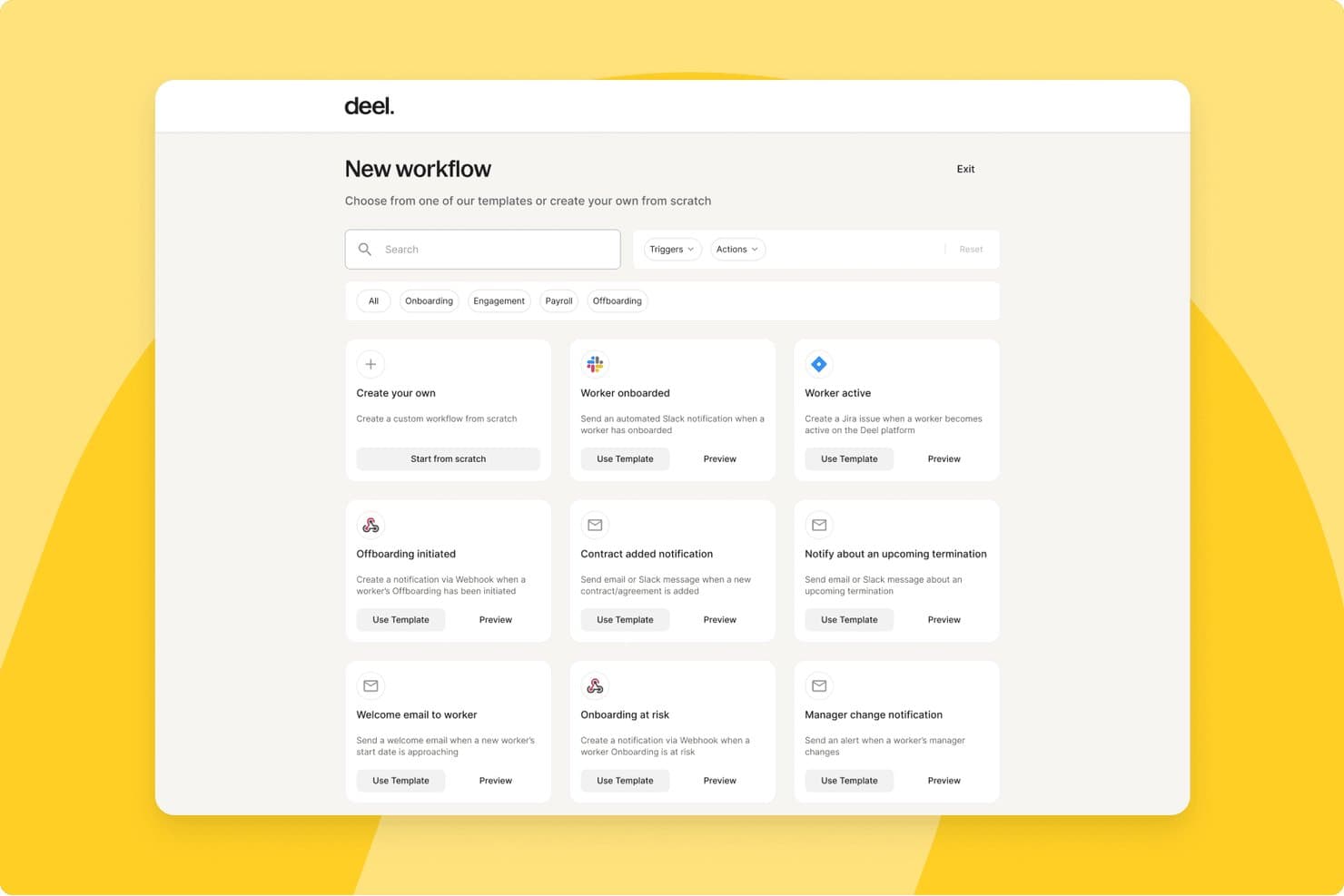
Deel HR offers a workflow automation dashboard where users can create custom workflows or choose from pre-built templates for onboarding, offboarding, payroll, and contractor management. Deel HR is a global workforce management platform that handles contractor onboarding, compliance, multi-currency payments, tax documentation, and contract management for teams working with freelancers and independent contractors across 150+ countries.
Who Is Deel HR Best For?
HR operations teams at mid-size to enterprise companies that regularly engage contractors across multiple countries will get the most from Deel HR.
Why I Picked Deel HR
Deel HR earns its spot on my shortlist because of how it handles compliance visibility across a global contractor roster. I love that contracts automatically update when local laws change, so my team isn't manually tracking regulatory shifts across dozens of jurisdictions. The misclassification safeguards built into contractor onboarding give me a real safety net when engaging workers in countries with complex classification rules.
Deel HR Key Features
- Automated invoicing and global mass payouts: Generate, approve, and pay contractor invoices in 120+ currencies with batch payments.
- Freelancer profile database: Maintain searchable contractor records with custom fields, engagement history, and rate tracking.
- Integrated tax document collection: Automatically collect W-9, W-8BEN, 1099, and international equivalents from contractors.
- Document management and e-signature: Generate, sign, and store contracts, NDAs, and SOWs in a secure digital archive.
Deel HR Integrations
Deel HR offers integrations with QuickBooks, Xero, BambooHR, Expensify, NetSuite, Sage Intacct, Greenhouse, Workday, SAP, and ADP, among others available through its app store. It also connects with Zapier and provides an API for custom integrations.
Pros and Cons
Pros:
- Jurisdiction-specific contract templates built in
- Automated tax document collection across jurisdictions
- Strong global contractor compliance coverage
Cons:
- Support response times can be slow
- Limited project and deliverables tracking features
 Best for end-to-end compliance management
- Free plan available
- Pricing upon request
Visit WebsiteCustomer Rating:4.7/5
YunoJuno offers a contract analytics dashboard with spend and contract insights. YunoJuno is a freelancer management system that covers the full contractor lifecycle, including sourcing, onboarding, contract management, global compliance checks, and payments across 165+ countries.
Who Is YunoJuno Best For?
YunoJuno is a strong fit for mid-size to enterprise companies that regularly hire contractors across multiple countries and need to manage classification risk and compliance at scale.
Why I Picked YunoJuno
YunoJuno earns its spot on my shortlist because no other tool I've used handles end-to-end compliance management as thoroughly. I particularly like the misclassification indemnification coverage, which protects your business from legal fees, taxes, and penalties tied to contractor classification errors. The platform also runs instant worker classification across 165+ countries and keeps a full audit trail of every classification decision, which I find invaluable when managing contractors across multiple jurisdictions.
YunoJuno Key Features
- Auto-generated contract templates: Generate contracts from project details like rate, dates, and contract type, with NDAs and client policies added automatically.
- Background and right-to-work checks: Run KYC, AML, ID, and right-to-work screening via built-in integrations with Amiqus and Veremark before contracts are issued.
- Real-time spend dashboards: View and filter contractor spend by team, department, project, location, or PO from a single reporting dashboard.
- SOW management: Standardize statements of work and track project milestones directly within the platform.
YunoJuno Integrations
Integrations include Salesforce, Sage, Workday, Xero, Notion, Slack, monday.com, QuickBooks, ADP Workforce Now, and Asana.
Pros and Cons
Pros:
- Automated contracts tailored by role and location
- Built-in human-assisted freelancer sourcing support
- Includes misclassification indemnification coverage
Cons:
- Requires manual applicant vetting
- Targeted freelance pool focus
Learn more about YunoJuno: Best for streamlined cross-border payouts
- Free demo available
- From $599/user/month (billed annually)
Visit WebsiteCustomer Rating:2.9/5
Remote tracks each new hire's onboarding progress step by step. Remote is a global HR and contractor management platform that handles international hiring, contractor onboarding, payroll, and compliance across 200+ countries from a single system.
Who Is Remote Best For?
Remote is a strong fit for globally distributed companies that need to pay contractors and employees across multiple countries without setting up local entities.
Why I Picked Remote
I picked Remote as one of the best because of how it handles payouts for distributed contractor teams. You can pay contractors in 70+ currencies, including stablecoins and virtual wallets, from a single platform. I also like the bulk invoicing, recurring payments, and employer-initiated invoice features, which cut down manual back-and-forth considerably. The auto-detection of inactive contractors means you're only ever billed for people who are actually working, which keeps costs honest.
Remote Key Features
- Localized contractor agreements: Generate contracts tailored to local labour laws in 170+ countries, with options to create, edit, and sign directly in the platform.
- Misclassification risk detection: Built-in AI-powered tools flag potential misclassification risks, with optional indemnity coverage up to $100,000 per contractor through the Contractor Management Plus plan.
- Smart contractor onboarding: Automate the collection of documentation and bring contractors up to speed without manual back-and-forth.
- Remote Watchtower: A team of on-the-ground international experts monitors labour law changes globally and keeps your contracts and processes current.
Remote Integrations
Integrations include BambooHR, HiBob, Personio, Workday, Greenhouse, QuickBooks, Xero, NetSuite, Slack, and Vanta.
Pros and Cons
Pros:
- AI-powered contractor misclassification risk detection
- Owns legal entities in 180+ countries
- Built-in IP and invention rights protection
Cons:
- Extended support ticket resolution
- No built-in talent sourcing or vetting
 Best for sourcing pre-vetted creative experts
- Free plan available
- From $129/month

Fiverr Pro offers a lead management dashboard for tracking contacts and activity. Fiverr Pro is a curated freelancer marketplace that connects businesses with hand-vetted professionals across creative, technical, and business disciplines for project-based hiring.
Who Is Fiverr Pro Best For?
Fiverr Pro is a strong fit for marketing teams and creative directors at small to mid-sized businesses who need on-demand access to skilled freelancers for design, copy, or video work.
Why I Picked Fiverr Pro
I've included Fiverr Pro in my top picks because of how seriously it takes talent vetting. Every freelancer is reviewed by domain experts before being accepted, and that bar stays high throughout their time on the platform. When I need a specialist, I can use the talent sourcing service, where Fiverr Pro's team interviews and vets candidates and delivers a shortlist with recommendations. I also like the custom vetting option, which lets me layer in my own screening criteria before making a hire.
Fiverr Pro Key Features
- Shared freelancer network: Save and revisit your team's preferred freelancers across projects, making it easy to rehire known talent.
- Purchase approval permissions: Set custom approval rules so team members can hire within defined spend limits.
- AI-assisted project brief generator: Generate a project brief with AI to receive a curated shortlist of matching freelancer offers.
- Legal document management: Upload, send, and collect e-signatures on NDAs and contracts directly within the platform.
Fiverr Pro Integrations
Integrations include WordPress, Shopify, PrestaShop, Adobe Commerce, Wix, WooCommerce, Magento, Drupal, Webflow, and Squarespace.
Pros and Cons
Pros:
- Built-in NDA and contract e-signatures
- Dedicated project managers coordinate complex work
- Freelancers vetted by domain experts before acceptance
Cons:
- Requires manual data entry
- Limited specialized search parameters
Learn more about Fiverr Pro: Best for access to diverse freelance talent pools
- Free plan available
- From 5% service fee/contract

Upwork includes a dashboard for contracts, payments, and hires. Upwork is a freelance marketplace where businesses post jobs, search a global talent pool, manage contracts, track billable hours, and process payments through a single platform.
Who Is Upwork Best For?
Upwork is a strong fit for small to mid-sized businesses and startups that need on-demand access to freelance talent across a wide range of skills and project types.
Why I Picked Upwork
I picked Upwork as one of the best options because no other freelancer management platform gives you access to a talent pool this broad across so many skill categories. What I find especially useful is the AI-assisted talent matching, which surfaces relevant candidates based on your job post without requiring manual searching. I also like the Project Catalogue feature, where freelancers list predefined scopes of work at set prices, so you can hire for a specific task without writing a full job post.
Upwork Key Features
- Built-in time tracker: Freelancers log hours directly in the platform, with optional screenshot capture for hourly contracts.
- Escrow-based milestone payments: Funds are held in escrow and released only after you approve a milestone or deliverable.
- Talent badges and work history: Freelancer profiles display verified job success scores, past client reviews, and earnings history.
- Saved talent lists: Organize and revisit vetted freelancers in curated lists for faster hiring on repeat or future projects.
Upwork Integrations
Upwork offers enterprise-level integrations with ATS, HRIS, and spend management systems, along with VMS partnerships with SAP Fieldglass and Flextrack. An API is available for custom integrations, and Upwork connects with Zapier.
Pros and Cons
Pros:
- Freelancer profiles show verified job success scores
- Escrow payments protect both sides of the contracts
- Covers 8,000+ skill categories across freelance roles
Cons:
- Inconsistent mediation resolution time
- No built-in vetting before freelancers can apply
Learn more about Upwork: Best for workflow automation with freelancers
- Free demo available
- Pricing upon request

WorkMarket offers a freelancer dashboard with assignments, talent, and pricing. WorkMarket is an independent contractor management system built by ADP that handles onboarding, verification, work assignment management, compliance support, and payments for 1099 workers and freelancers.
Who Is WorkMarket Best For?
WorkMarket is a strong fit for large enterprises that manage high volumes of field-based or project-based 1099 contractors across multiple locations.
Why I Picked WorkMarket
WorkMarket earns its spot on my shortlist because of how far it takes workflow automation across the full contractor lifecycle. I particularly like its custom automation rules engine, where you can define business-specific triggers and logic to move work orders, assignments, and payments through your pipeline without manual hand-offs. In practice, that means my team can generate a ticket in an external CRM, pass it directly into WorkMarket for contractor assignment, and route completed work data back to our accounting system automatically. That end-to-end automation, built around your own business rules, is what sets WorkMarket apart.
WorkMarket Key Features
- Labour Clouds: Organize contractors into groups by skill set, geography, or certification so you can quickly find and deploy the right worker for a given job.
- Assignment templates: Build reusable templates for recurring work orders to reduce setup time and maintain consistency across high-volume assignments.
- Contractor mobile app: Workers can check in and out, upload deliverables, communicate via SMS, and submit work for approval directly from a mobile device.
- Electronic 1099-NEC filing: WorkMarket prepares and files 1099-NEC forms with the IRS and applicable state agencies on your behalf at year-end.
WorkMarket Integrations
Integrations include AutoTask, ConnectWise, and Salesforce.
Pros and Cons
Pros:
- Flexible pay by milestone, project, or hour
- Bulk work order publishing to large groups
- AI-powered freelancer recommendations by skill
Cons:
- Mobile app lacks key web features
- 30-day waiting period for payouts
Learn more about WorkMarket:

Beeline provides a dashboard for headcount, spend, and supplier analytics. Beeline is a vendor management system (VMS) built for managing contingent and external workforces, covering contractor sourcing, supplier management, compliance, time and expense tracking, and independent contractor engagement.
Who Is Beeline Best For?
Beeline is a strong fit for large enterprises and procurement teams that manage high volumes of contingent workers, staffing suppliers, and extended workforce programs.
Why I Picked Beeline
Beeline earns its spot on my shortlist because no other tool in this space is built as exclusively for large, complex contingent workforce programs as this one. What stands out to me is the SOW management module, which covers the full lifecycle from sourcing through to invoicing, so you can track outsourced project work the same way you track individual contractors. I also like the global localization capabilities, which handle fiscal, legal, cultural, and language differences across countries without requiring custom workarounds. With $68B+ in annual spend under management and 6.1M assignments created annually, this is a platform built for serious scale.
Beeline Key Features
- Supplier performance analytics: Track and compare supplier rates, performance data, and spend across your entire contingent labour program in real time.
- Automated approval workflows: Move requisitions through hiring steps with simplified, click-reduced workflows and built-in automated approvals.
- Audit trail and classification safeguards: Enforce contract policies, multi-tier supplier rules, and compliance checks with a complete audit trail for every worker engagement.
- Direct sourcing module: Source and engage contingent talent directly, bypassing traditional staffing suppliers where appropriate.
Beeline Integrations
Beeline has completed over 2,000 integrations across HR, finance, sourcing, and IT systems, connecting with platforms like Workday, SAP, Oracle, Coupa, Kronos, and Okta. It offers 300+ RESTful APIs through its Developer Portal, along with plug-and-play connectors, data feeds, and iPaaS support for custom configurations.
Pros and Cons
Pros:
- Multi-vendor requisition and submission tracking
- Automates onboarding, time tracking, and invoicing
- Supports large, global contingent workforce programs
Cons:
- Managed configuration change requests
- Steep learning curve for analytics tools
Learn more about Beeline:
Diğer Serbest Çalışan Yönetim Yazılımları
Kısa listeme giremeyen ancak yine de göz atmaya değer bazı ek serbest çalışan yönetim yazılımı seçenekleri şunlardır:
- 11MultiplierBest for multi-country payroll in one platform
- 12HubstaffBest for integrated time tracking and productivity
- 13WorkMotionBest for automated employment status transitions
- 14AvatureBest for customizable talent acquisition workflows
- 15Field NationBest for managing onsite project-based work
- 16WorkGeniusBest for AI-powered talent matching
How I Evaluate Freelancer Management Software
I evaluate freelancer management software in two layers: the baseline every tool must hit to qualify—contractor onboarding, classification checks, global payouts—and what separates the best from the rest.
Core Functionality (Table Stakes For This List)
When I'm selecting tools for my list, I rank each one on a scale from 0 (does not offer the functionality) to 5 (excels in this area) for each core functionality listed below. Then, I calculate the tool's total score into a percentage. Each tool needs to achieve a minimum total score of 65% to be considered for inclusion.
- Freelancer Onboarding & Database: I look for a centralized talent pool where freelancers can self-onboard, upload documents, and maintain profiles with skills, rates, and availability.
- Worker Classification & Compliance: Each tool should offer classification checks that flag misclassification risk before a contract goes out—not just collect tax forms after the fact.
- Contracts & E-Signature: I evaluate whether you can templatize SOWs and NDAs, send them for e-signature, and store executed copies without toggling to a separate tool.
- Project & Engagement Tracking: The platform should let you assign deliverables, log hours, and track milestones so managers aren't chasing updates across spreadsheets and chat threads.
- Invoicing & Global Payments: I check for multi-currency payout support and consolidated invoice approvals, especially for teams paying freelancers across multiple regions at once.
- Tax Document Management: Automated 1099 generation and collection matters here—I look for tools that handle year-end filings rather than forcing manual prep in spreadsheets.
- Approvals & Budget Controls: Multi-level approval chains and per-project budget visibility help finance and hiring managers stay aligned on contractor spend before invoices clear.
- HRIS/ERP/Accounting Integrations: I check for native connectors to platforms like QuickBooks, NetSuite, or Workday so contractor data flows into your existing financial and HR systems.
Once I have a list of tools that meet this criteria, I consider what sets each platform apart.
Differentiating Factors (What Sets Vendors Apart)
Here's how I compare and contrast different vendors:
Standout Features
AI talent matching is a big differentiator—platforms that recommend freelancers based on skills, past ratings, and budget save hiring managers from manually sifting through a growing talent pool. I also evaluate whether a vendor offers Agent of Record services, which shift misclassification liability off your organization. Spend analytics matter too. Real-time dashboards that break down contractor costs by project, department, or cost center give finance teams the visibility they need to manage budgets proactively.
Beyond Features
Global coverage is one of the first things I evaluate—some platforms support payouts in a handful of countries while others cover 150+, which matters when your freelancer base spans multiple regions. Pricing models vary widely too. I look at whether a vendor charges flat per-contractor fees or takes a percentage of each payment, since that distinction changes your total cost dramatically as headcount scales. Security certifications like SOC 2 Type II and GDPR compliance also carry weight, especially for teams handling sensitive contractor data across jurisdictions.
Serbest Çalışan Yönetim Yazılımı Nasıl Seçilir?
Uzun özellik listeleri ve karmaşık fiyatlandırma yapıları arasında kaybolmak kolaydır. Kendinize özgü yazılım seçme sürecinizi yürütürken odağınızı korumanıza yardımcı olmak için göz önünde bulundurmanız gereken faktörleri içeren bir kontrol listesi aşağıdadır:
| Faktör | Dikkate Alınması Gerekenler |
| Ölçeklenebilirlik | Çözüm, mevcut serbest çalışan hacminizi ve öngörülen büyümeyi karşılayabilir mi? Daha sonra yüzlerce kullanıcı daha eklemeniz veya yeni iş birimlerine genişlemeniz gerekip gerekmeyeceğini değerlendirin. |
| Entegrasyonlar | Araç, İK bilgi sisteminiz, bordro, proje yönetimi veya faturalandırma sistemlerinizle bağlantı kuruyor mu? Entegrasyonlar mevcut değilse olası veri silolarını veya tekrarlanan işleri değerlendirin. |
| Özelleştirilebilirlik | İş akışlarını, belge şablonlarını veya onay zincirlerini işletmenize uyacak şekilde ayarlayabilir misiniz? Özelleştirme desteği için katı formatları veya gizli maliyetleri kontrol edin. |
| Kullanım kolaylığı | Ekibiniz ve serbest çalışanlarınız yazılımı hızlı bir şekilde benimser mi? Gösterişli bir kontrol paneli yerine anlaşılır bir arayüz, minimum eğitim ihtiyacı ve sezgisel bir tasarım arayın. |
| Uygulama ve işe alıştırma | Ekibinizi ve serbest çalışanlarınızı tamamen sisteme dahil etmek ne kadar sürecek? Geçiş desteği, deneme ortamları ve değişim yönetimi için mevcut kaynaklar hakkında bilgi alın. |
| Maliyet | Aktif kullanıcılar, işlem ücretleri veya gizli eklentiler için fiyatlandırma katmanlarını inceleyin. Platformun beklenmedik masraflar olmadan mevcut ve gelecekteki bütçenize uyduğundan emin olun. |
| Güvenlik önlemleri | Platform, şirketinizin veri gizliliği, şifreleme ve erişim kontrolü gereksinimlerini karşılıyor mu? Sektör standartlarına uygunluğu doğrulamak için belge isteyin. |
| Uyumluluk gereksinimleri | Yerel çalışan sınıflandırması, dijital imza ve vergi belgeleri, işe alım yaptığınız tüm bölgeler için ele alınıyor mu? Araçların maruz kaldığınız mevzuat riskleriyle örtüştüğünü doğrulayın. |
Serbest Çalışan Yönetim Yazılımları Nelerdir?
Serbest çalışan yönetim yazılımı, işletmelerin bağımsız yüklenicileri veya serbest çalışanları organize etmesine, işe alıştırmasına, yönetmesine ve ödemelerini yapmasına yardımcı olan dijital platformlardır. Bu araçlar proje atamalarını, sözleşmeleri, uyumluluk belgelerini, iletişimleri ve ödemeleri tek bir yerde merkezileştirir. Serbest çalışanların performansını takip etmeyi ve idari görevleri yerine getirmeyi kolaylaştırarak, İK profesyonellerinin dış iş gücüyle çalışırken manuel çabayı ve uyumluluk risklerini azaltmasına yardımcı olurlar.
Özellikler
Her iyi serbest çalışan yönetim yazılımının sahip olması gereken temel özellikler şunlardır:
- Serbest çalışan veritabanı: Her serbest çalışan için profilleri, iletişim bilgilerini, sözleşmeleri ve çalışma geçmişini güvenli ve aranabilir bir dizinde saklayın; bu bilgileri kolayca güncelleyip referans olarak kullanın.
- Proje ve görev takibi: Serbest çalışanlara görev veya proje atayın, son teslim tarihlerini belirleyin, ilerlemeyi izleyin ve proje ihtiyaçları değiştikçe ayarlamalar yapın.
- İşe alıştırma iş akışları: Yeni serbest çalışanları belge toplama, geçmiş kontrolü ve sözleşme imzalama gibi standartlaştırılmış dijital işe alıştırma adımlarında yönlendirin.
- Otomatik ödemeler: Faturalandırma, onaylar ve otomatik ödemeleri yönetin; serbest çalışanların tercih ettikleri ödeme yöntemleriyle doğru ve zamanında ödeme almasını sağlayın.
- Belge yönetimi: Sözleşmeleri, gizlilik sözleşmelerini, vergi belgelerini ve diğer kritik evrakları saklayın, paylaşın ve güncelleyin; düzenlemeler değiştikçe bunlara erişmeyi ve belgeleri takip etmeyi kolaylaştırın.
- Uyumluluk izleme: Yanlış sınıflandırma risklerini azaltmak için çalışan sınıflandırmasının doğru yapılmasını, yerel iş kanunlarına uyulmasını ve vergi formlarının toplanmasını takip edin ve güvence altına alın.
- Zaman ve gider takibi: Serbest çalışanların projeler için saatlerini kaydetmesine ve giderlerini göndermesine olanak tanıyarak yöneticilere fiilen gerçekleştirilen iş hakkında daha fazla görünürlük sağlayın.
- Raporlama ve analiz: Karar alma süreçlerini ve iç denetimleri desteklemek üzere harcamalar, proje durumu, verimlilik ve uyumluluk hakkında standart ve özel raporlar oluşturun.
- İş birliği araçları: Herkesin aynı doğrultuda kalmasını ve projelerin düzenli ilerlemesini sağlamak için dosyaları paylaşın, güncellemeler gönderin ve serbest çalışanlarla doğrudan platform içinde iletişim kurun.
Yaygın Serbest Çalışan Yönetim Yazılımı Yapay Zekâ Özellikleri
Yukarıda listelenen standart serbest çalışan yönetim yazılımı özelliklerinin ötesinde, bu çözümlerin çoğu aşağıdaki özelliklerle yapay zekâyı kullanmaya başlamıştır:
- Yapay zekâ destekli yetenek eşleştirme: Sistem, her görev için en uygun kişiyi önermek üzere proje gereksinimlerini ve serbest çalışan profillerini otomatik olarak analiz eder; böylece manuel sıralama ihtiyacını azaltır ve değerli zamandan tasarruf sağlar.
- Akıllı ücret önerileri: Yapay zekâ, belirli roller veya beceriler için adil ve rekabetçi ücretler önermek üzere piyasa verilerini ve geçmiş işe alım eğilimlerini inceler; hem hizmet alıcıların hem de serbest çalışanların bilinçli kararlar vermesine yardımcı olur.
- Tahmine dayalı proje öngörüsü: Yazılım, proje zaman çizelgelerini tahmin etmek, kaynak açıklarını belirlemek ve sorunlar ortaya çıkmadan önce olası teslimat risklerini öngörmek için geçmiş performans ölçümlerini kullanır.
- Otomatik uyumluluk kontrolleri: Yapay zekâ, değişen yerel iş kanunlarını ve yüklenici statüsü düzenlemelerini izler; yeni serbest çalışanlarla çalışmaya başladığınızda olası sorunları işaretler veya uyumluluğu sürdürmek için önerilerde bulunur.
- Doğal dil sohbet robotları: Yapay zekâ destekli sohbet arayüzleri, serbest çalışanların sorularını yanıtlar, kullanıcıları işe alıştırma veya ödeme iş akışlarında yönlendirir ve günün her saati otomatik self servis destek sunar.
Faydalar
Serbest çalışan yönetim yazılımını uygulamak, ekibiniz ve işletmeniz için çeşitli faydalar sağlar. Yararlanabileceğiniz avantajlardan bazıları şunlardır:
- Merkezileştirilmiş denetim: Daha kolay erişim ve daha fazla kontrol için serbest çalışan verilerini, sözleşmeleri ve iletişimleri tek bir platformda yönetin.
- Verimli işe alıştırma: Otomatik dijital iş akışları, yeni serbest çalışanların evraklarını göndermesine, sözleşmeleri kabul etmesine ve hızla işe uyum sağlamasına yardımcı olur.
- Doğru ve zamanında ödemeler: Entegre faturalandırma ve ödeme özellikleri, yüklenicilerin daha az manuel çabayla kilometre taşlarına veya takip edilen çalışma saatlerine göre ödeme almasını sağlar.
- Azaltılmış uyumluluk riski: Yerleşik uyumluluk araçları çalışan statüsünü takip eder, belgeleri yönetir ve olası sınıflandırma veya mevzuat sorunları hakkında sizi uyarır.
- Ölçeklenebilir süreçler: Proje yayınlama, görevleri yönetme ve ödemeleri işleme için düzenlenmiş iş akışları, işletme ihtiyaçları büyüdükçe serbest çalışan iş gücünüzü ölçeklendirmenizi kolaylaştırır.
- Geliştirilmiş iş birliği: Uygulama içi mesajlaşma ve belge paylaşımı, ekibinizin ve serbest çalışanların her proje boyunca aynı doğrultuda kalmasına yardımcı olur.
- Eyleme dönüştürülebilir içgörüler: Panolar ve özel raporlar, serbest çalışan performansı, maliyet eğilimleri ve proje durumu hakkında veriler sunarak İK ekiplerinin daha bilinçli kararlar almasına yardımcı olur.
Maliyetler ve Fiyatlandırma
Serbest çalışan yönetim yazılımı seçmek, mevcut çeşitli fiyatlandırma modellerini ve planları anlamayı gerektirir. Maliyetler özelliklere, ekip büyüklüğüne, eklentilere ve diğer unsurlara göre değişir. Aşağıdaki tablo, serbest çalışan yönetim yazılımı çözümlerinde yaygın planları, ortalama fiyatlarını ve genellikle dahil edilen özellikleri özetlemektedir:
Serbest Çalışan Yönetim Yazılımı İçin Plan Karşılaştırma Tablosu
| Plan Türü | Ortalama Fiyat | Yaygın Özellikler |
| Ücretsiz Plan | $0 | Temel serbest çalışan profilleri, basit proje ilanı oluşturma, sınırlı sözleşme yönetimi ve temel raporlama. |
| Bireysel Plan | $10-$25/kullanıcı/ay | Genişletilmiş dizin özellikleri, sınırlı işe alım ve işe başlatma araçları, temel ödeme işleme ve e-posta desteği. |
| İşletme Planı | $25-$60/kullanıcı/ay | Gelişmiş işe alım ve işe başlatma iş akışları, sözleşme otomasyonu, ödeme entegrasyonları, uyumluluk izleme ve uygulama içi mesajlaşma. |
| Kurumsal Plan | $60-$150/kullanıcı/ay | Özel iş akışları, API erişimi, gelişmiş analizler, uluslararası uyumluluk araçları, öncelikli destek ve özel hesap yönetimi. |
SSS
Serbest çalışan yönetim yazılımı hakkında sık sorulan bazı soruların yanıtları:
Yalnızca birkaç yüklenici çalıştırıyorsam serbest çalışan yönetim yazılımına ihtiyacım var mı?
Hayır, serbest çalışan yönetim yazılımı en çok çok sayıda serbest çalışanı veya karmaşık projeleri yöneten işletmeler için değerlidir. Yalnızca birkaç yükleniciyle çalışıyorsanız elektronik tablolar veya manuel süreçler yeterli olabilir. Serbest çalışan iş gücünüz büyüdükçe, özel iş gücü yönetim araçları küçük işletmelerin serbest çalışanlarla ilgili işleri daha iyi yönetmesine ve serbest çalışanları daha verimli işe almasına yardımcı olur.
Serbest çalışan yönetim yazılımı ödeme işlemlerine nasıl yardımcı olur?
Bu platformlar, sözleşmelere, kilometre taşlarına veya çalışılan saatlere göre tutarları hesaplayarak faturalandırma ve ödemeleri otomatikleştirir. Birden fazla ödeme yöntemini ve para birimini destekleyerek manuel takibi azaltır ve serbest çalışanlara doğru zamanda, doğru miktarda ödeme yapılmasını sağlar. Bu ayrıca dış kaynak kullanımı düzenlemelerinin yapılandırılmasına yardımcı olur; net serbest çalışan sözleşmelerine uyulmasını sağlarken farklı projeler ve katkı sağlayan kişiler arasında serbest çalışanlara güvenilir şekilde ödeme yapılmasını kolaylaştırır.
Güvenlik açısından nelere dikkat etmeliyim?
Şifreleme, role dayalı erişim kontrolleri, denetim günlükleri ve düzenli üçüncü taraf güvenlik değerlendirmeleri sunan yazılımları tercih edin. Platformun sektör standartlarına uyduğundan ve özellikle dağıtık uzaktan çalışma ortamlarında paylaşılan iletişim araçlarını kullanırken hem kurum içi kullanıcılar hem de harici serbest çalışanlar için izinleri yönetmenize olanak tanıdığından emin olun.
Serbest çalışan yönetim yazılımı diğer İK araçlarımla entegre olabilir mi?
Evet, birçok çözüm HRIS, bordro, proje takibi, belge depolama sistemleri ve daha kapsamlı iş gücü yönetim platformlarıyla entegre olur. Özellikle ekipleri koordine etmek, görev dağıtımı için kurum içi bir algoritmayı yönetmek veya yapılandırılmış yazılım geliştirme ve üretim iş akışlarını desteklemek amacıyla belirli araçlara güveniyorsanız, bir platform seçmeden önce mevcut özel bağlayıcıları veya API seçeneklerini doğrulamalısınız.
Bu platformlar üzerinden serbest çalışanların işe alım ve işe başlatma süreci zor mudur?
Hayır, çoğu platform yapılandırılmış bir işe alım ve işe başlatma süreci, dijital iş akışları, elektronik imzalar ve serbest çalışan sözleşmeleri ile gerekli belgeler için kontrol listeleri sunarak süreci kolaylaştırır. Bu, hem İK ekiplerinin hem de kendi hesabına çalışan serbest çalışanların daha az manuel takip işlemiyle daha hızlı başlamasına yardımcı olur. Ayrıca web tasarımı, grafik tasarımı ve diğer uzaktan çalışma düzenlemelerindeki roller için koordinasyonu geliştirerek ilk günden itibaren daha sorunsuz iletişim ve daha net beklentiler sağlar.